效果图:
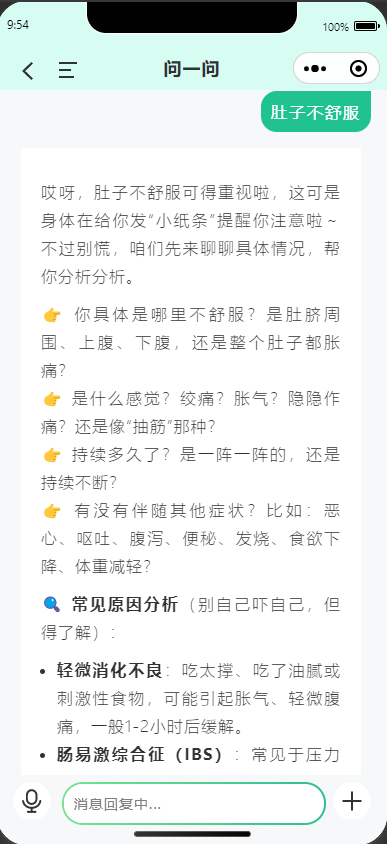
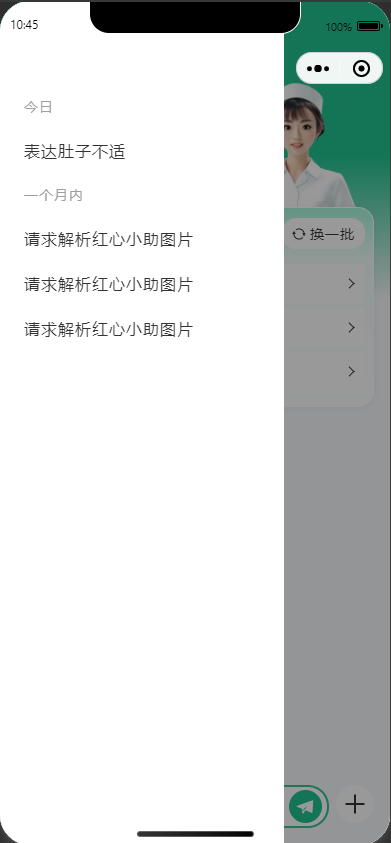
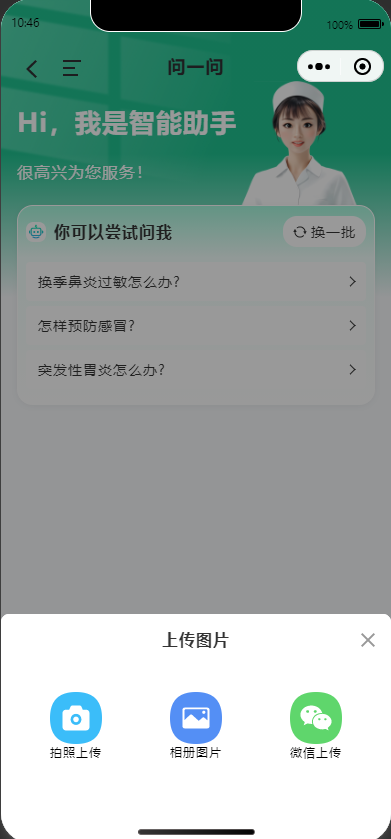
一、下载依赖 通过Towxml实现makDown 数据渲染回显
具体可查看 我文章列表中的 (超详细)uniapp 微信小程序使用towxml实现makDown文本展示
二、变量声明
javascript
// 调用dify 接口需要用到的参数
setData: {
  inputs: '',
  query: "", // 我输入的内容
  response_mode: "streaming",
  conversation_id: "", // 对话id用于查询历史记录
  user: "abc-123", // 唯一标识
  files: [],// 图片
},

fullAnswer: '', //回答返回的数据
ltData: [], //聊天的内容数据结合 第一条我发送的内容 第二条 回答的内容 以此类推
scrollShowTop:false,//页面是否滑动的标识
二、页面样式肯根据需求自定义
解释:
1、item.type 1为 我输入的内容展示在右边 2 为ai回答的内容展示在左边
2、isPlainObject 用于判断是否已经是处理后的makdown 数据
3、<image/> 中的 item.imageData 为我发送的图片
javascript
<scroll-view @scroll="handleScroll" :style="{ height: 'calc(100vh - 130rpx)' }" :scroll-top="scrollTop"
	<view class="liaotian-box">
		<view class="chat-container">
			<view class="chat-bubble " v-for="(item,index) in ltData" :key="index"
				:class="item.type==1?'right':'left'">
				<towxml :nodes="item.text" v-if="isPlainObject(item.text)"></towxml>
				<text class="jqr-text"
					v-if="!isPlainObject(item.text) && item.type==2">{{item.text}}</text>
			<text class="jqr-text" v-if="item.type==1 && item.imageData==''">{{item.text}}</text>
				<view class="jqr-text" v-if="item.type==1 && item.imageData!=''">
					<image :src="item.imageData" mode="" style="width: 300rpx;height: 300rpx;"></image>
				</view>
			<view class="bf-box flex-align-center flex-justify-between" v-if="item.type==2">
					<!-- 								<image :src="item.isShow?bfImg:wbfImg" mode=""
						@click="yybfChang(item,item.playText,index)"></image> -->
				<view class="bf-text">AI生成仅供参考</view>
			</view>
		</view>

	</view>
</view>
</scroll-view>
三、数据处理
javascript
watch: {
 // 监听机器人的对话将最新的数据实时更新
	fullAnswer(newVal, oldVal) {
		this.$nextTick(() => {
			if (!newVal) {
				this.$set(this.ltData[this.ltData.length - 1], 'text', '消息回复中...');
			} else {
         this.$set(this.ltData[this.ltData.length-1],'text',this.towxml(newVal,'markdown'));

		}
	});

 },

  			/**
			 * 监听是否滑动页面 取消在消息回复过程中页面置底
			 * @param {Object} newVal
			 * @param {Object} oldVal
			 */
			scrollNum(newVal, oldVal) {
				if (newVal < oldVal) {
					this.scrollShowTop = true
				}
			},

           //监听对话列表 实现页面始终是在最下面
            'ltData.length'(newVal, oldVal) {
				if (newVal != oldVal) {
					this.scrollShowTop = false
					this.$nextTick(() => {
						this.scrollToBottom()
					})
				}
				// console.log(newVal,oldVal,'长度')
			}

},


methods: {

			/**
			 * 判断是否是处理过后的makdown 数据
			 * @param {Object} obj
			 */
			isPlainObject(obj) {
				return Object.prototype.toString.call(obj) === '[object Object]';
			},


			/**
			 * 滚动条滚动到最底部
			 */
			scrollToBottom() {
				this.scrollToId = 'bottom-anchor';
				// 方法1:使用大数(需确保高度设置正确)
				this.scrollTop = 999999999;

				const query = uni.createSelectorQuery().in(this);
				query.select('.chat-box')
					.fields({
						scrollHeight: true, // 显式声明需要获取scrollHeight
						size: true // 可选:同时获取宽高
					}, res => {
						console.log(res.scrollHeight, '获取')
						this.scrollTop = res.scrollHeight; // 更新滚动位置
					}).exec();

				// 方法2:精确计算(更可靠)
				uni.createSelectorQuery()
					.select('.chat-box')
					.boundingClientRect(res => {

						// console.log(res.height, 'res.height')
						this.scrollTop = res.height * 200;
					})
					.exec();
			},


			/**
			 * 滚动条距离
			 * @param {Object} e
			 **/
			handleScroll(e) {
				this.scrollNum = e.detail.scrollTop
				// console.log(e.detail.scrollTop, '滚动条高度')
				if (e.detail.scrollTop > 100) {
					this.scrollShow = true
				} else {
					this.scrollShow = false
				}
			},


			/**
			 * 点击发送
			 */
			send() {

				console.log('触发了')
				if (this.myText == '') {
					uni.showToast({
						title: '请输入内容',
						icon: 'none'
					});
					return
				} else {
					this.buttonShow = true
				}

				this.listMyData = this.myText
				// 添加我的对话
				this.ltData.push({
					text: this.myText,
					imageData: this.imageData ? this.imageData : '',
					type: 1,
					isShow: false
				})
				this.fullAnswer = ''
				// 添加机器人的对话
				this.ltData.push({
					text: '消息回复中...',
					type: 2,
					isShow: false
				})
				this.$nextTick(() => {
					if (!this.scrollShowTop) {
						this.scrollToBottom();
					}
				})


				this.setData.query = this.myText
				this.myText = ''


				const requestTask = wx.request({
					url: 'https://krd.mindcode365.com:8443/v1/chat-messages',
					data: this.setData,
					method: 'POST',
					enableChunked: true,
					responseType: 'arraybuffer',
					header: {
						'Content-Type': 'application/json',
						'Authorization': 'Bearer app-VuBKiUeORUG1ychxTIwChey3',
						'Accept': 'text/event-stream'
					},
					success: (res) => {
						this.buttonShow = false
						this.ltData.forEach(item => {
							if (item.type == 2) {
								item.text = this.towxml(item.text, 'markdown');
							}
						});
						this.$forceUpdate();
						console.log('流式请求完成');
					},
					fail: (err) => {
						this.buttonShow = false
						console.error('请求失败', err);
					},
				});

				let bufferRemaining = new Uint8Array(0);
				let rawBuffer = '';
				let sseBuffer = '';


				requestTask.onChunkReceived((res) => {
					// 处理不同环境下的数据类型[6](@ref)
					let uint8Array;
					if (res.data instanceof ArrayBuffer) {
						uint8Array = new Uint8Array(res.data);
					} else if (Object.prototype.toString.call(res.data) === '[object Uint8Array]') {
						uint8Array = res.data;
					} else {
						console.error('未知的数据类型:', res.data);
						return;
					}

					// 合并上次未处理完的数据
					const mergedArray = new Uint8Array(bufferRemaining.length + uint8Array.length);
					mergedArray.set(bufferRemaining);
					mergedArray.set(uint8Array, bufferRemaining.length);

					// 解码数据[1,3](@ref)
					const chunkText = this.decodeUint8Array(mergedArray);
					sseBuffer += chunkText;

					// 按事件分割(SSE:事件之间空行分隔)
					const parts = sseBuffer.split(/\r?\n\r?\n/);
					sseBuffer = parts.pop() || ''; // 剩余半包留到下次

					for (const part of parts) {
						// 聚合本事件所有 data: 行(可能多行)
						const dataLines = part
							.split(/\r?\n/)
							.filter((l) => l.startsWith('data:'))
							.map((l) => l.slice(5).trimStart());

						if (dataLines.length === 0) continue;

						const dataStr = dataLines.join('\n');
						if (!dataStr || dataStr === '[DONE]') continue;

						let msg;
						try {
							msg = JSON.parse(dataStr);
						} catch (e) {
							console.error('JSON解析失败:', e, '原始数据:', dataStr);
							continue;
						}

						this.setData.conversation_id = msg.conversation_id;
						if (msg.answer) this.fullAnswer += msg.answer;

						if (msg.event === 'message_end' || msg.answer === '') {
							this.buttonShow = false;
							this.imageData = '';
							this.ltData.forEach(item => {
								if (item.type === 2 && !this.isPlainObject(item.text)) {
									item.text = this.towxml(item.text, 'markdown');
								}
							});
						}
					}

					// 更新剩余未处理数据
					bufferRemaining = new Uint8Array(0);

					this.$nextTick(() => {
						if (!this.scrollShowTop) this.scrollToBottom();
						this.$forceUpdate();
					});
				});

				console.log(requestTask, 'requestTask')


			},


            			// 替代TextDecoder的解码方法
			decodeUint8Array(uint8Array) {
				let str = '';
				let i = 0;

				while (i < uint8Array.length) {
					const byte1 = uint8Array[i];
					let char;

					// ASCII字符 (0x00-0x7F)
					if (byte1 < 0x80) {
						char = String.fromCharCode(byte1);
						i += 1;
					}
					// 2字节字符 (如部分中文)
					else if (byte1 >= 0xC0 && byte1 < 0xE0) {
						const byte2 = uint8Array[i + 1];
						char = String.fromCharCode(((byte1 & 0x1F) << 6) | (byte2 & 0x3F));
						i += 2;
					}
					// 3字节字符 (常用中文)
					else if (byte1 >= 0xE0 && byte1 < 0xF0) {
						const byte2 = uint8Array[i + 1];
						const byte3 = uint8Array[i + 2];
						char = String.fromCharCode(
							((byte1 & 0x0F) << 12) |
							((byte2 & 0x3F) << 6) |
							(byte3 & 0x3F)
						);
						i += 3;
					}
					// 4字节字符 (如颜文字、emoji)
					else {
						const byte2 = uint8Array[i + 1];
						const byte3 = uint8Array[i + 2];
						const byte4 = uint8Array[i + 3];

						// 计算Unicode码点
						const codepoint =
							((byte1 & 0x07) << 18) |
							((byte2 & 0x3F) << 12) |
							((byte3 & 0x3F) << 6) |
							(byte4 & 0x3F);

						// UTF-16代理对处理
						const highSurrogate = 0xD800 + ((codepoint - 0x10000) >> 10);
						const lowSurrogate = 0xDC00 + ((codepoint - 0x10000) & 0x3FF);
						char = String.fromCharCode(highSurrogate, lowSurrogate);
						i += 4;
					}

					str += char;
				}

				return str;
			},

}
说明:由于也是第一次实现此功能在代码上可能有一点乱 但是最终功能是实现了,希望对大家有所帮助
主要功能包括:ai对话、语音发送、聊天历史记录查询、历史记录中追问,makdown数据解析实现问答同步打字机效果等功能
避坑:语音转文字尽量不要用微信的同声传译会有问题,在识别文字的时候如果没有识别到文字,那么会返回一个错误但是这个错误的返回有延迟,所以你再一次识别语音的时候还是识别不到,必须要等到上一次识别有返回值时候才可以下一次
源码:
javascript
<template>
<view class="content">
<!-- @scroll="handleScroll" -->
<scroll-view @scroll="handleScroll" :style="{ height: 'calc(100vh - 130rpx)' }" :scroll-top="scrollTop"
scroll-y="true" class="chat-box">
<view class="text-tile" :class="scrollShow?'back-bg-D7FDF2':''">
<view class="text-box">
<view style="width: 80rpx;height: 50rpx; text-align: left;" @click="goBack">
<image src="/static/image/back-icon.svg" style="margin-top: 10rpx;" mode=""></image>
<!-- <view class="jiantou"></view> -->
</view>
<image v-if="loginShow" style="margin-top: 10rpx;"
src="/subPackages/subPackC/static/imgC/lsjl-icon.svg" mode="" @click="goToggle"></image>
</view>
<view>问一问</view>
</view>
<view style="height: 100vh;">
<view class="top-box">
<image class="ch-bg-box" src="../../static/imgC/chuanghu-icon.svg" mode=""></image>
<view class="content-top-box">
<view class="content-top">
<view class="content-top-left">
<view class="hi-sty">Hi,我是智能助手</view>
<view class="wh-sty">很高兴为您服务!</view>
</view>
<image class="ren-bg" src="/subPackages/subPackC/static/imgC/wyw-ren.svg" mode=""></image>
</view>
<!-- <view class="bj-yy"></view> -->
</view>
</view>
<view class="bottom-box">
<view class="mianban-sty">
<view class="qa-panel">
<view class="qa-header flex-align-center">
<view class="flex-align-center">
<image class="qa-icon" src="/subPackages/subPackC/static/imgC/jiqiren-icon.svg"
mode="">
</image>
<text class="qa-title">你可以尝试问我</text>
</view>
<!-- <image src="/subPackages/subPackA/static/imgA/xiantiao-bg.svg" mode=""></image> -->
<view class="hyh-sty flex-align-center" @click="hyhChange">
<image src="/subPackages/subPackC/static/imgC/sxwt-icon.svg" mode=""></image>
<view class="hyh-text">换一批</view>
</view>
</view>
<view class="qa-list">
<view class="qa-item" v-for="(item, index) in wywList" :key="index"
@click="handleTap(item)">
<text class="qa-text">{{ item }}</text>
<text class="qa-arrow"></text>
</view>
</view>
</view>
</view>
<view class="liaotian-box">
<view class="chat-container">
<view class="chat-bubble " v-for="(item,index) in ltData" :key="index"
:class="item.type==1?'right':'left'">
<towxml :nodes="item.text" v-if="isPlainObject(item.text)"></towxml>
<text class="jqr-text"
v-if="!isPlainObject(item.text) && item.type==2">{{item.text}}</text>
<text class="jqr-text" v-if="item.type==1 && item.imageData==''">{{item.text}}</text>
<view class="jqr-text" v-if="item.type==1 && item.imageData!=''">
<image :src="item.imageData" mode="" style="width: 300rpx;height: 300rpx;"></image>
</view>
<view class="bf-box flex-align-center flex-justify-between" v-if="item.type==2">
<!-- <image :src="item.isShow?bfImg:wbfImg" mode=""
@click="yybfChang(item,item.playText,index)"></image> -->
<view class="bf-text">AI生成仅供参考</view>
</view>
</view>
</view>
</view>
</view>
</view>
<uni-popup ref="popup" background-color="#fff" borderRadius='16rpx 16rpx 0 0'>
<view class="popup-box">
<view>
<!-- <view class="shijian-sty">一个月内</view> -->
<view class="list-box" v-if="hisDataList.length" >
<view v-for="(item,index) in hisDataList" :key="index">
<view class="title-sty">{{item.title}}</view>
<view :class="itemIndex==ind&&listIndex==index?'xz-sty':'item-text'" v-for="(item,ind) in item.list"
:key="ind" @click="itemChange(index,ind,item)">{{item.name}}</view>
</view>
</view>
<view class="list-box" v-else>
<view class="item-text">暂无历史记录</view>
</view>
</view>
</view>
</uni-popup>
<uni-popup ref="popupBottom" background-color="#fff" borderRadius='16rpx 16rpx 0 0'>
<view class="popup-content">
<view class="popup-title">
<view class="popup-text">
上传图片
</view>
<image src="../../static/imgC/cha-icon.svg" mode="" @click="getClose"></image>
</view>
<view class="cz-sty">
<view class="cz-sty-item">
<image src="../../static/imgC/pzsc-icon.svg" mode="" @click="goPZImg"></image>
<view class="cz-sty-text">拍照上传</view>
</view>
<view class="cz-sty-item">
<image src="../../static/imgC/xctp-icon.svg" mode="" @click="goXCImg"></image>
<view class="cz-sty-text">相册图片</view>
</view>
<view class="cz-sty-item">
<image src="../../static/imgC/wxsc-icon.svg" mode="" @click="goWXImg"></image>
<view class="cz-sty-text">微信上传</view>
</view>
</view>
</view>
</uni-popup>
<!-- 底部锚点 -->
<view id="bottom-anchor"></view>
</scroll-view>
<viw class="content-bottom">
<image :src="mkfShow?mkfImg:jianpanImg" mode="" @click="changeQh"></image>
<view class='input-box'>
<view class="input-sty">
<view class="ip-box">
<input :disabled="buttonShow" cursor-spacing='20' class="uni-input" adjust-position="true"
ref="myInput" :placeholder="buttonShow?'消息回复中...':'您可以输入问题,进行提问~'" v-model="myText"
v-if="mkfShow" />
<view v-else>
<button v-if="!buttonShow" :disabled="buttonShow?true:false" class="inp-text"
@touchstart.capture.stop.prevent="handleTouchStart"
@touchend.capture.stop.prevent="handleTouchEnd">
{{btnText}}
</button>
<button class="inp-text" v-else>
消息回复中...
</button>
</view>
<!-- <cover-view > -->
<button :disabled="buttonShow?true:false" class="fs-sty" @click.stop="send" v-if="mkfShow">
<image v-if="!buttonShow" src="/subPackages/subPackC/static/imgC/fasong-icon.svg" mode="">
</image>
</button>
<!-- </cover-view> -->
</view>
</view>
</view>
<image src="/subPackages/subPackC/static/imgC/add-icon.svg" mode="" @click="addImg"></image>
</viw>
<uni-popup ref="loginpop" background-color="#fff">
<view style="width: 80vw;">
<loginPrompt @clones='clones'></loginPrompt>
</view>
</uni-popup>
<yy-zhezhao v-if="zzShow" style="position: fixed;z-index: 99;"></yy-zhezhao>
</view>
</template>
<script>
import mkfImg from '../../static/imgC/mkf-icon.svg'
import jianpanImg from '../../static/imgC/jianpan-icon.svg'
import yyZhezhao from '../../components/dome.vue'
import loginPrompt from '../../../../components/loginPrompt.vue'
import baseUrl from '../../../../utils/baseUrl.js'
export default {
components: {
yyZhezhao,
loginPrompt
},
data() {
return {
buttonShow: false,
scrollTop: 0,
dataMy: '', //我的数据
zzShow: false, //遮罩的标识
yybfIndex: '',
mkfImg,
jianpanImg,
yyShow: false,
voiceState: "你可以这样说...",
transcriptionResult: "",
ltData: [], //聊天的内容数据
myText: '',
listMyData: '',
setData: {
inputs: '',
query: "",
response_mode: "streaming",
conversation_id: "",
user: "abc-123",
files: []
},
changDara: {
user: "abc-123",
files: ''
},
fullAnswer: '', //聊天组中获取的数据
listIndex:null,//聊天外层list的index
itemIndex: null,//聊天list的item的index
scrollShow: false, //距离顶部的位置
mkfShow: true,
btnText: '按住说话',
touchStartShow: false,
touchStartEnd: false,
questions: [
'换季鼻炎过敏怎么办?',
'中老年人血压高怎么办?',
'怎么提升自身免疫力?',
'怎样预防感冒?',
'突发性胃炎怎么办?',
'怎样预防糖尿病?',
],
wywList: [],
innerAudioContext: '',
hisDataList: '', //聊天历史列表
conversationId: '', //会话id
showData: '',
ssetData: `1.**勤洗手**:用肥皂和清水洗手,尤其是在外出回家、吃饭前、上厕所后。如果实在没水,也可以用含酒精的免洗洗手液。2**保持距离**:如果身边有人咳嗽或打喷嚏,尽量远离他们,避免直接吸入飞每天喝够水,保持沫。3.**多喝水**:身体水分充足,`, // 示例字符串
loginShow: false,
scrollNum: '', //滚动条的高度
scrollShowTop: false, //是否需要滚动到最下面
token: uni.getStorageSync('token'),
baseUrl: baseUrl.baseUrl,
imageData: '', //对话的图片
timer: null, // 存储计时器
startTime: '',
hasSpoken: false, //标记是否说话
noVoiceTimer: '',
recorderManager: null,
isRecording: false,
tempFilePath: '',
currentDate: '', //当前日期
monthAgo: '', //一个月以前
}
},
onShow() {
this.dataListTimes()
this.hyhChange()
this.recorderManager = uni.getRecorderManager();
if (uni.getStorageSync('userInfo')) {
this.setData.user = JSON.parse(uni.getStorageSync('userInfo')).id
}
// this.audioContext = wx.createInnerAudioContext();
this.$forceUpdate(); // 强制更新视图
if (uni.getStorageSync('token')) {
this.loginShow = true
} else {
this.$refs.loginpop.open('content')
}
// this.ssetData = this.towxml(str, 'markdown')
},
onUnload() {
uni.removeStorageSync('yyQuxian')
console.log('页面卸载,清理定时器或取消请求');
// 清理定时器、解绑事件监听等[2,6](@ref)
},
watch: {
myText(newVal, oldVal){
if(newVal!=oldVal){
this.imageData=''
this.setData.files=[]
}
},
// 监听机器人的对话将最新的数据实时更新
fullAnswer(newVal, oldVal) {
this.$nextTick(() => {
if (!newVal) {
this.$set(this.ltData[this.ltData.length - 1], 'text', '消息回复中...');
} else {
// console.log(newVal, '新数据')
this.$set(this.ltData[this.ltData.length - 1], 'text', this.towxml(newVal, 'markdown'));
/* this.ltData.forEach(item => {
item.text = this.towxml(item.text, 'markdown');
}); */
}
});
},
/**
* 监听是否滑动页面
* @param {Object} newVal
* @param {Object} oldVal
*/
scrollNum(newVal, oldVal) {
// console.log(newVal,oldVal,'滚动条的数据')
if (newVal < oldVal) {
this.scrollShowTop = true
}
// this.scrollTop
},
'ltData.length'(newVal, oldVal) {
if (newVal != oldVal) {
this.scrollShowTop = false
this.$nextTick(() => {
this.scrollToBottom()
})
}
// console.log(newVal,oldVal,'长度')
}
},
methods: {
/**
* 处理时间 时间戳 转年月日
*/
formatTimestamp(timestamp) {
const date = new Date(timestamp);
const year = date.getFullYear();
const month = String(date.getMonth() + 1).padStart(2, '0'); // 月份从0开始,需要+1并补零
const day = String(date.getDate()).padStart(2, '0'); // 获取日期并补零
return `${year}-${month}-${day}`; // 输出格式:YYYY-MM-DD
},
/**
* 获取当前日期和一个月以前的
*/
dataListTimes() {
// 获取当前日期
const now = new Date();
// 获取当前年月日
const year = now.getFullYear();
const month = String(now.getMonth() + 1).padStart(2, '0');; // 月份从0开始,需要加1
const day = String(now.getDate()).padStart(2, '0');
// 计算一个月前的日期
const oneMonthAgo = new Date(now);
oneMonthAgo.setMonth(oneMonthAgo.getMonth() - 1);
// 获取一个月前的年月日
const agoYear = oneMonthAgo.getFullYear();
const agoMonth = String(oneMonthAgo.getMonth() + 1).padStart(2, '0');
const agoDay = String(oneMonthAgo.getDate()).padStart(2, '0');
// 输出结果
this.currentDate = `${year}-${month}-${day}`
this.monthAgo = `${agoYear}-${agoMonth}-${agoDay}`
/* console.log(`当前日期:${year}-${month}-${day}`);
console.log(`一个月前的日期:${agoYear}-${agoMonth}-${agoDay}`); */
},
/**
* 处理数据格式
* @param {Object} data 数据
* @param {Object} today 当前日期
* @param {Object} oneMonthAgo 一个月以前
*/
groupDataByDate(data, today, oneMonthAgo) {
console.log(data, today, oneMonthAgo, 'data, today, oneMonthAgo')
return data.reduce((acc, item) => {
const date = item.created_at;
console.log(date, today, '999999')
if (date == today) {
// 今日数据
let todayGroup = acc.find(group => group.title === '今日');
if (todayGroup) {
todayGroup.list.push(item);
} else {
acc.push({
title: '今日',
list: [item]
});
}
} else if (date >= oneMonthAgo && date < today) {
// 一个月内数据
let withinMonthGroup = acc.find(group => group.title === '一个月内');
if (withinMonthGroup) {
withinMonthGroup.list.push(item);
} else {
acc.push({
title: '一个月内',
list: [item]
});
}
} else {
// 更早数据,按原始日期分组
let existingGroup = acc.find(group => group.title === date);
if (existingGroup) {
existingGroup.list.push(item);
} else {
acc.push({
title: date,
list: [item]
});
}
}
return acc;
}, []);
},
/**
* 获取录音
*/
startRecord() {
this.recorderManager.start({
format: 'wav'
});
this.isRecording = true;
console.log('shuju')
},
stopRecord() {
this.recorderManager.onStop((res) => {
this.tempFilePath = res.tempFilePath;
this.isRecording = false;
console.log(this.tempFilePath, '语音的文件')
// 上传到服务器
this.uploadVoice(res.tempFilePath);
});
if (this.recorderManager && this.isRecording) {
this.recorderManager.stop();
}
this.recorderManager.onError((err) => {
console.error('录音错误:', err.errMsg); // 错误信息
});
},
/**
* 语音转文字
* @param {Object} filePath
*/
uploadVoice(filePath) {
console.log('进入上传')
let that = this
uni.uploadFile({
url: '这里是语音转文字的接口',
filePath: filePath,
name: 'file',
header: {
'x-access-token': that.token
},
success: (uploadFileRes) => {
console.log(uploadFileRes, '返回数据')
let audio = JSON.parse(uploadFileRes.data)
that.myText = audio.text.replace(
/[\u{1F600}-\u{1F64F}\u{1F300}-\u{1F5FF}\u{1F680}-\u{1F6FF}\u{2600}-\u{26FF}\u{2700}-\u{27BF}\u{1F900}-\u{1F9FF}]/gu,
'')
that.send()
console.log(audio, '最终返回的数据')
/* const data = JSON.parse(uploadFileRes.data);
uni.showToast({
title: data.text, // 识别到的文字
icon: 'none'
}); */
},
fail: (err) => { // 重点:fail回调捕获错误
console.error('上传失败', err);
// 错误对象包含err.errMsg和err.errno(部分平台)
}
});
console.log('进入上传')
},
/**
* 获取微信图片
*/
goWXImg() {
let that = this
// that.myText = '1'
wx.chooseMessageFile({
count: 1, // 最多选择1张图片
type: 'image', // 仅选择图片类型
success(res) {
if (res.tempFiles.length > 0) {
that.uploadMultipleFiles(that.baseUrl + '/api/chat/upload', res
.tempFiles[0].path, {
userId: '123',
description: '多图上传'
})
}
that.$refs.popupBottom.close()
// that.send()
}
});
},
/**
* 拍照上传
*/
goPZImg() {
let that = this
//授权相机
uni.authorize({
scope: 'scope.camera',
success: (res => {
//用户点击授权后或用户之前已经授权过摄像头权限,就会到success里,下一步我们就可以拍照了
// that.addImg()
uni.chooseImage({
count: 1,
sizeType: ["original", "compressed"],
sourceType: ["camera"], // 从相册或相机选择
success: function(res) {
if (res.tempFiles.length > 0) {
that.uploadMultipleFiles(that.baseUrl + '/api/chat/upload',
res
.tempFiles[0].path, {
userId: '123',
description: '多图上传'
})
}
that.$refs.popupBottom.close()
// that.imgList=res.tempFilePaths
}
})
}),
fail: (res => {
uni.showModal({
title: "提示",
content: "需要授权才能进行拍照,请前往设置开启权限。",
success(res) {
if (res.confirm) {
uni.openSetting();
}
},
});
// 用户选择拒绝授权或者之前用户拒绝过授权都会到fail里,最后会处理这块
// that.showModal()
}),
})
},
/**
* 图库选择
*/
goXCImg() {
let that = this
//授权图库
uni.authorize({
scope: "scope.writePhotosAlbum",
success() {
console.log("用户已授权");
uni.chooseImage({
count: 1,
sizeType: ["original", "compressed"],
sourceType: ["album"], // 从相册或相机选择
success: function(res) {
console.log(res, '00000000')
if (res.tempFiles.length > 0) {
that.uploadMultipleFiles(that.baseUrl + '/api/chat/upload', res
.tempFiles[0].path, {
userId: '123',
description: '多图上传'
})
}
that.$refs.popupBottom.close()
// that.imgList=res.tempFilePaths
}
})
},
fail() {
uni.showModal({
title: "提示",
content: "需要授权才能选择图片,请前往设置开启权限。",
success(res) {
if (res.confirm) {
uni.openSetting();
}
},
});
},
})
},
/**
* 聊天图片上传
*/
uploadMultipleFiles(url, filePath, formData = {}) {
let that = this
console.log(url, filePath, '路径')
// 1. 使用微信小程序的 uploadFile API
uni.uploadFile({
url: url,
filePath: filePath,
name: 'file', // 使用相同的name,后端接收数组
header: {
'x-access-token': that.token
},
success: (uploadRes) => {
that.myText = '红心小助图片解析'
that.imageData = JSON.parse(uploadRes.data).data
that.setData.files = [{
type: "image",
transfer_method: "remote_url",
url: JSON.parse(uploadRes.data).data
// url: res.tempFiles[0].path
}]
that.send()
},
fail: (err) => {}
});
},
/**
* 关闭登录弹框
*/
clones() {
this.$refs.loginpop.close()
},
/**
* 判断是否是处理过后的makdown 数据
* @param {Object} obj
*/
isPlainObject(obj) {
return Object.prototype.toString.call(obj) === '[object Object]';
},
/**
* 获取历史记录列表
*/
historyData() {
console.log(JSON.parse(uni.getStorageSync('userInfo')).id, '0000000000')
wx.request({
url: '查询历史记录的接口',
data: {
last_id: '',
limit: 50,
// user: uni.getStorageSync('userCode'),
user: JSON.parse(uni.getStorageSync('userInfo')).id,
},
method: 'get',
header: {
'Authorization': 'Bearer app-BuBKiUeORUG1yahxTIwChey3',
},
success: (res) => {
res.data.data.forEach(item => {
if (item.name == 'New conversation') {
item.name = '新的对话'
}
if (item.name == 'Analyzing image') {
item.name = '图片解析'
}
})
let setDataList = ''
setDataList=res.data.data
//处理数据将时间戳转为年月日
setDataList.forEach(item => {
item.created_at = this.formatTimestamp(item.created_at * 1000)
})
//处理数据列表 处理为 带标题的数据格式
this.hisDataList = this.groupDataByDate(setDataList, this.currentDate, this.monthAgo)
console.log(this.hisDataList, 'this.hisDataList')
},
fail: (err) => {
console.error('请求失败', err); // 网络错误或服务器无响应
},
});
},
/**
* 生成uuid
* @param {Object} val
*/
generateUUID() {
const hexDigits = "0123456789abcdef";
let s = [];
for (let i = 0; i < 36; i++) {
s[i] = hexDigits.substr(Math.floor(Math.random() * 0x10), 1);
}
// 符合UUID v4规范(固定位)
s[14] = "4"; // 版本位
s[19] = hexDigits.substr((s[19] & 0x3) | 0x8, 1); // 变体位
// 插入分隔符
s[8] = s[13] = s[18] = s[23] = "-";
return s.join("");
},
/**
* 问一问 问题
*/
handleTap(val) {
if (this.buttonShow) {
uni.showToast({
title: '消息回复中',
icon: 'none'
})
} else {
this.myText = val
this.send()
}
},
/**
* 换一换
*/
hyhChange() {
this.wywList = this.getArrayItems(this.questions, 3)
},
/**
* 随机获取3条
*/
getArrayItems(arr, num) {
let temp_array = [...arr];
let return_array = [];
for (let i = 0; i < num; i++) {
if (temp_array.length > 0) {
let arrIndex = Math.floor(Math.random() * temp_array.length);
return_array.push(temp_array[arrIndex]);
temp_array.splice(arrIndex, 1);
}
}
return return_array;
},
/**
* 滚动条滚动到最底部
*/
scrollToBottom() {
this.scrollToId = 'bottom-anchor';
// 方法1:使用大数(需确保高度设置正确)
this.scrollTop = 999999999;
const query = uni.createSelectorQuery().in(this);
query.select('.chat-box')
.fields({
scrollHeight: true, // 显式声明需要获取scrollHeight
size: true // 可选:同时获取宽高
}, res => {
console.log(res.scrollHeight, '获取')
this.scrollTop = res.scrollHeight; // 更新滚动位置
}).exec();
// 方法2:精确计算(更可靠)
uni.createSelectorQuery()
.select('.chat-box')
.boundingClientRect(res => {
// console.log(res.height, 'res.height')
this.scrollTop = res.height * 200;
})
.exec();
},
/**
* 滚动条距离
* @param {Object} e
**/
handleScroll(e) {
this.scrollNum = e.detail.scrollTop
// console.log(e.detail.scrollTop, '滚动条高度')
if (e.detail.scrollTop > 100) {
this.scrollShow = true
} else {
this.scrollShow = false
}
},
/**
* 唤起弹框
*/
addImg() {
if (!this.buttonShow) {
this.$refs.popupBottom.open('bottom')
} else {
uni.showToast({
title: '消息回复中',
icon: 'none'
})
}
},
/**
* 关闭底部上传弹框
*/
getClose() {
this.$refs.popupBottom.close()
},
/**
* 点击发送
*/
send() {
console.log('触发了')
if (this.myText == '') {
uni.showToast({
title: '请输入内容',
icon: 'none'
});
return
} else {
this.buttonShow = true
}
this.listMyData = this.myText
// 添加我的对话
this.ltData.push({
text: this.myText,
imageData: this.imageData ? this.imageData : '',
type: 1,
isShow: false
})
this.fullAnswer = ''
// 添加机器人的对话
this.ltData.push({
text: '消息回复中...',
type: 2,
isShow: false
})
this.$nextTick(() => {
if (!this.scrollShowTop) {
this.scrollToBottom();
}
})
this.setData.query = this.myText
this.myText = ''
const requestTask = wx.request({
url: '对话的接口url 我这里的是dify接口',
data: this.setData,
method: 'POST',
enableChunked: true,
responseType: 'arraybuffer',
header: {
'Content-Type': 'application/json',
'Authorization': 'Bearer app-BuBKiUeORUG1yahxTIwChey3',
'Accept': 'text/event-stream'
},
success: (res) => {
this.buttonShow = false
this.ltData.forEach(item => {
if (item.type == 2) {
item.text = this.towxml(item.text, 'markdown');
}
});
this.$forceUpdate();
console.log('流式请求完成');
},
fail: (err) => {
this.buttonShow = false
console.error('请求失败', err);
},
});
let bufferRemaining = new Uint8Array(0);
let rawBuffer = '';
let sseBuffer = '';
requestTask.onChunkReceived((res) => {
// 处理不同环境下的数据类型[6](@ref)
let uint8Array;
if (res.data instanceof ArrayBuffer) {
uint8Array = new Uint8Array(res.data);
} else if (Object.prototype.toString.call(res.data) === '[object Uint8Array]') {
uint8Array = res.data;
} else {
console.error('未知的数据类型:', res.data);
return;
}
// 合并上次未处理完的数据
const mergedArray = new Uint8Array(bufferRemaining.length + uint8Array.length);
mergedArray.set(bufferRemaining);
mergedArray.set(uint8Array, bufferRemaining.length);
// 解码数据[1,3](@ref)
const chunkText = this.decodeUint8Array(mergedArray);
sseBuffer += chunkText;
// 按事件分割(SSE:事件之间空行分隔)
const parts = sseBuffer.split(/\r?\n\r?\n/);
sseBuffer = parts.pop() || ''; // 剩余半包留到下次
for (const part of parts) {
// 聚合本事件所有 data: 行(可能多行)
const dataLines = part
.split(/\r?\n/)
.filter((l) => l.startsWith('data:'))
.map((l) => l.slice(5).trimStart());
if (dataLines.length === 0) continue;
const dataStr = dataLines.join('\n');
if (!dataStr || dataStr === '[DONE]') continue;
let msg;
try {
msg = JSON.parse(dataStr);
} catch (e) {
console.error('JSON解析失败:', e, '原始数据:', dataStr);
continue;
}
this.setData.conversation_id = msg.conversation_id;
if (msg.answer) this.fullAnswer += msg.answer;
if (msg.event === 'message_end' || msg.answer === '') {
this.buttonShow = false;
this.imageData = '';
this.ltData.forEach(item => {
if (item.type === 2 && !this.isPlainObject(item.text)) {
item.text = this.towxml(item.text, 'markdown');
}
});
}
}
// 更新剩余未处理数据
bufferRemaining = new Uint8Array(0);
this.$nextTick(() => {
if (!this.scrollShowTop) this.scrollToBottom();
this.$forceUpdate();
});
});
console.log(requestTask, 'requestTask')
},
// 替代TextDecoder的解码方法
decodeUint8Array(uint8Array) {
let str = '';
let i = 0;
while (i < uint8Array.length) {
const byte1 = uint8Array[i];
let char;
// ASCII字符 (0x00-0x7F)
if (byte1 < 0x80) {
char = String.fromCharCode(byte1);
i += 1;
}
// 2字节字符 (如部分中文)
else if (byte1 >= 0xC0 && byte1 < 0xE0) {
const byte2 = uint8Array[i + 1];
char = String.fromCharCode(((byte1 & 0x1F) << 6) | (byte2 & 0x3F));
i += 2;
}
// 3字节字符 (常用中文)
else if (byte1 >= 0xE0 && byte1 < 0xF0) {
const byte2 = uint8Array[i + 1];
const byte3 = uint8Array[i + 2];
char = String.fromCharCode(
((byte1 & 0x0F) << 12) |
((byte2 & 0x3F) << 6) |
(byte3 & 0x3F)
);
i += 3;
}
// 4字节字符 (如颜文字、emoji)
else {
const byte2 = uint8Array[i + 1];
const byte3 = uint8Array[i + 2];
const byte4 = uint8Array[i + 3];
// 计算Unicode码点
const codepoint =
((byte1 & 0x07) << 18) |
((byte2 & 0x3F) << 12) |
((byte3 & 0x3F) << 6) |
(byte4 & 0x3F);
// UTF-16代理对处理
const highSurrogate = 0xD800 + ((codepoint - 0x10000) >> 10);
const lowSurrogate = 0xDC00 + ((codepoint - 0x10000) & 0x3FF);
char = String.fromCharCode(highSurrogate, lowSurrogate);
i += 4;
}
str += char;
}
return str;
},
processRemainingData(buffer) {
if (buffer.startsWith('data:')) {
try {
const data = JSON.parse(buffer.substring(6).trim());
if (data.answer) {
this.fullAnswer += data.answer;
}
} catch (e) {
console.error('处理剩余数据失败:', e);
}
}
},
/**
* 查看聊天记录内容
*/
itemChange(ind,index, item) {
console.log(ind,index,'ind,index')
this.listIndex=ind
this.itemIndex = index
this.ltData = []
this.conversationId = item.id
wx.request({
url: '这里是根据对话id查询对话内容的接口',
data: {
first_id: '',
limit: 50,
conversation_id: item.id,
user: JSON.parse(uni.getStorageSync('userInfo')).id,
},
method: 'get',
header: {
'Authorization': 'Bearer app-BuBKiUeORUG1yahxTIwChey3',
},
success: (res) => {
console.log(res, 'res')
this.$nextTick(() => {
this.setData.conversation_id = this.conversationId
res.data.data.forEach(item => {
if (item.query == '红心小助图片解析') {
this.ltData.push({
text: item.query.trim(),
type: 1,
imageData: item.message_files[0].url,
isShow: false
})
} else {
this.ltData.push({
text: item.query.trim(),
type: 1,
imageData: '',
isShow: false
})
}
//消息列表中添加自己的聊天数据
/* this.ltData.push({
text: item.query.trim(),
type: 1,
imageData:item.message_files[0].url,
isShow: false
}) */
/* const cleanedAnswer = item.answer.replace(/<\/?think>/g, '')
.replace(/\s+/g, ' ')
.replace(/^\s*[\r\n]/gm, '') */
//消息列表中添加机器人的聊天数据
this.ltData.push({
text: item.answer,
playText: item.answer,
type: 2,
isShow: false
})
})
//对消息列表进行数据处理
this.ltData.forEach(item => {
if (item.type == 2 && !this.isPlainObject(item.text)) {
item.text = this.towxml(item.text, 'markdown');
}
});
})
// console.log(this.ltData, '消息记录列表')
},
fail: (err) => {
this.setData.conversation_id = ''
console.error('请求失败', err); // 网络错误或服务器无响应
},
});
},
/**
* 唤起侧边弹框
*/
goToggle() {
this.historyData()
this.$refs.popup.open('left')
},
/**
* 语音键盘切换
*/
changeQh() {
console.log('切换')
if (uni.getStorageSync('yyQuxian')) {
this.mkfShow = !this.mkfShow
}
if (this.mkfShow && !uni.getStorageSync('yyQuxian')) {
let that = this
//判断是否有语音权限
uni.getSetting({
success(res) {
const isAuthorized = res.authSetting['scope.record'];
if (isAuthorized) {
that.mkfShow = false
uni.setStorageSync('yyQuxian', true)
// console.log("按住1秒后触发逻辑");
// // 这里写你的业务逻辑
// }, 2000);
} else {
uni.authorize({
scope: 'scope.record',
success(res) {
console.log(res, '99999999')
// that.touchStartShow = true
// uni.setStorageSync('yyQuxian',true)
},
fail() {
uni.showModal({
title: "提示",
content: "需要授权麦克风才能进行检测,请前往设置开启权限。",
success(res) {
if (res.confirm) {
uni.openSetting();
}
},
});
}
});
// uni.showModal({
// title: "提示",
// content: "需要授权麦克风才能进行检测,请前往设置开启权限。",
// success(res) {
// if (res.confirm) {
// uni.openSetting();
// }
// },
// });
console.log('未授权录音权限');
}
}
});
}
},
/**
* 按住说话
*/
handleTouchStart(event) {
let that = this
that.startTime = event.timeStamp
uni.getSetting({
success(res) {
const isAuthorized = res.authSetting['scope.record'];
console.log(isAuthorized, 'isAuthorized')
if (isAuthorized) {
/* that.touchStartShow=true
uni.setStorageSync('yyQuxian',true) */
console.log('已授权录音权限');; // 记录开始时间
// that.timer = setTimeout(() => {
if (!uni.getStorageSync('yyQuxian')) {
that.touchStartShow = true
that.btnText = '松开发送'
that.startRecord()
that.zzShow = true
}
} else {
uni.authorize({
scope: 'scope.record',
success(res) {
console.log(res, '99999999')
// that.touchStartShow = true
// uni.setStorageSync('yyQuxian',true)
},
fail() {
uni.showModal({
title: "提示",
content: "需要授权麦克风才能进行检测,请前往设置开启权限。",
success(res) {
if (res.confirm) {
uni.openSetting();
}
},
});
}
});
console.log('未授权录音权限');
}
}
});
if (that.touchStartShow || uni.getStorageSync('yyQuxian')) {
that.timer = setTimeout(() => {
that.touchStartShow = true
that.btnText = '松开发送'
that.startRecord()
that.zzShow = true
console.log("按住1秒后触发逻辑");
// 这里写你的业务逻辑
}, 200);
}
},
/**
* 松开发送
*/
handleTouchEnd(e) {
const duration = e.timeStamp - this.startTime;
if (duration > 350) {
console.log("长按事件");
} else {
uni.showToast({
title: '语音录入过短',
icon: 'none'
})
console.log("点击事件");
}
if (this.timer) {
clearTimeout(this.timer);
this.timer = null;
}
this.zzShow = false
this.touchStartShow = false
this.btnText = '按住说话'
this.stopRecord()
console.log(this.zzShow, '松开发送')
},
/**
* 返回
*/
goBack() {
/* uni.redirectTo({
url: '/pages/index/index'
}) */
uni.navigateBack()
}
}
}
</script>
<style scoped lang="scss">
.content {
height: 100vh;
// background-color: rgba(59, 201, 158, 0.2);
// background-color: #D7FDF2;
background-color: #F6F8FA;
.text-tile {
width: 100%;
font-size: 36rpx;
text-align: center;
color: #303133;
font-weight: bold;
display: flex;
align-items: center;
justify-content: center;
padding-top: 14%;
padding-bottom: 20rpx;
position: fixed;
top: 0;
z-index: 99;
.text-box {
position: absolute;
left: 40rpx;
display: flex;
align-items: center;
image {
width: 40rpx;
height: 40rpx;
}
.jiantou {
margin-left: 8rpx;
display: inline-block;
width: 22rpx;
height: 22rpx;
/* 添加边框颜色,以及边框样式为实线*/
border: #000000 solid;
/* 只添加上边框和右边框 ,下边框和左边框为0*/
border-width: 4rpx 4rpx 0 0;
/* 旋转45度 */
transform: rotate(-135deg);
}
}
}
.top-box {
padding: 2rpx 32rpx 0 32rpx;
// height: 750rpx;
// padding: 0 24rpx;
// background: linear-gradient(to bottom, #3BC99E, rgba(59, 201, 158, 0));
// background: linear-gradient(to bottom, #1ED09A, rgba(59, 201, 158, 0.0));
background: linear-gradient(180deg, #20C290 0%, #20C290 52%, #F6F8FA 100%);
position: relative;
.ch-bg-box {
width: 480rpx;
height: 424rpx;
position: absolute;
left: -22rpx;
z-index: 55;
}
.content-top-box {
position: relative;
height: 373rpx;
z-index: 88;
margin-top: 200rpx;
.chuanghu-sty {
position: absolute;
top: 0;
left: 0;
}
.content-top {
margin-top: 58rpx;
display: flex;
.content-top-left {
.hi-sty {
color: #FFFFFF;
font-size: 50rpx;
font-weight: bold;
}
.wh-sty {
margin-top: 44rpx;
color: #FFFFFF;
font-size: 32rpx
}
.yy-btutton {
border-radius: 35rpx;
height: 70rpx;
background-color: linear-gradient(to bottom, rgba(13, 231, 164, 1), rgba(240, 202, 54, 1));
background: linear-gradient(87deg, rgba(13, 231, 164, 1), rgba(240, 202, 54, 1));
padding: 5rpx;
display: inline-block;
margin-top: 32rpx;
.btn-bor {
border-radius: 35rpx;
height: 100%;
background: #E8FFF8;
display: flex;
align-items: center;
justify-content: space-between;
padding: 0 24rpx;
}
.yy-sty {
color: #666666;
font-size: 24rpx;
}
}
}
.ren-bg {
width: 254rpx;
height: 352rpx;
// margin-top: -90rpx;
position: absolute;
top: -45rpx;
right: 20rpx;
z-index: 99;
}
}
.bj-yy {
position: absolute;
top: 60rpx;
right: 20rpx;
width: 276rpx;
height: 200rpx;
background: #E8FF93;
filter: blur(160rpx);
z-index: 10;
}
}
}
.bottom-box {
margin-top: 24rpx;
padding: 0 32rpx 120rpx 32rpx;
box-sizing: border-box;
width: 100%;
position: absolute;
top: 25%;
z-index: 88;
.mianban-sty {
width: 100%;
.qa-panel {
border: 2rpx solid #FFF;
background: #F0FFFB;
border-radius: 32rpx;
padding: 20rpx 16rpx;
box-shadow: 0 2rpx 12rpx rgba(0, 0, 0, 0.05);
position: relative;
background: linear-gradient(180deg, #A4F7DC 0%, #F1FFFB 26%, #FFFFFF 100%);
border-radius: 32rpx 32rpx 32rpx 32rpx;
.qa-header {
margin-bottom: 30rpx;
justify-content: space-between;
// background: linear-gradient(to right, rgba(173, 254, 231, .2), rgba(248, 250, 239,.4));
.hyh-sty {
background-color: #FFFFFF;
border-radius: 28rpx;
padding: 12rpx 20rpx;
image {
width: 28rpx;
height: 28rpx;
}
.hyh-text {
margin-left: 8rpx;
color: #333333;
font-size: 28rpx;
}
}
.qa-icon {
width: 40rpx;
height: 40rpx;
margin-right: 16rpx;
}
.qa-title {
font-size: 32rpx;
color: #333;
font-weight: bold;
}
}
.qa-list {
font-size: 28rpx;
color: #333333;
.qa-item {
border-radius: 8rpx;
background-color: #FFF;
display: flex;
justify-content: space-between;
align-items: center;
padding: 20rpx 24rpx;
margin-bottom: 10rpx;
&:last-child {
border-bottom: none;
}
.qa-text {
font-size: 28rpx;
color: #333;
}
.qa-arrow {
display: inline-block;
width: 12rpx;
height: 12rpx;
/* 添加边框颜色,以及边框样式为实线*/
border: #333333 solid;
/* 只添加上边框和右边框 ,下边框和左边框为0*/
border-width: 2rpx 2rpx 0 0;
/* 旋转45度 */
transform: rotate(45deg);
}
}
}
}
}
.liaotian-box {
.chat-container {
display: flex;
flex-direction: column;
}
.chat-bubble {
margin: 8px 0 8px 8px;
// border-radius: 10px;
max-width: 95%;
.jqr-text {
display: inline-block;
padding: 10px;
font-size: 32rpx;
letter-spacing: 4rpx;
}
.bf-box {
border-top: 1rpx solid #D8D8D8;
padding: 10px;
.bf-text {
color: #9E9E9E;
font-size: 24rpx;
}
image {
width: 32rpx;
height: 32rpx;
}
}
}
.left {
border-radius: 0rpx 32rpx 32rpx 32rpx;
color: #333333;
align-self: flex-start;
/* 对齐到左边 */
background-color: #FFFFFF;
/* 背景颜色 */
}
.right {
border-radius: 32rpx 0rpx 32rpx 32rpx;
color: #FFFFFF;
align-self: flex-end;
/* 对齐到右边 */
background-color: #20C290;
/* 背景颜色 */
}
}
}
.content-bottom {
width: 100vw;
display: flex;
align-items: center;
/* position: fixed;
bottom: 0; */
padding: 0 32rpx 30rpx 32rpx;
box-sizing: border-box;
background-color: #F6F8FA;
padding-bottom: 35rpx;
// z-index: 99;
.input-box {
width: 100%;
padding: 0 22rpx;
height: 75rpx;
.input-sty {
width: 100%;
border-radius: 44rpx;
height: 100%;
background-color: linear-gradient(to bottom, #75E48F, #30BD92);
background: linear-gradient(87deg, #75E48F, #30BD92);
padding: 5rpx;
display: inline-block;
height: 75rpx;
.ip-box {
background-color: #FFFFFF;
border-radius: 44rpx;
position: relative;
.uni-input {
background-color: #FFFFFF;
border-radius: 44rpx;
// width: 96%;
height: 75rpx;
padding-left: 20rpx;
font-size: 28rpx;
width: 82%;
}
}
.inp-text {
user-select: none;
/* 禁止文本选择 */
-webkit-touch-callout: none;
/* 禁用iOS长按菜单 */
-webkit-user-select: none;
/* Safari兼容 */
border-radius: 44rpx;
width: 100%;
height: 100%;
text-align: center;
line-height: 75rpx;
color: #333333;
font-size: 32rpx;
margin-bottom: 5rpx;
border: none !important;
padding: 0 !important;
}
.fs-sty {
position: absolute;
top: 7rpx;
right: 10rpx;
width: 64rpx;
height: 64rpx;
align-items: center;
display: flex;
justify-content: center;
background-color: transparent !important;
border: none !important;
padding: 0 !important;
/* 针对微信小程序等平台的伪元素边框 */
&::after {
border: none !important;
}
image {
width: 64rpx;
height: 64rpx;
}
}
}
}
image {
width: 100rpx;
height: 100rpx;
}
}
}
@keyframes yuying1 {
0% {
height: 0%;
}
20% {
height: 20%;
}
50% {
height: 50%;
}
80% {
height: 20%;
}
100% {
height: 0%;
}
}
.container {
width: 50rpx;
height: 50rpx;
.one {
height: 10rpx;
animation: yuying1 0.8s infinite 0.1s;
-webkit-animation: yuying1 0.8s infinite 0.1s;
}
.two {
height: 20rpx;
animation: yuying1 0.8s infinite 0.2s;
-webkit-animation: yuying1 0.8s infinite 0.2s;
}
.three {
height: 30rpx;
animation: yuying1 0.8s infinite 0.3s;
-webkit-animation: yuying1 0.8s infinite 0.3s;
}
.four {
height: 20rpx;
animation: yuying1 0.8s infinite 0.4s;
-webkit-animation: yuying1 0.8s infinite 0.4s;
}
.five {
height: 10rpx;
animation: yuying1 0.8s infinite 0.5s;
-webkit-animation: yuying1 0.8s infinite 0.5s;
}
}
.one,
.two,
.three,
.four,
.five {
width: 4rpx;
height: 100%;
margin-left: 4rpx;
border-radius: 100rpx;
background-color: #2D9979;
vertical-align: middle;
display: inline-block;
}
.back-bg-D7FDF2 {
background-color: #D7FDF2;
}
.popup-box {
width: 65vw;
padding: 124rpx 30rpx;
.shijian-sty {
font-size: 28rpx;
color: #9E9E9E;
}
.list-box {
margin-top: 40rpx;
.item-text {
color: #333333;
font-size: 32rpx;
padding: 24rpx 18rpx;
}
.title-sty{
font-size: 28rpx;
color:#9E9E9E;
padding: 24rpx 18rpx;
}
.xz-sty {
color: #20C290;
font-size: 32rpx;
background: #E8F5F1;
padding: 24rpx 18rpx;
border-radius: 16rpx 16rpx 16rpx 16rpx;
}
}
}
.popup-content {
align-items: center;
justify-content: center;
padding: 15px;
height: 50px;
background-color: #fff;
border-radius: 16rpx 16rpx 0 0;
padding-bottom: 250rpx;
.popup-title {
display: flex;
align-items: center;
justify-content: center;
position: relative;
.popup-text {
color: #333333;
font-size: 32rpx;
font-weight: bold;
}
image {
width: 32rpx;
height: 32rpx;
position: absolute;
right: 0;
}
}
.cz-sty {
margin-top: 82rpx;
display: flex;
justify-content: space-around;
.cz-sty-item {
text-align: center;
image {
width: 100rpx;
height: 100rpx;
}
.cz-sty-text {
font-size: 24rpx;
}
}
}
}
</style>