依赖版本
| 插件 | 版本 | 说明 |
|---|---|---|
| node | 22.18.0 | |
| egg | 3.17.5 | 阿里系开源的企业级 Node.js 后端框架 |
| egg-cors | 3.0.1 | 解决跨域 |
| egg-jwt | 3.1.7 | 生成token |
| egg-valparams | 1.4.5 | 参数校验 |
| mysql2 | 3.16.1 | 连接和操作 MySQL 数据库 |
| egg-sequelize | 6.0.0 | 替代原生SQL |
创建 egg项目
官网地址:https://v3.eggjs.org/zh-CN/tutorials
javascript
npm init egg --type=simple安装依赖包数据迁移sequelize
javascript
npm install --save egg-sequelize mysql2 sequelize-cli在项目根目录下config/config.default.js 和config/plugin 配置对应的插件和数据库
config.default.js
javascript
module.exports = appInfo => {
  /**
   * built-in config
   * @type {Egg.EggAppConfig}
   **/
  const config = exports = {};

  // use for cookie sign key, should change to your own and keep security
  config.keys = appInfo.name + '_1768887481599_1642';

  // add your middleware config here
  config.middleware = [ 'errorHandler' ];

  // add your user config here
  const userConfig = {
    // myAppName: 'egg',
  };

  config.security = {
    // 关闭csrf
    csrf: {
      enable: false,
    },
  };

  // 允许跨域方法
  config.cors = {
    origin: '*',
    allowMethods: 'GET,POST,PUT,DELETE,PATCH,OPTIONS',
  };

  // 配置数据库
  config.sequelize = {
    dialect: 'mysql',
    host: '127.0.0.1',
    port: 3306,
    username: 'root',
    password: '123456',
    database: 'data_report',
    // 中国时区
    timezone: '+08:00',
    define: {
      // 取消数据表名复数
      freezeTableName: true,
      // 自动写入时间戳 created_at updated_at
      timestamps: true,
      // 字段生成软删除时间戳 deleted_at
      // paranoid: true,
      createdAt: 'created_at',
      updatedAt: 'updated_at',
      // deletedAt: 'deleted_at',
      // 所有驼峰命名格式化
      underscored: true,
    },
    // 查询结果自动转驼峰
    query: {
      raw: true, // 返回普通对象(非 Sequelize 实例)
      nest: true,
    },
    // 全局字段名转换
    underscored: true,
  };

  // 参数验证
  config.valparams = {
    locale: 'zh-CN',
    throwError: true,
  };

  // 加密
  config.crypto = {
    secret: '5f8d7e9c8b7a6d5e',
  };

  // jwt鉴权
  exports.jwt = {
    secret: '8a7B9c6D8e7F9g8H',
  };

  return {
    ...config,
    ...userConfig,
  };
};
plugin.js
javascript
/** @type Egg.EggPlugin */
module.exports = {
  // had enabled by egg
  // static: {
  //   enable: true,
  // }
  // 跨域
  cors: {
    enable: true,
    package: 'egg-cors',
  },
  // 配置数据库
  sequelize: {
    enable: true,
    package: 'egg-sequelize',
  },
  // 参数校验
  valparams: {
    enable: true,
    package: 'egg-valparams',
  },
  jwt: {
    enable: true,
    package: 'egg-jwt',
  },
};
创建 .sequelizerc 配置文件
在 egg项目中,我们希望将所有数据库 Migrations 相关的内容都放在 database 目录下,所以我们在项目根目录下新建一个 .sequelizerc 配置文件
javascript
'use strict';

const path = require('path');

module.exports = {
  "config": path.join(__dirname, 'database/config.json'),
  "migrations-path": path.join(__dirname, 'database/migrations'),
  "seeders-path": path.join(__dirname, 'database/seeders'),
  "models-path": path.join(__dirname, 'app/model'),
};
初始化 Migrations 配置文件和目录
执行完后会生成 database/config.json文件和 database/migrations目录
javascript
npx sequelize init:config
npx sequelize init:migrations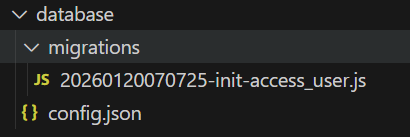
用 Sequelize CLI 直接创建数据库
javascript
npx sequelize db:create创建users表迁移文件
此时 sequelize-cli 和相关的配置也都初始化好了,我们可以开始编写项目的第一个 Migration 文件来创建我们的一个 users 表了
javascript
npx sequelize migration:generate --name=init-access_users在生成的access_users文件中写对应的表结构
javascript
module.exports = {
  // 执行迁移:创建表
  async up(queryInterface, Sequelize) {
    // 创建 access_user 表
    await queryInterface.createTable('access_user', {
      id: { type: Sequelize.BIGINT, primaryKey: true, autoIncrement: true, comment: '主键' },
      login_name: { type: Sequelize.STRING(64), allowNull: false, comment: '登录名' },
      real_name: { type: Sequelize.STRING(64), allowNull: false, comment: '真实用户', charset: 'utf8mb3', collate: 'utf8_bin' },
      password: { type: Sequelize.STRING(128), allowNull: false, comment: '密码' },
      phone: { type: Sequelize.STRING(16), allowNull: true, comment: '手机号码' },
      email: { type: Sequelize.STRING(64), allowNull: true, comment: '用户邮箱' },
      remark: { type: Sequelize.STRING(512), allowNull: true, comment: '备注' },
      enabled: { type: Sequelize.INTEGER, allowNull: false, defaultValue: 1, comment: '0--已禁用 1--已启用  DIC_NAME=ENABLE_FLAG' },
      delete: { type: Sequelize.INTEGER, allowNull: false, defaultValue: 0, comment: '0--未删除 1--已删除 DIC_NAME=DEL_FLAG' },
      create_by: { type: Sequelize.STRING(64), allowNull: true, comment: '创建人' },
      create_time: { type: Sequelize.DATE, allowNull: true, comment: '创建时间' },
      update_by: { type: Sequelize.STRING(64), allowNull: true, comment: '更新人' },
      update_time: { type: Sequelize.DATE, allowNull: true, comment: '更新时间' },
      version: { type: Sequelize.TINYINT, allowNull: true, comment: '版本号' },
    }, { comment: '运营用户表', charset: 'utf8mb3', collate: 'utf8_bin', engine: 'InnoDB' });

    // 添加唯一索引(对应原表的 IDX1)
    await queryInterface.addIndex('access_user', { name: 'IDX1', unique: true, fields: [ 'login_name' ] });
  },

  // 回滚迁移:删除表
  async down(queryInterface) {
    // 先删索引(可选,删表时会自动删索引,但显式删除更规范)
    await queryInterface.removeIndex('access_user', 'IDX1');
    // 删除表
    await queryInterface.dropTable('access_user');
  },
};
创建数据库表结构
javascript
npx sequelize-cli db:migrate会在对应的数据库生成对应的表结构
Sequelize介绍
Sequelize 是一个 Node.js 生态中最流行的 ORM(对象关系映射) 框架,主要用来简化你在 Node.js 项目中与关系型数据库(MySQL、PostgreSQL、SQLite、MSSQL 等)的交互。
简单来说,它帮你用 JavaScript/TypeScript 对象 来操作数据库表,而不用直接写复杂的 SQL 语句。
主要功能与优势
1. 对象映射(ORM)
将数据库表映射为 JavaScript 模型类,表的字段对应模型的属性,增删改查都可以通过对象方法完成,大幅降低学习成本。
2. 数据库迁移(Migration)
用版本化的脚本管理数据库结构变更(建表、加字段、改索引),保证多环境(开发 / 测试 / 生产)的数据库结构完全一致,这是团队协作的必备能力。
3. 关联与事务
轻松定义表之间的关联关系(一对一、一对多、多对多),并支持事务操作,确保多表操作的原子性。
4. 跨数据库兼容
一套代码可以在 MySQL、PostgreSQL、SQLite 等多种数据库间切换,无需修改核心业务逻辑。
5. 数据验证与钩子
内置数据验证规则,在数据入库前自动校验格式;支持钩子函数(Hook),在数据创建 / 更新 / 删除前后执行自定义逻辑(比如自动填充 create_time)
模型定义
javascript
// app/model/access_user.js
'use strict';

module.exports = app => {
  const { BIGINT, STRING, DATE, INTEGER } = app.Sequelize;
  const AccessUser = app.model.define('access_user', {
    id: { type: BIGINT, primaryKey: true, autoIncrement: true, comment: '主键' },
    login_name: { type: STRING(64), allowNull: false, comment: '登录名' },
    real_name: { type: STRING(64), allowNull: false, comment: '真实姓名' },
    password: { type: STRING(128), allowNull: false, comment: '密码' },
    enable_flag: { type: INTEGER, allowNull: false, defaultValue: 1, comment: '启用状态' },
    delete_flag: { type: INTEGER, allowNull: false, defaultValue: 0, comment: '删除状态' },
    create_time: { type: DATE, comment: '创建时间' },
    update_time: { type: DATE, comment: '更新时间' },
  }, {
    tableName: 'access_user', // 强制指定表名(避免复数化)
    timestamps: false, // 关闭自动时间戳
    comment: '运营用户表'
  });
  return AccessUser;
};
基础CRUD操作
1. 新增(Create)
javascript
// 创建单条数据
const user = await ctx.model.AccessUser.create({
  login_name: 'admin',
  real_name: '超级管理员',
  password: '加密密码',
  create_time: new Date(),
  update_time: new Date()
});

// 批量创建
await ctx.model.AccessUser.bulkCreate([
  { login_name: 'user1', real_name: '用户1', password: '123456' },
  { login_name: 'user2', real_name: '用户2', password: '123456' }
]);
2. 查询(Read)
javascript
// 根据主键查询
const user = await ctx.model.AccessUser.findByPk(1);

// 条件查询单条
const user = await ctx.model.AccessUser.findOne({
  where: { login_name: 'admin', delete_flag: 0 }
});

// 条件查询多条
const users = await ctx.model.AccessUser.findAll({
  where: { enable_flag: 1, delete_flag: 0 },
  attributes: ['id', 'login_name', 'real_name'], // 只查指定字段
  order: [['create_time', 'DESC']], // 排序
  limit: 10, // 限制条数
  offset: 0 // 偏移量(分页用)
});

// 分页查询(含总数)
const { count, rows } = await ctx.model.AccessUser.findAndCountAll({
  where: { delete_flag: 0 },
  limit: 10,
  offset: (page - 1) * 10,
  order: [['update_time', 'DESC']]
});
const result = { total: count, list: rows };
更新(Update)
javascript
// 根据主键更新
await ctx.model.AccessUser.update(
  { real_name: '新管理员', update_time: new Date() },
  { where: { id: 1 } }
);

// 条件更新
await ctx.model.AccessUser.update(
  { enable_flag: 0 },
  { where: { login_name: 'test' } }
);

// 先查后更(推荐,可触发钩子)
const user = await ctx.model.AccessUser.findByPk(1);
if (user) {
  user.real_name = '新名称';
  await user.save();
}
4. 删除(Delete)
javascript
// 物理删除(慎用)
await ctx.model.AccessUser.destroy({ where: { id: 1 } });

// 软删除(推荐)
await ctx.model.AccessUser.update(
  { delete_flag: 1 },
  { where: { id: 1 } }
);
高级查询
1. 条件运算符
javascript
const { Op } = app.Sequelize;
// 模糊查询
const users = await ctx.model.AccessUser.findAll({
  where: {
    real_name: { [Op.like]: '%管理员%' },
    id: { [Op.in]: [1, 2, 3] },
    create_time: {
      [Op.between]: ['2026-01-01', '2026-01-31']
    }
  }
});
2. 关联查询(一对多示例)
javascript
// 定义关联(在模型中)
AccessUser.hasMany(app.model.UserRole, { foreignKey: 'user_id', sourceKey: 'id' });

// 查询用户并关联角色
const user = await ctx.model.AccessUser.findOne({
  where: { id: 1 },
  include: [{ model: ctx.model.UserRole, attributes: ['role_id'] }]
});
迁移(Migration)操作
1. 创建迁移文件
javascript
npx sequelize-cli migration:generate --name create-access-user2. 建表迁移脚本
javascript
'use strict';
module.exports = {
  async up(queryInterface, Sequelize) {
    await queryInterface.createTable('access_user', {
      id: { type: Sequelize.BIGINT, primaryKey: true, autoIncrement: true },
      login_name: { type: Sequelize.STRING(64), allowNull: false },
      // 其他字段...
    });
  },
  async down(queryInterface) {
    await queryInterface.dropTable('access_user');
  }
};
3. 常用迁移命令
javascript
npx sequelize-cli db:migrate          # 执行迁移
npx sequelize-cli db:migrate:undo     # 回滚最近一次
npx sequelize-cli db:migrate:undo:all # 回滚所有
事务操作(保证原子性)
javascript
// 事务示例:创建用户 + 关联角色
const transaction = await ctx.model.transaction();
try {
  // 步骤1:创建用户
  const user = await ctx.model.AccessUser.create({
    login_name: 'test',
    real_name: '测试用户',
    password: '123456'
  }, { transaction });

  // 步骤2:关联角色
  await ctx.model.UserRole.create({
    user_id: user.id,
    role_id: 2
  }, { transaction });

  // 提交事务
  await transaction.commit();
} catch (err) {
  // 回滚事务
  await transaction.rollback();
  throw err;
}
常用工具方法
1. 数据验证
javascript
// 模型中添加验证规则
password: {
  type: STRING(128),
  allowNull: false,
  validate: {
    len: [6, 128], // 密码长度 6-128
    notEmpty: true // 非空
  }
}
2. 钩子函数(Hook)
javascript
// 模型中添加钩子:保存前自动填充时间
AccessUser.beforeSave(async (user) => {
  user.update_time = new Date();
  if (!user.create_time) {
    user.create_time = new Date();
  }
})