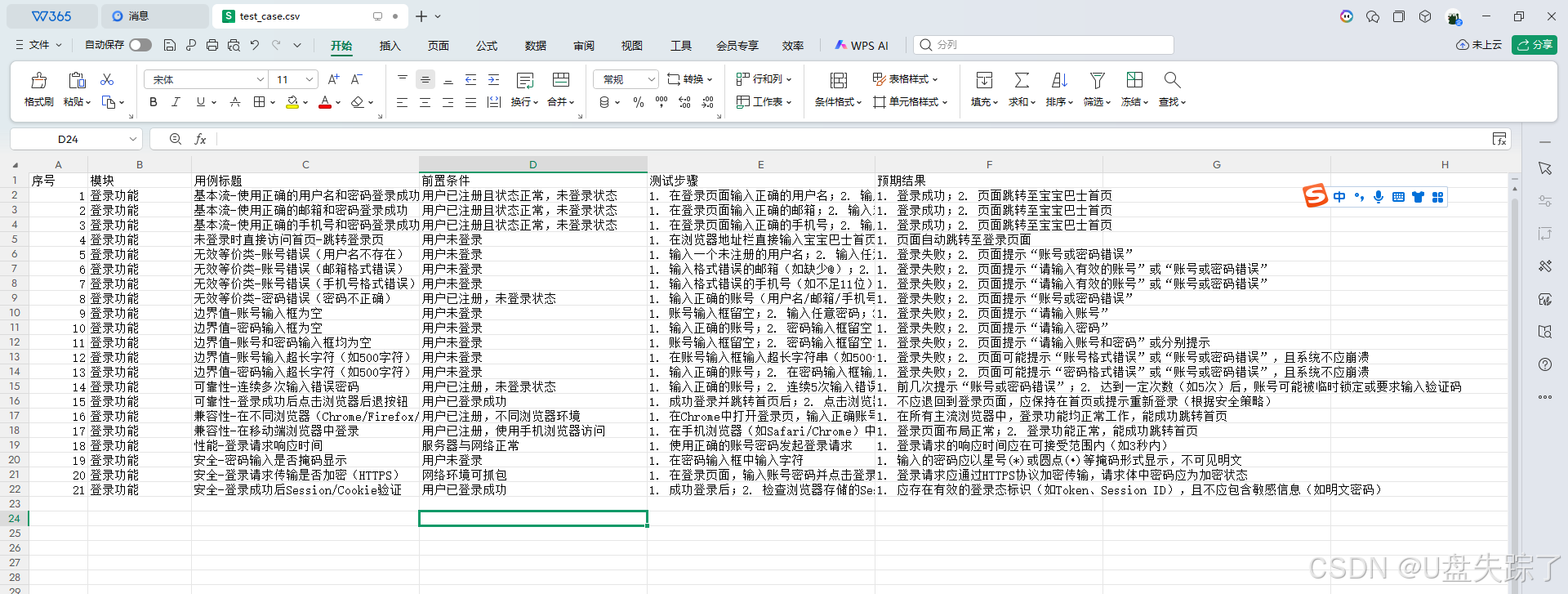
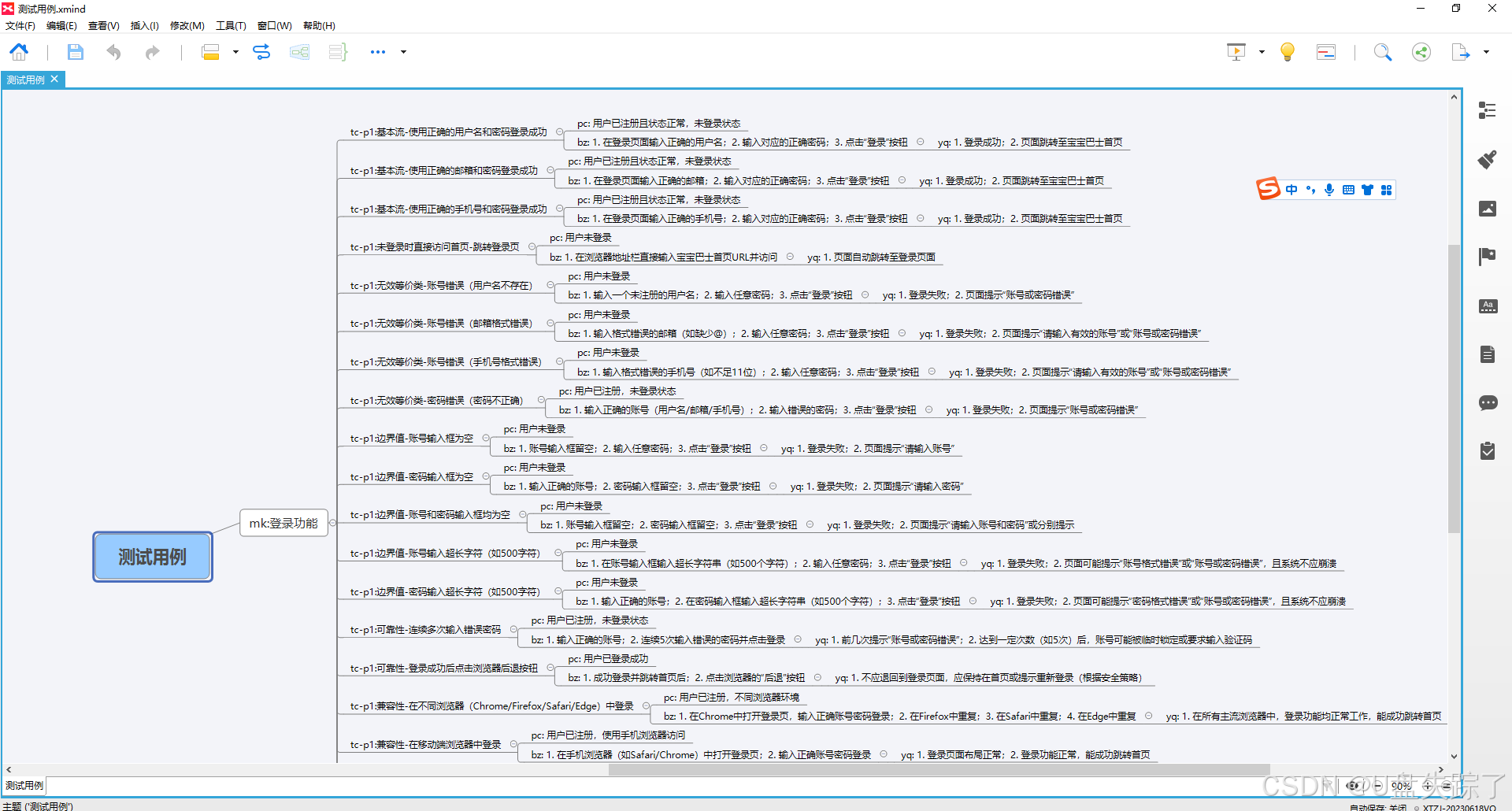
实现思路
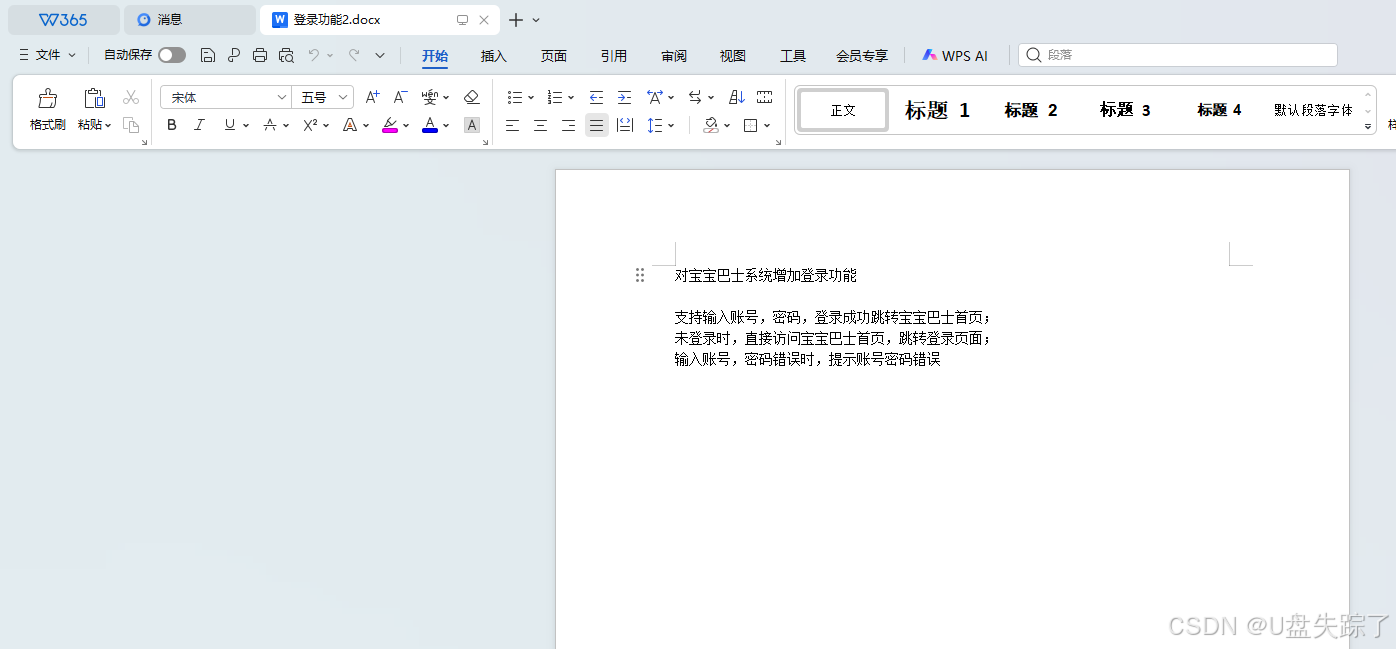
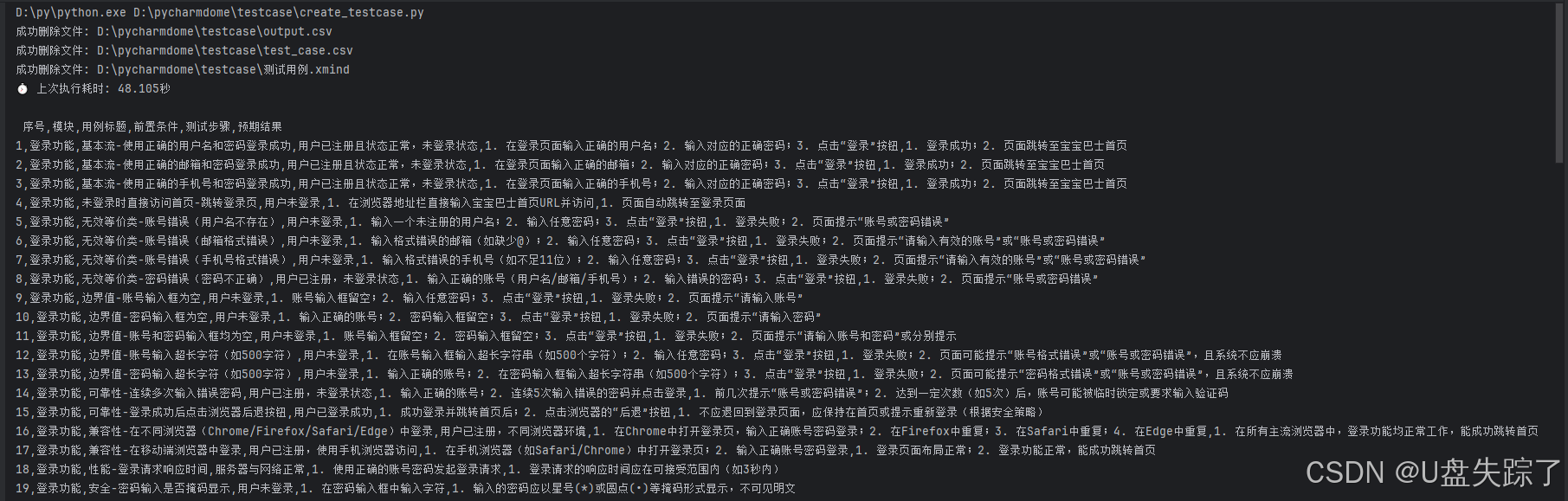
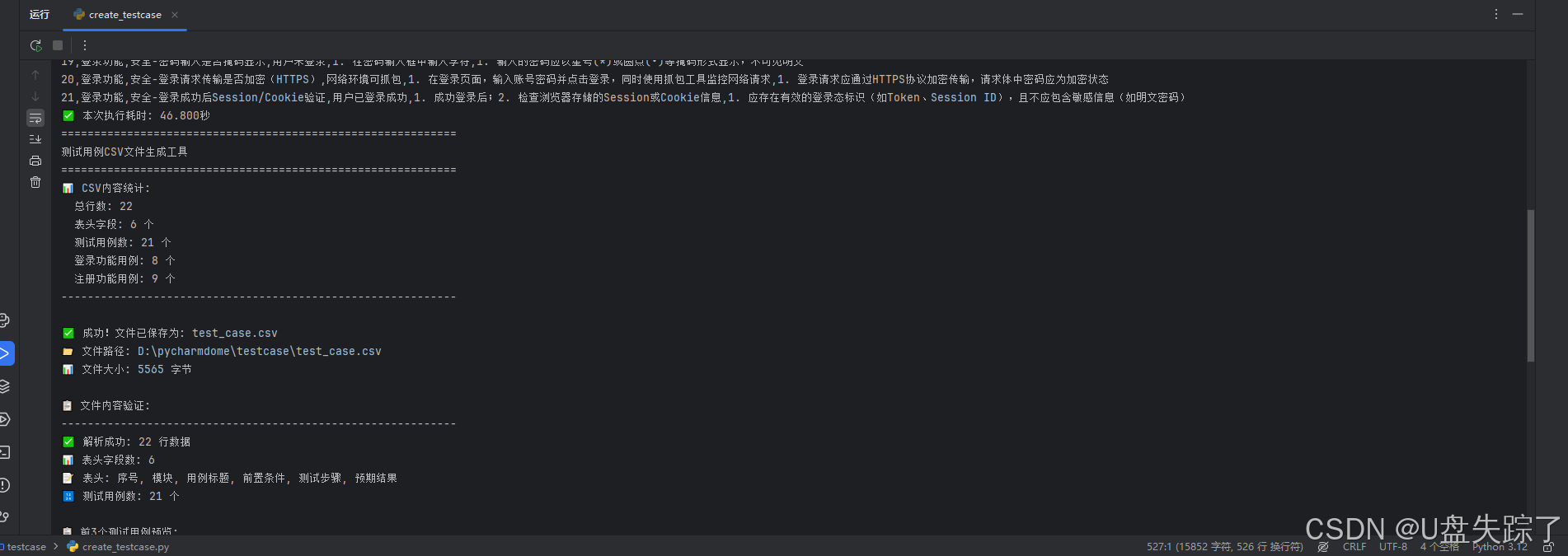
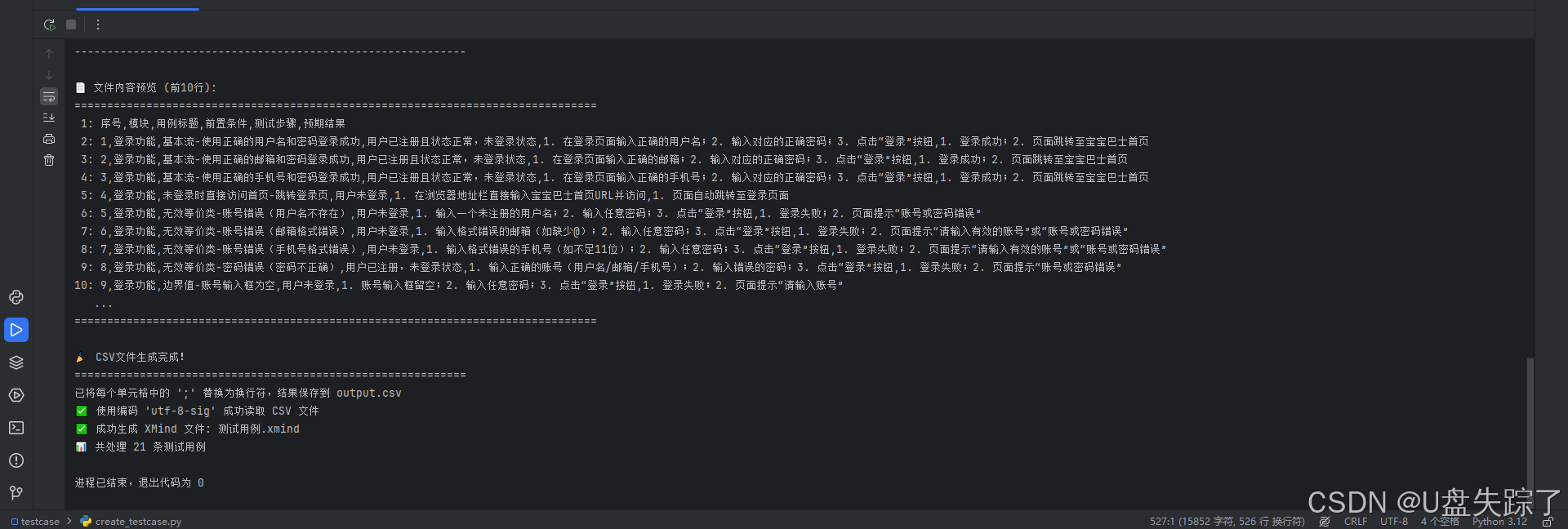
先把docx文件的文本内容读取处理,然后调用deepseek api把需求内容传递deepseek ,返回的csv内容生成表格文件,再处理成思维导图
完整脚本
python
# 文件名:deepseek生成testcase.py
# 作者:Administrator
# 日期:2026/1/3
# 描述:
# !/usr/bin/env python3
# -*- coding: utf-8 -*-


import os
import xmind
import openpyxl
import csv
import sys
import docx2txt
from openai import OpenAI
import time
from functools import wraps


# 读取docx文本内容
def read_docx(filename):
    # 提取所有文本
    text = docx2txt.process(filename)
    # 方法2:使用 filter() 处理换行
    result = '\n'.join(filter(lambda x: x.strip() != '', text.splitlines()))
    # print(result)
    return result


# 装饰器记录执行时间
def timed(func):
    """记录并显示上次执行耗时的装饰器"""

    @wraps(func)
    def wrapper(*args, **kwargs):
        # 1. 读取上次执行耗时
        try:
            with open("last_execution_time.txt", "r", encoding="utf-8") as f:
                last_time = float(f.read().strip())
                print(f"⏱️ 上次执行耗时: {last_time:.3f}秒")
        except (FileNotFoundError, ValueError):
            print("⏱️ 这是第一次执行")

        # 2. 执行并计时
        start = time.perf_counter()
        result = func(*args, **kwargs)
        end = time.perf_counter()
        duration = end - start

        # 3. 保存本次执行耗时
        with open("last_execution_time.txt", "w", encoding="utf-8") as f:
            f.write(str(duration))

        # 4. 显示本次结果
        print(f"✅ 本次执行耗时: {duration:.3f}秒")

        return result

    return wrapper


@timed
def api_testcase(API_KEY,res_content):
    # 直接使用密钥(仅用于测试和调试)
    client = OpenAI(
        api_key=API_KEY,  # 直接传入
        base_url="https://api.deepseek.com"
    )

    try:
        response = client.chat.completions.create(
            model="deepseek-chat",
            messages=[
                {"role": "system", "content": """你现在扮演测试工程师专家,可以根据需求内容列出基本流场景,有效无效,边界值,可靠性,兼容,性能,安全等等方面去编写测试用例;
                """},
                {"role": "user", "content": f"""
                根据该需求描述:{res_content}.内容生成测试用例,你用CSV格式内容输出测试用例,可参考如下我提供的测试用例格式:
                以下为CSV格式内容(包含表头):
                序号,模块,用例标题,前置条件,测试步骤,预期结果
                1,登录功能,登录系统+输入正确的账号密码+登录成功,用户已注册且状态正常,1. 输入已注册的账号(用户名/邮箱/手机号);2. 输入对应的正确密码;3. 点击"登录"按钮, 1. 登录成功; 2. 跳转至系统首页或用户中心
                """},
            ],
            stream=False
        )
        print("\n", response.choices[0].message.content)

        return response.choices[0].message.content
    except Exception as e:
        print(f"错误: {e}")
        print("可能的原因:")
        print("1. API密钥无效")
        print("2. 网络问题")
        print("3. 服务不可用")


def add_prefix_if_needed(text, prefix):
    """如果 text 没有以指定前缀开头,则自动添加"""
    if not text or not prefix:
        return text
    text_str = str(text).strip()
    if not text_str.startswith(prefix.strip()):
        return f"{prefix}{text_str}"
    return text_str


def safe_str(value):
    """安全转换为字符串,处理 None、数字等"""
    if value in (None, 'None', ''):
        return ""
    return str(value).strip()


def split_lines(text):
    """将文本按换行符分割为非空行列表"""
    if not text:
        return []
    lines = safe_str(text).split('\n')
    return [line.strip() for line in lines if line.strip()]


def normalize_header(header):
    """标准化表头:去空格、转小写,便于匹配"""
    return str(header).strip().lower()


def read_excel_and_generate_xmind(input_path, xmind_path):
    # 确保输出目录存在
    output_dir = os.path.dirname(xmind_path) or '.'
    os.makedirs(output_dir, exist_ok=True)

    # 如果目标 XMind 文件已存在,先删除它(实现覆盖)
    if os.path.exists(xmind_path):
        os.remove(xmind_path)
        print(f"🗑️  已删除旧文件: {xmind_path}")

    # 创建全新的 XMind 工作簿
    xmind_wb = xmind.load(xmind_path)
    sheet_xmind = xmind_wb.getPrimarySheet()
    root_topic = sheet_xmind.getRootTopic()
    root_topic.setTitle("测试用例")

    # 判断输入文件类型
    _, ext = os.path.splitext(input_path.lower())
    rows = []
    headers_raw = []

    if ext == '.xlsx':
        workbook = openpyxl.load_workbook(input_path, data_only=True)
        sheet = workbook.active
        all_rows = list(sheet.iter_rows(values_only=True))
        if not all_rows:
            raise ValueError("Excel 文件为空")
        headers_raw = [cell for cell in all_rows[0]]
        rows = all_rows[1:]
    elif ext == '.csv':
        all_rows = None
        encodings_to_try = ['utf-8-sig', 'utf-8', 'gbk', 'gb2312', 'cp936', 'latin1']
        for enc in encodings_to_try:
            try:
                with open(input_path, 'r', encoding=enc, newline='') as f:
                    reader = csv.reader(f)
                    all_rows = list(reader)
                    print(f"✅ 使用编码 '{enc}' 成功读取 CSV 文件")
                    break
            except (UnicodeDecodeError, LookupError):
                continue

        if all_rows is None:
            raise ValueError(
                "❌ 无法读取 CSV 文件:尝试了所有常见编码(UTF-8、GBK 等)均失败。\n"
                "请检查:\n"
                "1. 文件是否为真正的 CSV 文本文件(非 Excel .xls 直接改后缀)\n"
                "2. 是否用 Excel 另存为「CSV UTF-8 (逗号分隔)(*.csv)」格式"
            )
        if not all_rows:
            raise ValueError("CSV 文件为空")
        headers_raw = all_rows[0]
        rows = all_rows[1:]
    else:
        raise ValueError("仅支持 .xlsx 或 .csv 格式的输入文件(例如:测试用例.xlsx 或 测试用例.csv)")

    # 构建标准化的 header 映射(支持大小写/空格不敏感)
    required_fields_std = ["模块", "用例标题", "前置条件", "测试步骤", "预期结果"]
    normalized_headers = [normalize_header(h) for h in headers_raw]
    header_map = {}  # {"模块": 列索引, ...}

    # 先尝试标准字段名
    for std_field in required_fields_std:
        norm_key = normalize_header(std_field)
        if norm_key in normalized_headers:
            header_map[std_field] = normalized_headers.index(norm_key)

    # 如果还有缺失,尝试别名
    if len(header_map) < len(required_fields_std):
        ALIASES = {
            "模块": ["模块", "功能模块", "所属模块", "module"],
            "用例标题": ["用例标题", "标题", "测试用例", "case title", "title"],
            "前置条件": ["前置条件", "前提条件", "precondition", "pre-condition"],
            "测试步骤": ["测试步骤", "步骤", "操作步骤", "steps", "step"],
            "预期结果": ["预期结果", "期望结果", "expected", "result", "expected result"]
        }
        for std_field in required_fields_std:
            if std_field in header_map:
                continue
            found = False
            for alias in ALIASES[std_field]:
                alias_norm = normalize_header(alias)
                if alias_norm in normalized_headers:
                    header_map[std_field] = normalized_headers.index(alias_norm)
                    found = True
                    break
            if not found:
                available = [h for h in headers_raw if h is not None]
                raise ValueError(
                    f"未找到必需字段 '{std_field}'。\n"
                    f"可用列名: {available}\n"
                    f"支持的别名包括: {ALIASES[std_field]}"
                )

    # 存储已创建的模块主题
    module_topics = {}
    case_count = 0

    # 遍历数据行
    for row_idx, row in enumerate(rows, start=2):
        # 跳过完全空的行
        if not any(cell is not None and str(cell).strip() for cell in row):
            continue

        try:
            module = row[header_map["模块"]]
            title = row[header_map["用例标题"]]
            pre_cond = row[header_map["前置条件"]]
            steps = row[header_map["测试步骤"]]
            expected = row[header_map["预期结果"]]
        except IndexError:
            print(f"⚠️  第 {row_idx} 行数据列数不足,跳过: {row}")
            continue

        if not module or not title:
            continue  # 跳过缺少关键字段的行

        # 格式化
        formatted_module = add_prefix_if_needed(module, FIELD_PREFIXES["模块"])
        formatted_title = add_prefix_if_needed(title, FIELD_PREFIXES["用例标题"])

        # 获取或创建模块主题
        if formatted_module not in module_topics:
            module_topic = root_topic.addSubTopic()
            module_topic.setTitle(formatted_module)
            module_topics[formatted_module] = module_topic

        parent_module = module_topics[formatted_module]
        case_topic = parent_module.addSubTopic()
        case_topic.setTitle(formatted_title)
        case_count += 1

        # 前置条件
        if pre_cond and safe_str(pre_cond):
            formatted_pre_cond = add_prefix_if_needed(pre_cond, FIELD_PREFIXES["前置条件"])
            pc_topic = case_topic.addSubTopic()
            pc_topic.setTitle(formatted_pre_cond)

        # 测试步骤 & 预期结果配对
        step_lines = split_lines(steps)
        expected_lines = split_lines(expected)
        min_len = min(len(step_lines), len(expected_lines))

        for i in range(min_len):
            step_text = step_lines[i]
            exp_text = expected_lines[i]

            bz_topic = case_topic.addSubTopic()
            bz_title = add_prefix_if_needed(step_text, FIELD_PREFIXES["测试步骤"])
            bz_topic.setTitle(bz_title)

            yq_subtopic = bz_topic.addSubTopic()
            yq_title = add_prefix_if_needed(exp_text, FIELD_PREFIXES["预期结果"])
            yq_subtopic.setTitle(yq_title)

        # 处理剩余未配对的步骤
        for i in range(min_len, len(step_lines)):
            bz_topic = case_topic.addSubTopic()
            bz_title = add_prefix_if_needed(step_lines[i], FIELD_PREFIXES["测试步骤"])
            bz_topic.setTitle(bz_title)

        # 处理剩余未配对的预期结果
        for i in range(min_len, len(expected_lines)):
            yq_topic = case_topic.addSubTopic()
            yq_title = add_prefix_if_needed(expected_lines[i], FIELD_PREFIXES["预期结果"])
            yq_topic.setTitle(yq_title)

    # 保存 XMind 文件
    xmind.save(xmind_wb, xmind_path)
    print(f"✅ 成功生成 XMind 文件: {xmind_path}")
    print(f"📊 共处理 {case_count} 条测试用例")


# 生成csv文件
def save_csv_from_string(csv_string, output_file="test_case.csv"):
    """
    从CSV字符串保存为文件
    """
    try:
        # 检查文件是否已存在
        if os.path.exists(output_file):
            print(f"⚠️  文件 '{output_file}' 已存在!")
            counter = 1
            while os.path.exists(f"test_case_{counter}.csv"):
                counter += 1
            output_file = f"test_case_{counter}.csv"
            print(f"📝 将保存为新文件: {output_file}")

        # 写入文件
        with open(output_file, 'w', encoding='utf-8', newline='') as f:
            f.write(csv_string.strip())

        print(f"\n✅ 成功!文件已保存为: {output_file}")
        print(f"📁 文件路径: {os.path.abspath(output_file)}")
        print(f"📊 文件大小: {os.path.getsize(output_file)} 字节")

        # 验证和显示文件内容
        print(f"\n📋 文件内容验证:")
        print("-" * 60)

        try:
            # 尝试用csv模块读取以验证格式
            with open(output_file, 'r', encoding='utf-8') as f:
                csv_reader = csv.reader(f)
                rows = list(csv_reader)

                print(f"✅ 解析成功: {len(rows)} 行数据")
                print(f"📊 表头字段数: {len(rows[0])}")
                print(f"📝 表头: {', '.join(rows[0])}")
                print(f"🔢 测试用例数: {len(rows) - 1} 个")

                # 显示前几个测试用例
                print(f"\n📋 前3个测试用例预览:")
                for i, row in enumerate(rows[1:4], 1):
                    print(f"  用例{i}: {row[1]} - {row[2][:30]}...")

        except Exception as e:
            print(f"⚠️ CSV格式验证警告: {e}")
            print("💡 建议检查CSV内容格式是否正确")

        print("-" * 60)

        # 显示文件内容前几行
        print(f"\n📄 文件内容预览 (前10行):")
        print("=" * 80)
        with open(output_file, 'r', encoding='utf-8') as f:
            for i, line in enumerate(f):
                if i < 10:
                    print(f"{i + 1:2d}: {line.rstrip()}")
                else:
                    print("   ...")
                    break
        print("=" * 80)

        return True

    except Exception as e:
        print(f"❌ 保存文件时发生错误: {e}")
        return False


def main(case_csv):
    """
    主函数
    """
    print("=" * 60)
    print("测试用例CSV文件生成工具")
    print("=" * 60)

    # 显示CSV内容统计信息
    lines = case_csv.strip().split('\n')
    print(f"📊 CSV内容统计:")
    print(f"  总行数: {len(lines)}")
    print(f"  表头字段: {len(lines[0].split(','))} 个")
    print(f"  测试用例数: {len(lines) - 1} 个")

    # 分类统计
    login_count = sum(1 for line in lines if
                      line.startswith('1,') or line.startswith('2,') or line.startswith('3,') or line.startswith(
                          '4,') or line.startswith('5,') or line.startswith('6,') or line.startswith(
                          '7,') or line.startswith('8,'))
    register_count = sum(1 for line in lines if
                         line.startswith('9,') or line.startswith('10') or line.startswith('11') or line.startswith(
                             '12') or line.startswith('13') or line.startswith('14') or line.startswith(
                             '15') or line.startswith('16') or line.startswith('17'))

    print(f"  登录功能用例: {login_count} 个")
    print(f"  注册功能用例: {register_count} 个")
    print("-" * 60)

    # 询问用户是否生成文件
    # choice = input("是否生成CSV文件?(y/n): ").strip().lower()
    choice = 'y'
    if choice == 'y':
        # 可选:让用户指定文件名
        # custom_name = input("请输入文件名(直接回车使用默认名称 test_case.csv): ").strip()
        custom_name = 'test_case.csv'

        if custom_name:
            if not custom_name.lower().endswith('.csv'):
                custom_name += '.csv'
            save_csv_from_string(case_csv, custom_name)
        else:
            save_csv_from_string(case_csv)

        print("\n🎉 CSV文件生成完成!")
    else:
        print("取消生成文件。")

    print("=" * 60)

# 删除生成文件
def delete_file(filename):
    """
    删除当前脚本目录下的指定文件

    参数:
        filename: 要删除的文件名(可以是相对路径或绝对路径)
    """
    # 获取当前脚本所在目录
    current_dir = os.path.dirname(os.path.abspath(__file__))

    # 如果传入的是绝对路径,直接使用;否则拼接为当前目录下的路径
    if os.path.isabs(filename):
        file_path = filename
    else:
        file_path = os.path.join(current_dir, filename)

    # 检查文件是否存在
    if not os.path.exists(file_path):
        print(f"文件不存在: {file_path}")
        return False

    # 确保是文件而不是目录
    if not os.path.isfile(file_path):
        print(f"这不是一个文件: {file_path}")
        return False

    try:
        os.remove(file_path)
        print(f"成功删除文件: {file_path}")
        return True
    except Exception as e:
        print(f"删除失败: {e}")
        return False


if __name__ == "__main__":
    # 每次执行删除文件
    start_list = ["output.csv",
                  "test_case.csv",
                  "测试用例.xmind"]
    run = 1
    if run == 1:
        for i in start_list:
            delete_file(i)


    # API keys
    API_KEY = "输入你的api"

    # 传入需求文档,调用大模型
    case_csv = api_testcase(API_KEY,
                            read_docx("登录功能2.docx")
                            )

    # 生成csv文件
    main(case_csv)

    # 替换;修改为\n换行
    input_file = 'test_case.csv'
    output_file = 'output.csv'

    with open(input_file, 'r', encoding='utf-8') as fin, \
            open(output_file, 'w', encoding='utf-8', newline='') as fout:

        reader = csv.reader(fin)
        writer = csv.writer(fout)

        for row in reader:
            # 对每一列(每个单元格)进行处理:把 ; 替换为 \n
            new_row = [cell.replace(';', '\n') for cell in row]
            writer.writerow(new_row)

    print(f"已将每个单元格中的 ';' 替换为换行符,结果保存到 {output_file}")


    # ====================== 配置区(根据你的需求修改) ======================
    FIELD_PREFIXES = {
        "模块": "mk:",  # 模块前缀
        "用例标题": "tc-p1:",  # 用例标题前缀
        "前置条件": "pc: ",  # 前置条件前缀
        "测试步骤": "bz: ",  # 测试步骤前缀
        "预期结果": "yq: "  # 预期结果前缀
    }
    # ======================================================================

    # 支持命令行传参:python demo5.py input.xlsx output.xmind
    if len(sys.argv) >= 2:
        input_file = sys.argv[1]
        if len(sys.argv) >= 3:
            output_file = sys.argv[2]
        else:
            base = os.path.splitext(input_file)[0]
            output_file = f"{base}.xmind"
    else:
        # 默认文件(你可以根据需要修改)
        input_file = "output.csv"  # 也可以是 "测试用例.csv"
        output_file = "测试用例.xmind"

    if not os.path.exists(input_file):
        print(f"❌ 输入文件不存在: {input_file}")
        print("请确保当前目录下有该文件,或通过命令行指定路径。")
        sys.exit(1)

    try:
        read_excel_and_generate_xmind(input_file, output_file)
    except Exception as e:
        print(f"💥 程序运行出错: {e}")
        sys.exit(1)
实现效果