本文为整理项目开发中使用Fastadmin Excel实现导入功能的笔记
目录
实现导入
导出功能不用做,默认就可以导出;但导入就需要加载配置和结合业务进行处理。
文件类型设置
在application/extra/upload.php中设置可上传文件类型,
增加csv/xls/xlsx类型,如下:
php
/**
 * 可上传的文件类型
 * 如配置允许 pdf,ppt,docx,svg 等可能含有脚本的文件时,
 * 请先从服务器配置此类文件直接下载而不是预览
 */
'mimetype'  => 'jpg,png,bmp,jpeg,gif,webp,zip,rar,wav,mp4,mp3,webm,csv,xls,xlsx',
增加导入按钮
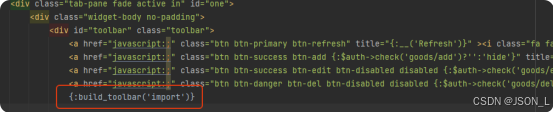
在列表(index.html)文件中增加导入按钮,如下:
php
{:build_toolbar('import')}位置如下图:
效果如下图:

增加导入方法
在控制器中增加导入方法,获取导入文件,读取文件中的数据,并处理导入到数据表中。
如下:
php
/**
 * 导入
 *
 * @return void
 * @throws PDOException
 * @throws BindParamException
 */
public function import()
{
    $file = $this->request->request('file');
    if (!$file) {
        $this->error(__('Parameter %s can not be empty', 'file'));
    }
    $filePath = ROOT_PATH . DS . 'public' . DS . $file;
    if (!is_file($filePath)) {
        $this->error(__('No results were found'));
    }

    // 实例化reader
    $ext = pathinfo($filePath, PATHINFO_EXTENSION);
    if (!in_array($ext, ['csv', 'xls', 'xlsx'])) {
        $this->error(__('Unknown data format'));
    }

    try {
        // 加载文件
        if (!$spreadsheet = IOFactory::load($filePath)) {
            $this->error(__('Unknown data format'));
        }
        $sheet = $spreadsheet->getActiveSheet();
        $data = [];
        foreach ($sheet->getRowIterator() as $row) {
            $rowIndex = $row->getRowIndex();
            // 不读取第一行 标题
            if ($rowIndex == 1) continue;

            $cellIterator = $row->getCellIterator();
            $row = [];
            foreach ($cellIterator as $cell) $row[] = $cell->getValue();
            $data[] = $row;
        }
    } catch (Exception $exception) {
        $this->error($exception->getMessage());
    }

    if (empty($data)) {
        $this->error('数据为空,无法导入');
    }

    // 在这里 验证数据格式 导入数据业务处理
    $this->success();
}
总结
在fastadmin中上传和导入已经集成,只需要实现导入数据的业务处理。