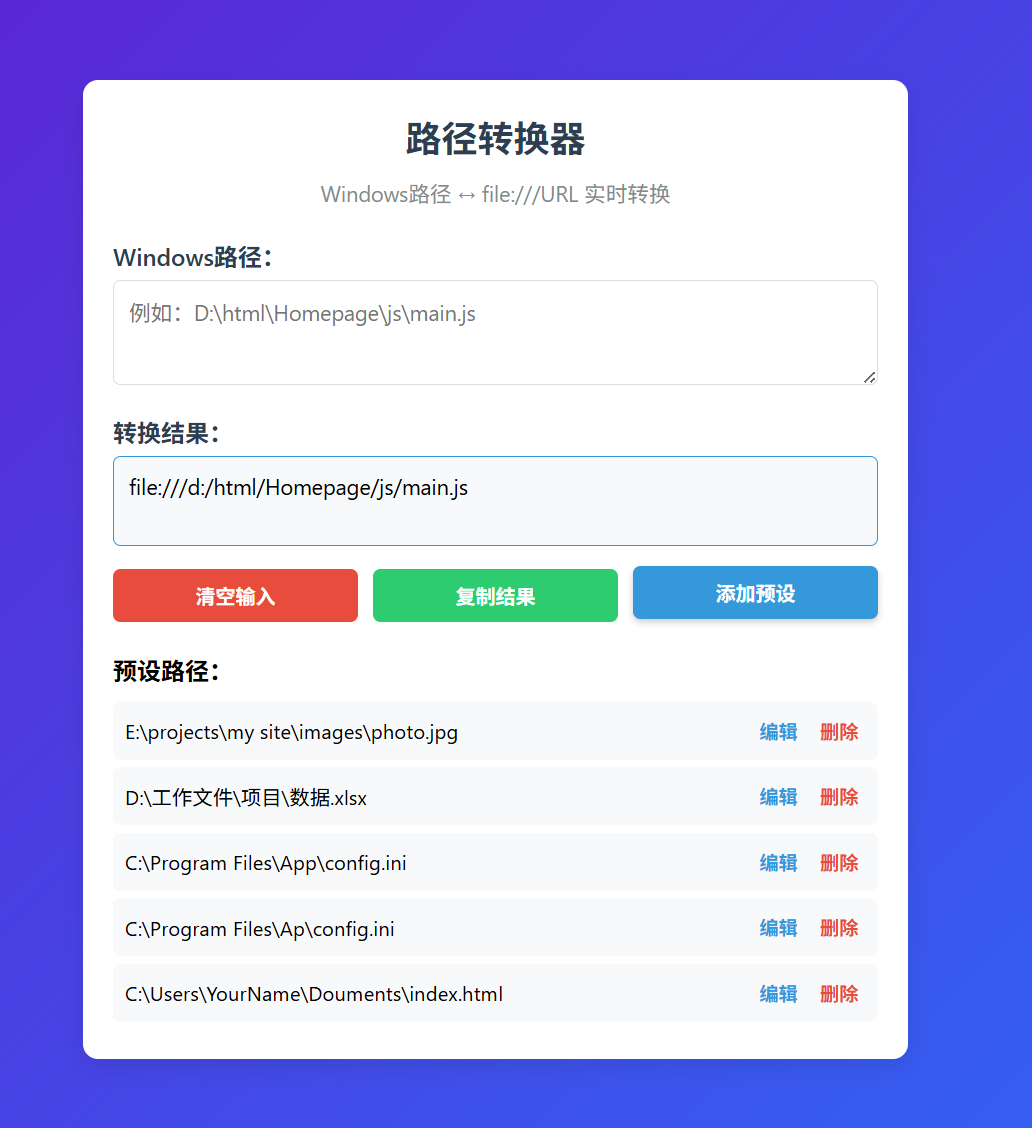
html
<!DOCTYPE html>
<html lang="zh-CN">
<head>
<meta charset="UTF-8">
<meta name="viewport" content="width=device-width, initial-scale=1.0">
<title>路径转换器 - 带预设功能</title>
<style>
* {
box-sizing: border-box;
margin: 0;
padding: 0;
font-family: 'Segoe UI', sans-serif;
}
body {
background: linear-gradient(135deg, #6a11cb 0%, #2575fc 100%);
min-height: 100vh;
display: flex;
justify-content: center;
align-items: center;
padding: 15px;
}
.container {
width: 100%;
max-width: 550px;
background: white;
border-radius: 10px;
box-shadow: 0 5px 15px rgba(0,0,0,0.1);
padding: 20px;
}
h1 {
text-align: center;
margin-bottom: 10px;
color: #2c3e50;
font-size: 1.5rem;
}
.subtitle {
text-align: center;
color: #7f8c8d;
margin-bottom: 20px;
font-size: 0.9rem;
}
.input-group, .output-group {
margin-bottom: 15px;
}
label {
display: block;
margin-bottom: 5px;
font-weight: 600;
color: #2c3e50;
}
textarea {
width: 100%;
height: 70px;
padding: 10px;
border: 1px solid #ddd;
border-radius: 5px;
resize: vertical;
font-size: 0.9rem;
}
textarea:focus {
outline: none;
border-color: #3498db;
}
.output-box {
background: #f8f9fa;
border: 1px solid #3498db;
border-radius: 5px;
padding: 10px;
min-height: 60px;
word-break: break-all;
font-size: 0.9rem;
white-space: pre-wrap;
}
.buttons {
display: flex;
gap: 10px;
margin-bottom: 15px;
}
button {
flex: 1;
padding: 8px;
border: none;
border-radius: 5px;
cursor: pointer;
font-weight: 600;
transition: all 0.2s;
}
button:hover {
transform: translateY(-2px);
box-shadow: 0 2px 5px rgba(0,0,0,0.2);
}
.clear-btn {
background: #e74c3c;
color: white;
}
.copy-btn {
background: #2ecc71;
color: white;
}
.add-preset-btn {
background: #3498db;
color: white;
}
.presets-section {
margin-top: 20px;
}
.presets-header {
display: flex;
justify-content: space-between;
align-items: center;
margin-bottom: 10px;
}
.presets-header h3 {
margin: 0;
font-size: 1rem;
}
.preset-item {
padding: 8px;
background: #f8f9fa;
border-radius: 5px;
margin-bottom: 5px;
cursor: pointer;
font-size: 0.85rem;
display: flex;
justify-content: space-between;
align-items: center;
}
.preset-item:hover {
background: #e9ecef;
}
.preset-actions {
display: flex;
gap: 5px;
}
.preset-edit, .preset-delete {
background: none;
border: none;
cursor: pointer;
font-size: 0.8rem;
padding: 2px 5px;
border-radius: 3px;
}
.preset-edit {
color: #3498db;
}
.preset-delete {
color: #e74c3c;
}
.preset-input {
width: 100%;
padding: 5px;
border: 1px solid #ddd;
border-radius: 3px;
font-size: 0.85rem;
}
.notification {
position: fixed;
top: 15px;
right: 15px;
padding: 10px 15px;
background: #2ecc71;
color: white;
border-radius: 5px;
opacity: 0;
transition: opacity 0.3s;
z-index: 100;
}
.notification.show {
opacity: 1;
}
.notification.error {
background: #e74c3c;
}
.modal {
display: none;
position: fixed;
top: 0;
left: 0;
width: 100%;
height: 100%;
background: rgba(0,0,0,0.5);
z-index: 1000;
justify-content: center;
align-items: center;
}
.modal-content {
background: white;
padding: 20px;
border-radius: 8px;
width: 90%;
max-width: 400px;
}
.modal h3 {
margin-bottom: 15px;
}
.modal-buttons {
display: flex;
gap: 10px;
margin-top: 15px;
}
.modal-buttons button {
flex: 1;
}
.save-btn {
background: #2ecc71;
color: white;
}
.cancel-btn {
background: #95a5a6;
color: white;
}
</style>
</head>
<body>
<div class="container">
<h1>路径转换器</h1>
<p class="subtitle">Windows路径 ↔ file:///URL 实时转换</p>
<div class="input-group">
<label>Windows路径:</label>
<textarea id="inputPath" placeholder="例如:D:\html\Homepage\js\main.js"></textarea>
</div>
<div class="output-group">
<label>转换结果:</label>
<div id="outputPath" class="output-box">file:///d:/html/Homepage/js/main.js</div>
</div>
<div class="buttons">
<button class="clear-btn" id="clearBtn">清空输入</button>
<button class="copy-btn" id="copyBtn">复制结果</button>
<button class="add-preset-btn" id="addPresetBtn">添加预设</button>
</div>
<div class="presets-section">
<div class="presets-header">
<h3>预设路径:</h3>
</div>
<div id="presetsList"></div>
</div>
</div>
<div id="notification" class="notification"></div>
<div id="editModal" class="modal">
<div class="modal-content">
<h3>编辑预设</h3>
<input type="text" id="editPresetInput" class="preset-input">
<div class="modal-buttons">
<button class="save-btn" id="saveEditBtn">保存</button>
<button class="cancel-btn" id="cancelEditBtn">取消</button>
</div>
</div>
</div>
<script>
document.addEventListener('DOMContentLoaded', function() {
// DOM 元素
const inputPath = document.getElementById('inputPath');
const outputPath = document.getElementById('outputPath');
const clearBtn = document.getElementById('clearBtn');
const copyBtn = document.getElementById('copyBtn');
const addPresetBtn = document.getElementById('addPresetBtn');
const presetsList = document.getElementById('presetsList');
const notification = document.getElementById('notification');
const editModal = document.getElementById('editModal');
const editPresetInput = document.getElementById('editPresetInput');
const saveEditBtn = document.getElementById('saveEditBtn');
const cancelEditBtn = document.getElementById('cancelEditBtn');
// 默认预设(仅首次加载时使用)
const DEFAULT_PRESETS = [
'D:\\html\\Homepage\\js\\main.js',
'C:\\Users\\YourName\\Documents\\index.html',
'E:\\projects\\my site\\images\\photo.jpg',
'D:\\工作文件\\项目\\数据.xlsx',
'C:\\Program Files\\App\\config.ini'
];
// 加载预设(优先用 localStorage,否则用默认值)
let presets = JSON.parse(localStorage.getItem('pathConverterPresets')) || [...DEFAULT_PRESETS];
let editingIndex = -1;
// ======================
// 工具函数
// ======================
// 清理路径:去引号、标准化
function sanitizePath(path) {
path = path.trim();
if ((path.startsWith('"') && path.endsWith('"')) ||
(path.startsWith("'") && path.endsWith("'"))) {
path = path.slice(1, -1);
}
return path;
}
// 判断是否为有效 Windows 路径(简单校验)
function isValidWindowsPath(path) {
return /^[A-Za-z]:[\\\/]/.test(path);
}
// 转换 Windows 路径为 file:// URI
function windowsPathToFileURI(winPath) {
if (!winPath) return 'file:///d:/html/Homepage/js/main.js';
const cleanPath = sanitizePath(winPath);
if (!isValidWindowsPath(cleanPath)) {
// 非标准路径也尝试转换(容错)
const unixStyle = cleanPath.replace(/\\/g, '/');
return 'file:///' + encodeURIComponent(unixStyle).replace(/%2F/g, '/');
}
// 提取盘符(转小写)
const drive = cleanPath.substring(0, 1).toLowerCase() + ':/';
const restPath = cleanPath.substring(3).replace(/\\/g, '/');
// 对路径部分进行 URI 编码(保留 /)
const encodedRest = restPath
.split('/')
.map(part => encodeURIComponent(part))
.join('/');
return 'file:///' + drive + encodedRest;
}
// 显示通知
function showNotification(message, isError = false) {
notification.textContent = message;
notification.className = 'notification' + (isError ? ' error' : '');
notification.classList.add('show');
setTimeout(() => notification.classList.remove('show'), 2000);
}
// ======================
// 核心功能
// ======================
function convertPath() {
const result = windowsPathToFileURI(inputPath.value);
outputPath.textContent = result;
}
function copyToClipboard() {
const text = outputPath.textContent;
if (!text || text.includes('file:///d:/html/Homepage/js/main.js') && !inputPath.value.trim()) {
showNotification('请输入路径后再复制', true);
return;
}
navigator.clipboard.writeText(text)
.then(() => showNotification('已复制!'))
.catch(() => showNotification('复制失败,请手动复制', true));
}
function clearInput() {
inputPath.value = '';
convertPath();
inputPath.focus();
}
// 规范化路径用于比较(忽略斜杠和大小写)
function normalizeForCompare(path) {
return path.toLowerCase().replace(/\\/g, '/');
}
function addPreset() {
const raw = inputPath.value.trim();
if (!raw) {
showNotification('请输入路径后再添加预设', true);
return;
}
const clean = sanitizePath(raw);
const normalized = normalizeForCompare(clean);
if (presets.some(p => normalizeForCompare(p) === normalized)) {
showNotification('该预设已存在(忽略大小写和斜杠)', true);
return;
}
presets.push(clean);
savePresets();
renderPresets();
showNotification('预设已添加');
}
function editPreset(index) {
editingIndex = index;
editPresetInput.value = presets[index];
editModal.style.display = 'flex';
editPresetInput.focus();
}
function saveEdit() {
const newValue = sanitizePath(editPresetInput.value);
if (!newValue) {
showNotification('预设不能为空', true);
return;
}
const normalizedNew = normalizeForCompare(newValue);
if (presets.some((p, i) => i !== editingIndex && normalizeForCompare(p) === normalizedNew)) {
showNotification('该预设已存在', true);
return;
}
presets[editingIndex] = newValue;
savePresets();
renderPresets();
closeEditModal();
showNotification('预设已更新');
}
function deletePreset(index) {
if (confirm('确定要删除这个预设吗?')) {
presets.splice(index, 1);
savePresets();
renderPresets();
showNotification('预设已删除');
}
}
function usePreset(index) {
inputPath.value = presets[index];
convertPath();
inputPath.focus();
}
function savePresets() {
localStorage.setItem('pathConverterPresets', JSON.stringify(presets));
}
function closeEditModal() {
editModal.style.display = 'none';
editingIndex = -1;
}
// ======================
// 渲染与事件
// ======================
function renderPresets() {
presetsList.innerHTML = '';
if (presets.length === 0) {
presetsList.innerHTML = '<div style="text-align: center; color: #7f8c8d; padding: 10px;">暂无预设,点击"添加预设"按钮创建</div>';
return;
}
presets.forEach((preset, index) => {
const item = document.createElement('div');
item.className = 'preset-item';
item.innerHTML = `
<span> ${preset}</span>
<div class="preset-actions">
<button class="preset-edit" data-index=" ${index}">编辑</button>
<button class="preset-delete" data-index=" ${index}">删除</button>
</div>
`;
item.addEventListener('click', e => {
if (!e.target.closest('.preset-edit') && !e.target.closest('.preset-delete')) {
usePreset(index);
}
});
item.querySelector('.preset-edit').addEventListener('click', e => {
e.stopPropagation();
editPreset(index);
});
item.querySelector('.preset-delete').addEventListener('click', e => {
e.stopPropagation();
deletePreset(index);
});
presetsList.appendChild(item);
});
}
// ======================
// 事件绑定
// ======================
clearBtn.addEventListener('click', clearInput);
copyBtn.addEventListener('click', copyToClipboard);
addPresetBtn.addEventListener('click', addPreset);
inputPath.addEventListener('input', convertPath);
saveEditBtn.addEventListener('click', saveEdit);
cancelEditBtn.addEventListener('click', closeEditModal);
// 键盘快捷键
document.addEventListener('keydown', e => {
if (e.key === 'Escape') {
if (editModal.style.display === 'flex') {
closeEditModal();
} else {
clearInput();
}
}
});
// 初始化
renderPresets();
convertPath(); // 设置默认示例
inputPath.focus();
});
</script>
</body>
</html>备用
html
<!DOCTYPE html>
<html lang="zh-CN">
<head>
<meta charset="UTF-8">
<meta name="viewport" content="width=device-width, initial-scale=1.0">
<title>路径转换器</title>
<style>
:root {
--primary: #3498db;
--success: #2ecc71;
--danger: #e74c3c;
--dark: #2c3e50;
--light: #f8f9fa;
--gray: #7f8c8d;
--border: #ddd;
}
* {
box-sizing: border-box;
margin: 0;
padding: 0;
font-family: 'Segoe UI', sans-serif;
}
body {
background: linear-gradient(135deg, #6a11cb 0%, #2575fc 100%);
min-height: 100vh;
display: flex;
justify-content: center;
align-items: center;
padding: 15px;
}
.container {
width: 100%;
max-width: 550px;
background: white;
border-radius: 10px;
box-shadow: 0 5px 15px rgba(0,0,0,0.1);
padding: 20px;
}
h1 {
text-align: center;
margin-bottom: 10px;
color: var(--dark);
font-size: 1.5rem;
}
.subtitle {
text-align: center;
color: var(--gray);
margin-bottom: 20px;
font-size: 0.9rem;
}
.input-group, .output-group {
margin-bottom: 15px;
}
label {
display: block;
margin-bottom: 5px;
font-weight: 600;
color: var(--dark);
}
textarea {
width: 100%;
height: 70px;
padding: 10px;
border: 1px solid var(--border);
border-radius: 5px;
resize: vertical;
font-size: 0.9rem;
}
textarea:focus {
outline: none;
border-color: var(--primary);
}
.output-box {
background: var(--light);
border: 1px solid var(--primary);
border-radius: 5px;
padding: 10px;
min-height: 60px;
word-break: break-all;
font-size: 0.9rem;
}
.buttons {
display: flex;
gap: 10px;
margin-bottom: 15px;
}
button {
flex: 1;
padding: 8px;
border: none;
border-radius: 5px;
cursor: pointer;
font-weight: 600;
transition: all 0.2s;
}
button:hover {
transform: translateY(-2px);
box-shadow: 0 2px 5px rgba(0,0,0,0.2);
}
.clear-btn {
background: var(--danger);
color: white;
}
.copy-btn {
background: var(--success);
color: white;
}
.add-preset-btn {
background: var(--primary);
color: white;
}
.presets-section {
margin-top: 20px;
}
.presets-header {
display: flex;
justify-content: space-between;
align-items: center;
margin-bottom: 10px;
}
.presets-header h3 {
margin: 0;
font-size: 1rem;
}
.preset-item {
padding: 8px;
background: var(--light);
border-radius: 5px;
margin-bottom: 5px;
cursor: pointer;
font-size: 0.85rem;
display: flex;
justify-content: space-between;
align-items: center;
}
.preset-item:hover {
background: #e9ecef;
}
.preset-actions {
display: flex;
gap: 5px;
}
.preset-edit, .preset-delete {
background: none;
border: none;
cursor: pointer;
font-size: 0.8rem;
padding: 2px 5px;
border-radius: 3px;
}
.preset-edit {
color: var(--primary);
}
.preset-delete {
color: var(--danger);
}
.notification {
position: fixed;
top: 15px;
right: 15px;
padding: 10px 15px;
background: var(--success);
color: white;
border-radius: 5px;
opacity: 0;
transition: opacity 0.3s;
z-index: 100;
}
.notification.show {
opacity: 1;
}
.notification.error {
background: var(--danger);
}
.modal {
display: none;
position: fixed;
top: 0;
left: 0;
width: 100%;
height: 100%;
background: rgba(0,0,0,0.5);
z-index: 1000;
justify-content: center;
align-items: center;
}
.modal-content {
background: white;
padding: 20px;
border-radius: 8px;
width: 90%;
max-width: 400px;
}
.modal h3 {
margin-bottom: 15px;
}
.modal-buttons {
display: flex;
gap: 10px;
margin-top: 15px;
}
.modal-buttons button {
flex: 1;
}
.save-btn {
background: var(--success);
color: white;
}
.cancel-btn {
background: var(--gray);
color: white;
}
.empty-state {
text-align: center;
color: var(--gray);
padding: 10px;
}
</style>
</head>
<body>
<div class="container">
<h1>路径转换器</h1>
<p class="subtitle">Windows路径 ↔ file:///URL 实时转换</p>
<div class="input-group">
<label>Windows路径:</label>
<textarea id="inputPath" placeholder="例如:D:\html\Homepage\js\main.js"></textarea>
</div>
<div class="output-group">
<label>转换结果:</label>
<div id="outputPath" class="output-box">file:///d:/html/Homepage/js/main.js</div>
</div>
<div class="buttons">
<button class="clear-btn" id="clearBtn">清空输入</button>
<button class="copy-btn" id="copyBtn">复制结果</button>
<button class="add-preset-btn" id="addPresetBtn">添加预设</button>
</div>
<div class="presets-section">
<div class="presets-header">
<h3>预设路径:</h3>
</div>
<div id="presetsList"></div>
</div>
</div>
<div id="notification" class="notification"></div>
<div id="editModal" class="modal">
<div class="modal-content">
<h3>编辑预设</h3>
<input type="text" id="editPresetInput" class="preset-input" style="width: 100%; padding: 8px; border: 1px solid #ddd; border-radius: 4px;">
<div class="modal-buttons">
<button class="save-btn" id="saveEditBtn">保存</button>
<button class="cancel-btn" id="cancelEditBtn">取消</button>
</div>
</div>
</div>
<script>
// 路径转换器应用
class PathConverter {
constructor() {
this.elements = {
inputPath: document.getElementById('inputPath'),
outputPath: document.getElementById('outputPath'),
clearBtn: document.getElementById('clearBtn'),
copyBtn: document.getElementById('copyBtn'),
addPresetBtn: document.getElementById('addPresetBtn'),
presetsList: document.getElementById('presetsList'),
notification: document.getElementById('notification'),
editModal: document.getElementById('editModal'),
editPresetInput: document.getElementById('editPresetInput'),
saveEditBtn: document.getElementById('saveEditBtn'),
cancelEditBtn: document.getElementById('cancelEditBtn')
};
this.presets = JSON.parse(localStorage.getItem('pathConverterPresets')) || [
'D:\\html\\Homepage\\js\\main.js',
'C:\\Users\\YourName\\Documents\\index.html',
'E:\\projects\\my site\\images\\photo.jpg',
'D:\\工作文件\\项目\\数据.xlsx',
'C:\\Program Files\\App\\config.ini'
];
this.editingIndex = -1;
this.init();
}
init() {
this.renderPresets();
this.bindEvents();
this.elements.inputPath.focus();
}
bindEvents() {
// 按钮事件
this.elements.clearBtn.addEventListener('click', () => this.clearInput());
this.elements.copyBtn.addEventListener('click', () => this.copyToClipboard());
this.elements.addPresetBtn.addEventListener('click', () => this.addPreset());
// 输入事件
this.elements.inputPath.addEventListener('input', () => this.convertPath());
// 模态框事件
this.elements.saveEditBtn.addEventListener('click', () => this.saveEdit());
this.elements.cancelEditBtn.addEventListener('click', () => this.closeModal());
// 键盘快捷键
document.addEventListener('keydown', (e) => this.handleKeyboard(e));
}
// 路径转换逻辑
convertPath() {
let input = this.elements.inputPath.value.trim();
if (!input) {
this.elements.outputPath.textContent = 'file:///d:/html/Homepage/js/main.js';
return;
}
// 清理输入(去除引号)
input = this.cleanInput(input);
// 转换路径
const converted = this.convertWindowsPath(input);
// 显示结果
this.elements.outputPath.textContent = converted;
}
cleanInput(input) {
if ((input.startsWith('"') && input.endsWith('"')) ||
(input.startsWith("'") && input.endsWith("'"))) {
return input.substring(1, input.length - 1);
}
return input;
}
convertWindowsPath(input) {
// 替换反斜杠为正斜杠
let converted = input.replace(/\\/g, '/');
// 确保盘符后的冒号是小写
if (converted.match(/^[A-Za-z]:/)) {
converted = converted.charAt(0).toLowerCase() + converted.substring(1);
}
// 处理盘符和路径部分
let driveLetter = '';
let pathPart = converted;
if (converted.match(/^[a-z]:\//)) {
driveLetter = converted.substring(0, 3);
pathPart = converted.substring(3);
}
// 编码路径(保留空格)
const encodedPath = encodeURI(pathPart).replace(/%20/g, ' ');
return 'file:///' + driveLetter + encodedPath;
}
copyToClipboard() {
const text = this.elements.outputPath.textContent;
if (!text || text === 'file:///d:/html/Homepage/js/main.js') {
this.showNotification('没有可复制的内容', true);
return;
}
navigator.clipboard.writeText(text)
.then(() => this.showNotification('已复制!'))
.catch(() => this.showNotification('复制失败', true));
}
clearInput() {
this.elements.inputPath.value = '';
this.elements.outputPath.textContent = 'file:///d:/html/Homepage/js/main.js';
this.elements.inputPath.focus();
}
// 预设管理
addPreset() {
const input = this.elements.inputPath.value.trim();
if (!input) {
this.showNotification('请输入路径后再添加预设', true);
return;
}
if (this.presets.includes(input)) {
this.showNotification('该预设已存在', true);
return;
}
this.presets.push(input);
this.savePresets();
this.renderPresets();
this.showNotification('预设已添加');
}
editPreset(index) {
this.editingIndex = index;
this.elements.editPresetInput.value = this.presets[index];
this.elements.editModal.style.display = 'flex';
this.elements.editPresetInput.focus();
}
saveEdit() {
if (this.editingIndex === -1) return;
const newValue = this.elements.editPresetInput.value.trim();
if (!newValue) {
this.showNotification('预设不能为空', true);
return;
}
this.presets[this.editingIndex] = newValue;
this.savePresets();
this.renderPresets();
this.closeModal();
this.showNotification('预设已更新');
}
deletePreset(index) {
if (confirm('确定要删除这个预设吗?')) {
this.presets.splice(index, 1);
this.savePresets();
this.renderPresets();
this.showNotification('预设已删除');
}
}
usePreset(index) {
this.elements.inputPath.value = this.presets[index];
this.convertPath();
this.elements.inputPath.focus();
}
savePresets() {
localStorage.setItem('pathConverterPresets', JSON.stringify(this.presets));
}
renderPresets() {
this.elements.presetsList.innerHTML = '';
if (this.presets.length === 0) {
this.elements.presetsList.innerHTML = '<div class="empty-state">暂无预设,点击"添加预设"按钮创建</div>';
return;
}
this.presets.forEach((preset, index) => {
const presetItem = document.createElement('div');
presetItem.className = 'preset-item';
presetItem.innerHTML = `
<span>${preset}</span>
<div class="preset-actions">
<button class="preset-edit" data-index="${index}">编辑</button>
<button class="preset-delete" data-index="${index}">删除</button>
</div>
`;
// 点击预设项使用该预设
presetItem.addEventListener('click', (e) => {
if (!e.target.classList.contains('preset-edit') &&
!e.target.classList.contains('preset-delete')) {
this.usePreset(index);
}
});
// 编辑按钮
presetItem.querySelector('.preset-edit').addEventListener('click', (e) => {
e.stopPropagation();
this.editPreset(index);
});
// 删除按钮
presetItem.querySelector('.preset-delete').addEventListener('click', (e) => {
e.stopPropagation();
this.deletePreset(index);
});
this.elements.presetsList.appendChild(presetItem);
});
}
// 辅助功能
showNotification(message, isError = false) {
this.elements.notification.textContent = message;
this.elements.notification.className = 'notification' + (isError ? ' error' : '');
this.elements.notification.classList.add('show');
setTimeout(() => this.elements.notification.classList.remove('show'), 2000);
}
closeModal() {
this.elements.editModal.style.display = 'none';
this.editingIndex = -1;
}
handleKeyboard(e) {
if (e.ctrlKey && e.key === 'c' && document.activeElement !== this.elements.inputPath) {
e.preventDefault();
this.copyToClipboard();
}
if (e.key === 'Escape') {
if (this.elements.editModal.style.display === 'flex') {
this.closeModal();
} else {
this.clearInput();
}
}
}
}
// 初始化应用
document.addEventListener('DOMContentLoaded', () => {
new PathConverter();
});
</script>
</body>
</html>