目录
[1. 数据收集](#1. 数据收集)
[2. 数据预处理](#2. 数据预处理)
[3. 车牌检测](#3. 车牌检测)
[4. 字符分割](#4. 字符分割)
[5. 字符识别:](#5. 字符识别:)
[6. 结果展示:](#6. 结果展示:)
[4.字符识别 (HOG + SVM):](#4.字符识别 (HOG + SVM):)
一、实验目的与要求
1 .实验目的
掌握计算机视觉二维图像的基本处理技术
2 .实验要求
1熟悉并掌握Python编程语言和OpenCV库。OpenCV库是用于图像处理和计算机视觉任务的开源库。
2运用计算机视觉课程的初级视觉部分所学原理对实验题目进行分析和设计。
3进行程序编写和调试工作。
二、实验内容
车牌检测与识别是计算机视觉领域中的一个重要应用方向,请设计算法自动识别和检测车牌上车牌。完成车牌区域的定位和字符分割和识别等关键工作。
三、实验方法
1. 数据收集
收集包含车辆的图像数据集,可使用公开数据集。
2. 数据预处理
对图像进行预处理,例如调整大小、灰度化、去噪等,以提高后续处理的效果。
3. 车牌检测
使用边缘检测、轮廓检测等技术来检测图像中的车牌区域,确保准确地定位车牌的位置。
4. 字符分割
对检测到的车牌区域进行字符分割,如阈值化、边缘检测、连通区域分析等将车牌上的字符分割为单个字符。
5. 字符识别:
对分割出的每个字符进行识别。
6. 结果展示:
在原始图像上标记出检测到的车牌区域和识别出的字符,并展示识别结果。
四、详细的算法设计及运行结果
1. 算法设计及结果
|---------|
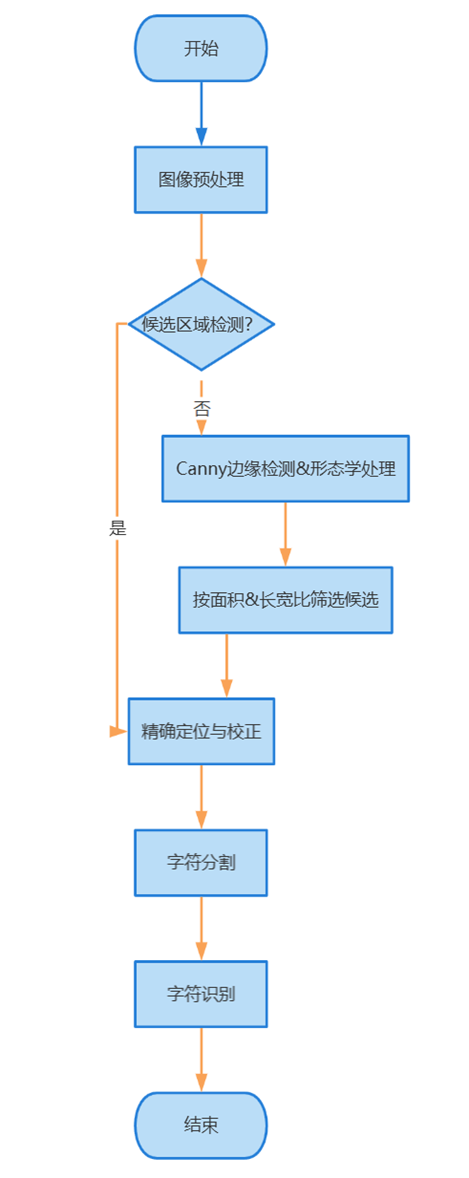
| 图表 1流程图 |
算法设计:
1.预处理与候选区域检测:
图像加载与标准化:读取输入图像,可选地进行尺寸调整以提高处理效率。
图像增强:通过灰度化、高斯模糊(去噪)、形态学操作(如开运算后与原图相减,突出车牌结构)和Otsu自适应阈值二值化,增强车牌特征。
边缘检测:使用Canny算子提取图像边缘。
轮廓筛选:对边缘图像进行形态学闭运算和开运算(连接断裂边缘、去除噪点),然后查找轮廓。根据轮廓的面积和最小外接矩形的长宽比,筛选出可能是车牌的候选区域。
2.车牌精确定位与颜色识别:
倾斜校正:对每个候选区域的最小外接矩形,计算其角点,并通过仿射变换校正车牌的倾斜。
颜色分析 (HSV空间):将校正后的候选车牌区域转换到HSV颜色空间。通过统计特定颜色范围(如蓝色、黄色、绿色,对应中国车牌常见颜色)的像素比例,判断车牌的主要颜色。
精确裁剪:根据识别出的车牌颜色,利用accurate_place函数进一步在HSV空间中优化车牌的边界,去除多余的背景,得到更精确的车牌图像(ROI)。
3.字符分割:
二值化与行定位:对精确定位后的车牌ROI进行灰度化,并根据车牌颜色(如黄、绿牌需反色处理)进行Otsu二值化。通过分析水平方向的像素投影直方图(find_waves),找到字符主要分布的行。
字符列定位:在已定位的字符行内,分析垂直方向的像素投影直方图(再次使用find_waves),分割出单个字符。算法包含对中文字符(通常较宽,可能由多个小波峰合并)和间隔点(通常较窄,可能会被剔除)的特殊处理逻辑。
4.字符识别 (HOG + SVM):
单个字符预处理:对每个分割出的字符图像块,进行尺寸归一化 (resize到固定大小如 SZ x SZ),并可选地进行倾斜校正 (deskew)。
特征提取:计算每个字符图像的HOG (Histogram of Oriented Gradients, 方向梯度直方图)特征。
分类识别:使用预先训练好的支持向量机 (SVM) 模型进行分类。系统维护两个SVM模型:一个用于识别第一个中文字符(省份简称,modelchinese),另一个用于识别后续的英文字母和数字(model)。如果本地没有模型文件 (.dat),代码会尝试从指定目录下的字符样本图片进行训练并保存模型。
5.结果展示:
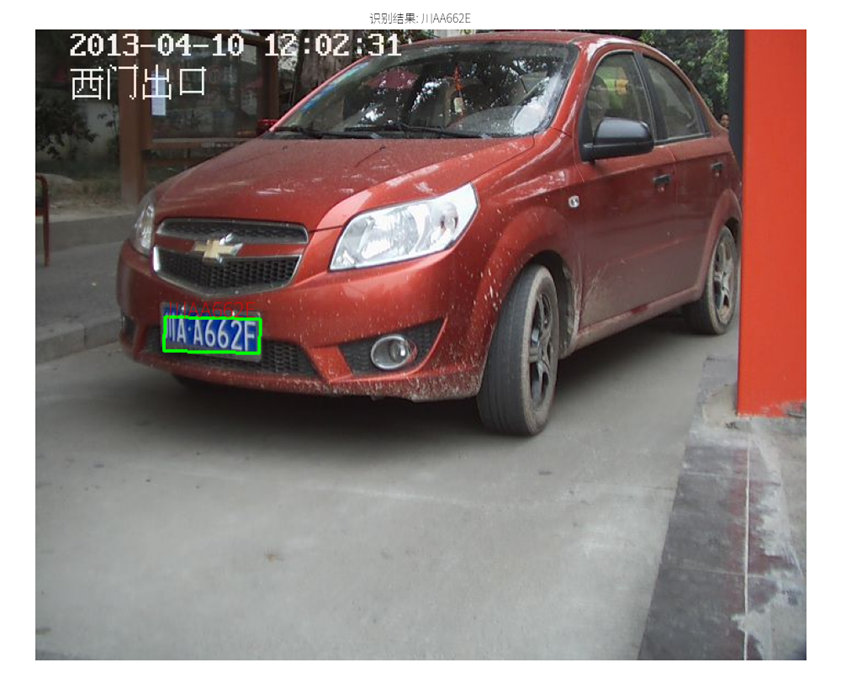
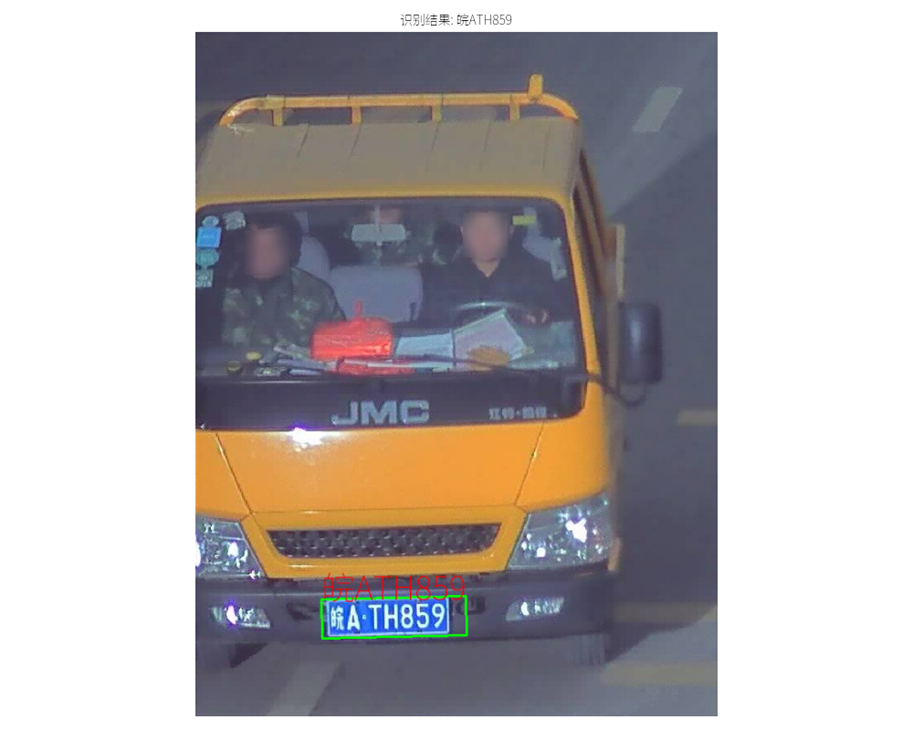
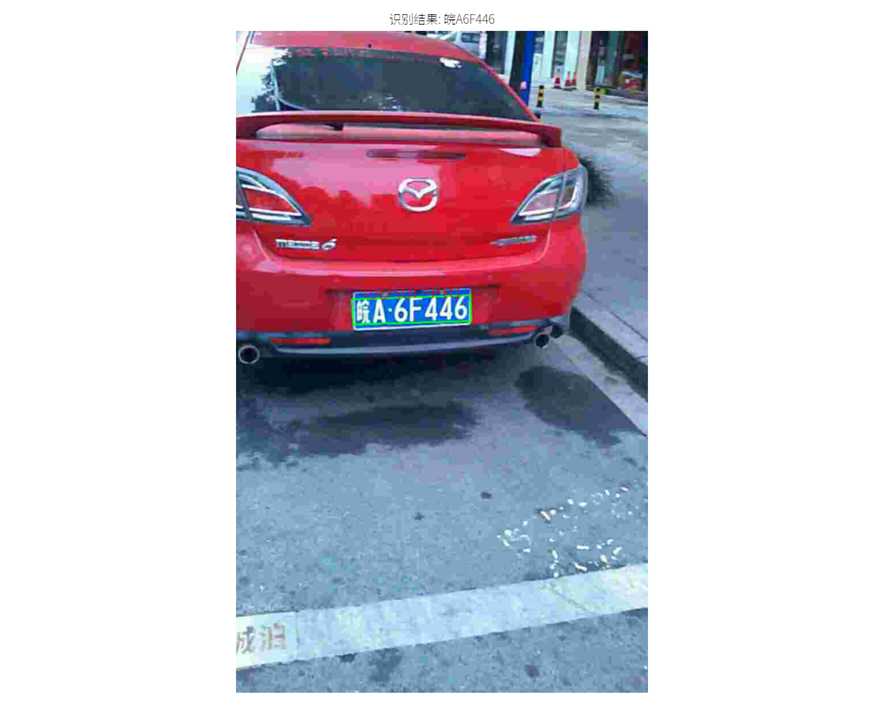
将识别出的单个字符组合成完整的车牌号码。在原始输入图像上,绘制出检测到的车牌边框。使用Pillow库(优先)或OpenCV的putText,将识别出的车牌号码标注在图像的车牌区域附近,并尝试加载自定义中文字体以正确显示。最终通过matplotlib显示处理后的图像及识别结果。
源程序代码:
python
import cv2
import numpy as np
from numpy.linalg import norm
import json
from PIL import ImageFont, ImageDraw, Image
import matplotlib.pyplot as plt
import matplotlib.font_manager as fm
import os
plt.rcParams['font.family'] = ['sans-serif']
plt.rcParams['font.sans-serif'] = ['SimHei', 'Microsoft YaHei', 'SimSun', 'NSimSun', 'FangSong', 'KaiTi']
plt.rcParams['axes.unicode_minus'] = False
FONT_PATH = r"D:\code\P code\Noto_Sans_SC\NotoSansSC-VariableFont_wght.ttf"
def set_custom_font(font_path):
try:
if os.path.exists(font_path):
# 加载自定义字体
custom_font_prop = fm.FontProperties(fname=font_path)
font_name = custom_font_prop.get_name()
# 将自定义字体添加到字体列表前面,优先使用
plt.rcParams['font.sans-serif'] = [font_name] + plt.rcParams['font.sans-serif']
return True
else:
print(f"警告:指定的字体文件路径不存在: {font_path}")
return False
except Exception as e:
print(f"警告:设置自定义字体失败: {e}")
return False
# 调用函数设置字体
font_loaded = set_custom_font(FONT_PATH)
# --- 全局常量 ---
SZ = 20
MAX_WIDTH = 1000
Min_Area = 2000
PROVINCE_START = 1000
# --- 辅助函数 ---
def imreadex(filename):
return cv2.imdecode(np.fromfile(filename, dtype=np.uint8), cv2.IMREAD_COLOR)
def point_limit(point):
if point[0] < 0: point[0] = 0
if point[1] < 0: point[1] = 0
def find_waves(threshold, histogram):
up_point = -1
is_peak = False
if histogram.size > 0 and histogram[0] > threshold:
up_point = 0
is_peak = True
wave_peaks = []
for i, x in enumerate(histogram):
if is_peak and x < threshold:
if i - up_point > 2: # 波峰宽度阈值
is_peak = False
wave_peaks.append((up_point, i))
elif not is_peak and x >= threshold:
is_peak = True
up_point = i
if is_peak and up_point != -1 and (i - up_point) > 4: # 确保最后一个波峰也被记录
wave_peaks.append((up_point, i))
return wave_peaks
def seperate_card(img, waves):
part_cards = []
for wave in waves:
part_cards.append(img[:, wave[0]:wave[1]])
return part_cards
def deskew(img):
m = cv2.moments(img)
if abs(m['mu02']) < 1e-2:
return img.copy()
skew = m['mu11'] / m['mu02']
M = np.float32([[1, skew, -0.5 * SZ * skew], [0, 1, 0]])
return cv2.warpAffine(img, M, (SZ, SZ), flags=cv2.WARP_INVERSE_MAP | cv2.INTER_LINEAR)
def preprocess_hog(digits):
samples = []
for img in digits:
if img is None or img.size == 0:
continue
gx = cv2.Sobel(img, cv2.CV_32F, 1, 0)
gy = cv2.Sobel(img, cv2.CV_32F, 0, 1)
mag, ang = cv2.cartToPolar(gx, gy)
bin_n = 16
bin_val = np.int32(bin_n * ang / (2 * np.pi))
s_sz_half = SZ // 2
bin_cells = bin_val[:s_sz_half, :s_sz_half], bin_val[s_sz_half:, :s_sz_half], \
bin_val[:s_sz_half, s_sz_half:], bin_val[s_sz_half:, s_sz_half:]
mag_cells = mag[:s_sz_half, :s_sz_half], mag[s_sz_half:, :s_sz_half], \
mag[:s_sz_half, s_sz_half:], mag[s_sz_half:, s_sz_half:]
hists = [np.bincount(b.ravel(), m.ravel(), bin_n) for b, m in zip(bin_cells, mag_cells)]
hist = np.hstack(hists)
eps = 1e-7
hist /= hist.sum() + eps
hist = np.sqrt(hist)
hist /= norm(hist) + eps
samples.append(hist)
return np.float32(samples)
provinces = [
"zh_cuan", "川", "zh_e", "鄂", "zh_gan", "赣", "zh_gan1", "甘",
"zh_gui", "贵", "zh_gui1", "桂", "zh_hei", "黑", "zh_hu", "沪",
"zh_ji", "冀", "zh_jin", "津", "zh_jing", "京", "zh_jl", "吉",
"zh_liao", "辽", "zh_lu", "鲁", "zh_meng", "蒙", "zh_min", "闽",
"zh_ning", "宁", "zh_qing", "靑", "zh_qiong", "琼", "zh_shan", "陕",
"zh_su", "苏", "zh_sx", "晋", "zh_wan", "皖", "zh_xiang", "湘",
"zh_xin", "新", "zh_yu", "豫", "zh_yu1", "渝", "zh_yue", "粤",
"zh_yun", "云", "zh_zang", "藏", "zh_zhe", "浙"
]
# 创建省份拼音到汉字的映射
province_map = {}
for i in range(0, len(provinces), 2):
if i+1 < len(provinces):
province_map[provinces[i]] = provinces[i+1]
class StatModel(object):
def load(self, fn):
try:
self.model = self.model.load(fn)
except AttributeError:
self.model = cv2.ml.SVM_load(fn)
def save(self, fn):
self.model.save(fn)
class SVM(StatModel):
def __init__(self, C=1, gamma=0.5):
self.model = cv2.ml.SVM_create()
self.model.setGamma(gamma)
self.model.setC(C)
self.model.setKernel(cv2.ml.SVM_RBF)
self.model.setType(cv2.ml.SVM_C_SVC)
def train(self, samples, responses):
self.model.train(samples, cv2.ml.ROW_SAMPLE, responses)
def predict(self, samples):
if samples.ndim == 1:
samples = samples.reshape(1, -1)
if samples.size == 0:
print("警告:SVM predict 方法接收到空样本数组。")
return None, np.array([]) # Match return type structure
return self.model.predict(samples)
class CardPredictor:
def __init__(self):
global Min_Area
try:
with open('config.js', encoding='utf-8') as f:
j = json.load(f)
for c_config in j["config"]:
if c_config["open"]:
self.cfg = c_config.copy()
Min_Area = self.cfg.get("Min_Area", Min_Area)
break
else:
raise RuntimeError('没有设置有效配置参数')
except FileNotFoundError:
raise FileNotFoundError("错误:未找到 config.js 文件。请确保它与脚本在同一目录中。")
except json.JSONDecodeError:
raise ValueError("错误:config.js 文件不是有效的 JSON 格式。")
self.font_path = FONT_PATH
if not os.path.exists(self.font_path):
print(f"警告: 字体文件在路径 '{self.font_path}' 未找到! 车牌号上的中文可能无法正确显示。")
def __del__(self):
try:
self.save_traindata()
except AttributeError:
pass
except Exception as e:
pass
def train_svm(self):
self.model = SVM(C=1, gamma=0.5)
self.modelchinese = SVM(C=1, gamma=0.5)
if os.path.exists("svm.dat"):
self.model.load("svm.dat")
else:
chars_train = []
chars_label = []
train_chars2_path = "train\\chars2"
if not os.path.isdir(train_chars2_path):
print(f"警告:目录 {train_chars2_path} 未找到。将跳过字母数字SVM训练。")
else:
for root, dirs, files in os.walk(train_chars2_path):
if len(os.path.basename(root)) > 1: continue
root_int = ord(os.path.basename(root))
for filename in files:
filepath = os.path.join(root, filename)
digit_img = cv2.imread(filepath)
if digit_img is None: continue
digit_img = cv2.cvtColor(digit_img, cv2.COLOR_BGR2GRAY)
chars_train.append(digit_img)
chars_label.append(root_int)
if chars_train:
chars_train = list(map(deskew, chars_train))
chars_train_hog = preprocess_hog(chars_train)
if chars_train_hog.ndim > 0 and chars_train_hog.size > 0:
chars_label_np = np.array(chars_label)
self.model.train(chars_train_hog, chars_label_np)
else:
print("警告:未找到字母数字字符的训练数据。")
if os.path.exists("svmchinese.dat"):
self.modelchinese.load("svmchinese.dat")
else:
chars_train_chi = []
chars_label_chi = []
train_charsChinese_path = "train\\charsChinese"
if not os.path.isdir(train_charsChinese_path):
print(f"警告:目录 {train_charsChinese_path} 未找到。将跳过中文字符SVM训练。")
else:
for root, dirs, files in os.walk(train_charsChinese_path):
if not os.path.basename(root).startswith("zh_"): continue
pinyin = os.path.basename(root)
try:
index = provinces.index(pinyin) + PROVINCE_START + 1
except ValueError:
continue
for filename in files:
filepath = os.path.join(root, filename)
digit_img = cv2.imread(filepath)
if digit_img is None: continue
digit_img = cv2.cvtColor(digit_img, cv2.COLOR_BGR2GRAY)
chars_train_chi.append(digit_img)
chars_label_chi.append(index)
if chars_train_chi:
chars_train_chi = list(map(deskew, chars_train_chi))
chars_train_chi_hog = preprocess_hog(chars_train_chi)
if chars_train_chi_hog.ndim > 0 and chars_train_chi_hog.size > 0:
chars_label_chi_np = np.array(chars_label_chi)
self.modelchinese.train(chars_train_chi_hog, chars_label_chi_np)
else:
print("警告:未找到中文字符的训练数据。")
def save_traindata(self):
if hasattr(self, 'model') and self.model is not None and self.model.model.isTrained():
if not os.path.exists("svm.dat"):
self.model.save("svm.dat")
if hasattr(self, 'modelchinese') and self.modelchinese is not None and self.modelchinese.model.isTrained():
if not os.path.exists("svmchinese.dat"):
self.modelchinese.save("svmchinese.dat")
def accurate_place(self, card_img_hsv, limit1, limit2, color):
row_num, col_num = card_img_hsv.shape[:2]
if row_num == 0 or col_num == 0:
return col_num, 0, 0, row_num
xl, xr, yh, yl = col_num, 0, 0, row_num
for r_idx in range(row_num):
count = 0
for c_idx in range(col_num):
H, S, V = card_img_hsv[r_idx, c_idx]
if limit1 < H <= limit2 and S > 34 and V > 46:
count += 1
if count / col_num > self.cfg.get("color_perc_row_confirm", 0.6):
if yl > r_idx: yl = r_idx
if yh < r_idx: yh = r_idx
for c_idx in range(col_num):
count = 0
for r_idx in range(row_num):
H, S, V = card_img_hsv[r_idx, c_idx]
if limit1 < H <= limit2 and S > 34 and V > 46:
count += 1
if count / row_num > self.cfg.get("color_perc_col_confirm", 0.5):
if xl > c_idx: xl = c_idx
if xr < c_idx: xr = c_idx
if yh <= yl: yh = row_num - 1
if xr <= xl: xr = col_num - 1
return xl, xr, yh, yl
def predict(self, car_pic, resize_rate=1):
if isinstance(car_pic, str):
img = imreadex(car_pic)
if img is None: return [], None, None, None
else:
img = car_pic
if img is None: return [], None, None, None
original_image_for_display = img.copy()
pic_hight, pic_width = img.shape[:2]
initial_pic_width, initial_pic_height = pic_width, pic_hight
if pic_width > MAX_WIDTH:
pic_rate = MAX_WIDTH / pic_width
img = cv2.resize(img, (MAX_WIDTH, int(pic_hight * pic_rate)), interpolation=cv2.INTER_LANCZOS4)
if resize_rate != 1:
current_h, current_w = img.shape[:2]
img = cv2.resize(img, (int(current_w * resize_rate), int(current_h * resize_rate)),interpolation=cv2.INTER_LANCZOS4)
blur_val = self.cfg.get("blur", 0)
if blur_val > 0:
img = cv2.GaussianBlur(img, (blur_val, blur_val), 0)
oldimg = img.copy()
img_gray = cv2.cvtColor(img, cv2.COLOR_BGR2GRAY)
kernel_open_close_size = self.cfg.get("morph_kernel_size", 20)
kernel_open_close = np.ones((kernel_open_close_size, kernel_open_close_size), np.uint8)
img_opening = cv2.morphologyEx(img_gray, cv2.MORPH_OPEN, kernel_open_close)
img_opened = cv2.addWeighted(img_gray, 1, img_opening, -1, 0)
ret, img_thresh = cv2.threshold(img_opened, 0, 255, cv2.THRESH_BINARY + cv2.THRESH_OTSU)
img_edge = cv2.Canny(img_thresh, self.cfg.get("canny_lower", 100), self.cfg.get("canny_upper", 200))
kernel_edge_r = self.cfg.get("morphologyr", 4)
kernel_edge_c = self.cfg.get("morphologyc", 19)
kernel_edge = np.ones((kernel_edge_r, kernel_edge_c), np.uint8)
img_edge1 = cv2.morphologyEx(img_edge, cv2.MORPH_CLOSE, kernel_edge)
img_edge2 = cv2.morphologyEx(img_edge1, cv2.MORPH_OPEN, kernel_edge)
try:
contours, hierarchy = cv2.findContours(img_edge2, cv2.RETR_TREE, cv2.CHAIN_APPROX_SIMPLE)
except ValueError:
image_contours, contours, hierarchy = cv2.findContours(img_edge2, cv2.RETR_TREE, cv2.CHAIN_APPROX_SIMPLE)
contours = [cnt for cnt in contours if cv2.contourArea(cnt) > Min_Area]
car_contours_rects = []
for cnt in contours:
rect = cv2.minAreaRect(cnt)
area_w, area_h = rect[1]
if area_w < 1 or area_h < 1: continue
rect_ratio = max(area_w, area_h) / min(area_w, area_h)
min_r, max_r = self.cfg.get("rect_min_ratio", 2), self.cfg.get("rect_max_ratio", 5.5)
if min_r < rect_ratio < max_r:
car_contours_rects.append(rect)
candidate_plates_info = []
for rect in car_contours_rects:
angle = rect[2]
rect_center, (rect_w, rect_h), rect_angle = rect
rect_expanded = (rect_center, (rect_w + 5, rect_h + 5), rect_angle if rect_angle != 0 else 1)
box = cv2.boxPoints(rect_expanded)
h_pt_cand = r_pt_cand = np.array([0, 0], dtype=np.float32) # Renamed
l_pt_cand = low_pt_cand = np.array([oldimg.shape[1], oldimg.shape[0]], dtype=np.float32)
for point in box:
if l_pt_cand[0] > point[0]: l_pt_cand = point.astype(np.float32)
if low_pt_cand[1] > point[1]: low_pt_cand = point.astype(np.float32)
if h_pt_cand[1] < point[1]: h_pt_cand = point.astype(np.float32)
if r_pt_cand[0] < point[0]: r_pt_cand = point.astype(np.float32)
card_img_candidate = None
if l_pt_cand[1] <= r_pt_cand[1]:
new_r_pt_cand = np.array([r_pt_cand[0], h_pt_cand[1]], dtype=np.float32)
pts1 = np.float32([l_pt_cand, h_pt_cand, r_pt_cand])
pts2 = np.float32([l_pt_cand, h_pt_cand, new_r_pt_cand])
else:
new_l_pt_cand = np.array([l_pt_cand[0], h_pt_cand[1]], dtype=np.float32)
pts1 = np.float32([l_pt_cand, h_pt_cand, r_pt_cand])
pts2 = np.float32([new_l_pt_cand, h_pt_cand, r_pt_cand])
if pts1.shape == (3, 2) and pts2.shape == (3, 2) and not np.array_equal(pts1,pts2):
try:
M = cv2.getAffineTransform(pts1, pts2)
dst = cv2.warpAffine(oldimg, M, (oldimg.shape[1], oldimg.shape[0]))
transformed_box = cv2.transform(np.array([box]), M)[0]
x_coords = transformed_box[:, 0]
y_coords = transformed_box[:, 1]
x_s, x_e = int(np.min(x_coords)), int(np.max(x_coords))
y_s, y_e = int(np.min(y_coords)), int(np.max(y_coords))
y_s = max(0, y_s)
y_e = min(dst.shape[0], y_e)
x_s = max(0, x_s)
x_e = min(dst.shape[1], x_e)
if y_e > y_s and x_e > x_s: card_img_candidate = dst[y_s:y_e, x_s:x_e]
except cv2.error as e_cv:
print(f"cv2.getAffineTransform 或 warpAffine 错误: {e_cv}")
if card_img_candidate is not None and card_img_candidate.size > 0:
candidate_plates_info.append(
{'img': card_img_candidate.copy(), 'rect_on_oldimg': rect, 'color': 'unprocessed'})
for plate_info in candidate_plates_info:
card_img = plate_info['img']
if card_img is None or card_img.size == 0: plate_info['valid'] = False; continue
card_img_hsv = cv2.cvtColor(card_img, cv2.COLOR_BGR2HSV)
r_n, c_n = card_img_hsv.shape[:2]
if r_n == 0 or c_n == 0: plate_info['valid'] = False; continue
pix_count = r_n * c_n
y_count, g_count, b_count, blk_count, w_count = 0, 0, 0, 0, 0
for ri in range(r_n):
for ci in range(c_n):
H, S, V = card_img_hsv[ri, ci]
if 11 < H <= 34 and S > 34:
y_count += 1
elif 35 < H <= 99 and S > 34:
g_count += 1
elif 99 < H <= 124 and S > 34:
b_count += 1
if 0 < H < 180 and 0 < S < 255 and 0 < V < 46:
blk_count += 1
elif 0 < H < 180 and 0 < S < 43 and 221 < V < 225:
w_count += 1
plate_color = "no"
l1, l2 = 0, 0
color_cfm_r = self.cfg.get("color_confirm_ratio", 0.4)
if y_count / pix_count >= color_cfm_r:
plate_color = "yello";l1, l2 = 11, 34
elif g_count / pix_count >= color_cfm_r:
plate_color = "green";l1, l2 = 35, 99
elif b_count / pix_count >= color_cfm_r:
plate_color = "blue";l1, l2 = 100, 124
elif (blk_count + w_count) / pix_count >= self.cfg.get("bw_confirm_ratio", 0.7):
plate_color = "bw"
plate_info['color'] = plate_color
if plate_color not in ("blue", "yello", "green"): plate_info['valid'] = False; continue
xl_a, xr_a, yh_a, yl_a = self.accurate_place(card_img_hsv, l1, l2, plate_color)
if yl_a >= yh_a or xl_a >= xr_a: plate_info['valid'] = False; continue
yl_a = max(0, yl_a)
yh_a = min(r_n, yh_a + 1)
xl_a = max(0, xl_a)
xr_a = min(c_n, xr_a + 1)
if yl_a >= yh_a or xl_a >= xr_a: plate_info['valid'] = False; continue
if plate_color == "green":
exp_r = self.cfg.get("green_expand_ratio", 0.25)
y_exp = int((yh_a - yl_a) * exp_r)
yl_a = max(0, yl_a - y_exp)
refined_img = card_img[yl_a:yh_a, xl_a:xr_a]
if refined_img.size == 0: plate_info['valid'] = False; continue
plate_info['img'] = refined_img
plate_info['valid'] = True
final_predict_text = []
final_roi = None
final_color = None
final_rect_oldimg = None
for p_info in candidate_plates_info:
if not p_info.get('valid', False): continue
ocr_img = p_info['img']
p_color = p_info['color']
gray_ocr = cv2.cvtColor(ocr_img, cv2.COLOR_BGR2GRAY)
if p_color in ("green", "yello"): gray_ocr = cv2.bitwise_not(gray_ocr)
ret, bin_ocr = cv2.threshold(gray_ocr, 0, 255, cv2.THRESH_BINARY + cv2.THRESH_OTSU)
x_hist = np.sum(bin_ocr, axis=1)
if x_hist.size == 0: continue
x_min_val, x_avg_val = np.min(x_hist), np.mean(x_hist)
x_thresh_val = (x_min_val + x_avg_val) / 2
waves_x = find_waves(x_thresh_val, x_hist)
if not waves_x: continue
wave_best_x = max(waves_x, key=lambda x_w: x_w[1] - x_w[0])
bin_ocr_char_row = bin_ocr[wave_best_x[0]:wave_best_x[1], :]
if bin_ocr_char_row.size == 0: continue
rn_cr, cn_cr = bin_ocr_char_row.shape[:2]
if rn_cr < 3 or cn_cr < 3: continue
if rn_cr > 2:
bin_ocr_char_row = bin_ocr_char_row[1:rn_cr - 1, :]
else:
continue
y_hist = np.sum(bin_ocr_char_row, axis=0)
if y_hist.size == 0: continue
y_min_val, y_avg_val = np.min(y_hist), np.mean(y_hist)
y_thresh_val = (y_min_val + y_avg_val) / self.cfg.get("char_segment_thresh_factor", 3.5)
waves_y = find_waves(y_thresh_val, y_hist)
min_chars, max_chars = self.cfg.get("min_char_num", 6), self.cfg.get("max_char_num", 8)
if not waves_y or len(waves_y) < min_chars - 1: continue
if len(waves_y) > 1 and (waves_y[0][1] - waves_y[0][0]) < (waves_y[1][1] - waves_y[1][0]) * 0.6:
if len(waves_y) > 2 and (waves_y[0][1] - waves_y[0][0] + waves_y[1][1] - waves_y[1][0]) < (
waves_y[2][1] - waves_y[2][0]) * 0.8:
wave_chinese = (waves_y[0][0], waves_y[2][1]);
waves_y = [wave_chinese] + waves_y[3:]
else:
wave_chinese = (waves_y[0][0], waves_y[1][1]);
waves_y = [wave_chinese] + waves_y[2:]
if len(waves_y) > min_chars:
dot_idx_cand = [i for i, w in enumerate(waves_y) if 1 < i < len(waves_y) - 1]
if dot_idx_cand:
dot_idx_cand.sort(key=lambda idx: waves_y[idx][1] - waves_y[idx][0])
dot_wave = waves_y[dot_idx_cand[0]]
other_widths = [(w[1] - w[0]) for i, w in enumerate(waves_y) if i != dot_idx_cand[0]]
if other_widths:
avg_char_w = np.mean(other_widths)
if avg_char_w > 0 and (dot_wave[1] - dot_wave[0]) < avg_char_w * self.cfg.get("dot_width_ratio_thresh", 0.35):
dot_img_seg = bin_ocr_char_row[:, dot_wave[0]:dot_wave[1]]
if dot_img_seg.size > 0 and np.mean(dot_img_seg) < self.cfg.get("dot_intensity_thresh", 50):
waves_y.pop(dot_idx_cand[0])
if not (min_chars <= len(waves_y) <= max_chars): continue
char_imgs = seperate_card(bin_ocr_char_row, waves_y)
current_text = []
valid_chars_count = 0
for i, char_img in enumerate(char_imgs):
if char_img.size == 0 or char_img.shape[0] < 5 or char_img.shape[1] < 5: continue
if np.mean(char_img) < self.cfg.get("char_min_intensity_thresh", 20) and i != 0: continue
border_val = char_img.shape[1] // 3
char_img_bordered = cv2.copyMakeBorder(char_img, border_val, border_val, border_val, border_val,
cv2.BORDER_CONSTANT, value=[0, 0, 0])
if char_img_bordered.size == 0: continue
char_img_resized = cv2.resize(char_img_bordered, (SZ, SZ), interpolation=cv2.INTER_AREA)
hog_features = preprocess_hog([char_img_resized])
if hog_features.size == 0: continue
char_str = ""
if i == 0:
if not hasattr(self, 'modelchinese') or not self.modelchinese.model.isTrained(): continue
_, resp = self.modelchinese.predict(hog_features)
if resp is not None and resp.size > 0:
pred_val = int(resp[0, 0])
try:
if 2045 <= pred_val <= 2055:
char_str = "皖"
else:
province_index = pred_val - PROVINCE_START - 1
if province_index % 2 == 1: # 确保取到的是拼音的索引
province_index -= 1
if 0 <= province_index < len(provinces):
province_pinyin = provinces[province_index]
if province_pinyin in province_map:
char_str = province_map[province_pinyin]
else:
char_str = "?"
print(f"未找到省份拼音对应的汉字: {province_pinyin}")
else:
char_str = "?"
print(f"省份索引超出范围: {province_index}")
except IndexError as e:
char_str = "?"
print(f"省份索引错误: {e}")
except Exception as e:
char_str = "?"
print(f"省份识别异常: {e}")
else:
if not hasattr(self, 'model') or not self.model.model.isTrained(): continue
_, resp = self.model.predict(hog_features)
if resp is not None and resp.size > 0:
pred_val_ascii = int(resp[0, 0])
if 32 <= pred_val_ascii <= 126:
char_str = chr(pred_val_ascii)
else:
char_str = "?"
if char_str == "1" and i == len(char_imgs) - 1:
h_c, w_c = char_img.shape[:2]
if w_c > 0 and h_c / w_c >= self.cfg.get("last_char_1_aspect_ratio_thresh", 7): continue
current_text.append(char_str)
valid_chars_count += 1
if min_chars <= valid_chars_count <= max_chars:
final_predict_text = current_text
final_roi = ocr_img.copy()
final_color = p_color
final_rect_oldimg = p_info['rect_on_oldimg']
break
if final_predict_text and final_rect_oldimg:
scale_x = initial_pic_width / oldimg.shape[1]
scale_y = initial_pic_height / oldimg.shape[0]
box_pts_oldimg = cv2.boxPoints(final_rect_oldimg)
box_pts_original = box_pts_oldimg.copy()
box_pts_original[:, 0] *= scale_x
box_pts_original[:, 1] *= scale_y
box_pts_original_int = np.intp(box_pts_original)
cv2.drawContours(original_image_for_display, [box_pts_original_int], 0, (0, 255, 0), 2)
text_to_show = "".join(final_predict_text)
bounding_rect = cv2.boundingRect(box_pts_original_int)
tx, ty, tw, th = bounding_rect
try:
font_size = int(th * 0.8)
if font_size <= 0: font_size = 10
font = ImageFont.truetype(self.font_path, font_size)
if hasattr(font, 'getbbox'):
text_bbox = font.getbbox(text_to_show)
text_width = text_bbox[2] - text_bbox[0]
text_height = text_bbox[3] - text_bbox[1]
text_y_offset_pil = text_bbox[1]
else:
text_width, text_height = font.getsize(text_to_show)
text_y_offset_pil = 0
while (text_width > tw or text_height > th * 1.1) and font_size > 5:
font_size = max(5, font_size - 2)
font = ImageFont.truetype(self.font_path, font_size)
if hasattr(font, 'getbbox'):
text_bbox = font.getbbox(text_to_show)
text_width = text_bbox[2] - text_bbox[0]
text_height = text_bbox[3] - text_bbox[1]
text_y_offset_pil = text_bbox[1]
else:
text_width, text_height = font.getsize(text_to_show)
text_y_offset_pil = 0
pil_img = Image.fromarray(cv2.cvtColor(original_image_for_display, cv2.COLOR_BGR2RGB))
draw = ImageDraw.Draw(pil_img)
text_x_pil = tx + int((tw - text_width) / 2)
text_y_pil = ty - text_height - 5
if text_y_pil < 0 or text_height > th: # 如果文字超出上方或高度本身就比车牌区域高
text_y_pil = ty + int((th - text_height) / 2) - text_y_offset_pil # 尝试垂直居中于车牌区域
text_x_pil = max(0, text_x_pil) #确保不超出图像左边界
text_y_pil = max(0, text_y_pil) #确保不超出图像上边界
draw.text((text_x_pil, text_y_pil), text_to_show, font=font, fill=(255, 0, 0, 255))
original_image_for_display = cv2.cvtColor(np.array(pil_img), cv2.COLOR_RGB2BGR)
except IOError:
print(f"警告: 字体文件 '{self.font_path}' 未找到或无法加载。车牌号上的中文可能无法正确显示。")
cv2.putText(original_image_for_display, text_to_show, (tx, ty - 10 if ty - 10 > 0 else ty + th + 15),
cv2.FONT_HERSHEY_SIMPLEX, 0.7, (0, 0, 255), 2)
except ImportError:
print("警告: Pillow库未安装或无法导入。车牌号上的中文可能无法正确显示。")
cv2.putText(original_image_for_display, text_to_show, (tx, ty - 10 if ty - 10 > 0 else ty + th + 15),
cv2.FONT_HERSHEY_SIMPLEX, 0.7, (0, 0, 255), 2)
except Exception as e_pil:
print(f"警告: 使用Pillow绘制文本时发生一般错误: {e_pil}。车牌号上的中文可能无法正确显示。")
cv2.putText(original_image_for_display, text_to_show, (tx, ty - 10 if ty - 10 > 0 else ty + th + 15),
cv2.FONT_HERSHEY_SIMPLEX, 0.7, (0, 0, 255), 2)
return final_predict_text, final_roi, final_color, original_image_for_display
# --- 主程序入口 ---
if __name__ == '__main__':
try:
predictor = CardPredictor()
predictor.train_svm()
image_path = r"1.jpg"
if not os.path.exists(image_path):
print(f"错误: 图片路径不存在: {image_path}")
else:
recognized_chars, roi_img, plate_color, image_with_result = predictor.predict(image_path)
if image_with_result is None:
print(f"无法处理图像: {image_path}")
else:
plate_text_console = "".join(recognized_chars) if recognized_chars else "无"
print(f"识别结果: {plate_text_console}")
plt.figure(figsize=(10, 8))
image_rgb_with_result = cv2.cvtColor(image_with_result, cv2.COLOR_BGR2RGB)
plt.imshow(image_rgb_with_result)
font_prop = None
if font_loaded:
font_prop = fm.FontProperties(fname=FONT_PATH)
else:
try:
font_prop = fm.FontProperties(family='SimHei')
except:
try:
font_prop = fm.FontProperties(family='Microsoft YaHei')
except:
print("无法找到合适的字体,将使用默认字体")
title_str = f"识别结果: {plate_text_console}" if recognized_chars else "未找到车牌或无法识别"
plt.title(title_str, fontproperties=font_prop)
plt.axis('off')
plt.tight_layout()
plt.show()
except FileNotFoundError as e:
print(f"文件未找到错误: {e}")
except RuntimeError as e:
print(f"运行时错误: {e}")
except ImportError as e:
print(f"导入错误: {e}")
except Exception as e:
print(f"发生未知错误: {e}")
import traceback
traceback.print_exc()运行结果:
五、算法的特色
1.精细化的车牌定位与颜色识别:
多阶段定位:算法不仅仅依赖单一的边缘或轮廓特征,而是结合了形状(轮廓面积、外接矩形长宽比)、仿射变换(校正倾斜)和 HSV颜色空间分析 (accurate_place 函数)。这种多阶段、多特征融合的定位方式提高了车牌检测的准确性和鲁棒性。
车牌颜色分类:能够识别车牌的主要颜色(如蓝色、黄色、绿色)。这不仅有助于更精确地裁剪车牌区域,也为后续处理(例如,黄/绿牌在字符二值化时通常需要反色处理)提供了依据。
2.针对性的字符识别策略:
双SVM模型:采用了两个独立的SVM(支持向量机)分类器。一个专门用于识别第一个中文字符(省份简称,modelchinese),另一个用于识别后续的英文字母和数字 (model)。考虑到中文字符与字母/数字在形态和数量上的差异,这种区分处理有助于提升各自的识别准确率。
HOG特征:使用方向梯度直方图 (HOG) 作为字符识别的特征,这是一种在物体检测和图像识别中表现良好的经典特征。
3.鲁棒的字符分割逻辑:
投影分析与波峰检测:通过分析车牌二值化图像在水平和垂直方向的像素投影直方图,并利用find_waves函数寻找波峰波谷,来实现字符的切割。
特殊字符处理:代码中对中文字符(通常比字母数字宽,可能需要合并相邻的窄波峰)和字符间的间隔点(通常较窄,可能会被识别为噪点并移除)进行了特殊逻辑处理,增强了字符分割的鲁棒性。
4.高度参数化与可配置性:
通过外部 config.js JSON文件来管理算法中的大量参数(如高斯模糊核大小、形态学核大小、各种面积和比例阈值、颜色确认比例等)。这使得用户可以在不修改核心代码的情况下,方便地调整参数以适应不同场景和图像质量,提高了算法的灵活性和可维护性。
5.完善的训练与模型管理:
代码具备自动训练和加载SVM模型的功能。如果预训练的模型文件 (.dat) 不存在,系统会自动从指定的训练图片目录加载样本,提取HOG特征,训练SVM模型,并保存以备后续使用。
6.友好的结果展示与中文字符支持:
在结果展示时,优先使用Pillow (PIL) 库配合指定的TrueType字体 (如 NotoSansSC) 在图像上绘制识别出的车牌号码。这能更好地支持中文字符的正确显示,提升了可视化效果。
如果Pillow库或字体加载失败,会自动回退到OpenCV的 putText 函数进行文本绘制。
最终处理结果通过 matplotlib 显示,便于观察和分析。
7.考虑了字符和车牌的几何畸变:
通过仿射变换校正整体车牌的倾斜。
deskew 函数用于校正单个字符图像的倾斜,这有助于提高HOG特征的稳定性和识别精度。