HttpClient
介绍
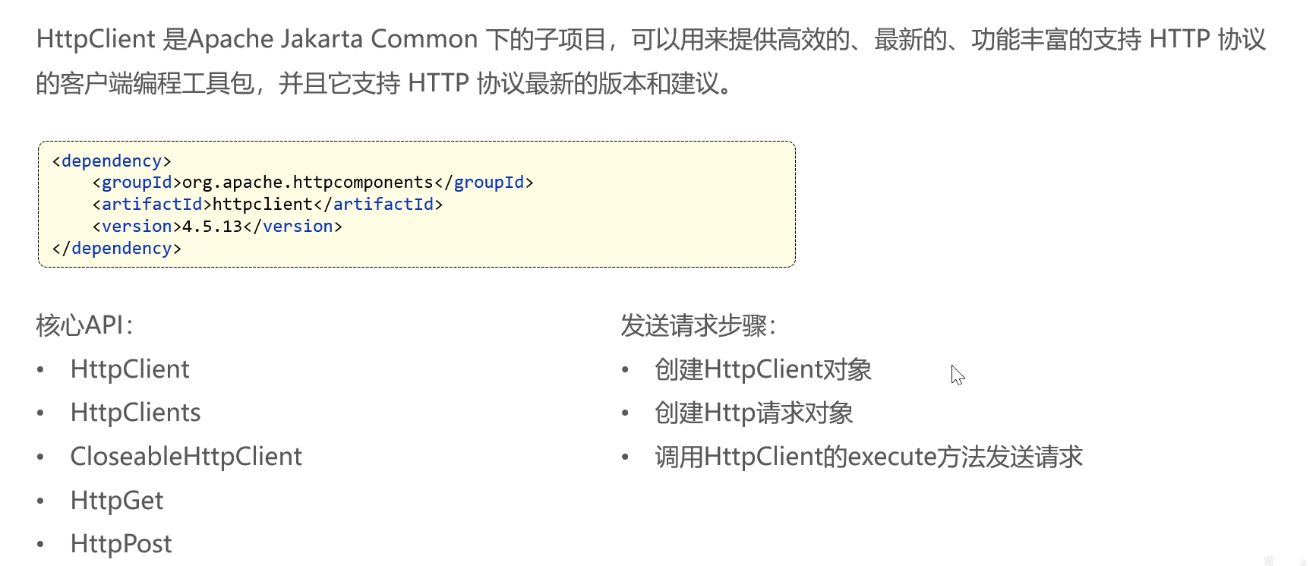
Get请求
java
@SpringBootTest
public class HttpClientTest {

    /**
     * 测试HttpClient发送Get请求
     */
    @Test
    public void testGet() throws Exception{
        //创建HttpClient对象
        CloseableHttpClient httpClient = HttpClients.createDefault();
        //创建HttpGet对象
        HttpGet httpGet = new HttpGet("http://localhost:8080/user/shop/status");
        //发送请求,获取响应结果
        CloseableHttpResponse httpResponse = httpClient.execute(httpGet);
        //输出响应结果
        int statusCode = httpResponse.getStatusLine().getStatusCode();
        System.out.println("响应状态码:"+statusCode);
        HttpEntity responseEntity = httpResponse.getEntity();
        String body = EntityUtils.toString(responseEntity);
        System.out.println("响应结果:"+body);

        //关闭资源
        httpResponse.close();
        httpClient.close();
    }
}
Post请求
java
    /**
     * 测试HttpClient发送Post请求
     */
    @Test
    public void testPost() throws Exception{
        //创建HttpClient对象
        CloseableHttpClient httpClient = HttpClients.createDefault();
        //创建HttpPost对象
        HttpPost httpPost = new HttpPost("http://localhost:8080/admin/employee/login");

        JSONObject jsonObject = new JSONObject();
        jsonObject.put("username","admin");
        jsonObject.put("password","123456");

        StringEntity entity = new StringEntity(jsonObject.toString());
        // 指定请求编码方式
        entity.setContentEncoding("utf-8");
        // 指定数据类型
        entity.setContentType("application/json");
        httpPost.setEntity(entity);
        // 发送请求
        CloseableHttpResponse response = httpClient.execute(httpPost);
        int statusCode = response.getStatusLine().getStatusCode();
        System.out.println("响应状态码:"+statusCode);
        HttpEntity responseEntity = response.getEntity();
        String body = EntityUtils.toString(responseEntity);
        System.out.println("响应结果:"+body);

        //关闭资源
        response.close();
        httpClient.close();
    }
封装成工具类
java
package com.sky.utils;

import com.alibaba.fastjson.JSONObject;
import org.apache.http.NameValuePair;
import org.apache.http.client.config.RequestConfig;
import org.apache.http.client.entity.UrlEncodedFormEntity;
import org.apache.http.client.methods.CloseableHttpResponse;
import org.apache.http.client.methods.HttpGet;
import org.apache.http.client.methods.HttpPost;
import org.apache.http.client.utils.URIBuilder;
import org.apache.http.entity.StringEntity;
import org.apache.http.impl.client.CloseableHttpClient;
import org.apache.http.impl.client.HttpClients;
import org.apache.http.message.BasicNameValuePair;
import org.apache.http.util.EntityUtils;

import java.io.IOException;
import java.net.URI;
import java.util.ArrayList;
import java.util.List;
import java.util.Map;

/**
 * Http工具类
 */
public class HttpClientUtil {

    static final  int TIMEOUT_MSEC = 5 * 1000;

    /**
     * 发送GET方式请求
     * @param url
     * @param paramMap
     * @return
     */
    public static String doGet(String url,Map<String,String> paramMap){
        // 创建Httpclient对象
        CloseableHttpClient httpClient = HttpClients.createDefault();

        String result = "";
        CloseableHttpResponse response = null;

        try{
            URIBuilder builder = new URIBuilder(url);
            if(paramMap != null){
                for (String key : paramMap.keySet()) {
                    builder.addParameter(key,paramMap.get(key));
                }
            }
            URI uri = builder.build();

            //创建GET请求
            HttpGet httpGet = new HttpGet(uri);

            //发送请求
            response = httpClient.execute(httpGet);

            //判断响应状态
            if(response.getStatusLine().getStatusCode() == 200){
                result = EntityUtils.toString(response.getEntity(),"UTF-8");
            }
        }catch (Exception e){
            e.printStackTrace();
        }finally {
            try {
                response.close();
                httpClient.close();
            } catch (IOException e) {
                e.printStackTrace();
            }
        }

        return result;
    }

    /**
     * 发送POST方式请求
     * @param url
     * @param paramMap
     * @return
     * @throws IOException
     */
    public static String doPost(String url, Map<String, String> paramMap) throws IOException {
        // 创建Httpclient对象
        CloseableHttpClient httpClient = HttpClients.createDefault();
        CloseableHttpResponse response = null;
        String resultString = "";

        try {
            // 创建Http Post请求
            HttpPost httpPost = new HttpPost(url);

            // 创建参数列表
            if (paramMap != null) {
                List<NameValuePair> paramList = new ArrayList();
                for (Map.Entry<String, String> param : paramMap.entrySet()) {
                    paramList.add(new BasicNameValuePair(param.getKey(), param.getValue()));
                }
                // 模拟表单
                UrlEncodedFormEntity entity = new UrlEncodedFormEntity(paramList);
                httpPost.setEntity(entity);
            }

            httpPost.setConfig(builderRequestConfig());

            // 执行http请求
            response = httpClient.execute(httpPost);

            resultString = EntityUtils.toString(response.getEntity(), "UTF-8");
        } catch (Exception e) {
            throw e;
        } finally {
            try {
                response.close();
            } catch (IOException e) {
                e.printStackTrace();
            }
        }

        return resultString;
    }

    /**
     * 发送POST方式请求
     * @param url
     * @param paramMap
     * @return
     * @throws IOException
     */
    public static String doPost4Json(String url, Map<String, String> paramMap) throws IOException {
        // 创建Httpclient对象
        CloseableHttpClient httpClient = HttpClients.createDefault();
        CloseableHttpResponse response = null;
        String resultString = "";

        try {
            // 创建Http Post请求
            HttpPost httpPost = new HttpPost(url);

            if (paramMap != null) {
                //构造json格式数据
                JSONObject jsonObject = new JSONObject();
                for (Map.Entry<String, String> param : paramMap.entrySet()) {
                    jsonObject.put(param.getKey(),param.getValue());
                }
                StringEntity entity = new StringEntity(jsonObject.toString(),"utf-8");
                //设置请求编码
                entity.setContentEncoding("utf-8");
                //设置数据类型
                entity.setContentType("application/json");
                httpPost.setEntity(entity);
            }

            httpPost.setConfig(builderRequestConfig());

            // 执行http请求
            response = httpClient.execute(httpPost);

            resultString = EntityUtils.toString(response.getEntity(), "UTF-8");
        } catch (Exception e) {
            throw e;
        } finally {
            try {
                response.close();
            } catch (IOException e) {
                e.printStackTrace();
            }
        }

        return resultString;
    }
    private static RequestConfig builderRequestConfig() {
        return RequestConfig.custom()
                .setConnectTimeout(TIMEOUT_MSEC)
                .setConnectionRequestTimeout(TIMEOUT_MSEC)
                .setSocketTimeout(TIMEOUT_MSEC).build();
    }

}
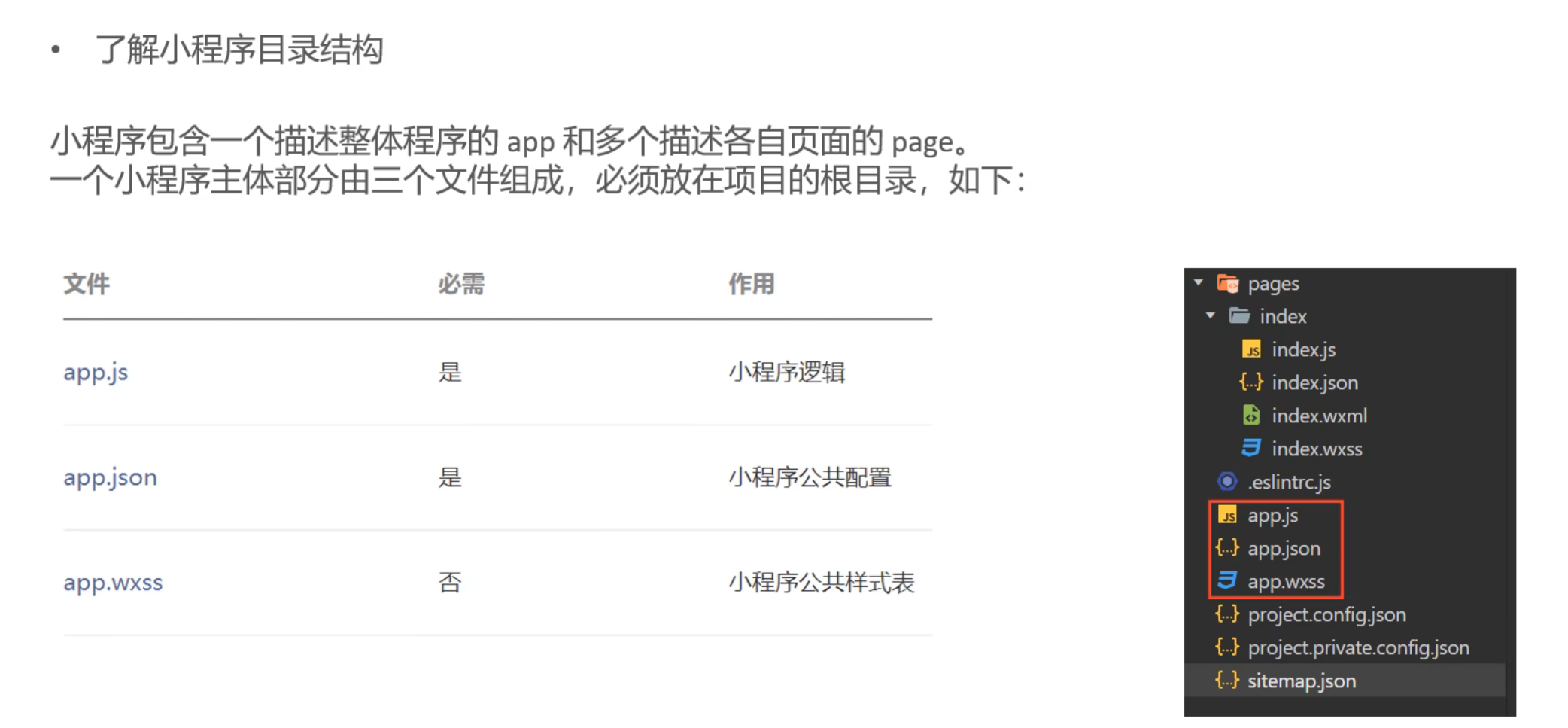
微信小程序介绍
微信登录
流程
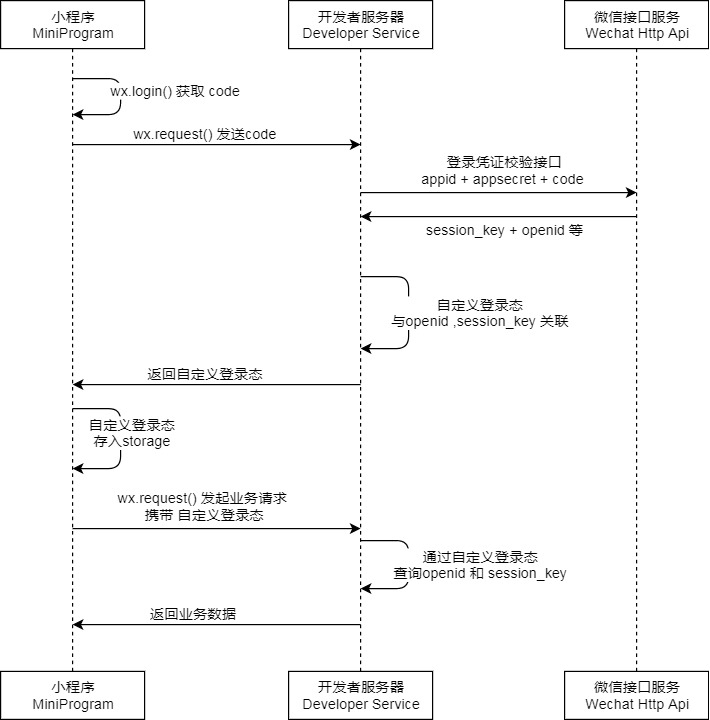
代码流程
controller层
java
@RestController
@RequestMapping("/user/user")
@Api(tags = "C端用户接口")
@Slf4j
public class UserController {

    @Autowired
    private UserService userService;
    @Autowired
    private JwtProperties jwtProperties;

    @PostMapping("/login")
    @ApiOperation("微信登录")
    public Result<UserLoginVO> login(@RequestBody UserLoginDTO userLoginDTO){
        log.info("微信登录:{}", userLoginDTO);
        // 微信登录
        User user = userService.wxLogin(userLoginDTO);

        // 为微信用户生成jwt令牌
        Map<String,Object> claims = new HashMap<>();
        claims.put("id", user.getId());
        String token = JwtUtil.createJWT(jwtProperties.getUserSecretKey(),jwtProperties.getUserTtl(),claims);

        // 封装返回的VO
        UserLoginVO userLoginVO = UserLoginVO.builder()
                .id(user.getId())
                .openid(user.getOpenid())
                .token(token)
                .build();

        return Result.success(userLoginVO);
    }
}
Service层
java
@Service
@Slf4j
public class UserServiceImpl implements UserService {

    private static final String WX_LOGIN = "https://api.weixin.qq.com/sns/jscode2session";

    @Autowired
    private WeChatProperties weChatProperties;
    @Autowired
    private UserMapper userMapper;

    /**
     * 微信登录
     * @param userLoginDTO
     * @return
     */
    public User wxLogin(UserLoginDTO userLoginDTO) {
        // 调用微信接口服务,用code换openid
        String openid = getOpenid(userLoginDTO.getCode());
        // 判断openid是否为空,为空登录失败,抛出异常
        if(openid==null){
            throw new LoginFailedException(MessageConstant.LOGIN_FAILED);
        }
        // 判断当前用户是否为新用户,是的话自动注册
        User user = userMapper.getByOpenid(openid);
        if(user==null){
            user = User.builder()
                    .openid(openid)
                    .createTime(LocalDateTime.now())
                    .build();
            userMapper.insert(user);
        }

        return user;
    }

    private String getOpenid(String code) {
        HashMap<String, String> map = new HashMap<>();
        map.put("appid", weChatProperties.getAppid());
        map.put("secret", weChatProperties.getSecret());
        map.put("js_code", code);
        map.put("grant_type", "authorization_code");
        String json = HttpClientUtil.doGet(WX_LOGIN,map);

        JSONObject jsonObject = JSON.parseObject(json);
        String openid = jsonObject.getString("openid");
        return openid;
    }
}