个人主页:云纳星辰怀自在
座右铭:"++所谓坚持,就是觉得还有希望!++"
引言
- 背景介绍:简述Excel在数据处理中的广泛应用,以及自动生成音标的需求场景(如语言学习、翻译辅助、数据分析)。
- 问题陈述:Excel本身不提供直接音标生成功能,如何通过技术手段实现自动化。
- 文章目标:提供实用方法,帮助用户高效集成音标生成到Excel工作流。
- 关键概念:解释音标(如国际音标IPA)的基本知识,及其在单词发音表示中的重要性。
实现方法概览
- 总体思路:介绍三种主要实现途径------使用Excel公式、VBA宏编程、以及外部API集成。
方法:使用VBA宏编程(进阶方法)
- 原理:通过VBA编写宏,调用外部词典API获取音标数据。
- 步骤详解:
-
准备工作:启用Excel宏功能(文件 > 选项 > 信任中心)。
-
VBA基础:简要介绍VBA编辑器界面和基本语法。
-
集成API:选择免费词典API(如Oxford Dictionaries API或Merriam-Webster API),注册获取API密钥。
-
宏编写步骤:
- 创建宏模块:在VBA编辑器中新建模块。
- 编写HTTP请求代码:使用
XMLHTTP对象发送请求到API,获取JSON响应。 - 解析音标数据:从JSON中提取音标字段(如IPA符号)。
- 自动化流程:将音标写入指定单元格。
-
示例代码:提供简单VBA代码片段(非完整代码,仅示意)。
vbaSub GetPhonetic() Dim word As String word = Range("A2").Value ' 假设A2为输入单词 ' 发送API请求并解析音标 ' ...(省略具体代码) Range("B2").Value = phonetic ' 将音标输出到B2 End Sub -
错误处理:添加代码处理API失败或无效单词的情况。
-
- 优缺点:自动化程度高,可处理动态数据,但需要编程技能和API依赖。
- 适用场景:中大型项目或需要实时更新的应用。
使用外部工具或插件(简化方法)
- 原理:利用现成的Excel插件或第三方工具实现音标生成。
- 步骤详解:
- 插件推荐:介绍可用工具(如Kutools for Excel或自定义插件),说明安装步骤。
- 集成方法:演示如何通过插件界面输入单词并自动生成音标。
- 数据同步:确保插件与Excel数据无缝连接。
- 优缺点:用户友好,免编程,但可能涉及成本或兼容性问题。
- 适用场景:非技术用户或快速部署需求。
数据处理与优化
- 音标显示:讨论如何在Excel中格式化音标(如使用特殊字体或Unicode字符)。
- 性能优化:处理大数据集时的技巧(如批量处理、缓存机制)。
- 错误排查:常见问题解决方案(如API限流、单词拼写错误)。
优缺点总结与最佳实践
- 总结:对比各方法的适用性,推荐VBA+API组合作为高效解决方案。
- 最佳实践:建议定期更新API密钥、备份数据,并测试不同单词类型。
- 局限性与改进:讨论方法限制(如API免费版功能有限),提出未来扩展(如集成AI模型)。
- 核心收获:强调Excel作为灵活工具,可通过技术扩展实现音标自动化生成。
很多时候,Excel借助API和插件可以极大提高工作效率,本文将会详细阐述如何在Excel中实现单词和句式的自动翻译,包括自动生成单词的音标。
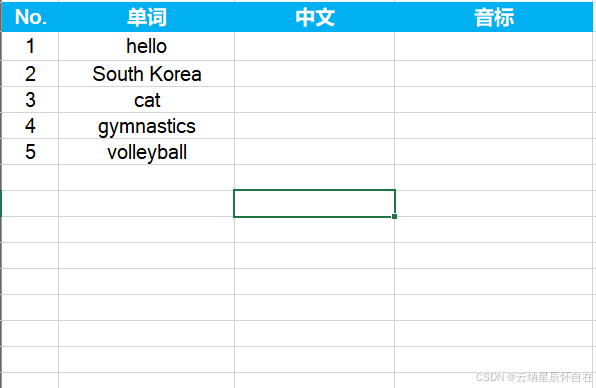
一、在Excel中维护英语词库,现在希望:
- 将这些单词的音标自动注解在单词右侧。
- 自动翻译这些单词
如下图所示,
二、在Excel中通过自动翻译文本
支持多种语言,如下图所示。

1. 自动生成音标
以下表格为例,希望将英语单词全部自动生成音标。需要借助VBA完成。当然,存在很多种方式,譬如:有道云API等各种,但大都需要付费,本文选择一款免费API,但是功能也首先,无法支持词组。
VBA源码
vbscript
Option Explicit

' ===================================================
' 主程序:优化版音标查询 (完整调试信息)
' ===================================================
Sub FetchPhonetic_Fast()
    Dim ws As Worksheet
    Dim lastRow As Long, i As Long, successCount As Long, failCount As Long
    Dim word As String, url As String, jsonResponse As String
    Dim phonetic As String
    Dim startTime As Single
    Dim totalWords As Long, processedCount As Long

    ' 初始化
    Set ws = ThisWorkbook.ActiveSheet
    Application.ScreenUpdating = False
    Application.Calculation = xlCalculationManual
    Application.EnableEvents = False
    startTime = Timer

    ' 找到B列最后一行
    lastRow = ws.Cells(ws.Rows.Count, "B").End(xlUp).Row
    If lastRow < 5 Then
        MsgBox "请在B列从第5行开始输入单词。", vbExclamation
        GoTo CleanExit
    End If

    ' 清空D列(音标列)旧数据
    ws.Range("D5:D" & lastRow).ClearContents

    ' 初始化计数器
    successCount = 0
    failCount = 0
    processedCount = 0
    totalWords = lastRow - 4

    ' 主循环
    For i = 5 To lastRow
        word = Trim(ws.Cells(i, "B").Value)

        ' 空单元格快速跳过机制
        If word = "" Then
            ws.Cells(i, "D").Value = "(空)"
            Application.StatusBar = "跳过空行: " & i - 4 & "/" & totalWords
            DoEvents
            GoTo NextRow
        End If

        ' 处理非空单词
        processedCount = processedCount + 1
        phonetic = ""

        ' 更新状态栏
        Application.StatusBar = "[" & processedCount & "个词/" & totalWords & "行] " & word

        ' === 调试信息:显示当前处理的行和单词 ===
        Debug.Print "========================================"
        Debug.Print "【主程序】第 " & i & " 行 | 单词: """ & word & """"
        Debug.Print "----------------------------------------"

        ' 构建请求URL并获取数据
        url = "https://api.dictionaryapi.dev/api/v2/entries/en/" & EncodeURIComponent(word)
        Debug.Print "【主程序】请求URL: " & url

        jsonResponse = HttpGetWithTimeout(url, 5000) ' 5秒超时

        ' === 调试信息:显示API返回状态 ===
        Debug.Print "【主程序】API返回状态: " & Left(jsonResponse, 150)
        Debug.Print "----------------------------------------"

        ' 智能解析音标
        phonetic = ExtractPhoneticFromJSON(jsonResponse, word)

        ' 更新计数器
        Select Case phonetic
            Case "不支持", "(查询失败)", "(查询超时)"
                failCount = failCount + 1
            Case Else
                successCount = successCount + 1
        End Select

        ' 写入结果
        ws.Cells(i, "D").Value = phonetic

        ' === 调试信息:显示最终结果 ===
        Debug.Print "【主程序】写入单元格结果: """ & phonetic & """"
        Debug.Print "【主程序】成功数: " & successCount & " | 失败数: " & failCount
        Debug.Print "========================================"
        Debug.Print ""

        ' 关键:让Excel处理其它事件
        DoEvents

        ' 智能延迟
        If i < lastRow Then
            If phonetic = "(查询超时)" Or phonetic = "(查询失败)" Then
                WaitSeconds 0.8
            ElseIf successCount Mod 5 = 0 And successCount > 0 Then
                WaitSeconds 0.3
            End If
        End If

NextRow:
    Next i

    ' 完成报告
    Dim timeCost As Single
    timeCost = Timer - startTime

    MsgBox "查询完成!" & vbNewLine & _
           "表格总行数: " & totalWords & vbNewLine & _
           "实际处理单词: " & processedCount & vbNewLine & _
           "成功获取音标: " & successCount & vbNewLine & _
           "查询失败/不支持: " & failCount & vbNewLine & _
           "空单元格跳过: " & (totalWords - processedCount) & vbNewLine & _
           "总耗时: " & Format(timeCost, "0.0") & " 秒", _
           vbInformation, "完成报告"

CleanExit:
    ' 恢复Excel设置
    Application.StatusBar = False
    Application.ScreenUpdating = True
    Application.Calculation = xlCalculationAutomatic
    Application.EnableEvents = True
End Sub

' ===================================================
' 核心函数1:增强调试版HTTP GET请求
' ===================================================
Private Function HttpGetWithTimeout(url As String, timeoutMs As Long) As String
    Dim http As Object
    Dim startTime As Single
    Dim errMsg As String

    On Error GoTo ErrorHandler

    ' 记录开始时间
    startTime = Timer
    Debug.Print "  【HTTP】开始请求,超时: " & timeoutMs & "ms"
    Debug.Print "  【HTTP】目标URL: " & url

    ' 尝试多种HTTP对象(按兼容性排序)
    Set http = CreateObject("MSXML2.ServerXMLHTTP.6.0")
    If http Is Nothing Then
        Debug.Print "  【HTTP】ServerXMLHTTP.6.0 创建失败,尝试XMLHTTP"
        Set http = CreateObject("MSXML2.XMLHTTP")
    End If
    If http Is Nothing Then
        Debug.Print "  【HTTP】XMLHTTP 创建失败,尝试Microsoft.XMLHTTP"
        Set http = CreateObject("Microsoft.XMLHTTP")
    End If

    If http Is Nothing Then
        errMsg = "[ERROR]: 无法创建任何HTTP对象"
        Debug.Print "  【HTTP】" & errMsg
        HttpGetWithTimeout = errMsg
        Exit Function
    End If

    Debug.Print "  【HTTP】对象创建成功: " & TypeName(http)

    ' 设置超时
    http.setTimeouts timeoutMs, timeoutMs, timeoutMs, timeoutMs

    ' 发送请求
    http.Open "GET", url, False
    Debug.Print "  【HTTP】连接已打开,准备发送..."

    http.send
    Debug.Print "  【HTTP】请求已发送,等待响应..."

    ' 等待响应
    Do While http.readyState <> 4
        DoEvents
        If (Timer - startTime) * 1000 > timeoutMs Then
            errMsg = "[TIMEOUT]: 超过" & timeoutMs & "毫秒未响应"
            Debug.Print "  【HTTP】" & errMsg
            HttpGetWithTimeout = errMsg
            Exit Function
        End If
    Loop

    Dim elapsedTime As Single
    elapsedTime = (Timer - startTime) * 1000
    Debug.Print "  【HTTP】请求完成,耗时: " & Format(elapsedTime, "0") & "ms"
    Debug.Print "  【HTTP】HTTP状态码: " & http.Status & " " & http.statusText
    Debug.Print "  【HTTP】readyState: " & http.readyState

    ' 检查HTTP状态码
    If http.Status = 200 Then
        Dim responseText As String
        responseText = http.responseText
        Debug.Print "  【HTTP】响应长度: " & Len(responseText) & " 字符"

        If Len(responseText) > 0 Then
            Debug.Print "  【HTTP】响应前200字符: " & Left(responseText, 200)
        Else
            Debug.Print "  【HTTP】响应内容为空"
        End If

        ' 检测是否为"未找到定义"的错误
        If InStr(1, responseText, """No Definitions Found""", vbTextCompare) > 0 Then
            HttpGetWithTimeout = "[NO_DEFINITION]"
        Else
            HttpGetWithTimeout = responseText
        End If
    Else
        ' 记录详细的HTTP错误信息
        errMsg = "[ERROR]: HTTP " & http.Status & " - " & http.statusText
        Debug.Print "  【HTTP】" & errMsg

        ' 如果是403/404等常见错误,尝试获取更多信息
        If http.Status >= 400 Then
            Dim errorBody As String
            errorBody = http.responseText
            If Len(errorBody) > 0 Then
                Debug.Print "  【HTTP】错误详情: " & Left(errorBody, 200)
            End If
        End If

        HttpGetWithTimeout = errMsg
    End If

    ' 清理对象
    Set http = Nothing
    Exit Function

ErrorHandler:
    ' 捕获并记录VBA错误
    errMsg = "[ERROR]: " & Err.Number & " - " & Err.Description
    Debug.Print "  【HTTP】VBA错误发生!"
    Debug.Print "  【HTTP】错误号: " & Err.Number
    Debug.Print "  【HTTP】错误描述: " & Err.Description
    Debug.Print "  【HTTP】错误来源: " & Err.Source

    If Not http Is Nothing Then
        Debug.Print "  【HTTP】HTTP对象状态 - readyState: " & http.readyState
    End If

    HttpGetWithTimeout = errMsg
End Function

' ===================================================
' 核心函数2:智能音标提取 (优先phonetic,其次phonetics[1].text)
' ===================================================
Private Function ExtractPhoneticFromJSON(jsonText As String, word As String) As String
    ' 步骤0:处理特殊标记
    If jsonText = "[NO_DEFINITION]" Then
        Debug.Print "  【解析】API返回: 单词未找到定义"
        ExtractPhoneticFromJSON = "不支持"
        Exit Function
    End If

    If Left(jsonText, 7) = "[ERROR]" Then
        Debug.Print "  【解析】HTTP请求失败: " & jsonText
        ExtractPhoneticFromJSON = "(查询失败)"
        Exit Function
    End If

    If jsonText = "[TIMEOUT]" Then
        Debug.Print "  【解析】请求超时"
        ExtractPhoneticFromJSON = "(查询超时)"
        Exit Function
    End If

    ' 检查是否为有效的JSON(以 [ 或 { 开头)
    If Len(jsonText) < 10 Then
        Debug.Print "  【解析】响应文本过短,长度: " & Len(jsonText)
        ExtractPhoneticFromJSON = "(查询失败)"
        Exit Function
    End If

    Dim firstChar As String
    firstChar = Left(jsonText, 1)
    If firstChar <> "[" And firstChar <> "{" Then
        Debug.Print "  【解析】无效JSON响应,开头字符: """ & firstChar & """"
        Debug.Print "  【解析】响应开头: " & Left(jsonText, 100)
        ExtractPhoneticFromJSON = "(查询失败)"
        Exit Function
    End If

    Debug.Print "  【解析】开始解析JSON,长度: " & Len(jsonText) & " 字符"
    Debug.Print "  【解析】JSON开头: " & Left(jsonText, 80) & "..."

    ' === 策略1:优先查找顶层的 "phonetic": "/.../" 字段(如gymnastics、cat) ===
    Dim phonetic As String
    phonetic = FindJsonValueByKey(jsonText, "phonetic")

    If phonetic <> "" Then
        Debug.Print "  【解析】找到顶层phonetic字段: """ & phonetic & """"
        If InStr(phonetic, "/") > 0 Then
            Debug.Print "  【解析】? 有效音标格式,使用顶层phonetic"
            ExtractPhoneticFromJSON = phonetic
            Exit Function
        Else
            Debug.Print "  【解析】? phonetic字段不含音标符号/,继续查找"
        End If
    Else
        Debug.Print "  【解析】未找到顶层phonetic字段"
    End If

    ' === 策略2:查找 phonetics 数组中的 text 字段 ===
    Debug.Print "  【解析】开始搜索phonetics数组..."

    ' 首先检查phonetics数组是否存在
    If InStr(1, jsonText, """phonetics"":", vbTextCompare) = 0 Then
        Debug.Print "  【解析】JSON中未找到phonetics字段"
        ExtractPhoneticFromJSON = "不支持"
        Exit Function
    End If

    ' 尝试查找第一个text字段 (索引0)
    Dim textFromArray As String
    textFromArray = FindTextInPhoneticsArray(jsonText, 0)

    If textFromArray <> "" And InStr(textFromArray, "/") > 0 Then
        Debug.Print "  【解析】找到phonetics[0].text: """ & textFromArray & """"
        ExtractPhoneticFromJSON = textFromArray
        Exit Function
    End If

    ' 尝试查找第二个text字段 (索引1) - 针对hello这类单词
    textFromArray = FindTextInPhoneticsArray(jsonText, 1)

    If textFromArray <> "" And InStr(textFromArray, "/") > 0 Then
        Debug.Print "  【解析】找到phonetics[1].text: """ & textFromArray & """"
        ExtractPhoneticFromJSON = textFromArray
        Exit Function
    End If

    ' 通用查找:尝试查找任何text字段
    Debug.Print "  【解析】尝试通用查找任何text字段..."
    textFromArray = FindAnyTextInPhonetics(jsonText)

    If textFromArray <> "" And InStr(textFromArray, "/") > 0 Then
        Debug.Print "  【解析】通用查找到text: """ & textFromArray & """"
        ExtractPhoneticFromJSON = textFromArray
        Exit Function
    End If

    Debug.Print "  【解析】? 未找到任何有效音标字段"
    Debug.Print "  【解析】JSON中包含phonetics但无有效text字段"
    ExtractPhoneticFromJSON = "不支持"
End Function

' ===================================================
' 辅助函数1:通用的JSON键值查找
' ===================================================
Private Function FindJsonValueByKey(jsonText As String, key As String) As String
    Dim searchKey As String, posStart As Long, posEnd As Long

    ' 模式1: "key": "value" (带空格)
    searchKey = """" & key & """: """
    posStart = InStr(1, jsonText, searchKey, vbTextCompare)

    If posStart > 0 Then
        posStart = posStart + Len(searchKey)
        posEnd = InStr(posStart, jsonText, """", vbTextCompare)
        If posEnd > posStart Then
            FindJsonValueByKey = Mid(jsonText, posStart, posEnd - posStart)
            Exit Function
        End If
    End If

    ' 模式2: "key":"value" (无空格)
    searchKey = """" & key & """:"""
    posStart = InStr(1, jsonText, searchKey, vbTextCompare)

    If posStart > 0 Then
        posStart = posStart + Len(searchKey)
        posEnd = InStr(posStart, jsonText, """", vbTextCompare)
        If posEnd > posStart Then
            FindJsonValueByKey = Mid(jsonText, posStart, posEnd - posStart)
            Exit Function
        End If
    End If

    ' 模式3: "key": value (值可能无引号,但音标通常有引号)
    searchKey = """" & key & """:"
    posStart = InStr(1, jsonText, searchKey, vbTextCompare)

    If posStart > 0 Then
        posStart = posStart + Len(searchKey)
        ' 跳过空格
        Do While posStart <= Len(jsonText) And Mid(jsonText, posStart, 1) = " "
            posStart = posStart + 1
        Loop

        If posStart <= Len(jsonText) Then
            If Mid(jsonText, posStart, 1) = """" Then
                posStart = posStart + 1
                posEnd = InStr(posStart, jsonText, """", vbTextCompare)
                If posEnd > posStart Then
                    FindJsonValueByKey = Mid(jsonText, posStart, posEnd - posStart)
                End If
            End If
        End If
    End If
End Function

' ===================================================
' 辅助函数2:在phonetics数组中查找指定索引的text字段(已修复循环)
' ===================================================
Private Function FindTextInPhoneticsArray(jsonText As String, targetIndex As Long) As String
    Dim searchKey As String
    Dim posStart As Long, currentPos As Long
    Dim foundCount As Long
    Dim inPhoneticsArray As Boolean

    ' 查找 "phonetics": 的位置
    searchKey = """phonetics"":"
    posStart = InStr(1, jsonText, searchKey, vbTextCompare)

    If posStart = 0 Then
        Exit Function
    End If

    currentPos = posStart + Len(searchKey)
    foundCount = -1 ' 从-1开始,找到第一个"text":"时变为0
    inPhoneticsArray = False

    ' 查找数组开始位置 [
    Do While currentPos <= Len(jsonText)
        If Mid(jsonText, currentPos, 1) = "[" Then
            inPhoneticsArray = True
            currentPos = currentPos + 1
            Exit Do
        End If
        currentPos = currentPos + 1
    Loop

    If Not inPhoneticsArray Then
        Exit Function
    End If

    ' 在数组内查找 - 使用Do While...Loop结构(支持Exit Do)
    Do While currentPos <= Len(jsonText) And inPhoneticsArray
        ' 检查是否遇到数组结束
        If Mid(jsonText, currentPos, 1) = "]" Then
            inPhoneticsArray = False
            Exit Do
        End If

        ' 查找 "text":" 模式
        If Mid(jsonText, currentPos, 8) = """text"":""" Then
            foundCount = foundCount + 1

            If foundCount = targetIndex Then
                ' 找到目标索引的text字段
                posStart = currentPos + 8 ' 跳过 """text"":"""
                Dim posEnd As Long
                posEnd = InStr(posStart, jsonText, """", vbTextCompare)

                If posEnd > posStart Then
                    FindTextInPhoneticsArray = Mid(jsonText, posStart, posEnd - posStart)
                    Exit Function
                End If
            End If

            ' 跳过这个text值,继续查找下一个
            currentPos = currentPos + 8
        Else
            currentPos = currentPos + 1
        End If
    Loop

    FindTextInPhoneticsArray = ""
End Function

' ===================================================
' 辅助函数3:通用查找phonetics中的任何text字段
' ===================================================
Private Function FindAnyTextInPhonetics(jsonText As String) As String
    Dim posStart As Long, posEnd As Long

    ' 直接查找第一个 "text":"/.../" 模式
    posStart = InStr(1, jsonText, """text"":""/", vbTextCompare)

    If posStart = 0 Then
        ' 尝试查找 "text":" 后接任何内容
        posStart = InStr(1, jsonText, """text"":""", vbTextCompare)
    End If

    If posStart > 0 Then
        posStart = posStart + 8 ' 跳过 """text"":"""
        posEnd = InStr(posStart, jsonText, """", vbTextCompare)
        If posEnd > posStart Then
            FindAnyTextInPhonetics = Mid(jsonText, posStart, posEnd - posStart)
        End If
    End If
End Function

' ===================================================
' 辅助函数4:URL编码
' ===================================================
Private Function EncodeURIComponent(text As String) As String
    Dim encoded As String, i As Long, ch As String, ascVal As Integer

    encoded = ""
    For i = 1 To Len(text)
        ch = Mid(text, i, 1)
        Select Case ch
            Case "A" To "Z", "a" To "z", "0" To "9", "-", "_", ".", "~"
                encoded = encoded & ch
            Case " "
                encoded = encoded & "%20"
            Case Else
                ascVal = AscW(ch)
                If ascVal < 0 Then ascVal = ascVal + 65536
                encoded = encoded & "%" & Hex(ascVal)
        End Select
    Next i

    Debug.Print "  【编码】原始: """ & text & """ -> 编码: """ & encoded & """"
    EncodeURIComponent = encoded
End Function

' ===================================================
' 辅助函数5:精确等待
' ===================================================
Private Sub WaitSeconds(seconds As Single)
    Dim startTime As Single
    startTime = Timer
    Do While Timer < startTime + seconds
        DoEvents
    Loop
End Sub
操作步骤
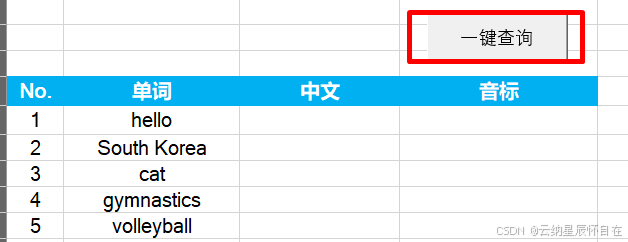
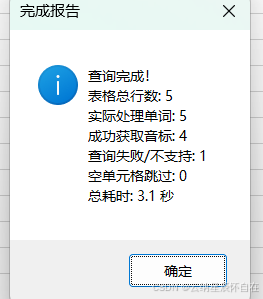
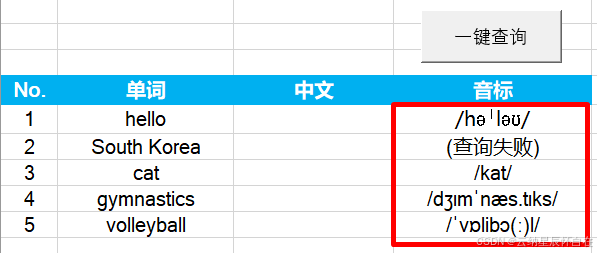
点击"一键查询"按钮,开始执行,完成后弹出右侧提示窗。结果如下:
2.自动翻译
下载安装"方方格子"插件
下载链接:http://www.ffcell.com/home/ffcell.aspx
选择适合电脑版本,下载安装,安装成功后如下图所示。

操作步骤
按如下图步骤进行操作
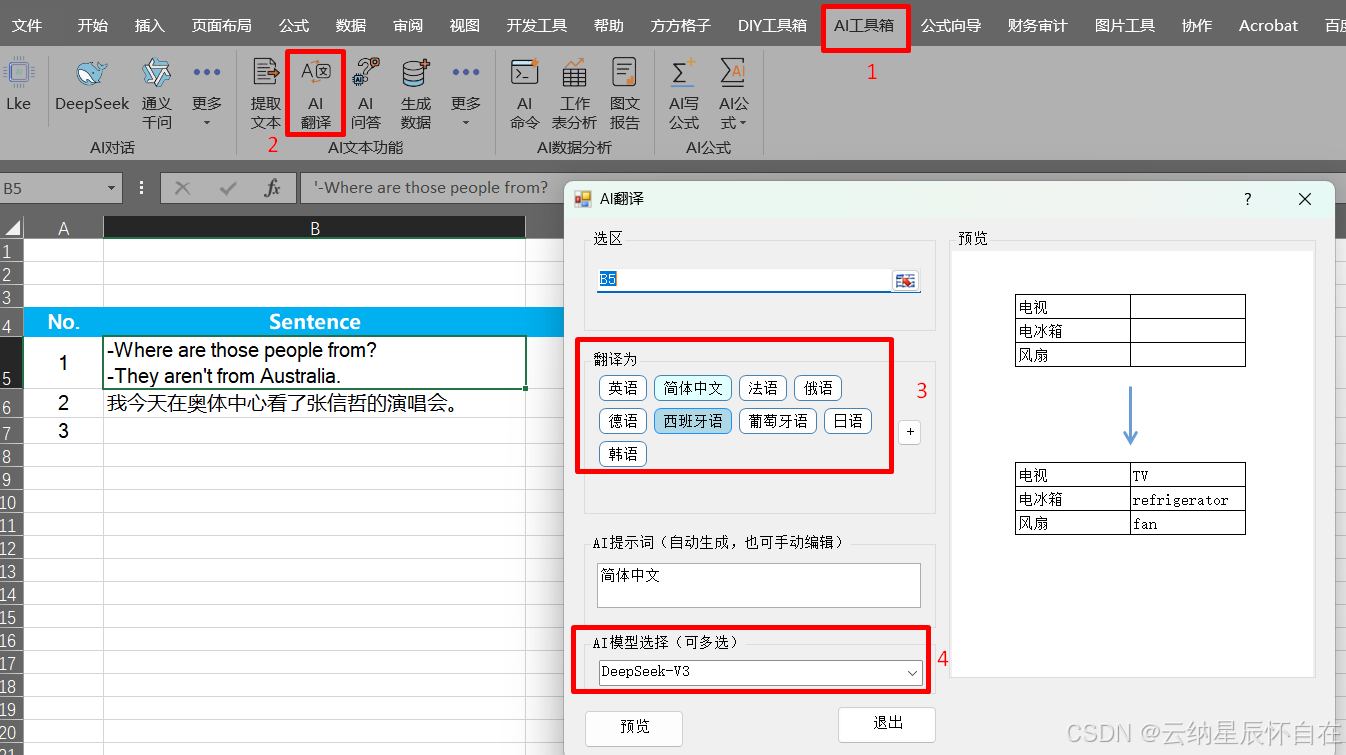
自动翻译结果如下:

资源<Excel文档>: 基于VBA调用API在Excel中自动生成音标和翻译
参考文章
