<!DOCTYPE html>
<html lang="zh-CN">
<head>
<meta charset="UTF-8">
<meta name="viewport" content="width=device-width, initial-scale=1.0">
<title>多彩背景切换演示</title>
<link rel="stylesheet" href="https://cdnjs.cloudflare.com/ajax/libs/font-awesome/6.4.0/css/all.min.css">
<style>
* {
margin: 0;
padding: 0;
box-sizing: border-box;
font-family: 'Segoe UI', 'Microsoft YaHei', sans-serif;
}
html, body {
height: 100%;
overflow: hidden;
}
body {
background: linear-gradient(135deg, #1a2a6c, #b21f1f, #fdbb2d);
color: #f8f4f4;
padding: 20px;
transition: background 0.8s ease, color 0.8s ease;
display: flex;
flex-direction: column;
justify-content: center;
align-items: center;
min-height: 100vh;
position: relative;
}
.container {
text-align: center;
max-width: 90%;
max-height: 90vh;
padding: 20px;
display: flex;
flex-direction: column;
justify-content: center;
align-items: center;
flex: 1;
overflow: visible;
}
/* 主题切换按钮 */
.theme-toggle {
position: fixed;
top: 20px;
right: 20px;
background: rgba(255, 255, 255, 0.2);
border: none;
border-radius: 50%;
width: 60px;
height: 60px;
color: white;
font-size: 1.8rem;
cursor: pointer;
z-index: 100;
transition: all 0.3s;
box-shadow: 0 4px 15px rgba(0, 0, 0, 0.2);
}
.theme-toggle:hover {
background: rgba(255, 255, 255, 0.3);
transform: scale(1.1);
}
h1 {
font-size: clamp(2rem, 5vw, 3.5rem);
margin-bottom: 15px;
text-shadow: 0 2px 10px rgba(0, 0, 0, 0.3);
transition: all 0.5s ease;
line-height: 1.2;
}
p {
font-size: clamp(1rem, 2.5vw, 1.3rem);
line-height: 1.4;
margin-bottom: 15px;
opacity: 0.9;
transition: all 0.5s ease;
max-width: 600px;
}
.theme-info {
background: rgba(255, 255, 255, 0.15);
backdrop-filter: blur(10px);
border-radius: 15px;
padding: 15px;
margin-top: 15px;
margin-bottom: 15px;
display: inline-block;
transition: all 0.5s ease;
max-width: 90%;
}
.theme-name {
font-size: clamp(1.2rem, 3vw, 1.5rem);
font-weight: bold;
margin-bottom: 8px;
}
.instruction {
font-size: clamp(0.9rem, 2vw, 1.1rem);
opacity: 0.8;
}
.theme-counter {
font-size: clamp(0.8rem, 1.8vw, 1rem);
margin-top: 8px;
opacity: 0.7;
}
.theme-grid {
display: grid;
grid-template-columns: repeat(auto-fit, minmax(80px, 1fr));
gap: 10px;
margin-top: 15px;
max-width: 600px;
width: 90%;
max-height: 120px;
overflow: visible;
padding-bottom: 5px;
}
.theme-preview {
height: 60px;
border-radius: 8px;
cursor: pointer;
transition: transform 0.3s ease;
box-shadow: 0 4px 8px rgba(0, 0, 0, 0.2);
border: 2px solid transparent;
}
.theme-preview:hover {
transform: translateY(-3px);
}
.theme-preview.active {
border: 2px solid white;
box-shadow: 0 0 15px rgba(255, 255, 255, 0.5);
}
.content-wrapper {
flex-direction: column;
align-items: center;
justify-content: center;
width: 100%;
height: 100%;
overflow: visible;
padding: 10px 0;
}
/* 响应式设计 */
@media (max-width: 768px) {
.container {
padding: 15px;
}
.theme-toggle {
width: 50px;
height: 50px;
font-size: 1.5rem;
}
.theme-grid {
grid-template-columns: repeat(auto-fit, minmax(60px, 1fr));
gap: 8px;
max-height: 100px;
}
.theme-preview {
height: 50px;
}
h1 {
margin-bottom: 10px;
}
p {
margin-bottom: 10px;
}
.theme-info {
margin-top: 10px;
margin-bottom: 10px;
}
}
@media (max-width: 480px) {
body {
padding: 10px;
}
.container {
padding: 10px;
}
.theme-grid {
grid-template-columns: repeat(auto-fit, minmax(50px, 1fr));
gap: 6px;
max-height: 80px;
}
.theme-preview {
height: 40px;
}
.theme-toggle {
width: 45px;
height: 45px;
font-size: 1.3rem;
top: 10px;
right: 10px;
}
h1 {
font-size: clamp(1.8rem, 5vw, 2.5rem);
margin-bottom: 8px;
}
p {
font-size: clamp(0.9rem, 2.5vw, 1.1rem);
margin-bottom: 8px;
}
}
/* 添加滚动提示 */
.scroll-hint {
position: absolute;
bottom: 5px;
font-size: 0.8rem;
opacity: 0.6;
animation: pulse 2s infinite;
}
@keyframes pulse {
0% { opacity: 0.6; }
50% { opacity: 0.3; }
100% { opacity: 0.6; }
}
</style>
</head>
<body>
<!-- 主题切换按钮 -->
<button class="theme-toggle" id="theme-toggle">
<i class="fas fa-palette"></i>
</button>
<div class="content-wrapper">
<div class="container">
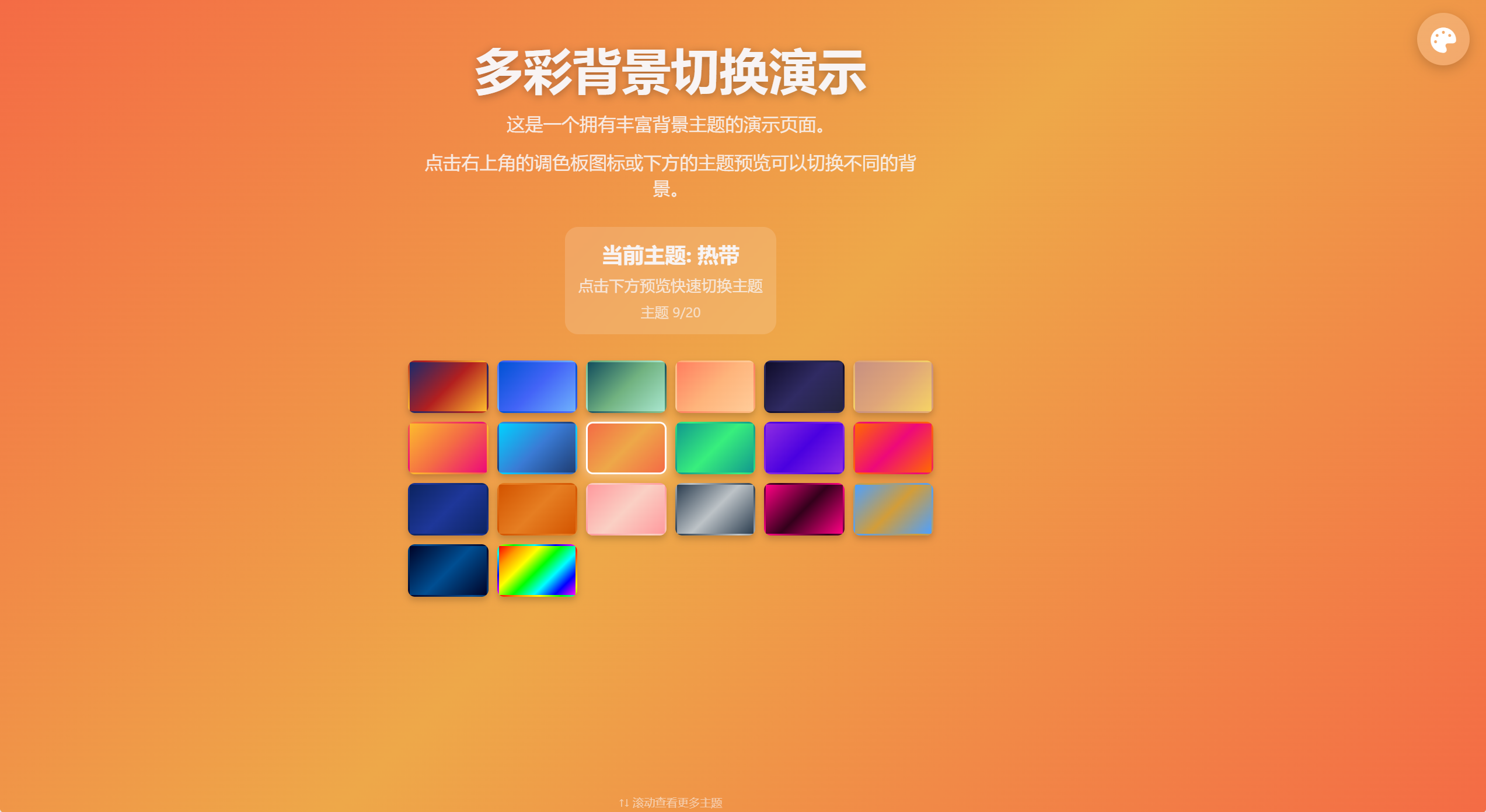
<h1>多彩背景切换演示</h1>
<p>这是一个拥有丰富背景主题的演示页面。</p>
<p>点击右上角的调色板图标或下方的主题预览可以切换不同的背景。</p>
<div class="theme-info">
<div class="theme-name" id="current-theme">当前主题: 默认</div>
<div class="instruction">点击下方预览快速切换主题</div>
<div class="theme-counter" id="theme-counter">主题 1/20</div>
</div>
<div class="theme-grid" id="theme-grid">
<!-- 主题预览将通过JavaScript动态生成 -->
</div>
<div class="scroll-hint" id="scroll-hint" style="display: none;">
↑↓ 滚动查看更多主题
</div>
</div>
</div>
<script>
// 扩展主题配置 - 添加更多精美背景
const themes = [
{
name: "默认",
background: "linear-gradient(135deg, #1a2a6c, #b21f1f, #fdbb2d)",
color: "#f8f4f4"
},
{
name: "海洋",
background: "linear-gradient(135deg, #0052D4, #4364F7, #6FB1FC)",
color: "#f8f4f4"
},
{
name: "森林",
background: "linear-gradient(135deg, #134E5E, #71B280, #a8e6cf)",
color: "#f8f4f4"
},
{
name: "日落",
background: "linear-gradient(135deg, #ff7e5f, #feb47b, #ffcc99)",
color: "#333333"
},
{
name: "夜空",
background: "linear-gradient(135deg, #0f0c29, #302b63, #24243e)",
color: "#f8f4f4"
},
{
name: "沙漠",
background: "linear-gradient(135deg, #c79081, #dfa579, #f6d365)",
color: "#333333"
},
{
name: "樱花",
background: "linear-gradient(135deg, #fdbb2d, #f46b45, #ee0979)",
color: "#f8f4f4"
},
{
name: "冰川",
background: "linear-gradient(135deg, #00d2ff, #3a7bd5, #1e3c72)",
color: "#f8f4f4"
},
{
name: "热带",
background: "linear-gradient(135deg, #f46b45, #eea849, #f46b45)",
color: "#f8f4f4"
},
{
name: "极光",
background: "linear-gradient(135deg, #11998e, #38ef7d, #11998e)",
color: "#f8f4f4"
},
{
name: "薰衣草",
background: "linear-gradient(135deg, #8e2de2, #4a00e0, #8e2de2)",
color: "#f8f4f4"
},
{
name: "日出",
background: "linear-gradient(135deg, #ff6a00, #ee0979, #ff6a00)",
color: "#f8f4f4"
},
{
name: "深蓝",
background: "linear-gradient(135deg, #0c2461, #1e3799, #0c2461)",
color: "#f8f4f4"
},
{
name: "秋叶",
background: "linear-gradient(135deg, #d35400, #e67e22, #d35400)",
color: "#f8f4f4"
},
{
name: "糖果",
background: "linear-gradient(135deg, #ff9a9e, #fad0c4, #ff9a9e)",
color: "#333333"
},
{
name: "金属",
background: "linear-gradient(135deg, #2c3e50, #bdc3c7, #2c3e50)",
color: "#f8f4f4"
},
{
name: "霓虹",
background: "linear-gradient(135deg, #ff0084, #33001b, #ff0084)",
color: "#f8f4f4"
},
{
name: "海滩",
background: "linear-gradient(135deg, #4da0ff, #d39d38, #4da0ff)",
color: "#f8f4f4"
},
{
name: "星空",
background: "linear-gradient(135deg, #000428, #004e92, #000428)",
color: "#f8f4f4"
},
{
name: "彩虹",
background: "linear-gradient(135deg, #ff0000, #ff9900, #ffff00, #00ff00, #00ffff, #0000ff, #ff00ff)",
color: "#333333"
}
];
// 当前主题索引
let currentThemeIndex = 0;
// 应用主题
function applyTheme(index) {
currentThemeIndex = index;
const theme = themes[currentThemeIndex];
// 应用新主题
document.body.style.background = theme.background;
document.body.style.color = theme.color;
// 更新主题信息
document.getElementById('current-theme').textContent = `当前主题: ${theme.name}`;
document.getElementById('theme-counter').textContent = `主题 ${currentThemeIndex + 1}/${themes.length}`;
// 更新按钮提示
const themeToggle = document.getElementById('theme-toggle');
themeToggle.title = `当前主题: ${theme.name}`;
// 添加切换动画效果
themeToggle.style.transform = 'scale(1.2) rotate(15deg)';
setTimeout(() => {
themeToggle.style.transform = 'scale(1) rotate(0deg)';
}, 300);
// 更新预览激活状态
updatePreviewActiveState();
}
// 切换主题(下一个)
function toggleTheme() {
const nextIndex = (currentThemeIndex + 1) % themes.length;
applyTheme(nextIndex);
}
// 更新预览激活状态
function updatePreviewActiveState() {
const previews = document.querySelectorAll('.theme-preview');
previews.forEach((preview, index) => {
if (index === currentThemeIndex) {
preview.classList.add('active');
} else {
preview.classList.remove('active');
}
});
}
// 创建主题预览
function createThemePreviews() {
const themeGrid = document.getElementById('theme-grid');
themeGrid.innerHTML = '';
themes.forEach((theme, index) => {
const preview = document.createElement('div');
preview.className = 'theme-preview';
preview.style.background = theme.background;
preview.title = theme.name;
preview.addEventListener('click', () => {
applyTheme(index);
});
themeGrid.appendChild(preview);
});
}
// 检查是否需要显示滚动提示
function checkScrollHint() {
const themeGrid = document.getElementById('theme-grid');
const scrollHint = document.getElementById('scroll-hint');
// 检查网格内容是否超出容器
if (themeGrid.scrollHeight > themeGrid.clientHeight) {
scrollHint.style.display = 'block';
} else {
scrollHint.style.display = 'none';
}
}
// 初始化页面
document.addEventListener('DOMContentLoaded', function() {
// 创建主题预览
createThemePreviews();
// 主题切换按钮
document.getElementById('theme-toggle').addEventListener('click', toggleTheme);
// 设置初始主题提示
const themeToggle = document.getElementById('theme-toggle');
themeToggle.title = `当前主题: ${themes[currentThemeIndex].name}`;
// 更新预览激活状态
updatePreviewActiveState();
// 添加键盘支持
document.addEventListener('keydown', function(e) {
if (e.key === 'ArrowRight' || e.key === ' ') {
// 右箭头或空格键切换到下一个主题
toggleTheme();
e.preventDefault();
} else if (e.key === 'ArrowLeft') {
// 左箭头切换到上一个主题
const prevIndex = (currentThemeIndex - 1 + themes.length) % themes.length;
applyTheme(prevIndex);
e.preventDefault();
}
});
// 确保页面不会出现滚动条
window.addEventListener('resize', function() {
document.body.style.overflow = 'hidden';
document.documentElement.style.overflow = 'hidden';
checkScrollHint();
});
// 初始设置
document.body.style.overflow = 'hidden';
document.documentElement.style.overflow = 'hidden';
// 检查是否需要显示滚动提示
setTimeout(checkScrollHint, 100);
});
</script>
</body>
</html>