如果是构造函数,相信大家都会,如果不是构造函数,核心就是NewObject。
- 在运行时构建
这里构建Ceiusm的一个组件
		globeAnchor = NewObject<UCesiumGlobeAnchorComponent>(Cast<UObject>(this),UCesiumGlobeAnchorComponent::StaticClass(),TEXT("GlobeAnchor"),RF_Transactional);         // 支持Undo/Redo
		//AddOwnedComponent(globeAnchor);
		//globeAnchor->AttachToComponent(RootComponent,FAttachmentTransformRules::KeepRelativeTransform);
		globeAnchor->RegisterComponent();
		AddInstanceComponent(globeAnchor);

UClass* baseClass = FindObject<UClass>(ANY_PACKAGE, TEXT("CameraComponent"));
UCameraComponent* tmpComp = NewObject<UCameraComponent>(Cast<UObject>(this), baseClass, *it.CameraName);
tmpComp->AttachToComponent(RootComponent, FAttachmentTransformRules::KeepRelativeTransform);
tmpComp->RegisterComponent();
AddInstanceComponent(tmpComp);

FRotator camRot = it.CameraRot;
//添加通道偏移
camRot += FRotator(m_channelData.offsetPatch, m_channelData.offsetYaw, m_channelData.offsetRoll);

tmpComp->SetRelativeLocation(it.CameraPos);
tmpComp->SetRelativeRotation(camRot);
其实核心就是 NewObject,RegisterComponent,AddInstanceComponent。
1. NewObject
-
用于动态创建一个UObject派生类的实例。
-
参数包括Outer(用于内存管理)、类名、对象名、标志等。
-
这里创建了一个UCesiumGlobeAnchorComponent实例。
2. RegisterComponent
-
将组件注册到引擎中,使其成为激活状态,参与游戏逻辑。
-
注册后,组件会收到BeginPlay等事件,并每帧更新(如果需要)。
3. AddInstanceComponent
-
将组件添加到Actor的实例组件列表中,并自动注册组件(如果尚未注册)。
-
同时设置组件的外部对象(Outer)为当前Actor,并管理组件的生命周期。
二.NewObject 标志位的思考
我在场景里删了globeranchor,又把它组装上结果我在运行时编译器里没看到。如果在编辑器,添加,或者构造函数里添加都能在编辑器里看到经纬度参数的变化,但删除后,再用NewObject,居然就看不到了,可是断点里明明生成成功了。于是使用了RF_Transactional。

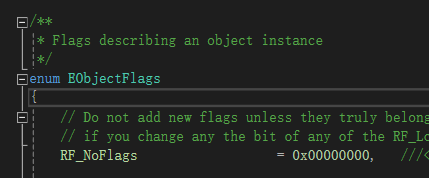
如果实例化的组件,总哪里不对,说不定是参数不对。这里应该是属于重做了这个组件,也不确定,留作日后思考。
-
RF_Public:对象在其包外可见。通常用于需要在蓝图中或其它类中访问的对象。
-
RF_Standalone:即使没有被引用,也保留对象以供编辑。这通常用于在编辑器中独立存在的对象,比如一个放在关卡中的Actor。
-
RF_MarkAsNative:在构造时标记为原生(仅用于UField及其派生类)。不要在其他地方使用这个标志进行检测。
-
RF_Transactional:对象是事务性的,支持撤销/重做。常用于编辑器中的对象。
-
RF_ClassDefaultObject:此对象是其类的默认对象(即类默认对象,CDO)。
-
RF_ArchetypeObject:此对象是另一个对象的模板(类似于类默认对象,但用于实例的模板)。
-
RF_Transient:不保存对象。通常用于运行时临时对象,不会保存到磁盘。
三.删除
		globeAnchor->DestroyComponent();
		globeAnchor = nullptr;