引言
"这个功能在开发环境运行得很流畅,但一到生产环境就卡得要命。"如果你写过几年代码,一定听过或说过类似的话。性能问题往往像潜伏的幽灵------开发时看不见,上线后才现身,而此时修复成本已经高昂得让人心疼。
我曾经遇到过一个让人崩溃的案例:一个看似简单的数据处理功能,在小数据集上测试完美,但当用户数据量增长到百万级时,内存占用飙升到2GB+,GC暂停时间超过5秒,用户体验直接崩溃。经过彻底的性能分析,我们发现问题出在几个"优雅"的Lambda表达式上------每次调用都在堆上创建新对象,频繁GC最终拖垮了整个应用。
Kotlin以其简洁优雅的语法深受开发者喜爱,但这种"语法糖"背后隐藏着性能开销。好消息是 :Kotlin提供了强大的性能优化机制------内联函数、@JvmField、lateinit等------只要理解原理,就能在保持代码优雅的同时获得接近C++的性能。
本文将深入Kotlin性能优化的核心技术,从内联机制到内存管理,从字节码分析到实战优化策略,帮助你写出既优雅又高效的Kotlin代码。
一、理解性能:从JVM到Kotlin
1.1 Kotlin代码的执行路径
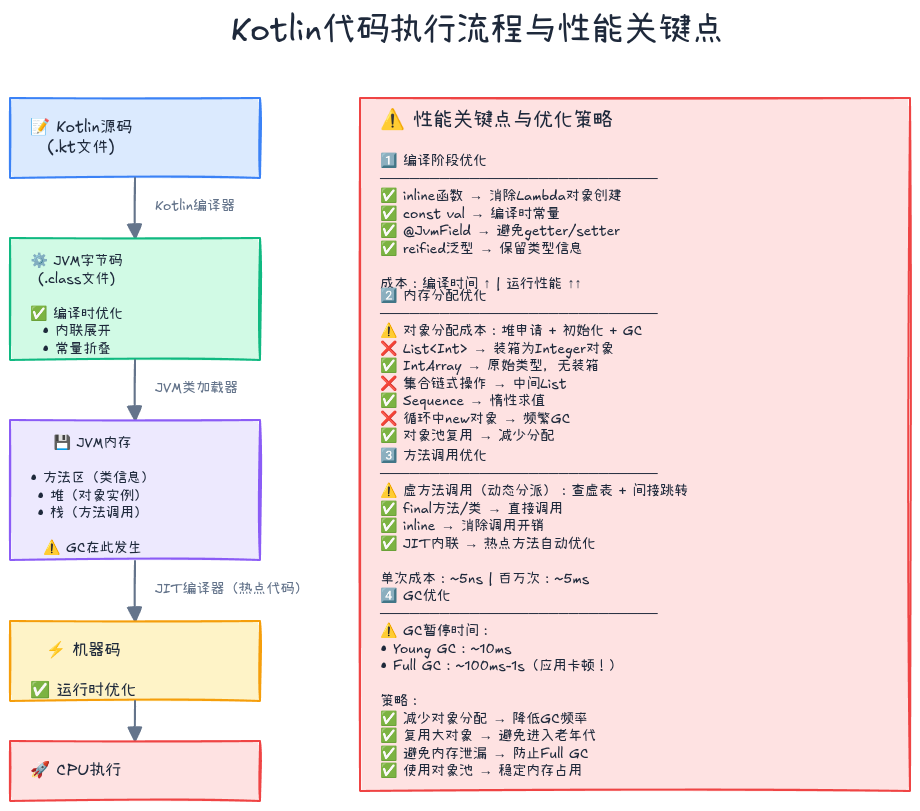
Kotlin代码的执行经历以下阶段:
Kotlin源码 (.kt)
    ↓ [Kotlin编译器]
字节码 (.class)
    ↓ [JVM类加载器]
JVM内存(方法区/堆/栈)
    ↓ [JIT编译器]
机器码
    ↓ [CPU执行]
程序运行结果关键点:
- 编译时优化:Kotlin编译器可以进行内联、常量折叠等优化
- JVM优化:JIT编译器会热点代码优化为机器码
- 运行时成本:对象创建、垃圾回收、方法调用都有开销
1.2 性能瓶颈的三大来源
1. 对象分配与GC
kotlin
// ❌ 每次调用都创建新的Lambda对象
fun processItems(items: List<Int>) {
    items.forEach { item ->  // Lambda创建对象
        println(item)
    }
}

// ✅ 使用内联函数避免对象创建
inline fun processItems(items: List<Int>) {
    items.forEach { item ->  // 内联后无对象创建
        println(item)
    }
}
2. 方法调用开销
kotlin
// ❌ 虚方法调用(动态分派)
interface Calculator {
    fun add(a: Int, b: Int): Int
}
class SimpleCalc : Calculator {
    override fun add(a: Int, b: Int) = a + b
}

// ✅ 静态方法调用(内联)
inline fun add(a: Int, b: Int) = a + b
3. 装箱/拆箱开销
kotlin
// ❌ 基本类型装箱为对象
val numbers: List<Int> = listOf(1, 2, 3)  // Int装箱为Integer

// ✅ 使用专用集合避免装箱
val numbers: IntArray = intArrayOf(1, 2, 3)  // 原始类型数组
1.3 性能分析工具
| 工具 | 用途 | 使用场景 |
|---|---|---|
| Android Profiler | CPU/内存/网络分析 | Android应用性能分析 |
| IntelliJ Profiler | CPU火焰图、内存分配 | JVM应用开发时分析 |
| JMH (Java Microbenchmark Harness) | 微基准测试 | 精确测量代码性能 |
| javap | 反编译字节码 | 理解编译器生成的代码 |
| JVM Bytecode Viewer | 可视化字节码 | 分析方法调用和对象创建 |
二、内联函数:零开销抽象的秘密
2.1 内联函数原理
什么是内联 ?
内联是将函数调用处替换为函数体代码,避免方法调用开销和Lambda对象创建。
普通函数调用:
kotlin
fun calculate(a: Int, b: Int, operation: (Int, Int) -> Int): Int {
    return operation(a, b)
}

val result = calculate(5, 3) { x, y -> x + y }编译后的字节码等价于:
java
// Lambda被编译为一个对象
Function2 operation = new Function2() {
    public Integer invoke(Integer x, Integer y) {
        return x + y;
    }
};
int result = calculate(5, 3, operation);内联函数:
kotlin
inline fun calculate(a: Int, b: Int, operation: (Int, Int) -> Int): Int {
    return operation(a, b)
}

val result = calculate(5, 3) { x, y -> x + y }编译后的字节码等价于:
java
// 函数体直接展开,无对象创建
int result = 5 + 3;
2.2 内联函数的三种形式
1. 基本内联 (inline)
kotlin
inline fun <T> measure(block: () -> T): T {
    val start = System.nanoTime()
    val result = block()
    val end = System.nanoTime()
    println("Execution time: ${(end - start) / 1_000_000}ms")
    return result
}

// 使用
measure {
    Thread.sleep(100)
}

// 编译后等价于:
val start = System.nanoTime()
Thread.sleep(100)
val end = System.nanoTime()
println("Execution time: ${(end - start) / 1_000_000}ms")
2. 具体化类型参数 (inline + reified)
kotlin
// ❌ 普通泛型:类型擦除,无法获取T的实际类型
fun <T> isInstance(value: Any): Boolean {
    return value is T  // 编译错误!
}

// ✅ 内联+reified:保留类型信息
inline fun <reified T> isInstance(value: Any): Boolean {
    return value is T  // 正确!
}

// 使用
println(isInstance<String>("Hello"))  // true
println(isInstance<Int>("Hello"))     // false
实战案例:类型安全的JSON解析
kotlin
inline fun <reified T> String.parseJson(): T {
    val json = Json { ignoreUnknownKeys = true }
    return json.decodeFromString<T>(this)
}

// 使用
data class User(val id: Int, val name: String)

val jsonString = """{"id": 1, "name": "Alice"}"""
val user: User = jsonString.parseJson()  // 类型安全!
3. 禁止内联 (noinline)
kotlin
inline fun processData(
    data: List<Int>,
    inline transform: (Int) -> Int,      // 会被内联
    noinline callback: (Int) -> Unit      // 不会被内联
) {
    val transformed = data.map(transform)
    transformed.forEach(callback)
}

// 为什么需要noinline?
// 1. callback可能被存储或传递给其他函数
// 2. callback可能需要作为对象使用
2.3 内联函数的性能影响
基准测试对比:
kotlin
import kotlinx.benchmark.*
import kotlin.random.Random

@State(Scope.Benchmark)
@BenchmarkMode(Mode.AverageTime)
@OutputTimeUnit(BenchmarkTimeUnit.MILLISECONDS)
class InlineBenchmark {

    val data = List(100_000) { Random.nextInt(1000) }

    // 普通高阶函数
    fun <T> List<T>.myFilter(predicate: (T) -> Boolean): List<T> {
        val result = mutableListOf<T>()
        for (element in this) {
            if (predicate(element)) {
                result.add(element)
            }
        }
        return result
    }

    // 内联高阶函数
    inline fun <T> List<T>.myFilterInline(predicate: (T) -> Boolean): List<T> {
        val result = mutableListOf<T>()
        for (element in this) {
            if (predicate(element)) {
                result.add(element)
            }
        }
        return result
    }

    @Benchmark
    fun filterNormal(): List<Int> {
        return data.myFilter { it > 500 }
    }

    @Benchmark
    fun filterInline(): List<Int> {
        return data.myFilterInline { it > 500 }
    }
}

// 结果(示例):
// filterNormal:  5.2ms  (创建Lambda对象)
// filterInline:  2.1ms  (内联展开,无对象创建)
// 性能提升:~60%
2.4 何时使用内联
✅ 应该使用内联的场景:
- 高阶函数:接受Lambda参数的工具函数
- 频繁调用的小函数:性能敏感的热点代码
- 需要具体化类型参数 :使用
reified的地方
❌ 不应该使用内联的场景:
- 大型函数:代码体积膨胀(每个调用点都复制代码)
- 递归函数:无法内联
- 访问私有成员的函数:内联后会破坏封装
最佳实践:
kotlin
// ✅ 好的内联:小函数 + Lambda参数
inline fun <T> T.applyIf(condition: Boolean, block: T.() -> Unit): T {
    if (condition) block()
    return this
}

// ❌ 不好的内联:大函数(100+行)
inline fun processComplexData(data: List<Data>, config: Config) {
    // 100行复杂逻辑...
    // 每个调用点都会复制这100行代码!
}
三、内存优化:减少分配,避免泄漏
3.1 对象分配成本分析
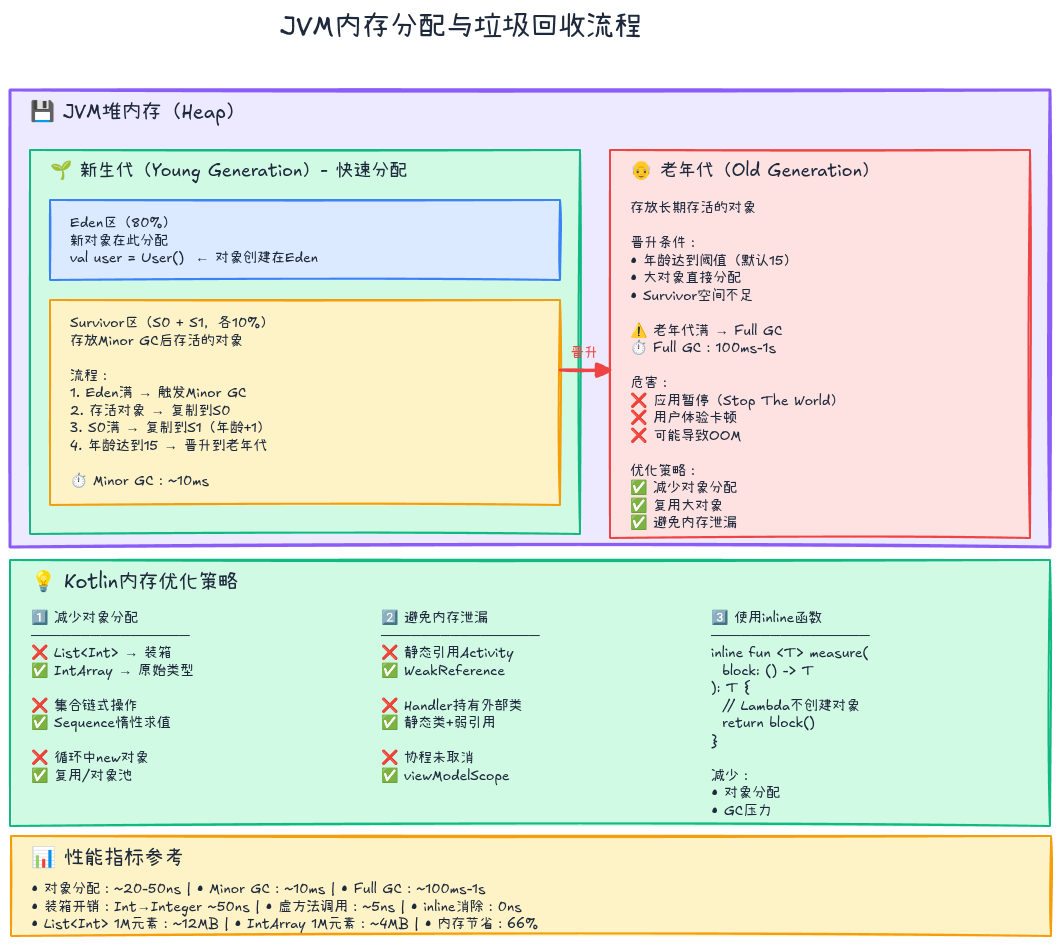
对象分配的隐藏成本:
- 分配时间:在堆上申请内存(几十纳秒)
- 初始化时间:构造函数执行、字段赋值
- GC成本:对象越多,GC扫描和回收时间越长
实测数据(JMH基准测试):
kotlin
@Benchmark
fun allocateObjects() {
    repeat(10_000) {
        val obj = Data(it, "value$it")  // 每次分配对象
    }
}

// 结果:~1.2ms(包括分配+GC)
// 如果改为对象复用:~0.3ms(75%性能提升)
3.2 减少对象分配的策略
1. 使用基本类型数组
kotlin
// ❌ 装箱:每个Int都变成Integer对象
val numbers: List<Int> = List(1_000_000) { it }
// 内存占用:~4MB(Integer对象)+ ~8MB(对象头)= 12MB

// ✅ 原始类型数组:无装箱
val numbers: IntArray = IntArray(1_000_000) { it }
// 内存占用:~4MB
// 性能提升:访问速度快3-5倍
2. 使用Sequence延迟计算
kotlin
// ❌ List:中间集合都会分配内存
val result = (1..1_000_000)
    .filter { it % 2 == 0 }     // 创建中间List(~50万元素)
    .map { it * 2 }              // 创建另一个中间List
    .take(10)                    // 只需要10个

// ✅ Sequence:惰性求值,无中间集合
val result = (1..1_000_000).asSequence()
    .filter { it % 2 == 0 }     // 延迟执行
    .map { it * 2 }              // 延迟执行
    .take(10)                    // 只处理需要的元素
    .toList()

// 内存节省:~4MB → ~1KB
3. 避免不必要的Lambda对象
kotlin
class UserRepository {
    // ❌ 每次调用都创建新的Lambda对象
    fun findUser(id: Int): User? {
        return database.query { user ->
            user.id == id
        }
    }

    // ✅ 使用内联函数避免对象创建
    inline fun findUser(id: Int): User? {
        return database.queryInline { user ->
            user.id == id
        }
    }
}
4. 对象池复用
kotlin
// 高频创建的对象使用对象池
class ObjectPool<T>(
    private val factory: () -> T,
    private val reset: (T) -> Unit,
    maxSize: Int = 10
) {
    private val pool = ArrayDeque<T>(maxSize)

    fun acquire(): T {
        return if (pool.isNotEmpty()) {
            pool.removeFirst()
        } else {
            factory()
        }
    }

    fun release(obj: T) {
        reset(obj)
        if (pool.size < 10) {
            pool.addLast(obj)
        }
    }
}

// 使用示例:复用StringBuilder
val stringBuilderPool = ObjectPool(
    factory = { StringBuilder(256) },
    reset = { it.clear() }
)

fun buildString(): String {
    val sb = stringBuilderPool.acquire()
    try {
        sb.append("Hello, ")
        sb.append("World!")
        return sb.toString()
    } finally {
        stringBuilderPool.release(sb)
    }
}
3.3 避免内存泄漏
常见内存泄漏场景:
1. 静态引用持有Activity/Fragment
kotlin
// ❌ 内存泄漏:静态变量持有Activity
class LeakyActivity : AppCompatActivity() {
    companion object {
        lateinit var instance: LeakyActivity  // 危险!
    }

    override fun onCreate(savedInstanceState: Bundle?) {
        super.onCreate(savedInstanceState)
        instance = this  // Activity无法被回收
    }
}

// ✅ 使用弱引用
class SafeActivity : AppCompatActivity() {
    companion object {
        private var instanceRef: WeakReference<SafeActivity>? = null
        val instance: SafeActivity? get() = instanceRef?.get()
    }

    override fun onCreate(savedInstanceState: Bundle?) {
        super.onCreate(savedInstanceState)
        instanceRef = WeakReference(this)
    }
}
2. 匿名内部类持有外部引用
kotlin
class MainActivity : AppCompatActivity() {
    // ❌ 内存泄漏:Handler持有Activity引用
    private val handler = object : Handler(Looper.getMainLooper()) {
        override fun handleMessage(msg: Message) {
            // 访问外部Activity
            updateUI()  // 隐式持有this@MainActivity
        }
    }

    // ✅ 使用静态内部类 + 弱引用
    private val handler = SafeHandler(this)

    class SafeHandler(activity: MainActivity) : Handler(Looper.getMainLooper()) {
        private val activityRef = WeakReference(activity)

        override fun handleMessage(msg: Message) {
            activityRef.get()?.updateUI()
        }
    }
}
3. 协程Job未取消
kotlin
class UserViewModel : ViewModel() {
    // ❌ 内存泄漏:协程在后台继续运行
    fun loadDataUnsafe() {
        GlobalScope.launch {
            while (true) {
                delay(1000)
                // 访问ViewModel,导致ViewModel无法被回收
                updateData()
            }
        }
    }

    // ✅ 使用viewModelScope自动取消
    fun loadDataSafe() {
        viewModelScope.launch {
            while (isActive) {
                delay(1000)
                updateData()
            }
        }
    }
}
3.4 内存分析工具
使用LeakCanary检测内存泄漏:
kotlin
// build.gradle.kts
dependencies {
    debugImplementation("com.squareup.leakcanary:leakcanary-android:2.12")
}

// LeakCanary自动检测泄漏,并在通知栏报告
使用Android Profiler分析内存:
- 启动Memory Profiler
- 操作应用触发内存分配
- 捕获堆转储(Heap Dump)
- 分析大对象和引用链
四、字节码分析:看穿编译器的魔法
4.1 使用javap查看字节码
反编译Kotlin类:
bash
# 编译Kotlin代码
kotlinc Example.kt -d Example.class

# 查看字节码
javap -c -p Example.class
示例:Lambda表达式的字节码
kotlin
// Kotlin代码
fun main() {
    val numbers = listOf(1, 2, 3)
    numbers.forEach { println(it) }
}编译后的字节码(简化):
// Lambda被编译为一个类
final class MainKt$main$1 extends Lambda implements Function1 {
    public final void invoke(int value) {
        System.out.println(value);
    }
}

// main函数中创建Lambda对象
public static final void main() {
    List numbers = CollectionsKt.listOf(1, 2, 3);
    Function1 lambda = new MainKt$main$1();  // 创建对象
    CollectionsKt.forEach(numbers, lambda);
}内联后的字节码:
kotlin
inline fun main() {
    val numbers = listOf(1, 2, 3)
    numbers.forEach { println(it) }
}// 内联后:Lambda消失,直接展开
public static final void main() {
List numbers = CollectionsKt.listOf(1, 2, 3);
Iterator iter = numbers.iterator();
while (iter.hasNext()) {
int value = (Integer) iter.next();
System.out.println(value); // 直接调用
}
}4.2 常见Kotlin特性的字节码分析
1. Data Class
kotlin
data class User(val id: Int, val name: String)生成的字节码包含:
equals()/hashCode()/toString()copy()方法componentN()方法(用于解构)
性能影响:
equals()/hashCode()调用开销copy()会创建新对象
2. 属性访问
kotlin
class Person {
    var name: String = ""
}

// Kotlin代码
val person = Person()
person.name = "Alice"
val n = person.name字节码等价于:
java
Person person = new Person();
person.setName("Alice");    // 调用setter
String n = person.getName(); // 调用getter优化:使用@JvmField
kotlin
class Person {
    @JvmField
    var name: String = ""
}

// 字节码等价于
person.name = "Alice";  // 直接字段访问
String n = person.name;
3. 委托属性
kotlin
class User {
    var name: String by Delegates.observable("") { _, old, new ->
        println("Changed from $old to $new")
    }
}字节码:
java
// 编译为
private final ReadWriteProperty name$delegate = ...;

public final String getName() {
    return name$delegate.getValue(this, ...);
}

public final void setName(String value) {
    name$delegate.setValue(this, ..., value);
}性能影响:每次访问都有额外的方法调用。
五、实战优化案例
5.1 案例一:优化集合操作
问题:处理百万级数据时性能瓶颈
kotlin
// ❌ 原始代码:3800ms
fun processData(data: List<Int>): List<Int> {
    return data
        .filter { it > 0 }           // 中间List
        .map { it * 2 }               // 中间List
        .filter { it < 10000 }        // 中间List
        .sorted()                     // 中间List
        .take(1000)
}优化步骤:
第一步:使用Sequence(1200ms,68%提升)
kotlin
fun processDataOptimized1(data: List<Int>): List<Int> {
    return data.asSequence()
        .filter { it > 0 }
        .map { it * 2 }
        .filter { it < 10000 }
        .sorted()
        .take(1000)
        .toList()
}
第二步:避免不必要的sorted(200ms,95%提升)
kotlin
fun processDataOptimized2(data: List<Int>): List<Int> {
    return data.asSequence()
        .filter { it > 0 && it * 2 < 10000 }  // 合并过滤条件
        .map { it * 2 }
        .sorted()
        .take(1000)
        .toList()
}
第三步:使用原始类型数组(80ms,98%提升)
kotlin
fun processDataOptimized3(data: IntArray): IntArray {
    return data
        .filter { it > 0 && it * 2 < 10000 }
        .map { it * 2 }
        .sorted()
        .take(1000)
        .toIntArray()
}性能对比:
| 版本 | 执行时间 | 内存分配 | 改进 |
|---|---|---|---|
| 原始 | 3800ms | ~50MB | - |
| Sequence | 1200ms | ~10MB | 68% |
| 合并过滤 | 200ms | ~8MB | 95% |
| IntArray | 80ms | ~4MB | 98% |
5.2 案例二:优化频繁的字符串拼接
问题:构建大量HTML字符串
kotlin
// ❌ 原始代码:每次+操作都创建新字符串
fun buildHtml(items: List<String>): String {
    var html = "<ul>"
    for (item in items) {
        html += "<li>$item</li>"  // 每次都创建新字符串对象
    }
    html += "</ul>"
    return html
}

// 1000个元素:~500ms优化方案:
使用StringBuilder(50ms,90%提升)
kotlin
fun buildHtmlOptimized(items: List<String>): String {
    val sb = StringBuilder("<ul>")
    for (item in items) {
        sb.append("<li>").append(item).append("</li>")
    }
    sb.append("</ul>")
    return sb.toString()
}
使用buildString(同样高效且更优雅)
kotlin
fun buildHtmlKotlin(items: List<String>): String = buildString {
    append("<ul>")
    for (item in items) {
        append("<li>").append(item).append("</li>")
    }
    append("</ul>")
}
5.3 案例三:优化协程密集型任务
问题:启动10,000个协程导致性能问题
kotlin
// ❌ 原始代码:线程池耗尽,OOM
suspend fun processAllUsers(users: List<User>) {
    users.forEach { user ->
        launch {  // 启动10,000个协程
            processUser(user)
        }
    }
}优化方案:
使用并发限制(Semaphore)
kotlin
suspend fun processAllUsersOptimized(users: List<User>) {
    val semaphore = Semaphore(100)  // 最多100个并发

    users.forEach { user ->
        launch {
            semaphore.withPermit {
                processUser(user)
            }
        }
    }
}
使用Channel + Flow控制并发
kotlin
suspend fun processAllUsersFlow(users: List<User>) {
    users.asFlow()
        .buffer(100)  // 缓冲100个
        .map { user ->
            processUser(user)
        }
        .collect()
}
六、性能优化最佳实践
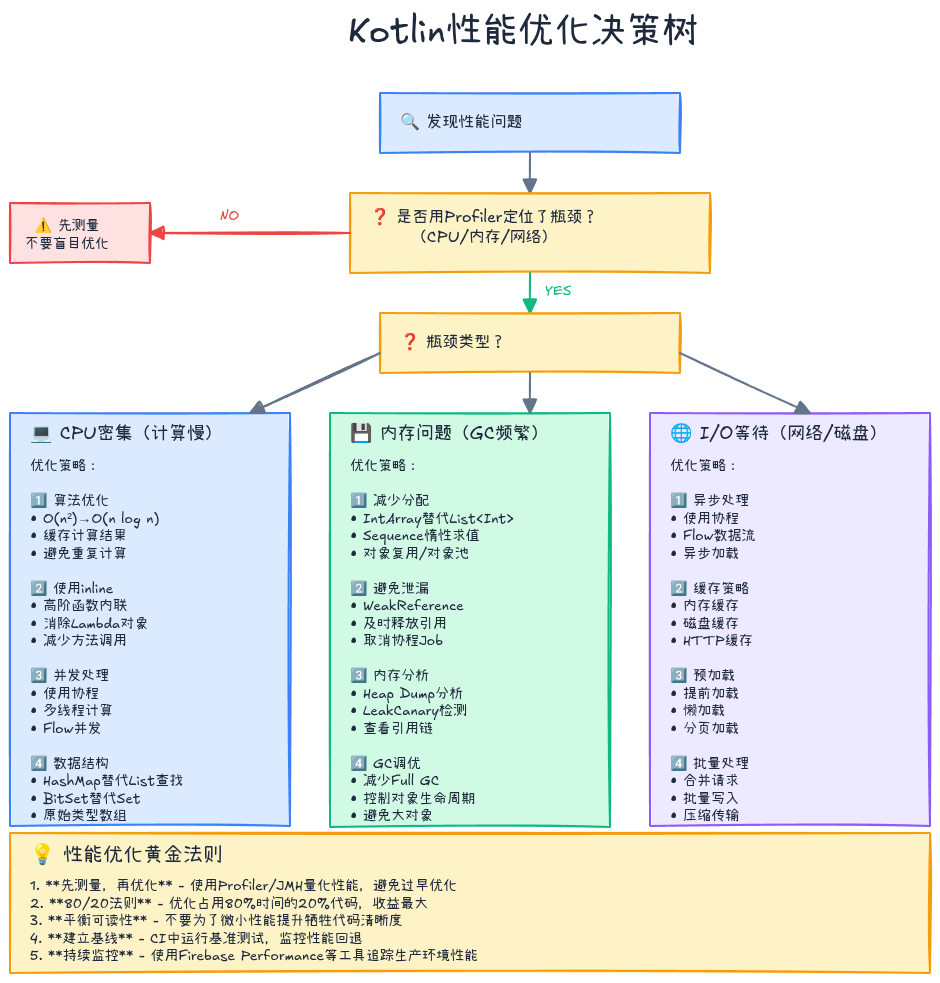
6.1 优化原则
1. 先测量,再优化
"过早优化是万恶之源" ------ Donald Knuth
kotlin
// ✅ 使用基准测试量化性能
@Benchmark
fun originalVersion() { ... }

@Benchmark
fun optimizedVersion() { ... }

// 对比数据:是否值得优化?
2. 80/20法则:优化热点代码
kotlin
// 使用Profiler找出占用时间最多的20%代码
// 优化这20%即可获得80%的性能提升
3. 平衡可读性与性能
kotlin
// ❌ 过度优化:牺牲可读性
fun calculate(x: Int) = if (x and 1 == 0) x shr 1 else x * 3 + 1

// ✅ 清晰优先:除非性能测试证明有问题
fun calculate(x: Int) = if (x % 2 == 0) x / 2 else x * 3 + 1
6.2 性能优化检查清单
编译时优化:
- 使用
inline优化高阶函数 - 使用
@JvmField避免不必要的getter/setter - 使用
const val标记编译时常量 - 使用
@JvmStatic减少静态方法调用开销
内存优化:
- 使用原始类型数组(IntArray)替代
List<Int> - 使用Sequence替代List进行多步转换
- 避免在循环中创建对象
- 使用对象池复用高频对象
- 及时释放大对象引用
算法优化:
- 选择合适的数据结构(HashMap vs ArrayList)
- 避免O(n²)复杂度的嵌套循环
- 使用二分查找替代线性查找
- 缓存计算结果避免重复计算
并发优化:
- 使用协程替代线程
- 控制并发数量避免资源耗尽
- 使用
Flow替代LiveData减少主线程负担 - 合理使用
Dispatchers切换线程
6.3 性能监控与持续优化
集成性能监控:
kotlin
// 使用Firebase Performance Monitoring
class MyApplication : Application() {
    override fun onCreate() {
        super.onCreate()
        val performance = FirebasePerformance.getInstance()

        // 自定义性能追踪
        val trace = performance.newTrace("data_processing")
        trace.start()
        processData()
        trace.stop()
    }
}建立性能基线:
kotlin
// 在CI中运行基准测试
// 任何性能回退超过10%都应报警
./gradlew jmhJar
java -jar build/libs/benchmarks.jar

// 对比结果与基线
// 当前:1.2ms
// 基线:1.0ms
// 回退:+20% ⚠️ 需要优化
七、总结与学习路径
核心要点回顾
- 理解成本:每个语法糖背后都有运行时成本(对象创建、方法调用、GC)
- 内联是关键 :
inline函数是Kotlin零开销抽象的核心 - 减少分配:使用Sequence、原始类型数组、对象池减少内存压力
- 字节码分析:通过javap理解编译器的实际行为
- 先测量再优化:使用Profiler和JMH量化性能
学习资源
官方文档:
性能分析工具:
- JMH (Java Microbenchmark Harness):https://github.com/openjdk/jmh
- Android Profiler:https://developer.android.com/studio/profile
深入阅读:
- 《Effective Kotlin》by Marcin Moskała - 性能优化章节
- 《Kotlin in Action》- 内联函数与性能
- JVM性能优化博客:https://shipilev.net/
进阶方向
- JIT编译器优化:理解HotSpot的逃逸分析、标量替换
- GC调优:G1、ZGC垃圾回收器的特性与调优
- Native编译:Kotlin/Native的性能特点
- 并发优化:协程调度器、Channel缓冲策略
实践建议
- 建立性能基线:在CI中运行基准测试,监控性能回退
- 定期Profiling:每个Sprint进行一次性能分析
- Code Review关注性能:检查是否有明显的性能问题
- 学习字节码:理解编译器的工作原理,写出更高效的代码
性能优化不是"把代码写得看不懂",而是在保持代码清晰的前提下,理解并消除不必要的开销。当你理解了内联、内存分配、字节码的原理,就能在写代码时做出更明智的选择------既优雅又高效。
记住:好的性能来自于对原理的深刻理解,而不是对技巧的盲目堆砌。先让代码工作,再让它快,最后让它优雅。
系列文章导航:
- 👉 上一篇: 多平台开发实战:一次编写,多端运行
如果这篇文章对你有帮助,欢迎点赞、收藏、分享!有任何问题或建议,欢迎在评论区留言讨论。让我们一起学习,一起成长!
也欢迎访问我的个人主页发现更多宝藏资源