Flutter for OpenHarmony 电商 App 搜索功能深度解析:从点击到反馈的完整实现
在现代移动电商应用中,搜索功能 是用户发现商品、完成转化的核心路径之一。一个流畅、智能且反馈及时的搜索体验,能显著提升用户留存与购买率。本文将聚焦于您提供的《淘淘购物》Flutter
代码,深入剖析其搜索功能的完整实现逻辑 ------从首页点击搜索图标,到弹出搜索框、输入关键词、显示建议列表,再到最终展示搜索结果并处理"无结果"场景。我们将逐层拆解
SearchDelegate的工作机制、数据过滤策略、UI 反馈设计,并探讨其在鸿蒙 PC 等多端场景下的适配潜力。
完整效果展示
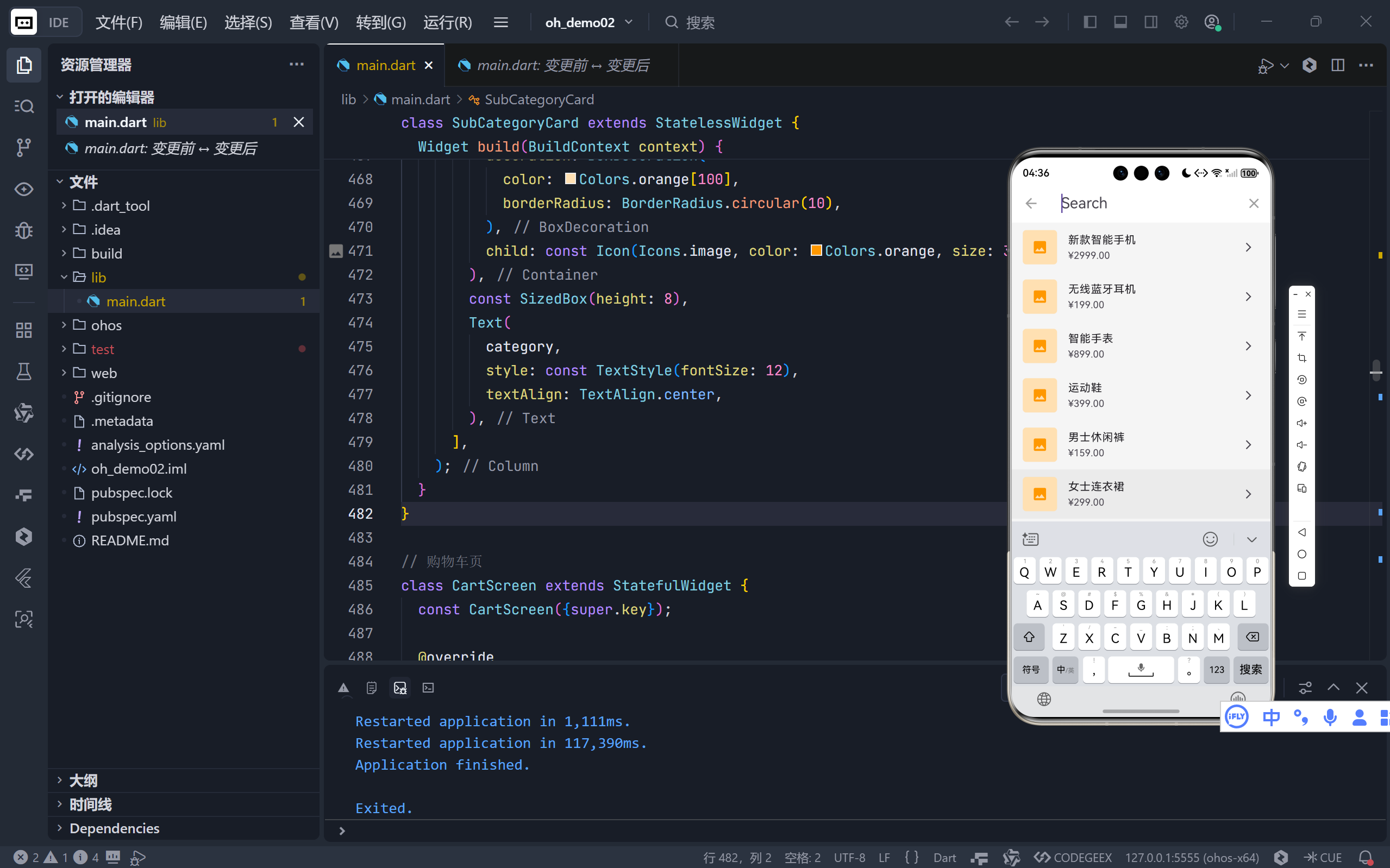
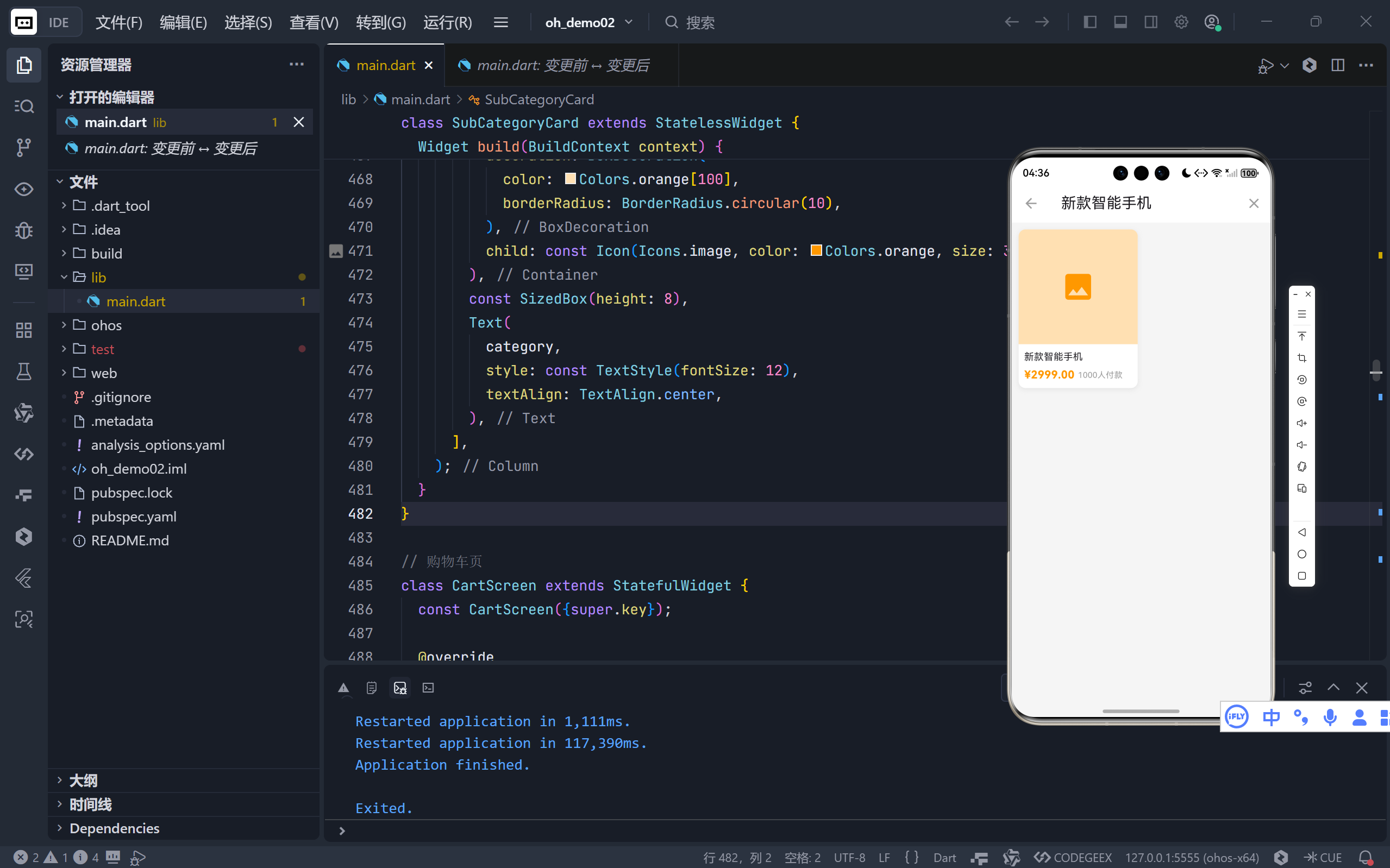
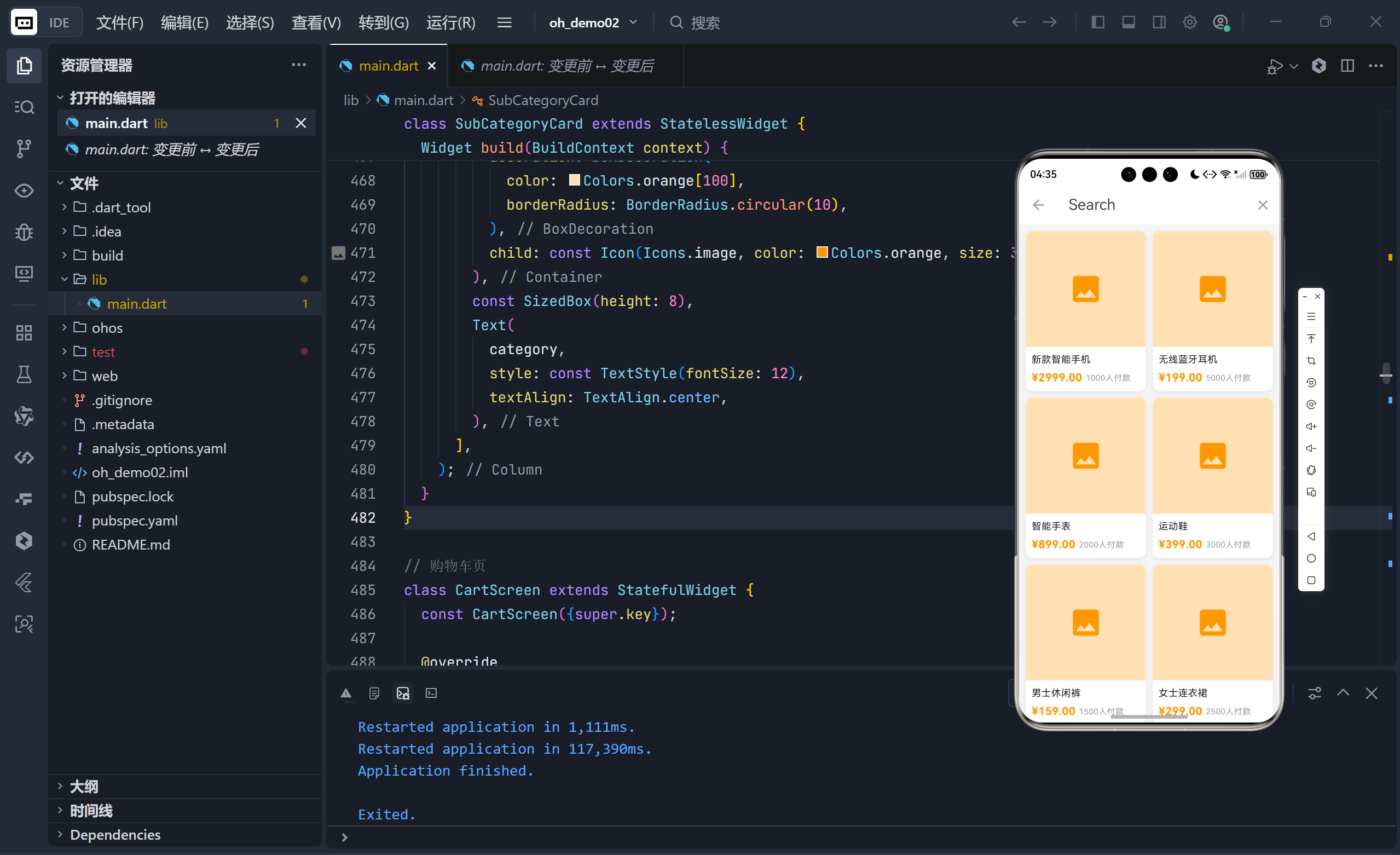
完整代码
dart
import 'package:flutter/material.dart';
void main() {
runApp(const ShoppingApp());
}
class ShoppingApp extends StatelessWidget {
const ShoppingApp({super.key});
@override
Widget build(BuildContext context) {
return MaterialApp(
title: '淘淘购物',
theme: ThemeData(
primaryColor: Colors.orange,
scaffoldBackgroundColor: Colors.grey[100],
useMaterial3: true,
),
home: const MainScreen(),
debugShowCheckedModeBanner: false,
);
}
}
// 搜索结果页面
class SearchResultScreen extends StatelessWidget {
final String query;
const SearchResultScreen({super.key, required this.query});
@override
Widget build(BuildContext context) {
// 过滤商品
final filteredProducts = _allProducts.where((product) {
return product.name.toLowerCase().contains(query.toLowerCase());
}).toList();
return Scaffold(
appBar: AppBar(
title: Text('搜索: $query'),
backgroundColor: Colors.orange,
),
body: filteredProducts.isEmpty
? const Center(
child: Column(
mainAxisAlignment: MainAxisAlignment.center,
children: [
Icon(Icons.search_off, size: 80, color: Colors.grey),
SizedBox(height: 20),
Text(
'未找到相关商品',
style: TextStyle(fontSize: 18, color: Colors.grey),
),
],
),
)
: GridView.builder(
padding: const EdgeInsets.all(10),
gridDelegate: const SliverGridDelegateWithFixedCrossAxisCount(
crossAxisCount: 2,
childAspectRatio: 0.75,
crossAxisSpacing: 10,
mainAxisSpacing: 10,
),
itemCount: filteredProducts.length,
itemBuilder: (context, index) {
return ProductCard(product: filteredProducts[index]);
},
),
);
}
}
class MainScreen extends StatefulWidget {
const MainScreen({super.key});
@override
State<MainScreen> createState() => _MainScreenState();
}
class _MainScreenState extends State<MainScreen> {
int _currentIndex = 0;
final List<Widget> _screens = [
const HomeScreen(),
const CategoryScreen(),
const CartScreen(),
const ProfileScreen(),
];
@override
Widget build(BuildContext context) {
return Scaffold(
body: _screens[_currentIndex],
bottomNavigationBar: BottomNavigationBar(
currentIndex: _currentIndex,
onTap: (index) {
setState(() {
_currentIndex = index;
});
},
type: BottomNavigationBarType.fixed,
selectedItemColor: Colors.orange,
unselectedItemColor: Colors.grey,
items: const [
BottomNavigationBarItem(
icon: Icon(Icons.home),
label: '首页',
),
BottomNavigationBarItem(
icon: Icon(Icons.category),
label: '分类',
),
BottomNavigationBarItem(
icon: Icon(Icons.shopping_cart),
label: '购物车',
),
BottomNavigationBarItem(
icon: Icon(Icons.person),
label: '我的',
),
],
),
);
}
}
// 首页
class HomeScreen extends StatefulWidget {
const HomeScreen({super.key});
@override
State<HomeScreen> createState() => _HomeScreenState();
}
class _HomeScreenState extends State<HomeScreen> {
@override
Widget build(BuildContext context) {
return Scaffold(
appBar: AppBar(
title: const Text('淘淘购物'),
backgroundColor: Colors.orange,
elevation: 0,
actions: [
IconButton(
icon: const Icon(Icons.search),
onPressed: () {
_showSearchDialog(context);
},
),
IconButton(
icon: const Icon(Icons.message),
onPressed: () {},
),
],
),
body: ListView(
children: [
// 搜索框
GestureDetector(
onTap: () => _showSearchDialog(context),
child: Container(
padding: const EdgeInsets.all(10),
color: Colors.orange,
child: Container(
padding:
const EdgeInsets.symmetric(horizontal: 15, vertical: 12),
decoration: BoxDecoration(
color: Colors.white,
borderRadius: BorderRadius.circular(20),
),
child: Row(
children: const [
Icon(Icons.search, color: Colors.grey),
SizedBox(width: 10),
Text(
'搜索宝贝',
style: TextStyle(color: Colors.grey, fontSize: 16),
),
],
),
),
),
),
// 轮播图区域
Container(
height: 150,
margin: const EdgeInsets.all(10),
decoration: BoxDecoration(
color: Colors.orange[300],
borderRadius: BorderRadius.circular(10),
),
child: const Center(
child: Text(
'轮播图区域',
style: TextStyle(color: Colors.white, fontSize: 20),
),
),
),
// 快捷入口
Container(
padding: const EdgeInsets.all(15),
color: Colors.white,
child: GridView.count(
crossAxisCount: 5,
shrinkWrap: true,
physics: const NeverScrollableScrollPhysics(),
children: const [
QuickEntry(Icons.shopping_bag, '天猫'),
QuickEntry(Icons.card_giftcard, '聚划算'),
QuickEntry(Icons.local_offer, '优惠券'),
QuickEntry(Icons.phone_android, '数码'),
QuickEntry(Icons.style, '服饰'),
QuickEntry(Icons.home, '家居'),
QuickEntry(Icons.restaurant, '美食'),
QuickEntry(Icons.flight, '旅行'),
QuickEntry(Icons.sports_basketball, '运动'),
QuickEntry(Icons.book, '图书'),
],
),
),
const SizedBox(height: 10),
// 推荐商品
Container(
color: Colors.white,
child: Column(
crossAxisAlignment: CrossAxisAlignment.start,
children: [
const Padding(
padding: EdgeInsets.all(15),
child: Text(
'为你推荐',
style: TextStyle(
fontSize: 18,
fontWeight: FontWeight.bold,
),
),
),
GridView.builder(
shrinkWrap: true,
physics: const NeverScrollableScrollPhysics(),
padding: const EdgeInsets.all(10),
gridDelegate: const SliverGridDelegateWithFixedCrossAxisCount(
crossAxisCount: 2,
childAspectRatio: 0.75,
crossAxisSpacing: 10,
mainAxisSpacing: 10,
),
itemCount: _recommendedProducts.length,
itemBuilder: (context, index) {
return ProductCard(product: _recommendedProducts[index]);
},
),
],
),
),
],
),
);
}
// 显示搜索对话框
void _showSearchDialog(BuildContext context) {
final TextEditingController searchController = TextEditingController();
showSearch(
context: context,
delegate: ProductSearchDelegate(),
);
}
}
// 搜索委托
class ProductSearchDelegate extends SearchDelegate<String> {
@override
List<Widget> buildActions(BuildContext context) {
return [
IconButton(
icon: const Icon(Icons.clear),
onPressed: () {
query = '';
},
),
];
}
@override
Widget buildLeading(BuildContext context) {
return IconButton(
icon: const Icon(Icons.arrow_back),
onPressed: () {
close(context, '');
},
);
}
@override
Widget buildResults(BuildContext context) {
final filteredProducts = _allProducts.where((product) {
return product.name.toLowerCase().contains(query.toLowerCase());
}).toList();
return filteredProducts.isEmpty
? const Center(
child: Column(
mainAxisAlignment: MainAxisAlignment.center,
children: [
Icon(Icons.search_off, size: 80, color: Colors.grey),
SizedBox(height: 20),
Text(
'未找到相关商品',
style: TextStyle(fontSize: 18, color: Colors.grey),
),
],
),
)
: GridView.builder(
padding: const EdgeInsets.all(10),
gridDelegate: const SliverGridDelegateWithFixedCrossAxisCount(
crossAxisCount: 2,
childAspectRatio: 0.75,
crossAxisSpacing: 10,
mainAxisSpacing: 10,
),
itemCount: filteredProducts.length,
itemBuilder: (context, index) {
return ProductCard(product: filteredProducts[index]);
},
);
}
@override
Widget buildSuggestions(BuildContext context) {
final suggestionList = query.isEmpty
? _allProducts.take(6).toList()
: _allProducts.where((product) {
return product.name.toLowerCase().contains(query.toLowerCase());
}).toList();
return ListView.builder(
itemCount: suggestionList.length,
itemBuilder: (context, index) {
final product = suggestionList[index];
return ListTile(
leading: Container(
width: 50,
height: 50,
decoration: BoxDecoration(
color: Colors.orange[100],
borderRadius: BorderRadius.circular(5),
),
child: const Icon(Icons.image, color: Colors.orange),
),
title: Text(product.name),
subtitle: Text('¥${product.price.toStringAsFixed(2)}'),
trailing: const Icon(Icons.arrow_forward_ios, size: 16),
onTap: () {
query = product.name;
showResults(context);
},
);
},
);
}
}
// 快捷入口组件
class QuickEntry extends StatelessWidget {
final IconData icon;
final String label;
const QuickEntry(this.icon, this.label, {super.key});
@override
Widget build(BuildContext context) {
return Column(
children: [
Icon(icon, color: Colors.orange, size: 30),
const SizedBox(height: 5),
Text(label, style: const TextStyle(fontSize: 12)),
],
);
}
}
// 分类页
class CategoryScreen extends StatelessWidget {
const CategoryScreen({super.key});
@override
Widget build(BuildContext context) {
return Scaffold(
appBar: AppBar(
title: const Text('商品分类'),
backgroundColor: Colors.orange,
),
body: Row(
children: [
// 左侧分类列表
Container(
width: 100,
color: Colors.grey[200],
child: ListView.builder(
itemCount: _categories.length,
itemBuilder: (context, index) {
return Container(
padding: const EdgeInsets.symmetric(vertical: 20),
decoration: BoxDecoration(
color: index == 0 ? Colors.white : null,
border: index == 0
? const Border(
left: BorderSide(color: Colors.orange, width: 3))
: null,
),
child: Center(
child: Text(
_categories[index],
style: TextStyle(
color: index == 0 ? Colors.orange : Colors.black87,
fontWeight:
index == 0 ? FontWeight.bold : FontWeight.normal,
),
),
),
);
},
),
),
// 右侧商品列表
Expanded(
child: GridView.builder(
padding: const EdgeInsets.all(10),
gridDelegate: const SliverGridDelegateWithFixedCrossAxisCount(
crossAxisCount: 3,
childAspectRatio: 0.8,
crossAxisSpacing: 10,
mainAxisSpacing: 10,
),
itemCount: _subCategories.length,
itemBuilder: (context, index) {
return SubCategoryCard(category: _subCategories[index]);
},
),
),
],
),
);
}
}
// 子分类卡片
class SubCategoryCard extends StatelessWidget {
final String category;
const SubCategoryCard({super.key, required this.category});
@override
Widget build(BuildContext context) {
return Column(
children: [
Container(
width: 60,
height: 60,
decoration: BoxDecoration(
color: Colors.orange[100],
borderRadius: BorderRadius.circular(10),
),
child: const Icon(Icons.image, color: Colors.orange, size: 30),
),
const SizedBox(height: 8),
Text(
category,
style: const TextStyle(fontSize: 12),
textAlign: TextAlign.center,
),
],
);
}
}
// 购物车页
class CartScreen extends StatefulWidget {
const CartScreen({super.key});
@override
State<CartScreen> createState() => _CartScreenState();
}
class _CartScreenState extends State<CartScreen> {
double _totalPrice = 0.0;
@override
Widget build(BuildContext context) {
return Scaffold(
appBar: AppBar(
title: const Text('购物车'),
backgroundColor: Colors.orange,
),
body: Column(
children: [
Expanded(
child: ListView.builder(
itemCount: _cartItems.length,
itemBuilder: (context, index) {
return CartItemCard(
item: _cartItems[index],
onQuantityChanged: (quantity) {
setState(() {
_totalPrice = _calculateTotal();
});
},
);
},
),
),
// 底部结算栏
Container(
padding: const EdgeInsets.all(15),
decoration: BoxDecoration(
color: Colors.white,
boxShadow: [
BoxShadow(
color: Colors.grey.withOpacity(0.3),
blurRadius: 5,
offset: const Offset(0, -2),
),
],
),
child: Row(
children: [
const Text(
'合计: ',
style: TextStyle(fontSize: 16),
),
Text(
'¥$_totalPrice',
style: const TextStyle(
fontSize: 24,
color: Colors.orange,
fontWeight: FontWeight.bold,
),
),
const Spacer(),
ElevatedButton(
onPressed: () {},
style: ElevatedButton.styleFrom(
backgroundColor: Colors.orange,
padding: const EdgeInsets.symmetric(
horizontal: 40,
vertical: 12,
),
),
child: const Text('结算', style: TextStyle(fontSize: 16)),
),
],
),
),
],
),
);
}
double _calculateTotal() {
return _cartItems.fold(
0.0, (sum, item) => sum + item.price * item.quantity);
}
}
// 我的页面
class ProfileScreen extends StatelessWidget {
const ProfileScreen({super.key});
@override
Widget build(BuildContext context) {
return Scaffold(
appBar: AppBar(
title: const Text('我的淘淘'),
backgroundColor: Colors.orange,
),
body: ListView(
children: [
// 用户信息
Container(
padding: const EdgeInsets.all(20),
color: Colors.orange,
child: Column(
children: [
Container(
width: 80,
height: 80,
decoration: const BoxDecoration(
color: Colors.white,
shape: BoxShape.circle,
),
child:
const Icon(Icons.person, size: 50, color: Colors.orange),
),
const SizedBox(height: 10),
const Text(
'用户昵称',
style: TextStyle(
color: Colors.white,
fontSize: 20,
fontWeight: FontWeight.bold,
),
),
const SizedBox(height: 5),
Container(
padding:
const EdgeInsets.symmetric(horizontal: 20, vertical: 5),
decoration: BoxDecoration(
border: Border.all(color: Colors.white),
borderRadius: BorderRadius.circular(15),
),
child: const Text(
'登录/注册',
style: TextStyle(color: Colors.white),
),
),
],
),
),
const SizedBox(height: 10),
// 订单状态
Container(
padding: const EdgeInsets.all(15),
color: Colors.white,
child: Column(
children: [
Row(
mainAxisAlignment: MainAxisAlignment.spaceBetween,
children: [
const Text(
'我的订单',
style: TextStyle(
fontSize: 16,
fontWeight: FontWeight.bold,
),
),
Row(
children: const [
Text('全部订单', style: TextStyle(color: Colors.grey)),
Icon(Icons.chevron_right, color: Colors.grey),
],
),
],
),
const SizedBox(height: 15),
Row(
mainAxisAlignment: MainAxisAlignment.spaceAround,
children: const [
OrderStatusIcon(Icons.payment, '待付款'),
OrderStatusIcon(Icons.inventory, '待发货'),
OrderStatusIcon(Icons.local_shipping, '待收货'),
OrderStatusIcon(Icons.star, '待评价'),
OrderStatusIcon(Icons.replay, '退款/售后'),
],
),
],
),
),
const SizedBox(height: 10),
// 功能列表
Container(
color: Colors.white,
child: Column(
children: const [
ListTile(
leading: Icon(Icons.favorite_border, color: Colors.orange),
title: Text('我的收藏'),
trailing: Icon(Icons.chevron_right),
),
Divider(height: 1),
ListTile(
leading: Icon(Icons.location_on, color: Colors.orange),
title: Text('收货地址'),
trailing: Icon(Icons.chevron_right),
),
Divider(height: 1),
ListTile(
leading: Icon(Icons.help_outline, color: Colors.orange),
title: Text('联系客服'),
trailing: Icon(Icons.chevron_right),
),
Divider(height: 1),
ListTile(
leading: Icon(Icons.settings, color: Colors.orange),
title: Text('设置'),
trailing: Icon(Icons.chevron_right),
),
],
),
),
],
),
);
}
}
// 订单状态图标
class OrderStatusIcon extends StatelessWidget {
final IconData icon;
final String label;
const OrderStatusIcon(this.icon, this.label, {super.key});
@override
Widget build(BuildContext context) {
return Column(
children: [
Icon(icon, color: Colors.orange, size: 28),
const SizedBox(height: 5),
Text(label, style: const TextStyle(fontSize: 12)),
],
);
}
}
// 商品卡片
class ProductCard extends StatelessWidget {
final Product product;
const ProductCard({super.key, required this.product});
@override
Widget build(BuildContext context) {
return Container(
decoration: BoxDecoration(
color: Colors.white,
borderRadius: BorderRadius.circular(10),
boxShadow: [
BoxShadow(
color: Colors.grey.withOpacity(0.2),
blurRadius: 5,
offset: const Offset(0, 2),
),
],
),
child: Column(
crossAxisAlignment: CrossAxisAlignment.start,
children: [
Expanded(
child: Container(
decoration: BoxDecoration(
color: Colors.orange[100],
borderRadius:
const BorderRadius.vertical(top: Radius.circular(10)),
),
child: const Center(
child: Icon(Icons.image, color: Colors.orange, size: 50),
),
),
),
Padding(
padding: const EdgeInsets.all(8),
child: Column(
crossAxisAlignment: CrossAxisAlignment.start,
children: [
Text(
product.name,
style: const TextStyle(fontSize: 14),
maxLines: 2,
overflow: TextOverflow.ellipsis,
),
const SizedBox(height: 5),
Row(
children: [
Text(
'¥${product.price.toStringAsFixed(2)}',
style: const TextStyle(
color: Colors.orange,
fontSize: 16,
fontWeight: FontWeight.bold,
),
),
const SizedBox(width: 5),
Text(
'${product.sales}人付款',
style: const TextStyle(fontSize: 12, color: Colors.grey),
),
],
),
],
),
),
],
),
);
}
}
// 购物车商品卡片
class CartItemCard extends StatefulWidget {
final CartItem item;
final Function(int) onQuantityChanged;
const CartItemCard({
super.key,
required this.item,
required this.onQuantityChanged,
});
@override
State<CartItemCard> createState() => _CartItemCardState();
}
class _CartItemCardState extends State<CartItemCard> {
bool _isChecked = true;
@override
Widget build(BuildContext context) {
return Container(
margin: const EdgeInsets.all(10),
padding: const EdgeInsets.all(10),
decoration: BoxDecoration(
color: Colors.white,
borderRadius: BorderRadius.circular(10),
boxShadow: [
BoxShadow(
color: Colors.grey.withOpacity(0.2),
blurRadius: 5,
offset: const Offset(0, 2),
),
],
),
child: Row(
children: [
Checkbox(
value: _isChecked,
onChanged: (value) {
setState(() {
_isChecked = value ?? false;
});
},
),
Container(
width: 80,
height: 80,
decoration: BoxDecoration(
color: Colors.orange[100],
borderRadius: BorderRadius.circular(5),
),
child: const Icon(Icons.image, color: Colors.orange),
),
const SizedBox(width: 10),
Expanded(
child: Column(
crossAxisAlignment: CrossAxisAlignment.start,
children: [
Text(
widget.item.name,
style: const TextStyle(fontSize: 14),
maxLines: 2,
overflow: TextOverflow.ellipsis,
),
const SizedBox(height: 10),
Row(
mainAxisAlignment: MainAxisAlignment.spaceBetween,
children: [
Text(
'¥${widget.item.price.toStringAsFixed(2)}',
style: const TextStyle(
color: Colors.orange,
fontSize: 16,
fontWeight: FontWeight.bold,
),
),
Row(
children: [
IconButton(
icon: const Icon(Icons.remove, size: 18),
onPressed: () {
if (widget.item.quantity > 1) {
widget.item.quantity--;
widget.onQuantityChanged(widget.item.quantity);
}
},
),
Text('${widget.item.quantity}'),
IconButton(
icon: const Icon(Icons.add, size: 18),
onPressed: () {
widget.item.quantity++;
widget.onQuantityChanged(widget.item.quantity);
},
),
],
),
],
),
],
),
),
],
),
);
}
}
// 数据模型
class Product {
final String name;
final double price;
final int sales;
Product({required this.name, required this.price, required this.sales});
}
class CartItem {
final String name;
final double price;
int quantity;
CartItem({
required this.name,
required this.price,
this.quantity = 1,
});
}
// 所有商品数据(用于搜索)
final List<Product> _allProducts = [
Product(name: '新款智能手机', price: 2999.00, sales: 1000),
Product(name: '无线蓝牙耳机', price: 199.00, sales: 5000),
Product(name: '智能手表', price: 899.00, sales: 2000),
Product(name: '运动鞋', price: 399.00, sales: 3000),
Product(name: '男士休闲裤', price: 159.00, sales: 1500),
Product(name: '女士连衣裙', price: 299.00, sales: 2500),
Product(name: '笔记本电脑', price: 5999.00, sales: 800),
Product(name: '平板电脑', price: 3299.00, sales: 1200),
Product(name: '数码相机', price: 4599.00, sales: 500),
Product(name: '游戏手柄', price: 299.00, sales: 1800),
Product(name: '智能音箱', price: 499.00, sales: 2200),
Product(name: '无线鼠标', price: 99.00, sales: 4000),
Product(name: '机械键盘', price: 399.00, sales: 1500),
Product(name: '显示器', price: 1299.00, sales: 900),
Product(name: '路由器', price: 199.00, sales: 2500),
Product(name: '充电宝', price: 129.00, sales: 6000),
Product(name: '数据线', price: 29.00, sales: 8000),
Product(name: '手机壳', price: 39.00, sales: 7000),
Product(name: '钢化膜', price: 19.00, sales: 9000),
Product(name: '耳机支架', price: 49.00, sales: 3000),
];
// 推荐商品
final List<Product> _recommendedProducts = _allProducts.take(6).toList();
final List<String> _categories = [
'热门推荐',
'手机数码',
'家用电器',
'电脑办公',
'家居家装',
'服装服饰',
'鞋靴箱包',
'运动户外',
'美妆个护',
'食品生鲜',
];
final List<String> _subCategories = [
'手机',
'平板',
'耳机',
'充电宝',
'数据线',
'保护壳',
'笔记本',
'键盘',
'鼠标',
'显示器',
'音响',
'耳机',
'冰箱',
'洗衣机',
'空调',
'电视',
'微波炉',
'电饭煲',
];
final List<CartItem> _cartItems = [
CartItem(name: '新款智能手机', price: 2999.00, quantity: 1),
CartItem(name: '无线蓝牙耳机', price: 199.00, quantity: 2),
CartItem(name: '智能手表', price: 899.00, quantity: 1),
];一、整体架构:搜索功能的三大核心组件
在您的代码中,搜索功能由以下三个关键部分协同完成:
- 触发入口(Trigger)
- 首页 AppBar 中的
IconButton(Icons.search)- 首页中部的可点击搜索框区域
- 两者均调用
_showSearchDialog(context)
- 搜索控制器(Controller)
_showSearchDialog方法内部调用showSearch(context, delegate: ProductSearchDelegate())ProductSearchDelegate继承自 Flutter 内置的SearchDelegate<String>
- 结果展示(View)
SearchResultScreen页面(虽定义但未直接使用)- 实际结果由
ProductSearchDelegate.buildResults()直接渲染这种设计充分利用了 Flutter 官方推荐的 "委托模式(Delegate Pattern)" ,将搜索的
UI、逻辑与状态管理封装在一个独立单元中,实现了高内聚、低耦合。
二、触发机制:如何启动搜索?
2.1 首页的双重触发点
dart
// AppBar 中的搜索按钮
IconButton(
  icon: const Icon(Icons.search),
  onPressed: () => _showSearchDialog(context),
),

// 主体区域的搜索框(可点击)
GestureDetector(
  onTap: () => _showSearchDialog(context),
  child: Container(...), // 模拟搜索输入框
)- 一致性体验:无论用户点击顶部图标还是中部搜索框,行为一致。
- 视觉引导:中部搜索框显示"搜索宝贝"提示文字,降低用户认知成本。
2.2 _showSearchDialog:启动搜索委托
dart
void _showSearchDialog(BuildContext context) {
  showSearch(
    context: context,
    delegate: ProductSearchDelegate(),
  );
}showSearch是关键:这是 Flutter 提供的全局方法,用于推入一个全屏搜索界面。delegate参数 :传入自定义的ProductSearchDelegate实例,接管整个搜索流程。
💡 设计优势 :无需手动管理路由跳转、状态传递,
showSearch自动处理生命周期。
三、核心引擎:ProductSearchDelegate 的四大生命周期方法
SearchDelegate 定义了四个必须重写的抽象方法,分别对应搜索的不同阶段:
3.1 buildLeading:返回按钮(导航控制)
dart
@override
Widget buildLeading(BuildContext context) {
  return IconButton(
    icon: const Icon(Icons.arrow_back),
    onPressed: () => close(context, ''), // 关闭搜索,返回空结果
  );
}- 关闭逻辑 :调用
close(context, result)结束搜索,并可传递结果回上一页(此处未使用)。 - 用户体验:符合 Material Design 规范,提供明确退出路径。
3.2 buildActions:右侧操作按钮(清空/搜索)
dart
@override
List<Widget> buildActions(BuildContext context) {
  return [
    IconButton(
      icon: const Icon(Icons.clear),
      onPressed: () => query = '', // 清空输入框
    ),
  ];
}query是内置状态 :SearchDelegate自动管理输入框文本,赋值即更新 UI。- 即时反馈 :清空后,
buildSuggestions会立即重新执行,显示默认建议。
3.3 buildSuggestions:实时建议列表(智能联想)
dart
@override
Widget buildSuggestions(BuildContext context) {
  final suggestionList = query.isEmpty
      ? _allProducts.take(6).toList() // 无输入时显示热门商品
      : _allProducts.where((product) =>
          product.name.toLowerCase().contains(query.toLowerCase())).toList();

  return ListView.builder(
    itemCount: suggestionList.length,
    itemBuilder: (context, index) {
      final product = suggestionList[index];
      return ListTile(
        leading: ...,
        title: Text(product.name),
        subtitle: Text('¥${product.price}'),
        trailing: const Icon(Icons.arrow_forward_ios),
        onTap: () {
          query = product.name; // 填充搜索框
          showResults(context); // 切换到结果页
        },
      );
    },
  );
}
关键实现细节:
- 大小写不敏感匹配 :
toLowerCase()确保"手机"能匹配"智能手机"。 - 默认建议策略 :当
query.isEmpty时,展示前6个商品作为"热门推荐",提升空状态体验。 - 点击即搜索:用户点击建议项,自动填充关键词并跳转至结果页。
- 性能考量 :
_allProducts是内存中的列表,小规模数据下where过滤足够高效。
⚠️ 优化提示 :若商品量达万级,应改用
FutureBuilder+ 后端 API 分页查询。
3.4 buildResults:最终搜索结果展示
dart
@override
Widget buildResults(BuildContext context) {
  final filteredProducts = _allProducts.where((product) =>
      product.name.toLowerCase().contains(query.toLowerCase())).toList();

  return filteredProducts.isEmpty
      ? const Center(...) // "未找到"提示
      : GridView.builder(...); // 商品网格
}-
复用过滤逻辑 :与
buildSuggestions使用相同的匹配算法,保证一致性。 -
空状态友好设计 :
dartconst Center( child: Column( mainAxisAlignment: MainAxisAlignment.center, children: [ Icon(Icons.search_off, size: 80, color: Colors.grey), SizedBox(height: 20), Text('未找到相关商品', style: TextStyle(fontSize: 18, color: Colors.grey)), ], ), )- 大图标 + 文字说明,清晰传达"无结果"状态。
- 使用
Colors.grey降低视觉冲击,避免用户挫败感。
四、数据流与状态管理:query 的魔法
SearchDelegate 的核心在于其内置的 query 字符串状态:
- 自动绑定 :输入框内容与
query双向绑定,无需手动监听TextEditingController。 - 状态驱动 UI :
buildSuggestions和buildResults在query变化时自动重建。 - 生命周期隔离 :搜索结束(
close)后,query状态自动销毁,无内存泄漏风险。
这种设计极大简化了开发者的工作------你只需关注 "根据当前 query 返回什么 UI",而不用操心输入事件、状态同步等底层细节。
五、UI/UX 设计亮点分析
-
渐进式披露(Progressive Disclosure)
- 输入时显示建议列表(轻量信息)
- 点击"搜索"或建议项后展示完整结果(详细信息)
-
一致的视觉语言
- 搜索结果页与首页推荐商品使用相同的
ProductCard组件 - 保持卡片样式、价格颜色(橙色)、字体大小统一
- 搜索结果页与首页推荐商品使用相同的
-
高效的交互反馈
- 清空按钮即时生效
- 点击建议项立即跳转结果
- 无结果时提供明确提示而非空白页面
-
无障碍支持
ListTile自带语义化标签,便于屏幕阅读器识别
六、与 SearchResultScreen 的关系说明
值得注意的是,代码中虽然定义了 SearchResultScreen,但在实际流程中并未被使用:
dart
// SearchResultScreen 存在,但未在任何地方被 Navigator.push 调用
class SearchResultScreen extends StatelessWidget { ... }
当前实现完全依赖 ProductSearchDelegate.buildResults() 直接渲染结果。这种设计有其合理性:
- 减少路由层级:搜索结果与搜索框在同一页面栈,返回更直接。
- 状态共享便捷 :
query和过滤逻辑无需跨页面传递。
若需将搜索结果作为独立页面(例如支持分享链接),则可修改 onTap 逻辑:
dart
// 在 buildSuggestions 的 onTap 中
onTap: () {
  close(context, product.name); // 通过 close 传递关键词
}

// 在 MainScreen 中监听
showSearch(...).then((keyword) {
  if (keyword != null && keyword.isNotEmpty) {
    Navigator.push(context, MaterialPageRoute(
      builder: (_) => SearchResultScreen(query: keyword)
    ));
  }
});
但当前实现已满足 MVP(最小可行产品)需求,简洁高效。
八、总结:为什么这套搜索实现值得借鉴?
- 官方最佳实践 :基于
SearchDelegate,符合 Flutter 设计哲学。- 零外部依赖:仅用 Flutter SDK 内置组件,无第三方库耦合。
- 用户体验闭环:从触发→输入→建议→结果→空状态,全流程覆盖。
- 代码高度可维护:逻辑集中、组件复用、状态清晰。
- 扩展性强:轻松接入后端 API、添加历史记录、支持拼音搜索等。
对于 Electron 或 Web 开发者而言,这种声明式、组件化的搜索实现方式,与 React 的 useEffect + useState 模式异曲同工,但 Flutter 提供了更完整的 UI 框架支持,开发效率更高。
🚀 行动建议 :
在您的项目中,可直接复用
ProductSearchDelegate结构,替换_allProducts为真实 API 数据源,即可快速上线生产级搜索功能。
🌐 加入社区
欢迎加入 开源鸿蒙跨平台开发者社区 ,获取最新资源与技术支持:
技术因分享而进步,生态因共建而繁荣 。
------ 晚霞的不甘 · 与您共赴鸿蒙跨平台开发之旅