目录
一、实验目的
- 掌握深度学习在光学字符识别(OCR)领域的应用:深入理解并实践如何利用深度学习技术解决一个具体的、具有挑战性的OCR任务------18位身份证号码的识别。
- 学习构建与训练复杂的混合神经网络模型:设计并实现一个结合了卷积神经网络(CNN)、循环神经网络(RNN)和注意力机制的混合模型,以有效提取图像特征并解码序列信息。
- 掌握高级数据增强与训练策略:学习并应用一系列复杂的数据增强技术,以提升模型对光照、角度、模糊、遮挡等真实世界干扰的鲁棒性。同时,实践高级训练策略,如自定义损失函数、学习率调度和梯度累积等,以优化模型性能。
- 实现端到端的识别与应用:开发一个完整的系统,不仅能训练出高精度的识别模型,还能加载该模型对新的身份证图片进行预测,并将结果可视化地呈现在原始图像上,实现从算法到应用的闭环。
二、实验内容
- 模型训练(iddemo1.py)
- 数据集:使用自制的身份证图像数据集,包含训练集和测试集。每个样本是一张身份证图片,其对应的18位号码记录在标签文件(train.txt,test.txt)中。(需要数据集的联系我私发)
- 数据预处理 :
- 区域裁剪:首先通过固定的坐标(140,225,330,265)精准裁剪出身份证号码所在的区域。
- 图像增强:对裁剪后的图像进行对比度和锐度提升,以强化字符特征。
- 数据增强:在训练阶段,应用一套非常丰富的自定义数据增强流水线(CustomAugmentation),包括随机的亮度、对比度、锐度、旋转、透视变换、缩放、模糊、位移以及随机遮挡,以模拟各种实际拍摄条件。
-
- 模型构建:搭建一个名为ImprovedIDCardCNN的深度学习模型。该模型以预训练的EfficientNet-B0为主干,结合了空间注意力机制、双向GRU以及创新的位置嵌入分类头,用于识别18位身份证号码。
- 模型训练:使用自定义的混合损失函数(HybridLoss)、AdamW优化器和CosineAnnealingWarmRestarts学习率调度器进行长达200个周期的训练。训练过程中采用了早停、梯度累积和梯度裁剪等高级策略,并保存验证集上准确率最高的模型。
- 模型推理与可视化(iddemo2.py)
- 模型加载:加载第一部分训练好的最佳模型权重best_idcard_model.pth。
- 图像识别:定义recognize_id_card函数,接收用户输入的身份证图片路径。该函数对图片执行与训练时一致的裁剪和预处理操作,然后送入模型进行推理。
- 结果解码:decode_prediction函数将模型输出的18个分类结果(logits)通过取最大值(argmax)的方式,逐个解码为对应的字符,并拼接成最终的18位身份证号码字符串。
- 结果呈现:使用Pillow库的ImageDraw和ImageFont模块,将识别出的身份证号码以绿色文字形式绘制在原始输入图片的左上角,并直接显示结果图像。
三、实验方法
- 模型架构(ImprovedIDCardCNN)
- 特征提取主干(Backbone) :采用在ImageNet上预训练的EfficientNet-B0 。这是一个高效且强大的轻量级网络,能有效提取图像的深层特征。实验中还采用了迁移学习策略,冻结了主干网络前70%的层,仅微调(fine-tuning)后30%的层,以保留通用特征并加速收敛。
- 空间注意力机制(SpatialAttention):在特征图之上,应用了一个简单的空间注意力模块。该模块通过一个卷积层和Sigmoid激活函数,学习一个权重掩码,使得模型能更加关注包含字符的关键区域,抑制背景噪声。
- 序列特征编码器(SequenceEncoder) :将经过注意力加权的特征图通过自适应池化层,转换成一个特征序列。然后,使用一个**双向门控循环单元(BidirectionalGRU)**对该序列进行编码。双向性使得模型在预测每个位置的特征时,能同时考虑其前后的上下文信息。
- 位置感知分类头(Position-AwareClassifierHead) :这是该模型最具创新的部分。
- 首先,将GRU的输出进行全局平均池化,得到一个代表整个号码图像的全局特征向量。
- 然后,引入一个位置嵌入层(nn.Embedding),为身份证号码的18个位置(从1到18)分别学习一个独一无二的64维向量。
- 最后,模型包含18个独立的分类器。对于第i个位置,将其专属的位置嵌入向量与全局特征向量拼接起来,再送入对应的分类器,预测该位置的字符。这种设计让模型明确知道当前正在预测哪个位置的字符,非常适合固定长度的序列识别任务。
- 损失函数与训练策略
- 混合损失函数(HybridLoss) :为了应对样本不均衡和模型过自信问题,本实验设计了一个结合了焦点损失(FocalLoss) 和**标签平滑(LabelSmoothing)**的混合损失函数。焦点损失让模型更专注于难分类的样本,而标签平滑则起到正则化作用,提升了模型的泛化能力。
- 先进的优化方案 :采用对权重衰减处理更优的AdamW 优化器,并配合CosineAnnealingWarmRestarts学习率调度器。该调度器能周期性地重启学习率,帮助模型跳出局部最优解,寻找更优的全局解。
- 大批量训练模拟 :由于显存限制,BATCH_SIZE设置为8,但通过梯度累积4步的方式,等效于使用32的批量大小进行训练,这使得梯度更新更稳定。
四、算法特色
- 架构创新:位置感知优于传统CTC 针对身份证号码为固定18位 这一强先验信息,本算法没有采用通用的OCR序列识别方法(如CTCLoss),而是独创性地设计了位置感知分类头 。通过将全局图像特征与每个字符的位置嵌入相结合,让模型在解码时具备了明确的位置感。这种方法比CTC更直接,也更适合此类固定长度的识别任务。
- 极致的数据增强策略 代码中实现了极为详尽的CustomAugmentation类,包含了十余种几何和色彩变换,特别是透视变换 和随机遮挡,极大地模拟了真实世界中可能遇到的身份证被随意摆放、反光、或被印章/污渍遮挡的情况。这是模型取得高鲁棒性的关键。
- 迁移学习与高效主干的结合 巧妙地利用了轻量级且性能卓越的EfficientNet-B0作为预训练主干,并通过部分微调的策略,在大幅减少训练成本的同时,充分利用了ImageNet数据集上学到的通用图像特征提取能力。
- 尖端训练技术的综合运用本实验几乎集成了当前深度学习训练的"全家桶":从AdamW优化器、带热身(Warmup)的余弦退火学习率,到梯度累积和梯度裁剪,再到自定义的混合损失函数和早停机制。这些技术的综合运用,共同保证了模型训练过程的稳定、高效和最终的高性能。
五、实验结果及分析
python
Iddemo1
import os
import torch
import torch.nn as nn
import torch.optim as optim
from torch.utils.data import Dataset, DataLoader
from torchvision import transforms, models
from PIL import Image
from PIL import ImageEnhance
import cv2
import numpy as np
from tqdm import tqdm
import multiprocessing
import torchvision.transforms.functional as TF
import random
import copy
# 配置参数
TRAIN_DATA_PATH = r"C:\Users\L1307\Desktop\deep learning\iddata\train"
TRAIN_LABEL_PATH = r"C:\Users\L1307\Desktop\deep learning\iddata\train.txt"
TEST_DATA_PATH = r"C:\Users\L1307\Desktop\deep learning\iddata\test"
TEST_LABEL_PATH = r"C:\Users\L1307\Desktop\deep learning\iddata\test.txt"
IMG_HEIGHT = 112 # 图像高度
IMG_WIDTH = 448 # 图像宽度
BATCH_SIZE = 8 # 批量大小
EPOCHS = 200 # 训练轮数
NUM_CLASSES = 37 # 数字0-9, A-Z, 字符'*'
ID_LENGTH = 18 # 中国身份证18位
LEARNING_RATE = 0.00005 #学习率
WEIGHT_DECAY = 1e-3 #权重衰减
# 设置设备
device = torch.device("cuda:0" if torch.cuda.is_available() else "cpu")
print(f"使用设备: {device}")
# 处理身份证图像的裁剪函数
def crop_id_number(image):
# 将图像转为灰度图
gray = cv2.cvtColor(np.array(image), cv2.COLOR_RGB2GRAY)
# 使用自适应阈值增强边缘
binary = cv2.adaptiveThreshold(gray, 255, cv2.ADAPTIVE_THRESH_GAUSSIAN_C,cv2.THRESH_BINARY, 11, 2)
# 使用膨胀和腐蚀操作强化文本区域
kernel = np.ones((1, 1), np.uint8)
dilation = cv2.dilate(binary, kernel, iterations=1)
erosion = cv2.erode(dilation, kernel, iterations=1)
# 精确裁剪号码区域
cropped_image = image.crop((140, 225, 330, 265)) # 微调裁剪区域,获取更完整的号码
return cropped_image
class CustomAugmentation:
def __init__(self, p=0.7):
self.p = p
def __call__(self, img):
if random.random() < self.p:
# 随机亮度变化
img = TF.adjust_brightness(img, random.uniform(0.7, 1.3))
# 随机对比度变化
img = TF.adjust_contrast(img, random.uniform(0.7, 1.3))
# 随机锐度变化
img = ImageEnhance.Sharpness(img).enhance(random.uniform(0.9, 1.7))
# 随机轻微扭曲
angle = random.uniform(-3, 3)
img = TF.rotate(img, angle)
# 随机透视变换 - 模拟不同角度拍摄
if random.random() < 0.3:
width, height = img.size
startpoints = [(0, 0), (width - 1, 0), (width - 1, height - 1), (0, height - 1)]
endpoints = [(random.randint(-5, 5), random.randint(-5, 5)),
(width - 1 + random.randint(-5, 5), random.randint(-5, 5)),
(width - 1 + random.randint(-5, 5), height - 1 + random.randint(-5, 5)),
(random.randint(-5, 5), height - 1 + random.randint(-5, 5))]
# 直接使用startpoints和endpoints,不调用_get_perspective_coeffs
img = TF.perspective(img, startpoints, endpoints, fill=0)
# 随机小尺度变化
scale = random.uniform(0.92, 1.08)
w, h = img.size
new_w, new_h = int(w * scale), int(h * scale)
img = TF.resize(img, (new_h, new_w))
img = TF.center_crop(img, (h, w))
# 添加随机模糊
if random.random() < 0.3:
from PIL import ImageFilter
blur_radius = random.uniform(0.1, 0.5)
img = img.filter(ImageFilter.GaussianBlur(radius=blur_radius))
# 随机水平位移
shift = random.randint(-7, 7)
img = TF.affine(img, angle=0, translate=(shift, 0), scale=1.0, shear=0)
# 随机遮挡小区域 - 模拟印章或污渍
if random.random() < 0.2:
w, h = img.size
occlude_w = random.randint(5, 15)
occlude_h = random.randint(5, 10)
x = random.randint(0, w - occlude_w)
y = random.randint(0, h - occlude_h)
img_array = np.array(img)
img_array[y:y + occlude_h, x:x + occlude_w, :] = random.randint(0, 255)
img = Image.fromarray(img_array)
return img
class IDCardDataset(Dataset):
def __init__(self, data_path, label_path, transform=None, augment=False):
self.data_path = data_path
self.transform = transform
self.augment = augment
self.augmentor = CustomAugmentation(p=0.7)
self.data = []
self.labels = []
print(f"正在加载数据集...")
print(f"数据路径: {data_path}")
print(f"标签文件: {label_path}")
if not os.path.exists(data_path):
raise ValueError(f"数据路径不存在: {data_path}")
if not os.path.exists(label_path):
raise ValueError(f"标签文件不存在: {label_path}")
try:
with open(label_path, 'r', encoding='utf-8') as f:
lines = f.readlines()
print(f"标签文件总行数: {len(lines)}")
for line_num, line in enumerate(lines[1:], 2):
parts = line.strip().split(',')
if len(parts) != 2:
print(f"警告: 第{line_num}行格式不正确: {line.strip()}")
continue
img_name, label = parts
img_path = os.path.join(data_path, img_name)
if not os.path.exists(img_path):
print(f"警告: 文件不存在: {img_path}")
continue
if len(label) != ID_LENGTH:
print(f"警告: 标签长度不正确 ({len(label)} != {ID_LENGTH}): {label}")
continue
self.data.append(img_path)
self.labels.append(label)
print(f"成功加载样本数量: {len(self.data)}")
if len(self.data) == 0:
raise ValueError("没有找到有效的训练样本!")
except Exception as e:
print(f"加载数据集时出错: {str(e)}")
raise
def __len__(self):
return len(self.data)
def __getitem__(self, idx):
img_path = self.data[idx]
label = self.labels[idx]
try:
image = Image.open(img_path).convert('RGB')
# 先进行身份证区域裁剪
image = crop_id_number(image)
# 图像预处理 - 增强对比度和锐度
enhancer = ImageEnhance.Contrast(image)
image = enhancer.enhance(1.5)
enhancer = ImageEnhance.Sharpness(image)
image = enhancer.enhance(1.5)
# 应用数据增强
if self.augment:
image = self.augmentor(image)
# 应用变换
if self.transform:
image = self.transform(image)
# 将标签转换为数字序列
label_tensor = torch.zeros(ID_LENGTH, dtype=torch.long)
for i, char in enumerate(label):
if char.isdigit():
label_tensor[i] = int(char)
elif char.isalpha():
label_tensor[i] = ord(char.upper()) - ord('A') + 10
elif char == '*':
label_tensor[i] = 36
else:
print(f"警告: 无效的字符: '{char}' 在位置 {i} 的标签 '{label}'")
# 使用空格或其他默认值
label_tensor[i] = 0
return image, label_tensor
except Exception as e:
print(f"处理样本时出错 (idx={idx}, path={img_path}): {str(e)}")
raise
# 使用预训练的ResNet特征提取器
class ImprovedIDCardCNN(nn.Module):
def __init__(self):
super(ImprovedIDCardCNN, self).__init__()
# 使用EfficientNet-B0作为特征提取器,参数更少
efficientnet = models.efficientnet_b0(weights=models.EfficientNet_B0_Weights.IMAGENET1K_V1)
self.features = efficientnet.features
# 冻结主干网络前70%层的参数,只训练后30%
total_layers = len(self.features)
trainable_from = int(total_layers * 0.7)
for i, param in enumerate(self.features.parameters()):
param.requires_grad = i >= trainable_from
# 使用简单的特征映射
self.adaptive_pool = nn.AdaptiveAvgPool2d((1, 24)) # 使用更长的序列
# 简化注意力机制,只保留空间注意力
self.attention = nn.Sequential(
nn.Conv2d(1280, 1, kernel_size=1), # EfficientNet-B0特征维度为1280
nn.Sigmoid()
)
# 使用简单但高效的GRU
self.rnn = nn.GRU(input_size=1280,hidden_size=320,num_layers=1,batch_first=True,bidirectional=True)
# 简化全连接层
self.fc = nn.Sequential(
nn.Linear(640, 320),
nn.LayerNorm(320),
nn.ReLU(),
nn.Dropout(0.1)
)
# 位置嵌入
self.position_embedding = nn.Embedding(ID_LENGTH, 64)
# 简化分类器
self.digit_classifiers = nn.ModuleList([
nn.Sequential(
nn.Linear(320 + 64, 256), # 320维特征 + 64维位置信息
nn.ReLU(),
nn.Dropout(0.1),
nn.Linear(256, NUM_CLASSES)
)
for _ in range(ID_LENGTH)
])
def forward(self, x):
batch_size = x.size(0)
# 特征提取
x = self.features(x)
# 应用注意力
attn = self.attention(x)
x = x * attn
# 自适应池化
x = self.adaptive_pool(x) # [B, 1280, 1, 24]
# 调整维度
x = x.squeeze(2).permute(0, 2, 1) # [B, 24, 1280]
# GRU处理
rnn_out, _ = self.rnn(x) # [B, 24, 640]
# 全局平均池化获取全局特征
x = torch.mean(rnn_out, dim=1) # [B, 640]
# 特征映射
x = self.fc(x) # [B, 320]
# 为每个位置创建分类输出
digit_outputs = []
for i in range(ID_LENGTH):
# 获取位置嵌入
pos_emb = self.position_embedding(torch.tensor(i, device=x.device)).expand(batch_size, -1)
# 合并特征和位置信息
features_with_pos = torch.cat([x, pos_emb], dim=1)
# 应用分类器
digit_output = self.digit_classifiers[i](features_with_pos)
digit_outputs.append(digit_output)
return digit_outputs
# 混合损失函数 - 结合交叉熵、焦点损失和标签平滑
class HybridLoss(nn.Module):
def __init__(self, alpha=0.5, gamma=2.0, smoothing=0.05, classes=NUM_CLASSES):
super(HybridLoss, self).__init__()
self.alpha = alpha
self.gamma = gamma
self.smoothing = smoothing
self.classes = classes
def forward(self, pred, target):
# 标签平滑处理
with torch.no_grad():
true_dist = torch.zeros_like(pred)
true_dist.fill_(self.smoothing / (self.classes - 1))
true_dist.scatter_(1, target.unsqueeze(1), 1.0 - self.smoothing)
# 计算交叉熵
log_prob = torch.nn.functional.log_softmax(pred, dim=1)
ce_loss = -(true_dist * log_prob).sum(dim=1)
# 计算焦点损失权重
prob = torch.exp(log_prob)
pt = torch.sum(true_dist * prob, dim=1)
focal_weight = (1 - pt) ** self.gamma
# 结合权重和交叉熵
loss = focal_weight * ce_loss
return loss.mean()
# 自定义权重初始化
def weight_init(m):
if isinstance(m, nn.Conv2d) or isinstance(m, nn.Linear):
nn.init.kaiming_normal_(m.weight, mode='fan_out', nonlinearity='relu')
if m.bias is not None:
nn.init.constant_(m.bias, 0)
elif isinstance(m, nn.BatchNorm2d) or isinstance(m, nn.LayerNorm):
nn.init.constant_(m.weight, 1)
nn.init.constant_(m.bias, 0)
# 定义训练函数
def train_model(model, train_loader, valid_loader, criterion, optimizer, scheduler, num_epochs=10):
history = {'train_loss': [], 'train_acc': [], 'val_loss': [], 'val_acc': []}
best_val_acc = 0.0
best_model_state = None
# 计算总批次数用于学习率预热
total_steps = len(train_loader) * num_epochs
warmup_steps = int(0.03 * total_steps) # 预热3%
# 早停机制
patience = 25
no_improvement = 0
# 梯度累积步数
accumulation_steps = 4
global_step = 0
optimizer.zero_grad() # 初始化梯度
for epoch in range(num_epochs):
# 训练阶段
model.train()
train_loss = 0.0
train_correct = 0
train_total = 0
# 使用tqdm显示进度条
train_bar = tqdm(train_loader, desc=f'Epoch {epoch + 1}/{num_epochs} [Train]')
for step, (inputs, labels) in enumerate(train_bar):
inputs = inputs.to(device)
labels = labels.to(device)
# 学习率预热
if global_step < warmup_steps and scheduler is None:
lr_scale = min(1.0, float(global_step + 1) / warmup_steps)
for pg in optimizer.param_groups:
pg['lr'] = lr_scale * LEARNING_RATE
global_step += 1
# 前向传播
outputs = model(inputs)
# 主损失 - 身份证号码识别
main_loss = 0
for i in range(ID_LENGTH):
main_loss += criterion(outputs[i], labels[:, i])
# 缩放梯度以适应梯度累积
loss = main_loss / accumulation_steps
loss.backward()
# 梯度累积
if (step + 1) % accumulation_steps == 0 or (step + 1) == len(train_loader):
# 梯度裁剪,防止梯度爆炸
torch.nn.utils.clip_grad_norm_(model.parameters(), max_norm=1.0)
optimizer.step()
optimizer.zero_grad()
train_loss += main_loss.item() # 记录未缩放的损失值
# 计算准确率
for i in range(ID_LENGTH):
_, predicted = torch.max(outputs[i], 1)
train_correct += (predicted == labels[:, i]).sum().item()
train_total += labels.size(0) * ID_LENGTH
# 更新进度条
train_bar.set_postfix({'loss': f"{main_loss.item():.4f}",'acc': f"{train_correct / train_total:.4f}"})
# 验证阶段
model.eval()
val_loss = 0.0
val_correct = 0
val_total = 0
char_correct = [0] * ID_LENGTH # 每个位置的正确率
# 使用tqdm显示进度条
valid_bar = tqdm(valid_loader, desc=f'Epoch {epoch + 1}/{num_epochs} [Valid]')
with torch.no_grad():
for inputs, labels in valid_bar:
inputs = inputs.to(device)
labels = labels.to(device)
outputs = model(inputs)
loss = 0
for i in range(ID_LENGTH):
loss += criterion(outputs[i], labels[:, i])
val_loss += loss.item()
# 计算总体准确率和每个位置的准确率
batch_correct = 0
for i in range(ID_LENGTH):
_, predicted = torch.max(outputs[i], 1)
correct = (predicted == labels[:, i]).sum().item()
val_correct += correct
char_correct[i] += correct
batch_correct += correct
val_total += labels.size(0) * ID_LENGTH
# 更新进度条
valid_bar.set_postfix({'loss': f"{loss.item() / ID_LENGTH:.4f}",'acc': f"{batch_correct / (labels.size(0) * ID_LENGTH):.4f}"})
# 计算平均损失和准确率
train_loss = train_loss / len(train_loader)
train_acc = train_correct / train_total
val_loss = val_loss / len(valid_loader)
val_acc = val_correct / val_total
# 计算每个位置的准确率
char_acc = [c / (len(valid_loader) * (
valid_loader.batch_size if len(valid_loader.dataset) > valid_loader.batch_size else len(
valid_loader.dataset))) for c in char_correct]
# 更新学习率
if scheduler:
if isinstance(scheduler, optim.lr_scheduler.ReduceLROnPlateau):
scheduler.step(val_loss)
else:
scheduler.step()
# 保存最佳模型
if val_acc > best_val_acc:
best_val_acc = val_acc
best_model_state = copy.deepcopy(model.state_dict())
torch.save({'epoch': epoch,'model_state_dict': model.state_dict(),'optimizer_state_dict': optimizer.state_dict(),'val_acc': val_acc,'val_loss': val_loss,'char_acc': char_acc}, 'best_idcard_model.pth')
print(f"✓ 保存新的最佳模型,验证准确率: {val_acc:.4f}")
no_improvement = 0
else:
no_improvement += 1
# 早停检查
if no_improvement >= patience:
print(f"连续{patience}轮未改善,提前停止训练")
break
# 保存历史记录
history['train_loss'].append(train_loss)
history['train_acc'].append(train_acc)
history['val_loss'].append(val_loss)
history['val_acc'].append(val_acc)
print(f'Epoch {epoch + 1}/{num_epochs}:')
print(f'Train Loss: {train_loss:.4f}, Train Acc: {train_acc:.4f}')
print(f'Val Loss: {val_loss:.4f}, Val Acc: {val_acc:.4f}')
if (epoch + 1) % 5 == 0:
print("各位置准确率:")
for i, acc in enumerate(char_acc):
print(f"位置 {i + 1}: {acc:.4f}", end=', ')
if (i + 1) % 6 == 0:
print() # 换行
print()
print('-' * 50)
if best_model_state is not None:
model.load_state_dict(best_model_state)
return model, history
# 增强的数据预处理
train_transform = transforms.Compose([
transforms.Resize((IMG_HEIGHT, IMG_WIDTH)),
transforms.ColorJitter(brightness=0.3, contrast=0.3, saturation=0.2, hue=0.1), # 增强色彩抖动
transforms.ToTensor(),
transforms.Normalize(mean=[0.485, 0.456, 0.406], std=[0.229, 0.224, 0.225]),
transforms.RandomErasing(p=0.2, scale=(0.02, 0.1), value='random'), # 随机擦除模拟遮挡
])
valid_transform = transforms.Compose([transforms.Resize((IMG_HEIGHT, IMG_WIDTH)),transforms.ToTensor(),transforms.Normalize(mean=[0.485, 0.456, 0.406], std=[0.229, 0.224, 0.225]),])
# 设置全局种子确保可重现性
def set_seed(seed=42):
random.seed(seed)
np.random.seed(seed)
torch.manual_seed(seed)
if torch.cuda.is_available():
torch.cuda.manual_seed(seed)
torch.cuda.manual_seed_all(seed)
torch.backends.cudnn.deterministic = True
torch.backends.cudnn.benchmark = False
set_seed()
if __name__ == '__main__':
# 设置随机种子
set_seed(42)
# 设置多进程启动方法
multiprocessing.set_start_method('spawn', force=True)
print("加载训练数据集...")
train_dataset = IDCardDataset(TRAIN_DATA_PATH, TRAIN_LABEL_PATH, transform=train_transform, augment=True)
print("加载验证数据集...")
valid_dataset = IDCardDataset(TEST_DATA_PATH, TEST_LABEL_PATH, transform=valid_transform, augment=False)
train_loader = DataLoader(train_dataset, batch_size=BATCH_SIZE, shuffle=True, num_workers=0, pin_memory=True,
drop_last=True)
valid_loader = DataLoader(valid_dataset, batch_size=BATCH_SIZE, shuffle=False, num_workers=0, pin_memory=True)
print("初始化模型...")
model = ImprovedIDCardCNN().to(device)
print(f"模型参数总量: {sum(p.numel() for p in model.parameters())}")
print(f"可训练参数数量: {sum(p.numel() for p in model.parameters() if p.requires_grad)}")
# 使用混合损失函数
criterion = HybridLoss()
# 使用带权重衰减的AdamW优化器
optimizer = optim.AdamW(model.parameters(), lr=LEARNING_RATE, weight_decay=WEIGHT_DECAY)
# 使用cosine-with-warmup调度器
T_max = EPOCHS * len(train_loader) // 4 # 四倍梯度累积步长
scheduler = optim.lr_scheduler.CosineAnnealingWarmRestarts(
optimizer, T_0=T_max, T_mult=1, eta_min=1e-7, verbose=True
)
try:
# 训练模型
print("开始训练...")
model, history = train_model(model, train_loader, valid_loader, criterion, optimizer, scheduler,num_epochs=EPOCHS)
# 保存最终模型
print("保存最终模型...")
torch.save({
'model_state_dict': model.state_dict(),
'history': history
}, 'final_idcard_model.pth')
print("训练完成!")
except KeyboardInterrupt:
print("训练被用户中断!")
# 保存中断时的模型
print("保存中断时的模型...")
torch.save({
'model_state_dict': model.state_dict(),
'optimizer_state_dict': optimizer.state_dict(),
}, 'interrupted_idcard_model.pth')
print("已保存中断模型")
except Exception as e:
print(f"训练发生错误: {str(e)}")
raise
iddemo2
import os
import torch
from PIL import Image, ImageEnhance, ImageDraw, ImageFont
from torchvision import transforms
from iddemo1 import ImprovedIDCardCNN, IMG_HEIGHT, IMG_WIDTH, NUM_CLASSES, ID_LENGTH
device = torch.device("cuda:0" if torch.cuda.is_available() else "cpu")
char_list = '0123456789ABCDEFGHIJKLMNOPQRSTUVWXYZ*'
CROP_BOX = (140, 225, 330, 265)
CHINESE_FONT_PATH = r"D:\code\P code\Noto_Sans_SC\NotoSansSC-VariableFont_wght.ttf"
CHINESE_FONT_SIZE = 25
# ---------- 模型加载 ----------
model = ImprovedIDCardCNN().to(device)
try:
checkpoint = torch.load('best_idcard_model.pth', map_location=device)
model.load_state_dict(checkpoint['model_state_dict'])
model.eval()
print("✓ 模型加载完成")
except FileNotFoundError:
print(f"错误: 模型文件 'best_idcard_model.pth' 未找到。请确保文件路径正确。")
exit()
except Exception as e:
print(f"模型加载失败: {e}")
exit()
# ---------- 图像预处理 ----------
transform = transforms.Compose([
transforms.Resize((IMG_HEIGHT, IMG_WIDTH)),
transforms.ToTensor(),
transforms.Normalize(mean=[0.485, 0.456, 0.406],
std=[0.229, 0.224, 0.225])
])
# ---------- 解码函数 ----------
def decode_prediction(outputs):
pred = ''
for i, out in enumerate(outputs):
_, top = torch.max(out, dim=1)
pred += char_list[top.item()]
return pred
# ---------- 主识别函数----------
def recognize_id_card(image_path):
if not os.path.exists(image_path):
print(f"图像路径不存在: {image_path}")
return
try:
original_pil_image = Image.open(image_path).convert("RGB")
cropped_for_model = original_pil_image.crop(CROP_BOX)
temp_image_for_model = cropped_for_model.copy()
enhancer = ImageEnhance.Contrast(temp_image_for_model)
temp_image_for_model = enhancer.enhance(1.5)
enhancer = ImageEnhance.Sharpness(temp_image_for_model)
final_image_for_model = enhancer.enhance(1.5)
input_tensor = transform(final_image_for_model).unsqueeze(0).to(device)
with torch.no_grad():
outputs = model(input_tensor)
prediction = decode_prediction(outputs)
print(f"\n最终识别结果: {prediction}")
image_to_display_text_on = original_pil_image.copy()
display_text = f"识别身份证号: {prediction}"
draw = ImageDraw.Draw(image_to_display_text_on)
try:
font_pil = ImageFont.truetype(CHINESE_FONT_PATH, CHINESE_FONT_SIZE)
except IOError:
print(f"警告: 中文字体文件 '{CHINESE_FONT_PATH}' 未找到或无法加载。")
print("将尝试使用Pillow默认字体,这可能导致中文无法正确显示。")
try:
font_pil = ImageFont.load_default()
except Exception as e_font_load:
print(f"加载Pillow默认字体失败: {e_font_load}")
font_pil = None
except Exception as e_font:
print(f"加载字体 '{CHINESE_FONT_PATH}' 时发生其他错误: {e_font}")
font_pil = None
font_color_pil = (0, 255, 0)
text_pos_x_pil = 15
text_pos_y_pil = 15
if font_pil:
draw.text((text_pos_x_pil, text_pos_y_pil), display_text, font=font_pil, fill=font_color_pil)
else:
print("错误:由于字体未能成功加载,无法在图片上绘制文本。")
image_to_display_text_on.show()
except FileNotFoundError:
print(f"错误: 图像文件 '{image_path}' 未找到。")
except Exception as e:
print(f"识别或显示过程中出错: {e}")
import traceback
traceback.print_exc()
# ---------- 执行入口 ----------
if __name__ == "__main__":
image_path_input = input("请输入身份证图像路径: ").strip('"').strip()
recognize_id_card(image_path_input)模型训练结果:
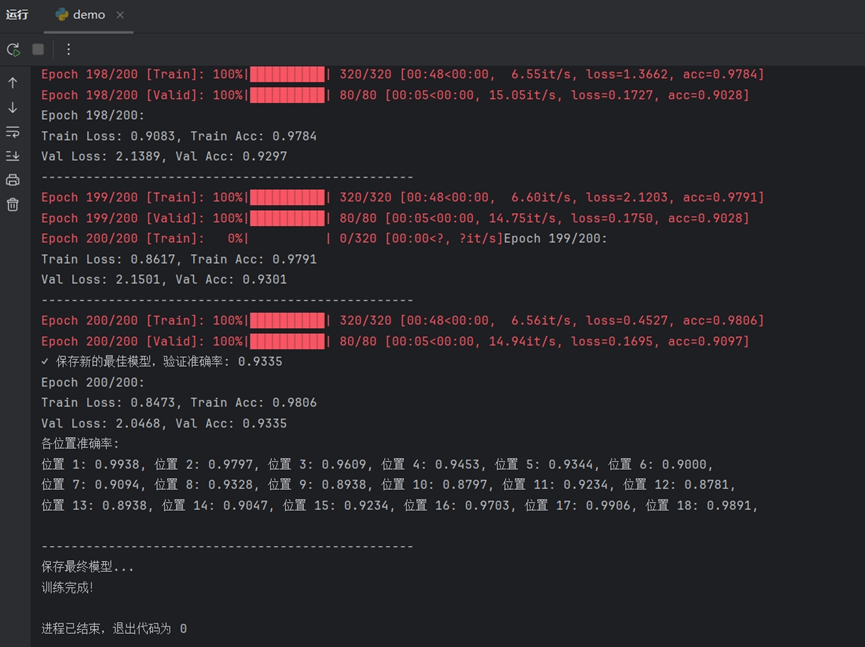
在iddemo1.py的训练过程中,每个周期结束后会输出该周期的训练损失、训练准确率和测试准确率,每五轮还会输出各位置的准确率。典型的输出格式:
模型完成了全部200个周期的训练。最终的验证集准确率(Val Acc)达到了93.35%,表明模型具有很强的泛化能力。各位置识别能力均衡且强大:详细的"各位置准确率"分析显示,模型对身份证号码18个位置的每一个字符都有很高的识别精度。大部分位置的准确率都接近或超过了90%,其中位置1、17、18的准确率更是超过了98%。这证明模型不是只对某些特定位置的数字敏感,而是对整个号码序列都有稳定的识别能力。
验证模型识别情况:
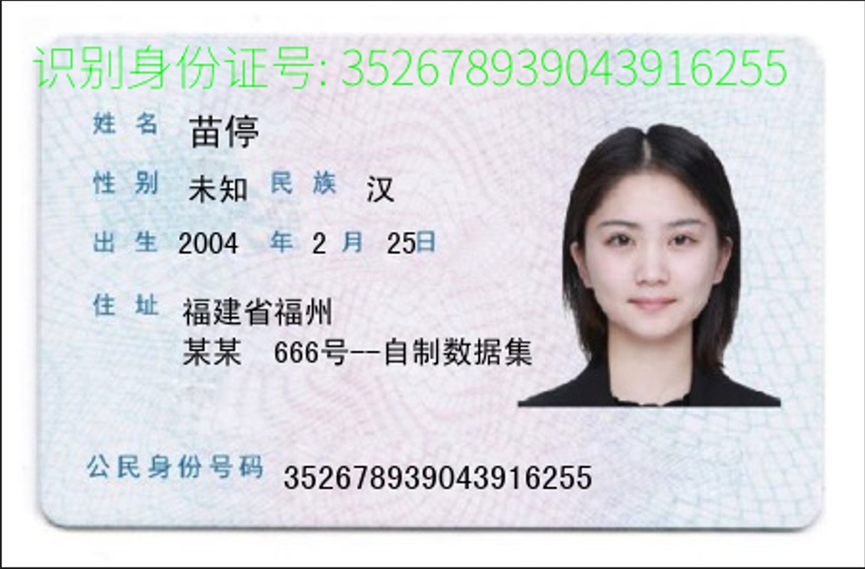
识别结果100%准确,模型输出的号码 352678939043916255 与卡片上的号码完全一致。

第二个模型输出的号码213984748281422633也与卡片上的号码完全一致。