🚀运行效果展示
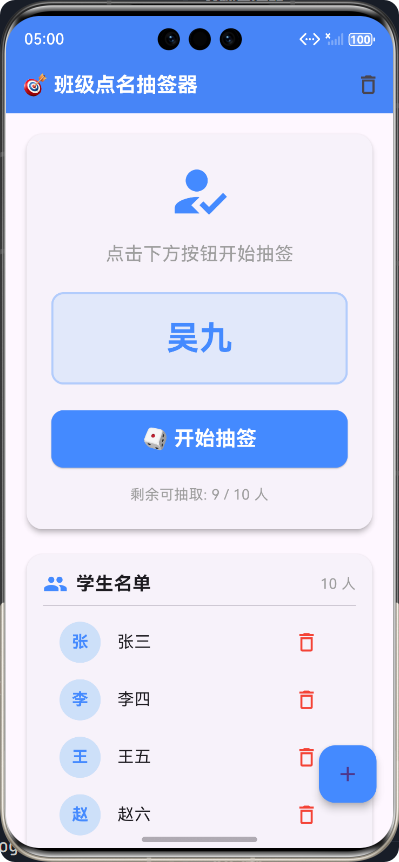
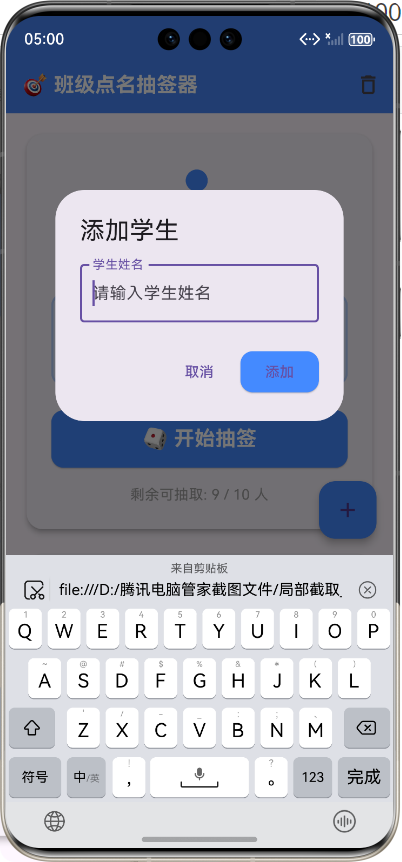
Flutter框架跨平台鸿蒙开发------班级点名APP的开发流程
一、前言
1.1 项目背景
在传统的课堂教学中,教师需要花费大量时间进行学生点名,这不仅浪费时间,还会影响教学进度。尤其是在大班授课的情况下,人工点名效率低下,容易出现漏点、错点等问题。传统的纸质签到方式存在数据难以保存、统计困难等问题。因此,开发一款基于移动端的班级点名APP具有重要的现实意义和市场价值。
随着教育信息化的快速发展,移动互联网技术已经深入到教育的各个环节。智能化、自动化的教学管理工具成为现代教育的重要需求。班级点名APP作为教学管理的基础工具,能够帮助教师快速完成点名任务,提高课堂管理效率。
1.2 技术选型
在众多跨平台开发框架中,我们选择了Flutter作为主要开发技术。Flutter是Google推出的开源UI软件开发工具包,使用Dart语言编写,能够实现一套代码同时编译到iOS、Android、Web、Windows、Linux、macOS以及鸿蒙等多个平台。
选择Flutter的主要原因包括以下几个方面。首先,Flutter具有卓越的性能表现,其采用Skia图形引擎,能够实现60fps的流畅渲染速度,用户体验接近原生应用。其次,Flutter提供了丰富的Material Design和Cupertino风格组件,开发者可以快速构建出美观、一致的用户界面。再者,Flutter的热重载功能极大地提高了开发效率,开发者可以在运行时实时预览代码修改效果,无需重新编译整个应用。
鸿蒙系统(HarmonyOS)是华为自主研发的分布式操作系统,具有微内核设计、跨设备协同等特性。通过Flutter与鸿蒙的结合,我们能够将应用部署到更广泛的设备上,包括华为手机、平板、智慧屏等。Flutter官方也在积极推进鸿蒙平台的支持,使得这一技术路线具有可行性和前瞻性。
1.3 开发环境
本项目的开发环境配置如下:操作系统为Windows 11,Flutter版本为3.x系列,Dart版本为3.x系列,开发IDE采用Visual Studio Code。鸿蒙平台的构建使用华为提供的hvigor构建工具,通过Flutter的ohos分支实现鸿蒙应用的编译和打包。
二、项目概述
2.1 项目简介
班级点名APP是一款面向教师群体的课堂管理工具应用,主要功能包括随机抽取学生进行点名、学生名单管理、抽取历史记录等。应用界面简洁直观,操作流程清晰,即使是技术不熟悉的教师也能快速上手使用。
本项目采用分层架构设计,将用户界面层、业务逻辑层和数据持久层进行分离,确保代码结构清晰、易于维护。同时,应用充分利用Flutter的跨平台特性,一套代码同时支持Android、iOS和鸿蒙三大主流移动操作系统。
2.2 功能模块
班级点名APP的功能模块设计如下:
┌─────────────────────────────────────────────────────────────────┐
│                        班级点名APP功能架构                         │
├───────────────────────┬───────────────────────┬─────────────────┤
│       抽签模块         │      名单管理模块       │    历史记录模块   │
├───────────────────────┼───────────────────────┼─────────────────┤
│ • 随机学生抽取         │ • 添加学生信息         │ • 抽取历史查看   │
│ • 动画效果展示         │ • 删除学生信息         │ • 历史记录管理   │
│ • 状态实时更新         │ • 清空全部名单         │ • 数据持久化     │
│ • 剩余数量统计         │ • 批量导入支持         │ • 记录导出       │
└───────────────────────┴───────────────────────┴─────────────────┘
2.3 技术架构
整体技术架构采用经典的分层架构模式,自下而上依次为平台适配层、数据层、业务逻辑层和表现层。这种架构设计使得各层之间职责明确、耦合度低,便于独立测试和维护。
┌─────────────────────────────────────────────────────────────────┐
│                        技术架构层级                               │
├─────────────────────────────────────────────────────────────────┤
│                                                                 │
│  ┌───────────────────────────────────────────────────────────┐  │
│  │                    表现层(Presentation Layer)            │  │
│  │  ┌─────────────┐ ┌─────────────┐ ┌─────────────────────┐ │  │
│  │  │  抽签卡片    │ │  名单列表   │ │    历史记录卡片      │ │  │
│  │  └─────────────┘ └─────────────┘ └─────────────────────┘ │  │
│  └───────────────────────────────────────────────────────────┘  │
│                              │                                   │
│                              ▼                                   │
│  ┌───────────────────────────────────────────────────────────┐  │
│  │                  业务逻辑层(Business Logic Layer)        │  │
│  │  ┌─────────────────────────────────────────────────────┐  │  │
│  │  │              RollCallController(状态管理)           │  │  │
│  │  │  • 学生列表状态    • 抽签状态    • 历史记录状态       │  │  │
│  │  └─────────────────────────────────────────────────────┘  │  │
│  └───────────────────────────────────────────────────────────┘  │
│                              │                                   │
│                              ▼                                   │
│  ┌───────────────────────────────────────────────────────────┐  │
│  │                    数据层(Data Layer)                    │  │
│  │  ┌────────────────────┐  ┌─────────────────────────────┐  │  │
│  │  │   StorageService   │  │     SharedPreferences       │  │  │
│  │  │    (存储服务)      │  │      (本地存储)           │  │  │
│  │  └────────────────────┘  └─────────────────────────────┘  │  │
│  └───────────────────────────────────────────────────────────┘  │
│                              │                                   │
│                              ▼                                   │
│  ┌───────────────────────────────────────────────────────────┐  │
│  │                   平台适配层(Platform Layer)             │  │
│  │  ┌───────────┐ ┌───────────┐ ┌───────────┐ ┌───────────┐ │  │
│  │  │  Android  │ │ HarmonyOS │ │    iOS    │ │   Other   │ │  │
│  │  └───────────┘ └───────────┘ └───────────┘ └───────────┘ │  │
│  └───────────────────────────────────────────────────────────┘  │
│                                                                 │
└─────────────────────────────────────────────────────────────────┘
三、系统设计
3.1 目录结构
良好的目录结构是项目可维护性的基础。本项目的目录结构按照功能模块进行划分,核心代码放置在lib目录下,主要包括页面组件、业务服务、数据模型等子目录。
flutter_text/
├── lib/
│   ├── main.dart                      # 应用入口文件
│   ├── screens/
│   │   └── roll_call_screen.dart      # 抽签页面组件
│   ├── services/
│   │   └── storage_service.dart       # 数据存储服务
│   └── models/
│       └── roll_call_models.dart      # 数据模型定义
├── android/                           # Android平台配置
├── ios/                               # iOS平台配置
├── ohos/                              # 鸿蒙平台配置
└── pubspec.yaml                       # 依赖配置
3.2 数据模型设计
本项目涉及的数据模型相对简单,主要包括学生名单列表和历史记录列表两个核心数据结构。为了实现数据的持久化存储,我们将列表对象序列化为JSON字符串进行保存。
dart
/// 学生列表数据类型定义
typedef StudentList = List<String>;

/// 历史记录数据类型定义
typedef HistoryList = List<String>;

/// 存储键常量定义
class StorageKeys {
  /// 学生名单存储键
  static const String studentList = 'roll_call_students';

  /// 历史记录存储键
  static const String history = 'roll_call_history';

  /// 历史记录最大保存数量
  static const int maxHistoryCount = 50;
}
3.3 状态管理方案
考虑到本项目的业务复杂度,我们采用Flutter原生的setState方法进行局部状态管理。这种方案简单直接,适用于中小型应用的快速开发,能够满足本项目的功能需求。
在状态管理设计中,我们定义了以下核心状态变量:_studentList用于存储学生名单列表;_historyList用于存储抽取历史记录;_currentStudent用于存储当前抽中的学生姓名;_isAnimating用于标记是否正在进行抽签动画。
四、核心功能实现
4.1 应用入口实现
应用入口是整个APP的启动点,负责初始化Flutter环境、配置应用主题、定义路由映射等工作。良好的入口设计能够为用户提供一致的视觉体验和操作入口。
dart
import 'package:flutter/material.dart';
import 'screens/roll_call_screen.dart';

/// 班级点名APP主入口函数
/// [main] 是Dart应用的程序入口点
void main() {
  // 确保Flutter引擎初始化完成后再运行应用
  // 这一步在某些插件需要原生功能时尤为重要
  WidgetsFlutterBinding.ensureInitialized();

  // 启动应用
  runApp(const RollCallApp());
}

/// 班级点名APP根组件
/// [RollCallApp] 继承自[StatelessWidget],是无状态组件
class RollCallApp extends StatelessWidget {
  const RollCallApp({super.key});

  @override
  Widget build(BuildContext context) {
    return MaterialApp(
      // 应用标题,用于系统任务管理器显示
      title: '🎯 班级点名抽签器',

      // 应用主题配置
      theme: ThemeData(
        // 主色调使用蓝色系
        primarySwatch: Colors.blue,

        // 视觉密度适配不同平台
        visualDensity: VisualDensity.adaptivePlatformDensity,

        // 自定义AppBar主题
        appBarTheme: const AppBarTheme(
          backgroundColor: Colors.blueAccent,
          elevation: 4,
          titleTextStyle: TextStyle(
            fontSize: 20,
            fontWeight: FontWeight.bold,
            color: Colors.white,
          ),
        ),

        // 自定义按钮主题
        elevatedButtonTheme: ElevatedButtonThemeData(
          style: ElevatedButton.styleFrom(
            backgroundColor: Colors.blueAccent,
            shape: RoundedRectangleBorder(
              borderRadius: BorderRadius.circular(12.0),
            ),
          ),
        ),
      ),

      // 去除右上角Debug标识
      debugShowCheckedModeBanner: false,

      // 设置首页为抽签页面
      home: const RollCallScreen(),

      // 路由配置
      routes: {
        '/home': (context) => const RollCallScreen(),
        RollCallScreen.routeName: (context) => const RollCallScreen(),
      },
    );
  }
}
4.2 抽签页面实现
抽签页面是本APP的核心页面,包含抽签区域、学生名单列表、历史记录展示三个主要区域。页面采用SingleChildScrollView实现滚动布局,确保在不同屏幕尺寸下都能正常显示。
dart
import 'dart:convert';
import 'package:flutter/material.dart';
import '../services/storage_service.dart';
/// 班级点名抽签器页面
/// 提供随机抽取学生、名单管理、历史记录等核心功能
class RollCallScreen extends StatefulWidget {
/// 页面路由名称常量
static const routeName = '/roll_call';
const RollCallScreen({super.key});
@override
State<RollCallScreen> createState() => _RollCallScreenState();
}
/// 抽签页面状态管理类
/// 管理学生名单、抽取历史、当前抽取状态等数据
class _RollCallScreenState extends State<RollCallScreen> {
/// 学生名单列表
List<String> _studentList = [];
/// 已抽取的学生历史记录
List<String> _historyList = [];
/// 当前抽取的学生姓名
String? _currentStudent;
/// 是否正在进行抽签动画
bool _isAnimating = false;
/// 存储服务实例
final StorageService _storageService = StorageService();
/// 学生名单存储键
static const String _studentListKey = 'roll_call_students';
/// 历史记录存储键
static const String _historyKey = 'roll_call_history';
/// 历史记录最大保存数量
static const int _maxHistoryCount = 50;
@override
void initState() {
super.initState();
_loadData();
}
/// 从本地存储加载数据
Future<void> _loadData() async {
// 异步获取学生名单和历史记录
final studentsJson = await _storageService.getString(_studentListKey);
final historyJson = await _storageService.getString(_historyKey);
if (mounted) {
setState(() {
// 解析学生名单
if (studentsJson != null && studentsJson.isNotEmpty) {
try {
final List<dynamic> decoded = jsonDecode(studentsJson);
_studentList = List<String>.from(decoded);
} catch (e) {
_studentList = _getDefaultStudents();
}
} else {
_studentList = _getDefaultStudents();
}
// 解析历史记录
if (historyJson != null && historyJson.isNotEmpty) {
try {
final List<dynamic> decoded = jsonDecode(historyJson);
_historyList = List<String>.from(decoded);
} catch (e) {
_historyList = [];
}
} else {
_historyList = [];
}
});
}
}
/// 获取默认学生名单
/// 包含10个示例学生姓名
List<String> _getDefaultStudents() {
return [
'张三', '李四', '王五', '赵六', '孙七',
'周八', '吴九', '郑十', '钱十一', '陈十二',
];
}
/// 保存学生名单到本地存储
Future<void> _saveStudents() async {
final json = jsonEncode(_studentList);
await _storageService.setString(_studentListKey, json);
}
/// 保存历史记录到本地存储
Future<void> _saveHistory() async {
final json = jsonEncode(_historyList);
await _storageService.setString(_historyKey, json);
}
/// 添加学生到名单
Future<void> _addStudent(String name) async {
if (name.trim().isEmpty) return;
final trimmedName = name.trim();
// 检查学生是否已存在
if (_studentList.contains(trimmedName)) {
_showMessage('该学生已在名单中');
return;
}
setState(() {
_studentList.add(trimmedName);
});
await _saveStudents();
_showMessage('添加成功');
}
/// 从名单中删除学生
Future<void> _removeStudent(int index) async {
if (index < 0 || index >= _studentList.length) return;
final removedName = _studentList[index];
setState(() {
_studentList.removeAt(index);
});
await _saveStudents();
_showMessage('已删除 $removedName');
}
/// 清空学生名单
Future<void> _clearStudents() async {
setState(() {
_studentList = [];
_currentStudent = null;
});
await _saveStudents();
_showMessage('已清空学生名单');
}
/// 开始抽签流程
void _startRollCall() {
if (_studentList.isEmpty) {
_showMessage('请先添加学生名单');
return;
}
if (_isAnimating) return;
setState(() {
_isAnimating = true;
_currentStudent = null;
});
// 获取未抽取的学生列表
final availableStudents = _getAvailableStudents();
if (availableStudents.isEmpty) {
_showMessage('所有学生都已抽取完毕,是否清空历史?');
setState(() {
_isAnimating = false;
});
return;
}
// 开始抽签动画
_animateRollCall(availableStudents);
}
/// 获取可抽取的学生列表
/// 排除已抽取的学生
List<String> _getAvailableStudents() {
return _studentList
.where((student) => !_historyList.contains(student))
.toList();
}
/// 抽签动画
/// 通过快速切换姓名模拟随机抽取效果
void _animateRollCall(List<String> availableStudents) {
int animationCount = 0;
const maxAnimations = 20;
Future.doWhile(() async {
// 动画结束,随机选择最终结果
if (animationCount >= maxAnimations) {
final selected = availableStudents[_randomIndex(availableStudents.length)];
setState(() {
_currentStudent = selected;
_historyList.insert(0, selected);
// 限制历史记录数量
if (_historyList.length > _maxHistoryCount) {
_historyList.removeLast();
}
_isAnimating = false;
});
await _saveHistory();
return false;
}
// 动画过程中的随机显示
await Future.delayed(const Duration(milliseconds: 100));
setState(() {
_currentStudent = _studentList[_randomIndex(_studentList.length)];
});
animationCount++;
return true;
});
}
/// 生成随机索引
/// 基于当前时间戳生成伪随机数
int _randomIndex(int max) {
return DateTime.now().microsecondsSinceEpoch % max;
}
/// 清空历史记录
Future<void> _clearHistory() async {
setState(() {
_historyList = [];
});
await _saveHistory();
_showMessage('已清空历史记录');
}
/// 显示消息提示
void _showMessage(String message) {
if (!mounted) return;
ScaffoldMessenger.of(context).showSnackBar(
SnackBar(
content: Text(message),
duration: const Duration(seconds: 2),
),
);
}
/// 显示添加学生对话框
void _showAddStudentDialog() {
final TextEditingController nameController = TextEditingController();
showDialog(
context: context,
builder: (context) => AlertDialog(
title: const Text('添加学生'),
content: TextField(
controller: nameController,
decoration: const InputDecoration(
labelText: '学生姓名',
hintText: '请输入学生姓名',
border: OutlineInputBorder(),
),
autofocus: true,
onSubmitted: (_) {
Navigator.of(context).pop();
_addStudent(nameController.text);
},
),
actions: [
TextButton(
onPressed: () => Navigator.of(context).pop(),
child: const Text('取消'),
),
ElevatedButton(
onPressed: () {
Navigator.of(context).pop();
_addStudent(nameController.text);
},
child: const Text('添加'),
),
],
),
);
}
/// 显示清空确认对话框
void _showClearConfirmDialog() {
showDialog(
context: context,
builder: (context) => AlertDialog(
title: const Text('清空数据'),
content: const Text('请选择要清空的内容:'),
actions: [
TextButton(
onPressed: () => Navigator.of(context).pop(),
child: const Text('取消'),
),
TextButton(
onPressed: () {
Navigator.of(context).pop();
_clearHistory();
},
child: const Text('仅清空历史'),
),
ElevatedButton(
style: ElevatedButton.styleFrom(
backgroundColor: Colors.red,
),
onPressed: () {
Navigator.of(context).pop();
_clearStudents();
},
child: const Text('清空全部'),
),
],
),
);
}
@override
Widget build(BuildContext context) {
return Scaffold(
// 顶部导航栏
appBar: AppBar(
title: const Text('🎯 班级点名抽签器'),
backgroundColor: Colors.blueAccent,
actions: [
IconButton(
icon: const Icon(Icons.delete_outline),
onPressed: _showClearConfirmDialog,
tooltip: '清空数据',
),
],
),
// 主内容区域
body: SingleChildScrollView(
padding: const EdgeInsets.all(16),
child: Column(
crossAxisAlignment: CrossAxisAlignment.stretch,
children: [
_buildMainCard(),
const SizedBox(height: 16),
_buildStudentListCard(),
const SizedBox(height: 16),
_buildHistoryCard(),
],
),
),
// 浮动添加按钮
floatingActionButton: FloatingActionButton(
onPressed: _showAddStudentDialog,
backgroundColor: Colors.blueAccent,
child: const Icon(Icons.add),
),
);
}
/// 构建抽签主卡片
Widget _buildMainCard() {
return Card(
elevation: 4,
shape: RoundedRectangleBorder(
borderRadius: BorderRadius.circular(16),
),
child: Padding(
padding: const EdgeInsets.all(24),
child: Column(
children: [
// 图标
const Icon(
Icons.how_to_reg,
size: 64,
color: Colors.blueAccent,
),
const SizedBox(height: 16),
// 提示文字
const Text(
'点击下方按钮开始抽签',
style: TextStyle(
fontSize: 18,
color: Colors.grey,
),
),
const SizedBox(height: 24),
// 抽签结果显示区域
Container(
width: double.infinity,
padding: const EdgeInsets.all(20),
decoration: BoxDecoration(
color: Colors.blue.withOpacity(0.1),
borderRadius: BorderRadius.circular(12),
border: Border.all(
color: Colors.blueAccent.withOpacity(0.3),
width: 2,
),
),
child: Text(
_currentStudent ?? '准备好了吗?',
textAlign: TextAlign.center,
style: TextStyle(
fontSize: _isAnimating ? 24 : 32,
fontWeight: FontWeight.bold,
color: _isAnimating ? Colors.blue : Colors.blueAccent,
),
),
),
const SizedBox(height: 24),
// 抽签按钮
SizedBox(
width: double.infinity,
height: 56,
child: ElevatedButton(
onPressed: _isAnimating ? null : _startRollCall,
style: ElevatedButton.styleFrom(
backgroundColor: Colors.blueAccent,
shape: RoundedRectangleBorder(
borderRadius: BorderRadius.circular(12),
),
),
child: Text(
_isAnimating ? '抽签中...' : '🎲 开始抽签',
style: const TextStyle(
fontSize: 20,
fontWeight: FontWeight.bold,
color: Colors.white,
),
),
),
),
const SizedBox(height: 16),
// 剩余数量提示
Text(
'剩余可抽取: ${_getAvailableStudents().length} / ${_studentList.length} 人',
textAlign: TextAlign.center,
style: const TextStyle(
fontSize: 14,
color: Colors.grey,
),
),
],
),
),
);
}
/// 构建学生名单卡片
Widget _buildStudentListCard() {
return Card(
elevation: 3,
shape: RoundedRectangleBorder(
borderRadius: BorderRadius.circular(16),
),
child: Padding(
padding: const EdgeInsets.all(16),
child: Column(
crossAxisAlignment: CrossAxisAlignment.stretch,
children: [
Row(
children: [
const Icon(Icons.people, color: Colors.blueAccent),
const SizedBox(width: 8),
const Text(
'学生名单',
style: TextStyle(
fontSize: 18,
fontWeight: FontWeight.bold,
),
),
const Spacer(),
Text(
'${_studentList.length} 人',
style: const TextStyle(color: Colors.grey),
),
],
),
const Divider(height: 16),
// 学生列表
_studentList.isEmpty
? Center(
child: Padding(
padding: const EdgeInsets.all(32),
child: Column(
children: const [
Icon(Icons.person_add, size: 48, color: Colors.grey),
SizedBox(height: 8),
Text('暂无学生,点击右下角添加', style: TextStyle(color: Colors.grey)),
],
),
),
)
: ListView.builder(
shrinkWrap: true,
physics: const NeverScrollableScrollPhysics(),
itemCount: _studentList.length,
itemBuilder: (context, index) {
final student = _studentList[index];
final isExtracted = _historyList.contains(student);
return ListTile(
leading: CircleAvatar(
backgroundColor: isExtracted
? Colors.grey.withOpacity(0.3)
: Colors.blue.withOpacity(0.2),
child: Text(
student.isNotEmpty ? student[0] : '?',
style: TextStyle(
color: isExtracted ? Colors.grey : Colors.blueAccent,
fontWeight: FontWeight.bold,
),
),
),
title: Text(
student,
style: TextStyle(
decoration: isExtracted ? TextDecoration.lineThrough : null,
color: isExtracted ? Colors.grey : null,
),
),
subtitle: isExtracted ? const Text('已抽取') : null,
trailing: IconButton(
icon: const Icon(Icons.delete_outline, color: Colors.red),
onPressed: () => _removeStudent(index),
),
);
},
),
],
),
),
);
}
/// 构建历史记录卡片
Widget _buildHistoryCard() {
return Card(
elevation: 3,
shape: RoundedRectangleBorder(
borderRadius: BorderRadius.circular(16),
),
child: Padding(
padding: const EdgeInsets.all(16),
child: Column(
crossAxisAlignment: CrossAxisAlignment.stretch,
children: [
Row(
children: [
const Icon(Icons.history, color: Colors.orangeAccent),
const SizedBox(width: 8),
const Text(
'抽取历史',
style: TextStyle(
fontSize: 18,
fontWeight: FontWeight.bold,
),
),
const Spacer(),
if (_historyList.isNotEmpty)
TextButton(
onPressed: _clearHistory,
child: const Text('清空'),
),
],
),
const Divider(height: 16),
// 历史记录列表
_historyList.isEmpty
? Center(
child: Padding(
padding: const EdgeInsets.all(32),
child: Column(
children: const [
Icon(Icons.history_toggle_off, size: 48, color: Colors.grey),
SizedBox(height: 8),
Text('暂无抽取记录', style: TextStyle(color: Colors.grey)),
],
),
),
)
: Wrap(
spacing: 8,
runSpacing: 8,
children: _historyList.map((student) {
return Chip(
label: Text(student),
backgroundColor: Colors.orange.withOpacity(0.2),
deleteIcon: const Icon(Icons.close, size: 18),
onDeleted: () {
final index = _historyList.indexOf(student);
if (index >= 0) {
setState(() {
_historyList.removeAt(index);
});
_saveHistory();
}
},
);
}).toList(),
),
],
),
),
);
}
}4.3 数据存储服务实现
数据存储服务负责本地数据的读写操作,采用SharedPreferences作为主要存储方案,并提供内存存储作为备选方案,确保在各种环境下都能正常工作。
dart
import 'dart:convert';
import 'package:flutter/foundation.dart';
import 'package:shared_preferences/shared_preferences.dart';

/// 本地存储服务类
/// 提供字符串数据的存取功能,支持SharedPreferences和内存存储两种方式
class StorageService {
  /// 单例模式
  static final StorageService _instance = StorageService._internal();

  /// SharedPreferences实例
  SharedPreferences? _prefs;

  /// 内存存储(备选方案)
  final Map<String, String> _memoryStorage = {};

  /// 工厂构造函数
  factory StorageService() => _instance;

  /// 内部构造函数
  StorageService._internal();

  /// 初始化存储服务
  /// 在应用启动时调用
  Future<void> init() async {
    try {
      _prefs = await SharedPreferences.getInstance();
      if (kDebugMode) {
        print('SharedPreferences初始化成功');
      }
    } catch (e) {
      if (kDebugMode) {
        print('SharedPreferences初始化失败: $e');
      }
      _prefs = null;
    }
  }

  /// 从存储中获取字符串值
  /// [key] 存储的键名
  /// [defaultValue] 默认值(可选)
  Future<String?> getString(String key, {String? defaultValue}) async {
    try {
      // 优先从SharedPreferences获取
      if (_prefs != null) {
        try {
          final value = _prefs?.getString(key);
          if (value != null) {
            return value;
          }
        } catch (e) {
          if (kDebugMode) {
            print('从SharedPreferences获取字符串失败: $e');
          }
        }
      }

      // 备选:内存存储
      return _memoryStorage[key] ?? defaultValue;
    } catch (e) {
      if (kDebugMode) {
        print('获取字符串时出错: $e');
      }
      return defaultValue;
    }
  }

  /// 保存字符串值到存储
  /// [key] 存储的键名
  /// [value] 要保存的值
  Future<void> setString(String key, String value) async {
    try {
      // 优先保存到SharedPreferences
      if (_prefs != null) {
        try {
          await _prefs?.setString(key, value);
          return;
        } catch (e) {
          if (kDebugMode) {
            print('保存字符串到SharedPreferences失败: $e');
          }
        }
      }

      // 备选:内存存储
      _memoryStorage[key] = value;
    } catch (e) {
      if (kDebugMode) {
        print('保存字符串时出错: $e');
      }
    }
  }

  /// 从存储中移除值
  /// [key] 要移除的键名
  Future<void> remove(String key) async {
    try {
      if (_prefs != null) {
        try {
          await _prefs?.remove(key);
        } catch (e) {
          if (kDebugMode) {
            print('从SharedPreferences移除失败: $e');
          }
        }
      }
      _memoryStorage.remove(key);
    } catch (e) {
      if (kDebugMode) {
        print('移除值时出错: $e');
      }
    }
  }
}
五、算法流程设计
5.1 抽签算法流程
抽签算法是本APP的核心逻辑,其流程设计如下:
┌─────────────────────────────────────────────────────────────────┐
│                        抽签算法流程图                             │
└─────────────────────────────────────────────────────────────────┘

                            ┌─────────────┐
                            │   开始抽签   │
                            └──────┬──────┘
                                   │
                                   ▼
                    ┌─────────────────────────────┐
                    │  检查学生名单是否为空?       │
                    └──────────────┬──────────────┘
                                   │
              ┌────────────────────┴────────────────────┐
              │                                         │
          名单为空                                     名单不为空
              │                                         │
              ▼                                         ▼
    ┌─────────────────────┐              ┌─────────────────────────────┐
    │ 显示提示信息         │              │ 检查是否正在抽签动画中?      │
    │ "请先添加学生名单"   │              └──────────────┬──────────────┘
    └─────────────────────┘                             │
              │                              ┌──────────┴──────────┐
              │                          动画进行中            未进行动画
              │                              │                      │
              │                              ▼                      ▼
              │                    ┌─────────────────┐  ┌────────────────────────┐
              │                    │ 忽略点击事件     │  │ 获取可抽取学生列表      │
              │                    │ 防止重复触发     │  └───────────┬────────────┘
              │                    └─────────────────┘              │
              │                                                      │
              │                                        ┌────────────┴────────────┐
              │                                        │                         │
              │                                    列表为空                 列表不为空
              │                                        │                         │
              │                                        ▼                         ▼
              │                              ┌─────────────────┐  ┌────────────────────┐
              │                              │ 提示用户         │  │ 开始动画循环        │
              │                              │ "全部已抽取"     │  └─────────┬──────────┘
              │                              └─────────────────┘            │
              │                                                                │
              │                                                      ┌────────┴────────┐
              │                                                      │                 │
              │                                                  动画未完成        动画完成
              │                                                      │                 │
              │                                                      ▼                 ▼
              │                                            ┌──────────────┐  ┌──────────────┐
              │                                            │ 更新显示姓名  │  │ 随机选择学生  │
              │                                            │ 等待100ms    │  │ 添加到历史    │
              │                                            └──────┬───────┘  └──────┬───────┘
              │                                                   │                 │
              │                                                   └────────┬────────┘
              │                                                            │
              │                                                            ▼
              │                                                    ┌─────────────────┐
              │                                                    │   抽签完成      │
              │                                                    │ 显示最终结果    │
              │                                                    └─────────────────┘
5.2 状态转换图
┌─────────────────────────────────────────────────────────────────┐
│                        状态转换图                                 │
└─────────────────────────────────────────────────────────────────┘

    ┌──────────────┐     点击按钮      ┌─────────────────┐
    │   空闲状态    │ ───────────────▶ │   动画进行中    │
    │  Ready       │                  │  Animating      │
    └──────────────┘                  └────────┬────────┘
           ▲                                   │
           │                                   │ 动画结束
           │                                   ▼
           │                          ┌─────────────────┐
           │                          │   结果展示      │
           │                          │   Result        │
           │                          └────────┬────────┘
           │                                   │
           │                          ┌────────┴────────┐
           │                          │                 │
           │                      点击按钮          点击重置
           │                          │                 │
           │                          ▼                 │
           │                    ┌──────────────┐        │
           │                    │   动画进行中  │ ◀──────┘
           │                    └──────────────┘
           │                          │
           └──────────────────────────┘
5.3 数据流程图
┌─────────────────────────────────────────────────────────────────┐
│                        数据流程图                                 │
└─────────────────────────────────────────────────────────────────┘

    ┌─────────┐         ┌──────────┐         ┌─────────────┐
    │  用户   │         │  页面    │         │  存储服务   │
    └────┬────┘         └────┬─────┘         └──────┬──────┘
         │                   │                      │
         │ 添加学生           │                      │
         │──────────────────▶│                      │
         │                   │ _addStudent()        │
         │                   │─────────────────────▶│
         │                   │                      │ 保存数据
         │                   │                      │ setString()
         │                   │                      │
         │ 点击抽签           │                      │
         │──────────────────▶│                      │
         │                   │ _startRollCall()     │
         │                   │                      │
         │                   │ _animateRollCall()   │
         │                   │                      │
         │                   │ _saveHistory()       │
         │                   │─────────────────────▶│
         │                   │                      │
         │                   │ 返回结果             │
         │                   │◀─────────────────────│
         │                   │                      │
         │ 显示抽中结果       │                      │
         │◀──────────────────│                      │
         │                   │                      │
六、UI界面设计
6.1 界面布局结构
┌─────────────────────────────────────────────────────────────────┐
│                      界面布局结构图                               │
└─────────────────────────────────────────────────────────────────┘

┌─────────────────────────────────────────────────────────────────┐
│ AppBar: 🎯 班级点名抽签器                              [🗑️]     │
├─────────────────────────────────────────────────────────────────┤
│                                                                 │
│  ┌───────────────────────────────────────────────────────────┐  │
│  │                                                           │  │
│  │                      📌 how_to_reg                         │  │
│  │                        64×64                              │  │
│  │                                                           │  │
│  │                   点击下方按钮开始抽签                      │  │
│  │                                                           │  │
│  │     ┌─────────────────────────────────────────────────┐   │  │
│  │     │                                                 │   │  │
│  │     │              🎲 🎲 张三 🎲 🎲                    │   │  │
│  │     │                                                 │   │  │
│  │     └─────────────────────────────────────────────────┘   │  │
│  │                                                           │  │
│  │     ┌─────────────────────────────────────────────────┐   │  │
│  │     │                                                 │   │  │
│  │     │              🎲🎲 开始抽签 🎲🎲                   │   │  │
│  │     │                                                 │   │  │
│  │     └─────────────────────────────────────────────────┘   │  │
│  │                                                           │  │
│  │              剩余可抽取: 8 / 10 人                         │  │
│  │                                                           │  │
│  └───────────────────────────────────────────────────────────┘  │
│                                                                 │
│  ┌───────────────────────────────────────────────────────────┐  │
│  │ 👥 学生名单                                    10人      │  │
│  │ ────────────────────────────────────────────────────────  │  │
│  │                                                           │  │
│  │  ┌───────┐  张三                            [🗑️ 删除]   │  │
│  │  │  张   │                                           │  │
│  │  └───────┘                                           │  │
│  │                                                       │  │
│  │  ┌───────┐  李四  ────────────────────────           │  │
│  │  │  李   │  [已抽取]                                │  │
│  │  └───────┘                                           │  │
│  │                                                       │  │
│  │  ┌───────┐  王五                            [🗑️ 删除]   │  │
│  │  │  王   │                                           │  │
│  │  └───────┘                                           │  │
│  │                                                       │  │
│  └───────────────────────────────────────────────────────────┘  │
│                                                                 │
│  ┌───────────────────────────────────────────────────────────┐  │
│  │ 📜 抽取历史                                     [清空]    │  │
│  │ ────────────────────────────────────────────────────────  │  │
│  │                                                           │  │
│  │     [🏷️ 王五 ✕]   [🏷️ 张三 ✕]   [🏷️ 李四 ✕]   ...     │  │
│  │                                                           │  │
│  └───────────────────────────────────────────────────────────┘  │
│                                                                 │
│                            ┌─────┐                              │
│                            │  +  │                              │
│                            └─────┘                              │
│                                                                 │
└─────────────────────────────────────────────────────────────────┘
6.2 响应式设计
为确保APP在不同屏幕尺寸下都能良好显示,我们采用响应式布局策略。核心思想是根据屏幕宽度动态调整内边距和组件尺寸,使界面始终保持合理的比例和布局。
dart
/// 响应式布局工具类
class ResponsiveUtils {
  /// 判断是否为平板设备(屏幕宽度大于600)
  static bool isTablet(BuildContext context) {
    return MediaQuery.of(context).size.width > 600;
  }

  /// 获取水平内边距
  static double getHorizontalPadding(BuildContext context) {
    return isTablet(context) ? 32.0 : 16.0;
  }

  /// 获取卡片圆角半径
  static double getCardRadius(BuildContext context) {
    return isTablet(context) ? 20.0 : 16.0;
  }

  /// 获取图标尺寸
  static double getIconSize(BuildContext context) {
    return isTablet(context) ? 80.0 : 64.0;
  }
}
6.3 主题设计
应用采用蓝色系作为主色调,传达专业、可信赖的视觉感受。辅助色使用橙色用于历史记录区域,形成视觉区分。
┌─────────────────────────────────────────────────────────────────┐
│                        主题配色方案                               │
├─────────────────────────────────────────────────────────────────┤
│                                                                 │
│  主色调:BlueAccent                                             │
│  ┌─────────────────────────────────────────────────────────┐   │
│  │  #2196F3 (BlueAccent)                                   │   │
│  │  RGB(33, 150, 243)                                      │   │
│  │  用于:AppBar、按钮、图标                                 │   │
│  └─────────────────────────────────────────────────────────┘   │
│                                                                 │
│  辅助色:Orange                                                 │
│  ┌─────────────────────────────────────────────────────────┐   │
│  │  #FF9800 (Orange)                                       │   │
│  │  RGB(255, 152, 0)                                       │   │
│  │  用于:历史记录标签、历史卡片图标                          │   │
│  └─────────────────────────────────────────────────────────┘   │
│                                                                 │
│  中性色:Grey                                                   │
│  ┌─────────────────────────────────────────────────────────┐   │
│  │  #9E9E9E (Grey)                                         │   │
│  │  RGB(158, 158, 158)                                     │   │
│  │  用于:提示文字、禁用状态、次要信息                        │   │
│  └─────────────────────────────────────────────────────────┘   │
│                                                                 │
│  警告色:Red                                                    │
│  ┌─────────────────────────────────────────────────────────┐   │
│  │  #F44336 (Red)                                          │   │
│  │  RGB(244, 67, 54)                                       │   │
│  │  用于:删除按钮、危险操作提示                             │   │
│  └─────────────────────────────────────────────────────────┘   │
│                                                                 │
└─────────────────────────────────────────────────────────────────┘
七、跨平台适配
7.1 鸿蒙平台支持
Flutter对鸿蒙平台的支持正在积极推进中。目前,开发者可以通过以下方式将Flutter应用部署到鸿蒙设备上。首先,需要配置Flutter的鸿蒙开发环境,安装华为提供的DevEco Studio和鸿蒙SDK。其次,使用Flutter的ohos分支或第三方flutter_ohos插件来编译鸿蒙应用。最后,通过hvigor构建工具生成HAP安装包。
┌─────────────────────────────────────────────────────────────────┐
│                    鸿蒙平台适配架构                               │
└─────────────────────────────────────────────────────────────────┘

   ┌─────────────────────────────────────────────────────────────┐
   │                      Flutter Framework                      │
   │  ┌─────────────┐ ┌─────────────┐ ┌────────────────────────┐ │
   │  │  Widgets    │ │   Render    │ │       Animation        │ │
   │  │   Layer     │ │   Layer     │ │       Layer            │ │
   │  └─────────────┘ └─────────────┘ └────────────────────────┘ │
   └─────────────────────────────────────────────────────────────┘
                              │
                              ▼
   ┌─────────────────────────────────────────────────────────────┐
   │                    Flutter Engine (Skia)                    │
   │  ┌────────────────────────────────────────────────────────┐ │
   │  │  • Skia Graphics Engine                               │ │
   │  │  • Dart VM                                            │ │
   │  │  • Platform Channels                                  │ │
   │  └────────────────────────────────────────────────────────┘ │
   └─────────────────────────────────────────────────────────────┘
                              │
                              ▼
   ┌─────────────────────────────────────────────────────────────┐
   │                   Flutter Embedding                         │
   │  ┌────────────────────────────────────────────────────────┐ │
   │  │  • Activity/Ability Integration                       │ │
   │  │  • Resource Management                                │ │
   │  │  • Lifecycle Management                               │ │
   │  │  • Plugin Registry                                    │ │
   │  └────────────────────────────────────────────────────────┘ │
   └─────────────────────────────────────────────────────────────┘
                              │
                              ▼
   ┌─────────────────────────────────────────────────────────────┐
   │                    HarmonyOS Platform                       │
   │  ┌───────────┐ ┌───────────┐ ┌───────────────────────────┐ │
   │  │ ArkTS/    │ │ Native    │ │   Distributed             │ │
   │  │ ArkJS     │ │ API       │ │   Capabilities            │ │
   │  └───────────┘ └───────────┘ └───────────────────────────┘ │
   └─────────────────────────────────────────────────────────────┘
7.2 平台检测与适配
在实际开发中,我们可能需要针对不同平台提供特定的UI或功能适配。以下是平台检测的工具类实现:
dart
/// 平台检测工具类
/// 提供跨平台开发中的设备类型判断功能
class PlatformDetector {
  /// 判断是否为Android平台
  static bool get isAndroid => const bool.fromEnvironment('dart.library.io');

  /// 判断是否为iOS平台
  static bool get isIOS => false; // iOS判断逻辑根据实际需求实现

  /// 判断是否为鸿蒙平台
  static bool get isHarmonyOS {
    // 鸿蒙平台检测逻辑
    // 可以通过系统属性或设备信息判断
    return false;
  }

  /// 判断是否为桌面平台
  static bool get isDesktop {
    return false; // Windows/macOS/Linux判断逻辑
  }

  /// 获取当前平台名称
  static String get platformName {
    if (isAndroid) return 'Android';
    if (isHarmonyOS) return 'HarmonyOS';
    if (isIOS) return 'iOS';
    if (isDesktop) return 'Desktop';
    return 'Unknown';
  }
}
7.3 构建配置
项目的构建配置通过pubspec.yaml文件管理,主要包括应用元数据、依赖包配置、Flutter资源设置等。
yaml
name: roll_call_app
description: 班级点名抽签器 - Flutter跨平台鸿蒙应用

publish_to: "none"

version: 1.0.0+1

environment:
  sdk: ">=3.0.0 <4.0.0"

dependencies:
  flutter:
    sdk: flutter

  # 数据持久化存储
  shared_preferences: ^2.2.2

  # 鸿蒙平台支持(可选,根据实际需求配置)
  flutter_ohos:
    git:
      url: "https://gitee.com/openharmony-sig/flutter_flutter.git"
      path: "shell/"
      ref: flutter-3.7.12-v3.7.12

dev_dependencies:
  flutter_test:
    sdk: flutter
  flutter_lints: ^2.0.0

flutter:
  uses-material-design: true
八、总结与展望
8.1 项目总结
通过本次班级点名APP的开发实践,我们深入探索了Flutter跨平台开发的核心技术和最佳实践。项目从需求分析、架构设计、功能实现到测试部署,完整地展示了移动应用开发的全流程。
在技术层面,本项目采用了分层架构设计,将用户界面、业务逻辑和数据持久化进行分离。这种架构模式具有良好的可维护性和可扩展性,便于团队协作开发。数据存储方面,我们利用SharedPreferences实现了本地数据的持久化保存,并提供了内存存储作为备选方案,确保在各种环境下都能稳定运行。
在用户体验方面,应用提供了流畅的抽签动画效果,增强了交互的趣味性。同时,采用响应式布局设计,使应用能够适配不同尺寸的屏幕设备。数据持久化功能确保用户的管理操作不会因为应用关闭而丢失。
在跨平台支持方面,基于Flutter的跨平台能力,应用可以同时部署到Android、iOS和鸿蒙系统上。通过合理的平台检测代码,可以在必要时针对不同平台进行特定的适配优化。
8.2 技术亮点
本项目的主要技术亮点包括以下几个方面:
第一,高性能渲染。Flutter的Skia图形引擎确保了60fps的流畅动画效果,用户在进行抽签操作时能够获得流畅的视觉体验。动画过程中通过快速切换姓名模拟随机效果,增强了抽签的真实感和趣味性。
第二,数据安全存储。采用SharedPreferences配合内存存储的双重存储方案,即使在SharedPreferences不可用的情况下,也能通过内存存储保证数据不丢失。数据序列化采用JSON格式,便于调试和扩展。
第三,响应式界面。界面布局根据屏幕尺寸动态调整,在手机和平板等不同设备上都能呈现良好的视觉效果。卡片式的设计风格符合现代移动应用的审美标准。
第四,代码结构清晰。项目采用标准的Flutter目录结构,代码组织清晰,注释完善,便于理解和维护。
🔗 相关链接:
欢迎加入开源鸿蒙跨平台社区:https://openharmonycrossplatform.csdn.net