一、前言
在使用 PaddleX 3.2 进行人脸识别时,开发者常面临两类典型场景:
- 真人/自定义人脸识别 :返回
labels = null,被判定为 Unknown - 卡通/动漫/AI 生成人脸:返回多个候选身份(Top-K),但不知如何决策
本文将同时覆盖两种主流用法:
✅ 自定义人脸库构建(如:张三、李四)
✅ 官方 CartoonFace 动漫人脸示例
✅ GPU 环境搭建 + PaddleX 3.2 安装
✅ Top-K 结果深度解析
✅ 身份校验策略(含 Unknown 判定)
💡 适合人群:
- Linux / Ubuntu 用户
- 拥有 CUDA 11.8 GPU
- 使用 PaddleX 3.x
- 从事 真人识别 或 动漫/AI 人脸 相关开发
二、环境说明
| 项目 | 版本 |
|---|---|
| Python | 3.10 |
| CUDA | 11.8 |
| 系统 | Ubuntu 22.04 / CentOS 7+ |
| PaddlePaddle | 3.2.0(GPU) |
| PaddleX | 3.2.0 |
⚠️ 强烈建议 :PaddlePaddle 与 PaddleX 版本严格对齐,避免兼容性问题!
三、安装 PaddlePaddle GPU 版本(CUDA 11.8)
bash
python -m pip install paddlepaddle-gpu==3.2.0 \
-i https://www.paddlepaddle.org.cn/packages/stable/cu118/
验证安装
python
import paddle
print(paddle.__version__)                # 应输出 3.2.0
print(paddle.is_compiled_with_cuda())    # 应输出 True
四、安装 PaddleX 3.2.0(CV 模块)
bash
pip install "paddlex[cv]==3.2.0"❗不要混装旧版(如 2.x)或 dev 版本,推荐使用虚拟环境隔离。
五、场景一:准备自定义人脸库(真人)
适用于员工考勤、门禁系统等真实人脸场景。
1️⃣ 创建目录并准备图片
bash
mkdir -p face_demo_gallery放入清晰正脸图:
001.png→ 张三002.png→ 李四
2️⃣ 创建标签文件 gallery.txt
txt
001.png 张三
002.png 李四
📁 目录结构:
face_demo_gallery/
├── 001.png
├── 002.png
└── gallery.txt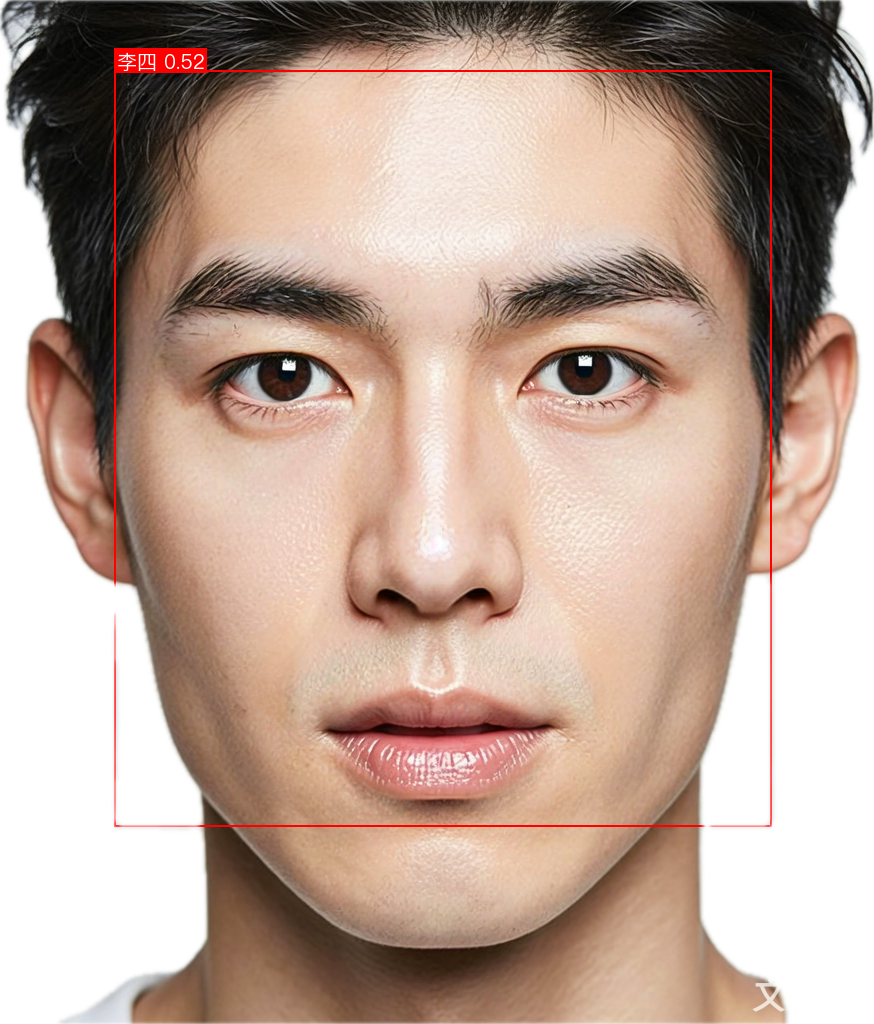
六、场景二:准备 CartoonFace 官方示例数据(动漫)
适用于动漫角色、AI 生成头像等非真人场景。
1️⃣ 下载官方数据
bash
wget https://paddle-model-ecology.bj.bcebos.com/paddlex/data/cartoonface_demo_gallery.tar2️⃣ 解压
bash
tar -xf cartoonface_demo_gallery.tar📁 目录结构:
cartoonface_demo_gallery/
├── gallery.txt
├── 0001.png
├── 0002.png
├── ...
└── test_images/
    └── cartoon_demo.jpg
📄 gallery.txt 内容示例:
txt
0001.png 太一
0002.png 素娜
0003.png 大和
0004.png 美美
🔍 说明:同一角色可能有多张图(如"素娜"出现多次),因此 Top-K 中名字重复是正常现象,非 bug。
七、通用人脸识别 Pipeline 调用
无论哪种场景,调用方式一致!
✅ 示例代码(自定义人脸)
python
from paddlex import create_pipeline
import os

os.makedirs("output", exist_ok=True)
pipeline = create_pipeline(pipeline="face_recognition")

# 构建自定义索引
index_data = pipeline.build_index(
    gallery_imgs="face_demo_gallery",
    gallery_label="face_demo_gallery/gallery.txt"
)

# 预测(替换为你的测试图)
results = pipeline.predict("your_test_image.jpg", index=index_data)

for res in results:
    res.print()
    res.save_to_img("output/")
    res.save_to_json("output/")
✅ 示例代码(CartoonFace 官方)
python
# 构建 CartoonFace 索引
index_data = pipeline.build_index(
    gallery_imgs="cartoonface_demo_gallery",
    gallery_label="cartoonface_demo_gallery/gallery.txt"
)

# 使用官方测试图
results = pipeline.predict(
    "cartoonface_demo_gallery/test_images/cartoon_demo.jpg",
    index=index_data
)

for res in output:
    res.print()
    res.save_to_img("./output/")
    res.save_to_json("./output/")
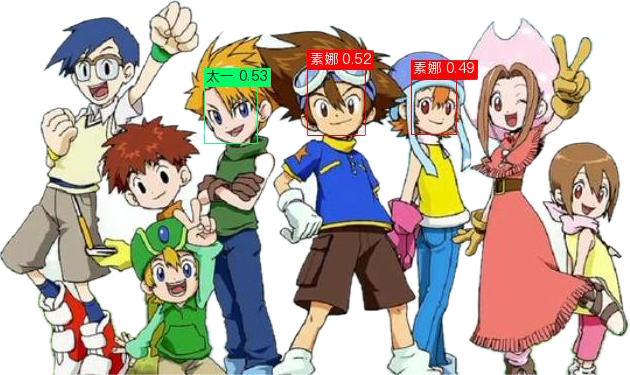
八、返回结果详解(JSON 格式)
示例输出(节选)
json
{
  "boxes": [
    {
      "labels": ["素娜", "素娜", "太一", "大和", "美美"],
      "rec_scores": [0.4872, 0.4471, 0.4466, 0.3857, 0.3305],
      "det_score": 0.7754,
      "coordinate": [423, 91, 468, 147]
    }
  ]
}
字段说明
| 字段 | 含义 |
|---|---|
det_score |
人脸检测置信度(≥0.7 表示检测成功) |
labels |
Top-K 最相似身份列表(默认 Top-5) |
rec_scores |
对应的特征相似度(0~1) |
⚠️ 注意:
- 真人场景 :若所有分数 < 0.35,
labels可能为null→ 判定为 Unknown- 卡通场景 :始终返回 Top-K,即使分数很低,需自行判断
九、身份校验策略(关键!)
推荐阈值
| 场景 | 可信阈值 | 说明 |
|---|---|---|
| 真人识别 | ≥ 0.55 | 高置信身份 |
| 卡通识别 | ≥ 0.55 | 可信;0.45~0.55 为"高度疑似" |
通用校验代码
python
from paddlex import create_pipeline
import os
import json
import warnings

# 忽略 Faiss 警告
warnings.filterwarnings("ignore", message="HNSW32 method does not support")

os.makedirs("output", exist_ok=True)

# ===============================
# 1. 创建人脸识别 Pipeline
# ===============================
pipeline = create_pipeline(pipeline="face_recognition")

# ===============================
# 2. 构建人脸索引(内存索引)
# ===============================
index_data = pipeline.build_index(
    gallery_imgs="face_demo_gallery",
    gallery_label="face_demo_gallery/gallery.txt",
    use_memory=True
)

# ===============================
# 3. 执行人脸识别
# ===============================
results = pipeline.predict(
    "文心一言AI作图_20260128165718.png",
    index=index_data
)
def unwrap_res_json(res_json):
    """
    兼容 PaddleX 不同版本返回结构
    """
    if "res" in res_json and isinstance(res_json["res"], dict):
        return res_json["res"]
    return res_json
# ===============================
# 4. 人脸校验函数 正式的 threshold=0.4 值要调大 这里面模拟照片
# ===============================
def face_verification(res_json, threshold=0.4):
    faces = []

    # 👉 关键修复点
    res_json = unwrap_res_json(res_json)

    for box in res_json.get("boxes", []):
        labels = box.get("labels")
        scores = box.get("rec_scores")

        # 检测到人脸,但无法识别身份
        if labels is None or scores is None:
            faces.append({
                "final_label": "Unknown",
                "verify": False,
                "rec_score": None,
                "det_score": box.get("det_score"),
                "coordinate": box.get("coordinate")
            })
            continue

        # Top-1
        top1_label = labels[0]
        top1_score = float(scores[0])

        faces.append({
            "final_label": top1_label if top1_score >= threshold else "Unknown",
            "verify": top1_score >= threshold,
            "rec_score": top1_score,
            "det_score": box.get("det_score"),
            "coordinate": box.get("coordinate")
        })

    return faces


# ===============================
# 5. 处理结果 & 保存
# ===============================
final_output = []

for res in results:
    res_json = res.json

    verified_faces = face_verification(res_json, threshold=0.4)

    final_output.append({
        "input_path": res_json.get("input_path"),
        "faces": verified_faces
    })

    # 保存可视化与原始 JSON
    res.save_to_img("output/")
    res.save_to_json("output/")

# ===============================
# 6. 保存最终校验结果
# ===============================
with open("output/result.json", "w", encoding="utf-8") as f:
    json.dump(final_output, f, indent=2, ensure_ascii=False)

print("✅ 人脸识别与校验完成")
print("📁 可视化结果:output/")
print("📄 最终校验 JSON:output/result.json")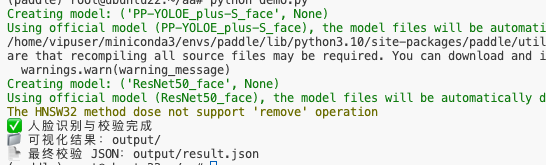
返回结果
bash
[
  {
    "input_path": null,
    "faces": [
      {
        "final_label": "李四",
        "verify": true,
        "rec_score": 0.5153087377548218,
        "det_score": 0.746188223361969,
        "coordinate": [
          180.9373779296875,
          71.51338195800781,
          837.9351806640625,
          825.9351806640625
        ]
      }
    ]
  }
]
十、总结
你已掌握:
✅ PaddlePaddle + PaddleX GPU 环境搭建
✅ 两种人脸库构建方式 :自定义(真人) vs 官方(卡通)
✅ 统一调用 face_recognition Pipeline
✅ Top-K 结果解析与 Unknown 判定逻辑
✅ 工程级身份校验策略
🎯 本方案可直接用于:
- 企业员工识别系统
- 动漫角色检索
- AI 生成头像身份初筛
- 多模态内容审核