以【KnowledgeBaseGame】案例为准进行分析,探索一下知识库的使用方法
文章目录
- 一、知识库的面板配置
- 二、知识库的组成
- 三、知识库文本如何解析成标准格式的数据
-
- [1 把知识问答整理成字典](#1 把知识问答整理成字典)
-
- [(1) 数据结构](#(1) 数据结构)
- [(2) 把知识问答的文本规范化成字典知识库](#(2) 把知识问答的文本规范化成字典知识库)
- [2 把提问整理成向量表](#2 把提问整理成向量表)
-
- [(1) 整体流程](#(1) 整体流程)
- [(2) 关键方法rag.Add()介绍](#(2) 关键方法rag.Add()介绍)
- 四、如何通过用户的提问信息,找到知识库中最匹配的【问题】
-
- [1 用户提交问题后的处理逻辑](#1 用户提交问题后的处理逻辑)
- [2 如何根据提问信息生成新的提示词](#2 如何根据提问信息生成新的提示词)
- [3 如何根据用户提问找到相似的答案](#3 如何根据用户提问找到相似的答案)
-
- [(1) 找到相似的问题:](#(1) 找到相似的问题:)
- [(2) 在知识库字典里,通过【问题】找到【答案】](#(2) 在知识库字典里,通过【问题】找到【答案】)
- [(3) Search方法的实现](#(3) Search方法的实现)
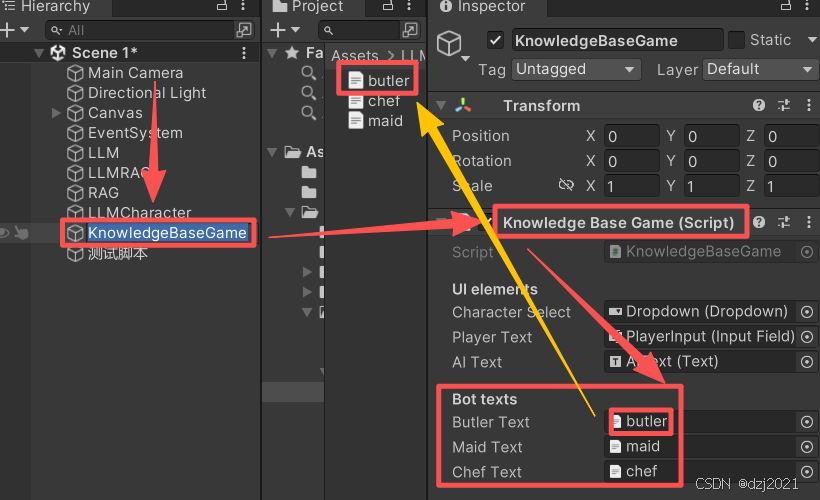
一、知识库的面板配置
以butler为例:
二、知识库的组成
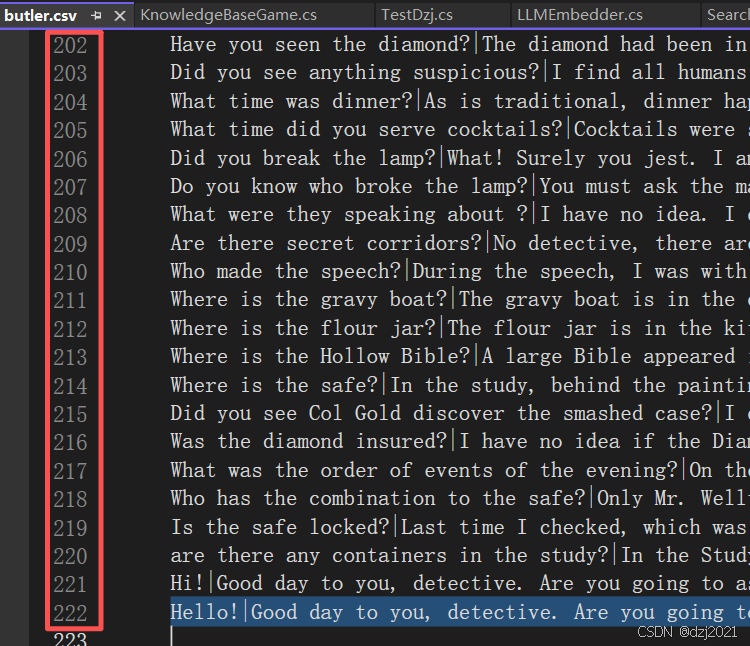
知识库由文本组成,结构为"问题"+"答案",为了好解析,每一行由一组问答组成,如下所示:
csharp
Query|Response|
Where was the diamond originally?|The diamond had been in the glass case in the Study for more than a month before tonight's dinner event.|Did you see Col Gold discover the smashed case?
What happened to the Diamond?|Respectfully, I have no idea. I am not omnipotent. Do you think I'm Google? The police already asked that. Ask something else.|Was the diamond insured?
Where is the Diamond?|Respectfully, I have no idea. I am not omnipotent. Do you think I'm Google? The police already asked that. Ask something else.|What was the order of events of the evening?
Who stole the Diamond?|Respectfully, I have no idea. I am not omnipotent. Do you think I'm Google? The police already asked that. Ask something else.|Who has the combination to the safe?
备注:butler的知识库文本一共有220行左右。
三、知识库文本如何解析成标准格式的数据
1 把知识问答整理成字典
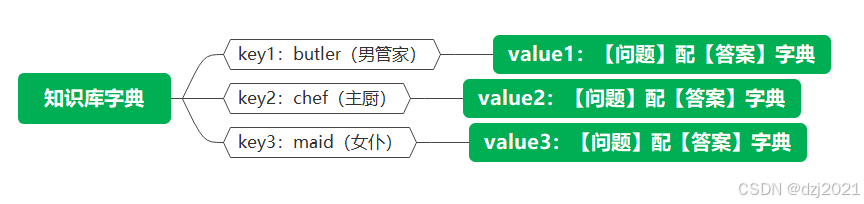
本例中,一共有三个角色,于是每个角色对应一系列问答,都要分门别类的整理出来,方便快速检索。
(1) 数据结构
csharp
Dictionary<string, Dictionary<string, string>> botQuestionAnswers = new Dictionary<string, Dictionary<string, string>>();

[来源] 《KnowledgeBaseGame.cs》, line22
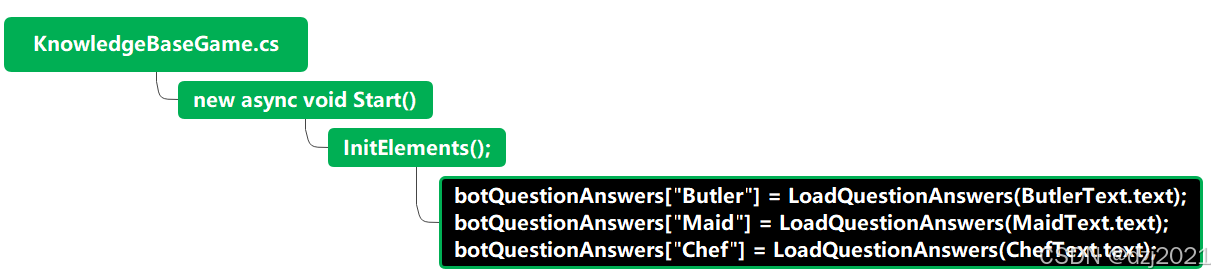
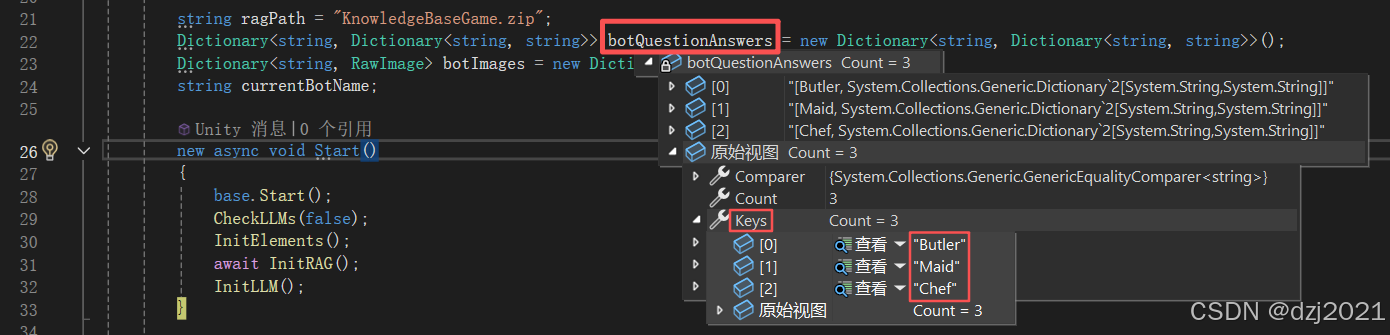
如下所示,它是一个字典套娃:
(2) 把知识问答的文本规范化成字典知识库
- 直接把提问和回答的信息解析出来,放到字典套娃里面
- 问答文本的解析代码:
csv文本里面,用【|】(竖线)来做分隔符,把【问题】和【答案】隔开,所以直接用【|】来破拆解析
csharp
public Dictionary<string, string> LoadQuestionAnswers(string questionAnswersText)
{
    Dictionary<string, string> questionAnswers = new Dictionary<string, string>();
    foreach (string line in questionAnswersText.Split("\n"))
    {
        if (line == "") continue;
        string[] lineParts = line.Split("|");
        questionAnswers[lineParts[0]] = lineParts[1];
    }
    return questionAnswers;
}

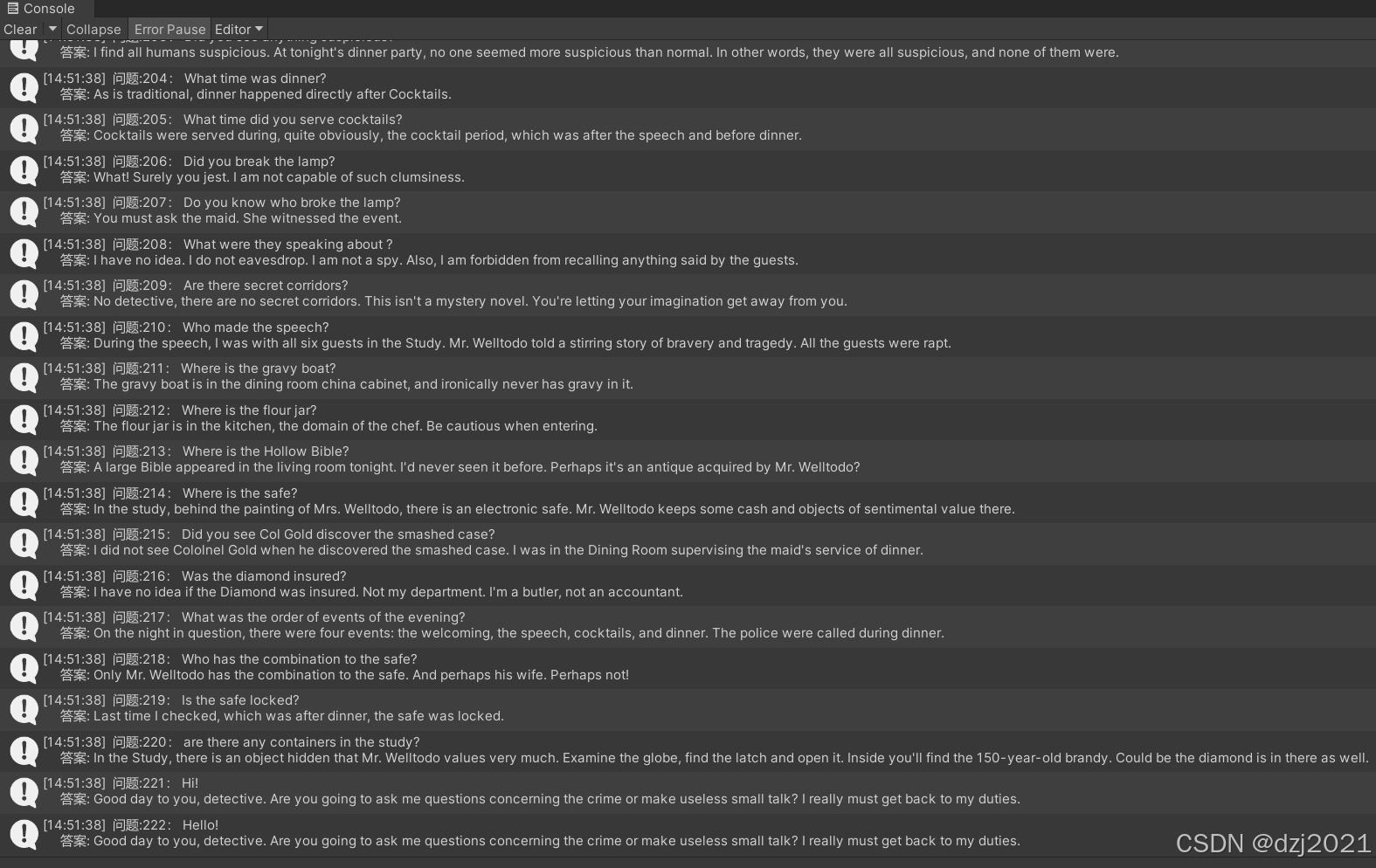
[来源] 《KnowledgeBaseGame.cs》, line60- 加载后的样子:
- Debug出来查看
csharp
 foreach (var kvp in dict)
 {
     UnityEngine.Debug.Log($" 问题:{index}: {kvp.Key} \n     答案: {kvp.Value}");
     index++;
 }
2 把提问整理成向量表
(1) 整体流程
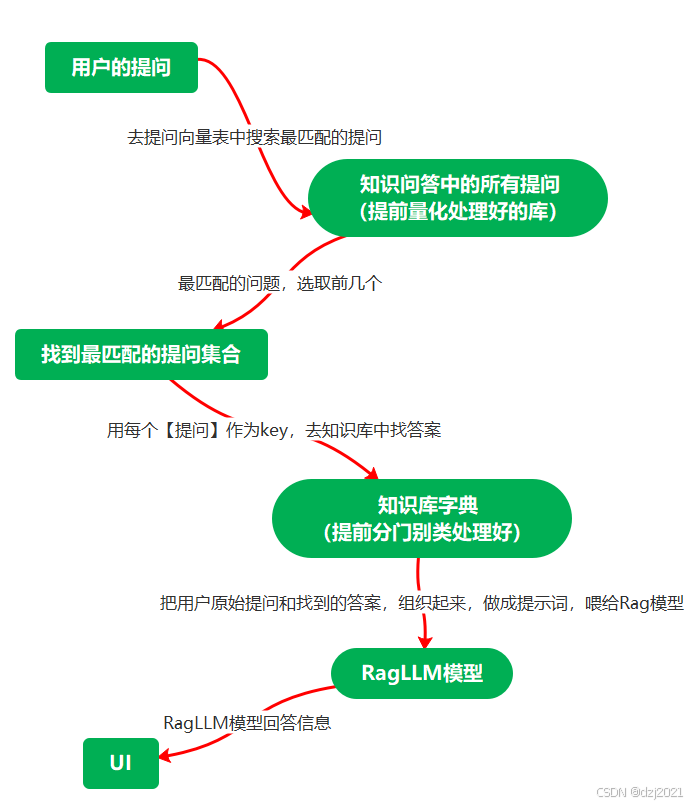
根据下面提问和回答的流程,我们需要提前准备好量化库,量化库里包含了知识问答里面所有【提问】的信息。
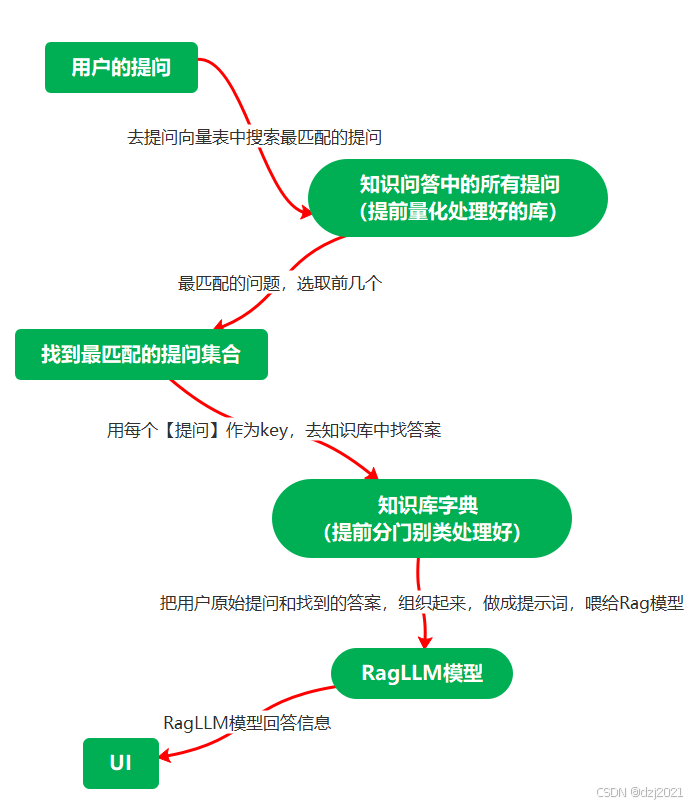
只是把【问题】加载到RAG库里面,目的是为了用RagLLM模型来进行搜索处理,数学上是用矩阵算法,把用户的提问矩阵信息,丢给模型,模型把知识库的问题矩阵进行匹配,返回最相似的提问信息。
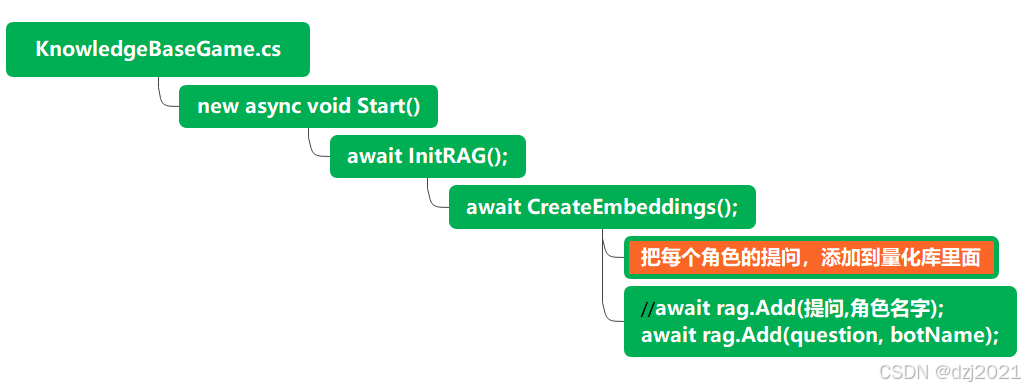
具体实现脚本:
csharp
    public async Task CreateEmbeddings()
    {
        bool loaded = await rag.Load(ragPath);
        if (!loaded)
        {
#if UNITY_EDITOR
            Stopwatch stopwatch = new Stopwatch();//创建一个秒表Stopwatch,这是一个高精度的计时器,精确到纳秒
            // build the embeddings
            foreach ((string botName, Dictionary<string, string> botQuestionAnswers) in botQuestionAnswers)
            {
                PlayerText.text += $"Creating Embeddings for {botName} (only once)...\n";
                List<string> questions = botQuestionAnswers.Keys.ToList();
                stopwatch.Start();//开始计时
                foreach (string question in questions) await rag.Add(question, botName);
                stopwatch.Stop();//停止计时
                Debug.Log($"embedded {rag.Count()} phrases in {stopwatch.Elapsed.TotalMilliseconds / 1000f} secs");//打印耗时
            }
            // store the embeddings
            rag.Save(ragPath);
#else
            // if in play mode throw an error
            throw new System.Exception("The embeddings could not be found!");
#endif
        }
    }
(2) 关键方法rag.Add()介绍
- (1)调用的方式
csharp
await rag.Add(question, botName);- (2)函数签名
csharp
public abstract Task<int> Add(string inputString, string group = "");-
- Task: 这是一个异步函数,返回一个 int 类型的任务。该整数是分配给这条新短语的 唯一标识符(ID/Key)。
-
- string inputString: 需要添加到搜索系统中的原始文本短语。
-
- string group = "": 可选参数。指定该数据所属的 分组(Data Group)。这允许你在搜索时缩小范围,只在特定组内查询。
补充: 在向量库里面搜索【问题】的时候,有与之匹配的Search方法:
csharp
public abstract Task<int> IncrementalSearch(string queryString, string group = "");四、如何通过用户的提问信息,找到知识库中最匹配的【问题】
用户提问后,提问信息经过rag.search方法,在量化库里面,找相似的提问,然后再用这些提问,去知识库字典里取答案,之后,把原始的提问信息和找到的答案信息,组成新的提示词,交给RagLLM模型,模型吐出信息后,用户看到回答的信息。
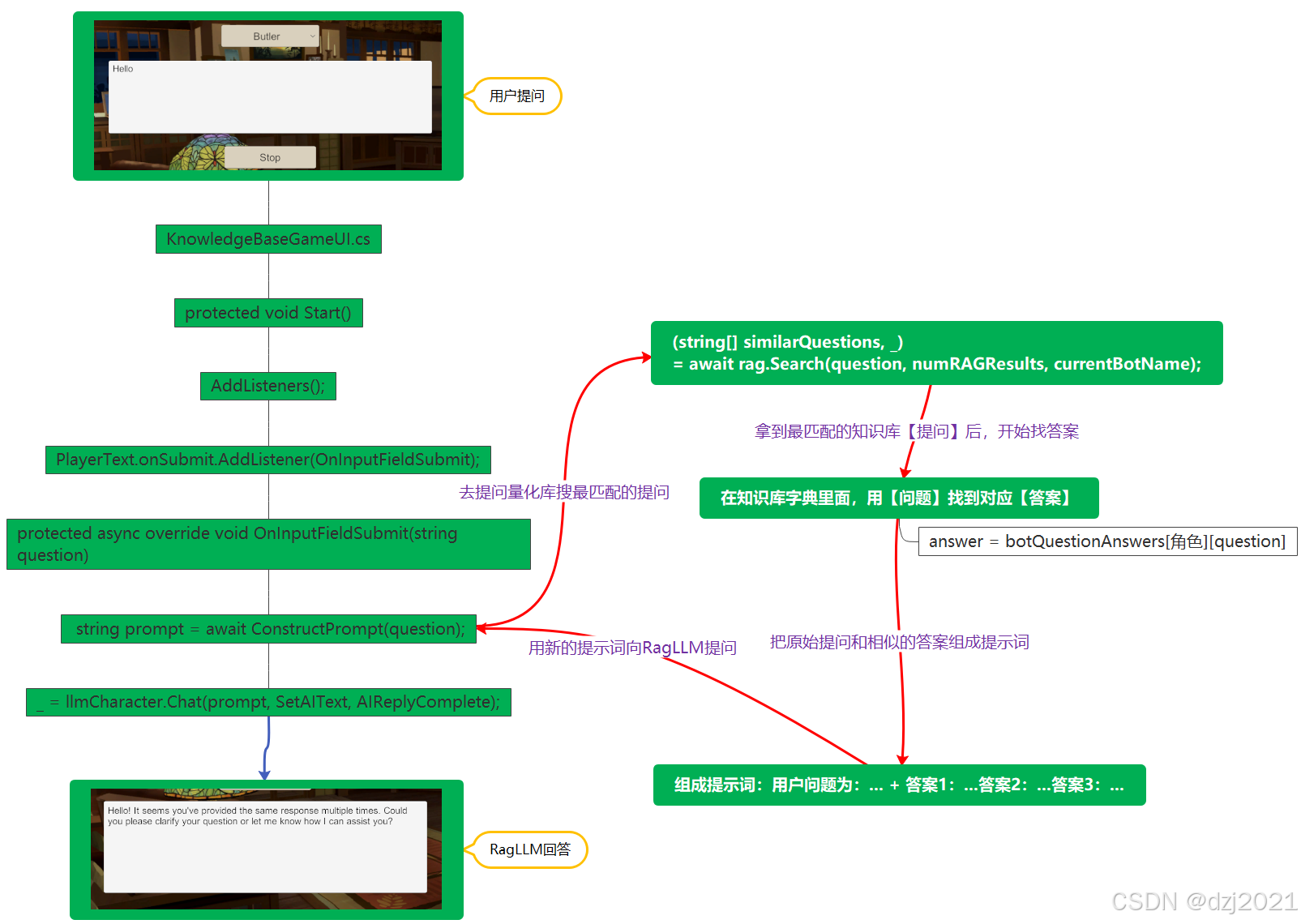
1 用户提交问题后的处理逻辑
- 1.1 用提问信息生成【新的提示词】
- 1.2 用【新的提示词】跟模型【聊天Chat】
csharp
protected async override void OnInputFieldSubmit(string question)
{
    PlayerText.interactable = false;
    SetAIText("...");
    string prompt = await ConstructPrompt(question);
    _ = llmCharacter.Chat(prompt, SetAIText, AIReplyComplete);
}
2 如何根据提问信息生成新的提示词
- 2.1 根据【用户提问信息】,找到【相似的答案】
- 2.2 用提问和答案信息,组成新的提示词
csharp
 public async Task<string> ConstructPrompt(string question)
 {
     // get similar answers from the RAG
     List<string> similarAnswers = await Retrieval(question);
     // create the prompt using the user question and the similar answers
     string answers = "";
     foreach (string similarAnswer in similarAnswers) answers += $"\n- {similarAnswer}";
     // string prompt = $"Robot: {currentBotName}\n\n";
     string prompt = $"Question: {question}\n\n";
     prompt += $"Possible Answers: {answers}";
     return prompt;
 }
3 如何根据用户提问找到相似的答案
(1) 找到相似的问题:
通过调用rag.Search(question, numRAGResults, currentBotName)实现
(2) 在知识库字典里,通过【问题】找到【答案】
csharp
botQuestionAnswers[currentBotName][similarQuestion]
csharp
public async Task<List<string>> Retrieval(string question)
{
    // find similar questions for the current bot using the RAG
    (string[] similarQuestions, _) = await rag.Search(question, numRAGResults, currentBotName);
    // get the answers of the similar questions
    List<string> similarAnswers = new List<string>();
    foreach (string similarQuestion in similarQuestions) similarAnswers.Add(botQuestionAnswers[currentBotName][similarQuestion]);
    return similarAnswers;
}
(3) Search方法的实现
- search的使用方式
csharp
(string[] similarQuestions, _) = await rag.Search(question, numRAGResults, currentBotName);- search方法的签名信息
csharp
public async Task<(string[], float[])> Search(string queryString, int k, string group = "")- 签名解释
csharp
- Task<(string[], float[])>: 异步返回一个元组。
  - string[]: 检索到的最相似的短语数组。
  - float[]: 对应结果的 距离(Distances/Dissimilarity)。距离越小代表越相似。

- string queryString: 用户的查询语句。

- int k: 指定需要返回的最匹配结果的数量。

- string group = "": 可选参数。如果指定,搜索将仅限于该分组内的数据。