小程序实现对接百度AI大模型,通过websocket连接百度实时语音识别进行处理后返回文字,调用大模型API返回的消息数据进行文字转语音朗诵并操作。
我们的需求是对接AI大模型来优化客户的操作,实现的方案是在小程序里面获取录音权限 后,调用百度的实时语音转文字将语音帧通过websocket进行处理 ,结束帧返回识别的文字后,调用AI大模型的api,将识别到的文字传入到百度AI大模型接口 中,返回识别的意图进行操作,并调用百度的文字转语音朗读返回的消息内容(ps:AI大模型中关键字需要自己在控制台创建)。
实现效果如下:
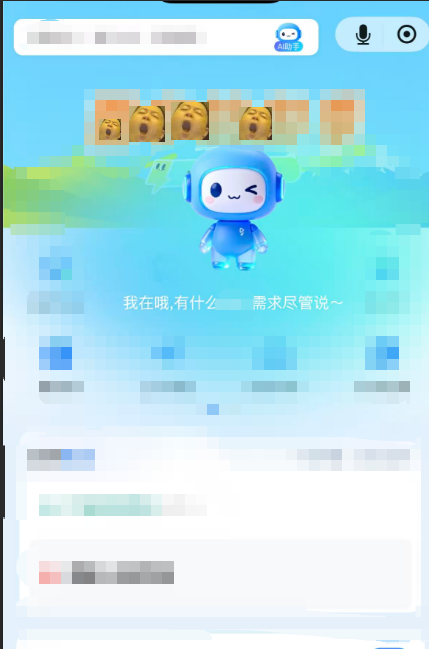
1. 点击ai助手时获取录音权限
toRecordVoice() {
	var that = this
	wx.getSetting({
		success(res) {
			if (!res.authSetting['scope.record']) {
				wx.authorize({
					scope: 'scope.record',
					success(succ) {
						// 权限已授予,展示AI助手模型
						that.showAIModel = true
					},
					fail(err) {
						uni.showModal({
							title: '权限申请',
							content: '需要录音权限才能使用语音功能',
							success(res) {
								if (res.confirm) {
									wx.openSetting({
										success(settingdata) {
											if (settingdata.authSetting[
													'scope.record']) {
												console.log('授权成功');
												that.showAIModel = true
											} else {
												console.log('授权失败');
											}
										}
									})
								}
							}
						})
					}
				})
			} else {
				that.showAIModel = true
			}
		}
	})
},
2.ai模块组件进行封装
<template>
<view class="ai-model">
<view class="ai-model-header">
<image src="xxxx.gif" class="ai-model-header-img"></image>
<view class="ai-model-header-text">{{text}}</view>
</view>
<!-- <view class="ai-model-result" v-if="recognitionResult">
<text class="result-label">识别结果:</text>
<text class="result-text">{{recognitionResult}}</text>
</view> -->
</view>
</template>
<script>
const md5 = require('@/libs/md5.js').md5;
const app = getApp()
const api = require('@/utils/api.js');
export default {
name: 'aiModel',
data() {
return {
text: '有什么需求尽管说',
voicePath: '',
// 百度语音识别配置
baiduConfig: {
appId: '',
apiKey: '',
secretKey: ''
},
// WebSocket连接
socketTask: null,
// 录音管理器
recorderManager: null,
// 识别状态
isRecognizing: false,
// 识别结果
recognitionResult: '',
// 临时结果
tempResult: '',
// WebSocket连接状态
socketConnected: false,
// 最后一次语音活动时间
lastVoiceActivityTime: null,
// 静默检测定时器
silenceTimer: null,
// 百度API访问令牌
accessToken: null,
// 令牌过期时间
tokenExpiresTime: null,
// 标识是否已开始过录音(避免重复启动)
hasStartedRecognition: false,
// 标识是否已经调用过AI接口(避免重复调用)
hasCalledApi: false,
// 连续静默帧数计数
silenceFrameCount: 0,
// 连续检测到有声音的帧数计数
voiceFrameCount: 0,
// 判断是否有声音的阈值
voiceThreshold: 20,
// 当前音频能量值
currentEnergy: 0,
// 音频播放器
audioContext: null
};
},
created() {
console.log('组件挂载时初始化录音管理器');
// 组件挂载时初始化录音管理器
this.initRecorder();
initAudioPlayer()
},
mounted() {
// 组件更新时自动开始语音识别(仅在首次显示时)
if (!this.isRecognizing && !this.hasStartedRecognition) {
console.log('组件显示时自动开始语音识别');
this.startVoiceRecognition();
this.hasStartedRecognition = true;
}
},
destroyed() {
// 组件销毁时清理资源
this.stopVoiceRecognition();
this.closeSocket();
// 重置所有标志位,避免下次显示时出现重复调用
this.hasStartedRecognition = false;
this.hasCalledApi = false;
this.isRecognizing = false;
this.recognitionResult = '';
this.tempResult = '';
},
methods: {
// 初始化音频播放器
initAudioPlayer() {
if (!this.audioContext) {
this.audioContext = uni.createInnerAudioContext();
this.audioContext.onError((res) => {
console.error('音频播放失败:', res);
});
}
},
toJumap(info){
var that = this;
// 在跳转页面之前关闭录音和WebSocket连接
if (that.isRecognizing && that.recorderManager) {
try {
that.recorderManager.stop();
that.isRecognizing = false;
} catch (e) {
console.error('停止录音失败:', e);
}
}
// 清除静默检测定时器
if (that.silenceTimer) {
clearInterval(that.silenceTimer);
that.silenceTimer = null;
}
// 关闭WebSocket连接
that.closeSocket();
//ai模型获取到的关键词进行直接跳转或文字转语音朗读
if(info.intent == "chat"){
this.textToSpeech(info.param.chat_reply);
}else if(info.intent == "xx"){
uni.navigateTo({
url: `xxxxx`
})
}
},
// 初始化录音管理器
initRecorder() {
if (!this.recorderManager) {
this.recorderManager = uni.getRecorderManager();
console.log('初始化录音管理器:', this.recorderManager);
console.log('初始化时的百度配置:', this.baiduConfig);
// 录音错误回调
this.recorderManager.onError((res) => {
console.error('录音失败:', res);
this.text = '录音失败,请重试';
this.isRecognizing = false;
});
// 录音停止回调
this.recorderManager.onStop((res) => {
console.log('录音停止:', res);
this.voicePath = res.tempFilePath;
this.isRecognizing = false;
});
// 录音数据回调
this.recorderManager.onFrameRecorded((res) => {
// 减少调试日志,仅保留关键信息
// 在微信小程序中,frameBuffer直接打印为空对象,但实际上有内容
if (res.frameBuffer) {
// 计算音频能量,判断是否有语音活动
let hasVoiceActivity = this.hasVoiceActivity(res.frameBuffer);
if (hasVoiceActivity) {
// 如果检测到语音活动,更新最后一次语音活动时间
this.lastVoiceActivityTime = Date.now();
this.silenceFrameCount = 0;
this.voiceFrameCount++;
} else {
// 如果没有检测到语音活动,增加静默帧数
this.silenceFrameCount++;
this.voiceFrameCount = 0;
}
if (this.isRecognizing && this.socketConnected) {
// 直接发送完整的音频帧,不进行分块
this.sendAudioData(res.frameBuffer);
}
}
});
}
},
// 开始语音识别
async startVoiceRecognition() {
try {
this.text = '正在连接语音识别服务...';
// 确保录音管理器已初始化
this.initRecorder();
if (!this.recorderManager) {
throw new Error('录音管理器初始化失败');
}
// 连接WebSocket
await this.connectSocket();
// 开始录音 - 使用成功案例中的配置参数
this.recorderManager.start({
duration: 600000, // 10分钟超时
format: 'pcm', // 必须是pcm格式,与百度API兼容
sampleRate: 16000, // 必须是16000Hz
numberOfChannels: 1, // 必须是单声道
sampleBits: 16, // 必须是16位
frameSize: 5, // 当录音大小达到5KB时触发onFrameRecorded
encodeBitRate: 96000 // 使用成功案例中的码率
});
this.isRecognizing = true;
this.text = '我在哦,有什么需求尽管说~';
this.recognitionResult = '';
this.tempResult = '';
// 初始化最后一次语音活动时间
this.lastVoiceActivityTime = Date.now();
console.log('开始录音,初始化lastVoiceActivityTime:', this.lastVoiceActivityTime);
// 启动静默检测定时器
this.startSilenceDetection();
} catch (err) {
console.error('开始语音识别失败:', err);
this.text = '连接语音识别服务失败,请重试';
this.isRecognizing = false;
}
},
// 停止语音识别
stopVoiceRecognition() {
// 先将识别状态设为false,防止新的音频数据被处理
this.isRecognizing = false;
if (this.recorderManager) {
try {
this.recorderManager.stop();
} catch (e) {
console.error('停止录音失败:', e);
}
}
// 清除静默检测定时器
if (this.silenceTimer) {
clearInterval(this.silenceTimer);
this.silenceTimer = null;
}
// 如果已经调用过API接口,则不再重复调用
if (this.hasCalledApi) {
console.log('已经调用过API接口,不再重复调用');
// 发送FINISH帧并关闭WebSocket
this.sendFinishFrame();
this.closeSocket();
return;
}
// 立即发送FINISH帧
this.sendFinishFrame();
// 关闭WebSocket连接
this.closeSocket();
// 如果没有最终识别结果,尝试调用API(用于静默超时的情况)
if (this.recognitionResult) {
// 将标志位设为true,防止重复调用API接口
this.hasCalledApi = true;
console.log('停止录音时调用后端接口,发送识别结果:', this.recognitionResult);
var params = {
"content": this.recognitionResult
};
net.postRequest(api.common.aiAgent, params, false, true, (data) => {
console.log(data,'datatta11111111111')
this.toJumap(data);
},(err) => {
console.error('调用后端接口失败:', err);
})
} else {
// 没有识别结果,直接关闭组件
this.closeComponent();
}
},
// 生成WebSocket连接URL
generateSocketUrl() {
// 获取当前时间戳
const timestamp = Math.floor(Date.now() / 1000);
// 生成随机数作为sn参数
const sn = this.generateSign(this.baiduConfig.apiKey, this.baiduConfig.secretKey, timestamp);
// 构造完整的WebSocket URL - 使用百度API要求的参数
return `wss://vop.baidu.com/realtime_asr?appid=${encodeURIComponent(this.baiduConfig.appId)}&appkey=${encodeURIComponent(this.baiduConfig.apiKey)}×tamp=${encodeURIComponent(timestamp)}&sn=${encodeURIComponent(sn)}&cuid=${encodeURIComponent('mini_app_device')}`;
},
// 生成签名
generateSign(apiKey, secretKey, timestamp) {
const str = `${apiKey}${timestamp}${secretKey}`;
return md5(str);
},
// 连接WebSocket
async connectSocket() {
return new Promise((resolve, reject) => {
if (this.socketTask && this.socketConnected) {
resolve();
return;
}
try {
// 直接使用签名认证方式连接,不依赖access token
const url = this.generateSocketUrl();
// console.log('连接WebSocket:', url);
this.socketTask = uni.connectSocket({
url: url,
protocols: ['websocket'],
success: (res) => {
// console.log('WebSocket连接成功',res);
},
fail: (err) => {
// console.error('WebSocket连接失败:', err);
reject(err);
}
});
// 连接打开
this.socketTask.onOpen(() => {
// console.log('WebSocket连接已打开');
this.socketConnected = true;
// console.log('连接打开后准备发送START帧,socketConnected:', this.socketConnected);
this.sendStartFrame();
resolve();
});
// 连接关闭
this.socketTask.onClose(() => {
console.log('WebSocket连接已关闭');
this.socketConnected = false;
this.socketTask = null;
});
// 接收消息
this.socketTask.onMessage((res) => {
console.log('收到消息:', res);
this.handleSocketMessage(res);
});
// 连接错误
this.socketTask.onError((err) => {
console.error('WebSocket错误:', err);
this.socketConnected = false;
this.socketTask = null;
reject(err);
});
} catch (error) {
console.error('连接WebSocket异常:', error);
reject(error);
}
});
},
// 关闭WebSocket
closeSocket() {
if (this.socketTask) {
this.socketTask.close();
this.socketTask = null;
this.socketConnected = false;
}
},
// 发送开始帧
sendStartFrame() {
if (!this.socketConnected) return;
// 详细确认百度配置参数
// console.log('百度配置参数 - 完整对象:', this.baiduConfig);
// console.log('appId类型:', typeof this.baiduConfig.appId, '值:', this.baiduConfig.appId);
// console.log('apiKey类型:', typeof this.baiduConfig.apiKey, '值:', this.baiduConfig.apiKey);
// console.log('secretKey类型:', typeof this.baiduConfig.secretKey, '值:', this.baiduConfig.secretKey);
// 单独创建data对象进行调试,确保format是小写
const dataObj = {
appid: this.baiduConfig.appId,
appkey: String(this.baiduConfig.apiKey),
dev_pid: 1537, // 使用普通话识别模型(1537为普通话,有标点)
cuid: "mini_app_device",
format: "pcm",
sample: 16000
};
console.log('创建的data对象:', dataObj);
// 根据百度API文档,START帧参数应在data对象内,appid使用int类型
const startFrame = {
type: "START",
data: dataObj
};
const jsonData = JSON.stringify(startFrame);
// console.log('发送START帧数据:', startFrame);
// console.log('发送START帧JSON:', jsonData);
// console.log('JSON字符串长度:', jsonData.length);
this.socketTask.send({
data: jsonData,
success: (res) => {
console.log('发送START帧成功',res);
},
fail: (err) => {
console.error('发送START帧失败:', err);
}
});
},
// 发送音频数据
sendAudioData(audioData) {
if (!this.isRecognizing || !this.socketConnected) return;
// 不再无条件更新lastVoiceActivityTime,只在检测到有声音时更新
// 检测是否有声音(基于之前在onFrameRecorded中计算的hasVoiceActivity结果)
// 这里不再重复检测,而是依赖onFrameRecorded中的检测结果
// 在微信小程序中,frameBuffer可能是一个特殊的对象,需要直接发送
try {
// 直接使用uni-app的send方法发送二进制数据
this.socketTask.send({
data: audioData,
success: (res) => {
// 不再无条件更新lastVoiceActivityTime
},
fail: (err) => {
// 打印详细的错误信息
for (let key in err) {
console.error(`错误属性${key}:`, err[key]);
}
// 如果直接发送失败,尝试将音频数据转换为ArrayBuffer后发送
this.trySendAsArrayBuffer(audioData);
}
});
} catch (e) {
// 异常时尝试转换后发送
this.trySendAsArrayBuffer(audioData);
}
},
// 尝试将音频数据转换为ArrayBuffer后发送
trySendAsArrayBuffer(audioData) {
if (!this.isRecognizing || !this.socketConnected) return;
try {
let arrayBuffer;
// 如果是TypedArray,转换为ArrayBuffer
if (audioData.buffer && audioData.buffer instanceof ArrayBuffer) {
arrayBuffer = audioData.buffer;
} else if (audioData instanceof ArrayBuffer) {
arrayBuffer = audioData;
} else {
// 其他情况,尝试转换
console.warn('无法确定音频数据格式');
return;
}
// 发送转换后的ArrayBuffer
this.socketTask.send({
data: arrayBuffer,
success: (res) => {
// 不再无条件更新lastVoiceActivityTime
},
fail: (err) => {
console.error('转换后发送音频数据失败:', err);
for (let key in err) {
console.error(`错误属性${key}:`, err[key]);
}
}
});
} catch (e) {
console.error('转换音频数据为ArrayBuffer异常:', e);
}
},
// 音频能量检测,判断是否有声音
hasVoiceActivity(frameBuffer) {
if (!frameBuffer) return false;
try {
let arrayBuffer;
// 获取ArrayBuffer
if (frameBuffer.buffer && frameBuffer.buffer instanceof ArrayBuffer) {
arrayBuffer = frameBuffer.buffer;
} else if (frameBuffer instanceof ArrayBuffer) {
arrayBuffer = frameBuffer;
} else {
console.warn('无法确定音频数据格式');
return false;
}
// 将ArrayBuffer转换为Int16Array以获取音频样本
const audioData = new Int16Array(arrayBuffer);
// 计算音频能量(均方根值)
let sumSquare = 0;
for (let i = 0; i < audioData.length; i++) {
sumSquare += audioData[i] * audioData[i];
}
const rms = Math.sqrt(sumSquare / audioData.length);
// 计算分贝值(dB)
const db = 20 * Math.log10(rms / 32768 + 1e-6);
// 更新当前能量值
this.currentEnergy = db;
// 如果分贝值大于阈值,认为有声音
// 调整阈值,从20dB改为-30dB,更适合实际使用场景
return db > -30;
} catch (e) {
console.error('音频能量检测异常:', e);
return false;
}
},
// 重新开始语音识别
restartRecognition() {
console.log('重新开始语音识别');
// 先检查是否正在识别,如果是,先停止
if (this.isRecognizing) {
// 停止当前的语音识别,但不发送FINISH帧和调用API
if (this.recorderManager) {
try {
this.recorderManager.stop();
} catch (e) {
console.error('停止录音失败:', e);
}
}
// 清除静默检测定时器
if (this.silenceTimer) {
clearInterval(this.silenceTimer);
this.silenceTimer = null;
}
// 关闭WebSocket连接
this.closeSocket();
}
// 重置所有状态
this.isRecognizing = false;
this.recognitionResult = '';
this.tempResult = '';
this.hasCalledApi = false;
this.lastVoiceActivityTime = null;
this.text = '有什么出行需求尽管说';
// 延迟一段时间后重新开始识别,给系统足够的时间清理资源
setTimeout(() => {
this.startVoiceRecognition();
}, 1000);
},
// 发送结束帧
sendFinishFrame() {
if (!this.socketConnected) return;
const finishFrame = {
type: 'FINISH'
};
this.socketTask.send({
data: JSON.stringify(finishFrame),
success: (res) => {
console.log('发送FINISH帧成功',res);
},
fail: (err) => {
console.error('发送FINISH帧失败:', err);
}
});
},
// 处理WebSocket消息
handleSocketMessage(res) {
try {
// console.log('接收WebSocket原始消息:', res);
// console.log('原始消息类型:', typeof res.data);
let messageData = res.data;
// 如果是ArrayBuffer类型,转换为字符串
if (messageData instanceof ArrayBuffer) {
messageData = new TextDecoder().decode(messageData);
console.log('转换后的文本消息:', messageData);
} else if (typeof messageData !== 'string') {
// 如果是其他类型,尝试转换为字符串
messageData = String(messageData);
console.log('强制转换后的文本消息:', messageData);
}
// 检查消息是否为空
if (!messageData) {
console.warn('收到空的WebSocket消息');
return;
}
// 尝试解析JSON数据
let data;
try {
// 移除可能的换行符,与成功案例保持一致
messageData = messageData.replace('\n','');
data = JSON.parse(messageData);
console.log('解析后的WebSocket消息:', data);
console.log('消息类型:', data.type);
} catch (parseErr) {
console.error('解析WebSocket消息失败:', parseErr);
console.error('原始消息内容:', messageData);
return;
}
// 检查是否有错误码
if (data.err_no) {
console.error('识别错误,错误码:', data.err_no, '错误信息:', data.err_msg);
// 不同错误码的处理策略
if (data.err_no === -3101) {
// 等待音频超时错误 - 这通常是因为音频帧没有及时发送到百度服务器
// 不要立即重启识别,而是继续当前的识别过程
console.log('处理等待音频超时错误,继续当前识别过程');
// 更新提示文本,但不要停止识别
this.text = '我在哦,有什么需求尽管说~';
// 更新最后一次语音活动时间,防止静默检测结束录音
this.lastVoiceActivityTime = Date.now();
} else {
// 其他错误,如网络错误、认证错误等
this.text = `网络开小差了,请稍后重试`;
// 识别错误后2秒重新开始识别
setTimeout(() => {
this.restartRecognition();
}, 2000);
}
return;
}
if (data.type === 'MID_TEXT') {
// 临时识别结果
this.tempResult = data.result;
console.log('临时识别结果:', this.tempResult);
// 立即更新显示文本为临时结果
this.text = this.tempResult;
// 更新最后一次语音活动时间,避免静默检测结束录音
this.lastVoiceActivityTime = Date.now();
console.log('收到临时结果,更新lastVoiceActivityTime:', this.lastVoiceActivityTime);
} else if (data.type === 'FIN_TEXT') {
// 最终识别结果
this.recognitionResult = data.result;
console.log('最终识别结果:', this.recognitionResult);
// 更新显示文本为最终结果
this.text = this.recognitionResult;
this.tempResult = '';
// 更新最后一次语音活动时间
this.lastVoiceActivityTime = Date.now();
// 向父组件发送识别结果
this.$emit('recognition-result', this.recognitionResult);
// 将标志位设为true,防止重复调用API接口
this.hasCalledApi = true;
// 调用后端处理的ai大模型接口,发送识别结果
var params = {
"content": this.recognitionResult
};
postRequest(api.aiAgent, params, (data) => {
console.log('后端接口返回结果:', data);
this.toJumap(data);
}, (err) => {
console.error('调用后端接口失败:', err);
// 如果调用失败,仍然关闭组件
this.closeComponent();
});
} else if (data.type === 'START') {
// 收到START响应,说明连接成功
console.log('START响应成功,开始接收音频');
this.text = '我在哦,有什么需求尽管说~';
} else if (data.type === 'ERROR') {
// 错误信息
console.error('识别错误:', data);
this.text = `识别错误: ${data.err_msg}`;
// 识别失败后2秒关闭组件
setTimeout(() => {
this.closeComponent();
}, 2000);
} else {
// 其他类型消息
console.log('其他类型WebSocket消息:', data);
// 显示原始消息类型
this.text = data.result;
}
} catch (e) {
console.error('处理WebSocket消息异常:', e);
// 尝试直接显示原始消息内容
try {
if (res.data instanceof ArrayBuffer) {
this.text = `消息处理异常: ${new TextDecoder().decode(res.data)}`;
} else {
this.text = `消息处理异常: ${String(res.data)}`;
}
} catch (parseErr) {
this.text = '消息处理异常';
}
}
},
// 关闭组件
closeComponent() {
// 先停止语音识别
this.stopVoiceRecognition();
// 通过事件通知父组件关闭弹窗
this.$emit('closeModel');
},
// 启动静默检测
startSilenceDetection() {
// 清除现有的定时器
if (this.silenceTimer) {
clearInterval(this.silenceTimer);
this.silenceTimer = null;
}
console.log('启动静默检测,初始lastVoiceActivityTime:', this.lastVoiceActivityTime);
// 每隔500ms检查一次是否静默
this.silenceTimer = setInterval(() => {
this.checkSilence();
}, 500);
},
// 检查是否静默
checkSilence() {
if (!this.isRecognizing) return;
const currentTime = Date.now();
console.log('检查静默 - 当前时间:', currentTime, 'lastVoiceActivityTime:', this.lastVoiceActivityTime, '间隔:', currentTime - this.lastVoiceActivityTime, 'ms');
// 如果超过10秒没有语音活动,认为是静默(增加阈值,给百度API足够的处理时间)
if (currentTime - this.lastVoiceActivityTime > 10000) {
console.log('检测到静默,自动结束录音');
this.stopVoiceRecognition();
}
},
// 获取百度API访问令牌
async getBaiduAccessToken() {
// 检查令牌是否存在且未过期
if (this.accessToken && this.tokenExpiresTime && Date.now() < this.tokenExpiresTime) {
return this.accessToken;
}
const {
apiKey,
secretKey
} = this.baiduConfig;
const url =
`https://aip.baidubce.com/oauth/2.0/token?grant_type=client_credentials&client_id=${apiKey}&client_secret=${secretKey}`;
return new Promise((resolve, reject) => {
uni.request({
url: url,
method: 'GET',
success: (res) => {
console.log('获取访问令牌成功:', res);
if (res.data.access_token) {
this.accessToken = res.data.access_token;
// 设置过期时间(提前10分钟)
this.tokenExpiresTime = Date.now() + (res.data.expires_in - 600) *
1000;
resolve(this.accessToken);
} else {
reject(new Error('获取访问令牌失败'));
}
},
fail: (err) => {
console.error('获取访问令牌失败:', err);
reject(err);
}
});
});
},
// 语音合成函数
async textToSpeech(text) {
try {
// 初始化音频播放器
this.initAudioPlayer();
// 获取访问令牌
const token = await this.getBaiduAccessToken();
// 调用百度语音合成API
const url =
`https://tsn.baidu.com/text2audio?tex=${encodeURIComponent(text)}&tok=${token}&cuid=mini_app_device&ctp=1&lan=zh&vol=8&per=4&spd=5&pit=5`;
console.log('语音合成URL:', url);
// 播放语音
this.audioContext.src = url;
this.audioContext.play();
} catch (error) {
console.error('语音合成失败:', error);
}
}
},
};
</script>
<style lang="scss" scoped>
.ai-model {
.ai-model-header {
position: fixed;
z-index: 999;
width: 100%;
top: 10%;
min-height:700rpx;
margin: auto;
left: 0;
right: 0;
align-items:0 center;
background:blue;
text-align: center;
overflow: hidden;
padding: 24rpx;
.ai-model-header-img{
width: 178rpx;
height: 218rpx;
margin-top: 20%;
}
.ai-model-header-text{
font-size: 28rpx;
color: #FFFFFF;
line-height: 1.6;
margin-top: 24rpx;
}
.ai-btn {
min-width: 200rpx;
}
}
.ai-model-result {
position: fixed;
bottom: 100rpx;
left: 20rpx;
right: 20rpx;
background: rgba(255, 255, 255, 0.9);
border-radius: 10rpx;
padding: 20rpx;
box-shadow: 0 2rpx 10rpx rgba(0, 0, 0, 0.1);
}
.result-label {
font-size: 28rpx;
font-weight: bold;
color: #333;
}
.result-text {
font-size: 28rpx;
color: #666;
margin-left: 10rpx;
}
}
</style>-
页面内进行调用
<aiModel ref="aiModel" v-if="showAIModel" @closeModel="closeModel">
import aiModel from '@/components/aiModel.vue';
export default {
components: {
aiModel
},
data() {
return {
showAIModel: false, // 是否显示AI模型
}
},
methods: {
closeModel() {
this.showAIModel = false;
}
}
}
目前简化版的AI模型就这么实现了,如果要实现连续对话的话,在websocket发送消息时将上一个接收的消息的sessionid传入,就可以了,欢迎大家提出意见互相学习,AI组件模块后续会继续优化,欢期待你的关注。