数据库表设计
首先,我们需要一张表来跟踪导出任务的状态和存储信息。
sql
-- study_test.export_task definition

CREATE TABLE `export_task` (
  `file_id` varchar(36) COLLATE utf8mb4_0900_as_ci NOT NULL COMMENT '文件唯一ID(UUID)',
  `file_name` varchar(255) CHARACTER SET utf8mb4 COLLATE utf8mb4_0900_as_ci DEFAULT NULL COMMENT '导出文件的原始名称(如:订单报表.xlsx)',
  `file_path` varchar(500) COLLATE utf8mb4_0900_as_ci DEFAULT NULL COMMENT '在MinIO中的存储路径/对象名',
  `status` varchar(20) COLLATE utf8mb4_0900_as_ci NOT NULL DEFAULT 'PROCESSING' COMMENT '任务状态:PROCESSING-处理中,SUCCESS-成功,FAILED-失败',
  `minio_bucket` varchar(100) COLLATE utf8mb4_0900_as_ci DEFAULT NULL COMMENT 'MinIO存储桶名称',
  `download_url` varchar(500) COLLATE utf8mb4_0900_as_ci DEFAULT NULL COMMENT 'MinIO文件下载地址(可设置有效期)',
  `create_time` datetime DEFAULT CURRENT_TIMESTAMP COMMENT '任务创建时间',
  `finish_time` datetime DEFAULT NULL COMMENT '任务完成(成功或失败)时间',
  `error_message` text COLLATE utf8mb4_0900_as_ci COMMENT '若失败,记录错误信息',
  `create_user` varchar(100) COLLATE utf8mb4_0900_as_ci DEFAULT NULL COMMENT '发起导出的用户ID',
  `query_params` text COLLATE utf8mb4_0900_as_ci COMMENT '导出请求的查询条件(JSON格式,用于业务查询)',
  PRIMARY KEY (`file_id`)
) ENGINE=InnoDB DEFAULT CHARSET=utf8mb4 COLLATE=utf8mb4_0900_as_ci;
ExportTask
java
package com.example.study.controller.export;

import com.baomidou.mybatisplus.annotation.*;
import io.swagger.annotations.ApiModel;
import io.swagger.annotations.ApiModelProperty;
import lombok.Data;
import java.time.LocalDateTime;

@Data
@TableName("export_task")
@ApiModel(value = "ExportTask对象", description = "导出任务表")
public class ExportTask {

    @TableId(value = "file_id", type = IdType.ASSIGN_UUID)
    @ApiModelProperty(value = "文件唯一ID(UUID)", example = "550e8400-e29b-41d4-a716-446655440000")
    private String fileId;

    @TableField(value = "file_name")
    @ApiModelProperty(value = "导出文件的原始名称", example = "订单报表.xlsx", required = true)
    private String fileName;

    @TableField(value = "file_path")
    @ApiModelProperty(value = "在MinIO中的存储路径/对象名", example = "exports/550e8400-e29b-41d4-a716-446655440000/订单报表.xlsx")
    private String filePath;

    @TableField(value = "status")
    @ApiModelProperty(value = "任务状态:PROCESSING-处理中,SUCCESS-成功,FAILED-失败",
            example = "PROCESSING", allowableValues = "PROCESSING,SUCCESS,FAILED")
    private String status;

    @TableField(value = "minio_bucket")
    @ApiModelProperty(value = "MinIO存储桶名称", example = "export-bucket")
    private String minioBucket;

    @TableField(value = "download_url")
    @ApiModelProperty(value = "MinIO文件下载地址(可设置有效期)",
            example = "https://minio.example.com/export-bucket/exports/xxx?token=xxx")
    private String downloadUrl;

    @TableField(value = "create_time")
    @ApiModelProperty(value = "任务创建时间", example = "2024-01-29T10:30:00")
    private LocalDateTime createTime;

    @TableField(value = "finish_time")
    @ApiModelProperty(value = "任务完成(成功或失败)时间", example = "2024-01-29T10:35:00")
    private LocalDateTime finishTime;

    @TableField(value = "error_message")
    @ApiModelProperty(value = "若失败,记录错误信息", example = "文件生成超时")
    private String errorMessage;

    @TableField(value = "create_user")
    @ApiModelProperty(value = "发起导出的用户ID", example = "user123")
    private String createUser;

    @TableField(value = "query_params")
    @ApiModelProperty(value = "导出请求的查询条件(JSON格式)",
            example = "{\"startDate\":\"2024-01-01\",\"endDate\":\"2024-01-31\",\"status\":1}")
    private String queryParams;
}
ExportTaskMapper
java
package com.example.study.mapper;

import com.baomidou.mybatisplus.core.mapper.BaseMapper;
import com.example.study.controller.export.ExportTask;

public interface ExportTaskMapper extends BaseMapper<ExportTask> {
}
后端接口实现详细步骤
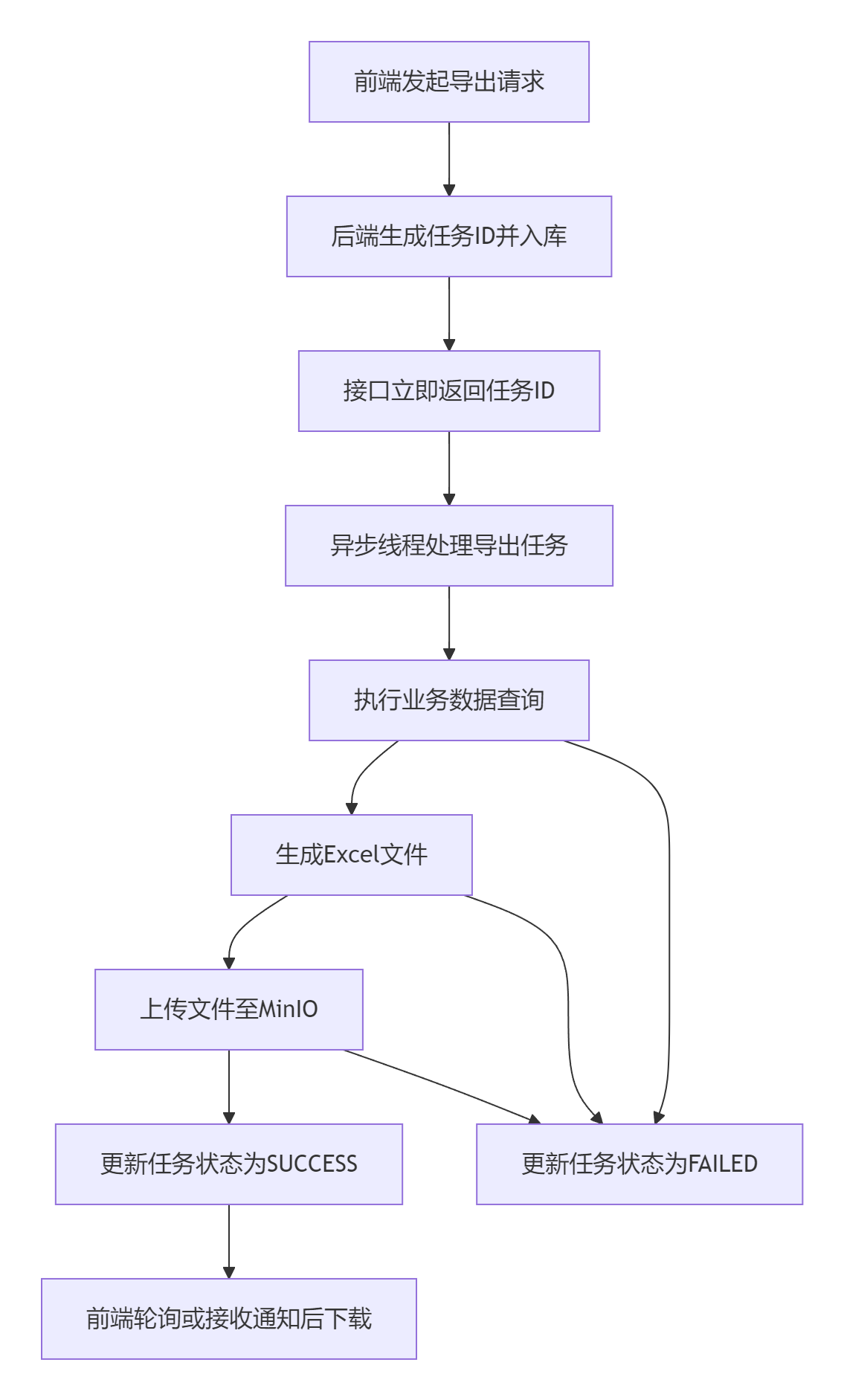
整个异步导出的业务流程,可以分为以下几个关键步骤,下图清晰地展示了其完整的工作流:
下面,我们来看每个环节的具体代码实现。
第1步:生成文件ID与初始化任务记录
pom.xml
XML
<!-- EasyExcel核心依赖 -->
<dependency>
    <groupId>com.alibaba</groupId>
    <artifactId>easyexcel</artifactId>
    <version>3.3.2</version> <!-- 建议使用较新版本 -->
    <exclusions>
        <!-- 排除 EasyExcel 自带的 POI 依赖,避免版本冲突 -->
        <exclusion>
            <groupId>org.apache.poi</groupId>
            <artifactId>poi</artifactId>
        </exclusion>
        <exclusion>
            <groupId>org.apache.poi</groupId>
            <artifactId>poi-ooxml</artifactId>
        </exclusion>
        <exclusion>
            <groupId>org.apache.poi</groupId>
            <artifactId>poi-ooxml-schemas</artifactId>
        </exclusion>
    </exclusions>
</dependency>

<!-- 然后显式引入一个与 EasyExcel 兼容的 POI 版本(解决java.lang.NoSuchFieldError: Factory错误是典型的 EasyExcel 和 Apache POI 版本冲突导致的报错) -->
<dependency>
    <groupId>org.apache.poi</groupId>
    <artifactId>poi</artifactId>
    <version>5.2.3</version> <!-- 确保版本兼容 -->
</dependency>
<dependency>
    <groupId>org.apache.poi</groupId>
    <artifactId>poi-ooxml</artifactId>
    <version>5.2.3</version>
</dependency>

<!-- 如果需要web导出功能,添加以下依赖 -->
<dependency>
    <groupId>org.springframework.boot</groupId>
    <artifactId>spring-boot-starter-web</artifactId>
</dependency>

<!-- Lombok(如未添加) -->
<dependency>
    <groupId>org.projectlombok</groupId>
    <artifactId>lombok</artifactId>
    <scope>provided</scope>
</dependency>
在Controller中,接收导出请求,立即生成UUID并创建任务记录。
ExportRequest
java
package com.example.study.controller.export;

import com.alibaba.fastjson.JSON;
import com.example.study.mapper.ExportTaskMapper;
import org.springframework.beans.factory.annotation.Autowired;
import org.springframework.http.ResponseEntity;
import org.springframework.web.bind.annotation.*;

import javax.servlet.http.HttpServletResponse;
import java.time.LocalDateTime;
import java.util.Date;
import java.util.UUID;

@RestController
@RequestMapping("/api/export")
public class ExportController {

    @Autowired
    private ExportTaskMapper exportTaskMapper;
    @Autowired
    private AsyncExportService asyncExportService;

    @PostMapping("/start")
    public ResponseEntity<String> startExport(@RequestBody ExportRequest request) {
        // 1. 生成唯一文件ID
        String fileId = UUID.randomUUID().toString(); // 使用Java内置UUID生成器

        // 2. 创建并保存导出任务记录,状态为"PROCESSING"
        ExportTask exportTask = new ExportTask();
        exportTask.setFileId(fileId);
        exportTask.setStatus("PROCESSING");
        exportTask.setCreateUser("用户名"); // 获取当前用户
        exportTask.setCreateTime(LocalDateTime.now());
        exportTask.setQueryParams(JSON.toJSONString(request)); // 保存查询条件

        exportTaskMapper.insert(exportTask);

        // 3. 提交异步任务(将刚创建的fileId传入)
        asyncExportService.executeExportTask(fileId, request);

        // 4. 立即返回文件ID给前端
        return ResponseEntity.ok(fileId);
    }

    @GetMapping("/status/{fileId}")
    public ResponseEntity<ExportTask> getExportStatus(@PathVariable String fileId) {
        ExportTask task = exportTaskMapper.selectById(fileId);
        return ResponseEntity.ok(task);
    }

    @GetMapping("/download/{fileId}")
    public void downloadFile(@PathVariable String fileId, HttpServletResponse response) {
        ExportTask task = exportTaskMapper.selectById(fileId);
        if (task == null || !"SUCCESS".equals(task.getStatus())) {
            throw new RuntimeException("文件不存在或尚未准备就绪");
        }

        // 重定向到MinIO的临时下载地址,或者通过MinIO服务流式传输文件
        // 具体实现取决于你的安全策略和MinIO配置
    }
}
ExportRequest
java
package com.example.study.controller.export;

import com.baomidou.mybatisplus.annotation.TableField;
import io.swagger.annotations.ApiModelProperty;
import lombok.Data;

@Data
public class ExportRequest {
    @TableField(value = "phone")
    @ApiModelProperty(value = "客户联系电话", example = "13800138000")
    private String phone;
}
第2步:异步执行导出任务
这是最核心的一步,使用@Async注解实现异步处理。
application.yml
java
# 线程池配置
export-task:
  # 核心线程数:线程池中长期保持存活的线程数,即使它们处于空闲状态
  core-pool-size: 5
  # 最大线程数:线程池允许创建的最大线程数量
  max-pool-size: 10
  # 队列容量:用于存放等待执行任务的阻塞队列大小
  queue-capacity: 50
  # 线程空闲时间(秒):超出核心线程数的空闲线程存活时间,超过此时间将被回收
  keep-alive-seconds: 60
  # 线程名称前缀:便于在日志中追踪和区分线程来源
  thread-name-prefix: "export-task-"
  # 优雅关闭等待时间(秒):应用关闭时,等待正在执行任务完成的超时时间
  await-termination-seconds: 30
ThreadPoolConfig
java
package com.example.study.controller.export;

import org.springframework.beans.factory.annotation.Value;
import org.springframework.context.annotation.Bean;
import org.springframework.context.annotation.Configuration;
import org.springframework.scheduling.annotation.EnableAsync;
import org.springframework.scheduling.concurrent.ThreadPoolTaskExecutor;
import java.util.concurrent.Executor;
import java.util.concurrent.ThreadPoolExecutor;

/**
 * 线程池配置类
 * 负责创建并配置用于异步导出任务的线程池Bean
 */
@Configuration // 标记此类为配置类,Spring Boot启动时会自动加载
@EnableAsync // 启用Spring的异步方法执行功能
public class ThreadPoolConfig {

    // 使用@Value注解从application.yml中注入属性值,并设置默认值(冒号后部分)
    // 默认值的作用是:当配置文件中未找到对应属性时,使用默认值防止应用启动失败 [8](@ref)
    @Value("${export-task.core-pool-size}") // 核心线程数,默认5
    private Integer corePoolSize;

    @Value("${export-task.max-pool-size}") // 最大线程数,默认10
    private Integer maxPoolSize;

    @Value("${export-task.queue-capacity}") // 队列容量,默认50
    private Integer queueCapacity;

    @Value("${export-task.keep-alive-seconds}") // 线程空闲时间,默认60秒
    private Integer keepAliveSeconds;

    @Value("${export-task.thread-name-prefix}") // 线程名前缀,默认"export-task-"
    private String threadNamePrefix;

    @Value("${export-task.await-termination-seconds}") // 优雅关闭等待时间,默认30秒
    private Integer awaitTerminationSeconds;

    /**
     * 创建名为"exportTaskExecutor"的线程池Bean
     * 在其他Service中可通过@Async("exportTaskExecutor")使用此线程池执行异步任务
     */
    @Bean("exportTaskExecutor")
    public Executor exportTaskExecutor() {
        ThreadPoolTaskExecutor executor = new ThreadPoolTaskExecutor();

        // 配置线程池参数,使用从YAML文件注入的值
        executor.setCorePoolSize(corePoolSize); // 设置核心线程数
        executor.setMaxPoolSize(maxPoolSize); // 设置最大线程数
        executor.setQueueCapacity(queueCapacity); // 设置队列容量
        executor.setKeepAliveSeconds(keepAliveSeconds); // 设置线程空闲时间
        executor.setThreadNamePrefix(threadNamePrefix); // 设置线程名称前缀,便于日志追踪

        // 设置拒绝策略:当线程池和队列都满时,由调用者所在线程执行任务
        // CallerRunsPolicy是一种负反馈策略,可以平缓任务提交速度
        executor.setRejectedExecutionHandler(new ThreadPoolExecutor.CallerRunsPolicy());

        // 设置优雅关闭:等待所有任务完成后关闭线程池
        executor.setWaitForTasksToCompleteOnShutdown(true);
        // 设置等待任务完成的最大时间,避免无限期等待
        executor.setAwaitTerminationSeconds(awaitTerminationSeconds);

        // 初始化线程池
        executor.initialize();

        return executor;
    }
}
AsyncExportService
java
package com.example.study.controller.export;

import com.alibaba.excel.EasyExcel;
import com.baomidou.mybatisplus.core.conditions.query.LambdaQueryWrapper;
import com.example.study.mapper.CustomerMapper;
import com.example.study.mapper.ExportTaskMapper;
import com.example.study.util.MinioUtils;
import lombok.extern.slf4j.Slf4j;
import org.springframework.beans.factory.annotation.Autowired;
import org.springframework.scheduling.annotation.Async;
import org.springframework.stereotype.Service;
import org.springframework.transaction.annotation.Transactional;

import java.io.File;
import java.io.IOException;
import java.nio.file.Files;
import java.nio.file.Path;
import java.nio.file.Paths;
import java.time.LocalDate;
import java.time.LocalDateTime;
import java.time.format.DateTimeFormatter;
import java.util.List;

@Service
@Slf4j
public class AsyncExportService {

    @Autowired
    private ExportTaskMapper exportTaskMapper;
    @Autowired
    private MinioUtils minioUtils;
    @Autowired
    private CustomerMapper customerMapper;

    @Async("exportTaskExecutor")
    @Transactional(rollbackFor = Exception.class)
    public void executeExportTask(String fileId, ExportRequest queryParams) {
        ExportTask task = exportTaskMapper.selectById(fileId);
        String tempFileName = null;

        try {
            // 1. 根据查询条件获取数据
            LambdaQueryWrapper<Customer> wrapper = new LambdaQueryWrapper<>();
//            wrapper.like(Customer::getPhone, queryParams.getPhone());
//            wrapper.last("LIMIT " + 100);
            wrapper.last("LIMIT " + 1000000);
            List<Customer> dataList = customerMapper.selectList(wrapper);

            // 2. 创建临时目录(如果不存在)
            Path tempDir = Paths.get("/tmp/exports");
            if (!Files.exists(tempDir)) {
                Files.createDirectories(tempDir);
            }

            // 3. 生成临时文件路径
            tempFileName = "/tmp/exports/export-" + fileId + ".xlsx";

            // 4. 使用EasyExcel写入数据
            EasyExcel.write(tempFileName, Customer.class)
                    .sheet("客户数据")
                    .doWrite(dataList);

            // 5. 准备上传MinIO
            String bucketName = "export-bucket";
            String yearMonth = LocalDate.now().format(DateTimeFormatter.ofPattern("yyyy-MM"));
            String yearMonthDay = LocalDateTime.now().format(DateTimeFormatter.ofPattern("yyyyMMddHHmmss"));
            String fileName = "客户数据" + yearMonthDay + ".xlsx";
            String objectName = "exports/" + yearMonth + "/" + fileName;

            // 6. 上传文件到MinIO
            boolean isSuccess = minioUtils.uploadFile(bucketName, objectName, tempFileName);

            if (isSuccess) {
                // 7. 获取下载地址
                String downloadUrl = minioUtils.getFileUrl(bucketName, objectName);

                // 8. 更新任务状态为成功
                task.setStatus("SUCCESS");
                task.setDownloadUrl(downloadUrl);
                task.setFilePath(objectName);
                task.setFileName(fileName);
                task.setMinioBucket(bucketName);
                task.setFinishTime(LocalDateTime.now());

                log.info("导出任务成功完成, fileId: {}", fileId);
            } else {
                throw new RuntimeException("MinIO文件上传失败");
            }

        } catch (Exception e) {
            log.error("导出任务处理失败, fileId: {}", fileId, e);
            task.setStatus("FAILED");
            task.setErrorMessage(e.getMessage());
            task.setFinishTime(LocalDateTime.now());
        } finally {
            try {
                // 9. 更新任务状态
                exportTaskMapper.updateById(task);

                // 10. 清理临时文件
                if (tempFileName != null) {
                    cleanupTempFile(tempFileName);
                }

            } catch (Exception e) {
                log.error("更新任务状态或清理临时文件时发生错误, fileId: {}", fileId, e);
            }
        }
    }

    /**
     * 清理临时文件
     */
    private void cleanupTempFile(String filePath) {
        try {
            Path path = Paths.get(filePath);
            if (Files.exists(path)) {
                Files.delete(path);
                log.info("临时文件清理成功: {}", filePath);

                // 尝试清理空目录
                Path parentDir = path.getParent();
                if (Files.isDirectory(parentDir) &&
                        Files.list(parentDir).count() == 0) {
                    Files.delete(parentDir);
                    log.info("空目录清理成功: {}", parentDir);
                }
            }
        } catch (IOException e) {
            log.warn("清理临时文件失败: {}, 错误: {}", filePath, e.getMessage());
            // 设置文件在JVM退出时删除
            try {
                Path path = Paths.get(filePath);
                if (Files.exists(path)) {
                    path.toFile().deleteOnExit();
                }
            } catch (Exception ex) {
                log.error("设置文件退出时删除失败: {}", filePath, ex);
            }
        }
    }


}
Customer
java
package com.example.study.controller.export;

import com.alibaba.excel.annotation.ExcelProperty;
import com.alibaba.excel.annotation.format.DateTimeFormat;
import com.alibaba.excel.annotation.format.NumberFormat;
import com.baomidou.mybatisplus.annotation.*;
import io.swagger.annotations.ApiModel;
import io.swagger.annotations.ApiModelProperty;
import lombok.Data;
import java.time.LocalDate;
import java.time.LocalDateTime;

@Data
@TableName("customers")
@ApiModel(value = "Customer对象", description = "客户信息主表")
public class Customer {

    @TableId(value = "customer_id", type = IdType.AUTO)
    @ApiModelProperty(value = "客户唯一标识符", example = "10000001")
    @ExcelProperty("客户ID") // Excel列名:客户ID
    private Integer customerId;

    @TableField(value = "name")
    @ApiModelProperty(value = "客户全名", required = true, example = "张三")
    @ExcelProperty("客户姓名") // Excel列名:客户姓名
    private String name;

    @TableField(value = "email")
    @ApiModelProperty(value = "客户电子邮箱地址", example = "zhangsan@example.com")
    @ExcelProperty("电子邮箱") // Excel列名:电子邮箱
    private String email;

    @TableField(value = "phone")
    @ApiModelProperty(value = "客户联系电话", example = "13800138000")
    @ExcelProperty("联系电话") // Excel列名:联系电话
    private String phone;

    @TableField(value = "registration_date")
    @ApiModelProperty(value = "客户注册日期", example = "2024-01-29")
    @ExcelProperty("注册日期") // Excel列名:注册日期
    @DateTimeFormat("yyyy-MM-dd") // 日期格式化为:年-月-日
    private LocalDate registrationDate;

    @TableField(value = "credit_limit")
    @ApiModelProperty(value = "客户信用额度", example = "50000.00")
    @ExcelProperty("信用额度") // Excel列名:信用额度
    @NumberFormat("#,##0.00") // 数字格式化为:千分位分隔,保留两位小数
    private Double creditLimit;

    @TableField(value = "status")
    @ApiModelProperty(value = "客户状态:0-禁用,1-启用", example = "1", allowableValues = "0,1")
    @ExcelProperty("客户状态") // Excel列名:客户状态
    private Integer status;

    @TableField(value = "created_at", fill = FieldFill.INSERT)
    @ApiModelProperty(value = "记录创建时间", example = "2024-01-29T10:30:00")
    @ExcelProperty("创建时间") // Excel列名:创建时间
    @DateTimeFormat("yyyy-MM-dd HH:mm:ss") // 日期时间格式化为:年-月-日 时:分:秒
    private LocalDateTime createdAt;
}
CustomerMapper
java
package com.example.study.mapper;

import com.baomidou.mybatisplus.core.mapper.BaseMapper;
import com.example.study.controller.export.Customer;

public interface CustomerMapper extends BaseMapper<Customer> {
}
第3步:MinIO服务层工具类
配置文件
java
minio:
  endpoint: http://127.0.0.1:9000
  accessKey: minioadmin
  secretKey: minioadmin
  bucketName: studytest
MinioUtils
java
package com.example.study.util;

import com.example.study.entity.minio.ObjectItem;
import io.minio.*;
import io.minio.http.Method;
import io.minio.messages.DeleteError;
import io.minio.messages.DeleteObject;
import io.minio.messages.Item;
import lombok.extern.slf4j.Slf4j;
import org.apache.commons.compress.utils.IOUtils;
import org.springframework.beans.factory.annotation.Autowired;
import org.springframework.beans.factory.annotation.Value;
import org.springframework.http.HttpHeaders;
import org.springframework.http.HttpStatus;
import org.springframework.http.MediaType;
import org.springframework.http.ResponseEntity;
import org.springframework.stereotype.Component;
import org.springframework.web.multipart.MultipartFile;
import java.io.ByteArrayOutputStream;
import java.io.IOException;
import java.io.InputStream;
import java.io.UnsupportedEncodingException;
import java.net.URLEncoder;
import java.util.ArrayList;
import java.util.Arrays;
import java.util.List;
import java.util.stream.Collectors;
/**
 * @description: minio工具类
 * @version:3.0
 */
@Component
@Slf4j
public class MinioUtils {
    @Autowired
    private MinioClient minioClient;
    @Value("${minio.bucketName}")
    private String bucketName;
    /**
     * description: 判断bucket是否存在,不存在则创建
     *
     * @return: void
     */
    public void existBucket(String name) {
        try {
            boolean exists =
                    minioClient.bucketExists(BucketExistsArgs.builder().bucket(name).build());
            if (!exists) {
                minioClient.makeBucket(MakeBucketArgs.builder().bucket(name).build());
            }
        } catch (Exception e) {
            e.printStackTrace();
        }
    }
    /**
     * 创建存储bucket
     * @param bucketName 存储bucket名称
     * @return Boolean
     */
    public Boolean makeBucket(String bucketName) {
        try {
            minioClient.makeBucket(MakeBucketArgs.builder()
                    .bucket(bucketName)
                    .build());
        } catch (Exception e) {
            e.printStackTrace();
            return false;
        }
        return true;
    }
    /**
     * 删除存储bucket
     * @param bucketName 存储bucket名称
     * @return Boolean
     */
    public Boolean removeBucket(String bucketName) {
        try {
            minioClient.removeBucket(RemoveBucketArgs.builder()
                    .bucket(bucketName)
                    .build());
        } catch (Exception e) {
            e.printStackTrace();
            return false;
        }
        return true;
    }

    public boolean uploadFile(String bucketName, String objectName, String filePath) {
        try {
            // 确保存储桶存在
            boolean found = minioClient.bucketExists(BucketExistsArgs.builder().bucket(bucketName).build());
            if (!found) {
                minioClient.makeBucket(MakeBucketArgs.builder().bucket(bucketName).build());
            }
            // 上传文件
            minioClient.uploadObject(
                    UploadObjectArgs.builder()
                            .bucket(bucketName)
                            .object(objectName)
                            .filename(filePath)
                            .build());
            return true;
        } catch (Exception e) {
            log.error("上传文件到MinIO失败", e);
            return false;
        }
    }

    public String getFileUrl(String bucketName, String objectName) {
        try {
            // 获取一个有时效性的下载地址(例如7天内有效)
            return minioClient.getPresignedObjectUrl(
                    GetPresignedObjectUrlArgs.builder()
                            .method(Method.GET)
                            .bucket(bucketName)
                            .object(objectName)
//                            .expiry(7 * 24 * 60 * 60) // 7天有效期
                            .build());
        } catch (Exception e) {
            log.error("获取MinIO文件URL失败", e);
            return null;
        }
    }

    /**
     * description: 上传文件
     *
     * @param multipartFile
     * @return: java.lang.String
     */
    public List<String> upload(MultipartFile[] multipartFile) {
        List<String> names = new ArrayList<>(multipartFile.length);
        for (MultipartFile file : multipartFile) {
            String fileName = file.getOriginalFilename();
            String[] split = fileName.split("\\.");
            if (split.length > 1) {
                fileName = split[0] + "_" + System.currentTimeMillis() + "." +
                        split[1];
            } else {
                fileName = fileName + System.currentTimeMillis();
            }
            InputStream in = null;
            try {
                in = file.getInputStream();
                minioClient.putObject(PutObjectArgs.builder()
                        .bucket(bucketName)
                        .object(fileName)
                        .stream(in, in.available(), -1)
                        .contentType(file.getContentType())
                        .build()
                );
            } catch (Exception e) {
                e.printStackTrace();
            } finally {
                if (in != null) {
                    try {
                        in.close();
                    } catch (IOException e) {
                        e.printStackTrace();
                    }
                }
            }
            names.add(fileName);
        }
        return names;
    }
    /**
     * description: 下载文件
     *
     * @param fileName
     * @return: org.springframework.http.ResponseEntity<byte [ ]>
     */
    public ResponseEntity<byte[]> download(String fileName) {
        ResponseEntity<byte[]> responseEntity = null;
        InputStream in = null;
        ByteArrayOutputStream out = null;
        try {
            in = minioClient.getObject(GetObjectArgs.builder().bucket(bucketName).object(fileName).build());
            out = new ByteArrayOutputStream();
            IOUtils.copy(in, out);
            //封装返回值
            byte[] bytes = out.toByteArray();
            HttpHeaders headers = new HttpHeaders();
            try {
                headers.add("Content-Disposition", "attachment;filename=" +
                        URLEncoder.encode(fileName, "UTF-8"));
            } catch (UnsupportedEncodingException e) {
                e.printStackTrace();
            }
            headers.setContentLength(bytes.length);
            headers.setContentType(MediaType.APPLICATION_OCTET_STREAM);
            headers.setAccessControlExposeHeaders(Arrays.asList("*"));
            responseEntity = new ResponseEntity<byte[]>(bytes, headers,
                    HttpStatus.OK);
        } catch (Exception e) {
            e.printStackTrace();
        } finally {
            try {
                if (in != null) {
                    try {
                        in.close();
                    } catch (IOException e) {
                        e.printStackTrace();
                    }
                }
                if (out != null) {
                    out.close();
                }
            } catch (IOException e) {
                e.printStackTrace();
            }
        }
        return responseEntity;
    }

    /**
     * 查看文件对象
     * @param bucketName 存储bucket名称
     * @return 存储bucket内文件对象信息
     */
    public List<ObjectItem> listObjects(String bucketName) {
        Iterable<Result<Item>> results = minioClient.listObjects(
                ListObjectsArgs.builder().bucket(bucketName).build());
        List<ObjectItem> objectItems = new ArrayList<>();
        try {
            for (Result<Item> result : results) {
                Item item = result.get();
                ObjectItem objectItem = new ObjectItem();
                objectItem.setObjectName(item.objectName());
                objectItem.setSize(item.size());
                objectItems.add(objectItem);
            }
        } catch (Exception e) {
            e.printStackTrace();
            return null;
        }
        return objectItems;
    }
    /**
     * 批量删除文件对象
     * @param bucketName 存储bucket名称
     * @param objects 对象名称集合
     */
    public Iterable<Result<DeleteError>> removeObjects(String bucketName,
                                                       List<String> objects) {
        List<DeleteObject> dos = objects.stream().map(e -> new
                DeleteObject(e)).collect(Collectors.toList());
        Iterable<Result<DeleteError>> results =
                minioClient.removeObjects(RemoveObjectsArgs.builder().bucket(bucketName).objects
                        (dos).build());
        return results;
    }
}
第4步:状态查询与文件下载接口
前端需要凭file_id轮询任务状态,并在成功后获取下载地址。
java
    @GetMapping("/status/{fileId}")
    public ResponseEntity<ExportTask> getExportStatus(@PathVariable String fileId) {
        ExportTask task = exportTaskMapper.selectById(fileId);
        return ResponseEntity.ok(task);
    }

    @GetMapping("/download/{fileId}")
    public void downloadFile(@PathVariable String fileId, HttpServletResponse response) {
        ExportTask task = exportTaskMapper.selectById(fileId);
        if (task == null || !"SUCCESS".equals(task.getStatus())) {
            throw new RuntimeException("文件不存在或尚未准备就绪");
        }

        // 重定向到MinIO的临时下载地址,或者通过MinIO服务流式传输文件
        // 具体实现取决于你的安全策略和MinIO配置
    }
建议
-
线程池配置 :为
@Async创建专用的线程池,避免核心业务资源被导出任务挤占。 -
大文件处理:如果数据量极大(十万级以上),应采用分页查询、流式写入的方式,防止内存溢出(OOM)。
-
状态通知:除了前端轮询,可以在任务完成后通过WebSocket主动通知前端,提升用户体验。
-
文件清理 :可以设置一个定时任务,定期清理状态为
FAILED或创建时间过久的任务记录及其在MinIO中的文件。 -
权限控制:在状态查询和下载接口中,务必加入权限校验,确保用户只能访问自己创建的文件。