之前写的功能太简单了,而且用户用了之后感觉用处不是很大,于是乎拓展了功能,添加了多个聚合函数和复合查询功能,增加了复合图表的数据可视化展现,修改了界面展现,并且增加了悬浮引导功能,新的界面如下:
界面部分:
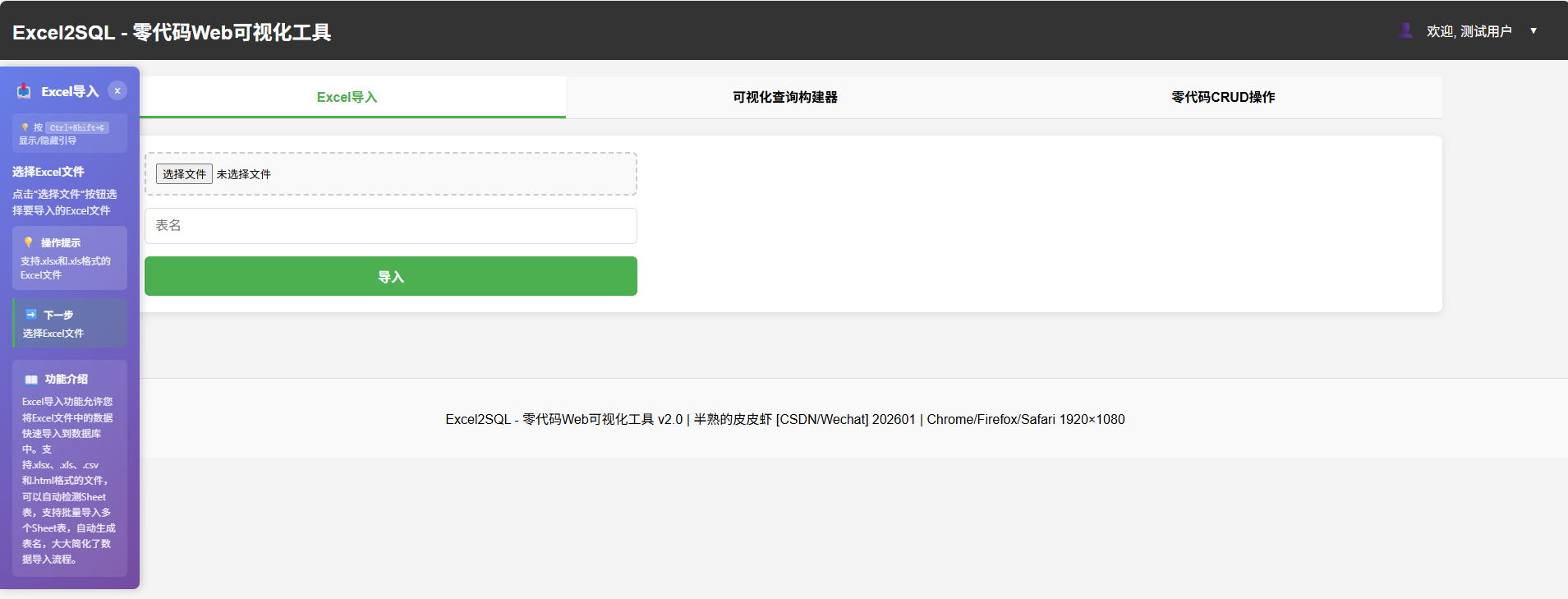
左边的蓝紫过渡色区域是悬浮式的引导;中间功能区域分了三个标签来显示,更加直观也方便操作,悬浮引导部分会根据各个模块,操作到的功能自动进行提示。
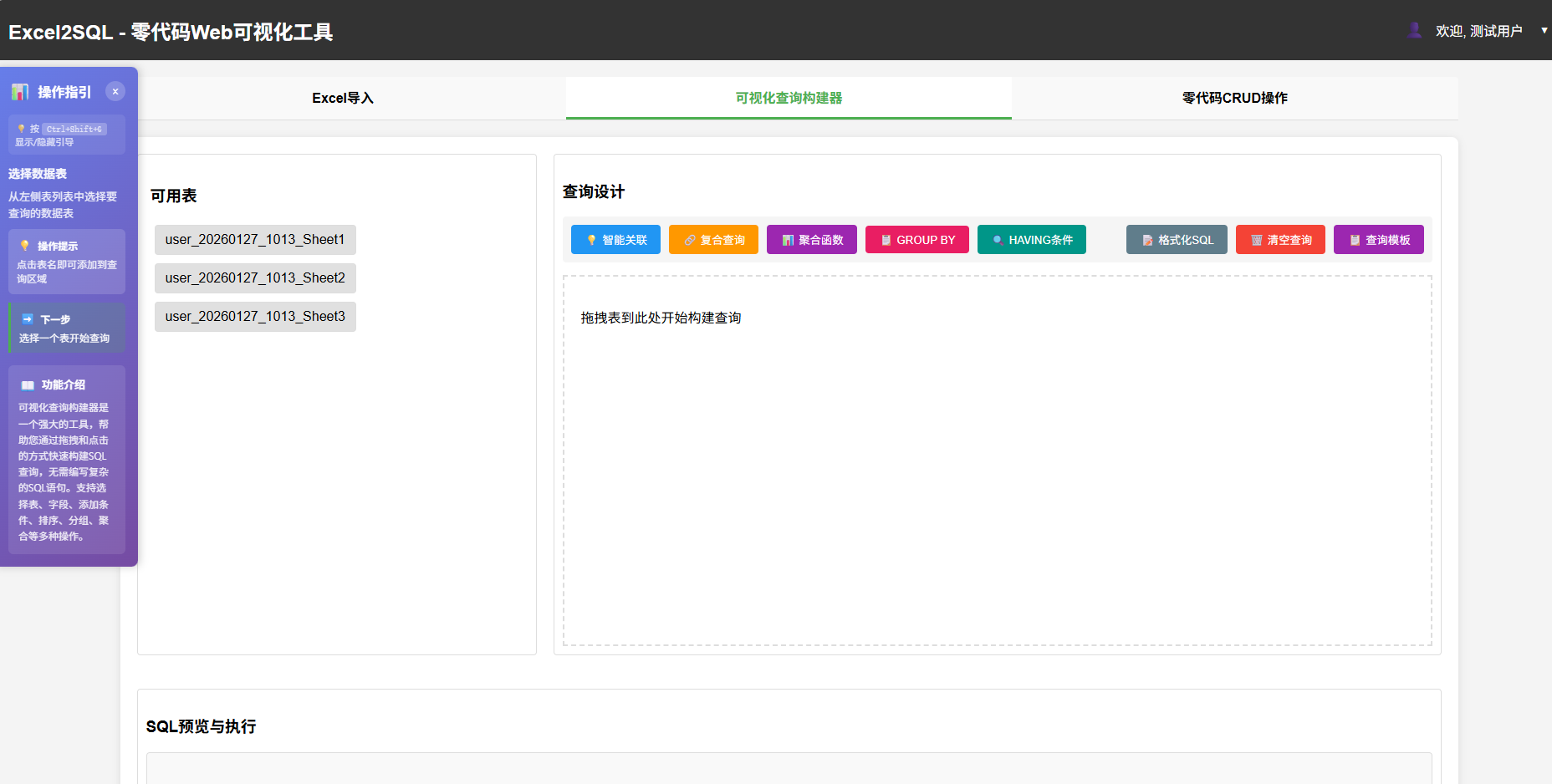
查询设计中的功能做了大量的改进。
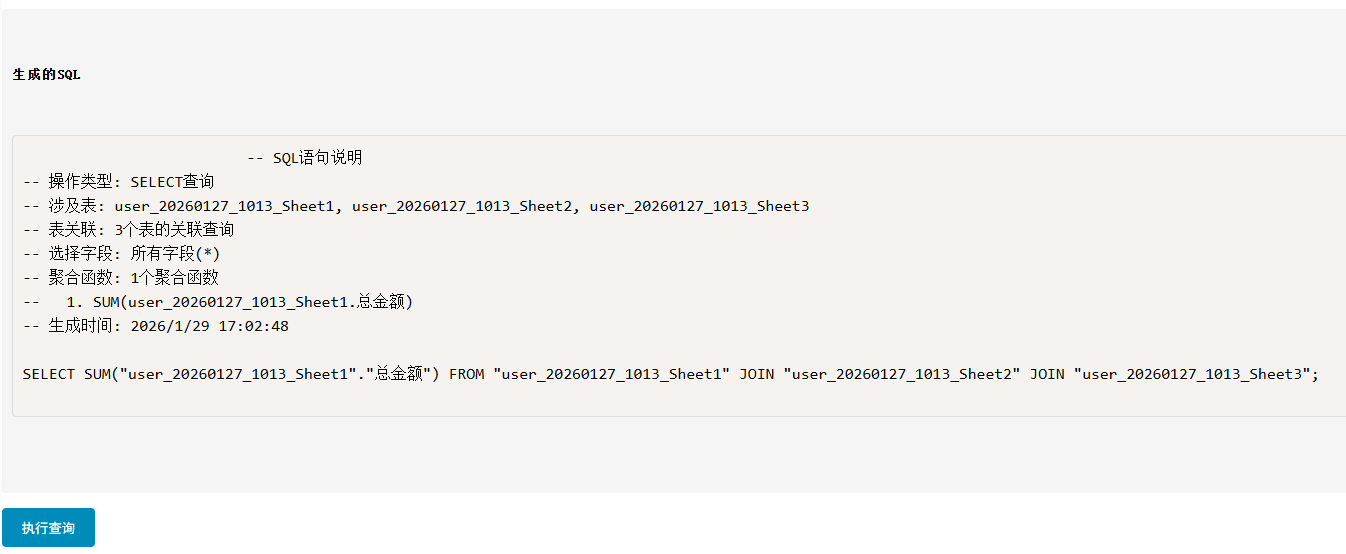
SQL均能自动化生成,当然了有些还是需要简单的修改一下。
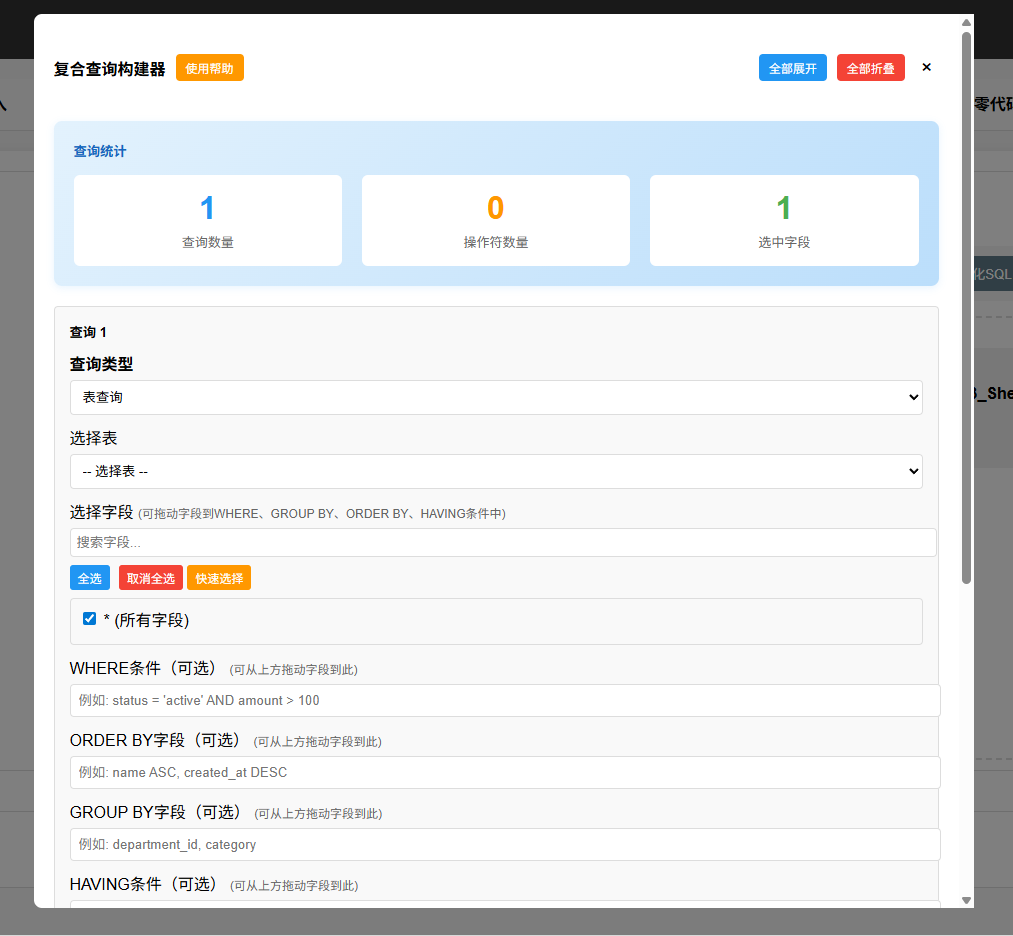
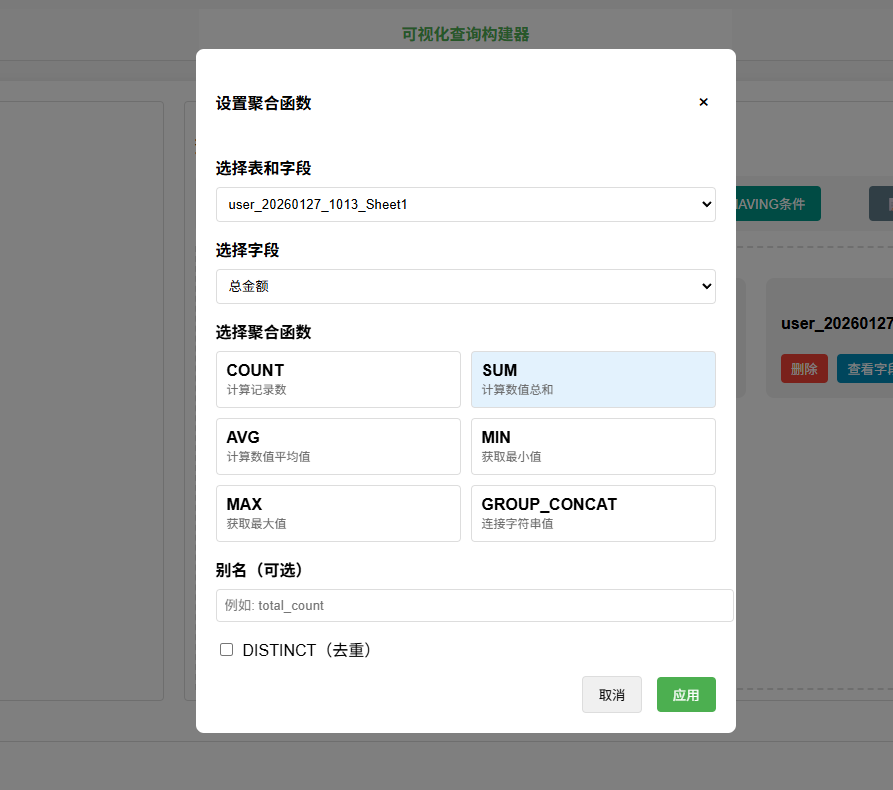
复合查询构造,功能上也更加丰富。
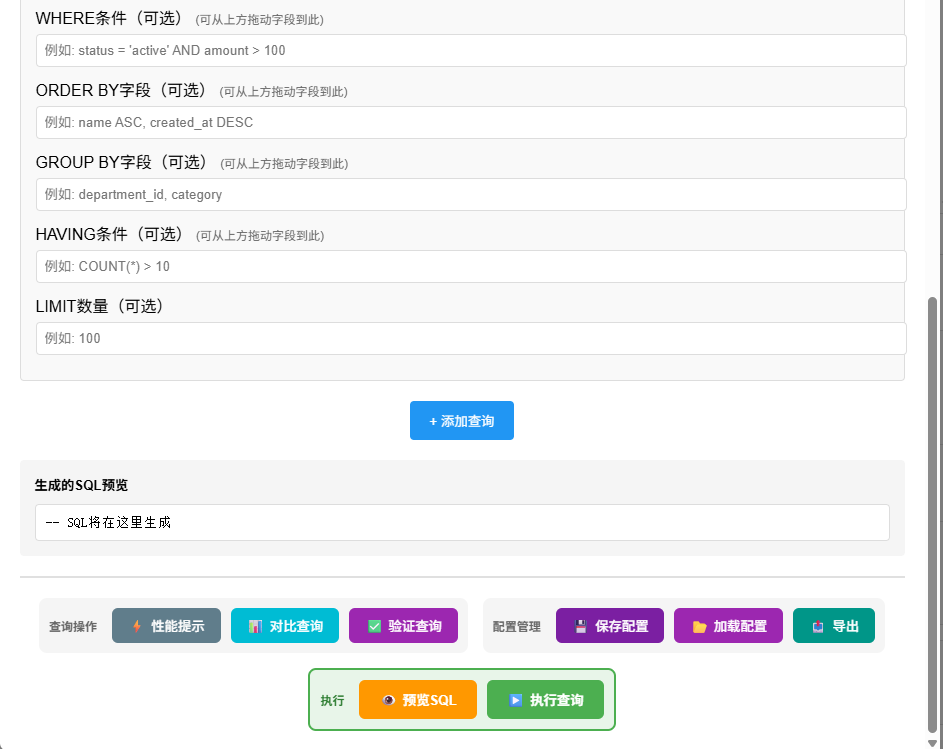
还有预置了部分查询模板
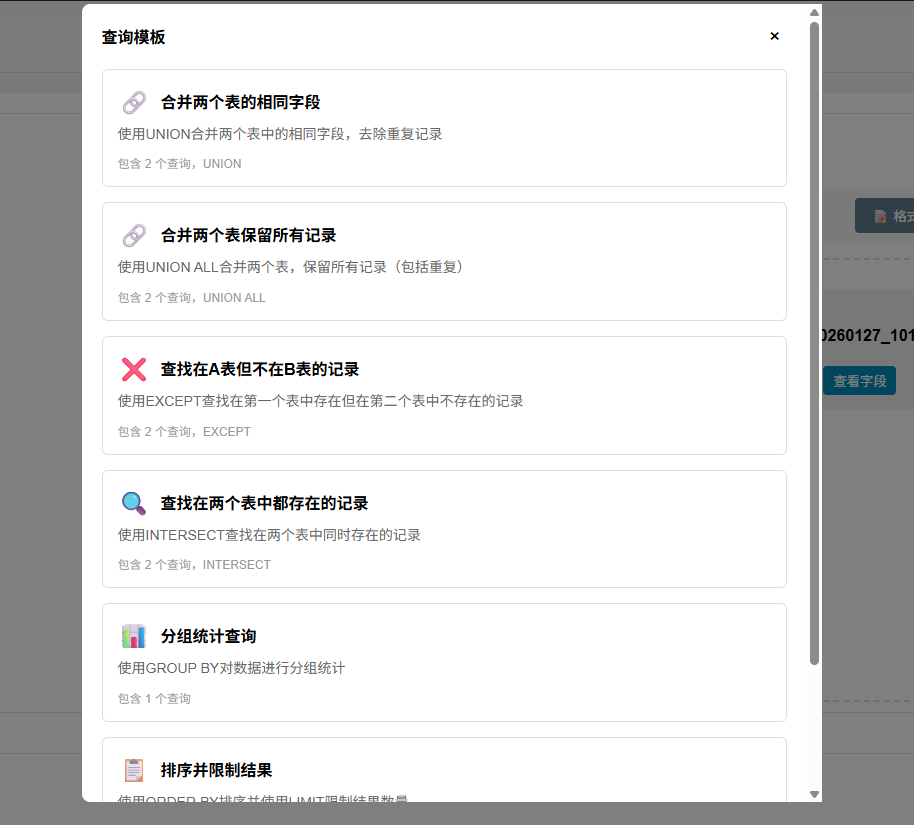
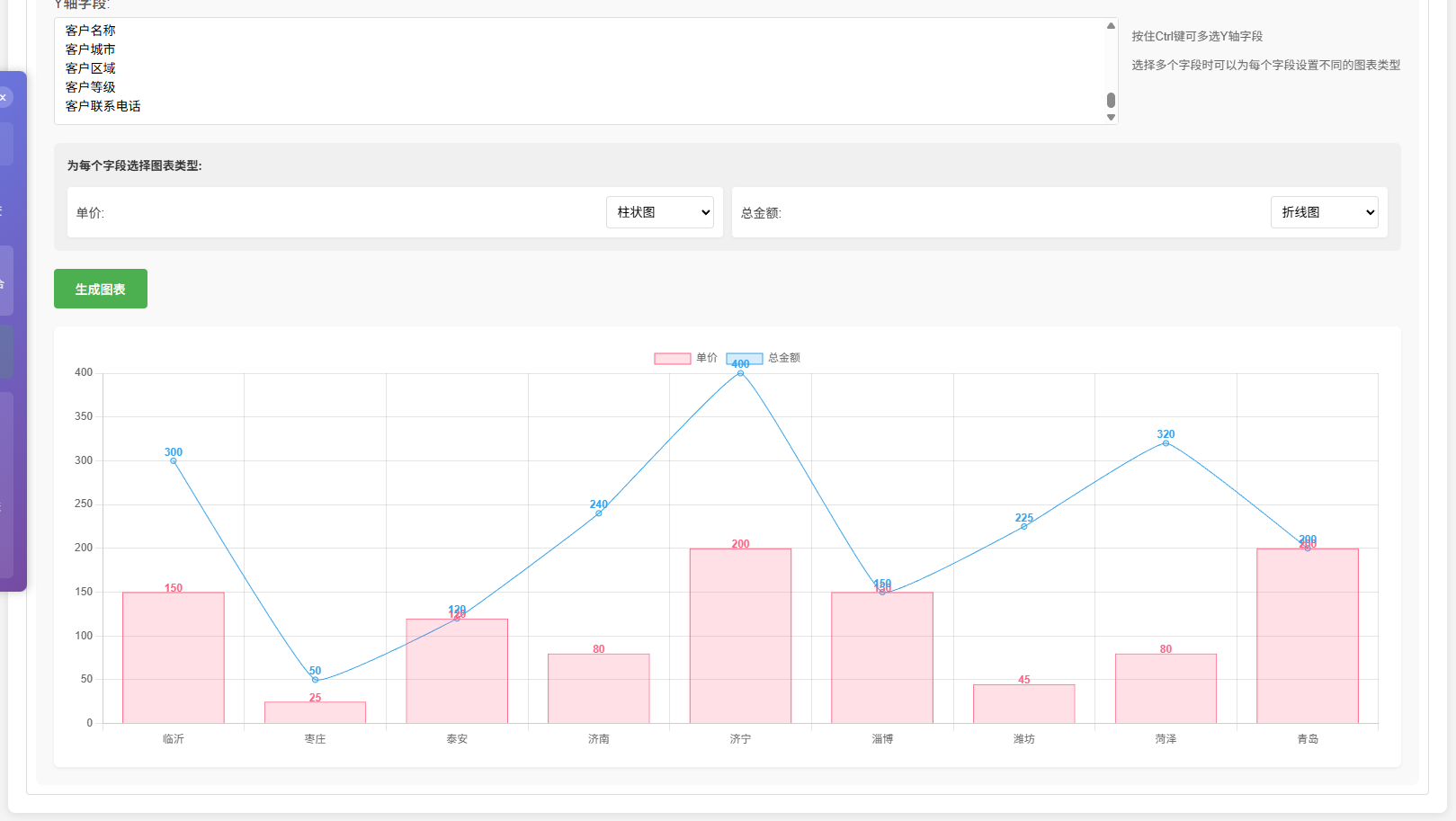
图表生成功能。
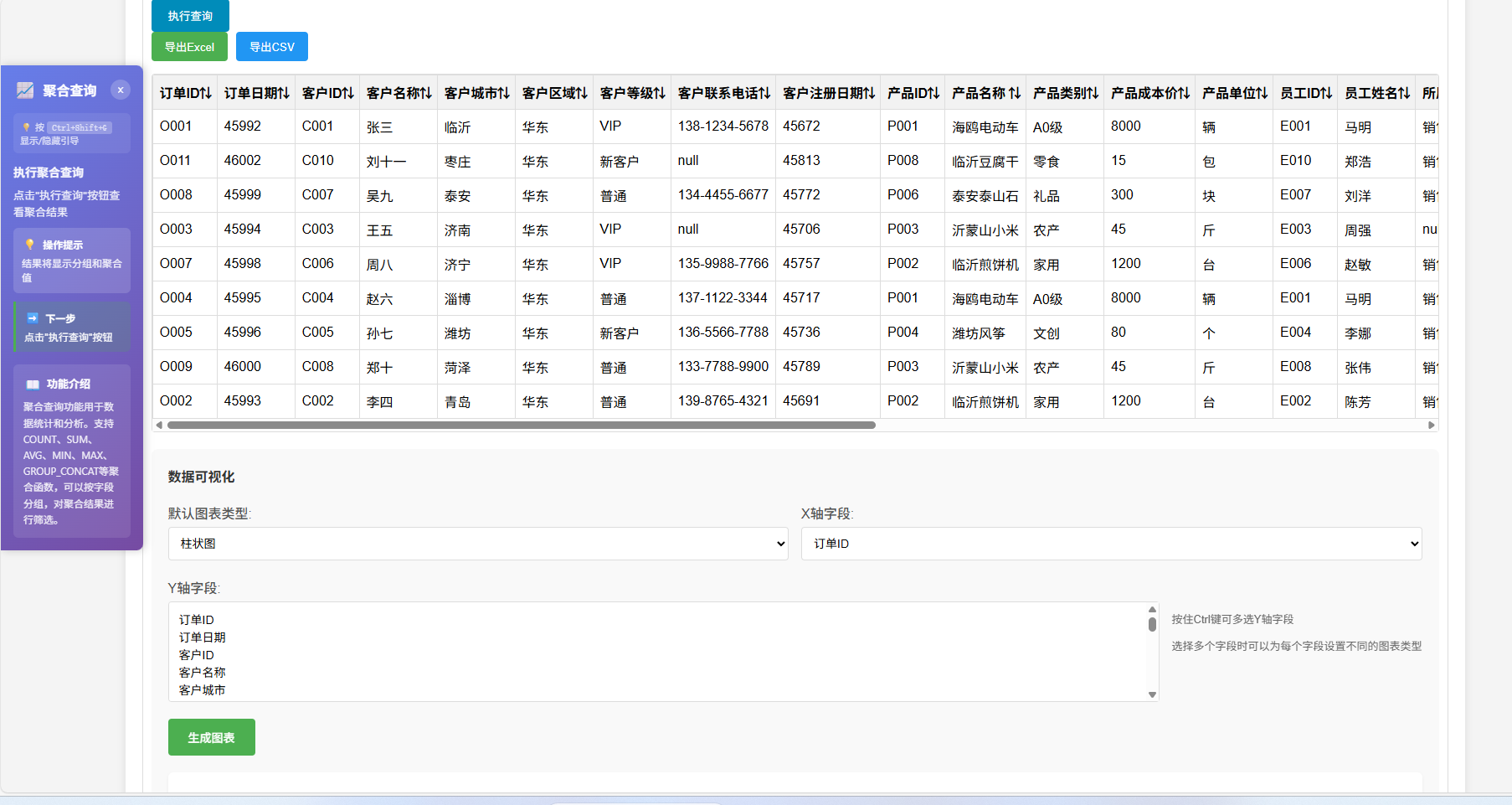
支持复合图表的生成
最后说说程序方面:
核心特性
-
**零代码操作**:无需编写代码即可导入Excel、CSV、HTML文件到数据库
-
**多用户支持**:每个用户拥有独立的SQLite数据库,数据隔离安全
-
**SQL查询执行**:支持自定义SQL查询,提供结果展示
-
**数据可视化**:集成Chart.js,支持多种图表类型的数据可视化
-
**权限管理**:基于角色的访问控制(RBAC),支持用户和管理员角色
-
**审计日志**:完整记录用户操作,便于追踪和安全管理
-
**智能引导**:提供操作引导系统,帮助用户快速上手
-
**可视化查询构建器**:支持拖拽式SQL查询构建
技术栈
| 技术组件 | 版本 | 用途 |
|---------|------|------|
| Flask | 2.0.1 | Web框架 |
| Flask-SQLAlchemy | 2.5.1 | ORM框架 |
| Flask-Login | 0.5.0 | 用户认证 |
| pandas | 1.3.3 | 数据处理 |
| openpyxl | 3.0.7 | Excel文件处理 |
| xlrd | 2.0.1 | Excel读取 |
| SQLite | - | 数据库 |
| Prism.js | - | SQL语法高亮 |
| Chart.js | - | 数据可视化 |
项目结构
Excel2SQLTools/
├── app.py # 应用主程序
├── models.py # 数据模型定义
├── db_utils.py # 数据库工具函数
├── auth_utils.py # 认证和权限工具
├── blueprints/ # 蓝图模块
│ ├── auth.py # 认证相关路由
│ ├── dashboard.py # 仪表板路由
│ └── api.py # API接口
├── templates/ # HTML模板
│ ├── login.html
│ ├── register.html
│ └── dashboard.html
├── static/ # 静态资源
│ ├── js/ # JavaScript文件
│ ├── prism/ # Prism.js语法高亮
│ └── chartjs/ # Chart.js图表库
├── UserData/ # 用户数据库目录
├── logs/ # 日志文件目录
├── build/ # PyInstaller打包文件
├── dist/ # 打包后的可执行文件
└── requirements.txt # 依赖包列表
项目使用Flask蓝图实现模块化设计:
-
**auth_bp**:处理用户认证(登录、注册、登出)
-
**dashboard_bp**:处理仪表板页面展示
-
**api_bp**:提供RESTful API接口(文件导入、SQL查询等)
python
#### 3. 数据库设计

##### 主数据库(main.db)

存储用户信息和审计日志:

```sql
-- 用户表
CREATE TABLE user (
    id INTEGER PRIMARY KEY,
    username VARCHAR(80) UNIQUE NOT NULL,
    password VARCHAR(120) NOT NULL,
    ip_address VARCHAR(50),
    nickname VARCHAR(80),
    avatar VARCHAR(50) DEFAULT 'default',
    role VARCHAR(20) NOT NULL DEFAULT 'user',
    created_at DATETIME NOT NULL,
    updated_at DATETIME NOT NULL
);

-- 审计日志表
CREATE TABLE audit_log (
    id INTEGER PRIMARY KEY,
    user_id INTEGER NOT NULL,
    action VARCHAR(100) NOT NULL,
    resource VARCHAR(200) NOT NULL,
    details TEXT,
    ip_address VARCHAR(50),
    user_agent VARCHAR(200),
    status VARCHAR(20) NOT NULL DEFAULT 'success',
    error_message TEXT,
    created_at DATETIME NOT NULL,
    FOREIGN KEY (user_id) REFERENCES user(id)
);
```

##### 用户数据库(UserData/{username}.db)

每个用户拥有独立的数据库,存储导入的数据表。

## 核心功能实现

### 1. 用户认证系统

#### 登录功能

```python
@auth_bp.route('/login', methods=['GET', 'POST'])
def login():
    if request.method == 'POST':
        username = request.form['username']
        password = request.form['password']
        user = models.User.query.filter_by(username=username).first()
        if user and check_password_hash(user.password, password):
            user.ip_address = request.remote_addr
            db.session.commit()
            login_user(user)
            record_audit_log('login', 'system', f'用户 {username} 登录成功')
            return redirect(url_for('dashboard.dashboard'))
        record_audit_log('login', 'system', f'用户 {username} 登录失败',
                        status='failed', error_message='用户名或密码错误')
        flash('Invalid username or password')
    return render_template('login.html')
```

#### 注册功能

```python
@auth_bp.route('/register', methods=['GET', 'POST'])
def register():
    if request.method == 'POST':
        username = request.form['username']
        password = request.form['password']
        confirm_password = request.form['confirm_password']

        # 验证密码一致性
        if password != confirm_password:
            flash('两次输入的密码不一致')
            return redirect(url_for('auth.register'))

        # 创建用户
        hashed_password = generate_password_hash(password, method='sha256')
        new_user = models.User(username=username, password=hashed_password,
                              ip_address=request.remote_addr, avatar='default')
        db.session.add(new_user)
        db.session.commit()

        # 为用户创建独立数据库
        create_user_database(username)
        login_user(new_user)
        return redirect(url_for('dashboard.dashboard'))
    return render_template('register.html')
```

### 2. 文件导入功能

#### 支持的文件格式

- **Excel文件**(.xlsx, .xls)
- **CSV文件**(.csv)
- **HTML文件**(.html)

#### 导入流程

```python
@api_bp.route('/import_excel', methods=['POST'])
@login_required
def import_excel():
    file = request.files['excel_file']

    # 检测文件格式
    file_content = file.read(200).decode('utf-8', errors='ignore')
    file.seek(0)

    is_html = '<html' in file_content.lower() or '<table' in file_content.lower()
    is_csv = ',' in file_content or ';' in file_content

    # 连接用户数据库
    db_path = os.path.join(user_data_dir, f'{current_user.username}.db')

    with get_db_connection(db_path) as conn:
        if is_html:
            # 读取HTML表格
            tables = pd.read_html(file)
            df = tables[0]
            df.to_sql(table_name, conn, if_exists='replace', index=False)
        elif filename.endswith('.csv') or is_csv:
            # 读取CSV文件
            df = pd.read_csv(file, encoding='utf-8', error_bad_lines=False)
            df.to_sql(table_name, conn, if_exists='replace', index=False)
        else:
            # 读取Excel文件
            xls = pd.ExcelFile(file)
            for sheet in sheets_to_import:
                df = pd.read_excel(xls, sheet_name=sheet)
                df.to_sql(table_name, conn, if_exists='replace', index=False)

    return redirect(url_for('dashboard.dashboard'))
```

### 3. SQL查询执行

```python
@api_bp.route('/query', methods=['POST'])
@login_required
def execute_user_query():
    data = request.get_json()
    sql = data.get('sql', '')
    page = data.get('page', 1)
    page_size = data.get('page_size', 20)

    db_path = os.path.join(user_data_dir, f'{current_user.username}.db')

    with get_db_connection(db_path) as conn:
        # 预处理SQL语句
        sql = sql.replace('`', '"')

        # 执行查询
        cursor = db_execute_query(conn, sql, params)

        # 获取分页数据
        paginated_result = db_get_paginated_data(conn, sql, params, page, page_size)

        return jsonify({
            'columns': paginated_result['columns'],
            'rows': paginated_result['rows'],
            'total': paginated_result['total'],
            'page': page,
            'page_size': page_size,
            'total_pages': paginated_result['total_pages']
        })
```

### 4. 数据库连接管理

使用上下文管理器确保数据库连接的正确关闭:

```python
@contextmanager
def get_db_connection(db_path):
    conn = None
    try:
        conn = sqlite3.connect(db_path)
        conn.row_factory = sqlite3.Row
        conn.isolation_level = 'EXCLUSIVE'
        conn.execute('BEGIN TRANSACTION')
        yield conn
    except Exception as e:
        if conn:
            conn.rollback()
        raise e
    finally:
        if conn:
            try:
                conn.commit()
            except Exception as e:
                conn.rollback()
            finally:
                conn.close()
```

### 5. 权限管理

#### 基于角色的访问控制

```python
def require_role(role):
    """要求特定角色的装饰器"""
    def decorator(f):
        @wraps(f)
        def decorated_function(*args, **kwargs):
            if not current_user.is_authenticated:
                return {'error': '用户未登录'}, 401

            if current_user.role != role and current_user.role != 'admin':
                return {'error': '权限不足'}, 403

            return f(*args, **kwargs)
        return decorated_function
    return decorator
```

#### 权限检查

```python
def check_permission(resource, action):
    """检查用户是否有操作资源的权限"""
    if not current_user.is_authenticated:
        return False

    # 管理员拥有所有权限
    if current_user.role == 'admin':
        return True

    # 普通用户权限检查
    # 可以查看和操作自己的表
    # 可以执行查询操作
    # 可以导入数据到自己的表

    return True
```

### 6. 审计日志

```python
def record_audit_log(action, resource, details=None, status='success', error_message=None):
    """记录操作审计日志"""
    try:
        user_id = current_user.id if current_user.is_authenticated else None
        username = current_user.username if current_user.is_authenticated else 'anonymous'
        ip_address = request.remote_addr
        user_agent = request.headers.get('User-Agent', '')

        # 保存到数据库
        audit_log = models.AuditLog(
            user_id=user_id,
            action=action,
            resource=resource,
            details=details,
            ip_address=ip_address,
            user_agent=user_agent,
            status=status,
            error_message=error_message
        )
        models.db.session.add(audit_log)
        models.db.session.commit()

        # 同时记录到文件日志
        audit_logger.info(f"[{username}] {action} on {resource}")
    except Exception as e:
        logging.error(f"Failed to record audit log: {str(e)}")
```
python
## 数据完整性保障

### 1. 数据验证

```python
def validate_data_integrity(conn, table_name, data):
    """验证数据完整性"""
    # 获取表结构
    cursor = execute_query(conn, f"PRAGMA table_info(\"{table_name}\")")
    columns = cursor.fetchall()

    # 验证字段是否存在
    for field in data:
        field_exists = any(col[1] == field for col in columns)
        if not field_exists:
            raise ValueError(f"字段 '{field}' 在表 '{table_name}' 中不存在")

    # 验证数据类型和约束
    for col in columns:
        col_name = col[1]
        col_type = col[2]
        col_notnull = col[3]

        if col_name in data:
            value = data[col_name]

            # 验证非空约束
            if col_notnull and value is None:
                raise ValueError(f"字段 '{col_name}' 不能为空")

            # 验证数据类型
            if value is not None:
                validate_data_type(col_name, col_type, value)

    # 验证唯一性约束
    validate_unique_constraints(conn, table_name, data)

    # 验证外键约束
    validate_foreign_key_constraints(conn, table_name, data)
```

### 2. 事务管理

```python
def execute_transaction(conn, operations):
    """执行事务操作,包含多个SQL语句"""
    try:
        results = []
        for sql, params in operations:
            cursor = execute_query(conn, sql, params)
            results.append(cursor)
        logging.info(f"Executed transaction with {len(operations)} operations")
        return results
    except Exception as e:
        logging.error(f"Transaction execution failed: {str(e)}")
        raise
```

### 3. 参数化查询

```python
def execute_query(conn, sql, params=()):
    """执行参数化查询"""
    cursor = conn.cursor()
    try:
        # 预处理SQL语句
        sql = sql.replace('`', '"')

        # 执行查询(使用参数化查询防止SQL注入)
        cursor.execute(sql, params)
        return cursor
    except sqlite3.IntegrityError as e:
        conn.rollback()
        raise Exception(f"数据完整性错误: {str(e)}")
    except sqlite3.OperationalError as e:
        conn.rollback()
        raise Exception(f"数据库操作错误: {str(e)}")
db_utils.py 完整代码
python
import sqlite3
import os
import time
import logging
from contextlib import contextmanager

# 获取当前运行目录
current_dir = os.path.dirname(os.path.abspath(__file__))

# 创建UserData目录
user_data_dir = os.path.join(current_dir, 'UserData')
if not os.path.exists(user_data_dir):
    os.makedirs(user_data_dir)

# 配置日志
log_dir = os.path.join(current_dir, 'logs')
if not os.path.exists(log_dir):
    os.makedirs(log_dir)

logging.basicConfig(
    filename=os.path.join(log_dir, 'db_operations.log'),
    level=logging.INFO,
    format='%(asctime)s - %(levelname)s - %(message)s'
)

# 为用户创建数据库
def create_user_database(username):
    """为用户创建数据库"""
    db_path = os.path.join(user_data_dir, f'{username}.db')
    if not os.path.exists(db_path):
        try:
            with get_db_connection(db_path):
                pass
            logging.info(f"Created database for user: {username}")
        except Exception as e:
            logging.error(f"Failed to create database for user {username}: {str(e)}")
            raise

@contextmanager
def get_db_connection(db_path):
    """数据库连接上下文管理器"""
    conn = None
    transaction_start = time.time()
    try:
        # 为每个请求创建一个新的数据库连接
        conn = sqlite3.connect(db_path)
        conn.row_factory = sqlite3.Row
        # 设置事务隔离级别
        conn.isolation_level = 'EXCLUSIVE'
        logging.info(f"Created new database connection for: {db_path}")
        # 开始事务
        conn.execute('BEGIN TRANSACTION')
        logging.info(f"Started transaction for: {db_path}")
        yield conn
    except sqlite3.IntegrityError as e:
        # 数据完整性错误
        if conn:
            conn.rollback()
            logging.error(f"Integrity error in transaction: {str(e)}")
        raise Exception(f"数据完整性错误: {str(e)}")
    except sqlite3.OperationalError as e:
        # 数据库操作错误
        if conn:
            conn.rollback()
            logging.error(f"Operational error in transaction: {str(e)}")
        raise Exception(f"数据库操作错误: {str(e)}")
    except Exception as e:
        # 其他错误
        if conn:
            conn.rollback()
            logging.error(f"Error in transaction: {str(e)}")
        raise e
    finally:
        if conn:
            try:
                conn.commit()
                transaction_duration = time.time() - transaction_start
                logging.info(f"Committed transaction for {db_path} in {transaction_duration:.4f}s")
            except Exception as e:
                logging.error(f"Failed to commit transaction: {str(e)}")
                try:
                    conn.rollback()
                except:
                    pass
            finally:
                try:
                    conn.close()
                    logging.info(f"Closed database connection for: {db_path}")
                except Exception as e:
                    logging.error(f"Failed to close database connection: {str(e)}")

# 参数化查询执行
def execute_query(conn, sql, params=()):
    """执行参数化查询"""
    cursor = conn.cursor()
    query_start = time.time()
    try:
        # 验证SQL语句
        if not sql or not sql.strip():
            raise ValueError("SQL语句不能为空")

        # 记录原始SQL语句
        logging.info(f"Original SQL: {sql[:200]}...")

        # 预处理SQL语句:将反引号替换为双引号
        sql = sql.replace('`', '"')

        # 记录处理后的SQL语句
        logging.info(f"Processed SQL: {sql[:200]}...")

        # 执行查询
        cursor.execute(sql, params)
        query_duration = time.time() - query_start
        logging.info(f"Executed query in {query_duration:.4f}s: {sql[:100]}...")
        return cursor
    except sqlite3.IntegrityError as e:
        conn.rollback()
        logging.error(f"Integrity error executing query: {str(e)}")
        raise Exception(f"数据完整性错误: {str(e)}")
    except sqlite3.OperationalError as e:
        conn.rollback()
        logging.error(f"Operational error executing query: {str(e)}")
        raise Exception(f"数据库操作错误: {str(e)}")
    except Exception as e:
        conn.rollback()
        logging.error(f"Error executing query: {str(e)}")
        raise e

# 验证数据完整性
def validate_data_integrity(conn, table_name, data):
    """验证数据完整性"""
    try:
        # 获取表结构
        cursor = execute_query(conn, f"PRAGMA table_info(\"{table_name}\")")
        columns = cursor.fetchall()

        # 验证字段是否存在
        for field in data:
            field_exists = any(col[1] == field for col in columns)
            if not field_exists:
                raise ValueError(f"字段 '{field}' 在表 '{table_name}' 中不存在")

        # 验证数据类型和约束
        for col in columns:
            col_name = col[1]
            col_type = col[2]
            col_notnull = col[3]  # 非空约束
            col_default = col[4]  # 默认值
            col_pk = col[5]  # 主键

            if col_name in data:
                value = data[col_name]

                # 验证非空约束
                if col_notnull and value is None:
                    raise ValueError(f"字段 '{col_name}' 不能为空")

                # 验证数据类型
                if value is not None:
                    # 整数类型验证
                    if col_type.lower() in ['integer', 'int']:
                        if not isinstance(value, (int, float)):
                            try:
                                int(value)
                            except:
                                raise ValueError(f"字段 '{col_name}' 必须是整数类型")
                    # 浮点数类型验证
                    elif col_type.lower() in ['real', 'float', 'double']:
                        if not isinstance(value, (int, float)):
                            try:
                                float(value)
                            except:
                                raise ValueError(f"字段 '{col_name}' 必须是数字类型")
                    # 布尔类型验证
                    elif col_type.lower() in ['bool', 'boolean']:
                        valid_bool_values = [True, False, 1, 0, 'true', 'false', '1', '0']
                        if value not in valid_bool_values:
                            raise ValueError(f"字段 '{col_name}' 必须是布尔类型")
                    # 日期时间类型验证
                    elif col_type.lower() in ['date', 'datetime', 'time']:
                        try:
                            # 尝试转换为日期时间
                            if isinstance(value, str):
                                # 简单的日期时间格式验证
                                import re
                                date_pattern = r'^\d{4}-\d{2}-\d{2}.*$'
                                if not re.match(date_pattern, value):
                                    raise ValueError(f"字段 '{col_name}' 必须是有效的日期时间格式")
                        except Exception:
                            raise ValueError(f"字段 '{col_name}' 必须是有效的日期时间格式")
                    # 字符串类型验证
                    elif col_type.lower() in ['text', 'string', 'varchar']:
                        if not isinstance(value, str):
                            try:
                                str(value)
                            except:
                                raise ValueError(f"字段 '{col_name}' 必须是字符串类型")
                        # 验证字符串长度
                        # 提取长度限制,例如 VARCHAR(50)
                        import re
                        length_match = re.search(r'\((\d+)\)', col_type)
                        if length_match:
                            max_length = int(length_match.group(1))
                            if len(str(value)) > max_length:
                                raise ValueError(f"字段 '{col_name}' 的长度不能超过 {max_length} 个字符")

        # 验证唯一性约束
        validate_unique_constraints(conn, table_name, data)

        # 验证外键约束
        validate_foreign_key_constraints(conn, table_name, data)

        logging.info(f"Data integrity validated for table: {table_name}")
        return True
    except Exception as e:
        logging.error(f"Data integrity validation failed: {str(e)}")
        raise

# 验证唯一性约束
def validate_unique_constraints(conn, table_name, data):
    """验证唯一性约束"""
    try:
        # 获取表的索引信息
        cursor = execute_query(conn, f"PRAGMA index_list(\"{table_name}\")")
        indexes = cursor.fetchall()

        for index in indexes:
            index_name = index[1]
            unique = index[2]

            if unique:
                # 获取索引的列信息
                cursor = execute_query(conn, f"PRAGMA index_info(\"{index_name}\")")
                index_columns = cursor.fetchall()

                # 检查是否所有索引列都在数据中
                index_col_names = [col[2] for col in index_columns]
                if all(col_name in data for col_name in index_col_names):
                    # 构建查询条件
                    conditions = []
                    params = []
                    for col_name in index_col_names:
                        conditions.append(f"{col_name} = ?")
                        params.append(data[col_name])

                    # 执行查询
                    query = f"SELECT COUNT(*) FROM {table_name} WHERE {' AND '.join(conditions)}"
                    cursor = execute_query(conn, query, params)
                    count = cursor.fetchone()[0]

                    if count > 0:
                        raise ValueError(f"违反唯一性约束,值已存在: {', '.join(index_col_names)}")
    except Exception as e:
        logging.error(f"Unique constraint validation failed: {str(e)}")
        raise

# 验证外键约束
def validate_foreign_key_constraints(conn, table_name, data):
    """验证外键约束"""
    try:
        # 获取外键约束信息
        cursor = execute_query(conn, f"PRAGMA foreign_key_list(\"{table_name}\")")
        foreign_keys = cursor.fetchall()

        for fk in foreign_keys:
            fk_column = fk[3]  # 外键列
            ref_table = fk[2]  # 引用表
            ref_column = fk[4]  # 引用列

            if fk_column in data:
                fk_value = data[fk_column]

                if fk_value is not None:
                    # 检查引用的记录是否存在
                    query = f"SELECT COUNT(*) FROM {ref_table} WHERE {ref_column} = ?"
                    cursor = execute_query(conn, query, (fk_value,))
                    count = cursor.fetchone()[0]

                    if count == 0:
                        raise ValueError(f"违反外键约束,引用的记录不存在: {ref_table}.{ref_column} = {fk_value}")
    except Exception as e:
        logging.error(f"Foreign key constraint validation failed: {str(e)}")
        raise

# 执行事务操作
def execute_transaction(conn, operations):
    """执行事务操作,包含多个SQL语句"""
    try:
        results = []
        for sql, params in operations:
            cursor = execute_query(conn, sql, params)
            results.append(cursor)
        logging.info(f"Executed transaction with {len(operations)} operations")
        return results
    except Exception as e:
        logging.error(f"Transaction execution failed: {str(e)}")
        raise

# 获取分页数据
def get_paginated_data(conn, sql, params=(), page=1, page_size=20):
    """获取分页数据"""
    # 预处理SQL语句:将反引号替换为双引号
    sql = sql.replace('`', '"')

    # 移除SQL语句末尾的分号
    sql = sql.rstrip(';')

    # 检查是否是PRAGMA查询
    sql_upper = sql.strip().upper()
    if sql_upper.startswith('PRAGMA'):
        # 对于PRAGMA查询,直接执行原始查询
        cursor = execute_query(conn, sql, params)

        # 获取列名
        columns = [desc[0] for desc in cursor.description]

        # 获取数据 - 对于PRAGMA查询,返回字典列表,以便前端可以使用field.name
        rows = [dict(zip(columns, row)) for row in cursor.fetchall()]

        # 计算总数和总页数
        total = len(rows)
        total_pages = (total + page_size - 1) // page_size

        # 手动进行分页
        offset = (page - 1) * page_size
        paginated_rows = rows[offset:offset + page_size]

        logging.info(f"Retrieved PRAGMA data: page {page}/{total_pages}, {len(paginated_rows)} rows")

        return {
            'columns': columns,
            'rows': paginated_rows,
            'total': total,
            'page': page,
            'page_size': page_size,
            'total_pages': total_pages
        }
    else:
        # 对于普通查询,使用常规的分页方法
        # 计算总数
        count_sql = f"SELECT COUNT(*) FROM ({sql}) AS total"
        cursor = execute_query(conn, count_sql, params)
        total = cursor.fetchone()[0]

        # 计算分页偏移量
        offset = (page - 1) * page_size

        # 执行分页查询
        paginated_sql = f"{sql} LIMIT ? OFFSET ?"
        paginated_params = params + (page_size, offset)
        cursor = execute_query(conn, paginated_sql, paginated_params)

        # 获取列名
        columns = [desc[0] for desc in cursor.description]

        # 获取数据
        rows = [list(row) for row in cursor.fetchall()]

        # 计算总页数
        total_pages = (total + page_size - 1) // page_size

        logging.info(f"Retrieved paginated data: page {page}/{total_pages}, {len(rows)} rows")

        return {
            'columns': columns,
            'rows': rows,
            'total': total,
            'page': page,
            'page_size': page_size,
            'total_pages': total_pages
        }
dashboard.html 完整代码 4816H
html
<!DOCTYPE html>
<html lang="zh-CN">
<head>
<meta charset="UTF-8">
<meta name="viewport" content="width=device-width, initial-scale=1.0">
<title>操作台 - Excel2SQL - 零代码Web可视化</title>
<link rel="icon" href="/excel2sql.ico" type="image/x-icon">
<!-- Prism.js for SQL syntax highlighting -->
<link rel="stylesheet" href="/static/prism/prism.min.css">
<script src="/static/prism/prism-core.min.js"></script>
<!-- Chart.js for data visualization -->
<script src="/static/chartjs/chart.min.js"></script>
<style>
body {
font-family: Arial, sans-serif;
margin: 0;
padding: 0;
background-color: #f4f4f4;
}
.header {
background-color: #333;
color: white;
padding: 15px;
display: flex;
justify-content: space-between;
align-items: center;
}
.header h1 {
margin: 0;
font-size: 24px;
}
.header .user-info {
display: flex;
align-items: center;
}
.header .user-info span {
margin-right: 15px;
}
.header .user-info a {
color: white;
text-decoration: none;
padding: 5px 10px;
background-color: #4CAF50;
border-radius: 4px;
}
.container {
padding: 20px;
max-width: 1600px;
margin: 0 auto;
}
.section {
background-color: white;
padding: 20px;
border-radius: 8px;
box-shadow: 0 2px 10px rgba(0, 0, 0, 0.1);
margin-bottom: 20px;
}
.section h2 {
margin-top: 0;
border-bottom: 1px solid #ddd;
padding-bottom: 10px;
}
.upload-form {
display: flex;
flex-direction: column;
max-width: 600px;
gap: 15px;
}
.upload-form input[type="file"] {
padding: 12px;
border: 2px dashed #ccc;
border-radius: 6px;
background-color: #f9f9f9;
transition: all 0.3s ease;
}
.upload-form input[type="file"]:hover {
border-color: #4CAF50;
background-color: #f0f9f0;
}
.upload-form input[type="text"] {
padding: 12px;
border: 1px solid #ddd;
border-radius: 6px;
font-size: 16px;
transition: border-color 0.3s ease;
}
.upload-form input[type="text"]:focus {
outline: none;
border-color: #4CAF50;
box-shadow: 0 0 0 3px rgba(76, 175, 80, 0.1);
}
.upload-form button {
padding: 12px 20px;
background-color: #4CAF50;
color: white;
border: none;
border-radius: 6px;
cursor: pointer;
font-size: 16px;
font-weight: bold;
transition: all 0.3s ease;
}
.upload-form button:hover {
background-color: #45a049;
transform: translateY(-1px);
box-shadow: 0 2px 8px rgba(0, 0, 0, 0.15);
}
.upload-form button:active {
transform: translateY(0);
}
.query-builder {
display: flex;
flex-direction: column;
gap: 20px;
}
.tables-panel {
border: 1px solid #ddd;
border-radius: 4px;
padding: 15px;
min-height: 100px;
}
#tables-list {
display: flex;
flex-wrap: wrap;
align-items: center;
min-height: 60px;
}
.query-panel {
border: 1px solid #ddd;
border-radius: 4px;
padding: 10px;
}
.query-design-area {
margin-bottom: 10px;
}
.sql-preview-area {
margin-top: 10;
}
.table-item {
background-color: #e0e0e0;
padding: 8px 12px;
border-radius: 4px;
margin: 5px;
cursor: pointer;
border: 1px solid #ddd;
display: inline-block;
white-space: nowrap;
}
.table-item:hover {
background-color: #f0f0f0;
}
.sql-preview {
background-color: #f5f5f5;
padding: 10px;
border-radius: 4px;
margin-top: 10px;
font-family: monospace;
white-space: pre-wrap;
}
.execute-btn {
margin-top: 15px;
padding: 10px 20px;
background-color: #008CBA;
color: white;
border: none;
border-radius: 4px;
cursor: pointer;
}
.execute-btn:hover {
background-color: #007B9E;
}
.result-table-container {
margin-top: 15px;
overflow-x: auto;
overflow-y: auto;
max-height: 500px;
border: 1px solid #ddd;
border-radius: 4px;
position: relative;
}
.result-table {
width: 100%;
border-collapse: collapse;
white-space: nowrap;
}
.result-table th, .result-table td {
border: 1px solid #ddd;
padding: 8px;
text-align: left;
white-space: nowrap;
}
.result-table th {
background-color: #f2f2f2;
position: sticky;
top: 0;
z-index: 1;
white-space: nowrap;
}
.result-table tr:hover {
background-color: #f5f5f5;
}
/* 模态框样式 */
.modal {
display: none;
position: fixed;
z-index: 1000;
left: 0;
top: 0;
width: 100%;
height: 100%;
overflow: auto;
background-color: rgba(0,0,0,0.4);
}
.modal-content {
background-color: #fefefe;
margin: 5% auto;
padding: 20px;
border: 1px solid #888;
width: 80%;
max-width: 800px;
border-radius: 8px;
box-shadow: 0 4px 8px rgba(0,0,0,0.2);
}
.modal-header {
padding: 10px 0;
border-bottom: 1px solid #ddd;
margin-bottom: 20px;
}
.modal-header h4 {
margin: 0;
}
.modal-body {
max-height: 60vh;
overflow-y: auto;
}
.modal-footer {
padding: 15px 0;
border-top: 1px solid #ddd;
margin-top: 20px;
text-align: right;
}
/* 表单字段多列布局 */
.form-grid {
display: grid;
grid-template-columns: repeat(auto-fit, minmax(250px, 1fr));
gap: 15px;
}
.form-group {
margin-bottom: 0;
}
.form-group label {
display: block;
margin-bottom: 5px;
font-weight: bold;
}
.form-group input {
width: 100%;
padding: 8px;
border: 1px solid #ddd;
border-radius: 4px;
}
/* 用户信息样式 */
.user-info {
position: relative;
}
.user-profile {
display: flex;
align-items: center;
cursor: pointer;
padding: 5px 10px;
border-radius: 4px;
}
.user-profile:hover {
background-color: rgba(0, 0, 0, 0.05);
}
.dropdown-arrow {
margin-left: 5px;
font-size: 10px;
}
.user-menu {
position: absolute;
top: 100%;
right: 0;
background-color: white;
border: 1px solid #ddd;
border-radius: 4px;
box-shadow: 0 2px 10px rgba(0, 0, 0, 0.1);
z-index: 1000;
display: none;
}
.user-menu.show {
display: block;
}
.user-menu a {
display: block;
padding: 10px 15px;
color: #333;
text-decoration: none;
}
.user-menu a:hover {
background-color: #f5f5f5;
}
/* 头像选择样式 */
#avatar-selection {
display: flex;
flex-wrap: wrap;
gap: 15px;
margin-top: 10px;
}
.avatar-option {
display: flex;
flex-direction: column;
align-items: center;
padding: 12px;
border: 2px solid #ddd;
border-radius: 4px;
cursor: pointer;
width: 90px;
transition: all 0.2s ease;
}
.avatar-option:hover {
border-color: #4CAF50;
background-color: rgba(76, 175, 80, 0.05);
}
.avatar-option.selected {
border-color: #4CAF50;
background-color: rgba(76, 175, 80, 0.1);
}
.avatar-icon {
font-size: 24px;
margin-bottom: 5px;
}
/* 标签页样式 */
.tabs {
display: flex;
border-bottom: 1px solid #ddd;
margin-bottom: 20px;
background-color: #f9f9f9;
border-radius: 4px 4px 0 0;
overflow: hidden;
}
.tab {
padding: 12px 20px;
cursor: pointer;
border-bottom: 3px solid transparent;
transition: all 0.3s ease;
flex: 1;
text-align: center;
font-weight: bold;
}
.tab:hover {
background-color: #f0f0f0;
}
.tab.active {
background-color: white;
border-bottom-color: #4CAF50;
color: #4CAF50;
}
.tab-content {
display: none;
animation: fadeIn 0.3s ease;
}
.tab-content.active {
display: block;
}
@keyframes fadeIn {
from { opacity: 0; transform: translateY(10px); }
to { opacity: 1; transform: translateY(0); }
}
/* 水平布局样式 */
.horizontal-layout {
display: flex;
gap: 20px;
margin-bottom: 20px;
}
.horizontal-layout > div {
flex: 1;
}
/* 响应式布局 */
@media (max-width: 1200px) {
.horizontal-layout {
flex-direction: column;
}
}
</style>
</head>
<body>
<div class="header">
<h1>Excel2SQL - 零代码Web可视化工具</h1>
<div class="user-info">
<div class="user-profile" onclick="toggleUserMenu()">
<span class="avatar" id="header-avatar" style="display: inline-block; width: 32px; height: 32px; border-radius: 50%; color: white; text-align: center; line-height: 32px; margin-right: 10px; font-size: 20px;">{{ getAvatarIcon(avatar) }}</span>
<span>欢迎, {{ nickname or username }}</span>
<span class="dropdown-arrow">▼</span>
</div>
<div id="user-menu" class="user-menu">
<a href="#" onclick="showUserProfile()">个人资料</a>
<a href="{{ url_for('auth.logout') }}">退出登录</a>
</div>
</div>
</div>
<!-- 个人资料模态框 -->
<div id="profile-modal" class="modal">
<div class="modal-content">
<div class="modal-header">
<h4>个人资料</h4>
</div>
<div class="modal-body">
<form id="profile-form" onsubmit="updateProfile(); return false;">
<div class="form-grid">
<div class="form-group">
<label>用户名</label>
<input type="text" value="{{ username }}" disabled>
</div>
<div class="form-group">
<label for="nickname">昵称</label>
<input type="text" id="nickname" name="nickname" value="{{ nickname or '' }}">
</div>
<div class="form-group">
<label for="current_password">当前密码</label>
<input type="password" id="current_password" name="current_password" placeholder="输入当前密码">
</div>
<div class="form-group">
<label for="new_password">新密码</label>
<input type="password" id="new_password" name="new_password" placeholder="输入新密码">
</div>
<div class="form-group">
<label for="confirm_password">确认密码</label>
<input type="password" id="confirm_password" name="confirm_password" placeholder="确认新密码">
</div>
</div>
<div class="form-group" style="margin-top: 20px;">
<label>头像</label>
<div id="avatar-selection">
<div class="avatar-option" data-avatar="default" {% if avatar == 'default' %}class="selected"{% endif %}>
<span class="avatar-icon">👤</span>
<span>默认</span>
</div>
<div class="avatar-option" data-avatar="user1" {% if avatar == 'user1' %}class="selected"{% endif %}>
<span class="avatar-icon">👨</span>
<span>男性</span>
</div>
<div class="avatar-option" data-avatar="user2" {% if avatar == 'user2' %}class="selected"{% endif %}>
<span class="avatar-icon">👩</span>
<span>女性</span>
</div>
<div class="avatar-option" data-avatar="user3" {% if avatar == 'user3' %}class="selected"{% endif %}>
<span class="avatar-icon">👧</span>
<span>女孩</span>
</div>
<div class="avatar-option" data-avatar="user4" {% if avatar == 'user4' %}class="selected"{% endif %}>
<span class="avatar-icon">👦</span>
<span>男孩</span>
</div>
<div class="avatar-option" data-avatar="user5" {% if avatar == 'user5' %}class="selected"{% endif %}>
<span class="avatar-icon">🧑</span>
<span>中性</span>
</div>
<div class="avatar-option" data-avatar="user6" {% if avatar == 'user6' %}class="selected"{% endif %}>
<span class="avatar-icon">👨💼</span>
<span>职场</span>
</div>
<div class="avatar-option" data-avatar="user7" {% if avatar == 'user7' %}class="selected"{% endif %}>
<span class="avatar-icon">🎓</span>
<span>学生</span>
</div>
<div class="avatar-option" data-avatar="user8" {% if avatar == 'user8' %}class="selected"{% endif %}>
<span class="avatar-icon">🏥</span>
<span>医生</span>
</div>
<div class="avatar-option" data-avatar="user9" {% if avatar == 'user9' %}class="selected"{% endif %}>
<span class="avatar-icon">👮</span>
<span>警察</span>
</div>
<div class="avatar-option" data-avatar="user10" {% if avatar == 'user10' %}class="selected"{% endif %}>
<span class="avatar-icon">👩🎨</span>
<span>艺术家</span>
</div>
<div class="avatar-option" data-avatar="user11" {% if avatar == 'user11' %}class="selected"{% endif %}>
<span class="avatar-icon">👨🏫</span>
<span>教师</span>
</div>
<div class="avatar-option" data-avatar="user12" {% if avatar == 'user12' %}class="selected"{% endif %}>
<span class="avatar-icon">👨🍳</span>
<span>厨师</span>
</div>
<div class="avatar-option" data-avatar="user13" {% if avatar == 'user13' %}class="selected"{% endif %}>
<span class="avatar-icon">👩🔬</span>
<span>科学家</span>
</div>
<div class="avatar-option" data-avatar="user14" {% if avatar == 'user14' %}class="selected"{% endif %}>
<span class="avatar-icon">👨🚀</span>
<span>宇航员</span>
</div>
<div class="avatar-option" data-avatar="user15" {% if avatar == 'user15' %}class="selected"{% endif %}>
<span class="avatar-icon">👩💻</span>
<span>程序员</span>
</div>
<div class="avatar-option" data-avatar="user16" {% if avatar == 'user16' %}class="selected"{% endif %}>
<span class="avatar-icon">🧑🎤</span>
<span>歌手</span>
</div>
<div class="avatar-option" data-avatar="user17" {% if avatar == 'user17' %}class="selected"{% endif %}>
<span class="avatar-icon">🧑⚕️</span>
<span>医护</span>
</div>
<div class="avatar-option" data-avatar="user18" {% if avatar == 'user18' %}class="selected"{% endif %}>
<span class="avatar-icon">🧑🏫</span>
<span>讲师</span>
</div>
<div class="avatar-option" data-avatar="user19" {% if avatar == 'user19' %}class="selected"{% endif %}>
<span class="avatar-icon">🧑💼</span>
<span>商务</span>
</div>
<div class="avatar-option" data-avatar="user20" {% if avatar == 'user20' %}class="selected"{% endif %}>
<span class="avatar-icon">🧑🎨</span>
<span>设计师</span>
</div>
<div class="avatar-option" data-avatar="user21" {% if avatar == 'user21' %}class="selected"{% endif %}>
<span class="avatar-icon">🧑🔧</span>
<span>工程师</span>
</div>
<div class="avatar-option" data-avatar="user22" {% if avatar == 'user22' %}class="selected"{% endif %}>
<span class="avatar-icon">🧑✈️</span>
<span>飞行员</span>
</div>
<div class="avatar-option" data-avatar="user23" {% if avatar == 'user23' %}class="selected"{% endif %}>
<span class="avatar-icon">🧑🚒</span>
<span>消防员</span>
</div>
{% if username == 'admin' %}
<div class="avatar-option" data-avatar="admin" {% if avatar == 'admin' %}class="selected"{% endif %}>
<span class="avatar-icon">👑</span>
<span>管理员</span>
</div>
{% endif %}
</div>
<input type="hidden" id="avatar" name="avatar" value="{{ avatar }}">
</div>
</form>
</div>
<div class="modal-footer">
<button type="submit" form="profile-form" style="background-color: #4CAF50; color: white; border: none; padding: 10px 20px; border-radius: 4px; cursor: pointer;">保存</button>
<button onclick="closeModal('profile-modal')" style="background-color: #f44336; color: white; border: none; padding: 10px 20px; border-radius: 4px; cursor: pointer; margin-left: 10px;">取消</button>
</div>
</div>
</div>
<div class="container">
<!-- 标签页导航 -->
<div class="tabs">
<div class="tab active" onclick="switchTab('import-tab')">Excel导入</div>
<div class="tab" onclick="switchTab('query-tab')">可视化查询构建器</div>
<div class="tab" onclick="switchTab('crud-tab')">零代码CRUD操作</div>
</div>
<!-- Excel导入标签页 -->
<div class="tab-content active" id="import-tab">
<div class="section">
<form class="upload-form" action="{{ url_for('api.import_excel') }}" method="post" enctype="multipart/form-data">
<input type="file" name="excel_file" id="excel_file" accept=".xlsx,.xls,.csv,.html" required onchange="handleFileChange(this)">
<input type="text" name="table_name" id="table_name" placeholder="表名" required>
<div id="sheet_selection" style="display: none; margin: 15px 0;">
<h4>选择要导入的Sheet表</h4>
<div id="sheet_list" style="margin: 10px 0;"></div>
<label><input type="checkbox" id="import_all_sheets"> 导入所有Sheet表</label>
</div>
<button type="submit">导入</button>
</form>
<script>
function autoFillTableName(fileInput) {
const tableNameInput = document.getElementById('table_name');
// 使用用户名+日期年月日时分的形式构建数据表名
const username = '{{ username }}';
const now = new Date();
const date = now.toISOString().slice(0, 10).replace(/-/g, '');
const hours = String(now.getHours()).padStart(2, '0');
const minutes = String(now.getMinutes()).padStart(2, '0');
tableNameInput.value = `${username}_${date}_${hours}${minutes}`;
}
function handleFileChange(input) {
// 自动填充表名
autoFillTableName(input);
// 检测文件中的Sheet表
const file = input.files[0];
if (file) {
const formData = new FormData();
formData.append('excel_file', file);
fetch('{{ url_for('api.get_excel_sheets') }}', {
method: 'POST',
body: formData
})
.then(response => response.json())
.then(data => {
if (data.sheets && data.sheets.length > 1) {
// 显示Sheet表选择
document.getElementById('sheet_selection').style.display = 'block';
const sheetList = document.getElementById('sheet_list');
sheetList.innerHTML = '';
// 添加每个Sheet表的复选框
data.sheets.forEach(sheet => {
const div = document.createElement('div');
div.innerHTML = `<label><input type="checkbox" name="selected_sheets[]" value="${sheet}"> ${sheet}</label>`;
sheetList.appendChild(div);
});
} else {
// 隐藏Sheet表选择
document.getElementById('sheet_selection').style.display = 'none';
}
})
.catch(error => {
console.error('Error:', error);
});
}
}
// 导入所有Sheet表的复选框处理
document.addEventListener('DOMContentLoaded', function() {
const importAllCheckbox = document.getElementById('import_all_sheets');
if (importAllCheckbox) {
importAllCheckbox.addEventListener('change', function() {
const sheetCheckboxes = document.querySelectorAll('input[name="selected_sheets[]"]');
sheetCheckboxes.forEach(checkbox => {
checkbox.disabled = this.checked;
});
// 添加隐藏输入字段,用于后端判断是否导入所有Sheet表
let importAllInput = document.getElementById('import_all_input');
if (!importAllInput) {
importAllInput = document.createElement('input');
importAllInput.type = 'hidden';
importAllInput.id = 'import_all_input';
importAllInput.name = 'import_all';
document.querySelector('.upload-form').appendChild(importAllInput);
}
importAllInput.value = this.checked ? 'true' : 'false';
});
}
});
</script>
</div>
</div>
<!-- 可视化查询构建器标签页 -->
<div class="tab-content" id="query-tab">
<div class="section">
<div class="query-builder">
<!-- 水平布局:可用表和查询设计 -->
<div class="horizontal-layout" style="display: flex; gap: 20px;">
<!-- 可用表区域 -->
<div class="tables-panel" style="flex: 1; max-width: 33.333%;">
<h3>可用表</h3>
<div id="tables-list">
<!-- 表列表将通过JavaScript动态生成 -->
</div>
</div>
<!-- 查询设计区域 -->
<div class="query-panel" style="flex: 2; min-width: 66.666%;">
<h3>查询设计</h3>
<div id="query-design" style="border: 2px dashed #ddd; padding: 20px; min-height: 400px; position: relative;">
<!-- 拖拽设计区域 -->
<p>拖拽表到此处开始构建查询</p>
</div>
</div>
</div>
<!-- SQL预览与执行区域 -->
<div class="query-panel">
<h3>SQL预览与执行</h3>
<!-- 高级查询选项 -->
<div class="advanced-options" style="margin: 15px 0; padding: 15px; border: 1px solid #ddd; border-radius: 4px; background-color: #f9f9f9;">
<h4>高级查询选项</h4>
<!-- 水平布局:分组和排序 -->
<div class="horizontal-layout">
<!-- Group By选项 -->
<div class="option-group">
<label style="display: block; margin-bottom: 8px; font-weight: bold;">分组 (GROUP BY)</label>
<div id="group-by-fields" style="min-height: 30px; border: 1px solid #ddd; border-radius: 4px; padding: 10px;">
<p>拖拽字段到此处进行分组</p>
</div>
</div>
<!-- Order By选项 -->
<div class="option-group">
<label style="display: block; margin-bottom: 8px; font-weight: bold;">排序 (ORDER BY)</label>
<div id="order-by-fields" style="min-height: 30px; border: 1px solid #ddd; border-radius: 4px; padding: 10px;">
<p>拖拽字段到此处进行排序</p>
</div>
</div>
</div>
<!-- 保存查询模板 -->
<div class="option-group" style="margin-top: 15px;">
<label style="display: block; margin-bottom: 8px; font-weight: bold;">查询模板</label>
<input type="text" id="template-name" placeholder="模板名称" style="width: 200px; padding: 8px; margin-right: 10px; border: 1px solid #ddd; border-radius: 4px;">
<button onclick="saveQueryTemplate()" style="padding: 8px 16px; background-color: #4CAF50; color: white; border: none; border-radius: 4px; cursor: pointer;">保存模板</button>
<button onclick="loadQueryTemplates()" style="padding: 8px 16px; background-color: #2196F3; color: white; border: none; border-radius: 4px; cursor: pointer; margin-left: 10px;">加载模板</button>
<button onclick="showQueryHistory()" style="padding: 8px 16px; background-color: #f39c12; color: white; border: none; border-radius: 4px; cursor: pointer; margin-left: 10px;">查询历史</button>
</div>
</div>
<div class="sql-preview" style="min-height: 30px;">
<h4>生成的SQL</h4>
<pre class="language-sql" style="width: 98%; min-height: 100px; max-height: 300px; padding: 10px; border: 1px solid #ddd; border-radius: 4px; font-family: monospace; white-space: pre-wrap; overflow: auto;">
<code id="sql-code" contenteditable="true" style="outline: none;">-- SQL将在这里生成,你可以在下方执行查询,也支持手工修改后再执行</code>
</pre>
<!-- 自动补全提示框 -->
<div id="autocomplete-popup" style="position: absolute; background-color: white; border: 1px solid #ddd; border-radius: 4px; box-shadow: 0 2px 8px rgba(0,0,0,0.15); z-index: 1000; display: none; max-height: 200px; overflow-y: auto;"></div>
</div>
<button class="execute-btn" onclick="executeQuery()">执行查询</button>
<div id="query-result">
<!-- 查询结果将在这里显示 -->
</div>
<!-- 数据可视化选项 -->
<div id="visualization-options" style="margin-top: 20px; display: none; padding: 20px; background-color: #f9f9f9; border-radius: 8px;">
<h4 style="margin-top: 0; margin-bottom: 20px; color: #333;">数据可视化</h4>
<!-- 基本图表设置 -->
<div style="display: grid; grid-template-columns: repeat(auto-fit, minmax(200px, 1fr)); gap: 15px; margin-bottom: 20px;">
<div style="display: flex; flex-direction: column; gap: 5px;">
<label for="chart-type" style="font-weight: 500; color: #555;">默认图表类型:</label>
<select id="chart-type" style="padding: 10px; border: 1px solid #ddd; border-radius: 4px; font-size: 14px;">
<option value="bar">柱状图</option>
<option value="line">折线图</option>
<option value="pie">饼图</option>
<option value="doughnut">环形图</option>
<option value="radar">雷达图</option>
<option value="polarArea">极坐标图</option>
</select>
</div>
<div style="display: flex; flex-direction: column; gap: 5px;">
<label for="x-axis" style="font-weight: 500; color: #555;">X轴字段:</label>
<select id="x-axis" style="padding: 10px; border: 1px solid #ddd; border-radius: 4px; font-size: 14px;"></select>
</div>
</div>
<!-- Y轴字段设置 -->
<div style="margin-bottom: 20px;">
<label for="y-axis" style="font-weight: 500; color: #555; display: block; margin-bottom: 5px;">Y轴字段:</label>
<div style="display: flex; gap: 15px; align-items: flex-start;">
<select id="y-axis" multiple style="padding: 10px; border: 1px solid #ddd; border-radius: 4px; min-height: 120px; flex: 1; font-size: 14px;"></select>
<div style="display: flex; flex-direction: column; justify-content: space-between;">
<div style="color: #666; font-size: 13px; line-height: 1.4;">
<p>按住Ctrl键可多选Y轴字段</p>
<p>选择多个字段时可以为每个字段设置不同的图表类型</p>
</div>
</div>
</div>
</div>
<!-- 字段图表类型设置 -->
<div id="chart-types-container" style="margin-bottom: 20px; display: none; padding: 15px; background-color: #f0f0f0; border-radius: 6px;">
<h5 style="margin-top: 0; margin-bottom: 15px; color: #333;">为每个字段选择图表类型:</h5>
<div id="field-chart-types" style="display: grid; grid-template-columns: repeat(auto-fit, minmax(300px, 1fr)); gap: 10px;"></div>
</div>
<!-- 生成按钮 -->
<div style="margin-bottom: 20px;">
<button onclick="generateChart()" style="padding: 12px 24px; background-color: #4CAF50; color: white; border: none; border-radius: 4px; cursor: pointer; font-size: 14px; font-weight: 500;">
生成图表
</button>
</div>
<!-- 图表容器 -->
<div id="chart-container" style="margin-top: 20px; height: 450px; background-color: white; border-radius: 6px; padding: 20px; box-shadow: 0 2px 4px rgba(0,0,0,0.05);">
<!-- 图表将在这里显示 -->
</div>
</div>
</div>
</div>
</div>
</div>
<!-- 零代码CRUD操作标签页 -->
<div class="tab-content" id="crud-tab">
<div class="section">
<div class="crud-operations">
<div class="form-group">
<label for="crud-table">选择表</label>
<select id="crud-table" onchange="loadTableData()">
<option value="">请选择表</option>
</select>
</div>
<div id="crud-content">
<!-- CRUD操作内容将通过JavaScript动态生成 -->
</div>
</div>
</div>
</div>
</div>
<script>
// 标签页切换函数
function switchTab(tabId) {
// 移除所有标签页的active类
document.querySelectorAll('.tab').forEach(tab => {
tab.classList.remove('active');
});
// 隐藏所有标签内容
document.querySelectorAll('.tab-content').forEach(content => {
content.classList.remove('active');
});
// 为点击的标签页添加active类
event.currentTarget.classList.add('active');
// 显示对应的标签内容
document.getElementById(tabId).classList.add('active');
}
// 全局变量
let selectedTables = [];
let joinConditions = [];
let selectedFields = {}; // 存储每个表中选择的字段
let lastExecutedSql = ''; // 存储最后执行的SQL语句
let groupByFields = []; // 存储分组字段
let orderByFields = []; // 存储排序字段
let queryTemplates = []; // 存储查询模板
let queryHistory = []; // 存储查询历史记录
let queryResultData = null; // 存储查询结果数据,用于可视化
let currentChart = null; // 存储当前图表实例
let currentWord = ''; // 当前输入的单词,用于自动补全
// 增强功能全局变量
let aggregateFields = []; // 存储聚合函数应用
let havingConditions = []; // 存储HAVING条件
let fieldConditions = []; // 存储字段条件
// SQL关键字列表,用于自动补全
const sqlKeywords = [
'SELECT', 'FROM', 'WHERE', 'JOIN', 'LEFT', 'RIGHT', 'INNER', 'OUTER',
'GROUP', 'BY', 'ORDER', 'HAVING', 'LIMIT', 'OFFSET', 'AS', 'ON',
'AND', 'OR', 'NOT', 'IN', 'LIKE', 'BETWEEN', 'IS', 'NULL',
'INSERT', 'UPDATE', 'DELETE', 'CREATE', 'DROP', 'ALTER', 'TABLE',
'SUM', 'AVG', 'COUNT', 'MAX', 'MIN', 'DISTINCT'
];
// 初始化SQL编辑器
function initSqlEditor() {
const sqlCode = document.getElementById('sql-code');
// 添加输入事件监听
sqlCode.addEventListener('input', function() {
updateSqlHighlighting();
handleAutoComplete(this);
});
// 添加键盘事件监听
sqlCode.addEventListener('keydown', function(e) {
handleAutoCompleteKeydown(e);
});
// 初始化语法高亮
updateSqlHighlighting();
}
// 更新SQL语法高亮
function updateSqlHighlighting() {
const sqlCode = document.getElementById('sql-code');
if (typeof Prism !== 'undefined' && Prism.highlightElement) {
try {
Prism.highlightElement(sqlCode);
} catch (error) {
console.warn('SQL语法高亮失败:', error);
}
}
}
// 处理自动补全
function handleAutoComplete(element) {
const caretPosition = getCaretPosition(element);
const text = element.textContent;
const textBeforeCaret = text.substring(0, caretPosition);
const lastSpaceIndex = textBeforeCaret.lastIndexOf(' ');
const lastNewlineIndex = textBeforeCaret.lastIndexOf('\n');
const startIndex = Math.max(lastSpaceIndex, lastNewlineIndex) + 1;
currentWord = textBeforeCaret.substring(startIndex).toUpperCase();
if (currentWord.length > 1) {
const suggestions = sqlKeywords.filter(keyword =>
keyword.startsWith(currentWord)
);
if (suggestions.length > 0) {
showAutoCompleteSuggestions(suggestions, element, caretPosition);
} else {
hideAutoCompleteSuggestions();
}
} else {
hideAutoCompleteSuggestions();
}
}
// 获取光标位置
function getCaretPosition(element) {
let position = 0;
const selection = window.getSelection();
if (selection.rangeCount > 0) {
const range = selection.getRangeAt(0);
const preCaretRange = range.cloneRange();
preCaretRange.selectNodeContents(element);
preCaretRange.setEnd(range.endContainer, range.endOffset);
position = preCaretRange.toString().length;
}
return position;
}
// 显示自动补全建议
function showAutoCompleteSuggestions(suggestions, element, caretPosition) {
const popup = document.getElementById('autocomplete-popup');
popup.innerHTML = '';
suggestions.forEach(suggestion => {
const item = document.createElement('div');
item.textContent = suggestion;
item.style.padding = '8px 12px';
item.style.cursor = 'pointer';
item.style.borderBottom = '1px solid #f0f0f0';
item.addEventListener('click', function() {
insertAutoCompleteSuggestion(suggestion, element, caretPosition);
});
item.addEventListener('mouseover', function() {
this.style.backgroundColor = '#f0f0f0';
});
item.addEventListener('mouseout', function() {
this.style.backgroundColor = 'white';
});
popup.appendChild(item);
});
// 计算弹出位置
const rect = element.getBoundingClientRect();
const lineHeight = parseFloat(getComputedStyle(element).lineHeight);
const lines = element.textContent.substring(0, caretPosition).split('\n').length;
popup.style.display = 'block';
popup.style.left = rect.left + 'px';
popup.style.top = (rect.top + lines * lineHeight + 10) + 'px';
}
// 隐藏自动补全建议
function hideAutoCompleteSuggestions() {
const popup = document.getElementById('autocomplete-popup');
popup.style.display = 'none';
}
// 插入自动补全建议
function insertAutoCompleteSuggestion(suggestion, element, caretPosition) {
const text = element.textContent;
const textBeforeCaret = text.substring(0, caretPosition);
const lastSpaceIndex = textBeforeCaret.lastIndexOf(' ');
const lastNewlineIndex = textBeforeCaret.lastIndexOf('\n');
const startIndex = Math.max(lastSpaceIndex, lastNewlineIndex) + 1;
const newText = text.substring(0, startIndex) + suggestion + text.substring(caretPosition);
element.textContent = newText;
// 设置光标位置
setCaretPosition(element, startIndex + suggestion.length);
// 隐藏建议框
hideAutoCompleteSuggestions();
// 更新语法高亮
updateSqlHighlighting();
}
// 设置光标位置
function setCaretPosition(element, position) {
const range = document.createRange();
const selection = window.getSelection();
let currentPosition = 0;
let found = false;
function traverseNodes(node) {
if (found) return;
if (node.nodeType === Node.TEXT_NODE) {
const nextPosition = currentPosition + node.length;
if (currentPosition <= position && position <= nextPosition) {
range.setStart(node, position - currentPosition);
range.collapse(true);
selection.removeAllRanges();
selection.addRange(range);
found = true;
return;
}
currentPosition = nextPosition;
} else {
for (let i = 0; i < node.childNodes.length; i++) {
traverseNodes(node.childNodes[i]);
if (found) return;
}
}
}
traverseNodes(element);
}
// 处理自动补全键盘事件
function handleAutoCompleteKeydown(e) {
const popup = document.getElementById('autocomplete-popup');
if (popup.style.display === 'block') {
const items = popup.children;
const activeItem = document.querySelector('#autocomplete-popup > div.active');
switch (e.key) {
case 'ArrowDown':
e.preventDefault();
if (activeItem) {
activeItem.classList.remove('active');
activeItem.style.backgroundColor = 'white';
const nextItem = activeItem.nextElementSibling || items[0];
nextItem.classList.add('active');
nextItem.style.backgroundColor = '#e0e0e0';
} else {
items[0].classList.add('active');
items[0].style.backgroundColor = '#e0e0e0';
}
break;
case 'ArrowUp':
e.preventDefault();
if (activeItem) {
activeItem.classList.remove('active');
activeItem.style.backgroundColor = 'white';
const prevItem = activeItem.previousElementSibling || items[items.length - 1];
prevItem.classList.add('active');
prevItem.style.backgroundColor = '#e0e0e0';
} else {
items[items.length - 1].classList.add('active');
items[items.length - 1].style.backgroundColor = '#e0e0e0';
}
break;
case 'Enter':
e.preventDefault();
const selectedItem = activeItem || items[0];
if (selectedItem) {
selectedItem.click();
}
break;
case 'Escape':
e.preventDefault();
hideAutoCompleteSuggestions();
break;
}
}
}
function loadUserTables() {
fetch('/api/tables', {
cache: 'no-cache'
})
.then(response => response.json())
.then(data => {
const tablesList = document.getElementById('tables-list');
tablesList.innerHTML = '';
data.tables.forEach(table => {
const tableItem = document.createElement('div');
tableItem.className = 'table-item';
tableItem.textContent = table;
tableItem.draggable = true;
tableItem.ondragstart = function(e) {
e.dataTransfer.setData('text/plain', table);
};
// 添加右键菜单功能
tableItem.oncontextmenu = function(e) {
e.preventDefault();
showTableContextMenu(e, table);
};
tablesList.appendChild(tableItem);
});
});
}
function initDragAndDrop() {
console.log('initDragAndDrop() called');
const queryDesign = document.getElementById('query-design');
console.log('queryDesign element:', queryDesign);
if (!queryDesign) {
console.error('query-design element not found!');
return;
}
queryDesign.ondragover = function(e) {
e.preventDefault();
};
queryDesign.ondrop = function(e) {
console.log('ondrop event triggered');
e.preventDefault();
const tableName = e.dataTransfer.getData('text/plain');
console.log('Dropped table:', tableName);
console.log('Current selectedTables:', selectedTables);
if (tableName && !selectedTables.includes(tableName)) {
selectedTables.push(tableName);
console.log('Updated selectedTables:', selectedTables);
addTableToDesign(tableName);
console.log('Calling updateSQLPreview()...');
updateSQLPreview();
} else {
console.log('Table already selected or invalid');
}
};
}
// 显示表的右键菜单
function showTableContextMenu(e, tableName) {
// 移除已存在的右键菜单
const existingMenu = document.getElementById('table-context-menu');
if (existingMenu) {
existingMenu.remove();
}
// 创建右键菜单
const menu = document.createElement('div');
menu.id = 'table-context-menu';
menu.style = `
position: fixed;
top: ${e.clientY}px;
left: ${e.clientX}px;
background-color: white;
border: 1px solid #ddd;
border-radius: 4px;
box-shadow: 0 2px 10px rgba(0,0,0,0.1);
z-index: 1000;
padding: 5px 0;
min-width: 150px;
`;
// 添加菜单项
menu.innerHTML = `
<div class="menu-item" onclick="deleteTable('${tableName}')">
删除表
</div>
`;
// 添加菜单项样式
const style = document.createElement('style');
style.textContent = `
.menu-item {
padding: 8px 15px;
cursor: pointer;
font-size: 14px;
}
.menu-item:hover {
background-color: #f0f0f0;
}
`;
menu.appendChild(style);
// 添加到文档
document.body.appendChild(menu);
// 点击其他地方关闭菜单
setTimeout(() => {
document.addEventListener('click', closeTableContextMenu);
}, 10);
}
// 关闭表的右键菜单
function closeTableContextMenu(e) {
const menu = document.getElementById('table-context-menu');
if (menu && !menu.contains(e.target)) {
menu.remove();
document.removeEventListener('click', closeTableContextMenu);
}
}
// 删除表
function deleteTable(tableName) {
if (confirm(`确定要删除表 ${tableName} 吗?此操作不可恢复。`)) {
fetch('/api/delete_table', {
method: 'POST',
headers: {
'Content-Type': 'application/json'
},
body: JSON.stringify({ table_name: tableName })
})
.then(response => response.json())
.then(result => {
if (result.error) {
alert('删除失败: ' + result.error);
} else {
alert('删除成功');
// 重新加载表列表
loadUserTables();
// 关闭右键菜单
const menu = document.getElementById('table-context-menu');
if (menu) {
menu.remove();
}
}
});
}
}
function addTableToDesign(tableName) {
const queryDesign = document.getElementById('query-design');
// 清空初始提示
if (queryDesign.querySelector('p')) {
queryDesign.innerHTML = '';
}
const tableElement = document.createElement('div');
tableElement.className = 'table-design-item';
tableElement.style = 'background-color: #f0f0f0; padding: 15px; border-radius: 8px; margin: 10px; display: inline-block;';
tableElement.innerHTML = `
<h4>${tableName}</h4>
<button onclick="removeTable('${tableName}')" style="background-color: #f44336; color: white; border: none; padding: 5px 10px; border-radius: 4px; cursor: pointer;">删除</button>
<button onclick="loadTableFields('${tableName}')" style="background-color: #008CBA; color: white; border: none; padding: 5px 10px; border-radius: 4px; cursor: pointer; margin-left: 5px;">查看字段</button>
<div id="fields-${tableName}" style="margin-top: 10px; display: none;">
<!-- 字段列表将在这里显示 -->
</div>
`;
queryDesign.appendChild(tableElement);
}
function removeTable(tableName) {
selectedTables = selectedTables.filter(t => t !== tableName);
// 重新渲染设计区域
renderDesignArea();
updateSQLPreview();
}
function loadTableFields(tableName) {
const fieldsContainer = document.getElementById(`fields-${tableName}`);
if (fieldsContainer.style.display === 'none') {
// 加载表字段
// 为表名添加双引号,防止SQL语法错误
const quotedTableName = `"${tableName}"`;
fetch('/api/query', {
method: 'POST',
headers: {
'Content-Type': 'application/json'
},
body: JSON.stringify({ sql: `PRAGMA table_info(${quotedTableName});` })
})
.then(response => response.json())
.then(data => {
if (data.error) {
fieldsContainer.innerHTML = `<p style="color: red;">错误: ${data.error}</p>`;
} else {
let fieldsHtml = '<h5 style="margin: 5px 0; font-size: 12px;">字段列表</h5><div class="fields-container" style="display: flex; flex-direction: column; gap: 4px; max-height: 300px; overflow-y: auto; padding-right: 5px;">';
data.rows.forEach(field => {
const fieldName = field.name;
fieldsHtml += `
<div class="field-item" data-table="${tableName}" data-field="${fieldName}" style="background-color: #e0e0e0; padding: 4px 8px; border-radius: 3px; cursor: move; display: flex; justify-content: space-between; align-items: center; font-size: 11px;">
<span>${fieldName}</span>
<button onclick="toggleField('${tableName}', '${fieldName}')" style="background-color: #4CAF50; color: white; border: none; padding: 1px 4px; border-radius: 3px; cursor: pointer; font-size: 10px; margin-left: 6px;">添加</button>
</div>
`;
});
fieldsHtml += '</div>';
fieldsContainer.style.fontSize = '12px';
fieldsContainer.innerHTML = fieldsHtml;
// 初始化字段拖拽功能
initFieldDragAndDrop();
// 初始化右键菜单功能
initFieldRightClick();
}
fieldsContainer.style.display = 'block';
});
} else {
fieldsContainer.style.display = 'none';
}
}
function initFieldDragAndDrop() {
const fieldItems = document.querySelectorAll('.field-item');
let draggedField = null;
fieldItems.forEach(field => {
field.draggable = true;
field.ondragstart = function(e) {
draggedField = this;
this.style.opacity = '0.5';
};
field.ondragend = function(e) {
this.style.opacity = '1';
};
field.ondragover = function(e) {
e.preventDefault();
};
field.ondrop = function(e) {
e.preventDefault();
if (draggedField !== this) {
const sourceTable = draggedField.dataset.table;
const sourceField = draggedField.dataset.field;
const targetTable = this.dataset.table;
const targetField = this.dataset.field;
// 避免同一个表内的字段关联
if (sourceTable !== targetTable) {
// 添加关联条件
addJoinCondition(sourceTable, sourceField, targetTable, targetField);
// 绘制连接线
drawConnection(draggedField, this);
// 更新SQL预览
updateSQLPreview();
}
}
};
});
}
// 初始化高级选项的拖拽功能
function initAdvancedOptions() {
// 初始化分组字段拖拽
initGroupByDragAndDrop();
// 初始化排序字段拖拽
initOrderByDragAndDrop();
}
// 初始化分组字段拖拽
function initGroupByDragAndDrop() {
const groupByFields = document.getElementById('group-by-fields');
groupByFields.ondragover = function(e) {
e.preventDefault();
};
groupByFields.ondrop = function(e) {
e.preventDefault();
const draggedField = document.querySelector('.field-item[style*="opacity: 0.5"]');
if (draggedField) {
const tableName = draggedField.dataset.table;
const fieldName = draggedField.dataset.field;
addGroupByField(tableName, fieldName);
}
};
}
// 初始化排序字段拖拽
function initOrderByDragAndDrop() {
const orderByFields = document.getElementById('order-by-fields');
orderByFields.ondragover = function(e) {
e.preventDefault();
};
orderByFields.ondrop = function(e) {
e.preventDefault();
const draggedField = document.querySelector('.field-item[style*="opacity: 0.5"]');
if (draggedField) {
const tableName = draggedField.dataset.table;
const fieldName = draggedField.dataset.field;
addOrderByField(tableName, fieldName);
}
};
}
// 添加分组字段
function addGroupByField(tableName, fieldName) {
// 检查是否已存在
const existingIndex = groupByFields.findIndex(item =>
item.tableName === tableName && item.fieldName === fieldName
);
if (existingIndex === -1) {
groupByFields.push({ tableName, fieldName });
renderGroupByFields();
updateSQLPreview();
}
}
// 渲染分组字段
function renderGroupByFields() {
const container = document.getElementById('group-by-fields');
if (groupByFields.length === 0) {
container.innerHTML = '<p>拖拽字段到此处进行分组</p>';
return;
}
let html = '<div style="display: flex; flex-wrap: wrap; gap: 8px;">';
groupByFields.forEach((field, index) => {
html += `
<div class="group-by-item" style="background-color: #e0e0e0; padding: 6px 10px; border-radius: 4px; display: flex; align-items: center;">
<span>${field.tableName}.${field.fieldName}</span>
<button onclick="removeGroupByField(${index})" style="margin-left: 8px; background-color: #f44336; color: white; border: none; padding: 2px 6px; border-radius: 4px; cursor: pointer; font-size: 12px;">删除</button>
</div>
`;
});
html += '</div>';
container.innerHTML = html;
}
// 移除分组字段
function removeGroupByField(index) {
groupByFields.splice(index, 1);
renderGroupByFields();
updateSQLPreview();
}
// 添加排序字段
function addOrderByField(tableName, fieldName) {
// 检查是否已存在
const existingIndex = orderByFields.findIndex(item =>
item.tableName === tableName && item.fieldName === fieldName
);
if (existingIndex === -1) {
orderByFields.push({ tableName, fieldName, direction: 'ASC' });
renderOrderByFields();
updateSQLPreview();
}
}
// 渲染排序字段
function renderOrderByFields() {
const container = document.getElementById('order-by-fields');
if (orderByFields.length === 0) {
container.innerHTML = '<p>拖拽字段到此处进行排序</p>';
return;
}
let html = '<div style="display: flex; flex-wrap: wrap; gap: 8px;">';
orderByFields.forEach((field, index) => {
html += `
<div class="order-by-item" style="background-color: #e0e0e0; padding: 6px 10px; border-radius: 4px; display: flex; align-items: center;">
<span>${field.tableName}.${field.fieldName}</span>
<select onchange="updateOrderByDirection(${index}, this.value)" style="margin-left: 8px; padding: 2px 6px; border: 1px solid #ddd; border-radius: 4px; font-size: 12px;">
<option value="ASC" ${field.direction === 'ASC' ? 'selected' : ''}>ASC</option>
<option value="DESC" ${field.direction === 'DESC' ? 'selected' : ''}>DESC</option>
</select>
<button onclick="removeOrderByField(${index})" style="margin-left: 8px; background-color: #f44336; color: white; border: none; padding: 2px 6px; border-radius: 4px; cursor: pointer; font-size: 12px;">删除</button>
</div>
`;
});
html += '</div>';
container.innerHTML = html;
}
// 更新排序方向
function updateOrderByDirection(index, direction) {
orderByFields[index].direction = direction;
updateSQLPreview();
}
// 移除排序字段
function removeOrderByField(index) {
orderByFields.splice(index, 1);
renderOrderByFields();
updateSQLPreview();
}
// 保存查询模板
function saveQueryTemplate() {
const templateName = document.getElementById('template-name').value;
if (!templateName) {
alert('请输入模板名称');
return;
}
const template = {
name: templateName,
selectedTables,
joinConditions,
selectedFields,
groupByFields,
orderByFields,
fieldConditions,
sql: document.getElementById('sql-code').textContent,
createdAt: new Date().toISOString()
};
queryTemplates.push(template);
saveQueryTemplatesToStorage();
alert('模板保存成功');
document.getElementById('template-name').value = '';
}
// 加载查询模板
function loadQueryTemplates() {
if (queryTemplates.length === 0) {
alert('没有保存的查询模板');
return;
}
// 创建模板选择模态框
const modal = document.createElement('div');
modal.id = 'template-modal';
modal.style = `
position: fixed;
top: 0;
left: 0;
width: 100%;
height: 100%;
background-color: rgba(0,0,0,0.5);
z-index: 1000;
display: flex;
justify-content: center;
align-items: center;
`;
let templateList = '';
queryTemplates.forEach((template, index) => {
templateList += `
<div style="padding: 10px; border-bottom: 1px solid #ddd; display: flex; justify-content: space-between; align-items: center;">
<div>
<div style="font-weight: bold;">${template.name}</div>
<div style="font-size: 12px; color: #666;">${new Date(template.createdAt).toLocaleString()}</div>
<div style="font-size: 12px; color: #666; margin-top: 5px;">表: ${template.selectedTables.join(', ')}</div>
</div>
<div>
<button onclick="useTemplate(${index})" style="padding: 5px 10px; background-color: #4CAF50; color: white; border: none; border-radius: 4px; cursor: pointer; margin-right: 8px;">使用</button>
<button onclick="deleteTemplate(${index})" style="padding: 5px 10px; background-color: #f44336; color: white; border: none; border-radius: 4px; cursor: pointer;">删除</button>
</div>
</div>
`;
});
modal.innerHTML = `
<div style="background-color: white; border-radius: 8px; padding: 20px; width: 600px; max-width: 90%; max-height: 80vh; overflow-y: auto;">
<div style="display: flex; justify-content: space-between; align-items: center; margin-bottom: 20px;">
<h4>选择查询模板</h4>
<button onclick="closeModal('template-modal')" style="background: none; border: none; font-size: 20px; cursor: pointer;">×</button>
</div>
<div id="template-list">
${templateList}
</div>
</div>
`;
document.body.appendChild(modal);
}
// 使用模板
function useTemplate(index) {
const template = queryTemplates[index];
// 恢复模板数据
selectedTables = template.selectedTables;
joinConditions = template.joinConditions;
selectedFields = template.selectedFields;
groupByFields = template.groupByFields;
orderByFields = template.orderByFields;
fieldConditions = template.fieldConditions;
// 更新界面
renderDesignArea();
renderGroupByFields();
renderOrderByFields();
document.getElementById('sql-code').textContent = template.sql;
// 更新语法高亮
updateSqlHighlighting();
// 关闭模态框
closeModal('template-modal');
alert('模板加载成功');
}
// 删除模板
function deleteTemplate(index) {
if (confirm('确定要删除这个模板吗?')) {
queryTemplates.splice(index, 1);
saveQueryTemplatesToStorage();
// 更新模板列表
const templateList = document.getElementById('template-list');
if (templateList) {
loadQueryTemplates();
}
}
}
// 保存模板到本地存储
function saveQueryTemplatesToStorage() {
try {
localStorage.setItem('queryTemplates', JSON.stringify(queryTemplates));
} catch (e) {
console.error('保存模板失败:', e);
}
}
// 从本地存储加载模板
function loadQueryTemplatesFromStorage() {
try {
const stored = localStorage.getItem('queryTemplates');
if (stored) {
queryTemplates = JSON.parse(stored);
}
} catch (e) {
console.error('加载模板失败:', e);
queryTemplates = [];
}
}
// 保存查询到历史记录
function saveToQueryHistory(fullSql, cleanSql) {
const historyItem = {
id: Date.now(),
fullSql: fullSql,
cleanSql: cleanSql,
executedAt: new Date().toISOString(),
// 提取表名
tables: extractTablesFromSql(cleanSql)
};
// 添加到历史记录开头
queryHistory.unshift(historyItem);
// 限制历史记录数量
if (queryHistory.length > 50) {
queryHistory = queryHistory.slice(0, 50);
}
// 保存到本地存储
saveQueryHistoryToStorage();
}
// 从SQL中提取表名
function extractTablesFromSql(sql) {
const tables = [];
const fromMatch = sql.match(/FROM\s+`([^`]+)`/i);
if (fromMatch) {
tables.push(fromMatch[1]);
}
const joinMatches = sql.match(/JOIN\s+`([^`]+)`/gi);
if (joinMatches) {
joinMatches.forEach(match => {
const tableMatch = match.match(/`([^`]+)`/);
if (tableMatch) {
tables.push(tableMatch[1]);
}
});
}
return tables;
}
// 保存查询历史到本地存储
function saveQueryHistoryToStorage() {
try {
localStorage.setItem('queryHistory', JSON.stringify(queryHistory));
} catch (e) {
console.error('保存查询历史失败:', e);
}
}
// 从本地存储加载查询历史
function loadQueryHistoryFromStorage() {
try {
const stored = localStorage.getItem('queryHistory');
if (stored) {
queryHistory = JSON.parse(stored);
}
} catch (e) {
console.error('加载查询历史失败:', e);
queryHistory = [];
}
}
// 显示查询历史记录
function showQueryHistory() {
if (queryHistory.length === 0) {
alert('没有查询历史记录');
return;
}
// 创建历史记录模态框
const modal = document.createElement('div');
modal.id = 'history-modal';
modal.style = `
position: fixed;
top: 0;
left: 0;
width: 100%;
height: 100%;
background-color: rgba(0,0,0,0.5);
z-index: 1000;
display: flex;
justify-content: center;
align-items: center;
`;
let historyList = '';
queryHistory.forEach(item => {
const executedAt = new Date(item.executedAt).toLocaleString();
const tables = item.tables.length > 0 ? item.tables.join(', ') : '无';
const sqlPreview = item.cleanSql.substring(0, 100) + (item.cleanSql.length > 100 ? '...' : '');
historyList += `
<div style="padding: 10px; border-bottom: 1px solid #ddd; display: flex; flex-direction: column;">
<div style="display: flex; justify-content: space-between; align-items: center; margin-bottom: 5px;">
<div style="font-size: 12px; color: #666;">
${executedAt}
</div>
<div style="display: flex; gap: 5px;">
<button onclick="useHistoryItem(${item.id})" style="padding: 3px 8px; background-color: #4CAF50; color: white; border: none; border-radius: 4px; cursor: pointer; font-size: 12px;">使用</button>
<button onclick="deleteHistoryItem(${item.id})" style="padding: 3px 8px; background-color: #f44336; color: white; border: none; border-radius: 4px; cursor: pointer; font-size: 12px;">删除</button>
</div>
</div>
<div style="font-size: 12px; color: #999; margin-bottom: 5px;">
表: ${tables}
</div>
<div style="font-family: monospace; font-size: 13px; white-space: pre-wrap; background-color: #f5f5f5; padding: 8px; border-radius: 4px; margin-bottom: 5px;">
${sqlPreview}
</div>
</div>
`;
});
modal.innerHTML = `
<div style="background-color: white; border-radius: 8px; padding: 20px; width: 800px; max-width: 90%; max-height: 80vh; overflow-y: auto;">
<div style="display: flex; justify-content: space-between; align-items: center; margin-bottom: 20px;">
<h4>查询历史记录</h4>
<div style="display: flex; gap: 10px;">
<button onclick="clearQueryHistory()" style="padding: 5px 10px; background-color: #f44336; color: white; border: none; border-radius: 4px; cursor: pointer; font-size: 14px;">清空历史</button>
<button onclick="closeModal('history-modal')" style="background: none; border: none; font-size: 20px; cursor: pointer;">×</button>
</div>
</div>
<div id="history-list">
${historyList}
</div>
</div>
`;
document.body.appendChild(modal);
}
// 使用历史记录项
function useHistoryItem(id) {
const historyItem = queryHistory.find(item => item.id === id);
if (historyItem) {
// 设置SQL代码
document.getElementById('sql-code').textContent = historyItem.fullSql;
// 更新语法高亮
updateSqlHighlighting();
// 关闭模态框
closeModal('history-modal');
}
}
// 删除历史记录项
function deleteHistoryItem(id) {
queryHistory = queryHistory.filter(item => item.id !== id);
saveQueryHistoryToStorage();
// 重新显示历史记录
showQueryHistory();
}
// 清空查询历史记录
function clearQueryHistory() {
if (confirm('确定要清空所有查询历史记录吗?')) {
queryHistory = [];
saveQueryHistoryToStorage();
// 关闭模态框
closeModal('history-modal');
alert('查询历史记录已清空');
}
}
// 显示可视化选项
function showVisualizationOptions() {
if (queryResultData) {
const visualizationOptions = document.getElementById('visualization-options');
visualizationOptions.style.display = 'block';
// 更新字段选择器
updateFieldSelectors();
}
}
// 更新字段选择器
function updateFieldSelectors() {
const xAxisSelect = document.getElementById('x-axis');
const yAxisSelect = document.getElementById('y-axis');
const columns = queryResultData.columns;
// 清空选择器
xAxisSelect.innerHTML = '';
yAxisSelect.innerHTML = '';
// 添加选项
columns.forEach(column => {
const xOption = document.createElement('option');
xOption.value = column;
xOption.textContent = column;
xAxisSelect.appendChild(xOption);
const yOption = document.createElement('option');
yOption.value = column;
yOption.textContent = column;
yAxisSelect.appendChild(yOption);
});
// 添加Y轴字段选择事件监听器
yAxisSelect.addEventListener('change', function() {
const selectedOptions = Array.from(this.selectedOptions).map(option => option.value);
const chartTypesContainer = document.getElementById('chart-types-container');
const fieldChartTypes = document.getElementById('field-chart-types');
if (selectedOptions.length > 1) {
// 显示图表类型选择容器
chartTypesContainer.style.display = 'block';
// 清空现有内容
fieldChartTypes.innerHTML = '';
// 为每个选中的字段添加图表类型选择器
selectedOptions.forEach(field => {
const fieldTypeContainer = document.createElement('div');
fieldTypeContainer.style = 'display: flex; align-items: center; gap: 10px; padding: 10px; background-color: white; border-radius: 4px; box-shadow: 0 1px 3px rgba(0,0,0,0.05);';
fieldTypeContainer.innerHTML = `
<span style="font-size: 14px; color: #333; flex: 1;">${field}:</span>
<select class="field-chart-type" data-field="${field}" style="padding: 8px; border: 1px solid #ddd; border-radius: 4px; font-size: 14px; min-width: 120px;">
<option value="bar">柱状图</option>
<option value="line">折线图</option>
<option value="pie">饼图</option>
<option value="doughnut">环形图</option>
<option value="radar">雷达图</option>
<option value="polarArea">极坐标图</option>
</select>
`;
fieldChartTypes.appendChild(fieldTypeContainer);
});
} else {
// 隐藏图表类型选择容器
chartTypesContainer.style.display = 'none';
}
});
}
// 生成图表
function generateChart() {
if (!queryResultData) return;
// 获取默认图表类型
const defaultChartType = document.getElementById('chart-type').value;
console.log('Default chart type:', defaultChartType);
const xAxisField = document.getElementById('x-axis').value;
const yAxisSelect = document.getElementById('y-axis');
const yAxisFields = Array.from(yAxisSelect.selectedOptions).map(option => option.value);
if (!xAxisField || yAxisFields.length === 0) {
alert('请选择X轴和至少一个Y轴字段');
return;
}
// 准备图表数据
const labels = [];
const datasets = [];
// 找到X轴字段的索引
const xAxisIndex = queryResultData.columns.indexOf(xAxisField);
if (xAxisIndex === -1) {
alert('选择的X轴字段不存在于查询结果中');
return;
}
// 提取X轴数据
queryResultData.rows.forEach(row => {
labels.push(row[xAxisIndex]);
});
// 定义颜色数组
const colors = [
{ bg: 'rgba(255, 99, 132, 0.2)', border: 'rgba(255, 99, 132, 1)' },
{ bg: 'rgba(54, 162, 235, 0.2)', border: 'rgba(54, 162, 235, 1)' },
{ bg: 'rgba(255, 206, 86, 0.2)', border: 'rgba(255, 206, 86, 1)' },
{ bg: 'rgba(75, 192, 192, 0.2)', border: 'rgba(75, 192, 192, 1)' },
{ bg: 'rgba(153, 102, 255, 0.2)', border: 'rgba(153, 102, 255, 1)' },
{ bg: 'rgba(255, 159, 64, 0.2)', border: 'rgba(255, 159, 64, 1)' },
{ bg: 'rgba(199, 199, 199, 0.2)', border: 'rgba(199, 199, 199, 1)' },
{ bg: 'rgba(83, 102, 255, 0.2)', border: 'rgba(83, 102, 255, 1)' },
{ bg: 'rgba(255, 99, 255, 0.2)', border: 'rgba(255, 99, 255, 1)' },
{ bg: 'rgba(255, 206, 186, 0.2)', border: 'rgba(255, 206, 186, 1)' }
];
// 为每个Y轴字段创建一个数据集
yAxisFields.forEach((yAxisField, index) => {
const yAxisIndex = queryResultData.columns.indexOf(yAxisField);
if (yAxisIndex === -1) {
alert(`选择的字段 ${yAxisField} 不存在于查询结果中`);
return;
}
const data = [];
// 提取Y轴数据
queryResultData.rows.forEach(row => {
// 尝试将Y轴数据转换为数字
const yValue = parseFloat(row[yAxisIndex]);
data.push(isNaN(yValue) ? 0 : yValue);
});
// 获取颜色
const color = colors[index % colors.length];
// 获取用户为该字段选择的图表类型
let fieldChartType = defaultChartType;
const chartTypeSelect = document.querySelector(`.field-chart-type[data-field="${yAxisField}"]`);
if (chartTypeSelect) {
fieldChartType = chartTypeSelect.value;
}
console.log(`Chart type for ${yAxisField}:`, fieldChartType);
// 创建数据集
datasets.push({
label: yAxisField,
data: data,
// 恢复type属性,使用用户选择的图表类型
type: fieldChartType,
backgroundColor: ['pie', 'doughnut', 'polarArea'].includes(fieldChartType) ?
color.border.replace('1)', '0.7)') : color.bg,
borderColor: color.border,
borderWidth: 1,
tension: fieldChartType === 'line' ? 0.1 : 0
});
});
// 销毁旧图表
if (currentChart) {
currentChart.destroy();
currentChart = null;
}
// 清空图表容器
const chartContainer = document.getElementById('chart-container');
chartContainer.innerHTML = '';
// 创建新的canvas元素
const canvas = document.createElement('canvas');
canvas.id = 'result-chart';
chartContainer.appendChild(canvas);
// 获取图表上下文
const ctx = canvas.getContext('2d');
// 使用默认图表类型作为主图表类型
const mainChartType = defaultChartType;
console.log('Main chart type:', mainChartType);
// 创建新图表
console.log('Creating chart with type:', mainChartType);
try {
// 自定义插件来显示标签
const customLabelsPlugin = {
id: 'customLabels',
afterDraw: function(chart) {
const ctx = chart.ctx;
ctx.font = 'bold 12px Arial';
ctx.textAlign = 'center';
ctx.textBaseline = 'top';
chart.data.datasets.forEach(function(dataset, datasetIndex) {
const meta = chart.getDatasetMeta(datasetIndex);
if (!meta.hidden) {
meta.data.forEach(function(element, index) {
// 获取数据值
const value = dataset.data[index];
// 获取元素位置
const x = element.x;
const y = element.y;
// 为不同类型的图表添加标签
// 检查数据集级别的type属性
const datasetType = dataset.type || chart.config.type;
if (datasetType === 'bar') {
// 柱状图标签位置
ctx.fillStyle = dataset.borderColor;
ctx.fillText(value, x, y - 10);
} else if (datasetType === 'line') {
// 折线图标签位置
ctx.fillStyle = dataset.borderColor;
ctx.fillText(value, x, y - 15);
}
});
}
});
}
};
currentChart = new Chart(ctx, {
type: mainChartType,
data: {
labels: labels,
datasets: datasets
},
plugins: [customLabelsPlugin],
options: {
responsive: true,
maintainAspectRatio: false,
scales: ['pie', 'doughnut', 'polarArea'].includes(mainChartType) ?
{} : {
y: {
beginAtZero: true
}
}
}
});
console.log('Chart created successfully:', currentChart.config.type);
} catch (error) {
console.error('Error creating chart:', error);
alert('创建图表时出错: ' + error.message);
}
}
function initFieldRightClick() {
const fieldItems = document.querySelectorAll('.field-item');
fieldItems.forEach(field => {
field.oncontextmenu = function(e) {
e.preventDefault();
// 移除已存在的右键菜单
const existingMenu = document.getElementById('field-context-menu');
if (existingMenu) {
existingMenu.remove();
}
// 创建右键菜单
const menu = document.createElement('div');
menu.id = 'field-context-menu';
menu.style = `
position: fixed;
top: ${e.clientY}px;
left: ${e.clientX}px;
background-color: white;
border: 1px solid #ddd;
border-radius: 4px;
box-shadow: 0 2px 10px rgba(0,0,0,0.1);
z-index: 1000;
padding: 5px 0;
min-width: 150px;
`;
// 添加菜单项
menu.innerHTML = `
<div class="menu-item" onclick="showFieldConditionModal('${field.dataset.table}', '${field.dataset.field}')">
设置条件
</div>
<div class="menu-item" onclick="removeFieldCondition('${field.dataset.table}', '${field.dataset.field}')">
移除条件
</div>
`;
// 添加菜单项样式
const style = document.createElement('style');
style.textContent = `
.menu-item {
padding: 8px 15px;
cursor: pointer;
font-size: 14px;
}
.menu-item:hover {
background-color: #f0f0f0;
}
`;
menu.appendChild(style);
// 添加到文档
document.body.appendChild(menu);
// 点击其他地方关闭菜单
setTimeout(() => {
document.addEventListener('click', closeContextMenu);
}, 10);
};
});
}
function closeContextMenu(e) {
const menu = document.getElementById('field-context-menu');
if (menu && !menu.contains(e.target)) {
menu.remove();
document.removeEventListener('click', closeContextMenu);
}
}
function showFieldConditionModal(tableName, fieldName) {
// 检查是否已存在模态框
const existingModal = document.getElementById('condition-modal');
if (existingModal) {
existingModal.remove();
}
// 创建模态框
const modal = document.createElement('div');
modal.id = 'condition-modal';
modal.style = `
position: fixed;
top: 0;
left: 0;
width: 100%;
height: 100%;
background-color: rgba(0,0,0,0.5);
z-index: 1000;
display: flex;
justify-content: center;
align-items: center;
`;
// 模态框内容
modal.innerHTML = `
<div style="background-color: white; border-radius: 8px; padding: 20px; width: 400px; max-width: 90%;">
<div style="display: flex; justify-content: space-between; align-items: center; margin-bottom: 20px;">
<h4>设置条件 - ${tableName}.${fieldName}</h4>
<button onclick="closeModal('condition-modal')" style="background: none; border: none; font-size: 20px; cursor: pointer;">×</button>
</div>
<div style="margin-bottom: 20px;">
<label style="display: block; margin-bottom: 8px;">操作符</label>
<select id="operator" style="width: 100%; padding: 8px; border: 1px solid #ddd; border-radius: 4px;">
<option value="=">等于 (=)</option>
<option value="!=">不等于 (!=)</option>
<option value=">">大于 (>)</option>
<option value=">=">大于等于 (>=)</option>
<option value="<">小于 (<)</option>
<option value="<=">小于等于 (<=)</option>
<option value="LIKE">包含 (LIKE)</option>
<option value="NOT LIKE">不包含 (NOT LIKE)</option>
<option value="IN">在列表中 (IN)</option>
<option value="NOT IN">不在列表中 (NOT IN)</option>
</select>
</div>
<div style="margin-bottom: 20px;">
<label style="display: block; margin-bottom: 8px;">值</label>
<input type="text" id="condition-value" placeholder="输入条件值" style="width: 100%; padding: 8px; border: 1px solid #ddd; border-radius: 4px;">
<small style="color: #666; display: block; margin-top: 5px;">对于IN操作符,请用逗号分隔多个值</small>
</div>
<div style="margin-bottom: 20px;">
<label style="display: block; margin-bottom: 8px;">逻辑关系</label>
<select id="logic-operator" style="width: 100%; padding: 8px; border: 1px solid #ddd; border-radius: 4px;">
<option value="AND">与 (AND)</option>
<option value="OR">或 (OR)</option>
</select>
</div>
<div style="text-align: right;">
<button onclick="closeModal('condition-modal')" style="padding: 8px 16px; border: 1px solid #ddd; border-radius: 4px; cursor: pointer; margin-right: 10px;">取消</button>
<button onclick="saveFieldCondition('${tableName}', '${fieldName}')" style="padding: 8px 16px; background-color: #4CAF50; color: white; border: none; border-radius: 4px; cursor: pointer;">保存</button>
</div>
</div>
`;
// 添加到文档
document.body.appendChild(modal);
}
// 字段数据类型缓存
let fieldDataTypeCache = {};
// 获取字段数据类型
function getFieldDataType(tableName, fieldName) {
// 检查缓存中是否已有该字段的类型
const cacheKey = `${tableName}.${fieldName}`;
if (fieldDataTypeCache[cacheKey]) {
return fieldDataTypeCache[cacheKey];
}
// 通过API获取字段的实际数据类型
// 为表名添加双引号,防止SQL语法错误
const quotedTableName = `"${tableName}"`;
fetch('/api/query', {
method: 'POST',
headers: {
'Content-Type': 'application/json'
},
body: JSON.stringify({ sql: `PRAGMA table_info(${quotedTableName});` })
})
.then(response => response.json())
.then(data => {
if (!data.error && data.rows) {
const field = data.rows.find(row => row[1] === fieldName);
if (field) {
let dataType = 'string'; // 默认字符串类型
const typeName = field[2].toLowerCase();
// 根据SQLite类型映射到JavaScript类型
if (typeName.includes('int') || typeName.includes('integer')) {
dataType = 'integer';
} else if (typeName.includes('real') || typeName.includes('float') || typeName.includes('double')) {
dataType = 'real';
} else if (typeName.includes('bool') || typeName.includes('boolean')) {
dataType = 'boolean';
} else if (typeName.includes('date') || typeName.includes('time')) {
dataType = 'datetime';
}
// 缓存字段类型
fieldDataTypeCache[cacheKey] = dataType;
}
}
})
.catch(error => {
console.error('获取字段类型失败:', error);
});
// 先返回默认类型,API请求完成后会更新缓存
return 'string';
}
// 验证数据类型
function validateDataType(value, dataType, operator) {
// 对于LIKE和NOT LIKE操作符,总是视为字符串
if (operator === 'LIKE' || operator === 'NOT LIKE') {
return true;
}
// 对于IN和NOT IN操作符,验证每个值
if (operator === 'IN' || operator === 'NOT IN') {
const values = value.split(',').map(v => v.trim());
for (const val of values) {
if (!validateSingleValue(val, dataType)) {
return false;
}
}
return true;
}
// 对于其他操作符,验证单个值
return validateSingleValue(value, dataType);
}
// 验证单个值的数据类型
function validateSingleValue(value, dataType) {
switch (dataType.toLowerCase()) {
case 'integer':
case 'int':
return !isNaN(parseInt(value)) && parseInt(value).toString() === value;
case 'real':
case 'float':
case 'double':
return !isNaN(parseFloat(value));
case 'boolean':
const boolValue = value.toLowerCase();
return boolValue === 'true' || boolValue === 'false' ||
boolValue === '1' || boolValue === '0';
case 'date':
case 'datetime':
return !isNaN(Date.parse(value));
default: // string
return true;
}
}
function saveFieldCondition(tableName, fieldName) {
const operator = document.getElementById('operator').value;
const value = document.getElementById('condition-value').value;
const logicOperator = document.getElementById('logic-operator').value;
if (!value) {
alert('请输入条件值');
return;
}
// 获取字段数据类型并验证
const dataType = getFieldDataType(tableName, fieldName);
if (!validateDataType(value, dataType, operator)) {
alert(`输入值的数据类型与字段 ${fieldName} 不匹配,请输入正确的 ${dataType} 类型值`);
return;
}
// 检查是否已存在该字段的条件
const existingIndex = fieldConditions.findIndex(cond =>
cond.tableName === tableName && cond.fieldName === fieldName
);
const condition = {
tableName,
fieldName,
operator,
value,
logicOperator,
dataType // 保存数据类型信息
};
if (existingIndex > -1) {
// 更新现有条件
fieldConditions[existingIndex] = condition;
} else {
// 添加新条件
fieldConditions.push(condition);
}
// 关闭模态框
closeModal('condition-modal');
// 更新SQL预览
updateSQLPreview();
// 显示成功消息
alert('条件设置成功');
}
function removeFieldCondition(tableName, fieldName) {
fieldConditions = fieldConditions.filter(cond =>
!(cond.tableName === tableName && cond.fieldName === fieldName)
);
// 关闭右键菜单
const menu = document.getElementById('field-context-menu');
if (menu) {
menu.remove();
}
// 更新SQL预览
updateSQLPreview();
// 显示成功消息
alert('条件已移除');
}
function closeModal(modalId) {
const modal = document.getElementById(modalId);
if (modal) {
modal.remove();
}
}
function addJoinCondition(sourceTable, sourceField, targetTable, targetField) {
// 检查是否已存在相同的关联条件
const existingCondition = joinConditions.find(cond =>
(cond.sourceTable === sourceTable && cond.sourceField === sourceField &&
cond.targetTable === targetTable && cond.targetField === targetField) ||
(cond.sourceTable === targetTable && cond.sourceField === targetField &&
cond.targetTable === sourceTable && cond.targetField === sourceField)
);
if (!existingCondition) {
joinConditions.push({
sourceTable,
sourceField,
targetTable,
targetField
});
// 更新SQL预览
updateSQLPreview();
// 重新绘制连接线
redrawConnections();
// 显示成功消息
alert('关联条件添加成功');
} else {
// 显示已存在的消息
alert('该关联条件已存在');
}
}
function removeJoinCondition(sourceTable, sourceField, targetTable, targetField) {
joinConditions = joinConditions.filter(cond =>
!(cond.sourceTable === sourceTable && cond.sourceField === sourceField &&
cond.targetTable === targetTable && cond.targetField === targetField) &&
!(cond.sourceTable === targetTable && cond.sourceField === targetField &&
cond.targetTable === sourceTable && cond.targetField === sourceField)
);
// 更新SQL预览
updateSQLPreview();
// 重新绘制连接线
redrawConnections();
// 显示成功消息
alert('关联条件已移除');
}
function drawConnection(sourceElement, targetElement) {
const sourceTable = sourceElement.dataset.table;
const sourceField = sourceElement.dataset.field;
const targetTable = targetElement.dataset.table;
const targetField = targetElement.dataset.field;
// 添加关联条件
addJoinCondition(sourceTable, sourceField, targetTable, targetField);
}
function toggleField(tableName, fieldName) {
// 初始化表的字段选择状态
if (!selectedFields[tableName]) {
selectedFields[tableName] = [];
}
// 切换字段选择状态
const fieldIndex = selectedFields[tableName].indexOf(fieldName);
if (fieldIndex > -1) {
// 取消选择字段
selectedFields[tableName].splice(fieldIndex, 1);
// 更新按钮状态
updateFieldButton(tableName, fieldName, false);
} else {
// 选择字段
selectedFields[tableName].push(fieldName);
// 更新按钮状态
updateFieldButton(tableName, fieldName, true);
}
// 更新SQL预览
updateSQLPreview();
}
function updateFieldButton(tableName, fieldName, isSelected) {
const fieldsContainer = document.getElementById(`fields-${tableName}`);
if (fieldsContainer) {
const fieldItems = fieldsContainer.querySelectorAll('.field-item');
fieldItems.forEach(item => {
if (item.querySelector('span').textContent === fieldName) {
const button = item.querySelector('button');
if (isSelected) {
button.textContent = '移除';
button.style.backgroundColor = '#f44336';
} else {
button.textContent = '添加';
button.style.backgroundColor = '#4CAF50';
}
}
});
}
}
function renderDesignArea() {
const queryDesign = document.getElementById('query-design');
if (selectedTables.length === 0) {
queryDesign.innerHTML = '<p>拖拽表到此处开始构建查询</p>';
return;
}
// 清空设计区域并添加SVG层
queryDesign.innerHTML = '';
// 创建SVG元素用于绘制连接线,放在底层
const svg = document.createElementNS('http://www.w3.org/2000/svg', 'svg');
svg.id = 'connection-lines';
svg.style = `
position: absolute;
top: 0;
left: 0;
width: 100%;
height: 100%;
pointer-events: none;
z-index: 0;
`;
queryDesign.appendChild(svg);
// 创建表容器,放在SVG上层
const tablesContainer = document.createElement('div');
tablesContainer.id = 'tables-container';
tablesContainer.style = 'position: relative; z-index: 1;';
queryDesign.appendChild(tablesContainer);
// 添加表
selectedTables.forEach((tableName, index) => {
const tableElement = document.createElement('div');
tableElement.className = 'table-design-item';
tableElement.dataset.table = tableName;
tableElement.style = `
background-color: #f0f0f0;
padding: 10px;
border-radius: 6px;
margin: 8px;
display: inline-block;
position: absolute;
cursor: move;
box-shadow: 0 2px 4px rgba(0,0,0,0.1);
min-width: 180px;
max-width: 220px;
font-size: 12px;
left: ${index * 240}px;
top: ${Math.floor(index / 3) * 220}px;
`;
tableElement.innerHTML = `
<h4 style="margin: 5px 0; font-size: 14px;">${tableName}</h4>
<div style="display: flex; gap: 4px; margin-bottom: 8px;">
<button onclick="removeTable('${tableName}')" style="background-color: #f44336; color: white; border: none; padding: 3px 8px; border-radius: 3px; cursor: pointer; font-size: 11px;">删除</button>
<button onclick="loadTableFields('${tableName}')" style="background-color: #008CBA; color: white; border: none; padding: 3px 8px; border-radius: 3px; cursor: pointer; font-size: 11px;">查看字段</button>
</div>
<div id="fields-${tableName}" style="margin-top: 8px; display: none;">
<!-- 字段列表将在这里显示 -->
</div>
`;
tablesContainer.appendChild(tableElement);
// 初始化表的拖拽功能
initTableDragAndDrop(tableElement);
});
// 重新绘制连接线
redrawConnections();
}
// 初始化表的拖拽功能
function initTableDragAndDrop(tableElement) {
let isDragging = false;
let startX, startY, offsetX, offsetY;
tableElement.onmousedown = function(e) {
// 避免点击按钮时触发拖拽
if (e.target.tagName === 'BUTTON' || e.target.tagName === 'INPUT') {
return;
}
isDragging = true;
startX = e.clientX;
startY = e.clientY;
const rect = tableElement.getBoundingClientRect();
const containerRect = document.getElementById('tables-container').getBoundingClientRect();
offsetX = rect.left - containerRect.left;
offsetY = rect.top - containerRect.top;
tableElement.style.zIndex = '10';
};
document.onmousemove = function(e) {
if (!isDragging) return;
const containerRect = document.getElementById('tables-container').getBoundingClientRect();
const newX = e.clientX - containerRect.left - (startX - offsetX);
const newY = e.clientY - containerRect.top - (startY - offsetY);
tableElement.style.left = `${Math.max(0, newX)}px`;
tableElement.style.top = `${Math.max(0, newY)}px`;
tableElement.style.position = 'absolute';
// 重新绘制连接线
redrawConnections();
};
document.onmouseup = function() {
if (isDragging) {
isDragging = false;
tableElement.style.zIndex = '1';
}
};
}
// 重新绘制所有连接线
function redrawConnections() {
const svg = document.getElementById('connection-lines');
if (!svg) return;
// 清空现有连接线
svg.innerHTML = '';
// 绘制所有关联条件的连接线
joinConditions.forEach(cond => {
const sourceTableElement = document.querySelector(`.table-design-item[data-table="${cond.sourceTable}"]`);
const targetTableElement = document.querySelector(`.table-design-item[data-table="${cond.targetTable}"]`);
if (sourceTableElement && targetTableElement) {
drawConnectionLine(sourceTableElement, targetTableElement, cond.sourceField, cond.targetField);
}
});
}
// 使用SVG绘制连接线
function drawConnectionLine(sourceElement, targetElement, sourceField, targetField) {
const svg = document.getElementById('connection-lines');
if (!svg) return;
// 获取元素位置
const sourceRect = sourceElement.getBoundingClientRect();
const targetRect = targetElement.getBoundingClientRect();
const containerRect = document.getElementById('query-design').getBoundingClientRect();
// 计算连接线的起点和终点
const startX = sourceRect.right - containerRect.left;
const startY = sourceRect.top + sourceRect.height / 2 - containerRect.top;
const endX = targetRect.left - containerRect.left;
const endY = targetRect.top + targetRect.height / 2 - containerRect.top;
// 创建连接线
const line = document.createElementNS('http://www.w3.org/2000/svg', 'path');
// 计算贝塞尔曲线路径
const dx = endX - startX;
const dy = endY - startY;
const controlPointX1 = startX + dx * 0.3;
const controlPointY1 = startY;
const controlPointX2 = endX - dx * 0.3;
const controlPointY2 = endY;
const path = `M ${startX} ${startY} C ${controlPointX1} ${controlPointY1}, ${controlPointX2} ${controlPointY2}, ${endX} ${endY}`;
line.setAttribute('d', path);
line.setAttribute('stroke', '#2196F3');
line.setAttribute('stroke-width', '2');
line.setAttribute('stroke-dasharray', '5,5');
line.setAttribute('fill', 'none');
// 添加箭头
const arrow = document.createElementNS('http://www.w3.org/2000/svg', 'marker');
arrow.id = 'arrowhead';
arrow.setAttribute('markerWidth', '10');
arrow.setAttribute('markerHeight', '7');
arrow.setAttribute('refX', '9');
arrow.setAttribute('refY', '3.5');
arrow.setAttribute('orient', 'auto');
const arrowPath = document.createElementNS('http://www.w3.org/2000/svg', 'path');
arrowPath.setAttribute('d', 'M 0 0 L 10 3.5 L 0 7');
arrowPath.setAttribute('fill', '#2196F3');
arrow.appendChild(arrowPath);
// 只有在还没有箭头定义时才添加
if (!svg.querySelector('#arrowhead')) {
svg.appendChild(arrow);
}
line.setAttribute('marker-end', 'url(#arrowhead)');
// 添加连接线到SVG
svg.appendChild(line);
}
function updateSQLPreview() {
console.log('updateSQLPreview() called');
console.log('selectedTables:', selectedTables);
console.log('selectedFields:', selectedFields);
console.log('aggregateFields:', aggregateFields);
console.log('groupByFields:', groupByFields);
console.log('havingConditions:', havingConditions);
console.log('orderByFields:', orderByFields);
console.log('fieldConditions:', fieldConditions);
console.log('joinConditions:', joinConditions);
let sql = '';
if (selectedTables.length === 0) {
sql = '-- SQL将在这里生成';
} else {
// 构建注释
let comments = '-- SQL语句说明\n';
comments += '-- 操作类型: SELECT查询\n';
comments += `-- 涉及表: ${selectedTables.join(', ')}\n`;
if (selectedTables.length > 1) {
comments += '-- 表关联: ' + selectedTables.length + '个表的关联查询\n';
}
// 检查是否有选择的字段
let hasSelectedFields = false;
const selectedFieldsCount = {};
selectedTables.forEach(table => {
if (selectedFields[table] && selectedFields[table].length > 0) {
hasSelectedFields = true;
selectedFieldsCount[table] = selectedFields[table].length;
}
});
if (hasSelectedFields) {
comments += '-- 选择字段: ';
const fieldComments = [];
for (const [table, count] of Object.entries(selectedFieldsCount)) {
fieldComments.push(`${table}表(${count}个字段)`);
}
comments += fieldComments.join(', ') + '\n';
} else {
comments += '-- 选择字段: 所有字段(*)\n';
}
// 检查是否有关联条件
if (joinConditions.length > 0) {
comments += `-- 关联条件: ${joinConditions.length}个表关联条件\n`;
joinConditions.forEach((cond, index) => {
comments += `-- ${index + 1}. ${cond.sourceTable}.${cond.sourceField} = ${cond.targetTable}.${cond.targetField}\n`;
});
}
// 检查是否有字段条件
if (fieldConditions.length > 0) {
comments += `-- 过滤条件: ${fieldConditions.length}个字段条件\n`;
fieldConditions.forEach((cond, index) => {
comments += `-- ${index + 1}. ${cond.tableName}.${cond.fieldName} ${cond.operator} ${cond.value}\n`;
});
}
// 检查是否有聚合函数
if (aggregateFields.length > 0) {
comments += `-- 聚合函数: ${aggregateFields.length}个聚合函数\n`;
aggregateFields.forEach((agg, index) => {
comments += `-- ${index + 1}. ${agg.funcName}(${agg.distinct ? 'DISTINCT ' : ''}${agg.tableName}.${agg.fieldName})${agg.alias ? ' AS ' + agg.alias : ''}\n`;
});
}
// 检查是否有分组条件
if (groupByFields.length > 0) {
comments += `-- 分组条件: ${groupByFields.length}个分组字段\n`;
groupByFields.forEach((field, index) => {
comments += `-- ${index + 1}. ${field.tableName}.${field.fieldName}\n`;
});
}
// 检查是否有排序条件
if (orderByFields.length > 0) {
comments += `-- 排序条件: ${orderByFields.length}个排序字段\n`;
orderByFields.forEach((field, index) => {
comments += `-- ${index + 1}. ${field.tableName}.${field.fieldName} ${field.direction}\n`;
});
}
comments += '-- 生成时间: ' + new Date().toLocaleString() + '\n\n';
// 构建SELECT子句
let selectClause = 'SELECT ';
// 检查是否使用DISTINCT
const useDistinct = document.getElementById('use-distinct')?.checked;
if (useDistinct) {
selectClause += 'DISTINCT ';
}
// 收集所有选择的字段
const fieldsList = [];
selectedTables.forEach(table => {
if (selectedFields[table] && selectedFields[table].length > 0) {
selectedFields[table].forEach(field => {
// 检查是否有聚合函数应用到此字段
const aggregate = aggregateFields.find(a => a.tableName === table && a.fieldName === field);
if (aggregate) {
// 如果有聚合函数,使用聚合函数表达式
// 不添加到fieldsList,因为我们会单独处理聚合函数
} else {
// 没有聚合函数,使用普通字段
fieldsList.push(`"${table}"."${field}"`);
}
});
}
});
// 构建SELECT子句
let selectFields = [];
// 添加聚合函数
if (aggregateFields.length > 0) {
aggregateFields.forEach(agg => {
selectFields.push(agg.expression);
});
}
// 添加非聚合字段
fieldsList.forEach(field => {
selectFields.push(field);
});
// 决定使用哪些字段
if (selectFields.length > 0) {
selectClause += selectFields.join(', ');
} else if (hasSelectedFields) {
selectClause += fieldsList.join(', ');
} else {
selectClause += '*';
}
// 构建FROM子句和JOIN子句
let fromClause = ` FROM "${selectedTables[0]}"`;
// 构建JOIN子句(增强版,支持多种JOIN类型)
for (let i = 1; i < selectedTables.length; i++) {
const targetTable = selectedTables[i];
const joinCondition = joinConditions.find(jc => jc.targetTable === targetTable);
if (joinCondition && joinCondition.joinType) {
fromClause += ` ${joinCondition.joinType} "${targetTable}"`;
} else {
fromClause += ` JOIN "${targetTable}"`;
}
}
// 构建WHERE条件
let whereClause = '';
const conditions = [];
// 添加关联条件
joinConditions.forEach((cond, index) => {
conditions.push(`"${cond.sourceTable}"."${cond.sourceField}" = "${cond.targetTable}"."${cond.targetField}"`);
});
// 添加字段条件
fieldConditions.forEach(cond => {
let conditionStr = '';
// 处理不同的操作符
if (cond.operator === 'IN' || cond.operator === 'NOT IN') {
// 处理IN和NOT IN操作符
const values = cond.value.split(',').map(v => v.trim());
const quotedValues = values.map(v => `'${v}'`).join(', ');
conditionStr = `"${cond.tableName}"."${cond.fieldName}" ${cond.operator} (${quotedValues})`;
} else if (cond.operator === 'LIKE' || cond.operator === 'NOT LIKE') {
// 处理LIKE和NOT LIKE操作符
conditionStr = `"${cond.tableName}"."${cond.fieldName}" ${cond.operator} '%${cond.value}%'`;
} else {
// 处理其他操作符
conditionStr = `"${cond.tableName}"."${cond.fieldName}" ${cond.operator} '${cond.value}'`;
}
conditions.push(conditionStr);
});
// 构建完整的WHERE子句
if (conditions.length > 0) {
whereClause = ' WHERE ' + conditions.join(' AND ');
}
// 构建GROUP BY子句
let groupByClause = '';
if (groupByFields.length > 0) {
const groupByList = groupByFields.map(field => `"${field.tableName}"."${field.fieldName}"`);
groupByClause = ' GROUP BY ' + groupByList.join(', ');
}
// 构建HAVING子句
let havingClause = '';
if (havingConditions.length > 0) {
const conditions = havingConditions.map(cond => {
let conditionStr = '';
if (cond.operator === 'IN' || cond.operator === 'NOT IN') {
const values = cond.value.split(',').map(v => v.trim());
const quotedValues = values.map(v => `'${v}'`).join(', ');
conditionStr = `${cond.field} ${cond.operator} (${quotedValues})`;
} else if (cond.operator === 'BETWEEN' || cond.operator === 'NOT BETWEEN') {
const values = cond.value.split(',').map(v => v.trim());
if (values.length === 2) {
conditionStr = `${cond.field} ${cond.operator} '${values[0]}' AND '${values[1]}'`;
} else {
conditionStr = `${cond.field} ${cond.operator} '${values[0]}' AND '${values[0]}'`;
}
} else if (cond.operator === 'LIKE' || cond.operator === 'NOT LIKE') {
conditionStr = `${cond.field} ${cond.operator} '%${cond.value}%'`;
} else {
conditionStr = `${cond.field} ${cond.operator} '${cond.value}'`;
}
return conditionStr;
});
havingClause = ' HAVING ' + conditions.join(` ${havingConditions[0].logic} `);
}
// 构建ORDER BY子句
let orderByClause = '';
if (orderByFields.length > 0) {
const orderByList = orderByFields.map(field => `"${field.tableName}"."${field.fieldName}" ${field.direction}`);
orderByClause = ' ORDER BY ' + orderByList.join(', ');
}
sql = comments + selectClause + fromClause + whereClause + groupByClause + havingClause + orderByClause + ';';
}
console.log('Generated SQL:', sql);
const sqlCodeElement = document.getElementById('sql-code');
console.log('sqlCodeElement:', sqlCodeElement);
if (sqlCodeElement) {
sqlCodeElement.textContent = sql;
console.log('SQL content set successfully');
} else {
console.error('sql-code element not found!');
}
// 更新语法高亮
updateSqlHighlighting();
}
// 输入验证和数据清洗函数
function validateAndCleanInput(sqlInput) {
// 1. 基本验证
if (!sqlInput || sqlInput.trim() === '') {
throw new Error('SQL语句不能为空');
}
// 2. 移除注释
let cleanSql = sqlInput.split('\n').filter(line => {
const trimmedLine = line.trim();
return trimmedLine && !trimmedLine.startsWith('--');
}).join(' ').trim();
if (!cleanSql) {
throw new Error('SQL语句不能为空');
}
// 3. 检测潜在的SQL注入攻击
const injectionPatterns = [
/\\b(DROP|DELETE|TRUNCATE|ALTER|CREATE|INSERT|UPDATE)\\b/i,
/\\b(UNION|SELECT)\\b.*\\b(FROM|WHERE)\\b/i,
/--.*;/i,
/\\bOR\\b.*=.*;/i,
/\\bAND\\b.*=.*;/i,
/\\bEXEC\\b/i,
/\\bEXECUTE\\b/i,
/\\bXP_\\w+/i,
/\\bSP_\\w+/i
];
for (const pattern of injectionPatterns) {
if (pattern.test(cleanSql)) {
throw new Error('SQL语句包含潜在的安全风险');
}
}
// 4. 限制SQL语句长度
if (cleanSql.length > 10000) {
throw new Error('SQL语句长度超过限制');
}
// 5. 确保SQL语句以分号结尾
if (!cleanSql.endsWith(';')) {
cleanSql += ';';
}
return cleanSql;
}
// 显示错误消息
function showErrorMessage(message) {
const resultDiv = document.getElementById('query-result');
resultDiv.innerHTML = '<p style="color: red;">错误: ' + message + '</p>';
}
// 显示加载状态
function showLoadingState() {
const resultDiv = document.getElementById('query-result');
resultDiv.innerHTML = '<p style="color: blue;">正在执行查询,请稍候...</p>';
}
function executeQuery(page = 1, pageSize = 20) {
try {
const sqlCode = document.getElementById('sql-code').textContent;
// 显示加载状态
showLoadingState();
// 验证和清洗SQL输入
const cleanSql = validateAndCleanInput(sqlCode);
// 存储最后执行的SQL语句(包含注释)
lastExecutedSql = sqlCode;
// 保存到查询历史记录
saveToQueryHistory(sqlCode, cleanSql);
// 执行查询
fetch('/api/query', {
method: 'POST',
headers: {
'Content-Type': 'application/json'
},
body: JSON.stringify({ sql: cleanSql, page: page, page_size: pageSize })
})
.then(response => {
if (!response.ok) {
throw new Error('网络请求失败: ' + response.status);
}
return response.json();
})
.then(data => {
const resultDiv = document.getElementById('query-result');
if (data.error) {
resultDiv.innerHTML = '<p style="color: red;">错误: ' + data.error + '</p>';
} else {
let html = '<div style="margin-bottom: 10px;">';
html += '<button onclick="exportToExcel()" style="background-color: #4CAF50; color: white; border: none; padding: 8px 16px; border-radius: 4px; cursor: pointer; margin-right: 10px;">导出Excel</button>';
html += '<button onclick="exportToCSV()" style="background-color: #2196F3; color: white; border: none; padding: 8px 16px; border-radius: 4px; cursor: pointer;">导出CSV</button>';
html += '</div>';
html += '<div class="result-table-container"><table class="result-table" id="result-table"><thead><tr>';
// 添加表头
if (data.columns.length > 0) {
data.columns.forEach(function(col, index) {
html += '<th onclick="sortTable(\'result-table\', ' + index + ')" style="cursor: pointer; position: sticky; top: 0; z-index: 1; background-color: #f2f2f2; padding-right: 20px;">' + col + '<span style="position: absolute; right: 5px;">⇅</span></th>';
});
}
html += '</tr></thead><tbody>';
// 添加数据行
data.rows.forEach(function(row) {
html += '<tr>';
row.forEach(function(cell) {
html += '<td>' + cell + '</td>';
});
html += '</tr>';
});
html += '</tbody></table></div>';
// 添加分页控件
if (data.total > data.page_size) {
html += '<div style="margin-top: 15px; text-align: center;">';
html += '<div style="margin-bottom: 10px;">显示 ' + ((data.page - 1) * data.page_size + 1) + '-' + Math.min(data.page * data.page_size, data.total) + ' 条,共 ' + data.total + ' 条</div>';
html += '<div class="pagination">';
// 上一页
if (data.page > 1) {
html += '<button onclick="executeQuery(' + (data.page - 1) + ', ' + data.page_size + ')" style="margin: 0 5px; padding: 5px 10px; border: 1px solid #ddd; border-radius: 4px; cursor: pointer;">上一页</button>';
}
// 页码
const maxPages = 5;
let startPage = Math.max(1, data.page - Math.floor(maxPages / 2));
let endPage = Math.min(data.total_pages, startPage + maxPages - 1);
startPage = Math.max(1, endPage - maxPages + 1);
for (let i = startPage; i <= endPage; i++) {
if (i === data.page) {
html += '<button style="margin: 0 5px; padding: 5px 10px; border: 1px solid #4CAF50; background-color: #4CAF50; color: white; border-radius: 4px; cursor: pointer;">' + i + '</button>';
} else {
html += '<button onclick="executeQuery(' + i + ', ' + data.page_size + ')" style="margin: 0 5px; padding: 5px 10px; border: 1px solid #ddd; border-radius: 4px; cursor: pointer;">' + i + '</button>';
}
}
// 下一页
if (data.page < data.total_pages) {
html += '<button onclick="executeQuery(' + (data.page + 1) + ', ' + data.page_size + ')" style="margin: 0 5px; padding: 5px 10px; border: 1px solid #ddd; border-radius: 4px; cursor: pointer;">下一页</button>';
}
// 每页条数选择
html += '<select onchange="changePageSize(this.value)" style="margin-left: 15px; padding: 5px;">';
const pageSizes = [10, 20, 50, 100];
pageSizes.forEach(size => {
html += '<option value="' + size + '"' + (size === data.page_size ? ' selected' : '') + '>' + size + '条/页</option>';
});
html += '</select>';
html += '</div>';
html += '</div>';
}
resultDiv.innerHTML = html;
// 存储查询结果数据
queryResultData = data;
// 初始化表格功能
initTableFeatures('result-table');
// 显示可视化选项
showVisualizationOptions();
}
})
.catch(error => {
showErrorMessage('执行查询时出错: ' + error.message);
});
} catch (error) {
showErrorMessage(error.message);
}
}
// 改变每页显示条数
function changePageSize(pageSize) {
executeQuery(1, parseInt(pageSize));
}
// 添加Group By子句
function addGroupBy(fieldName) {
// 检查是否是CRUD表格
const crudTableSelect = document.getElementById('crud-table');
const selectedCrudTable = crudTableSelect.value;
if (selectedCrudTable) {
// 处理CRUD表格的情况
const currentCrudTable = document.getElementById('crud-table-' + selectedCrudTable);
if (currentCrudTable) {
// 构建新的SQL语句
let newSql = `SELECT * FROM "${selectedCrudTable}" GROUP BY "${fieldName}";`;
// 执行查询并更新CRUD表格
fetch('/api/query', {
method: 'POST',
headers: {
'Content-Type': 'application/json'
},
body: JSON.stringify({ sql: newSql })
})
.then(response => response.json())
.then(data => {
if (data.error) {
alert('错误: ' + data.error);
} else {
// 更新CRUD表格数据
updateCrudTable(selectedCrudTable, data);
}
});
}
} else {
// 处理查询构建器或查询结果的情况
const sqlCodeElement = document.getElementById('sql-code');
if (!sqlCodeElement) return;
let sqlContent = sqlCodeElement.textContent;
// 提取实际SQL语句(移除注释)
let currentSql = sqlContent.split('\n').filter(line => {
const trimmedLine = line.trim();
return trimmedLine && !trimmedLine.startsWith('--');
}).join(' ').trim();
if (!currentSql) return;
// 移除分号
if (currentSql.endsWith(';')) {
currentSql = currentSql.slice(0, -1);
}
// 提取字段名(去掉所有引号)
let cleanFieldName = fieldName.replace(/["'`]/g, '');
// 检查字段名是否包含表名前缀
let finalFieldName = fieldName;
if (!cleanFieldName.includes('.')) {
// 字段名不包含表名前缀,尝试从SQL语句中提取表名
// 查找所有的表名
const tableNames = [];
const fromMatch = currentSql.match(/FROM\s+([^\s]+)/i);
if (fromMatch) {
tableNames.push(fromMatch[1].replace(/[`"]/g, ''));
}
// 查找所有的JOIN表名
const joinMatches = currentSql.match(/JOIN\s+([^\s]+)/gi);
if (joinMatches) {
joinMatches.forEach(match => {
const tableName = match.replace(/JOIN\s+/i, '').replace(/[`"]/g, '');
tableNames.push(tableName);
});
}
// 如果找到了表名,为字段名添加表名前缀
if (tableNames.length > 0) {
// 尝试找到包含该字段的表
// 这里简单使用第一个表名,实际情况可能需要更复杂的逻辑
finalFieldName = `"${tableNames[0]}"."${cleanFieldName}"`;
}
}
// 检查是否已经有GROUP BY子句
if (currentSql.toLowerCase().includes('group by')) {
// 修改现有的GROUP BY子句
const groupByIndex = currentSql.toLowerCase().indexOf('group by');
const existingGroupBy = currentSql.substring(groupByIndex);
// 检查字段是否已经在GROUP BY中
if (!existingGroupBy.includes(finalFieldName)) {
const newGroupBy = existingGroupBy.replace('GROUP BY', `GROUP BY ${finalFieldName},`);
currentSql = currentSql.substring(0, groupByIndex) + newGroupBy;
}
} else {
// 添加新的GROUP BY子句
currentSql += ` GROUP BY ${finalFieldName}`;
}
// 更新SQL但不自动执行(保留注释)
let updatedSql = sqlContent;
// 找到最后一个非注释行
const lines = sqlContent.split('\n');
let lastNonCommentLineIndex = -1;
for (let i = lines.length - 1; i >= 0; i--) {
const trimmedLine = lines[i].trim();
if (trimmedLine && !trimmedLine.startsWith('--')) {
lastNonCommentLineIndex = i;
break;
}
}
if (lastNonCommentLineIndex !== -1) {
// 替换最后一个非注释行
lines[lastNonCommentLineIndex] = currentSql + ';';
updatedSql = lines.join('\n');
} else {
// 如果没有非注释行,直接设置为新SQL
updatedSql = currentSql + ';';
}
sqlCodeElement.textContent = updatedSql;
// 存储最后执行的SQL语句(包含注释)
lastExecutedSql = updatedSql;
alert('SQL语句已更新,请查看并点击执行查询按钮。');
}
}
// 添加Order By子句
function addOrderBy(fieldName, direction) {
// 检查是否是CRUD表格
const crudTableSelect = document.getElementById('crud-table');
const selectedCrudTable = crudTableSelect.value;
if (selectedCrudTable) {
// 处理CRUD表格的情况
const currentCrudTable = document.getElementById('crud-table-' + selectedCrudTable);
if (currentCrudTable) {
// 构建新的SQL语句
let newSql = `SELECT * FROM "${selectedCrudTable}" ORDER BY "${fieldName}" ${direction};`;
// 执行查询并更新CRUD表格
fetch('/api/query', {
method: 'POST',
headers: {
'Content-Type': 'application/json'
},
body: JSON.stringify({ sql: newSql })
})
.then(response => response.json())
.then(data => {
if (data.error) {
alert('错误: ' + data.error);
} else {
// 更新CRUD表格数据
updateCrudTable(selectedCrudTable, data);
}
});
}
} else {
// 处理查询构建器或查询结果的情况
const sqlCodeElement = document.getElementById('sql-code');
if (!sqlCodeElement) return;
let sqlContent = sqlCodeElement.textContent;
// 提取实际SQL语句(移除注释)
let currentSql = sqlContent.split('\n').filter(line => {
const trimmedLine = line.trim();
return trimmedLine && !trimmedLine.startsWith('--');
}).join(' ').trim();
if (!currentSql) return;
// 移除分号
if (currentSql.endsWith(';')) {
currentSql = currentSql.slice(0, -1);
}
// 检查是否已经有ORDER BY子句
if (currentSql.toLowerCase().includes('order by')) {
// 修改现有的ORDER BY子句
const orderByIndex = currentSql.toLowerCase().indexOf('order by');
const existingOrderBy = currentSql.substring(orderByIndex);
// 检查字段是否已经在ORDER BY中
if (!existingOrderBy.includes(fieldName)) {
const newOrderBy = existingOrderBy.replace('ORDER BY', `ORDER BY ${fieldName} ${direction},`);
currentSql = currentSql.substring(0, orderByIndex) + newOrderBy;
}
} else {
// 添加新的ORDER BY子句
currentSql += ` ORDER BY ${fieldName} ${direction}`;
}
// 更新SQL但不自动执行(保留注释)
let updatedSql = sqlContent;
// 找到最后一个非注释行
const lines = sqlContent.split('\n');
let lastNonCommentLineIndex = -1;
for (let i = lines.length - 1; i >= 0; i--) {
const trimmedLine = lines[i].trim();
if (trimmedLine && !trimmedLine.startsWith('--')) {
lastNonCommentLineIndex = i;
break;
}
}
if (lastNonCommentLineIndex !== -1) {
// 替换最后一个非注释行
lines[lastNonCommentLineIndex] = currentSql + ';';
updatedSql = lines.join('\n');
} else {
// 如果没有非注释行,直接设置为新SQL
updatedSql = currentSql + ';';
}
sqlCodeElement.textContent = updatedSql;
// 存储最后执行的SQL语句(包含注释)
lastExecutedSql = updatedSql;
alert('SQL语句已更新,请查看并点击执行查询按钮。');
}
}
// 更新CRUD表格数据
function updateCrudTable(tableName, data) {
const crudContent = document.getElementById('crud-content');
if (!crudContent) return;
// 生成更新后的表格HTML
let html = `
<h3>${tableName} 数据管理</h3>
<button onclick="showAddForm('${tableName}')" style="background-color: #4CAF50; color: white; border: none; padding: 10px 20px; border-radius: 4px; cursor: pointer; margin-bottom: 15px;">添加数据</button>
<div id="add-form-${tableName}" style="display: none; margin-bottom: 20px; padding: 15px; background-color: #f9f9f9; border-radius: 8px;">
<!-- 添加表单将通过JavaScript动态生成 -->
</div>
<div class="result-table-container">
<table class="result-table" id="crud-table-${tableName}">
<thead><tr>
`;
// 添加表头
if (data.columns.length > 0) {
data.columns.forEach((col, index) => {
html += `<th onclick="sortTable('crud-table-${tableName}', ${index})" style="cursor: pointer; position: sticky; top: 0; z-index: 1; background-color: #f2f2f2; padding-right: 20px;">${col}<span style="position: absolute; right: 5px;">⇅</span></th>`;
});
html += '<th style="position: sticky; top: 0; z-index: 1; background-color: #f2f2f2;">操作</th>';
}
html += '</tr></thead><tbody>';
// 添加数据行
if (data.rows.length > 0) {
data.rows.forEach((row, index) => {
html += '<tr>';
row.forEach(cell => {
html += '<td>' + cell + '</td>';
});
html += `
<td>
<button onclick="showEditForm('${tableName}', ${index})" style="background-color: #008CBA; color: white; border: none; padding: 5px 10px; border-radius: 4px; cursor: pointer; margin-right: 5px;">编辑</button>
<button onclick="deleteData('${tableName}', ${index})" style="background-color: #f44336; color: white; border: none; padding: 5px 10px; border-radius: 4px; cursor: pointer;">删除</button>
</td>
`;
html += '</tr>';
});
} else {
html += '<tr><td colspan="' + (data.columns.length + 1) + '">暂无数据</td></tr>';
}
html += '</tbody></table></div>';
// 添加分页控件
if (data.total > data.page_size) {
html += '<div style="margin-top: 15px; text-align: center;">';
html += '<div style="margin-bottom: 10px;">显示 ' + ((data.page - 1) * data.page_size + 1) + '-' + Math.min(data.page * data.page_size, data.total) + ' 条,共 ' + data.total + ' 条</div>';
html += '<div class="pagination">';
// 上一页
if (data.page > 1) {
html += '<button onclick="loadTableData(' + (data.page - 1) + ', ' + data.page_size + ')" style="margin: 0 5px; padding: 5px 10px; border: 1px solid #ddd; border-radius: 4px; cursor: pointer;">上一页</button>';
}
// 页码
const maxPages = 5;
let startPage = Math.max(1, data.page - Math.floor(maxPages / 2));
let endPage = Math.min(data.total_pages, startPage + maxPages - 1);
startPage = Math.max(1, endPage - maxPages + 1);
for (let i = startPage; i <= endPage; i++) {
if (i === data.page) {
html += '<button style="margin: 0 5px; padding: 5px 10px; border: 1px solid #4CAF50; background-color: #4CAF50; color: white; border-radius: 4px; cursor: pointer;">' + i + '</button>';
} else {
html += '<button onclick="loadTableData(' + i + ', ' + data.page_size + ')" style="margin: 0 5px; padding: 5px 10px; border: 1px solid #ddd; border-radius: 4px; cursor: pointer;">' + i + '</button>';
}
}
// 下一页
if (data.page < data.total_pages) {
html += '<button onclick="loadTableData(' + (data.page + 1) + ', ' + data.page_size + ')" style="margin: 0 5px; padding: 5px 10px; border: 1px solid #ddd; border-radius: 4px; cursor: pointer;">下一页</button>';
}
// 每页条数选择
html += '<select onchange="changeCrudPageSize(' + data.page + ', this.value)" style="margin-left: 15px; padding: 5px;">';
const pageSizes = [10, 20, 50, 100];
pageSizes.forEach(size => {
html += '<option value="' + size + '"' + (size === data.page_size ? ' selected' : '') + '>' + size + '条/页</option>';
});
html += '</select>';
html += '</div>';
html += '</div>';
}
// 更新CRUD内容
crudContent.innerHTML = html;
// 初始化表格功能
initTableFeatures('crud-table-' + tableName);
}
// 添加WHERE条件
function addWhereCondition(fieldName) {
// 检查是否是CRUD表格
const crudTableSelect = document.getElementById('crud-table');
const selectedCrudTable = crudTableSelect.value;
if (selectedCrudTable) {
// 处理CRUD表格的情况
const value = prompt(`请输入 ${fieldName} 的过滤条件值:`);
if (value !== null) {
// 构建新的SQL语句
let newSql = `SELECT * FROM "${selectedCrudTable}" WHERE "${fieldName}" = '${value}';`;
// 执行查询并更新CRUD表格
fetch('/api/query', {
method: 'POST',
headers: {
'Content-Type': 'application/json'
},
body: JSON.stringify({ sql: newSql })
})
.then(response => response.json())
.then(data => {
if (data.error) {
alert('错误: ' + data.error);
} else {
// 更新CRUD表格数据
updateCrudTable(selectedCrudTable, data);
}
});
}
} else {
// 处理查询构建器或查询结果的情况
const sqlCodeElement = document.getElementById('sql-code');
if (!sqlCodeElement) return;
let sqlContent = sqlCodeElement.textContent;
// 提取实际SQL语句(移除注释)
let currentSql = sqlContent.split('\n').filter(line => {
const trimmedLine = line.trim();
return trimmedLine && !trimmedLine.startsWith('--');
}).join(' ').trim();
if (!currentSql) return;
// 移除分号
if (currentSql.endsWith(';')) {
currentSql = currentSql.slice(0, -1);
}
const value = prompt(`请输入 ${fieldName} 的过滤条件值:`);
if (value !== null) {
// 检查是否已经有WHERE子句
if (currentSql.toLowerCase().includes('where')) {
// 修改现有的WHERE子句
const whereIndex = currentSql.toLowerCase().indexOf('where');
const existingWhere = currentSql.substring(whereIndex);
const newWhere = existingWhere.replace('WHERE', `WHERE ${fieldName} = '${value}' AND`);
currentSql = currentSql.substring(0, whereIndex) + newWhere;
} else {
// 添加新的WHERE子句
currentSql += ` WHERE ${fieldName} = '${value}'`;
}
// 更新SQL但不自动执行(保留注释)
let updatedSql = sqlContent;
// 找到最后一个非注释行
const lines = sqlContent.split('\n');
let lastNonCommentLineIndex = -1;
for (let i = lines.length - 1; i >= 0; i--) {
const trimmedLine = lines[i].trim();
if (trimmedLine && !trimmedLine.startsWith('--')) {
lastNonCommentLineIndex = i;
break;
}
}
if (lastNonCommentLineIndex !== -1) {
// 替换最后一个非注释行
lines[lastNonCommentLineIndex] = currentSql + ';';
updatedSql = lines.join('\n');
} else {
// 如果没有非注释行,直接设置为新SQL
updatedSql = currentSql + ';';
}
sqlCodeElement.textContent = updatedSql;
// 存储最后执行的SQL语句(包含注释)
lastExecutedSql = updatedSql;
alert('SQL语句已更新,请查看并点击执行查询按钮。');
}
}
}
// 添加HAVING条件
function addHavingCondition(fieldName) {
// 检查是否是CRUD表格
const crudTableSelect = document.getElementById('crud-table');
const selectedCrudTable = crudTableSelect.value;
if (selectedCrudTable) {
// 处理CRUD表格的情况
const value = prompt(`请输入 ${fieldName} 的分组过滤条件值:`);
if (value !== null) {
// 构建新的SQL语句
let newSql = `SELECT "${fieldName}", COUNT(*) FROM "${selectedCrudTable}" GROUP BY "${fieldName}" HAVING COUNT(*) > ${value};`;
// 执行查询并更新CRUD表格
fetch('/api/query', {
method: 'POST',
headers: {
'Content-Type': 'application/json'
},
body: JSON.stringify({ sql: newSql })
})
.then(response => response.json())
.then(data => {
if (data.error) {
alert('错误: ' + data.error);
} else {
// 更新CRUD表格数据
updateCrudTable(selectedCrudTable, data);
}
});
}
} else {
// 处理查询构建器或查询结果的情况
const sqlCodeElement = document.getElementById('sql-code');
if (!sqlCodeElement) return;
let sqlContent = sqlCodeElement.textContent;
// 提取实际SQL语句(移除注释)
let currentSql = sqlContent.split('\n').filter(line => {
const trimmedLine = line.trim();
return trimmedLine && !trimmedLine.startsWith('--');
}).join(' ').trim();
if (!currentSql) return;
// 移除分号
if (currentSql.endsWith(';')) {
currentSql = currentSql.slice(0, -1);
}
const value = prompt(`请输入 ${fieldName} 的分组过滤条件值:`);
if (value !== null) {
// 检查是否已经有HAVING子句
if (currentSql.toLowerCase().includes('having')) {
// 修改现有的HAVING子句
const havingIndex = currentSql.toLowerCase().indexOf('having');
const existingHaving = currentSql.substring(havingIndex);
const newHaving = existingHaving.replace('HAVING', `HAVING ${fieldName} > ${value} AND`);
currentSql = currentSql.substring(0, havingIndex) + newHaving;
} else if (currentSql.toLowerCase().includes('group by')) {
// 添加新的HAVING子句
currentSql += ` HAVING ${fieldName} > ${value}`;
} else {
// 先添加GROUP BY再添加HAVING
currentSql += ` GROUP BY ${fieldName} HAVING ${fieldName} > ${value}`;
}
// 更新SQL但不自动执行(保留注释)
let updatedSql = sqlContent;
// 找到最后一个非注释行
const lines = sqlContent.split('\n');
let lastNonCommentLineIndex = -1;
for (let i = lines.length - 1; i >= 0; i--) {
const trimmedLine = lines[i].trim();
if (trimmedLine && !trimmedLine.startsWith('--')) {
lastNonCommentLineIndex = i;
break;
}
}
if (lastNonCommentLineIndex !== -1) {
// 替换最后一个非注释行
lines[lastNonCommentLineIndex] = currentSql + ';';
updatedSql = lines.join('\n');
} else {
// 如果没有非注释行,直接设置为新SQL
updatedSql = currentSql + ';';
}
sqlCodeElement.textContent = updatedSql;
// 存储最后执行的SQL语句(包含注释)
lastExecutedSql = updatedSql;
alert('SQL语句已更新,请查看并点击执行查询按钮。');
}
}
}
// 添加DISTINCT去重
function addDistinct(fieldName) {
// 检查是否是CRUD表格
const crudTableSelect = document.getElementById('crud-table');
const selectedCrudTable = crudTableSelect.value;
if (selectedCrudTable) {
// 处理CRUD表格的情况
// 构建新的SQL语句
let newSql = `SELECT DISTINCT "${fieldName}" FROM ${selectedCrudTable};`;
// 执行查询并更新CRUD表格
fetch('/api/query', {
method: 'POST',
headers: {
'Content-Type': 'application/json'
},
body: JSON.stringify({ sql: newSql })
})
.then(response => response.json())
.then(data => {
if (data.error) {
alert('错误: ' + data.error);
} else {
// 更新CRUD表格数据
updateCrudTable(selectedCrudTable, data);
}
});
} else {
// 处理查询构建器或查询结果的情况
const sqlCodeElement = document.getElementById('sql-code');
if (sqlCodeElement) {
// 处理查询构建器的情况
let sqlContent = sqlCodeElement.textContent;
// 提取实际SQL语句(移除注释)
let currentSql = sqlContent.split('\n').filter(line => {
const trimmedLine = line.trim();
return trimmedLine && !trimmedLine.startsWith('--');
}).join(' ').trim();
if (!currentSql) return;
// 移除分号
if (currentSql.endsWith(';')) {
currentSql = currentSql.slice(0, -1);
}
// 提取FROM子句
const fromIndex = currentSql.toLowerCase().indexOf('from');
if (fromIndex === -1) return;
const fromClause = currentSql.substring(fromIndex);
// 构建新的SQL语句,只选择所选字段并去重
let newSql = `SELECT DISTINCT ${fieldName} ${fromClause}`;
// 更新SQL但不自动执行(保留注释)
let updatedSql = sqlContent;
// 找到最后一个非注释行
const lines = sqlContent.split('\n');
let lastNonCommentLineIndex = -1;
for (let i = lines.length - 1; i >= 0; i--) {
const trimmedLine = lines[i].trim();
if (trimmedLine && !trimmedLine.startsWith('--')) {
lastNonCommentLineIndex = i;
break;
}
}
if (lastNonCommentLineIndex !== -1) {
// 替换最后一个非注释行
lines[lastNonCommentLineIndex] = newSql + ';';
updatedSql = lines.join('\n');
} else {
// 如果没有非注释行,直接设置为新SQL
updatedSql = newSql + ';';
}
sqlCodeElement.textContent = updatedSql;
// 存储最后执行的SQL语句(包含注释)
lastExecutedSql = updatedSql;
alert('SQL语句已更新,请查看并点击执行查询按钮。');
} else {
// 处理查询结果的情况
// 尝试从查询结果表格获取信息
const resultTable = document.getElementById('result-table');
if (resultTable) {
// 构建新的SQL语句,仅选择当前字段并去重
let newSql = `SELECT DISTINCT "${fieldName}" FROM (${lastExecutedSql});`;
// 执行查询并更新结果表格
fetch('/api/query', {
method: 'POST',
headers: {
'Content-Type': 'application/json'
},
body: JSON.stringify({ sql: newSql })
})
.then(response => response.json())
.then(data => {
const resultDiv = document.getElementById('query-result');
if (data.error) {
resultDiv.innerHTML = '<p style="color: red;">错误: ' + data.error + '</p>';
} else {
let html = '<div class="result-table-container"><table class="result-table" id="result-table"><thead><tr>';
// 添加表头
if (data.columns.length > 0) {
data.columns.forEach((col, index) => {
html += `<th onclick="sortTable('result-table', ${index})" style="cursor: pointer; position: sticky; top: 0; z-index: 1; background-color: #f2f2f2; padding-right: 20px;">${col}<span style="position: absolute; right: 5px;">⇅</span></th>`;
});
}
html += '</tr></thead><tbody>';
// 添加数据行
data.rows.forEach(row => {
html += '<tr>';
row.forEach(cell => {
html += '<td>' + cell + '</td>';
});
html += '</tr>';
});
html += '</tbody></table></div>';
resultDiv.innerHTML = html;
// 初始化表格功能
initTableFeatures('result-table');
}
});
}
}
}
}
// 添加LIMIT限制
function addLimit(fieldName) {
// 检查是否是CRUD表格
const crudTableSelect = document.getElementById('crud-table');
const selectedCrudTable = crudTableSelect.value;
if (selectedCrudTable) {
// 处理CRUD表格的情况
const limit = prompt('请输入限制返回的记录数:');
if (limit !== null && !isNaN(limit) && parseInt(limit) > 0) {
// 构建新的SQL语句
let newSql = `SELECT * FROM ${selectedCrudTable} LIMIT ${limit};`;
// 执行查询并更新CRUD表格
fetch('/api/query', {
method: 'POST',
headers: {
'Content-Type': 'application/json'
},
body: JSON.stringify({ sql: newSql })
})
.then(response => response.json())
.then(data => {
if (data.error) {
alert('错误: ' + data.error);
} else {
// 更新CRUD表格数据
updateCrudTable(selectedCrudTable, data);
}
});
}
} else {
// 处理查询构建器或查询结果的情况
const sqlCodeElement = document.getElementById('sql-code');
if (!sqlCodeElement) return;
let sqlContent = sqlCodeElement.textContent;
// 提取实际SQL语句(移除注释)
let currentSql = sqlContent.split('\n').filter(line => {
const trimmedLine = line.trim();
return trimmedLine && !trimmedLine.startsWith('--');
}).join(' ').trim();
if (!currentSql) return;
// 移除分号
if (currentSql.endsWith(';')) {
currentSql = currentSql.slice(0, -1);
}
const limit = prompt('请输入限制返回的记录数:');
if (limit !== null && !isNaN(limit) && parseInt(limit) > 0) {
// 移除现有的LIMIT子句
currentSql = currentSql.replace(/\s+LIMIT\s+\d+/i, '');
// 添加新的LIMIT子句
currentSql += ' LIMIT ' + limit;
// 更新SQL但不自动执行(保留注释)
let updatedSql = sqlContent;
// 找到最后一个非注释行
const lines = sqlContent.split('\n');
let lastNonCommentLineIndex = -1;
for (let i = lines.length - 1; i >= 0; i--) {
const trimmedLine = lines[i].trim();
if (trimmedLine && !trimmedLine.startsWith('--')) {
lastNonCommentLineIndex = i;
break;
}
}
if (lastNonCommentLineIndex !== -1) {
// 替换最后一个非注释行
lines[lastNonCommentLineIndex] = currentSql + ';';
updatedSql = lines.join('\n');
} else {
// 如果没有非注释行,直接设置为新SQL
updatedSql = currentSql + ';';
}
sqlCodeElement.textContent = updatedSql;
// 存储最后执行的SQL语句(包含注释)
lastExecutedSql = updatedSql;
alert('SQL语句已更新,请查看并点击执行查询按钮。');
}
}
}
// 导出到Excel
function exportToExcel() {
if (!window.queryResultData) {
alert('没有可导出的数据');
return;
}
var data = window.queryResultData;
var html = '<table border="1">';
// 添加表头
html += '<tr>';
data.columns.forEach(function(col) {
html += '<th>' + col + '</th>';
});
html += '</tr>';
// 添加数据行
data.rows.forEach(function(row) {
html += '<tr>';
row.forEach(function(cell) {
// 确保cell是字符串
var cellStr = String(cell);
html += '<td>' + cellStr + '</td>';
});
html += '</tr>';
});
html += '</table>';
// 创建Blob对象
var excelContent = '<html xmlns:x="urn:schemas-microsoft-com:office:excel">' +
'<head>' +
'<meta charset="UTF-8">' +
'<!--[if gte mso 9]>' +
'<xml>' +
'<x:ExcelWorkbook>' +
'<x:ExcelWorksheets>' +
'<x:ExcelWorksheet>' +
'<x:Name>Sheet1</x:Name>' +
'<x:WorksheetOptions>' +
'<x:DisplayGridlines/>' +
'</x:WorksheetOptions>' +
'</x:ExcelWorksheet>' +
'</x:ExcelWorksheets>' +
'</x:ExcelWorkbook>' +
'</xml>' +
'<![endif]-->' +
'</head>' +
'<body>' +
html +
'</body>' +
'</html>';
var blob = new Blob([excelContent], {
type: 'application/vnd.ms-excel'
});
// 创建下载链接
var url = URL.createObjectURL(blob);
var a = document.createElement('a');
a.href = url;
a.download = '查询结果_' + new Date().getTime() + '.xls';
document.body.appendChild(a);
a.click();
document.body.removeChild(a);
URL.revokeObjectURL(url);
}
// 导出到CSV
function exportToCSV() {
if (!window.queryResultData) {
alert('没有可导出的数据');
return;
}
var data = window.queryResultData;
var csv = '';
// 添加表头
csv += data.columns.join(',') + '\n';
// 添加数据行
data.rows.forEach(function(row) {
var rowData = row.map(function(cell) {
// 确保cell是字符串
var cellStr = String(cell);
// 处理包含逗号或引号的单元格
if (cellStr.includes(',') || cellStr.includes('"') || cellStr.includes('\n')) {
return '"' + cellStr.replace(/"/g, '""') + '"';
}
return cellStr;
});
csv += rowData.join(',') + '\n';
});
// 添加BOM(Byte Order Mark)以确保Excel正确识别UTF-8编码
var bom = new Uint8Array([0xEF, 0xBB, 0xBF]);
var csvWithBom = bom + csv;
// 创建Blob对象
var blob = new Blob([bom, csv], {
type: 'text/csv;charset=utf-8;'
});
// 创建下载链接
var url = URL.createObjectURL(blob);
var a = document.createElement('a');
a.href = url;
a.download = '查询结果_' + new Date().getTime() + '.csv';
document.body.appendChild(a);
a.click();
document.body.removeChild(a);
URL.revokeObjectURL(url);
}
function initTableFeatures(tableId) {
const table = document.getElementById(tableId);
if (!table) return;
// 初始化表头拖动功能
initHeaderDragAndDrop(table);
// 初始化表头右键菜单
initHeaderContextMenu(table);
}
function initHeaderDragAndDrop(table) {
const headers = table.querySelectorAll('th');
let draggedHeader = null;
headers.forEach(header => {
header.draggable = true;
header.ondragstart = function(e) {
draggedHeader = this;
this.style.opacity = '0.5';
};
header.ondragend = function(e) {
this.style.opacity = '1';
};
header.ondragover = function(e) {
e.preventDefault();
};
header.ondrop = function(e) {
e.preventDefault();
if (draggedHeader !== this) {
const table = this.closest('table');
const headerRow = table.querySelector('thead tr');
const headers = Array.from(headerRow.querySelectorAll('th'));
const draggedIndex = headers.indexOf(draggedHeader);
const dropIndex = headers.indexOf(this);
// 重新排列表头
if (draggedIndex < dropIndex) {
headerRow.insertBefore(draggedHeader, this.nextSibling);
} else {
headerRow.insertBefore(draggedHeader, this);
}
// 重新排列表格数据
const rows = table.querySelectorAll('tbody tr');
rows.forEach(row => {
const cells = Array.from(row.querySelectorAll('td'));
const draggedCell = cells[draggedIndex];
cells.splice(draggedIndex, 1);
cells.splice(dropIndex, 0, draggedCell);
// 清空并重新添加单元格
row.innerHTML = '';
cells.forEach(cell => row.appendChild(cell));
});
}
};
});
}
function initHeaderContextMenu(table) {
const headers = table.querySelectorAll('th');
headers.forEach(header => {
header.oncontextmenu = function(e) {
e.preventDefault();
// 创建右键菜单
const menu = document.createElement('div');
menu.style = `
position: fixed;
top: ${e.clientY}px;
left: ${e.clientX}px;
background-color: white;
border: 1px solid #ddd;
border-radius: 4px;
box-shadow: 0 2px 10px rgba(0, 0, 0, 0.1);
z-index: 1000;
padding: 5px 0;
`;
// 添加菜单项
const deleteItem = document.createElement('div');
deleteItem.style = `
padding: 8px 15px;
cursor: pointer;
`;
deleteItem.textContent = '删除此字段';
deleteItem.onmouseenter = function() {
this.style.backgroundColor = '#f0f0f0';
};
deleteItem.onmouseleave = function() {
this.style.backgroundColor = 'white';
};
deleteItem.onclick = function() {
const headerIndex = Array.from(table.querySelectorAll('th')).indexOf(header);
if (headerIndex !== -1) {
// 删除表头
header.remove();
// 删除对应的数据列
const rows = table.querySelectorAll('tbody tr');
rows.forEach(row => {
const cells = row.querySelectorAll('td');
if (cells[headerIndex]) {
cells[headerIndex].remove();
}
});
}
menu.remove();
};
menu.appendChild(deleteItem);
// 添加聚合函数分隔线
const separator = document.createElement('div');
separator.style = `
height: 1px;
background-color: #ddd;
margin: 5px 0;
`;
menu.appendChild(separator);
// 添加聚合函数菜单项
const aggregateFunctions = [
{ name: '记录数', func: 'count' },
{ name: '平均值', func: 'avg' },
{ name: '最大值', func: 'max' },
{ name: '最小值', func: 'min' },
{ name: '总和', func: 'sum' }
];
aggregateFunctions.forEach(func => {
const funcItem = document.createElement('div');
funcItem.style = `
padding: 8px 15px;
cursor: pointer;
`;
funcItem.textContent = func.name;
funcItem.onmouseenter = function() {
this.style.backgroundColor = '#f0f0f0';
};
funcItem.onmouseleave = function() {
this.style.backgroundColor = 'white';
};
funcItem.onclick = function() {
const headerIndex = Array.from(table.querySelectorAll('th')).indexOf(header);
if (headerIndex !== -1) {
calculateAggregateFunction(table, headerIndex, func.func, header.textContent);
}
menu.remove();
};
menu.appendChild(funcItem);
});
// 添加SQL操作分隔线
const sqlSeparator = document.createElement('div');
sqlSeparator.style = `
height: 1px;
background-color: #ddd;
margin: 5px 0;
`;
menu.appendChild(sqlSeparator);
// 添加SQL操作菜单项
const sqlOperations = [
{ name: 'Group By', action: 'addGroupBy' },
{ name: '升序排序', action: 'addOrderBy', params: 'ASC' },
{ name: '降序排序', action: 'addOrderBy', params: 'DESC' },
{ name: 'WHERE条件', action: 'addWhereCondition' },
{ name: 'HAVING条件', action: 'addHavingCondition' },
{ name: 'DISTINCT去重', action: 'addDistinct' },
{ name: 'LIMIT限制', action: 'addLimit' }
];
sqlOperations.forEach(op => {
const opItem = document.createElement('div');
opItem.style = `
padding: 8px 15px;
cursor: pointer;
`;
opItem.textContent = op.name;
opItem.onmouseenter = function() {
this.style.backgroundColor = '#f0f0f0';
};
opItem.onmouseleave = function() {
this.style.backgroundColor = 'white';
};
opItem.onclick = function() {
// 提取字段名,移除排序图标
let fieldName = header.textContent.trim();
// 移除末尾的排序图标
fieldName = fieldName.replace('⇅', '').trim();
// 移除已有的引号
fieldName = fieldName.replace(/"/g, '');
// 再次移除所有引号,确保完全清除
fieldName = fieldName.replace(/'/g, '');
fieldName = fieldName.replace(/`/g, '');
// 保留表名前缀(如果有)
if (fieldName.includes('.')) {
// 字段名包含表名前缀,例如 "table.field"
// 确保表名和字段名都用双引号包裹
const parts = fieldName.split('.');
if (parts.length === 2) {
// 移除各部分中的引号
const tableName = parts[0].replace(/["'`]/g, '').trim();
const columnName = parts[1].replace(/["'`]/g, '').trim();
fieldName = `"${tableName}"."${columnName}"`;
}
} else {
// 字段名不包含表名前缀,用双引号包裹
// 移除字段名中的引号
const cleanFieldName = fieldName.replace(/["'`]/g, '').trim();
fieldName = `"${cleanFieldName}"`;
}
if (op.action === 'addGroupBy') {
addGroupBy(fieldName);
} else if (op.action === 'addOrderBy') {
addOrderBy(fieldName, op.params);
} else if (op.action === 'addWhereCondition') {
addWhereCondition(fieldName);
} else if (op.action === 'addHavingCondition') {
addHavingCondition(fieldName);
} else if (op.action === 'addDistinct') {
addDistinct(fieldName);
} else if (op.action === 'addLimit') {
addLimit(fieldName);
}
menu.remove();
};
menu.appendChild(opItem);
});
document.body.appendChild(menu);
// 点击其他地方关闭菜单
setTimeout(() => {
document.addEventListener('click', function closeMenu(e) {
if (!menu.contains(e.target)) {
menu.remove();
document.removeEventListener('click', closeMenu);
}
});
}, 0);
};
});
}
function sortTable(tableId, columnIndex) {
const table = document.getElementById(tableId);
const tbody = table.querySelector('tbody');
const rows = Array.from(tbody.querySelectorAll('tr'));
const isAscending = table.getAttribute('data-sort-direction') !== 'desc';
// 排序行
rows.sort((a, b) => {
const aValue = a.cells[columnIndex].textContent;
const bValue = b.cells[columnIndex].textContent;
if (!isNaN(parseFloat(aValue)) && !isNaN(parseFloat(bValue))) {
return isAscending ? parseFloat(aValue) - parseFloat(bValue) : parseFloat(bValue) - parseFloat(aValue);
} else {
return isAscending ? aValue.localeCompare(bValue) : bValue.localeCompare(aValue);
}
});
// 清空并重新添加排序后的行
tbody.innerHTML = '';
rows.forEach(row => tbody.appendChild(row));
// 更新排序方向
table.setAttribute('data-sort-direction', isAscending ? 'desc' : 'asc');
}
function calculateAggregateFunction(table, columnIndex, funcName, fieldName) {
const rows = table.querySelectorAll('tbody tr');
const values = [];
// 收集数据
rows.forEach(row => {
const cell = row.cells[columnIndex];
if (cell) {
const value = cell.textContent;
if (value && value !== '暂无数据') {
values.push(value);
}
}
});
// 计算聚合函数
let result;
const numericValues = values.filter(v => !isNaN(parseFloat(v))).map(v => parseFloat(v));
switch (funcName) {
case 'count':
result = values.length;
break;
case 'avg':
if (numericValues.length > 0) {
result = numericValues.reduce((sum, val) => sum + val, 0) / numericValues.length;
} else {
result = 'N/A';
}
break;
case 'max':
result = numericValues.length > 0 ? Math.max(...numericValues) : 'N/A';
break;
case 'min':
result = numericValues.length > 0 ? Math.min(...numericValues) : 'N/A';
break;
case 'sum':
result = numericValues.length > 0 ? numericValues.reduce((sum, val) => sum + val, 0) : 'N/A';
break;
default:
result = 'N/A';
}
// 显示结果
alert(`${fieldName} 的 ${funcName === 'count' ? '记录数' : funcName === 'avg' ? '平均值' : funcName === 'max' ? '最大值' : funcName === 'min' ? '最小值' : '总和'}: ${result}`);
}
function autoResizeTextarea(textarea) {
// 重置高度以获取正确的scrollHeight
textarea.style.height = 'auto';
// 设置新高度,最小为60px,最大为300px
const newHeight = Math.min(Math.max(textarea.scrollHeight, 60), 300);
textarea.style.height = newHeight + 'px';
}
// 用户菜单和个人资料功能
function toggleUserMenu() {
const userMenu = document.getElementById('user-menu');
userMenu.classList.toggle('show');
}
function showUserProfile() {
const modal = document.getElementById('profile-modal');
modal.style.display = 'block';
initAvatarSelection();
}
function initAvatarSelection() {
const avatarOptions = document.querySelectorAll('.avatar-option');
const avatarInput = document.getElementById('avatar');
avatarOptions.forEach(option => {
option.addEventListener('click', function() {
// 移除所有选中状态
avatarOptions.forEach(opt => opt.classList.remove('selected'));
// 添加当前选中状态
this.classList.add('selected');
// 更新隐藏输入框的值
avatarInput.value = this.dataset.avatar;
});
});
}
function updateProfile() {
const form = document.getElementById('profile-form');
const formData = new FormData(form);
const data = {};
for (const [key, value] of formData.entries()) {
data[key] = value;
}
fetch('/api/update_profile', {
method: 'POST',
headers: {
'Content-Type': 'application/json'
},
body: JSON.stringify(data)
})
.then(response => response.json())
.then(result => {
if (result.error) {
alert('更新失败: ' + result.error);
} else {
alert('更新成功');
// 关闭模态框
closeModal('profile-modal');
// 刷新页面以显示更新后的信息
location.reload();
}
});
}
// 点击其他地方关闭用户菜单
document.addEventListener('click', function(e) {
const userProfile = document.querySelector('.user-profile');
const userMenu = document.getElementById('user-menu');
if (!userProfile.contains(e.target)) {
userMenu.classList.remove('show');
}
});
// CRUD操作相关函数
function loadCrudTables() {
fetch('/api/tables')
.then(response => response.json())
.then(data => {
const crudTableSelect = document.getElementById('crud-table');
// 清空除了第一个选项外的所有选项
while (crudTableSelect.options.length > 1) {
crudTableSelect.remove(1);
}
data.tables.forEach(table => {
const option = document.createElement('option');
option.value = table;
option.textContent = table;
crudTableSelect.appendChild(option);
});
});
}
function loadTableData(page = 1, pageSize = 20) {
const tableName = document.getElementById('crud-table').value;
const crudContent = document.getElementById('crud-content');
// 存储当前页码和每页大小
if (!document.getElementById('current-page')) {
const hiddenFields = document.createElement('div');
hiddenFields.style.display = 'none';
hiddenFields.innerHTML = `
<input type="hidden" id="current-page" value="${page}">
<input type="hidden" id="current-page-size" value="${pageSize}">
`;
crudContent.parentNode.appendChild(hiddenFields);
} else {
document.getElementById('current-page').value = page;
document.getElementById('current-page-size').value = pageSize;
}
if (!tableName) {
crudContent.innerHTML = '';
return;
}
// 加载表数据
fetch('/api/query', {
method: 'POST',
headers: {
'Content-Type': 'application/json'
},
body: JSON.stringify({
sql: `SELECT * FROM ${tableName};`,
page: page,
page_size: pageSize
})
})
.then(response => response.json())
.then(data => {
if (data.error) {
crudContent.innerHTML = '<p style="color: red;">错误: ' + data.error + '</p>';
} else {
// 生成CRUD操作界面
let html = `
<h3>${tableName} 数据管理</h3>
<button onclick="showAddForm('${tableName}')" style="background-color: #4CAF50; color: white; border: none; padding: 10px 20px; border-radius: 4px; cursor: pointer; margin-bottom: 15px;">添加数据</button>
<div id="add-form-${tableName}" style="display: none; margin-bottom: 20px; padding: 15px; background-color: #f9f9f9; border-radius: 8px;">
<!-- 添加表单将通过JavaScript动态生成 -->
</div>
<div class="result-table-container">
<table class="result-table" id="crud-table-${tableName}">
<thead><tr>
`;
// 添加表头
if (data.columns.length > 0) {
data.columns.forEach((col, index) => {
html += `<th onclick="sortTable('crud-table-${tableName}', ${index})" style="cursor: pointer; position: sticky; top: 0; z-index: 1; background-color: #f2f2f2; padding-right: 20px;">${col}<span style="position: absolute; right: 5px;">⇅</span></th>`;
});
html += '<th style="position: sticky; top: 0; z-index: 1; background-color: #f2f2f2;">操作</th>';
}
html += '</tr></thead><tbody>';
// 添加数据行
if (data.rows.length > 0) {
data.rows.forEach((row, index) => {
html += '<tr>';
row.forEach(cell => {
html += '<td>' + cell + '</td>';
});
html += `
<td>
<button onclick="showEditForm('${tableName}', ${index})" style="background-color: #008CBA; color: white; border: none; padding: 5px 10px; border-radius: 4px; cursor: pointer; margin-right: 5px;">编辑</button>
<button onclick="deleteData('${tableName}', ${index})" style="background-color: #f44336; color: white; border: none; padding: 5px 10px; border-radius: 4px; cursor: pointer;">删除</button>
</td>
`;
html += '</tr>';
});
} else {
html += '<tr><td colspan="' + (data.columns.length + 1) + '">暂无数据</td></tr>';
}
html += '</tbody></table></div>';
// 添加分页控件
if (data.total > data.page_size) {
html += '<div style="margin-top: 15px; text-align: center;">';
html += '<div style="margin-bottom: 10px;">显示 ' + ((data.page - 1) * data.page_size + 1) + '-' + Math.min(data.page * data.page_size, data.total) + ' 条,共 ' + data.total + ' 条</div>';
html += '<div class="pagination">';
// 上一页
if (data.page > 1) {
html += '<button onclick="loadTableData(' + (data.page - 1) + ', ' + data.page_size + ')" style="margin: 0 5px; padding: 5px 10px; border: 1px solid #ddd; border-radius: 4px; cursor: pointer;">上一页</button>';
}
// 页码
const maxPages = 5;
let startPage = Math.max(1, data.page - Math.floor(maxPages / 2));
let endPage = Math.min(data.total_pages, startPage + maxPages - 1);
startPage = Math.max(1, endPage - maxPages + 1);
for (let i = startPage; i <= endPage; i++) {
if (i === data.page) {
html += '<button style="margin: 0 5px; padding: 5px 10px; border: 1px solid #4CAF50; background-color: #4CAF50; color: white; border-radius: 4px; cursor: pointer;">' + i + '</button>';
} else {
html += '<button onclick="loadTableData(' + i + ', ' + data.page_size + ')" style="margin: 0 5px; padding: 5px 10px; border: 1px solid #ddd; border-radius: 4px; cursor: pointer;">' + i + '</button>';
}
}
// 下一页
if (data.page < data.total_pages) {
html += '<button onclick="loadTableData(' + (data.page + 1) + ', ' + data.page_size + ')" style="margin: 0 5px; padding: 5px 10px; border: 1px solid #ddd; border-radius: 4px; cursor: pointer;">下一页</button>';
}
// 每页条数选择
html += '<select onchange="changeCrudPageSize(' + data.page + ', this.value)" style="margin-left: 15px; padding: 5px;">';
const pageSizes = [10, 20, 50, 100];
pageSizes.forEach(size => {
html += '<option value="' + size + '"' + (size === data.page_size ? ' selected' : '') + '>' + size + '条/页</option>';
});
html += '</select>';
html += '</div>';
html += '</div>';
}
crudContent.innerHTML = html;
// 初始化表格功能
initTableFeatures('crud-table-' + tableName);
}
});
}
// 改变CRUD表格每页显示条数
function changeCrudPageSize(page, pageSize) {
loadTableData(parseInt(page), parseInt(pageSize));
}
function showAddForm(tableName) {
// 获取表结构并生成表单字段
// 为表名添加双引号,防止SQL语法错误
const quotedTableName = `"${tableName}"`;
fetch('/api/query', {
method: 'POST',
headers: {
'Content-Type': 'application/json'
},
body: JSON.stringify({ sql: `PRAGMA table_info(${quotedTableName});` })
})
.then(response => response.json())
.then(data => {
if (data.error) {
alert('获取表结构失败: ' + data.error);
} else {
// 创建模态框
let modalHtml = `
<div id="add-modal" class="modal">
<div class="modal-content">
<div class="modal-header">
<h4>添加数据 - ${tableName}</h4>
</div>
<div class="modal-body">
<form id="add-form" onsubmit="addData('${tableName}'); return false;">
<div class="form-grid">
`;
// 生成表单字段
data.rows.forEach(field => {
const fieldName = field.name;
modalHtml += `
<div class="form-group">
<label for="field-${fieldName}">${fieldName}</label>
<input type="text" id="field-${fieldName}" name="${fieldName}" />
</div>
`;
});
modalHtml += `
</div>
</form>
</div>
<div class="modal-footer">
<button type="submit" form="add-form" style="background-color: #4CAF50; color: white; border: none; padding: 10px 20px; border-radius: 4px; cursor: pointer;">保存</button>
<button onclick="closeModal('add-modal')" style="background-color: #f44336; color: white; border: none; padding: 10px 20px; border-radius: 4px; cursor: pointer; margin-left: 10px;">取消</button>
</div>
</div>
</div>
`;
// 添加模态框到页面
document.body.insertAdjacentHTML('beforeend', modalHtml);
// 显示模态框
document.getElementById('add-modal').style.display = 'block';
}
});
}
function closeModal(modalId) {
const modal = document.getElementById(modalId);
if (modal) {
modal.remove();
}
}
function showEditForm(tableName, index) {
// 获取表数据
fetch('/api/query', {
method: 'POST',
headers: {
'Content-Type': 'application/json'
},
body: JSON.stringify({ sql: `SELECT * FROM ${tableName};` })
})
.then(response => response.json())
.then(data => {
if (data.error) {
alert('获取数据失败: ' + data.error);
} else if (data.rows.length > index) {
const rowData = data.rows[index];
const columns = data.columns;
// 获取表结构
// 为表名添加双引号,防止SQL语法错误
const quotedTableName = `"${tableName}"`;
return fetch('/api/query', {
method: 'POST',
headers: {
'Content-Type': 'application/json'
},
body: JSON.stringify({ sql: `PRAGMA table_info(${quotedTableName});` })
})
.then(response => response.json())
.then(tableInfo => {
if (tableInfo.error) {
alert('获取表结构失败: ' + tableInfo.error);
} else {
// 创建模态框
let modalHtml = `
<div id="edit-modal" class="modal">
<div class="modal-content">
<div class="modal-header">
<h4>编辑数据 - ${tableName}</h4>
</div>
<div class="modal-body">
<form id="edit-form" onsubmit="updateData('${tableName}', ${index}); return false;">
<div class="form-grid">
`;
// 生成表单字段并填充现有数据
tableInfo.rows.forEach((field, i) => {
const fieldName = field.name;
const fieldValue = rowData[i] || '';
modalHtml += `
<div class="form-group">
<label for="edit-field-${fieldName}">${fieldName}</label>
<input type="text" id="edit-field-${fieldName}" name="${fieldName}" value="${fieldValue}" />
</div>
`;
});
modalHtml += `
</div>
</form>
</div>
<div class="modal-footer">
<button type="submit" form="edit-form" style="background-color: #4CAF50; color: white; border: none; padding: 10px 20px; border-radius: 4px; cursor: pointer;">保存</button>
<button onclick="closeModal('edit-modal')" style="background-color: #f44336; color: white; border: none; padding: 10px 20px; border-radius: 4px; cursor: pointer; margin-left: 10px;">取消</button>
</div>
</div>
</div>
`;
// 添加模态框到页面
document.body.insertAdjacentHTML('beforeend', modalHtml);
// 显示模态框
document.getElementById('edit-modal').style.display = 'block';
}
});
} else {
alert('数据不存在');
}
});
}
function deleteData(tableName, index) {
if (confirm('确定要删除这条数据吗?')) {
// 获取表数据以确定要删除的行
fetch('/api/query', {
method: 'POST',
headers: {
'Content-Type': 'application/json'
},
body: JSON.stringify({ sql: `SELECT * FROM ${tableName};` })
})
.then(response => response.json())
.then(data => {
if (data.error) {
alert('获取数据失败: ' + data.error);
} else if (data.rows.length > index) {
// 构建删除SQL语句(这里假设第一列是主键或唯一标识)
const columns = data.columns;
const rowData = data.rows[index];
const primaryKey = columns[0];
const primaryKeyValue = rowData[0];
const deleteSql = `DELETE FROM "${tableName}" WHERE "${primaryKey}" = '${primaryKeyValue}';`;
// 执行删除操作
fetch('/api/query', {
method: 'POST',
headers: {
'Content-Type': 'application/json'
},
body: JSON.stringify({ sql: deleteSql })
})
.then(response => response.json())
.then(result => {
if (result.error) {
alert('删除失败: ' + result.error);
} else {
alert('删除成功');
// 重新加载表数据,保持当前页码
const currentPage = parseInt(document.getElementById('current-page')?.value || 1);
const currentPageSize = parseInt(document.getElementById('current-page-size')?.value || 20);
loadTableData(currentPage, currentPageSize);
}
});
} else {
alert('数据不存在');
}
});
}
}
function addData(tableName) {
const form = document.getElementById('add-form');
const formData = new FormData(form);
const data = {};
// 收集表单数据
for (const [key, value] of formData.entries()) {
data[key] = value;
}
// 构建插入SQL语句
const fields = Object.keys(data);
const values = Object.values(data);
const quotedFields = fields.map(field => `"${field}"`);
const insertSql = `INSERT INTO "${tableName}" (${quotedFields.join(', ')}) VALUES ('${values.join("', '")}');`;
// 执行插入操作
fetch('/api/query', {
method: 'POST',
headers: {
'Content-Type': 'application/json'
},
body: JSON.stringify({ sql: insertSql })
})
.then(response => response.json())
.then(result => {
if (result.error) {
alert('添加失败: ' + result.error);
} else {
alert('添加成功');
// 关闭模态框
closeModal('add-modal');
// 重新加载表数据,保持当前页码
const currentPage = parseInt(document.getElementById('current-page')?.value || 1);
const currentPageSize = parseInt(document.getElementById('current-page-size')?.value || 20);
loadTableData(currentPage, currentPageSize);
}
});
}
function updateData(tableName, index) {
const form = document.getElementById('edit-form');
const formData = new FormData(form);
const data = {};
// 收集表单数据
for (const [key, value] of formData.entries()) {
data[key] = value;
}
// 获取表数据以确定要更新的行
fetch('/api/query', {
method: 'POST',
headers: {
'Content-Type': 'application/json'
},
body: JSON.stringify({ sql: `SELECT * FROM ${tableName};` })
})
.then(response => response.json())
.then(tableData => {
if (tableData.error) {
alert('获取数据失败: ' + tableData.error);
} else if (tableData.rows.length > index) {
const rowData = tableData.rows[index];
const primaryKey = tableData.columns[0];
const primaryKeyValue = rowData[0];
// 构建更新SQL语句
const setClauses = Object.entries(data).map(([key, value]) => `"${key}" = '${value}'`);
const updateSql = `UPDATE "${tableName}" SET ${setClauses.join(', ')} WHERE "${primaryKey}" = '${primaryKeyValue}';`;
// 执行更新操作
fetch('/api/query', {
method: 'POST',
headers: {
'Content-Type': 'application/json'
},
body: JSON.stringify({ sql: updateSql })
})
.then(response => response.json())
.then(result => {
if (result.error) {
alert('更新失败: ' + result.error);
} else {
alert('更新成功');
// 关闭模态框
closeModal('edit-modal');
// 重新加载表数据,保持当前页码
const currentPage = parseInt(document.getElementById('current-page')?.value || 1);
const currentPageSize = parseInt(document.getElementById('current-page-size')?.value || 20);
loadTableData(currentPage, currentPageSize);
}
});
} else {
alert('数据不存在');
}
});
}
</script>
<!-- Query enhancements -->
<script src="/static/js/query-enhancements.js"></script>
<!-- 初始化函数 -->
<script>
window.onload = function() {
loadUserTables();
initDragAndDrop();
loadCrudTables();
initAdvancedOptions();
loadQueryTemplatesFromStorage();
loadQueryHistoryFromStorage();
initSqlEditor();
initGuideSystem();
updateSQLPreview();
};
</script>
<footer style="margin-top: 40px; padding: 20px; background-color: #f9f9f9; border-top: 1px solid #ddd; text-align: center;">
<p>Excel2SQL - 零代码Web可视化工具 v2.0 | 半熟的皮皮虾 [CSDN/Wechat] 202601 | Chrome/Firefox/Safari 1920×1080</p>
</footer>
</body>
</html>