C++AI大模型接入SDK---Ollama本地接入Deepseek
文章目录
项目地址: 橘子师兄/ai-model-acess-tech - Gitee.com
博客专栏:C++AI大模型接入SDK_橘子师兄的博客-CSDN博客
博主首页:橘子师兄-CSDN博客
1、为什么需要本地接入大模型
各大模型厂商已经提供了网页版的大模型使用服务,比如DeepSeek、ChatGPT等,用户直接在网页上提问,就能得到需要的答案,为什么还要本地接入大模型呢
使用云端大模型的优点
- 效果强:云端算力足、模型大,输出质量通过高于本地模型
- 即开即用:无需下载和配置,注册后即可使用
- 自动升级:官方会不断更新和优化模型
- 插件生态:ChatGPT plus、Gemini Advanced等往往自带额外功能
使用云端大模型的缺陷
-
隐私风险:输入的数据会传送到云端,虽然大厂承诺,但仍有顾虑。许多行业(如医疗、金融、法
律、政府)的数据高度敏感,法律禁止将数据上传到第三方。而且企业内部的战略文档、代码库、设
计图等核心资产,如果通过API发送给第三方,存在泄露的风险
-
费用问题:大规模调用API需要付费,费用可能很高。虽然官网按token收费看起来单价不高,但对
于高频使用的企业或个人开发者来说,长期积累的成本非常巨大
-
网络依赖:需要网络,有时访问受限,延迟高。在无网络请求下无法使用,比如保密单位、偏远地
区等,而且网络高峰期可能还会遇到无法响应情况
-
可控性差:无法选择模型版本的内部细节,比如调整参数、控制模型输出格式、集成自定义函数等
本地部署大模型优点
- 隐私保护:数据完全在本地处理,不会上传云端
- 零调用费用:模型下载后随便用,不会产生API调用费用
- 离线可用:没有网络也能用,非常适合边缘场景
- 灵活可控:可以随时切换模型,甚至加载自己的训练模型
本地部署大模型的缺陷
- 硬件要求高:对显卡、内容要求比较高
- 效果有限:在低成本下效果有限
- 初始成本高:模型下载很大,运行时占用资源多
因此对于普通用户和非敏感任务,直接使用官网的云端服务是最简单、最经济的选择。但对于企业、有隐私或特殊需求的用户,就需要本地部署大模型。
本地接入大模型步骤:

下面介绍使用Ollama本地接入:deepseek
2、Ollama介绍
"快速启动并运行大语言模型",官方的宣传语简洁地概括了Ollama的核心功能和价值主张。Ollama 是一个开源的大型语言模型服务工具,旨在帮助用户快速在本地运行大模型。通过简单的安装指令,用户可以通过一条命令轻松启动和运行开源的大型语言模型。 它提供了一个简洁易用的命令行界面和服务器,专为构建大型语言模型应用而设计。用户可以轻松下载、运行和管理各种开源 LLM。与传统 LLM 需要复杂配置和强大硬件不同,Ollama 能够让用户在消费级的 PC 上体验 LLM 的强大功能。
Ollama 会自动监测本地计算资源,如有 GPU 的条件,会优先使用 GPU 的资源,同时模型的推理速度
也更快。如果没有 GPU 条件,直接使用 CPU 资源。
Ollama特点:
• 开源免费:Ollama 及其支持的模型完全开源且免费,用户可以随时访问和使用这些资源,而无需
支付任何费用。
• 简单易用:Ollama 无需复杂的配置和安装过程,只需几条简单的命令即可启动和运行,为用户节
省了大量时间和精力。
• 支持多平台:Ollama 提供了多种安装方式,支持 Mac、Linux 和 Windows 平台,并提供 Docker
镜像,满足不同用户的需求。
• 模型丰富:Ollama 支持包括 DeepSeek-R1、 Llama3.3、Gemma2、Qwen2 在内的众多热门开
源 LLM,用户可以轻松一键下载和切换模型,享受丰富的选择。
• 功能齐全:Ollama 将模型权重、配置和数据捆绑成一个包,定义为 Modelfile,使得模型管理更加
简便和高效。
• 支持工具调用:Ollama 支持使用 Llama 3.1 等模型进行工具调用。这使模型能够使用它所知道的
工具来响应给定的提示,从而使模型能够执行更复杂的任务。
• 资源占用低:Ollama 优化了设置和配置细节,包括 GPU 使用情况,从而提高了模型运行的效率,
确保在资源有限的环境下也能顺畅运行。
• 隐私保护:Ollama 所有数据处理都在本地机器上完成,可以保护用户的隐私。
• 社区活跃:Ollama 拥有一个庞大且活跃的社区,用户可以轻松获取帮助、分享经验,并积极参与
到模型的开发和改进中,共同推动项目的发展。
ubuntu下 Ollama下载安装:
bash
curl -fsSL https://ollama.com/install.sh | shOllama常用指令
| 命令 | 描述 |
|---|---|
| ollama server | 启动Ollama |
| ollama show | 显示模型信息 |
| ollama run | 运行模型 |
| ollama stop | 停止正在运行的模型 |
| ollama pull | 从ollama官方维护的模型库中拉去模型 ollama官方维护的模型库 |
| ollama list | 列出所有可用的模型 |
| ollama ps | 列出正在运行模型 |
| ollama rm | 删除模型 |
| ollama heip | 显示任意命令的帮助信息 |
| 标志 | 描述 |
|---|---|
| -h、 - - help | 显示Ollama的帮助信息 |
| -v、--version | 显示版本信息 |
注意: ollama server 启动的是一个前台进程,终端关闭进程也就关闭了。在生产环境中,推荐使
用 systemctl 来管理Ollama 服务,该种方式下Ollama 服务在后台运行,即使终端关闭服务仍
会继续运行。
bash
> sudo systemctl start ollama # 启动服务
> sudo systemctl stop ollama # 停止服务
> sudo systemctl restart ollama # 重启服务
> sudo systemctl status ollama # 查看服务状态
Ollama 服务启动之后,查看ollama服务运行情况:
bash
bit@bit08:ps -ef | grep ollama
ollama 1861551 1 0 03:32 ? 00:00:09 /usr/local/bin/ollama serve
bit 1994271 1852472 0 08:35 pts/3 00:00:00 grep --color=auto ollama
bit@bit08:~/.ollama$ sudo netstat -tuln -p | grep :11434
tcp 0 0 127.0.0.1:11434 0.0.0.0:* LISTEN
1861551/ollama
可以看到,Ollama监听localhost的11434端口,因此在模型接入时endpoint可设置为:
bash
> ollama run deepseek-r1:1.5b # ollama 会自动下载 deepseek-r1:1.5b模型,大概
1.1GB
bash
bit@bit08:~$ ollama run deepseek-r1:1.5b
pulling manifest
pulling aabd4debf0c8: 100%
▕██████████████████████████████████████████████████████████████
████████████████████████████████████████████████████████████████
█████████████████████▏ 1.1 GB
pulling c5ad996bda6e: 100%
▕██████████████████████████████████████████████████████████████
████████████████████████████████████████████████████████████████
█████████████████████▏ 556 B
pulling 6e4c38e1172f: 100%
▕██████████████████████████████████████████████████████████████
████████████████████████████████████████████████████████████████
█████████████████████▏ 1.1 KB
pulling f4d24e9138dd: 100%
▕██████████████████████████████████████████████████████████████
████████████████████████████████████████████████████████████████
█████████████████████▏ 148 B
pulling a85fe2a2e58e: 100%
▕██████████████████████████████████████████████████████████████
████████████████████████████████████████████████████████████████
█████████████████████▏ 487 B
verifying sha256 digest
writing manifest
success
>>> 你是谁?
您好!我是由中国的深度求索(DeepSeek)公司开发的智能助手DeepSeek-R1。如您有任何任何问
题,我会尽我所能为您提供帮助。
>>> /bye
bit@bit08:~$ ollama list # 列出模型可用模型
NAME ID SIZE MODIFIED
deepseek-r1:1.5b e0979632db5a 1.1 GB 3 minutes ago
bit@bit08:~/.ollama$ sudo ls -l /usr/share/ollama/.ollama/models
total 8
drwxr-xr-x 2 ollama ollama 4096 Sep 2 04:30 blobs
drwxr-xr-x 3 ollama ollama 4096 Sep 2 04:30 manifests
bit@bit08:~/.ollama$
blobs/目录下存储模型的实际权重数据文件,文件名是sha256-<哈希值> ,用来保证唯一性和去重。
manifests/目录下存储模型的清单信息,包括模型的metadata(名称、版本、描述等信息)、依赖关系和模型运行的参数配置。
json
{
    "schemaVersion": 2,
    "mediaType": "application/vnd.docker.distribution.manifest.v2+json",
    "config": {
        "mediaType": "application/vnd.docker.container.image.v1+json",
        "digest": "sha256:a85fe2a2e58e2426116d3686dfdc1a6ea58640c1e684069976aa730be6c1fa01",
        "size": 487
    },
    "layers": [
        {
            "mediaType": "application/vnd.ollama.image.model",
            "digest": "sha256:aabd4debf0c8f08881923f2c25fc0fdeed24435271c2b3e92c4af36704040dbc",
            "size": 1117320512
        },
        {
            "mediaType": "application/vnd.ollama.image.template",
            "digest": "sha256:c5ad996bda6eed4df6e3b605a9869647624851ac248209d22fd5e2c0cc1121d3",
            "size": 556
        },
        {
            "mediaType": "application/vnd.ollama.image.license",
            "digest": "sha256:6e4c38e1172f42fdbff13edf9a7a017679fb82b0fde415a3e8b3c31c6ed4a4e4",
            "size": 1065
        },
        {
            "mediaType": "application/vnd.ollama.image.params",
            "digest": "sha256:f4d24e9138dd4603380add165d2b0d970bef471fac194b436ebd50e6147c6588",
            "size": 148
        }
    ]
}
当在终端运行 ollama run deepseek-r1:7b 命令时,Ollama首先查看manifests/ 目录,找到deepseek-r1:7b 的清单文件,根据清单文件中的哈希值,找到blobs/ 目录中对应的模型文件,加载并运行模型。
windows上安装Ollama:
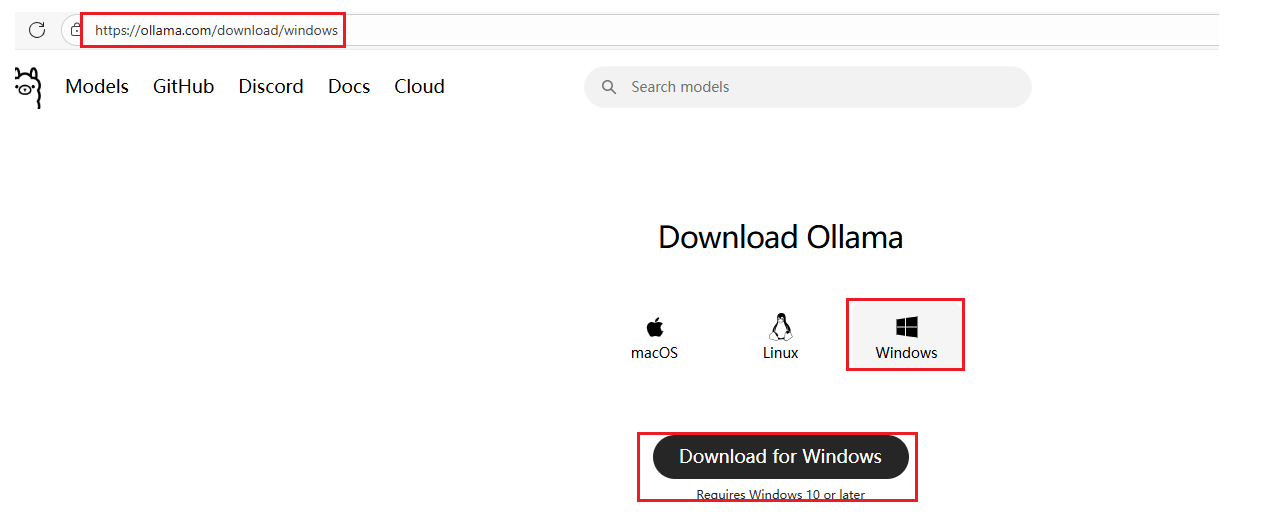
ollama下载
ollama安装
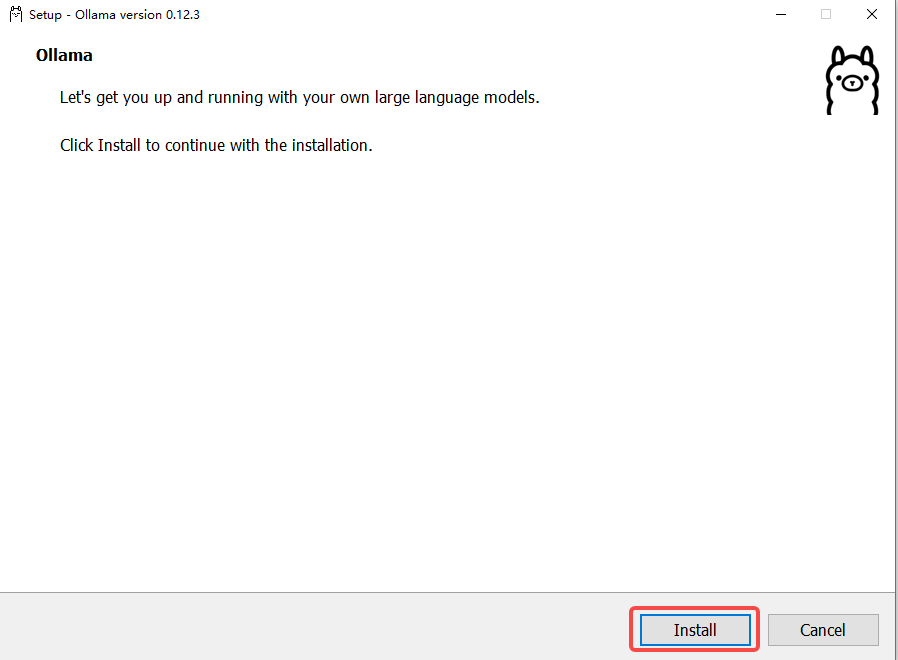
直接点击Install即可完成一键安装。貌似win10中ollma安装无法选择安装位置,安装位置在:
C:\Users\Administrator\AppData\Roaming 路径下。(貌似ollma的安装无法选择位置,只能默认安装)安装好之后,ollama的服务默认就启动起来了。
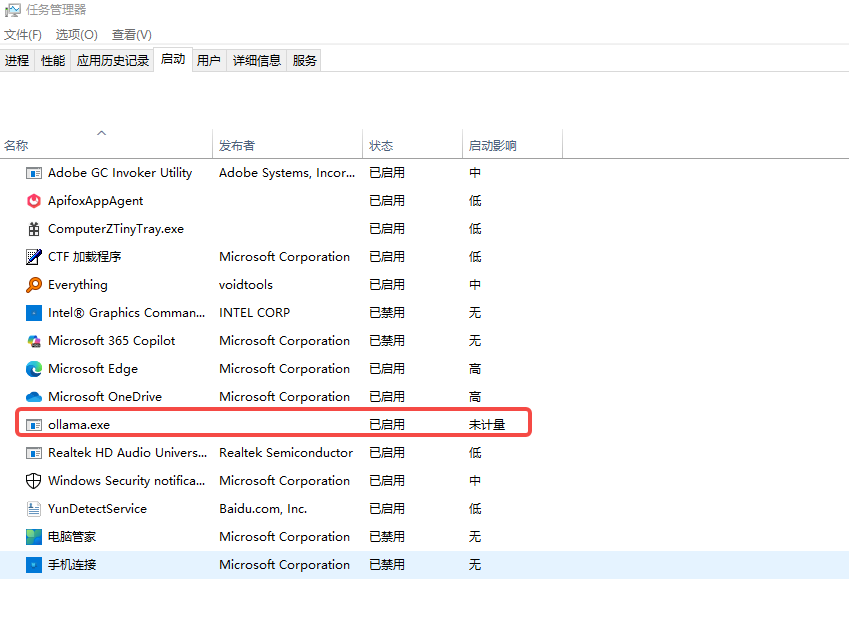
或者在浏览器中输入:http://localhost:11434 ,看到Ollama is running 时说明ollama服务已经启动了。
win10中,ollama安装好之后会带一个图形化界面:
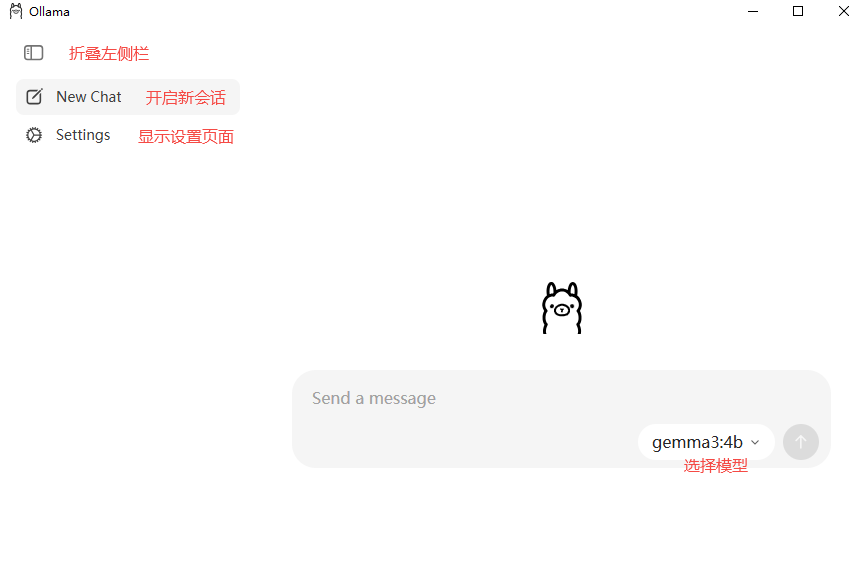
设置界面
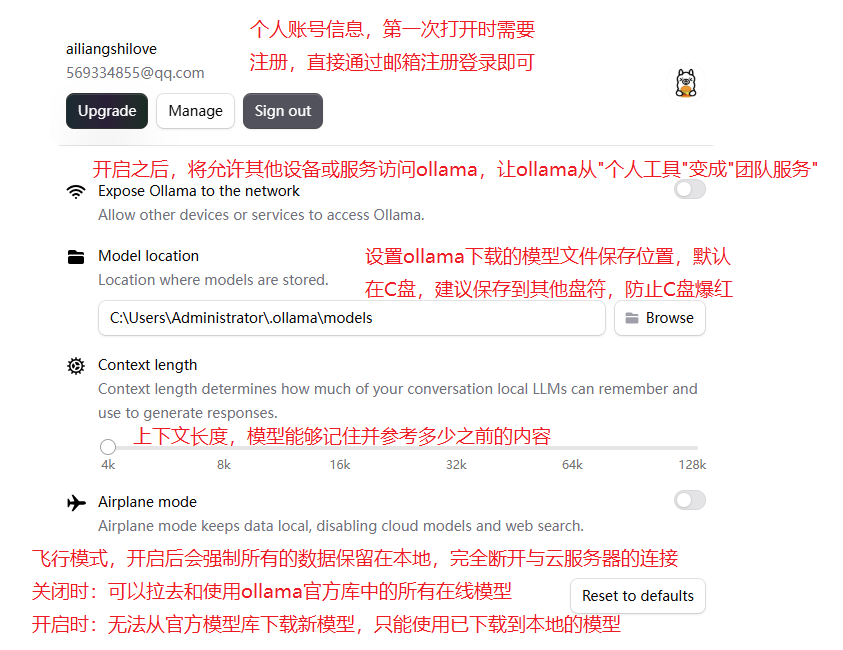
环境变量
| 参数 | 标识与配置 |
|---|---|
| OLLAMA_MODELS | 表示模型文件的存放目录,默认目录为当前用户目录即 C:\Users%username%.ollama\models ,建议放在其他盘(如 D:\ApplyTool\ProgramTool\ollama\models |
| OLLAMA_HOST | 表示ollama 服务监听的网络地址,默认为127.0.0.1 如果想要允许其他电脑访问 Ollama(如局域网中的其他电脑),建议设置成 0.0.0.0 |
| OLLAMA_PORT | 表示ollama 服务监听的默认端口,默认为11434 如果端口有冲突,可以修改设置成其他端口(如8080等) |
| OLLAMA_ORIGINS | 表示HTTP 客户端的请求来源,使用半角逗号分隔列表 如果本地使用不受限制,可以设置成星号 * |
| OLLAMA_KEEP_ALIVE | 表示大模型加载到内存中后的存活时间,默认为5m即 5 分钟 (如纯数字300 代表 300 秒,0 代表处理请求响应后立即卸载模型, 任何负数则表示一直存活)建议设置成 24h ,即模型在内存中保持 24 小时,提高访 问速度 |
| OLLAMA_NUM_PARALLEL | 表示请求处理的并发数量,默认为1 (即单并发串行处理请求) 建议按照实际需求进行调整 |
| OLLAMA_MAX_QUEUE | 表示请求队列长度,默认值为512 建议按照实际需求进行调整,超过队列长度的请求会被抛弃 |
| OLLAMA_DEBUG | 表示输出 Debug 日志,应用研发阶段可以设置成1 (即输出详细日志信息,便于排查 问题) |
| OLLAMA_MAX_LOAD ED_MODELS | 表示最多同时加载到内存中模型的数量,默认为1 (即只能有 1 个模型在内存中) |
3、大模型初始化
由于现在是通过Ollama本地接入某个大模型,Ollama实际是在本地搭建了一个服务器,用户可以通过Ollama下载需要接入的模型,Ollma会替用户管理模型,并真正和大模型对接,用户通过Ollama提供的HTTP接口访问。用户向大模型发的消息实际是,先发给Ollama服务器,Ollama服务器将消息发给大模型,大模型响应之后,Ollama再将消息返回给用户,用户不直接和大模型交互,因此初始化时不需要设置api key进行身份认证。
注意:本地部署可以在自己的本地机器上,也可以在企业自己的局域网或云服务器上。
Ollama可以接入许多大模型,具体接入那个大模型看用户选择,因此需加入_model_name 和
_model_desc来保存接入的大模型的名称和描述信息。
c++]
///////////////////////////// OllamaLLMProvider.h
///////////////////////////////////////
#pragma once
#include "ILLMProvider.h"

namespace ai_chat_sdk {
    class OllamaLLMProvider : public ILLMProvider {
    public:
        // 初始化模型 key: api_key, value: api_key
        virtual bool initModel(const std::map<std::string, std::string>& model_config) override;

        // 检测模型是否有效
        virtual bool isAvailable() override;

        // 获取模型名称
        virtual std::string getModelName() const override;

        // 获取模型描述信息
        virtual std::string getModelDesc() const override;

        // 发送消息给模型 - 全量返回
        virtual std::string sendMessage(const std::vector<Message>& messages,
                                        const std::map<std::string, std::string>& request_param) override;

        // 发送消息给模型 - 流式响应
        virtual std::string sendMessageStream(const std::vector<Message>& messages,
                                              const std::map<std::string, std::string>& request_param,
                                              std::function<void(const std::string&, bool)> callback) override;
    protected:
        std::string _model_name; // 模型名称
        std::string _model_desc; // 模型描述
    };
} // end ai_chat_sdk

///////////////////////////// OllamaLLMProvider.cpp
///////////////////////////////////////
// ...
// 初始化模型
bool OllamaLLMProvider::initModel(const std::map<std::string, std::string>& model_config) {
    // 初始化模型名称
    auto it = model_config.find("model_name");
    if (it != model_config.end()) {
        _model_name = it->second;
    } else {
        ERR("Ollama model name is empty!");
        return false;
    }

    // 初始化模型描述
    it = model_config.find("model_desc");
    if (it != model_config.end()) {
        _model_desc = it->second;
    } else {
        ERR("Ollama model desc is empty!");
        return false;
    }

    // 初始化endpoint
    it = model_config.find("endpoint");
    if (it != model_config.end()) {
        _endpoint = it->second;
    } else {
        ERR("Ollama endpoint is empty!");
        return false;
    }

    // 设置初始化成功标记
    _isAvailable = true;
    return true;
}

// 检测模型是否有效
bool OllamaLLMProvider::isAvailable() {
    return _isAvailable;
}

// 获取模型名称
std::string OllamaLLMProvider::getModelName() const {
    return _model_name;
}

// 获取模型描述信息
std::string OllamaLLMProvider::getModelDesc() const {
    return _model_desc;
}
4、发送消息--全量消息
发送全量消息接口:
URL: /api/chat
参数:
c++
model : 模型名称。
message : 消息列表,包含历史消息
stream : 是否开启流式响应,true开启,false关闭,默认开启流式响应
options : json对象,设置一些高级的可选参数,比如:temperature、最大tokens数。注意:
Ollama的最大 tokens字段为num_ctx
启动ollama之后,在终端中使用bash给ollama发送请求:
bash
# 使用curl给ollama发送请求
curl -s -X POST "http://127.0.0.1:11434/api/chat" \
     -H "Content-Type: application/json" \
     -d '{"model": "deepseek-r1:1.5b", "stream": false, "messages": [{"role": "user", "content": "你是谁?"}], "options": {"temperature": 0.7, "num_ctx": 2048}}'
json
# 模型响应
{
    "model": "deepseek-r1:1.5b",
    "created_at": "2025-09-02T09:24:03.117965426Z",
    "message": {
        "role": "assistant",
        "content": "\n\n</think>\n\n你好!很高兴见到你,有什么我可以帮忙的吗?"
    },
    "done_reason": "stop",
    "done": true,
    "total_duration": 24879553617,
    "load_duration": 97011891,
    "prompt_eval_count": 2,
    "prompt_eval_duration": 133646497,
    "eval_count": 181,
    "eval_duration": 24647987800
}
c++
/////////////////////////////// OllamaLLMProvider.cpp
////////////////////////////////////
// ...
// 发送消息给模型
std::string OllamaLLMProvider::sendMessage(
    const std::vector<Message>& messages,
    const std::map<std::string, std::string>& request_param) {

    // 检查模型是否有效
    if (!_isAvailable) {
        ERR("OllamaLLMProvider: model is not init!");
        return "";
    }

    // 获取采样温度 和 max_tokens
    double temperature = 0.7;
    int max_tokens = 2048;
    if (request_param.find("temperature") != request_param.end()) {
        temperature = std::stof(request_param.at("temperature"));
    }
    if (request_param.find("max_tokens") != request_param.end()) {
        max_tokens = std::stoi(request_param.at("max_tokens"));
    }

    // 构建历史消息
    Json::Value messages_array(Json::arrayValue);
    for (const auto& message : messages) {
        Json::Value msg;
        msg["role"] = message.role;
        msg["content"] = message.content;
        messages_array.append(msg);
    }

    // 构建请求体
    Json::Value options;
    options["temperature"] = temperature;
    options["num_ctx"] = max_tokens;

    Json::Value request_body;
    request_body["model"] = _model_name;
    request_body["messages"] = messages_array;
    request_body["stream"] = false;
    request_body["options"] = options;

    // 序列化
    Json::StreamWriterBuilder writer;
    std::string json_string = Json::writeString(writer, request_body);
    DBG("OllamaLLMProvider: request_body: {}", json_string);

    // 创建HTTP Client
    httplib::Client client(_endpoint);
    client.set_connection_timeout(30, 0);    // 30秒超时
    client.set_read_timeout(60, 0);          // 60秒读取超时

    // 设置请求头
    httplib::Headers headers = {
        {"Content-Type", "application/json"}
    };

    // 发送POST请求
    auto response = client.Post("/api/chat", headers, json_string, "application/json");
    if (!response) {
        ERR("Failed to connect to OllamaLLMProviderAPI - check network and SSL");
        return "";
    }

    DBG("OllamaLLMProviderAPI response status: {}", response->status);
    DBG("OllamaLLMProviderAPI response body: {}", response->body);

    // 检查响应是否成功
    if (response->status != 200) {
        ERR("OllamaLLMProviderAPI returned non-200 status: {} - {}",
            response->status, response->body);
        return "";
    }

    // 解析响应体
    Json::Value response_json;
    Json::CharReaderBuilder reader_builder;
    std::string parse_errors;
    std::istringstream response_stream(response->body);

    if (!Json::parseFromStream(reader_builder, response_stream, &response_json, &parse_errors)) {
        ERR("Failed to parse OllamaLLMProviderAPI response: {}", parse_errors);
        return "";
    }

    // 解析大模型回复内容
    // 大模型回复包含在message的json对象中
    if (response_json.isMember("message") &&
        response_json["message"].isMember("content")) {
        std::string reply_content = response_json["message"]["content"].asString();
        INFO("Received Ollama response: {}", reply_content);
        return reply_content;
    }

    // 解析失败,返回错误信息
    ERR("Invalid response format from Ollama API");
    return "Invalid response format from Ollama API";
}
5、发送消息--全量消息测试
c++
///////////////////////////////// testLLM.cpp
/////////////////////////////////////
// ...
TEST(OllamaLLMProviderTest, sendMessage) {
    auto ollamaLLMProvider = std::make_shared<ai_chat_sdk::OllamaLLMProvider>();
    ASSERT_TRUE(ollamaLLMProvider != nullptr);

    std::map<std::string, std::string> param_map;
    param_map["model_name"] = "deepseek-r1:1.5b";
    param_map["endpoint"] = "http://127.0.0.1:11434";
    param_map["model_desc"] = "本地部署deepseek-r1:1.5b模型, 采用专家混合架构,专注于深度理解与推理";

    ollamaLLMProvider->initModel(param_map);
    ASSERT_TRUE(ollamaLLMProvider->isAvailable());

    std::vector<ai_chat_sdk::Message> messages;
    messages.push_back({"user", "你好"});

    std::string response = ollamaLLMProvider->sendMessage(messages, param_map);
    ASSERT_FALSE(response.empty());
    INFO("response {}", response);
}// 程序执行结果:
bit@bit08:~/will/AIModelAcess/ai-model-acess/test/build$ ./LLMTest
[==========] Running 1 test from 1 test suite.
[----------] Global test environment set-up.
[----------] 1 test from OllamaLLMProviderTest
[ RUN ] OllamaLLMProviderTest.sendMessage
08:26:40 [aiChatServer][info ][/home/bit/will/AIModelAcess/ai-model-acess/sdk/src/OllamaLLMProvider.cpp:45 ] Ollama provider init success with endpoint: http://127.0.0.1:11434
08:26:40 [aiChatServer][debug ][/home/bit/will/AIModelAcess/ai-model-acess/sdk/src/OllamaLLMProvider.cpp:104 ] OllamaLLMProvider: request_body: {
"messages": [
{
"content": "你好",
"role": "user"
}
],
"model": "deepseek-r1:1.5b",
"options": {
"num_ctx": 2048,
"temperature": 0.69999999999999996
},
"stream": false
}
08:26:43 [aiChatServer][debug ][/home/bit/will/AIModelAcess/ai-model-acess/sdk/src/OllamaLLMProvider.cpp:123 ] OllamaLLMProviderAPI response status: 200
08:26:43 [aiChatServer][debug ][/home/bit/will/AIModelAcess/ai-model-acess/sdk/src/OllamaLLMProvider.cpp:124 ] OllamaLLMProviderAPI response body: {
"model": "deepseek-r1:1.5b",
"created_at": "2025-09-15T08:26:43.159427332Z",
"message": {
"role": "assistant",
"content": "<think>\n\n</think>\n\n你好!很高兴见到你,有什么我可以帮忙的吗?"
},
"done_reason": "stop",
"done": true,
"total_duration": 2378824005,
"load_duration": 125987641,
"prompt_eval_count": 4,
"prompt_eval_duration": 225315283,
"eval_count": 17,
"eval_duration": 2026800139
}
08:26:43 [aiChatServer][info ][/home/bit/will/AIModelAcess/ai-model-acess/sdk/src/OllamaLLMProvider.cpp:146 ] Received Ollama response: <think>
</think>
你好!很高兴见到你,有什么我可以帮忙的吗?
08:26:43 [aiChatServer][info ][/home/bit/will/AIModelAcess/ai-model-acess/test/testLLMProvider.cpp:214 ] response <think>
</think>
你好!很高兴见到你,有什么我可以帮忙的吗?
[ OK ] OllamaLLMProviderTest.sendMessage (2381 ms)
[----------] 1 test from OllamaLLMProviderTest (2381 ms total)
[----------] Global test environment tear-down
[==========] 1 test from 1 test suite ran. (2381 ms total)
[ PASSED ] 1 test.6、发送消息--流式响应
URL : /api/chat
参数:
model : 模型名称。
message : 消息列表,包含历史消息
stream : 是否开启流式响应,true开启,false关闭,默认开启流式响应
options : json对象,设置一些高级的可选参数,比如:temperature、最大tokens数。注意:
Ollama的最大 tokens字段为num_ctx
启动ollama之后,在终端中使用bash给ollama发送请求:
json
# 模型响应
{
    "model": "deepseek-r1:1.5b",
    "created_at": "2025-09-02T10:38:24.054739072Z",
    "message": {
        "role": "assistant",
        "content": "您好"
    },
    "done": false
}

...

{
    "model": "deepseek-r1:1.5b",
    "created_at": "2025-09-02T10:38:28.49268141Z",
    "message": {
        "role": "assistant",
        "content": "帮助"
    },
    "done": false
}

{
    "model": "deepseek-r1:1.5b",
    "created_at": "2025-09-02T10:38:28.626182393Z",
    "message": {
        "role": "assistant",
        "content": "。"
    },
    "done": false
}

{
    "model": "deepseek-r1:1.5b",
    "created_at": "2025-09-02T10:38:28.760770641Z",
    "message": {
        "role": "assistant",
        "content": ""
    },
    "done_reason": "stop",
    "done": true,
    "total_duration": 5720171892,
    "load_duration": 90386941,
    "prompt_eval_count": 6,
    "prompt_eval_duration": 383758775,
    "eval_count": 40,
    "eval_duration": 5245057118
}
对比DeepSeek的直接响应格式,可以看出Ollama对DeepSeek返回的结果进行了简化处理。
c++
/////////////////////////////// OllamaLLMProvider.cpp
////////////////////////////////////
std::string OllamaLLMProvider::sendMessageStream(
    const std::vector<Message>& messages,
    const std::map<std::string, std::string>& request_param,
    std::function<void(const std::string&, bool)> callback)
{
    if (!_isAvailable) {
        ERR("OllamaLLMProvider is not available");
        return "";
    }

    // 获取采样温度 和 max_tokens
    double temperature = 0.7;
    int max_tokens = 2048;
    if (request_param.find("temperature") != request_param.end()) {
        temperature = std::stof(request_param.at("temperature"));
    }
    if (request_param.find("max_tokens") != request_param.end()) {
        max_tokens = std::stoi(request_param.at("max_tokens"));
    }

    // 构建历史消息
    Json::Value messages_array(Json::arrayValue);
    for (const auto& message : messages) {
        Json::Value msg;
        msg["role"] = message.role;
        msg["content"] = message.content;
        messages_array.append(msg);
    }

    // 构建请求体
    Json::Value options;
    options["temperature"] = temperature;
    options["num_ctx"] = max_tokens;

    Json::Value request_body;
    request_body["model"] = _model_name;
    request_body["messages"] = messages_array;
    request_body["stream"] = true; // 开启流式响应
    request_body["options"] = options;

    // 序列化
    Json::StreamWriterBuilder writer;
    std::string json_string = Json::writeString(writer, request_body);
    DBG("OllamaLLMProvider: Send stream request to ollama Server, request_body: {}", json_string);

    // 创建HTTP Client
    httplib::Client client(_endpoint);
    client.set_connection_timeout(30, 0);  // 30秒超时
    client.set_read_timeout(300, 0);       // 流式响应需要更长的时间

    // 设置请求头
    httplib::Headers headers = {
        {"Content-Type", "application/json"},
    };

    // 流式处理变量
    std::string buffer;
    bool gotError = false;
    std::string errorMsg;      // 错误描述符
    int statusCode = 0;        // 状态码
    bool streamFinish = false; // 标记流式返回数据是否结束
    std::string fullResponse;  // 累积完整的响应

    // 创建请求对象
    httplib::Request req;
    req.method = "POST";
    req.path = "/api/chat";
    req.headers = headers;
    req.body = json_string;

    // 响应头处理
    req.response_handler = [&](const httplib::Response& response) {
        statusCode = response.status;
        DBG("Received HTTP Status: {}", statusCode);
        if (200 != statusCode) {
            gotError = true;
            errorMsg = "HTTP Error:" + std::to_string(statusCode);
            return false; // 终止请求
        }
        return true; // 继续接收数据
    };

    // 增量数据接收响应期
    req.content_receiver = [&](const char* data, size_t len, uint64_t offset,
                                uint64_t totalLength) {
        // 如果http请求头出错,就不需要再继续接收了
        if (gotError) {
            return false;
        }

        // 追加新数据到缓冲区
        buffer.append(data, len);
        DBG("data : {}", buffer);

        // 处理所有完整的事件,事件和事件之间以\n分隔
        size_t pos = 0;
        while ((pos = buffer.find('\n')) != std::string::npos) {
            std::string jsonLine = buffer.substr(0, pos);
            buffer.erase(0, pos + 1); // 移除已经处理的事件

            // 处理空行和注释
            if (jsonLine.empty()) {
                continue;
            }

            // 解析json数据
            Json::Value chunk;
            Json::CharReaderBuilder readerBuilder;
            std::string errs;
            std::istringstream jsonStream(jsonLine);
            if (Json::parseFromStream(readerBuilder, jsonStream, &chunk, &errs)) {
                // 处理结束标记
                if (chunk.get("done", false).asBool()) {
                    callback("", true);
                    streamFinish = true;
                    return true;
                }

                // 提取增量内容
                if (chunk.isMember("message") &&
                    chunk["message"].isMember("content")) {
                    std::string content = chunk["message"]["content"].asString();
                    // 累积到完整响应
                    fullResponse += content;
                    callback(content, false);
                }
            } else {
                WARN("DeepSeek SSE JSON parse error : {}", errs);
            }
        }
        return true; // 继续接收数据
    };

    // 发送请求并处理结果
    auto response = client.send(req);
    if (!response) {
        // 网络错误
        auto err = response.error();
        ERR("Network error : {}", std::to_string(static_cast<int>(err)));
        return "";
    }

    // 确保流正常结束
    if (!streamFinish) {
        WARN("Stream ended without done-true");
        callback("", true);
    }

    return fullResponse;
}
7、发送消息-流式响应测试
c++
///////////////////////////////// testLLM.cpp
/////////////////////////////////////
TEST(OllamaLLMProviderTest, sendMessage)
{
    auto ollamaLLMProvider = std::make_shared<ai_chat_sdk::OllamaLLMProvider>();
    ASSERT_TRUE(ollamaLLMProvider != nullptr);

    std::map<std::string, std::string> param_map;
    param_map["model_name"] = "deepseek-r1:1.5b";
    param_map["endpoint"] = "http://127.0.0.1:11434";
    param_map["model_desc"] = "本地部署的DeepSeek, DeepSeek 推出的旗舰级开源大模型"
                              "(128K上下文), 性能强大, 专注于深度理解与推理";

    ollamaLLMProvider->initModel(param_map);
    ASSERT_TRUE(ollamaLLMProvider->isAvailable());

    std::vector<ai_chat_sdk::Message> messages;
    messages.push_back({"user", "你是谁?"});

    auto write_chunk = [&](const std::string& chunk, bool last) {
        INFO("chunk : {}", chunk);
        if (last) {
            INFO("[DONE]");
        }
    };

    std::string fulldata = ollamaLLMProvider->sendMessageStream(messages, param_map, write_chunk);
    ASSERT_FALSE(fulldata.empty());
    INFO("fulldata {}", fulldata);
}// 程序执行部分结果:
// ...
[aiChatServer][debug ][/home/bit/will/AIModelAcess/ai-modelacess/
sdk/src/OllamaLLMProvider.cpp:262 ] data : {"model":"deepseekr1:
1.5b","created_at":"2025-09-15T08:33:41.327763632Z","message":
{"role":"assistant","content":""},"done_reason":"stop","done":true,"total_durat
ion":137052702492,"load_duration":114049272,"prompt_eval_count":27,"prompt_eval
_duration":2030739739,"eval_count":954,"eval_duration":134740804092}
08:33:41 [aiChatServer][info ][/home/bit/will/AIModelAcess/ai-modelacess/
test/testLLMProvider.cpp:237 ] chunk :
08:33:41 [aiChatServer][info ][/home/bit/will/AIModelAcess/ai-modelacess/
test/testLLMProvider.cpp:239 ] [DONE]
[ OK ] OllamaLLMProviderTest.sendMessage (137054 ms)
[----------] 1 test from OllamaLLMProviderTest (137054 ms total)
[----------] Global test environment tear-down
[==========] 1 test from 1 test suite ran. (137054 ms total)
[ PASSED ] 1 test.