在项目开发过程中,如果把日志、异常和业务代码全部写在一起,后期维护会比较混乱。尤其是日志,一旦项目功能增多,所有信息都写到同一个文件中,查找问题会非常不方便。
因此在本项目中,对日志进行了简单拆分:日志类只负责记录日志,不和异常类、业务类混在一起,并且按业务模块分别写入不同的日志文件,提升日志的可读性和维护性。
一、安装 NLog
通过 NuGet 安装 NLog 相关包:
Install-Package NLog Install-Package NLog.Config
安装完成后,项目中会使用 NLog 作为日志框架。
二、配置日志文件
1. 新建 NLog.config
在项目中新增 NLog.config 文件。
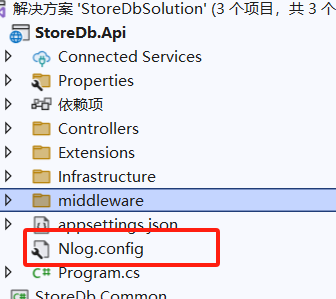
2. 设置文件属性
右键 NLog.config → 属性
将 "复制到输出目录" 设置为 "如果较新则复制",确保程序运行时能够正确读取配置。
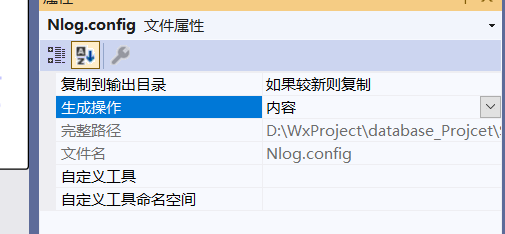
3. 配置不同的日志文件
在 NLog.config 中配置多个日志目标和规则:
XML
<?xml version="1.0" encoding="utf-8" ?>
<nlog xmlns="http://www.nlog-project.org/schemas/NLog.xsd"
      xmlns:xsi="http://www.w3.org/2001/XMLSchema-instance">
	<!-- 定义全局变量 -->
	<variable name="logDir" value="${basedir}/logs" />
	<!-- 定义日志目标 -->
	<targets>
		<!-- 通用日志 -->
		<target xsi:type="File"
				name="commonFile"
				fileName="${logDir}/common/${shortdate}.log"
				layout="${longdate}${newline}${uppercase:${level}}${newline}${message}${newline}-----------------------------${newline}"
				concurrentWrites="true"
				keepFileOpen="false" />
		<!-- StoreFile 日志 -->
		<target xsi:type="File"
				name="storeFile"
				fileName="${logDir}/storefile/${shortdate}.log"
			    layout="${longdate}${newline}${uppercase:${level}}${newline}${message}${newline}-----------------------------${newline}"
			    concurrentWrites="true"
				keepFileOpen="false" />
	</targets>
	<!-- 定义规则 -->
	<rules>
		<!-- common 日志 -->
		<logger name="CommonLogger" minlevel="Info" writeTo="commonFile" />
		<!-- storefile 日志 -->
		<logger name="StoreLogger" minlevel="Info" writeTo="storeFile" />
	</rules>
</nlog>
三、编写日志类
日志类单独封装,只负责日志记录,不处理具体业务逻辑。
cs
using NLog;
using System;
using System.Collections.Generic;
using System.Linq;
using System.Text;
using System.Threading.Tasks;
namespace StoreDb.Common.Helper
{
    /// <summary>
    /// 日志类
    /// </summary>
    public static class Logs
    {
        private static readonly Logger CommonLogger = LogManager.GetLogger("CommonLogger");
        private static readonly Logger StoreLogger = LogManager.GetLogger("StoreLogger");
        /// <summary>
        /// 保存到common日志
        /// </summary>
        /// <param name="message"></param>
        public static void Common(string message)
        {
            CommonLogger.Info(message);
        }
        /// <summary>
        /// 保存到store日志
        /// </summary>
        /// <param name="message"></param>
        public static void Store(string message)
        {
            StoreLogger.Info(message);
        }
        /// <summary>
        /// common异常
        /// </summary>
        /// <param name="message"></param>
        /// <param name="ex"></param>
        public static void CommonError(string message, Exception ex = null)
        {
            CommonLogger.Error(ex, message);
        }
        /// <summary>
        /// store异常
        /// </summary>
        /// <param name="message"></param>
        /// <param name="ex"></param>
        public static void StoreError(string message, Exception ex = null)
        {
            StoreLogger.Error(ex, message);
        }
    }
}
四、使用示例
cs
Logs.Common("系统启动完成");
Logs.Store("执行业务操作");
程序运行后,会在项目根目录下自动生成 logs 文件夹,并分别创建 common 和 storefile 两个子目录,用于存放不同业务模块的日志文件。

结尾
通过以上方式,实现了日志与业务、异常的解耦,并按业务模块对日志进行拆分。日志结构清晰,配置简单,方便后期问题排查和系统维护,适合在日常项目中使用。