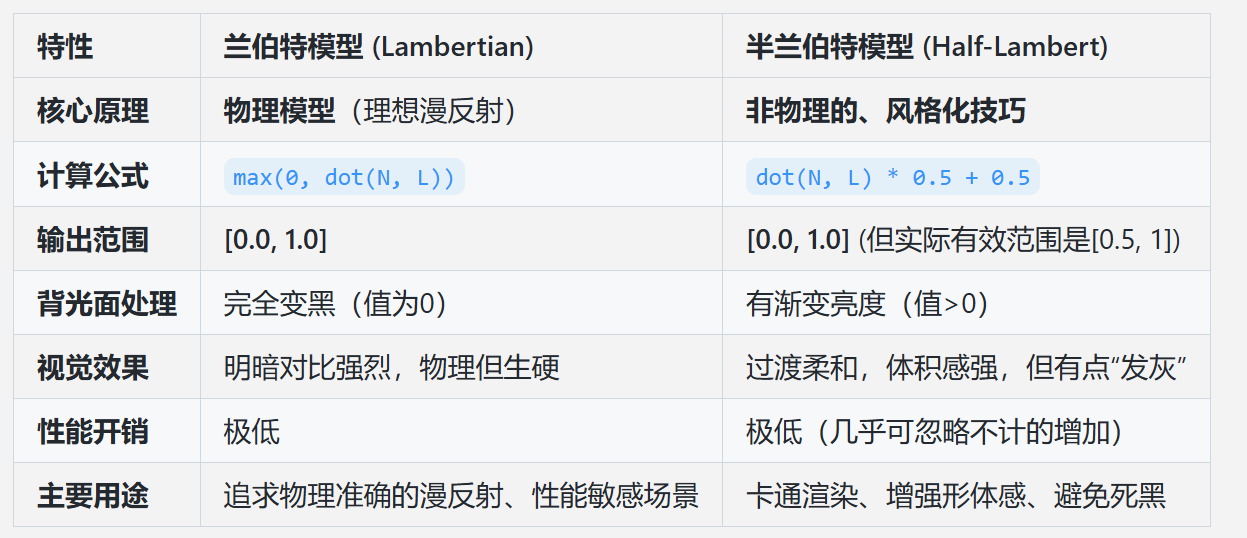
1、兰伯特光照模型
核心思想 :模拟理想的漫反射表面。光线照射到粗糙表面后,会均匀地向各个方向散射。因此,其亮度只取决于光线方向与表面法线的夹角,与观察者的位置无关。
计算公式 : diffuse = LightColor * Albedo * max(0, dot(N, L))
N: 归一化的表面法线向量L: 归一化的指向光源的方向向量max(0, ...): 将点积结果钳制在 0, 1 之间。这意味着当光线与法线夹角大于90度(即从背面照射)时,漫反射贡献为0。
ShaderLab代码(逐顶点):
html
Shader "MyCustom/Lambert"
{
    Properties
    {
        //材质的漫反射颜色
        _Color("Base Color", color) = (1.0, 1.0, 1.0, 1.0)
        //漫反射系数
        _kD("kD", Range(0, 1)) = 1
    }
    SubShader
    {
        Tags { "RenderType"="Opaque" }
        LOD 100

        Pass
        {
            CGPROGRAM
            #pragma vertex vert
            #pragma fragment frag

            #include "UnityCG.cginc"

            struct appdata
            {
                float4 vertex : POSITION; //顶点位置
                float3 normal : NORMAL;   //法线
            };

            //顶点着色器输出
            struct v2f
            {
                float4 vertex : SV_POSITION;
                float4 col : COLOR;
            };

            float4 _Color;
            float _kD;
            //表示这个变量的初始值来自于外部的其他环境
            uniform float4 _LightColor0;

            v2f vert (appdata v)
            {
                v2f o;

                //Unity内置 模型 * 世界 * 投影矩阵 UNITY_MATRIX_MVP,把顶点位置从模型空间转换到裁剪空间中
                o.vertex = UnityObjectToClipPos(v.vertex);
                //将模型空间的法线转到世界空间;
                float3 worldNormal = normalize(UnityObjectToWorldNormal(v.normal));

                //float3 worldNormal = normalize(mul(float4(v.normal, 0.0), unity_WorldToObject).xyz);

                //获取光源方向(假设场景中只有一个光源且该光源的类型是平行光)
                float3 worldLight = normalize(_WorldSpaceLightPos0.xyz);

                //当法线和光线之间夹角大于90时,光线是在照射物体的背面,此时光照强度为0
                float lambert = max(dot(worldNormal, worldLight), 0.0);
                //也可以使用saturate函数把参数截取到[0, 1]的范围内,防止负值
                // float lambert = saturate(dot(worldNormal, worldLight));

                float3 diffuse = _kD * lambert * _Color.rgb * _LightColor0.rgb;

                //环境光
                float3 ambient = UNITY_LIGHTMODEL_AMBIENT.xyz;
                float3 finalColor = diffuse + ambient;
                o.col = float4(finalColor, 1.0);
                return o;
            }

            fixed4 frag (v2f i) : SV_Target
            {
                return i.col;
            }
            ENDCG
        }
    }
}
2、半兰伯特光照模型
核心思想 :由Valve公司在开发《半条命》时提出的一种非物理的、风格化的技术 。它的目的是解决兰伯特模型中背光面过黑的问题,通过一个简单的数学变换将光照范围从 0, 1 重新映射到 0.5, 1(或其他范围),从而让背光面也能产生一定的渐变亮度。
计算公式 : diffuse = LightColor * Albedo * (dot(N, L) * 0.5 + 0.5)
- 这个公式通常会被概括为:
diffuse = LightColor * Albedo * (α * dot(N, L) + β)- 其中
α是缩放系数,β是偏移系数,通常都设为0.5,使得结果从 -1, 1 映射到 0, 1。
- 其中
- 更通用的形式允许你控制明暗对比度:
diffuse = LightColor * Albedo * pow(α * dot(N, L) + β, gamma)
ShaderLab代码(逐顶点):
cs
Shader "MyCustom/HalfLambert"
{
    Properties
    {
        //材质的漫反射颜色
        _Color("Base Color", color) = (1.0, 1.0, 1.0, 1.0)
        //漫反射系数
        _kD("kD", Range(0, 1)) = 1
    }
    SubShader
    {
        Tags
        {
            "RenderType"="Opaque"
        }
        LOD 100

        Pass
        {
            CGPROGRAM
            #pragma vertex vert
            #pragma fragment frag

            #include "UnityCG.cginc"

            struct appdata
            {
                float4 vertex : POSITION; //顶点位置
                float3 normal : NORMAL; //法线
            };

            //顶点着色器输出
            struct v2f
            {
                float4 vertex : SV_POSITION;
                float4 col : COLOR;
            };

            float4 _Color;
            float _kD;
            //表示这个变量的初始值来自于外部的其他环境
            uniform float4 _LightColor0;

            v2f vert(appdata v)
            {
                v2f o;

                //Unity内置 模型 * 世界 * 投影矩阵 UNITY_MATRIX_MVP,把顶点位置从模型空间转换到裁剪空间中
                o.vertex = UnityObjectToClipPos(v.vertex);
                //将模型空间的法线转到世界空间;
                float3 worldNormal = normalize(UnityObjectToWorldNormal(v.normal));

                //float3 worldNormal = normalize(mul(float4(v.normal, 0.0), unity_WorldToObject).xyz);

                //获取光源方向(假设场景中只有一个光源且该光源的类型是平行光)
                float3 worldLight = normalize(_WorldSpaceLightPos0.xyz);

                // half lambert = light * diffuse * (0.5 * (n * l) + 0.5)
                float lambert = 0.5 * dot(worldNormal, worldLight) + 0.5;

                float3 diffuse = _kD * lambert * _Color.rgb * _LightColor0.rgb;

                //环境光
                float3 ambient = UNITY_LIGHTMODEL_AMBIENT.xyz;
                float3 finalColor = diffuse + ambient;
                o.col = float4(finalColor, 1.0);
                return o;
            }

            fixed4 frag(v2f i) : SV_Target
            {
                return i.col;
            }
            ENDCG
        }


    }
}
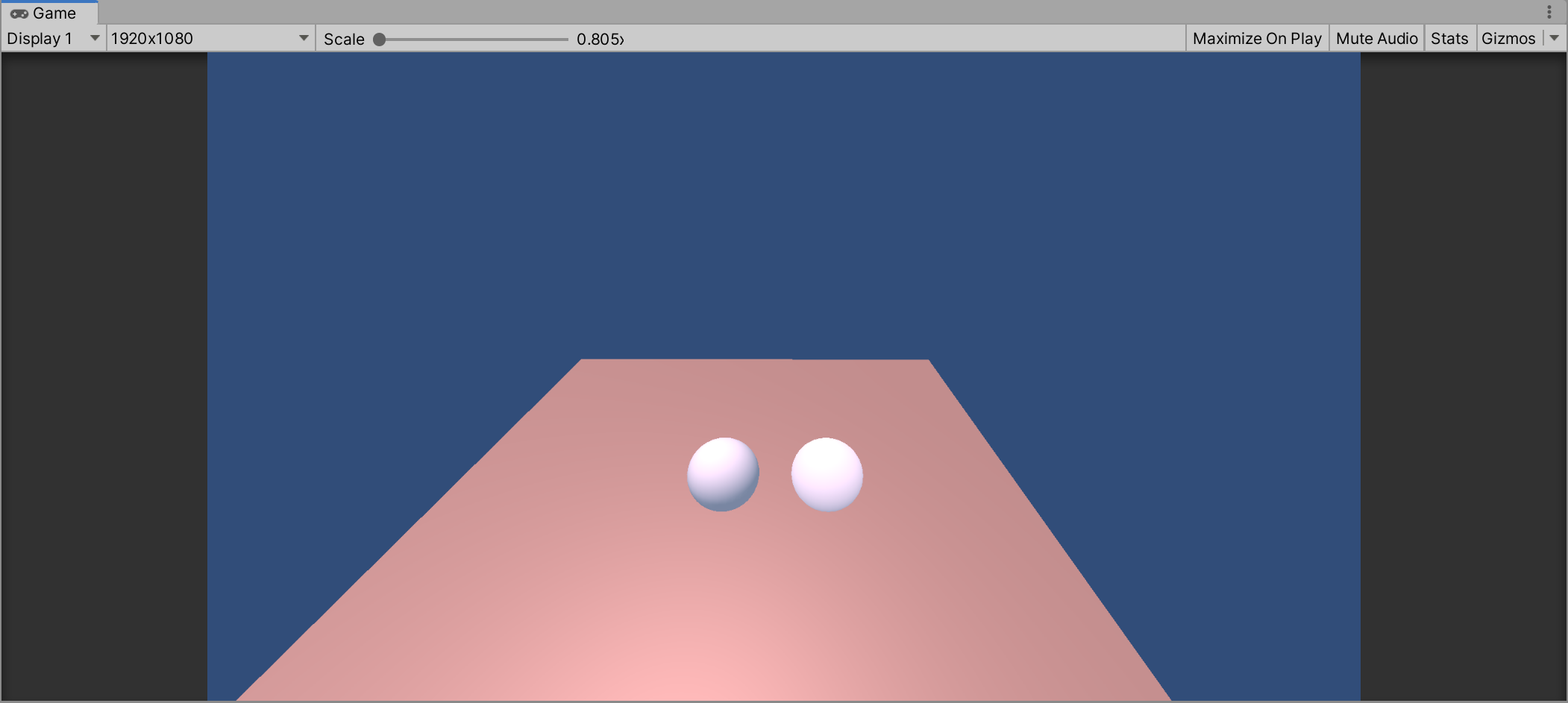
3、两种光照模型对比
Unity中效果对比:
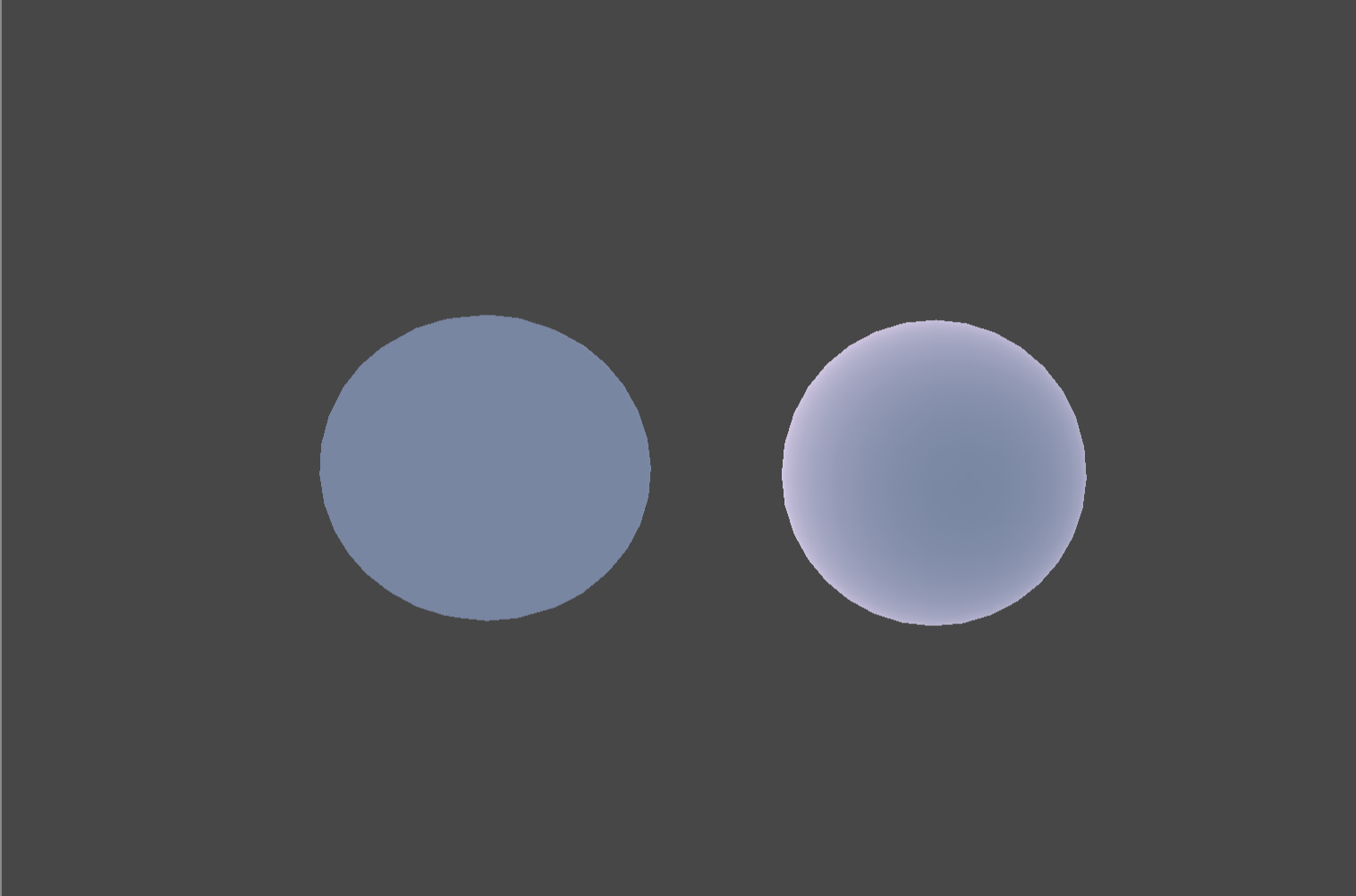
背面效果对比
用AI写了个对比光照模型的的html,可供观看实际效果
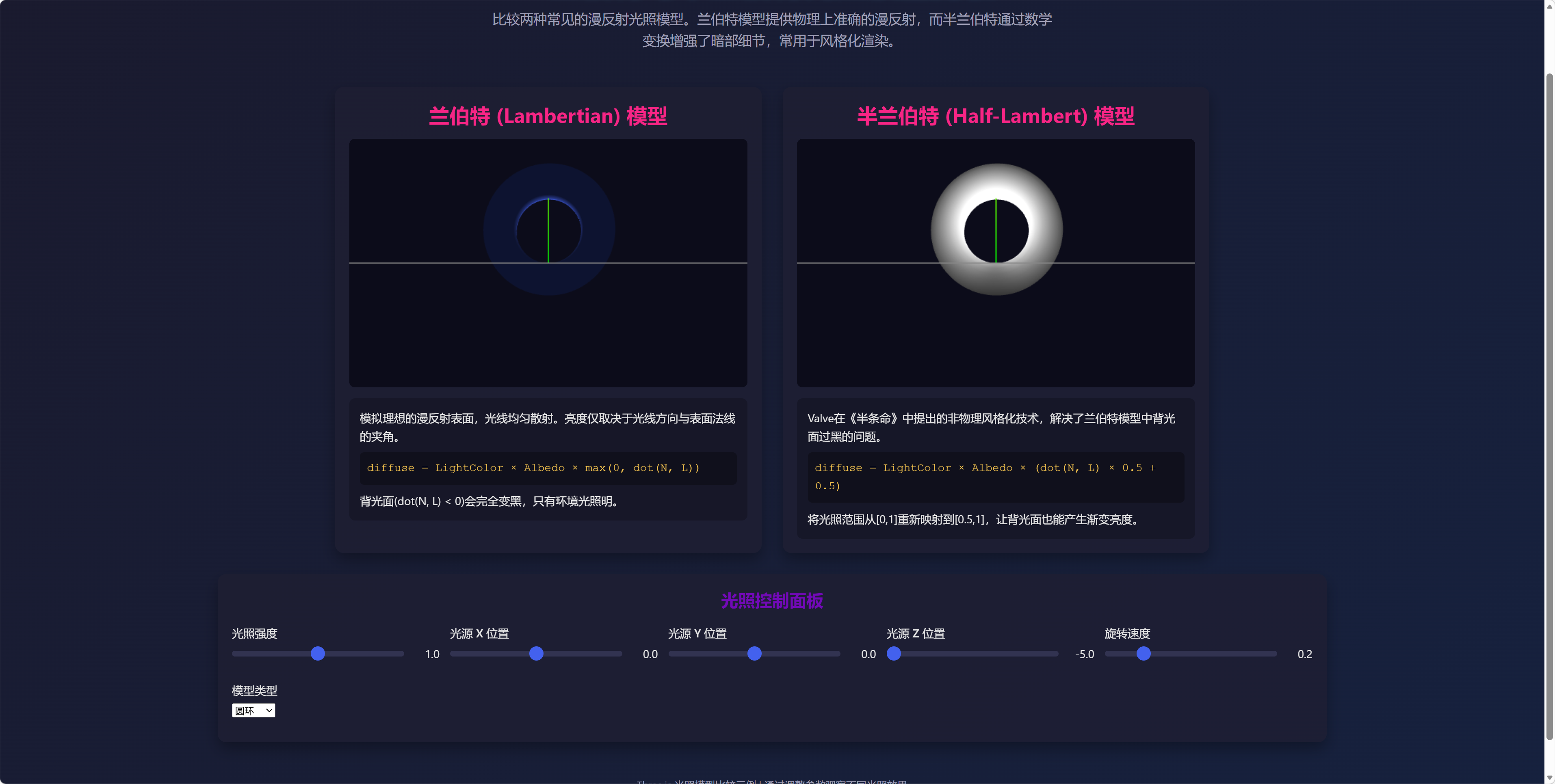
html
<!DOCTYPE html>
<html lang="zh-CN">
<head>
<meta charset="UTF-8">
<meta name="viewport" content="width=device-width, initial-scale=1.0">
<title>兰伯特与半兰伯特光照模型比较</title>
<script src="https://cdnjs.cloudflare.com/ajax/libs/three.js/r128/three.min.js"></script>
<style>
* {
margin: 0;
padding: 0;
box-sizing: border-box;
font-family: 'Segoe UI', Tahoma, Geneva, Verdana, sans-serif;
}
body {
background: linear-gradient(135deg, #1a1a2e 0%, #16213e 100%);
color: #e6e6e6;
min-height: 100vh;
overflow-x: hidden;
}
.container {
max-width: 1600px;
margin: 0 auto;
padding: 20px;
}
header {
text-align: center;
padding: 20px 0;
margin-bottom: 30px;
}
h1 {
font-size: 2.8rem;
margin-bottom: 10px;
color: #4cc9f0;
text-shadow: 0 0 10px rgba(76, 201, 240, 0.5);
}
.subtitle {
font-size: 1.2rem;
color: #a0a0b8;
max-width: 800px;
margin: 0 auto;
line-height: 1.6;
}
.comparison {
display: flex;
flex-wrap: wrap;
gap: 30px;
justify-content: center;
margin-bottom: 30px;
}
.model {
background: rgba(30, 30, 50, 0.8);
border-radius: 12px;
padding: 20px;
box-shadow: 0 10px 20px rgba(0, 0, 0, 0.3);
flex: 1;
min-width: 400px;
max-width: 600px;
}
.model h2 {
text-align: center;
margin-bottom: 15px;
color: #f72585;
font-size: 1.8rem;
}
.canvas-container {
width: 100%;
height: 350px;
border-radius: 8px;
overflow: hidden;
margin-bottom: 15px;
background: #0c0c1a;
}
.description {
padding: 15px;
background: rgba(20, 20, 35, 0.7);
border-radius: 8px;
font-size: 1rem;
line-height: 1.6;
}
.formula {
font-family: 'Courier New', monospace;
background: rgba(0, 0, 0, 0.3);
padding: 10px;
border-radius: 6px;
margin: 10px 0;
color: #f9c74f;
}
.controls {
background: rgba(30, 30, 50, 0.8);
border-radius: 12px;
padding: 20px;
box-shadow: 0 10px 20px rgba(0, 0, 0, 0.3);
margin-bottom: 30px;
}
.controls h2 {
text-align: center;
margin-bottom: 20px;
color: #7209b7;
}
.control-grid {
display: grid;
grid-template-columns: repeat(auto-fit, minmax(250px, 1fr));
gap: 15px;
}
.control-item {
margin-bottom: 15px;
}
.control-item label {
display: block;
margin-bottom: 8px;
font-weight: 500;
}
.slider-container {
display: flex;
align-items: center;
}
.slider-container input {
flex: 1;
height: 8px;
-webkit-appearance: none;
background: rgba(100, 100, 150, 0.3);
border-radius: 4px;
outline: none;
}
.slider-container input::-webkit-slider-thumb {
-webkit-appearance: none;
width: 20px;
height: 20px;
border-radius: 50%;
background: #4361ee;
cursor: pointer;
}
.slider-value {
width: 40px;
text-align: right;
margin-left: 10px;
}
.footer {
text-align: center;
padding: 20px;
color: #a0a0b8;
font-size: 0.9rem;
}
@media (max-width: 900px) {
.comparison {
flex-direction: column;
align-items: center;
}
.model {
width: 100%;
}
}
</style>
</head>
<body>
<div class="container">
<header>
<h1>兰伯特与半兰伯特光照模型比较</h1>
<p class="subtitle">比较两种常见的漫反射光照模型。兰伯特模型提供物理上准确的漫反射,而半兰伯特通过数学变换增强了暗部细节,常用于风格化渲染。</p>
</header>
<div class="comparison">
<div class="model">
<h2>兰伯特 (Lambertian) 模型</h2>
<div class="canvas-container" id="lambert-container"></div>
<div class="description">
<p>模拟理想的漫反射表面,光线均匀散射。亮度仅取决于光线方向与表面法线的夹角。</p>
<div class="formula">diffuse = LightColor × Albedo × max(0, dot(N, L))</div>
<p>背光面(dot(N, L) < 0)会完全变黑,只有环境光照明。</p>
</div>
</div>
<div class="model">
<h2>半兰伯特 (Half-Lambert) 模型</h2>
<div class="canvas-container" id="half-lambert-container"></div>
<div class="description">
<p>Valve在《半条命》中提出的非物理风格化技术,解决了兰伯特模型中背光面过黑的问题。</p>
<div class="formula">diffuse = LightColor × Albedo × (dot(N, L) × 0.5 + 0.5)</div>
<p>将光照范围从[0,1]重新映射到[0.5,1],让背光面也能产生渐变亮度。</p>
</div>
</div>
</div>
<div class="controls">
<h2>光照控制面板</h2>
<div class="control-grid">
<div class="control-item">
<label for="light-intensity">光照强度</label>
<div class="slider-container">
<input type="range" id="light-intensity" min="0" max="2" step="0.1" value="1">
<span class="slider-value" id="light-intensity-value">1.0</span>
</div>
</div>
<div class="control-item">
<label for="light-x">光源 X 位置</label>
<div class="slider-container">
<input type="range" id="light-x" min="-5" max="5" step="0.1" value="2">
<span class="slider-value" id="light-x-value">2.0</span>
</div>
</div>
<div class="control-item">
<label for="light-y">光源 Y 位置</label>
<div class="slider-container">
<input type="range" id="light-y" min="-5" max="5" step="0.1" value="3">
<span class="slider-value" id="light-y-value">3.0</span>
</div>
</div>
<div class="control-item">
<label for="light-z">光源 Z 位置</label>
<div class="slider-container">
<input type="range" id="light-z" min="-5" max="5" step="0.1" value="4">
<span class="slider-value" id="light-z-value">4.0</span>
</div>
</div>
<div class="control-item">
<label for="rotation-speed">旋转速度</label>
<div class="slider-container">
<input type="range" id="rotation-speed" min="0" max="1" step="0.05" value="0.2">
<span class="slider-value" id="rotation-speed-value">0.2</span>
</div>
</div>
<div class="control-item">
<label for="model-type">模型类型</label>
<div class="slider-container">
<select id="model-type">
<option value="sphere">球体</option>
<option value="torus">圆环</option>
<option value="cube">立方体</option>
</select>
</div>
</div>
</div>
</div>
<div class="footer">
<p>Three.js 光照模型比较示例 | 通过调整参数观察不同光照效果</p>
</div>
</div>
<script>
// 全局变量
let lambertScene, halfLambertScene;
let lambertRenderer, halfLambertRenderer;
let lambertCamera, halfLambertCamera;
let object1, object2;
let light;
let rotationSpeed = 0.2;
let currentModelType = 'sphere';
// 初始化场景
function init() {
// 初始化渲染器
lambertRenderer = new THREE.WebGLRenderer({ antialias: true });
lambertRenderer.setSize(document.getElementById('lambert-container').offsetWidth,
document.getElementById('lambert-container').offsetHeight);
lambertRenderer.setClearColor(0x0c0c1a);
document.getElementById('lambert-container').appendChild(lambertRenderer.domElement);
halfLambertRenderer = new THREE.WebGLRenderer({ antialias: true });
halfLambertRenderer.setSize(document.getElementById('half-lambert-container').offsetWidth,
document.getElementById('half-lambert-container').offsetHeight);
halfLambertRenderer.setClearColor(0x0c0c1a);
document.getElementById('half-lambert-container').appendChild(halfLambertRenderer.domElement);
// 初始化相机
const aspect = document.getElementById('lambert-container').offsetWidth /
document.getElementById('lambert-container').offsetHeight;
lambertCamera = new THREE.PerspectiveCamera(75, aspect, 0.1, 1000);
lambertCamera.position.z = 5;
halfLambertCamera = new THREE.PerspectiveCamera(75, aspect, 0.1, 1000);
halfLambertCamera.position.z = 5;
// 初始化场景
lambertScene = new THREE.Scene();
halfLambertScene = new THREE.Scene();
// 添加光源
light = new THREE.PointLight(0xffffff, 1);
light.position.set(2, 3, 4);
lambertScene.add(light.clone());
halfLambertScene.add(light.clone());
// 添加环境光
const ambientLight = new THREE.AmbientLight(0x333333);
lambertScene.add(ambientLight.clone());
halfLambertScene.add(ambientLight.clone());
// 创建网格辅助
const gridHelper1 = new THREE.GridHelper(10, 10);
lambertScene.add(gridHelper1);
const gridHelper2 = new THREE.GridHelper(10, 10);
halfLambertScene.add(gridHelper2);
// 创建坐标轴辅助
const axesHelper1 = new THREE.AxesHelper(3);
lambertScene.add(axesHelper1);
const axesHelper2 = new THREE.AxesHelper(3);
halfLambertScene.add(axesHelper2);
// 创建初始模型
createModels();
// 添加事件监听器
setupEventListeners();
// 开始动画循环
animate();
}
// 创建模型
function createModels() {
// 清除旧模型
if (object1) lambertScene.remove(object1);
if (object2) halfLambertScene.remove(object2);
let geometry;
// 根据选择创建几何体
if (currentModelType === 'sphere') {
geometry = new THREE.SphereGeometry(1.5, 32, 32);
} else if (currentModelType === 'torus') {
geometry = new THREE.TorusGeometry(1.5, 0.5, 16, 100);
} else if (currentModelType === 'cube') {
geometry = new THREE.BoxGeometry(2, 2, 2);
}
// 创建材质
const lambertMaterial = new THREE.MeshLambertMaterial({
color: 0x4361ee,
side: THREE.DoubleSide
});
const halfLambertMaterial = new THREE.ShaderMaterial({
uniforms: {
lightColor: { value: new THREE.Color(0xffffff) },
lightIntensity: { value: 1.0 },
lightPosition: { value: new THREE.Vector3(2, 3, 4) }
},
vertexShader: `
varying vec3 vNormal;
varying vec3 vPosition;
void main() {
vNormal = normalize(normalMatrix * normal);
vPosition = vec3(modelViewMatrix * vec4(position, 1.0));
gl_Position = projectionMatrix * modelViewMatrix * vec4(position, 1.0);
}
`,
fragmentShader: `
uniform vec3 lightColor;
uniform float lightIntensity;
uniform vec3 lightPosition;
varying vec3 vNormal;
varying vec3 vPosition;
void main() {
vec3 normal = normalize(vNormal);
vec3 lightDir = normalize(lightPosition - vPosition);
// 半兰伯特计算
float dotNL = dot(normal, lightDir);
float halfLambert = dotNL * 0.5 + 0.5;
vec3 diffuse = lightColor * lightIntensity * halfLambert;
// 添加一些环境光
vec3 ambient = vec3(0.2, 0.2, 0.2);
gl_FragColor = vec4(ambient + diffuse, 1.0);
}
`,
side: THREE.DoubleSide
});
// 创建网格
object1 = new THREE.Mesh(geometry, lambertMaterial);
object1.position.y = 1;
lambertScene.add(object1);
object2 = new THREE.Mesh(geometry, halfLambertMaterial);
object2.position.y = 1;
halfLambertScene.add(object2);
}
// 设置事件监听
function setupEventListeners() {
// 光照强度
document.getElementById('light-intensity').addEventListener('input', function(e) {
const value = parseFloat(e.target.value);
document.getElementById('light-intensity-value').textContent = value.toFixed(1);
light.intensity = value;
lambertScene.children.forEach(child => {
if (child instanceof THREE.PointLight) child.intensity = value;
});
halfLambertScene.children.forEach(child => {
if (child instanceof THREE.PointLight) child.intensity = value;
});
if (object2.material instanceof THREE.ShaderMaterial) {
object2.material.uniforms.lightIntensity.value = value;
}
});
// 光源X位置
document.getElementById('light-x').addEventListener('input', function(e) {
const value = parseFloat(e.target.value);
document.getElementById('light-x-value').textContent = value.toFixed(1);
updateLightPosition();
});
// 光源Y位置
document.getElementById('light-y').addEventListener('input', function(e) {
const value = parseFloat(e.target.value);
document.getElementById('light-y-value').textContent = value.toFixed(1);
updateLightPosition();
});
// 光源Z位置
document.getElementById('light-z').addEventListener('input', function(e) {
const value = parseFloat(e.target.value);
document.getElementById('light-z-value').textContent = value.toFixed(1);
updateLightPosition();
});
// 旋转速度
document.getElementById('rotation-speed').addEventListener('input', function(e) {
rotationSpeed = parseFloat(e.target.value);
document.getElementById('rotation-speed-value').textContent = rotationSpeed.toFixed(2);
});
// 模型类型
document.getElementById('model-type').addEventListener('change', function(e) {
currentModelType = e.target.value;
createModels();
});
// 窗口大小调整
window.addEventListener('resize', onWindowResize);
}
// 更新光源位置
function updateLightPosition() {
const x = parseFloat(document.getElementById('light-x').value);
const y = parseFloat(document.getElementById('light-y').value);
const z = parseFloat(document.getElementById('light-z').value);
light.position.set(x, y, z);
lambertScene.children.forEach(child => {
if (child instanceof THREE.PointLight) child.position.set(x, y, z);
});
halfLambertScene.children.forEach(child => {
if (child instanceof THREE.PointLight) child.position.set(x, y, z);
});
if (object2.material instanceof THREE.ShaderMaterial) {
object2.material.uniforms.lightPosition.value.set(x, y, z);
}
}
// 窗口大小调整
function onWindowResize() {
const aspect = document.getElementById('lambert-container').offsetWidth /
document.getElementById('lambert-container').offsetHeight;
lambertCamera.aspect = aspect;
lambertCamera.updateProjectionMatrix();
lambertRenderer.setSize(document.getElementById('lambert-container').offsetWidth,
document.getElementById('lambert-container').offsetHeight);
halfLambertCamera.aspect = aspect;
halfLambertCamera.updateProjectionMatrix();
halfLambertRenderer.setSize(document.getElementById('half-lambert-container').offsetWidth,
document.getElementById('half-lambert-container').offsetHeight);
}
// 动画循环
function animate() {
requestAnimationFrame(animate);
// 旋转对象
if (object1) object1.rotation.y += rotationSpeed * 0.01;
if (object2) object2.rotation.y += rotationSpeed * 0.01;
// 渲染场景
lambertRenderer.render(lambertScene, lambertCamera);
halfLambertRenderer.render(halfLambertScene, halfLambertCamera);
}
// 页面加载完成后初始化
window.addEventListener('load', init);
</script>
</body>
</html>