版本依赖关系:
sqlcipher-4.12.0 openssl3.0+ SQLite 3.51.1
一、编译环境 & MT方式编译
1、vs2022 + cmake4.2.1.0
2、sqlcipher-4.12.0 集成的数据库是sqlite3.51.1
bash
https://github.com/sqlcipher/sqlcipher/releases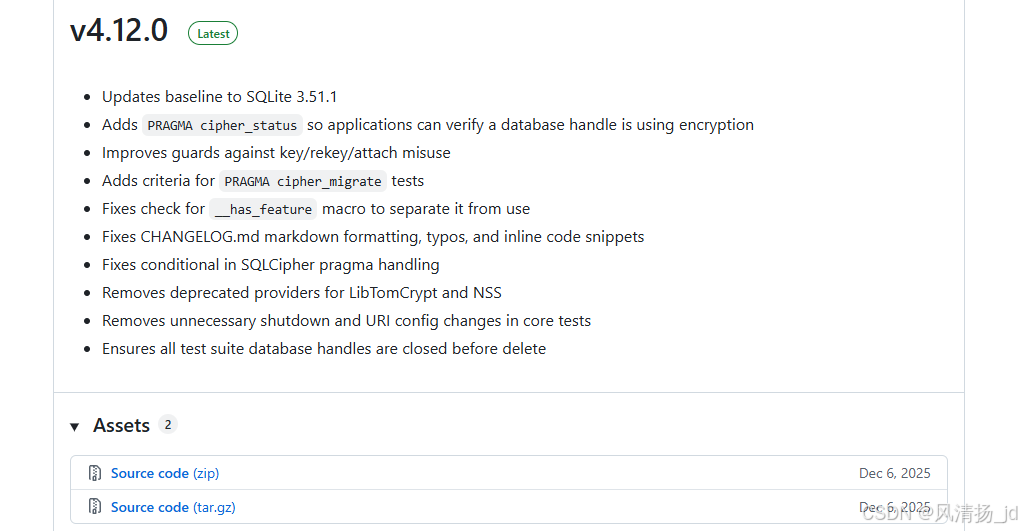
依赖编译工具:ActiveTcl
3、openssl3.5.4
1)、直接下载编译好的
2)、或者自行编译 perl等环境自行下载
bash
@echo off
cls
chcp 65001 >nul

echo ======================================================
echo           OpenSSL+zlib+cURL 静态MT版本编译脚本
echo           x64 静态库  MT运行时  无依赖
echo ======================================================
echo.

:: ===================== 配置区(根据实际情况修改)=====================
set "OPENSSL_SRC=D:\sqlite\openssl-openssl-3.5.4"
set "OPENSSL_INSTALL=D:\sqlite\openssl-openssl-3.5.4-install"
set "CMAKE_PATH=C:\Program Files\CMake3.18.4\bin\cmake.exe"
set "VS_GENERATOR=Visual Studio 17 2022"
set "PLATFORM=x64"
:: ====================================================================

:: 检查工具与源码路径有效性
if not exist "%CMAKE_PATH%" (
    echo 错误:未找到 CMake,请检查路径是否正确
    pause
    exit /b 1
)
if not exist "%OPENSSL_SRC%\Configure" (
    echo 错误:未找到 OpenSSL 源码,请检查路径是否正确
    pause
    exit /b 1
)

:: 1. 编译 OpenSSL 静态MT版本
echo 开始编译 OpenSSL...
cd /d "%OPENSSL_SRC%"
:: 检查 Perl(OpenSSL Configure 依赖)
perl -v >nul 2>&1
if %errorlevel% neq 0 (
    echo 错误:未找到 Perl,请安装 StrawberryPerl 或 ActivePerl,并确保 perl 在 PATH 中
    pause
    exit /b 1
)
nmake clean > nul 2>&1
rd /s /q out32 >nul 2>&1
:: 强制使用静态 CRT (/MT)
set "CL=/MT /O2 /W3"
perl Configure VC-WIN64A no-shared --prefix="%OPENSSL_INSTALL%" --release
if %errorlevel% neq 0 (
    echo OpenSSL 配置失败
    pause
    exit /b 1
)
nmake
if %errorlevel% neq 0 (
    echo OpenSSL 编译失败
    pause
    exit /b 1
)
nmake install
:: 清理临时环境变量
set "CL="
echo OpenSSL 编译安装完成
echo.
pause
4、SqliteCPP 封装的sqlite c++库【可选】
cpp
git clone https://github.com/SRombauts/SQLiteCpp.git二、准备编译:
主要用MT方式编译sqlcipher-4.12.0
1、#启动x64 Native Tools Command Prompt for VS 2022
2、# 切换到sqlcipher-4.12.0目录
bash
cd /d D:\sqlite\sqlcipher-4.12.03、# 编译
bash
nmake /f Makefile.msc clean
nmake /f Makefile.msc sqlite3.c
4、#dll形式MD
bash
# 注意修改其中的 OpenSSL 的安装路径
cl -I"C:\Program Files\OpenSSL-Win64\include" sqlite3.c -DSQLITE_API=__declspec(dllexport) -DSQLITE_TEMP_STORE=2 -DSQLITE_HAS_CODEC -DSQLITE_EXTRA_INIT=sqlcipher_extra_init -DSQLITE_EXTRA_SHUTDOWN=sqlcipher_extra_shutdown -DHAVE_STDINT_H /MT -link -dll -out:sqlcipher.dll -LIBPATH:"C:\Program Files\OpenSSL-Win64\lib\VC\x64\MD" libcrypto.lib libssl.lib advapi32.lib user32.lib

# 注意修改其中的 OpenSSL 的安装路径
cl -I"C:\Program Files\OpenSSL-Win64\include" sqlite3.c shell.c -DSQLITE_TEMP_STORE=2 -DSQLITE_HAS_CODEC -DSQLITE_OS_WIN -DSQLITE_EXTRA_INIT=sqlcipher_extra_init -DSQLITE_EXTRA_SHUTDOWN=sqlcipher_extra_shutdown -DHAVE_STDINT_H /MT -link -out:sqlcipher.exe -LIBPATH:"C:\Program Files\OpenSSL-Win64\lib\VC\x64\MD" libcrypto.lib libssl.lib advapi32.lib user32.lib gdi32.lib
5、#dll形式MT
bash
//dll依赖openssl的MT
cl /I"C:\Program Files\OpenSSL-Win64\include" /D_SCL_SECURE_NO_WARNINGS /D_CRT_SECURE_NO_WARNINGS /DSQLITE_API=__declspec(dllexport) /DSQLITE_TEMP_STORE=2 /DSQLITE_HAS_CODEC /DSQLITE_EXTRA_INIT=sqlcipher_extra_init /DSQLITE_EXTRA_SHUTDOWN=sqlcipher_extra_shutdown /DHAVE_STDINT_H /DOPENSSL_STATIC /MT /O2 /W3 /nologo sqlite3.c /link /dll /out:sqlcipher.dll /LIBPATH:"C:\Program Files\OpenSSL-Win64\lib\VC\x64\MT" libcrypto.lib libssl.lib advapi32.lib bcrypt.lib ws2_32.lib crypt32.lib


//dll不依赖openssl的MT库
cl /I"C:\Program Files\OpenSSL-Win64\include" /D_SCL_SECURE_NO_WARNINGS /D_CRT_SECURE_NO_WARNINGS /DSQLITE_API=__declspec(dllexport) /DSQLITE_TEMP_STORE=2 /DSQLITE_HAS_CODEC /DSQLITE_EXTRA_INIT=sqlcipher_extra_init /DSQLITE_EXTRA_SHUTDOWN=sqlcipher_extra_shutdown /DHAVE_STDINT_H /DOPENSSL_STATIC /MT /O2 /W3 /nologo sqlite3.c /link /dll /out:sqlcipher.dll /LIBPATH:"C:\Program Files\OpenSSL-Win64\lib\VC\x64\MT" libcrypto_static.lib libssl_static.lib advapi32.lib bcrypt.lib ws2_32.lib crypt32.lib

cl -I"C:\Program Files\OpenSSL-Win64\include" sqlite3.c shell.c -DSQLITE_TEMP_STORE=2 -DSQLITE_HAS_CODEC -DSQLITE_OS_WIN -DSQLITE_EXTRA_INIT=sqlcipher_extra_init -DSQLITE_EXTRA_SHUTDOWN=sqlcipher_extra_shutdown -DHAVE_STDINT_H /DOPENSSL_STATIC /MT /O2 /W3 -link -out:sqlcipher.exe -LIBPATH:"C:\Program Files\OpenSSL-Win64\lib\VC\x64\MT" libcrypto_static.lib libssl_static.lib advapi32.lib bcrypt.lib ws2_32.lib crypt32.lib
6、静态LIB MT
bash
静态LIB MT
cl /c /I"C:\Program Files\OpenSSL-Win64\include" /D_SCL_SECURE_NO_WARNINGS /D_CRT_SECURE_NO_WARNINGS /DSQLITE_API=__declspec(dllexport) /DSQLITE_TEMP_STORE=2 /DSQLITE_HAS_CODEC /DSQLITE_EXTRA_INIT=sqlcipher_extra_init /DSQLITE_EXTRA_SHUTDOWN=sqlcipher_extra_shutdown /DHAVE_STDINT_H /DOPENSSL_STATIC /MT /O2 /W3 /nologo sqlite3.c && lib /OUT:sqlcipher_static.lib sqlite3.obj /LIBPATH:"C:\Program Files\OpenSSL-Win64\lib\VC\x64\MT" libcrypto_static.lib libssl_static.lib /NODEFAULTLIB


v2会有警告的:
cl /c /I"C:\Program Files\OpenSSL-Win64\include" /D_SCL_SECURE_NO_WARNINGS /D_CRT_SECURE_NO_WARNINGS /DSQLITE_API=__declspec(dllexport) /DSQLITE_TEMP_STORE=2 /DSQLITE_HAS_CODEC /DSQLITE_EXTRA_INIT=sqlcipher_extra_init /DSQLITE_EXTRA_SHUTDOWN=sqlcipher_extra_shutdown /DHAVE_STDINT_H /DOPENSSL_STATIC /MT /O2 /W3 /nologo sqlite3.c && lib /OUT:sqlcipher_static.lib sqlite3.obj /LIBPATH:"C:\Program Files\OpenSSL-Win64\lib\VC\x64\MT" libcrypto_static.lib libssl_static.lib advapi32.lib crypt32.lib bcrypt.lib ws2_32.lib


crypt32.lib(CRYPT32.dll) : warning LNK4006: __NULL_IMPORT_DESCRIPTOR 已在 advapi32.lib(ADVAPI32.dll) 中定义;已忽略第二 个定义
bcrypt.lib(bcrypt.dll) : warning LNK4006: __NULL_IMPORT_DESCRIPTOR 已在 advapi32.lib(ADVAPI32.dll) 中定义;已忽略第二个 定义
ws2_32.lib(WS2_32.dll) : warning LNK4006: __NULL_IMPORT_DESCRIPTOR 已在 advapi32.lib(ADVAPI32.dll) 中定义;已忽略第二个 定义
最终生成结果:
sqlcipher-4.12.0\sqlite3.h
sqlcipher-4.12.0\sqlcipher.h
sqlcipher_static.lib
将静态库拷贝到工程下即可。
7、使用例子:
第一类:
直接用sqlcipher.h和sqlite3.h实现加密例子:
1、头文件:
bash
sqlcipher-4.12.0\sqlite3.h
sqlcipher-4.12.0\sqlcipher.h2、lib文件
bash
sqlcipher_static.lib
ws2_32.lib
crypt32.lib
3、直接用
cpp
#include "sqlite3.h"
#include <iostream>
#include <stdexcept>
#include <string>

int main(){

  sqlite3* db;
    int rc = sqlite3_open("encrypted.db", &db);
    if (rc == SQLITE_OK) {
        const char* key = "your-secret-passphrase";
        rc = sqlite3_key(db, key, strlen(key));
        if (rc != SQLITE_OK) {
            // 处理密钥设置错误
            fprintf(stderr, "Error setting key: %s\n", sqlite3_errmsg(db));
        }
    }
}
第二类:
直接用sqlcipher.h和sqlite3.h和SQLiteCpp实现加密例子:
注意:
1、工程配置SQLITE_HAS_CODEC宏启用加密功能函数
2、sqlcipher-4.12.0\sqlite3.h【不要用D:\sqlite\SqliteCPP\sqlite3\sqlite3.h】
3、include、lib
bash
sqlcipher-4.12.0\sqlite3.h
sqlcipher-4.12.0\sqlcipher.h

sqlcipher_static.lib
ws2_32.lib
crypt32.lib
bash
sqlcipher-4.12.0\sqlite3.h截取部分定义

/* BEGIN SQLCIPHER */
#ifdef SQLITE_HAS_CODEC
/*
** Specify the key for an encrypted database.  This routine should be
** called right after sqlite3_open().
**
** The code to implement this API is not available in the public release
** of SQLite.
*/
SQLITE_API int sqlite3_key(
  sqlite3 *db,                   /* Database to be rekeyed */
  const void *pKey, int nKey     /* The key */
);
SQLITE_API int sqlite3_key_v2(
  sqlite3 *db,                   /* Database to be rekeyed */
  const char *zDbName,           /* Name of the database */
  const void *pKey, int nKey     /* The key */
);

/*
** Change the key on an open database.  If the current database is not
** encrypted, this routine will encrypt it.  If pNew==0 or nNew==0, the
** database is decrypted.
**
** The code to implement this API is not available in the public release
** of SQLite.
*/
/* SQLCipher usage note:

   If the current database is plaintext SQLCipher will NOT encrypt it.
   If the current database is encrypted and pNew==0 or nNew==0, SQLCipher
   will NOT decrypt it.

   This routine will ONLY work on an already encrypted database in order
   to change the key.

   Conversion from plaintext-to-encrypted or encrypted-to-plaintext should
   use an ATTACHed database and the sqlcipher_export() convenience function
   as per the SQLCipher Documentation.
*/
SQLITE_API int sqlite3_rekey(
  sqlite3 *db,                   /* Database to be rekeyed */
  const void *pKey, int nKey     /* The new key */
);
SQLITE_API int sqlite3_rekey_v2(
  sqlite3 *db,                   /* Database to be rekeyed */
  const char *zDbName,           /* Name of the database */
  const void *pKey, int nKey     /* The new key */
);

/*
** Specify the activation key for a SEE database.  Unless
** activated, none of the SEE routines will work.
*/
SQLITE_API void sqlite3_activate_see(
  const char *zPassPhrase        /* Activation phrase */
);
#endif
/* END SQLCIPHER */

#ifdef SQLITE_ENABLE_CEROD
bash
#include "sqlite3.h"
#include <iostream>
#include <SQLiteCpp/Database.h>
#include <stdexcept>
#include <string>
#include <iomanip>  // 用于格式化输出(对齐)

void printUserTable(SQLite::Database& db) {
    const std::string table_name = "user";

    try {
        std::cout << "\n==================================== USER 表内容 ====================================" << std::endl;
        // 2. 执行查询,获取所有行
        SQLite::Statement query(db, "SELECT id, name, age FROM user ORDER BY id ASC");

        // 3. 打印表头(格式化对齐)
        std::cout << std::left  // 左对齐
            << std::setw(8)  // 列宽8
            << "ID"
            << std::setw(15) // 列宽15
            << "姓名"
            << std::setw(8)  // 列宽8
            << "年龄"
            << std::endl;
        std::cout << "-------------------------------------------------------------------------------------" << std::endl;

        // 4. 遍历结果并打印
        bool has_data = false; // 标记是否有数据
        while (query.executeStep()) {
            has_data = true;

            // 获取字段值(处理 NULL)
            int id = query.getColumn("id").getInt();
            std::string name = query.getColumn("name").getText();
            std::string age_str = query.getColumn("age").isNull() ? "未填写" : std::to_string(query.getColumn("age").getInt());

            // 格式化打印行数据
            std::cout << std::left
                << std::setw(8) << id
                << std::setw(15) << name
                << std::setw(8) << age_str
                << std::endl;
        }

        // 5. 处理无数据的情况
        if (!has_data) {
            std::cout << "                                  (表中暂无数据)" << std::endl;
        }

        std::cout << "=====================================================================================" << std::endl;

    }
    catch (const SQLite::Exception& e) {
        std::cerr << "打印 user 表失败:" << e.what() << " (错误码:" << e.getErrorCode() << ")" << std::endl;
    }
}

int main() {
    try {
        SQLite::Database db("test.db3", SQLite::OPEN_READWRITE| SQLite::OPEN_CREATE);
        // Encrypt the database
        db.key("123secret");
        const std::string create_table_sql = R"(
            CREATE TABLE IF NOT EXISTS user (
                id INTEGER PRIMARY KEY AUTOINCREMENT,
                name TEXT NOT NULL,
                age INTEGER
            );
        )";
        db.exec(create_table_sql);
        db.exec("INSERT OR IGNORE INTO user (name, age) VALUES ('张三', 25)");
        db.exec("INSERT OR IGNORE INTO user (name, age) VALUES ('李四', 30)");
        db.exec("INSERT OR IGNORE INTO user (name) VALUES ('王五')"); // age 为 NULL
    }
    catch (...) {

    }
    try {

        SQLite::Database db("test.db3", SQLite::OPEN_READONLY);
        db.key("123secret");

        bool is_ok = db.tableExists("user");
        if (is_ok) {
            std::cout << "user\n";
            printUserTable(db);
        }
    }
    catch (...) {

        }

}