背景
操作 Redis 的代码如下
java
package com.jiawa.train.business.controller;

import jakarta.annotation.Resource;
import org.slf4j.Logger;
import org.slf4j.LoggerFactory;
import org.springframework.data.redis.core.RedisTemplate;
import org.springframework.web.bind.annotation.PathVariable;
import org.springframework.web.bind.annotation.RequestMapping;
import org.springframework.web.bind.annotation.RestController;

import java.util.concurrent.TimeUnit;

@RestController
public class RedisController {

    private static final Logger LOG = LoggerFactory.getLogger(RedisController.class);

    @Resource
    private RedisTemplate redisTemplate;

    @RequestMapping("/redis/set/{key}/{value}")
    public String set(@PathVariable String key, @PathVariable String value) {
        redisTemplate.opsForValue().set(key, value, 3600, TimeUnit.SECONDS);
        LOG.info("key: {}, value: {}", key, value);
        return "success";
    }

    @RequestMapping("/redis/get/{key}")
    public Object get(@PathVariable String key) {
        Object object = redisTemplate.opsForValue().get(key);
        LOG.info("key: {}, value: {}", key, object);
        return object;
    }
}
尝试使用 HTTP 请求分别添加并查询一条数据
http
GET http://localhost:8000/business/redis/set/123/test1
Accept: application/json

###

GET http://localhost:8000/business/redis/get/123
Accept: application/json

###
添加请求的响应如下,一切正常
GET http://localhost:8000/business/redis/set/123/test1

HTTP/1.1 200 OK
Vary: Origin
Vary: Access-Control-Request-Method
Vary: Access-Control-Request-Headers
Content-Type: application/json
Content-Length: 7
Date: Fri, 30 Jan 2026 14:44:22 GMT

success
响应文件已保存。
> 2026-01-30T224422.200.json

Response code: 200 (OK); Time: 19ms (19 ms); Content length: 7 bytes (7 B)
查询请求的响应如下,一切正常
GET http://localhost:8000/business/redis/get/123

HTTP/1.1 200 OK
Vary: Origin
Vary: Access-Control-Request-Method
Vary: Access-Control-Request-Headers
Content-Type: application/json
Content-Length: 5
Date: Fri, 30 Jan 2026 14:45:43 GMT

test1
响应文件已保存。
> 2026-01-30T224543.200.json

Response code: 200 (OK); Time: 15ms (15 ms); Content length: 5 bytes (5 B)
乱码
但此时,在 IDEA 的数据库界面上,这条数据变成了乱码,这可能与RedisTemplate的序列化方式有关。
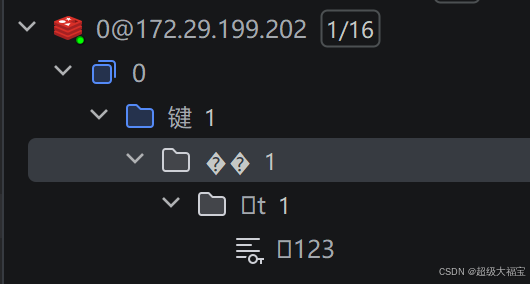
- Spring的
RedisTemplate默认使用JdkSerializationRedisSerializer,它会将键和值都进行Java序列化(变成二进制格式) - 当通过REST接口存入字符串
123时,Redis实际存储的是序列化后的二进制数据 - 某些Redis可视化工具(如Another Redis Desktop Manager)尝试反序列化这些二进制数据时,可能显示为乱码或特殊符号
解决方案
方案1:配置RedisTemplate使用字符串序列化(推荐)
java
@Configuration
public class RedisConfig {

    @Bean
    public RedisTemplate<String, Object> redisTemplate(RedisConnectionFactory connectionFactory) {
        RedisTemplate<String, Object> template = new RedisTemplate<>();
        template.setConnectionFactory(connectionFactory);

        // 使用String序列化器
        template.setKeySerializer(new StringRedisSerializer());
        template.setValueSerializer(new StringRedisSerializer());

        return template;
    }
}
方案2:改用StringRedisTemplate(更简单)
java
@Resource
private StringRedisTemplate stringRedisTemplate; // 专用于字符串操作

@RequestMapping("/redis/set/{key}/{value}")
public String set(@PathVariable String key, @PathVariable String value) {
    stringRedisTemplate.opsForValue().set(key, value, 3600, TimeUnit.SECONDS);
    return "success";
}
方案3:检查可视化工具设置
在Redis可视化工具中:
- 尝试切换不同的解码方式(如UTF-8)
- 查看原始字节数据(可能有"Hex View"选项)
- 确认工具是否支持Java序列化数据的解析
服务无法启动
现在添加一下对比的代码,但此时无法启动服务了
bash
package com.jiawa.train.business.controller;

import jakarta.annotation.Resource;
import org.slf4j.Logger;
import org.slf4j.LoggerFactory;
import org.springframework.data.redis.core.RedisTemplate;
import org.springframework.data.redis.core.StringRedisTemplate;
import org.springframework.web.bind.annotation.PathVariable;
import org.springframework.web.bind.annotation.RequestMapping;
import org.springframework.web.bind.annotation.RestController;

import java.util.concurrent.TimeUnit;

@RestController
public class RedisController {

    private static final Logger LOG = LoggerFactory.getLogger(RedisController.class);

    @Resource
    private RedisTemplate redisTemplate;

    @Resource
    private StringRedisTemplate redisTemplate1;

    @Resource
    private RedisTemplate<String, Object> redisTemplate2;

    @RequestMapping("/redis/set/{key}/{value}")
    public String set(@PathVariable String key, @PathVariable String value) {
        redisTemplate.opsForValue().set(key, value, 3600, TimeUnit.SECONDS);
        LOG.info("key: {}, value: {}", key, value);
        return "success";
    }

    @RequestMapping("/redis/get/{key}")
    public Object get(@PathVariable String key) {
        Object object = redisTemplate.opsForValue().get(key);
        LOG.info("key: {}, value: {}", key, object);
        return object;
    }

    @RequestMapping("/redis1/set/{key}/{value}")
    public String setString1(@PathVariable String key, @PathVariable String value) {
        redisTemplate1.opsForValue().set(key, value, 3600, TimeUnit.SECONDS);
        LOG.info("key1: {}, value1: {}", key, value);
        return "success";
    }

    @RequestMapping("/redis1/get/{key}")
    public Object getString1(@PathVariable String key) {
        Object object = redisTemplate1.opsForValue().get(key);
        LOG.info("key1: {}, value1: {}", key, object);
        return object;
    }

    @RequestMapping("/redis2/set/{key}/{value}")
    public String setString2(@PathVariable String key, @PathVariable String value) {
        redisTemplate2.opsForValue().set(key, value, 3600, TimeUnit.SECONDS);
        LOG.info("key2: {}, value2: {}", key, value);
        return "success";
    }

    @RequestMapping("/redis2/get/{key}")
    public Object getString2(@PathVariable String key) {
        Object object = redisTemplate2.opsForValue().get(key);
        LOG.info("key2: {}, value2: {}", key, object);
        return object;
    }
}
把 redisTemplate2 相关的代码注释掉,就能正常启动了,这是因为Spring Boot自动配置机制的工作原理。
1. Spring的自动装配机制
Spring Boot会根据类路径上的依赖自动配置相应的Bean。当添加了 spring-boot-starter-data-redis 依赖后:
-
Spring会自动创建两个Redis模板bean:
StringRedisTemplate(key和value都是String类型)RedisTemplate<Object, Object>(通用模板)
-
但不会自动创建
RedisTemplate<String, Object>这种泛型特化的bean
2. 代码问题
java
@Resource
private RedisTemplate<String, Object> redisTemplate2;  // 这个bean不存在
Spring容器中有:
redisTemplate(类型是RedisTemplate<Object, Object>)stringRedisTemplate(类型是StringRedisTemplate)
但没有:
redisTemplate<String, Object>(特定泛型的RedisTemplate)
3. 为什么注释掉就能启动
- 当注入
@Resource private RedisTemplate redisTemplate时,Spring能找到一个匹配的bean(RedisTemplate<Object, Object>),因为不指定泛型时使用原始类型 - 当注入
@Resource private RedisTemplate<String, Object> redisTemplate2时,Spring需要一个确切类型的bean,但容器中没有
解决方案
方案1:不指定泛型(会出现图形化界面乱码的问题)
java
@Resource
private RedisTemplate redisTemplate; // 不指定泛型,使用原始类型方案2:使用现有的StringRedisTemplate(马上尝试一下)
java
@Resource
private StringRedisTemplate stringRedisTemplate; // 专门处理字符串方案3:自己创建并注册RedisTemplate<String, Object>的bean(这只是一个演示项目,就不实测了)
创建配置类:
java
@Configuration
public class RedisConfig {

    @Bean
    public RedisTemplate<String, Object> redisTemplate(RedisConnectionFactory factory) {
        RedisTemplate<String, Object> template = new RedisTemplate<>();
        template.setConnectionFactory(factory);

        // 配置序列化
        template.setKeySerializer(new StringRedisSerializer());
        template.setValueSerializer(new GenericJackson2JsonRedisSerializer());
        template.setHashKeySerializer(new StringRedisSerializer());
        template.setHashValueSerializer(new GenericJackson2JsonRedisSerializer());

        template.afterPropertiesSet();
        return template;
    }
}
然后在控制器中注入:
java
@Resource
private RedisTemplate<String, Object> redisTemplate2;  // 现在可以找到bean了
推荐做法
- 对于简单的字符串操作 :使用
StringRedisTemplate - 对于复杂对象存储 :创建自定义的
RedisTemplate<String, Object>并配置JSON序列化 - 避免混合使用:建议在整个项目中使用同一种RedisTemplate配置
这就是注释掉 RedisTemplate<String, Object> 就能正常启动的原因。Spring容器中不存在这个确切泛型的bean,但存在原始类型的 RedisTemplate 和 StringRedisTemplate。
使用StringRedisTemplate 进行测试
现在的代码如下
java
package com.jiawa.train.business.controller;

import jakarta.annotation.Resource;
import org.slf4j.Logger;
import org.slf4j.LoggerFactory;
import org.springframework.data.redis.core.RedisTemplate;
import org.springframework.data.redis.core.StringRedisTemplate;
import org.springframework.web.bind.annotation.PathVariable;
import org.springframework.web.bind.annotation.RequestMapping;
import org.springframework.web.bind.annotation.RestController;

import java.util.concurrent.TimeUnit;

@RestController
public class RedisController {

    private static final Logger LOG = LoggerFactory.getLogger(RedisController.class);

    @Resource
    private RedisTemplate redisTemplate;

    @Resource
    private StringRedisTemplate redisTemplate1;

//    @Resource
//    private RedisTemplate<String, Object> redisTemplate2;

    @RequestMapping("/redis/set/{key}/{value}")
    public String set(@PathVariable String key, @PathVariable String value) {
        redisTemplate.opsForValue().set(key, value, 3600, TimeUnit.SECONDS);
        LOG.info("key: {}, value: {}", key, value);
        return "success";
    }

    @RequestMapping("/redis/get/{key}")
    public Object get(@PathVariable String key) {
        Object object = redisTemplate.opsForValue().get(key);
        LOG.info("key: {}, value: {}", key, object);
        return object;
    }

    @RequestMapping("/redis1/set/{key}/{value}")
    public String setString1(@PathVariable String key, @PathVariable String value) {
        redisTemplate1.opsForValue().set(key, value, 3600, TimeUnit.SECONDS);
        LOG.info("key1: {}, value1: {}", key, value);
        return "success";
    }

    @RequestMapping("/redis1/get/{key}")
    public Object getString1(@PathVariable String key) {
        Object object = redisTemplate1.opsForValue().get(key);
        LOG.info("key1: {}, value1: {}", key, object);
        return object;
    }

//    @RequestMapping("/redis2/set/{key}/{value}")
//    public String setString2(@PathVariable String key, @PathVariable String value) {
//        redisTemplate2.opsForValue().set(key, value, 3600, TimeUnit.SECONDS);
//        LOG.info("key2: {}, value2: {}", key, value);
//        return "success";
//    }
//
//    @RequestMapping("/redis2/get/{key}")
//    public Object getString2(@PathVariable String key) {
//        Object object = redisTemplate2.opsForValue().get(key);
//        LOG.info("key2: {}, value2: {}", key, object);
//        return object;
//    }
}
HTTP 请求如下
http
GET http://localhost:8000/business/redis1/set/test/123
Accept: application/json

###

GET http://localhost:8000/business/redis1/get/test
Accept: application/json
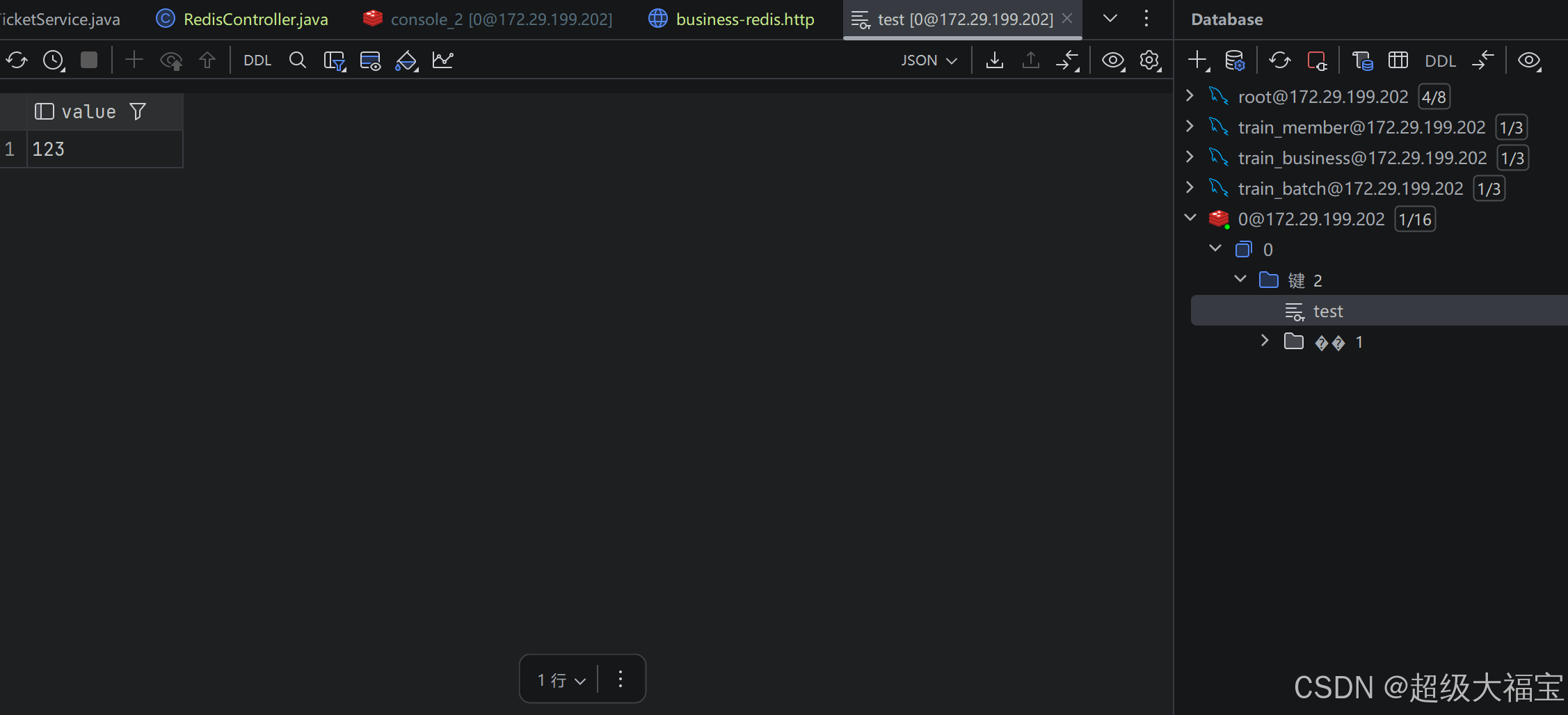
结果不再出现乱码
总结
- 根本原因 :
RedisTemplate默认的JDK序列化导致数据存储为二进制格式 - 解决方案 :
- 配置字符串序列化器
- 或改用
StringRedisTemplate
- 验证:修改后再次通过接口和可视化工具查看,应该能正常显示字符串