CustomTween自定义Tween详解
虽然Flutter提供了丰富的内置Tween类型,但在某些特殊场景下,需要自定义Tween来实现独特的动画效果。自定义Tween需要继承Tween类并实现lerp()插值方法,根据动画进度计算中间值。本文将深入探讨自定义Tween的实现方法和常见应用场景。
一、自定义Tween的必要性
内置Tween覆盖了大多数常见需求,但以下场景可能需要自定义Tween:
特殊数据类型: 需要为不支持的类型实现插值,如自定义的几何形状、复杂的配置对象等。
特殊插值逻辑: 内置Tween使用线性插值,需要非线性或其他插值方式,如对数插值、阶梯插值等。
复杂对象动画: 需要同时插值多个属性,如同时插值位置、旋转、缩放等组合属性。
性能优化: 针对特定场景优化插值算法,减少计算量或内存分配。
特殊效果: 需要在插值过程中添加额外逻辑,如条件判断、状态切换等。
| 需求类型 | 内置Tween | 自定义Tween | 实现难度 |
|---|---|---|---|
| 常见数值类型 | 支持 | 不需要 | 无 |
| 自定义类型 | 不支持 | 需要 | 低 |
| 非线性插值 | 不支持 | 需要 | 中 |
| 复杂对象 | 不支持 | 需要 | 高 |
| 性能优化 | 一般 | 可优化 | 高 |
支持
不支持
不特殊
特殊
是
否
是
否
需要自定义Tween?
数据类型支持?
插值逻辑特殊?
必须自定义
使用内置Tween
性能要求高?
自定义优化
需要组合多个属性?
自定义组合Tween
考虑是否真的需要
二、自定义Tween的基本结构
自定义Tween需要继承Tween类,类型参数T是要插值的数据类型。
基本模板:
dart
class CustomTween<T> extends Tween<T> {
  CustomTween({T? begin, T? end}) : super(begin: begin, end: end);

  @override
  T lerp(double t) {
    // t范围: 0.0-1.0
    // 实现插值逻辑
    // 返回begin和end之间的中间值
  }
}
lerp()方法的核心是实现插值算法,必须保证:
- t=0时返回begin
- t=1时返回end
- t在中间时返回合理的中间值
lerp()方法的数学原理:
lerp是Linear Interpolation(线性插值)的缩写,数学公式为:
lerp ( a , b , t ) = a + ( b − a ) × t \text{lerp}(a, b, t) = a + (b - a) \times t lerp(a,b,t)=a+(b−a)×t
其中:
- a是起始值(begin)
- b是结束值(end)
- t是插值因子(0.0-1.0)
t=0
t=1
0
begin值
lerp结果
动画进度t
end值
中间值
三、SizeTween实现示例
SizeTween是一个常见的需求,用于插值Size对象的宽度和高度。
dart
class SizeTween extends Tween<Size> {
  SizeTween({Size? begin, Size? end}) : super(begin: begin, end: end);

  @override
  Size lerp(double t) {
    final begin = this.begin ?? Size.zero;
    final end = this.end ?? Size.zero;
    return Size(
      begin.width + (end.width - begin.width) * t,
      begin.height + (end.height - begin.height) * t,
    );
  }
}
这个实现分别对width和height进行线性插值,实现Size的平滑过渡。
使用SizeTween:
dart
_sizeAnimation = SizeTween(
  begin: const Size(100, 100),
  end: const Size(250, 150),
).animate(_controller);SizeTween的数学原理:
Width插值:
w ( t ) = w b e g i n + ( w e n d − w b e g i n ) × t w(t) = w_{begin} + (w_{end} - w_{begin}) \times t w(t)=wbegin+(wend−wbegin)×t
Height插值:
h ( t ) = h b e g i n + ( h e n d − h b e g i n ) × t h(t) = h_{begin} + (h_{end} - h_{begin}) \times t h(t)=hbegin+(hend−hbegin)×t
最终Size:
Size ( t ) = Size ( w ( t ) , h ( t ) ) \text{Size}(t) = \text{Size}(w(t), h(t)) Size(t)=Size(w(t),h(t))
四、RectTween实现示例
RectTween用于插值矩形区域,常用于裁剪动画或区域变化动画。
dart
class RectTween extends Tween<Rect> {
  RectTween({Rect? begin, Rect? end}) : super(begin: begin, end: end);

  @override
  Rect lerp(double t) {
    final begin = this.begin ?? Rect.zero;
    final end = this.end ?? Rect.zero;
    return Rect.fromLTRB(
      begin.left + (end.left - begin.left) * t,
      begin.top + (end.top - begin.top) * t,
      begin.right + (end.right - begin.right) * t,
      begin.bottom + (end.bottom - begin.bottom) * t,
    );
  }
}
这个实现对Rect的四个边界分别插值,保证矩形的平滑变化。
使用RectTween:
dart
_clipAnimation = RectTween(
  begin: const Rect.fromLTWH(0, 0, 100, 100),
  end: const Rect.fromLTWH(0, 0, 300, 200),
).animate(_controller);

// 在ClipRect中使用
ClipRect(
  clipper: AnimatedRectClipper(rect: _clipAnimation.value),
  child: ...
)RectTween的应用场景:
| 应用场景 | begin | end | 效果 |
|---|---|---|---|
| 裁剪展开 | 小矩形 | 大矩形 | 视野展开 |
| 图片遮罩 | 部分遮罩 | 无遮罩 | 图片显示 |
| 区域选择 | 点 | 矩形框 | 框选动画 |
| 弹窗缩放 | 小矩形 | 大矩形 | 弹窗弹出 |
五、复杂对象Tween实现
对于复杂对象,需要插值多个属性。以下是一个同时插值位置、大小、旋转的自定义Tween:
dart
class TransformTween extends Tween<TransformData> {
  TransformTween({TransformData? begin, TransformData? end})
      : super(begin: begin, end: end);

  @override
  TransformData lerp(double t) {
    final begin = this.begin ?? TransformData.zero;
    final end = this.end ?? TransformData.zero;
    return TransformData(
      offset: Offset.lerp(begin.offset, end.offset, t)!,
      size: Size.lerp(begin.size, end.size, t)!,
      rotation: begin.rotation + (end.rotation - begin.rotation) * t,
      scale: begin.scale + (end.scale - begin.scale) * t,
    );
  }
}

class TransformData {
  final Offset offset;
  final Size size;
  final double rotation;
  final double scale;

  const TransformData({
    this.offset = Offset.zero,
    this.size = Size.zero,
    this.rotation = 0,
    this.scale = 1,
  });

  static const zero = TransformData();
}复杂对象插值策略:
数值类型
Offset
Size
Color
自定义对象
角度
复杂对象
属性类型?
直接线性插值
使用Offset.lerp
使用Size.lerp
使用Color.lerp
递归插值
处理周期性
角度插值特殊处理:
dart
double lerpAngle(double a, double b, double t) {
  final diff = b - a;
  final normalizedDiff = ((diff + pi) % (2 * pi)) - pi;
  return a + normalizedDiff * t;
}
六、非线性插值Tween
线性插值不满足所有需求,以下实现一个对数插值的数值Tween:
dart
class LogarithmicTween extends Tween<double> {
  final double base;

  LogarithmicTween({
    required double begin,
    required double end,
    this.base = 2.0,
  }) : super(begin: begin, end: end);

  @override
  double lerp(double t) {
    if (t == 0) return begin;
    if (t == 1) return end;

    final logBegin = log(begin) / log(base);
    final logEnd = log(end) / log(base);
    final logValue = logBegin + (logEnd - logBegin) * t;
    return pow(base, logValue).toDouble();
  }
}
这个Tween使用对数插值,适合跨度很大的数值动画。
非线性插值类型对比:
| 插值类型 | 公式 | 适用场景 | 效果 |
|---|---|---|---|
| 线性插值 | a + (b-a)t | 通用 | 匀速 |
| 对数插值 | log(a) + (log(b)-log(a))t | 大范围数值 | 慢→慢 |
| 指数插值 | a^t | 快速变化 | 慢→快 |
| 平方插值 | a + (b-a)t² | 强调结束 | 慢→快 |
| 开方插值 | a + (b-a)√t | 强调开始 | 快→慢 |
小范围
大范围
强调结束
强调开始
中性
插值类型选择
数值范围?
线性插值
对数插值
强调方向?
平方插值
开方插值
线性插值
七、条件Tween实现
有时需要在插值过程中添加条件逻辑,以下实现一个在特定位置跳跃的Tween:
dart
class JumpTween extends Tween<double> {
  final double jumpPosition;
  final double jumpAmount;

  JumpTween({
    required double begin,
    required double end,
    this.jumpPosition = 0.5,
    this.jumpAmount = 10.0,
  }) : super(begin: begin, end: end);

  @override
  double lerp(double t) {
    var value = begin + (end - begin) * t;
    if (t >= jumpPosition && t < jumpPosition + 0.1) {
      value += jumpAmount;
    }
    return value;
  }
}
这个Tween在动画进行到50%的位置时产生跳跃效果。
其他条件Tween示例:
dart
// 阶梯插值
class StepTween extends Tween<double> {
  final int steps;

  StepTween({
    required double begin,
    required double end,
    this.steps = 5,
  }) : super(begin: begin, end: end);

  @override
  double lerp(double t) {
    final stepIndex = (t * steps).floor();
    final stepT = stepIndex / steps;
    return begin + (end - begin) * stepT;
  }
}

// 弹跳插值
class BounceTween extends Tween<double> {
  final int bounces;

  BounceTween({
    required double begin,
    required double end,
    this.bounces = 3,
  }) : super(begin: begin, end: end);

  @override
  double lerp(double t) {
    final x = t * bounces * 2 * pi;
    final y = sin(x) * exp(-x * 0.1);
    return begin + (end - begin) * (t + y * 0.1);
  }
}
八、自定义Tween的注意事项
实现自定义Tween时需要注意以下几点:
空值处理: begin和end可能为null,应该提供默认值或抛出异常。
dart
@override
Size lerp(double t) {
  final begin = this.begin ?? Size.zero;
  final end = this.end ?? Size.zero;
  // ...
}类型安全: 确保返回值的类型与T一致。
数值范围: 返回值应该在合理的范围内,避免溢出或无效值。
性能考虑: lerp()会被频繁调用,避免创建临时对象或复杂计算。
线程安全: lerp()应该在UI线程调用,避免异步操作。
曲线兼容: Tween应该能与CurveTween配合使用。
边界条件: 处理t=0、t=1等边界情况。
自定义Tween对比:
| Tween类型 | 复杂度 | 适用场景 | 性能 |
|---|---|---|---|
| 内置Tween | 低 | 大多数场景 | 高 |
| 简单自定义 | 中 | 特殊类型 | 高 |
| 复杂自定义 | 高 | 复杂对象 | 中 |
| 非线性Tween | 中 | 特殊效果 | 中 |
性能优化技巧:
dart
// 优化前: 每次创建新对象
@override
Size lerp(double t) {
  return Size(
    begin.width + (end.width - begin.width) * t,
    begin.height + (end.height - begin.height) * t,
  );
}

// 优化后: 缓存计算结果
class SizeTween extends Tween<Size> {
  double? _cachedT;
  Size? _cachedResult;

  @override
  Size lerp(double t) {
    if (_cachedT == t && _cachedResult != null) {
      return _cachedResult!;
    }

    final begin = this.begin ?? Size.zero;
    final end = this.end ?? Size.zero;
    final result = Size(
      begin.width + (end.width - begin.width) * t,
      begin.height + (end.height - begin.height) * t,
    );

    _cachedT = t;
    _cachedResult = result;
    return result;
  }
}
九、CustomTween知识点总结
CustomTween是Flutter动画系统中实现自定义插值逻辑的核心组件。当内置Tween无法满足需求时,可以通过继承Tween类并重写lerp()方法来实现自定义的插值逻辑。
核心概念:
- 插值算法: lerplinear interpolation,线性插值
- 类型参数: T表示要插值的数据类型
- begin和end: 插值的起始值和结束值
- t参数: 插值因子,范围0.0-1.0
实现要点:
- 继承Tween类
- 重写lerp()方法
- 处理null值和边界条件
- 保证返回值在合理范围内
- 考虑性能优化
lerp()方法的数学原理:
lerp ( a , b , t ) = a + ( b − a ) × t \text{lerp}(a, b, t) = a + (b - a) \times t lerp(a,b,t)=a+(b−a)×t
其中a是begin值,b是end值,t是进度因子。
常用插值类型:
- 线性插值: 匀速过渡
- 对数插值: 适合大范围数值
- 指数插值: 快速变化
- 平方/开方插值: 强调方向
与其他组件的关系:
- AnimationController: 提供动画控制器
- Curve: 提供时间映射
- Tween: 实现值插值
- AnimatedBuilder: 使用动画值构建UI
使用步骤:
- 定义数据类(如果是复杂对象)
- 继承Tween类
- 重写lerp()方法实现插值逻辑
- 创建AnimationController
- 创建自定义Tween并调用animate()
- 使用AnimatedBuilder监听动画值
十、示例案例:自定义SizeTween
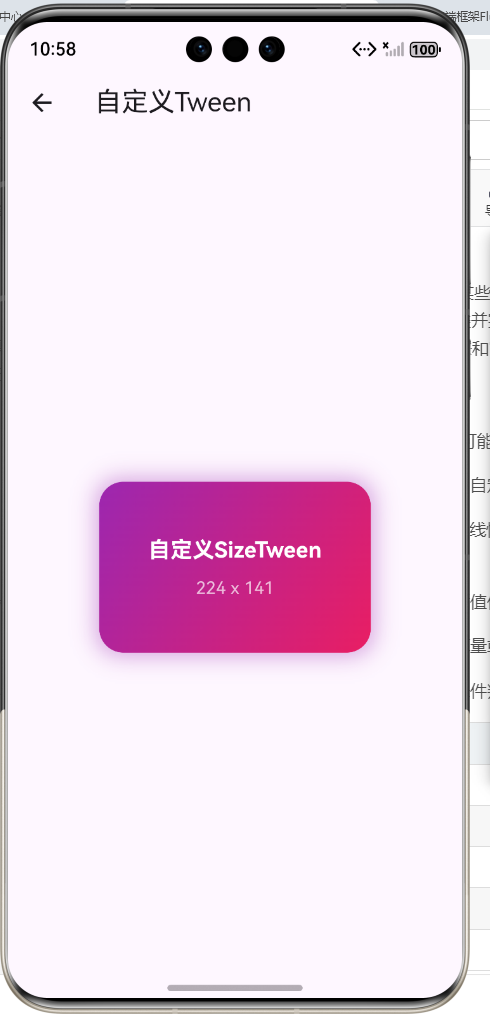
本示例演示了自定义SizeTween的实现和使用,实现容器尺寸从100x100到250x150的平滑变化。
dart
import 'package:flutter/material.dart';
import 'dart:math';

class SizeTween extends Tween<Size> {
  SizeTween({Size? begin, Size? end}) : super(begin: begin, end: end);

  @override
  Size lerp(double t) {
    final begin = this.begin ?? Size.zero;
    final end = this.end ?? Size.zero;
    return Size(
      begin.width + (end.width - begin.width) * t,
      begin.height + (end.height - begin.height) * t,
    );
  }
}

class CustomTweenDemo extends StatefulWidget {
  const CustomTweenDemo({super.key});

  @override
  State<CustomTweenDemo> createState() => _CustomTweenDemoState();
}

class _CustomTweenDemoState extends State<CustomTweenDemo>
    with SingleTickerProviderStateMixin {
  late AnimationController _controller;
  late Animation<Size> _sizeAnimation;

  @override
  void initState() {
    super.initState();
    _controller = AnimationController(
      duration: const Duration(seconds: 2),
      vsync: this,
    );

    _sizeAnimation = SizeTween(
      begin: const Size(100, 100),
      end: const Size(250, 150),
    ).animate(_controller);

    _controller.repeat(reverse: true);
  }

  @override
  void dispose() {
    _controller.dispose();
    super.dispose();
  }

  @override
  Widget build(BuildContext context) {
    return Scaffold(
      appBar: AppBar(
        title: const Text('自定义SizeTween'),
      ),
      body: Center(
        child: AnimatedBuilder(
          animation: _controller,
          builder: (context, child) {
            final size = _sizeAnimation.value;
            return Container(
              width: size.width,
              height: size.height,
              decoration: BoxDecoration(
                gradient: const LinearGradient(
                  colors: [Colors.purple, Colors.pink],
                  begin: Alignment.topLeft,
                  end: Alignment.bottomRight,
                ),
                borderRadius: BorderRadius.circular(20),
                boxShadow: [
                  BoxShadow(
                    color: Colors.purple.withOpacity(0.4),
                    blurRadius: 15,
                    spreadRadius: 3,
                  ),
                ],
              ),
              child: Center(
                child: Column(
                  mainAxisAlignment: MainAxisAlignment.center,
                  children: [
                    const Text(
                      '自定义SizeTween',
                      style: TextStyle(
                        color: Colors.white,
                        fontSize: 18,
                        fontWeight: FontWeight.bold,
                      ),
                    ),
                    const SizedBox(height: 8),
                    Text(
                      '${size.width.toInt()} x ${size.height.toInt()}',
                      style: const TextStyle(
                        color: Colors.white70,
                        fontSize: 14,
                      ),
                    ),
                  ],
                ),
              ),
            );
          },
        ),
      ),
    );
  }
}示例说明:
- 自定义SizeTween: 继承Tween,实现lerp()方法
- 线性插值width和height:
begin + (end - begin) * t - 创建Size对象返回: 根据插值结果创建中间Size
- 动画时长2秒,往复循环
- 实时显示当前尺寸值
自定义SizeTween可以用于容器尺寸变化、图片缩放、区域过渡等各种需要尺寸动画的场景。
欢迎加入开源鸿蒙跨平台社区:https://openharmonycrossplatform.csdn.net