如果要做一个开始菜单,实现的方法有很多
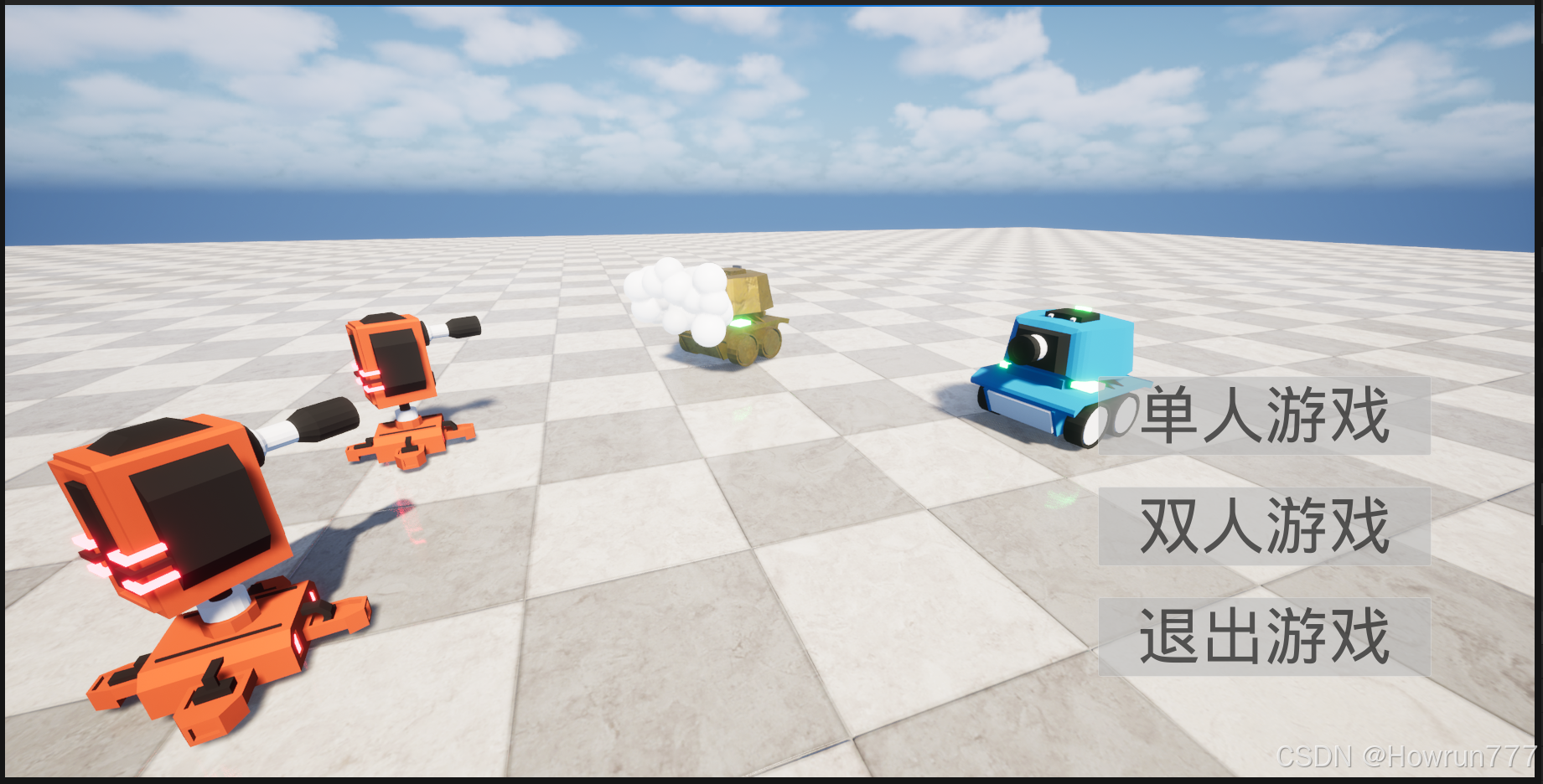
最佳实践:
-
创建一个MainMenuWidget, 继承自UUserWidget类, 然后再创建对应子类BP_MainMenuWidget
-
创建一个MainMenuLevel关卡, 专门用于播放开始菜单
-
为这个关卡创建一个MainMenuGameMode类,继承自GameModeBase类, 在创建对应子类BP_MainMenuGameMode
-
为这个MainMenuLevel关卡挂载这个游戏模式类
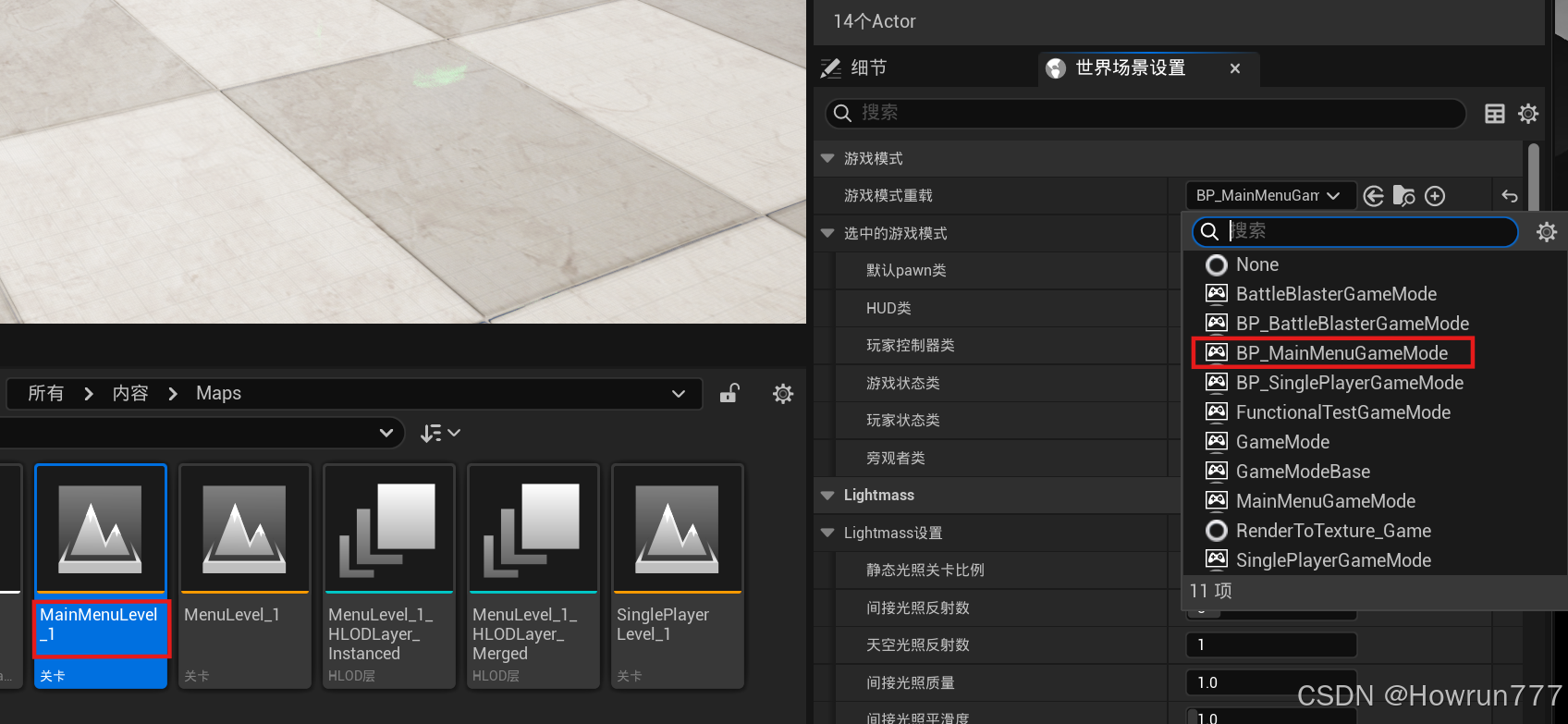
5.在MainMenuGameMode游戏模式类中, 创建MainMenuWidget蓝图子类
这就是最佳架构!
MainMenuWidget.h
cpp
#pragma once

#include "CoreMinimal.h"
#include "Blueprint/UserWidget.h"
#include "Components/Button.h"
#include "MainMenuWidget.generated.h"

UCLASS()
class BATTLEBLASTER_API UMainMenuWidget : public UUserWidget
{
	GENERATED_BODY()

protected:
	// meta = (BindWidget) 必须确保蓝图中按钮的名字与此处变量名完全一致
	UPROPERTY(meta = (BindWidget))
	UButton* BtnSinglePlayer;

	UPROPERTY(meta = (BindWidget))
	UButton* BtnTwoPlayers;

	UPROPERTY(meta = (BindWidget))
	UButton* BtnQuitGame;

	// 必须重写此函数来绑定点击事件
	virtual void NativeConstruct() override;

	// 点击回调函数
	UFUNCTION()
	void OnSinglePlayerClicked();

	UFUNCTION()
	void OnTwoPlayersClicked();

	UFUNCTION()
	void OnQuitClicked();
};
MainMenuWidget.cpp
cpp
#include "MainMenuWidget.h"
#include "Kismet/GameplayStatics.h"
#include "Kismet/KismetSystemLibrary.h"

void UMainMenuWidget::NativeConstruct()
{
	Super::NativeConstruct();

	// 绑定回调函数
	if (BtnSinglePlayer)
		BtnSinglePlayer->OnClicked.AddDynamic(this, &UMainMenuWidget::OnSinglePlayerClicked);

	if (BtnTwoPlayers)
		BtnTwoPlayers->OnClicked.AddDynamic(this, &UMainMenuWidget::OnTwoPlayersClicked);

	if (BtnQuitGame)
		BtnQuitGame->OnClicked.AddDynamic(this, &UMainMenuWidget::OnQuitClicked);
}

void UMainMenuWidget::OnSinglePlayerClicked()
{
	// 跳转到游戏关卡,并传递单人参数
	UGameplayStatics::OpenLevel(GetWorld(), TEXT("SinglePlayerLevel_1"), true, TEXT("Players=1"));
}

void UMainMenuWidget::OnTwoPlayersClicked()
{
	// 跳转到游戏关卡,并传递双人参数
	UGameplayStatics::OpenLevel(GetWorld(), TEXT("Level_1"), true, TEXT("Players=2"));
}

void UMainMenuWidget::OnQuitClicked()
{
	// 退出游戏逻辑
	UKismetSystemLibrary::QuitGame(GetWorld(), GetOwningPlayer(), EQuitPreference::Quit, false);
}
MainMenuGameMode.h
cpp
#pragma once

#include "CoreMinimal.h"
#include "GameFramework/GameModeBase.h"
#include "MainMenuGameMode.generated.h"

UCLASS()
class BATTLEBLASTER_API AMainMenuGameMode : public AGameModeBase
{
	GENERATED_BODY()

protected:
	// 重写 BeginPlay
	virtual void BeginPlay() override;

	// 定义一个变量,用来在编辑器里选择你的 WBP_MainMenuWidget 蓝图
	UPROPERTY(EditAnywhere, BlueprintReadWrite, Category = "UI")
	TSubclassOf<class UUserWidget> MainMenuWidgetClass;

	// 用于保存创建出来的 UI 实例指针
	UPROPERTY()
	class UUserWidget* CurrentWidget;
};
MainMenuGameMode.cpp
cpp
#include "MainMenuGameMode.h"
#include "Blueprint/UserWidget.h"
#include "Kismet/GameplayStatics.h"

void AMainMenuGameMode::BeginPlay()
{
	Super::BeginPlay();

	APlayerController* PC = GetWorld()->GetFirstPlayerController();

	if (PC && MainMenuWidgetClass)
	{
		// 1. 创建 Widget
		CurrentWidget = CreateWidget<UUserWidget>(GetWorld(), MainMenuWidgetClass);

		if (CurrentWidget)
		{
			// 2. 添加到视口
			CurrentWidget->AddToViewport();

			// 3. 设置输入模式为 UI Only
			FInputModeUIOnly InputMode;
			InputMode.SetWidgetToFocus(CurrentWidget->TakeWidget());
			InputMode.SetLockMouseToViewportBehavior(EMouseLockMode::DoNotLock);

			PC->SetInputMode(InputMode);

			// 4. 显示鼠标
			PC->bShowMouseCursor = true;
		}
	}
}
用 UMG 设计菜单 UI
- 在内容浏览器右键 → 用户界面 → Widget 蓝图 ,命名为
WBP_MainMenu。 - 在蓝图的 "类设置" 中,将父类改为我们刚创建的
UMainMenu(C++ 类)。 - 打开 Widget 蓝图,拖入 3 个
Button控件,分别命名为:Btn_SinglePlayerBtn_MultiPlayerBtn_Quit
- 给按钮设置文本为 "单人模式"、"双人模式"、"退出游戏",并按你的图片布局排列。