1:进程间通信介绍
1:目的
1:数据传输:⼀个进程需要将它的数据发送给另⼀个进程
2:资源共享:多个进程之间共享同样的资源。
3:通知事件:⼀个进程需要向另⼀个或⼀组进程发送消息,通知它(它们)发⽣了某种事件(如进程终⽌时要通知⽗进程)。
4:进程控制:有些进程希望完全控制另⼀个进程的执⾏(如Debug进程),此时控制进程希望能够拦截另⼀个进程的所有陷⼊和异常,并能够及时知道它的状态改变。
2:进程间通信发展
1:管道
2:System V进程间通信
3:POSIX进程间通信
3:进程间通信分类
管道
1:匿名管道pipe
2:命名管道
System V IPC
1:System V消息队列
2:System V 共享内存
3:System V信号量
POSIX IPC
1:消息队列
2:共享内存
3:信号量
4:互斥量
5:条件变量
6:读写锁
2:管道
什么是管道
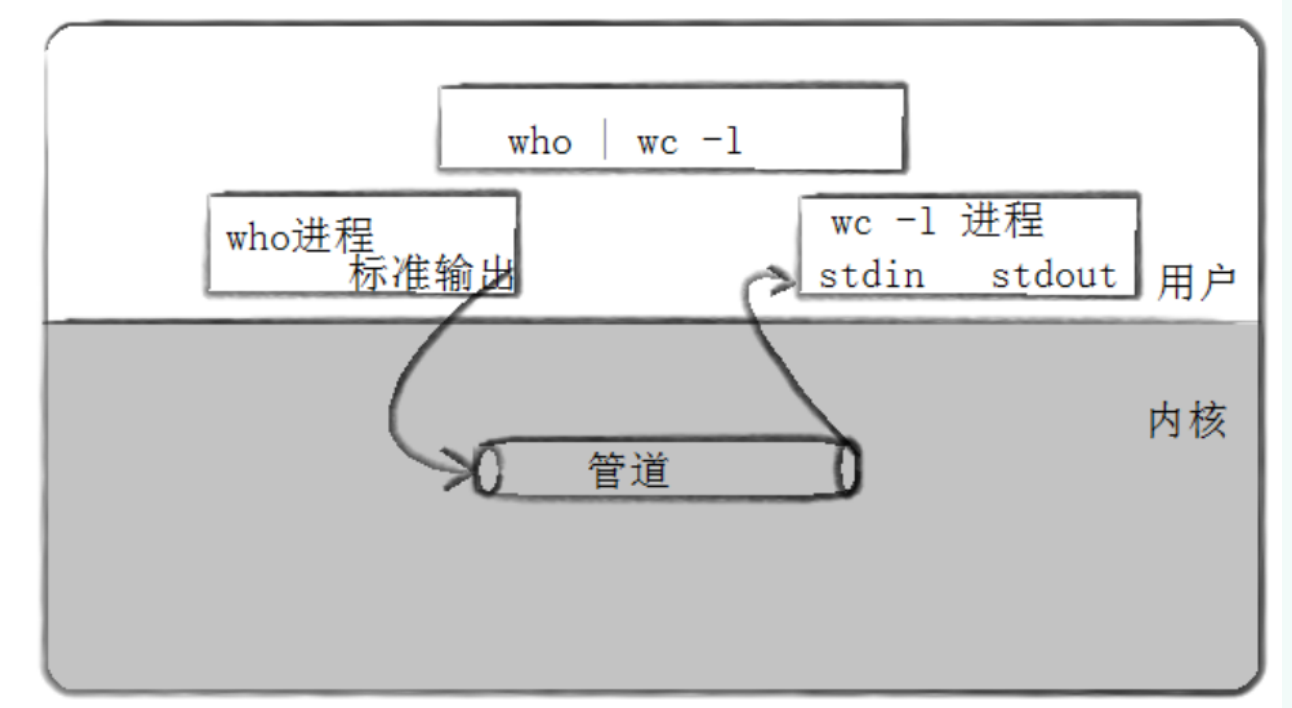
1:管道是Unix中最古老的进程间通信的形式
2:我们把从一个进程连接到另一个进程的一个数据流×称为一个"管道"
3:匿名管道
cpp
#include<unistd.h>
//功能:创建一个无名管道
//原形
int pipe(int fd[2])
//参数
//fd:文件描述符素组,其中fd[0]表示读端,fd[1]表示写端
//返回值:成功返回0,失败返回错误码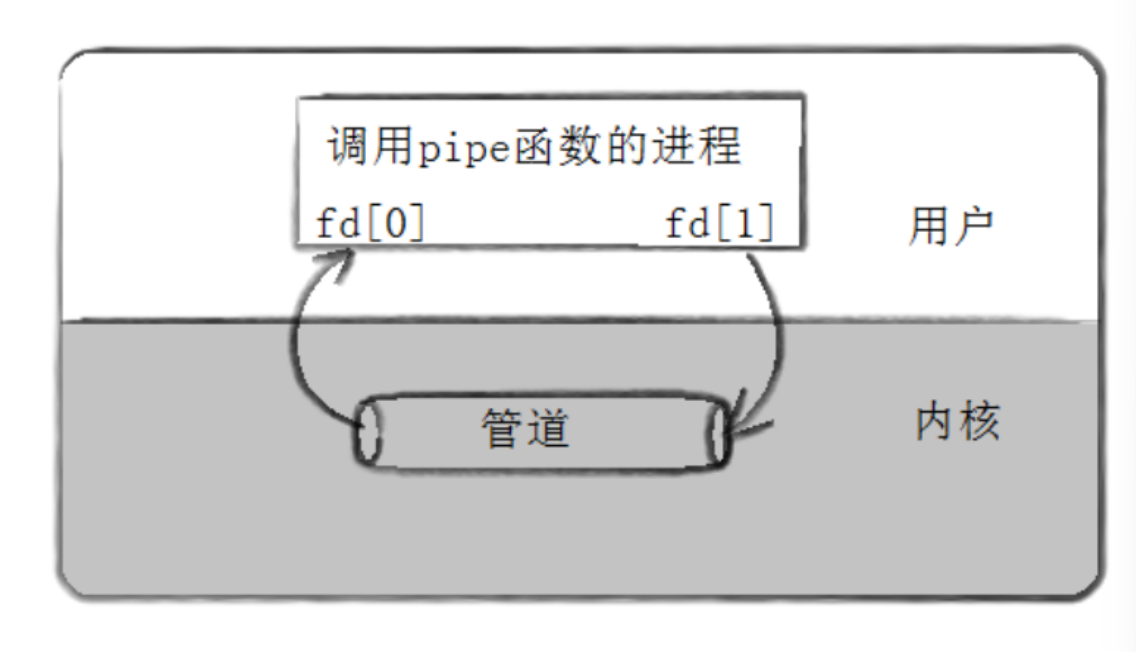
1:代码示例(父进程给子进程发消息)
cpp
#include <unistd.h>
#include <iostream>
#include <stdlib.h>
#include <string.h>
#include <sys/wait.h>

int main() {
    int fd[2];       // 管道的两个文件描述符:fd[0]读端,fd[1]写端
    pid_t pid;
    char buf[100];   // 存储读取的内容

    // 1. 创建管道
    if (pipe(fd) == -1) {
        perror("pipe创建失败");
        exit(1);
    }

    // 2. 创建子进程
    pid = fork();
    if (pid == -1) {
        perror("fork创建子进程失败");
        exit(1);
    }

    if (pid > 0) {  // 父进程逻辑
        close(fd[0]);  // 父进程负责写,关闭读端
        const char *msg = "i am father";
        // 向管道写端写入数据(+1包含字符串终止符'\0')
        write(fd[1], msg, strlen(msg) + 1);
        close(fd[1]);  // 写完后关闭写端
        wait(NULL);    // 等待子进程执行完毕
    } else {        // 子进程逻辑
        close(fd[1]);  // 子进程负责读,关闭写端
        read(fd[0], buf, sizeof(buf));  // 从管道读端读取数据
        std::cout<<buf<<std::endl;
        close(fd[0]);  // 读完后关闭读端
    }

    return 0;
}
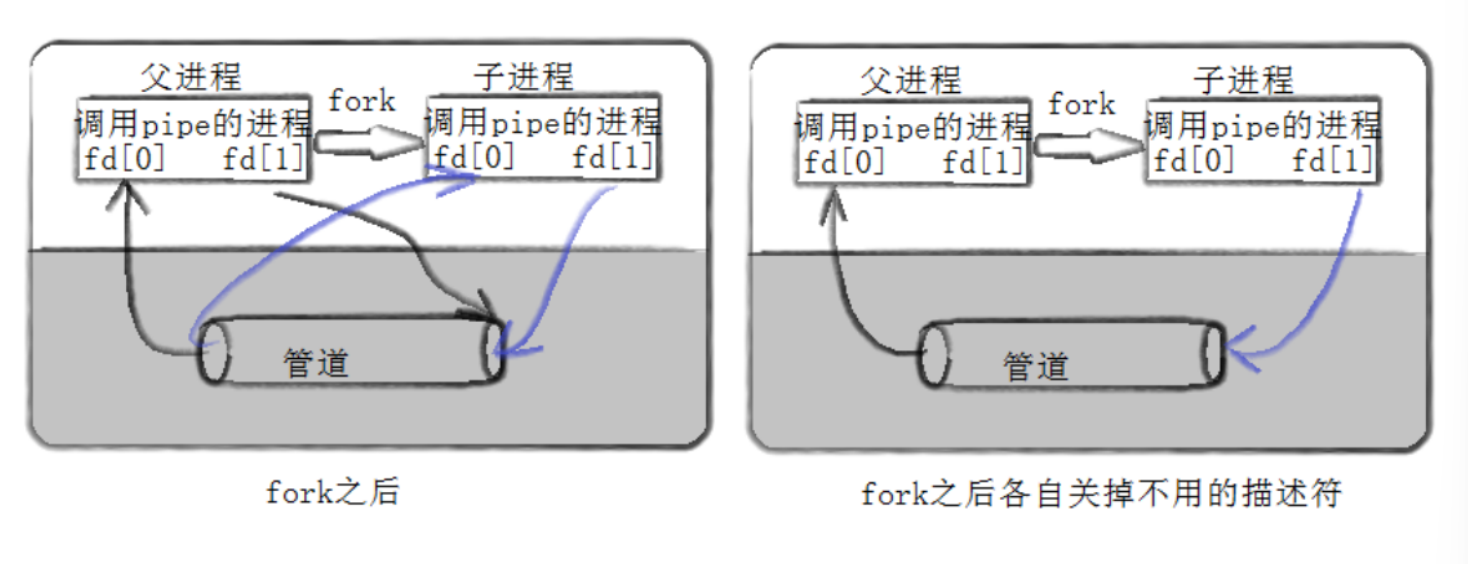
2:用fork来共享管道原理
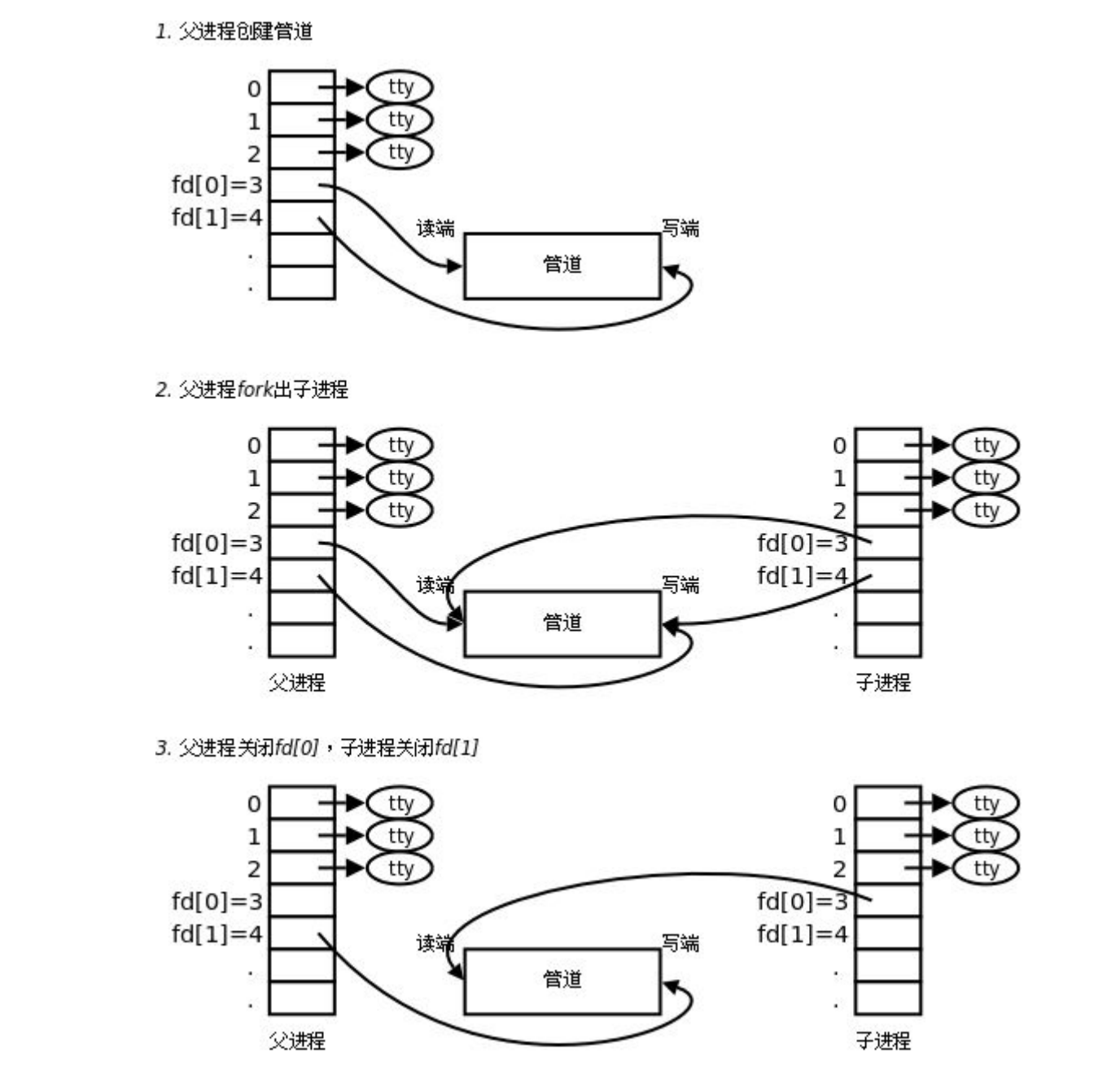
3:站在文件描述符角度深度理解管道
4:内核角度看管道本质
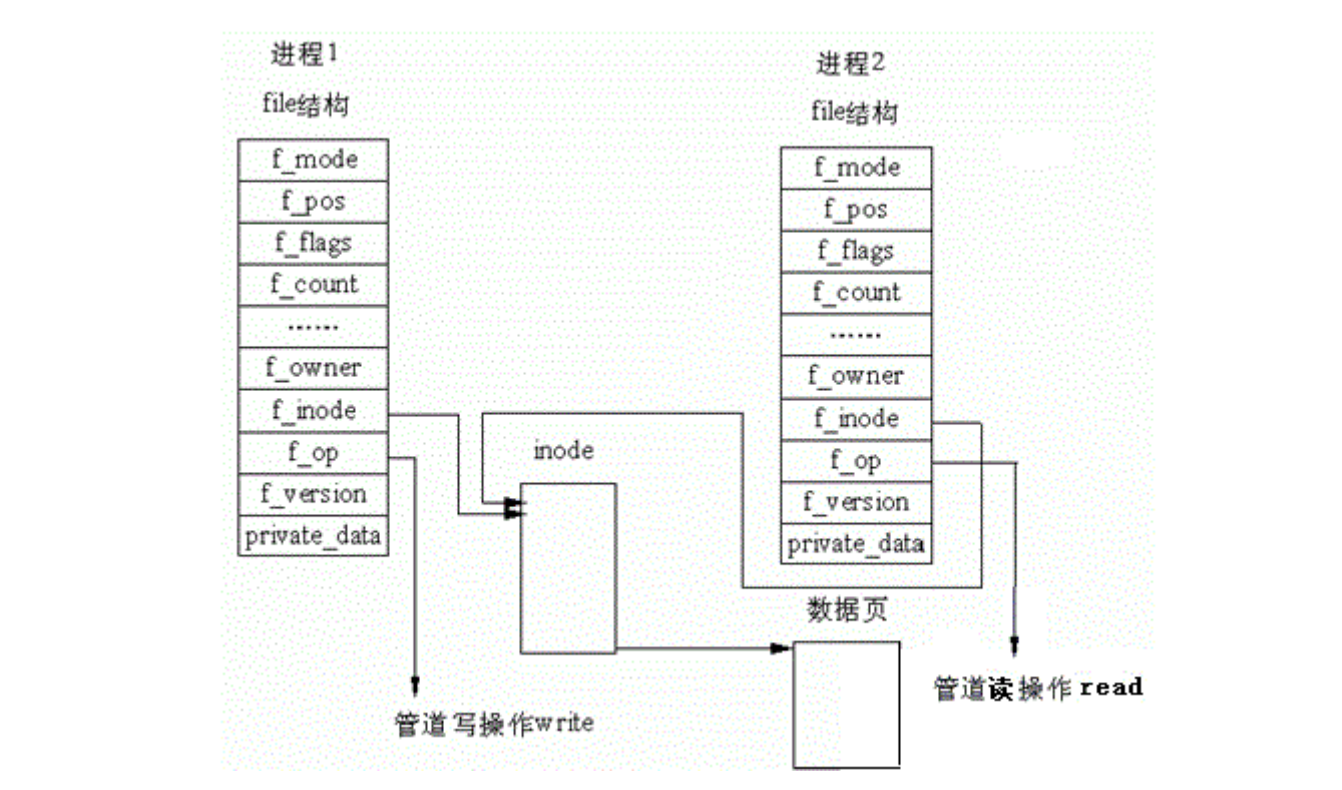
所以,看待管道,就如同看待文件意义!管道的使用和文件一致。迎合了"Liux下一切皆文件的思想"
5:管道代码测试
cpp
#include <stdio.h>
#include <unistd.h>
#include <sys/types.h>
#include <string.h>
#include <sys/wait.h>
#include <stdlib.h>
int main()
{
    int fd[2] = {0};
    int i = pipe(fd);
    if (i < 0)
    {
        perror("pipe fail");
        exit(1);
    }
    pid_t id = fork();
    if (id < 0)
    {
        perror("fork fail");
        exit(1);
    }
    else if (id == 0)
    { // child read
        close(fd[1]);
        char buff[1024]={0};
        read(fd[0], buff, 1023);
        printf("%s", buff);
        close(fd[0]);
        return 1;
    }
    else
    {
        // father write
        close(fd[0]);
        const char *buff = "i am father";
        write(fd[1], buff, strlen(buff));
        close(fd[1]);
        wait(NULL);
    }

    return 0;
}
这是在父子进程内使用管道+进行通信
6:管道读写规则
• 当没有数据可读时
◦ O_NONBLOCK disable:read调⽤阻塞,即进程暂停执⾏,⼀直等到有数据来到为⽌。
◦ O_NONBLOCK enable:read调⽤返回-1,errno值为EAGAIN。
• 当管道满的时候
◦ O_NONBLOCK disable: write调⽤阻塞,直到有进程读⾛数据
◦ O_NONBLOCK enable:调⽤返回-1,errno值为EAGAIN
• 如果所有管道写端对应的⽂件描述符被关闭,则read返回0
• 如果所有管道读端对应的⽂件描述符被关闭,则write操作会产⽣信号SIGPIPE,进⽽可能导致write进程退出
• 当要写⼊的数据量不⼤于PIPE_BUF时,linux将保证写⼊的原⼦性。
• 当要写⼊的数据量⼤于PIPE_BUF时,linux将不再保证写⼊的原⼦性。
7:管道特点
• 只能⽤于具有共同祖先的进程(具有亲缘关系的进程)之间进⾏通信;通常,⼀个管道由⼀个进程创建,然后该进程调⽤fork,此后⽗、⼦进程之间就可应⽤该管道。
• 管道提供流式服务
• ⼀般⽽⾔,进程退出,管道释放,所以管道的⽣命周期随进程
• ⼀般⽽⾔,内核会对管道操作进⾏同步与互斥
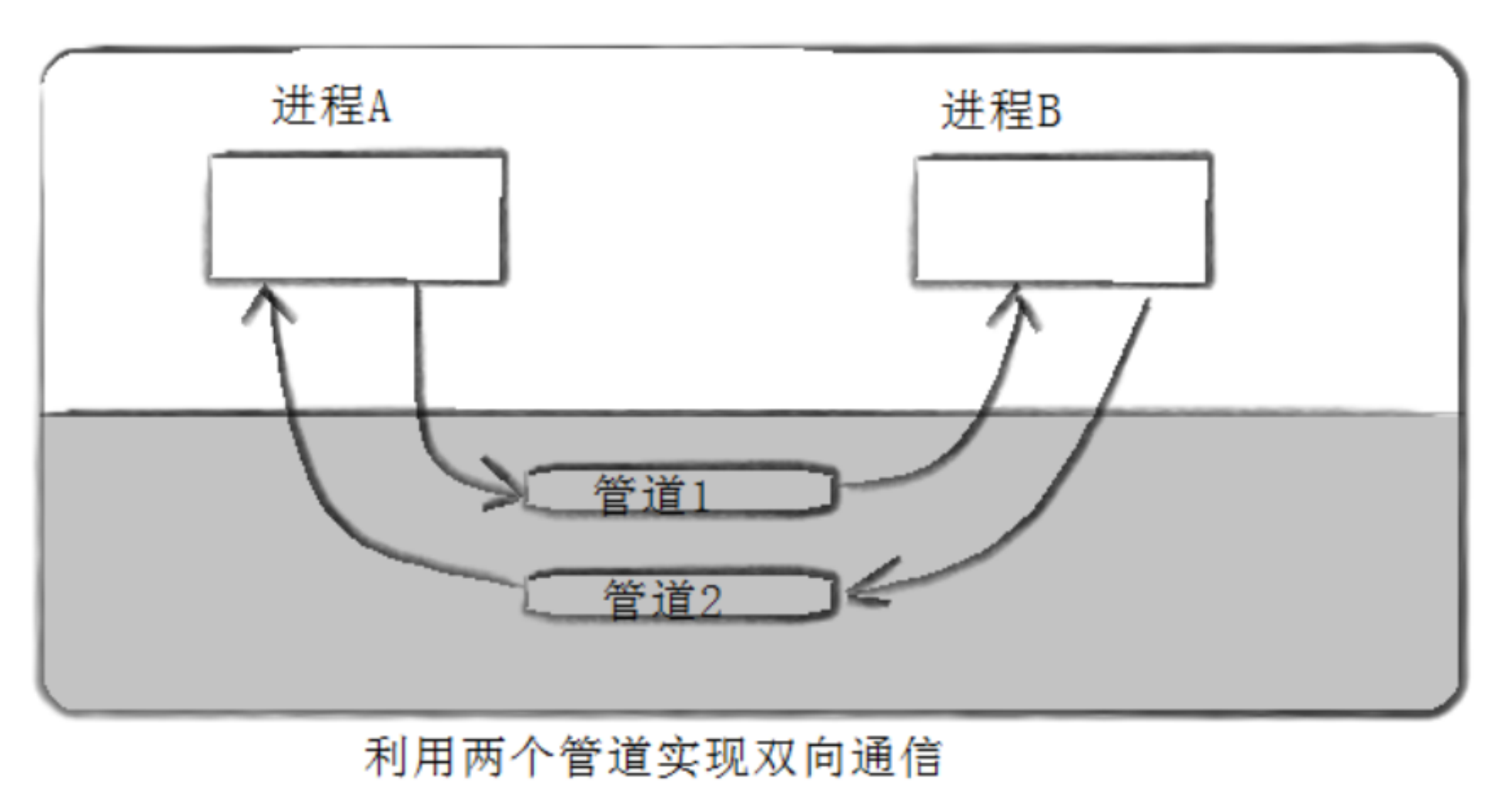
• 管道是半双⼯的,数据只能向⼀个⽅向流动;需要双⽅通信时,需要建⽴起两个管道
4:命名管道
• 管道应⽤的⼀个限制就是只能在具有共同祖先(具有亲缘关系)的进程间通信。
• 如果我们想在不相关的进程之间交换数据,可以使⽤FIFO⽂件来做这项⼯作,它经常被称为命名管道。
• 命名管道是⼀种特殊类型的⽂件
1:创建命名管道
1:命令行创造
mkfifo filename
2:进程内创造
相关C函数
cpp
int mkfifo(const char*filename,mode_t mode);
//函数声明
2:命名和匿名管道区别
• 匿名管道由pipe函数创建并打开。
• 命名管道由mkfifo函数创建,打开⽤open
• FIFO(命名管道)与pipe(匿名管道)之间唯⼀的区别在它们创建与打开的⽅式不同,⼀但这些⼯作完成之后,它们具有相同的语义。
3:命名管道的打开规则
• 如果当前打开操作是为读⽽打开FIFO时
◦ O_NONBLOCK disable:阻塞直到有相应进程为写⽽打开该FIFO
◦ O_NONBLOCK enable:⽴刻返回成功
• 如果当前打开操作是为写⽽打开FIFO时
◦ O_NONBLOCK disable:阻塞直到有相应进程为读⽽打开该FIFO
◦ O_NONBLOCK enable:⽴刻返回失败,错误码为ENXIO
4:命名管道的使用
send端
cpp
#include <iostream>
#include <string>
#include <unistd.h>
#include <sys/stat.h>
#include <fcntl.h>
using namespace std;

int main()
{
    umask(0);
    if (mkfifo("pipe", 0644) == -1)
    {
        perror("pipe exist");
    }
    int send = open("pipe", O_WRONLY);
    if (send == -1)
    {
        perror("open fail");
        unlink("pipe");
        exit(1);
    }
    string s = "i am process send";
    ssize_t write_len = write(send, s.c_str(), s.size());
    if (write_len == -1)
    {
        perror("write fail");
    }
    else
    {
        cout << "write success" << endl;
    }
    close(send);
    unlink("pipe");

    return 0;
}
accept端
cpp
#include <iostream>
#include <string>
#include <unistd.h>
#include <sys/stat.h>
#include <fcntl.h>
using namespace std;

int main()
{
    int recv = open("pipe", O_RDONLY);
    if (recv == -1)
    {
        perror("open fail");
        exit(1);
    }
    cout << "serve open sucess" << endl;
    char buff[1024] = {0};
    ssize_t read_len = read(recv, buff, sizeof(buff) - 1);
    if(read_len==-1)
    {
        perror("read fail");
    }
    else if(read_len==0)
    {
        cout<<"pipe write close"<<endl;
    }
    else{
        cout<<"read_len:"<<buff<<endl;
    }
    close(recv);
    unlink("pipe");
    return 0;
}
5:system V共享内存
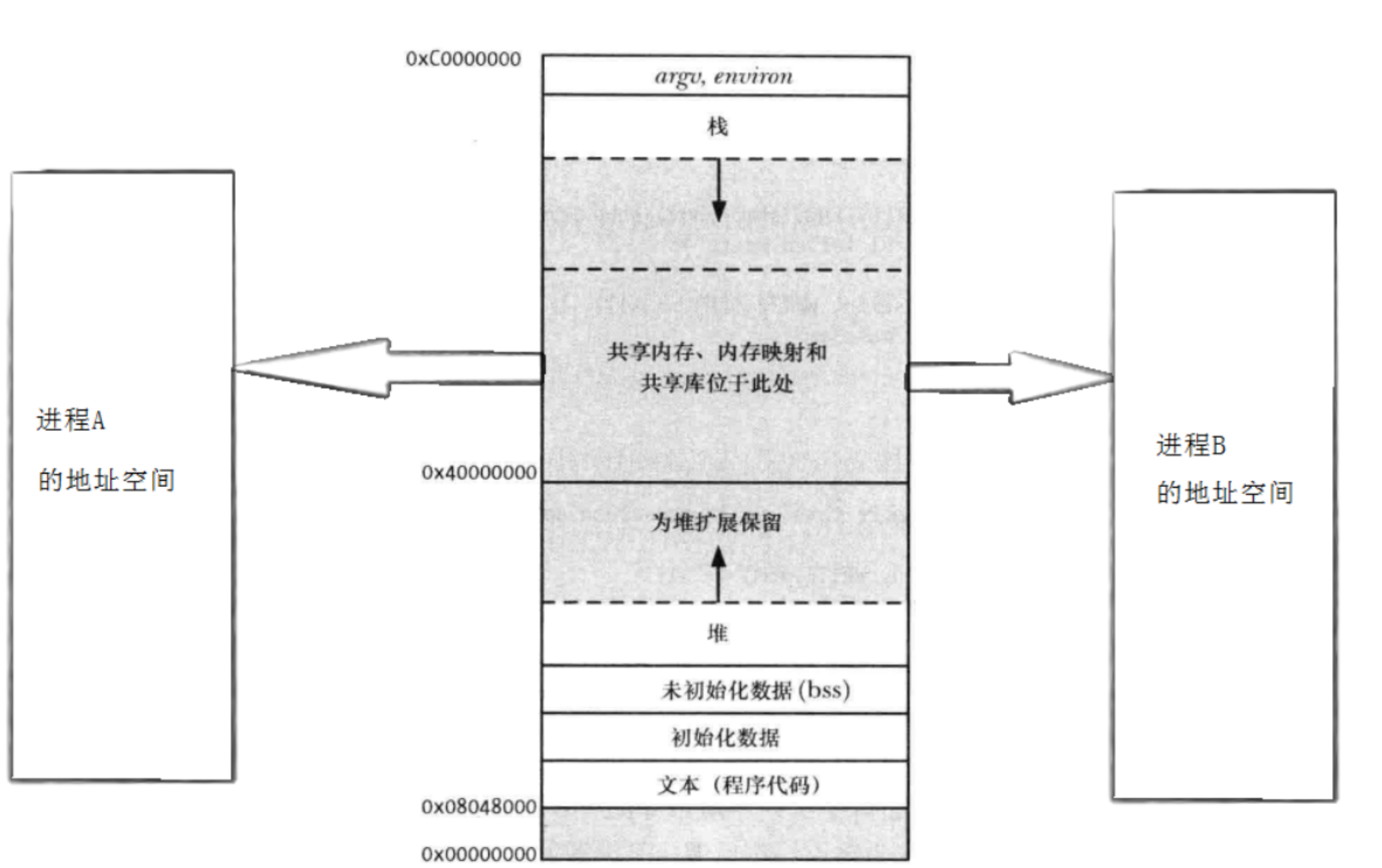
共享内存区是最快的IPC形式。⼀旦这样的内存映射到共享它的进程的地址空间,这些进程间数据传递不再涉及到内核,换句话说是进程不再通过执⾏进⼊内核的系统调⽤来传递彼此的数据。
1:共享内存示意图
2:共享内存数据结构
cpp
/*
 * linux/include/linux/shm.h
 *
 * Copyright (C) 1999 Christoph Rohland
 *
 * structure definitions for System V Shared Memory
 */
#ifndef _LINUX_SHM_H
#define _LINUX_SHM_H

#include <linux/ipc.h>
#include <linux/errno.h>

/*
 * The shmid64_ds structure for x86 architecture.
 * Note extra padding because this structure is passed back and forth
 * between kernel and user space.
 *
 * Pad space is left for:
 * - 64-bit time_t to solve y2038 problem
 * - 2 miscellaneous 32-bit values
 */
struct shmid_ds {
	struct ipc_perm		shm_perm;	/* operation perms */
	int			shm_segsz;	/* size of segment (bytes) */
	__kernel_time_t		shm_atime;	/* last attach time */
	__kernel_time_t		shm_dtime;	/* last detach time */
	__kernel_time_t		shm_ctime;	/* last change time */
	__kernel_ipc_pid_t	shm_cpid;	/* pid of creator */
	__kernel_ipc_pid_t	shm_lpid;	/* pid of last operator */
	unsigned short		shm_nattch;	/* no. of current attaches */
	unsigned short		shm_unused;	/* compatibility */
	void			*shm_unused2;	/* ditto - used by DIPC */
	void			*shm_unused3;	/* unused */
};

/* ipc_perm结构体(依赖),定义在linux/ipc.h */
struct ipc_perm
{
	key_t			__key;		/* Key supplied to shmget(2) */
	uid_t			uid;		/* Effective UID of owner */
	gid_t			gid;		/* Effective GID of owner */
	uid_t			cuid;		/* Effective UID of creator */
	gid_t			cgid;		/* Effective GID of creator */
	mode_t			mode;		/* Permissions + SHM_DEST flag */
	unsigned short		seq;		/* Sequence number */
};

/* 其他共享内存相关宏定义(省略) */
#endif /* _LINUX_SHM_H */
3:共享内存的函数
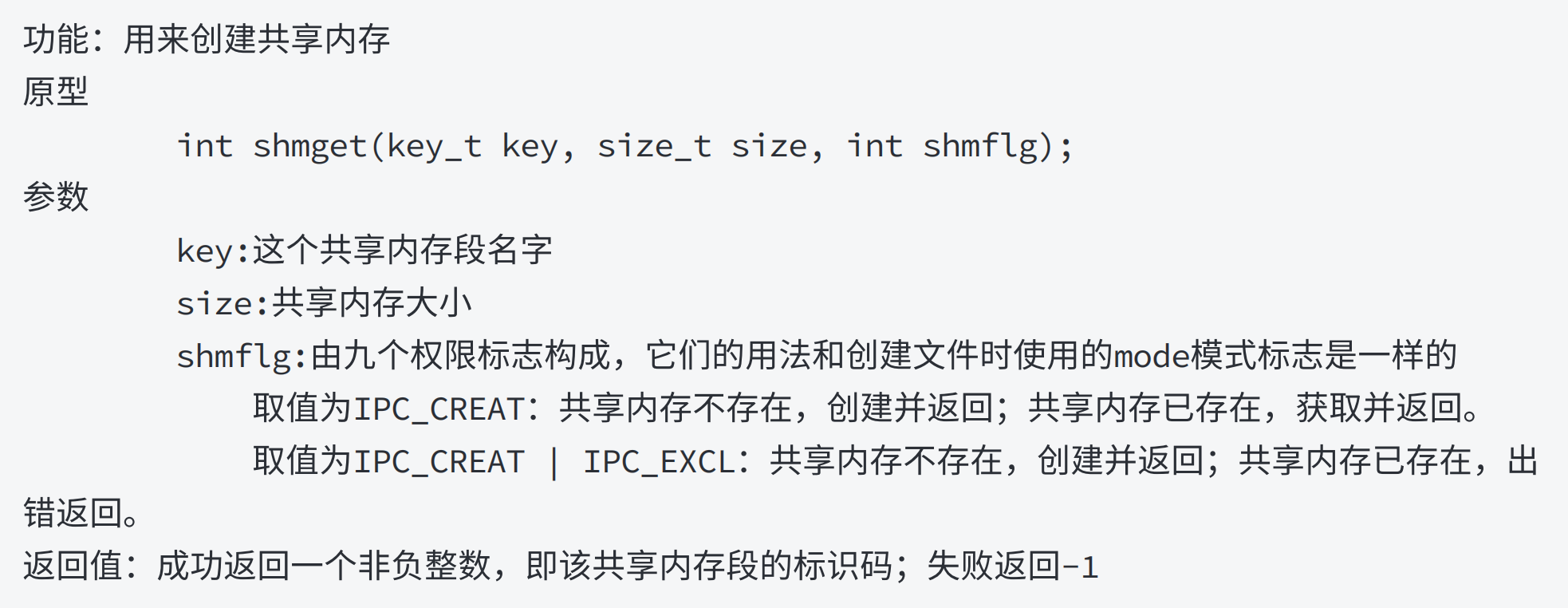
1:shmget函数
2:shmat函数
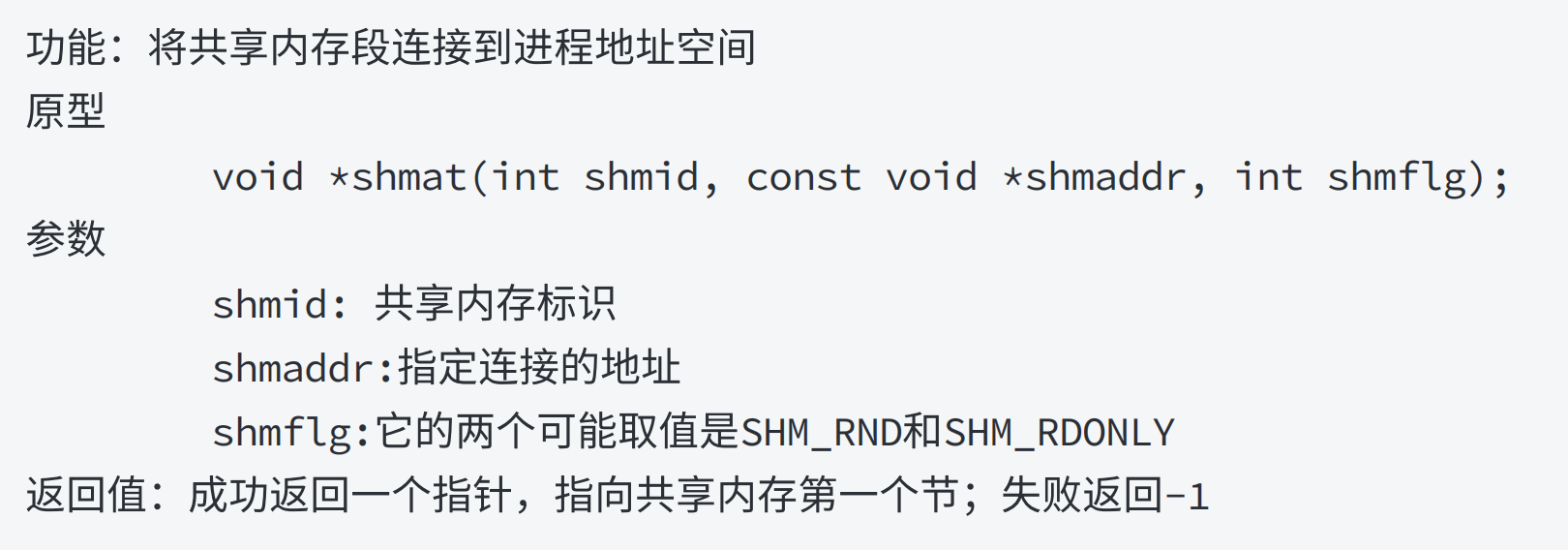
注意:

3:shmdat函数
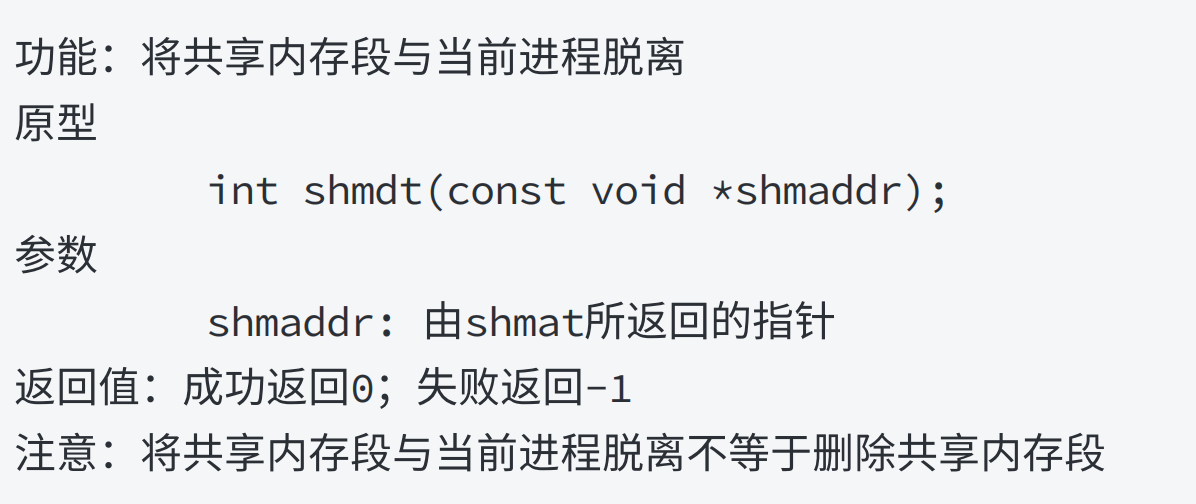
4:shmctl函数
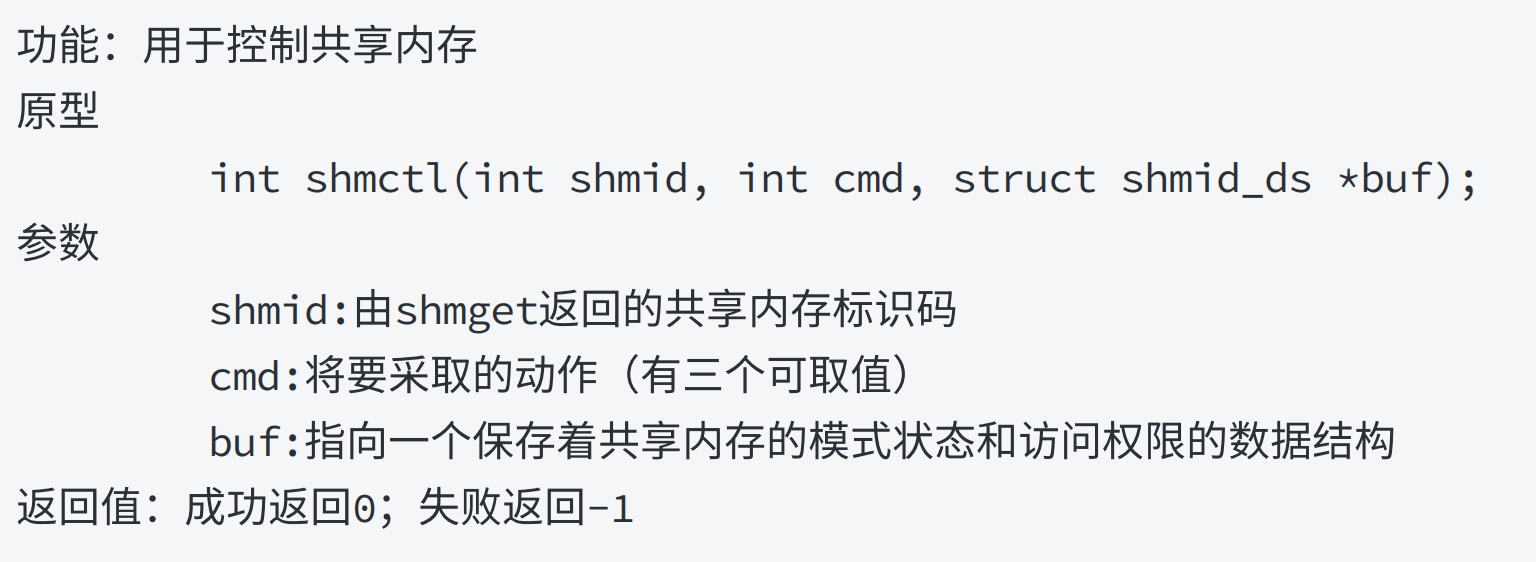
4:共享内存测试
A进程发送
cpp
// 发送端
#include <iostream>
#include <sys/ipc.h>
#include <string>
#include <cstring>
#include <stdlib.h>
#include <sys/shm.h>

#define SHM_SIZE 1024
#define KEY_PATH "."
#define KEY_ID 'a'

using namespace std;

int main()
{
    key_t key;
    int shmid;
    char *shm_addr;
    if ((key = ftok(KEY_PATH, KEY_ID)) == -1)
    {
        perror("ftok fail");
        exit(-1);
    }

    if ((shmid = shmget(key, SHM_SIZE, IPC_CREAT | 0666)) == -1)
    {
        perror("shget fail");
        exit(-2);
    }

    if ((shm_addr = (char *)shmat(shmid, NULL, 0)) == (char *)-1)
    {
        perror("shmat fail");
        exit(-3);
    }

    string s = "i am process A";
    strcpy(shm_addr, s.c_str());
    cout << "A has writed date" << s << endl;

    getchar();
    if(shmdt(shm_addr)==-1)
    {
        perror("shmdt fail");
        exit(-4);
    }
    return 0;
}
B进程接受
cpp
// 接收端
#include <iostream>
#include <sys/ipc.h>
#include <string>
#include <cstring>
#include <stdlib.h>
#include <sys/shm.h>

#define SHM_SIZE 1024
#define KEY_PATH "."
#define KEY_ID 'a'

using namespace std;

int main()
{
    key_t key;
    int shmid;
    char *shm_addr;
    if ((key = ftok(KEY_PATH, KEY_ID)) == -1)
    {
        perror("ftok fail");
        exit(-1);
    }

    if((shmid=shmget(key,SHM_SIZE,0666))==-1)
    {
        perror("shmget fail");
        exit(-2);
    }

    if ((shm_addr = (char *)shmat(shmid, NULL, 0)) == (char *)-1)
    {
        perror("shmat fail");
        exit(-3);
    }

    cout<<"There is B process:"<<shm_addr<<endl;

    if(shmdt(shm_addr)==-1)
    {
        perror("shmdt fail");
        exit(-4);
    }

    if(shmctl(shmid,IPC_RMID,NULL)==-1){
        perror("shmctl fail");
        exit(-5);
    }

    cout<<"share end"<<endl;

    return 0;
}