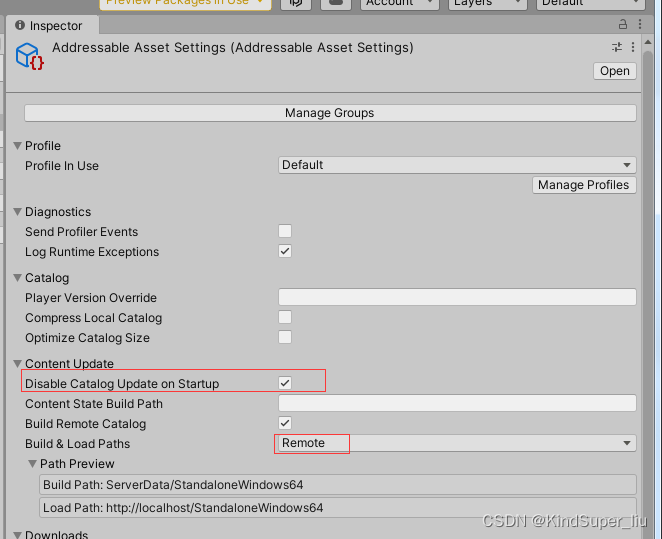
开启远程的:找到Addressable Asset Settings文件,Build&Load Paths选择Remote.
并且这里的Disable Catalog Update On Startup我们勾选上,主要是我们后面代码自己控制要更新那些文件。
远程的下载到本地后会进行缓存,以后就会每次先从缓存中读取。如果删除了缓存,又会从服务器中读取。
注意:如果Remote类型关闭了下图该选项,不会缓存到本地,而是每次都从服务器下载。
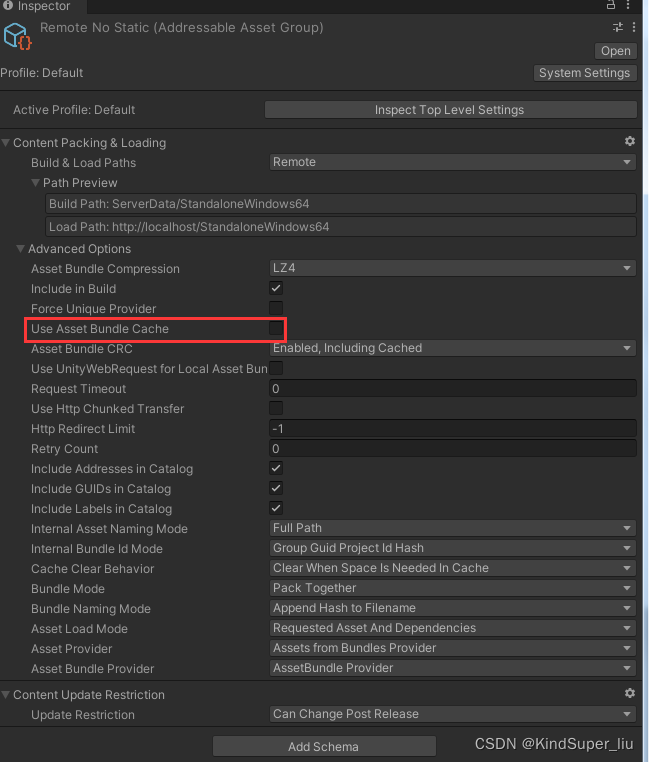
Can Change Post Release和Cannot Change Post区别
可以看到在上图的Content Update Restriction里面还有一个Update Restriction(更新限制)选项,可以选中以下两种:
Can Change Post Release:
后续更新资源的话全量更新(直接替换旧资源)
Cannot Change Post Release:
后续更新资源的话增量更新(不改变旧资源包,使用新资源包加载改变的内容)
这两种的区别可以在下面的更新AB包的步骤看出区别。
更新AA包
假如我们现在已经有一个APK包发出去了,AB包的类型既有Local,又有Remote;既有Can Chage又有Cannot Change类型。那么APK将会从那些地方加载这些AB包呢?前面已经说过Local将会打进APK里,那么会放在本地,Remote将会放在远程服务器,使用时候将会从远程服务器下载下来,并提供是否缓存选项。
那么现在更新AA包,我们将怎么做呢?
- 选择Tool-Check for Content Update Restrictions
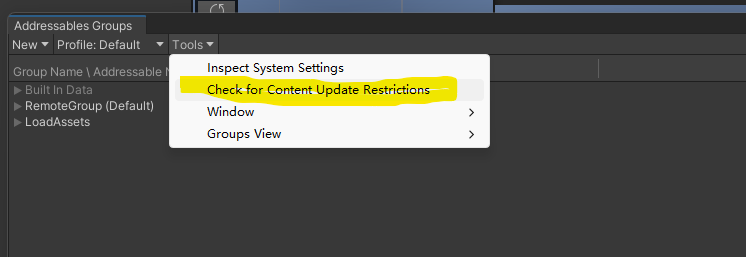
点击后会弹出对话框要求选择之前打包生成的.bin文件.然后会出现如下界面
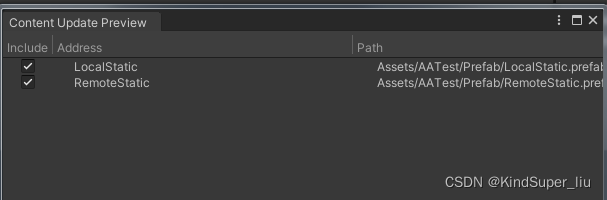
注意:这里会将Asset有改变的,并且分组选项是Cannot Change Post Release的包(将要增量更新的包),选择出来,然后点击右下角的apply change,就会有一个新的分组ContentUpdate出现,这个分组的包将会打在Remote,然后放在服务器,就能更新原来不论在Local,还是Remote的Cannot Change包。
而Can Change的包将会直接生成新的Bundle,到时候旧的APK更新Catalog后,就能从新的Bundle里去读到资源。
选择Build-Clean Build,把旧的本地资源包清除,再把ServerData的服务器资源包清除,再选中Update a Previous Build,同样要选择之前打包生成的.bin文件,这时候就打成了新的AA包。
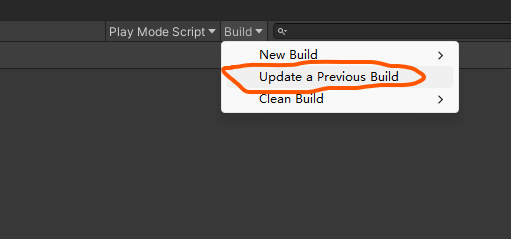
加载AA包
这里直接上代码
cs
using System.Collections;
using System.Collections.Generic;
using System.Threading.Tasks;
using UnityEngine;
using UnityEngine.AddressableAssets;
using UnityEngine.ResourceManagement.AsyncOperations;

public class AddressableRemoteLoad : MonoBehaviour
{
    private List<object> _updateKeys = new List<object>();

    private void Start()
    {
        UpdateCatalog();
    }
    private async void UpdateCatalog()
    {
        //初始化Addressable
        var init = Addressables.InitializeAsync();
        await init.Task;

        //开始连接服务器检查更新
        var handle = Addressables.CheckForCatalogUpdates(false);
        await handle.Task;
        Debug.Log("check catalog status " + handle.Status);
        if (handle.Status == AsyncOperationStatus.Succeeded)
        {
            List<string> catalogs = handle.Result;
            if (catalogs != null && catalogs.Count > 0)
            {
                foreach (var catalog in catalogs)
                {
                    Debug.Log("catalog  " + catalog);
                }
                Debug.Log("download catalog start ");
                var updateHandle = Addressables.UpdateCatalogs(catalogs, false);
                await updateHandle.Task;
                foreach (var item in updateHandle.Result)
                {
                    Debug.Log("catalog result " + item.LocatorId);
                    foreach (var key in item.Keys)
                    {
                        Debug.Log("catalog key " + key);
                    }
                    _updateKeys.AddRange(item.Keys);
                }
                Debug.Log("download catalog finish " + updateHandle.Status);
            }
            else
            {
                Debug.Log("dont need update catalogs");
            }
        }
        Addressables.Release(handle);
        DownLoad();
    }
    public void DownLoad()
    {
        //StartCoroutine(DownAssetImpl());
        // 详细进度
        StartCoroutine(DownAssetImpl(
           progress =>
           {
               Debug.Log( $"{progress * 100:F0}%");
           },
            detailedProgress: (percent, downloaded, total) => {
                Debug.Log($"percent : {percent}" );
                Debug.Log($"{FormatBytes(downloaded)} / {FormatBytes(total)}");
            }
        ));
    }

    public IEnumerator DownAssetImpl(System.Action<float> progressCallback = null, System.Action<float, long, long> detailedProgress = null)
    {
        var downloadsize = Addressables.GetDownloadSizeAsync(_updateKeys);
        yield return downloadsize;

        long totalBytes = downloadsize.Result;
        Debug.Log("Total download size : " + FormatBytes(totalBytes));

        if (totalBytes > 0)
        {
            var download = Addressables.DownloadDependenciesAsync(_updateKeys, Addressables.MergeMode.Union);

            // 进度监控
            while (!download.IsDone)
            {
                if (progressCallback != null)
                {
                    #region 获取进度
                    #region 方法一
                    /*float progress = download.GetDownloadStatus().DownloadedBytes / (float)totalBytes;
                    progressCallback.Invoke(progress);*/
                    #endregion
                    #region 方法二
                    progressCallback.Invoke(download.PercentComplete);
                    #endregion
                    #endregion
                    if (detailedProgress != null)
                    {
                        // 使用 GetDownloadStatus 获取详细进度
                        var status = download.GetDownloadStatus();
                        detailedProgress.Invoke(
                            status.Percent,  // 或者用 status.DownloadedBytes/(float)totalBytes
                            status.DownloadedBytes,
                            totalBytes
                        );
                    }
                }
                yield return null;
            }

            // 确保最终进度为100%
            if (progressCallback != null)
                progressCallback.Invoke(1f);
            if (detailedProgress != null)
                detailedProgress?.Invoke(1f, totalBytes, totalBytes);

            // 检查下载结果
            if (download.Status == AsyncOperationStatus.Succeeded)
            {
                Debug.Log("Download completed successfully!");
                Debug.Log("Download result type: " + download.Result.GetType());

                // 处理下载的资源
                if (download.Result is List<UnityEngine.ResourceManagement.ResourceProviders.IAssetBundleResource> bundleList)
                {
                    foreach (var item in bundleList)
                    {
                        var ab = item.GetAssetBundle();
                        if (ab != null)
                        {
                            Debug.Log("AssetBundle name: " + ab.name);
                            foreach (var name in ab.GetAllAssetNames())
                            {
                                Debug.Log("Asset name: " + name);
                            }
                        }
                    }
                }
            }
            else
            {
                Debug.LogError("Download failed: " + download.OperationException);
            }

            Addressables.Release(download);
        }
        else
        {
            Debug.Log("No download required.");
            if (progressCallback != null)
                progressCallback.Invoke(1f);
            if (detailedProgress != null)
                detailedProgress?.Invoke(1f, totalBytes, totalBytes);
        }

        Addressables.Release(downloadsize);
    }

    // 辅助方法:格式化字节显示
    private string FormatBytes(long bytes)
    {
        string[] sizes = { "B", "KB", "MB", "GB" };
        int order = 0;
        double size = bytes;

        while (size >= 1024 && order < sizes.Length - 1)
        {
            order++;
            size = size / 1024;
        }

        return string.Format("{0:0.##} {1}", size, sizes[order]);
    }

    private void Update()
    {
        if (Input.GetKeyDown(KeyCode.Space))
        {
            Addressables.LoadAssetAsync<GameObject>("Assets/Prefabs/Sphere.prefab").Completed += (asset) =>
               {
                   GameObject.Instantiate(asset.Result);
               };
        }
    }
}
原来AA包在Remote的是都能正常更新的,原来Local的并且Cannot Change(能增量更新的)也在刚刚打包过程中可以看到新生成了ContentUpdate分组的,并且放在了Remote。能够进行更新。
只有Local的并且Can Chage的旧包无法更新,只有新包才能正常加载。
加上其他的方式
-
自定义加载路径
csusing UnityEngine; using UnityEngine.AddressableAssets; using UnityEngine.ResourceManagement.AsyncOperations; using System.Threading.Tasks; using System; using UnityEngine.ResourceManagement.ResourceLocations; using System.Collections.Generic; using System.IO; using Cysharp.Threading.Tasks; using UnityEngine.Networking; public class AddressableLoad : MonoBehaviour { private long totalDownloadSize = 0; public async void Start() { await CheckForUpdates(); } /// <summary> /// 检查并下载更新 /// </summary> public async Task<bool> CheckForUpdates() { try { UpdateStatus("正在检查更新..."); /* // 1. 获取远程catalog var remoteCatalogPath = await GetRemoteCatalog(); if (string.IsNullOrEmpty(remoteCatalogPath)) { UpdateStatus("获取远程目录失败"); return false; }*/ // 2. 初始化Addressables await Addressables.InitializeAsync().Task; // 3. 检查catalog更新 var catalogUpdateOp = Addressables.CheckForCatalogUpdates(false); await catalogUpdateOp.Task; if (catalogUpdateOp.Status == AsyncOperationStatus.Succeeded) { Debug.Log($"发现 {catalogUpdateOp.Result.Count}个目录更新"); if (catalogUpdateOp.Result.Count > 0) { UpdateStatus($"发现{ catalogUpdateOp.Result.Count }个目录更新"); // 4. 更新catalog var updateOp = Addressables.UpdateCatalogs(catalogUpdateOp.Result, false); await updateOp.Task; if (updateOp.Status == AsyncOperationStatus.Succeeded) { await DownloadUpdatedContent(); return true; } } else { UpdateStatus("已是最新版本"); /* Addressables.LoadAssetAsync<GameObject>("Assets/Prefabs/Sphere.prefab").Completed += (asset) => { GameObject.Instantiate(asset.Result); };*/ } } if (catalogUpdateOp.IsValid()) { Addressables.Release(catalogUpdateOp); } return false; } catch (Exception e) { Debug.LogError($"检查更新失败: {e.Message}"); UpdateStatus($"更新失败: {e.Message}"); return false; } } /*/// <summary> /// 获取远程catalog /// </summary> private async Task<string> GetRemoteCatalog() { try { // 从服务器获取catalog using (var www = new UnityEngine.Networking.UnityWebRequest(remoteCatalogUrl)) { www.downloadHandler = new UnityEngine.Networking.DownloadHandlerBuffer(); var operation = www.SendWebRequest(); while (!operation.isDone) { await Task.Yield(); } if (www.result == UnityEngine.Networking.UnityWebRequest.Result.Success) { return www.downloadHandler.text; } } } catch (Exception e) { Debug.LogError($"获取远程catalog失败: {e}"); } return null; }*/ /// <summary> /// 下载更新的资源 /// </summary> private async Task DownloadUpdatedContent() { try { // 1. 获取需要下载的资源大小 var resourceLocators = Addressables.ResourceLocators; var downloadDependencies = new List<object>(); // 收集所有需要下载的资源key var keys = new List<string>(); foreach (var locator in resourceLocators) { foreach (var key in locator.Keys) { if (key is string) keys.Add(key as string); } } // 2. 计算总下载大小 var downloadSizeOp = Addressables.GetDownloadSizeAsync(keys); await downloadSizeOp.Task; if (downloadSizeOp.Status == AsyncOperationStatus.Succeeded) { totalDownloadSize = downloadSizeOp.Result; if (totalDownloadSize > 0) { UpdateDownloadSize(totalDownloadSize); UpdateStatus($"需要下载 {FormatSize(totalDownloadSize)}"); // 3. 下载资源 await DownloadWithProgress(keys); } else { UpdateStatus("无需下载新资源"); } } if (downloadSizeOp.IsValid()) { Addressables.Release(downloadSizeOp); } } catch (Exception e) { Debug.LogError($"下载资源失败: {e}"); UpdateStatus($"下载失败: {e.Message}"); } } /// <summary> /// 带进度条的资源下载 /// </summary> private async Task DownloadWithProgress(List<string> keys) { // 先获取所有资源的下载链接 var locations = await Addressables.LoadResourceLocationsAsync(keys, Addressables.MergeMode.Union); long totalBytes = 0; long downloadedBytes = 0; /* // 计算总大小 foreach (var location in locations) { if (location.HasDependencies) { var deps = location.Dependencies; // 这里可以估算大小或从metadata获取 } }*/ UpdateStatus("准备下载..."); // 创建保存目录 string saveDirectory = Path.Combine(Application.persistentDataPath, "DownloadedAssets"); if (!Directory.Exists(saveDirectory)) { Directory.CreateDirectory(saveDirectory); } // 下载每个资源 foreach (var location in locations) { //if (location.ResourceType == typeof(UnityEngine.Object)) { // 下载并保存 await DownloadAndSaveResource(location, saveDirectory, (downloaded, total) => { // 更新进度 downloadedBytes += downloaded; float progress = totalBytes > 0 ? (float)downloadedBytes / totalBytes : 0; UpdateProgress(progress); UpdateStatus($"下载中... {FormatSize(downloadedBytes)} / {FormatSize(totalBytes)}"); }); } } UpdateStatus("下载完成"); UpdateProgress(1f); // 触发下载完成事件 OnDownloadComplete?.Invoke(); } private async Task DownloadAndSaveResource(IResourceLocation location, string saveDirectory, Action<long, long> onProgress) { try { // 从位置获取下载URL string downloadUrl = location.InternalId; if (downloadUrl.StartsWith("http", StringComparison.OrdinalIgnoreCase)) { // 使用UnityWebRequest下载原始文件 using (UnityWebRequest request = UnityWebRequest.Get(downloadUrl)) { // 设置保存路径 string fileName = Path.GetFileName(new Uri(downloadUrl).LocalPath); string savePath = Path.Combine(saveDirectory, fileName); // 创建下载处理器 var downloadHandler = new DownloadHandlerFile(savePath); request.downloadHandler = downloadHandler; // 发送请求 var operation = request.SendWebRequest(); while (!operation.isDone) { onProgress?.Invoke((long)(request.downloadedBytes), (long)request.downloadedBytes); await Task.Delay(100); } if (request.result != UnityWebRequest.Result.Success) { Debug.LogError($"下载失败: {request.error}"); } else { Debug.Log($"文件已保存: {savePath}"); } } } } catch (Exception e) { Debug.LogError($"下载资源失败: {e.Message}"); } } /// <summary> /// 手动清理缓存 /// </summary> public void ClearCache() { Caching.ClearCache(); UpdateStatus("缓存已清理"); } #region UI更新方法 private void UpdateStatus(string message) { Debug.Log(message); } private void UpdateProgress(float progress) { Debug.Log(progress); } private void UpdateDownloadSize(long size) { Debug.Log($"下载大小: {FormatSize(size)}"); } private string FormatSize(long bytes) { string[] sizes = { "B", "KB", "MB", "GB" }; int order = 0; double len = bytes; while (len >= 1024 && order < sizes.Length - 1) { order++; len = len / 1024; } return $"{len:0.##} {sizes[order]}"; } #endregion #region 事件 public event Action OnDownloadComplete; public event Action<float> OnDownloadProgress; public event Action<string> OnStatusChanged; #endregion } -
下载多个资源
csusing System; using System.Collections.Generic; using System.IO; using System.Linq; using System.Threading; using Cysharp.Threading.Tasks; using Extensions; using UnityEngine; using UnityEngine.Networking; public class Downloader { private Action onStart; private Action onComplete; private int filesCount; private bool isDownloadError = false; public Downloader() { Init(); } private void Init() { filesCount = 0; isDownloadError = false; if (!Directory.Exists($"{Application.persistentDataPath}/Resources")) { Directory.CreateDirectory($"{Application.persistentDataPath}/Resources"); } } /// <summary> /// 开始下载 /// </summary> /// <param name="startDownload"></param> /// <returns></returns> public Downloader OnStart(Action startDownload) { onStart = startDownload; return this; } /// <summary> /// 下载单个文件 /// </summary> /// <param name="url"></param> /// <param name="downloadTracker">下载跟踪器</param> /// <param name="downLoadError"></param> public Downloader AsyncDownloadFile(string url, Action<DownloadTracker> downloadTracker = null, Action<string> downLoadError = null) { onStart?.Invoke(); DownloadFile(url, ResSavePath(url), downloadTracker,downLoadError).Forget(); return this; } /// <summary> /// 下载多个文件 /// </summary> /// <param name="urls"></param> /// <param name="downloadTracker">下载跟踪器</param> /// <param name="currenDownloadCont">当前下载文件数量,总文件数量</param> /// <param name="downLoadError">下载错误</param> public Downloader AsyncDownloadMultipleFile(List<string> urls, Action<int, int> currenDownloadCont = null, Action<DownloadTracker> downloadTracker = null, Action<string> downLoadError = null) { DownloadMultipleFiles(urls, currenDownloadCont,downloadTracker, downLoadError).Forget(); return this; } /// <summary> /// 下载完成回调 /// </summary> /// <param name="complete"></param> public void OnComplete(Action complete) { this.onComplete = complete; } private async UniTask DownloadFile(string url, string savePath, Action<DownloadTracker> currentTracker , Action<string> downLoadError, bool isMultiple = false) { try { var fileSize = await GetFileSize(url); if (fileSize > 0) { using var request = UnityWebRequest.Get(url); request.downloadHandler = new DownloadHandlerBuffer(); var asyncOperation = request.SendWebRequest(); while (!asyncOperation.isDone) { // 更新下载进度 var currentProgress = request.downloadProgress; var currentSize = BytesToMB(request.downloadedBytes); currentTracker?.Invoke(new DownloadTracker(fileSize, currentSize, currentProgress > 0.99f ? 1f : currentProgress)); await UniTask.Yield(); } if (request.result != UnityWebRequest.Result.Success) { Debug.LogError("Error downloading: " + request.error); isDownloadError = true; downLoadError?.Invoke(request.error); return; } await WriteFile(request.downloadHandler.data, savePath, currentTracker); Debug.Log("File saved to: " + savePath); if (isMultiple) { // 一种线程安全的操作,用于原子性地递增变量filesCount的值 Interlocked.Increment(ref filesCount); } else { await UniTask.Yield(); onComplete?.Invoke(); } } else if (fileSize < 0) { downLoadError?.Invoke("获取文件失败"); } } catch (Exception e) { Debug.LogError("DownloadFile exception: " + e.Message); downLoadError?.Invoke(e.Message); } } private async UniTask DownloadMultipleFiles(List<string> urls, Action<int, int> currenDownCont,Action<DownloadTracker> downloadTracker,Action<string> downLoadError) { if (urls == null || urls.Count == 0) return; var resUrls = urls.Distinct().ToList(); onStart?.Invoke(); for (var i = 0; i < resUrls.Count; i++) { if (isDownloadError) break; currenDownCont?.Invoke(i + 1, resUrls.Count); await DownloadFile(resUrls[i], ResSavePath(resUrls[i]), downloadTracker, downLoadError, true); } if (filesCount >= resUrls.Count) { onComplete?.Invoke(); } } private async UniTask<float> GetFileSize(string url) { try { // 增加URL合法性检查 if (!Uri.IsWellFormedUriString(url, UriKind.Absolute)) { Debug.LogError("Invalid URL"); return -1; } using var headRequest = UnityWebRequest.Head(url); var asyncOperation = headRequest.SendWebRequest(); // 直接await异步操作,而不是使用UniTask.WaitUntil // 等待请求完成 await UniTask.WaitUntil(() => asyncOperation.isDone); if (headRequest.result != UnityWebRequest.Result.Success) { // 使用UnityWebRequest.error获取详细错误信息 Debug.LogError($"Request failed: {headRequest.error}"); return -1; } if (ulong.TryParse(headRequest.GetResponseHeader("Content-Length"), out ulong fileSize)) { var size = BytesToMB(fileSize); Debug.Log($"File size: {size} MB"); return size; } else { Debug.LogError("Error parsing file size"); return -1; } } catch (Exception e) { // 捕获并处理异步操作中可能抛出的异常 Debug.LogError($"Exception occurred: {e.Message}"); return -1; } } /// <summary> /// 写入文件 /// </summary> /// <param name="data"></param> /// <param name="savePath"></param> /// <param name="downloadTracker"></param> private async UniTask WriteFile(byte[] data, string savePath, Action<DownloadTracker> downloadTracker) { // 验证路径是否合法 if (!Path.IsPathRooted(savePath) || !Directory.Exists(Path.GetDirectoryName(savePath))) { throw new ArgumentException("Invalid save path.", nameof(savePath)); } var chunkSize = 4096 * 100; // 每次写入的块大小 var totalBytesWritten = 0; try { await using var fileStream = new FileStream(savePath, FileMode.Create, FileAccess.Write, FileShare.None, 4096); while (totalBytesWritten < data.Length) { var remainingBytes = data.Length - totalBytesWritten; var bytesToWrite = Math.Min(chunkSize, remainingBytes); await fileStream.WriteAsync(data, totalBytesWritten, bytesToWrite); totalBytesWritten += bytesToWrite; // 计算并更新写入进度 // var writeProgress = (float)totalBytesWritten / data.Length; // downloadTracker?.Invoke(new DownloadTracker(0f, 0f, writeProgress)); } } catch (IOException ex) { // 记录或处理文件IO异常 Debug.LogError($"File write error: {ex.Message}"); } catch (UnauthorizedAccessException ex) { // 记录或处理权限异常 Debug.LogError($"Unauthorized access error: {ex.Message}"); } catch (OperationCanceledException) { // 处理取消操作 Debug.LogError("Write operation cancelled."); } } private float BytesToMB(ulong bytes) { return (float)bytes / (1024 * 1024); } string ResSavePath(string url) { if (url.Equals("Null")) return url; var path = $"{Application.persistentDataPath}/Resources/{url.ExtractFileNameFromUrl()}"; return path; } public class DownloadTracker { private readonly float m_TotalSize; private readonly float m_CurrentSize; private readonly float m_CurrentProgress; public DownloadTracker(float totalSize, float currentSize, float currentProgress) { m_TotalSize = totalSize; m_CurrentSize = currentSize; m_CurrentProgress = currentProgress; } /// <summary> /// 获取下载进度 /// </summary> /// <returns></returns> public float GetProgress() { return m_CurrentProgress; } /// <summary> /// 获取文件总大小 /// </summary> /// <returns></returns> public float GetTotalSize() { return m_TotalSize; } /// <summary> /// 获取当前下载大小 /// </summary> /// <returns></returns> public float GetCurrentSize() { return m_CurrentSize; } } }