声明与致谢:
本文基于 GitHub 开源项目 ApiTesting 进行深度的二次开发与定制。
首先要特别感谢原作者 Leozhanggg 的开源贡献,该项目基于 Python+Pytest+Requests+Allure+Yaml+Json 实现了优秀的全链路接口自动化测试框架,为我们提供了坚实的基础。
本文旨在记录在实际应用中对该项目的优化、问题修复及功能扩展过程。
- 问题修复与深度优化
针对原框架在特定场景下的不足(如对form表单数据请求的支持、文件上传问题等),进行了针对性的缺陷修复与代码重构,提升了框架的健壮性。
- 新增功能实现
为了满足更复杂的测试需求,在原框架基础上扩展了新的功能模块,进一步增强了其适用性。
💡 代码获取:
文末附上了经过上述两方面修改后的完整代码,有需要的读者可以自取参考。
基础使用流程什么的,建议先看一下原作者项目的README,先了解一下大概的使用流程。
注意: 如果修改了生成请求数据的代码,记得要删除之前生成的请求数据,已经有请求数据的话 是不会重新生成请求数据的。
1、项目依赖问题解决
这个可以看我这篇博客,说得很详细:
解决 Python 项目依赖冲突:使用 pip-tools 一键生成现代化的 requirements.txt
2、保存抓包文件的命名问题
抓包文件命名尽量只使用中文、字母、数字和下划线,使用其他符号解析不了可能会有报错。
比如:公共功能-上传文件.chlsj 这个抓包文件名中的 - 就是不能解析的,会报错。
3、代码写法不兼容问题解决
comm\utils\readYaml.py 文件
yaml.dump(obj, fw, Dumper=yaml.RoundTripDumper, allow_unicode=True) 这个写法新版本已不支持
改为:
python
		# 1. 创建 YAML 实例
		yaml_instance = yaml.YAML()
		# 2. 设置属性(对应旧写法中的参数)
		yaml_instance.default_flow_style = False  # 保持块状格式(类似 RoundTripDumper 的效果)
		yaml_instance.allow_unicode = True  # 允许 Unicode 字符
		yaml_instance.sort_keys = False
		# 3. 使用实例的 dump 方法
		yaml_instance.dump(obj, fw)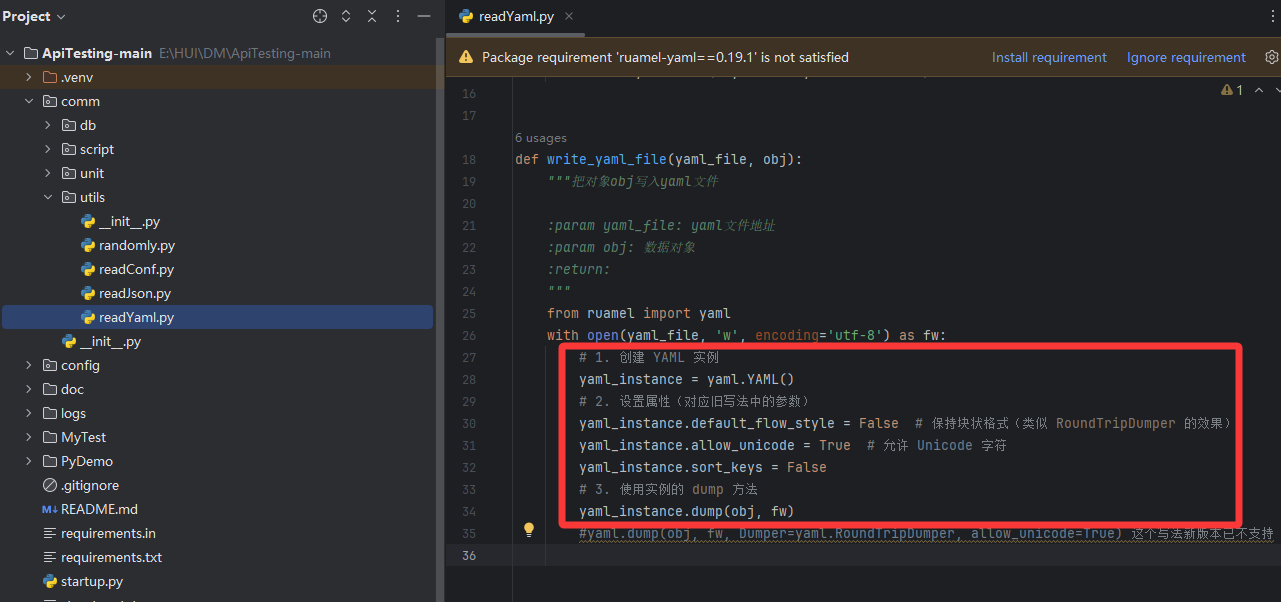
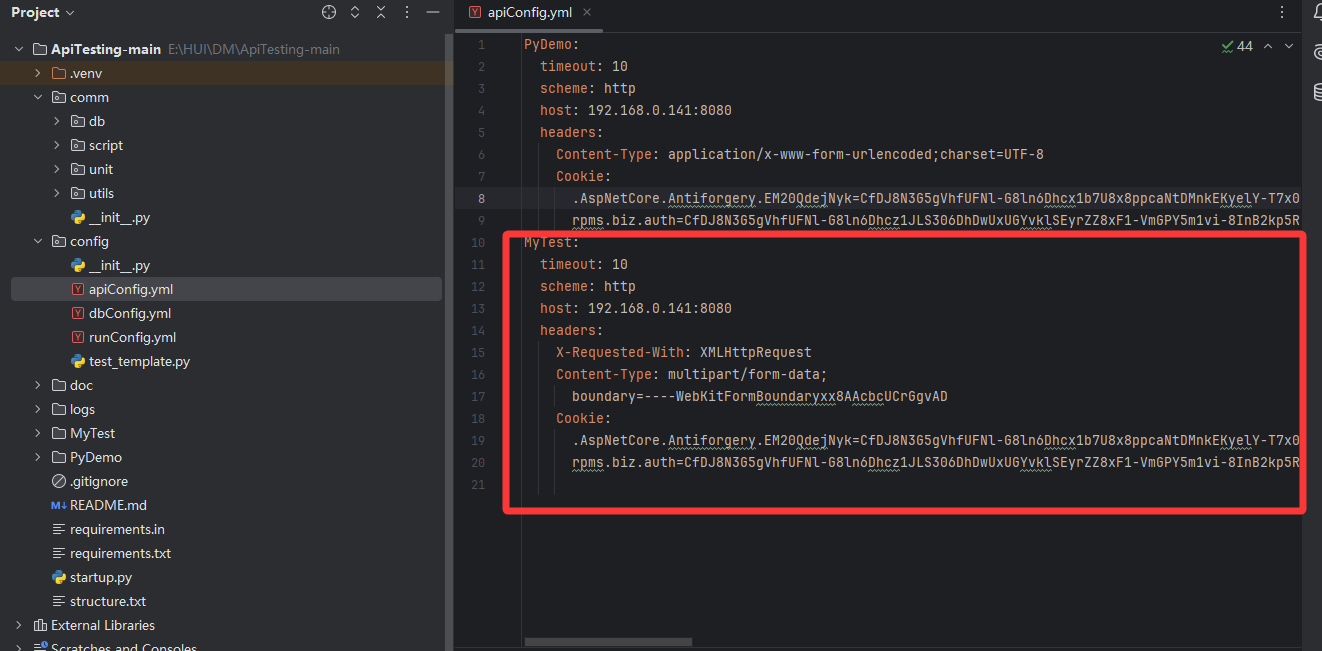
4、配置参数调整
调整为自己项目的参数 所有参数按自己实际项目修改;
参数会根据抓包数据自动填入,自己使用一般只需要改一下cookie信息即可
5、python接口测试 传form表单数据格式不正确问题解决
运行之后,明明传了请求数据,content-type 也没问题,但是通过代码请求返回了 项目信息不能为空
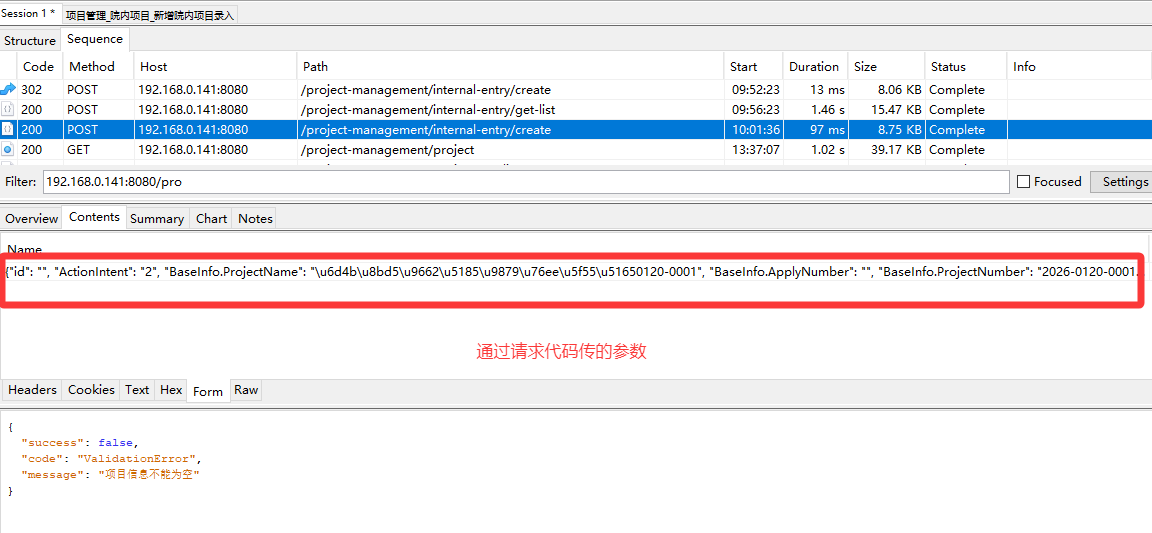
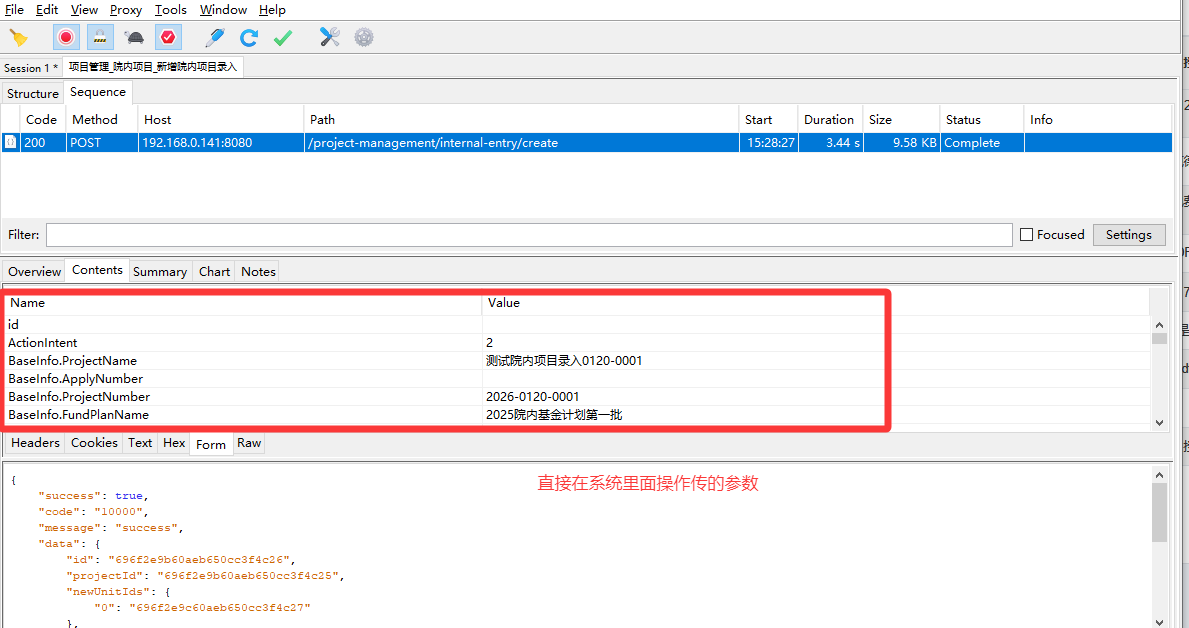
虽然两段数据的"内容"是一样的,但"包装形式"完全不同。直接用 Requests 发送第一段原始字符串,和浏览器发送的第二段表单数据,在服务器眼里是完全不同的两个请求。
❓ 为什么请求不成功?
核心原因:Content-Type 与 Body 格式不匹配
1.浏览器(第二段数据)的做法:
格式:它将数据组织成了 key=value&key2=value2 的形式。
请求头:自动设置了 Content-Type: application/x-www-form-urlencoded。
结果:服务器知道这是一个表单,能正确解析出 BaseInfo.ProjectName 等字段。
2.现在的 Python 代码(第一段数据)的做法:
-
情况 A(传了字符串):如果你直接把第一段那个长字符串传给 requests.post(data=...),但没有手动设置 Content-Type,Requests 可能会把它当成纯文本发送,或者编码方式不对。
-
情况 B(传了 JSON):如果你用了 json= 参数,Requests 会把数据变成 {"BaseInfo.ProjectName": "测试..."} 这种 JSON 格式发送,而服务器端是一个接收表单(Form)的接口,它看不懂 JSON,所以返回"没有请求信息"。
🛠️ 怎么让 Python 发出和浏览器一样的请求?
要让 Python 发出和第二段数据一样的请求,关键在于构造字典并利用 Requests 的自动编码功能。
把"字符串"转换成"Python 字典"
把抓包拿到的原始数据解析成一个 Python 的 dict。因为 Requests 只有拿到 dict,才能自动把它转成浏览器那种 key=value 的格式。
1.将原代码中comm\script\writeCaseYml.py 文件的 parse_request_parameter 函数替换为下面的代码
python
def parse_request_parameter(har_ct):

    # 解析请求报文

    parameter = dict()

    method = har_ct["method"]

    mime_type = har_ct["request"].get("mimeType", "").lower() # 获取Content-Type

    body_text = har_ct["request"]["body"].get("text", "")

    try:

        # 1. GET 请求:直接解析 Query 参数为字典

        if method == 'GET':

            # 如果有查询参数

            if har_ct.get("query"):

                for item in har_ct["query"]:

                    parameter[item['name']] = item['value']

            return parameter if parameter else None

        # 2. POST/PUT/DELETE 请求

        # 根据不同的 Content-Type 进行解析

        if body_text:

            # A. 处理 application/x-www-form-urlencoded

            if 'x-www-form-urlencoded' in mime_type:

                # 解码 URL 编码的字符串,并分割成字典

                decoded_text = urllib.parse.unquote(body_text)

                for kv in decoded_text.split('&'):

                    if '=' in kv:

                        k, v = kv.split('=', 1) # 1 表示只分割一次,防止值里包含等号

                        parameter[k] = v

                print('处理了请求参数')

                return parameter


            # B. 处理 application/json

            elif 'json' in mime_type:

                # 直接将 JSON 字符串反序列化为 Python 字典

                return json.loads(body_text)


            # C. 其他类型(如 text, xml 等),暂时返回原始字符串或空

            else:

                # 如果无法解析为字典,可以返回字符串,或者尝试通用 JSON 解析

                try:

                    return json.loads(body_text)

                except:

                    logging.warning(f"无法解析的 Body 类型: {mime_type}, 内容: {body_text}")

                    return body_text # 或者返回 None

        return None # 没有 Body 的情况

    except Exception as e:

        logging.error("解析 parameter 失败: %s, 原始数据: %s" % (e, body_text))

raise e2.将原代码omm\unit\apiMethod.py 文件中 post 函数替换为以下代码
python
def post(headers, address, mime_type, timeout=10, data=None, files=None, cookies=None):

    """

    post请求

    :param headers: 请求头

    :param address: 请求地址

    :param mime_type: 请求参数格式(form_data, application/json, raw)

    :param timeout: 超时时间

    :param data: 请求参数 (字典或字符串)

    :param files: 上传文件请求参数(dict)

    :param cookies:

    :return:

    """

    # 1. 处理文件上传 (multipart/form-data)

    if 'form_data' in mime_type or files:

        # 如果有文件,或者指定为 form_data

        if files:

            for key in files:

                value = files[key]

                if isinstance(value, str) and os.path.exists(value):

                    files[key] = (os.path.basename(value), open(value, 'rb'))

            # 使用 MultipartEncoder

            enc = MultipartEncoder(

                fields=files,

                boundary='--------------' + str(random.randint(1e28, 1e29-1))

            )

            headers['Content-Type'] = enc.content_type

            response = requests.post(

                url=address,

                data=enc,

                headers=headers,

                timeout=timeout,

                cookies=cookies,

                verify=False

            )

        else:

            # 没有文件,但指定为 form,且 data 是字典

            headers['Content-Type'] = 'application/x-www-form-urlencoded'

            response = requests.post(

                url=address,

                data=data, # 这里传入字典,requests 会自动编码为 a=1&b=2

                headers=headers,

                timeout=timeout,

                cookies=cookies,

                verify=False

            )


    # 2. 处理 JSON (application/json)

    elif 'application/json' in mime_type:

        headers['Content-Type'] = 'application/json'

        # 如果 data 是字典,直接传给 json 参数;如果是字符串,用 data

        if isinstance(data, dict):

            response = requests.post(

                url=address,

                json=data, # 这里会自动序列化字典并设置 Content-Type

                headers=headers,

                timeout=timeout,

                cookies=cookies,

                verify=False

            )

        else:

            response = requests.post(

                url=address,

                data=data, # 假设 data 已经是 json 字符串

                headers=headers,

                timeout=timeout,

                cookies=cookies,

                verify=False

            )


    # 3. 处理 Raw/Text 或其他类型

    else:

        # 默认作为表单或原始字符串处理

        # 如果你的 raw 数据是 JSON 字符串,保留原样;如果是字典,转为字符串

        if isinstance(data, dict):

            # 如果是 raw 但传了字典,通常意味着是表单数据

            headers['Content-Type'] = 'application/x-www-form-urlencoded'

            response = requests.post(

                url=address,

                data=data, # 字典转为 a=1&b=2

                headers=headers,

                timeout=timeout,

                cookies=cookies,

                verify=False

            )

        else:

            headers['Content-Type'] = mime_type # 使用指定的 raw 类型

            response = requests.post(

                url=address,

                data=data, # 原始字符串

                headers=headers,

                timeout=timeout,

                cookies=cookies,

                verify=False

            )

    # 响应处理 (保持不变)

    try:

        if response.status_code != 200:

            return response.status_code, response.text

        else:

            return response.status_code, response.json()

    except (json.decoder.JSONDecodeError, simplejson.errors.JSONDecode0Error):

        return response.status_code, None

    except Exception as e:

        logging.exception('ERROR')

        logging.error(e)

        raise
🛠️ 为什么这样修改有效?
-
类型转换:原代码直接把 har_ct"request""body""text"(字符串)赋值给 parameter。修改后的代码使用 json.loads(body_text),将 JSON 格式的字符串转换成了 Python 的 dict 对象。
-
兼容性:增加了对 Content-Type 的判断,既能处理 JSON 数据,也能处理表单数据(x-www-form-urlencoded),使其更健壮。
-
逻辑一致性:无论接口是 GET 还是 POST,最终 parameter 都是字典格式,方便后续框架进行统一的参数化处理。
6、pyhon 传参,form参数名重复 问题
根据上面的第五步,已经解决了传参格式问题,重新请求,发现还是有问题,对比了一下抓包数据和python转换的请求数据,发现python转换数据时,Members.index参数值与抓包时的参数值不一样,并且相同参数名的参数,只转换了一个,后面重复参数名的参数被省略了。
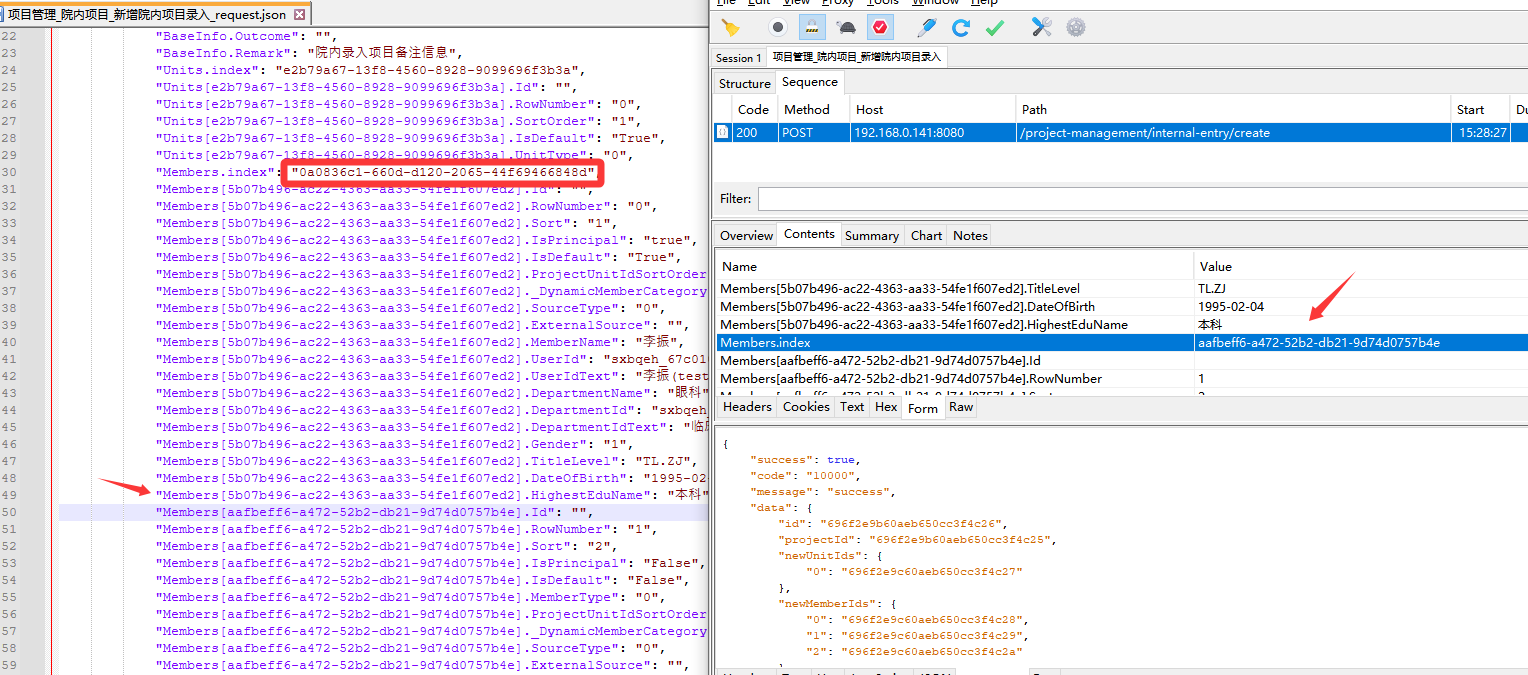
这是一个非常隐蔽的 Python 字典键覆盖(Key Overwriting) 问题。
虽然 Charles 抓包数据中 Members.index 出现了三次(对应三个不同的 UUID),但writeCaseYml.py 脚本生成的 JSON 中只有一个 Members.index,且值是最后一个 UUID。
根本原因: 在 parse_request_parameter 函数中,使用了 parameterval = val 的逻辑。由于 Form 表单解析时,字典(Dict)的键必须是唯一的,当解析到后续的 Members.index 时,它会直接覆盖掉之前的值,最终只保留最后一个。
解决方案
要解决这个问题,你不能使用标准的 Key-Value 字典来存储参数,因为 Form 格式本身是支持重复键的,而 JSON 和 Python 字典不支持。
你需要将参数存储为 "键值对列表" 或者 特殊的结构。
1、修改comm\script\writeCaseYml.py 文件parse_request_parameter方法
修改解析逻辑,让参数保持为 \[key, value, key, value] 的列表形式,这样能 100% 还原 Form 表单的顺序和重复性。
python
def parse_request_parameter(har_ct):
    # 解析请求报文
    parameter = dict()
    method = har_ct["method"]
    mime_type = har_ct["request"].get("mimeType", "").lower() # 获取Content-Type
    body_text = har_ct["request"]["body"].get("text", "")

    try:
        # 1. GET 请求:直接解析 Query 参数为字典
        if method == 'GET':
            # 如果有查询参数
            if har_ct.get("query"):
                for item in har_ct["query"]:
                    parameter[item['name']] = item['value']
            return parameter if parameter else None

        # 2. POST/PUT/DELETE 请求
        # 根据不同的 Content-Type 进行解析
        if body_text:
            # A. 处理 application/x-www-form-urlencoded
            if 'x-www-form-urlencoded' in mime_type:
                # 解码 URL 编码的字符串,并分割成字典
                decoded_text = urllib.parse.unquote(body_text)
                # for kv in decoded_text.split('&'):
                #     if '=' in kv:
                #         k, v = kv.split('=', 1) # 1 表示只分割一次,防止值里包含等号
                #         parameter[k] = v
                # print('处理了请求参数')
                # return parameter
                 # 修改点1: 不再使用字典,改用列表存储 [key, value]
                parameter = []
                for kv in decoded_text.split('&'):
                    if '=' in kv:
                        k, v = kv.split('=', 1)
                        parameter.append([k, v]) # 存储为二维列表
                return parameter

            # B. 处理 application/json
            elif 'json' in mime_type:
                # 直接将 JSON 字符串反序列化为 Python 字典
                return json.loads(body_text)

            # C. 其他类型(如 text, xml 等),暂时返回原始字符串或空
            else:
                # 如果无法解析为字典,可以返回字符串,或者尝试通用 JSON 解析
                try:
                    return json.loads(body_text)
                except:
                    logging.warning(f"无法解析的 Body 类型: {mime_type}, 内容: {body_text}")
                    return body_text # 或者返回 None

        return None # 没有 Body 的情况

    except Exception as e:
        logging.error("解析 parameter 失败: %s, 原始数据: %s" % (e, body_text))
raise e2、修改comm\script\writeCaseYml.py 文件init_test_case方法
python
def init_test_case(har_ct, module_path, parameter, file_name):
    """
    初始化测试用例结构
    :param har_ct: HAR 请求数据
    :param module_path: 模块路径
    :param parameter: 解析后的参数 (可能是 dict, list[str] 或 str)
    :param file_name: 文件名
    :return: test_case 字典
    """
    title = file_name
    test_case = {
        "summary": title,
        "describe": 'test_' + title
    }

    # --- 核心修改:根据参数类型处理存储逻辑 ---
    # 判断是否为 Form 表单数据 (列表格式) 或者是长字符串/复杂字典
    need_separate_file = False

    # 1. 计算参数长度:如果是列表(Form),需要计算还原成字符串后的长度
    if isinstance(parameter, list):
        # 如果是 Form 列表,模拟还原成 URL 编码字符串来计算长度
        temp_str = "&".join([f"{k}={v}" for k, v in parameter])
        need_separate_file = len(temp_str) > 200
    else:
        # 如果是 JSON 字典或普通字符串
        need_separate_file = len(str(parameter)) > 200

    if need_separate_file:
        # 生成文件名
        if isinstance(parameter, list):
            # Form 数据建议保存为 .txt 或 .data,因为不是标准 JSON
            param_name = title + '_request.data'
        else:
            param_name = title + '_request.json'

        param_file_path = os.path.join(module_path, param_name)

        # 只有当文件不存在时才创建,避免覆盖
        if not os.path.exists(param_file_path):
            try:
                # 写入文件的逻辑根据类型区分
                if isinstance(parameter, list):
                    # 方案A: 直接写入 [key, value] 列表,方便 requests 直接读取
                    write_json_file(param_file_path, parameter)
                else:
                    # 方案B: JSON 数据,保持原有的 {"body": ...} 结构
                    param_dict = {
                        "summary": title,
                        "body": parameter
                    }
                    write_json_file(param_file_path, [param_dict])
                logging.info("生成请求文件: {}".format(param_file_path))
            except Exception as e:
                logging.error("写入请求文件失败: %s" % e)

        # YAML/配置中存储的是文件名,告诉 runner 去读文件
        test_case["parameter"] = param_name
    else:
        # 参数较短,直接内嵌在 YAML 中
        test_case["parameter"] = parameter

    # --- 响应断言处理 (保持不变) ---
    response_code = har_ct["response"]["status"]
    response_body_text = har_ct["response"]["body"].get("text", "{}")

    check = {
        "check_type": 'check_json',
        "expected_code": response_code
    }

    try:
        expected_request = json.loads(response_body_text)
        # 响应结果通常都是 JSON,按原逻辑处理
        if len(str(expected_request)) > 200:
            result_name = title + '_response.json'
            result_file_path = os.path.join(module_path, result_name)

            if not os.path.exists(result_file_path):
                result_dict = {
                    "summary": title,
                    "body": expected_request
                }
                write_json_file(result_file_path, [result_dict])
                logging.info("生成响应文件: {}".format(result_file_path))

            check["expected_result"] = result_name
        else:
            check["expected_result"] = expected_request
    except json.JSONDecodeError:
        logging.warning("响应体不是合法的 JSON,将作为文本处理")
        check["expected_result"] = response_body_text
        check["check_type"] = 'check_text' # 可能需要调整断言类型

    test_case["check_body"] = check
    return test_case
关键修改点说明
-
类型判断 (isinstance):
代码现在会检查 parameter 是 list(Form 表单)还是 dict/str(JSON/普通)。
-
长度计算修正:
对于 Form 表单(列表),不再直接 str(list),而是模拟拼接成 a=1&b=2 的字符串来计算长度,这样更准确。
-
文件格式区分:
Form 数据保存为 .data 后缀(内容是 \["k","v", "k","v"])。
JSON 数据保存为 .json 后缀(内容是 {"body": {...}})。
-
文件写入逻辑:
Form Data:直接把列表写入文件。后续在 apiSend.py 中读取时,可以直接把这个列表传给 requests.post(data=...)。
JSON Data:保持原有的嵌套结构,兼容旧逻辑。
3、修改 comm/unit/initializePremise.py 中的 read_json 方法
python
def read_json(summary, json_obj, case_path):
    """
    校验内容读取
    :param summary: 用例名称
    :param json_obj: json文件或数据对象
    :param case_path: case路径
    :return: 返回具体的参数数据 (字典或列表)
    """
    # 如果参数本身就是空的,直接返回
    if not json_obj:
        return json_obj
    # 如果参数已经是字典(可能在 yaml 中直接定义了短参数),直接返回
    elif isinstance(json_obj, dict):
        return json_obj
    else:
        try:
            file_path = os.path.join(case_path, json_obj)
            with open(file_path, "r", encoding="utf-8") as js:
                data_list = json.load(js)

                # --- 核心修改开始 ---
                # 判断是否为 Form 表单数据文件 (.data 后缀)
                if json_obj.endswith('.data'):
                    # 直接返回整个列表,因为 .data 文件里存的就是纯粹的 [["k","v"], ...]
                    logging.debug(f"读取 Form 表单数据文件: {json_obj}")
                    return data_list
                else:
                    # 原有逻辑:JSON 文件,需要遍历查找匹配 summary 的条目
                    logging.debug(f"读取 JSON 数据文件: {json_obj}")
                    for data in data_list:
                        if data.get('summary') == summary:  # 使用 get 防止 KeyError
                            return data.get('body', {})
                    # 如果没找到对应的 summary
                    logging.warning(f"在文件 {json_obj} 中未找到 summary 为 {summary} 的数据")
                    return {}
                # --- 核心修改结束 ---

        except FileNotFoundError:
            logging.error(f"用例关联文件不存在: {file_path}")
            raise
        except json.JSONDecodeError:
            logging.error(f"用例关联的文件格式错误 (不是合法的 JSON): {file_path}")
            raise
        except Exception as e:
            logging.error(f"读取文件时发生未知错误: {e}")
            raise
根据传入的文件名后缀(.data 或 .json)来区分处理逻辑:
-
如果是 .data 文件:直接返回读取的列表,不需要查找 summary。
-
如果是 .json 文件:保持原有的查找 summary 的逻辑。
7、参数化
直接在生成的请求参数文件(.data .json .yaml)中,使用代码里面已经预置好的随机参数
comm\unit\replaceRelevance.py 文件中可以看可以使用的随机参数
我这里修改了两个参数值 使用随机参数,具体使用参考如下:
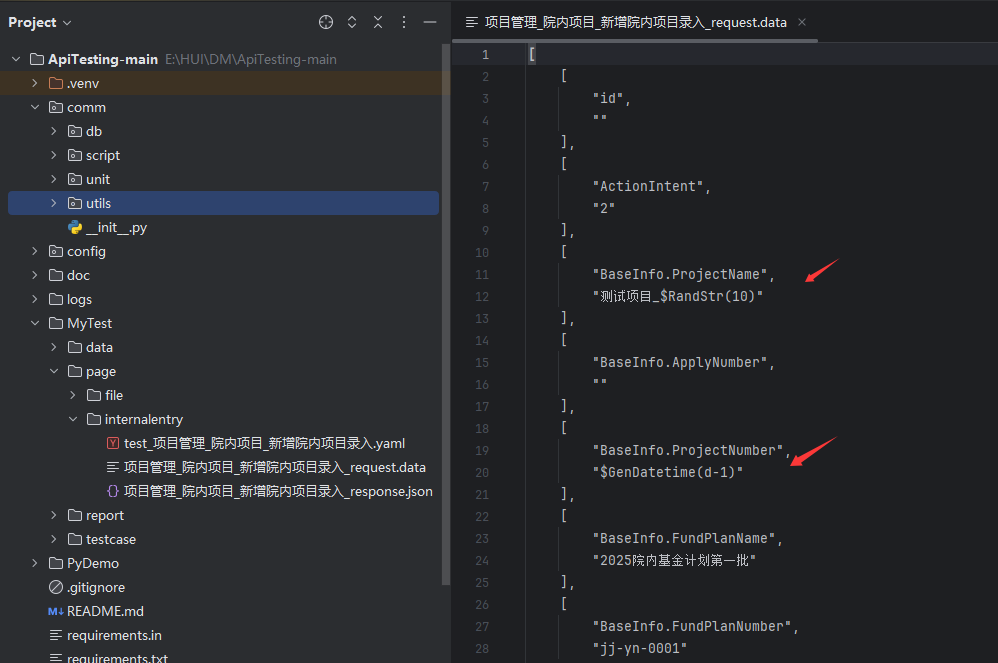
8、上传文件接口报错
看了一下生成的请求参数文件,发现请求参数没有,应该是没转换成功
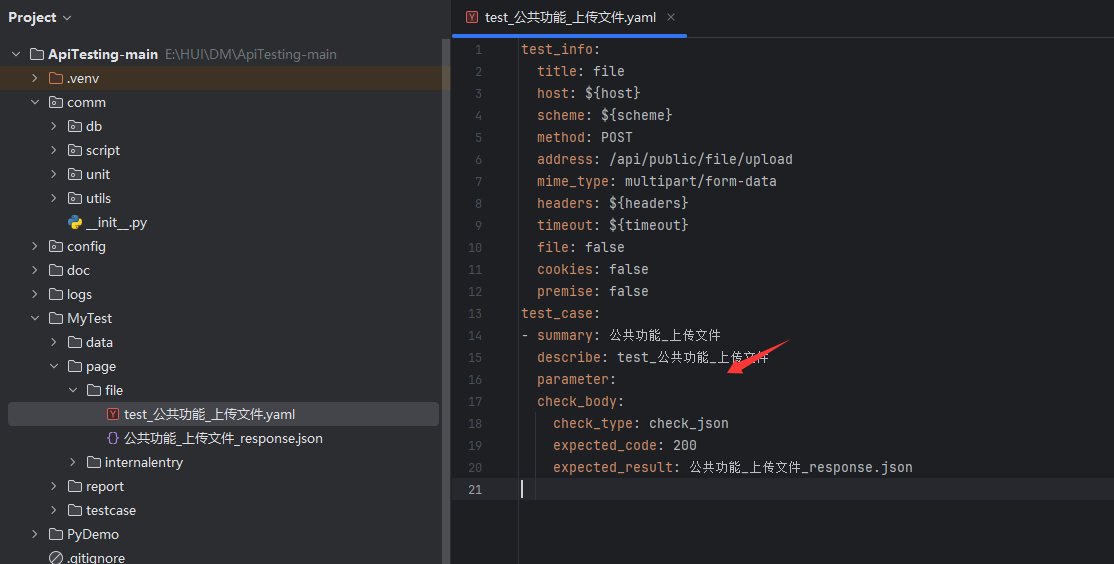
根本原因在于:代码未能正确识别 HAR/Chlsj 数据中的 multipart/form-data 格式数据。
具体来说,是解析逻辑与数据存储格式不匹配导致的。
.chlsj 文件内容,文件数据是这样存储的:
python
"body": {

"encoding": "base64",

"encoded": "LS0tLS0tV2ViS2l0Rm9ybUJvdW5kYXJ5..." }
文件内容被 Base64 编码存储在 body.encoded 字段中,而不是以明文的 key=value 形式存储。
现在writeCaseYml.py 中的 parse_request_parameter 逻辑,处理 Form 表单的逻辑是:
- 读取 body.text(或者类似的明文字段)。
- 判断 body.text是否为空,不为空继续解析参数,为空直接返回None,由于文件内容存储在body.encoded中,body.text为空,所以直接返回了None
解决办法:
1.修改config\apiConfig.yml 文件
增加一个字段,用来存放真实文件的路径。
python
MyTest:
  timeout: 10
  scheme: http
  host: 192.168.0.141:8080
  headers:
    X-Requested-With: XMLHttpRequest
    Content-Type: multipart/form-data;
      boundary=----WebKitFormBoundaryxx8AAcbcUCrGgvAD
    Cookie:
      .AspNetCore.Antiforgery.EM20QdejNyk=CfDJ8N3G5gVhfUFNl-G8ln6DhcxgqcWeKZYvI5RrsSUx1PgwH_LFoBMwIacTRWWzzUgNR2wUl1CLi8CTUYswAMVG4Ipe1xRM2sCPKtWl3HyOG9RVe_LBda6CiT8gWKBdOCwvJ6kbIK_sWU14pek_RpWIYBg;
      rpms.biz.auth=CfDJ8N3G5gVhfUFNl-G8ln6Dhcymq-yfckQDa1Hu8bZXv5TBL9oMXlNF_bSbi0yBRfMT-Mpe8xiRx_6JRkR6TLJXZ4ei6EW_fYnRZICzDSZ7KRDtmo8mAV8l2D2NYifsPR9w9tuVMPKTfVyyYnzXQ4LUrTbUJuQVYh4fTiWrrTW0rvpFOpMa5PaM2usMvgdPL-__mHMfgf2igFnFIiRaSsPog0BlaAZQe3rSaoHg5Oxiu1T1MRh6HIb-745H9dhNZ817JGr8IoIO89uMpESKqUDi6xFBfYer__1JAqniH401Qr_9QITwticQWkyj1i7v50VchwnDCAaS0gxoahXCzrgLPr5HT0QCmkdEfXhWJsqqFmQMhOCwzGpD5hKrDPHC96cIiAgwJLeuPHr1qGi8WhNjwhE
  # 新增:定义上传文件的真实路径
upload_file_path: E:/HUI/test/file/_互联网+_在妇科疾病全程管理中的应用研究进展.pdf2.修改comm\script\writeCaseYml.py 文件parse_request_parameter 方法
修改点解析
- 增加获取body而不是仅获取body.text内容,并且增加判断body、body.text任一不为空就进入下一步,因为上传文件 文件内容不在body.text中。
- 增加对文件上传的处理,检测到文件上传请求,给表单字段名为'file' 赋值一个特殊的标记,后续apiMethod.py中调用时,识别到这个标记 就去配置里面找真实的文件路径 并上传
python
def parse_request_parameter(har_ct):
    # 解析请求报文
    parameter = dict()
    method = har_ct["method"]
    mime_type = har_ct["request"].get("mimeType", "").lower() # 获取Content-Type
    body_text = har_ct["request"]["body"].get("text", "")
    body_info = har_ct["request"]["body"]
    # print("body_text内容为:",body_text)
    # print("body_info内容为:",body_info)
    try:
        # 1. GET 请求:直接解析 Query 参数为字典
        if method == 'GET':
            # 如果有查询参数
            if har_ct.get("query"):
                for item in har_ct["query"]:
                    parameter[item['name']] = item['value']
            return parameter if parameter else None

        # 2. POST/PUT/DELETE 请求
        # 根据不同的 Content-Type 进行解析
        if body_text or body_info:
            # A. 核心修改:处理文件上传 (multipart/form-data)
            if 'multipart/form-data' in mime_type:
                # 无论原始文件名是什么,统一返回一个特殊标记
                # 这样在运行时,apiMethod 会用配置文件里的真实路径替换它
                logging.warning(f"检测到文件上传请求。为了通用性,使用通用占位符参数。")
                # 返回一个字典,键是表单名(通常为file),值是特殊标记
                # 注意:这里假设表单字段名为 'file',如果实际是其他名字(如fileData),请修改此处
                return {"file": "__GENERIC_UPLOAD_FILE_PLACEHOLDER__"}

            # A. 处理 application/x-www-form-urlencoded
            if 'x-www-form-urlencoded' in mime_type:
                # 解码 URL 编码的字符串,并分割成字典
                decoded_text = urllib.parse.unquote(body_text)
                # for kv in decoded_text.split('&'):
                #     if '=' in kv:
                #         k, v = kv.split('=', 1) # 1 表示只分割一次,防止值里包含等号
                #         parameter[k] = v
                # print('处理了请求参数')
                # return parameter
                 # 修改点1: 不再使用字典,改用列表存储 [key, value]
                parameter = []
                for kv in decoded_text.split('&'):
                    if '=' in kv:
                        k, v = kv.split('=', 1)
                        parameter.append([k, v]) # 存储为二维列表
                return parameter

            # B. 处理 application/json
            elif 'json' in mime_type:
                # 直接将 JSON 字符串反序列化为 Python 字典
                return json.loads(body_text)

            # C. 其他类型(如 text, xml 等),暂时返回原始字符串或空
            else:
                # 如果无法解析为字典,可以返回字符串,或者尝试通用 JSON 解析
                try:
                    return json.loads(body_text)
                except:
                    logging.warning(f"无法解析的 Body 类型: {mime_type}, 内容: {body_text}")
                    return body_text # 或者返回 None

        return None # 没有 Body 的情况

    except Exception as e:
        logging.error("解析 parameter 失败: %s, 原始数据: %s" % (e, body_text))
raise e修改write_case_yaml 方法
增加对文件上传接口的判断,如果是文件上传,生成的请求参数文件file标记为true
python
def write_case_yaml(har_path):
    """循环读取接口数据文件

    :param har_path: Charles导出文件路径
    :return:
    """
    case_file_list = list()
    logging.info("读取抓包文件主目录: {}".format(har_path))
    har_list = os.listdir(har_path)
    for each in har_list:
        # ext_name = os.path.splitext(each)[1]
        file_name, ext_name = os.path.splitext(each)
        if ext_name == '.chlsj':

            logging.info("读取抓包文件: {}".format(each))
            file_path = har_path+'/'+each
            with open(file_path, 'r', encoding='utf-8') as f:
                har_cts = json.loads(f.read())
                har_ct = har_cts[0]

                # 获取接口基本信息
                method = har_ct["method"]
                path = har_ct["path"]
                title = file_name
                # title = path.split("/")[-1].replace('-', '')
                module = path.split("/")[-2].replace('-', '')
                module_path = har_path.split('data')[0] + '/page/' + module

                # 创建模块目录
                try:
                    os.makedirs(module_path)
                except:
                    pass

                # 初始化api配置
                init_api_conf(har_ct)

                # 解析请求参数
                parameter = parse_request_parameter(har_ct)

                # 初始化测试用例
                test_case = init_test_case(har_ct, module_path, parameter, file_name)

                # 定义测试信息
                test_info = dict()
                test_info["title"] = module
                test_info["host"] = '${host}'
                test_info["scheme"] = '${scheme}'
                test_info["method"] = method
                test_info["address"] = path
                test_info["mime_type"] = har_ct["request"]["mimeType"]
                test_info["headers"] = '${headers}'
                test_info["timeout"] = '${timeout}'
                test_info["file"] = False
                # --- 修复点:动态判断 file 字段 ---
                # 检查是否为文件上传请求
                is_file_upload = 'multipart/form-data' in har_ct["request"]["mimeType"].lower()
                test_info["file"] = is_file_upload  # 如果是上传请求,则为 True

                test_info["cookies"] = False
                test_info["premise"] = False

                # 合并测试信息、测试用例
                case_list = dict()
                case_list["test_info"] = test_info
                case_list["test_case"] = [test_case]

                # 写入测试用例(存在则忽略)
                case_name = 'test_'+title+'.yaml'
                case_file = module_path+'/'+case_name
                if not os.path.exists(case_file):
                    logging.info("生成用例文件: {}".format(case_file))
                    write_yaml_file(case_file, case_list)
                case_file_list.append(case_file)

return case_file_list3.修改comm\unit\apiMethod.py 文件post 执行方法
修改解析:
增加了"预处理"逻辑。在发送请求前,检查参数中是否包含我们刚才定义的特殊标记 GENERIC_UPLOAD_FILE_PLACEHOLDER。如果包含,就去读取 apiConfig.yml 中的真实路径。
python
def post(headers, address, mime_type, timeout=10, data=None, files=None, cookies=None):
    """
    post请求
    :param headers: 请求头
    :param address: 请求地址
    :param mime_type: 请求参数格式(form_data, application/json, raw)
    :param timeout: 超时时间
    :param data: 请求参数 (字典或字符串)
    :param files: 上传文件请求参数(dict)
    :param cookies:
    :return:
    """
    # --- 新增逻辑:预处理文件路径 ---
    # 检查是否为 multipart/form-data 请求 (文件上传)
    if 'form_data' in mime_type or files:
        # 读取配置文件,获取项目名和配置
        from config import API_CONFIG, PROJECT_NAME
        config_data = read_yaml_data(API_CONFIG)

        # 获取当前项目的 upload_file_path
        real_file_path = config_data.get(PROJECT_NAME, {}).get('upload_file_path')

        if not real_file_path:
            raise FileNotFoundError(f"配置文件中未找到 {PROJECT_NAME} 的 upload_file_path,请检查 apiConfig.yml")

        # 检查 files 参数中是否包含占位符
        if files:
            for key, value in files.items():
                # 如果值是字符串,并且是我们定义的特殊占位符
                if isinstance(value, str) and value == "__GENERIC_UPLOAD_FILE_PLACEHOLDER__":
                    # 检查真实文件是否存在
                    if not os.path.exists(real_file_path):
                        raise FileNotFoundError(f"配置的真实文件不存在: {real_file_path}")

                    # 替换为 (文件名, 文件句柄) 的元组
                    files[key] = (os.path.basename(real_file_path), open(real_file_path, 'rb'))
                    print("文件已经被替换")
    # 1. 处理文件上传 (multipart/form-data)
    if 'form_data' in mime_type or files:
        # 如果有文件,或者指定为 form_data

        if files:
            # for key in files:
            #     value = files[key]
            #     if isinstance(value, str) and os.path.exists(value):
            #         files[key] = (os.path.basename(value), open(value, 'rb'))
            # 使用 MultipartEncoder
            enc = MultipartEncoder(
                fields=files,
                #boundary='--------------' + str(random.randint(1e28, 1e29-1))
                # 修复:使用整数代替浮点数  在Python 3.12中,random.randint()函数要求参数必须是整数,但代码中使用了科学计数法表示的浮点数(1e28和1e29-1),这在Python 3.12中不再被接受。
                boundary = '--------------' + str(random.randint(10 ** 28, 10 ** 29 - 1))
            )
            headers['Content-Type'] = enc.content_type
            response = requests.post(
                url=address,
                data=enc,
                headers=headers,
                timeout=timeout,
                cookies=cookies,
                verify=False
            )
        else:
            # 没有文件,但指定为 form,且 data 是字典
            headers['Content-Type'] = 'application/x-www-form-urlencoded'
            response = requests.post(
                url=address,
                data=data, # 这里传入字典,requests 会自动编码为 a=1&b=2
                headers=headers,
                timeout=timeout,
                cookies=cookies,
                verify=False
            )

    # 2. 处理 JSON (application/json)
    elif 'application/json' in mime_type:
        headers['Content-Type'] = 'application/json'
        # 如果 data 是字典,直接传给 json 参数;如果是字符串,用 data
        if isinstance(data, dict):
            response = requests.post(
                url=address,
                json=data, # 这里会自动序列化字典并设置 Content-Type
                headers=headers,
                timeout=timeout,
                cookies=cookies,
                verify=False
            )
        else:
            response = requests.post(
                url=address,
                data=data, # 假设 data 已经是 json 字符串
                headers=headers,
                timeout=timeout,
                cookies=cookies,
                verify=False
            )

    # 3. 处理 Raw/Text 或其他类型
    else:
        # 默认作为表单或原始字符串处理
        # 如果你的 raw 数据是 JSON 字符串,保留原样;如果是字典,转为字符串
        if isinstance(data, dict):
            # 如果是 raw 但传了字典,通常意味着是表单数据
            headers['Content-Type'] = 'application/x-www-form-urlencoded'
            response = requests.post(
                url=address,
                data=data, # 字典转为 a=1&b=2
                headers=headers,
                timeout=timeout,
                cookies=cookies,
                verify=False
            )
        else:
            headers['Content-Type'] = mime_type # 使用指定的 raw 类型
            response = requests.post(
                url=address,
                data=data, # 原始字符串
                headers=headers,
                timeout=timeout,
                cookies=cookies,
                verify=False
            )

    # 响应处理 (保持不变)
    try:
        if response.status_code != 200:
            return response.status_code, response.text
        else:
            return response.status_code, response.json()
    except (json.decoder.JSONDecodeError, simplejson.errors.JSONDecode0Error):
        return response.status_code, None
    except Exception as e:
        logging.exception('ERROR')
        logging.error(e)
        raise
9、根据现有函数功能实现随机文件上传
通过上面的第8步,已经实现了文件上传接口测试,但是有一个问题,就是配置文件里面的文件 是固定的,这会导致每次上传的都是同一个文件。
现在我们在 comm\unit\replaceRelevance.py 文件增加 $RandFile() 函数功能,修改一下代码,实现随机文件上传。
- 修改配置文件 (apiConfig.yml)
添加 file_upload_dir 配置,值为你存放测试文件的文件夹路径。
python
MyTest:
  timeout: 10
  scheme: http
  host: 192.168.0.141:8080
  headers:
    X-Requested-With: XMLHttpRequest
    Content-Type: multipart/form-data;
      boundary=----WebKitFormBoundaryxx8AAcbcUCrGgvAD
    Cookie:
      .AspNetCore.Antiforgery.EM20QdejNyk=CfDJ8N3G5gVhfUFNl-G8ln6DhcxgqcWeKZYvI5RrsSUx1PgwH_LFoBMwIacTRWWzzUgNR2wUl1CLi8CTUYswAMVG4Ipe1xRM2sCPKtWl3HyOG9RVe_LBda6CiT8gWKBdOCwvJ6kbIK_sWU14pek_RpWIYBg;
      rpms.biz.auth=CfDJ8N3G5gVhfUFNl-G8ln6Dhcymq-yfckQDa1Hu8bZXv5TBL9oMXlNF_bSbi0yBRfMT-Mpe8xiRx_6JRkR6TLJXZ4ei6EW_fYnRZICzDSZ7KRDtmo8mAV8l2D2NYifsPR9w9tuVMPKTfVyyYnzXQ4LUrTbUJuQVYh4fTiWrrTW0rvpFOpMa5PaM2usMvgdPL-__mHMfgf2igFnFIiRaSsPog0BlaAZQe3rSaoHg5Oxiu1T1MRh6HIb-745H9dhNZ817JGr8IoIO89uMpESKqUDi6xFBfYer__1JAqniH401Qr_9QITwticQWkyj1i7v50VchwnDCAaS0gxoahXCzrgLPr5HT0QCmkdEfXhWJsqqFmQMhOCwzGpD5hKrDPHC96cIiAgwJLeuPHr1qGi8WhNjwhE
# 新增:专门定义文件上传的根目录
file_upload_dir: E:/HUI/test/file- 修改变量替换文件 (replaceRelevance.py)
修改点:
- 增加正则:在顶部增加 pattern_rand_file。
- 增加处理函数:仿照 replace_random 写一个新的 replace_rand_file 函数。
- 注入主函数:在 replace 函数中调用它。
python
import re
import os # 新增:用于文件操作
import random # 新增:用于随机选择
from comm.utils.randomly import *
from config import API_CONFIG, PROJECT_NAME # 新增:用于读取配置

pattern_var = r"\${(.*?)}"
pattern_eval = r"\$Eval\((.*?)\)"
pattern_str = r'\$RandStr\(([0-9]*?)\)'
pattern_int = r'\$RandInt\(([0-9]*,[0-9]*?)\)'
pattern_choice = r"\$RandChoice\((.*?)\)"
pattern_float = r'\$RandFloat\(([0-9]*,[0-9]*,[0-9]*)\)'
pattern_phone = r'\$GenPhone\(\)'
pattern_guid = r'\$GenGuid\(\)'
pattern_wxid = r'\$GenWxid\(\)'
pattern_noid = r'\$GenNoid\((.*?)\)'
pattern_date = r'\$GenDate\((.*?)\)'
pattern_datetime = r'\$GenDatetime\((.*?)\)'
# --- 新增:随机文件正则 ---
pattern_rand_file = r'\$RandFile\(\)'

def replace_pattern(pattern, value):
	"""替换正则表达式

	:param pattern: 匹配字符
	:param value: 匹配值
	:return:
	"""
	patterns = pattern.split('(.*?)')
	return ''.join([patterns[0], value, patterns[-1]])


def replace_relevance(param, relevance=None):
	"""替换变量关联值

	:param param: 参数对象
	:param relevance: 关联对象
	:return:
	"""
	result = re.findall(pattern_var, str(param))
	if (not result) or (not relevance):
		pass
	else:
		for each in result:
			try:
				# 关联值只考虑一个值
				# value = relevance[each]
				# pattern = re.compile(r'\${' + each + '}')
				# try:
				# 	param = re.sub(pattern, value, param)
				# except TypeError:
				# 	param = value

				# 关联参数多值时一一对应替换
				# relevance_index = 0
				# if isinstance(relevance[each], list):
				# 	try:
				# 		param = re.sub(pattern, relevance[each][relevance_index], param, count=1)
				# 		relevance_index += 1
				# 	except IndexError:
				# 		relevance_index = 0
				# 		param = re.sub(pattern, relevance[each][relevance_index], param, count=1)
				# 		relevance_index += 1

				# 关联参数多值时指定索引值替换
				mark = re.findall(r"\[\-?[0-9]*\]", each)
				# 判断关联参数是否指定索引值var[n]
				if len(mark)==0:
					if isinstance(relevance[each], list):
						value = relevance[each][0]
					else:
						value = relevance[each]
				elif len(mark)==1:
					var = each.strip(mark[0])
					n = int(mark[0].strip('[').strip(']'))
					value = relevance[var][n]
					each = each.replace('[', '\[').replace(']', '\]')
				else:
					var = each
					for m in mark:
						var = var.replace(m, '')
					n1 = int(mark[0].strip('[').strip(']'))
					n2 = int(mark[1].strip('[').strip(']'))
					value = relevance[var][n1][n2]
					each = each.replace('[', '\[').replace(']', '\]')

				# 生成正在表达式并替换关联参数
				pattern = re.compile('\${' + each + '}')
				try:
					if param.strip('${' + each + '}'):
						param = re.sub(pattern, str(value), param)
					else:
						param = re.sub(pattern, value, param)
				except TypeError:
					param = value
			except KeyError:
				raise KeyError('替换变量{0}失败,未发现变量对应关联值!\n关联列表:{1}'.format(param, relevance))
				# pass
	return param


def replace_eval(param):
	"""替换eval表达式结果

	:param param: 参数对象
	:return:
	"""
	result = re.findall(pattern_eval, str(param))
	if not result:
		pass
	else:
		for each in result:
			try:
				if 'import' in each:
					raise Exception('存在非法标识import')
				else:
					value = str(eval(each))
					param = re.sub(pattern_eval, value, param)
			except KeyError as e:
				raise Exception('获取值[ % ]失败!\n%'.format(param, e))
			except SyntaxError:
				pass
	return param


def replace_random(param):
	"""替换随机方法参数值

	:param param:
	:return:
	"""
	int_list = re.findall(pattern_int, str(param))
	str_list = re.findall(pattern_str, str(param))
	choice_list = re.findall(pattern_choice, str(param))
	guid_list = re.findall(pattern_guid, str(param))
	noid_list = re.findall(pattern_noid, str(param))
	phone_list = re.findall(pattern_phone, str(param))
	wxid_list = re.findall(pattern_wxid, str(param))
	date_list = re.findall(pattern_date, str(param))
	datetime_list = re.findall(pattern_datetime, str(param))

	if len(str_list):
		for each in str_list:
			# pattern = re.compile(r'\$RandStr\(' + each + r'\)')
			# param = re.sub(pattern, str(random_str(each)), param, count=1)
			param = re.sub(pattern_str, str(random_str(each)), param, count=1)

	if len(int_list):
		for each in int_list:
			param = re.sub(pattern_int, str(random_int(each)), param, count=1)

	if len(choice_list):
		for each in choice_list:
			param = re.sub(pattern_choice, str(random_choice(each)), param, count=1)

	if len(date_list):
		for each in date_list:
			param = re.sub(pattern_date, str(generate_date(each)), param, count=1)

	if len(datetime_list):
		for each in datetime_list:
			param = re.sub(pattern_datetime, str(generate_datetime(each)), param, count=1)

	if len(noid_list):
		for each in noid_list:
			param = re.sub(pattern_noid, str(generate_noid(each)), param, count=1)

	if len(phone_list):
		for i in phone_list:
			param = re.sub(pattern_phone, str(generate_phone()), param, count=1)

	if len(guid_list):
		for i in guid_list:
			param = re.sub(pattern_guid, generate_guid(), param, count=1)

	if len(wxid_list):
		for i in wxid_list:
			param = re.sub(pattern_wxid, generate_wxid(), param, count=1)

	return param


# --- 新增函数:处理随机文件 ---
def replace_rand_file(param):
	"""
    处理 $RandFile() 函数,将其替换为配置目录下的随机文件全路径
    """
	# 只有字符串才处理
	if isinstance(param, str) and '$RandFile()' in param:
		try:
			# 1. 读取配置文件获取目录
			from comm.utils.readYaml import read_yaml_data
			config_data = read_yaml_data(API_CONFIG)
			upload_dir = config_data.get(PROJECT_NAME, {}).get('file_upload_dir')

			if not upload_dir:
				raise ValueError("配置文件中未找到 file_upload_dir")
			if not os.path.exists(upload_dir):
				raise FileNotFoundError(f"文件上传目录不存在: {upload_dir}")

			# 2. 获取目录下所有文件
			file_list = [f for f in os.listdir(upload_dir) if os.path.isfile(os.path.join(upload_dir, f))]
			if not file_list:
				raise FileNotFoundError(f"目录中没有找到文件: {upload_dir}")

			# 3. 随机选择一个文件
			selected_file = random.choice(file_list)
			full_path = os.path.join(upload_dir, selected_file).replace("\\", "/")  # 统一路径格式

			print(f"【Debug】随机选中文件: {full_path}")  # 调试用,可改为 logging.info
			# 4. 替换字符串
			param = param.replace('$RandFile()', full_path)

		except Exception as e:
			print(f"【Error】随机文件处理失败: {e}")
			# 失败时替换为空,防止报错中断
			param = param.replace('$RandFile()', '')

	return param


# --- 结束新增 ---
def replace(param, relevance=None):
	"""替换参数对应关联数据

	:param param: 参数对象
	:param relevance: 关联对象
	:return:
	"""
	if not param:
		pass
	elif isinstance(param, dict):
		for key, value in param.items():
			if isinstance(value, dict):
				param[key] = replace(value, relevance)
			elif isinstance(value, list):
				for index, sub_value in enumerate(value):
					param[key][index] = replace(sub_value, relevance)
			else:
				value = replace_relevance(value, relevance)
				# --- 新增:在 replace_random 之前调用 ---
				value = replace_rand_file(value)
				# --- 结束新增 ---
				value = replace_random(value)
				value = replace_eval(value)
				param[key] = value

	elif isinstance(param, list):
		for index, value in enumerate(param):
			param[index] = replace(value, relevance)

	else:
		param = replace_relevance(param, relevance)
		# --- 新增:在 replace_random 之前调用 ---
		param = replace_rand_file(param)
		# --- 结束新增 ---
		param = replace_random(param)
		param = replace_eval(param)

	return param


if __name__ == '__main__':
	print('替换变量并计算表达式:', replace('$Eval(${unitCode}*1000+1)', {'unitCode': 9876543210}))
	print('生成1-9之间的随机数:', replace('$RandInt(1,9)'))
	print('生成10位随机字符:', replace('$RandStr(10)'))
	print('从列表中随机选择:', replace('$RandChoice(a,b,c,d)'))
	print('生成一个伪手机号:', replace('$GenPhone()'))
	print('生成一个guid:', replace('$GenGuid()'))
	print('生成一个伪微信ID:', replace('$GenWxid()'))
	print('生成一个伪身份证:', replace('$GenNoid()'))
	print('生成一个18岁伪身份证:', replace("$GenNoid(y-18)"))
	print('生成下个月今天的日期:', replace("$GenDate(m+1)"))
	print('生成昨天此时的时间:', replace("$GenDatetime(d-1)"))
print('通过索引指定关联值:', replace('${name[-1]}', {'name': ['test1', 'test2']}))- 配合修改 writeCaseYml.py 文件parse_request_parameter 方法,使上传文件接口直接调用随机文件上传
python
# 在 parse_request_parameter 函数中,处理 multipart 的地方
if 'multipart/form-data' in mime_type:
    logging.warning("检测到文件上传,生成随机文件指令")
    # 注意:这里返回的是字符串 "$RandFile()"
return {"file": "$RandFile()"}- 同步修改 post方法中文件处理的逻辑
python
def post(headers, address, mime_type, timeout=10, data=None, files=None, cookies=None):
    """
    post请求
    :param headers: 请求头
    :param address: 请求地址
    :param mime_type: 请求参数格式(form_data, raw, application/json等)
    :param timeout: 超时时间
    :param data: 请求参数
    :param files: 上传文件请求参数(dict)
    :param cookies: cookies
    :return: status_code, response_data
    """
    try:
        # 1. 处理文件上传 (multipart/form-data)
        if 'form_data' in mime_type or files:
            # --- 文件处理逻辑 ---
            if files:
                for key, value in files.items():
                    if isinstance(value, str) and '/' in value:
                        # 如果值是包含路径的字符串,转换为 (filename, file_handle) 元组
                        files[key] = (os.path.basename(value), open(value, 'rb'))

            # 构建 MultipartEncoder
            # 修复:使用整数代替浮点数 (兼容 Python 3.12+)
            boundary = '--------------' + str(random.randint(10 ** 28, 10 ** 29 - 1))
            enc = MultipartEncoder(fields=files or {}, boundary=boundary)
            headers['Content-Type'] = enc.content_type

            response = requests.post(
                url=address,
                data=enc,
                headers=headers,
                timeout=timeout,
                cookies=cookies,
                verify=False
            )

        # 2. 处理 JSON (application/json)
        elif 'application/json' in mime_type:
            headers['Content-Type'] = 'application/json'
            # 如果 data 是字典,直接传给 json 参数;如果是字符串,用 data
            if isinstance(data, dict):
                response = requests.post(
                    url=address,
                    json=data,  # 这里会自动序列化字典并设置 Content-Type
                    headers=headers,
                    timeout=timeout,
                    cookies=cookies,
                    verify=False
                )
            else:
                response = requests.post(
                    url=address,
                    data=data,  # 假设 data 已经是 json 字符串
                    headers=headers,
                    timeout=timeout,
                    cookies=cookies,
                    verify=False
                )

        # 3. 处理 Raw/Text 或其他类型 (默认分支)
        else:
            # 默认作为表单或原始字符串处理
            if isinstance(data, dict):
                # 如果是 raw 但传了字典,通常意味着是表单数据
                headers['Content-Type'] = 'application/x-www-form-urlencoded'
                response = requests.post(
                    url=address,
                    data=data,  # 字典转为 a=1&b=2
                    headers=headers,
                    timeout=timeout,
                    cookies=cookies,
                    verify=False
                )
            else:
                headers['Content-Type'] = mime_type  # 使用指定的 raw 类型
                response = requests.post(
                    url=address,
                    data=data,  # 原始字符串
                    headers=headers,
                    timeout=timeout,
                    cookies=cookies,
                    verify=False
                )

        # --- 统一响应处理 ---
        try:
            if response.status_code != 200:
                return response.status_code, response.text
            else:
                return response.status_code, response.json()
        except (json.decoder.JSONDecodeError, simplejson.errors.JSONDecodeError):
            return response.status_code, None

    except Exception as e:
        logging.exception('ERROR')
        logging.error(e)
        raise
10、多接口关联和获取上一接口返回值
实际应用中很多接口会依赖一些接口,并且需要上一接口的返回值。
以我的项目为例,新增院内项目录入 录入时参数必须要上传文件(需要获取到文件id),那么我就必须要先访问文件上传接口,再访问院内项目录入接口。
步骤如下:
1、在新增院内项目yaml文件的premise 填入前置接口的yaml文件路径
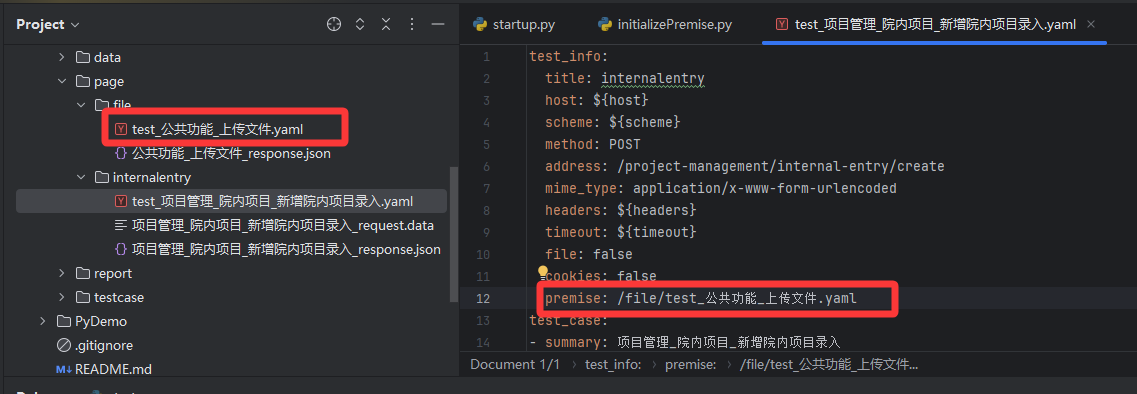
2、在新增院内项目的实际请求参数文件(.yaml/.data/.json)中 引用前置接口的参数名
格式是 ${这里填你上一个接口返回的参数名}
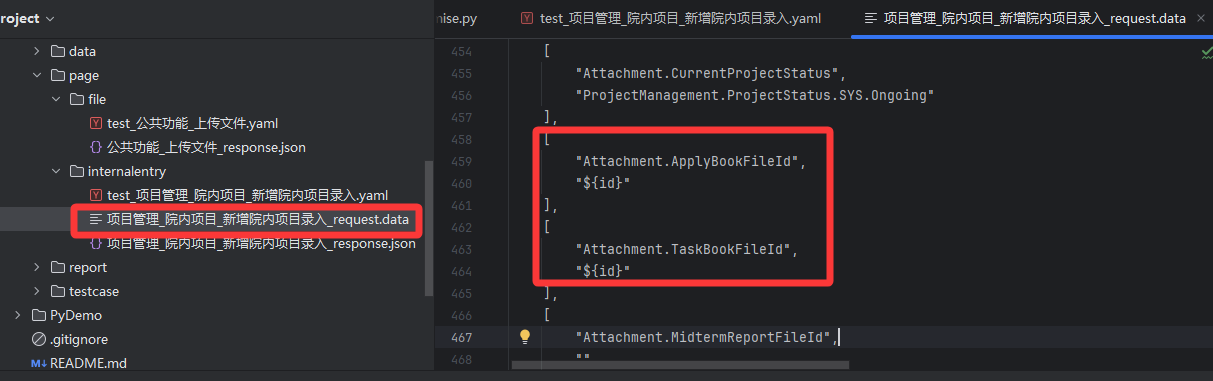
3、修复一下comm\unit\initializePremise.py 文件中init_premise方法 处理替换关联值的逻辑,因为这里只处理了字典格式替换,但是前面修复同参数名的问题 我们的请求参数是可能会是列表的,就会有类型不匹配的报错。
python
def init_premise(test_info, case_data, case_path):
    """用例前提条件执行,提取关键值

    :param test_info: 测试信息
    :param case_data: 用例数据
    :param case_path: 用例路径
    :return:
    """
    # 获取项目公共关联值
    aconfig = readYaml.read_yaml_data(API_CONFIG)
    __relevance = aconfig[PROJECT_NAME]
    # 处理测试信息
    test_info = replaceRelevance.replace(test_info, __relevance)
    logging.debug("测试信息处理结果:{}".format(test_info))
    # 处理Cookies
    if test_info['cookies']:
        cookies = aconfig[PROJECT_NAME]['cookies']
        logging.debug("请求Cookies处理结果:{}".format(cookies))

    # 判断是否存在前置接口
    pre_case_yaml = test_info["premise"]
    if pre_case_yaml:
        # 获取前置接口用例
        logging.info("获取前置接口测试用例:{}".format(pre_case_yaml))
        pre_case_yaml = PAGE_DIR + pre_case_yaml
        pre_case_path = os.path.dirname(pre_case_yaml)
        pre_case_dict = readYaml.read_yaml_data(pre_case_yaml)
        pre_test_info = pre_case_dict['test_info']
        pre_case_data = pre_case_dict['test_case'][0]
        # 判断前置接口是否也存在前置接口
        if pre_test_info["premise"]:
            init_premise(pre_test_info, pre_case_data, pre_case_path)

        for i in range(3):
            # 处理前置接口测试信息
            pre_test_info = replaceRelevance.replace(pre_test_info, __relevance)
            logging.debug("测试信息处理结果:{}".format(pre_test_info))
            # 处理前置接口Cookies
            if pre_test_info['cookies']:
                cookies = aconfig[PROJECT_NAME]['cookies']
                logging.debug("请求Cookies处理结果:{}".format(cookies))
            # 处理前置接口入参:获取入参-替换关联值-发送请求
            pre_parameter = read_json(pre_case_data['summary'], pre_case_data['parameter'], pre_case_path)
            pre_parameter = replaceRelevance.replace(pre_parameter, __relevance)
            pre_case_data['parameter'] = pre_parameter
            logging.debug("请求参数处理结果:{}".format(pre_parameter))
            logging.info("执行前置接口测试用例:{}".format(pre_test_info))
            code, data = apiSend.send_request(pre_test_info, pre_case_data)

            # 检查接口是否调用成功
            code, data = apiSend.send_request(pre_test_info, pre_case_data)

            # 检查接口是否调用成功--修改的地方在这里开始
            if data:
                # 处理当前接口入参:获取入参-获取关联值-替换关联值
                parameter = read_json(case_data['summary'], case_data['parameter'], case_path)
                __relevance = readRelevance.get_relevance(data, parameter, __relevance)
                parameter = replaceRelevance.replace(parameter, __relevance)
                case_data['parameter'] = parameter
                logging.debug("请求参数处理结果:{}".format(parameter))
                logging.debug("类型检查: {}".format(type(parameter)))
                print(data)

                # 获取当前接口期望结果:获取期望结果-获取关联值-替换关联值
                expected_rs = read_json(case_data['summary'], case_data['check_body']['expected_result'], case_path)

                # 检查 parameter 的类型
                if isinstance(parameter, dict):
                    parameter['data'] = data
                elif isinstance(parameter, list):
                    # 假设列表中的每个元素都是字典,并且我们需要将 data 插入到每个字典中
                    for item in parameter:
                        if isinstance(item, dict):
                            item['data'] = data
                else:
                    logging.error("参数类型不支持: {}".format(type(parameter)))
                    break# 修改的地方在这里结束

                __relevance = readRelevance.get_relevance(parameter, expected_rs, __relevance)
                expected_rs = replaceRelevance.replace(expected_rs, __relevance)
                case_data['check_body']['expected_result'] = expected_rs
                logging.debug("期望返回处理结果:{}".format(case_data))
                break
            else:
                time.sleep(1)
                logging.error("前置接口请求失败!等待1秒后重试!")
        else:
            logging.info("前置接口请求失败!尝试三次失败!")
            raise Exception("获取前置接口关联数据失败!")
    else:
        # 处理当前接口入参:获取入参-获取关联值-替换关联值
        parameter = read_json(case_data['summary'], case_data['parameter'], case_path)
        parameter = replaceRelevance.replace(parameter, __relevance)
        case_data['parameter'] = parameter
        logging.debug("请求参数处理结果:{}".format(parameter))

        # 获取当前接口期望结果:获取期望结果-获取关联值-替换关联值
        expected_rs = read_json(case_data['summary'], case_data['check_body']['expected_result'], case_path)
        __relevance = readRelevance.get_relevance(parameter, expected_rs, __relevance)
        expected_rs = replaceRelevance.replace(expected_rs, __relevance)
        case_data['check_body']['expected_result'] = expected_rs
        logging.debug("期望返回处理结果:{}".format(case_data))

    return test_info, case_data
结果:
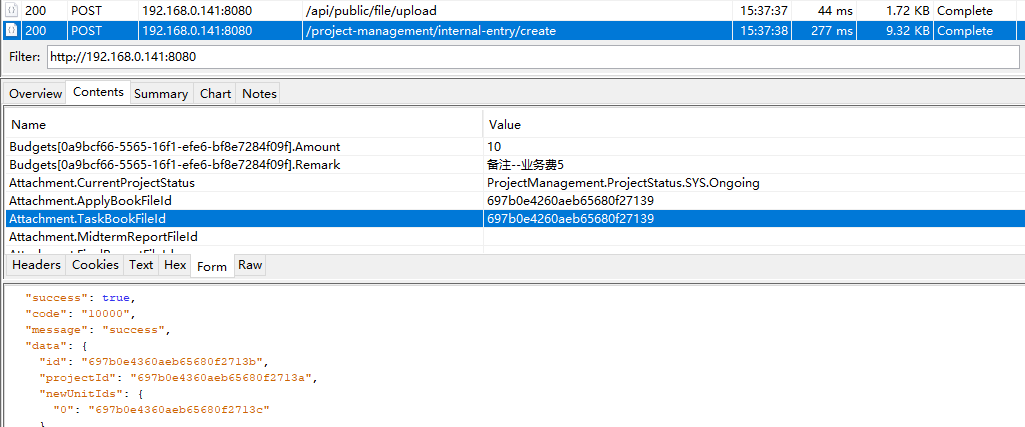
修改之后就没问题啦,先请求了文件上传接口 再请求了新增院内项目的接口,获取的文件id值也没问题。
11、解决运行时 有抓包文件 导致连接超时(Read timed out)问题
开了抓包软件 然后运行脚本时 报了连接超时错误。
错误原因: 测试脚本运行时,系统检测到了代理设置(Proxy),尝试通过本地的 127.0.0.1:8888 转发请求,但该端口没有服务监听,导致连接超时(Read timed out)。
解决方案: 在 Python 环境中禁用代理,或在代码中显式关闭请求的代理功能。
python
"D:\Program Files\Python312\python.exe" E:\HUI\DM\ApiTesting-main\startup.py
2026-01-29 16:09:10,648 - startup.py - INFO: 根据接口抓包数据,自动生成测试用例和测试脚本,然后运行测试!
2026-01-29 16:09:10,648 - writeCaseYml.py - INFO: 读取抓包文件主目录: E:/HUI/DM/ApiTesting-main/MyTest/data
2026-01-29 16:09:10,648 - writeCaseYml.py - INFO: 读取抓包文件: 公共功能_上传文件.chlsj
2026-01-29 16:09:10,650 - writeCaseYml.py - WARNING: 检测到文件上传,生成随机文件指令
2026-01-29 16:09:10,650 - writeCaseYml.py - INFO: 读取抓包文件: 项目管理_院内项目_新增院内项目录入.chlsj
2026-01-29 16:09:10,652 - writeCaseYml.py - INFO: 读取抓包文件: 项目管理_院内项目_查询院内项目录入列表.chlsj
2026-01-29 16:09:10,653 - writeCaseYml.py - INFO: 生成请求文件: E:/HUI/DM/ApiTesting-main/MyTest//page/internalentry\项目管理_院内项目_查询院内项目录入列表_request.json
2026-01-29 16:09:10,654 - writeCaseYml.py - INFO: 生成响应文件: E:/HUI/DM/ApiTesting-main/MyTest//page/internalentry\项目管理_院内项目_查询院内项目录入列表_response.json
2026-01-29 16:09:10,654 - writeCaseYml.py - INFO: 生成用例文件: E:/HUI/DM/ApiTesting-main/MyTest//page/internalentry/test_项目管理_院内项目_查询院内项目录入列表.yaml
============================= test session starts =============================
platform win32 -- Python 3.12.7, pytest-9.0.2, pluggy-1.6.0 -- D:\Program Files\Python312\python.exe
cachedir: .pytest_cache
metadata: {'Python': '3.12.7', 'Platform': 'Windows-10-10.0.19045-SP0', 'Packages': {'pytest': '9.0.2', 'pluggy': '1.6.0'}, 'Plugins': {'allure-pytest': '2.15.3', 'anyio': '4.9.0', 'langsmith': '0.3.23', 'forked': '1.6.0', 'html': '4.2.0', 'metadata': '3.1.1', 'rerunfailures': '16.1', 'xdist': '3.8.0'}, 'JAVA_HOME': 'D:\\soft\\Java\\jdk-21'}
rootdir: E:\HUI\DM\ApiTesting-main
plugins: allure-pytest-2.15.3, anyio-4.9.0, langsmith-0.3.23, forked-1.6.0, html-4.2.0, metadata-3.1.1, rerunfailures-16.1, xdist-3.8.0
collecting ... collected 3 items

MyTest/testcase/file/test_公共功能_上传文件.py::TestFile::test_公共功能_上传文件[test_case0] 【Debug】随机选中文件: E:/HUI/test/file/Activatable NIR-II organic fluorescent probes for bioimaging.pdf
2026-01-29 16:09:11,125 - apiSend.py - INFO: ======================================================================================================================================================
2026-01-29 16:09:11,125 - apiSend.py - INFO: 请求接口:公共功能_上传文件
2026-01-29 16:09:11,125 - apiSend.py - INFO: 请求地址:http://192.168.0.141:8080/api/public/file/upload
2026-01-29 16:09:11,125 - apiSend.py - INFO: 请求头: {'X-Requested-With': 'XMLHttpRequest', 'Content-Type': 'multipart/form-data; boundary=----WebKitFormBoundaryxx8AAcbcUCrGgvAD', 'Cookie': '.AspNetCore.Antiforgery.EM20QdejNyk=CfDJ8N3G5gVhfUFNl-G8ln6DhczMcVUGcxBe9UBK86JJusxJlpS9TAwao9pVlLWhA31iF-qaoB7qZopaBkj1u5E836tl1rmXBlogjJT3BU9i6ngYGeN0fLI2H5WcjLKk3rKK3vvTjP6Pp6AP5bGru43dn9o; rpms.biz.auth=CfDJ8N3G5gVhfUFNl-G8ln6DhcwW14zgKKTnjWY-t2_m2-POszBnA2mYVOI7a_4GltudtHPw87mrbM0PUGcGkBEmgb9VyPPdDHO-jnVKup6G3IHD10aq0_BY99195dUtnt6ivm2lv7w24zeLhqHy1ZTfpMnyxw_Cb0iIUDmTip31iBDwEbNh6IkzV7jEm76fZomYPymSu5lMN_eHdBb7ar3b5g77kUyKU5P9tEg1U5IHKPTL31efNPdiqULWrLrkUZ_WPtanhvK2PmkIhI9G_TR2A7e-TltJxMAijM9d0OKmmgkKtNp8q-hiaUuTKXFrBNGcR9fiatTAgk9_PzahngGi8Dg2cdEU3Lg_PcM_gtJCxXmNILNi54qDT2IjXGptuaFqPsflgUktaKQMMQOghx6x50s'}
2026-01-29 16:09:11,125 - apiSend.py - INFO: 请求参数: {'file': 'E:/HUI/test/file/Activatable NIR-II organic fluorescent probes for bioimaging.pdf'}
2026-01-29 16:09:11,125 - apiSend.py - INFO: 请求方法: POST
2026-01-29 16:09:21,342 - apiMethod.py - ERROR: ERROR
Traceback (most recent call last):
  File "D:\Program Files\Python312\Lib\site-packages\urllib3\connectionpool.py", line 534, in _make_request
    response = conn.getresponse()
               ^^^^^^^^^^^^^^^^^^
  File "D:\Program Files\Python312\Lib\site-packages\urllib3\connection.py", line 571, in getresponse
    httplib_response = super().getresponse()
                       ^^^^^^^^^^^^^^^^^^^^^
  File "D:\Program Files\Python312\Lib\http\client.py", line 1428, in getresponse
    response.begin()
  File "D:\Program Files\Python312\Lib\http\client.py", line 331, in begin
    version, status, reason = self._read_status()
                              ^^^^^^^^^^^^^^^^^^^
  File "D:\Program Files\Python312\Lib\http\client.py", line 292, in _read_status
    line = str(self.fp.readline(_MAXLINE + 1), "iso-8859-1")
               ^^^^^^^^^^^^^^^^^^^^^^^^^^^^^^
  File "D:\Program Files\Python312\Lib\socket.py", line 720, in readinto
    return self._sock.recv_into(b)
           ^^^^^^^^^^^^^^^^^^^^^^^
TimeoutError: timed out

The above exception was the direct cause of the following exception:

Traceback (most recent call last):
  File "D:\Program Files\Python312\Lib\site-packages\requests\adapters.py", line 644, in send
    resp = conn.urlopen(
           ^^^^^^^^^^^^^
  File "D:\Program Files\Python312\Lib\site-packages\urllib3\connectionpool.py", line 841, in urlopen
    retries = retries.increment(
              ^^^^^^^^^^^^^^^^^^
  File "D:\Program Files\Python312\Lib\site-packages\urllib3\util\retry.py", line 490, in increment
    raise reraise(type(error), error, _stacktrace)
          ^^^^^^^^^^^^^^^^^^^^^^^^^^^^^^^^^^^^^^^^
  File "D:\Program Files\Python312\Lib\site-packages\urllib3\util\util.py", line 39, in reraise
    raise value
  File "D:\Program Files\Python312\Lib\site-packages\urllib3\connectionpool.py", line 787, in urlopen
    response = self._make_request(
               ^^^^^^^^^^^^^^^^^^^
  File "D:\Program Files\Python312\Lib\site-packages\urllib3\connectionpool.py", line 536, in _make_request
    self._raise_timeout(err=e, url=url, timeout_value=read_timeout)
  File "D:\Program Files\Python312\Lib\site-packages\urllib3\connectionpool.py", line 367, in _raise_timeout
    raise ReadTimeoutError(
urllib3.exceptions.ReadTimeoutError: HTTPConnectionPool(host='127.0.0.1', port=8888): Read timed out. (read timeout=10)

During handling of the above exception, another exception occurred:

Traceback (most recent call last):
  File "E:\HUI\DM\ApiTesting-main\comm\unit\apiMethod.py", line 45, in post
    response = requests.post(
               ^^^^^^^^^^^^^^
  File "D:\Program Files\Python312\Lib\site-packages\requests\api.py", line 115, in post
    return request("post", url, data=data, json=json, **kwargs)
           ^^^^^^^^^^^^^^^^^^^^^^^^^^^^^^^^^^^^^^^^^^^^^^^^^^^^
  File "D:\Program Files\Python312\Lib\site-packages\requests\api.py", line 59, in request
    return session.request(method=method, url=url, **kwargs)
           ^^^^^^^^^^^^^^^^^^^^^^^^^^^^^^^^^^^^^^^^^^^^^^^^^
  File "D:\Program Files\Python312\Lib\site-packages\requests\sessions.py", line 589, in request
    resp = self.send(prep, **send_kwargs)
           ^^^^^^^^^^^^^^^^^^^^^^^^^^^^^^
  File "D:\Program Files\Python312\Lib\site-packages\requests\sessions.py", line 703, in send
    r = adapter.send(request, **kwargs)
        ^^^^^^^^^^^^^^^^^^^^^^^^^^^^^^^
  File "D:\Program Files\Python312\Lib\site-packages\requests\adapters.py", line 690, in send
    raise ReadTimeout(e, request=request)
requests.exceptions.ReadTimeout: HTTPConnectionPool(host='127.0.0.1', port=8888): Read timed out. (read timeout=10)
2026-01-29 16:09:21,350 - apiMethod.py - ERROR: HTTPConnectionPool(host='127.0.0.1', port=8888): Read timed out. (read timeout=10)
FAILED
MyTest/testcase/internalentry/test_项目管理_院内项目_新增院内项目录入.py::TestInternalentry::test_项目管理_院内项目_新增院内项目录入[test_case0] 2026-01-29 16:09:21,520 - initializePremise.py - INFO: 获取前置接口测试用例:/file/test_公共功能_上传文件.yaml
【Debug】随机选中文件: E:/HUI/test/file/大于10分或中科院1区_朱依敏(1101,生内二科).pdf
2026-01-29 16:09:21,523 - initializePremise.py - INFO: 执行前置接口测试用例:{'title': 'file', 'host': '192.168.0.141:8080', 'scheme': 'http', 'method': 'POST', 'address': '/api/public/file/upload', 'mime_type': 'multipart/form-data', 'headers': {'X-Requested-With': 'XMLHttpRequest', 'Content-Type': 'multipart/form-data; boundary=----WebKitFormBoundaryxx8AAcbcUCrGgvAD', 'Cookie': '.AspNetCore.Antiforgery.EM20QdejNyk=CfDJ8N3G5gVhfUFNl-G8ln6DhczMcVUGcxBe9UBK86JJusxJlpS9TAwao9pVlLWhA31iF-qaoB7qZopaBkj1u5E836tl1rmXBlogjJT3BU9i6ngYGeN0fLI2H5WcjLKk3rKK3vvTjP6Pp6AP5bGru43dn9o; rpms.biz.auth=CfDJ8N3G5gVhfUFNl-G8ln6DhcwW14zgKKTnjWY-t2_m2-POszBnA2mYVOI7a_4GltudtHPw87mrbM0PUGcGkBEmgb9VyPPdDHO-jnVKup6G3IHD10aq0_BY99195dUtnt6ivm2lv7w24zeLhqHy1ZTfpMnyxw_Cb0iIUDmTip31iBDwEbNh6IkzV7jEm76fZomYPymSu5lMN_eHdBb7ar3b5g77kUyKU5P9tEg1U5IHKPTL31efNPdiqULWrLrkUZ_WPtanhvK2PmkIhI9G_TR2A7e-TltJxMAijM9d0OKmmgkKtNp8q-hiaUuTKXFrBNGcR9fiatTAgk9_PzahngGi8Dg2cdEU3Lg_PcM_gtJCxXmNILNi54qDT2IjXGptuaFqPsflgUktaKQMMQOghx6x50s'}, 'timeout': 10, 'file': True, 'cookies': False, 'premise': False}
2026-01-29 16:09:21,523 - apiSend.py - INFO: ======================================================================================================================================================
2026-01-29 16:09:21,523 - apiSend.py - INFO: 请求接口:公共功能_上传文件
2026-01-29 16:09:21,523 - apiSend.py - INFO: 请求地址:http://192.168.0.141:8080/api/public/file/upload
2026-01-29 16:09:21,523 - apiSend.py - INFO: 请求头: {'X-Requested-With': 'XMLHttpRequest', 'Content-Type': 'multipart/form-data; boundary=----WebKitFormBoundaryxx8AAcbcUCrGgvAD', 'Cookie': '.AspNetCore.Antiforgery.EM20QdejNyk=CfDJ8N3G5gVhfUFNl-G8ln6DhczMcVUGcxBe9UBK86JJusxJlpS9TAwao9pVlLWhA31iF-qaoB7qZopaBkj1u5E836tl1rmXBlogjJT3BU9i6ngYGeN0fLI2H5WcjLKk3rKK3vvTjP6Pp6AP5bGru43dn9o; rpms.biz.auth=CfDJ8N3G5gVhfUFNl-G8ln6DhcwW14zgKKTnjWY-t2_m2-POszBnA2mYVOI7a_4GltudtHPw87mrbM0PUGcGkBEmgb9VyPPdDHO-jnVKup6G3IHD10aq0_BY99195dUtnt6ivm2lv7w24zeLhqHy1ZTfpMnyxw_Cb0iIUDmTip31iBDwEbNh6IkzV7jEm76fZomYPymSu5lMN_eHdBb7ar3b5g77kUyKU5P9tEg1U5IHKPTL31efNPdiqULWrLrkUZ_WPtanhvK2PmkIhI9G_TR2A7e-TltJxMAijM9d0OKmmgkKtNp8q-hiaUuTKXFrBNGcR9fiatTAgk9_PzahngGi8Dg2cdEU3Lg_PcM_gtJCxXmNILNi54qDT2IjXGptuaFqPsflgUktaKQMMQOghx6x50s'}
2026-01-29 16:09:21,523 - apiSend.py - INFO: 请求参数: {'file': 'E:/HUI/test/file/大于10分或中科院1区_朱依敏(1101,生内二科).pdf'}
2026-01-29 16:09:21,523 - apiSend.py - INFO: 请求方法: POST
2026-01-29 16:09:30,693 - apiSend.py - INFO: 请求接口结果:
 (200, {'success': True, 'code': '10000', 'message': 'success', 'data': {'fileName': '697b15bb60aeb634b8caab7d.pdf', 'originalFileName': '大于10分或中科院1区_朱依敏(1101,生内二科).pdf', 'isImage': False, 'filePath': None, 'id': '697b15bb60aeb634b8caab7f'}})
2026-01-29 16:09:31,695 - apiSend.py - INFO: ======================================================================================================================================================
2026-01-29 16:09:31,695 - apiSend.py - INFO: 请求接口:公共功能_上传文件
2026-01-29 16:09:31,695 - apiSend.py - INFO: 请求地址:http://192.168.0.141:8080/api/public/file/upload
2026-01-29 16:09:31,695 - apiSend.py - INFO: 请求头: {'X-Requested-With': 'XMLHttpRequest', 'Content-Type': 'multipart/form-data; boundary=--------------97826183964541900115791608475', 'Cookie': '.AspNetCore.Antiforgery.EM20QdejNyk=CfDJ8N3G5gVhfUFNl-G8ln6DhczMcVUGcxBe9UBK86JJusxJlpS9TAwao9pVlLWhA31iF-qaoB7qZopaBkj1u5E836tl1rmXBlogjJT3BU9i6ngYGeN0fLI2H5WcjLKk3rKK3vvTjP6Pp6AP5bGru43dn9o; rpms.biz.auth=CfDJ8N3G5gVhfUFNl-G8ln6DhcwW14zgKKTnjWY-t2_m2-POszBnA2mYVOI7a_4GltudtHPw87mrbM0PUGcGkBEmgb9VyPPdDHO-jnVKup6G3IHD10aq0_BY99195dUtnt6ivm2lv7w24zeLhqHy1ZTfpMnyxw_Cb0iIUDmTip31iBDwEbNh6IkzV7jEm76fZomYPymSu5lMN_eHdBb7ar3b5g77kUyKU5P9tEg1U5IHKPTL31efNPdiqULWrLrkUZ_WPtanhvK2PmkIhI9G_TR2A7e-TltJxMAijM9d0OKmmgkKtNp8q-hiaUuTKXFrBNGcR9fiatTAgk9_PzahngGi8Dg2cdEU3Lg_PcM_gtJCxXmNILNi54qDT2IjXGptuaFqPsflgUktaKQMMQOghx6x50s'}
2026-01-29 16:09:31,696 - apiSend.py - INFO: 请求参数: {'file': ('大于10分或中科院1区_朱依敏(1101,生内二科).pdf', <_io.BufferedReader name='E:/HUI/test/file/大于10分或中科院1区_朱依敏(1101,生内二科).pdf'>)}
2026-01-29 16:09:31,696 - apiSend.py - INFO: 请求方法: POST
2026-01-29 16:09:31,785 - apiSend.py - INFO: 请求接口结果:
 (200, {'success': True, 'code': '10000', 'message': 'success', 'data': {'fileName': '697b15bc60aeb634b8cab12d.pdf', 'originalFileName': '大于10分或中科院1区_朱依敏(1101,生内二科).pdf', 'isImage': False, 'filePath': None, 'id': '697b15bc60aeb634b8cab12e'}})
{'success': True, 'code': '10000', 'message': 'success', 'data': {'fileName': '697b15bc60aeb634b8cab12d.pdf', 'originalFileName': '大于10分或中科院1区_朱依敏(1101,生内二科).pdf', 'isImage': False, 'filePath': None, 'id': '697b15bc60aeb634b8cab12e'}}
2026-01-29 16:09:32,788 - apiSend.py - INFO: ======================================================================================================================================================
2026-01-29 16:09:32,789 - apiSend.py - INFO: 请求接口:项目管理_院内项目_新增院内项目录入
2026-01-29 16:09:32,789 - apiSend.py - INFO: 请求地址:http://192.168.0.141:8080/project-management/internal-entry/create
2026-01-29 16:09:32,789 - apiSend.py - INFO: 请求头: {'X-Requested-With': 'XMLHttpRequest', 'Content-Type': 'multipart/form-data; boundary=--------------38078517233957531320417537126', 'Cookie': '.AspNetCore.Antiforgery.EM20QdejNyk=CfDJ8N3G5gVhfUFNl-G8ln6DhczMcVUGcxBe9UBK86JJusxJlpS9TAwao9pVlLWhA31iF-qaoB7qZopaBkj1u5E836tl1rmXBlogjJT3BU9i6ngYGeN0fLI2H5WcjLKk3rKK3vvTjP6Pp6AP5bGru43dn9o; rpms.biz.auth=CfDJ8N3G5gVhfUFNl-G8ln6DhcwW14zgKKTnjWY-t2_m2-POszBnA2mYVOI7a_4GltudtHPw87mrbM0PUGcGkBEmgb9VyPPdDHO-jnVKup6G3IHD10aq0_BY99195dUtnt6ivm2lv7w24zeLhqHy1ZTfpMnyxw_Cb0iIUDmTip31iBDwEbNh6IkzV7jEm76fZomYPymSu5lMN_eHdBb7ar3b5g77kUyKU5P9tEg1U5IHKPTL31efNPdiqULWrLrkUZ_WPtanhvK2PmkIhI9G_TR2A7e-TltJxMAijM9d0OKmmgkKtNp8q-hiaUuTKXFrBNGcR9fiatTAgk9_PzahngGi8Dg2cdEU3Lg_PcM_gtJCxXmNILNi54qDT2IjXGptuaFqPsflgUktaKQMMQOghx6x50s'}
2026-01-29 16:09:32,789 - apiSend.py - INFO: 请求参数: [['id', ''], ['ActionIntent', '2'], ['BaseInfo.ProjectName', '测试院内项目_D7E05B0C-FCE9-11F0-9341-345A603F52CB'], ['BaseInfo.ApplyNumber', ''], ['BaseInfo.ProjectNumber', '2026-01-29 16:09:32'], ['BaseInfo.FundPlanName', '2025院内基金计划第一批'], ['BaseInfo.FundPlanNumber', 'jj-yn-0001'], ['BaseInfo.NeedDeptRecommend', 'true'], ['BaseInfo.FundNameValue', 'GZRZZXSPY'], ['BaseInfo.ResearchCategory', '0'], ['BaseInfo.ResearchStartDate', '2026-01-01'], ['BaseInfo.ResearchEndDate', '2026-03-31'], ['BaseInfo.GrantCategoryValue', 'GZRZZXSPY.MS'], ['BaseInfo.ProjectStatusValue', 'ProjectManagement.ProjectStatus.SYS.Ongoing'], ['BaseInfo.InitiationDate', '2026-01-20'], ['BaseInfo.CompletionDate', ''], ['BaseInfo.TerminationDate', ''], ['BaseInfo.Outcome', ''], ['BaseInfo.Remark', '院内录入项目备注信息'], ['Units.index', 'e2b79a67-13f8-4560-8928-9099696f3b3a'], ['Units[e2b79a67-13f8-4560-8928-9099696f3b3a].Id', ''], ['Units[e2b79a67-13f8-4560-8928-9099696f3b3a].RowNumber', '0'], ['Units[e2b79a67-13f8-4560-8928-9099696f3b3a].SortOrder', '1'], ['Units[e2b79a67-13f8-4560-8928-9099696f3b3a].IsDefault', 'True'], ['Units[e2b79a67-13f8-4560-8928-9099696f3b3a].UnitType', '0'], ['Members.index', '5b07b496-ac22-4363-aa33-54fe1f607ed2'], ['Members[5b07b496-ac22-4363-aa33-54fe1f607ed2].Id', ''], ['Members[5b07b496-ac22-4363-aa33-54fe1f607ed2].RowNumber', '0'], ['Members[5b07b496-ac22-4363-aa33-54fe1f607ed2].Sort', '1'], ['Members[5b07b496-ac22-4363-aa33-54fe1f607ed2].IsPrincipal', 'true'], ['Members[5b07b496-ac22-4363-aa33-54fe1f607ed2].IsDefault', 'True'], ['Members[5b07b496-ac22-4363-aa33-54fe1f607ed2].ProjectUnitIdSortOrder', '1'], ['Members[5b07b496-ac22-4363-aa33-54fe1f607ed2]._DynamicMemberCategory', 'FIXED_MEMBER_CATEGORY_0'], ['Members[5b07b496-ac22-4363-aa33-54fe1f607ed2].SourceType', '0'], ['Members[5b07b496-ac22-4363-aa33-54fe1f607ed2].ExternalSource', ''], ['Members[5b07b496-ac22-4363-aa33-54fe1f607ed2].MemberName', '李振'], ['Members[5b07b496-ac22-4363-aa33-54fe1f607ed2].UserId', 'sxbqeh_67c0107654345805b83f9a1f'], ['Members[5b07b496-ac22-4363-aa33-54fe1f607ed2].UserIdText', '李振(test0003)'], ['Members[5b07b496-ac22-4363-aa33-54fe1f607ed2].DepartmentName', '眼科'], ['Members[5b07b496-ac22-4363-aa33-54fe1f607ed2].DepartmentId', 'sxbqeh_056017'], ['Members[5b07b496-ac22-4363-aa33-54fe1f607ed2].DepartmentIdText', '临床医技科室-手术科室-眼科'], ['Members[5b07b496-ac22-4363-aa33-54fe1f607ed2].Gender', '1'], ['Members[5b07b496-ac22-4363-aa33-54fe1f607ed2].TitleLevel', 'TL.ZJ'], ['Members[5b07b496-ac22-4363-aa33-54fe1f607ed2].DateOfBirth', '1995-02-04'], ['Members[5b07b496-ac22-4363-aa33-54fe1f607ed2].HighestEduName', '本科'], ['Members.index', 'aafbeff6-a472-52b2-db21-9d74d0757b4e'], ['Members[aafbeff6-a472-52b2-db21-9d74d0757b4e].Id', ''], ['Members[aafbeff6-a472-52b2-db21-9d74d0757b4e].RowNumber', '1'], ['Members[aafbeff6-a472-52b2-db21-9d74d0757b4e].Sort', '2'], ['Members[aafbeff6-a472-52b2-db21-9d74d0757b4e].IsPrincipal', 'False'], ['Members[aafbeff6-a472-52b2-db21-9d74d0757b4e].IsDefault', 'False'], ['Members[aafbeff6-a472-52b2-db21-9d74d0757b4e].MemberType', '0'], ['Members[aafbeff6-a472-52b2-db21-9d74d0757b4e].ProjectUnitIdSortOrder', '1'], ['Members[aafbeff6-a472-52b2-db21-9d74d0757b4e]._DynamicMemberCategory', 'FIXED_MEMBER_CATEGORY_0'], ['Members[aafbeff6-a472-52b2-db21-9d74d0757b4e].SourceType', '0'], ['Members[aafbeff6-a472-52b2-db21-9d74d0757b4e].ExternalSource', ''], ['Members[aafbeff6-a472-52b2-db21-9d74d0757b4e].MemberName', '夏暄'], ['Members[aafbeff6-a472-52b2-db21-9d74d0757b4e].UserId', 'sxbqeh_67c00ca754345805b83f99df'], ['Members[aafbeff6-a472-52b2-db21-9d74d0757b4e].UserIdText', '夏暄(test0002)'], ['Members[aafbeff6-a472-52b2-db21-9d74d0757b4e].DepartmentName', '普通外科'], ['Members[aafbeff6-a472-52b2-db21-9d74d0757b4e].DepartmentId', 'sxbqeh_0523'], ['Members[aafbeff6-a472-52b2-db21-9d74d0757b4e].DepartmentIdText', '临床医技科室-普通外科'], ['Members[aafbeff6-a472-52b2-db21-9d74d0757b4e].Gender', '2'], ['Members[aafbeff6-a472-52b2-db21-9d74d0757b4e].TitleLevel', 'TL.ZG'], ['Members[aafbeff6-a472-52b2-db21-9d74d0757b4e].DateOfBirth', '1993-08-15'], ['Members[aafbeff6-a472-52b2-db21-9d74d0757b4e].HighestEduName', '小学'], ['Members[aafbeff6-a472-52b2-db21-9d74d0757b4e].PositionType', 'QT'], ['Members.index', '0a0836c1-660d-d120-2065-44f69466848d'], ['Members[0a0836c1-660d-d120-2065-44f69466848d].Id', ''], ['Members[0a0836c1-660d-d120-2065-44f69466848d].RowNumber', '2'], ['Members[0a0836c1-660d-d120-2065-44f69466848d].Sort', '3'], ['Members[0a0836c1-660d-d120-2065-44f69466848d].IsPrincipal', 'False'], ['Members[0a0836c1-660d-d120-2065-44f69466848d].IsDefault', 'False'], ['Members[0a0836c1-660d-d120-2065-44f69466848d].MemberType', '0'], ['Members[0a0836c1-660d-d120-2065-44f69466848d].ProjectUnitIdSortOrder', '1'], ['Members[0a0836c1-660d-d120-2065-44f69466848d]._DynamicMemberCategory', 'YXS'], ['Members[0a0836c1-660d-d120-2065-44f69466848d].SourceType', '1'], ['Members[0a0836c1-660d-d120-2065-44f69466848d].ExternalSource', 'YXS'], ['Members[0a0836c1-660d-d120-2065-44f69466848d].UserIdText', ''], ['Members[0a0836c1-660d-d120-2065-44f69466848d].UserId', ''], ['Members[0a0836c1-660d-d120-2065-44f69466848d].MemberName', '测试'], ['Members[0a0836c1-660d-d120-2065-44f69466848d].DepartmentIdText', ''], ['Members[0a0836c1-660d-d120-2065-44f69466848d].DepartmentId', ''], ['Members[0a0836c1-660d-d120-2065-44f69466848d].DepartmentName', '儿科'], ['Members[0a0836c1-660d-d120-2065-44f69466848d].Gender', '1'], ['Members[0a0836c1-660d-d120-2065-44f69466848d].TitleLevel', ''], ['Members[0a0836c1-660d-d120-2065-44f69466848d].DateOfBirth', ''], ['Members[0a0836c1-660d-d120-2065-44f69466848d].HighestEduName', ''], ['Members[0a0836c1-660d-d120-2065-44f69466848d].PositionType', ''], ['__Principal__', 'on'], ['BaseInfo.ApprovedAmount', '20'], ['BudgetAmount', '20'], ['Budgets.index', 'c6fc0772-2f76-d776-eea5-b8ffe353f798'], ['Budgets[c6fc0772-2f76-d776-eea5-b8ffe353f798].Id', ''], ['Budgets[c6fc0772-2f76-d776-eea5-b8ffe353f798].RowNumber', '0'], ['Budgets[c6fc0772-2f76-d776-eea5-b8ffe353f798].Sort', '1'], ['Budgets[c6fc0772-2f76-d776-eea5-b8ffe353f798].SubjectName', 'SBF'], ['Budgets[c6fc0772-2f76-d776-eea5-b8ffe353f798].Amount', '5'], ['Budgets[c6fc0772-2f76-d776-eea5-b8ffe353f798].Remark', '备注--设备费5'], ['Budgets.index', '54e53a7b-89e7-c7f0-ae6c-f905241a8396'], ['Budgets[54e53a7b-89e7-c7f0-ae6c-f905241a8396].Id', ''], ['Budgets[54e53a7b-89e7-c7f0-ae6c-f905241a8396].RowNumber', '1'], ['Budgets[54e53a7b-89e7-c7f0-ae6c-f905241a8396].Sort', '2'], ['Budgets[54e53a7b-89e7-c7f0-ae6c-f905241a8396].SubjectName', 'LWF'], ['Budgets[54e53a7b-89e7-c7f0-ae6c-f905241a8396].Amount', '5'], ['Budgets[54e53a7b-89e7-c7f0-ae6c-f905241a8396].Remark', '备注--劳务费5'], ['Budgets.index', '0a9bcf66-5565-16f1-efe6-bf8e7284f09f'], ['Budgets[0a9bcf66-5565-16f1-efe6-bf8e7284f09f].Id', ''], ['Budgets[0a9bcf66-5565-16f1-efe6-bf8e7284f09f].RowNumber', '2'], ['Budgets[0a9bcf66-5565-16f1-efe6-bf8e7284f09f].Sort', '3'], ['Budgets[0a9bcf66-5565-16f1-efe6-bf8e7284f09f].SubjectName', 'YWF'], ['Budgets[0a9bcf66-5565-16f1-efe6-bf8e7284f09f].Amount', '10'], ['Budgets[0a9bcf66-5565-16f1-efe6-bf8e7284f09f].Remark', '备注--业务费5'], ['Attachment.CurrentProjectStatus', 'ProjectManagement.ProjectStatus.SYS.Ongoing'], ['Attachment.ApplyBookFileId', '697b15bc60aeb634b8cab12e'], ['Attachment.TaskBookFileId', '697b15bc60aeb634b8cab12e'], ['Attachment.MidtermReportFileId', ''], ['Attachment.FinalReportFileId', ''], ['Attachment.TerminationReportFileId', ''], ['Attachment.EtReviewApprovalFileId', ''], ['Attachment.OtherFileIds_FileCount', ''], ['__RequestVerificationToken', 'CfDJ8N3G5gVhfUFNl-G8ln6DhcxiNteWRnotKwE2wpjMcVJ68i4PcRS_4y3jguPkF6oNoJJaUzN1RANyNFvefZkah2eyB8FCymvaLui8IrbZIefrj8iuEQ2lfkbxBu4qFlouXBfAc1rpnnaSEh8hMBwSWqnwVcx3PyzogrhpnAQVtM6E24Ze_7-jgmP3QXUFci0e2Q']]
2026-01-29 16:09:32,792 - apiSend.py - INFO: 请求方法: POST
2026-01-29 16:09:41,553 - apiSend.py - INFO: 请求接口结果:
 (200, {'success': True, 'code': '10000', 'message': 'success', 'data': {'id': '697b15c560aeb634b8cab382', 'projectId': '697b15c560aeb634b8cab381', 'newUnitIds': {'0': '697b15c560aeb634b8cab383'}, 'newMemberIds': {'0': '697b15c560aeb634b8cab384', '1': '697b15c560aeb634b8cab385', '2': '697b15c560aeb634b8cab386'}, 'newBudgetIds': {'0': '697b15c560aeb634b8cab387', '1': '697b15c560aeb634b8cab388', '2': '697b15c560aeb634b8cab389'}}})
PASSED
MyTest/testcase/internalentry/test_项目管理_院内项目_查询院内项目录入列表.py::TestInternalentry::test_项目管理_院内项目_查询院内项目录入列表[test_case0] 2026-01-29 16:09:42,567 - apiSend.py - INFO: ======================================================================================================================================================
2026-01-29 16:09:42,568 - apiSend.py - INFO: 请求接口:项目管理_院内项目_查询院内项目录入列表
2026-01-29 16:09:42,568 - apiSend.py - INFO: 请求地址:http://192.168.0.141:8080/project-management/internal-entry/get-list
2026-01-29 16:09:42,568 - apiSend.py - INFO: 请求头: {'X-Requested-With': 'XMLHttpRequest', 'Content-Type': 'multipart/form-data; boundary=----WebKitFormBoundaryxx8AAcbcUCrGgvAD', 'Cookie': '.AspNetCore.Antiforgery.EM20QdejNyk=CfDJ8N3G5gVhfUFNl-G8ln6DhczMcVUGcxBe9UBK86JJusxJlpS9TAwao9pVlLWhA31iF-qaoB7qZopaBkj1u5E836tl1rmXBlogjJT3BU9i6ngYGeN0fLI2H5WcjLKk3rKK3vvTjP6Pp6AP5bGru43dn9o; rpms.biz.auth=CfDJ8N3G5gVhfUFNl-G8ln6DhcwW14zgKKTnjWY-t2_m2-POszBnA2mYVOI7a_4GltudtHPw87mrbM0PUGcGkBEmgb9VyPPdDHO-jnVKup6G3IHD10aq0_BY99195dUtnt6ivm2lv7w24zeLhqHy1ZTfpMnyxw_Cb0iIUDmTip31iBDwEbNh6IkzV7jEm76fZomYPymSu5lMN_eHdBb7ar3b5g77kUyKU5P9tEg1U5IHKPTL31efNPdiqULWrLrkUZ_WPtanhvK2PmkIhI9G_TR2A7e-TltJxMAijM9d0OKmmgkKtNp8q-hiaUuTKXFrBNGcR9fiatTAgk9_PzahngGi8Dg2cdEU3Lg_PcM_gtJCxXmNILNi54qDT2IjXGptuaFqPsflgUktaKQMMQOghx6x50s'}
2026-01-29 16:09:42,568 - apiSend.py - INFO: 请求参数: {'submitTime': {'startTime': '', 'endTime': ''}, 'leaderMemberName': '', 'projectNumber': '', 'projectName': '', 'fundPlanName': '', 'auditStatus': '', 'fundNameValue': '', 'initiationDate': {'startTime': '', 'endTime': ''}, 'completionDate': {'startTime': '', 'endTime': ''}, 'leaderMemberDepartment': '', 'pageNumber': 1, 'pageSize': 10}
2026-01-29 16:09:42,568 - apiSend.py - INFO: 请求方法: POST
2026-01-29 16:09:43,589 - apiSend.py - INFO: 请求接口结果:
 (200, {'success': True, 'code': '10000', 'message': 'success', 'data': {'totalCount': 91, 'items': [{'projectId': '697b15c560aeb634b8cab381', 'submitTime': '2026-01-29 16:09:41', 'creationTime': '2026-01-29 16:09:41', 'creatorId': 'system_id_3008764621', 'creatorName': '系统', 'fundPlanName': '2025院内基金计划第一批', 'fundName': '国自然种子选手培育', 'fundNameValue': 'GZRZZXSPY', 'projectName': '测试院内项目_D7E05B0C-FCE9-11F0-9341-345A603F52CB', 'projectNumber': '2026-01-29 16:09:32', 'approvedAmount': 20.0, 'initiationDate': '2026-01-20 00:00:00', 'completionDate': None, 'terminationDate': None, 'projectStatusValue': 'ProjectManagement.ProjectStatus.SYS.Ongoing', 'projectStatus': '在研', 'leaderMembers': [{'memberName': '李振', 'userId': 'sxbqeh_67c0107654345805b83f9a1f', 'departmentName': '眼科', 'departmentId': 'sxbqeh_056017', 'positionType': None, 'positionTypeText': None, 'id': '697b15c560aeb634b8cab384'}], 'auditStatus': 3, 'auditStatusText': '审批中', 'canEdit': False, 'canUpdate': False, 'canRevoke': True, 'canCheck': True, 'canDelete': False, 'canRestore': False, 'id': '697b15c560aeb634b8cab382'}, {'projectId': '6979711060aeb65f68b4c2f2', 'submitTime': '2026-01-28 10:14:40', 'creationTime': '2026-01-28 10:14:41', 'creatorId': 'sxbqeh_au_0403', 'creatorName': '李卉', 'fundPlanName': None, 'fundName': '护理科研基金', 'fundNameValue': 'Internal.CareResearch', 'projectName': 'zzy院内项目测试2026012806项目', 'projectNumber': '2131231231231231231231231313', 'approvedAmount': 10.0, 'initiationDate': '2026-01-27 00:00:00', 'completionDate': None, 'terminationDate': None, 'projectStatusValue': 'ProjectManagement.ProjectStatus.SYS.Ongoing', 'projectStatus': '在研', 'leaderMembers': [{'memberName': '张三', 'userId': '6901881e60aeb644748ca3c0', 'departmentName': '心血管内科', 'departmentId': 'sxbqeh_055001', 'positionType': 'YS', 'positionTypeText': None, 'id': '6979711160aeb65f68b4c2f5'}], 'auditStatus': 9, 'auditStatusText': '通过', 'canEdit': False, 'canUpdate': True, 'canRevoke': False, 'canCheck': False, 'canDelete': False, 'canRestore': False, 'id': '6979711060aeb65f68b4c2f3'}, {'projectId': '696f2e9b60aeb650cc3f4c25', 'submitTime': '2026-01-20 15:28:27', 'creationTime': '2026-01-20 15:28:28', 'creatorId': 'system_id_3008764621', 'creatorName': '系统', 'fundPlanName': '2025院内基金计划第一批', 'fundName': '国自然种子选手培育', 'fundNameValue': 'GZRZZXSPY', 'projectName': '测试院内项目录入0120-0001', 'projectNumber': '2026-0120-0001', 'approvedAmount': 20.0, 'initiationDate': '2026-01-20 00:00:00', 'completionDate': None, 'terminationDate': None, 'projectStatusValue': 'ProjectManagement.ProjectStatus.SYS.Ongoing', 'projectStatus': '在研', 'leaderMembers': [{'memberName': '李振', 'userId': 'sxbqeh_67c0107654345805b83f9a1f', 'departmentName': '眼科', 'departmentId': 'sxbqeh_056017', 'positionType': None, 'positionTypeText': None, 'id': '696f2e9c60aeb650cc3f4c28'}], 'auditStatus': 3, 'auditStatusText': '审批中', 'canEdit': False, 'canUpdate': False, 'canRevoke': True, 'canCheck': True, 'canDelete': False, 'canRestore': False, 'id': '696f2e9b60aeb650cc3f4c26'}, {'projectId': '696850a560aeb65b2cb255de', 'submitTime': '2026-01-15 10:27:49', 'creationTime': '2026-01-15 10:27:51', 'creatorId': 'sxbqeh_67c0107654345805b83f9a1f', 'creatorName': '李振', 'fundPlanName': None, 'fundName': '科研基金', 'fundNameValue': 'Internal.Research', 'projectName': '测试院内人员类别配置', 'projectNumber': '0115', 'approvedAmount': 10.0, 'initiationDate': '2026-01-15 00:00:00', 'completionDate': None, 'terminationDate': None, 'projectStatusValue': 'ProjectManagement.ProjectStatus.SYS.Ongoing', 'projectStatus': '在研', 'leaderMembers': [{'memberName': '李振', 'userId': 'sxbqeh_67c0107654345805b83f9a1f', 'departmentName': '眼科', 'departmentId': 'sxbqeh_056017', 'positionType': 'CS', 'positionTypeText': None, 'id': '696850a660aeb65b2cb255e1'}], 'auditStatus': 3, 'auditStatusText': '审批中', 'canEdit': False, 'canUpdate': False, 'canRevoke': False, 'canCheck': True, 'canDelete': False, 'canRestore': False, 'id': '696850a560aeb65b2cb255df'}, {'projectId': '69674cf060aeb66600d6668e', 'submitTime': '2026-01-14 15:59:44', 'creationTime': '2026-01-14 15:59:44', 'creatorId': 'sxbqeh_67c0107654345805b83f9a1f', 'creatorName': '李振', 'fundPlanName': None, 'fundName': '科研基金', 'fundNameValue': 'Internal.Research', 'projectName': '测试院内录入外部成员配置', 'projectNumber': '0114-1558', 'approvedAmount': 0.0, 'initiationDate': '2026-01-14 00:00:00', 'completionDate': None, 'terminationDate': None, 'projectStatusValue': 'ProjectManagement.ProjectStatus.SYS.Ongoing', 'projectStatus': '在研', 'leaderMembers': [{'memberName': '测试', 'userId': None, 'departmentName': '测试科室', 'departmentId': None, 'positionType': None, 'positionTypeText': None, 'id': '69674cf060aeb66600d66691'}], 'auditStatus': 9, 'auditStatusText': '通过', 'canEdit': False, 'canUpdate': True, 'canRevoke': False, 'canCheck': False, 'canDelete': False, 'canRestore': False, 'id': '69674cf060aeb66600d6668f'}, {'projectId': '69674b0f60aeb66600d66648', 'submitTime': '2026-01-14 15:51:43', 'creationTime': '2026-01-14 15:51:43', 'creatorId': 'sxbqeh_67c0107654345805b83f9a1f', 'creatorName': '李振', 'fundPlanName': None, 'fundName': '科研基金', 'fundNameValue': 'Internal.Research', 'projectName': '测试院内录入预算科目重复配置', 'projectNumber': '0114-1550', 'approvedAmount': 40.0, 'initiationDate': '2026-01-14 00:00:00', 'completionDate': None, 'terminationDate': None, 'projectStatusValue': 'ProjectManagement.ProjectStatus.SYS.Ongoing', 'projectStatus': '在研', 'leaderMembers': [{'memberName': '李振', 'userId': 'sxbqeh_67c0107654345805b83f9a1f', 'departmentName': '眼科', 'departmentId': 'sxbqeh_056017', 'positionType': 'KY', 'positionTypeText': None, 'id': '69674b0f60aeb66600d6664b'}], 'auditStatus': 3, 'auditStatusText': '审批中', 'canEdit': False, 'canUpdate': False, 'canRevoke': False, 'canCheck': True, 'canDelete': False, 'canRestore': False, 'id': '69674b0f60aeb66600d66649'}, {'projectId': '695db57660aeb655f058aaf1', 'submitTime': '2026-01-07 09:23:02', 'creationTime': '2026-01-07 09:23:02', 'creatorId': 'sxbqeh_au_0403', 'creatorName': '李卉', 'fundPlanName': None, 'fundName': '护理科研基金', 'fundNameValue': 'Internal.CareResearch', 'projectName': 'zzy验证院内基金科目不能重复20260107录入01', 'projectNumber': '11121412412412412414141', 'approvedAmount': 20.0, 'initiationDate': '2026-01-01 00:00:00', 'completionDate': None, 'terminationDate': None, 'projectStatusValue': 'ProjectManagement.ProjectStatus.SYS.Ongoing', 'projectStatus': '在研', 'leaderMembers': [{'memberName': '张三', 'userId': '6901881e60aeb644748ca3c0', 'departmentName': '心血管内科', 'departmentId': 'sxbqeh_055001', 'positionType': 'YS', 'positionTypeText': None, 'id': '695db57660aeb655f058aaf4'}], 'auditStatus': 3, 'auditStatusText': '审批中', 'canEdit': False, 'canUpdate': False, 'canRevoke': False, 'canCheck': True, 'canDelete': False, 'canRestore': False, 'id': '695db57660aeb655f058aaf2'}, {'projectId': '695db4a060aeb655f058aaaa', 'submitTime': '2026-01-07 09:20:23', 'creationTime': '2026-01-07 09:19:28', 'creatorId': 'system_id_3008764621', 'creatorName': '系统', 'fundPlanName': None, 'fundName': '护理科研基金', 'fundNameValue': 'Internal.CareResearch', 'projectName': '测试院内录入预算科目3', 'projectNumber': '2617-03', 'approvedAmount': 30.0, 'initiationDate': '2026-01-07 00:00:00', 'completionDate': None, 'terminationDate': None, 'projectStatusValue': 'ProjectManagement.ProjectStatus.SYS.Ongoing', 'projectStatus': '在研', 'leaderMembers': [{'memberName': '李振', 'userId': 'sxbqeh_67c0107654345805b83f9a1f', 'departmentName': '眼科', 'departmentId': 'sxbqeh_056017', 'positionType': 'KY', 'positionTypeText': None, 'id': '695db4a060aeb655f058aaad'}], 'auditStatus': 3, 'auditStatusText': '审批中', 'canEdit': False, 'canUpdate': False, 'canRevoke': True, 'canCheck': True, 'canDelete': False, 'canRestore': False, 'id': '695db4a060aeb655f058aaab'}, {'projectId': '695db3cb60aeb655f058aa55', 'submitTime': '2026-01-07 09:15:55', 'creationTime': '2026-01-07 09:15:55', 'creatorId': 'sxbqeh_67c0107654345805b83f9a1f', 'creatorName': '李振', 'fundPlanName': None, 'fundName': '科研基金', 'fundNameValue': 'Internal.Research', 'projectName': '测试院内录入预算科目2', 'projectNumber': '2617-01', 'approvedAmount': 20.0, 'initiationDate': '2026-01-07 00:00:00', 'completionDate': None, 'terminationDate': None, 'projectStatusValue': 'ProjectManagement.ProjectStatus.SYS.Ongoing', 'projectStatus': '在研', 'leaderMembers': [{'memberName': '李振', 'userId': 'sxbqeh_67c0107654345805b83f9a1f', 'departmentName': '眼科', 'departmentId': 'sxbqeh_056017', 'positionType': 'KY', 'positionTypeText': None, 'id': '695db3cb60aeb655f058aa58'}], 'auditStatus': 9, 'auditStatusText': '通过', 'canEdit': False, 'canUpdate': True, 'canRevoke': False, 'canCheck': False, 'canDelete': False, 'canRestore': False, 'id': '695db3cb60aeb655f058aa56'}, {'projectId': '695ccf1260aeb6024cc869b5', 'submitTime': None, 'creationTime': '2026-01-06 17:00:02', 'creatorId': 'sxbqeh_67c0107654345805b83f9a1f', 'creatorName': '李振', 'fundPlanName': '', 'fundName': '人才引进科研启动金', 'fundNameValue': 'Internal.TalentIntro', 'projectName': '测试院内录入预算科目1', 'projectNumber': '16-0001', 'approvedAmount': 10.0, 'initiationDate': '2026-01-06 00:00:00', 'completionDate': None, 'terminationDate': None, 'projectStatusValue': 'ProjectManagement.ProjectStatus.SYS.Ongoing', 'projectStatus': '在研', 'leaderMembers': [{'memberName': '李振', 'userId': 'sxbqeh_67c0107654345805b83f9a1f', 'departmentName': '眼科', 'departmentId': 'sxbqeh_056017', 'positionType': 'KY', 'positionTypeText': None, 'id': '695ccf1260aeb6024cc869b8'}], 'auditStatus': 0, 'auditStatusText': '草稿', 'canEdit': False, 'canUpdate': False, 'canRevoke': False, 'canCheck': False, 'canDelete': False, 'canRestore': False, 'id': '695ccf1260aeb6024cc869b6'}]}})
PASSED

================================== FAILURES ===================================
_____________________ TestFile.test_公共功能_上传文件[test_case0] _____________________

self = <urllib3.connectionpool.HTTPConnectionPool object at 0x00000231869627E0>
conn = <HTTPConnection(host='127.0.0.1', port=8888) at 0x23186962630>
method = 'POST', url = 'http://192.168.0.141:8080/api/public/file/upload'
body = <MultipartEncoder: {'file': ('Activatable NIR-II organic fluorescent probes for bioimaging.pdf', <_io.BufferedReader name='E:/HUI/test/file/Activatable NIR-II organic fluorescent probes for bioimaging.pdf'>)}>
headers = {'User-Agent': 'python-requests/2.32.5', 'Accept-Encoding': 'gzip, deflate', 'Accept': '*/*', 'Connection': 'keep-aliv...cR9fiatTAgk9_PzahngGi8Dg2cdEU3Lg_PcM_gtJCxXmNILNi54qDT2IjXGptuaFqPsflgUktaKQMMQOghx6x50s', 'Content-Length': '7566237'}
retries = Retry(total=0, connect=None, read=False, redirect=None, status=None)
timeout = Timeout(connect=10, read=10, total=None), chunked = False
response_conn = <HTTPConnection(host='127.0.0.1', port=8888) at 0x23186962630>
preload_content = False, decode_content = False, enforce_content_length = True

    def _make_request(
        self,
        conn: BaseHTTPConnection,
        method: str,
        url: str,
        body: _TYPE_BODY | None = None,
        headers: typing.Mapping[str, str] | None = None,
        retries: Retry | None = None,
        timeout: _TYPE_TIMEOUT = _DEFAULT_TIMEOUT,
        chunked: bool = False,
        response_conn: BaseHTTPConnection | None = None,
        preload_content: bool = True,
        decode_content: bool = True,
        enforce_content_length: bool = True,
    ) -> BaseHTTPResponse:
        """
        Perform a request on a given urllib connection object taken from our
        pool.

        :param conn:
            a connection from one of our connection pools

        :param method:
            HTTP request method (such as GET, POST, PUT, etc.)

        :param url:
            The URL to perform the request on.

        :param body:
            Data to send in the request body, either :class:`str`, :class:`bytes`,
            an iterable of :class:`str`/:class:`bytes`, or a file-like object.

        :param headers:
            Dictionary of custom headers to send, such as User-Agent,
            If-None-Match, etc. If None, pool headers are used. If provided,
            these headers completely replace any pool-specific headers.

        :param retries:
            Configure the number of retries to allow before raising a
            :class:`~urllib3.exceptions.MaxRetryError` exception.

            Pass ``None`` to retry until you receive a response. Pass a
            :class:`~urllib3.util.retry.Retry` object for fine-grained control
            over different types of retries.
            Pass an integer number to retry connection errors that many times,
            but no other types of errors. Pass zero to never retry.

            If ``False``, then retries are disabled and any exception is raised
            immediately. Also, instead of raising a MaxRetryError on redirects,
            the redirect response will be returned.

        :type retries: :class:`~urllib3.util.retry.Retry`, False, or an int.

        :param timeout:
            If specified, overrides the default timeout for this one
            request. It may be a float (in seconds) or an instance of
            :class:`urllib3.util.Timeout`.

        :param chunked:
            If True, urllib3 will send the body using chunked transfer
            encoding. Otherwise, urllib3 will send the body using the standard
            content-length form. Defaults to False.

        :param response_conn:
            Set this to ``None`` if you will handle releasing the connection or
            set the connection to have the response release it.

        :param preload_content:
          If True, the response's body will be preloaded during construction.

        :param decode_content:
            If True, will attempt to decode the body based on the
            'content-encoding' header.

        :param enforce_content_length:
            Enforce content length checking. Body returned by server must match
            value of Content-Length header, if present. Otherwise, raise error.
        """
        self.num_requests += 1

        timeout_obj = self._get_timeout(timeout)
        timeout_obj.start_connect()
        conn.timeout = Timeout.resolve_default_timeout(timeout_obj.connect_timeout)

        try:
            # Trigger any extra validation we need to do.
            try:
                self._validate_conn(conn)
            except (SocketTimeout, BaseSSLError) as e:
                self._raise_timeout(err=e, url=url, timeout_value=conn.timeout)
                raise

        # _validate_conn() starts the connection to an HTTPS proxy
        # so we need to wrap errors with 'ProxyError' here too.
        except (
            OSError,
            NewConnectionError,
            TimeoutError,
            BaseSSLError,
            CertificateError,
            SSLError,
        ) as e:
            new_e: Exception = e
            if isinstance(e, (BaseSSLError, CertificateError)):
                new_e = SSLError(e)
            # If the connection didn't successfully connect to it's proxy
            # then there
            if isinstance(
                new_e, (OSError, NewConnectionError, TimeoutError, SSLError)
            ) and (conn and conn.proxy and not conn.has_connected_to_proxy):
                new_e = _wrap_proxy_error(new_e, conn.proxy.scheme)
            raise new_e

        # conn.request() calls http.client.*.request, not the method in
        # urllib3.request. It also calls makefile (recv) on the socket.
        try:
            conn.request(
                method,
                url,
                body=body,
                headers=headers,
                chunked=chunked,
                preload_content=preload_content,
                decode_content=decode_content,
                enforce_content_length=enforce_content_length,
            )

        # We are swallowing BrokenPipeError (errno.EPIPE) since the server is
        # legitimately able to close the connection after sending a valid response.
        # With this behaviour, the received response is still readable.
        except BrokenPipeError:
            pass
        except OSError as e:
            # MacOS/Linux
            # EPROTOTYPE and ECONNRESET are needed on macOS
            # https://erickt.github.io/blog/2014/11/19/adventures-in-debugging-a-potential-osx-kernel-bug/
            # Condition changed later to emit ECONNRESET instead of only EPROTOTYPE.
            if e.errno != errno.EPROTOTYPE and e.errno != errno.ECONNRESET:
                raise

        # Reset the timeout for the recv() on the socket
        read_timeout = timeout_obj.read_timeout

        if not conn.is_closed:
            # In Python 3 socket.py will catch EAGAIN and return None when you
            # try and read into the file pointer created by http.client, which
            # instead raises a BadStatusLine exception. Instead of catching
            # the exception and assuming all BadStatusLine exceptions are read
            # timeouts, check for a zero timeout before making the request.
            if read_timeout == 0:
                raise ReadTimeoutError(
                    self, url, f"Read timed out. (read timeout={read_timeout})"
                )
            conn.timeout = read_timeout

        # Receive the response from the server
        try:
>           response = conn.getresponse()
                       ^^^^^^^^^^^^^^^^^^

D:\Program Files\Python312\Lib\site-packages\urllib3\connectionpool.py:534:
_ _ _ _ _ _ _ _ _ _ _ _ _ _ _ _ _ _ _ _ _ _ _ _ _ _ _ _ _ _ _ _ _ _ _ _ _ _ _ _
D:\Program Files\Python312\Lib\site-packages\urllib3\connection.py:571: in getresponse
    httplib_response = super().getresponse()
                       ^^^^^^^^^^^^^^^^^^^^^
D:\Program Files\Python312\Lib\http\client.py:1428: in getresponse
    response.begin()
D:\Program Files\Python312\Lib\http\client.py:331: in begin
    version, status, reason = self._read_status()
                              ^^^^^^^^^^^^^^^^^^^
D:\Program Files\Python312\Lib\http\client.py:292: in _read_status
    line = str(self.fp.readline(_MAXLINE + 1), "iso-8859-1")
               ^^^^^^^^^^^^^^^^^^^^^^^^^^^^^^
_ _ _ _ _ _ _ _ _ _ _ _ _ _ _ _ _ _ _ _ _ _ _ _ _ _ _ _ _ _ _ _ _ _ _ _ _ _ _ _

self = <socket.SocketIO object at 0x00000231869623E0>
b = <memory at 0x000002318683E200>

    def readinto(self, b):
        """Read up to len(b) bytes into the writable buffer *b* and return
        the number of bytes read.  If the socket is non-blocking and no bytes
        are available, None is returned.

        If *b* is non-empty, a 0 return value indicates that the connection
        was shutdown at the other end.
        """
        self._checkClosed()
        self._checkReadable()
        if self._timeout_occurred:
            raise OSError("cannot read from timed out object")
        while True:
            try:
>               return self._sock.recv_into(b)
                       ^^^^^^^^^^^^^^^^^^^^^^^
E               TimeoutError: timed out

D:\Program Files\Python312\Lib\socket.py:720: TimeoutError

The above exception was the direct cause of the following exception:

self = <requests.adapters.HTTPAdapter object at 0x00000231869613A0>
request = <PreparedRequest [POST]>, stream = False
timeout = Timeout(connect=10, read=10, total=None), verify = False, cert = None
proxies = OrderedDict({'http': 'http://127.0.0.1:8888', 'https': 'http://127.0.0.1:8888'})

    def send(
        self, request, stream=False, timeout=None, verify=True, cert=None, proxies=None
    ):
        """Sends PreparedRequest object. Returns Response object.

        :param request: The :class:`PreparedRequest <PreparedRequest>` being sent.
        :param stream: (optional) Whether to stream the request content.
        :param timeout: (optional) How long to wait for the server to send
            data before giving up, as a float, or a :ref:`(connect timeout,
            read timeout) <timeouts>` tuple.
        :type timeout: float or tuple or urllib3 Timeout object
        :param verify: (optional) Either a boolean, in which case it controls whether
            we verify the server's TLS certificate, or a string, in which case it
            must be a path to a CA bundle to use
        :param cert: (optional) Any user-provided SSL certificate to be trusted.
        :param proxies: (optional) The proxies dictionary to apply to the request.
        :rtype: requests.Response
        """

        try:
            conn = self.get_connection_with_tls_context(
                request, verify, proxies=proxies, cert=cert
            )
        except LocationValueError as e:
            raise InvalidURL(e, request=request)

        self.cert_verify(conn, request.url, verify, cert)
        url = self.request_url(request, proxies)
        self.add_headers(
            request,
            stream=stream,
            timeout=timeout,
            verify=verify,
            cert=cert,
            proxies=proxies,
        )

        chunked = not (request.body is None or "Content-Length" in request.headers)

        if isinstance(timeout, tuple):
            try:
                connect, read = timeout
                timeout = TimeoutSauce(connect=connect, read=read)
            except ValueError:
                raise ValueError(
                    f"Invalid timeout {timeout}. Pass a (connect, read) timeout tuple, "
                    f"or a single float to set both timeouts to the same value."
                )
        elif isinstance(timeout, TimeoutSauce):
            pass
        else:
            timeout = TimeoutSauce(connect=timeout, read=timeout)

        try:
>           resp = conn.urlopen(
                method=request.method,
                url=url,
                body=request.body,
                headers=request.headers,
                redirect=False,
                assert_same_host=False,
                preload_content=False,
                decode_content=False,
                retries=self.max_retries,
                timeout=timeout,
                chunked=chunked,
            )

D:\Program Files\Python312\Lib\site-packages\requests\adapters.py:644:
_ _ _ _ _ _ _ _ _ _ _ _ _ _ _ _ _ _ _ _ _ _ _ _ _ _ _ _ _ _ _ _ _ _ _ _ _ _ _ _
D:\Program Files\Python312\Lib\site-packages\urllib3\connectionpool.py:841: in urlopen
    retries = retries.increment(
D:\Program Files\Python312\Lib\site-packages\urllib3\util\retry.py:490: in increment
    raise reraise(type(error), error, _stacktrace)
          ^^^^^^^^^^^^^^^^^^^^^^^^^^^^^^^^^^^^^^^^
D:\Program Files\Python312\Lib\site-packages\urllib3\util\util.py:39: in reraise
    raise value
D:\Program Files\Python312\Lib\site-packages\urllib3\connectionpool.py:787: in urlopen
    response = self._make_request(
D:\Program Files\Python312\Lib\site-packages\urllib3\connectionpool.py:536: in _make_request
    self._raise_timeout(err=e, url=url, timeout_value=read_timeout)
_ _ _ _ _ _ _ _ _ _ _ _ _ _ _ _ _ _ _ _ _ _ _ _ _ _ _ _ _ _ _ _ _ _ _ _ _ _ _ _

self = <urllib3.connectionpool.HTTPConnectionPool object at 0x00000231869627E0>
err = TimeoutError('timed out')
url = 'http://192.168.0.141:8080/api/public/file/upload', timeout_value = 10

    def _raise_timeout(
        self,
        err: BaseSSLError | OSError | SocketTimeout,
        url: str,
        timeout_value: _TYPE_TIMEOUT | None,
    ) -> None:
        """Is the error actually a timeout? Will raise a ReadTimeout or pass"""

        if isinstance(err, SocketTimeout):
>           raise ReadTimeoutError(
                self, url, f"Read timed out. (read timeout={timeout_value})"
            ) from err
E           urllib3.exceptions.ReadTimeoutError: HTTPConnectionPool(host='127.0.0.1', port=8888): Read timed out. (read timeout=10)

D:\Program Files\Python312\Lib\site-packages\urllib3\connectionpool.py:367: ReadTimeoutError

During handling of the above exception, another exception occurred:

self = <test_公共功能_上传文件.TestFile object at 0x0000023186647650>
test_case = {'check_body': {'check_type': 'check_json', 'expected_code': 200, 'expected_result': {'code': '10000', 'data': {'fileN...er name='E:/HUI/test/file/Activatable NIR-II organic fluorescent probes for bioimaging.pdf'>)}, 'summary': '公共功能_上传文件'}

    @pytest.mark.parametrize("test_case", case_data["test_case"])
    @allure.story("test_公共功能_上传文件")
    def test_公共功能_上传文件(self, test_case):
        # 初始化请求:执行前置接口+替换关联变量
        test_info, test_case = init_premise(case_data["test_info"], test_case, case_path)
        # 发送当前接口
>       code, data = send_request(test_info, test_case)
                     ^^^^^^^^^^^^^^^^^^^^^^^^^^^^^^^^^^

MyTest\testcase\file\test_公共功能_上传文件.py:25:
_ _ _ _ _ _ _ _ _ _ _ _ _ _ _ _ _ _ _ _ _ _ _ _ _ _ _ _ _ _ _ _ _ _ _ _ _ _ _ _
comm\unit\apiSend.py:66: in send_request
    result = apiMethod.post(headers=headers,
comm\unit\apiMethod.py:45: in post
    response = requests.post(
D:\Program Files\Python312\Lib\site-packages\requests\api.py:115: in post
    return request("post", url, data=data, json=json, **kwargs)
           ^^^^^^^^^^^^^^^^^^^^^^^^^^^^^^^^^^^^^^^^^^^^^^^^^^^^
D:\Program Files\Python312\Lib\site-packages\requests\api.py:59: in request
    return session.request(method=method, url=url, **kwargs)
           ^^^^^^^^^^^^^^^^^^^^^^^^^^^^^^^^^^^^^^^^^^^^^^^^^
D:\Program Files\Python312\Lib\site-packages\requests\sessions.py:589: in request
    resp = self.send(prep, **send_kwargs)
           ^^^^^^^^^^^^^^^^^^^^^^^^^^^^^^
D:\Program Files\Python312\Lib\site-packages\requests\sessions.py:703: in send
    r = adapter.send(request, **kwargs)
        ^^^^^^^^^^^^^^^^^^^^^^^^^^^^^^^
_ _ _ _ _ _ _ _ _ _ _ _ _ _ _ _ _ _ _ _ _ _ _ _ _ _ _ _ _ _ _ _ _ _ _ _ _ _ _ _

self = <requests.adapters.HTTPAdapter object at 0x00000231869613A0>
request = <PreparedRequest [POST]>, stream = False
timeout = Timeout(connect=10, read=10, total=None), verify = False, cert = None
proxies = OrderedDict({'http': 'http://127.0.0.1:8888', 'https': 'http://127.0.0.1:8888'})

    def send(
        self, request, stream=False, timeout=None, verify=True, cert=None, proxies=None
    ):
        """Sends PreparedRequest object. Returns Response object.

        :param request: The :class:`PreparedRequest <PreparedRequest>` being sent.
        :param stream: (optional) Whether to stream the request content.
        :param timeout: (optional) How long to wait for the server to send
            data before giving up, as a float, or a :ref:`(connect timeout,
            read timeout) <timeouts>` tuple.
        :type timeout: float or tuple or urllib3 Timeout object
        :param verify: (optional) Either a boolean, in which case it controls whether
            we verify the server's TLS certificate, or a string, in which case it
            must be a path to a CA bundle to use
        :param cert: (optional) Any user-provided SSL certificate to be trusted.
        :param proxies: (optional) The proxies dictionary to apply to the request.
        :rtype: requests.Response
        """

        try:
            conn = self.get_connection_with_tls_context(
                request, verify, proxies=proxies, cert=cert
            )
        except LocationValueError as e:
            raise InvalidURL(e, request=request)

        self.cert_verify(conn, request.url, verify, cert)
        url = self.request_url(request, proxies)
        self.add_headers(
            request,
            stream=stream,
            timeout=timeout,
            verify=verify,
            cert=cert,
            proxies=proxies,
        )

        chunked = not (request.body is None or "Content-Length" in request.headers)

        if isinstance(timeout, tuple):
            try:
                connect, read = timeout
                timeout = TimeoutSauce(connect=connect, read=read)
            except ValueError:
                raise ValueError(
                    f"Invalid timeout {timeout}. Pass a (connect, read) timeout tuple, "
                    f"or a single float to set both timeouts to the same value."
                )
        elif isinstance(timeout, TimeoutSauce):
            pass
        else:
            timeout = TimeoutSauce(connect=timeout, read=timeout)

        try:
            resp = conn.urlopen(
                method=request.method,
                url=url,
                body=request.body,
                headers=request.headers,
                redirect=False,
                assert_same_host=False,
                preload_content=False,
                decode_content=False,
                retries=self.max_retries,
                timeout=timeout,
                chunked=chunked,
            )

        except (ProtocolError, OSError) as err:
            raise ConnectionError(err, request=request)

        except MaxRetryError as e:
            if isinstance(e.reason, ConnectTimeoutError):
                # TODO: Remove this in 3.0.0: see #2811
                if not isinstance(e.reason, NewConnectionError):
                    raise ConnectTimeout(e, request=request)

            if isinstance(e.reason, ResponseError):
                raise RetryError(e, request=request)

            if isinstance(e.reason, _ProxyError):
                raise ProxyError(e, request=request)

            if isinstance(e.reason, _SSLError):
                # This branch is for urllib3 v1.22 and later.
                raise SSLError(e, request=request)

            raise ConnectionError(e, request=request)

        except ClosedPoolError as e:
            raise ConnectionError(e, request=request)

        except _ProxyError as e:
            raise ProxyError(e)

        except (_SSLError, _HTTPError) as e:
            if isinstance(e, _SSLError):
                # This branch is for urllib3 versions earlier than v1.22
                raise SSLError(e, request=request)
            elif isinstance(e, ReadTimeoutError):
>               raise ReadTimeout(e, request=request)
E               requests.exceptions.ReadTimeout: HTTPConnectionPool(host='127.0.0.1', port=8888): Read timed out. (read timeout=10)

D:\Program Files\Python312\Lib\site-packages\requests\adapters.py:690: ReadTimeout
------------------------------ Captured log call ------------------------------
DEBUG    root:initializePremise.py:100 测试信息处理结果:{'title': 'file', 'host': '192.168.0.141:8080', 'scheme': 'http', 'method': 'POST', 'address': '/api/public/file/upload', 'mime_type': 'multipart/form-data', 'headers': {'X-Requested-With': 'XMLHttpRequest', 'Content-Type': 'multipart/form-data; boundary=----WebKitFormBoundaryxx8AAcbcUCrGgvAD', 'Cookie': '.AspNetCore.Antiforgery.EM20QdejNyk=CfDJ8N3G5gVhfUFNl-G8ln6DhczMcVUGcxBe9UBK86JJusxJlpS9TAwao9pVlLWhA31iF-qaoB7qZopaBkj1u5E836tl1rmXBlogjJT3BU9i6ngYGeN0fLI2H5WcjLKk3rKK3vvTjP6Pp6AP5bGru43dn9o; rpms.biz.auth=CfDJ8N3G5gVhfUFNl-G8ln6DhcwW14zgKKTnjWY-t2_m2-POszBnA2mYVOI7a_4GltudtHPw87mrbM0PUGcGkBEmgb9VyPPdDHO-jnVKup6G3IHD10aq0_BY99195dUtnt6ivm2lv7w24zeLhqHy1ZTfpMnyxw_Cb0iIUDmTip31iBDwEbNh6IkzV7jEm76fZomYPymSu5lMN_eHdBb7ar3b5g77kUyKU5P9tEg1U5IHKPTL31efNPdiqULWrLrkUZ_WPtanhvK2PmkIhI9G_TR2A7e-TltJxMAijM9d0OKmmgkKtNp8q-hiaUuTKXFrBNGcR9fiatTAgk9_PzahngGi8Dg2cdEU3Lg_PcM_gtJCxXmNILNi54qDT2IjXGptuaFqPsflgUktaKQMMQOghx6x50s'}, 'timeout': 10, 'file': True, 'cookies': False, 'premise': False}
DEBUG    root:initializePremise.py:181 请求参数处理结果:{'file': 'E:/HUI/test/file/Activatable NIR-II organic fluorescent probes for bioimaging.pdf'}
DEBUG    root:initializePremise.py:68 读取 JSON 数据文件: 公共功能_上传文件_response.json
DEBUG    root:readRelevance.py:75 获取关联键列表:
[]
DEBUG    root:initializePremise.py:188 期望返回处理结果:{'summary': '公共功能_上传文件', 'describe': 'test_公共功能_上传文件', 'parameter': {'file': 'E:/HUI/test/file/Activatable NIR-II organic fluorescent probes for bioimaging.pdf'}, 'check_body': {'check_type': 'check_json', 'expected_code': 200, 'expected_result': {'success': True, 'code': '10000', 'message': 'success', 'data': {'fileName': '696f2e9760aeb650cc3f4c23.pdf', 'originalFileName': '临床研究科学性审查意见.pdf', 'isImage': False, 'filePath': None, 'id': '696f2e9760aeb650cc3f4c24'}}}}
INFO     root:apiSend.py:37 ======================================================================================================================================================
INFO     root:apiSend.py:38 请求接口:公共功能_上传文件
INFO     root:apiSend.py:39 请求地址:http://192.168.0.141:8080/api/public/file/upload
INFO     root:apiSend.py:40 请求头: {'X-Requested-With': 'XMLHttpRequest', 'Content-Type': 'multipart/form-data; boundary=----WebKitFormBoundaryxx8AAcbcUCrGgvAD', 'Cookie': '.AspNetCore.Antiforgery.EM20QdejNyk=CfDJ8N3G5gVhfUFNl-G8ln6DhczMcVUGcxBe9UBK86JJusxJlpS9TAwao9pVlLWhA31iF-qaoB7qZopaBkj1u5E836tl1rmXBlogjJT3BU9i6ngYGeN0fLI2H5WcjLKk3rKK3vvTjP6Pp6AP5bGru43dn9o; rpms.biz.auth=CfDJ8N3G5gVhfUFNl-G8ln6DhcwW14zgKKTnjWY-t2_m2-POszBnA2mYVOI7a_4GltudtHPw87mrbM0PUGcGkBEmgb9VyPPdDHO-jnVKup6G3IHD10aq0_BY99195dUtnt6ivm2lv7w24zeLhqHy1ZTfpMnyxw_Cb0iIUDmTip31iBDwEbNh6IkzV7jEm76fZomYPymSu5lMN_eHdBb7ar3b5g77kUyKU5P9tEg1U5IHKPTL31efNPdiqULWrLrkUZ_WPtanhvK2PmkIhI9G_TR2A7e-TltJxMAijM9d0OKmmgkKtNp8q-hiaUuTKXFrBNGcR9fiatTAgk9_PzahngGi8Dg2cdEU3Lg_PcM_gtJCxXmNILNi54qDT2IjXGptuaFqPsflgUktaKQMMQOghx6x50s'}
INFO     root:apiSend.py:41 请求参数: {'file': 'E:/HUI/test/file/Activatable NIR-II organic fluorescent probes for bioimaging.pdf'}
INFO     root:apiSend.py:58 请求方法: POST
DEBUG    urllib3.connectionpool:connectionpool.py:241 Starting new HTTP connection (1): 127.0.0.1:8888
ERROR    root:apiMethod.py:112 ERROR
Traceback (most recent call last):
  File "D:\Program Files\Python312\Lib\site-packages\urllib3\connectionpool.py", line 534, in _make_request
    response = conn.getresponse()
               ^^^^^^^^^^^^^^^^^^
  File "D:\Program Files\Python312\Lib\site-packages\urllib3\connection.py", line 571, in getresponse
    httplib_response = super().getresponse()
                       ^^^^^^^^^^^^^^^^^^^^^
  File "D:\Program Files\Python312\Lib\http\client.py", line 1428, in getresponse
    response.begin()
  File "D:\Program Files\Python312\Lib\http\client.py", line 331, in begin
    version, status, reason = self._read_status()
                              ^^^^^^^^^^^^^^^^^^^
  File "D:\Program Files\Python312\Lib\http\client.py", line 292, in _read_status
    line = str(self.fp.readline(_MAXLINE + 1), "iso-8859-1")
               ^^^^^^^^^^^^^^^^^^^^^^^^^^^^^^
  File "D:\Program Files\Python312\Lib\socket.py", line 720, in readinto
    return self._sock.recv_into(b)
           ^^^^^^^^^^^^^^^^^^^^^^^
TimeoutError: timed out

The above exception was the direct cause of the following exception:

Traceback (most recent call last):
  File "D:\Program Files\Python312\Lib\site-packages\requests\adapters.py", line 644, in send
    resp = conn.urlopen(
           ^^^^^^^^^^^^^
  File "D:\Program Files\Python312\Lib\site-packages\urllib3\connectionpool.py", line 841, in urlopen
    retries = retries.increment(
              ^^^^^^^^^^^^^^^^^^
  File "D:\Program Files\Python312\Lib\site-packages\urllib3\util\retry.py", line 490, in increment
    raise reraise(type(error), error, _stacktrace)
          ^^^^^^^^^^^^^^^^^^^^^^^^^^^^^^^^^^^^^^^^
  File "D:\Program Files\Python312\Lib\site-packages\urllib3\util\util.py", line 39, in reraise
    raise value
  File "D:\Program Files\Python312\Lib\site-packages\urllib3\connectionpool.py", line 787, in urlopen
    response = self._make_request(
               ^^^^^^^^^^^^^^^^^^^
  File "D:\Program Files\Python312\Lib\site-packages\urllib3\connectionpool.py", line 536, in _make_request
    self._raise_timeout(err=e, url=url, timeout_value=read_timeout)
  File "D:\Program Files\Python312\Lib\site-packages\urllib3\connectionpool.py", line 367, in _raise_timeout
    raise ReadTimeoutError(
urllib3.exceptions.ReadTimeoutError: HTTPConnectionPool(host='127.0.0.1', port=8888): Read timed out. (read timeout=10)

During handling of the above exception, another exception occurred:

Traceback (most recent call last):
  File "E:\HUI\DM\ApiTesting-main\comm\unit\apiMethod.py", line 45, in post
    response = requests.post(
               ^^^^^^^^^^^^^^
  File "D:\Program Files\Python312\Lib\site-packages\requests\api.py", line 115, in post
    return request("post", url, data=data, json=json, **kwargs)
           ^^^^^^^^^^^^^^^^^^^^^^^^^^^^^^^^^^^^^^^^^^^^^^^^^^^^
  File "D:\Program Files\Python312\Lib\site-packages\requests\api.py", line 59, in request
    return session.request(method=method, url=url, **kwargs)
           ^^^^^^^^^^^^^^^^^^^^^^^^^^^^^^^^^^^^^^^^^^^^^^^^^
  File "D:\Program Files\Python312\Lib\site-packages\requests\sessions.py", line 589, in request
    resp = self.send(prep, **send_kwargs)
           ^^^^^^^^^^^^^^^^^^^^^^^^^^^^^^
  File "D:\Program Files\Python312\Lib\site-packages\requests\sessions.py", line 703, in send
    r = adapter.send(request, **kwargs)
        ^^^^^^^^^^^^^^^^^^^^^^^^^^^^^^^
  File "D:\Program Files\Python312\Lib\site-packages\requests\adapters.py", line 690, in send
    raise ReadTimeout(e, request=request)
requests.exceptions.ReadTimeout: HTTPConnectionPool(host='127.0.0.1', port=8888): Read timed out. (read timeout=10)
ERROR    root:apiMethod.py:113 HTTPConnectionPool(host='127.0.0.1', port=8888): Read timed out. (read timeout=10)
=========================== short test summary info ===========================
FAILED MyTest/testcase/file/test_公共功能_上传文件.py::TestFile::test_公共功能_上传文件[test_case0]
======================== 1 failed, 2 passed in 33.51s =========================
Report successfully generated to E:\HUI\DM\ApiTesting-main\MyTest\report\html

Process finished with exit code 0
解决办法
在 Python 环境中禁用代理,或在代码中显式关闭请求的代理功能。
这里采用第二种方法,修改代码,修改 comm/unit/apiMethod.py 文件,在 requests 请求中显式传入空的 proxies 参数。
需要修改的所有位置:
apiMethod.py -> post 函数(所有 requests.post 调用处)
apiMethod.py -> get 函数(requests.get)
apiMethod.py -> put 函数(requests.put)
apiMethod.py -> delete 函数(requests.delete)
我这里直接贴完整修改后的代码,可以直接替换apiMethod.py 文件
python
# -*- coding:utf-8 -*-
# @Time    : 2021/2/2
# @Author  : Leo Zhang
# @File    : apiMethod.py
# *************************
import os
import json
import random
import logging
import requests
import simplejson
from requests_toolbelt import MultipartEncoder
from comm.utils.readYaml import write_yaml_file, read_yaml_data
from config import API_CONFIG, PROJECT_NAME


def post(headers, address, mime_type, timeout=10, data=None, files=None, cookies=None):
    """
    post请求
    :param headers: 请求头
    :param address: 请求地址
    :param mime_type: 请求参数格式(form_data, raw, application/json等)
    :param timeout: 超时时间
    :param data: 请求参数
    :param files: 上传文件请求参数(dict)
    :param cookies: cookies
    :return: status_code, response_data
    """
    try:
        # 1. 处理文件上传 (multipart/form-data)
        if 'form_data' in mime_type or files:
            # --- 文件处理逻辑 ---
            if files:
                for key, value in files.items():
                    if isinstance(value, str) and '/' in value:
                        # 如果值是包含路径的字符串,转换为 (filename, file_handle) 元组
                        files[key] = (os.path.basename(value), open(value, 'rb'))

            # 构建 MultipartEncoder
            # 修复:使用整数代替浮点数 (兼容 Python 3.12+)
            boundary = '--------------' + str(random.randint(10 ** 28, 10 ** 29 - 1))
            enc = MultipartEncoder(fields=files or {}, boundary=boundary)
            headers['Content-Type'] = enc.content_type

            response = requests.post(
                url=address,
                data=enc,
                headers=headers,
                timeout=timeout,
                cookies=cookies,
                verify=False,
                proxies={} # 强制不使用任何代理
            )

        # 2. 处理 JSON (application/json)
        elif 'application/json' in mime_type:
            headers['Content-Type'] = 'application/json'
            # 如果 data 是字典,直接传给 json 参数;如果是字符串,用 data
            if isinstance(data, dict):
                response = requests.post(
                    url=address,
                    json=data,  # 这里会自动序列化字典并设置 Content-Type
                    headers=headers,
                    timeout=timeout,
                    cookies=cookies,
                    verify=False,
                    proxies={} # 强制不使用任何代理
                )
            else:
                response = requests.post(
                    url=address,
                    data=data,  # 假设 data 已经是 json 字符串
                    headers=headers,
                    timeout=timeout,
                    cookies=cookies,
                    verify=False,
                    proxies={} # 强制不使用任何代理
                )

        # 3. 处理 Raw/Text 或其他类型 (默认分支)
        else:
            # 默认作为表单或原始字符串处理
            if isinstance(data, dict):
                # 如果是 raw 但传了字典,通常意味着是表单数据
                headers['Content-Type'] = 'application/x-www-form-urlencoded'
                response = requests.post(
                    url=address,
                    data=data,  # 字典转为 a=1&b=2
                    headers=headers,
                    timeout=timeout,
                    cookies=cookies,
                    verify=False,
                    proxies={} # 强制不使用任何代理
                )
            else:
                headers['Content-Type'] = mime_type  # 使用指定的 raw 类型
                response = requests.post(
                    url=address,
                    data=data,  # 原始字符串
                    headers=headers,
                    timeout=timeout,
                    cookies=cookies,
                    verify=False,
                    proxies={} # 强制不使用任何代理
                )

        # --- 统一响应处理 ---
        try:
            if response.status_code != 200:
                return response.status_code, response.text
            else:
                return response.status_code, response.json()
        except (json.decoder.JSONDecodeError, simplejson.errors.JSONDecodeError):
            return response.status_code, None

    except Exception as e:
        logging.exception('ERROR')
        logging.error(e)
        raise

def get(headers, address, data, timeout=8, cookies=None):
    """
    get请求
    :param headers: 请求头
    :param address: 请求地址
    :param data: 请求参数
    :param timeout: 超时时间
    :param cookies:
    :return:
    """
    response = requests.get(url=address,
                            params=data,
                            headers=headers,
                            timeout=timeout,
                            cookies=cookies,
                            verify=False,
                            proxies={} # 强制不使用任何代理
                            )
    if response.status_code == 301:
        response = requests.get(url=response.headers["location"], verify=False)
    try:
        return response.status_code, response.json()
    except json.decoder.JSONDecodeError:
        return response.status_code, None
    except simplejson.errors.JSONDecodeError:
        return response.status_code, None
    except Exception as e:
        logging.exception('ERROR')
        logging.error(e)
        raise


def put(headers, address, mime_type, timeout=8, data=None, files=None, cookies=None):
    """
    put请求
    :param headers: 请求头
    :param address: 请求地址
    :param mime_type: 请求参数格式(form_data,raw)
    :param timeout: 超时时间
    :param data: 请求参数
    :param files: 文件路径
    :param cookies:
    :return:
    """
    if mime_type == 'raw':
        data = json.dumps(data)
    elif mime_type == 'application/json':
        data = json.dumps(data)
    response = requests.put(url=address,
                            data=data,
                            headers=headers,
                            timeout=timeout,
                            files=files,
                            cookies=cookies,
                            verify=False,
                            proxies={} # 强制不使用任何代理
                            )
    try:
        return response.status_code, response.json()
    except json.decoder.JSONDecodeError:
        return response.status_code, None
    except simplejson.errors.JSONDecodeError:
        return response.status_code, None
    except Exception as e:
        logging.exception('ERROR')
        logging.error(e)
        raise


def delete(headers, address, data, timeout=8, cookies=None):
    """
    delete请求
    :param headers: 请求头
    :param address: 请求地址
    :param data: 请求参数
    :param timeout: 超时时间
    :param cookies:
    :return:
    """
    response = requests.delete(url=address,
                               params=data,
                               headers=headers,
                               timeout=timeout,
                               cookies=cookies,
                               verify=False,
                               proxies={} # 强制不使用任何代理
                               )
    try:
        return response.status_code, response.json()
    except json.decoder.JSONDecodeError:
        return response.status_code, None
    except simplejson.errors.JSONDecodeError:
        return response.status_code, None
    except Exception as e:
        logging.exception('ERROR')
        logging.error(e)
        raise


def save_cookie(headers, address, mime_type, timeout=8, data=None, files=None, cookies=None):
    """
    保存cookie信息
    :param headers: 请求头
    :param address: 请求地址
    :param mime_type: 请求参数格式(form_data,raw)
    :param timeout: 超时时间
    :param data: 请求参数
    :param files: 文件路径
    :param cookies:
    :return:
    """
    if 'data' in mime_type:
        response = requests.post(url=address,
                                 data=data,
                                 headers=headers,
                                 timeout=timeout,
                                 files=files,
                                 cookies=cookies,
                                 verify=False,
                                 proxies={} # 强制不使用任何代理
                                 )
    else:
        response = requests.post(url=address,
                                 json=data,
                                 headers=headers,
                                 timeout=timeout,
                                 files=files,
                                 cookies=cookies,
                                 verify=False,
                                 proxies={} # 强制不使用任何代理
                                 )
    try:
        cookies = response.cookies.get_dict()
        # 读取api配置并写入最新的cookie结果
        aconfig = read_yaml_data(API_CONFIG)
        aconfig[PROJECT_NAME]['cookies'] = cookies
        write_yaml_file(API_CONFIG, aconfig)
        logging.debug("cookies已保存,结果为:{}".format(cookies))
    except json.decoder.JSONDecodeError:
        return response.status_code, None
    except simplejson.errors.JSONDecodeError:
        return response.status_code, None
    except Exception as e:
        logging.exception('ERROR')
        logging.error(e)
        raise
12、随机上传文件优化(支持选择不同文件类型上传)
此修改主要解决之前文件上传的两个问题
1、在apiConfig.yml中配置的文件路径是本地路径,放在服务器上会有问题
2、上传文件方法是随机选取文件,不能指定文件类型
解决方法
把文件分类型放在项目路径下,并且修改随机选择文件的方法,使随机选择文件方法可以根据填写的文件类型从对应路径的文件类型中去随机选择。
- 将需要上传的文件分类型存放在项目的路径下
如图,在你的测试项目下新增file文件,并在file文件下新增不同文件类型的文件,且将不同类型的文件放在对应文件类型下
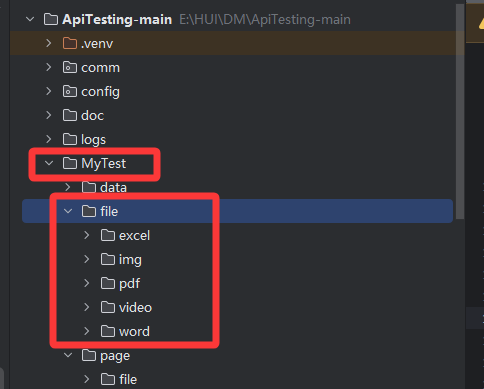
- 修改comm\unit\replaceRelevance.py 文件代码
主要是修改之前的上传文件正则表达式部分和随机上传文件方法的逻辑;
python
# --- 新增:支持参数化的随机文件正则,匹配 $RandFile(excel) 或 $RandFile(img) ---
pattern_rand_file = r'\$RandFile\((.*?)\)'
python
# --- 新增函数:处理随机文件 ---
def replace_rand_file(param):
	"""
    处理 $RandFile(type) 函数
    现在的逻辑:根据传入的类型(excel/word/pdf/img/video),拼接项目内的 MyTest/file/type 目录
    """
	# 只有字符串才处理
	if not isinstance(param, str) or not '$RandFile(' in param:
		return param

	# 1. 定义支持的文件类型映射(也可以直接用传入的参数作为文件夹名)
	# 这里为了灵活性,做一个映射。如果传入的是 'pdf',就去 pdf 文件夹。
	# 如果传入的是 'image' 或 'img',都指向 img 文件夹。
	type_mapping = {
		'excel': 'excel',
		'word': 'word',
		'pdf': 'pdf',
		'img': 'img',
		'image': 'img',  # 兼容写法
		'picture': 'img',
		'video': 'video',
		'mp4': 'video'
	}

	# 2. 查找所有 $RandFile(xxx) 占位符
	matches = re.findall(pattern_rand_file, param)
	if not matches:
		return param

	try:
		# 3. 构建基础文件目录 (假设 config.py 同级目录下有 MyTest/file)
		# 获取当前文件的目录,然后向上两级找到项目根目录,再拼接 file
		# 假设目录结构: project_root/config.py, project_root/MyTest/file/
		base_file_dir = os.path.join(os.path.dirname(os.path.dirname(os.path.dirname(os.path.abspath(__file__)))), 'MyTest', 'file')

		# 检查基础目录是否存在
		if not os.path.exists(base_file_dir):
			raise FileNotFoundError(f"基础文件目录不存在: {base_file_dir}。请检查目录结构。")

		for placeholder in matches:
			placeholder_clean = placeholder.strip().lower()  # 清理空格并转小写

			# 4. 根据映射找到对应的子目录
			if placeholder_clean in type_mapping:
				sub_dir_name = type_mapping[placeholder_clean]
				upload_dir = os.path.join(base_file_dir, sub_dir_name)
			else:
				# 如果传入了不支持的类型,比如 $RandFile(zip),默认回退到 img 或者报错
				# 这里选择回退到 img 目录,并打印警告
				logging.warning(f"不支持的文件类型: {placeholder},将默认从 img 目录选取。")
				upload_dir = os.path.join(base_file_dir, 'img')

			# 5. 检查该类型目录是否存在
			if not os.path.exists(upload_dir):
				raise FileNotFoundError(f"文件类型目录不存在: {upload_dir}。请创建该目录并放入文件。")

			# 6. 获取目录下所有文件
			file_list = [f for f in os.listdir(upload_dir)
						 if os.path.isfile(os.path.join(upload_dir, f))
						 and not f.startswith('.')]  # 忽略隐藏文件

			if not file_list:
				raise FileNotFoundError(f"目录中没有找到文件: {upload_dir}")

			# 7. 随机选择一个文件
			selected_file = random.choice(file_list)
			full_path = os.path.join(upload_dir, selected_file).replace("\\", "/")  # 统一路径格式

			# 8. 替换字符串中的占位符
			# 注意:re.sub 可能会有转义问题,直接用 str.replace 更稳妥,因为我们已经解析过参数了
			placeholder_full = f'$RandFile({placeholder})'
			param = param.replace(placeholder_full, full_path)

	except Exception as e:
		logging.error(f"【Error】随机文件处理失败: {e}")
		# 失败时替换为空,防止报错中断
		for placeholder in matches:
			param = param.replace(f'$RandFile({placeholder})', '')

	return param


# --- 结束新增 ---- 修改comm\script\writeCaseYml.py 文件parse_request_parameter 方法处理文件上传请求的返回
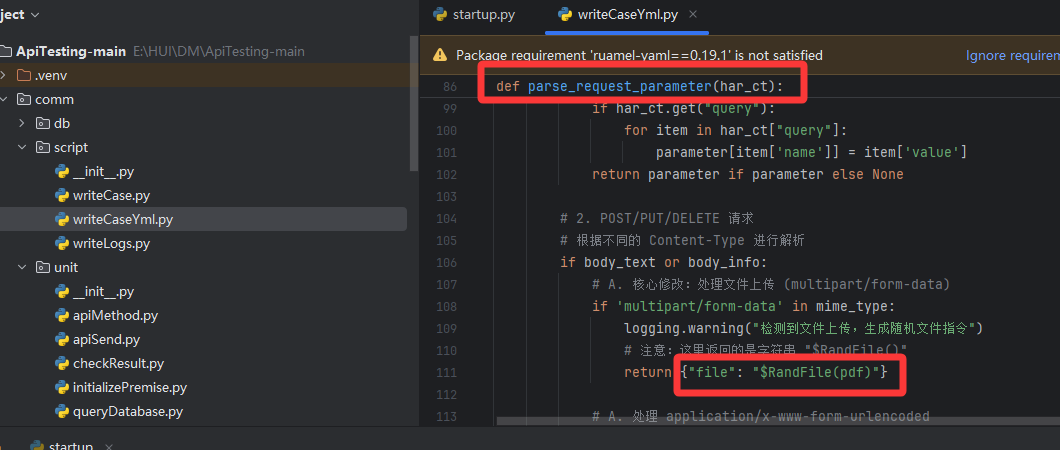
python
$RandFile(pdf) #括号里面填写对应的文件类型即可 excel/img/doc/pdf/video13、同一接口多次请求,保存每次返回参数值用于后续接口
实际应用中往往有这样的需求,比如新增一条项目数据,需要上传多个文件,也就是在访问新增项目接口之前,就需要访问多次文件上传的接口,并且将文件上传接口返回来的文件id保存下来,用于新增项目接口的传参。
-
上传文件的yaml文件中,填写多个用例
注意Summary需要填写规范,因为提取的值会用Summary 后缀来命名。
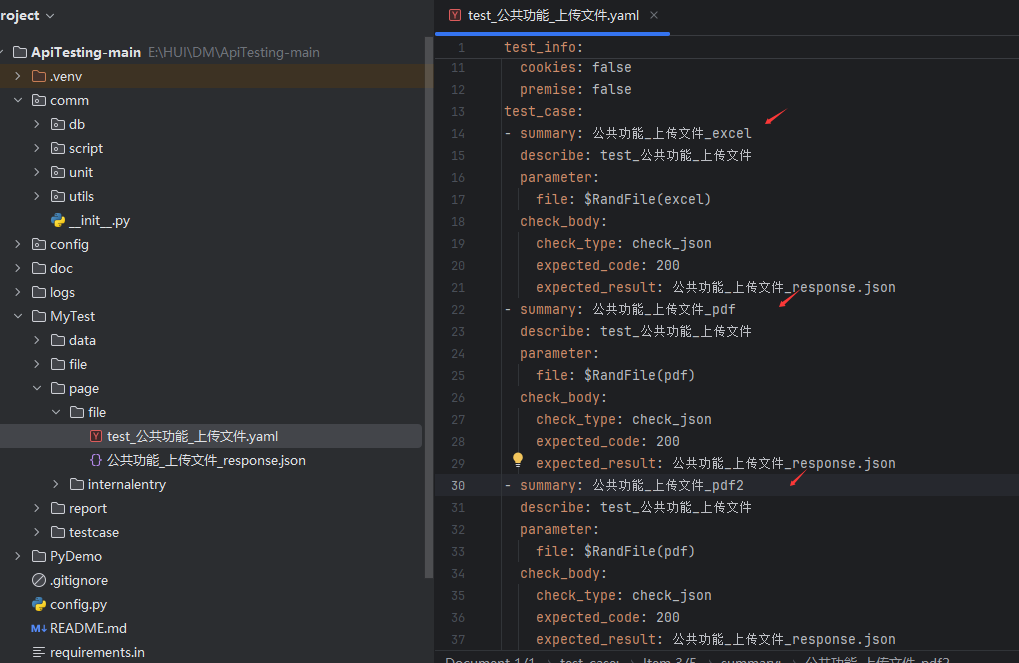
-
修改comm\unit\initializePremise.py 文件init_premise 方法
的提取逻辑,动态提取文件上传返回的id,使识别 Summary 后缀,生成特定动态变量名(excel_id)并存入全局配置。
python
def init_premise(test_info, case_data, case_path):
    """
    用例前提条件执行,提取关键值
    修复:
    1. 移除了 break,确保循环执行所有前置上传用例
    2. 增加了 read_json 的异常容错
    3. 修复了路径拼接错误(去除开头斜杠)
    """
    # 获取项目公共关联值
    aconfig = readYaml.read_yaml_data(API_CONFIG)
    __relevance = aconfig[PROJECT_NAME]

    # --- 1. 预处理当前接口信息 ---
    test_info = replaceRelevance.replace(test_info, __relevance)
    logging.debug("测试信息处理结果:{}".format(test_info))

    # 处理Cookies
    if test_info['cookies']:
        cookies = aconfig[PROJECT_NAME]['cookies']
        logging.debug("请求Cookies处理结果:{}".format(cookies))

    # --- 2. 处理前置接口 (如果有) ---
    pre_case_yaml = test_info["premise"]
    if pre_case_yaml:
        # --- 关键修复:去除路径开头的 / 或 \ ---
        # 防止 os.path.join 将其识别为绝对路径而丢弃 PAGE_DIR
        pre_case_yaml = pre_case_yaml.lstrip('/').lstrip('\\')
        pre_case_yaml = os.path.join(PAGE_DIR, pre_case_yaml)
        logging.debug(f"读取前置用例文件: {pre_case_yaml}")

        if not os.path.exists(pre_case_yaml):
            raise FileNotFoundError(f"前置用例文件不存在: {pre_case_yaml}")

        pre_case_path = os.path.dirname(pre_case_yaml)
        pre_case_dict = readYaml.read_yaml_data(pre_case_yaml)
        pre_test_info = pre_case_dict['test_info']
        pre_case_data_list = pre_case_dict['test_case']

        # 递归处理前置接口的前置接口
        if pre_test_info["premise"]:
            init_premise(pre_test_info, pre_case_data_list, pre_case_path)

        # --- 3. 循环执行所有前置用例 ---
        for pre_case_data in pre_case_data_list:
            executed_successfully = False
            for i in range(3):  # 重试机制
                try:
                    # 处理前置接口信息
                    current_pre_test_info = replaceRelevance.replace(pre_test_info.copy(), __relevance)

                    # --- 容错处理 read_json ---
                    try:
                        pre_parameter = read_json(pre_case_data['summary'], pre_case_data['parameter'], pre_case_path)
                    except Exception as json_e:
                        logging.warning(f"读取参数文件失败,使用原始参数: {pre_case_data['parameter']} | 错误: {json_e}")
                        pre_parameter = pre_case_data['parameter']

                    pre_parameter = replaceRelevance.replace(pre_parameter, __relevance)

                    logging.info(f"执行前置接口: {current_pre_test_info['title']} - {pre_case_data['summary']}")

                    # 发送请求
                    code, data = apiSend.send_request(current_pre_test_info,
                                                      {**pre_case_data, 'parameter': pre_parameter})

                    if code == 200 and data and data.get("success"):
                        # --- 4. 核心逻辑:智能提取上传文件 ID ---
                        if "公共功能_上传文件" in pre_case_data['summary']:
                            suffix = pre_case_data['summary'].split('_')[-1].lower()
                            var_key = f"{suffix}_id"
                            # 根据实际返回结构调整
                            file_id = data.get("data", {}).get("id")
                            if file_id:
                                __relevance[var_key] = file_id
                                logging.info(f"【前置依赖】提取成功: ${var_key} = {file_id}")
                            else:
                                logging.warning(f"上传接口返回无 ID 字段: {data}")

                        executed_successfully = True
                        break  # 接口成功,跳出重试循环

                    else:
                        logging.error(f"前置接口业务失败: {data}")

                except Exception as e:
                    logging.error(f"执行前置用例出错: {e}")

                time.sleep(1)

            # 如果你想严格模式(一个失败全部停止),请取消下面的注释
            # if not executed_successfully:
            #     raise Exception(f"前置接口请求三次均失败!{pre_case_data['summary']}")

        # --- 5. 所有前置用例执行完毕后,处理当前接口的参数 ---
        try:
            parameter = read_json(case_data['summary'], case_data['parameter'], case_path)
        except:
            parameter = case_data['parameter']

        parameter = replaceRelevance.replace(parameter, __relevance)
        case_data['parameter'] = parameter

        try:
            expected_rs = read_json(case_data['summary'], case_data['check_body']['expected_result'], case_path)
        except:
            expected_rs = case_data['check_body']['expected_result']

        expected_rs = replaceRelevance.replace(expected_rs, __relevance)
        case_data['check_body']['expected_result'] = expected_rs

    else:
        # --- 6. 无前置接口时的处理 ---
        try:
            parameter = read_json(case_data['summary'], case_data['parameter'], case_path)
        except:
            parameter = case_data['parameter']
        parameter = replaceRelevance.replace(parameter, __relevance)
        case_data['parameter'] = parameter

        try:
            expected_rs = read_json(case_data['summary'], case_data['check_body']['expected_result'], case_path)
        except:
            expected_rs = case_data['check_body']['expected_result']
        expected_rs = replaceRelevance.replace(expected_rs, __relevance)
        case_data['check_body']['expected_result'] = expected_rs

return test_info, case_data-
在后面使用接口 新增项目接口的请求yaml文件中填入文件上传前置接口
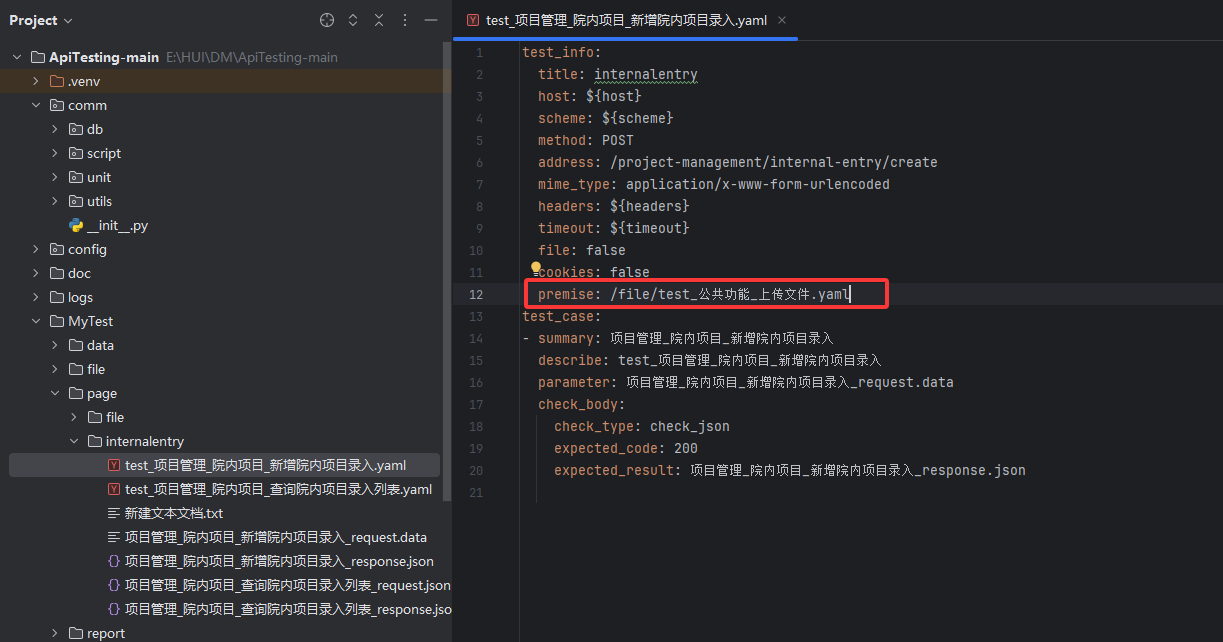
-
在新增项目接口的请求参数中 填入变量名
这样就实现一个接口同时取多个前置接口的返回值了。
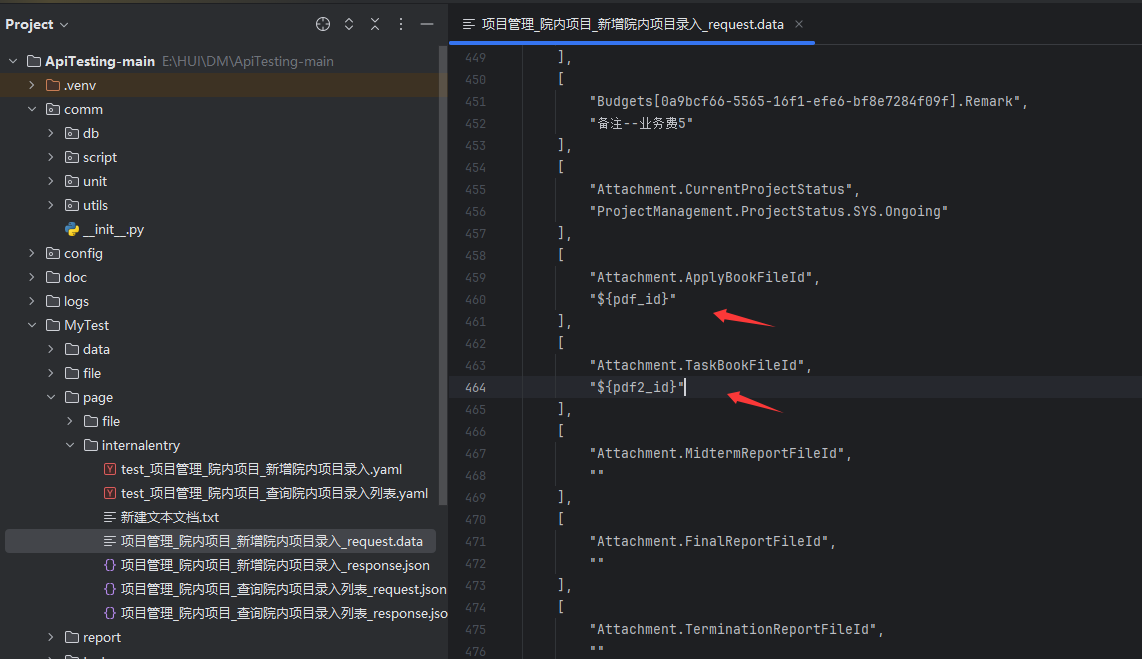
14、修改后的完整代码
通过网盘分享的文件:ApiTesting-main.zip
链接: https://pan.baidu.com/s/1RWT6onD6k2QnWgXc9tKrHw?pwd=d4u7
提取码: d4u7