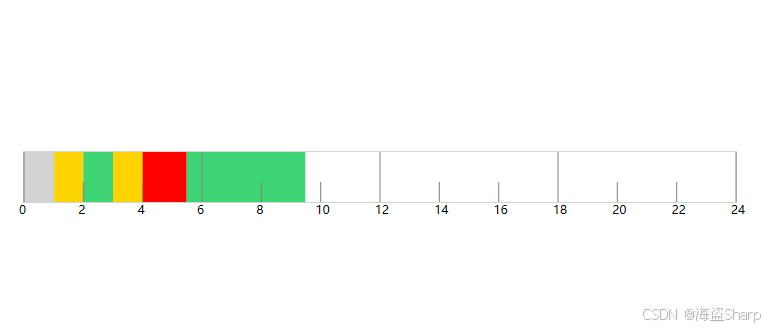
需求
实现一个设备的运行时间图,用四色表示设备运行状态,灰色为离线,黄色为待机,绿色为运行,红色为故障

基础实现
创建一个用户控件,在Canvas中用不同颜色的Rectangle方块,表示不同的状态;用Line绘制刻度尺。
刻度尺绘制
csharp
/// <summary>
/// 刻度线长
/// </summary>
private int length = 20;

/// <summary>
/// 刻度间隔
/// </summary>
private int intervalNum = 2;

/// <summary>
/// 绘制刻度,根据canvas长度,分为24等分,对应24小时,刻度线长为length,最左边绘制0点
/// </summary>
void DrawScale()
{
    double interval = ScaleCanvas.ActualWidth / 24 * intervalNum;
    double height = ScaleCanvas.ActualHeight;
    for (int i = 0; i <= 24 / intervalNum; i++)
    {
        double y1 = (i * intervalNum) % AreaNum == 0 ? 0 : height - length;
        y1 = Math.Min(Math.Abs(y1), height);

        Line line = new Line
        {
            X1 = i * interval,
            X2 = i * interval,
            Y1 = y1,
            Y2 = height,
            Stroke = Brushes.Gray,
            StrokeThickness = 1
        };
        this.ScaleCanvas.Children.Add(line);
        TextBlock textBlock = new TextBlock
        {
            Text = (i * intervalNum).ToString(),
            FontSize = 12,
        };
        textBlock.SetValue(Canvas.LeftProperty, i * interval - 5);
        textBlock.SetValue(Canvas.TopProperty, height);
        this.ScaleCanvas.Children.Add(textBlock);
    }
    ;
}
状态控制
按比例计算方块的横坐标和长度,比例=Canvas实际宽度ActualHeight / 一天总分钟数(24*60)
宽度Width等于 时间间隔的分钟数x 比例
横坐标Canvas.Left等于 起始时间x 比例
csharp
//绘制设备运行状态时间图
void DrawContent()
{
    if (ItemsSource == null)
    {
        return;
    }
    double unit = ScaleCanvas.ActualWidth / (24 * 60);
    //根据ItemsSource筛选出当天的时间集合,然后绘制不同颜色的Rectangle
    var items = ItemsSource
        .Where(w => w.Time.Date.Equals(Date.Date) && statusColors.ContainsKey(w.Status))
        .ToArray();

    for (int i = 0; i < items.Length - 1; i++)
    {
        int start = GetMinutes(items[i].Time);
        int end = GetMinutes(items[i + 1].Time);
        Rectangle rectangle = new Rectangle
        {
            Width = (end - start) * unit,
            Height = ScaleCanvas.ActualHeight,
            Fill = statusColors[items[i].Status]
        };
        rectangle.SetValue(Canvas.LeftProperty, start * unit);
        this.ScaleCanvas.Children.Add(rectangle);
    }
}
完整实现
控件EquipStatusTimeChart.xaml
xml
<UserControl
    x:Class="WpfApp1.EquipStatusTimeChart"
    xmlns="http://schemas.microsoft.com/winfx/2006/xaml/presentation"
    xmlns:x="http://schemas.microsoft.com/winfx/2006/xaml"
    xmlns:d="http://schemas.microsoft.com/expression/blend/2008"
    xmlns:local="clr-namespace:WpfApp1"
    xmlns:mc="http://schemas.openxmlformats.org/markup-compatibility/2006"
    d:DesignHeight="65"
    d:DesignWidth="760"
    mc:Ignorable="d">
    <Grid>
        <Border
            MinWidth="400"
            MinHeight="20"
            Margin="10"
            BorderBrush="LightGray"
            BorderThickness="1">

            <Canvas Name="ScaleCanvas" />
        </Border>
    </Grid>
</UserControl>
EquipStatusTimeChart.xaml 的交互逻辑
csharp
 public partial class EquipStatusTimeChart : UserControl
 {
     public DateTime Date
     {
         get { return (DateTime)GetValue(DateProperty); }
         set { SetValue(DateProperty, value); }
     }

     // Using a DependencyProperty as the backing store for Date.  This enables animation, styling, binding, etc...
     public static readonly DependencyProperty DateProperty = DependencyProperty.Register(
         "Date",
         typeof(DateTime),
         typeof(EquipStatusTimeChart),
         new PropertyMetadata(DateTime.Today)
     );

     private Dictionary<string, Brush> statusColors = new Dictionary<string, Brush>();

     public List<StatusItem> Statuses
     {
         get { return (List<StatusItem>)GetValue(StatusesProperty); }
         set { SetValue(StatusesProperty, value); }
     }

     // Using a DependencyProperty as the backing store for Statuses.  This enables animation, styling, binding, etc...
     public static readonly DependencyProperty StatusesProperty = DependencyProperty.Register(
         "Statuses",
         typeof(List<StatusItem>),
         typeof(EquipStatusTimeChart),
         new PropertyMetadata(
             new List<StatusItem>(),
             (sender, e) =>
             {
                 var chart = sender as EquipStatusTimeChart;
                 chart.StatusesChanged(sender, e);
             }
         )
     );

     void StatusesChanged(DependencyObject d, DependencyPropertyChangedEventArgs e)
     {
         if (e.NewValue != null)
         {
             statusColors = Statuses.ToDictionary(x => x.Status, x => x.ShowColor);
         }
     }

     public IEnumerable<StatusTimeItem> ItemsSource
     {
         get { return (IEnumerable<StatusTimeItem>)GetValue(ItemsSourceProperty); }
         set { SetValue(ItemsSourceProperty, value); }
     }

     // Using a DependencyProperty as the backing store for MyProperty.  This enables animation, styling, binding, etc...
     public static readonly DependencyProperty ItemsSourceProperty = DependencyProperty.Register(
         "ItemsSource",
         typeof(IEnumerable<StatusTimeItem>),
         typeof(EquipStatusTimeChart),
         new PropertyMetadata(null)
     );

     public EquipStatusTimeChart()
     {
         InitializeComponent();
     }

     public override void OnApplyTemplate()
     {
         base.OnApplyTemplate();
         statusColors = Statuses.ToDictionary(x => x.Status, x => x.ShowColor);
     }

     /// <summary>
     /// 刻度线长
     /// </summary>
     private int length = 20;

     /// <summary>
     /// 刻度间隔
     /// </summary>
     private int intervalNum = 2;

     private int AreaNum = 6;

     protected override void OnRender(DrawingContext drawingContext)
     {
         base.OnRender(drawingContext);
         this.ScaleCanvas.Children.Clear();
         DrawContent();
         DrawScale();
     }

     //绘制设备运行状态时间图
     void DrawContent()
     {
         if (ItemsSource == null)
         {
             return;
         }
         double unit = ScaleCanvas.ActualWidth / (24 * 60);
         //根据ItemsSource筛选出当天的时间集合,然后绘制不同颜色的Rectangle
         var items = ItemsSource
             .Where(w => w.Time.Date.Equals(Date.Date) && statusColors.ContainsKey(w.Status))
             .ToArray();

         for (int i = 0; i < items.Length - 1; i++)
         {
             int start = GetMinutes(items[i].Time);
             int end = GetMinutes(items[i + 1].Time);
             Rectangle rectangle = new Rectangle
             {
                 Width = (end - start) * unit,
                 Height = ScaleCanvas.ActualHeight,
                 Fill = statusColors[items[i].Status]
             };
             rectangle.SetValue(Canvas.LeftProperty, start * unit);
             this.ScaleCanvas.Children.Add(rectangle);
         }
     }

     int GetMinutes(DateTime time)
     {
         return time.Hour * 60 + time.Minute;
     }

     /// <summary>
     /// 绘制刻度,根据canvas长度,分为24等分,对应24小时,刻度线长为length,最左边绘制0点
     /// </summary>
     void DrawScale()
     {
         double interval = ScaleCanvas.ActualWidth / 24 * intervalNum;
         double height = ScaleCanvas.ActualHeight;
         for (int i = 0; i <= 24 / intervalNum; i++)
         {
             double y1 = (i * intervalNum) % AreaNum == 0 ? 0 : height - length;
             y1 = Math.Min(Math.Abs(y1), height);

             Line line = new Line
             {
                 X1 = i * interval,
                 X2 = i * interval,
                 Y1 = y1,
                 Y2 = height,
                 Stroke = Brushes.Gray,
                 StrokeThickness = 1
             };
             this.ScaleCanvas.Children.Add(line);
             TextBlock textBlock = new TextBlock
             {
                 Text = (i * intervalNum).ToString(),
                 FontSize = 12,
             };
             textBlock.SetValue(Canvas.LeftProperty, i * interval - 5);
             textBlock.SetValue(Canvas.TopProperty, height);
             this.ScaleCanvas.Children.Add(textBlock);
         }
         ;
     }
 }
控件状态项
表示状态选项
csharp
  public class StatusItem : DependencyObject
  {
      public string Status
      {
          get { return (string)GetValue(StatusProperty); }
          set { SetValue(StatusProperty, value); }
      }

      // Using a DependencyProperty as the backing store for Status.  This enables animation, styling, binding, etc...
      public static readonly DependencyProperty StatusProperty = DependencyProperty.Register(
          "Status",
          typeof(string),
          typeof(StatusItem),
          new PropertyMetadata("")
      );

      public Brush ShowColor
      {
          get { return (Brush)GetValue(ShowColorProperty); }
          set { SetValue(ShowColorProperty, value); }
      }

      // Using a DependencyProperty as the backing store for ShowColor.  This enables animation, styling, binding, etc...
      public static readonly DependencyProperty ShowColorProperty = DependencyProperty.Register(
          "ShowColor",
          typeof(Brush),
          typeof(StatusItem),
          new PropertyMetadata(null)
      );
  }
使用
在MainWindow中添加控件,
xml
    <Grid>
        <local:EquipStatusTimeChart x:Name="Chart" Margin="40,179,42,187">
            <local:EquipStatusTimeChart.Statuses>
                <local:StatusItem ShowColor="LightGray" Status="Offline" />
                <local:StatusItem ShowColor="#FFD400" Status="Wait" />
                <local:StatusItem ShowColor="#3DD573 " Status="Run" />
                <local:StatusItem ShowColor="Red" Status="Failt" />
            </local:EquipStatusTimeChart.Statuses>
        </local:EquipStatusTimeChart>

    </Grid>
增加一个数据绑定类
csharp
    public class StatusTimeItem
    {
        public DateTime Time { get; set; }

        public string Status { get; set; }
    }
在后台交互逻辑中初始化数据,然后绑定到控件上
csharp
 List<StatusTimeItem> items = new List<StatusTimeItem>();
 items.Add(new StatusTimeItem() { Status = "Offline", Time = DateTime.Today });
 items.Add(
     new StatusTimeItem()
     {
         Status = "Wait",
         Time = DateTime.Today.AddHours(1).AddMinutes(1),
     }
 );
 items.Add(new StatusTimeItem() { Status = "Run", Time = DateTime.Today.AddHours(2) });
 items.Add(new StatusTimeItem() { Status = "Run", Time = DateTime.Today.AddHours(2) });
 items.Add(new StatusTimeItem() { Status = "Wait", Time = DateTime.Today.AddHours(3) });
 items.Add(new StatusTimeItem() { Status = "Failt", Time = DateTime.Today.AddHours(4) });
 items.Add(
     new StatusTimeItem()
     {
         Status = "Run",
         Time = DateTime.Today.AddHours(5).AddMinutes(29),
     }
 );

 items.Add(
     new StatusTimeItem()
     {
         Status = "Run",
         Time = DateTime.Today.AddHours(9).AddMinutes(29),
     }
 );
 Chart.ItemsSource = items;
运行效果