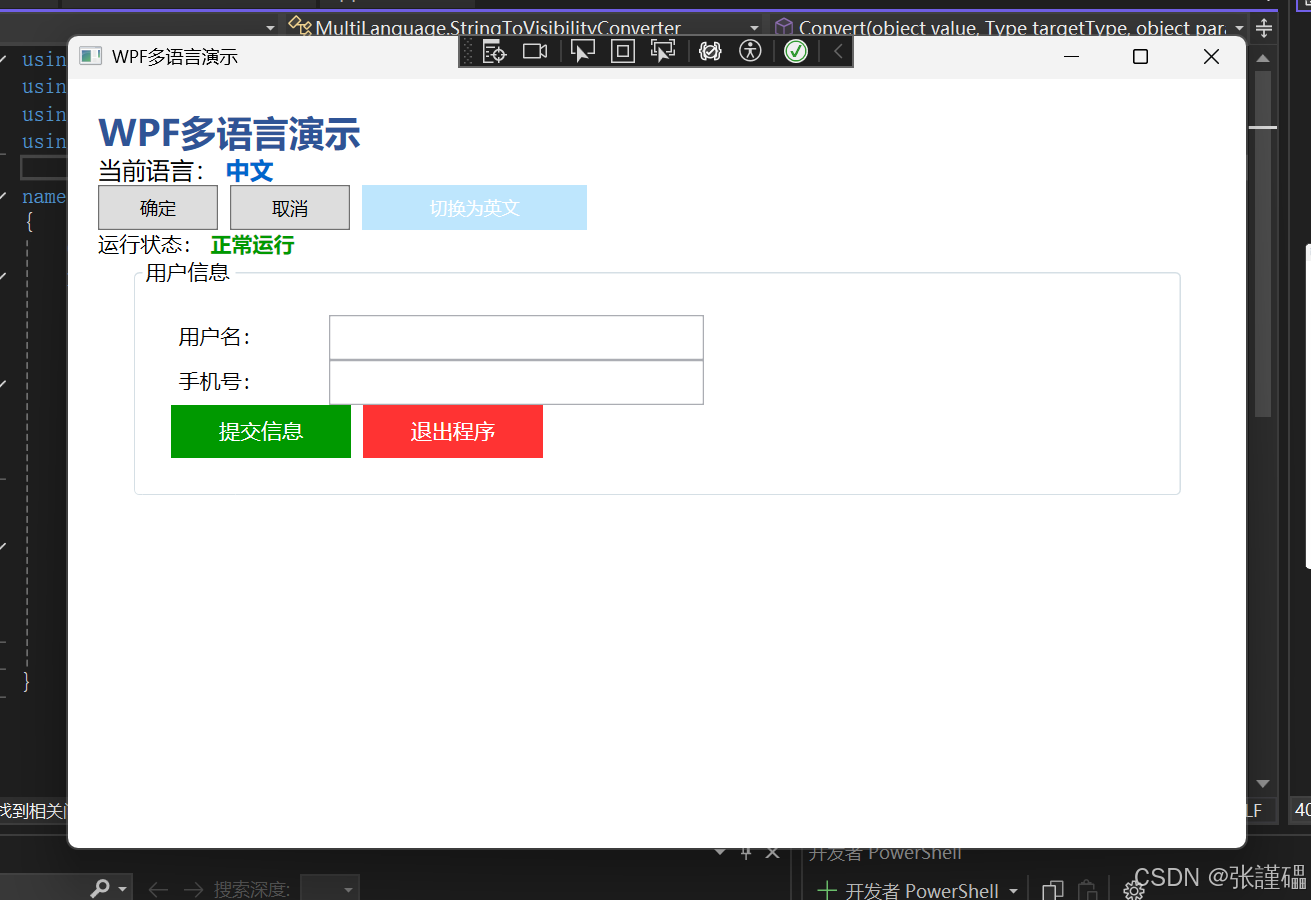
WPF 多语言实现完整笔记(.NET 4.7.2)
一、实现核心思路
基于WPF 动态资源(DynamicResource) + 资源字典(ResourceDictionary) + 单例语言管理器实现多语言切换,核心是将所有需国际化的文本抽离到独立的语言资源文件中,通过替换应用程序的资源字典完成语言切换,同时记录用户语言偏好并持久化。
二、项目结构梳理
MultiLanguage/
├─ Common/
│  └─ LanguageManager.cs  // 核心多语言管理类(单例+INotifyPropertyChanged)
├─ Resources/             // 语言资源字典文件夹
│  ├─ Lang_zh-CN.xaml     // 中文资源文件
│  └─ Lang_en-US.xaml     // 英文资源文件
├─ App.xaml + App.xaml.cs // 应用程序入口,初始化语言元数据
├─ MainWindow.xaml + MainWindow.xaml.cs // 主界面(绑定资源+切换逻辑)
├─ StringToVisibilityConverter.cs // 自定义转换器(水印显示/隐藏)
└─ app.config             // 配置文件,持久化用户语言设置
三、核心代码模块详解
模块 1:语言管理核心类(LanguageManager.cs)
作用:单例模式统一管理语言切换、资源加载、语言持久化、属性通知,是多语言实现的核心枢纽。
using System;
using System.ComponentModel;
using System.Globalization;
using System.Linq;
using System.Reflection;
using System.Threading;
using System.Windows;
using System.Windows.Markup;
namespace MultiLanguage.Common
{
public class LanguageManager : INotifyPropertyChanged
{
// 1. 单例模式(懒加载,线程安全)
private static readonly Lazy<LanguageManager> _instance = new Lazy<LanguageManager>(() => new LanguageManager());
public static LanguageManager Instance => _instance.Value;
private LanguageManager() { InitLanguage(); } // 私有构造,初始化语言
// 2. 语言类型枚举(带描述特性,用于显示语言名称)
public enum LanguageType
{
[Description("中文")]
zh_CN,
[Description("英文")]
en_US
}
// 3. 当前语言属性(核心,赋值时触发语言加载)
private LanguageType _currentLang;
public LanguageType CurrentLang
{
get => _currentLang;
set
{
if (_currentLang != value)
{
_currentLang = value;
LoadLanguageResource(); // 加载对应语言资源
// 持久化语言设置到配置文件
Properties.Settings.Default.Language = value.ToString();
Properties.Settings.Default.Save();
// 通知UI属性变更
OnPropertyChanged(nameof(CurrentLang));
OnPropertyChanged(nameof(CurrentLangDesc));
}
}
}
// 4. 当前语言描述(获取枚举的Description,用于UI显示)
public string CurrentLangDesc
{
get
{
FieldInfo field = _currentLang.GetType().GetField(_currentLang.ToString());
DescriptionAttribute attr = Attribute.GetCustomAttribute(field, typeof(DescriptionAttribute)) as DescriptionAttribute;
return attr?.Description ?? _currentLang.ToString().Replace("_", "-");
}
}
// 5. 初始化语言(程序启动时执行,优先读取配置文件,无则默认中文)
private void InitLanguage()
{
try
{
string saveLang = Properties.Settings.Default.Language;
if (!string.IsNullOrEmpty(saveLang) && Enum.TryParse(saveLang, out LanguageType lang))
CurrentLang = lang;
else
CurrentLang = LanguageType.zh_CN;
}
catch { CurrentLang = LanguageType.zh_CN; } // 异常时默认中文
}
// 6. 加载语言资源字典(核心方法,替换应用程序资源)
private void LoadLanguageResource()
{
try
{
// 转换语言编码(zh_CN → zh-CN,匹配资源文件命名)
string langCode = _currentLang.ToString().Replace("_", "-");
// 资源文件路径(注意格式:/程序集;component/文件夹/文件名.xaml)
string resourcePath = $"/MultiLanguage;component/Resources/Lang_{langCode}.xaml";
Uri resourceUri = new Uri(resourcePath, UriKind.Relative);
ResourceDictionary newLangDict = new ResourceDictionary { Source = resourceUri };
// 移除旧的语言资源字典(避免资源冗余)
var oldLangDict = Application.Current.Resources.MergedDictionaries
.FirstOrDefault(d => d.Source?.ToString().Contains("Lang_") == true);
if (oldLangDict != null) Application.Current.Resources.MergedDictionaries.Remove(oldLangDict);
// 添加新的语言资源字典
Application.Current.Resources.MergedDictionaries.Add(newLangDict);
// 设置线程文化(适配数字/日期等格式国际化,可选)
CultureInfo culture = new CultureInfo(langCode);
Thread.CurrentThread.CurrentUICulture = culture;
Thread.CurrentThread.CurrentCulture = culture;
}
catch (Exception ex)
{
MessageBox.Show($"语言加载失败:{ex.Message}", "错误", MessageBoxButton.OK, MessageBoxImage.Error);
}
}
// 7. INotifyPropertyChanged 接口实现(通知UI更新)
public event PropertyChangedEventHandler PropertyChanged;
private void OnPropertyChanged(string propertyName)
{
PropertyChanged?.Invoke(this, new PropertyChangedEventArgs(propertyName));
}
}
}关键要点:
-
单例模式:保证整个应用只有一个语言管理器实例,避免状态混乱;
-
DynamicResource绑定:资源变更时 UI 自动更新,区别于StaticResource(仅加载一次); -
资源字典替换:通过移除旧字典、添加新字典实现语言切换,所有绑定该资源的 UI 会同步更新;
-
持久化:通过
Properties.Settings将语言设置保存到app.config,程序重启后保留用户偏好。
模块 2:语言资源字典文件(Resources 文件夹)
作用 :按语言拆分,存储所有需国际化的文本,以Key-Value形式管理,Key 统一、Value 按语言翻译。
中文资源:Lang_zh-CN.xaml
<ResourceDictionary xmlns="http://schemas.microsoft.com/winfx/2006/xaml/presentation"
                    xmlns:x="http://schemas.microsoft.com/winfx/2006/xaml"
                    xmlns:system="clr-namespace:System;assembly=mscorlib">
    <system:String x:Key="Lbl_Title">WPF多语言演示</system:String>
    <system:String x:Key="Lbl_Content">当前语言:</system:String>
    <system:String x:Key="Btn_Ok">确定</system:String>
    <system:String x:Key="Btn_Cancel">取消</system:String>
    <system:String x:Key="Btn_SwitchLang">切换为英文</system:String>
    <system:String x:Key="Msg_Success">语言切换成功!</system:String>
    <system:String x:Key="Group_UserInfo">用户信息</system:String>
    <system:String x:Key="Lbl_UserName">用户名:</system:String>
    <system:String x:Key="Lbl_Phone">手机号:</system:String>
    <system:String x:Key="Hint_UserName">请输入您的用户名</system:String>
    <system:String x:Key="Hint_Phone">请输入您的手机号</system:String>
    <system:String x:Key="Btn_Submit">提交信息</system:String>
    <system:String x:Key="Btn_Exit">退出程序</system:String>
    <system:String x:Key="Lbl_Status">运行状态:</system:String>
    <system:String x:Key="Status_Normal">正常运行</system:String>
    <system:String x:Key="Msg_SubmitTip">信息提交成功,感谢使用!</system:String>
    <system:String x:Key="Msg_ExitTip">确定要退出WPF多语言程序吗?</system:String>
</ResourceDictionary>
英文资源:Lang_en-US.xaml
<ResourceDictionary xmlns="http://schemas.microsoft.com/winfx/2006/xaml/presentation"
                    xmlns:x="http://schemas.microsoft.com/winfx/2006/xaml"
                    xmlns:system="clr-namespace:System;assembly=mscorlib">
    <system:String x:Key="Lbl_Title">WPF Multi-Language Demo</system:String>
    <system:String x:Key="Lbl_Content">Current Language:</system:String>
    <system:String x:Key="Btn_Ok">OK</system:String>
    <system:String x:Key="Btn_Cancel">Cancel</system:String>
    <system:String x:Key="Btn_SwitchLang">Switch to Chinese</system:String>
    <system:String x:Key="Msg_Success">Language switched successfully!</system:String>
    <system:String x:Key="Group_UserInfo">User Information</system:String>
    <system:String x:Key="Lbl_UserName">User Name:</system:String>
    <system:String x:Key="Lbl_Phone">Phone Number:</system:String>
    <system:String x:Key="Hint_UserName">Please enter your user name</system:String>
    <system:String x:Key="Hint_Phone">Please enter your phone number</system:String>
    <system:String x:Key="Btn_Submit">Submit Info</system:String>
    <system:String x:Key="Btn_Exit">Exit Program</system:String>
    <system:String x:Key="Lbl_Status">Running Status:</system:String>
    <system:String x:Key="Status_Normal">Running Normally</system:String>
    <system:String x:Key="Msg_SubmitTip">Info submitted successfully, thanks for using!</system:String>
    <system:String x:Key="Msg_ExitTip">Are you sure to exit the WPF multi-language program?</system:String>
</ResourceDictionary>关键要点:
-
所有资源的
x:Key必须完全一致 ,仅Value按语言翻译; -
资源类型:此处用
system:String存储文本,也可存储其他类型(如字体、颜色、样式); -
文件命名规范:
Lang_语言编码.xaml(如 zh-CN、en-US),与语言管理器中的路径匹配。
模块 3:应用程序入口(App.xaml + App.xaml.cs)
作用:初始化默认语言资源、设置 WPF 控件语言元数据,保证程序启动时加载默认中文资源。
App.xaml(声明默认资源字典)
<Application x:Class="MultiLanguage.App"
             xmlns="http://schemas.microsoft.com/winfx/2006/xaml/presentation"
             xmlns:x="http://schemas.microsoft.com/winfx/2006/xaml"
             StartupUri="MainWindow.xaml">
    <Application.Resources>
        <ResourceDictionary>
            <ResourceDictionary.MergedDictionaries>
                <!-- 程序启动默认加载中文资源 -->
                <ResourceDictionary Source="/MultiLanguage;component/Resources/Lang_zh-CN.xaml"/>
            </ResourceDictionary.MergedDictionaries>
        </ResourceDictionary>
    </Application.Resources>
</Application>
App.xaml.cs(初始化控件语言元数据)
using System;
using System.Globalization;
using System.Windows;
using System.Windows.Markup;
namespace MultiLanguage
{
public partial class App : Application
{
public App()
{
// 设置WPF控件默认语言元数据,解决部分控件国际化显示问题
var defaultCulture = new CultureInfo("zh-CN");
FrameworkElement.LanguageProperty.OverrideMetadata(
typeof(FrameworkElement),
new FrameworkPropertyMetadata(XmlLanguage.GetLanguage(defaultCulture.IetfLanguageTag)));
}
}
}模块 4:配置文件(app.config)
作用 :持久化用户的语言设置,由Properties.Settings自动维护,程序重启后读取该配置。
<?xml version="1.0" encoding="utf-8" ?>
<configuration>
    <configSections>
        <sectionGroup name="userSettings" type="System.Configuration.UserSettingsGroup, System, Version=4.0.0.0, Culture=neutral, PublicKeyToken=b77a5c561934e089" >
            <section name="MultiLanguage.Properties.Settings" type="System.Configuration.ClientSettingsSection, System, Version=4.0.0.0, Culture=neutral, PublicKeyToken=b77a5c561934e089" allowExeDefinition="MachineToLocalUser" requirePermission="false" />
        </sectionGroup>
    </configSections>
    <startup>
        <supportedRuntime version="v4.0" sku=".NETFramework,Version=v4.7.2" />
    </startup>
    <userSettings>
        <MultiLanguage.Properties.Settings>
            <!-- 语言设置持久化,默认中文zh-CN,切换后自动修改 -->
            <setting name="Language" serializeAs="String">
                <value>zh-CN</value>
            </setting>
        </MultiLanguage.Properties.Settings>
    </userSettings>
</configuration>
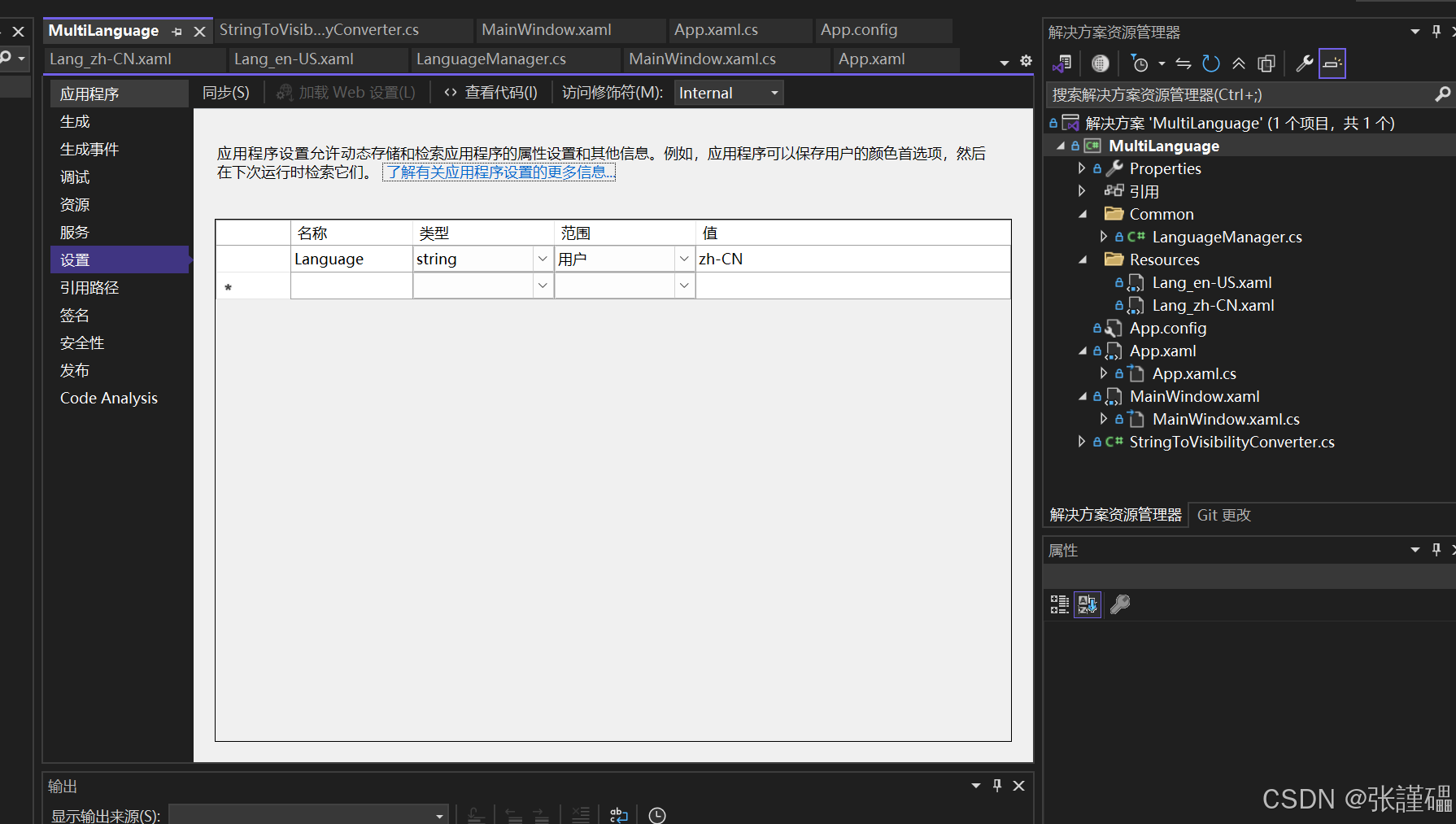
关键要点 :Language节点由 Visual Studio 的设置设计器自动生成(右键项目→属性→设置→添加名称 Language,类型 string,范围用户)。
模块 5:自定义转换器(StringToVisibilityConverter.cs)
作用:实现输入框水印的显示 / 隐藏逻辑(输入框为空时显示水印,有内容时隐藏)。
using System;
using System.Globalization;
using System.Windows;
using System.Windows.Data;
namespace MultiLanguage
{
public class StringToVisibilityConverter : IValueConverter
{
// 正向转换:字符串为空→Visible(显示水印),非空→Collapsed(隐藏水印)
public object Convert(object value, Type targetType, object parameter, CultureInfo culture)
{
return string.IsNullOrEmpty(value?.ToString()) ? Visibility.Visible : Visibility.Collapsed;
}
// 反向转换:此处无需实现,抛出异常即可
public object ConvertBack(object value, Type targetType, object parameter, CultureInfo culture)
{
throw new NotImplementedException();
}
}
}模块 6:主界面(MainWindow.xaml + MainWindow.xaml.cs)
作用:绑定多语言资源、实现语言切换按钮逻辑、演示水印 / 按钮 / 文本等控件的国际化。
MainWindow.xaml(核心:DynamicResource 绑定 + DataContext 设置)
<Window x:Class="MultiLanguage.MainWindow"
xmlns="http://schemas.microsoft.com/winfx/2006/xaml/presentation"
xmlns:x="http://schemas.microsoft.com/winfx/2006/xaml"
xmlns:d="http://schemas.microsoft.com/expression/blend/2008"
xmlns:mc="http://schemas.openxmlformats.org/markup-compatibility/2006"
xmlns:common="clr-namespace:MultiLanguage.Common"
xmlns:local="clr-namespace:MultiLanguage"
mc:Ignorable="d"
Title="{DynamicResource Lbl_Title}" Height="550" Width="800"
WindowStartupLocation="CenterScreen"
<!-- 绑定语言管理器单例,用于显示当前语言描述 -->
DataContext="{Binding Source={x:Static common:LanguageManager.Instance}}">
<Window.Resources>
<!-- 原生转换器:布尔值转可见性 -->
<BooleanToVisibilityConverter x:Key="BooleanToVisibilityConverter"/>
<!-- 注册自定义转换器:字符串为空转可见性(水印用) -->
<local:StringToVisibilityConverter x:Key="StringToVisibilityConverter"/>
<!-- 控件样式(省略,仅美化界面) -->
<Style TargetType="Button">
<Setter Property="Margin" Value="0,0,8,0"/>
<Setter Property="Cursor" Value="Hand"/>
</Style>
<Style TargetType="TextBox" Width="250" Height="30" Margin="5,0,0,0"/>
<Style TargetType="Label" Width="100" Height="30" HorizontalAlignment="Right"/>
<!-- 水印样式:浅灰色、左内边距 -->
<Style TargetType="TextBlock" x:Key="WatermarkStyle">
<Setter Property="Foreground" Value="#CCCCCC"/>
<Setter Property="Margin" Value="10,0,0,0"/>
<Setter Property="VerticalAlignment" Value="Center"/>
</Style>
</Window.Resources>
<ScrollViewer Margin="20" VerticalScrollBarVisibility="Auto">
<Grid>
<Grid.RowDefinitions>
<RowDefinition Height="Auto"/>
<RowDefinition Height="Auto"/>
<RowDefinition Height="Auto"/>
<RowDefinition Height="Auto"/>
<RowDefinition Height="Auto"/>
<RowDefinition Height="*"/>
</Grid.RowDefinitions>
<!-- 主标题:绑定动态资源 -->
<TextBlock Text="{DynamicResource Lbl_Title}" FontSize="24" FontWeight="Bold" Foreground="#2F5496"/>
<!-- 当前语言显示:绑定资源+语言管理器的CurrentLangDesc -->
<StackPanel Grid.Row="1" Orientation="Horizontal">
<TextBlock Text="{DynamicResource Lbl_Content}" FontSize="16"/>
<TextBlock Text="{Binding CurrentLangDesc}" FontSize="16" Foreground="#0066CC" Margin="5,0,0,0"/>
</StackPanel>
<!-- 功能按钮:绑定动态资源,语言切换按钮绑定Click事件 -->
<StackPanel Grid.Row="2" Orientation="Horizontal">
<Button Content="{DynamicResource Btn_Ok}" Width="80" Height="30"/>
<Button Content="{DynamicResource Btn_Cancel}" Width="80" Height="30"/>
<Button Content="{DynamicResource Btn_SwitchLang}" Width="150" Height="30"
Background="#0066CC" Foreground="White" Click="SwitchLang_Click"/>
</StackPanel>
<!-- 运行状态:绑定动态资源 -->
<StackPanel Grid.Row="3" Orientation="Horizontal">
<TextBlock Text="{DynamicResource Lbl_Status}" FontSize="14"/>
<TextBlock Text="{DynamicResource Status_Normal}" FontSize="14" Foreground="#009900" Margin="5,0,0,0"/>
</StackPanel>
<!-- 用户信息分组框:水印实现(核心:绑定动态资源+转换器) -->
<GroupBox Grid.Row="4" Header="{DynamicResource Group_UserInfo}" Width="700" Padding="20">
<Grid>
<Grid.RowDefinitions>
<RowDefinition Height="Auto"/>
<RowDefinition Height="Auto"/>
<RowDefinition Height="Auto"/>
</Grid.RowDefinitions>
<!-- 用户名:Grid嵌套实现水印(TextBox+TextBlock) -->
<Grid Grid.Row="0" HorizontalAlignment="Left">
<Grid.ColumnDefinitions>
<ColumnDefinition Width="Auto"/>
<ColumnDefinition Width="Auto"/>
</Grid.ColumnDefinitions>
<Label Content="{DynamicResource Lbl_UserName}" Grid.Column="0"/>
<TextBox x:Name="Txt_UserName" Grid.Column="1"/>
<!-- 水印:绑定动态资源,通过转换器控制可见性 -->
<TextBlock Grid.Column="1" Style="{StaticResource WatermarkStyle}"
Text="{DynamicResource Hint_UserName}"
Visibility="{Binding Text, ElementName=Txt_UserName, Converter={StaticResource StringToVisibilityConverter}}"/>
</Grid>
<!-- 手机号:同用户名水印实现 -->
<Grid Grid.Row="1" HorizontalAlignment="Left">
<Grid.ColumnDefinitions>
<ColumnDefinition Width="Auto"/>
<ColumnDefinition Width="Auto"/>
</Grid.ColumnDefinitions>
<Label Content="{DynamicResource Lbl_Phone}" Grid.Column="0"/>
<TextBox x:Name="Txt_Phone" Grid.Column="1" InputScope="TelephoneNumber"/>
<TextBlock Grid.Column="1" Style="{StaticResource WatermarkStyle}"
Text="{DynamicResource Hint_Phone}"
Visibility="{Binding Text, ElementName=Txt_Phone, Converter={StaticResource StringToVisibilityConverter}}"/>
</Grid>
<!-- 提交/退出按钮:绑定动态资源+Click事件 -->
<StackPanel Grid.Row="2" Orientation="Horizontal">
<Button Content="{DynamicResource Btn_Submit}" Width="120" Height="35" Background="#009900" Foreground="White" Click="Btn_Submit_Click"/>
<Button Content="{DynamicResource Btn_Exit}" Width="120" Height="35" Background="#FF3333" Foreground="White" Click="Btn_Exit_Click"/>
</StackPanel>
</Grid>
</GroupBox>
</Grid>
</ScrollViewer>
</Window>MainWindow.xaml.cs(界面逻辑:语言切换、提交、退出)
using System.Windows;
using MultiLanguage.Common;
namespace MultiLanguage
{
public partial class MainWindow : Window
{
public MainWindow()
{
InitializeComponent();
}
// 1. 语言切换核心逻辑:修改语言管理器的CurrentLang属性
private void SwitchLang_Click(object sender, RoutedEventArgs e)
{
var langManager = LanguageManager.Instance;
langManager.CurrentLang = langManager.CurrentLang == LanguageManager.LanguageType.zh_CN
? LanguageManager.LanguageType.en_US
: LanguageManager.LanguageType.zh_CN;
// 提示语言切换成功(绑定动态资源)
MessageBox.Show((string)Application.Current.Resources["Msg_Success"], "提示",
MessageBoxButton.OK, MessageBoxImage.Information);
}
// 2. 提交信息:弹出国际化提示
private void Btn_Submit_Click(object sender, RoutedEventArgs e)
{
MessageBox.Show((string)Application.Current.Resources["Msg_SubmitTip"],
(string)Application.Current.Resources["Btn_Ok"],
MessageBoxButton.OK, MessageBoxImage.Information);
}
// 3. 退出程序:弹出国际化确认框
private void Btn_Exit_Click(object sender, RoutedEventArgs e)
{
var result = MessageBox.Show((string)Application.Current.Resources["Msg_ExitTip"],
(string)Application.Current.Resources["Btn_Cancel"],
MessageBoxButton.YesNo, MessageBoxImage.Question);
if (result == MessageBoxResult.Yes)
{
Application.Current.Shutdown();
}
}
}
}关键要点:
-
所有需国际化的控件属性(如
Content/Text/Header/Title)必须使用{DynamicResource Key}绑定,而非{StaticResource Key}; -
水印实现:通过
Grid嵌套TextBox和TextBlock,利用转换器根据输入框内容控制水印的可见性; -
语言切换:仅需修改
LanguageManager.Instance.CurrentLang属性,语言管理器会自动完成资源加载和 UI 更新。
四、关键配置与注意事项
1. 资源文件属性配置
右键资源文件(Lang_zh-CN.xaml/Lang_en-US.xaml)→ 属性 → 设置:
-
生成操作:Page(默认,无需修改);
-
复制到输出目录:如果较新则复制(保证资源文件随程序发布)。
2. Settings 设置添加
右键项目 → 属性 → 选择设置 标签 → 点击创建设置文件 → 添加一行:
-
名称:Language;
-
类型:string;
-
范围:用户;
-
默认值:zh_CN。
3. 核心注意点
-
DynamicResource 必须使用:StaticResource 仅在程序启动时加载一次,资源字典替换后 UI 不会更新;DynamicResource 会监听资源变化,自动更新 UI;
-
资源文件路径格式 :
/程序集名称;component/文件夹名称/文件名.xaml(程序集名称为项目名称,不可写错); -
单例模式:保证语言管理器唯一,避免多次创建导致的状态不一致;
-
异常处理:语言加载过程中增加 try-catch,避免资源文件缺失导致程序崩溃;
-
文化设置 :
Thread.CurrentThread.CurrentUICulture控制资源加载的文化,CurrentCulture控制数字 / 日期 / 货币的格式化,建议两者同时设置。
五、功能测试流程
-
启动程序:默认显示中文,配置文件中 Language 值为 zh_CN;
-
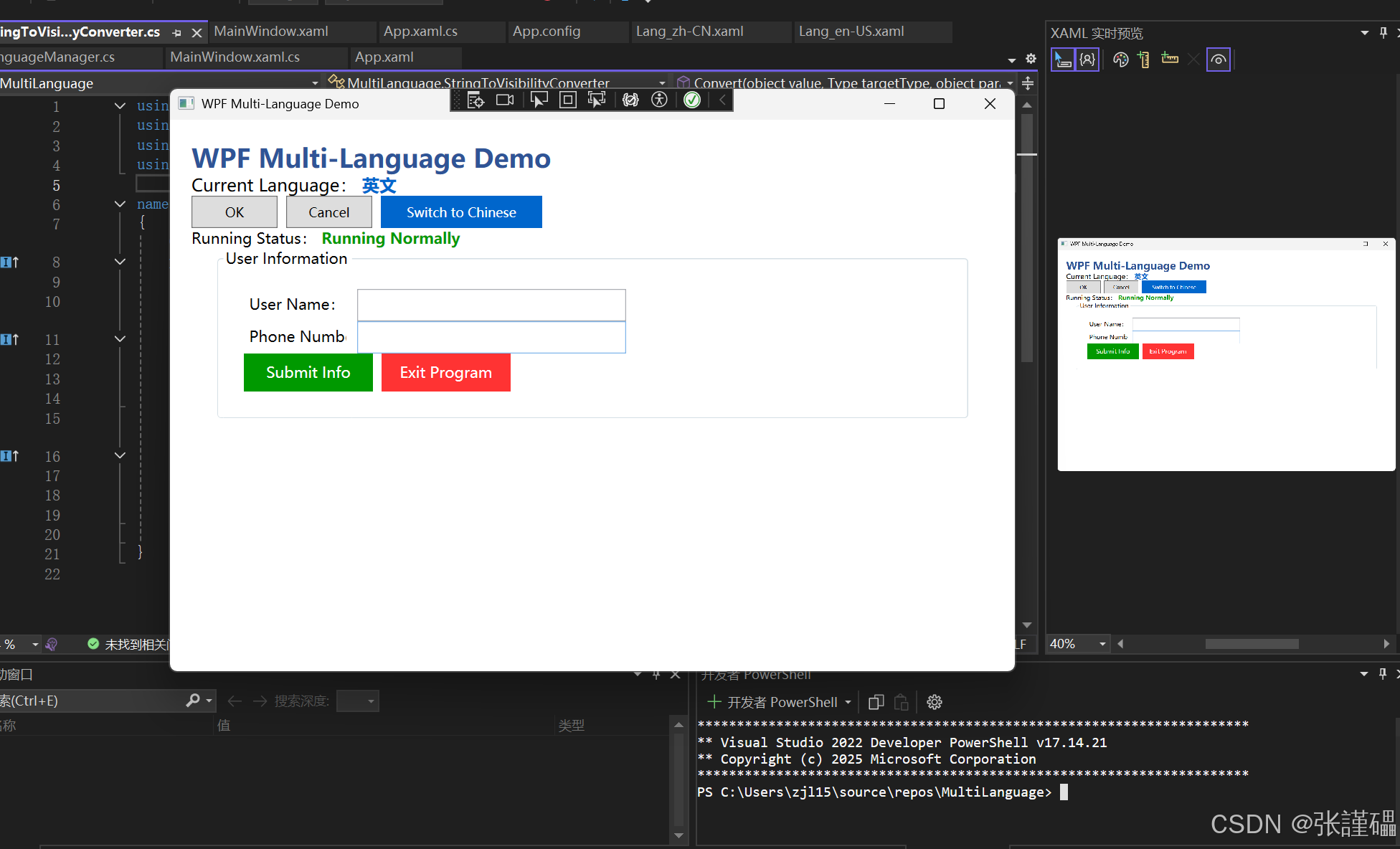
点击切换为英文按钮:所有文本切换为英文,配置文件中 Language 值变为 en_US,弹出 "Language switched successfully!" 提示;
-
再次点击Switch to Chinese按钮:文本切回中文,配置文件值恢复 zh_CN;
-
重启程序:会读取配置文件中的 Language 值,显示上一次选择的语言;
-
输入框测试:用户名 / 手机号输入框为空时显示水印,输入内容后水印隐藏;
-
按钮测试:点击提交 / 退出,弹出的提示框文本均为当前语言。
六、扩展与优化方向
-
增加更多语言 :新增 Lang_ja-JP.xaml(日语)、Lang_ko-KR.xaml(韩语)等资源文件,在
LanguageType枚举中添加对应项即可; -
资源分类 :将不同模块的资源拆分到不同的资源字典(如 Common.xaml、User.xaml),再在 Lang_xx-XX.xaml 中通过
MergedDictionaries合并,便于大型项目管理; -
动态添加语言:支持从外部文件(如 XML/JSON)加载语言资源,无需重新编译程序;
-
字体 / 样式国际化:在资源字典中添加字体、颜色、样式等资源,实现界面风格的国际化;
-
无刷新切换:当前实现已支持无刷新切换,所有绑定 DynamicResource 的控件会自动更新,无需重启窗口 / 程序;
-
多线程安全 :在语言管理器的
LoadLanguageResource方法中增加锁,避免多线程同时切换语言导致的资源字典混乱。
七、核心知识点总结
-
WPF 多语言的核心是动态资源字典替换 ,结合
DynamicResource实现 UI 自动更新; -
单例模式的
LanguageManager是多语言的管理枢纽,负责资源加载、状态维护、持久化; -
Properties.Settings实现用户语言偏好的持久化,程序重启后保留设置; -
转换器是 WPF 界面逻辑的重要组成,此处用于实现水印的显示 / 隐藏;
-
资源文件的
Key必须全局统一,是多语言切换的基础。
效果展示: