一、报错信息
隔一段时间运行流水线报错如下:
jenkins控制台输出:
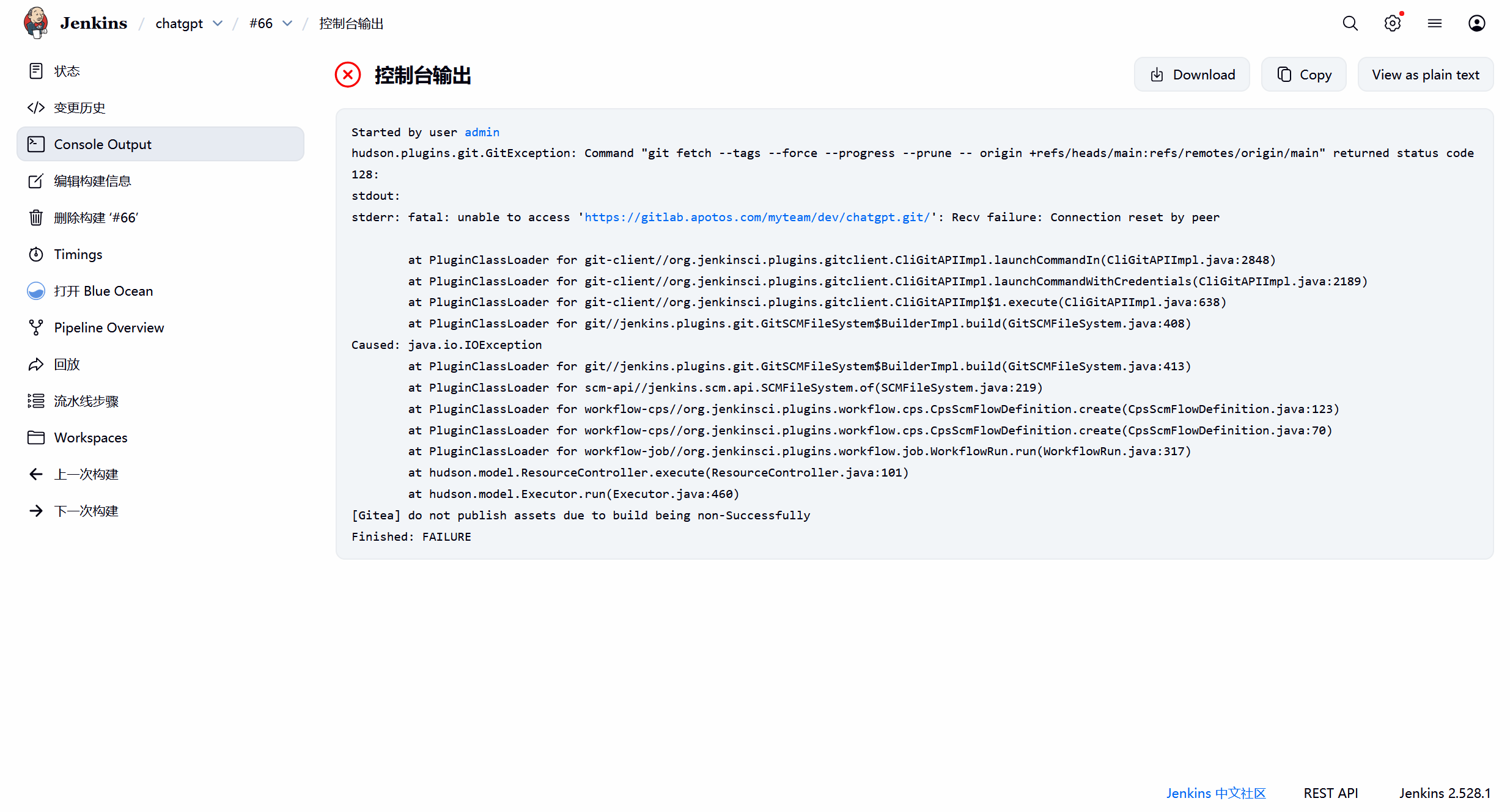
Started by user admin
hudson.plugins.git.GitException: Command "git fetch --tags --force --progress --prune -- origin +refs/heads/main:refs/remotes/origin/main" returned status code 128:
stdout:
stderr: fatal: unable to access 'https://gitlab.apotos.com/myteam/dev/chatgpt.git/': Recv failure: Connection reset by peer
at PluginClassLoader for git-client//org.jenkinsci.plugins.gitclient.CliGitAPIImpl.launchCommandIn(CliGitAPIImpl.java:2848)
at PluginClassLoader for git-client//org.jenkinsci.plugins.gitclient.CliGitAPIImpl.launchCommandWithCredentials(CliGitAPIImpl.java:2189)
at PluginClassLoader for git-client//org.jenkinsci.plugins.gitclient.CliGitAPIImpl$1.execute(CliGitAPIImpl.java:638)
at PluginClassLoader for git//jenkins.plugins.git.GitSCMFileSystem$BuilderImpl.build(GitSCMFileSystem.java:408)
Caused: java.io.IOException
at PluginClassLoader for git//jenkins.plugins.git.GitSCMFileSystem$BuilderImpl.build(GitSCMFileSystem.java:413)
at PluginClassLoader for scm-api//jenkins.scm.api.SCMFileSystem.of(SCMFileSystem.java:219)
at PluginClassLoader for workflow-cps//org.jenkinsci.plugins.workflow.cps.CpsScmFlowDefinition.create(CpsScmFlowDefinition.java:123)
at PluginClassLoader for workflow-cps//org.jenkinsci.plugins.workflow.cps.CpsScmFlowDefinition.create(CpsScmFlowDefinition.java:70)
at PluginClassLoader for workflow-job//org.jenkinsci.plugins.workflow.job.WorkflowRun.run(WorkflowRun.java:317)
at hudson.model.ResourceController.execute(ResourceController.java:101)
at hudson.model.Executor.run(Executor.java:460)
[Gitea] do not publish assets due to build being non-Successfully
Finished: FAILURE二、排查与分析
1.关键信息
hudson.plugins.git.GitException: Command "git fetch --tags --force --progress --prune -- origin +refs/heads/main:refs/remotes/origin/main" returned status code 128:
stdout:
stderr: fatal: unable to access 'https://gitlab.apotos.com/myteam/dev/chatgpt.git/': Recv failure: Connection reset by peer连接被对端重置了,原因有很多,比如网络不稳定或防火墙拦截,TLS/SSL 协议不兼容,中间有反向代理或 WAF 限制,GitLab 服务端崩溃或限流,代理设置错误, SSL 证书问题(部分情况会表现为 reset)等。
由于jenkins和gitlab都正常运行,jenkins和gitlab在同一k8s集群内(之前webhook使用的是集群内服务域名80端口,http所以不要求ssl证书验证),jenkinsfile的gitlab是https://gitlab.apotos.com,使用的cert-manager签发的self-certificate,jenkins可能不信任这个自签的证书。
2.检测gitlab连通性
jenkins-pod内用curl测试一下:
kubectl -n jenkins exec jenkins-69798dfb97-gxvt7 -- sh -lc 'set -e; echo "== curl non-k =="; (curl -I --max-time 10 https://gitlab.apotos.com 2>&1 | head -n 20) || true'stderr:
== curl non-k ==
% Total % Received % Xferd Average Speed Time Time Time Current
Dload Upload Total Spent Left Speed
0 0 0 0 0 0 0 0 --:--:-- --:--:-- --:--:-- 0
0 0 0 0 0 0 0 0 --:--:-- --:--:-- --:--:-- 0
curl: (60) SSL certificate problem: self-signed certificate
More details here: https://curl.se/docs/sslcerts.html
curl failed to verify the legitimacy of the server and therefore could not
establish a secure connection to it. To learn more about this situation and
how to fix it, please visit the webpage mentioned above.3.问题定位
这个错误:
curl: (60) SSL certificate problem: self-signed certificate表示 curl 无法验证目标服务器的 SSL 证书,因为该证书是"自签名"的(self-signed),不被系统信任。
三、解决
直接把 gitlab.apotos.com 的自签证书导出成 ConfigMap,挂到 Jenkins controller Pod,并设置 GIT_SSL_CAINFO,让 Jenkins 拉仓库时走这个 CA。
1.导出自签证书
kubectl -n jenkins exec jenkins-69798dfb97-gxvt7 -- sh -lc '
  set -e;
  (command -v openssl >/dev/null 2>&1) || exit 1;
  echo | openssl s_client -showcerts -servername gitlab.apotos.com -connect gitlab.apotos.com:443 2>/dev/null |
  sed -ne "/BEGIN CERTIFICATE/,/END CERTIFICATE/p"
' > /data/devops/gitops/jenkins/gitlab.apotos.com.crt \
&& wc -l /data/devops/gitops/jenkins/gitlab.apotos.com.crt \
&& head -n 2 /data/devops/gitops/jenkins/gitlab.apotos.com.crt
2.配置gitlab-ca-configmap.yaml
apiVersion: v1
kind: ConfigMap
metadata:
name: gitlab-ca
namespace: jenkins
data:
gitlab.apotos.com.crt: |
-----BEGIN CERTIFICATE-----
MIICzDCCAbSgAwIBAgIRAJyQ3VZ+Z2sYpv+FdRlOUNYwDQYJKoZIhvcNAQELBQAw
ADAeFw0yNjAxMjAwODEzMzhaFw0yNjA0MjAwODEzMzhaMAAwggEiMA0GCSqGSIb3
DQEBAQUAA4IBDwAwggEKAoIBAQCyjQvU+IEGkVuJbLZoZsskOqRk16TE21v/A3VO
PkS5ui5Or3/gAfbfOCxW5Bd9+dm910wHQ2HunKsZzmfWXMEM/MQmohW7f7mhfWIh
65eE+xSXeXyqFwh3uIE/o0kQb/qIbEoYuXbHu4U7VL0CnaII3Z43iFRdKg94mshg
/3zsn82/9d5HAktcPluHzYN+K9qIDSLdV4xkFo9k/na1kylQ2msj550Y1BSrUQId
y3S8duMYF/EVF898XpquEIgXH77gLZyytgMXG+zZjOXvX4yd4RDbljtrB0NwZbcZ
QFiae0ZcZk2OpUcb9t/ll1c3aMOj3fUlF9RO7canrCc4/X8RAgMBAAGjQTA/MA4G
A1UdDwEB/wQEAwIFoDAMBgNVHRMBAf8EAjAAMB8GA1UdEQEB/wQVMBOCEWdpdGxh
Yi5hcG90b3MuY29tMA0GCSqGSIb3DQEBCwUAA4IBAQA+VBqU9gwzC5N29xidZIS1
2FaUX15IFhhj9oGxuI5jkzslu14+sg7gji3H3ehPrmt1p4mtBnkCg8om150h+3X1
zT+5k67gXmDsLEF4J7qHrLEF6Sh3cClVXDI6CUltyy7SkFBqYGsYZ0+RXtt6Gwov
4jEzSbtbYc9TFTFJStYJ64cjoG9nTTlkbEzR9sE1UsaJ5EnT/Y5DrmYqKWXY4FAm
Rab/EkI74hWql0DpENHqrZyEpBrj4Ot3GjJGdc09tZ77fScl/G319okqmDO8BOXV
19+ZIzKHQknT1P36vN6RdWBBOq63oWzDiwKzfio0mL7ELYYhq3RnFn6NYdYdgR/k
-----END CERTIFICATE-----
3.挂载证书到jenkins-pod
apiVersion: apps/v1
kind: Deployment
metadata:
name: jenkins
namespace: jenkins
spec:
replicas: 1
selector:
matchLabels:
app: jenkins-server
template:
metadata:
labels:
app: jenkins-server
# 添加 supplementalGroups 配置,将 Jenkins 容器加入到 109 组,解决jenkins容器无法访问docker socket的问题。
# 以下安全配置方便jenkins容器可以在pipeline中使用kubectl 和 docker命令来管理容器。如果使用argocd可以缩小权限或者直接注释。
# 如果所有流水线都使用Kubernetes agent Pod(agent { kubernetes { ... } }),构建镜像走 BuildKit(buildctl/buildkitd),全程没用 docker.sock / docker 命令,也没用 kubectl,可以直接注释。
spec:
securityContext:
fsGroup: 995
runAsUser: 1000
supplementalGroups:
- 109
serviceAccountName: jenkins-admin
containers:
- name: jenkins
image: swr.cn-north-4.myhuaweicloud.com/ddn-k8s/docker.io/jenkins/jenkins:2.528.1-lts
imagePullPolicy: IfNotPresent
env:
- name: GIT_SSL_CAINFO
value: /etc/ssl/certs/gitlab.apotos.com.crt
- name: CURL_CA_BUNDLE
value: /etc/ssl/certs/gitlab.apotos.com.crt
resources:
limits:
memory: "2Gi"
cpu: "1000m"
requests:
memory: "1Gi"
cpu: "500m"
ports:
- name: httpport
containerPort: 8080
- name: jnlpport
containerPort: 50000
livenessProbe:
httpGet:
path: "/login"
port: 8080
initialDelaySeconds: 90
periodSeconds: 10
timeoutSeconds: 30
failureThreshold: 5
readinessProbe:
httpGet:
path: "/login"
port: 8080
initialDelaySeconds: 60
periodSeconds: 10
timeoutSeconds: 30
failureThreshold: 3
volumeMounts:
- name: jenkins-data
mountPath: /var/jenkins_home
- name: gitlab-ca
mountPath: /etc/ssl/certs/gitlab.apotos.com.crt
subPath: gitlab.apotos.com.crt
- name: kubectl
mountPath: /usr/bin/kubectl
- name: kube-config
mountPath: /root/.kube
- name: docker
mountPath: /usr/bin/docker
- name: docker-sock
mountPath: /var/run/docker.sock
volumes:
- name: jenkins-data
persistentVolumeClaim:
claimName: jenkins-pvc
- name: gitlab-ca
configMap:
name: gitlab-ca
- name: kubectl
hostPath:
path: /usr/bin/kubectl
- name: kube-config
hostPath:
path: /root/.kube
- name: docker
hostPath:
path: /usr/bin/docker
- name: docker-sock
hostPath:
path: /var/run/docker.sock
4.apply and rollout
kubectl apply -f /data/devops/gitops/jenkins/gitlab-ca-configmap.yaml
kubectl apply -f /data/devops/gitops/jenkins/jenkins-deployment.yaml
kubectl -n jenkins rollout status deploy/jenkins --timeout=180s5.jenkins-pod内curl gitlab
curl -I --max-time 10 https://gitlab.apotos.comstdout:
% Total % Received % Xferd Average Speed Time Time Time Current
Dload Upload Total Spent Left Speed
0 0 0 0 0 0 0 0 --:--:-- --:--:-- --:--:-- 0HTTP/2 302
date: Thu, 05 Feb 2026 05:23:58 GMT
content-type: text/html; charset=utf-8
content-length: 0
location: https://gitlab.apotos.com/users/sign_in
0 0 0 0 0 0 0 0 --:--:-- --:--:-- --:--:-- 0现在返回302,是我在ingress设置了http重定向,被重定向到登录页面。到这里这个问题已经解决了,重新运行流水线看看是否能git。
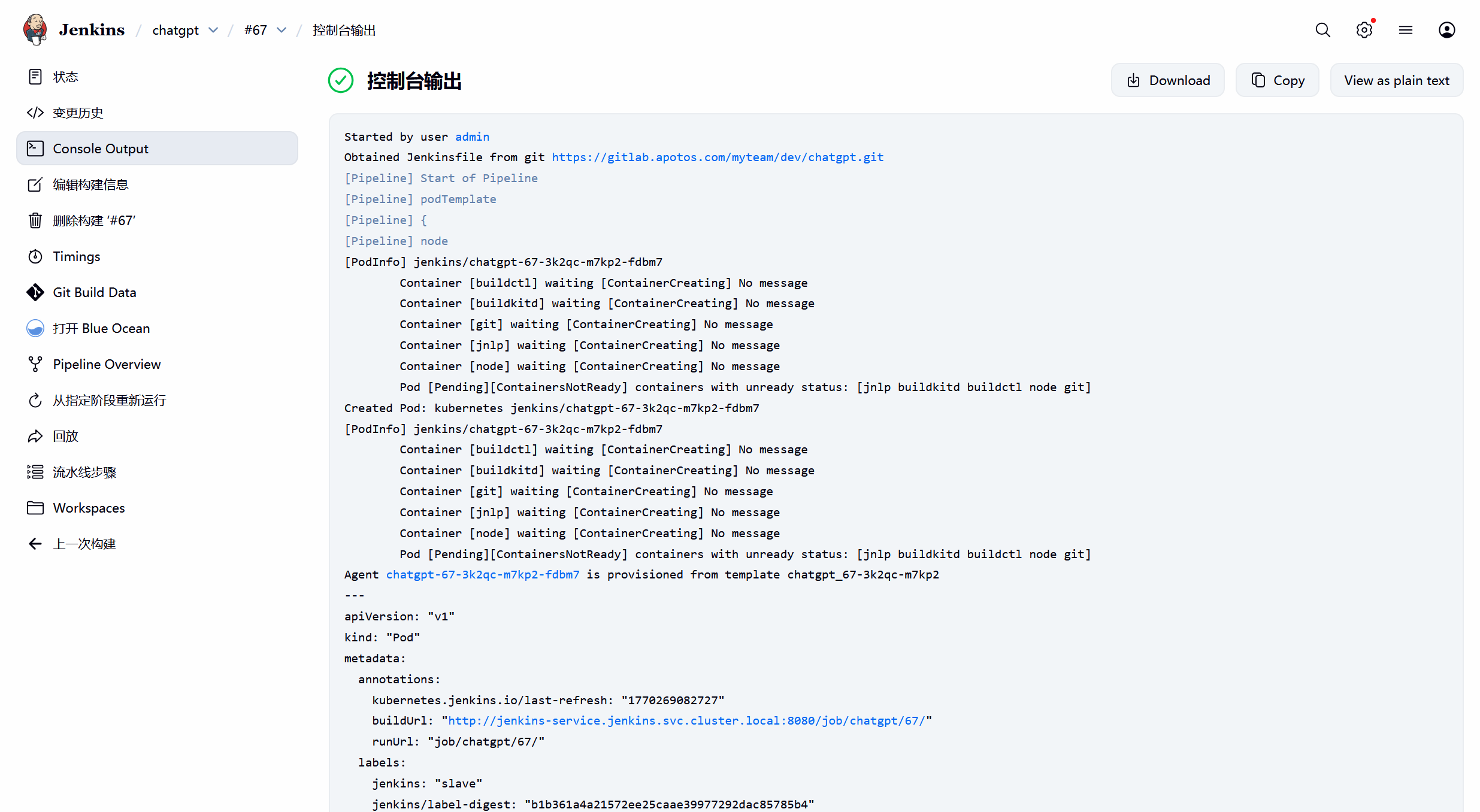
查看logs,git操作都能正常执行。
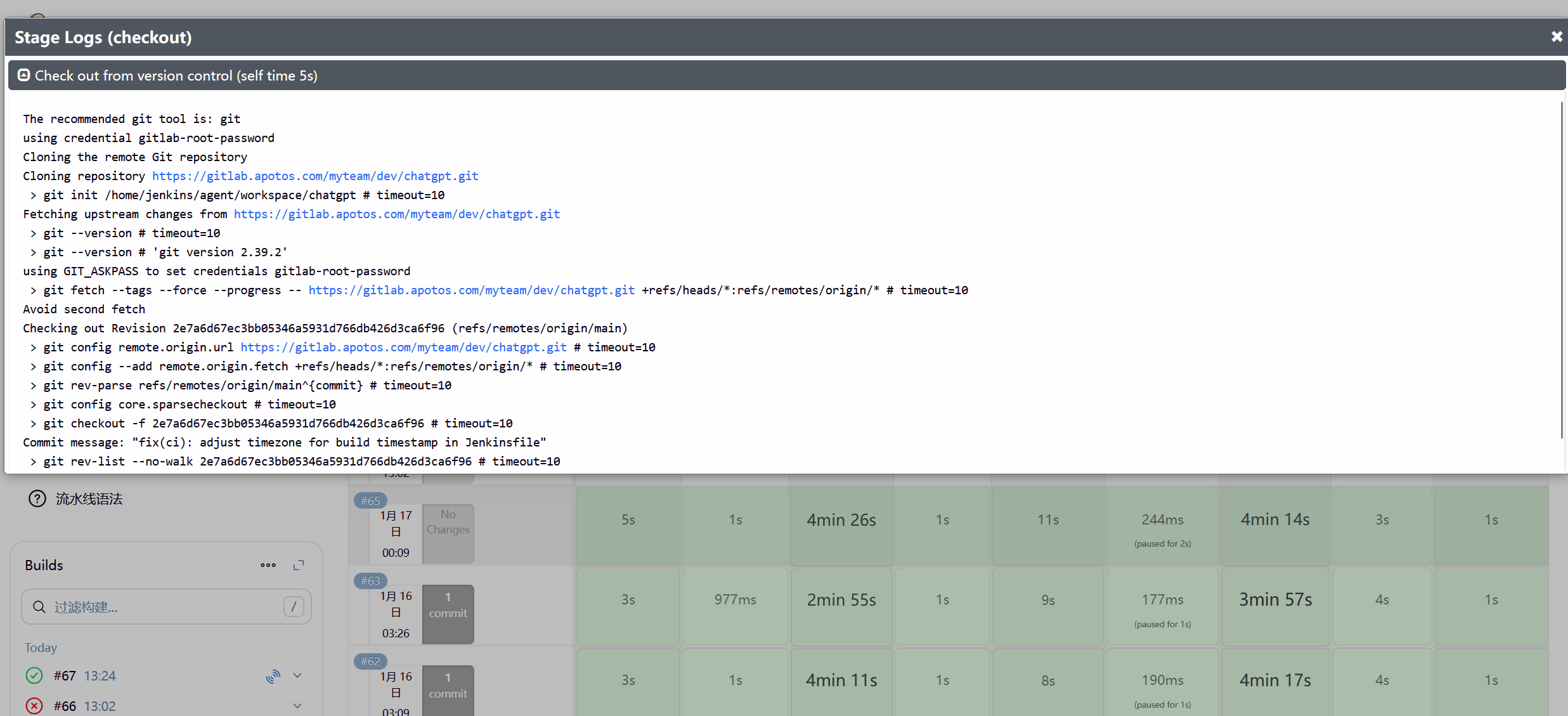
流水线Finished: SUCCESS