目录
1.版本选择
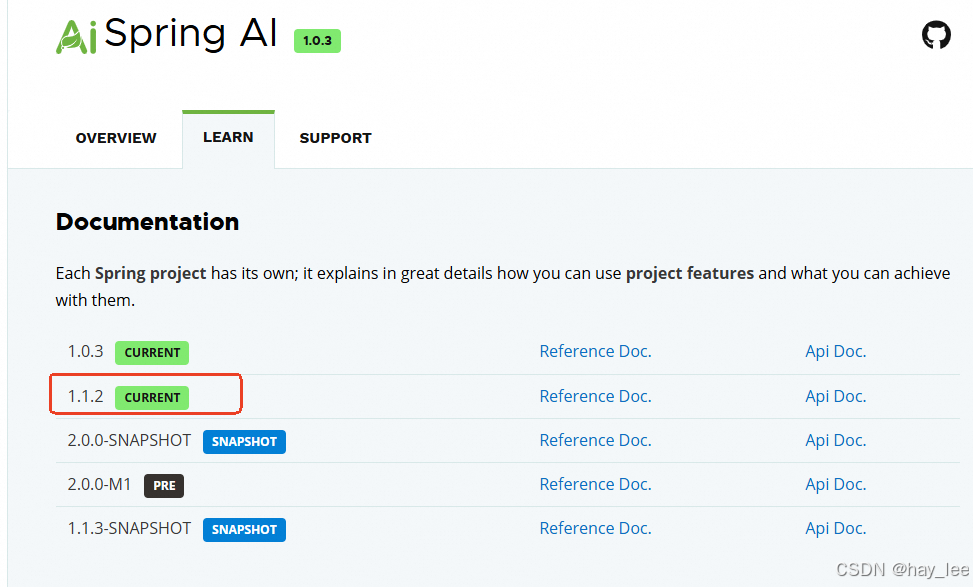
当前Spring AI 最新正式版本为1.1.2,我们使用这个版本,对应的springboot版本Spring Boot >= 3.5.0 and < 4.0.0
2.完整代码实现
这里我们使用ollama部署的本地模型,ollama部署可以参考之前的文章:(二)1.1 ollama本地快速部署deepseek
后端:
pom.xml
<?xml version="1.0" encoding="UTF-8"?>
<project xmlns="http://maven.apache.org/POM/4.0.0" xmlns:xsi="http://www.w3.org/2001/XMLSchema-instance"
  xsi:schemaLocation="http://maven.apache.org/POM/4.0.0 http://maven.apache.org/xsd/maven-4.0.0.xsd">
  <modelVersion>4.0.0</modelVersion>

  <parent>
    <groupId>org.springframework.boot</groupId>
    <artifactId>spring-boot-starter-parent</artifactId>
    <version>3.5.9</version>
  </parent>

  <groupId>com.haylee</groupId>
  <artifactId>spring-ai-agent</artifactId>
  <version>1.0-SNAPSHOT</version>

  <name>spring-ai-agent</name>

  <properties>
    <project.build.sourceEncoding>UTF-8</project.build.sourceEncoding>
    <maven.compiler.release>17</maven.compiler.release>
    <spring-ai-version>1.1.2</spring-ai-version>
  </properties>

  <dependencyManagement>
    <dependencies>
      <dependency>
        <groupId>org.springframework.ai</groupId>
        <artifactId>spring-ai-bom</artifactId>
        <version>${spring-ai-version}</version>
        <type>pom</type>
        <scope>import</scope>
      </dependency>
    </dependencies>
  </dependencyManagement>

  <dependencies>

    <dependency>
      <groupId>org.springframework.boot</groupId>
      <artifactId>spring-boot-starter-web</artifactId>
    </dependency>

    <dependency>
      <groupId>org.springframework.boot</groupId>
      <artifactId>spring-boot-starter-webflux</artifactId>
    </dependency>

    <dependency>
      <groupId>org.springframework.boot</groupId>
      <artifactId>spring-boot-starter-thymeleaf</artifactId>
    </dependency>

    <dependency>
      <groupId>org.springframework.ai</groupId>
      <artifactId>spring-ai-starter-model-ollama</artifactId>
    </dependency>

  </dependencies>

  <build>

  </build>
</project>
application.yml
spring:
  thymeleaf:
    cache: false
    prefix: classpath:/templates/
    suffix: .html
    encoding: UTF-8
  ai:
    ollama:
      base-url: http://localhost:11434
      chat:
        options:
          model: qwen3:4b
          temperature: 0.6    # 值越小,会降低随机性,保证一致性
    init:
      # 不自动下载模型
      pull-model-strategy: never
IndexController:
package com.haylee.controller;

import org.springframework.stereotype.Controller;
import org.springframework.web.bind.annotation.GetMapping;

@Controller
public class IndexController {

    @GetMapping("/")
    public String streamIndexPage() {
        return "stream-index"; // 返回模板名称
    }
}
OllamaChatController:
package com.haylee.controller;

import org.slf4j.Logger;
import org.slf4j.LoggerFactory;
import org.springframework.ai.chat.model.ChatResponse;
import org.springframework.ai.chat.prompt.Prompt;
import org.springframework.ai.ollama.OllamaChatModel;
import org.springframework.ai.ollama.api.OllamaChatOptions;
import org.springframework.beans.factory.annotation.Autowired;
import org.springframework.http.MediaType;
import org.springframework.http.ResponseEntity;
import org.springframework.web.bind.annotation.GetMapping;
import org.springframework.web.bind.annotation.RequestMapping;
import org.springframework.web.bind.annotation.RequestParam;
import org.springframework.web.bind.annotation.RestController;
import reactor.core.publisher.Flux;

@RestController
@RequestMapping("/ollama")
public class OllamaChatController {

    private Logger logger = LoggerFactory.getLogger(OllamaChatController.class);

    @Autowired
    private OllamaChatModel ollamaChatModel;


    /**
     * 模型
     * @param prompt
     * @return
     */
    @GetMapping("/call")
    public String call(@RequestParam("prompt") String prompt) {
        Prompt pt = new Prompt(prompt, OllamaChatOptions.builder()
                .enableThinking()
                .build());
        ChatResponse  response = ollamaChatModel.call(pt);
        String thinking = response.getResult().getMetadata().get("thinking");
        logger.info("[Thinking] " + thinking);
        String answer = response.getResult().getOutput().getText();
        logger.info("[Response] " + answer);
        return answer;
    }

    /**
     * 模型stream+springboot reactive stream
     * @param prompt
     * @return
     */
    @GetMapping(value = "/stream", produces = MediaType.TEXT_EVENT_STREAM_VALUE)
    public Flux<String> stream(@RequestParam("prompt") String prompt) {
        Prompt pt = new Prompt(prompt, OllamaChatOptions.builder()
                .enableThinking()
                .build());
        Flux<ChatResponse> result = ollamaChatModel.stream(pt);
//        result.subscribe(response -> {
//            String thinking = response.getResult().getMetadata().get("thinking");
//            String content = response.getResult().getOutput().getText();
//            if (thinking != null && !thinking.isEmpty()) {
//                System.out.println("[Thinking] " + thinking);
//            }
//            if (content != null && !content.isEmpty()) {
//                System.out.println("[Response] " + content);
//            }
//        });
        return result.map(response ->
                        response.getResult().getOutput().getText()
                ).
                concatWith(Flux.just("[DONE]")).
                doOnComplete(() -> logger.info("Stream completed"));
    }
}
前端:
resources/templates/stream-index.html
<!DOCTYPE html>
<html lang="zh-CN">
<head>
    <meta charset="UTF-8">
    <meta name="viewport" content="width=device-width, initial-scale=1.0">
    <title>Spring AI 流式输出</title>
    <style>
        body {
            font-family: Arial, sans-serif;
            max-width: 800px;
            margin: 0 auto;
            padding: 20px;
        }
        .input-section {
            margin-bottom: 20px;
        }
        #prompt-input {
            width: 70%;
            padding: 10px;
            font-size: 16px;
        }
        button {
            padding: 10px 20px;
            font-size: 16px;
            margin-left: 10px;
            background-color: #007bff;
            color: white;
            border: none;
            border-radius: 4px;
            cursor: pointer;
        }
        button:hover {
            background-color: #0056b3;
        }
        button:disabled {
            background-color: #6c757d;
            cursor: not-allowed;
        }
        #response-container {
            border: 1px solid #ddd;
            padding: 15px;
            min-height: 200px;
            max-height: 400px;
            overflow-y: auto;
            background-color: #f9f9f9;
            white-space: pre-wrap;
            font-family: monospace;
            line-height: 1.5;
        }
        .thinking {
            color: #666;
            font-style: italic;
        }
        .output {
            color: #000;
        }
        .status {
            margin-top: 10px;
            padding: 5px;
            color: #28a745;
        }
    </style>
</head>
<body>
<h1>Spring AI 流式输出</h1>

<div class="input-section">
    <input type="text" id="prompt-input" placeholder="请输入您的问题..." />
    <button id="send-btn">发送</button>
    <button id="clear-btn">清空</button>
</div>

<div id="response-container">等待输入...</div>
<div id="status" class="status"></div>

<script>
        document.addEventListener('DOMContentLoaded', function() {
            const promptInput = document.getElementById('prompt-input');
            const sendBtn = document.getElementById('send-btn');
            const clearBtn = document.getElementById('clear-btn');
            const responseContainer = document.getElementById('response-container');
            const statusDiv = document.getElementById('status');

            sendBtn.addEventListener('click', function() {
                const prompt = promptInput.value.trim();
                if (prompt) {
                    responseContainer.innerHTML = '';

                    // 创建新的 EventSource
                    const eventSource = new EventSource('/ollama/stream?prompt=' + encodeURIComponent(prompt));

                    sendBtn.disabled = true;
                    sendBtn.textContent = '响应中...';

                    eventSource.onmessage = function(event) {
                        if (event.data === '[DONE]') {

                            eventSource.close(); // 关闭连接

                            sendBtn.disabled = false;
                            sendBtn.textContent = '发送';

                            return;
                        }
                        responseContainer.textContent += event.data;
                        responseContainer.scrollTop = responseContainer.scrollHeight;
                    };

                    // 监听错误事件并关闭连接
                    eventSource.onerror = function(err) {
                        console.error('SSE Error:', err);
                        eventSource.close(); // 关闭连接
                        sendBtn.disabled = false;
                        sendBtn.textContent = '发送';
                    };

                    // 监听完成事件(需要服务器发送完成信号)
                    eventSource.addEventListener('complete', function() {
                        eventSource.close(); // 手动关闭连接
                        sendBtn.disabled = false;
                        sendBtn.textContent = '发送';
                    });
                } else {
                    alert('请输入提示内容');
                }
            });

            // 支持回车键发送
            promptInput.addEventListener('keypress', function(e) {
                if (e.key === 'Enter') {
                    sendBtn.click();
                }
            });

            // 清空按钮
            clearBtn.addEventListener('click', function() {
                responseContainer.textContent = '等待输入...';
                promptInput.value = '';
                statusDiv.textContent = '';
            });
        });
    </script>
</body>
</html>
3.效果
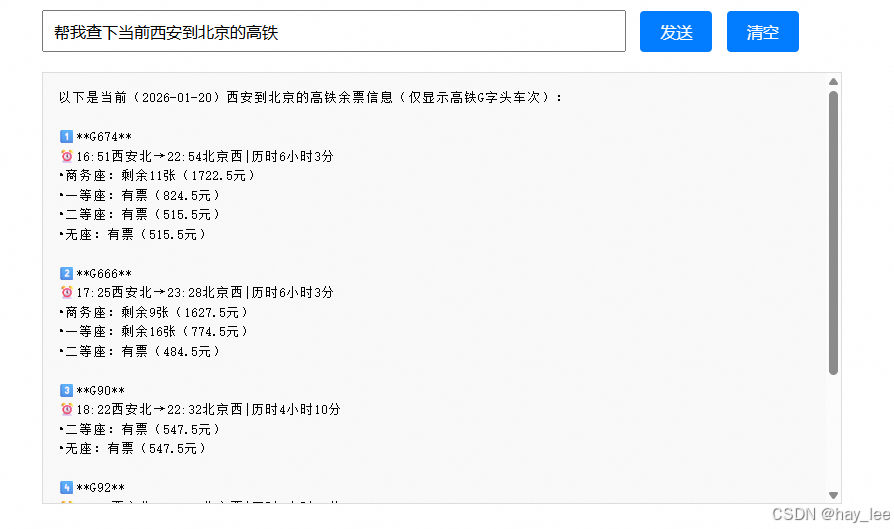
这里使用MCP服务工具:参考AI大模型:(三)3.2 Spring AI实现Agent
大模型相关课程:
|----|---|------------------------------------------------------------------------------------------------------------------------------------------------------------------------------------------------------------------|
| 1 | 一 | 1.大模型的发展与局限性 |
| 2 | 二 | 1.1 ollama本地快速部署deepseek |
| 3 | 二 | 1.2 linux本地部署deepseek千问蒸馏版+web对话聊天 |
| 4 | 二 | 1.3 linux本地部署通义万相2.1+deepseek视频生成 |
| 5 | 二 | 1.4 Qwen2.5-Omni全模态大模型部署 |
| 6 | 二 | 1.5 Stable Diffusion中文文生图模型部署 |
| 7 | 二 | 1.6 DeepSeek-OCR部署尝鲜 |
| 8 | 二 | 2.1 从零训练自己的大模型概述 |
| 9 | 二 | 2.2 分词器 |
| 10 | 二 | 2.3 预训练自己的模型 |
| 11 | 二 | 2.4 微调自己的模型 |
| 12 | 二 | 2.5 人类对齐训练自己的模型 |
| 13 | 二 | 3.1 微调训练详解 |
| 14 | 二 | 3.2 Llama-Factory微调训练deepseek-r1实践 |
| 15 | 二 | 3.3 transform+LoRA代码微调deepseek实践 |
| 16 | 二 | 4.1 文生图(Text-to-Image)模型发展史 |
| 17 | 二 | 4.2 文生图GUI训练实践-真人写实生成 |
| 18 | 二 | 4.3 文生图代码训练实践-真人写实生成 |
| 19 | 二 | 5.1 文生视频(Text-to-Video)模型发展史 |
| 20 | 二 | 5.2 文生视频(Text-to-Video)模型训练实践 |
| 21 | 二 | 6.1 目标检测模型的发展史 |
| 22 | | 6.2 YOLO模型训练实践及目标跟踪 |
| 23 | 三 | 1.1 Dify介绍 |
| 24 | 三 | 1.2 Dify安装 |
| 25 | 三 | 1.3 Dify文本生成快速搭建旅游助手 |
| 26 | 三 | 1.4 Dify聊天助手快速搭建智能淘宝店小二 |
| 27 | 三 | 1.5 Dify agent快速搭建爬虫助手 |
| 28 | 三 | 1.6 Dify工作流快速搭建数据可视化助手 |
| 29 | 三 | 1.7 Dify chatflow快速搭建数据查询智能助手 |
| 30 | 三 | 2.1 RAG介绍 |
| 31 | 三 | 2.2 Spring AI-手动实现RAG |
| 32 | 三 | 2.3 Spring AI-开箱即用完整实践RAG |
| 33 | 三 | 2.4 LlamaIndex实现RAG |
| 34 | 三 | 2.5 LlamaIndex构建RAG优化与实践 |
| 35 | 三 | 2.6 LangChain实现RAG企业知识问答助手 |
| 36 | 三 | 2.7 LangChain构建RAG企业知识问答助手实践 |
| 37 | 三 | 3.1 agent核心功能与概念 |
| 38 | 三 | 3.2 Spring AI实现Agent |