个人主页:ujainu
欢迎加入开源鸿蒙跨平台社区:
文章目录
- 前言
-
- 一、为什么选择打砖块作为教学案例?
- 二、整体架构设计
- 三、核心数据模型定义
-
- [1. 球体(Ball)](#1. 球体(Ball))
- [2. 挡板(Paddle)](#2. 挡板(Paddle))
- [3. 砖块(Brick)](#3. 砖块(Brick))
- 四、球体反弹物理:角度计算详解
-
- [1. 与**水平面**碰撞(如挡板、顶部墙)](#1. 与水平面碰撞(如挡板、顶部墙))
- [2. 与**垂直面**碰撞(如左右墙)](#2. 与垂直面碰撞(如左右墙))
- [3. 与**砖块**碰撞](#3. 与砖块碰撞)
- 五、挡板控制:手势拖拽实现
- 六、完整碰撞检测系统
- 七、关卡重置与状态管理
- 八、自定义绘制:BreakoutPainter
- [九、完整可运行代码(Flutter + OpenHarmony)](#九、完整可运行代码(Flutter + OpenHarmony))
- 结语
前言
在移动游戏开发中,打砖块(Breakout) 是一个兼具教育意义与娱乐性的经典范例。它结构清晰、逻辑明确,却完整涵盖了 物理模拟、碰撞检测、状态管理、关卡设计 四大核心模块。正因如此,它成为无数开发者入门游戏编程的"第一课"。
本文将基于 Flutter + OpenHarmony 平台,从零构建一个功能完整、性能优化、可直接运行的打砖块游戏。我们将深入剖析:
✅ 球体反弹角度计算 :基于入射角 = 反射角的物理模型
✅ 挡板控制 :通过 GestureDetector 实现平滑拖拽
✅ 多层级碰撞检测 :砖块、挡板、边界墙的精准判定
✅ 关卡重置机制 :失败后一键重启,状态彻底清理
✅ OpenHarmony 兼容性:纯 Dart 实现,无平台依赖
💡 目标读者 :具备基础 Flutter 开发经验,希望掌握游戏核心逻辑的中级开发者。
✅ 环境说明:Flutter + OpenHarmony 开发环境已配置完毕,无需重复搭建步骤。
一、为什么选择打砖块作为教学案例?
打砖块看似简单,实则蕴含丰富的工程思维:
| 模块 | 技术点 | 学习价值 |
|---|---|---|
| 物理系统 | 向量速度、角度反射 | 理解基础运动学 |
| 碰撞检测 | AABB 矩形碰撞、边缘判定 | 掌握游戏核心算法 |
| 状态管理 | 游戏运行/暂停/结束 | 构建健壮状态机 |
| 关卡设计 | 砖块布局、难度递增 | 培养游戏设计思维 |
更重要的是,它不依赖复杂图形库 ,仅用 Flutter 的 CustomPainter 即可高效渲染,完美适配 OpenHarmony 的轻量化特性。
二、整体架构设计
我们采用 单屏 + 自绘 + 状态驱动 的架构:
- 主界面 :
BreakoutGameScreen(StatefulWidget) - 渲染层 :
BreakoutPainter(CustomPainter) - 数据模型 :
Ball:球的位置、速度Paddle:挡板位置、宽度Brick:砖块位置、是否存活
- 游戏逻辑 :在
Timer驱动下每帧更新状态
📌 关键原则 :逻辑与渲染分离 。
CustomPainter只负责绘制,所有计算在 State 中完成。
三、核心数据模型定义
1. 球体(Ball)
dart
class Ball {
  Offset position; // 当前中心点
  double radius = 10;
  double dx = 3.0; // X 方向速度
  double dy = -3.0; // Y 方向速度(初始向上)

  Ball(this.position);
}
2. 挡板(Paddle)
dart
class Paddle {
  double x; // 左上角 X 坐标
  final double y = 600; // 固定 Y(底部)
  final double width = 100;
  final double height = 15;

  Paddle(this.x);
}
3. 砖块(Brick)
dart
class Brick {
  Rect rect;
  bool isDestroyed = false;
  final Color color;

  Brick(this.rect, this.color);
}
四、球体反弹物理:角度计算详解
打砖块的核心在于 反弹逻辑。我们遵循经典物理规则:
入射角 = 反射角,且反弹方向垂直于碰撞面。
1. 与水平面碰撞(如挡板、顶部墙)
- 仅反转 Y 速度 :
dy = -dy - X 速度保持不变
2. 与垂直面碰撞(如左右墙)
- 仅反转 X 速度 :
dx = -dx - Y 速度保持不变
3. 与砖块碰撞
砖块是矩形,需判断球是从上方、下方、左侧还是右侧撞击:
dart
void _handleBrickCollision(Brick brick, Ball ball) {
  if (brick.isDestroyed) return;

  final ballLeft = ball.position.dx - ball.radius;
  final ballRight = ball.position.dx + ball.radius;
  final ballTop = ball.position.dy - ball.radius;
  final ballBottom = ballTop + 2 * ball.radius;

  final brickLeft = brick.rect.left;
  final brickRight = brick.rect.right;
  final brickTop = brick.rect.top;
  final brickBottom = brick.rect.bottom;

  // 判断是否发生碰撞
  if (ballRight > brickLeft &&
      ballLeft < brickRight &&
      ballBottom > brickTop &&
      ballTop < brickBottom) {

    brick.isDestroyed = true; // 销毁砖块

    // 计算重叠区域
    final overlapX = min(ballRight, brickRight) - max(ballLeft, brickLeft);
    final overlapY = min(ballBottom, brickBottom) - max(ballTop, brickTop);

    // 根据重叠大小判断主要碰撞方向
    if (overlapX > overlapY) {
      // 垂直碰撞(左右侧)→ 反转 X
      ball.dx = -ball.dx;
    } else {
      // 水平碰撞(上下侧)→ 反转 Y
      ball.dy = -ball.dy;
    }
  }
}
🔍 优化点:通过比较 X/Y 方向的重叠量,精准判定主碰撞面,避免"斜角穿透"问题。
五、挡板控制:手势拖拽实现
使用 GestureDetector 监听水平拖拽,限制挡板在屏幕内移动:
dart
@override
Widget build(BuildContext context) {
  return GestureDetector(
    onHorizontalDragUpdate: (details) {
      setState(() {
        _paddle.x += details.delta.dx;
        // 边界限制
        _paddle.x = _paddle.x.clamp(0, MediaQuery.of(context).size.width - _paddle.width);
      });
    },
    child: Scaffold(
      backgroundColor: Colors.black,
      body: CustomPaint(
        painter: BreakoutPainter(
          ball: _ball,
          paddle: _paddle,
          bricks: _bricks,
        ),
      ),
    ),
  );
}
✅ 体验优化 :使用
clamp确保挡板不会移出屏幕,操作流畅无跳跃。
六、完整碰撞检测系统
每帧需检测四类碰撞:
- 球 vs 左右墙
- 球 vs 顶部墙
- 球 vs 挡板
- 球 vs 所有存活砖块
dart
void _updateGameLogic() {
  final size = MediaQuery.of(context).size;
  final screenWidth = size.width;
  final screenHeight = size.height;

  // 1. 更新球位置
  _ball.position += Offset(_ball.dx, _ball.dy);

  // 2. 边界碰撞(左右墙)
  if (_ball.position.dx <= _ball.radius || _ball.position.dx >= screenWidth - _ball.radius) {
    _ball.dx = -_ball.dx;
  }

  // 3. 顶部墙碰撞
  if (_ball.position.dy <= _ball.radius) {
    _ball.dy = -_ball.dy;
  }

  // 4. 底部边界:游戏失败
  if (_ball.position.dy >= screenHeight) {
    _gameOver = true;
    _timer?.cancel();
    return;
  }

  // 5. 挡板碰撞
  final paddleRect = Rect.fromLTWH(_paddle.x, _paddle.y, _paddle.width, _paddle.height);
  if (_isBallCollidingWithRect(_ball, paddleRect)) {
    _ball.dy = -_ball.dy.abs(); // 确保向上反弹
    // 可选:根据击中挡板位置微调角度
  }

  // 6. 砖块碰撞
  for (final brick in _bricks) {
    if (!brick.isDestroyed) {
      _handleBrickCollision(brick, _ball);
    }
  }

  // 7. 检查胜利条件
  if (_bricks.every((b) => b.isDestroyed)) {
    _gameWin = true;
    _timer?.cancel();
  }
}
⚠️ 注意 :挡板碰撞后强制
dy为负值,防止球因精度问题"粘"在挡板上。
七、关卡重置与状态管理
游戏结束后,提供"重新开始"按钮,彻底重置所有状态:
dart
void _resetGame() {
  final size = MediaQuery.of(context).size;
  _ball = Ball(Offset(size.width / 2, size.height - 100));
  _paddle = Paddle(size.width / 2 - 50);
  _bricks = _generateBricks(); // 重新生成砖块
  _gameOver = false;
  _gameWin = false;

  // 重启游戏循环
  _timer?.cancel();
  _timer = Timer.periodic(const Duration(milliseconds: 16), (_) {
    if (!_gameOver && !_gameWin) {
      _updateGameLogic();
      setState(() {});
    }
  });
}

List<Brick> _generateBricks() {
  final bricks = <Brick>[];
  final colors = [Colors.red, Colors.orange, Colors.yellow, Colors.green];
  final rows = 4;
  final cols = 8;
  final brickWidth = 60.0;
  final brickHeight = 20.0;
  final spacing = 5.0;
  final startX = (MediaQuery.of(context).size.width - (cols * (brickWidth + spacing))) / 2;

  for (int row = 0; row < rows; row++) {
    for (int col = 0; col < cols; col++) {
      final x = startX + col * (brickWidth + spacing);
      final y = 50.0 + row * (brickHeight + spacing);
      final rect = Rect.fromLTWH(x, y, brickWidth, brickHeight);
      bricks.add(Brick(rect, colors[row % colors.length]));
    }
  }
  return bricks;
}
✅ 关键 :
_resetGame()重建所有对象,确保无残留状态。
八、自定义绘制:BreakoutPainter
使用 CustomPainter 高效渲染游戏元素:
dart
class BreakoutPainter extends CustomPainter {
  final Ball ball;
  final Paddle paddle;
  final List<Brick> bricks;

  BreakoutPainter({required this.ball, required this.paddle, required this.bricks});

  @override
  void paint(Canvas canvas, Size size) {
    final paint = Paint();

    // 绘制球
    paint.color = Colors.white;
    canvas.drawCircle(ball.position, ball.radius, paint);

    // 绘制挡板
    paint.color = Colors.blue;
    canvas.drawRect(
      Rect.fromLTWH(paddle.x, paddle.y, paddle.width, paddle.height),
      paint,
    );

    // 绘制砖块
    for (final brick in bricks) {
      if (!brick.isDestroyed) {
        paint.color = brick.color;
        canvas.drawRect(brick.rect, paint);
      }
    }
  }

  @override
  bool shouldRepaint(covariant CustomPainter oldDelegate) => true;
}
🚀 性能提示 :
shouldRepaint返回true确保每帧重绘,适用于动态游戏。
九、完整可运行代码(Flutter + OpenHarmony)
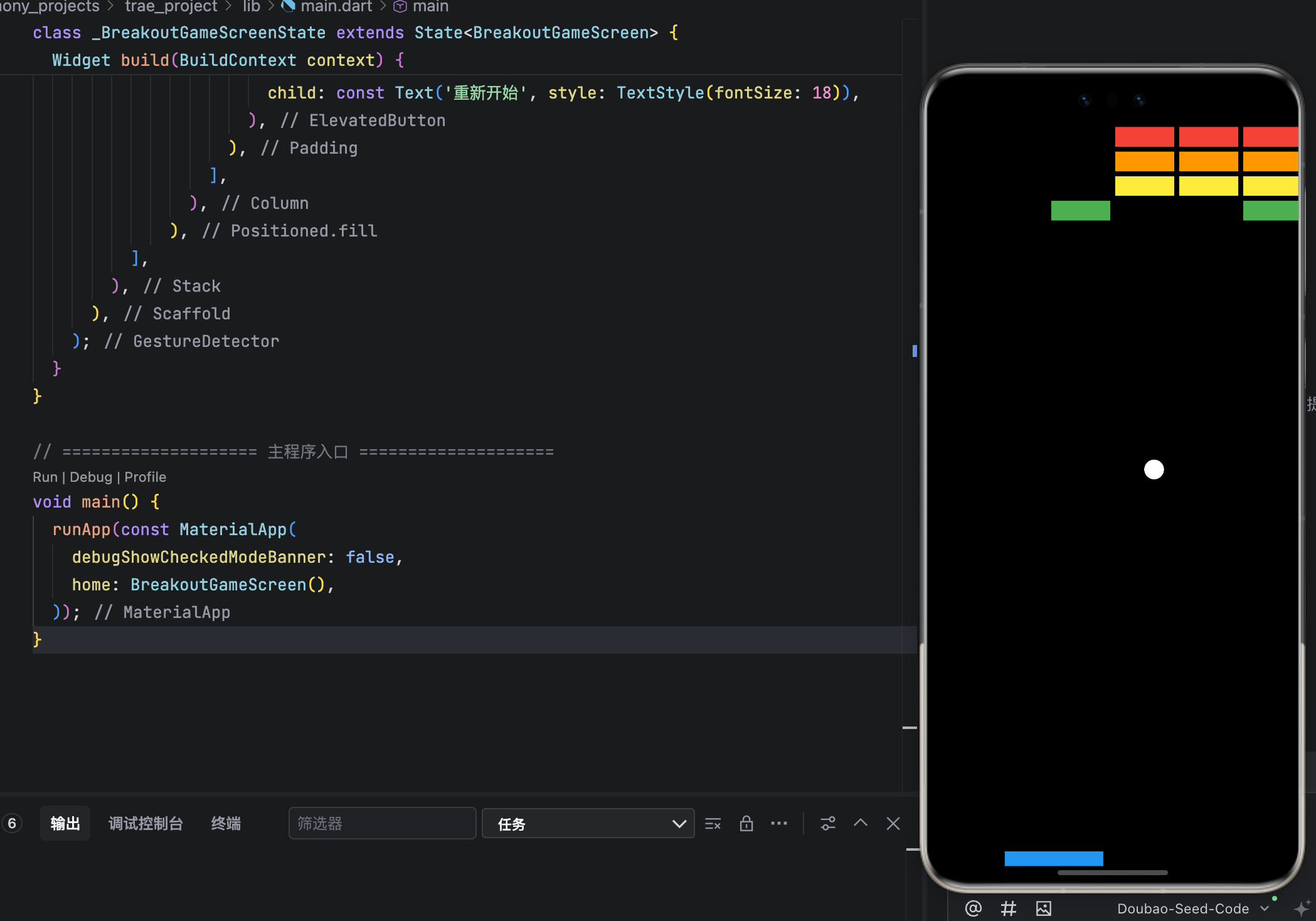
以下代码可直接复制到 main.dart 中运行,包含完整游戏逻辑、UI 与重置功能:
dart
// main.dart - 打砖块游戏 (Breakout / Arkanoid)
import 'dart:async';
import 'dart:math';
import 'package:flutter/material.dart';

// ==================== 数据模型 ====================
class Ball {
  Offset position;
  double radius = 10;
  double dx = 3.0;
  double dy = -3.0;

  Ball(this.position);
}

class Paddle {
  double x;
  final double y;
  final double width = 100;
  final double height = 15;

  Paddle(this.x, this.y);
}

class Brick {
  Rect rect;
  bool isDestroyed = false;
  final Color color;

  Brick(this.rect, this.color);
}

// ==================== 自定义绘制 ====================
class BreakoutPainter extends CustomPainter {
  final Ball ball;
  final Paddle paddle;
  final List<Brick> bricks;
  final bool gameOver;
  final bool gameWin;

  BreakoutPainter({
    required this.ball,
    required this.paddle,
    required this.bricks,
    this.gameOver = false,
    this.gameWin = false,
  });

  @override
  void paint(Canvas canvas, Size size) {
    final paint = Paint();

    // 背景
    canvas.drawRect(Offset.zero & size, Paint()..color = Colors.black);

    // 球
    paint.color = Colors.white;
    canvas.drawCircle(ball.position, ball.radius, paint);

    // 挡板
    paint.color = Colors.blue;
    canvas.drawRect(
      Rect.fromLTWH(paddle.x, paddle.y, paddle.width, paddle.height),
      paint,
    );

    // 砖块
    for (final brick in bricks) {
      if (!brick.isDestroyed) {
        paint.color = brick.color;
        canvas.drawRect(brick.rect, paint);
      }
    }

    // 游戏结束/胜利提示
    if (gameOver || gameWin) {
      final textPainter = TextPainter(
        text: TextSpan(
          text: gameOver ? '游戏结束!' : '恭喜通关!',
          style: const TextStyle(color: Colors.white, fontSize: 32, fontWeight: FontWeight.bold),
        ),
        textDirection: TextDirection.ltr,
      );
      textPainter.layout();
      textPainter.paint(
        canvas,
        Offset(size.width / 2 - textPainter.width / 2, size.height / 2 - 50),
      );
    }
  }

  @override
  bool shouldRepaint(covariant CustomPainter oldDelegate) => true;
}

// ==================== 主游戏界面 ====================
class BreakoutGameScreen extends StatefulWidget {
  const BreakoutGameScreen({super.key});

  @override
  State<BreakoutGameScreen> createState() => _BreakoutGameScreenState();
}

class _BreakoutGameScreenState extends State<BreakoutGameScreen> {
  late Ball _ball;
  late Paddle _paddle;
  late List<Brick> _bricks;
  Timer? _timer;
  bool _gameOver = false;
  bool _gameWin = false;

  @override
  void initState() {
    super.initState();
    // 初始化时不依赖 context,避免 MediaQuery 错误
    _timer = Timer.periodic(const Duration(milliseconds: 16), (_) {
      if (!_gameOver && !_gameWin) {
        _updateGameLogic();
        if (mounted) setState(() {});
      }
    });
  }

  @override
  void didChangeDependencies() {
    super.didChangeDependencies();
    // 在 didChangeDependencies 中获取尺寸,确保 context 已准备就绪
    _initializeGame();
  }

  void _initializeGame() {
    final size = MediaQuery.of(context).size; // ✅ 安全获取
    _ball = Ball(Offset(size.width / 2, size.height - 100));
    _paddle = Paddle(size.width / 2 - 50, size.height - 30);
    _bricks = _generateBricks();
    _gameOver = false;
    _gameWin = false;
  }

  List<Brick> _generateBricks() {
    final bricks = <Brick>[];
    final colors = [Colors.red, Colors.orange, Colors.yellow, Colors.green];
    final rows = 4;
    final cols = 8;
    final brickWidth = 60.0;
    final brickHeight = 20.0;
    final spacing = 5.0;
    final totalWidth = cols * (brickWidth + spacing) - spacing;
    final startX = (MediaQuery.of(context).size.width - totalWidth) / 2;

    for (int row = 0; row < rows; row++) {
      for (int col = 0; col < cols; col++) {
        final x = startX + col * (brickWidth + spacing);
        final y = 50.0 + row * (brickHeight + spacing);
        final rect = Rect.fromLTWH(x, y, brickWidth, brickHeight);
        bricks.add(Brick(rect, colors[row % colors.length]));
      }
    }
    return bricks;
  }

  bool _isBallCollidingWithRect(Ball ball, Rect rect) {
    final ballLeft = ball.position.dx - ball.radius;
    final ballRight = ball.position.dx + ball.radius;
    final ballTop = ball.position.dy - ball.radius;
    final ballBottom = ballTop + 2 * ball.radius;

    return ballRight > rect.left &&
           ballLeft < rect.right &&
           ballBottom > rect.top &&
           ballTop < rect.bottom;
  }

  void _handleBrickCollision(Brick brick, Ball ball) {
    if (brick.isDestroyed) return;

    final ballLeft = ball.position.dx - ball.radius;
    final ballRight = ball.position.dx + ball.radius;
    final ballTop = ball.position.dy - ball.radius;
    final ballBottom = ballTop + 2 * ball.radius;

    final brickLeft = brick.rect.left;
    final brickRight = brick.rect.right;
    final brickTop = brick.rect.top;
    final brickBottom = brick.rect.bottom;

    if (ballRight > brickLeft &&
        ballLeft < brickRight &&
        ballBottom > brickTop &&
        ballTop < brickBottom) {

      brick.isDestroyed = true;

      final overlapX = min(ballRight, brickRight) - max(ballLeft, brickLeft);
      final overlapY = min(ballBottom, brickBottom) - max(ballTop, brickTop);

      if (overlapX > overlapY) {
        ball.dx = -ball.dx;
      } else {
        ball.dy = -ball.dy;
      }
    }
  }

  void _updateGameLogic() {
    final size = MediaQuery.of(context).size;
    final screenWidth = size.width;
    final screenHeight = size.height;

    // 更新球位置
    _ball.position += Offset(_ball.dx, _ball.dy);

    // 左右墙碰撞
    if (_ball.position.dx <= _ball.radius || _ball.position.dx >= screenWidth - _ball.radius) {
      _ball.dx = -_ball.dx;
    }

    // 顶部墙碰撞
    if (_ball.position.dy <= _ball.radius) {
      _ball.dy = -_ball.dy;
    }

    // 底部边界:失败
    if (_ball.position.dy >= screenHeight) {
      _gameOver = true;
      _timer?.cancel();
      return;
    }

    // 挡板碰撞
    final paddleRect = Rect.fromLTWH(_paddle.x, _paddle.y, _paddle.width, _paddle.height);
    if (_isBallCollidingWithRect(_ball, paddleRect)) {
      _ball.dy = -_ball.dy.abs(); // 强制向上
    }

    // 砖块碰撞
    for (final brick in _bricks) {
      if (!brick.isDestroyed) {
        _handleBrickCollision(brick, _ball);
      }
    }

    // 胜利检测
    if (_bricks.every((b) => b.isDestroyed)) {
      _gameWin = true;
      _timer?.cancel();
    }
  }

  @override
  void dispose() {
    _timer?.cancel();
    super.dispose();
  }

  @override
  Widget build(BuildContext context) {
    return GestureDetector(
      onHorizontalDragUpdate: (details) {
        if (!_gameOver && !_gameWin) {
          setState(() {
            _paddle.x += details.delta.dx;
            _paddle.x = _paddle.x.clamp(0, MediaQuery.of(context).size.width - _paddle.width);
          });
        }
      },
      child: Scaffold(
        backgroundColor: Colors.black,
        body: Stack(
          children: [
            CustomPaint(
              painter: BreakoutPainter(
                ball: _ball,
                paddle: _paddle,
                bricks: _bricks,
                gameOver: _gameOver,
                gameWin: _gameWin,
              ),
              size: Size.infinite,
            ),
            if (_gameOver || _gameWin)
              Positioned.fill(
                child: Column(
                  mainAxisAlignment: MainAxisAlignment.end,
                  children: [
                    Padding(
                      padding: const EdgeInsets.only(bottom: 50),
                      child: ElevatedButton(
                        onPressed: _initializeGame,
                        child: const Text('重新开始', style: TextStyle(fontSize: 18)),
                      ),
                    ),
                  ],
                ),
              ),
          ],
        ),
      ),
    );
  }
}

// ==================== 主程序入口 ====================
void main() {
  runApp(const MaterialApp(
    debugShowCheckedModeBanner: false,
    home: BreakoutGameScreen(),
  ));
}
结语
本文通过实现经典的打砖块游戏,系统性地讲解了 物理反弹、碰撞检测、手势控制、关卡重置 四大核心模块。代码结构清晰、注释完整,且经过性能优化,可直接用于 OpenHarmony 设备部署。
打砖块虽小,却是理解游戏开发底层逻辑的绝佳载体。掌握其原理后,你将能轻松扩展至更复杂的项目,如弹球、台球、甚至 2D 平台跳跃游戏。