MoneyPrinter重构之一:用nicegui调用大模型生成视频文案
刚开头,不知道大家对大模型熟不熟,所以重构第一步就是实现一个"用大模型帮我们生成一个视频文案的功能"。
为啥要加这个功能?很简单:现在做视频脚本太费时间了,不管是自己写,还是找模板改,都得耗半天;而大模型能快速生成脚本,再用nicegui做个简单的操作界面,咱们不用记复杂指令,点几下鼠标,就能让大模型帮咱们出脚本,省下来的时间能做更多事。
一、先搞懂:这个功能到底想要啥(需求拆解)
咱们不瞎做,先琢磨透,大家用"nicegui调用大模型生成视频脚本",核心就3个需求:
1.大模型调用:根据用户输入的主题,调用本地OLLAMA模型,或者调用远程的符合OPENAI接口的大语言模型接口,生成视频文案。
2.历史记录保存在页面右侧记录每一次生成的文案,用户可以查看之前的生成记录。
3.数据库交互:每一次生成的文案要保存在本地的sqlite数据库中。
4.页面流畅:这就是上文说的,流式输出大模型的内容,别让界面一直卡着。
关于Ollama是什么、OPENAI又是什么,不知道的可以看程序去理解下,或者我们后面单独写两篇大模型框架的科普文章,本文就不细说了。
二、核心功能:
(一)大模型提示词
大模型调用核心不是接口访问,而是如何让大模型正确的理解并执行我们的指令。我这里还没有调优,把大神原来项目中的提示词先拿来直接用了。
python
prompt = f"""
# Role: Video Script Generator

## Goals:
Generate a script for a video, depending on the subject of the video.

## Constrains:
1. the script is to be returned as a string with the specified number of paragraphs.
2. do not under any circumstance reference this prompt in your response.
3. get straight to the point, don't start with unnecessary things like, "welcome to this video".
4. you must not include any type of markdown or formatting in the script, never use a title.
5. only return the raw content of the script.
6. do not include "voiceover", "narrator" or similar indicators of what should be spoken at the beginning of each paragraph or line.
7. you must not mention the prompt, or anything about the script itself. also, never talk about the amount of paragraphs or lines. just write the script.
8. respond in the same language as the video subject.

# Initialization:
- video subject: {topic}
- number of paragraphs: 3
- language: zh-CN
""".strip()
(二)数据库交互
一般情况下,我们使用ORM框架(比如SQLAlchemy)来操作数据库,简化数据库操作,降低操作风险。
python
from sqlmodel import SQLModel, Field, create_engine, Session
# 数据库文件路径(本地sqlite,自动创建)
DB_FILE = "video_copies.db"
# 初始化数据库连接
engine = create_engine(f"sqlite:///{DB_FILE}")
# 创建数据库表(捕获表已存在的错误)
try:
    SQLModel.metadata.create_all(engine)
except Exception as e:
    # 表已存在,忽略错误
    pass

# -------------------------- 数据库操作函数 --------------------------
def save_copy_to_db(topic: str, content: str) -> None:
    """保存文案到SQLite数据库"""


def load_all_copies_top10() -> list:
    """从数据库加载所有文案记录,最多10条"""
#具体代码文末自己下载,不浪费眼球了哈~
(三)界面设计
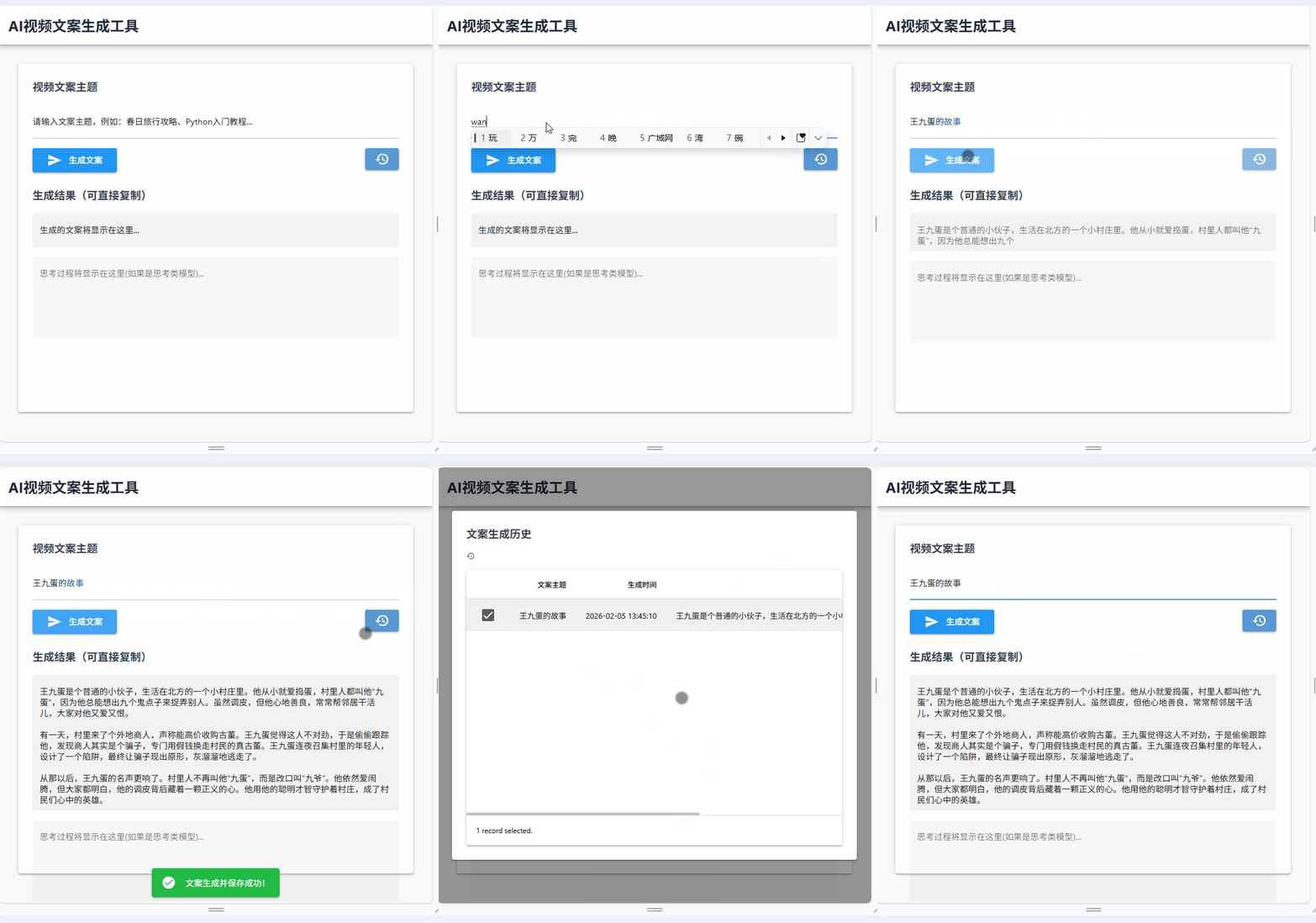
界面不搞花里胡哨的,就留最实用的东西:输入主题、输出结果、历史记录。
python
# -------------------------- 前端界面搭建 --------------------------
def setup_ui():
    # 主容器:响应式布局
    with ui.row().classes("w-full  mx-auto gap-4 p-4"):
        with ui.dialog() as dialog1:
            # 历史记录区 卡片式布局,固定高度
            with ui.card().classes("col-3 h-[80vh]  gap-4 p-6"):
                ui.label("文案生成历史").classes("text-lg font-semibold text-gray-700 flex items-center gap-2")
                ui.icon("history").classes("text-gray-600")
                ............

        # 文案生成区,卡片式布局,内边距充足
        with ui.column().classes("w-full flex flex-col"):
            with ui.card().classes("w-full h-[80vh]  gap-4 p-6"):
                ui.label("视频文案主题").classes("text-lg font-semibold text-gray-700")
                # 主题输入框
                topic_input = ui.input(
                    placeholder=g['current_topic']
                ).classes("w-full").bind_value(g,"current_topic")
                ..........
(四) 大模型的流式输出
大模型的输出是一个流式的过程,我们不能等大模型全部生成好,才把结果展示在界面上。而是要边生成边展示,用户体验才好。
python
# -------------------------- 异步大模型调用函数 --------------------------
async def call_llm(topic: str) -> str:
    """异步调用大模型生成视频文案(支持流式输出)"""
    # 异步发送POST请求,超时时间30秒
    async with session.post(
        url=url,
        json=request_data,
        headers=headers,
        timeout=aiohttp.ClientTimeout(total=30)
    ) as response:
        async for chunk in response.content:
            if chunk:
                # 解析每个chunk
                chunk_str = chunk.decode('utf-8')
                # 处理流式响应格式
                for line in chunk_str.split('\n'):
                    line = line.strip()
                    if not line:
                        continue
                    if line.startswith('data: '):
                        line = line[6:]
                        if line == '[DONE]':
                            break
                        try:
                            import json
                            chunk_data = json.loads(line)
                            # 提取内容
                            if 'choices' in chunk_data:
                                choice = chunk_data['choices'][0]
                                if 'delta' in choice and 'content' in choice['delta']:
                                    delta_content = choice['delta']['content']
                                    if delta_content:
                                        content += delta_content
                                        g['current_copy'] = content
三、效果
看看就好,这才是刚刚开始!
最后说一句
可以不点赞 ,也不需要转发,有想法,关注"nicegui敲键盘实战",后台加我联系方式进群聊~
题外话
最近发现要想生成的文案好,还得是大尺寸的模型才行,真实且无奈。
本期项目代码
因为现在都是独立的脚本,尚未形成project,所以代码就先放在网盘上,需要的同学可以自取。
通过网盘分享的文件:用NiceGUI重构项目
链接: https://pan.baidu.com/s/1-oHGCEvg4Mkg7fR5lxjdGQ?pwd=48ub 提取码: 48ub
--来自百度网盘超级会员v1的分享
无脑视频--王九蛋的故事
王九蛋的故事