Python 列表排序
本文聚焦 Python 列表的排序操作,包含 sort() 与 sorted() 的对比、自定义排序、多级排序、排序稳定性及性能分析。
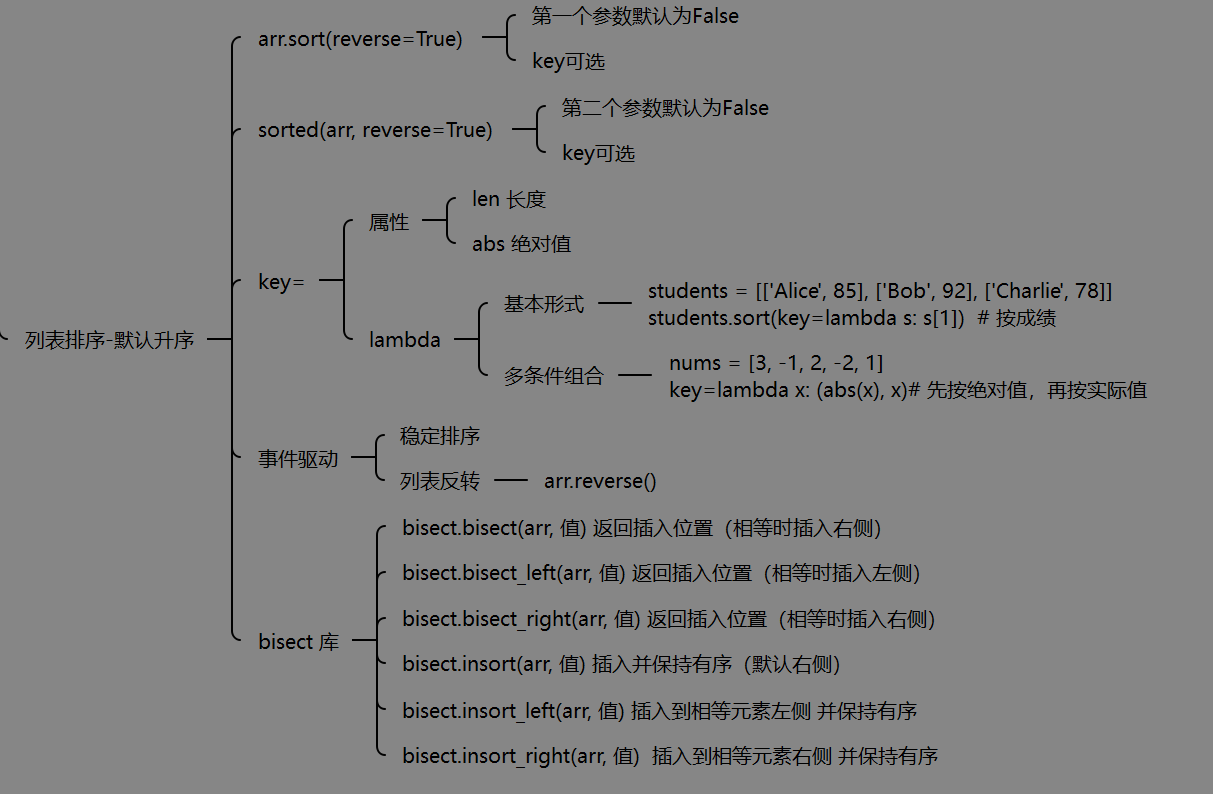
我也将给出个人思维导图
一、基础用法
1.1 sort() vs sorted()
| 方法 | 类型 | 返回值 | 是否修改原列表 |
|---|---|---|---|
list.sort() |
方法 | None |
是(原地排序) |
sorted(list) |
内置函数 | 新列表 | 否 |
python
nums = [3, 1, 4, 1, 5, 9]

# sort() - 原地排序
nums.sort()
print(nums)  # [1, 1, 3, 4, 5, 9]
# sort() 返回 None
result = nums.sort()
print(result)  # None

# sorted() - 返回新列表
nums = [3, 1, 4, 1, 5, 9]
sorted_nums = sorted(nums)
print(sorted_nums)  # [1, 1, 3, 4, 5, 9]
print(nums)         # [3, 1, 4, 1, 5, 9] - 原列表不变
注意 :
sort()返回None是有意设计,强制开发者区分原地操作和返回新值。
1.2 反向排序
python
nums = [3, 1, 4, 1, 5, 9]

# 方法 1:reverse 参数
nums.sort(reverse=True)
# [9, 5, 4, 3, 1, 1]

# 方法 2:sorted + reverse
nums = [3, 1, 4, 1, 5, 9]
desc = sorted(nums, reverse=True)
# [9, 5, 4, 3, 1, 1]

# 方法 3:先排序再反转(不推荐,多一次操作)
nums = [3, 1, 4, 1, 5, 9]
nums.sort()
nums.reverse()
# [9, 5, 4, 3, 1, 1]
1.3 字符串列表排序与字典序
字典序(Lexicographic Order):从左到右逐字符比较,Unicode 码点小的排在前面。
python
# 基础字典序排序
words = ['banana', 'apple', 'cherry']
words.sort()
# ['apple', 'banana', 'cherry']

# 大小写敏感(ASCII: 'A'=65, 'a'=97)
words = ['banana', 'Apple', 'cherry']
words.sort()
# ['Apple', 'banana', 'cherry'] - 大写字母排在前面

# 数字 < 大写 < 小写
chars = ['9', 'A', 'a', 'Z', 'z']
chars.sort()
# ['9', 'A', 'Z', 'a', 'z']
# ASCII: '9'=57, 'A'=65, 'Z'=90, 'a'=97, 'z'=122

# 前缀相同,短的排在前面
words = ['a', 'aa', 'aaa']
words.sort()
# ['a', 'aa', 'aaa']

# 不区分大小写
words = ['banana', 'Apple', 'cherry']
words.sort(key=str.lower)
# ['Apple', 'banana', 'cherry']

# 按最后一个字符排序
words = ['abc', 'def', 'xyz']
words.sort(key=lambda s: s[-1])
# ['abc', 'def', 'xyz']  # c < f < z
注意 :不同类型元素的列表无法排序,会抛出
TypeError。
二、自定义排序
2.1 key 参数
key 指定一个函数,用于提取比较键:
python
# 按字符串长度排序
words = ['python', 'java', 'c', 'javascript']
words.sort(key=len)
# ['c', 'java', 'python', 'javascript']

# 按绝对值排序
nums = [3, -5, 2, -1, 4]
nums.sort(key=abs)
# [-1, 2, 3, 4, -5]

# 按字符串中数字部分排序
items = ['item123', 'item45', 'item6']
items.sort(key=lambda s: int(s[4:]))
# ['item6', 'item45', 'item123']

# 按倒数第二字符排序
words = ['abc', 'xyz', 'def']
words.sort(key=lambda s: s[-2])
# ['abc', 'def', 'xyz']
2.2 使用 lambda 函数
python
# 按嵌套列表的某个元素排序
students = [['Alice', 85], ['Bob', 92], ['Charlie', 78]]
students.sort(key=lambda s: s[1])  # 按成绩
# [['Charlie', 78], ['Alice', 85], ['Bob', 92]]

# 复杂排序逻辑
files = ['report.pdf', 'data.csv', 'notes.txt']
files.sort(key=lambda s: s.split('.')[-1])  # 按扩展名
# ['data.csv', 'notes.txt', 'report.pdf']

# 按数值部分排序(忽略前缀)
items = ['ver1.10', 'ver1.2', 'ver1.1']
items.sort(key=lambda s: [int(x) for x in s[3:].split('.')])
# ['ver1.1', 'ver1.2', 'ver1.10']
2.3 多条件组合
python
# 先按长度,再按字母序
words = ['aa', 'b', 'aaa', 'ab', 'a']
words.sort(key=lambda s: (len(s), s))
# ['a', 'b', 'aa', 'ab', 'aaa']

# 先按绝对值,再按实际值
nums = [3, -1, 2, -2, 1]
nums.sort(key=lambda x: (abs(x), x))
# [-1, 1, -2, 2, 3]
三、多级排序
3.1 利用稳定性多次排序
Python 排序是稳定的,相等元素保持原顺序。利用这一点可实现多级排序:
python
# 学生:姓名、年龄、成绩
students = [
    ['Alice', 20, 85],
    ['Bob', 22, 85],
    ['Charlie', 20, 92],
    ['David', 22, 78]
]

# 先按二级排序键(年龄)
students.sort(key=lambda s: s[1])
# 再按一级排序键(成绩)
students.sort(key=lambda s: s[2], reverse=True)
# 结果:
# [['Charlie', 20, 92]]      # 成绩最高
# [['Alice', 20, 85]]        # 成绩相同,年龄小的在前(稳定性)
# [['Bob', 22, 85]]          # 成绩相同,年龄大的在后
# [['David', 22, 78]]        # 成绩最低
3.2 使用元组键(推荐)
python
students = [
    ['Alice', 20, 85],
    ['Bob', 22, 85],
    ['Charlie', 20, 92],
]

# 按成绩降序、年龄升序
students.sort(key=lambda s: (-s[2], s[1]))
# [['Charlie', 20, 92], ['Alice', 20, 85], ['Bob', 22, 85]]

# 按成绩升序、年龄升序、姓名升序
students.sort(key=lambda s: (s[2], s[1], s[0]))优势:一次排序完成,更高效清晰。
3.3 三级及以上排序
python
# 记录:部门、职位级别、入职时间、姓名
records = [
    ['IT', 3, 2020, 'Alice'],
    ['HR', 2, 2019, 'Bob'],
    ['IT', 3, 2021, 'Charlie'],
    ['IT', 2, 2020, 'David'],
]

# 按部门 → 级别(降序)→ 入职时间
records.sort(key=lambda r: (r[0], -r[1], r[2]))
# [['HR', 2, 2019, 'Bob'],
#  ['IT', 2, 2020, 'David'],
#  ['IT', 3, 2020, 'Alice'],
#  ['IT', 3, 2021, 'Charlie']]
四、排序稳定性
4.1 稳定排序的含义
稳定排序:相等元素的相对顺序在排序后保持不变。
python
# 示例:按分数排序,同分保持原顺序
students = [
    ['Alice', 85],
    ['Bob', 92],
    ['Charlie', 85],
]

students.sort(key=lambda s: s[1])
# [['Alice', 85], ['Charlie', 85], ['Bob', 92]]
# Alice 原本在 Charlie 前面,排序后依然在前
4.2 实际应用场景
python
# 任务:优先级、创建顺序
tasks = [
    ['Task C', 'high', 2],
    ['Task A', 'low', 1],
    ['Task B', 'high', 1],
]

# 先按创建时间排序
tasks.sort(key=lambda t: t[2])
# [['Task A', 'low', 1],
#  ['Task B', 'high', 1],
#  ['Task C', 'high', 2]]

# 再按优先级排序(利用稳定性)
tasks.sort(key=lambda t: t[1], reverse=True)
# [['Task B', 'high', 1],  # 同优先级,Task B 原本在前
#  ['Task C', 'high', 2],
#  ['Task A', 'low', 1]]
五、特殊场景
5.1 列表反转
python
nums = [1, 2, 3, 4, 5]

# reverse() - 原地反转
nums.reverse()
# [5, 4, 3, 2, 1]

# 切片反转 - 创建新列表
nums = [1, 2, 3, 4, 5]
reversed_nums = nums[::-1]
# [5, 4, 3, 2, 1]
print(nums)  # [1, 2, 3, 4, 5] - 原列表不变
5.2 bisect 库:有序列表插入
bisect 是 Python 标准库,用于在已排序列表中高效查找和插入。
python
import bisect

nums = [1, 3, 5, 7, 9]

# bisect_left:返回插入位置(相等时插入左侧)
pos = bisect.bisect_left(nums, 5)
print(pos)  # 2(索引 2,5 的位置)

# bisect_right:返回插入位置(相等时插入右侧)
pos = bisect.bisect_right(nums, 5)
print(pos)  # 3(索引 3,5 之后)

# bisect:别名,等同于 bisect_right(更常用)
pos = bisect.bisect(nums, 5)
print(pos) # 3插入操作:
python
nums = [1, 3, 5, 7, 9]

# insort:插入并保持有序(默认右侧)
bisect.insort(nums, 4)
# [1, 3, 4, 5, 7, 9]

# insort_left:插入到相等元素左侧
bisect.insort_left(nums, 5)
# [1, 3, 4, 5, 5, 7, 9]

# insort_right:插入到相等元素右侧
bisect.insort_right(nums, 5)
# [1, 3, 4, 5, 5, 5, 7, 9]| 函数 | 作用 | 相等元素位置 |
|---|---|---|
bisect |
查找插入位置 | 右侧 |
bisect_left |
查找插入位置 | 左侧 |
bisect_right |
查找插入位置 | 右侧 |
insort |
插入并保持有序 | 右侧 |
insort_left |
插入并保持有序 | 左侧 |
insort_right |
插入并保持有序 | 右侧 |
注意 :
bisect是bisect_right的别名,insort是insort_right的别名,两者更常用。
时间复杂度:查找 O(log n),插入 O(n)(需要移动元素)
六、性能分析
6.1 算法:Timsort
Python 使用 Timsort 算法(结合归并排序和插入排序):
| 特性 | 说明 |
|---|---|
| 时间复杂度 | O(n log n) 最坏/平均 |
| 空间复杂度 | O(n) 额外空间 |
| 稳定性 | 稳定排序 |
| 适应性 | 对部分有序数据效率高(接近 O(n)) |
6.2 性能对比
python
import timeit

TEST_SORT = "nums = list(range(1000000, 0, -1)); nums.sort()"
TEST_SORTED = "sorted(list(range(1000000, 0, -1)))"
TEST_REVERSE = "nums = list(range(1000000)); nums.reverse()"| 操作 | 时间复杂度 | 空间复杂度 | 说明 |
|---|---|---|---|
list.sort() |
O(n log n) | O(1) | 原地排序 |
sorted(list) |
O(n log n) | O(n) | 创建副本,占用更多内存 |
list.reverse() |
O(n) | O(1) | 原地反转 |
切片 [::-1] |
O(n) | O(n) | 创建新列表 |
bisect.insort() |
O(n) | O(1) | 插入(查找 O(log n)) |
bisect.bisect() |
O(log n) | O(1) | 仅查找位置 |
6.3 性能建议
| 场景 | 推荐方法 | 原因 |
|---|---|---|
| 原列表可修改 | list.sort() |
节省内存 |
| 需保留原列表 | sorted(list) |
不破坏原数据 |
| 已排序列表插入元素 | bisect.insort() |
O(n) vs O(n log n) |
| 只需要反向 | list.reverse() |
O(n) 原地操作 |
七、最佳实践
7.1 选择排序方法
python
# 场景 1:需要修改原列表
nums = [3, 1, 2]
nums.sort()  # 推荐

# 场景 2:需要保留原列表
nums = [3, 1, 2]
sorted_nums = sorted(nums)  # 推荐

# 场景 3:链式操作
nums = [3, 1, 2]
result = sorted(nums)[:3]  # sorted 支持链式

# 场景 4:只检查排序,不实际排序
nums = [1, 2, 3]
all(nums[i] <= nums[i+1] for i in range(len(nums)-1))  # True
7.2 常见错误
python
# 错误 1:忽略 sort() 的返回值
nums = [3, 1, 2]
sorted_nums = nums.sort()  # sorted_nums 是 None!
# 正确
nums.sort()
sorted_nums = nums

# 错误 2:修改排序后再排序
nums = [3, 1, 2]
nums.sort().reverse()  # AttributeError: 'NoneType'
# 正确
nums.sort(reverse=True)

# 错误 3:对不兼容类型排序
mixed = [1, 'a', 2]
mixed.sort()  # TypeError
7.3 代码风格建议
| 原则 | 好的写法 | 不好的写法 |
|---|---|---|
| 原地排序 | nums.sort() |
nums = sorted(nums) |
| 保留原值 | sorted_nums = sorted(nums) |
nums_copy = nums[:]; nums_copy.sort() |
| 多级排序 | sort(key=lambda x: (-x[0], x[1])) |
两次 sort 调用 |
| 反转 | nums.reverse() |
nums = nums[::-1](当不需要保留原值) |
八、总结
| 方面 | 要点 |
|---|---|
| sort() | 原地排序,返回 None,修改原列表 |
| sorted() | 返回新列表,原列表不变,支持链式操作 |
| key 参数 | 指定比较键,支持 lambda 自定义逻辑 |
| 稳定性 | Python 排序稳定,可用于多级排序 |
| 算法 | Timsort,O(n log n),稳定且高效 |
| 最佳实践 | 原地用 sort(),保留原值用 sorted() |