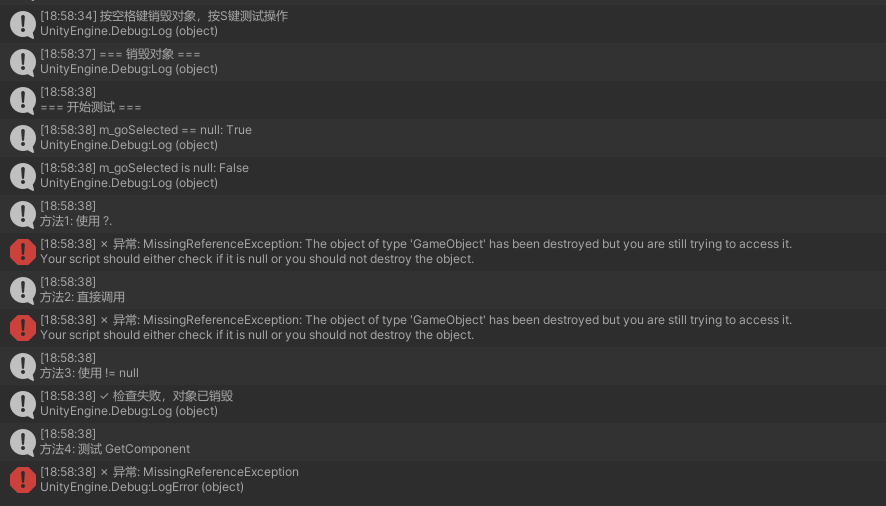
当使用 ?. 操作符(C# 语法糖)时,它只检查该对象在 内存(C#层面) 是否为 null,而不会检查该对象在 Unity 引擎层面是否已被销毁(Destroyed)。
为什么使用?.会报错?
对象已被销毁: 例如,当前Item 指向的是上一次点击的那个 Item。如果由于某种原因(比如列表刷新、翻页、重新打开界面),之前的那个 Item 对象已经被 Destroy 了,但变量 Item 依然保存着那一块内存地址。
?. 的局限性: 对于 Unity 的 GameObject 或 Component,obj?.SetActive() 不能检测出对象是否被销毁。当对象被销毁后, 在 Unity 看来是 "null",但在 C# 引用层面它不是 null。此时调用 SetActive 就会抛出 NullReferenceException。
核心结论: 在 Unity 中,处理 GameObject、MonoBehaviour 等继承自 UnityEngine.Object 的对象时,禁止使用 ?. 和 ?? 操作符。始终使用显式的 if (obj != null) 或 if (obj == null)。
测试代码:
cs
public class TestUnityFakeNullDemo : MonoBehaviour
{
    private GameObject testObject;
    private Transform testTransform;

    void Start()
    {
        testObject = new GameObject("TestObject");
        testTransform = testObject.transform;

        StartCoroutine(TestSequence());
    }

    IEnumerator TestSequence()
    {
        Debug.Log("=== 第一阶段:对象存在时 ===");
        TestPhase1_ObjectExists();

        yield return new WaitForSeconds(0.5f);

        Debug.Log("\n=== 销毁对象 ===");
        Destroy(testObject);

        // 立即测试(对象标记为销毁但可能还未完全销毁)
        Debug.Log("\n=== 第二阶段:Destroy 调用后立即测试 ===");
        TestPhase2_ImmediatelyAfterDestroy();

        yield return null; // 等待一帧

        Debug.Log("\n=== 第三阶段:等待一帧后测试 ===");
        TestPhase3_AfterOneFrame();

        yield return new WaitForSeconds(1f);

        Debug.Log("\n=== 第四阶段:等待1秒后测试 ===");
        TestPhase4_AfterDelay();
    }

    void TestPhase1_ObjectExists()
    {
        Debug.Log($"testObject == null: {testObject == null}");
        Debug.Log($"testObject is null: {testObject is null}");
        Debug.Log($"testObject?.name: {testObject?.name}");
    }

    void TestPhase2_ImmediatelyAfterDestroy()
    {
        Debug.Log($"testObject == null: {testObject == null}");
        Debug.Log($"testObject is null: {testObject is null}");

        // 测试属性访问
        Debug.Log($"testObject?.name: '{testObject?.name}'");

        // 测试方法调用 - 关键!
        TestMethodCall("SetActive", () => { testObject?.SetActive(false);return 0; });
        TestMethodCall("GetComponent", () => testObject?.GetComponent<Transform>());
        TestMethodCall("transform.position", () => {
            var pos = testObject?.transform?.position;
            return pos;
        });
    }

    void TestPhase3_AfterOneFrame()
    {
        Debug.Log($"testObject == null: {testObject == null}");
        Debug.Log($"testObject is null: {testObject is null}");

        TestMethodCall("SetActive (1帧后)", () => { testObject?.SetActive(false); return 0; });

        // 测试 Component 引用
        Debug.Log($"\ntestTransform == null: {testTransform == null}");
        Debug.Log($"testTransform is null: {testTransform is null}");
        TestMethodCall("Transform.position", () => {
            var pos = testTransform?.position;
            return pos;
        });
    }

    void TestPhase4_AfterDelay()
    {
        Debug.Log($"testObject == null: {testObject == null}");

        // 尝试不使用 ?.
        Debug.Log("\n--- 直接访问(应该抛异常)---");
        try
        {
            testObject.SetActive(false);
            Debug.Log("✓ 没有异常(不应该)");
        }
        catch (System.Exception e)
        {
            Debug.LogError($"✗ 异常: {e.GetType().Name}");
        }

        // 正确的检查方式
        Debug.Log("\n--- 使用 != null 检查 ---");
        if (testObject != null)
        {
            Debug.Log("对象存在");
        }
        else
        {
            Debug.Log("✓ 正确识别对象已销毁");
        }
    }

    void TestMethodCall(string name, System.Func<object> action)
    {
        Debug.Log($"\n测试: {name}");
        try
        {
            var result = action();
            Debug.Log($"✓ 成功执行,结果: {result}");
        }
        catch (MissingReferenceException e)
        {
            Debug.LogError($"✗ MissingReferenceException: {e.Message}");
        }
        catch (System.NullReferenceException e)
        {
            Debug.LogError($"✗ NullReferenceException: {e.Message}");
        }
        catch (System.Exception e)
        {
            Debug.LogError($"✗ {e.GetType().Name}: {e.Message}");
        }
    }
}
结果: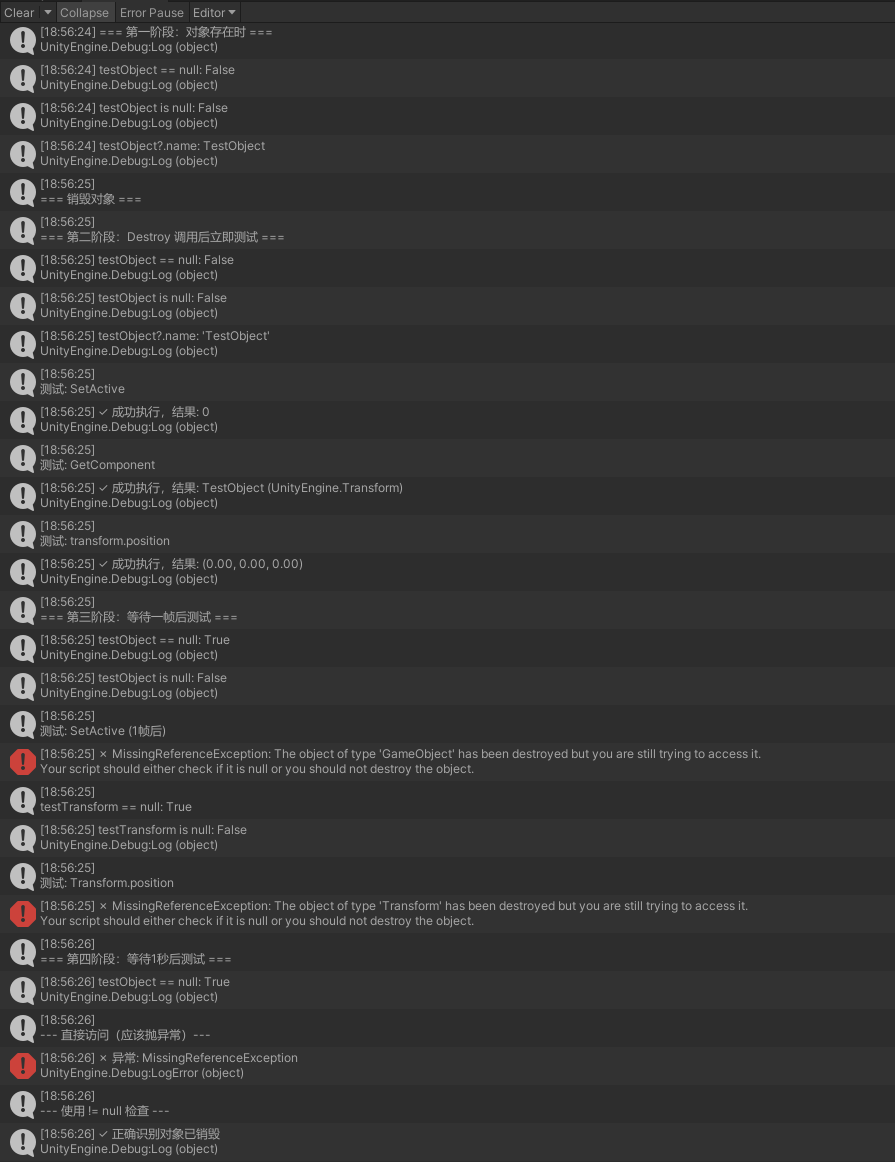
测试代码2:
cs
using UnityEngine;

public class RealWorldExample : MonoBehaviour
{
    private GameObject m_goSelected;

    void Start()
    {
        // 创建一个带渲染器的对象
        m_goSelected = GameObject.CreatePrimitive(PrimitiveType.Cube);
        m_goSelected.name = "SelectedCube";

        Debug.Log("按空格键销毁对象,按S键测试操作");
    }

    void Update()
    {
        if (Input.GetKeyDown(KeyCode.Space))
        {
            Debug.Log("=== 销毁对象 ===");
            Destroy(m_goSelected);
        }

        if (Input.GetKeyDown(KeyCode.S))
        {
            TestOperations();
        }
    }

    void TestOperations()
    {
        Debug.Log("\n=== 开始测试 ===");
        Debug.Log($"m_goSelected == null: {m_goSelected == null}");
        Debug.Log($"m_goSelected is null: {m_goSelected is null}");

        // 方法1: 使用 ?.
        Debug.Log("\n方法1: 使用 ?.");
        try
        {
            m_goSelected?.SetActive(false);
            Debug.Log("✓ m_goSelected?.SetActive(false) 执行成功");

            // 再次激活
            m_goSelected?.SetActive(true);
            Debug.Log("✓ m_goSelected?.SetActive(true) 执行成功");
        }
        catch (System.Exception e)
        {
            Debug.LogError($"✗ 异常: {e.GetType().Name}: {e.Message}");
        }

        // 方法2: 不使用检查直接调用
        Debug.Log("\n方法2: 直接调用");
        try
        {
            m_goSelected.SetActive(false);
            Debug.Log("✓ 直接调用成功");
        }
        catch (System.Exception e)
        {
            Debug.LogError($"✗ 异常: {e.GetType().Name}: {e.Message}");
        }

        // 方法3: 使用 != null 检查
        Debug.Log("\n方法3: 使用 != null");
        if (m_goSelected != null)
        {
            m_goSelected.SetActive(false);
            Debug.Log("✓ 检查通过并执行");
        }
        else
        {
            Debug.Log("✓ 检查失败,对象已销毁");
        }

        // 方法4: 测试其他Unity API
        Debug.Log("\n方法4: 测试 GetComponent");
        try
        {
            var renderer = m_goSelected?.GetComponent<Renderer>();
            Debug.Log($"✓ GetComponent 结果: {renderer}");
        }
        catch (System.Exception e)
        {
            Debug.LogError($"✗ 异常: {e.GetType().Name}");
        }
    }
}
结果: