MacOS下源码安装SDL3并运行hello.c示例程序
最近准备学习FFmepg、SDL、Qt等软件时,想使用自己的MacMin4运行一下已故博主雷霄骅的一些FFmepg和SDL相关示例程序,其相关博客和github仓库地址如下:
- https://blog.csdn.net/leixiaohua1020
- https://github.com/leixiaohua1020
- https://github.com/leixiaohua1020/leixiaohua1020.github.io/tree/master/batch
批量脚本 - simplest_ffmpeg_demos_git_clone_all.sh
- simplest_ffmpeg_demos_compile_gcc_all.sh
这里像雷神致敬!!!
下载SDL最新源代码
SDL目前已经更新到3.x版本了,其官网地址为:https://www.libsdl.org/,其Github仓库地址为:https://github.com/libsdl-org/SDL
首先我们运行如下命令下载SDL最新代码:
bash
git clone https://github.com/libsdl-org/SDL.git或者
bash
git clone git@github.com:libsdl-org/SDL.git当然前提是我们在我们的MacOs系统中提前安装好git软件,可以使用brew install git命令安装即可。
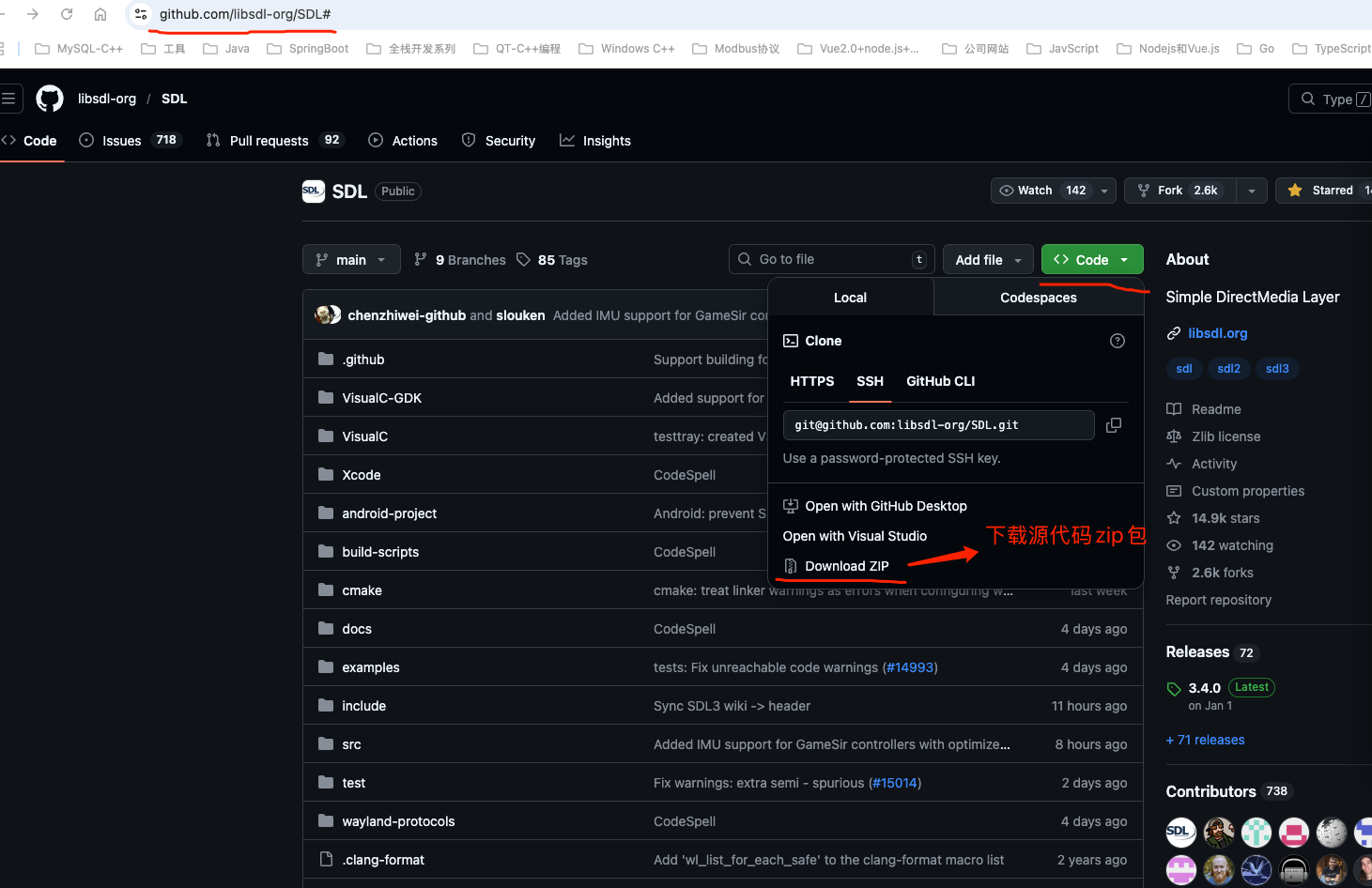
或者直接在Github上面下载对应的源代码zip包也可以。
在MacOS中编译SDL源代码
在MacOS中编译SDL源代码和Linux中一样,分别进入到SDL源代码目录,分别执行如下命令即可:
bash
mkdir build
cmake ..
make
sudo make install
最终默认安装目录为:/usr/local
我们可以使用pkg-config工具查看sdl3的头文件和库文件安装目录:
bash
pkg-config --cflags --libs sdl3如下所示:
bash
192:build-scripts john$ pkg-config --cflags --libs sdl3
-I/usr/local/include -L/usr/local/lib -Wl,-rpath,/usr/local/lib -lSDL3
192:build-scripts john$ ls /usr/local/include/SDL3/
SDL.h                           SDL_events.h                    SDL_main_impl.h                 SDL_platform.h                  SDL_test_crc32.h
SDL_assert.h                    SDL_filesystem.h                SDL_messagebox.h                SDL_platform_defines.h          SDL_test_font.h
SDL_asyncio.h                   SDL_gamepad.h                   SDL_metal.h                     SDL_power.h                     SDL_test_fuzzer.h
SDL_atomic.h                    SDL_gpu.h                       SDL_misc.h                      SDL_process.h                   SDL_test_harness.h
SDL_audio.h                     SDL_guid.h                      SDL_mouse.h                     SDL_properties.h                SDL_test_log.h
SDL_begin_code.h                SDL_haptic.h                    SDL_mutex.h                     SDL_rect.h                      SDL_test_md5.h
SDL_bits.h                      SDL_hidapi.h                    SDL_oldnames.h                  SDL_render.h                    SDL_test_memory.h
SDL_blendmode.h                 SDL_hints.h                     SDL_opengl.h                    SDL_revision.h                  SDL_thread.h
SDL_camera.h                    SDL_init.h                      SDL_opengl_glext.h              SDL_scancode.h                  SDL_time.h
SDL_clipboard.h                 SDL_intrin.h                    SDL_opengles.h                  SDL_sensor.h                    SDL_timer.h
SDL_close_code.h                SDL_iostream.h                  SDL_opengles2.h                 SDL_stdinc.h                    SDL_touch.h
SDL_copying.h                   SDL_joystick.h                  SDL_opengles2_gl2.h             SDL_storage.h                   SDL_tray.h
SDL_cpuinfo.h                   SDL_keyboard.h                  SDL_opengles2_gl2ext.h          SDL_surface.h                   SDL_version.h
SDL_dialog.h                    SDL_keycode.h                   SDL_opengles2_gl2platform.h     SDL_system.h                    SDL_video.h
SDL_dlopennote.h                SDL_loadso.h                    SDL_opengles2_khrplatform.h     SDL_test.h                      SDL_vulkan.h
SDL_egl.h                       SDL_locale.h                    SDL_openxr.h                    SDL_test_assert.h
SDL_endian.h                    SDL_log.h                       SDL_pen.h                       SDL_test_common.h
SDL_error.h                     SDL_main.h                      SDL_pixels.h                    SDL_test_compare.h
192:build-scripts john$ ls /usr/local/lib/SDL.*
ls: /usr/local/lib/SDL.*: No such file or directory
192:build-scripts john$ ls /usr/local/lib/libSDL3.*
/usr/local/lib/libSDL3.0.dylib  /usr/local/lib/libSDL3.dylib
192:build-scripts john$ /usr/local/lib/pkgconfig/sdl3.pc文件内容如下:
bash
prefix=/usr/local
exec_prefix=${prefix}
libdir=${prefix}/lib
includedir=${prefix}/include

Name: sdl3
Description: Simple DirectMedia Layer is a cross-platform multimedia library designed to provide low level access to audio, keyboard, mouse, joystick, 3D hardware via OpenGL, and 2D video framebuffer.
URL: https://www.libsdl.org/
Version: 3.5.0
Requires.private:
Conflicts:
Libs: -L${libdir} -Wl,-rpath,${libdir} -lSDL3
Libs.private: -Wl,-framework,CoreMedia -Wl,-framework,CoreVideo -Wl,-framework,Cocoa -Wl,-weak_framework,UniformTypeIdentifiers -Wl,-framework,IOKit -Wl,-framework,ForceFeedback -Wl,-framework,Carbon -Wl,-framework,CoreAudio -Wl,-framework,AudioToolbox -Wl,-framework,AVFoundation -Wl,-framework,Foundation -Wl,-framework,GameController -Wl,-framework,Metal -Wl,-framework,QuartzCore -Wl,-weak_framework,CoreHaptics -lpthread -lm
Cflags: -I${includedir}
运行官方的hello.c源代码
SDL官方提供的hello.c源代码下载地址为:https://raw.githubusercontent.com/libsdl-org/SDL/refs/heads/main/docs/hello.c
其内容如下:
c
/*
  Copyright (C) 1997-2026 Sam Lantinga <slouken@libsdl.org>

  This software is provided 'as-is', without any express or implied
  warranty.  In no event will the authors be held liable for any damages
  arising from the use of this software.

  Permission is granted to anyone to use this software for any purpose,
  including commercial applications, and to alter it and redistribute it
  freely.
*/
#define SDL_MAIN_USE_CALLBACKS 1  /* use the callbacks instead of main() */
#include <SDL3/SDL.h>
#include <SDL3/SDL_main.h>

static SDL_Window *window = NULL;
static SDL_Renderer *renderer = NULL;

/* This function runs once at startup. */
SDL_AppResult SDL_AppInit(void **appstate, int argc, char *argv[])
{
    /* Create the window */
    if (!SDL_CreateWindowAndRenderer("Hello World", 800, 600, SDL_WINDOW_FULLSCREEN, &window, &renderer)) {
        SDL_Log("Couldn't create window and renderer: %s", SDL_GetError());
        return SDL_APP_FAILURE;
    }
    return SDL_APP_CONTINUE;
}

/* This function runs when a new event (mouse input, keypresses, etc) occurs. */
SDL_AppResult SDL_AppEvent(void *appstate, SDL_Event *event)
{
    if (event->type == SDL_EVENT_KEY_DOWN ||
        event->type == SDL_EVENT_QUIT) {
        return SDL_APP_SUCCESS;  /* end the program, reporting success to the OS. */
    }
    return SDL_APP_CONTINUE;
}

/* This function runs once per frame, and is the heart of the program. */
SDL_AppResult SDL_AppIterate(void *appstate)
{
    const char *message = "Hello World!";
    int w = 0, h = 0;
    float x, y;
    const float scale = 4.0f;

    /* Center the message and scale it up */
    SDL_GetRenderOutputSize(renderer, &w, &h);
    SDL_SetRenderScale(renderer, scale, scale);
    x = ((w / scale) - SDL_DEBUG_TEXT_FONT_CHARACTER_SIZE * SDL_strlen(message)) / 2;
    y = ((h / scale) - SDL_DEBUG_TEXT_FONT_CHARACTER_SIZE) / 2;

    /* Draw the message */
    SDL_SetRenderDrawColor(renderer, 0, 0, 0, 255);
    SDL_RenderClear(renderer);
    SDL_SetRenderDrawColor(renderer, 255, 255, 255, 255);
    SDL_RenderDebugText(renderer, x, y, message);
    SDL_RenderPresent(renderer);

    return SDL_APP_CONTINUE;
}

/* This function runs once at shutdown. */
void SDL_AppQuit(void *appstate, SDL_AppResult result)
{
}
刚开始看上面的代码,感觉很奇怪,传统的main()主函数入口不见了。为什么这些函数使用SDL3框架后没有看到main函数,都是回调注册吗?
是的,这段代码使用了SDL3框架,并且通过回调函数的方式实现了程序的逻辑,而不是传统的main函数。这是因为代码中定义了SDL_MAIN_USE_CALLBACKS宏,并且实现了SDL3的应用程序回调函数接口。
代码逻辑分析
-
宏定义
c#define SDL_MAIN_USE_CALLBACKS 1这行代码告诉SDL3库,程序将使用回调函数的方式来实现应用程序的逻辑,而不是通过传统的
main函数。SDL3会在内部调用这些回调函数来管理应用程序的生命周期。 -
回调函数的实现
SDL3提供了一组标准的回调函数接口,用于替代
main函数。这些回调函数分别在应用程序的不同阶段被调用:-
SDL_AppInitcSDL_AppResult SDL_AppInit(void **appstate, int argc, char *argv[])- 这是应用程序的初始化函数,类似于传统
main函数中的初始化部分。 - 在这里,代码通过
SDL_CreateWindowAndRenderer创建了一个窗口和渲染器。 - 如果窗口和渲染器创建失败,会记录错误日志并返回
SDL_APP_FAILURE,表示初始化失败。
- 这是应用程序的初始化函数,类似于传统
-
SDL_AppEventcSDL_AppResult SDL_AppEvent(void *appstate, SDL_Event *event)- 这个函数在每次事件(如键盘输入、鼠标点击、窗口关闭等)发生时被调用。
- 代码中检查了事件类型,如果是
SDL_EVENT_KEY_DOWN(按键按下)或SDL_EVENT_QUIT(退出事件),则返回SDL_APP_SUCCESS,表示程序应该结束。
-
SDL_AppIteratecSDL_AppResult SDL_AppIterate(void *appstate)- 这是程序的核心逻辑,每一帧都会调用一次。
- 代码中绘制了一个"Hello World!"的消息,先清空屏幕,然后设置绘制颜色,最后调用
SDL_RenderDebugText绘制文本,并通过SDL_RenderPresent将内容呈现到窗口。
-
SDL_AppQuitcvoid SDL_AppQuit(void *appstate, SDL_AppResult result)- 这是程序退出时调用的清理函数。
- 目前代码中没有实现任何清理逻辑,但可以在这里释放资源,比如销毁窗口和渲染器。
-
-
没有
main函数的原因- SDL3在检测到
SDL_MAIN_USE_CALLBACKS宏定义后,会自动调用这些回调函数来管理程序的生命周期。 - SDL3内部有一个默认的
main函数,它会初始化SDL库,然后依次调用SDL_AppInit、SDL_AppEvent、SDL_AppIterate和SDL_AppQuit,从而实现程序的运行。
- SDL3在检测到
回调函数的优点
- 模块化:将程序的不同阶段分离到不同的回调函数中,逻辑更加清晰。
- 框架管理:SDL3框架负责调用这些回调函数,开发者只需专注于实现具体的逻辑。
- 跨平台支持:SDL3的这种设计可以更好地适配不同平台的启动方式,而开发者无需关心底层细节。
总结
这段代码通过定义SDL_MAIN_USE_CALLBACKS宏,使用了SDL3的回调机制来替代传统的main函数。SDL3框架会自动调用这些回调函数来管理程序的生命周期。这种设计方式使得代码更加模块化,便于维护和跨平台开发。
运行hello.c
在MacOS下安装完SDL3后,运行hello.c就很简单了,直接执行如下命令即可:
bash
gcc hello.c -o hello `pkg-config --cflags --libs sdl3`
./hello运行hello可执行程序后,默认是全屏显示窗口,显示了Hello World!字符串(白色字体),并且按键盘中任意键或者 ESC就会退出窗口。
为了容易演示运行结果和截图,我们可以把hello.c源代码中的第23行中的代码
c
if (!SDL_CreateWindowAndRenderer("Hello World", 800, 600, SDL_WINDOW_FULLSCREEN, &window, &renderer)) {其中的SDL_WINDOW_FULLSCREEN表示全屏显示,可以使用其他的参数,如下:
bash
// SDL_WINDOW_MINIMIZED
// SDL_WINDOW_MAXIMIZED
// SDL_WINDOW_ALWAYS_ON_TOP
// SDL_WINDOW_FULLSCREEN其完整的窗口的标志(/usr/local/include/SDL3/SDL_video.h)如下:
c
/**
 * The flags on a window.
 *
 * These cover a lot of true/false, or on/off, window state. Some of it is
 * immutable after being set through SDL_CreateWindow(), some of it can be
 * changed on existing windows by the app, and some of it might be altered by
 * the user or system outside of the app's control.
 *
 * When creating windows with `SDL_WINDOW_RESIZABLE`, SDL will constrain
 * resizable windows to the dimensions recommended by the compositor to fit it
 * within the usable desktop space, although some compositors will do this
 * automatically without intervention as well. Use `SDL_SetWindowResizable`
 * after creation instead if you wish to create a window with a specific size.
 *
 * \since This datatype is available since SDL 3.2.0.
 *
 * \sa SDL_GetWindowFlags
 */
typedef Uint64 SDL_WindowFlags;

#define SDL_WINDOW_FULLSCREEN           SDL_UINT64_C(0x0000000000000001)    /**< window is in fullscreen mode */
#define SDL_WINDOW_OPENGL               SDL_UINT64_C(0x0000000000000002)    /**< window usable with OpenGL context */
#define SDL_WINDOW_OCCLUDED             SDL_UINT64_C(0x0000000000000004)    /**< window is occluded */
#define SDL_WINDOW_HIDDEN               SDL_UINT64_C(0x0000000000000008)    /**< window is neither mapped onto the desktop nor shown in the taskbar/dock/window list; SDL_ShowWindow() is required for it to become visible */
#define SDL_WINDOW_BORDERLESS           SDL_UINT64_C(0x0000000000000010)    /**< no window decoration */
#define SDL_WINDOW_RESIZABLE            SDL_UINT64_C(0x0000000000000020)    /**< window can be resized */
#define SDL_WINDOW_MINIMIZED            SDL_UINT64_C(0x0000000000000040)    /**< window is minimized */
#define SDL_WINDOW_MAXIMIZED            SDL_UINT64_C(0x0000000000000080)    /**< window is maximized */
#define SDL_WINDOW_MOUSE_GRABBED        SDL_UINT64_C(0x0000000000000100)    /**< window has grabbed mouse input */
#define SDL_WINDOW_INPUT_FOCUS          SDL_UINT64_C(0x0000000000000200)    /**< window has input focus */
#define SDL_WINDOW_MOUSE_FOCUS          SDL_UINT64_C(0x0000000000000400)    /**< window has mouse focus */
#define SDL_WINDOW_EXTERNAL             SDL_UINT64_C(0x0000000000000800)    /**< window not created by SDL */
#define SDL_WINDOW_MODAL                SDL_UINT64_C(0x0000000000001000)    /**< window is modal */
#define SDL_WINDOW_HIGH_PIXEL_DENSITY   SDL_UINT64_C(0x0000000000002000)    /**< window uses high pixel density back buffer if possible */
#define SDL_WINDOW_MOUSE_CAPTURE        SDL_UINT64_C(0x0000000000004000)    /**< window has mouse captured (unrelated to MOUSE_GRABBED) */
#define SDL_WINDOW_MOUSE_RELATIVE_MODE  SDL_UINT64_C(0x0000000000008000)    /**< window has relative mode enabled */
#define SDL_WINDOW_ALWAYS_ON_TOP        SDL_UINT64_C(0x0000000000010000)    /**< window should always be above others */
#define SDL_WINDOW_UTILITY              SDL_UINT64_C(0x0000000000020000)    /**< window should be treated as a utility window, not showing in the task bar and window list */
#define SDL_WINDOW_TOOLTIP              SDL_UINT64_C(0x0000000000040000)    /**< window should be treated as a tooltip and does not get mouse or keyboard focus, requires a parent window */
#define SDL_WINDOW_POPUP_MENU           SDL_UINT64_C(0x0000000000080000)    /**< window should be treated as a popup menu, requires a parent window */
#define SDL_WINDOW_KEYBOARD_GRABBED     SDL_UINT64_C(0x0000000000100000)    /**< window has grabbed keyboard input */
#define SDL_WINDOW_FILL_DOCUMENT        SDL_UINT64_C(0x0000000000200000)    /**< window is in fill-document mode (Emscripten only), since SDL 3.4.0 */
#define SDL_WINDOW_VULKAN               SDL_UINT64_C(0x0000000010000000)    /**< window usable for Vulkan surface */
#define SDL_WINDOW_METAL                SDL_UINT64_C(0x0000000020000000)    /**< window usable for Metal view */
#define SDL_WINDOW_TRANSPARENT          SDL_UINT64_C(0x0000000040000000)    /**< window with transparent buffer */
#define SDL_WINDOW_NOT_FOCUSABLE        SDL_UINT64_C(0x0000000080000000)    /**< window should not be focusable */
比如说改成
c
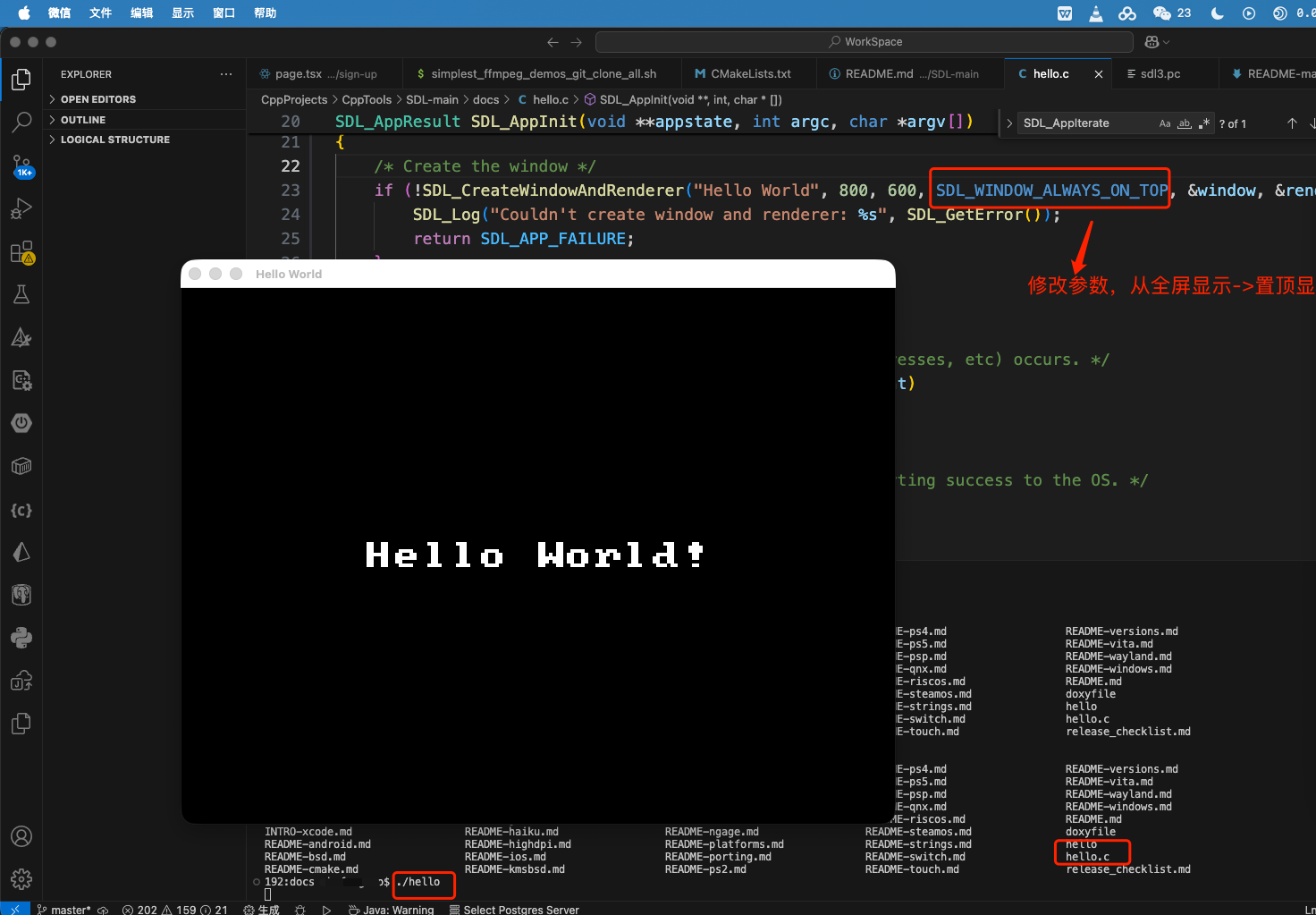
if (!SDL_CreateWindowAndRenderer("Hello World", 800, 600, SDL_WINDOW_ALWAYS_ON_TOP, &window, &renderer)) {我们再次编译并运行hello.c程序,可以发现窗口置顶到最前台,如下图所示:
当然hello.c在其他系统平台上运行的方法可以参考