本项目是自己为了熟悉MFC的使用而自己设计的,所以过程曲折,仅做为学习记录:
要实现的功能:
-
创建MFC应用程序框架(使用对话框)。
-
设计主窗口,将窗口分为左右两部分(直接在客户区绘制两个控件)。
-
左侧:树形控件(CTreeCtrl)用于显示分组目录。
-
右侧:列表控件(CListCtrl)或自定义绘制控件用于显示软件图标和名字。
-
-
实现左侧树形控件的功能:
- 支持右键菜单(新建、删除、重命名分组)。
-
实现右侧列表控件的功能:
-
支持拖拽快捷方式(文件)到列表控件中,以添加新的软件项。
-
支持右键菜单(例如删除、重命名软件项等)。
-
-
数据存储:需要将分组信息和软件项信息保存到文件(如XML、INI或数据库),以便下次启动时加载。
一、创建项目和基础框架
1、新建项目:
-
打开Visual Studio
-
创建新项目 → MFC应用程序 → 项目名称"desktopmanager"
-
在"应用程序类型"中选择**"基于对话框",**
-
在"用户界面功能"和高级功能中全部取消选择
-
生成的类选择为APP
-
点击"完成"
2、修改主对话框
删除默认控件:
-
打开资源视图(Resource View)
-
打开Dialog文件夹
-
双击IDD_DESKTOPMANAGER_DIALOG
-
删除对话框上默认的"确定"和"取消"按钮
二、设计界面布局
第一步:使用资源编辑器设计界面
-
**调整对话框属性:**边框(Border)为Resizing,Minimize Box和Maximize Box都设为True
-
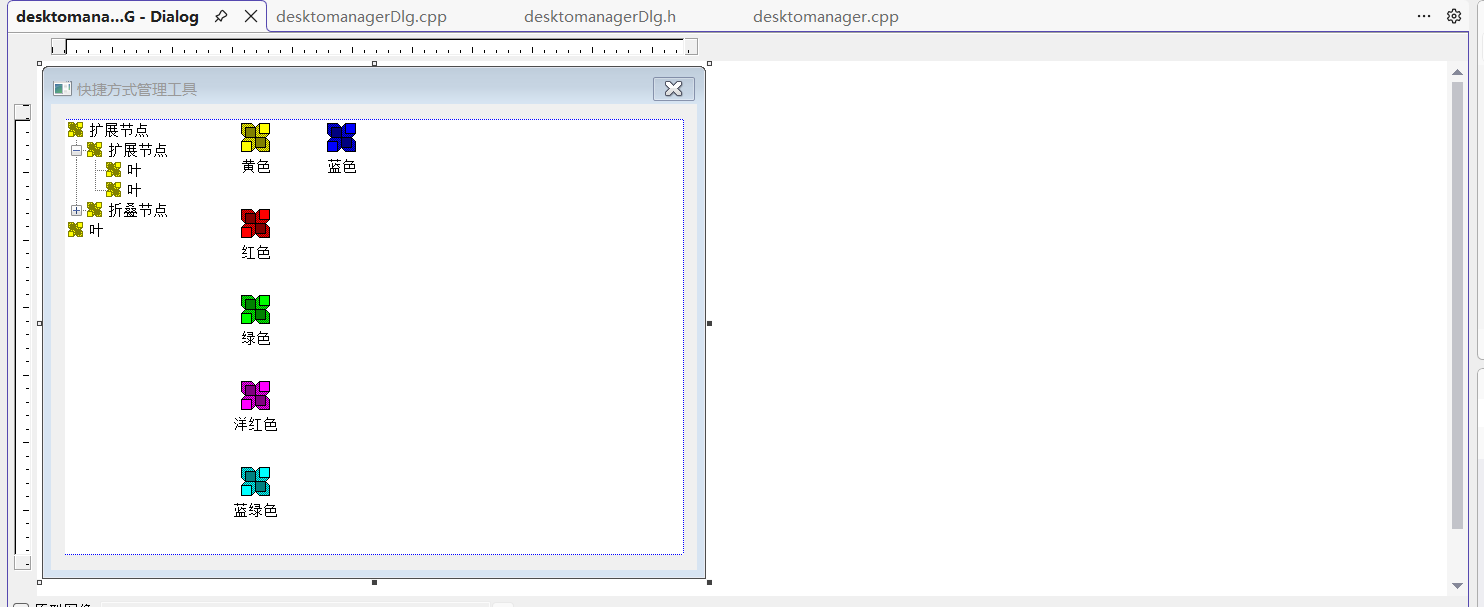
添加控件:
下面的控件边框都设置为无,单纯为了更加美观
-
从工具箱拖拽Tree Control控件到对话框左侧
-
ID: IDC_TREE_GROUPS
-
设置属性:Has buttons, Has lines, Lines at root,调整大小类型为垂直
-
-
从工具箱拖拽List Control控件到对话框右侧
-
ID: IDC_LIST_SOFTWARE
-
设置View属性为Icon,调整大小类型为两者
-
第二步:添加控件变量
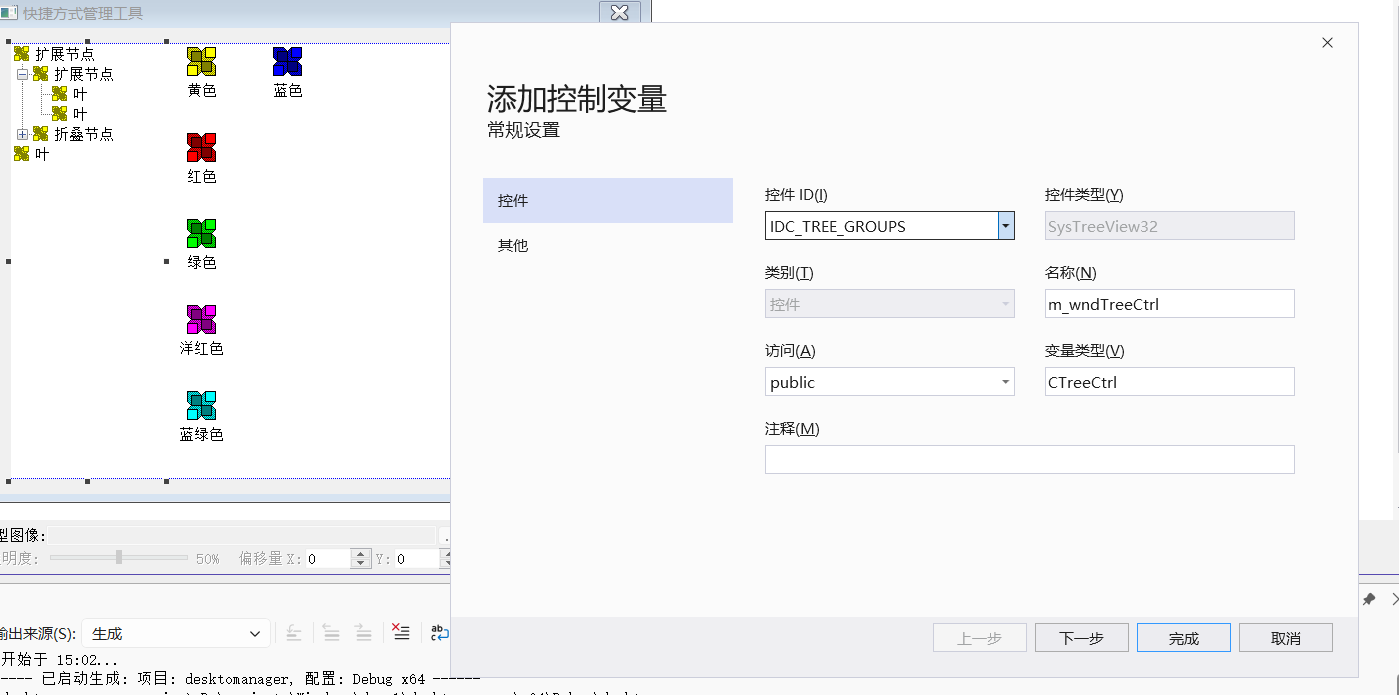
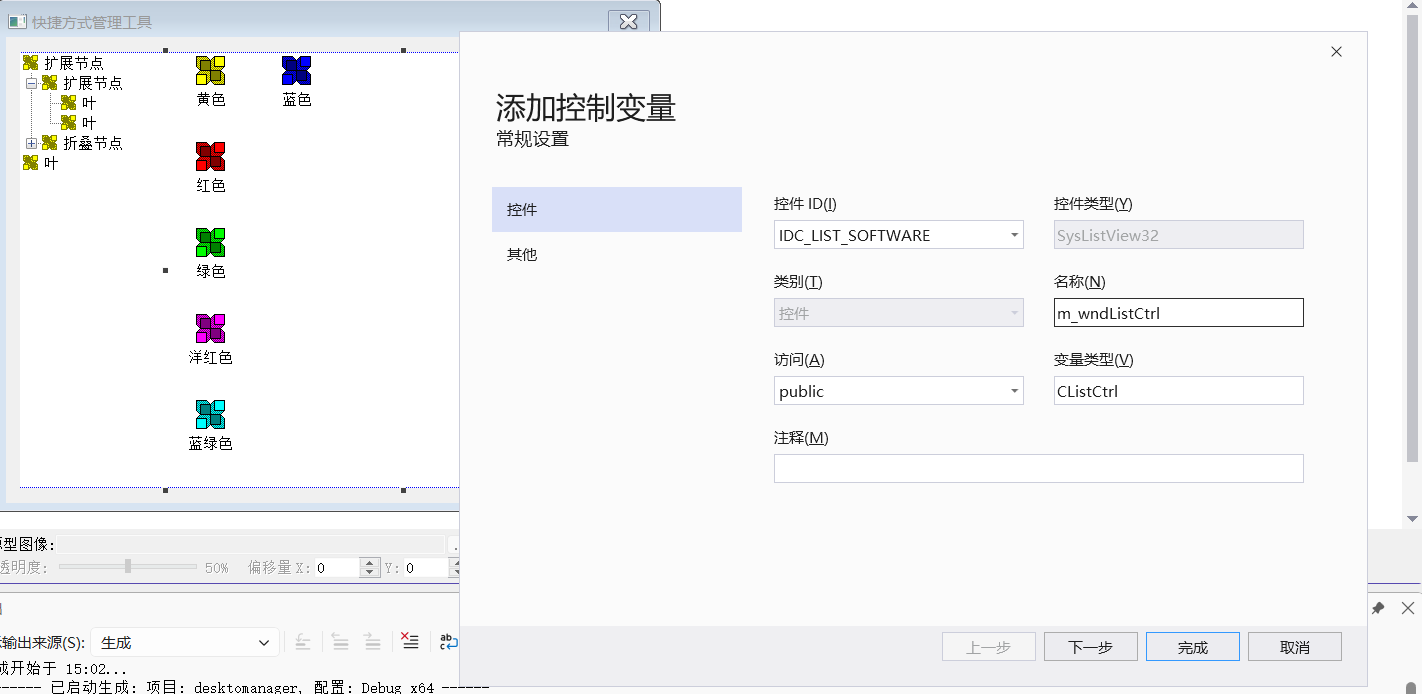
对话框头文件:
cpp
// desktomanagerDlg.h: 头文件
//

#pragma once


// CdesktomanagerDlg 对话框
class CdesktomanagerDlg : public CDialogEx
{
// 构造
public:
	CdesktomanagerDlg(CWnd* pParent = nullptr);	// 标准构造函数

// 对话框数据
#ifdef AFX_DESIGN_TIME
	enum { IDD = IDD_DESKTOMANAGER_DIALOG };
#endif

protected:
virtual void DoDataExchange(CDataExchange* pDX);	// DDX/DDV 支持


// 实现
protected:
	HICON m_hIcon;

	// 生成的消息映射函数
	virtual BOOL OnInitDialog();
	afx_msg void OnPaint();
	afx_msg HCURSOR OnQueryDragIcon();
	DECLARE_MESSAGE_MAP()

public:
    // 数据管理
    class CDataManager* m_pDataManager;

    // 初始化方法
    void InitControls();
    void InitTreeCtrl();
    void InitListCtrl();


    //控件变量
    CTreeCtrl m_wndTreeCtrl;
    CListCtrl m_wndListCtrl;
};
同时先写出初步的初始化代码:
cpp
//初始化左侧树界面
void CdesktomanagerDlg::InitTreeCtrl()
{
	// 设置树形控件样式
	m_wndTreeCtrl.ModifyStyle(0, TVS_SHOWSELALWAYS | TVS_TRACKSELECT);

	// 添加示例分组
	HTREEITEM hGroup1 = m_wndTreeCtrl.InsertItem(_T("办公软件"));
	HTREEITEM hGroup2 = m_wndTreeCtrl.InsertItem(_T("开发工具"));
	HTREEITEM hGroup3 = m_wndTreeCtrl.InsertItem(_T("娱乐软件"));
}

//初始化右侧软件列表界面
void CdesktomanagerDlg::InitListCtrl()
{
	// 设置列表控件为图标视图
	m_wndListCtrl.ModifyStyle(LVS_TYPEMASK, LVS_ICON);


}
三、左侧树形控件的右键菜单实现
第一步:在资源文件中添加菜单
- 选择"添加资源" → "Menu" → "新建"
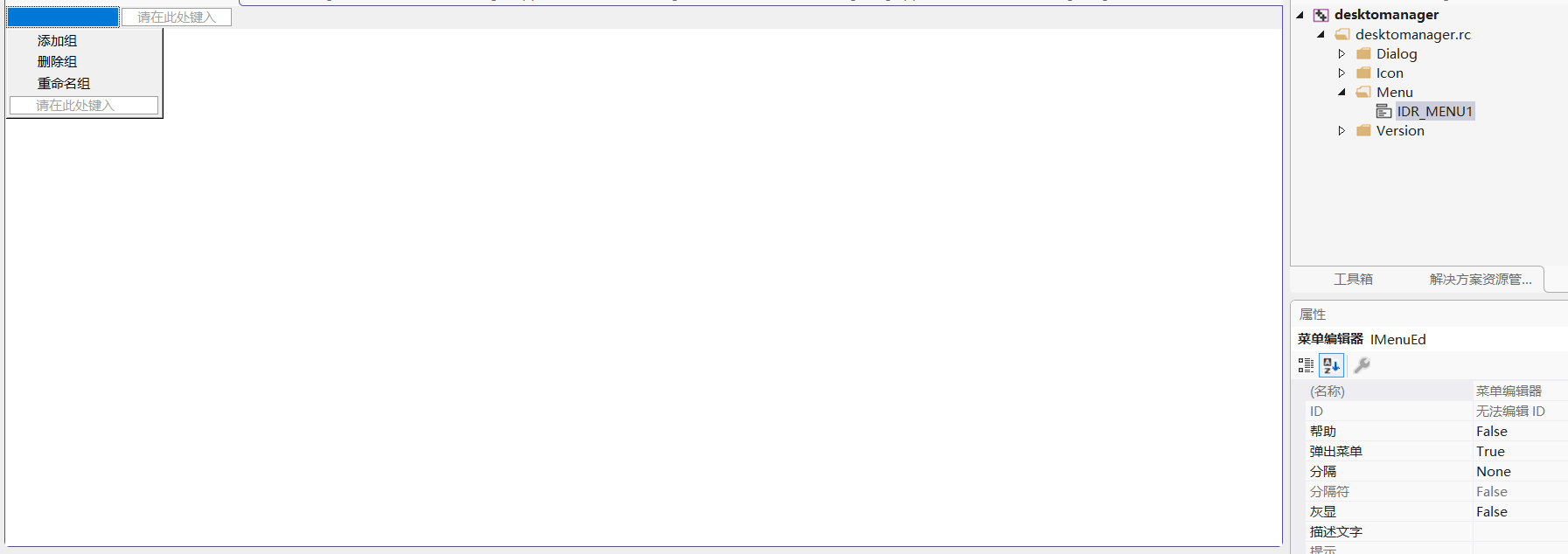
设计菜单结构:
cpp
添加分组(&A)     ID_GROUP_ADD
删除分组(&D)     ID_GROUP_DELETE
重命名分组(&R)   ID_GROUP_RENAME
第二步:实现右键菜单功能
Windows内部消息处理流程
cpp
1. 控件发生事件(如点击、选择变化)
2. 控件发送WM_NOTIFY消息给父窗口
   lParam = 指向NMHDR或派生结构体的指针
3. MFC框架接收消息
4. 通过消息映射找到对应的处理函数
5. 调用处理函数,传递参数
6. 处理函数通过pResult返回处理结果
7. 结果返回给发送通知的控件
1、添加消息处理函数和菜单变量
在DesktopManagerDlg.h中添加:
cpp
class CdesktomanagerDlg : public CDialog
{
    // ... 其他代码

protected:
    // 树形控件右键菜单相关
    afx_msg void OnTvnSelchangedTreeGroups(NMHDR* pNMHDR, LRESULT* pResult);
    afx_msg void OnNMRClickTreeGroups(NMHDR* pNMHDR, LRESULT* pResult);

    // 菜单命令处理函数
    afx_msg void OnGroupAdd();
    afx_msg void OnGroupDelete();
    afx_msg void OnGroupRename();
    afx_msg void OnGroupRefresh();

    // 辅助函数
    void ShowTreeContextMenu(CPoint point);
    BOOL GetSelectedGroupName(CString& strName);

    DECLARE_MESSAGE_MAP()

private:
    // 添加菜单成员变量
    CMenu m_menuTree;  // 树形控件右键菜单

    // 其他成员变量...
};
2、实现消息映射
cpp
BEGIN_MESSAGE_MAP(CdesktomanagerDlg, CDialogEx)
	ON_WM_PAINT()
	ON_WM_QUERYDRAGICON()
	ON_NOTIFY(NM_RCLICK, IDC_TREE_GROUPS, &CdesktomanagerDlg::OnNMRClickTreeGroups)
	ON_COMMAND(ID_GROUP_ADD, &CdesktomanagerDlg::OnGroupAdd)
	ON_COMMAND(ID_GROUP_DELETE, &CdesktomanagerDlg::OnGroupDelete)
	ON_COMMAND(ID_GROUP_RENAME, &CdesktomanagerDlg::OnGroupRename)
END_MESSAGE_MAP()
3、加载菜单资源
在InitTreeCtrl()函数中添加菜单加载:
cpp
//初始化左侧树界面
void CdesktomanagerDlg::InitTreeCtrl()
{


	if (!m_menuTree.LoadMenu(IDR_MENU1))
	{
		AfxMessageBox(_T("无法加载菜单资源!"));
	}

}
4、实现右键菜单显示
cpp
// 树形控件右键点击事件处理
void CdesktomanagerDlg::OnNMRClickTreeGroups(NMHDR* pNMHDR, LRESULT* pResult)
{
	// 获取鼠标位置
	CPoint point;
	GetCursorPos(&point);

	// 转换为树形控件的客户区坐标
	CPoint clientPoint = point;
	m_wndTreeCtrl.ScreenToClient(&clientPoint);

	// 获取点击的项目
	UINT flags = 0;
	HTREEITEM hItem = m_wndTreeCtrl.HitTest(clientPoint, &flags);

	if (hItem != NULL)
	{
		// 选中该项
		m_wndTreeCtrl.SelectItem(hItem);

		// 显示右键菜单
		ShowTreeContextMenu(point);
	}

	*pResult = 0;
}

// 显示树形控件上下文菜单
void CdesktomanagerDlg::ShowTreeContextMenu(CPoint point)
{
	// 获取选中的树项
	HTREEITEM hSelected = m_wndTreeCtrl.GetSelectedItem();
	if (!hSelected) return;

	// 获取弹出菜单
	CMenu* pPopup = m_menuTree.GetSubMenu(0);
	if (!pPopup) return;

	// 分组节点:可以删除和重命名,但不能添加子分组
	pPopup->EnableMenuItem(ID_GROUP_ADD, MF_ENABLED);
	pPopup->EnableMenuItem(ID_GROUP_DELETE, MF_ENABLED);
	pPopup->EnableMenuItem(ID_GROUP_RENAME, MF_ENABLED);

	// 显示菜单
	pPopup->TrackPopupMenu(TPM_LEFTALIGN | TPM_RIGHTBUTTON,
		point.x, point.y, this);
}
第三步:实现菜单命令处理函数
1、添加分组功能
cpp
// 添加分组
void CdesktomanagerDlg::OnGroupAdd()
{
	// 输入对话框获取分组名称
	CString strGroupName;
	if (InputGroupName(strGroupName))
	{
		if (strGroupName.IsEmpty())
		{
			AfxMessageBox(_T("分组名称不能为空!"));
			return;
		}

		// 获取根节点
		HTREEITEM hRoot = m_wndTreeCtrl.GetRootItem();

		// 检查分组是否已存在
		while (hRoot != NULL)
		{
			if (FindTreeItemByName(hRoot, strGroupName) != NULL)
			{
				AfxMessageBox(_T("该分组已存在!"));
				return;
			}
			hRoot = m_wndTreeCtrl.GetNextSiblingItem(hRoot);
		}


		// 添加新分组到树形控件
		HTREEITEM hNewItem = m_wndTreeCtrl.InsertItem(strGroupName);

		// 为新分组分配一个唯一的ID(这里使用简单递增方式)
		static int nNextGroupId = 1;
		m_wndTreeCtrl.SetItemData(hNewItem, nNextGroupId++);

		// 选中新添加的分组
		m_wndTreeCtrl.SelectItem(hNewItem);

		// TODO: 将新分组保存到数据管理器
		// m_pDataManager->AddGroup(strGroupName);
	}
}

// 输入分组名称的辅助函数
BOOL CdesktomanagerDlg::InputGroupName(CString& strResult)
{
	// 创建一个简单的输入对话框
	CInputDialog dlg;

	if (dlg.DoModal() == IDOK)
	{
		strResult = dlg.m_strInput;
		return TRUE;
	}

	return FALSE;
}

// 在树形控件中查找指定名称的项
HTREEITEM CdesktomanagerDlg::FindTreeItemByName(HTREEITEM hParent, const CString& strName)
{
	HTREEITEM hChild = m_wndTreeCtrl.GetChildItem(hParent);

	while (hChild != NULL)
	{
		CString strItemText = m_wndTreeCtrl.GetItemText(hChild);
		if (strItemText == strName)
		{
			return hChild;
		}

		// 递归查找子项(如果支持嵌套分组)
		HTREEITEM hFound = FindTreeItemByName(hChild, strName);
		if (hFound != NULL)
		{
			return hFound;
		}

		hChild = m_wndTreeCtrl.GetNextItem(hChild, TVGN_NEXT);
	}

	return NULL;
}
2、实现输入对话框类
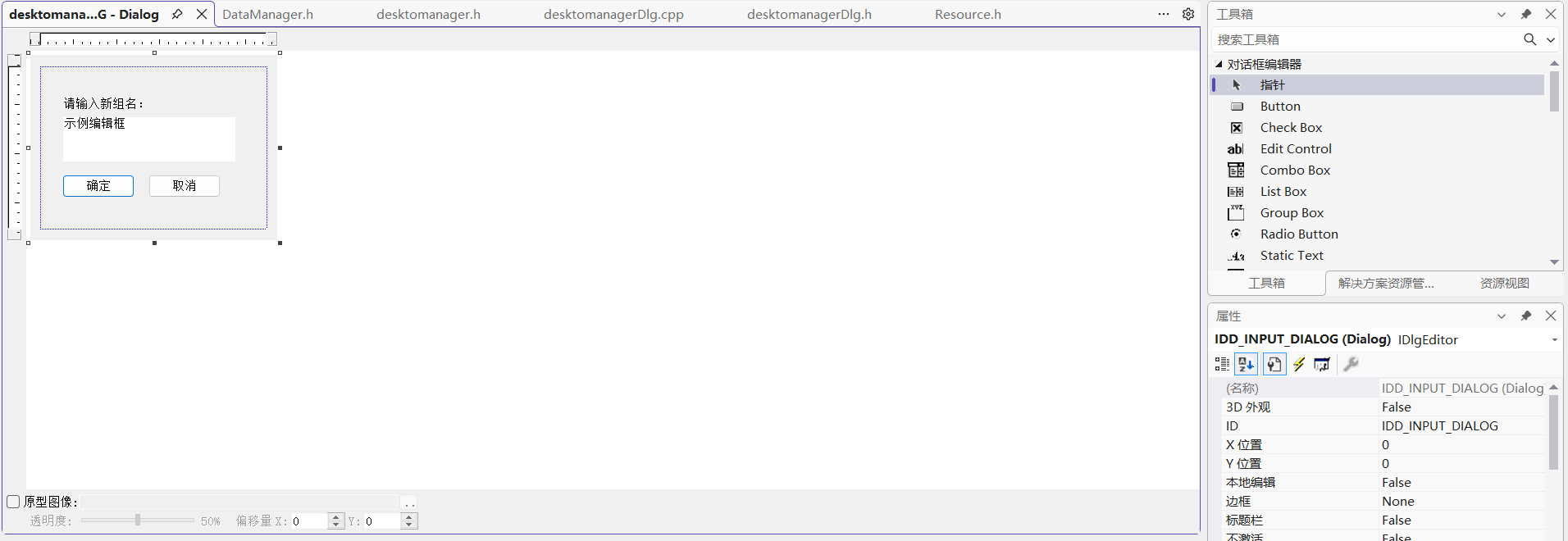
创建对应的对话框资源IDD_INPUT_DIALOG:
-
添加一个静态文本控件(IDC_STATIC_PROMPT)
-
添加一个编辑框(IDC_EDIT_INPUT):
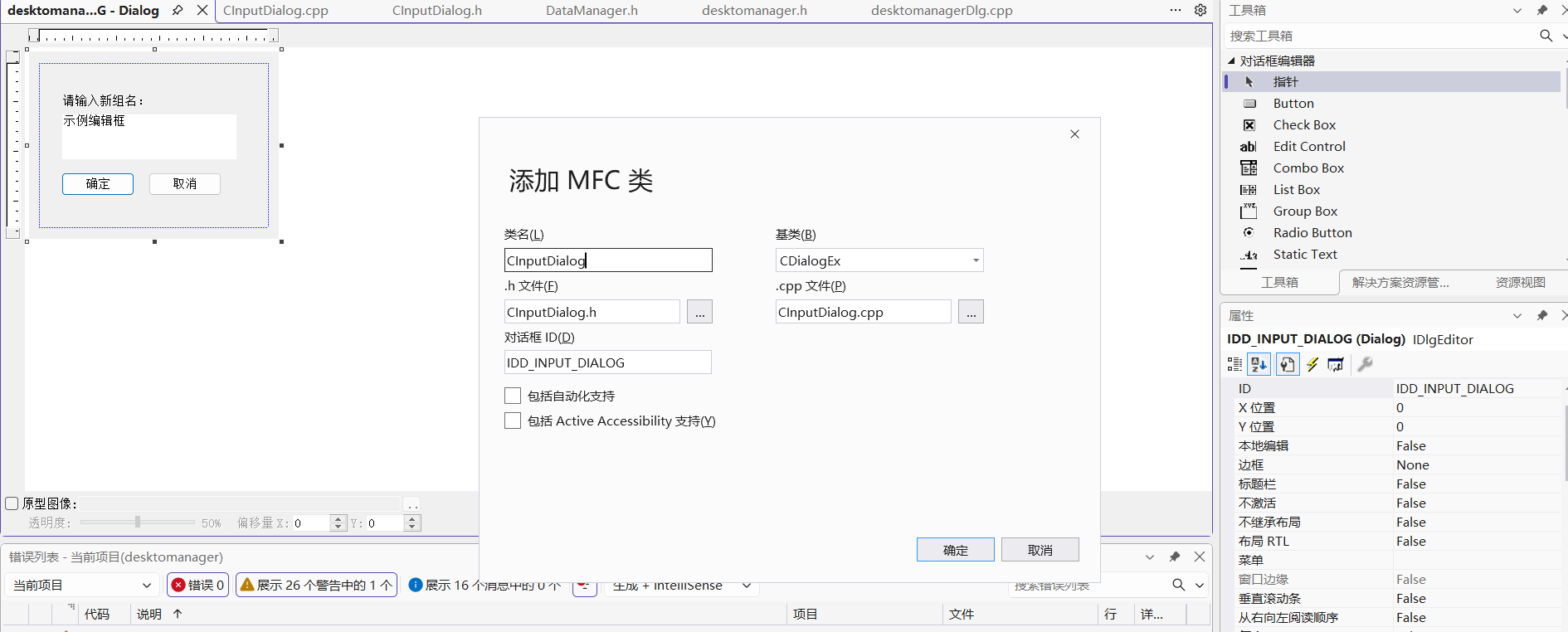
创建一个新的类CInputDialog:
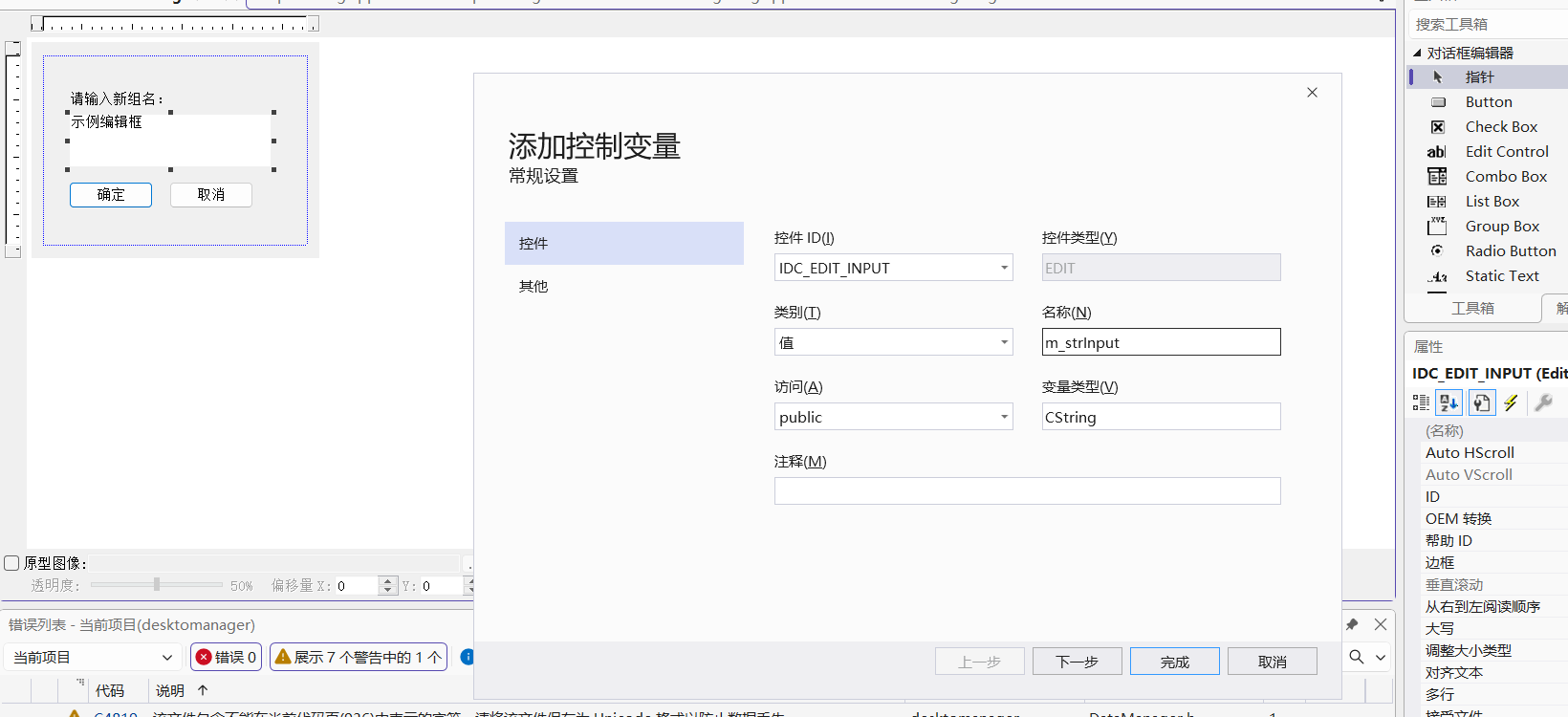
给其中的编辑框创建一个值变量:
3、删除分组功能
cpp
// 删除分组
void CdesktomanagerDlg::OnGroupDelete()
{
	// 获取选中的分组
	HTREEITEM hSelected = m_wndTreeCtrl.GetSelectedItem();
	if (!hSelected) return;

	// 获取分组名称
	CString strGroupName = m_wndTreeCtrl.GetItemText(hSelected);

	// 确认删除
	CString strMessage;
	strMessage.Format(_T("确定要删除分组 \"%s\" 吗?\n该分组下的所有软件项也将被删除。"), strGroupName);

	if (AfxMessageBox(strMessage, MB_YESNO | MB_ICONQUESTION) != IDYES)
	{
		return;
	}

	// 获取分组ID
	int nGroupId = (int)m_wndTreeCtrl.GetItemData(hSelected);

	// 选中下一个可用的分组
	HTREEITEM hNextItem = m_wndTreeCtrl.GetNextSiblingItem(hSelected);
	if (!hNextItem)
	{
		hNextItem = m_wndTreeCtrl.GetPrevSiblingItem(hSelected);
	}

	// 删除树形控件中的项
	m_wndTreeCtrl.DeleteItem(hSelected);

	// TODO: 从数据管理器中删除该分组
	// m_pDataManager->RemoveGroup(nGroupId);

	// 清空右侧列表(因为该分组已删除)
	m_wndListCtrl.DeleteAllItems();

	if (hNextItem)
	{
		m_wndTreeCtrl.SelectItem(hNextItem);
	}
}
4、重命名分组功能
cpp
// 重命名分组
void CdesktomanagerDlg::OnGroupRename()
{
	// 获取选中的分组
	HTREEITEM hSelected = m_wndTreeCtrl.GetSelectedItem();
	if (!hSelected) return;
;

	// 输入新名称
	CString strNewName;
	if (InputGroupName(strNewName))
	{
		if (strNewName.IsEmpty())
		{
			AfxMessageBox(_T("分组名称不能为空!"));
			return;
		}

		HTREEITEM hRoot = m_wndTreeCtrl.GetRootItem();

		// 检查分组是否已存在
		while (hRoot != NULL)
		{
			if (FindTreeItemByName(hRoot, strNewName) != NULL)
			{
				AfxMessageBox(_T("该分组名称已存在!"));
				return;
			}
			hRoot = m_wndTreeCtrl.GetNextSiblingItem(hRoot);
		}


		// 获取分组ID
		int nGroupId = (int)m_wndTreeCtrl.GetItemData(hSelected);

		// 更新树形控件中的显示名称
		m_wndTreeCtrl.SetItemText(hSelected, strNewName);

		// TODO: 更新数据管理器中的分组名称
		// m_pDataManager->RenameGroup(nGroupId, strNewName);
	}
}
第四步:清理资源
cpp
// CdesktomanagerDlg.h
class CdesktomanagerDlg : public CDialog
{
// ... 其他代码
protected:
    // 必须声明为afx_msg
    afx_msg void OnDestroy();
    // ... 其他函数声明
};
在cpp文件中添加消息映射:
cpp
// CdesktomanagerDlg.cpp
BEGIN_MESSAGE_MAP(CdesktomanagerDlg, CDialog)
    // ... 其他消息映射
    ON_WM_DESTROY()  // 这行是关键!告诉MFC调用OnDestroy()
    // ... 其他消息映射
END_MESSAGE_MAP()
四、数据模型的实现
第一阶段:创建基础数据模型文件
1. SoftwareItem.h
cpp
// SoftwareItem.h
#pragma once

#include <afxwin.h>

class CSoftwareItem
{
public:
    CSoftwareItem();
    CSoftwareItem(const CString& name, const CString& path);
    ~CSoftwareItem();

    // 成员变量
    CString m_strName;        // 显示名称
    CString m_strExePath;     // 可执行文件路径
    CString m_strArguments;   // 启动参数
    CString m_strWorkingDir;  // 工作目录
    CString m_strIconPath;    // 图标路径
    int     m_nIconIndex;     // 图标索引
    HICON   m_hIcon;          // 图标句柄
    BOOL    m_bRunAsAdmin;    // 是否以管理员权限运行

    // 方法
    BOOL LoadIcon();              // 加载图标
    BOOL Execute(BOOL bRunAsAdmin = FALSE) const;  // 执行程序
    BOOL ExtractIconFromFile();   // 从文件提取图标
    CString GetFileName() const;  // 获取文件名(不带路径)
    CString GetDirectory() const; // 获取目录路径

private:
    void ClearIcon();  // 清理图标资源
};
2. SoftwareItem.cpp
cpp
// SoftwareItem.cpp
#include "pch.h"
#include "SoftwareItem.h"
#include <shlobj.h>
#include <shellapi.h>

CSoftwareItem::CSoftwareItem() :
    m_nIconIndex(0),
    m_hIcon(NULL),
    m_bRunAsAdmin(FALSE)
{
}

CSoftwareItem::CSoftwareItem(const CString& name, const CString& path) :
    m_strName(name),
    m_strExePath(path),
    m_strIconPath(path),
    m_nIconIndex(0),
    m_hIcon(NULL),
    m_bRunAsAdmin(FALSE)
{
}

CSoftwareItem::~CSoftwareItem()
{
    ClearIcon();
}

void CSoftwareItem::ClearIcon()
{
    if (m_hIcon != NULL)
    {
        DestroyIcon(m_hIcon);
        m_hIcon = NULL;
    }
}

BOOL CSoftwareItem::LoadIcon()
{
    ClearIcon();

    // 首先尝试从指定路径加载图标
    if (!m_strIconPath.IsEmpty())
    {
        if (ExtractIconFromFile())
            return TRUE;
    }

    // 如果失败,尝试从可执行文件提取图标
    if (!m_strExePath.IsEmpty() && m_strExePath != m_strIconPath)
    {
        // 临时保存当前图标路径
        CString strOldIconPath = m_strIconPath;
        int nOldIconIndex = m_nIconIndex;

        // 尝试从可执行文件提取
        m_strIconPath = m_strExePath;
        m_nIconIndex = 0;

        if (ExtractIconFromFile())
            return TRUE;

        // 恢复原来的设置
        m_strIconPath = strOldIconPath;
        m_nIconIndex = nOldIconIndex;
    }

    // 如果都失败,使用系统默认图标
    HICON hIcon = NULL;
    SHFILEINFO sfi = { 0 };

    if (SHGetFileInfo(m_strExePath, 0, &sfi, sizeof(sfi),
        SHGFI_ICON | SHGFI_LARGEICON))
    {
        hIcon = sfi.hIcon;
    }

    if (hIcon != NULL)
    {
        m_hIcon = hIcon;
        return TRUE;
    }

    return FALSE;
}
BOOL CSoftwareItem::ExtractIconFromFile()
{
    if (m_strIconPath.IsEmpty())
        return FALSE;

    HICON hIcon = NULL;

    // 从文件提取图标
    if (m_nIconIndex == 0)
    {
        // 尝试提取主要图标
        SHFILEINFO sfi = { 0 };
        if (SHGetFileInfo(m_strIconPath, 0, &sfi, sizeof(sfi),
            SHGFI_ICON | SHGFI_LARGEICON))
        {
            hIcon = sfi.hIcon;
        }
    }

    // 如果失败,尝试使用ExtractIconEx
    if (hIcon == NULL)
    {
        ExtractIconEx(m_strIconPath, m_nIconIndex, &hIcon, NULL, 1);
    }

    if (hIcon != NULL)
    {
        m_hIcon = hIcon;
        return TRUE;
    }

    return FALSE;
}

BOOL CSoftwareItem::Execute(BOOL bRunAsAdmin) const
{
    if (m_strExePath.IsEmpty())
        return FALSE;

    SHELLEXECUTEINFO sei = { sizeof(sei) };
    sei.lpFile = m_strExePath;

    if (!m_strArguments.IsEmpty())
        sei.lpParameters = m_strArguments;

    if (!m_strWorkingDir.IsEmpty())
        sei.lpDirectory = m_strWorkingDir;

    sei.nShow = SW_SHOWNORMAL;

    if (bRunAsAdmin || m_bRunAsAdmin)
    {
        sei.lpVerb = _T("runas");
    }
    else
    {
        sei.lpVerb = _T("open");
    }

    return ShellExecuteEx(&sei) ? TRUE : FALSE;
}

CString CSoftwareItem::GetFileName() const
{
    int nPos = m_strExePath.ReverseFind(_T('\\'));
    if (nPos != -1)
    {
        return m_strExePath.Mid(nPos + 1);
    }
    return m_strExePath;
}

CString CSoftwareItem::GetDirectory() const
{
    int nPos = m_strExePath.ReverseFind(_T('\\'));
    if (nPos != -1)
    {
        return m_strExePath.Left(nPos);
    }
    return _T("");
}
3. SoftwareGroup.h
cpp
// SoftwareGroup.h
#pragma once

#include "SoftwareItem.h"
#include <vector>

class CSoftwareGroup
{
public:
    CSoftwareGroup();
    explicit CSoftwareGroup(const CString& name);
    ~CSoftwareGroup();

    // 成员变量
    CString m_strGroupName;               // 分组名称
    int     m_nGroupId;                   // 分组ID(唯一标识)

    // 方法
    void AddItem(const CSoftwareItem& item);
    BOOL RemoveItem(int nIndex);
    BOOL UpdateItem(int nIndex, const CSoftwareItem& item);

    // 查找
    int FindItemByName(const CString& strName) const;
    int FindItemByPath(const CString& strPath) const;

    // 获取
    const CSoftwareItem* GetItem(int nIndex) const;
    CSoftwareItem* GetItem(int nIndex);
    int GetItemCount() const { return (int)m_items.size(); }
    const std::vector<CSoftwareItem>& GetItems() const { return m_items; }

    // 批量操作
    void Clear() { m_items.clear(); }
    BOOL MoveItem(int nFromIndex, int nToIndex);

private:
    std::vector<CSoftwareItem> m_items;   // 软件项列表
};
4. SoftwareGroup.cpp
cpp
// SoftwareGroup.cpp
#include "pch.h"
#include "SoftwareGroup.h"

CSoftwareGroup::CSoftwareGroup() : m_nGroupId(0)
{
}

CSoftwareGroup::CSoftwareGroup(const CString& name) :
    m_strGroupName(name), m_nGroupId(0)
{
}

CSoftwareGroup::~CSoftwareGroup()
{
}

void CSoftwareGroup::AddItem(const CSoftwareItem& item)
{
    m_items.push_back(item);
}

BOOL CSoftwareGroup::RemoveItem(int nIndex)
{
    if (nIndex < 0 || nIndex >= (int)m_items.size())
        return FALSE;

    m_items.erase(m_items.begin() + nIndex);
    return TRUE;
}

BOOL CSoftwareGroup::UpdateItem(int nIndex, const CSoftwareItem& item)
{
    if (nIndex < 0 || nIndex >= (int)m_items.size())
        return FALSE;

    m_items[nIndex] = item;
    return TRUE;
}

int CSoftwareGroup::FindItemByName(const CString& strName) const
{
    for (size_t i = 0; i < m_items.size(); i++)
    {
        if (m_items[i].m_strName.CompareNoCase(strName) == 0)
            return (int)i;
    }
    return -1;
}

int CSoftwareGroup::FindItemByPath(const CString& strPath) const
{
    for (size_t i = 0; i < m_items.size(); i++)
    {
        if (m_items[i].m_strExePath.CompareNoCase(strPath) == 0)
            return (int)i;
    }
    return -1;
}

const CSoftwareItem* CSoftwareGroup::GetItem(int nIndex) const
{
    if (nIndex < 0 || nIndex >= (int)m_items.size())
        return NULL;

    return &m_items[nIndex];
}

CSoftwareItem* CSoftwareGroup::GetItem(int nIndex)
{
    if (nIndex < 0 || nIndex >= (int)m_items.size())
        return NULL;

    return &m_items[nIndex];
}

BOOL CSoftwareGroup::MoveItem(int nFromIndex, int nToIndex)
{
    if (nFromIndex < 0 || nFromIndex >= (int)m_items.size() ||
        nToIndex < 0 || nToIndex >= (int)m_items.size())
        return FALSE;

    if (nFromIndex == nToIndex)
        return TRUE;

    CSoftwareItem item = m_items[nFromIndex];
    m_items.erase(m_items.begin() + nFromIndex);

    if (nToIndex > nFromIndex)
        nToIndex--;

    m_items.insert(m_items.begin() + nToIndex, item);
    return TRUE;
}
5. DataManager.h
cpp
// DataManager.h
#pragma once

#include "SoftwareGroup.h"
#include <vector>
#include <afx.h>  // 添加对CStdioFile的支持

class CDataManager
{
public:
    CDataManager();
    ~CDataManager();

    // 单例模式访问
    static CDataManager& GetInstance();

    // 初始化与保存
    BOOL Initialize(LPCTSTR lpszFilePath = NULL);
    BOOL Save();

    // 分组管理
    int AddGroup(const CString& strName);
    BOOL RemoveGroup(int nGroupId);
    BOOL RenameGroup(int nGroupId, const CString& strNewName);
    CString GetGroupName(int nGroupId) const;
    int GetGroupCount() const;
    const std::vector<CSoftwareGroup>& GetAllGroups() const;

    // 项目操作
    BOOL AddItemToGroup(int nGroupId, const CSoftwareItem& item);
    BOOL RemoveItemFromGroup(int nGroupId, int nItemIndex);
    BOOL UpdateItemInGroup(int nGroupId, int nItemIndex, const CSoftwareItem& item);
    BOOL MoveItem(int nSrcGroupId, int nSrcIndex, int nDestGroupId, int nDestIndex);

    // 查找
    int FindGroupByName(const CString& strName) const;
    int FindGroupById(int nId) const;

    // 获取数据
    const CSoftwareGroup* GetGroup(int nGroupId) const;
    CSoftwareGroup* GetGroup(int nGroupId);
    const CSoftwareItem* GetItem(int nGroupId, int nItemIndex) const;
    CSoftwareItem* GetItem(int nGroupId, int nItemIndex);

    // 设置
    void SetTreeWidth(int nWidth) { m_nTreeWidth = nWidth; }
    int GetTreeWidth() const { return m_nTreeWidth; }
    void SetLastSelectedGroup(int nGroupId) { m_nLastSelectedGroup = nGroupId; }
    int GetLastSelectedGroup() const { return m_nLastSelectedGroup; }

private:
    static CDataManager* s_pInstance;

    // 数据
    std::vector<CSoftwareGroup> m_groups;
    CString m_strDataFilePath;

    // 设置
    int m_nTreeWidth;
    int m_nLastSelectedGroup;

    // 内部方法
    int GenerateGroupId();
    BOOL LoadFromFile();
    BOOL SaveToFile();
    void ParseItemLine(const CString& strLine, CSoftwareGroup& group);
    void ReadSettings(CStdioFile& file);

    // 禁用拷贝
    CDataManager(const CDataManager&) = delete;
    CDataManager& operator=(const CDataManager&) = delete;
};
6. DataManager.cpp
cpp
// DataManager.cpp
#include "pch.h"
#include "DataManager.h"
#include <shlobj.h>  // 用于SHGetFolderPath

// 静态成员初始化
CDataManager* CDataManager::s_pInstance = NULL;

// 构造函数
CDataManager::CDataManager() :
    m_nTreeWidth(200),
    m_nLastSelectedGroup(-1)
{
}

// 析构函数
CDataManager::~CDataManager()
{
    // 保存数据
    Save();
}

// 获取单例实例
CDataManager& CDataManager::GetInstance()
{
    if (s_pInstance == NULL)
    {
        s_pInstance = new CDataManager();
    }
    return *s_pInstance;
}

// 初始化数据管理器
BOOL CDataManager::Initialize(LPCTSTR lpszFilePath)
{
    // 确定数据文件路径
    if (lpszFilePath == NULL || lpszFilePath[0] == _T('\0'))
    {
        // 使用默认路径:用户AppData目录
        TCHAR szPath[MAX_PATH];
        if (SUCCEEDED(SHGetFolderPath(NULL, CSIDL_APPDATA, NULL, 0, szPath)))
        {
            m_strDataFilePath.Format(_T("%s\\DesktopManager\\config.dat"), szPath);

            // 确保目录存在
            CString strDir = m_strDataFilePath;
            int nPos = strDir.ReverseFind(_T('\\'));
            if (nPos != -1)
            {
                strDir = strDir.Left(nPos);
                CreateDirectory(strDir, NULL);
            }
        }
        else
        {
            // 如果获取AppData失败,使用当前目录
            m_strDataFilePath = _T("DesktopManager.dat");
        }
    }
    else
    {
        m_strDataFilePath = lpszFilePath;
    }

    // 加载数据
    return LoadFromFile();
}

// 保存数据
BOOL CDataManager::Save()
{
    return SaveToFile();
}

// 从文件加载数据
BOOL CDataManager::LoadFromFile()
{
    m_groups.clear();

    try
    {
        CStdioFile file;
        if (!file.Open(m_strDataFilePath, CFile::modeRead | CFile::typeText))
        {
            // 文件不存在,创建默认分组
            AddGroup(_T("默认分组"));
            return TRUE;
        }

        CSoftwareGroup* pCurrentGroup = NULL;
        CString strLine;

        while (file.ReadString(strLine))
        {
            strLine.Trim();

            if (strLine.IsEmpty())
                continue;

            if (strLine.Left(7) == _T("[Group]"))
            {
                // 新分组
                CString strGroupName = strLine.Mid(7);
                strGroupName.Trim();

                int nGroupId = AddGroup(strGroupName);
                pCurrentGroup = (nGroupId != -1) ? GetGroup(nGroupId) : NULL;
            }
            else if (pCurrentGroup != NULL && strLine.Left(5) == _T("Item="))
            {
                // 解析项目数据
                ParseItemLine(strLine, *pCurrentGroup);
            }
            else if (strLine == _T("[Settings]"))
            {
                // 读取设置
                ReadSettings(file);
            }
        }

        file.Close();
        return TRUE;
    }
    catch (CFileException* e)
    {
        e->Delete();
        return FALSE;
    }
}

// 解析项目行
void CDataManager::ParseItemLine(const CString& strLine, CSoftwareGroup& group)
{
    CString strData = strLine.Mid(5); // 去掉"Item="

    int nStartPos = 0;
    int nField = 0;
    CSoftwareItem item;

    while (nStartPos < strData.GetLength())
    {
        int nEndPos = strData.Find(_T('|'), nStartPos);
        CString strToken;

        if (nEndPos == -1)
        {
            strToken = strData.Mid(nStartPos);
            nStartPos = strData.GetLength();
        }
        else
        {
            strToken = strData.Mid(nStartPos, nEndPos - nStartPos);
            nStartPos = nEndPos + 1;
        }

        switch (nField)
        {
        case 0: item.m_strName = strToken; break;
        case 1: item.m_strExePath = strToken; break;
        case 2: item.m_strArguments = strToken; break;
        case 3: item.m_strWorkingDir = strToken; break;
        case 4: item.m_strIconPath = strToken; break;
        case 5: item.m_nIconIndex = _ttoi(strToken); break;
        case 6: item.m_bRunAsAdmin = (_ttoi(strToken) != 0); break;
        }

        nField++;
    }

    if (nField >= 2) // 至少要有名称和路径
    {
        group.AddItem(item);
    }
}

// 读取设置
void CDataManager::ReadSettings(CStdioFile& file)
{
    CString strLine;
    while (file.ReadString(strLine))
    {
        strLine.Trim();

        // 如果遇到新的节开始,停止读取
        if (strLine.IsEmpty() || strLine[0] == _T('['))
        {
            // CStdioFile会自动处理位置,不需要手动回退
            break;
        }

        int nPos = strLine.Find(_T('='));
        if (nPos != -1)
        {
            CString strKey = strLine.Left(nPos);
            CString strValue = strLine.Mid(nPos + 1);

            if (strKey == _T("TreeWidth"))
                m_nTreeWidth = _ttoi(strValue);
            else if (strKey == _T("LastSelectedGroup"))
                m_nLastSelectedGroup = _ttoi(strValue);
        }
    }
}

// 保存数据到文件
BOOL CDataManager::SaveToFile()
{
    try
    {
        CStdioFile file;
        if (!file.Open(m_strDataFilePath, CFile::modeCreate | CFile::modeWrite | CFile::typeText))
            return FALSE;

        // 保存分组
        for (const auto& group : m_groups)
        {
            file.WriteString(_T("[Group]") + group.m_strGroupName + _T("\n"));

            // 保存该分组的项目
            for (int i = 0; i < group.GetItemCount(); i++)
            {
                const CSoftwareItem* pItem = group.GetItem(i);
                if (pItem != NULL)
                {
                    CString strLine;
                    strLine.Format(_T("Item=%s|%s|%s|%s|%s|%d|%d\n"),
                        pItem->m_strName.GetString(),
                        pItem->m_strExePath.GetString(),
                        pItem->m_strArguments.GetString(),
                        pItem->m_strWorkingDir.GetString(),
                        pItem->m_strIconPath.GetString(),
                        pItem->m_nIconIndex,
                        pItem->m_bRunAsAdmin ? 1 : 0);

                    file.WriteString(strLine);
                }
            }

            file.WriteString(_T("\n"));
        }

        // 保存设置
        file.WriteString(_T("[Settings]\n"));

        CString strLine;
        strLine.Format(_T("TreeWidth=%d\n"), m_nTreeWidth);
        file.WriteString(strLine);

        strLine.Format(_T("LastSelectedGroup=%d\n"), m_nLastSelectedGroup);
        file.WriteString(strLine);

        file.Close();
        return TRUE;
    }
    catch (CFileException* e)
    {
        e->Delete();
        return FALSE;
    }
}

// 添加分组
int CDataManager::AddGroup(const CString& strName)
{
    // 检查是否已存在同名分组
    if (FindGroupByName(strName) != -1)
        return -1;

    // 生成新ID
    int nNewId = GenerateGroupId();

    // 创建新分组
    CSoftwareGroup newGroup(strName);
    newGroup.m_nGroupId = nNewId;
    m_groups.push_back(newGroup);

    // 保存到文件
    SaveToFile();

    return nNewId;
}

// 删除分组
BOOL CDataManager::RemoveGroup(int nGroupId)
{
    int nIndex = FindGroupById(nGroupId);
    if (nIndex == -1)
        return FALSE;

    m_groups.erase(m_groups.begin() + nIndex);
    SaveToFile();
    return TRUE;
}

// 重命名分组
BOOL CDataManager::RenameGroup(int nGroupId, const CString& strNewName)
{
    CSoftwareGroup* pGroup = GetGroup(nGroupId);
    if (pGroup == NULL)
        return FALSE;

    // 检查新名称是否与其他分组冲突
    if (FindGroupByName(strNewName) != -1)
        return FALSE;

    pGroup->m_strGroupName = strNewName;
    SaveToFile();
    return TRUE;
}

// 生成分组ID
int CDataManager::GenerateGroupId()
{
    int nMaxId = 0;
    for (const auto& group : m_groups)
    {
        if (group.m_nGroupId > nMaxId)
            nMaxId = group.m_nGroupId;
    }
    return nMaxId + 1;
}

// 按名称查找分组
int CDataManager::FindGroupByName(const CString& strName) const
{
    for (size_t i = 0; i < m_groups.size(); i++)
    {
        if (m_groups[i].m_strGroupName.CompareNoCase(strName) == 0)
            return static_cast<int>(i);
    }
    return -1;
}

// 按ID查找分组
int CDataManager::FindGroupById(int nId) const
{
    for (size_t i = 0; i < m_groups.size(); i++)
    {
        if (m_groups[i].m_nGroupId == nId)
            return static_cast<int>(i);
    }
    return -1;
}

// 获取分组(const版本)
const CSoftwareGroup* CDataManager::GetGroup(int nGroupId) const
{
    for (const auto& group : m_groups)
    {
        if (group.m_nGroupId == nGroupId)
            return &group;
    }
    return NULL;
}

// 获取分组(非const版本)
CSoftwareGroup* CDataManager::GetGroup(int nGroupId)
{
    for (auto& group : m_groups)
    {
        if (group.m_nGroupId == nGroupId)
            return &group;
    }
    return NULL;
}

// 获取所有分组
const std::vector<CSoftwareGroup>& CDataManager::GetAllGroups() const
{
    return m_groups;
}

// 添加项目到分组
BOOL CDataManager::AddItemToGroup(int nGroupId, const CSoftwareItem& item)
{
    CSoftwareGroup* pGroup = GetGroup(nGroupId);
    if (pGroup == NULL)
        return FALSE;

    // 检查是否已存在同名项目
    if (pGroup->FindItemByName(item.m_strName) != -1)
        return FALSE;

    pGroup->AddItem(item);
    SaveToFile();
    return TRUE;
}

// 从分组中删除项目
BOOL CDataManager::RemoveItemFromGroup(int nGroupId, int nItemIndex)
{
    CSoftwareGroup* pGroup = GetGroup(nGroupId);
    if (pGroup == NULL)
        return FALSE;

    BOOL bResult = pGroup->RemoveItem(nItemIndex);
    if (bResult)
    {
        SaveToFile();
    }
    return bResult;
}

// 更新分组中的项目
BOOL CDataManager::UpdateItemInGroup(int nGroupId, int nItemIndex, const CSoftwareItem& item)
{
    CSoftwareGroup* pGroup = GetGroup(nGroupId);
    if (pGroup == NULL)
        return FALSE;

    // 检查新名称是否与其他项目冲突(除了自己)
    int nExistingIndex = pGroup->FindItemByName(item.m_strName);
    if (nExistingIndex != -1 && nExistingIndex != nItemIndex)
        return FALSE;

    BOOL bResult = pGroup->UpdateItem(nItemIndex, item);
    if (bResult)
    {
        SaveToFile();
    }
    return bResult;
}

// 移动项目
BOOL CDataManager::MoveItem(int nSrcGroupId, int nSrcIndex, int nDestGroupId, int nDestIndex)
{
    // 获取源分组和目标分组
    CSoftwareGroup* pSrcGroup = GetGroup(nSrcGroupId);
    CSoftwareGroup* pDestGroup = GetGroup(nDestGroupId);

    if (pSrcGroup == NULL || pDestGroup == NULL)
        return FALSE;

    // 获取要移动的项目
    CSoftwareItem* pItem = pSrcGroup->GetItem(nSrcIndex);
    if (pItem == NULL)
        return FALSE;

    // 如果是同一分组内的移动
    if (nSrcGroupId == nDestGroupId)
    {
        BOOL bResult = pSrcGroup->MoveItem(nSrcIndex, nDestIndex);
        if (bResult)
        {
            SaveToFile();
        }
        return bResult;
    }
    else
    {
        // 不同分组间的移动:先复制到目标分组,再从源分组删除
        CSoftwareItem itemCopy = *pItem;

        // 添加到目标分组
        pDestGroup->AddItem(itemCopy);

        // 从源分组删除
        BOOL bResult = pSrcGroup->RemoveItem(nSrcIndex);
        if (bResult)
        {
            SaveToFile();
        }
        return bResult;
    }
}

// 获取分组名称
CString CDataManager::GetGroupName(int nGroupId) const
{
    const CSoftwareGroup* pGroup = GetGroup(nGroupId);
    if (pGroup != NULL)
        return pGroup->m_strGroupName;

    return _T("");
}

// 获取分组数量
int CDataManager::GetGroupCount() const
{
    return (int)m_groups.size();
}

// 获取项目(const版本)
const CSoftwareItem* CDataManager::GetItem(int nGroupId, int nItemIndex) const
{
    const CSoftwareGroup* pGroup = GetGroup(nGroupId);
    if (pGroup == NULL)
        return NULL;

    return pGroup->GetItem(nItemIndex);
}

// 获取项目(非const版本)
CSoftwareItem* CDataManager::GetItem(int nGroupId, int nItemIndex)
{
    CSoftwareGroup* pGroup = GetGroup(nGroupId);
    if (pGroup == NULL)
        return NULL;

    return pGroup->GetItem(nItemIndex);
}
五、右侧列表控件右键菜单实现
第一步:准备菜单资源
创建两个菜单资源
第一个菜单:右键点击在项目上时显示
1、在资源视图中添加新菜单,ID设为IDR_MENU_LIST_ITEM
cpp
菜单结构:
以管理员权限运行(&A)    ID_ITEM_RUNAS
打开方式(&O)            ID_ITEM_OPENWITH
打开文件所在位置(&L)     ID_ITEM_OPENLOCATION
---------------------(分隔线)
删除(&D)                ID_ITEM_DELETE
编辑(&E)                ID_ITEM_EDIT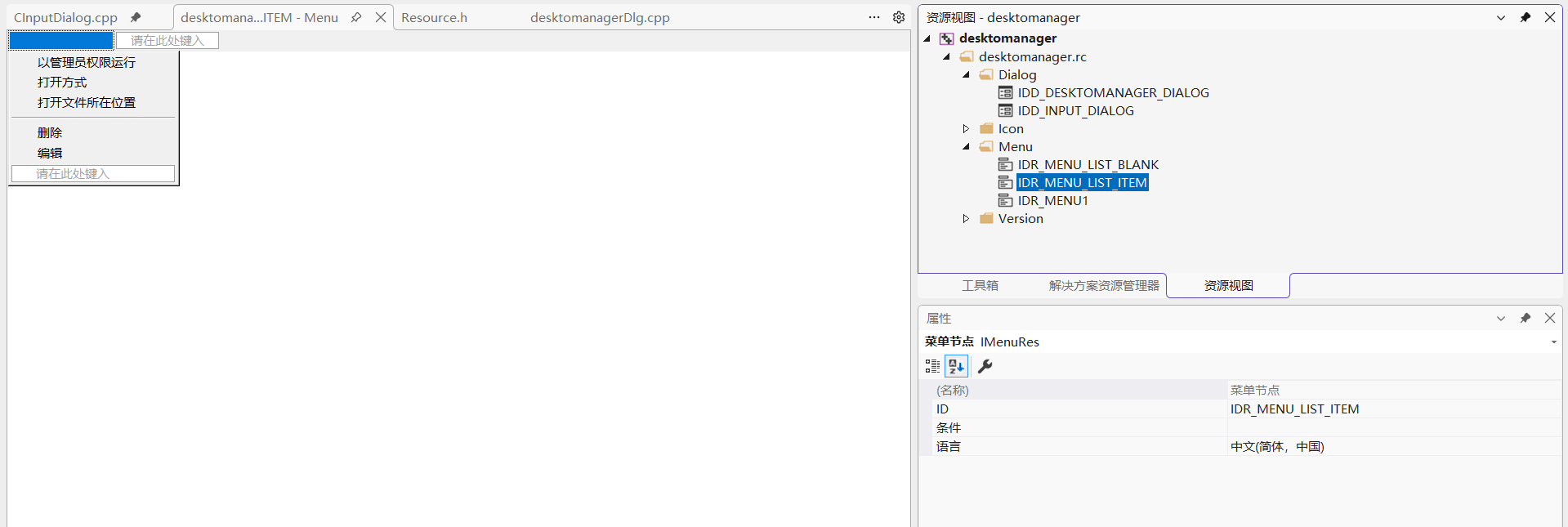
第二个菜单:右键点击在空白区域时显示
- 在资源视图中添加新菜单,ID设为
IDR_MENU_LIST_BLANK
cpp
菜单结构:
新建空白项目(&N)        ID_ITEM_NEW
删除所有项目(&D)        ID_ITEM_DELETEALL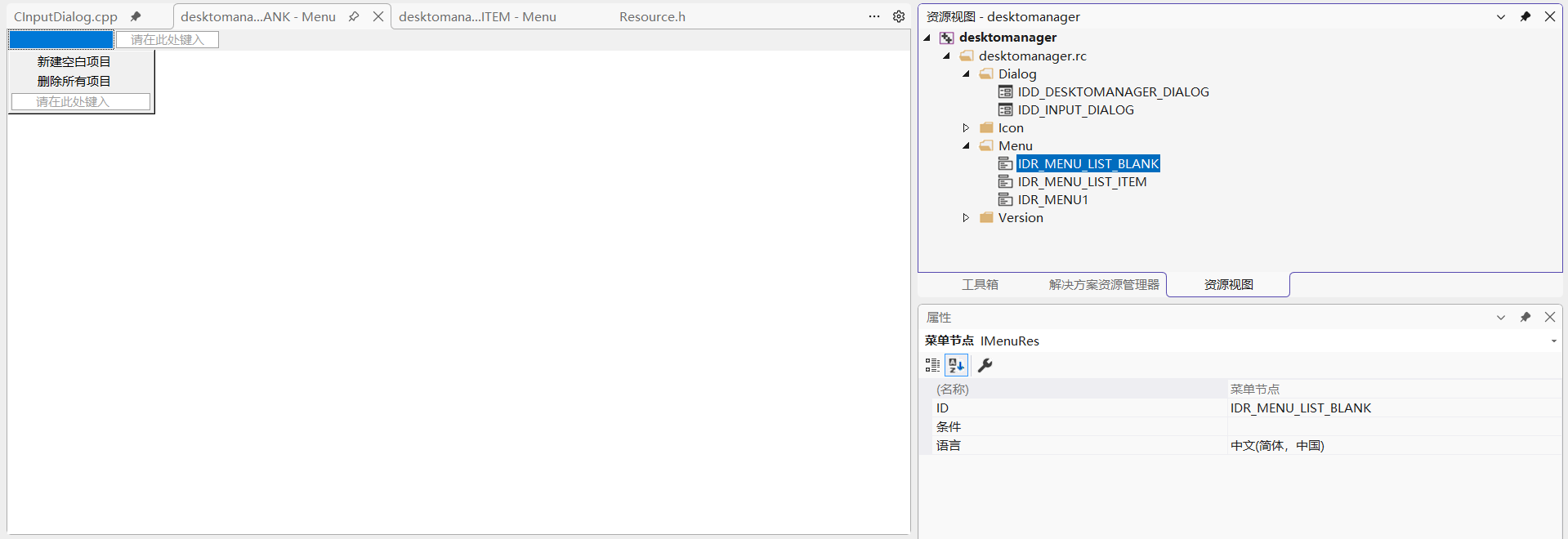
第二步:实现右键菜单功能
1、添加消息处理函数和变量
在DesktopManagerDlg.h中添加:
cpp
// 数据管理
CDataManager& m_dataManager;  // 数据管理器引用
int m_nCurrentGroupId;        // 当前选中的分组ID
int m_nSelectedItemIndex;     // 当前选中的列表项索引

// 树形控件消息
afx_msg void OnTvnSelchangedTreeGroups(NMHDR* pNMHDR, LRESULT* pResult);
afx_msg void OnNMRClickTreeGroups(NMHDR* pNMHDR, LRESULT* pResult);

//列表控件右键菜单
CMenu m_menuListItem;     // 右键点击在项目上时的菜单
CMenu m_menuListBlank;    // 右键点击在空白区域时的菜单

void RefreshListView(int nGroupId);
// 数据操作
void LoadDataToTree();
void LoadItemsToList(int nGroupId);
BOOL ShowEditSoftwareDialog(CSoftwareItem& item, BOOL bEditMode = FALSE);

// 辅助函数
CString GetCurrentGroupName() const;
CSoftwareItem* GetSelectedSoftwareItem() const;

// 列表控件消息
afx_msg void OnNMRClickListSoftware(NMHDR* pNMHDR, LRESULT* pResult);
afx_msg void OnLvnItemActivateListSoftware(NMHDR* pNMHDR, LRESULT* pResult);

// 列表右键菜单命令处理
afx_msg void OnItemRunAs();
afx_msg void OnItemOpenWith();
afx_msg void OnItemOpenLocation();
afx_msg void OnItemDelete();
afx_msg void OnItemEdit();
afx_msg void OnItemNew();
afx_msg void OnItemDeleteAll();
2、实现消息映射
在DesktopManagerDlg.cpp中:
cpp
BEGIN_MESSAGE_MAP(CdesktomanagerDlg, CDialogEx)
    //其他代码
	// 列表控件消息
	ON_NOTIFY(NM_RCLICK, IDC_LIST_SOFTWARE, &CdesktomanagerDlg::OnNMRClickListSoftware)
	ON_NOTIFY(LVN_ITEMACTIVATE, IDC_LIST_SOFTWARE, &CdesktomanagerDlg::OnLvnItemActivateListSoftware)
	// 列表右键菜单命令
	ON_COMMAND(ID_ITEM_RUNAS, &CdesktomanagerDlg::OnItemRunAs)
	ON_COMMAND(ID_ITEM_OPENWITH, &CdesktomanagerDlg::OnItemOpenWith)
	ON_COMMAND(ID_ITEM_OPENLOCATION, &CdesktomanagerDlg::OnItemOpenLocation)
	ON_COMMAND(ID_ITEM_DELETE, &CdesktomanagerDlg::OnItemDelete)
	ON_COMMAND(ID_ITEM_EDIT, &CdesktomanagerDlg::OnItemEdit)
	ON_COMMAND(ID_ITEM_NEW, &CdesktomanagerDlg::OnItemNew)
	ON_COMMAND(ID_ITEM_DELETEALL, &CdesktomanagerDlg::OnItemDeleteAll)

END_MESSAGE_MAP()
3、实现构造函数和初始化
cpp
// DesktopManagerDlg.cpp - 构造函数
CdesktomanagerDlg::CdesktomanagerDlg(CWnd* pParent /*=NULL*/)
    : CDialog(CDesktopManagerDlg::IDD, pParent)
    , m_dataManager(CDataManager::GetInstance())  // 获取数据管理器实例
    , m_nCurrentGroupId(-1)
    , m_nSelectedItemIndex(-1)
{
    // 构造函数体
}


BOOL CdesktomanagerDlg::OnInitDialog()
{
	CDialogEx::OnInitDialog();

	// 设置此对话框的图标。  当应用程序主窗口不是对话框时,框架将自动
	//  执行此操作
	SetIcon(m_hIcon, TRUE);			// 设置大图标
	SetIcon(m_hIcon, FALSE);		// 设置小图标

	// 初始化数据管理器
	if (!m_dataManager.Initialize())
	{
		AfxMessageBox(_T("无法初始化数据管理器"));
		EndDialog(IDCANCEL);
		return FALSE;
	}

	// 加载菜单资源
	if (!m_menuListItem.LoadMenu(IDR_MENU_LIST_ITEM))
	{
		AfxMessageBox(_T("无法加载列表项菜单资源"));
	}

	if (!m_menuListBlank.LoadMenu(IDR_MENU_LIST_BLANK))
	{
		AfxMessageBox(_T("无法加载列表空白菜单资源"));
	}


	// 初始化控件
	InitTreeCtrl();
	InitListCtrl();

	// 加载数据
	LoadDataToTree();

	return TRUE;  // 除非将焦点设置到控件,否则返回 TRUE
}

// 加载数据到树形控件
void CdesktomanagerDlg::LoadDataToTree()
{
	m_wndTreeCtrl.DeleteAllItems();

	// 从数据管理器加载分组
	const std::vector<CSoftwareGroup>& groups = m_dataManager.GetAllGroups();
	for (const auto& group : groups)
	{
		HTREEITEM hItem = m_wndTreeCtrl.InsertItem(group.m_strGroupName);
		m_wndTreeCtrl.SetItemData(hItem, group.m_nGroupId);
	}

	// 选中上次选中的分组
	int nLastGroupId = m_dataManager.GetLastSelectedGroup();
	if (nLastGroupId != -1)
	{
		HTREEITEM hFound = FindTreeItemByGroupId(nLastGroupId);
		if (hFound)
		{
			m_wndTreeCtrl.SelectItem(hFound);
			m_wndTreeCtrl.EnsureVisible(hFound);
		}
	}
}

// 查找树节点
HTREEITEM CdesktomanagerDlg::FindTreeItemByGroupId(int nGroupId)
{
	HTREEITEM hRoot = m_wndTreeCtrl.GetRootItem();
	if (!hRoot) return NULL;

	HTREEITEM hChild = m_wndTreeCtrl.GetChildItem(hRoot);
	while (hChild)
	{
		if (m_wndTreeCtrl.GetItemData(hChild) == nGroupId)
		{
			return hChild;
		}
		hChild = m_wndTreeCtrl.GetNextSiblingItem(hChild);
	}

	return NULL;
}
第三步:实现树形控件选择事件
cpp
// 树形控件选择改变事件
void CdesktomanagerDlg::OnTvnSelchangedTreeGroups(NMHDR* pNMHDR, LRESULT* pResult)
{
	LPNMTREEVIEW pNMTreeView = reinterpret_cast<LPNMTREEVIEW>(pNMHDR);

	HTREEITEM hSelected = m_wndTreeCtrl.GetSelectedItem();
	if (!hSelected)
	{
		*pResult = 0;
		return;
	}

	// 获取选中的分组ID
	int nGroupId = (int)m_wndTreeCtrl.GetItemData(hSelected);

	// 如果是根节点
	if (nGroupId == 0)
	{
		m_nCurrentGroupId = -1;
		m_wndListCtrl.DeleteAllItems();  // 清空列表
	}
	else
	{
		m_nCurrentGroupId = nGroupId;

		// 保存最后选中的分组
		m_dataManager.SetLastSelectedGroup(nGroupId);
		m_dataManager.Save();

		// 加载该分组的项目到列表
		LoadItemsToList(nGroupId);
	}

	*pResult = 0;
}

// 加载指定分组的项目到列表
void CdesktomanagerDlg::LoadItemsToList(int nGroupId)
{
	m_wndListCtrl.DeleteAllItems();
	m_nSelectedItemIndex = -1;

	// 从数据管理器获取分组
	const CSoftwareGroup* pGroup = m_dataManager.GetGroup(nGroupId);
	if (!pGroup)
		return;

	// 获取分组中的项目
	const std::vector<CSoftwareItem>& items = pGroup->GetItems();

	// 添加到列表控件
	for (size_t i = 0; i < items.size(); i++)
	{
		const CSoftwareItem& item = items[i];

		// 插入列表项
		int nIndex = m_wndListCtrl.InsertItem((int)i, item.m_strName);

		// 可以设置图标
		// if (item.m_hIcon)
		// {
		//     // 添加图标到图像列表
		// }

		// 设置项数据为索引
		m_wndListCtrl.SetItemData(nIndex, (DWORD_PTR)i);
	}
}
第四步:实现列表控件右键菜单
1、实现右键点击事件处理
cpp
// 列表控件右键点击事件
void CdesktomanagerDlg::OnNMRClickListSoftware(NMHDR* pNMHDR, LRESULT* pResult)
{
	// 获取鼠标位置
	CPoint point;
	GetCursorPos(&point);

	// 转换为列表控件的客户区坐标
	CPoint clientPoint = point;
	m_wndListCtrl.ScreenToClient(&clientPoint);

	// 判断点击位置是否有项目
	UINT flags = 0;
	int nHitItem = m_wndListCtrl.HitTest(clientPoint, &flags);

	if (nHitItem != -1 && (flags & LVHT_ONITEM))
	{
		// 点击在项目上
		m_wndListCtrl.SetItemState(nHitItem, LVIS_SELECTED, LVIS_SELECTED);
		m_nSelectedItemIndex = nHitItem;

		// 显示项目右键菜单
		ShowListItemContextMenu(point);
	}
	else
	{
		// 点击在空白区域
		m_wndListCtrl.SetItemState(-1, 0, LVIS_SELECTED);  // 取消所有选中
		m_nSelectedItemIndex = -1;

		// 显示空白区域右键菜单
		ShowListBlankContextMenu(point);
	}

	*pResult = 0;
}

// 显示列表项右键菜单
void CdesktomanagerDlg::ShowListItemContextMenu(CPoint point)
{
	CMenu* pPopup = m_menuListItem.GetSubMenu(0);
	if (!pPopup)
		return;

	// 获取选中的项目
	CSoftwareItem* pItem = GetSelectedSoftwareItem();
	if (!pItem)
		return;

	// 检查文件是否存在,决定某些菜单项是否可用
	BOOL bFileExists = (::GetFileAttributes(pItem->m_strExePath) != INVALID_FILE_ATTRIBUTES);

	// 设置菜单项状态
	pPopup->EnableMenuItem(ID_ITEM_RUNAS, bFileExists ? MF_ENABLED : MF_GRAYED);
	pPopup->EnableMenuItem(ID_ITEM_OPENWITH, bFileExists ? MF_ENABLED : MF_GRAYED);
	pPopup->EnableMenuItem(ID_ITEM_OPENLOCATION, bFileExists ? MF_ENABLED : MF_GRAYED);
	pPopup->EnableMenuItem(ID_ITEM_DELETE, MF_ENABLED);
	pPopup->EnableMenuItem(ID_ITEM_EDIT, MF_ENABLED);

	// 显示菜单
	pPopup->TrackPopupMenu(TPM_LEFTALIGN | TPM_RIGHTBUTTON, point.x, point.y, this);
}

// 显示空白区域右键菜单
void CdesktomanagerDlg::ShowListBlankContextMenu(CPoint point)
{
	// 如果没有选中分组,不能操作
	if (m_nCurrentGroupId == -1)
	{
		AfxMessageBox(_T("请先选择一个分组"));
		return;
	}

	CMenu* pPopup = m_menuListBlank.GetSubMenu(0);
	if (!pPopup)
		return;

	// 获取当前分组,检查是否有项目
	const CSoftwareGroup* pGroup = m_dataManager.GetGroup(m_nCurrentGroupId);
	BOOL bHasItems = (pGroup && pGroup->GetItemCount() > 0);

	// 设置菜单项状态
	pPopup->EnableMenuItem(ID_ITEM_NEW, MF_ENABLED);
	pPopup->EnableMenuItem(ID_ITEM_DELETEALL, bHasItems ? MF_ENABLED : MF_GRAYED);

	// 显示菜单
	pPopup->TrackPopupMenu(TPM_LEFTALIGN | TPM_RIGHTBUTTON, point.x, point.y, this);
}
2、实现辅助函数
cpp
// 获取当前选中的软件项
CSoftwareItem* CdesktomanagerDlg::GetSelectedSoftwareItem() const
{
	if (m_nCurrentGroupId == -1 || m_nSelectedItemIndex == -1)
		return NULL;

	return m_dataManager.GetItem(m_nCurrentGroupId, m_nSelectedItemIndex);
}

// 获取当前分组名称
CString CdesktomanagerDlg::GetCurrentGroupName() const
{
	if (m_nCurrentGroupId == -1)
		return _T("");

	return m_dataManager.GetGroupName(m_nCurrentGroupId);
}
第五步:实现菜单命令处理函数
1、创建对话框资源
-
新建对话框资源:
-
ID设为
IDD_DIALOG_EDIT_SOFTWARE -
标题设为"软件项目设置"
-
-
添加控件:
cpp
静态文本:"名称:"         IDC_STATIC_NAME
编辑框                    IDC_EDIT_NAME

静态文本:"程序路径:"     IDC_STATIC_PATH
编辑框                    IDC_EDIT_PATH
按钮"浏览..."             IDC_BUTTON_BROWSE

静态文本:"启动参数:"     IDC_STATIC_ARGS
编辑框                    IDC_EDIT_ARGS

静态文本:"工作目录:"     IDC_STATIC_WORKDIR
编辑框                    IDC_EDIT_WORKDIR
按钮"浏览..."             IDC_BUTTON_BROWSEDIR

按钮"确定"                IDOK
按钮"取消"                IDCANCEL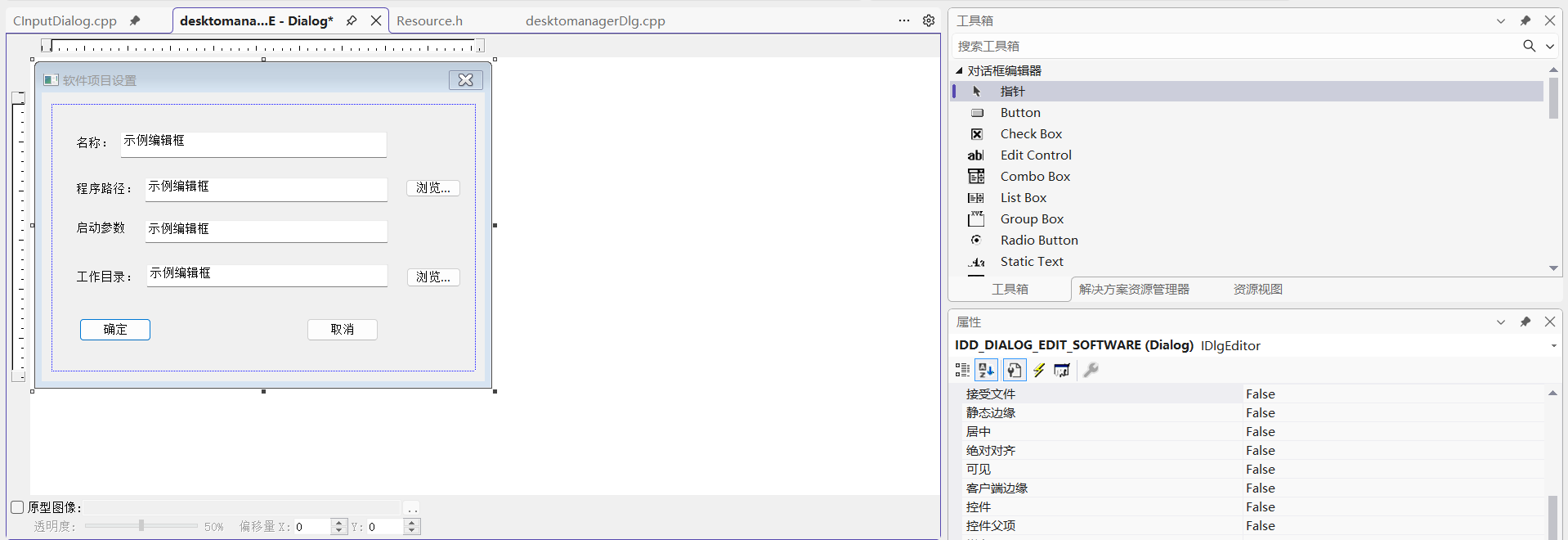
2、创建编辑软件对话框类
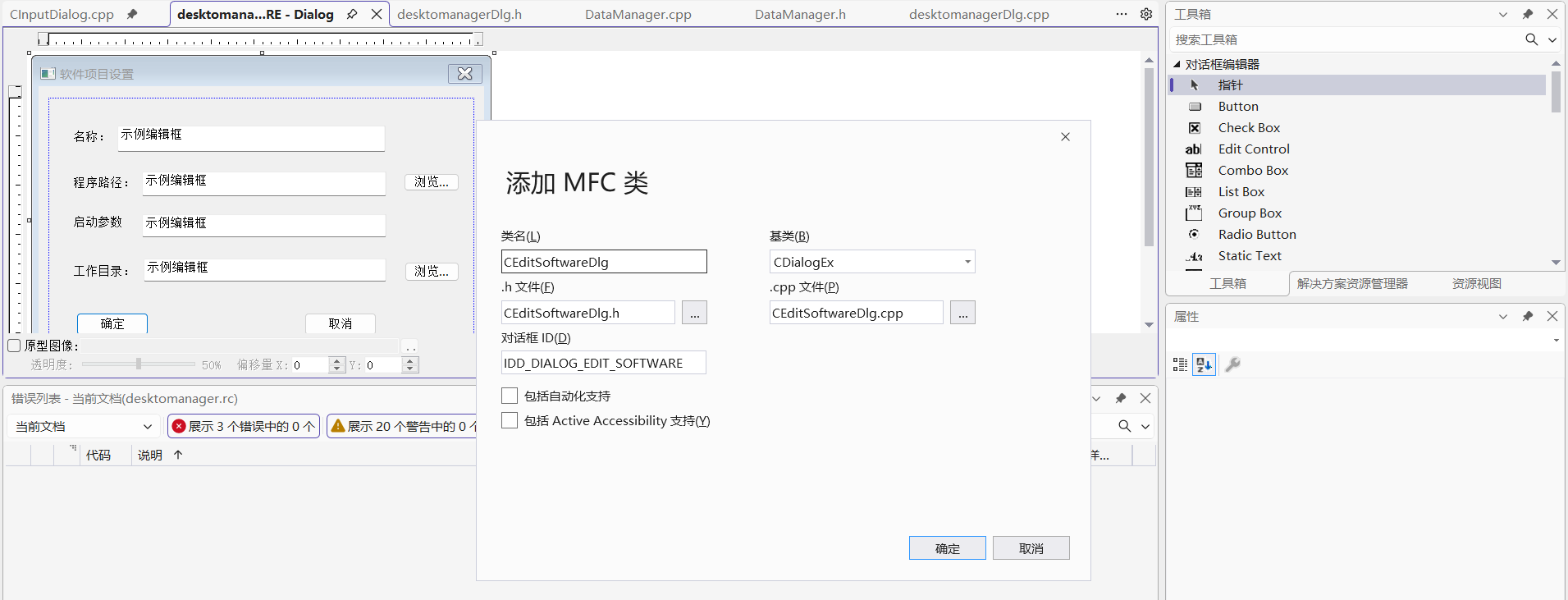
CEditSoftwareDlg.h:
cpp
#pragma once
#include "afxdialogex.h"
#include "SoftwareItem.h"

// CEditSoftwareDlg 对话框

class CEditSoftwareDlg : public CDialogEx
{
	DECLARE_DYNAMIC(CEditSoftwareDlg)

public:
	CEditSoftwareDlg(CWnd* pParent = nullptr);   // 标准构造函数
	virtual ~CEditSoftwareDlg();

// 对话框数据
#ifdef AFX_DESIGN_TIME
	enum { IDD = IDD_DIALOG_EDIT_SOFTWARE };
#endif

	// 设置/获取软件项数据
	void SetSoftwareItem(const CSoftwareItem& item);
	CSoftwareItem GetSoftwareItem() const;

	// 设置是否为编辑模式
	void SetEditMode(BOOL bEdit) { m_bEditMode = bEdit; }

	// 消息处理
	afx_msg void OnBnClickedButtonBrowse();
	afx_msg void OnBnClickedButtonBrowsedir();

	// 控件变量
	CString m_strName;
	CString m_strPath;
	CString m_strArgs;
	CString m_strWorkDir;

	// 状态
	BOOL m_bEditMode;

	// 辅助函数
	CString BrowseForExecutable();
	CString BrowseForDirectory();

protected:
	virtual void DoDataExchange(CDataExchange* pDX);    // DDX/DDV 支持

	DECLARE_MESSAGE_MAP()
};
添加值变量和点击消息处理函数:
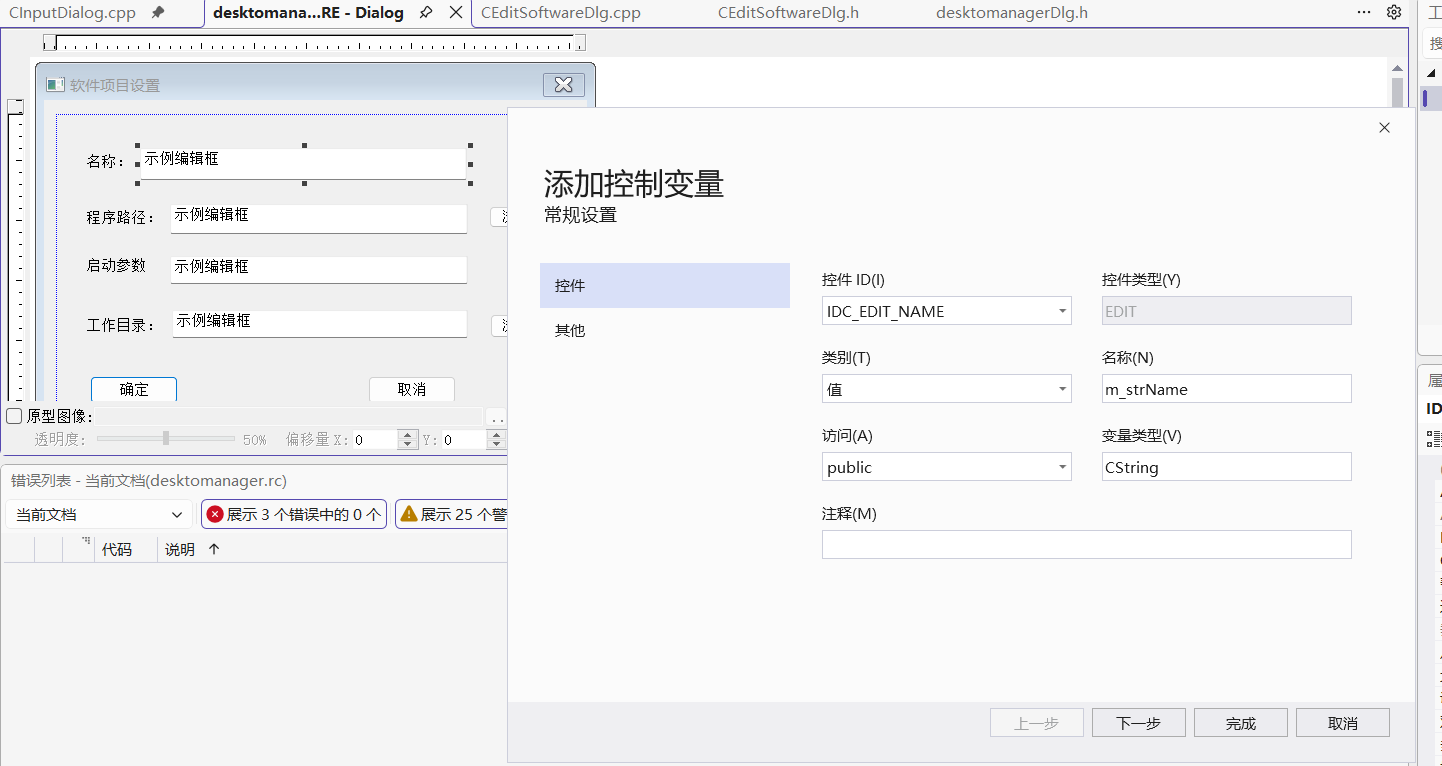
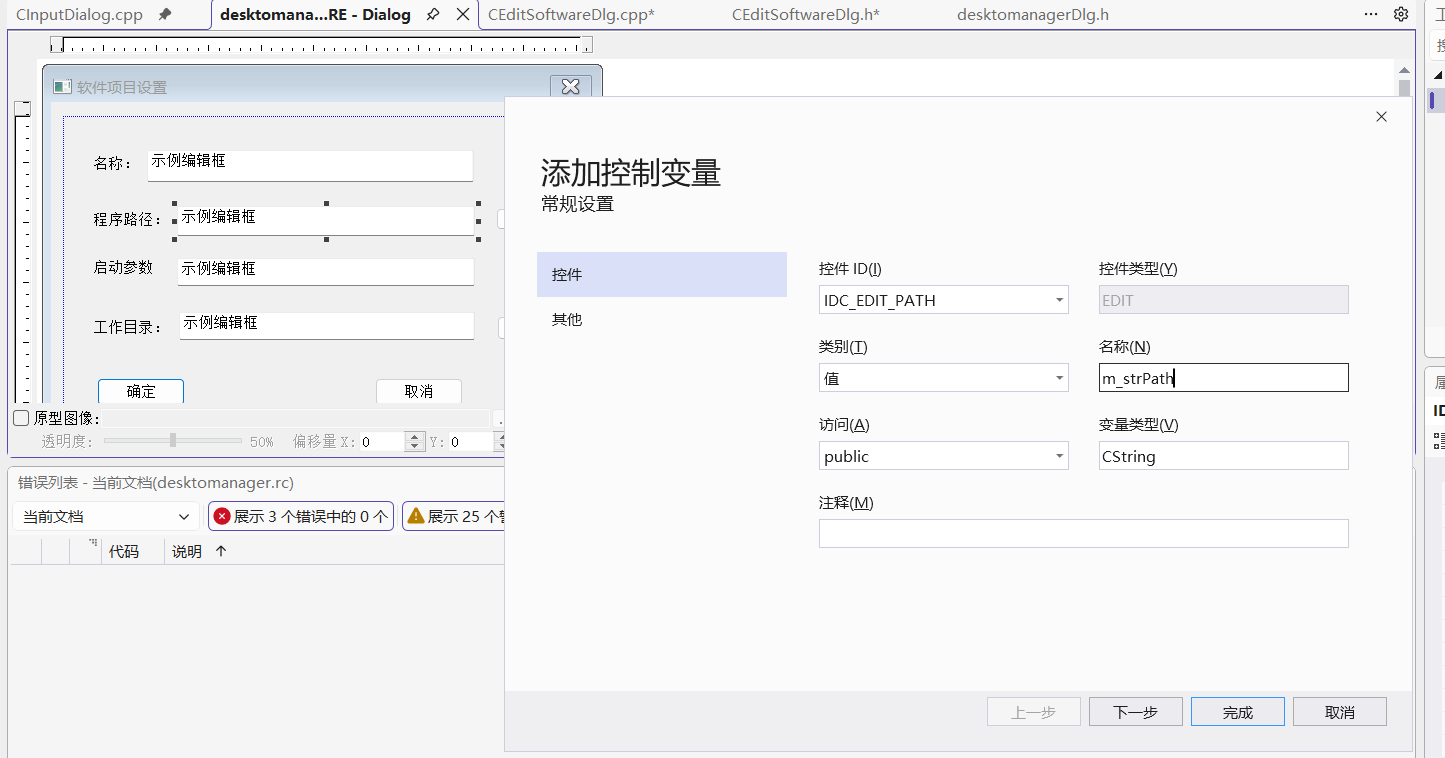
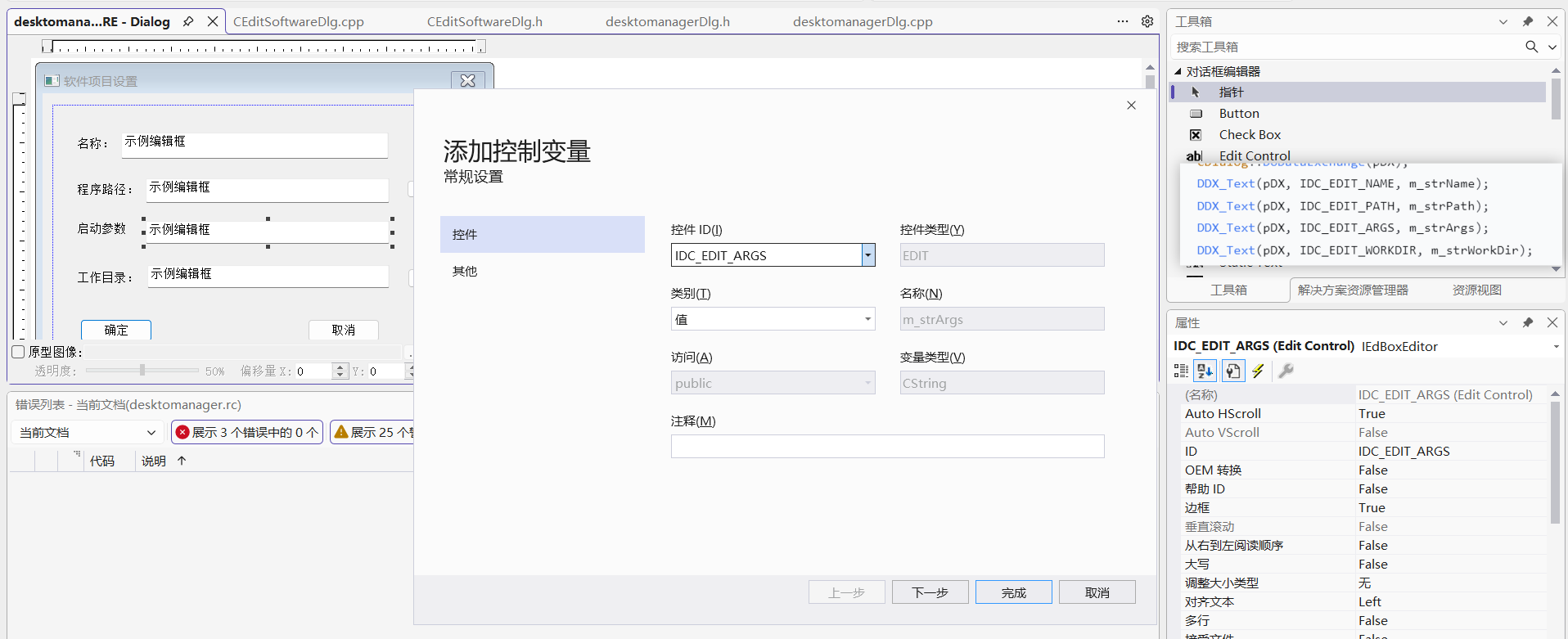
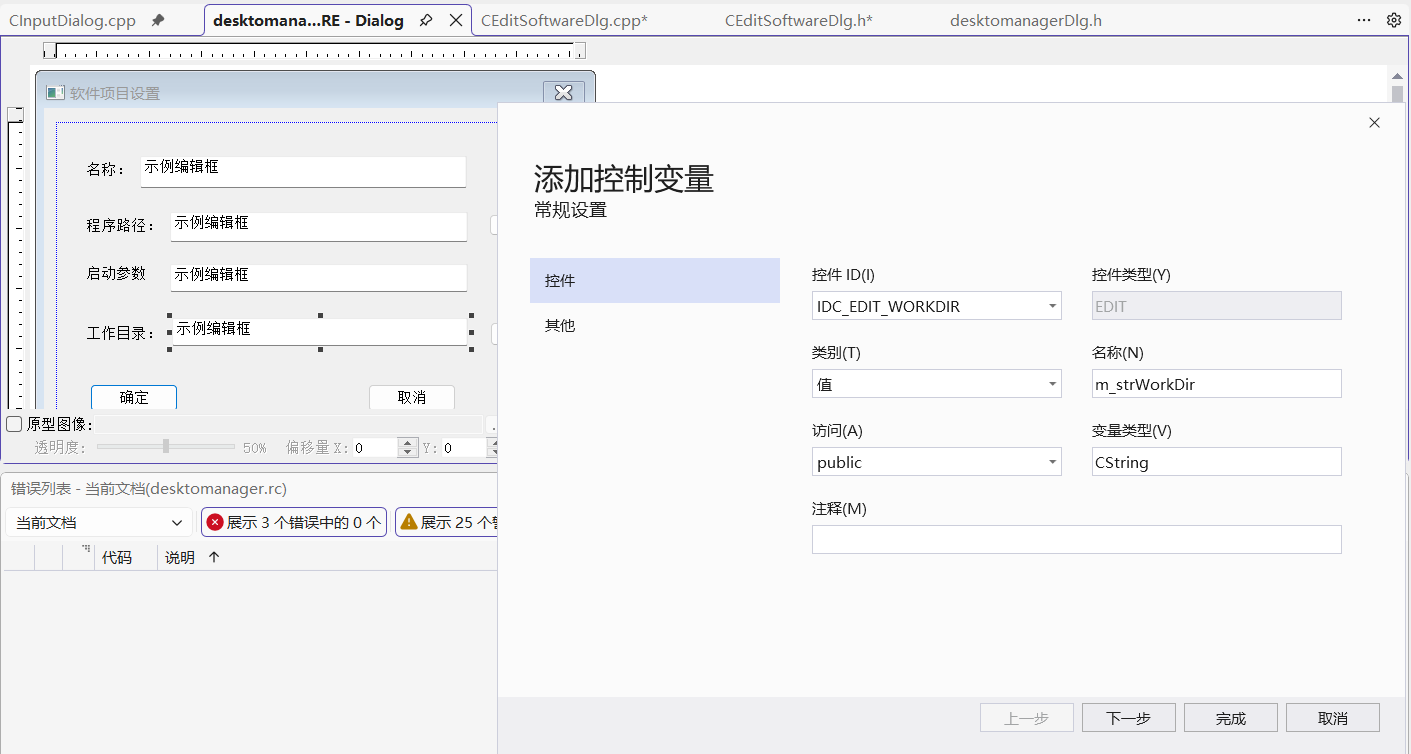
CEditSoftwareDlg.cpp:
cpp
// CEditSoftwareDlg.cpp: 实现文件
//

#include "pch.h"
#include "desktomanager.h"
#include "afxdialogex.h"
#include "CEditSoftwareDlg.h"


// CEditSoftwareDlg 对话框

IMPLEMENT_DYNAMIC(CEditSoftwareDlg, CDialogEx)

CEditSoftwareDlg::CEditSoftwareDlg(CWnd* pParent /*=nullptr*/)
	: CDialogEx(IDD_DIALOG_EDIT_SOFTWARE, pParent)
    , m_strName(_T(""))
    , m_strPath(_T(""))
    , m_strArgs(_T(""))
    , m_strWorkDir(_T(""))
    , m_bEditMode(FALSE)
{

}

CEditSoftwareDlg::~CEditSoftwareDlg()
{
}

void CEditSoftwareDlg::DoDataExchange(CDataExchange* pDX)
{
    CDialogEx::DoDataExchange(pDX);
    DDX_Text(pDX, IDC_EDIT_NAME, m_strName);
    DDX_Text(pDX, IDC_EDIT_PATH, m_strPath);
    DDX_Text(pDX, IDC_EDIT_ARGS, m_strArgs);
    DDX_Text(pDX, IDC_EDIT_WORKDIR, m_strWorkDir);
}


BEGIN_MESSAGE_MAP(CEditSoftwareDlg, CDialogEx)

    ON_BN_CLICKED(IDC_BUTTON_BROWSE, &CEditSoftwareDlg::OnBnClickedButtonBrowse)
    ON_BN_CLICKED(IDC_BUTTON_BROWSEDIR, &CEditSoftwareDlg::OnBnClickedButtonBrowsedir)
END_MESSAGE_MAP()

BOOL CEditSoftwareDlg::OnInitDialog()
{
    CDialogEx::OnInitDialog();
    // 根据模式设置对话框标题
    SetWindowText(m_bEditMode ? _T("编辑软件项目") : _T("新建软件项目"));

    return TRUE;
}
// CEditSoftwareDlg 消息处理程序

void CEditSoftwareDlg::SetSoftwareItem(const CSoftwareItem& item)
{
    m_strName = item.m_strName;
    m_strPath = item.m_strExePath;
    m_strArgs = item.m_strArguments;
    m_strWorkDir = item.m_strWorkingDir;
}

CSoftwareItem CEditSoftwareDlg::GetSoftwareItem() const
{
    CSoftwareItem item;
    item.m_strName = m_strName;
    item.m_strExePath = m_strPath;
    item.m_strArguments = m_strArgs;
    item.m_strWorkingDir = m_strWorkDir;
    return item;
}

void CEditSoftwareDlg::OnBnClickedButtonBrowse()
{
    CString strFilter = _T("可执行文件 (*.exe;*.bat;*.cmd)|*.exe;*.bat;*.cmd|")
        _T("所有文件 (*.*)|*.*||");

    CFileDialog dlg(TRUE, _T("exe"), NULL,
        OFN_HIDEREADONLY | OFN_OVERWRITEPROMPT | OFN_FILEMUSTEXIST,
        strFilter, this);

    if (dlg.DoModal() == IDOK)
    {
        m_strPath = dlg.GetPathName();

        // 如果名称为空,使用文件名作为默认名称
        if (m_strName.IsEmpty())
        {
            CString strFileName = dlg.GetFileName();
            int nDotPos = strFileName.ReverseFind(_T('.'));
            if (nDotPos != -1)
            {
                m_strName = strFileName.Left(nDotPos);
            }
            else
            {
                m_strName = strFileName;
            }
        }

        // 如果工作目录为空,设置默认工作目录
        if (m_strWorkDir.IsEmpty())
        {
            m_strWorkDir = dlg.GetFolderPath();
        }

        UpdateData(FALSE);
    }
}

void CEditSoftwareDlg::OnBnClickedButtonBrowsedir()
{
    BROWSEINFO bi = { 0 };
    bi.lpszTitle = _T("选择工作目录");
    bi.ulFlags = BIF_RETURNONLYFSDIRS | BIF_NEWDIALOGSTYLE;

    LPITEMIDLIST pidl = SHBrowseForFolder(&bi);
    if (pidl != NULL)
    {
        TCHAR szPath[MAX_PATH];
        if (SHGetPathFromIDList(pidl, szPath))
        {
            m_strWorkDir = szPath;
            UpdateData(FALSE);
        }

        // 释放内存
        CoTaskMemFree(pidl);
    }
}
3、在DesktopManagerDlg.cpp中实现对话框显示函数
cpp
// 显示编辑软件对话框
BOOL CdesktomanagerDlg::ShowEditSoftwareDialog(CSoftwareItem& item, BOOL bEditMode)
{
	CEditSoftwareDlg dlg;
	dlg.SetEditMode(bEditMode);

	if (bEditMode)
	{
		dlg.SetSoftwareItem(item);
	}

	if (dlg.DoModal() == IDOK)
	{
		item = dlg.GetSoftwareItem();
		return TRUE;
	}

	return FALSE;
}
4、实现菜单命令处理函数
cpp
// 以管理员权限运行
void CdesktomanagerDlg::OnItemRunAs()
{
	CSoftwareItem* pItem = GetSelectedSoftwareItem();
	if (!pItem)
		return;

	pItem->Execute(TRUE);  // TRUE表示以管理员权限运行
}

// 打开方式
void CdesktomanagerDlg::OnItemOpenWith()
{
	CSoftwareItem* pItem = GetSelectedSoftwareItem();
	if (!pItem)
		return;

	CString strPath = pItem->m_strExePath;

	SHELLEXECUTEINFO sei = { sizeof(sei) };
	sei.lpVerb = _T("openas");
	sei.lpFile = strPath;
	sei.nShow = SW_SHOWNORMAL;

	ShellExecuteEx(&sei);
}

// 打开文件所在位置
void CdesktomanagerDlg::OnItemOpenLocation()
{
	CSoftwareItem* pItem = GetSelectedSoftwareItem();
	if (!pItem)
		return;

	CString strPath = pItem->m_strExePath;

	// 提取目录路径
	int nPos = strPath.ReverseFind(_T('\\'));
	if (nPos != -1)
	{
		CString strDir = strPath.Left(nPos);
		CString strParam;
		strParam.Format(_T("/select,\"%s\""), strPath);

		ShellExecute(NULL, _T("open"), _T("explorer.exe"), strParam, NULL, SW_SHOWNORMAL);
	}
	else
	{
		AfxMessageBox(_T("无法获取文件所在目录"));
	}
}

// 删除选中的项目
void CdesktomanagerDlg::OnItemDelete()
{
	if (m_nCurrentGroupId == -1 || m_nSelectedItemIndex == -1)
		return;

	CSoftwareItem* pItem = GetSelectedSoftwareItem();
	if (!pItem)
		return;

	CString strMessage;
	strMessage.Format(_T("确定要删除 \"%s\" 吗?"), pItem->m_strName);

	if (AfxMessageBox(strMessage, MB_YESNO | MB_ICONQUESTION) == IDYES)
	{
		// 从数据管理器中删除
		if (m_dataManager.RemoveItemFromGroup(m_nCurrentGroupId, m_nSelectedItemIndex))
		{
			// 刷新列表
			LoadItemsToList(m_nCurrentGroupId);
		}
		else
		{
			AfxMessageBox(_T("删除失败"));
		}
	}
}

// 编辑选中的项目
void CdesktomanagerDlg::OnItemEdit()
{
	if (m_nCurrentGroupId == -1 || m_nSelectedItemIndex == -1)
		return;

	CSoftwareItem* pItem = GetSelectedSoftwareItem();
	if (!pItem)
		return;

	// 复制项目用于编辑
	CSoftwareItem editItem = *pItem;

	// 显示编辑对话框
	if (ShowEditSoftwareDialog(editItem, TRUE))
	{
		// 验证数据
		if (editItem.m_strName.IsEmpty())
		{
			AfxMessageBox(_T("软件名称不能为空"));
			return;
		}

		if (editItem.m_strExePath.IsEmpty())
		{
			AfxMessageBox(_T("程序路径不能为空"));
			return;
		}

		// 更新数据管理器
		if (m_dataManager.UpdateItemInGroup(m_nCurrentGroupId, m_nSelectedItemIndex, editItem))
		{
			// 刷新列表显示
			m_wndListCtrl.SetItemText(m_nSelectedItemIndex, 0, editItem.m_strName);
		}
		else
		{
			AfxMessageBox(_T("更新失败,可能是名称重复"));
		}
	}
}

// 新建空白项目
void CdesktomanagerDlg::OnItemNew()
{
	if (m_nCurrentGroupId == -1)
	{
		AfxMessageBox(_T("请先选择一个分组"));
		return;
	}

	// 创建新项目
	CSoftwareItem newItem;
	newItem.m_strName = _T("新项目");

	// 显示编辑对话框
	if (ShowEditSoftwareDialog(newItem, FALSE))
	{
		// 验证数据
		if (newItem.m_strName.IsEmpty())
		{
			AfxMessageBox(_T("软件名称不能为空"));
			return;
		}

		if (newItem.m_strExePath.IsEmpty())
		{
			AfxMessageBox(_T("程序路径不能为空"));
			return;
		}

		// 添加到数据管理器
		if (m_dataManager.AddItemToGroup(m_nCurrentGroupId, newItem))
		{
			// 刷新列表
			LoadItemsToList(m_nCurrentGroupId);
		}
		else
		{
			AfxMessageBox(_T("添加失败,可能是名称重复"));
		}
	}
}

// 删除所有项目
void CdesktomanagerDlg::OnItemDeleteAll()
{
	if (m_nCurrentGroupId == -1)
	{
		AfxMessageBox(_T("请先选择一个分组"));
		return;
	}

	// 获取当前分组
	const CSoftwareGroup* pGroup = m_dataManager.GetGroup(m_nCurrentGroupId);
	if (!pGroup || pGroup->GetItemCount() == 0)
		return;

	CString strMessage;
	strMessage.Format(_T("确定要删除 \"%s\" 分组中的所有 %d 个项目吗?"),
		pGroup->m_strGroupName, pGroup->GetItemCount());

	if (AfxMessageBox(strMessage, MB_YESNO | MB_ICONWARNING) == IDYES)
	{
		// 清空列表
		m_wndListCtrl.DeleteAllItems();

		// 从数据管理器中删除所有项目
		// 由于我们的数据管理器没有提供清空分组的方法,需要逐个删除
		// 这里我们从后往前删除,避免索引问题
		for (int i = pGroup->GetItemCount() - 1; i >= 0; i--)
		{
			m_dataManager.RemoveItemFromGroup(m_nCurrentGroupId, i);
		}

		// 刷新列表
		LoadItemsToList(m_nCurrentGroupId);
	}
}
第六步:实现双击启动功能
cpp
// 列表项双击/回车启动
void CdesktomanagerDlg::OnLvnItemActivateListSoftware(NMHDR* pNMHDR, LRESULT* pResult)
{
	LPNMITEMACTIVATE pNMItemActivate = reinterpret_cast<LPNMITEMACTIVATE>(pNMHDR);

	int nIndex = pNMItemActivate->iItem;
	if (nIndex >= 0)
	{
		// 更新选中的索引
		m_nSelectedItemIndex = nIndex;

		// 获取项目并执行
		CSoftwareItem* pItem = GetSelectedSoftwareItem();
		if (pItem)
		{
			pItem->Execute(FALSE);  // 普通方式运行
		}
	}

	*pResult = 0;
}
第七步:实现清理和资源管理
cpp
// 在对话框销毁时清理资源和保存数据
void CdesktomanagerDlg::OnDestroy()
{
	CDialog::OnDestroy();

	// 销毁左侧菜单
	if (m_menuTree.m_hMenu != NULL)
	{
		m_menuTree.DestroyMenu();
	}

	// 销毁右侧菜单
	if (m_menuListItem.m_hMenu != NULL)
	{
		m_menuListItem.DestroyMenu();
	}

	if (m_menuListBlank.m_hMenu != NULL)
	{
		m_menuListBlank.DestroyMenu();
	}

	// 保存数据
	m_dataManager.Save();
}
六、实现拖拽功能:支持从桌面拖拽快捷方式到列表控件
第一阶段:使列表控件支持拖拽
第一步:启用列表控件的拖拽功能
cpp
// DesktopManagerDlg.cpp - 修改InitListCtrl函数
void CdesktomanagerDlg::InitListCtrl()
{
    // 设置列表控件为图标视图
    DWORD dwStyle = LVS_ICON | LVS_AUTOARRANGE | LVS_SHOWSELALWAYS;
    m_wndListCtrl.ModifyStyle(LVS_TYPEMASK, dwStyle);

    // 设置列表控件的扩展样式
    m_wndListCtrl.SetExtendedStyle(LVS_EX_FULLROWSELECT | LVS_EX_DOUBLEBUFFER);

    // 启用列表控件的拖拽功能(作为拖放目标)
    m_wndListCtrl.ModifyStyle(0, WS_EX_ACCEPTFILES);

    // 注册拖放目标
    m_wndListCtrl.DragAcceptFiles(TRUE);
}
第二步:添加拖拽消息处理
cpp
// DesktopManagerDlg.h - 添加拖拽相关声明
class CdesktomanagerDlg: public CDialog
{
    // ... 其他代码 ...

protected:
    // 拖拽消息处理
    afx_msg void OnDropFiles(HDROP hDropInfo);

    DECLARE_MESSAGE_MAP()

private:
    // 拖拽处理函数
    void ProcessDroppedFiles(HDROP hDropInfo);
    BOOL ProcessShortcutFile(LPCTSTR lpszFilePath, CSoftwareItem& item);
    BOOL ProcessExecutableFile(LPCTSTR lpszFilePath, CSoftwareItem& item);
    BOOL AddDroppedItem(const CSoftwareItem& item);
};
第三步:实现消息映射
cpp
BEGIN_MESSAGE_MAP(CdesktomanagerDlg, CDialogEx)

	ON_WM_DROPFILES()  // 添加拖拽文件消息
    // ... 其他消息映射 ...
END_MESSAGE_MAP()
第二阶段:实现拖拽文件处理
第一步:实现OnDropFiles函数
cpp
// DesktopManagerDlg.cpp - 实现拖拽文件处理
void CdesktomanagerDlg::OnDropFiles(HDROP hDropInfo)
{
	// 检查是否有选中的分组
	if (m_nCurrentGroupId == -1)
	{
		AfxMessageBox(_T("请先在左侧选择一个分组"));
		DragFinish(hDropInfo);
		return;
	}

	// 获取鼠标位置
	CPoint point;
	DragQueryPoint(hDropInfo, &point);

	// 转换为列表控件坐标
	m_wndListCtrl.ScreenToClient(&point);

	// 检查拖拽是否在列表控件内
	CRect rect;
	m_wndListCtrl.GetWindowRect(&rect);
	ScreenToClient(&rect);

	if (!rect.PtInRect(point))
	{
		// 拖拽位置不在列表控件内
		DragFinish(hDropInfo);
		return;
	}

	// 处理拖拽的文件
	ProcessDroppedFiles(hDropInfo);

	// 完成拖拽操作
	DragFinish(hDropInfo);
}
第二步:实现ProcessDroppedFiles函数
cpp
// DesktopManagerDlg.cpp - 处理拖拽的文件
void CdesktomanagerDlg::ProcessDroppedFiles(HDROP hDropInfo)
{
	// 获取拖拽的文件数量
	UINT nFileCount = DragQueryFile(hDropInfo, 0xFFFFFFFF, NULL, 0);

	if (nFileCount == 0)
		return;

	// 获取当前分组名称(用于显示)
	CString strGroupName = GetCurrentGroupName();

	// 处理每个文件
	int nSuccessCount = 0;
	int nFailCount = 0;

	for (UINT i = 0; i < nFileCount; i++)
	{
		// 获取文件路径
		TCHAR szFilePath[MAX_PATH];
		DragQueryFile(hDropInfo, i, szFilePath, MAX_PATH);

		CSoftwareItem newItem;
		BOOL bSuccess = FALSE;

		// 根据文件类型处理
		CString strFilePath = szFilePath;
		CString strExt = strFilePath.Right(4);
		strExt.MakeLower();

		if (strExt == _T(".lnk"))
		{
			// 处理快捷方式
			bSuccess = ProcessShortcutFile(strFilePath, newItem);
		}
		else if (strExt == _T(".exe"))
		{
			// 处理可执行文件
			bSuccess = ProcessExecutableFile(strFilePath, newItem);
		}
		else
		{
			// 其他文件类型,尝试作为快捷方式处理
			bSuccess = ProcessShortcutFile(strFilePath, newItem);
			if (!bSuccess)
			{
				// 如果不是快捷方式,尝试作为普通文件处理
				bSuccess = ProcessExecutableFile(strFilePath, newItem);
			}
		}

		if (bSuccess)
		{
			// 添加到分组
			if (AddDroppedItem(newItem))
			{
				nSuccessCount++;
			}
			else
			{
				nFailCount++;
			}
		}
		else
		{
			nFailCount++;
		}
	}

	// 显示处理结果
	if (nSuccessCount > 0)
	{
		// 刷新列表显示
		LoadItemsToList(m_nCurrentGroupId);

		// 显示成功消息
		CString strMessage;
		if (nFailCount == 0)
		{
			strMessage.Format(_T("成功添加 %d 个项目到 \"%s\" 分组"),
				nSuccessCount, strGroupName);
		}
		else
		{
			strMessage.Format(_T("成功添加 %d 个项目,%d 个项目失败"),
				nSuccessCount, nFailCount);
		}

		// 可以显示消息,也可以不显示,避免打扰用户
		// AfxMessageBox(strMessage, MB_ICONINFORMATION);
	}
	else if (nFailCount > 0)
	{
		AfxMessageBox(_T("添加失败:无法处理拖拽的文件"), MB_ICONWARNING);
	}
}
第三阶段:实现文件处理函数
第一步:添加快捷方式处理函数
cpp
// DesktopManagerDlg.cpp - 添加快捷方式处理函数
#include <shlobj.h>
#include <shlwapi.h>
#pragma comment(lib, "shlwapi.lib")

BOOL CdesktomanagerDlg::ProcessShortcutFile(LPCTSTR lpszFilePath, CSoftwareItem& item)
{
	IShellLink* pShellLink = NULL;
	IPersistFile* pPersistFile = NULL;

	HRESULT hr = CoCreateInstance(CLSID_ShellLink, NULL, CLSCTX_INPROC_SERVER,
		IID_IShellLink, (LPVOID*)&pShellLink);

	if (FAILED(hr))
		return FALSE;

	// 获取IPersistFile接口
	hr = pShellLink->QueryInterface(IID_IPersistFile, (LPVOID*)&pPersistFile);
	if (FAILED(hr))
	{
		pShellLink->Release();
		return FALSE;
	}

	// 加载快捷方式文件
	// 根据编译环境处理字符串转换
#ifdef _UNICODE
	// Unicode环境下,LPCTSTR已经是宽字符
	// 直接转换到宽字符字符串
	WCHAR wszPath[MAX_PATH];
	lstrcpynW(wszPath, lpszFilePath, MAX_PATH);
#else
	// 多字节环境下,需要转换到宽字符
	WCHAR wszPath[MAX_PATH];
	MultiByteToWideChar(CP_ACP, 0, lpszLnkPath, -1, wszPath, MAX_PATH);
#endif

	hr = pPersistFile->Load(wszPath, STGM_READ);
	if (FAILED(hr))
	{
		pPersistFile->Release();
		pShellLink->Release();
		return FALSE;
	}

	// 解析快捷方式
	TCHAR szTargetPath[MAX_PATH];
	TCHAR szArguments[MAX_PATH];
	TCHAR szWorkingDir[MAX_PATH];
	TCHAR szDescription[MAX_PATH];

	// 获取目标路径
	hr = pShellLink->GetPath(szTargetPath, MAX_PATH, NULL, SLGP_SHORTPATH);
	if (FAILED(hr))
	{
		// 尝试其他方式
		hr = pShellLink->GetPath(szTargetPath, MAX_PATH, NULL, 0);
	}

	if (FAILED(hr) || szTargetPath[0] == _T('\0'))
	{
		pPersistFile->Release();
		pShellLink->Release();
		return FALSE;
	}

	// 获取其他信息
	pShellLink->GetArguments(szArguments, MAX_PATH);
	pShellLink->GetWorkingDirectory(szWorkingDir, MAX_PATH);
	pShellLink->GetDescription(szDescription, MAX_PATH);

	// 获取图标位置
	TCHAR szIconPath[MAX_PATH];
	int nIconIndex = 0;
	pShellLink->GetIconLocation(szIconPath, MAX_PATH, &nIconIndex);

	// 获取显示名称(使用文件名作为默认名称)
	TCHAR szFileName[MAX_PATH];
	_tsplitpath(lpszFilePath, NULL, NULL, szFileName, NULL);

	// 清理接口
	pPersistFile->Release();
	pShellLink->Release();

	// 填充软件项信息
	item.m_strName = szFileName;
	item.m_strExePath = szTargetPath;
	item.m_strArguments = szArguments;
	item.m_strWorkingDir = szWorkingDir;
	item.m_strIconPath = (szIconPath[0] != _T('\0')) ? szIconPath : szTargetPath;
	item.m_nIconIndex = nIconIndex;

	// 如果名称是空的,使用目标文件的文件名
	if (item.m_strName.IsEmpty())
	{
		_tsplitpath(szTargetPath, NULL, NULL, szFileName, NULL);
		item.m_strName = szFileName;
	}

	return TRUE;
}
第二步:添加可执行文件处理函数
cpp
// DesktopManagerDlg.cpp - 添加可执行文件处理函数
BOOL CdesktomanagerDlg::ProcessExecutableFile(LPCTSTR lpszFilePath, CSoftwareItem& item)
{
	// 检查文件是否存在
	if (::GetFileAttributes(lpszFilePath) == INVALID_FILE_ATTRIBUTES)
		return FALSE;

	// 获取文件名(不带扩展名)作为显示名称
	TCHAR szFileName[MAX_PATH];
	TCHAR szFileTitle[MAX_PATH];

	_tsplitpath(lpszFilePath, NULL, NULL, szFileName, NULL);
	GetFileTitle(lpszFilePath, szFileTitle, MAX_PATH);

	// 填充软件项信息
	item.m_strName = szFileName;
	item.m_strExePath = lpszFilePath;
	item.m_strIconPath = lpszFilePath;
	item.m_nIconIndex = 0;

	// 获取文件描述(如果有)
	DWORD dwHandle = 0;
	DWORD dwSize = GetFileVersionInfoSize(lpszFilePath, &dwHandle);

	if (dwSize > 0)
	{
		BYTE* pVersionInfo = new BYTE[dwSize];
		if (GetFileVersionInfo(lpszFilePath, dwHandle, dwSize, pVersionInfo))
		{
			struct LANGANDCODEPAGE {
				WORD wLanguage;
				WORD wCodePage;
			} *lpTranslate;

			UINT cbTranslate = 0;

			// 获取语言和代码页
			if (VerQueryValue(pVersionInfo,
				_T("\\VarFileInfo\\Translation"),
				(LPVOID*)&lpTranslate, &cbTranslate))
			{
				// 获取文件描述
				for (UINT i = 0; i < (cbTranslate / sizeof(LANGANDCODEPAGE)); i++)
				{
					TCHAR szSubBlock[MAX_PATH];
					_stprintf_s(szSubBlock, MAX_PATH,
						_T("\\StringFileInfo\\%04x%04x\\FileDescription"),
						lpTranslate[i].wLanguage, lpTranslate[i].wCodePage);

					LPTSTR lpBuffer = NULL;
					UINT dwBytes = 0;

					if (VerQueryValue(pVersionInfo, szSubBlock,
						(LPVOID*)&lpBuffer, &dwBytes) && dwBytes > 0)
					{
						// 如果有文件描述,使用它作为名称
						item.m_strName = lpBuffer;
						break;
					}
				}
			}
		}

		delete[] pVersionInfo;
	}

	return TRUE;
}
第三步:添加拖拽项到分组
cpp
// DesktopManagerDlg.cpp - 添加拖拽项到分组
BOOL CdesktomanagerDlg::AddDroppedItem(const CSoftwareItem& item)
{
	if (m_nCurrentGroupId == -1)
		return FALSE;

	// 检查项目名称是否为空
	if (item.m_strName.IsEmpty())
		return FALSE;

	// 检查目标文件是否存在
	if (::GetFileAttributes(item.m_strExePath) == INVALID_FILE_ATTRIBUTES)
	{
		// 文件不存在,询问用户是否继续
		CString strMessage;
		strMessage.Format(_T("目标文件不存在:\n%s\n\n是否仍然添加?"),
			item.m_strExePath);

		if (AfxMessageBox(strMessage, MB_YESNO | MB_ICONWARNING) != IDYES)
		{
			return FALSE;
		}
	}

	// 检查是否已存在同名项目
	const CSoftwareGroup* pGroup = m_dataManager.GetGroup(m_nCurrentGroupId);
	if (pGroup && pGroup->FindItemByName(item.m_strName) != -1)
	{
		// 已存在同名项目,询问是否覆盖或重命名
		CString strMessage;
		strMessage.Format(_T("分组中已存在名为 \"%s\" 的项目。\n\n选择操作:"),
			item.m_strName);

		int nResult = AfxMessageBox(strMessage, MB_YESNOCANCEL | MB_ICONQUESTION);

		if (nResult == IDCANCEL)
		{
			return FALSE;
		}
		else if (nResult == IDNO)
		{
			// 重命名
			CString strNewName;
			strNewName.Format(_T("%s (2)"), item.m_strName);

			// 查找可用的名称
			int nSuffix = 2;
			while (pGroup->FindItemByName(strNewName) != -1)
			{
				nSuffix++;
				strNewName.Format(_T("%s (%d)"), item.m_strName, nSuffix);
			}

			CSoftwareItem renamedItem = item;
			renamedItem.m_strName = strNewName;

			return m_dataManager.AddItemToGroup(m_nCurrentGroupId, renamedItem);
		}
		// IDYES 继续执行,覆盖现有项目
	}

	// 添加到数据管理器
	return m_dataManager.AddItemToGroup(m_nCurrentGroupId, item);
}
第四阶段:添加快捷方式图标提取
修改SoftwareItem类以支持图标提取
cpp
// SoftwareItem.cpp - 修改LoadIcon函数
BOOL CSoftwareItem::LoadIcon()
{
    ClearIcon();

    // 首先尝试从指定路径加载图标
    if (!m_strIconPath.IsEmpty())
    {
        if (ExtractIconFromFile())
            return TRUE;
    }

    // 如果失败,尝试从可执行文件提取图标
    if (!m_strExePath.IsEmpty() && m_strExePath != m_strIconPath)
    {
        // 临时保存当前图标路径
        CString strOldIconPath = m_strIconPath;
        int nOldIconIndex = m_nIconIndex;

        // 尝试从可执行文件提取
        m_strIconPath = m_strExePath;
        m_nIconIndex = 0;

        if (ExtractIconFromFile())
            return TRUE;

        // 恢复原来的设置
        m_strIconPath = strOldIconPath;
        m_nIconIndex = nOldIconIndex;
    }

    // 如果都失败,使用系统默认图标
    HICON hIcon = NULL;
    SHFILEINFO sfi = {0};

    if (SHGetFileInfo(m_strExePath, 0, &sfi, sizeof(sfi),
                     SHGFI_ICON | SHGFI_LARGEICON))
    {
        hIcon = sfi.hIcon;
    }

    if (hIcon != NULL)
    {
        m_hIcon = hIcon;
        return TRUE;
    }

    return FALSE;
}

BOOL CSoftwareItem::ExtractIconFromFile()
{
    if (m_strIconPath.IsEmpty())
        return FALSE;

    HICON hIcon = NULL;

    // 从文件提取图标
    if (m_nIconIndex == 0)
    {
        // 尝试提取主要图标
        SHFILEINFO sfi = {0};
        if (SHGetFileInfo(m_strIconPath, 0, &sfi, sizeof(sfi),
                         SHGFI_ICON | SHGFI_LARGEICON))
        {
            hIcon = sfi.hIcon;
        }
    }

    // 如果失败,尝试使用ExtractIconEx
    if (hIcon == NULL)
    {
        ExtractIconEx(m_strIconPath, m_nIconIndex, &hIcon, NULL, 1);
    }

    if (hIcon != NULL)
    {
        m_hIcon = hIcon;
        return TRUE;
    }

    return FALSE;
}
七、Debug和补充
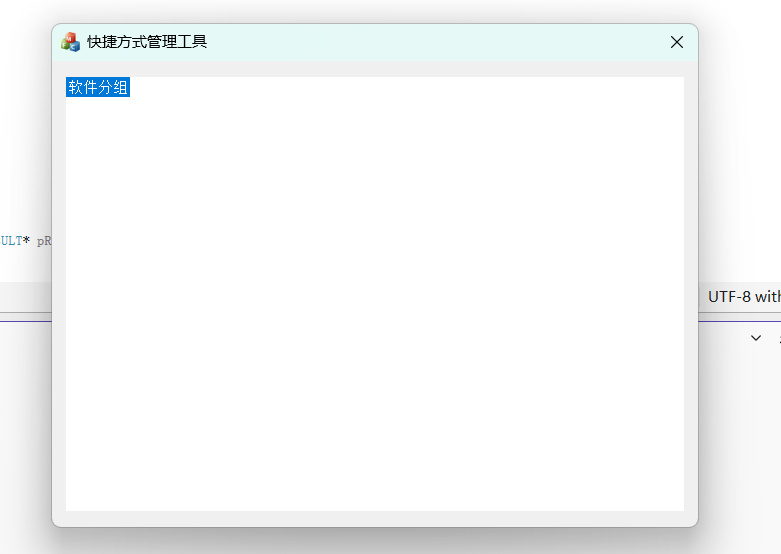
1、运行后发生错误:
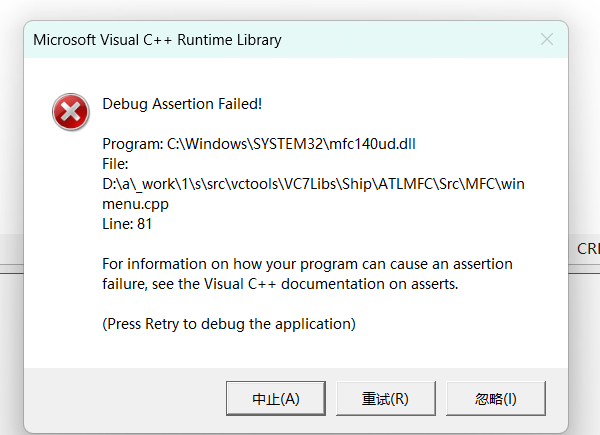
经过检查发现是因为初始化时不小心重复使用了两次LoadMenu(),删去多余的代码即可:
初步效果:
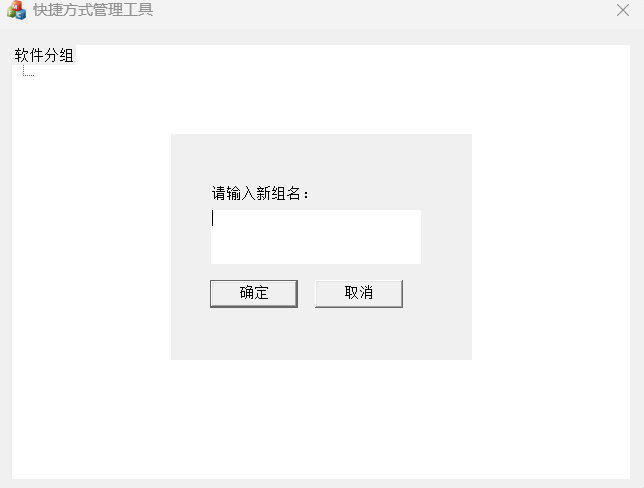
**2、
'_wsplitpath': This function or variable may be unsafe. Consider using _wsplitpath_s instead. To disable deprecation, use _CRT_SECURE_NO_WARNINGS. See online help for details.**
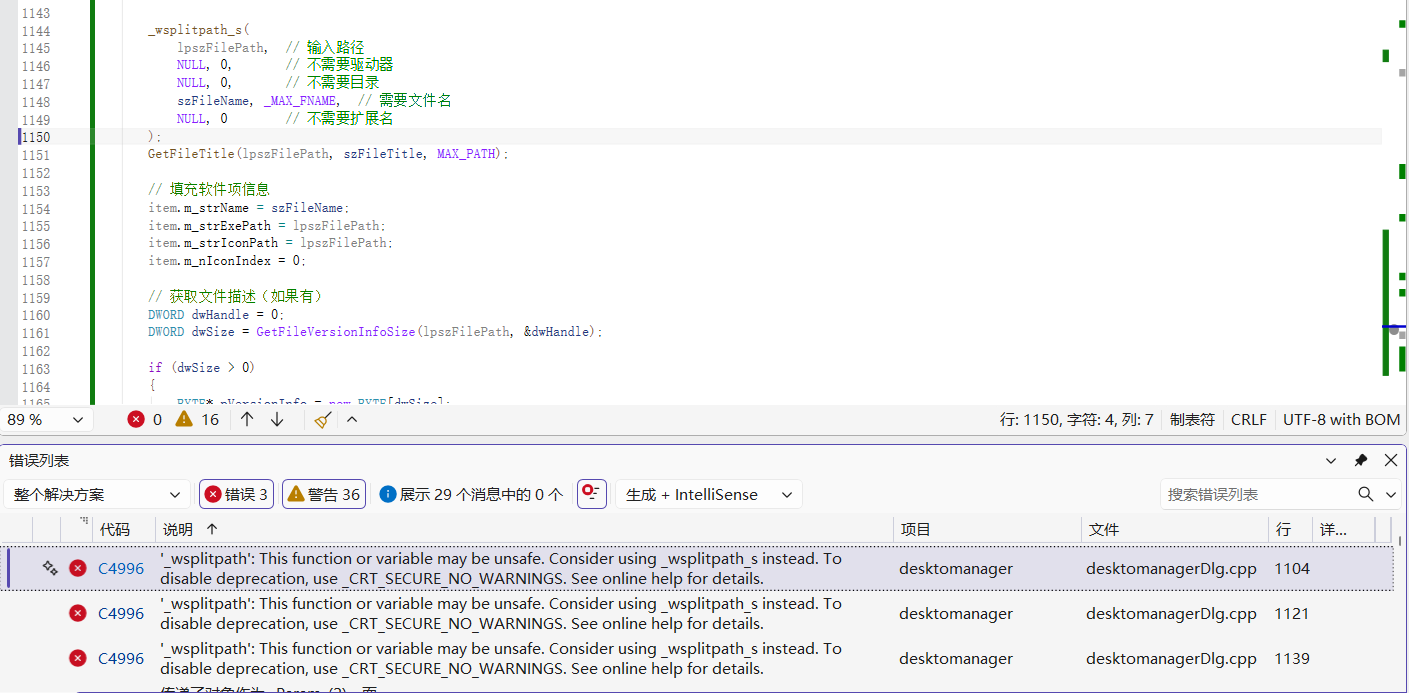
使用下面的_wsplitpath_s进行替代:
cpp
_wsplitpath_s(
	lpszFilePath,  // 输入路径
	NULL, 0,       // 不需要驱动器
	NULL, 0,       // 不需要目录
	szFileName, _MAX_FNAME,  // 需要文件名
	NULL, 0        // 不需要扩展名
);
3、发现列表控件没有图标显示,原因是没有创建ImageList和给列表控件设置ImageList
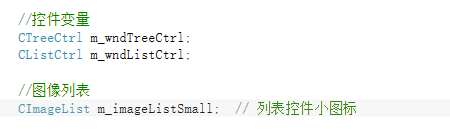
创建ImageList和给列表控件设置ImageList,并修改下面的函数:
cpp
// 加载指定分组的项目到列表
void CdesktomanagerDlg::LoadItemsToList(int nGroupId)
{
	m_wndListCtrl.DeleteAllItems();
	m_nSelectedItemIndex = -1;

	m_imageListSmall.DeleteImageList();  // 清空图像列表
	m_imageListSmall.Create(16, 16, ILC_COLOR32 | ILC_MASK, 20, 20);  // 重新创建图像列表
	m_wndListCtrl.SetImageList(&m_imageListSmall, LVSIL_SMALL);

	// 从数据管理器获取分组
	const CSoftwareGroup* pGroup = m_dataManager.GetGroup(nGroupId);
	if (!pGroup)
		return;

	// 获取分组中的项目
	const std::vector<CSoftwareItem>& items = pGroup->GetItems();

	// 添加到列表控件
	for (size_t i = 0; i < items.size(); i++)
	{
		const CSoftwareItem& item = items[i];

		int nImageIndex = -1;
		bool bNeedDestroy = false;
		HICON hIcon = item.m_hIcon;
		if (hIcon == nullptr)
		{
			SHFILEINFO sfi = {};
			if (SHGetFileInfo(item.m_strExePath, 0, &sfi, sizeof(sfi), SHGFI_ICON | SHGFI_SMALLICON) && sfi.hIcon)
			{
				hIcon = sfi.hIcon;
				bNeedDestroy = true;
			}
		}
		if (hIcon)
		{
			nImageIndex = m_imageListSmall.Add(hIcon);
			if (bNeedDestroy) DestroyIcon(hIcon);
		}
		int nIndex = m_wndListCtrl.InsertItem((int)i, item.m_strName, nImageIndex);
		m_wndListCtrl.SetItemData(nIndex, (DWORD_PTR)i);

	}
}
1. 图标资源泄漏
-
注意通过
SHGetFileInfo获取的图标(sfi.hIcon)在使用后应调用DestroyIcon释放,防止 GDI 资源泄漏。 -
将图标添加到图像列表时,
CImageList::Add会复制图标,原图标句柄仍需由调用者销毁。
2. 图像列表重建后需要重新关联列表控件
- 先调用
DeleteImageList销毁原图像列表,再重新创建。但列表控件可能仍持有旧图像列表的指针,导致图标显示异常。需调用SetImageList重新关联。
4、树控件分组 ID 与数据管理器不同步
问题 :
在 OnGroupAdd 中,插入树项时使用静态递增的 nNextGroupId 设置 ItemData,而后调用 m_dataManager.AddGroup() 生成新分组。数据管理器生成的 ID 与树项存储的 ID 不一致,导致后续删除、重命名、加载列表等操作使用错误 ID,可能操作错误分组或失败。
修改:
-
先调用
m_dataManager.AddGroup(strGroupName)获取新分组的真实 ID。 -
若成功,再插入树项并将该 ID 设置到
ItemData中。
cpp
int nNewId = m_dataManager.AddGroup(strGroupName);
if (nNewId != -1)
{
    HTREEITEM hNewItem = m_wndTreeCtrl.InsertItem(strGroupName);
    m_wndTreeCtrl.SetItemData(hNewItem, nNewId);
    m_wndTreeCtrl.SelectItem(hNewItem);
}
else
{
    AfxMessageBox(_T("添加分组失败,可能名称已存在"));
}
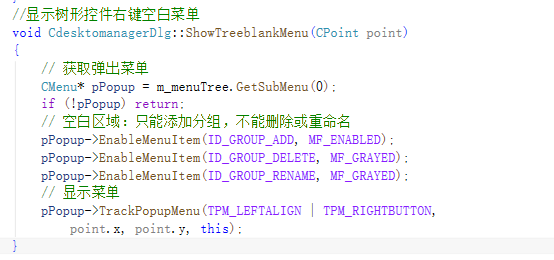
5、补充树形控件右键空白处的处理
6、修改数据存储为JSON
cpp
// 从文件加载数据
BOOL CDataManager::LoadFromFile()
{
    m_groups.clear();

    try
    {
        // 以二进制模式读取文件(避免文本模式对 Unicode 的干扰)
        CFile file;
        if (!file.Open(m_strDataFilePath, CFile::modeRead | CFile::typeBinary))
        {
            // 文件不存在,创建默认分组并保存
            AddGroup(_T("默认分组"));
            return TRUE;
        }

        // 读取全部数据到缓冲区
        ULONGLONG len = file.GetLength();
        if (len > 0)
        {
            std::vector<char> buffer(static_cast<size_t>(len) + 1);
            file.Read(buffer.data(), (UINT)len);
            buffer[len] = '\0';

            // 解析 JSON(假设文件为 UTF-8 编码)
            json j = json::parse(buffer.data());

            // 加载分组
            if (j.contains("groups") && j["groups"].is_array())
            {
                for (const auto& groupJson : j["groups"])
                {
                    int id = groupJson.value("id", 0);
                    std::string name = groupJson.value("name", "");
                    // 正确转换 UTF-8 到 CString
                    CString strName = CString(CA2W(name.c_str(), CP_UTF8));

                    CSoftwareGroup newGroup(strName);
                    newGroup.m_nGroupId = id;
                    // 加载项目
                    if (groupJson.contains("items") && groupJson["items"].is_array())
                    {
                        for (const auto& itemJson : groupJson["items"])
                        {
                            CSoftwareItem item;
                            item.m_strName = CString(CA2W(itemJson.value("name", "").c_str(), CP_UTF8));
                            item.m_strExePath = CString(CA2W(itemJson.value("exePath", "").c_str(), CP_UTF8));
                            item.m_strArguments = CString(CA2W(itemJson.value("arguments", "").c_str(), CP_UTF8));
                            item.m_strWorkingDir = CString(CA2W(itemJson.value("workingDir", "").c_str(), CP_UTF8));
                            item.m_strIconPath = CString(CA2W(itemJson.value("iconPath", "").c_str(), CP_UTF8));
                            item.m_nIconIndex = itemJson.value("iconIndex", 0);
                            item.m_bRunAsAdmin = itemJson.value("runAsAdmin", 0) != 0;
                            newGroup.AddItem(item);
                        }
                    }
                    m_groups.push_back(newGroup);
                }
            }

            // 加载设置
            if (j.contains("settings") && j["settings"].is_object())
            {
                const auto& settings = j["settings"];
                m_nTreeWidth = settings.value("treeWidth", 200);
                m_nLastSelectedGroup = settings.value("lastSelectedGroup", -1);
            }
        }

        file.Close();
        return TRUE;
    }
    catch (const std::exception& e)
    {
        // 输出错误信息
        AfxMessageBox(CString(CA2W(e.what(), CP_UTF8)));
        // JSON 解析失败时,创建默认分组
        m_groups.clear();
        AddGroup(_T("默认分组"));
        return FALSE;
    }
    catch (CFileException* e)
    {
        e->Delete();
        m_groups.clear();
        AddGroup(_T("默认分组"));
        return FALSE;
    }
}


// 保存数据到文件
BOOL CDataManager::SaveToFile()
{
    try
    {
        // 构建 JSON 对象
        json j;

        // 保存分组
        j["groups"] = json::array();
        for (const auto& group : m_groups)
        {
            json groupJson;
            groupJson["id"] = group.m_nGroupId;
            groupJson["name"] = std::string(CT2A(group.m_strGroupName, CP_UTF8));

            // 保存项目
            groupJson["items"] = json::array();
            for (int i = 0; i < group.GetItemCount(); ++i)
            {
                const CSoftwareItem* pItem = group.GetItem(i);
                if (!pItem) continue;

                json itemJson;
                itemJson["name"] = std::string(CT2A(pItem->m_strName, CP_UTF8));
                itemJson["exePath"] = std::string(CT2A(pItem->m_strExePath, CP_UTF8));
                itemJson["arguments"] = std::string(CT2A(pItem->m_strArguments, CP_UTF8));
                itemJson["workingDir"] = std::string(CT2A(pItem->m_strWorkingDir, CP_UTF8));
                itemJson["iconPath"] = std::string(CT2A(pItem->m_strIconPath, CP_UTF8));
                itemJson["iconIndex"] = pItem->m_nIconIndex;
                itemJson["runAsAdmin"] = pItem->m_bRunAsAdmin;
                groupJson["items"].push_back(itemJson);
            }

            j["groups"].push_back(groupJson);
        }

        // 保存设置
        j["settings"] = json::object();
        j["settings"]["treeWidth"] = m_nTreeWidth;
        j["settings"]["lastSelectedGroup"] = m_nLastSelectedGroup;

        // 序列化为 UTF-8 字符串(缩进 4 格,便于阅读)
        std::string jsonStr = j.dump(4);

        // 写入文件
        CFile file;
        if (!file.Open(m_strDataFilePath, CFile::modeCreate | CFile::modeWrite | CFile::typeBinary))
            return FALSE;

        file.Write(jsonStr.c_str(), (UINT)jsonStr.size());
        file.Close();

        return TRUE;
    }
    catch (CFileException* e)
    {
        e->Delete();
        return FALSE;
    }
    catch (const std::exception&)
    {
        return FALSE;
    }
}
7、解决无法通过拖拽快捷方式进行添加的功能
经过测试,发现前面添加的文件拖拽添加功能,实际上无法使用。
在 OnDropFiles 函数开头添加一个简单的消息框或调试输出:
cpp
void CdesktomanagerDlg::OnDropFiles(HDROP hDropInfo)
{
    AfxMessageBox(_T("拖拽事件已触发"));  // 临时测试
    // ... 原有代码
}
拖拽文件时没有弹出消息框,说明 WM_DROPFILES 消息没有被对话框接收到。根本原因在于:消息发送给了列表控件,而列表控件未处理该消息,也没有转发给父窗口。
问题分析
-
在
InitListCtrl中为列表控件设置了WS_EX_ACCEPTFILES样式并调用DragAcceptFiles(TRUE),这使得列表控件成为拖拽目标。 -
当文件拖放到列表控件上时,系统会将
WM_DROPFILES消息直接发送给列表控件,而不是父窗口(对话框)。 -
由于没有子类化列表控件并处理它的
OnDropFiles,消息被忽略,因此对话框的OnDropFiles永远不会被调用。
解决方案
- 移除列表控件的拖拽设置
让对话框直接接收拖拽消息,然后在消息处理中判断鼠标位置是否在列表控件内。
cpp
// m_wndListCtrl.ModifyStyle(0, WS_EX_ACCEPTFILES);   // 删除
// m_wndListCtrl.DragAcceptFiles(TRUE); // 删除- 让对话框接受文件拖拽
在对话框的 OnInitDialog 中添加:
cpp
DragAcceptFiles(TRUE); // 对话框作为拖拽目标- 修改
OnDropFiles中的坐标判断
由于消息现在由对话框接收,DragQueryPoint 返回的鼠标位置是相对于对话框客户区的坐标。需要将其转换为屏幕坐标,再与列表控件的屏幕矩形比较:
cpp
void CdesktomanagerDlg::OnDropFiles(HDROP hDropInfo)
{
    if (m_nCurrentGroupId == -1)
    {
        AfxMessageBox(_T("请先在左侧选择一个分组"));
        DragFinish(hDropInfo);
        return;
    }

    CPoint point;
    DragQueryPoint(hDropInfo, &point);           // 对话框客户区坐标
    ClientToScreen(&point);                       // 转换为屏幕坐标

    CRect rect;
    m_wndListCtrl.GetWindowRect(&rect);           // 列表控件屏幕坐标
    if (!rect.PtInRect(point))
    {
        DragFinish(hDropInfo);                     // 不在列表控件内,忽略
        return;
    }

    // 处理拖拽的文件
    ProcessDroppedFiles(hDropInfo);
    DragFinish(hDropInfo);
}
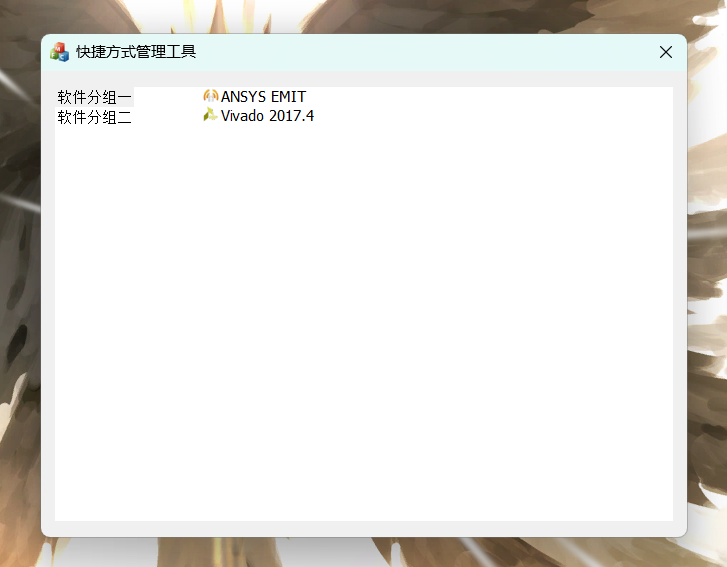
八、最终效果
九、将项目进行打包发布
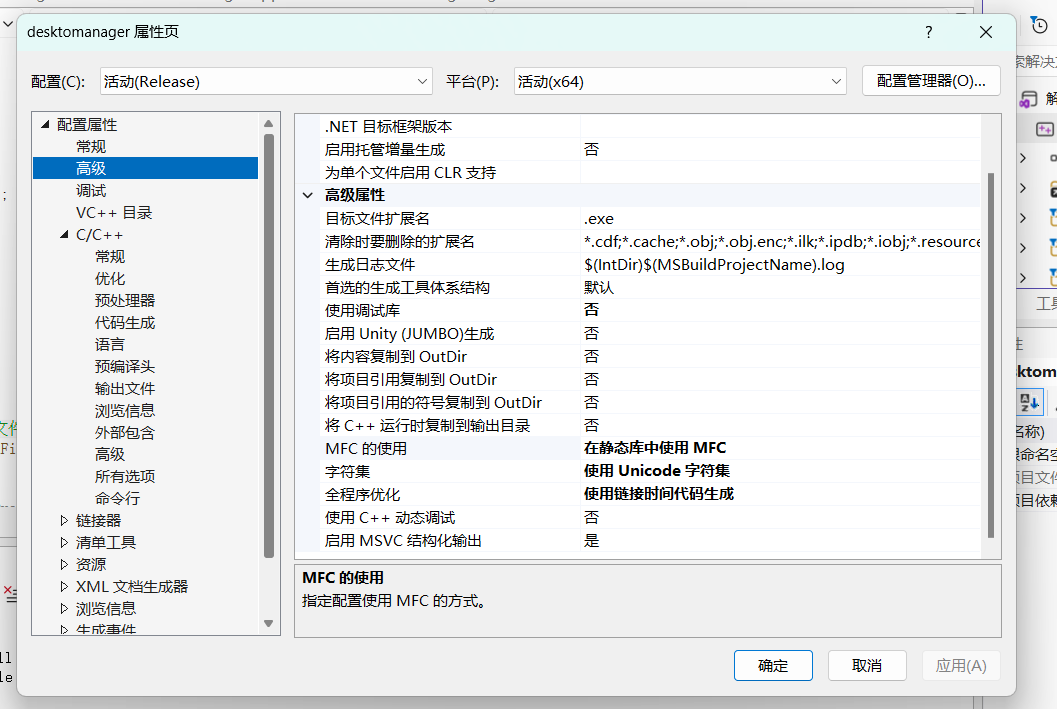
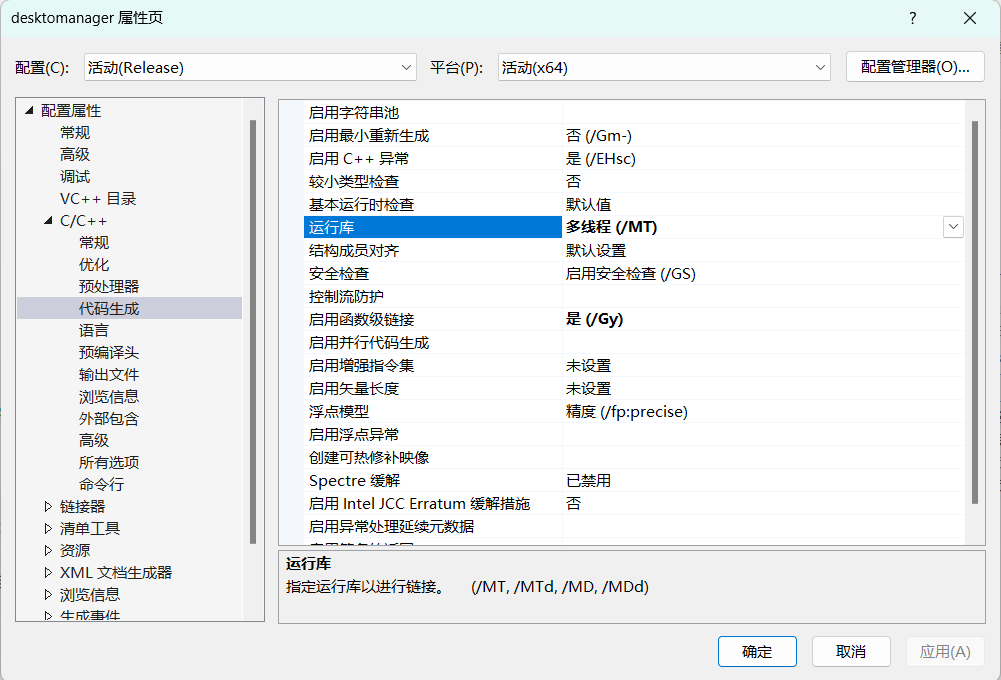
项目(对其右键)->属性:
高级->MFC的使用:在静态库中使用 MFC
C/C++->代码生成->运行库:多线程 (/MT)
再点击生成即可:

完整的代码之后会发到github上。