文章目录
- 引言
- 一、项目搭建与依赖选择
-
- [1.1 Maven项目结构](#1.1 Maven项目结构)
- [1.2 最小化依赖](#1.2 最小化依赖)
- 二、消息模型:对话的基石
-
- [2.1 角色定义](#2.1 角色定义)
- [2.2 消息模型](#2.2 消息模型)
- [2.3 工具调用相关模型](#2.3 工具调用相关模型)
- [2.4 记忆管理](#2.4 记忆管理)
- 三、LLM客户端:对接大模型API
- 四、Agent核心:ReAct循环实现
-
- [4.1 BaseAgent:循环骨架](#4.1 BaseAgent:循环骨架)
- [4.2 ToolCallAgent:ReAct核心引擎](#4.2 ToolCallAgent:ReAct核心引擎)
- 五、工具系统:可插拔的能力扩展
-
- [5.1 工具接口](#5.1 工具接口)
- [5.2 工具基类](#5.2 工具基类)
- [5.3 工具注册中心](#5.3 工具注册中心)
- [5.4 首批工具:文件读写](#5.4 首批工具:文件读写)
- 六、ManusAgent:组装一切
- 七、启动入口
- 八、执行流程图
- 总结
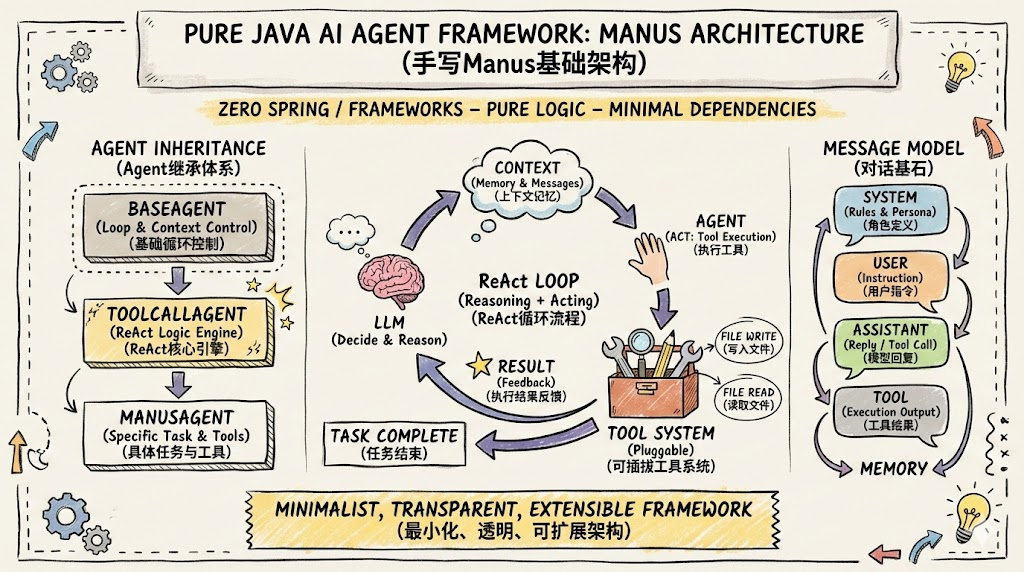
引言
当我们谈论AI Agent时,最核心的问题是:一个Agent到底是怎么运转的? 它如何接收用户指令?如何决定调用哪个工具?如何在多轮交互中保持上下文?
接下来我将从零开始,用纯Java(不依赖Spring框架)搭建一个完整的AI Agent基础架构。我们将实现:
- 三层Agent继承体系(BaseAgent → ToolCallAgent → ManusAgent)
- OpenAI兼容的LLM客户端
- 消息模型与记忆管理
- 可插拔的工具系统
- 文件读写工具作为首批能力
完成后,这个Agent就能接收用户指令,调用大模型进行推理,选择合适的工具执行任务,并将结果反馈给大模型继续决策------这就是经典的ReAct(Reasoning + Acting)模式。
一、项目搭建与依赖选择
1.1 Maven项目结构
java
ai-manus/
├── pom.xml
└── src/main/java/com/zhouyu/
    ├── ManusApplication.java          # 启动入口
    ├── agent/
    │   ├── BaseAgent.java             # Agent基类
    │   ├── ToolCallAgent.java         # 工具调用Agent
    │   └── ManusAgent.java            # 具体Agent实现
    ├── model/
    │   ├── ModelConfig.java           # 模型配置
    │   ├── OpenAIClient.java          # LLM API客户端
    │   ├── Message.java               # 消息模型
    │   ├── Memory.java                # 记忆管理
    │   ├── ModelResponse.java         # 模型响应
    │   ├── Role.java                  # 角色枚举
    │   ├── ToolCall.java              # 工具调用模型
    │   ├── ToolDefinition.java        # 工具定义
    │   └── Function.java              # 函数模型
    └── tools/
        ├── Tool.java                  # 工具接口
        ├── BaseTool.java              # 工具基类
        ├── ToolCollection.java        # 工具注册中心
        ├── ToolResult.java            # 工具执行结果
        └── impl/
            ├── FileWriterTool.java    # 文件写入工具
            └── FileReaderTool.java    # 文件读取工具
1.2 最小化依赖
项目刻意选择"最小依赖"原则,不使用Spring等重型框架:
xml
<dependencies>
    <!-- HTTP客户端:调用LLM API -->
    <dependency>
        <groupId>com.squareup.okhttp3</groupId>
        <artifactId>okhttp</artifactId>
        <version>4.12.0</version>
    </dependency>

    <!-- JSON处理 -->
    <dependency>
        <groupId>com.fasterxml.jackson.core</groupId>
        <artifactId>jackson-databind</artifactId>
        <version>2.16.1</version>
    </dependency>

    <!-- 日志 -->
    <dependency>
        <groupId>org.slf4j</groupId>
        <artifactId>slf4j-api</artifactId>
        <version>2.0.12</version>
    </dependency>
    <dependency>
        <groupId>ch.qos.logback</groupId>
        <artifactId>logback-classic</artifactId>
        <version>1.4.14</version>
    </dependency>

    <!-- 减少样板代码 -->
    <dependency>
        <groupId>org.projectlombok</groupId>
        <artifactId>lombok</artifactId>
        <version>1.18.26</version>
    </dependency>
</dependencies>这样做的好处是:你看到的每一行代码都是Agent逻辑本身,没有框架魔法的干扰。
二、消息模型:对话的基石
2.1 角色定义
OpenAI Chat API定义了四种消息角色,我们用枚举来表示:
java
public enum Role {
    SYSTEM("system"),       // 系统提示词,定义Agent行为
    USER("user"),           // 用户输入
    ASSISTANT("assistant"), // 大模型回复(可能包含tool_calls)
    TOOL("tool");           // 工具执行结果

    private final String value;

    Role(String value) { this.value = value; }
    public String getValue() { return value; }
}
2.2 消息模型
Message类需要兼容OpenAI Chat Completions API的消息格式,同时支持多模态(文本+图片):
java
@Data
@AllArgsConstructor
@NoArgsConstructor
public class Message {
    private Role role;
    private String content;
    private List<ToolCall> toolCalls;   // assistant消息携带的工具调用请求
    private String name;                // tool消息的工具名
    private String toolCallId;          // tool消息关联的调用ID
    private String base64Image;         // 多模态图片数据(Base64编码)

    // 静态工厂方法,创建不同角色的消息
    public static Message userMessage(String content) {
        return new Message(Role.USER, content);
    }

    public static Message systemMessage(String content) {
        return new Message(Role.SYSTEM, content);
    }

    public static Message assistantMessage(String content) {
        return new Message(Role.ASSISTANT, content);
    }

    public static Message toolMessage(String content, String name,
                                       String toolCallId, String base64Image) {
        Message msg = new Message(Role.TOOL, content);
        msg.setName(name);
        msg.setToolCallId(toolCallId);
        msg.setBase64Image(base64Image);
        return msg;
    }
}
关键设计点:
toolCalls字段:当大模型决定调用工具时,返回的assistant消息会包含tool_calls列表toolCallId字段:工具执行结果必须通过toolCallId与对应的调用请求关联,这是OpenAI协议要求base64Image字段:预留多模态支持,后续浏览器截图等功能会用到
2.3 工具调用相关模型
java
// 工具调用请求
@Data
@AllArgsConstructor
@NoArgsConstructor
public class ToolCall {
    private String id;
    private String type = "function";
    private Function function;
}

// 函数信息
@Data
@NoArgsConstructor
@AllArgsConstructor
public class Function {
    private String name;       // 函数名
    private String arguments;  // 参数(JSON字符串)
}

// 工具定义(传给LLM的元信息)
@Data
@NoArgsConstructor
@AllArgsConstructor
@Builder
public class ToolDefinition {
    private String name;
    private String description;
    private Map<String, Object> parameters;  // JSON Schema格式
}
2.4 记忆管理
初始版本的Memory非常简洁------一个消息列表:
java
@Data
public class Memory {
    private List<Message> messages;

    public Memory() {
        this.messages = new ArrayList<>();
    }

    public void addMessage(Message message) {
        messages.add(message);
    }
}
所有消息(系统提示、用户输入、模型回复、工具结果)都存入Memory,保证上下文的完整性。
三、LLM客户端:对接大模型API
OpenAIClient负责与大模型API通信。它使用OkHttp3发送HTTP请求,兼容OpenAI Chat Completions API格式:
java
public class OpenAIClient {
    private final ModelConfig modelConfig;
    private final OkHttpClient httpClient;
    private final ObjectMapper objectMapper;

    public OpenAIClient(ModelConfig modelConfig) {
        this.modelConfig = modelConfig;
        this.objectMapper = new ObjectMapper();
        this.httpClient = new OkHttpClient.Builder()
                .connectTimeout(Duration.ofSeconds(30))
                .readTimeout(Duration.ofMinutes(5))   // 大模型推理需要较长时间
                .writeTimeout(Duration.ofMinutes(5))
                .build();
    }

    public ModelResponse chat(List<Message> messages, List<ToolDefinition> tools) {
        Map<String, Object> requestBody = new HashMap<>();
        requestBody.put("model", modelConfig.getModel());
        requestBody.put("messages", convertMessagesToApiFormat(messages));

        // 仅在有工具时传入tools参数
        if (tools != null && !tools.isEmpty()) {
            requestBody.put("tools", convertToolsToApiFormat(tools));
        }

        String jsonBody = objectMapper.writeValueAsString(requestBody);

        Request request = new Request.Builder()
                .url(modelConfig.getBaseUrl() + "/chat/completions")
                .post(RequestBody.create(jsonBody, JSON))
                .addHeader("Authorization", "Bearer " + modelConfig.getApiKey())
                .build();

        try (Response response = httpClient.newCall(request).execute()) {
            return parseResponse(response.body().string());
        }
    }
}
多模态消息转换
客户端自动处理含图片的消息,转为OpenAI多模态格式:
java
private List<Map<String, Object>> convertMessagesToApiFormat(List<Message> messages) {
    List<Map<String, Object>> apiMessages = new ArrayList<>();
    for (Message message : messages) {
        Map<String, Object> apiMessage = new HashMap<>();
        apiMessage.put("role", message.getRole().getValue());

        if (message.getContent() != null) {
            if (message.getBase64Image() != null) {
                // 多模态content数组
                List<Map<String, Object>> content = new ArrayList<>();
                content.add(Map.of("type", "text", "text", message.getContent()));
                content.add(Map.of("type", "image_url",
                    "image_url", Map.of("url",
                        "data:image/jpeg;base64," + message.getBase64Image())));
                apiMessage.put("content", content);
            } else {
                apiMessage.put("content", message.getContent());
            }
        }
        // ... 处理toolCalls、name、toolCallId等字段
        apiMessages.add(apiMessage);
    }
    return apiMessages;
}
工具定义转换
遵循OpenAI Function Calling标准格式:
java
private List<Map<String, Object>> convertToolsToApiFormat(List<ToolDefinition> tools) {
    List<Map<String, Object>> apiTools = new ArrayList<>();
    for (ToolDefinition tool : tools) {
        apiTools.add(Map.of(
            "type", "function",
            "function", Map.of(
                "name", tool.getName(),
                "description", tool.getDescription(),
                "parameters", tool.getParameters()
            )
        ));
    }
    return apiTools;
}
四、Agent核心:ReAct循环实现
4.1 BaseAgent:循环骨架
BaseAgent定义了Agent执行的基本骨架------一个有限步数的循环:
java
public abstract class BaseAgent {
    protected final Memory memory;
    private final int maxStep;
    protected String systemPrompt;

    public BaseAgent(String systemPrompt) {
        this.memory = new Memory();
        this.maxStep = 10;     // 安全阀:防止无限循环
        this.systemPrompt = systemPrompt;
    }

    public String run(String prompt) {
        // 1. 初始化上下文
        memory.addMessage(Message.systemMessage(systemPrompt));
        memory.addMessage(Message.userMessage(prompt));

        int currentStep = 0;
        StringBuilder allStepResult = new StringBuilder();

        // 2. ReAct循环
        while (currentStep < maxStep) {
            StepResult stepResult = step();  // 子类实现单步逻辑
            allStepResult.append(stepResult.output).append("/n");

            if (!stepResult.isShouldContinue()) {
                break;  // 大模型认为任务完成
            }
            currentStep++;
        }
        return allStepResult.toString();
    }

    protected abstract StepResult step();

    @Data @Builder
    public static class StepResult {
        private final String output;           // 当前步的输出
        private final boolean shouldContinue;  // 是否继续执行
    }
}
4.2 ToolCallAgent:ReAct核心引擎
ToolCallAgent实现了ReAct循环的单步逻辑------这是整个系统的灵魂:
java
public class ToolCallAgent extends BaseAgent {
    protected ToolCollection toolCollection;
    protected OpenAIClient openAIClient;
    private ObjectMapper objectMapper;

    @Override
    protected StepResult step() {
        // 1. 获取全部上下文消息和工具定义
        List<Message> contextMessages = memory.getMessages();
        List<ToolDefinition> toolDefinitions = toolCollection.getToolDefinitions();

        // 2. 调用大模型
        ModelResponse modelResponse = openAIClient.chat(contextMessages, toolDefinitions);

        // 3. 大模型决定调用工具
        if (modelResponse.hasToolCalls()) {
            Message assistantMessage = Message.assistantMessage(modelResponse.getContent());
            assistantMessage.setToolCalls(convertToToolCalls(modelResponse.getToolCalls()));
            memory.addMessage(assistantMessage);
            return handleToolCalls(modelResponse.getToolCalls());
        }

        // 4. 大模型直接回复文本
        if (modelResponse.getContent() != null && !modelResponse.getContent().isBlank()) {
            memory.addMessage(Message.assistantMessage(modelResponse.getContent()));
        }

        // 5. 判断是否结束(finish_reason == "stop")
        if (modelResponse.getFinishReason().equals("stop")) {
            return StepResult.builder()
                .shouldContinue(false)
                .output("大模型认为任务已经执行结束").build();
        }

        return StepResult.builder()
            .shouldContinue(true)
            .output(modelResponse.getContent()).build();
    }
}核心设计决策:
- 工具执行后
shouldContinue始终为true------工具只是中间步骤,执行结果需要反馈给大模型做下一步决策 - 严格维护消息链------先存assistant的tool_calls消息,再存tool的执行结果消息,这个顺序不能乱
- 错误也要存入Memory------让大模型知道工具执行失败了,它可以调整策略
工具执行的实现:
java
private StepResult handleToolCalls(List<Object> toolCalls) {
    StringBuilder allResults = new StringBuilder();
    for (Object toolCallObj : toolCalls) {
        try {
            JsonNode toolCallNode = objectMapper.valueToTree(toolCallObj);
            String toolCallId = toolCallNode.get("id").asText();
            String toolName = toolCallNode.get("function").get("name").asText();
            String argumentsJson = toolCallNode.get("function").get("arguments").asText();

            // 解析参数并执行工具
            Map<String, Object> arguments = objectMapper.readValue(argumentsJson, Map.class);
            ToolResult result = toolCollection.executeTool(toolName, arguments);

            // 将结果封装为toolMessage
            String resultContent = result.hasError()
                ? "Error: " + result.getError()
                : result.getOutput().toString();

            Message toolMessage = Message.toolMessage(
                resultContent, toolName, toolCallId, result.getBase64Image());
            memory.addMessage(toolMessage);
        } catch (Exception e) {
            // 错误也存入Memory
            Message errorMessage = Message.toolMessage(
                "工具执行失败: " + e.getMessage(), "unknown",
                UUID.randomUUID().toString());
            memory.addMessage(errorMessage);
        }
    }
    return StepResult.builder().shouldContinue(true).output(allResults.toString()).build();
}
五、工具系统:可插拔的能力扩展
5.1 工具接口
java
public interface Tool {
    String getName();
    String getDescription();
    Map<String, Object> getParametersSchema();   // JSON Schema
    ToolResult execute(Map<String, Object> parameters);

    default ToolDefinition toDefinition() {
        return new ToolDefinition(getName(), getDescription(), getParametersSchema());
    }
}
5.2 工具基类
BaseTool提供构建JSON Schema和安全提取参数的辅助方法:
java
public abstract class BaseTool implements Tool {
    protected final String name;
    protected final String description;

    // JSON Schema构建辅助
    protected Map<String, Object> stringParam(String description) {
        return Map.of("type", "string", "description", description);
    }

    protected Map<String, Object> boolParam(String description) {
        return Map.of("type", "boolean", "description", description);
    }

    // 安全的参数提取
    protected String getString(Map<String, Object> parameters, String key) {
        Object value = parameters.get(key);
        return value != null ? value.toString() : null;
    }

    // Schema组装
    protected Map<String, Object> buildSchema(
            Map<String, Map<String, Object>> properties, List<String> required) {
        Map<String, Object> schema = new HashMap<>();
        schema.put("type", "object");
        schema.put("properties", properties);
        if (required != null && !required.isEmpty()) {
            schema.put("required", required);
        }
        return schema;
    }
}
5.3 工具注册中心
java
public class ToolCollection {
    private final Map<String, Tool> tools = new HashMap<>();

    public void addTool(Tool tool) {
        tools.put(tool.getName(), tool);
    }

    public List<ToolDefinition> getToolDefinitions() {
        List<ToolDefinition> definitions = new ArrayList<>();
        for (Tool tool : tools.values()) {
            definitions.add(tool.toDefinition());
        }
        return definitions;
    }

    public ToolResult executeTool(String toolName, Map<String, Object> parameters) {
        Tool tool = tools.get(toolName);
        if (tool == null) {
            return ToolResult.error("Tool not found: " + toolName);
        }
        return tool.execute(parameters);
    }
}
5.4 首批工具:文件读写
FileWriterTool------支持写入和追加模式:
java
public class FileWriterTool extends BaseTool {

    public FileWriterTool() {
        super("write_file", "写入内容到文件");
    }

    @Override
    public Map<String, Object> getParametersSchema() {
        return buildSchema(
            Map.of(
                "file_path", stringParam("要写入的文件路径"),
                "content", stringParam("要写入文件的内容"),
                "append", boolParam("追加到文件而不是覆盖(默认:false)")
            ),
            List.of("file_path", "content")
        );
    }

    @Override
    public ToolResult execute(Map<String, Object> parameters) {
        try {
            String filePath = getString(parameters, "file_path");
            String content = getString(parameters, "content");
            boolean append = getBoolean(parameters, "append", false);

            Path path = Paths.get(filePath);
            if (path.getParent() != null) {
                Files.createDirectories(path.getParent());
            }

            if (append) {
                Files.writeString(path, content, StandardOpenOption.CREATE, StandardOpenOption.APPEND);
            } else {
                Files.writeString(path, content, StandardOpenOption.CREATE, StandardOpenOption.TRUNCATE_EXISTING);
            }

            return ToolResult.success("成功写入文件:" + filePath);
        } catch (IOException e) {
            return ToolResult.error("写入文件失败:" + e.getMessage());
        }
    }
}FileReaderTool:
java
public class FileReaderTool extends BaseTool {

    public FileReaderTool() {
        super("read_file", "读取文件内容");
    }

    @Override
    public ToolResult execute(Map<String, Object> parameters) {
        try {
            String filePath = getString(parameters, "file_path");
            Path path = Paths.get(filePath);
            if (!Files.exists(path)) {
                return ToolResult.error("文件不存在:" + filePath);
            }
            return ToolResult.success(Files.readString(path));
        } catch (IOException e) {
            return ToolResult.error("读取文件失败:" + e.getMessage());
        }
    }
}
六、ManusAgent:组装一切
ManusAgent是面向用户的具体Agent,负责注册工具、配置系统提示词、管理工作空间:
java
public class ManusAgent extends ToolCallAgent {

    private final static String SYSTEM_PROMPT = """
        # 角色定义
        你是Manus,一个多功能的AI代理,能够使用可用的工具处理各种任务。

        # 规则
        - 工作目录:{workspace}
        - 一次只能执行一个工具
        """;

    public ManusAgent(OpenAIClient openAIClient) {
        super(openAIClient, null, null);

        // 注册工具
        ToolCollection toolCollection = new ToolCollection();
        toolCollection.addTool(new FileWriterTool());
        toolCollection.addTool(new FileReaderTool());
        this.toolCollection = toolCollection;

        // 创建workspace工作目录
        Path workspaceRoot = getProjectRoot().resolve("workspace");
        Files.createDirectories(workspaceRoot);
        this.systemPrompt = SYSTEM_PROMPT.replace("{workspace}", workspaceRoot.toString());
    }
}
七、启动入口
java
public class ManusApplication {
    public static void main(String[] args) {
        OpenAIClient openAIClient = new OpenAIClient(ModelConfig.builder()
                .baseUrl("https://dashscope.aliyuncs.com/compatible-mode/v1")
                .apiKey(System.getenv("DASHSCOPE_API_KEY"))
                .model("qwen-plus")
                .build());

        ManusAgent manusAgent = new ManusAgent(openAIClient);

        String prompt = "请帮我用HTML、CSS、JS创建一个简单的贪吃蛇游戏,分成三个文件";
        manusAgent.run(prompt);

        System.exit(0);
    }
}
八、执行流程图
java
用户输入: "创建贪吃蛇游戏"
       ▼
┌─ BaseAgent.run() ──────────────────────────┐
│  Memory: [SystemMsg, UserMsg]               │
│       ▼                                     │
│  ┌─ ToolCallAgent.step() ────────────────┐  │
│  │  LLM推理 → 返回 write_file(snake.html)│  │
│  │  执行工具 → 存入结果 → continue=true   │  │
│  └───────────────────────────────────────┘  │
│       ▼                                     │
│  ┌─ step() ──────────────────────────────┐  │
│  │  LLM推理 → 返回 write_file(snake.css) │  │
│  │  执行工具 → 存入结果 → continue=true   │  │
│  └───────────────────────────────────────┘  │
│       ▼                                     │
│  ┌─ step() ──────────────────────────────┐  │
│  │  LLM推理 → 返回 write_file(snake.js)  │  │
│  │  执行工具 → 存入结果 → continue=true   │  │
│  └───────────────────────────────────────┘  │
│       ▼                                     │
│  ┌─ step() ──────────────────────────────┐  │
│  │  LLM推理 → finish_reason="stop"       │  │
│  │  任务完成 → continue=false             │  │
│  └───────────────────────────────────────┘  │
└─────────────────────────────────────────────┘
总结
通过这篇文章,我们搭建了一个AI Agent的完整基础架构:
- 三层Agent体系 :
BaseAgent负责循环控制,ToolCallAgent负责ReAct逻辑,ManusAgent负责具体业务 - 消息驱动架构:所有交互通过Message对象流转,严格遵循OpenAI Chat API协议
- 可插拔工具系统 :通过
Tool接口和ToolCollection注册中心,工具的增减不影响Agent核心逻辑 - LLM作为决策引擎:Agent不包含硬编码的决策规则,所有决策由大模型在运行时完成
这个基础架构已经可以通过文件读写工具完成简单任务。在后续文章中,我们将逐步为它添加Docker沙箱、网页搜索、浏览器自动化等更强大的能力。
