本文属于【Azure 架构师学习笔记】系列。
本文属于【Azure AI】系列。
接上文 【Azure 架构师学习笔记 】- Azure AI(5)-Azure认知服务-Azure Computer Vision OCR
前言
如果说前一篇OCR是让机器"看见"文字,那么Document Intelligence就是让机器"读懂"文档。它是Azure上一项专门从文档中提取结构化信息的AI服务,前身是Azure Form Recognizer。最常用的地方就是发票。
它的核心价值:你的OCR提取的是"一堆文字",而Document Intelligence提取的是按照需求"发票号码:INV-001"、"总金额:$1,600"、"到期日:2025-09-25"这样的键值对。
Document Intelligence的三大核心能力
-
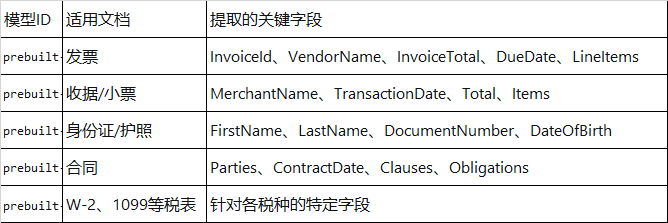
预置模型(Prebuilt Models)------ 30+种开箱即用
和Computer Vision一样,无需训练,直接调用。常用的预置模型有:
-
自定义模型(Custom Models)------专属模型
当你的文档不在预置模型覆盖范围内时(比如公司内部的报销单、特殊行业表格),你可以训练自己的模型。
训练要求:
- 需要5-50份标注好的文档样本(依复杂度而定)
- 可以使用Document Intelligence Studio的可视化标注界面,无需写代码
- 支持组合模型:把多个自定义模型打包成一个,自动路由到正确的模型处理
- 通用文档分析(Layout/General Document)------ 理解文档结构
布局分析:提取段落、标题、表格、选择标记的位置和层级关系
语义分块:将文档分解为语义完整的"块",这对后面做RAG(检索增强生成)至关重要
实操
首先安装必要的SDK。
python
pip install azure-ai-documentintelligence使用下面的代码,修改必要的信息。
python
from azure.ai.documentintelligence import DocumentIntelligenceClient
from azure.core.credentials import AzureKeyCredential
import os


# 配置(替换成你的)
endpoint = "https://XXXX.cognitiveservices.azure.com/"
key = "你的密码"

def analyze_invoice(file_path):
    """识别发票,提取关键信息"""
    # 1. 创建客户端
    client = DocumentIntelligenceClient(
        endpoint=endpoint,
        credential=AzureKeyCredential(key)
    )

    # 2. 打开文件
    with open(file_path, "rb") as f:
        file_data = f.read()

    # 3. 调用预置发票模型
    poller = client.begin_analyze_document(
        "prebuilt-invoice",
        body=file_data,
        content_type="application/pdf"   # 如果图片是 image/jpeg
    )
    result = poller.result()

    # 4. 提取字段
    if result.documents:
        doc = result.documents[0]
        fields = doc.fields

        # 安全提取(部分字段可能不存在)
        invoice_id = fields.get("InvoiceId", {}).get("valueString") if fields.get("InvoiceId") else "N/A"
        vendor_name = fields.get("VendorName", {}).get("valueString") if fields.get("VendorName") else "N/A"
        total = fields.get("InvoiceTotal", {}).get("valueCurrency", {}).get("amount") if fields.get("InvoiceTotal") else "N/A"
        due_date = fields.get("DueDate", {}).get("valueDate") if fields.get("DueDate") else "N/A"

        print(f"发票号: {invoice_id}")
        print(f"供应商: {vendor_name}")
        print(f"总金额: {total}")
        print(f"到期日: {due_date}")

        # 提取明细项(如果有)
        if fields.get("Items"):
            print("\n明细项:")
            for item in fields["Items"].get("valueArray", []):
                desc = item.get("valueObject", {}).get("Description", {}).get("valueString", "")
                amount = item.get("valueObject", {}).get("Amount", {}).get("valueCurrency", {}).get("amount", "")
                print(f"  - {desc}: {amount}")
    else:
        print("未识别到任何文档")

# 使用示例
analyze_invoice("invoice_sample.pdf")
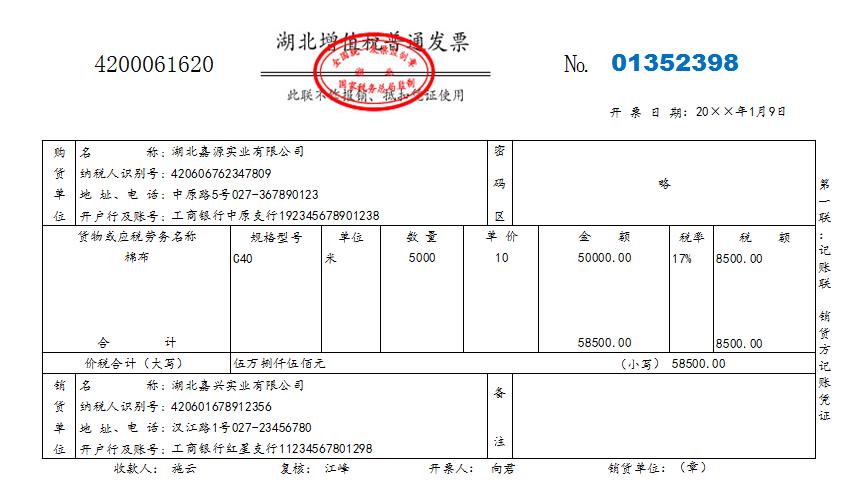
下面是从网上下载的示例发票。
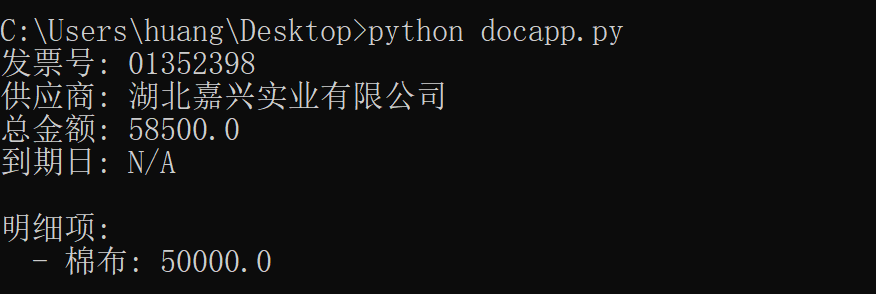
执行后可以看到提取信息。
接下来再尝试另外一个简单的实操
布局分析(Layout Model)------ 理解文档结构
因为上面的发票结构也以表格为主,我们尝试用代码分析这个表格结构
python
from azure.ai.documentintelligence import DocumentIntelligenceClient
from azure.core.credentials import AzureKeyCredential

endpoint = "https://xxxxx.cognitiveservices.azure.com/"
key = "xxxxx"

client = DocumentIntelligenceClient(endpoint=endpoint, credential=AzureKeyCredential(key))

with open("文件名字需要放到跟代码同一个目录下.pdf", "rb") as f:
    poller = client.begin_analyze_document(
        "prebuilt-layout",  # 使用布局模型
        body=f.read(),
        content_type="application/pdf"
    )
result = poller.result()

# 提取表格
for table in result.tables:
    print(f"表格有 {table.row_count} 行, {table.column_count} 列")
    for cell in table.cells:
        print(f"  单元格 [{cell.row_index},{cell.column_index}]: {cell.content}")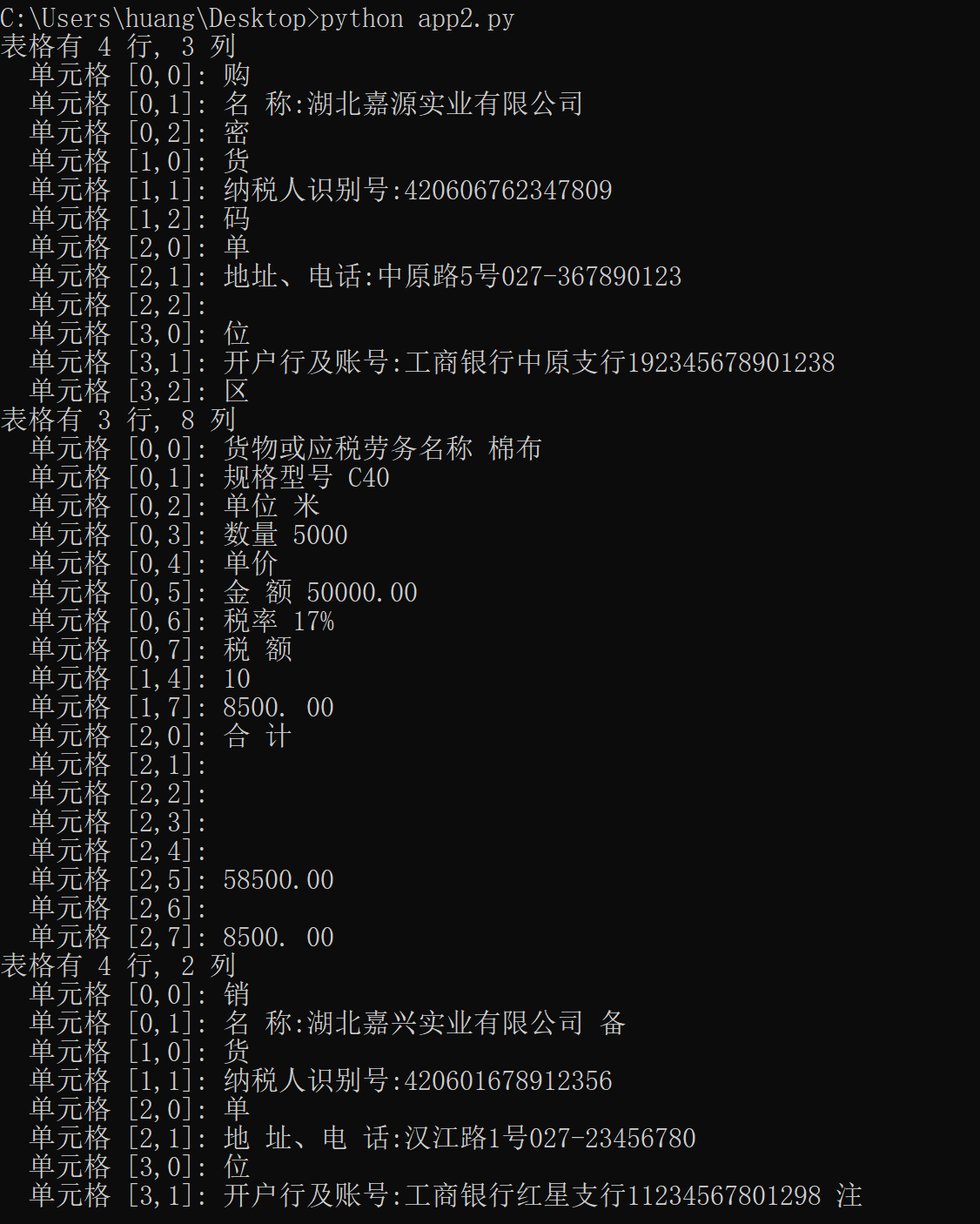
这种方式看似简单,但是对于后续的RAG 使用而言是非常必要的。
小结
我们从Computer Vision OCR(提取文字)进阶到Document Intelligence(提取含义)。前者是基础,后者是真正的业务价值所在。比如OCR只是提取文字,Document Intelligence是理解文档结构并提取语义信息。发票上有"500",OCR只知道这是文字"500",Document Intelligence知道这是"InvoiceTotal"字段的值,类型是金额。
当然真正的使用产生价值还需要一些进阶功能,我们在下一文继续。