实验简介
一、Nginx 搭建下载服务器实验
实验目的
配置 Nginx 作为文件下载服务器,实现文件列表展示、下载速度限制、文件大小 / 时间显示优化、页面风格自定义等功能。
核心操作
- 基础配置:创建下载目录
/usr/local/nginx/download,放入测试文件(passwd、100M 的 bigfile),配置location /download指向该目录; - 启用列表功能:添加
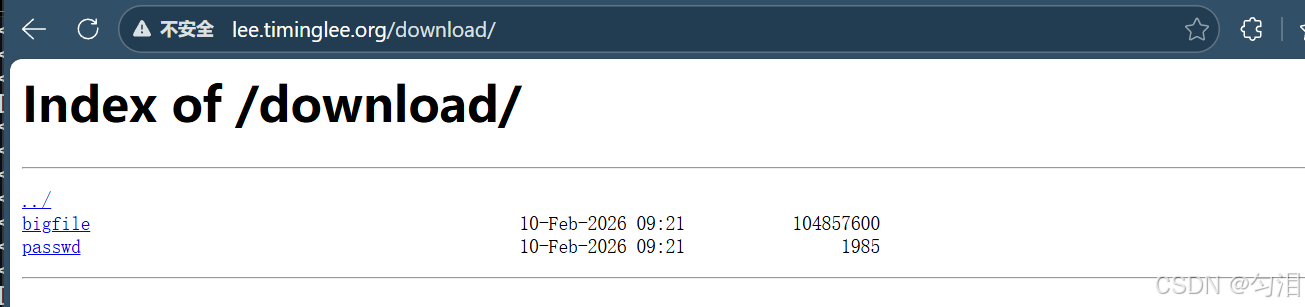
autoindex on;,访问/download/可展示文件列表; - 下载控速:添加
limit_rate 1024k;,限制下载速度为 1MB/s(测试 wget 下载 bigfile,速度从 232MB/s 降至 1MB/s); - 显示优化:
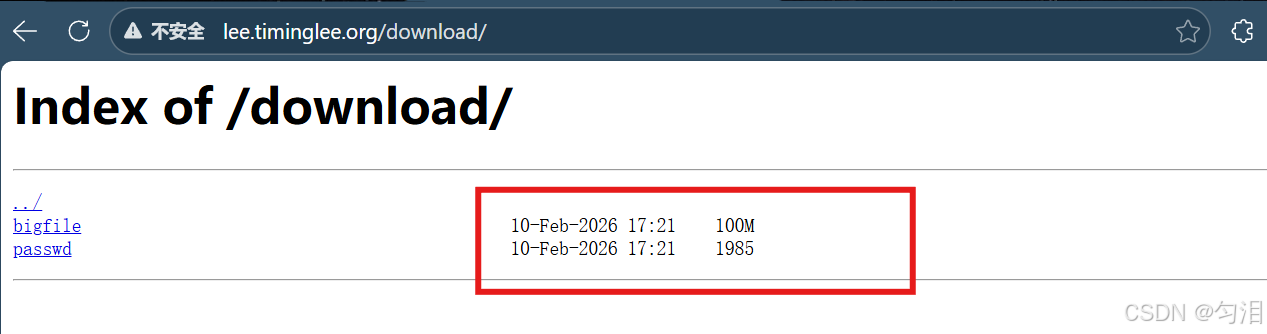
autoindex_exact_size off;:以易读单位(如 100M)显示文件大小(而非字节数);autoindex_localtime on;:以服务器本地时间显示文件修改时间;
- 页面风格:通过
autoindex_format指定列表格式(html/xml/json/jsonp),适配不同访问场景。
二、Nginx 文件检测实验
实验目的
配置 Nginx 的try_files指令和错误页面,实现访问不存在的 URI 时,自动匹配指定文件(而非直接返回 404 错误),提升访问容错性。
核心操作
- 创建默认错误页面文件
/usr/local/nginx/errorpage/default.html; - 在虚拟主机配置中添加
try_files $uri $uri.html $uri/index.html /default.html;,按顺序匹配 URI、URI.html、URI/index.html,均匹配失败则返回 default.html; - 配置
error_page指定 404/405/502/503 等错误码指向自定义错误路径; - 重载 Nginx 后,访问不存在的
lee.timinglee.org/aaaaaaaaaa/,返回 default.html 的内容(而非 404),HTTP 状态码仍为 200。
三、Nginx 状态页实验
实验目的
配置 Nginx 的stub_status模块,暴露 Nginx 运行状态(如连接数、请求数等),并通过认证和 IP 白名单限制访问,保障状态页安全。
核心操作
- 在虚拟主机中新增
location /nginx_status块,启用stub_status;; - 配置
auth_basic基础认证,指定认证用户文件/usr/local/nginx/conf/.htpasswd; - 通过
allow 172.25.254.0/24; deny all;限制仅内网段可访问; - 重载 Nginx 后,访问
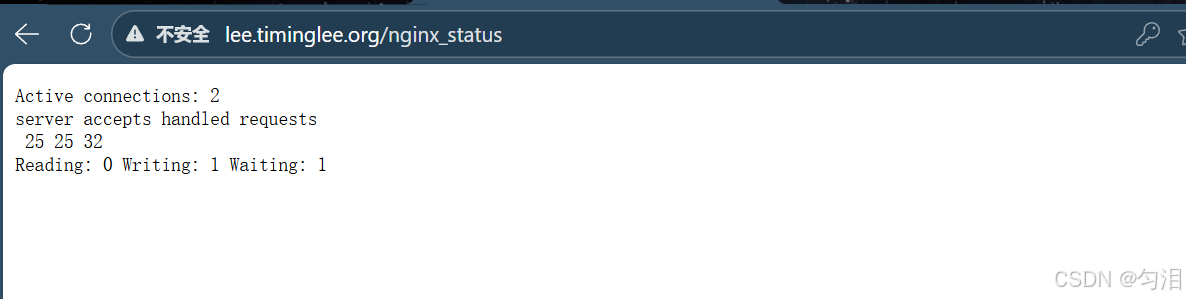
lee.timinglee.org/nginx_status需输入账号密码,且仅指定 IP 段可访问,页面展示 Nginx 连接 / 请求状态。
四、Nginx 压缩功能实验
实验目的
配置 Nginx 的gzip模块,对指定类型的响应内容进行压缩,减少网络传输量,提升访问速度。
核心操作
- 在
nginx.conf中全局启用 gzip 压缩:gzip on;:开启压缩;gzip_comp_level 4;:设置压缩级别(1-9,级别越高压缩率越高);gzip_min_length 1024k;:仅对大于 1024k 的内容压缩;gzip_types:指定压缩的内容类型(文本、JS、CSS、图片等);gzip_static on;:优先使用预压缩的.gz 文件;
- 准备大文件
bigfile.txt和小文件index.html作为测试素材; - 重载 Nginx 后,通过
curl --head --compressed测试:- 大文件
bigfile.txt返回Content-Encoding: gzip,说明压缩生效; - 小文件
index.html因小于gzip_min_length,未触发压缩。
- 大文件
五、Nginx 变量
实验目的
深入理解 Nginx 内置变量的触发条件(如请求参数、Cookie、用户代理等),验证echo模块与变量的结合使用,为后续变量应用(如反向代理、限流)打基础。
核心操作
- 升级 Nginx 并编译
echo-nginx-module模块(解决默认 Nginx 无 echo 指令的问题); - 逐个测试内置变量:
$args:输出 URL 请求参数(如?key=lee&id=11);$is_args:判断是否有参数(有则输出?,无则为空);$cookie_key2:输出客户端 Cookie 中 key2 的值;$remote_user:输出基础认证的用户名;
- 通过
curl -b(设置Cookie) -A(设置User-Agent) -u(设置认证账号)模拟请求,验证变量取值的准确性。
六、Nginx 自定义变量实验
实验目的
理解 Nginx 内置变量的含义,掌握自定义变量的创建、赋值与传递,通过echo模块输出变量值验证效果。
核心操作
- 先升级 Nginx 并添加
echo-nginx-module模块(支持echo指令输出内容); - 在
location /vars块中,通过echo输出内置变量:- 网络相关:
$remote_addr(客户端 IP)、$remote_port(客户端端口)、$server_addr(服务端 IP)等; - 请求相关:
$request_method(请求方法)、$request_uri(完整请求 URI)、$args(请求参数)等; - 路径相关:
$document_root(网站根目录)、$document_uri(请求文档路径)等;
- 网络相关:
- 自定义变量:通过
set $test lee;创建变量并赋值,通过set $web_port $server_port;实现变量传递; - 重载 Nginx 后,访问
lee.timinglee.org/vars/,可直观看到所有内置 / 自定义变量的取值。
Nginx中建立下载服务器
[root@nginx ~]# mkdir  -p /usr/local/nginx/download
[root@nginx ~]# cp /etc/passwd  /usr/local/nginx/download/
[root@nginx ~]# dd if=/dev/zero of=/usr/local/nginx/download/bigfile bs=1M count=100
记录了100+0 的读入
记录了100+0 的写出
104857600字节(105 MB,100 MiB)已复制,0.132682 s,790 MB/s
[root@nginx ~]# vim /usr/local/nginx/conf/conf.d/vhosts.conf
server {
    listen 80;
    server_name lee.timinglee.org;
    error_page 404 405 503 502 /error;
    error_log logs/timinglee.org/lee.error error;
    location /lee {
        root /usr/local/nginx/html;
    }

    location /error {
        alias /usr/local/nginx/errorpage/errormessage;
    }


    location /download {
        root /usr/local/nginx;
    }
}
[root@nginx ~]# nginx -s reload
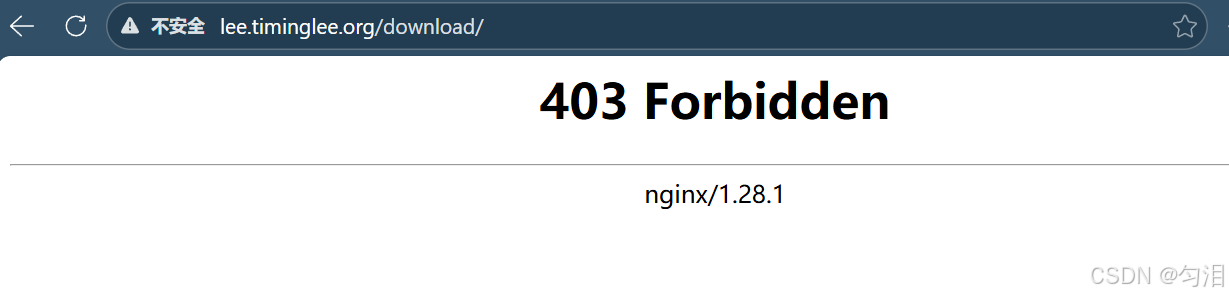
访问
启用列表功能
[root@nginx ~]# vim /usr/local/nginx/conf/conf.d/vhosts.conf
server {
    listen 80;
    server_name lee.timinglee.org;
    error_page 404 405 503 502 /error;
    error_log logs/timinglee.org/lee.error error;
    location /lee {
        root /usr/local/nginx/html;
    }

    location /error {
        alias /usr/local/nginx/errorpage/errormessage;
    }


    location /download {
        root /usr/local/nginx;
        autoindex on;
    }
}
[root@nginx ~]# nginx -s reload
访问
下载控速
[root@nginx ~]# wget http://lee.timinglee.org/download/bigfile
--2026-02-10 17:31:00--  http://lee.timinglee.org/download/bigfile
正在解析主机 lee.timinglee.org (lee.timinglee.org)... 172.25.254.100
正在连接 lee.timinglee.org (lee.timinglee.org)|172.25.254.100|:80... 已连接。
已发出 HTTP 请求,正在等待回应... 200 OK
长度:104857600 (100M) [application/octet-stream]
正在保存至: "bigfile"

bigfile                           100%[==========================================================>] 100.00M   512MB/s  用时 0.2s

2026-02-10 17:31:00 (512 MB/s) - 已保存 "bigfile" [104857600/104857600])

[root@nginx ~]# rm -fr bigfile
[root@nginx ~]# vim /usr/local/nginx/conf/conf.d/vhosts.conf
server {
    listen 80;
    server_name lee.timinglee.org;
    error_page 404 405 503 502 /error;
    error_log logs/timinglee.org/lee.error error;
    location /lee {
        root /usr/local/nginx/html;
    }

    location /error {
        alias /usr/local/nginx/errorpage/errormessage;
    }


    location /download {
        root /usr/local/nginx;
        autoindex on;
        limit_rate 1024k;
    }
}
[root@nginx ~]# nginx -s reload
[root@nginx ~]# wget http://lee.timinglee.org/download/bigfile
--2026-02-10 17:31:42--  http://lee.timinglee.org/download/bigfile
正在解析主机 lee.timinglee.org (lee.timinglee.org)... 172.25.254.100
正在连接 lee.timinglee.org (lee.timinglee.org)|172.25.254.100|:80... 已连接。
已发出 HTTP 请求,正在等待回应... 200 OK
长度:104857600 (100M) [application/octet-stream]
正在保存至: "bigfile"

bigfile                             2%[>                                                          ]   2.00M  1.02MB/s
显示文件大小优化
[root@nginx ~]# vim /usr/local/nginx/conf/conf.d/vhosts.conf
server {
    listen 80;
    server_name lee.timinglee.org;
    error_page 404 405 503 502 /error;
    error_log logs/timinglee.org/lee.error error;
    location /lee {
        root /usr/local/nginx/html;
    }

    location /error {
        alias /usr/local/nginx/errorpage/errormessage;
    }


    location /download {
        root /usr/local/nginx;
        autoindex on;
        limit_rate 1024k;
        autoindex_exact_size off;
    }
}
[root@nginx ~]# nginx -s reload
[root@nginx ~]# curl  lee.timinglee.org/download
<html>
<head><title>301 Moved Permanently</title></head>
<body>
<center><h1>301 Moved Permanently</h1></center>
<hr><center>nginx/1.28.1</center>
</body>
</html>
[root@nginx ~]# curl  lee.timinglee.org/download/
<html>
<head><title>Index of /download/</title></head>
<body>
<h1>Index of /download/</h1><hr><pre><a href="../">../</a>
<a href="bigfile">bigfile</a>                                            10-Feb-2026 09:21    100M
<a href="passwd">passwd</a>                                             10-Feb-2026 09:21    1985
</pre><hr></body>
</html>
时间显示调整
[root@nginx ~]# vim /usr/local/nginx/conf/conf.d/vhosts.conf
server {
    listen 80;
    server_name lee.timinglee.org;
    error_page 404 405 503 502 /error;
    error_log logs/timinglee.org/lee.error error;
    location /lee {
        root /usr/local/nginx/html;
    }

    location /error {
        alias /usr/local/nginx/errorpage/errormessage;
    }


    location /download {
        root /usr/local/nginx;
        autoindex on;
        limit_rate 1024k;
        autoindex_exact_size off;
        autoindex_localtime on;
    }
}
[root@nginx ~]# nginx -s reload
访问
设定页面风格
[root@nginx ~]# vim /usr/local/nginx/conf/conf.d/vhosts.conf
server {
    listen 80;
    server_name lee.timinglee.org;
    error_page 404 405 503 502 /error;
    error_log logs/timinglee.org/lee.error error;
    location /lee {
        root /usr/local/nginx/html;
    }

    location /error {
        alias /usr/local/nginx/errorpage/errormessage;
    }


    location /download {
        root /usr/local/nginx;
        autoindex on;
        limit_rate 1024k;
        autoindex_exact_size off;
        autoindex_localtime on;
        autoindex_format html | xml | json | jsonp;
    }
}
[root@nginx ~]# nginx -s reload
访问(xml风格)

Nginx的文件检测
[root@nginx ~]# echo default > /usr/local/nginx/errorpage/default.html
[root@nginx ~]# cat /usr/local/nginx/errorpage/default.html
default
[root@nginx ~]# vim /usr/local/nginx/conf/conf.d/vhosts.conf
server {
    listen 80;
    server_name lee.timinglee.org;
    error_page 404 405 503 502 /error;
    error_log logs/timinglee.org/lee.error error;
    root /usr/local/nginx/errorpage;
    try_files $uri $uri.html $uri/index.html /default.html;
}
[root@nginx ~]# nginx -s reload
[root@nginx ~]# curl -v  lee.timinglee.org/aaaaaaaaaa/
*   Trying 172.25.254.100:80...
* Connected to lee.timinglee.org (172.25.254.100) port 80 (#0)
> GET /aaaaaaaaaa/ HTTP/1.1
> Host: lee.timinglee.org
> User-Agent: curl/7.76.1
> Accept: */*
>
* Mark bundle as not supporting multiuse
< HTTP/1.1 200 OK
< Server: nginx/1.28.1
< Date: Tue, 10 Feb 2026 09:41:11 GMT
< Content-Type: text/html
< Content-Length: 8
< Last-Modified: Tue, 10 Feb 2026 09:40:29 GMT
< Connection: keep-alive
< ETag: "698afd0d-8"
< Accept-Ranges: bytes
<
default
* Connection #0 to host lee.timinglee.org left intact
Nginx的状态页
[root@nginx ~]# vim /usr/local/nginx/conf/conf.d/vhosts.conf
server {
    listen 80;
    server_name lee.timinglee.org;

    location /nginx_status{
        stub_status;
        auth_basic "auth login";
        auth_basic_user_file /usr/local/nginx/conf/.htpasswd;
        allow 172.25.254.0/24;
        deny all;
    }
}
[root@nginx ~]# nginx -s reload
访问
Nginx的压缩功能
[root@nginx ~]# mkdir  /usr/local/nginx/timinglee.org/lee/html -p
[root@nginx ~]# echo  hello lee > /usr/local/nginx/timinglee.org/lee/html/index.html
[root@nginx ~]# cp /usr/local/nginx/logs/access.log /usr/local/nginx/timinglee.org/lee/html/bigfile.txt
[root@nginx ~]# vim /usr/local/nginx/conf/nginx.conf
 gzip  on;
    gzip_comp_level 4;
    gzip_disable "MSIE [1-6]\.";
    gzip_min_length 1024k;
    gzip_buffers 32 1024k;
    gzip_types text/plain application/javascript application/x-javascript text/css  application/xml text/javascript application/x-httpd-php image/gif image/png;
    gzip_vary on;
    gzip_static on;
[root@nginx ~]# vim /usr/local/nginx/conf/conf.d/vhosts.conf
server {
    listen 80;
    server_name lee.timinglee.org;
    root /usr/local/nginx/timinglee.org/lee/html;
    location /nginx_status{
        stub_status;
        auth_basic "auth login";
        auth_basic_user_file /usr/local/nginx/conf/.htpasswd;
        allow 172.25.254.0/24;
        deny all;
    }
}
[root@nginx ~]# nginx -s reload

#测试
[root@nginx ~]# curl  --head --compressed  lee.timinglee.org/bigfile.txt
HTTP/1.1 200 OK
Server: nginx/1.28.1
Date: Tue, 10 Feb 2026 09:54:29 GMT
Content-Type: text/plain
Content-Length: 11271
Last-Modified: Tue, 10 Feb 2026 09:51:17 GMT
Connection: keep-alive
ETag: "698aff95-2c07"
Accept-Ranges: bytes

[root@nginx ~]# curl  --head --compressed  lee.timinglee.org/index.html
HTTP/1.1 200 OK
Server: nginx/1.28.1
Date: Tue, 10 Feb 2026 09:54:34 GMT
Content-Type: text/html
Content-Length: 10
Last-Modified: Tue, 10 Feb 2026 09:51:14 GMT
Connection: keep-alive
ETag: "698aff92-a"
Accept-Ranges: bytes
Nginx 变量
升级Nginx支持echo
[root@nginx ~]# systemctl stop nginx.service
[root@nginx ~]# ps aux | grep nginx
avahi        867  0.0  0.7  16656  5632 ?        Ss   16:24   0:00 avahi-daemon: running [nginx.local]
root        2931  0.0  0.3 221812  2560 pts/0    S+   17:55   0:00 grep --color=auto nginx
[root@nginx ~]# tar zxf echo-nginx-module-0.64.tar.gz
[root@Nginx ~]# cd nginx-1.28.1/
[root@Nginx nginx-1.28.1]# make clean
[root@Nginx nginx-1.28.1]# ./configure  --prefix=/usr/local/nginx --user=nginx --group=nginx --with-http_ssl_module --with-http_v2_module --with-http_realip_module --with-http_stub_status_module --with-http_gzip_static_module --with-pcre --with-stream --with-stream_ssl_module --with-stream_realip_module  --add-module=/root/echo-nginx-module-0.64
[root@Nginx nginx-1.28.1]# make
[root@Nginx nginx-1.28.1]# rm -rf /usr/local/nginx/sbin/nginx
[root@Nginx nginx-1.28.1]# cp objs/nginx /usr/local/nginx/sbin/ -p

#测试
[root@nginx nginx-1.28.1]# vim /usr/local/nginx/conf/conf.d/vhosts.conf
server {
    listen 80;
    server_name lee.timinglee.org;
    root /usr/local/nginx/timinglee.org/lee/html;
    location /vars {
        default_type text/html;
        echo $remote_addr;
    }
}
[root@nginx nginx-1.28.1]# nginx -t
nginx: the configuration file /usr/local/nginx/conf/nginx.conf syntax is ok
nginx: configuration file /usr/local/nginx/conf/nginx.conf test is successful
[root@nginx nginx-1.28.1]# systemctl start nginx.service
理解内建变量
[root@nginx nginx-1.28.1]# vim /usr/local/nginx/conf/conf.d/vhosts.conf
server {
    listen 80;
    server_name lee.timinglee.org;
    root /usr/local/nginx/timinglee.org/lee/html;
    location /vars {
        default_type text/html;
        echo $remote_addr;
    }
}
[root@nginx nginx-1.28.1]# nginx -s reload
[root@nginx nginx-1.28.1]# curl  lee.timinglee.org/vars/
172.25.254.100
[root@nginx nginx-1.28.1]# vim /usr/local/nginx/conf/conf.d/vhosts.conf
server {
    listen 80;
    server_name lee.timinglee.org;
    root /usr/local/nginx/timinglee.org/lee/html;
    location /vars {
        default_type text/html;
        echo $args;
    }
}
[root@nginx nginx-1.28.1]# nginx -s reload
[root@nginx nginx-1.28.1]# curl "http://lee.timinglee.org/vars?key=lee&id=11"
key=lee&id=11
[root@nginx nginx-1.28.1]# vim /usr/local/nginx/conf/conf.d/vhosts.conf
[root@nginx nginx-1.28.1]# nginx -s reload
[root@nginx nginx-1.28.1]# curl "http://lee.timinglee.org/vars?key=lee&id=11"
key=lee&id=11
?
[root@Nginx nginx-1.28.1]# curl "http://lee.timinglee.org/vars"

[root@nginx nginx-1.28.1]# vim /usr/local/nginx/conf/conf.d/vhosts.conf
server {
    listen 80;
    server_name lee.timinglee.org;
    root /usr/local/nginx/timinglee.org/lee/html;
    location /vars {
        default_type text/html;
        echo $document_root;
    }
}
[root@nginx nginx-1.28.1]# nginx -s reload
[root@nginx nginx-1.28.1]# curl "http://lee.timinglee.org/vars?key=lee&id=11"
/usr/local/nginx/timinglee.org/lee/html
[root@nginx nginx-1.28.1]# vim /usr/local/nginx/conf/conf.d/vhosts.conf
server {
    listen 80;
    server_name lee.timinglee.org;
    root /usr/local/nginx/timinglee.org/lee/html;
    location /vars {
        default_type text/html;
        echo $remote_addr;
        echo $args;
        echo $is_args;
        echo $document_root;
        echo $document_uri;
        echo $host;
        echo $remote_port;
        echo $remote_user;
        echo $request_method;
        echo $request_filename;
        echo $request_uri;
        echo $scheme;
        echo $server_protocol;
        echo $server_addr;
        echo $server_name;
        echo $server_port;
        echo $http_user_agent;
        echo $cookie_key2;
        echo $http_user_agent;
        echo $sent_http_content_type;
    }
}
[root@nginx nginx-1.28.1]# nginx -s reload
[root@nginx nginx-1.28.1]# curl "http://lee.timinglee.org/vars?key=lee&id=11"
172.25.254.100
key=lee&id=11
?
/usr/local/nginx/timinglee.org/lee/html
/vars
lee.timinglee.org
51496

GET
/usr/local/nginx/timinglee.org/lee/html/vars
/vars?key=lee&id=11
http
HTTP/1.1
172.25.254.100
lee.timinglee.org
80
curl/7.76.1

curl/7.76.1
text/html
自定义变量
[root@nginx nginx-1.28.1]# vim /usr/local/nginx/conf/conf.d/vhosts.conf
server {
    listen 80;
    server_name lee.timinglee.org;
    root /usr/local/nginx/timinglee.org/lee/html;
    location /vars {
        default_type text/html;
        echo $remote_addr;
        echo $args;
        echo $is_args;
        echo $document_root;
        echo $document_uri;
        echo $host;
        echo $remote_port;
        echo $remote_user;
        echo $request_method;
        echo $request_filename;
        echo $request_uri;
        echo $scheme;
        echo $server_protocol;
        echo $server_addr;
        echo $server_name;
        echo $server_port;
        echo $http_user_agent;
        echo $cookie_key2;
        echo $http_user_agent;
        echo $sent_http_content_type;
        set $test lee;					#手动设定变量值
     	echo $test;
        set $web_port $server_port;		#变量个传递
        echo $web_port;
    }
}
[root@nginx nginx-1.28.1]# nginx -s reload
[root@nginx nginx-1.28.1]# curl  lee.timinglee.org/vars/
172.25.254.100


/usr/local/nginx/timinglee.org/lee/html
/vars/
lee.timinglee.org
49398

GET
/usr/local/nginx/timinglee.org/lee/html/vars/
/vars/
http
HTTP/1.1
172.25.254.100
lee.timinglee.org
80
curl/7.76.1

curl/7.76.1
text/html
lee
80