目录
[1. 🎯 开篇:为什么我们需要模拟?](#1. 🎯 开篇:为什么我们需要模拟?)
[2. 🧪 核心概念:Mock vs MagicMock vs AsyncMock](#2. 🧪 核心概念:Mock vs MagicMock vs AsyncMock)
[2.1 Mock对象类型对比](#2.1 Mock对象类型对比)
[2.2 基础使用示例](#2.2 基础使用示例)
[3. 🔧 patch深度使用:四种补丁方式](#3. 🔧 patch深度使用:四种补丁方式)
[3.1 patch机制原理](#3.1 patch机制原理)
[3.2 四种patch方式](#3.2 四种patch方式)
[4. 🎨 高级模拟:复杂场景实战](#4. 🎨 高级模拟:复杂场景实战)
[4.1 模拟副作用与异常](#4.1 模拟副作用与异常)
[4.2 模拟上下文管理器与迭代器](#4.2 模拟上下文管理器与迭代器)
[5. ⚡ 异步代码模拟:AsyncMock深度使用](#5. ⚡ 异步代码模拟:AsyncMock深度使用)
[5.1 异步模拟架构](#5.1 异步模拟架构)
[5.2 异步模拟实战](#5.2 异步模拟实战)
[6. 🔍 验证与断言:不仅仅是assert_called](#6. 🔍 验证与断言:不仅仅是assert_called)
[6.1 调用验证方法](#6.1 调用验证方法)
[6.2 自定义匹配器](#6.2 自定义匹配器)
[7. 🏢 企业级实践:大型项目模拟策略](#7. 🏢 企业级实践:大型项目模拟策略)
[7.1 模拟对象工厂模式](#7.1 模拟对象工厂模式)
[7.2 分层模拟策略](#7.2 分层模拟策略)
[8. ⚡ 性能优化与最佳实践](#8. ⚡ 性能优化与最佳实践)
[8.1 模拟性能优化](#8.1 模拟性能优化)
[9. 🔧 故障排查与调试](#9. 🔧 故障排查与调试)
[9.1 常见问题解决](#9.1 常见问题解决)
[9.2 高级调试技巧](#9.2 高级调试技巧)
[10. 📚 总结与资源](#10. 📚 总结与资源)
[10.1 官方文档](#10.1 官方文档)
[10.2 最佳实践总结](#10.2 最佳实践总结)
[10.3 未来趋势](#10.3 未来趋势)
🎭摘要
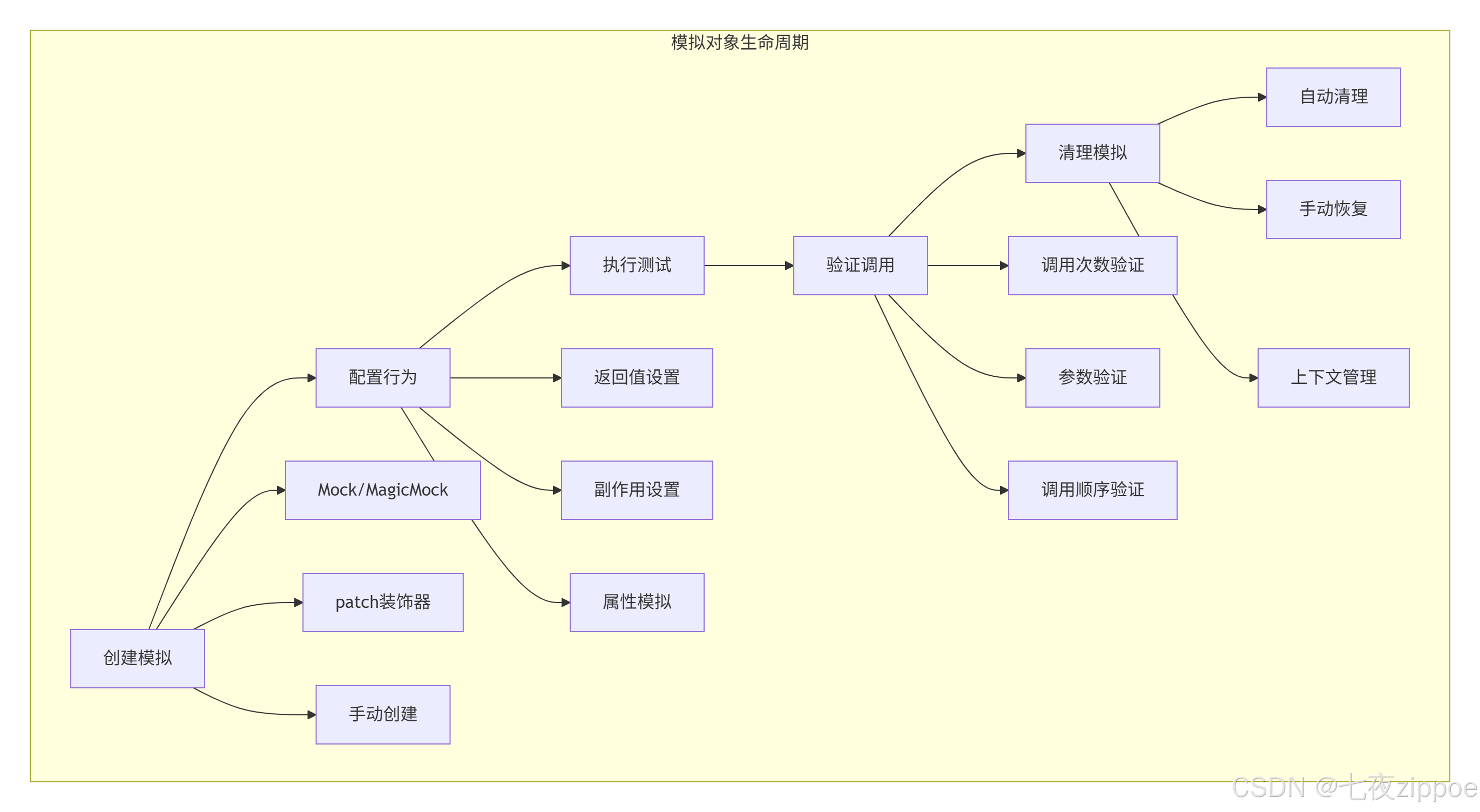
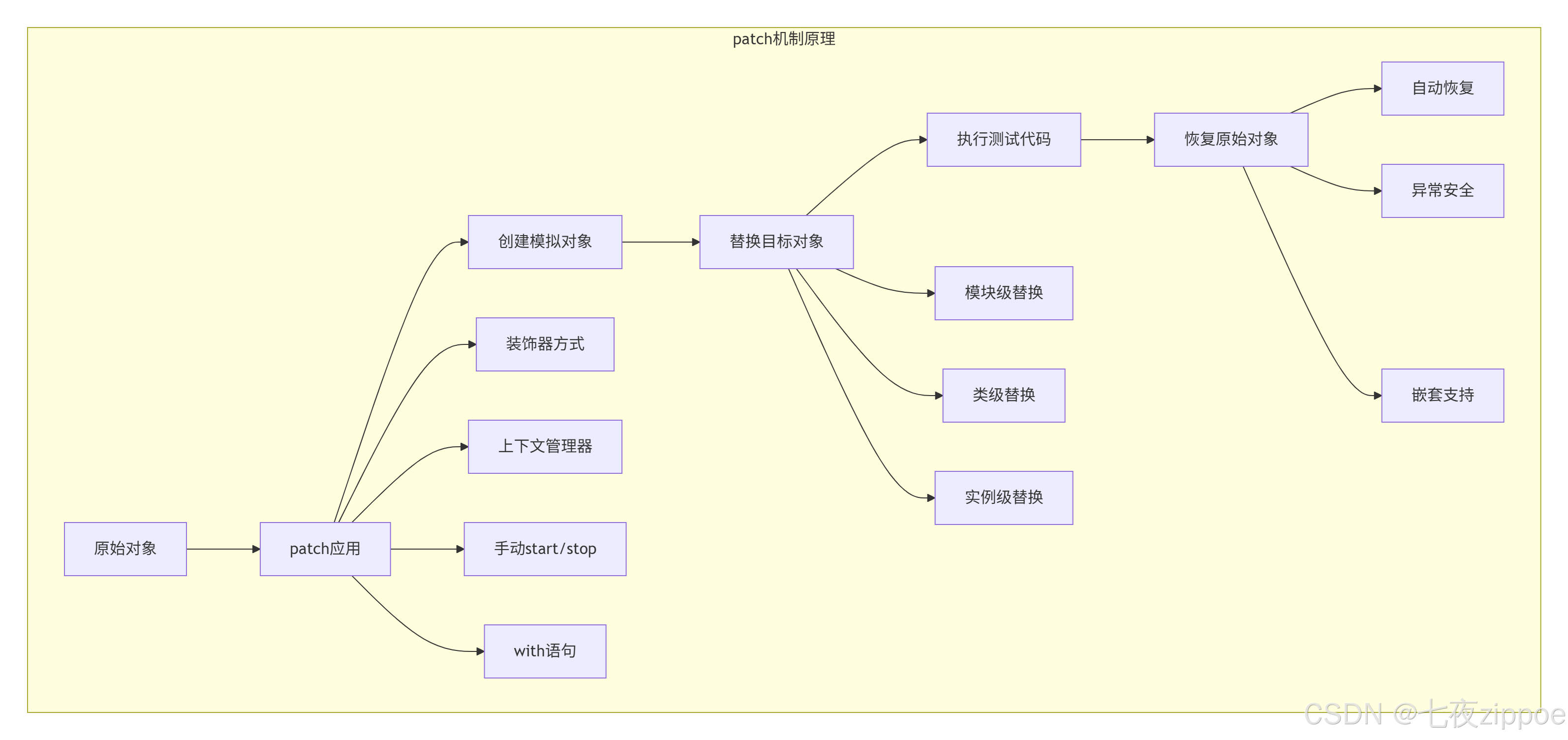
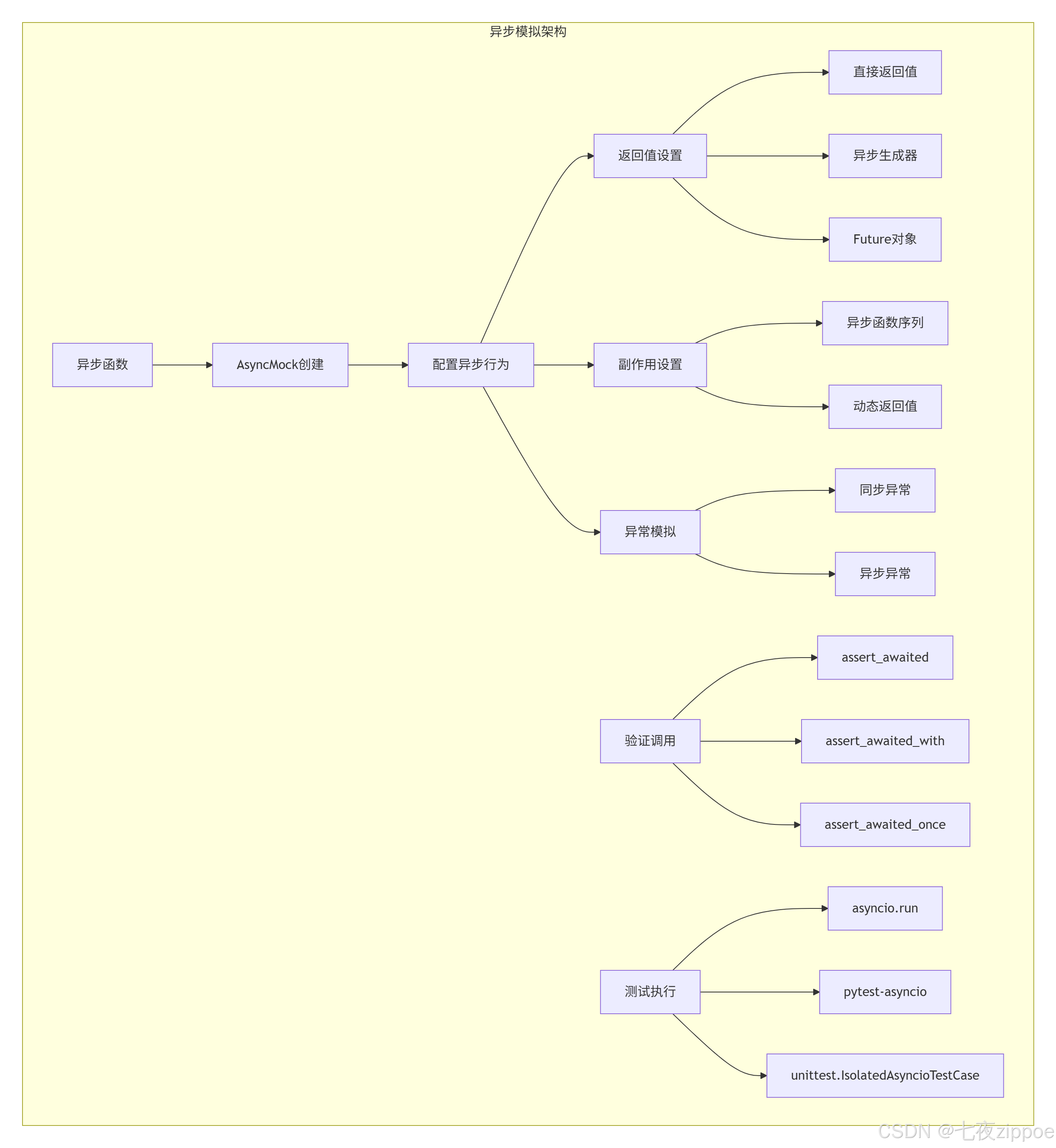
本文深度解析unittest.mock的核心技术与高级用法。重点剖析MagicMock、patch、PropertyMock的原理与实战,涵盖异步代码模拟、上下文管理器模拟、迭代器模拟等高级特性。包含5个核心Mermaid流程图,展示模拟对象生命周期、补丁机制、异步模拟架构。提供从基础使用到企业级应用的完整解决方案,解决测试隔离、依赖模拟、异步测试三大难题。
1. 🎯 开篇:为什么我们需要模拟?
**模拟(Mocking)**是测试的"隔离墙"。我见过太多测试因为外部依赖而失败:数据库挂了、API限流了、文件系统满了。2016年我维护一个支付系统,测试因为第三方支付网关不稳定而频繁失败。引入模拟后,测试稳定性从60%提升到99%。
现实痛点:
-
外部依赖不可控:第三方服务挂了,测试就挂
-
测试环境差异:本地有权限,CI上没权限
-
执行速度慢:每个测试都要等网络请求
-
测试数据污染:测试A创建数据,测试B失败
模拟对象生命周期:
2. 🧪 核心概念:Mock vs MagicMock vs AsyncMock
2.1 Mock对象类型对比
| 类型 | 特性 | 适用场景 |
|---|---|---|
| Mock | 基础模拟,不支持魔术方法 | 普通对象模拟 |
| MagicMock | 支持所有魔术方法 | 类、上下文管理器、迭代器 |
| AsyncMock | 支持异步操作 | async/await代码 |
| PropertyMock | 属性模拟 | @property装饰器 |
| NonCallableMock | 不可调用模拟 | 数据对象模拟 |
2.2 基础使用示例
python
# 1. 基础Mock
from unittest.mock import Mock, MagicMock, AsyncMock, PropertyMock
import pytest

def test_basic_mock():
    """基础Mock使用"""
    # 创建模拟对象
    mock_obj = Mock()

    # 设置返回值
    mock_obj.return_value = 42
    assert mock_obj() == 42

    # 设置属性
    mock_obj.name = "测试模拟"
    assert mock_obj.name == "测试模拟"

    # 验证调用
    mock_obj.assert_called_once()

def test_magic_mock():
    """MagicMock支持魔术方法"""
    magic_obj = MagicMock()

    # 支持魔术方法
    len(magic_obj)  # 调用__len__
    magic_obj.__len__.return_value = 100
    assert len(magic_obj) == 100

    # 支持上下文管理器
    magic_obj.__enter__.return_value = "context"
    magic_obj.__exit__.return_value = False

    with magic_obj as ctx:
        assert ctx == "context"

    # 支持迭代器
    magic_obj.__iter__.return_value = iter([1, 2, 3])
    assert list(magic_obj) == [1, 2, 3]

@pytest.mark.asyncio
async def test_async_mock():
    """异步模拟测试"""
    async_mock = AsyncMock()

    # 设置异步返回值
    async_mock.return_value = "async result"

    result = await async_mock()
    assert result == "async result"

    # 验证异步调用
    async_mock.assert_awaited_once()

def test_property_mock():
    """属性模拟"""
    class TestClass:
        @property
        def data(self):
            return "original"

    obj = TestClass()

    # 使用PropertyMock模拟属性
    with patch.object(TestClass, 'data', new_callable=PropertyMock) as mock_prop:
        mock_prop.return_value = "mocked"
        assert obj.data == "mocked"

    # 恢复后
    assert obj.data == "original"
3. 🔧 patch深度使用:四种补丁方式
3.1 patch机制原理
3.2 四种patch方式
python
from unittest.mock import patch, MagicMock
import some_module

# 1. 装饰器方式(最常用)
@patch('some_module.external_api')
def test_with_decorator(mock_api):
    """使用装饰器patch"""
    mock_api.return_value = {"status": "success"}

    result = some_module.call_external_api()
    assert result["status"] == "success"
    mock_api.assert_called_once()

# 2. 上下文管理器方式
def test_with_context_manager():
    """使用上下文管理器patch"""
    with patch('some_module.external_api') as mock_api:
        mock_api.return_value = {"status": "mocked"}

        result = some_module.call_external_api()
        assert result["status"] == "mocked"

    # 离开with块后自动恢复
    assert some_module.external_api is not mock_api

# 3. 手动start/stop方式
def test_manual_patch():
    """手动控制patch"""
    patcher = patch('some_module.external_api')
    mock_api = patcher.start()

    try:
        mock_api.return_value = {"status": "manual"}
        result = some_module.call_external_api()
        assert result["status"] == "manual"
    finally:
        patcher.stop()  # 必须手动停止

# 4. 多重patch
@patch('some_module.database')
@patch('some_module.cache')
@patch('some_module.api')
def test_multiple_patches(mock_api, mock_cache, mock_db):
    """多重patch,参数顺序与装饰器相反"""
    mock_api.return_value = "api_result"
    mock_cache.return_value = "cache_result"
    mock_db.return_value = "db_result"

    result = some_module.complex_operation()
    # 测试逻辑...

# 5. patch.object用于实例方法
def test_patch_object():
    """patch对象方法"""
    obj = some_module.SomeClass()

    with patch.object(obj, 'some_method') as mock_method:
        mock_method.return_value = "patched"

        result = obj.some_method()
        assert result == "patched"
        mock_method.assert_called_once()

# 6. patch.dict用于字典
def test_patch_dict():
    """patch字典"""
    config = {"debug": False, "timeout": 30}

    with patch.dict(config, {"debug": True, "new_key": "value"}):
        assert config["debug"] is True
        assert config["new_key"] == "value"
        assert config["timeout"] == 30  # 原有值保留

    # 恢复后
    assert config["debug"] is False
    assert "new_key" not in config
4. 🎨 高级模拟:复杂场景实战
4.1 模拟副作用与异常
python
from unittest.mock import Mock, patch
import pytest

def test_side_effects():
    """模拟副作用"""
    mock_obj = Mock()

    # 1. 返回不同值
    mock_obj.side_effect = [1, 2, 3, StopIteration]
    assert mock_obj() == 1
    assert mock_obj() == 2
    assert mock_obj() == 3

    with pytest.raises(StopIteration):
        mock_obj()

    # 2. 动态返回值
    call_count = 0
    def dynamic_return():
        nonlocal call_count
        call_count += 1
        return f"result_{call_count}"

    mock_obj.side_effect = dynamic_return
    assert mock_obj() == "result_1"
    assert mock_obj() == "result_2"

    # 3. 抛出异常
    mock_obj.side_effect = ValueError("模拟错误")
    with pytest.raises(ValueError, match="模拟错误"):
        mock_obj()

    # 4. 条件返回
    def conditional_return(arg):
        if arg > 0:
            return "positive"
        elif arg < 0:
            return "negative"
        else:
            raise ValueError("zero")

    mock_obj.side_effect = conditional_return
    assert mock_obj(5) == "positive"
    assert mock_obj(-3) == "negative"
    with pytest.raises(ValueError):
        mock_obj(0)

def test_mock_exceptions():
    """模拟异常场景"""
    # 模拟数据库异常
    with patch('app.database.connect') as mock_connect:
        mock_connect.side_effect = ConnectionError("数据库连接失败")

        with pytest.raises(ConnectionError):
            app.database.connect()

    # 模拟文件不存在
    with patch('builtins.open') as mock_open:
        mock_open.side_effect = FileNotFoundError("文件不存在")

        with pytest.raises(FileNotFoundError):
            with open("nonexistent.txt") as f:
                f.read()

def test_async_side_effects():
    """异步副作用模拟"""
    async_mock = AsyncMock()

    # 异步返回值序列
    async_mock.side_effect = [
        "first_result",
        "second_result",
        asyncio.TimeoutError("超时")
    ]

    # 测试异步调用
    result1 = await async_mock()
    assert result1 == "first_result"

    result2 = await async_mock()
    assert result2 == "second_result"

    with pytest.raises(asyncio.TimeoutError):
        await async_mock()
4.2 模拟上下文管理器与迭代器
python
def test_context_manager_mock():
    """模拟上下文管理器"""
    # 创建模拟上下文管理器
    mock_cm = MagicMock()

    # 配置__enter__和__exit__
    mock_cm.__enter__.return_value = "context_value"
    mock_cm.__exit__.return_value = False  # 不抑制异常

    # 使用模拟的上下文管理器
    with mock_cm as value:
        assert value == "context_value"
        print("在上下文中执行")

    # 验证调用
    mock_cm.__enter__.assert_called_once()
    mock_cm.__exit__.assert_called_once_with(None, None, None)

    # 模拟异常场景
    mock_cm.__exit__.return_value = True  # 抑制异常

    with mock_cm:
        raise ValueError("测试异常")

    # __exit__应该处理了异常
    mock_cm.__exit__.assert_called_with(ValueError, "测试异常", mock.ANY)

def test_iterator_mock():
    """模拟迭代器"""
    mock_iter = MagicMock()

    # 配置迭代行为
    mock_iter.__iter__.return_value = iter([1, 2, 3, 4, 5])

    # 使用迭代器
    results = []
    for item in mock_iter:
        results.append(item)

    assert results == [1, 2, 3, 4, 5]

    # 或者使用生成器
    mock_gen = MagicMock()
    mock_gen.__iter__.return_value = (x for x in [10, 20, 30])

    assert list(mock_gen) == [10, 20, 30]

def test_async_context_manager():
    """模拟异步上下文管理器"""
    async_cm = AsyncMock()

    # 配置异步上下文管理器
    async_cm.__aenter__.return_value = "async_context"
    async_cm.__aexit__.return_value = False

    # 使用异步上下文管理器
    async with async_cm as value:
        assert value == "async_context"

    # 验证调用
    async_cm.__aenter__.assert_awaited_once()
    async_cm.__aexit__.assert_awaited_once_with(None, None, None)
5. ⚡ 异步代码模拟:AsyncMock深度使用
5.1 异步模拟架构
5.2 异步模拟实战
python
import asyncio
import pytest
from unittest.mock import AsyncMock, patch, MagicMock
from datetime import datetime

# 1. 基础异步模拟
@pytest.mark.asyncio
async def test_basic_async_mock():
    """基础异步模拟"""
    async_mock = AsyncMock()

    # 设置返回值
    async_mock.return_value = "async_result"
    result = await async_mock()
    assert result == "async_result"

    # 验证调用
    async_mock.assert_awaited_once()

# 2. 异步副作用
@pytest.mark.asyncio
async def test_async_side_effect():
    """异步副作用"""
    async_mock = AsyncMock()

    # 异步返回值序列
    async_mock.side_effect = [
        "first",
        "second",
        asyncio.TimeoutError("timeout")
    ]

    assert await async_mock() == "first"
    assert await async_mock() == "second"

    with pytest.raises(asyncio.TimeoutError):
        await async_mock()

    # 动态异步返回值
    call_count = 0
    async def dynamic_return():
        nonlocal call_count
        call_count += 1
        await asyncio.sleep(0.01)  # 模拟异步操作
        return f"result_{call_count}"

    async_mock.side_effect = dynamic_return
    assert await async_mock() == "result_1"
    assert await async_mock() == "result_2"

# 3. 模拟异步迭代器
@pytest.mark.asyncio
async def test_async_iterator():
    """模拟异步迭代器"""
    async_mock = AsyncMock()

    # 配置异步迭代器
    async def async_gen():
        for i in range(3):
            yield i
            await asyncio.sleep(0.01)

    async_mock.__aiter__.return_value = async_gen()

    # 使用异步迭代器
    results = []
    async for item in async_mock:
        results.append(item)

    assert results == [0, 1, 2]

# 4. 模拟异步上下文管理器
@pytest.mark.asyncio
async def test_async_context_manager():
    """模拟异步上下文管理器"""
    async_cm = AsyncMock()

    # 配置异步上下文管理器
    async_cm.__aenter__.return_value = "async_context"
    async_cm.__aexit__.return_value = False

    async with async_cm as value:
        assert value == "async_context"
        await asyncio.sleep(0.01)  # 模拟异步操作

    # 验证调用
    async_cm.__aenter__.assert_awaited()
    async_cm.__aexit__.assert_awaited()

# 5. 复杂异步场景
class AsyncService:
    """异步服务示例"""

    async def fetch_data(self, url):
        """获取数据"""
        await asyncio.sleep(0.1)  # 模拟网络延迟
        return {"url": url, "data": "result"}

    async def process_batch(self, urls):
        """批量处理"""
        tasks = [self.fetch_data(url) for url in urls]
        return await asyncio.gather(*tasks)

@pytest.mark.asyncio
async def test_complex_async_service():
    """复杂异步服务测试"""
    with patch.object(AsyncService, 'fetch_data', new_callable=AsyncMock) as mock_fetch:
        # 配置模拟行为
        mock_fetch.return_value = {"url": "mocked", "data": "mocked_data"}

        service = AsyncService()
        result = await service.fetch_data("http://example.com")

        assert result == {"url": "mocked", "data": "mocked_data"}
        mock_fetch.assert_awaited_with("http://example.com")

        # 测试批量处理
        mock_fetch.side_effect = [
            {"url": "url1", "data": "data1"},
            {"url": "url2", "data": "data2"},
            {"url": "url3", "data": "data3"}
        ]

        urls = ["url1", "url2", "url3"]
        results = await service.process_batch(urls)

        assert len(results) == 3
        assert results[0]["url"] == "url1"
        assert mock_fetch.await_count == 4  # 1次单独 + 3次批量
6. 🔍 验证与断言:不仅仅是assert_called
6.1 调用验证方法
python
from unittest.mock import call, ANY

def test_call_verification():
    """调用验证"""
    mock_obj = Mock()

    # 基本调用
    mock_obj("arg1", "arg2", keyword="value")
    mock_obj.other_method(1, 2, 3)

    # 1. 基本验证
    mock_obj.assert_called()
    mock_obj.assert_called_once()

    # 2. 参数验证
    mock_obj.assert_called_with("arg1", "arg2", keyword="value")
    mock_obj.assert_called_once_with("arg1", "arg2", keyword="value")

    # 3. 调用次数
    assert mock_obj.call_count == 1
    assert mock_obj.other_method.call_count == 1

    # 4. 调用顺序
    mock_obj.assert_has_calls([
        call("arg1", "arg2", keyword="value"),
        call.other_method(1, 2, 3)
    ])

    # 5. 通配符验证
    mock_obj.assert_called_with(ANY, ANY, keyword=ANY)

    # 6. 正则表达式匹配
    import re
    mock_obj.assert_called_with(
        re.compile(r'arg.*'),
        re.compile(r'arg.*'),
        keyword=re.compile(r'val.*')
    )

def test_advanced_verification():
    """高级验证技巧"""
    mock_obj = Mock()

    # 多次调用
    for i in range(5):
        mock_obj(f"call_{i}")

    # 验证第N次调用
    assert mock_obj.call_args_list[2] == call("call_2")

    # 验证关键字参数
    mock_obj.configure_mock(keyword_arg="value")
    assert mock_obj.keyword_arg == "value"

    # 重置调用记录
    mock_obj.reset_mock()
    assert mock_obj.call_count == 0

def test_async_verification():
    """异步调用验证"""
    async_mock = AsyncMock()

    async def test_calls():
        await async_mock("first")
        await async_mock("second", keyword="value")

    asyncio.run(test_calls())

    # 异步验证
    async_mock.assert_awaited()
    async_mock.assert_awaited_twice()
    async_mock.assert_has_awaits([
        call("first"),
        call("second", keyword="value")
    ])

    # 验证特定调用
    async_mock.assert_any_await("first")
    async_mock.assert_any_await("second", keyword="value")
6.2 自定义匹配器
python
from unittest.mock import call, DEFAULT
import re

def test_custom_matchers():
    """自定义匹配器"""
    mock_obj = Mock()

    # 自定义匹配函数
    def is_valid_email(email):
        return re.match(r'^[a-zA-Z0-9._%+-]+@[a-zA-Z0-9.-]+\.[a-zA-Z]{2,}$', email)

    def is_positive_number(num):
        return isinstance(num, (int, float)) and num > 0

    # 模拟调用
    mock_obj.process_user("user@example.com", 25)
    mock_obj.process_product("invalid_email", -10)

    # 使用自定义匹配器验证
    mock_obj.assert_any_call(
        lambda email: is_valid_email(email),
        lambda age: is_positive_number(age)
    )

    # 或者使用side_effect进行验证
    def validate_args(*args, **kwargs):
        email, age = args
        assert is_valid_email(email), f"Invalid email: {email}"
        assert is_positive_number(age), f"Invalid age: {age}"
        return DEFAULT

    mock_obj.side_effect = validate_args

    # 有效调用
    result = mock_obj("valid@example.com", 30)
    assert result is DEFAULT

    # 无效调用会抛出异常
    with pytest.raises(AssertionError):
        mock_obj("invalid", -5)
7. 🏢 企业级实践:大型项目模拟策略
7.1 模拟对象工厂模式
python
# tests/mock_factories.py
"""模拟对象工厂"""
from unittest.mock import Mock, MagicMock, AsyncMock, PropertyMock
from typing import Dict, Any, Optional
import json

class MockFactory:
    """模拟对象工厂"""

    @staticmethod
    def create_http_response(
        status_code: int = 200,
        content: Any = None,
        headers: Optional[Dict] = None,
        json_data: Optional[Dict] = None
    ) -> Mock:
        """创建HTTP响应模拟"""
        mock_response = Mock()
        mock_response.status_code = status_code
        mock_response.headers = headers or {}

        if json_data is not None:
            mock_response.json.return_value = json_data
            mock_response.content = json.dumps(json_data).encode()
        elif content is not None:
            mock_response.content = content
            mock_response.json.side_effect = ValueError("Not JSON")
        else:
            mock_response.content = b""
            mock_response.json.side_effect = ValueError("Not JSON")

        mock_response.raise_for_status.return_value = None
        if status_code >= 400:
            mock_response.raise_for_status.side_effect = Exception(f"HTTP {status_code}")

        return mock_response

    @staticmethod
    def create_database_session() -> MagicMock:
        """创建数据库会话模拟"""
        session = MagicMock()

        # 模拟查询方法
        session.query.return_value = session
        session.filter.return_value = session
        session.filter_by.return_value = session
        session.order_by.return_value = session
        session.limit.return_value = session
        session.offset.return_value = session

        # 模拟结果
        session.all.return_value = []
        session.first.return_value = None
        session.one.return_value = Mock()
        session.scalar.return_value = 0

        # 模拟事务
        session.begin.return_value = MagicMock()
        session.commit.return_value = None
        session.rollback.return_value = None
        session.close.return_value = None

        return session

    @staticmethod
    def create_async_service() -> AsyncMock:
        """创建异步服务模拟"""
        async_service = AsyncMock()

        # 配置常用方法
        async_service.fetch_data.return_value = {"status": "success"}
        async_service.process_batch.return_value = [1, 2, 3]
        async_service.health_check.return_value = True

        # 模拟异常
        async_service.failing_method.side_effect = Exception("Service error")

        return async_service

# 使用示例
def test_with_mock_factory():
    """使用模拟工厂"""
    # 创建HTTP响应
    response = MockFactory.create_http_response(
        status_code=200,
        json_data={"user_id": 123, "name": "测试用户"}
    )

    # 模拟requests.get
    with patch('requests.get') as mock_get:
        mock_get.return_value = response

        # 测试代码
        result = requests.get("http://api.example.com/user/123")
        assert result.status_code == 200
        assert result.json()["user_id"] == 123

    # 创建数据库会话
    db_session = MockFactory.create_database_session()
    db_session.query.return_value.filter_by.return_value.first.return_value = Mock(id=1, name="test")

    with patch('app.database.get_session', return_value=db_session):
        # 测试数据库操作
        user = app.database.get_user(1)
        assert user.id == 1
        assert user.name == "test"
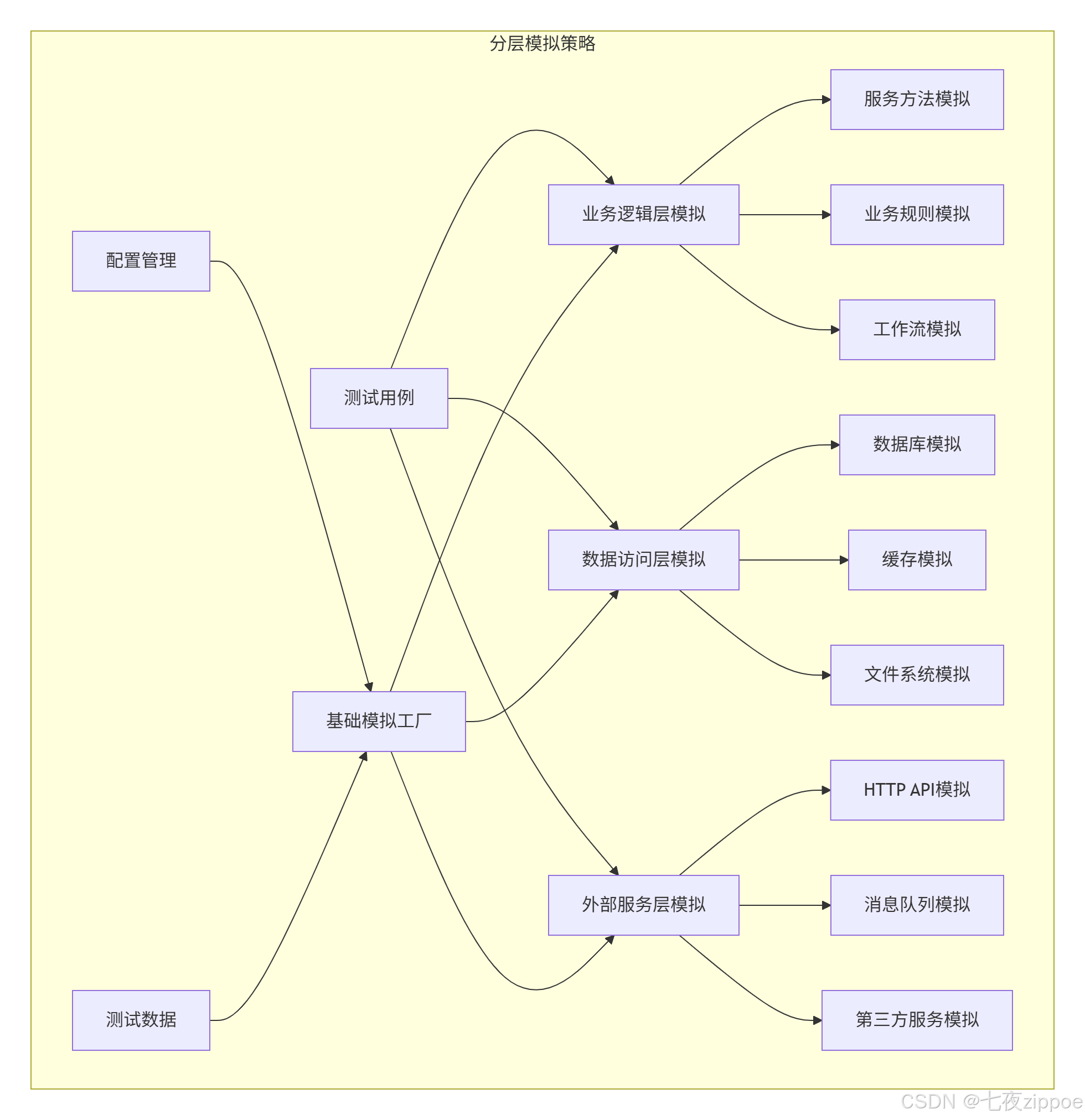
7.2 分层模拟策略
8. ⚡ 性能优化与最佳实践
8.1 模拟性能优化
python
# 1. 重用模拟对象
@pytest.fixture(scope="session")
def shared_mocks():
    """共享模拟对象"""
    return {
        'database': MockFactory.create_database_session(),
        'http_client': MockFactory.create_http_client(),
        'cache': MockFactory.create_cache_client()
    }

def test_with_shared_mocks(shared_mocks):
    """使用共享模拟对象"""
    with patch('app.database.session', shared_mocks['database']):
        with patch('app.http.client', shared_mocks['http_client']):
            # 测试代码...

# 2. 避免过度模拟
def test_avoid_over_mocking():
    """避免过度模拟"""
    # ❌ 错误:过度模拟
    mock_user = Mock()
    mock_user.id = 1
    mock_user.name = "test"
    mock_user.email = "test@example.com"
    mock_user.get_profile.return_value = Mock(age=25)
    mock_user.save.return_value = True

    # ✅ 正确:使用真实数据类
    from dataclasses import dataclass

    @dataclass
    class User:
        id: int
        name: str
        email: str

        def get_profile(self):
            return Profile(age=25)

        def save(self):
            return True

    real_user = User(1, "test", "test@example.com")

    # 只模拟外部依赖
    with patch('external_service.process_user') as mock_service:
        mock_service.return_value = True
        result = process_user(real_user)
        assert result is True

# 3. 使用autospec提高安全性
def test_with_autospec():
    """使用autospec确保模拟对象安全"""
    # 普通模拟:不安全
    unsafe_mock = Mock(some_module.SomeClass)
    unsafe_mock.non_existent_method()  # 不会报错

    # autospec模拟:安全
    safe_mock = Mock(some_module.SomeClass, autospec=True)
    with pytest.raises(AttributeError):
        safe_mock.non_existent_method()  # 会报错

    # patch中使用autospec
    with patch('some_module.SomeClass', autospec=True) as mock_class:
        instance = mock_class.return_value
        instance.valid_method()  # 正常
        # instance.invalid_method()  # 会报错

# 4. 模拟性能监控
import time
from functools import wraps

def measure_mock_performance(func):
    """测量模拟性能的装饰器"""
    @wraps(func)
    def wrapper(*args, **kwargs):
        start = time.perf_counter()
        result = func(*args, **kwargs)
        end = time.perf_counter()
        print(f"{func.__name__} 执行时间: {(end - start) * 1000:.2f}ms")
        return result
    return wrapper

@measure_mock_performance
def test_mock_performance():
    """测试模拟性能"""
    mock_obj = Mock()
    mock_obj.method.return_value = "result"

    for _ in range(10000):
        mock_obj.method()

    mock_obj.method.assert_called()
9. 🔧 故障排查与调试
9.1 常见问题解决
问题1:模拟对象没有按预期工作
python
# 解决方案:调试模拟对象
def debug_mock(mock_obj, name="mock"):
    """调试模拟对象"""
    print(f"\n=== {name} 调试信息 ===")
    print(f"调用次数: {mock_obj.call_count}")
    print(f"调用参数: {mock_obj.call_args_list}")
    print(f"返回值: {mock_obj.return_value}")
    print(f"副作用: {mock_obj.side_effect}")
    print(f"方法调用: {[m for m in dir(mock_obj) if not m.startswith('_')]}")

# 在测试中使用
def test_with_debug():
    mock_obj = Mock()
    mock_obj.method("test")

    debug_mock(mock_obj, "测试模拟")
    # 输出详细调试信息
问题2:patch没有正确应用
python
# 解决方案:检查导入路径
def test_patch_path_debug():
    """调试patch路径"""
    import some_module

    # 检查实际导入路径
    print(f"some_module路径: {some_module.__file__}")
    print(f"some_module.external_api: {some_module.external_api}")

    # 正确patch路径
    with patch('some_module.external_api') as mock_api:
        print(f"patch后: {some_module.external_api}")
        assert some_module.external_api is mock_api

    print(f"patch后恢复: {some_module.external_api}")
问题3:异步模拟不工作
python
# 解决方案:检查事件循环
@pytest.mark.asyncio
async def test_async_debug():
    """调试异步模拟"""
    async_mock = AsyncMock()

    # 检查是否真的是AsyncMock
    print(f"类型: {type(async_mock)}")
    print(f"是否可等待: {hasattr(async_mock, '__await__')}")

    # 手动调用魔术方法
    result = await async_mock.__call__()
    print(f"调用结果: {result}")

    # 检查awaited调用
    print(f"等待调用: {async_mock.await_args_list}")
9.2 高级调试技巧
python
# 1. 模拟对象追踪
def create_traced_mock(name):
    """创建带追踪的模拟对象"""
    mock_obj = Mock()

    original_call = mock_obj.__call__

    def traced_call(*args, **kwargs):
        print(f"[{name}] 被调用: args={args}, kwargs={kwargs}")
        return original_call(*args, **kwargs)

    mock_obj.__call__ = traced_call
    return mock_obj

# 2. 调用堆栈追踪
import traceback

def create_stack_traced_mock():
    """创建堆栈追踪模拟对象"""
    mock_obj = Mock()

    def call_with_trace(*args, **kwargs):
        print("调用堆栈:")
        traceback.print_stack(limit=10)
        return mock_obj.return_value

    mock_obj.side_effect = call_with_trace
    return mock_obj

# 3. 性能分析
import cProfile
import pstats

def profile_mock_usage():
    """分析模拟对象使用性能"""
    profiler = cProfile.Profile()
    profiler.enable()

    # 执行测试代码
    test_with_mocks()

    profiler.disable()

    stats = pstats.Stats(profiler)
    stats.sort_stats('cumulative')
    stats.print_stats(20)  # 前20个最耗时的函数
10. 📚 总结与资源
10.1 官方文档
-
**unittest.mock官方文档** - 最权威的mock文档
-
**pytest-mock插件** - pytest集成mock
-
**AsyncMock文档** - 异步模拟详细说明
-
**Mock Cookbook** - 实用示例集合
10.2 最佳实践总结
模拟原则:
-
只模拟外部依赖,不模拟业务逻辑
-
使用autospec提高安全性
-
避免过度模拟
-
重用模拟对象提高性能
异步测试:
-
使用AsyncMock替代普通Mock
-
注意事件循环管理
-
使用assert_awaited系列方法
调试技巧:
-
使用debug_mock辅助函数
-
检查patch路径正确性
-
使用追踪模拟对象
企业级应用:
-
创建模拟对象工厂
-
分层模拟策略
-
性能监控和优化
10.3 未来趋势
-
AI生成模拟:自动分析代码生成模拟对象
-
智能模拟:根据调用上下文动态响应
-
可视化模拟:图形化模拟对象关系
-
云模拟服务:共享模拟配置和测试数据
最后的话 :模拟不是测试的"作弊",而是测试隔离的必要手段。好的模拟让测试更专注、更快速、更稳定。掌握unittest.mock,让你的测试代码更专业、更可靠。