今天针对JDBC相关内容展开了学习:
1.JDBC就是使用Java对数据库进行连接,进行DDL,DML,DQL等操作;
2.JDBC可以分为两层:
面向底层的JDBC Driver Interface(驱动程序管理器接口)
面向程序员的JDBC API
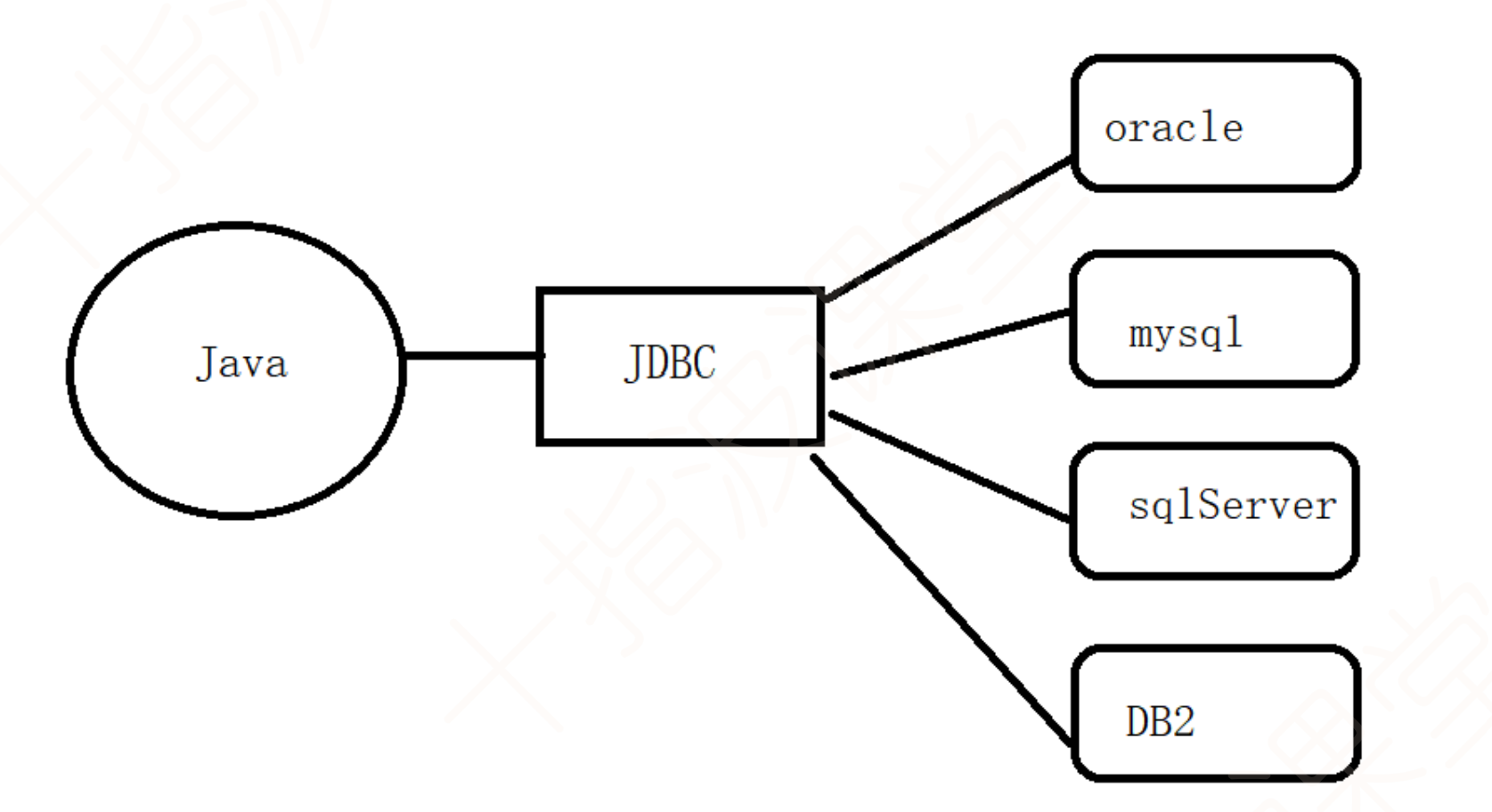
3.JDBC实现原理:每个数据库厂商都提供给了Java响应的驱动,我们只需要调用JDBC的API来使DriverManager去获取不同数据库的驱动就可以实现对不同数据库的连接与操作,这些数据库的JDBC的Driver都实现了一个统一的接口: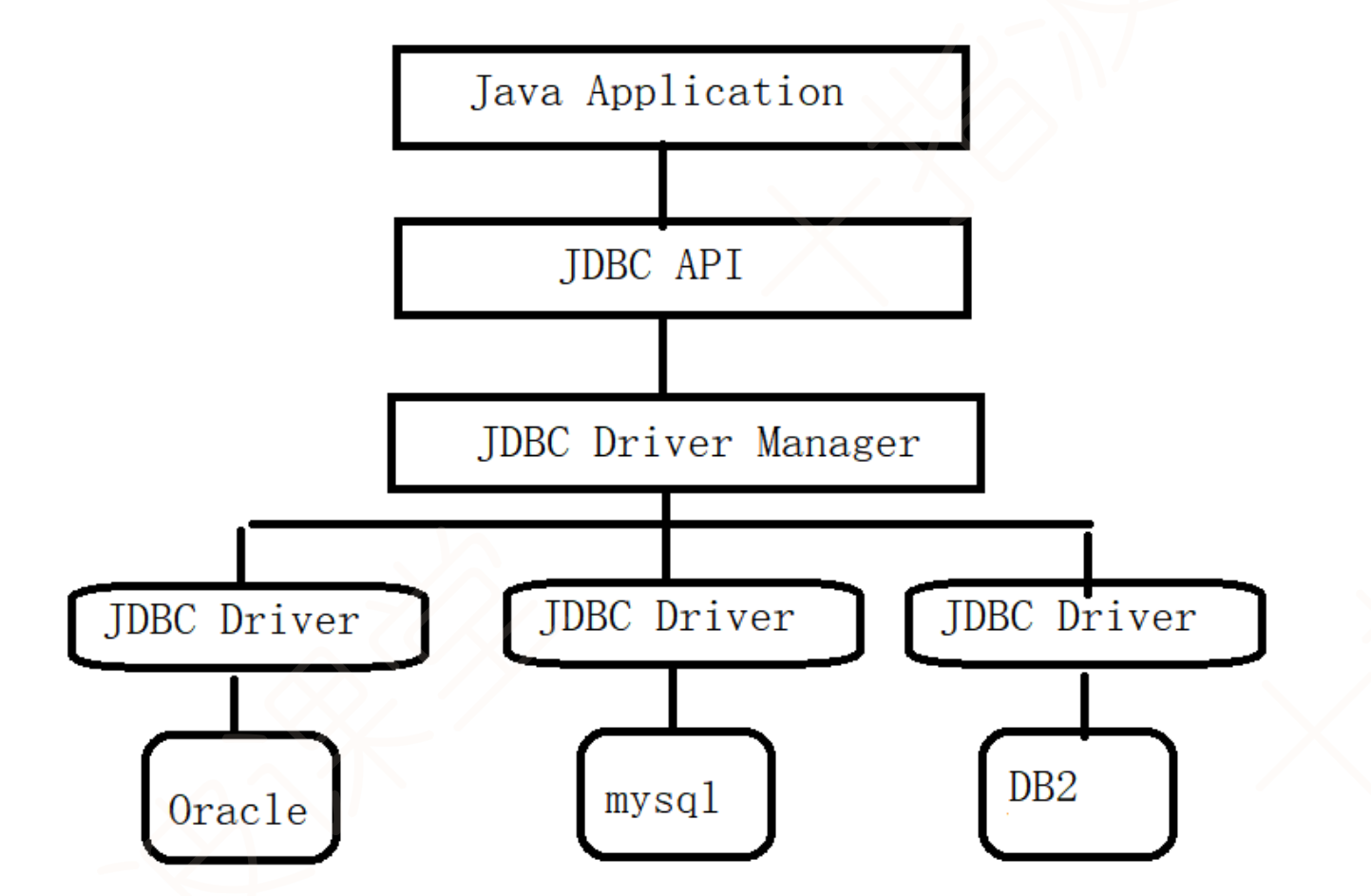
4.连接数据库的方法:
(1)通过Driver接口的connect方法来获取Connection对象:
java
Driver driver=new com.mysql.cj.jdbc.Driver();
Properties info=new Properties();
info.setProperty("user","root");
info.setProperty("password","root");
//通过java 连数据库 协议
//jdbc:mysql://ip:port/db_name
String url="jdbc:mysql://localhost:3306/test?serverTimezone=Asia/Shanghai&useSSL=false";
Connection connection = driver.connect(url, info);
System.out.println("connection = " + connection);
(2)通过反射机制来静态加载Driver接口并通过connect方法来获取Connection对象:
java
//通过反射方式静态加载驱动类
public static void getConnection2() throws Exception {
Class<?> aClass = Class.forName("com.mysql.cj.jdbc.Driver");
Driver driver =(Driver) aClass.getConstructor().newInstance();
Properties info=new Properties();
info.setProperty("user","root");
info.setProperty("password","root");
//通过java 连数据库 协议
//jdbc:mysql://ip:port/db_name
String url="jdbc:mysql://localhost:3306/test";
Connection connection = driver.connect(url, info);
System.out.println("connection = " + connection);
}
(3)通过DriverManager的getConnection方法来获取连接:
java
public static void getConnection3() throws Exception{
Class<?> aClass = Class.forName("com.mysql.cj.jdbc.Driver");
Driver driver =(Driver) aClass.getConstructor().newInstance();
DriverManager.registerDriver(driver);
String url="jdbc:mysql://localhost:3306/test";
Connection connection = DriverManager.getConnection(url, "root",
"root");
System.out.println("connection = " + connection);
}
(4)标准获取Connection的方式
java
public static void getConnection4() throws Exception{
//提供URL地址
String url="jdbc:mysql://localhost:3306/test";
//加载驱动
Class.forName("com.mysql.cj.jdbc.Driver");
//获取连接对象
Connection connection = DriverManager.getConnection(url, "root",
"root");
System.out.println("connection = " + connection);
}
总结一下,对数据库进行连接时必须获取Connection对象,因为后续会提到,只有获取了Connection对象才能获取Statement对象才能对数据库进行DDL、DML等操作;
注意一下这里的url在写的时候要注意格式为jdbc:mysql://ip地址:端口/库名?serverTimeZone = Asia/Shanghai&useSSL =false;
5.常见的异常类
(1)mysql服务没有启动:com.mysql.cj.jdbc.exceptions.CommunicationsException: Communications
link failure
(2)驱动类名错误:java.lang.ClassNotFoundException: com.mysql.cj.jdbc.driver
(3)驱动包没有导入:java.lang.ClassNotFoundException: com.mysql.cj.jdbc.Driver
(4)数据库名字错误: java.sql.SQLSyntaxErrorException: Unknown database 'testtest'
(5)url地址错误:java.sql.SQLException: No suitable driver found for jdbc:oracle://localhost:3306/test
The driver has not received any packets from the server.
(6)用户名或密码错误:java.sql.SQLException: Access denied for user 'root'@'localhost'
Access denied for user 'root1'@'localhost' (using password: YES)
6.Statement对象
通过Statement
Statement statement=connection.createStatement();
更新数据库操作:
java
public class Test {
public static void main(String[] args) throws Exception {
ResourceBundle bundle=ResourceBundle.getBundle("db");
String user=bundle.getString("jdbc.user");
String password=bundle.getString("jdbc.password");
String url=bundle.getString("jdbc.url");
String driver=bundle.getString("jdbc.driver");
Class.forName(driver);
//获取连接对象
Connection connection = DriverManager.getConnection(url, user,
password);
//获取语句对象
Statement statement=connection.createStatement();
Scanner scanner=new Scanner(System.in);
System.out.println("请录入姓名");
String name=scanner.next();
System.out.println("请录入性别");
String gender=scanner.next();
System.out.println("请录入年龄");
int age=scanner.nextInt();
//拼接sql语句
String sql="insert into student
values(default,'"+name+"','"+gender+"',"+age+")";
int i = statement.executeUpdate(sql);
if (i>0){
System.out.println("插入数据成功");
}else{
System.out.println("插入数据失败");
}
//关闭资源
statement.close();
connection.close();
}
}
插入数据操作:
java
public class Test {
public static void main(String[] args) throws Exception {
ResourceBundle bundle=ResourceBundle.getBundle("db");
String user=bundle.getString("jdbc.user");
String password=bundle.getString("jdbc.password");
String url=bundle.getString("jdbc.url");
String driver=bundle.getString("jdbc.driver");
Class.forName(driver);
//获取连接对象
Connection connection = DriverManager.getConnection(url, user,
password);
//获取语句对象
Statement statement=connection.createStatement();
Scanner scanner=new Scanner(System.in);
System.out.println("请录入姓名");
String name=scanner.next();
System.out.println("请录入性别");
String gender=scanner.next();
System.out.println("请录入年龄");
int age=scanner.nextInt();
//拼接sql语句
String sql="insert into student
values(default,'"+name+"','"+gender+"',"+age+")";
int i = statement.executeUpdate(sql);
if (i>0){
System.out.println("插入数据成功");
}else{
System.out.println("插入数据失败");
}
//关闭资源
statement.close();
connection.close();
}
}
删除数据操作:
java
public class TestDelete {
public static void main(String[] args) throws Exception{
ResourceBundle bundle=ResourceBundle.getBundle("db");
String user=bundle.getString("jdbc.user");
String password=bundle.getString("jdbc.password");
String url=bundle.getString("jdbc.url");
String driver=bundle.getString("jdbc.driver");
Class.forName(driver);
//获取连接对象
Connection connection = DriverManager.getConnection(url, user,
password);
//获取语句对象
Statement statement=connection.createStatement();
Scanner scanner=new Scanner(System.in);
System.out.println("请录入要删除的id");
int id=scanner.nextInt();
String sql="delete from student where id="+id;
int i = statement.executeUpdate(sql);
System.out.println(i>0?"删除成功":"删除失败");
statement.close();
connection.close();
}
}
ResultSet结果集:
java
public static void main(String[] args) throws Exception{
ResourceBundle bundle=ResourceBundle.getBundle("db");
String user=bundle.getString("jdbc.user");
String password=bundle.getString("jdbc.password");
String url=bundle.getString("jdbc.url");
String driver=bundle.getString("jdbc.driver");
Class.forName(driver);
//获取连接对象
Connection connection = DriverManager.getConnection(url, user,
password);
//获取语句对象
Statement statement=connection.createStatement();
String sql="select * from student";
ResultSet resultSet = statement.executeQuery(sql);
while (resultSet.next()){
System.out.print(resultSet.getInt(1)+"\t");
System.out.print(resultSet.getString(2)+"\t");
System.out.print(resultSet.getString(3)+"\t");
System.out.println(resultSet.getInt(4)+"\t");
}
resultSet.close();
statement.close();
connection.close();
}
}
excuteUpdate会返回影响的数据行数,可以把返回值作为操作是否成功的依据;
excuteQuery会返回一个结果集,结果集默认有一个指针最开始在第一个元素前,使用.next()可以使其移动,在读不到数据行之后返回false,使用结果姐的get字段类型(第几列)可以获取数据;
7.总结一下操纵jdbc的操作如下:
1.提供连接数据库的URL地址
2.Class.forName加载驱动
3.获得连接对象 DriverManager.getConnection()
4.获取语句对象Statement
5.操纵sql语句,执行CRUD
6.操纵结果集对象 ResultSet
7.关闭资源
8.处理异常 SQLException