欢迎加入开源鸿蒙跨平台社区:https://openharmonycrossplatform.csdn.net
一、仪表盘系统架构深度解析
仪表盘是数据可视化的重要组成部分,广泛应用于汽车仪表、工业监控、健康数据展示等场景。通过 CustomPainter 和动画系统,我们可以创建各种精美的仪表盘效果。
📱 1.1 仪表盘核心组件
一个完整的仪表盘系统通常包含以下核心组件:
┌─────────────────────────────────────────────────────────────────┐
│                    仪表盘系统架构                                │
├─────────────────────────────────────────────────────────────────┤
│                                                                 │
│  ┌─────────────────────────────────────────────────────────┐    │
│  │                    仪表盘容器 (Container)                │    │
│  │  ┌─────────────────────────────────────────────────┐    │    │
│  │  │              CustomPainter 绘制层               │    │    │
│  │  │  ┌─────────────────────────────────────────┐    │    │    │
│  │  │  │  外圈装饰 (Outer Ring)                  │    │    │    │
│  │  │  │  ┌─────────────────────────────────┐    │    │    │    │
│  │  │  │  │  刻度盘 (Scale Plate)           │    │    │    │    │
│  │  │  │  │  ┌─────────────────────────┐    │    │    │    │    │
│  │  │  │  │  │  进度弧 (Progress Arc)  │    │    │    │    │    │
│  │  │  │  │  │  ┌─────────────────┐    │    │    │    │    │    │
│  │  │  │  │  │  │  指针 (Pointer) │    │    │    │    │    │    │
│  │  │  │  │  │  └─────────────────┘    │    │    │    │    │    │
│  │  │  │  │  │  ┌─────────────────┐    │    │    │    │    │    │
│  │  │  │  │  │  │  数值显示       │    │    │    │    │    │    │
│  │  │  │  │  │  └─────────────────┘    │    │    │    │    │    │
│  │  │  │  │  └─────────────────────────┘    │    │    │    │    │
│  │  │  │  └─────────────────────────────────┘    │    │    │    │
│  │  │  └─────────────────────────────────────────┘    │    │    │
│  │  └─────────────────────────────────────────────────┘    │    │
│  └─────────────────────────────────────────────────────────┘    │
│                                                                 │
└─────────────────────────────────────────────────────────────────┘
仪表盘核心属性:
| 属性 | 类型 | 说明 | 应用场景 |
|---|---|---|---|
| value | double | 当前数值 | 控制指针位置和进度 |
| minValue | double | 最小值 | 刻度范围起点 |
| maxValue | double | 最大值 | 刻度范围终点 |
| startAngle | double | 起始角度 | 仪表盘起始位置 |
| sweepAngle | double | 扫描角度 | 仪表盘覆盖范围 |
| divisions | int | 刻度数量 | 主刻度线数量 |
🔬 1.2 绘制坐标系统
仪表盘绘制使用极坐标系统,需要将极坐标转换为笛卡尔坐标:
dart
// 极坐标转笛卡尔坐标
Offset polarToCartesian(Offset center, double radius, double angle) {
  return Offset(
    center.dx + radius * cos(angle),
    center.dy + radius * sin(angle),
  );
}

// 角度计算(从起始角度到当前值对应的角度)
double valueToAngle(double value, double min, double max, double startAngle, double sweepAngle) {
  final normalizedValue = (value - min) / (max - min);
  return startAngle + normalizedValue * sweepAngle;
}
坐标系统示意:
                    0° (顶部)
                      │
                      │
                      │
         270° ────────┼──────── 90°
                      │
                      │
                      │
                    180° (底部)

Flutter 角度系统:
- 0° 指向右侧 (3点钟方向)
- 角度顺时针增加
- 使用弧度制 (pi = 180°)
🎯 1.3 动画系统设计
仪表盘动画通常包含以下类型:
dart
// 指针动画
Animation<double> pointerAnimation = Tween<double>(
  begin: 0,
  end: targetValue,
).animate(CurvedAnimation(
  parent: controller,
  curve: Curves.easeOutCubic,
));

// 进度弧动画
Animation<double> progressAnimation = Tween<double>(
  begin: 0,
  end: 1,
).animate(CurvedAnimation(
  parent: controller,
  curve: Curves.easeInOut,
));

// 颜色渐变动画
Animation<Color?> colorAnimation = ColorTween(
  begin: Colors.green,
  end: Colors.red,
).animate(controller);
二、基础仪表盘实现
👆 2.1 简单圆形仪表盘
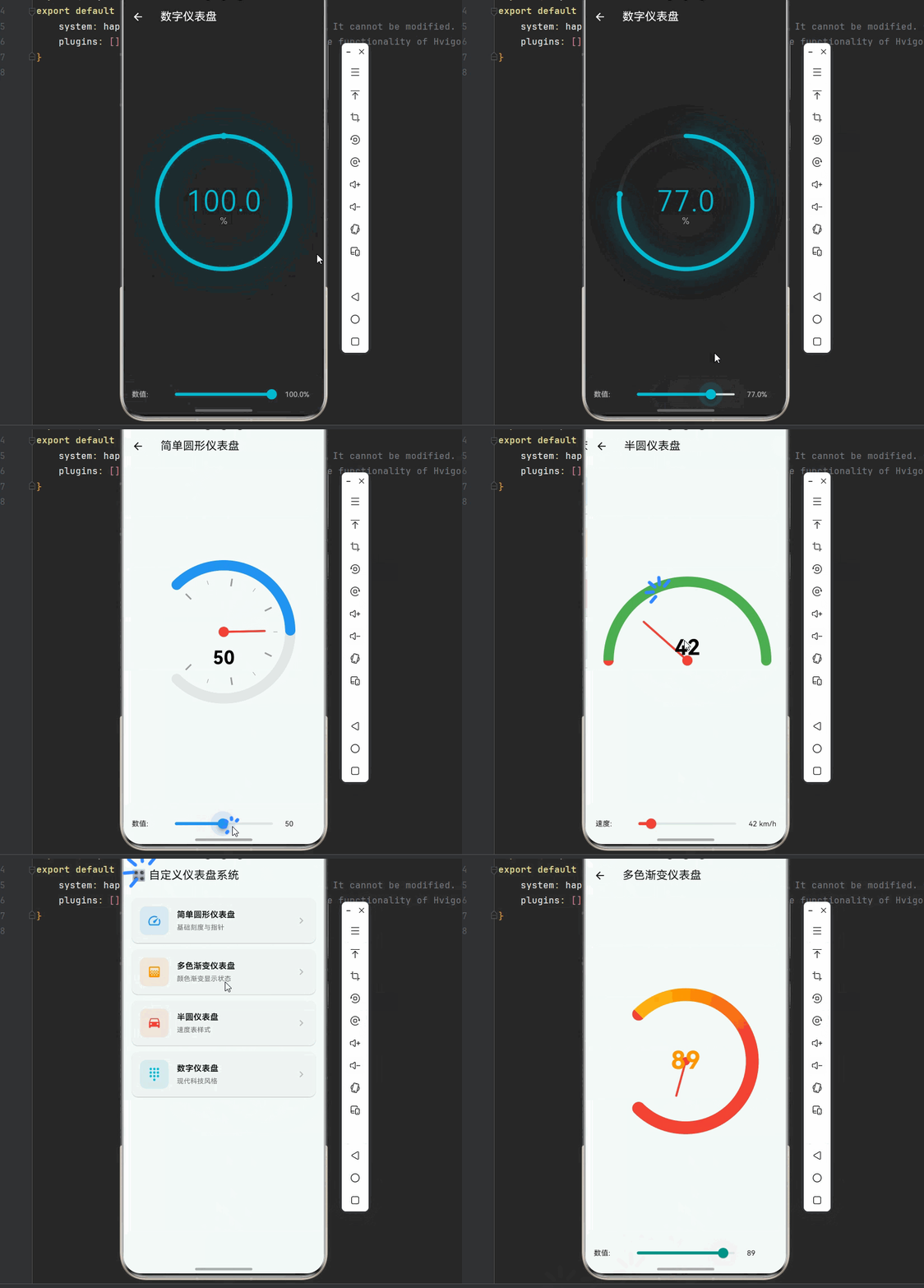
从最基础的圆形仪表盘开始,包含刻度线、指针和数值显示。
dart
import 'dart:math';
import 'package:flutter/material.dart';

/// 简单圆形仪表盘
class SimpleGaugePainter extends CustomPainter {
  final double value;
  final double minValue;
  final double maxValue;
  final double startAngle;
  final double sweepAngle;
  final Color progressColor;
  final Color backgroundColor;

  SimpleGaugePainter({
    required this.value,
    this.minValue = 0,
    this.maxValue = 100,
    this.startAngle = -pi * 0.75,
    this.sweepAngle = pi * 1.5,
    this.progressColor = Colors.blue,
    this.backgroundColor = Colors.grey,
  });

  @override
  void paint(Canvas canvas, Size size) {
    final center = Offset(size.width / 2, size.height / 2);
    final radius = min(size.width, size.height) / 2 - 20;

    _drawBackground(canvas, center, radius);
    _drawProgress(canvas, center, radius);
    _drawTicks(canvas, center, radius);
    _drawPointer(canvas, center, radius);
    _drawCenter(canvas, center);
    _drawValue(canvas, center, radius);
  }

  void _drawBackground(Canvas canvas, Offset center, double radius) {
    final paint = Paint()
      ..color = backgroundColor.withOpacity(0.2)
      ..style = PaintingStyle.stroke
      ..strokeWidth = 20
      ..strokeCap = StrokeCap.round;

    canvas.drawArc(
      Rect.fromCircle(center: center, radius: radius),
      startAngle,
      sweepAngle,
      false,
      paint,
    );
  }

  void _drawProgress(Canvas canvas, Offset center, double radius) {
    final progressSweep = (value - minValue) / (maxValue - minValue) * sweepAngle;

    final paint = Paint()
      ..color = progressColor
      ..style = PaintingStyle.stroke
      ..strokeWidth = 20
      ..strokeCap = StrokeCap.round;

    canvas.drawArc(
      Rect.fromCircle(center: center, radius: radius),
      startAngle,
      progressSweep,
      false,
      paint,
    );
  }

  void _drawTicks(Canvas canvas, Offset center, double radius) {
    final tickCount = 10;
    final tickPaint = Paint()
      ..color = Colors.grey
      ..strokeWidth = 2;

    for (int i = 0; i <= tickCount; i++) {
      final angle = startAngle + (sweepAngle * i / tickCount);
      final isMajor = i % 2 == 0;
      final tickLength = isMajor ? 15.0 : 8.0;

      final outerPoint = Offset(
        center.dx + (radius - 25) * cos(angle),
        center.dy + (radius - 25) * sin(angle),
      );
      final innerPoint = Offset(
        center.dx + (radius - 25 - tickLength) * cos(angle),
        center.dy + (radius - 25 - tickLength) * sin(angle),
      );

      canvas.drawLine(innerPoint, outerPoint, tickPaint..strokeWidth = isMajor ? 3 : 1);
    }
  }

  void _drawPointer(Canvas canvas, Offset center, double radius) {
    final pointerAngle = startAngle + (value - minValue) / (maxValue - minValue) * sweepAngle;
    final pointerLength = radius - 50;

    final pointerPaint = Paint()
      ..color = Colors.red
      ..strokeWidth = 4
      ..strokeCap = StrokeCap.round;

    final pointerEnd = Offset(
      center.dx + pointerLength * cos(pointerAngle),
      center.dy + pointerLength * sin(pointerAngle),
    );

    canvas.drawLine(center, pointerEnd, pointerPaint);
  }

  void _drawCenter(Canvas canvas, Offset center) {
    final centerPaint = Paint()
      ..color = Colors.red
      ..style = PaintingStyle.fill;

    canvas.drawCircle(center, 10, centerPaint);
  }

  void _drawValue(Canvas canvas, Offset center, double radius) {
    final textPainter = TextPainter(
      text: TextSpan(
        text: value.toStringAsFixed(0),
        style: const TextStyle(
          color: Colors.black,
          fontSize: 36,
          fontWeight: FontWeight.bold,
        ),
      ),
      textDirection: TextDirection.ltr,
    )..layout();

    textPainter.paint(
      canvas,
      Offset(
        center.dx - textPainter.width / 2,
        center.dy + 30,
      ),
    );
  }

  @override
  bool shouldRepaint(SimpleGaugePainter oldDelegate) => value != oldDelegate.value;
}

/// 简单仪表盘示例
class SimpleGaugeDemo extends StatefulWidget {
  const SimpleGaugeDemo({super.key});

  @override
  State<SimpleGaugeDemo> createState() => _SimpleGaugeDemoState();
}

class _SimpleGaugeDemoState extends State<SimpleGaugeDemo>
    with SingleTickerProviderStateMixin {
  double _value = 50;
  late AnimationController _controller;
  late Animation<double> _animation;

  @override
  void initState() {
    super.initState();
    _controller = AnimationController(
      duration: const Duration(milliseconds: 1500),
      vsync: this,
    );
    _animation = Tween<double>(begin: 0, end: _value).animate(
      CurvedAnimation(parent: _controller, curve: Curves.easeOutCubic),
    )..addListener(() => setState(() => _value = _animation.value));
    _controller.forward();
  }

  @override
  void dispose() {
    _controller.dispose();
    super.dispose();
  }

  @override
  Widget build(BuildContext context) {
    return Scaffold(
      appBar: AppBar(title: const Text('简单圆形仪表盘')),
      body: Column(
        children: [
          Expanded(
            child: Center(
              child: SizedBox(
                width: 300,
                height: 300,
                child: CustomPaint(
                  painter: SimpleGaugePainter(value: _value),
                ),
              ),
            ),
          ),
          Container(
            padding: const EdgeInsets.all(16),
            decoration: BoxDecoration(
              color: Colors.grey[100],
              borderRadius: const BorderRadius.vertical(top: Radius.circular(20)),
            ),
            child: Column(
              children: [
                Row(
                  children: [
                    const SizedBox(width: 60, child: Text('数值:')),
                    Expanded(
                      child: Slider(
                        value: _value,
                        min: 0,
                        max: 100,
                        divisions: 100,
                        activeColor: Colors.blue,
                        onChanged: (value) => setState(() => _value = value),
                      ),
                    ),
                    SizedBox(width: 60, child: Text('${_value.toStringAsFixed(0)}')),
                  ],
                ),
              ],
            ),
          ),
        ],
      ),
    );
  }
}
🔧 2.2 多色渐变仪表盘
通过颜色渐变展示不同数值区间,直观显示数值状态。
dart
/// 多色渐变仪表盘
class GradientGaugePainter extends CustomPainter {
  final double value;
  final double minValue;
  final double maxValue;
  final List<Color> gradientColors;
  final List<double> colorStops;

  GradientGaugePainter({
    required this.value,
    this.minValue = 0,
    this.maxValue = 100,
    this.gradientColors = const [Colors.green, Colors.yellow, Colors.orange, Colors.red],
    this.colorStops = const [0.0, 0.33, 0.66, 1.0],
  });

  @override
  void paint(Canvas canvas, Size size) {
    final center = Offset(size.width / 2, size.height / 2);
    final radius = min(size.width, size.height) / 2 - 30;
    final startAngle = -pi * 0.75;
    final sweepAngle = pi * 1.5;

    _drawGradientArc(canvas, center, radius, startAngle, sweepAngle);
    _drawTickLabels(canvas, center, radius, startAngle, sweepAngle);
    _drawPointer(canvas, center, radius, startAngle, sweepAngle);
    _drawCenterInfo(canvas, center);
  }

  void _drawGradientArc(Canvas canvas, Offset center, double radius, double startAngle, double sweepAngle) {
    final rect = Rect.fromCircle(center: center, radius: radius);

    final gradient = SweepGradient(
      center: Alignment.center,
      startAngle: startAngle,
      endAngle: startAngle + sweepAngle,
      colors: gradientColors,
      stops: colorStops,
      transform: GradientRotation(startAngle),
    );

    final backgroundPaint = Paint()
      ..shader = gradient
      ..style = PaintingStyle.stroke
      ..strokeWidth = 25
      ..strokeCap = StrokeCap.round;

    canvas.drawArc(rect, startAngle, sweepAngle, false, backgroundPaint);

    final shadowPaint = Paint()
      ..color = Colors.black.withOpacity(0.1)
      ..style = PaintingStyle.stroke
      ..strokeWidth = 35
      ..maskFilter = const MaskFilter.blur(BlurStyle.normal, 8);

    canvas.drawArc(rect, startAngle, sweepAngle, false, shadowPaint);
  }

  void _drawTickLabels(Canvas canvas, Offset center, double radius, double startAngle, double sweepAngle) {
    final labels = ['0', '25', '50', '75', '100'];

    for (int i = 0; i < labels.length; i++) {
      final angle = startAngle + (sweepAngle * i / (labels.length - 1));
      final labelRadius = radius - 50;

      final textPainter = TextPainter(
        text: TextSpan(
          text: labels[i],
          style: TextStyle(
            color: Colors.grey[600],
            fontSize: 14,
            fontWeight: FontWeight.w500,
          ),
        ),
        textDirection: TextDirection.ltr,
      )..layout();

      final offset = Offset(
        center.dx + labelRadius * cos(angle) - textPainter.width / 2,
        center.dy + labelRadius * sin(angle) - textPainter.height / 2,
      );

      textPainter.paint(canvas, offset);
    }
  }

  void _drawPointer(Canvas canvas, Offset center, double radius, double startAngle, double sweepAngle) {
    final pointerAngle = startAngle + (value - minValue) / (maxValue - minValue) * sweepAngle;
    final pointerLength = radius - 60;

    final pointerPath = Path();
    pointerPath.moveTo(center.dx, center.dy);
    pointerPath.lineTo(
      center.dx + pointerLength * cos(pointerAngle - 0.05),
      center.dy + pointerLength * sin(pointerAngle - 0.05),
    );
    pointerPath.lineTo(
      center.dx + (pointerLength + 10) * cos(pointerAngle),
      center.dy + (pointerLength + 10) * sin(pointerAngle),
    );
    pointerPath.lineTo(
      center.dx + pointerLength * cos(pointerAngle + 0.05),
      center.dy + pointerLength * sin(pointerAngle + 0.05),
    );
    pointerPath.close();

    final pointerPaint = Paint()
      ..color = _getValueColor()
      ..style = PaintingStyle.fill;

    canvas.drawPath(pointerPath, pointerPaint);
  }

  void _drawCenterInfo(Canvas canvas, Offset center) {
    final valuePainter = TextPainter(
      text: TextSpan(
        text: value.toStringAsFixed(0),
        style: TextStyle(
          color: _getValueColor(),
          fontSize: 48,
          fontWeight: FontWeight.bold,
        ),
      ),
      textDirection: TextDirection.ltr,
    )..layout();

    valuePainter.paint(
      canvas,
      Offset(center.dx - valuePainter.width / 2, center.dy - 30),
    );

    final unitPainter = TextPainter(
      text: TextSpan(
        text: '单位',
        style: TextStyle(
          color: Colors.grey[600],
          fontSize: 14,
        ),
      ),
      textDirection: TextDirection.ltr,
    )..layout();

    unitPainter.paint(
      canvas,
      Offset(center.dx - unitPainter.width / 2, center.dy + 25),
    );
  }

  Color _getValueColor() {
    final normalizedValue = (value - minValue) / (maxValue - minValue);
    final index = (normalizedValue * (gradientColors.length - 1)).floor();
    return gradientColors[index.clamp(0, gradientColors.length - 1)];
  }

  @override
  bool shouldRepaint(GradientGaugePainter oldDelegate) => value != oldDelegate.value;
}

/// 多色渐变仪表盘示例
class GradientGaugeDemo extends StatefulWidget {
  const GradientGaugeDemo({super.key});

  @override
  State<GradientGaugeDemo> createState() => _GradientGaugeDemoState();
}

class _GradientGaugeDemoState extends State<GradientGaugeDemo> {
  double _value = 65;

  @override
  Widget build(BuildContext context) {
    return Scaffold(
      appBar: AppBar(title: const Text('多色渐变仪表盘')),
      body: Column(
        children: [
          Expanded(
            child: Center(
              child: SizedBox(
                width: 320,
                height: 320,
                child: CustomPaint(
                  painter: GradientGaugePainter(value: _value),
                ),
              ),
            ),
          ),
          Container(
            padding: const EdgeInsets.all(16),
            decoration: BoxDecoration(
              color: Colors.grey[100],
              borderRadius: const BorderRadius.vertical(top: Radius.circular(20)),
            ),
            child: Row(
              children: [
                const SizedBox(width: 60, child: Text('数值:')),
                Expanded(
                  child: Slider(
                    value: _value,
                    min: 0,
                    max: 100,
                    divisions: 100,
                    activeColor: Colors.teal,
                    onChanged: (value) => setState(() => _value = value),
                  ),
                ),
                SizedBox(width: 60, child: Text('${_value.toStringAsFixed(0)}')),
              ],
            ),
          ),
        ],
      ),
    );
  }
}
三、高级仪表盘效果
🌊 3.1 半圆仪表盘
半圆仪表盘是最常见的仪表盘样式,常用于速度表、转速表等场景。
dart
/// 半圆仪表盘
class SemicircleGaugePainter extends CustomPainter {
  final double value;
  final double minValue;
  final double maxValue;
  final String unit;
  final String label;

  SemicircleGaugePainter({
    required this.value,
    this.minValue = 0,
    this.maxValue = 180,
    this.unit = 'km/h',
    this.label = '速度',
  });

  @override
  void paint(Canvas canvas, Size size) {
    final center = Offset(size.width / 2, size.height * 0.7);
    final radius = min(size.width, size.height) * 0.6;
    final startAngle = pi;
    final sweepAngle = pi;

    _drawOuterRing(canvas, center, radius);
    _drawSpeedArc(canvas, center, radius, startAngle, sweepAngle);
    _drawTicks(canvas, center, radius, startAngle, sweepAngle);
    _drawPointer(canvas, center, radius, startAngle, sweepAngle);
    _drawCenterInfo(canvas, center);
  }

  void _drawOuterRing(Canvas canvas, Offset center, double radius) {
    final outerPaint = Paint()
      ..color = Colors.grey[200]!
      ..style = PaintingStyle.stroke
      ..strokeWidth = 3;

    canvas.drawCircle(center, radius + 15, outerPaint);

    final innerPaint = Paint()
      ..color = Colors.grey[100]!
      ..style = PaintingStyle.fill;

    canvas.drawCircle(center, radius - 30, innerPaint);
  }

  void _drawSpeedArc(Canvas canvas, Offset center, double radius, double startAngle, double sweepAngle) {
    final progress = (value - minValue) / (maxValue - minValue);

    final gradient = SweepGradient(
      center: Alignment.center,
      startAngle: startAngle,
      endAngle: startAngle + sweepAngle,
      colors: const [Colors.green, Colors.lime, Colors.yellow, Colors.orange, Colors.red],
      stops: const [0.0, 0.25, 0.5, 0.75, 1.0],
      transform: GradientRotation(startAngle),
    );

    final arcPaint = Paint()
      ..shader = gradient
      ..style = PaintingStyle.stroke
      ..strokeWidth = 20
      ..strokeCap = StrokeCap.round;

    canvas.drawArc(
      Rect.fromCircle(center: center, radius: radius),
      startAngle,
      sweepAngle,
      false,
      arcPaint,
    );

    final progressPaint = Paint()
      ..color = Colors.black.withOpacity(0.3)
      ..style = PaintingStyle.stroke
      ..strokeWidth = 20
      ..strokeCap = StrokeCap.round;

    canvas.drawArc(
      Rect.fromCircle(center: center, radius: radius),
      startAngle + sweepAngle * progress,
      sweepAngle * (1 - progress),
      false,
      progressPaint,
    );
  }

  void _drawTicks(Canvas canvas, Offset center, double radius, double startAngle, double sweepAngle) {
    const majorTickCount = 9;
    const minorTickCount = 4;

    for (int i = 0; i <= majorTickCount; i++) {
      final angle = startAngle + (sweepAngle * i / majorTickCount);
      final isMajor = true;

      _drawTick(canvas, center, radius, angle, isMajor);

      if (i < majorTickCount) {
        for (int j = 1; j <= minorTickCount; j++) {
          final minorAngle = angle + (sweepAngle / majorTickCount * j / (minorTickCount + 1));
          _drawTick(canvas, center, radius, minorAngle, false);
        }
      }

      final tickValue = minValue + (maxValue - minValue) * i / majorTickCount;
      _drawTickLabel(canvas, center, radius, angle, tickValue);
    }
  }

  void _drawTick(Canvas canvas, Offset center, double radius, double angle, bool isMajor) {
    final tickLength = isMajor ? 15.0 : 8.0;
    final tickWidth = isMajor ? 3.0 : 1.5;

    final paint = Paint()
      ..color = isMajor ? Colors.black : Colors.grey
      ..strokeWidth = tickWidth;

    final outerPoint = Offset(
      center.dx + (radius + 5) * cos(angle),
      center.dy + (radius + 5) * sin(angle),
    );
    final innerPoint = Offset(
      center.dx + (radius + 5 - tickLength) * cos(angle),
      center.dy + (radius + 5 - tickLength) * sin(angle),
    );

    canvas.drawLine(innerPoint, outerPoint, paint);
  }

  void _drawTickLabel(Canvas canvas, Offset center, double radius, double angle, double tickValue) {
    final textPainter = TextPainter(
      text: TextSpan(
        text: tickValue.toInt().toString(),
        style: const TextStyle(
          color: Colors.black87,
          fontSize: 12,
          fontWeight: FontWeight.w500,
        ),
      ),
      textDirection: TextDirection.ltr,
    )..layout();

    final labelRadius = radius + 30;
    final offset = Offset(
      center.dx + labelRadius * cos(angle) - textPainter.width / 2,
      center.dy + labelRadius * sin(angle) - textPainter.height / 2,
    );

    textPainter.paint(canvas, offset);
  }

  void _drawPointer(Canvas canvas, Offset center, double radius, double startAngle, double sweepAngle) {
    final pointerAngle = startAngle + (value - minValue) / (maxValue - minValue) * sweepAngle;
    final pointerLength = radius - 40;

    final pointerPath = Path();
    pointerPath.moveTo(
      center.dx + 15 * cos(pointerAngle + pi / 2),
      center.dy + 15 * sin(pointerAngle + pi / 2),
    );
    pointerPath.lineTo(
      center.dx + pointerLength * cos(pointerAngle),
      center.dy + pointerLength * sin(pointerAngle),
    );
    pointerPath.lineTo(
      center.dx + 15 * cos(pointerAngle - pi / 2),
      center.dy + 15 * sin(pointerAngle - pi / 2),
    );
    pointerPath.close();

    final pointerPaint = Paint()
      ..color = Colors.red
      ..style = PaintingStyle.fill;

    canvas.drawPath(pointerPath, pointerPaint);

    final shadowPaint = Paint()
      ..color = Colors.red.withOpacity(0.3)
      ..maskFilter = const MaskFilter.blur(BlurStyle.normal, 5);

    canvas.drawPath(pointerPath.shift(const Offset(2, 2)), shadowPaint);
  }

  void _drawCenterInfo(Canvas canvas, Offset center) {
    final valuePainter = TextPainter(
      text: TextSpan(
        text: value.toStringAsFixed(0),
        style: const TextStyle(
          color: Colors.black,
          fontSize: 42,
          fontWeight: FontWeight.bold,
        ),
      ),
      textDirection: TextDirection.ltr,
    )..layout();

    valuePainter.paint(
      canvas,
      Offset(center.dx - valuePainter.width / 2, center.dy - 50),
    );

    final unitPainter = TextPainter(
      text: TextSpan(
        text: unit,
        style: TextStyle(
          color: Colors.grey[600],
          fontSize: 16,
        ),
      ),
      textDirection: TextDirection.ltr,
    )..layout();

    unitPainter.paint(
      canvas,
      Offset(center.dx - unitPainter.width / 2, center.dy - 5),
    );

    final labelPainter = TextPainter(
      text: TextSpan(
        text: label,
        style: TextStyle(
          color: Colors.grey[500],
          fontSize: 12,
        ),
      ),
      textDirection: TextDirection.ltr,
    )..layout();

    labelPainter.paint(
      canvas,
      Offset(center.dx - labelPainter.width / 2, center.dy + 20),
    );
  }

  @override
  bool shouldRepaint(SemicircleGaugePainter oldDelegate) => value != oldDelegate.value;
}

/// 半圆仪表盘示例
class SemicircleGaugeDemo extends StatefulWidget {
  const SemicircleGaugeDemo({super.key});

  @override
  State<SemicircleGaugeDemo> createState() => _SemicircleGaugeDemoState();
}

class _SemicircleGaugeDemoState extends State<SemicircleGaugeDemo>
    with SingleTickerProviderStateMixin {
  double _value = 0;
  late AnimationController _controller;
  late Animation<double> _animation;

  @override
  void initState() {
    super.initState();
    _controller = AnimationController(
      duration: const Duration(seconds: 2),
      vsync: this,
    );
    _animation = Tween<double>(begin: 0, end: 120.0).animate(
      CurvedAnimation(parent: _controller, curve: Curves.easeOutCubic),
    )..addListener(() => setState(() => _value = _animation.value));
    _controller.forward();
  }

  @override
  void dispose() {
    _controller.dispose();
    super.dispose();
  }

  @override
  Widget build(BuildContext context) {
    return Scaffold(
      appBar: AppBar(title: const Text('半圆仪表盘')),
      body: Column(
        children: [
          Expanded(
            child: Center(
              child: SizedBox(
                width: 350,
                height: 280,
                child: CustomPaint(
                  painter: SemicircleGaugePainter(value: _value),
                ),
              ),
            ),
          ),
          Container(
            padding: const EdgeInsets.all(16),
            decoration: BoxDecoration(
              color: Colors.grey[100],
              borderRadius: const BorderRadius.vertical(top: Radius.circular(20)),
            ),
            child: Row(
              children: [
                const SizedBox(width: 60, child: Text('速度:')),
                Expanded(
                  child: Slider(
                    value: _value,
                    min: 0,
                    max: 180,
                    divisions: 180,
                    activeColor: Colors.red,
                    onChanged: (value) => setState(() => _value = value),
                  ),
                ),
                SizedBox(width: 60, child: Text('${_value.toStringAsFixed(0)} km/h')),
              ],
            ),
          ),
        ],
      ),
    );
  }
}
💬 3.2 数字仪表盘
现代风格的数字仪表盘,适合科技感强的应用场景。
dart
/// 数字仪表盘
class DigitalGaugePainter extends CustomPainter {
  final double value;
  final double minValue;
  final double maxValue;
  final String unit;
  final Color accentColor;

  DigitalGaugePainter({
    required this.value,
    this.minValue = 0,
    this.maxValue = 100,
    this.unit = '%',
    this.accentColor = Colors.cyan,
  });

  @override
  void paint(Canvas canvas, Size size) {
    final center = Offset(size.width / 2, size.height / 2);
    final radius = min(size.width, size.height) / 2 - 20;

    _drawGlowEffect(canvas, center, radius);
    _drawProgressRing(canvas, center, radius);
    _drawTickMarks(canvas, center, radius);
    _drawDigitalValue(canvas, center);
    _drawUnit(canvas, center);
  }

  void _drawGlowEffect(Canvas canvas, Offset center, double radius) {
    final progress = (value - minValue) / (maxValue - minValue);

    final glowPaint = Paint()
      ..color = accentColor.withOpacity(0.3)
      ..style = PaintingStyle.stroke
      ..strokeWidth = 30
      ..maskFilter = const MaskFilter.blur(BlurStyle.normal, 20);

    canvas.drawArc(
      Rect.fromCircle(center: center, radius: radius),
      -pi / 2,
      2 * pi * progress,
      false,
      glowPaint,
    );
  }

  void _drawProgressRing(Canvas canvas, Offset center, double radius) {
    final progress = (value - minValue) / (maxValue - minValue);

    final backgroundPaint = Paint()
      ..color = Colors.grey.withOpacity(0.1)
      ..style = PaintingStyle.stroke
      ..strokeWidth = 8
      ..strokeCap = StrokeCap.round;

    canvas.drawCircle(center, radius, backgroundPaint);

    final progressPaint = Paint()
      ..shader = SweepGradient(
        center: Alignment.center,
        startAngle: -pi / 2,
        endAngle: 2 * pi * progress - pi / 2,
        colors: [
          accentColor.withOpacity(0.5),
          accentColor,
        ],
        transform: const GradientRotation(-pi / 2),
      ).createShader(Rect.fromCircle(center: center, radius: radius))
      ..style = PaintingStyle.stroke
      ..strokeWidth = 8
      ..strokeCap = StrokeCap.round;

    canvas.drawArc(
      Rect.fromCircle(center: center, radius: radius),
      -pi / 2,
      2 * pi * progress,
      false,
      progressPaint,
    );

    final dotPaint = Paint()
      ..color = accentColor
      ..style = PaintingStyle.fill;

    final dotAngle = -pi / 2 + 2 * pi * progress;
    final dotPosition = Offset(
      center.dx + radius * cos(dotAngle),
      center.dy + radius * sin(dotAngle),
    );

    canvas.drawCircle(dotPosition, 6, dotPaint);
    canvas.drawCircle(dotPosition, 10, dotPaint..color = accentColor.withOpacity(0.3));
  }

  void _drawTickMarks(Canvas canvas, Offset center, double radius) {
    const tickCount = 60;

    for (int i = 0; i < tickCount; i++) {
      final angle = -pi / 2 + 2 * pi * i / tickCount;
      final isMajor = i % 5 == 0;
      final tickLength = isMajor ? 12.0 : 6.0;

      final paint = Paint()
        ..color = isMajor ? Colors.grey[400]! : Colors.grey[300]!
        ..strokeWidth = isMajor ? 2 : 1;

      final outerPoint = Offset(
        center.dx + (radius - 15) * cos(angle),
        center.dy + (radius - 15) * sin(angle),
      );
      final innerPoint = Offset(
        center.dx + (radius - 15 - tickLength) * cos(angle),
        center.dy + (radius - 15 - tickLength) * sin(angle),
      );

      canvas.drawLine(innerPoint, outerPoint, paint);
    }
  }

  void _drawDigitalValue(Canvas canvas, Offset center) {
    final textPainter = TextPainter(
      text: TextSpan(
        text: value.toStringAsFixed(1),
        style: TextStyle(
          color: accentColor,
          fontSize: 56,
          fontWeight: FontWeight.w300,
          letterSpacing: 2,
        ),
      ),
      textDirection: TextDirection.ltr,
    )..layout();

    textPainter.paint(
      canvas,
      Offset(center.dx - textPainter.width / 2, center.dy - 35),
    );
  }

  void _drawUnit(Canvas canvas, Offset center) {
    final textPainter = TextPainter(
      text: TextSpan(
        text: unit,
        style: TextStyle(
          color: Colors.grey[500],
          fontSize: 18,
          fontWeight: FontWeight.w500,
        ),
      ),
      textDirection: TextDirection.ltr,
    )..layout();

    textPainter.paint(
      canvas,
      Offset(center.dx - textPainter.width / 2, center.dy + 25),
    );
  }

  @override
  bool shouldRepaint(DigitalGaugePainter oldDelegate) => value != oldDelegate.value;
}

/// 数字仪表盘示例
class DigitalGaugeDemo extends StatefulWidget {
  const DigitalGaugeDemo({super.key});

  @override
  State<DigitalGaugeDemo> createState() => _DigitalGaugeDemoState();
}

class _DigitalGaugeDemoState extends State<DigitalGaugeDemo> {
  double _value = 75;

  @override
  Widget build(BuildContext context) {
    return Scaffold(
      backgroundColor: Colors.grey[900],
      appBar: AppBar(
        title: const Text('数字仪表盘'),
        backgroundColor: Colors.grey[900],
        foregroundColor: Colors.white,
      ),
      body: Column(
        children: [
          Expanded(
            child: Center(
              child: SizedBox(
                width: 300,
                height: 300,
                child: CustomPaint(
                  painter: DigitalGaugePainter(value: _value),
                ),
              ),
            ),
          ),
          Container(
            padding: const EdgeInsets.all(16),
            decoration: BoxDecoration(
              color: Colors.grey[850],
              borderRadius: const BorderRadius.vertical(top: Radius.circular(20)),
            ),
            child: Row(
              children: [
                const SizedBox(width: 60, child: Text('数值:', style: TextStyle(color: Colors.white70))),
                Expanded(
                  child: Slider(
                    value: _value,
                    min: 0,
                    max: 100,
                    divisions: 100,
                    activeColor: Colors.cyan,
                    onChanged: (value) => setState(() => _value = value),
                  ),
                ),
                SizedBox(width: 60, child: Text('${_value.toStringAsFixed(1)}%', style: const TextStyle(color: Colors.white70))),
              ],
            ),
          ),
        ],
      ),
    );
  }
}
四、完整代码示例
以下是本文所有示例的完整代码,可以直接运行体验:
dart
import 'dart:math';
import 'package:flutter/material.dart';

void main() {
  runApp(const MyApp());
}

class MyApp extends StatelessWidget {
  const MyApp({super.key});

  @override
  Widget build(BuildContext context) {
    return MaterialApp(
      debugShowCheckedModeBanner: false,
      theme: ThemeData(
        colorScheme: ColorScheme.fromSeed(seedColor: Colors.teal),
        useMaterial3: true,
      ),
      home: const GaugeHomePage(),
    );
  }
}

class GaugeHomePage extends StatelessWidget {
  const GaugeHomePage({super.key});

  @override
  Widget build(BuildContext context) {
    return Scaffold(
      appBar: AppBar(title: const Text('🎛️ 自定义仪表盘系统')),
      body: ListView(
        padding: const EdgeInsets.all(16),
        children: [
          _buildSectionCard(context, title: '简单圆形仪表盘', description: '基础刻度与指针', icon: Icons.speed, color: Colors.blue, onTap: () => Navigator.push(context, MaterialPageRoute(builder: (_) => const SimpleGaugeDemo()))),
          _buildSectionCard(context, title: '多色渐变仪表盘', description: '颜色渐变显示状态', icon: Icons.gradient, color: Colors.orange, onTap: () => Navigator.push(context, MaterialPageRoute(builder: (_) => const GradientGaugeDemo()))),
          _buildSectionCard(context, title: '半圆仪表盘', description: '速度表样式', icon: Icons.drive_eta, color: Colors.red, onTap: () => Navigator.push(context, MaterialPageRoute(builder: (_) => const SemicircleGaugeDemo()))),
          _buildSectionCard(context, title: '数字仪表盘', description: '现代科技风格', icon: Icons.dialpad, color: Colors.cyan, onTap: () => Navigator.push(context, MaterialPageRoute(builder: (_) => const DigitalGaugeDemo()))),
        ],
      ),
    );
  }

  Widget _buildSectionCard(BuildContext context, {required String title, required String description, required IconData icon, required Color color, required VoidCallback onTap}) {
    return Card(
      margin: const EdgeInsets.only(bottom: 12),
      child: InkWell(
        onTap: onTap,
        borderRadius: BorderRadius.circular(12),
        child: Padding(
          padding: const EdgeInsets.all(16),
          child: Row(
            children: [
              Container(width: 56, height: 56, decoration: BoxDecoration(color: color.withOpacity(0.1), borderRadius: BorderRadius.circular(12)), child: Icon(icon, color: color, size: 28)),
              const SizedBox(width: 16),
              Expanded(child: Column(crossAxisAlignment: CrossAxisAlignment.start, children: [Text(title, style: const TextStyle(fontSize: 16, fontWeight: FontWeight.bold)), const SizedBox(height: 4), Text(description, style: TextStyle(fontSize: 13, color: Colors.grey[600]))])),
              Icon(Icons.chevron_right, color: Colors.grey[400]),
            ],
          ),
        ),
      ),
    );
  }
}

class SimpleGaugePainter extends CustomPainter {
  final double value;
  final double minValue;
  final double maxValue;
  final double startAngle;
  final double sweepAngle;
  final Color progressColor;
  final Color backgroundColor;

  SimpleGaugePainter({
    required this.value,
    this.minValue = 0,
    this.maxValue = 100,
    this.startAngle = -pi * 0.75,
    this.sweepAngle = pi * 1.5,
    this.progressColor = Colors.blue,
    this.backgroundColor = Colors.grey,
  });

  @override
  void paint(Canvas canvas, Size size) {
    final center = Offset(size.width / 2, size.height / 2);
    final radius = min(size.width, size.height) / 2 - 20;

    _drawBackground(canvas, center, radius);
    _drawProgress(canvas, center, radius);
    _drawTicks(canvas, center, radius);
    _drawPointer(canvas, center, radius);
    _drawCenter(canvas, center);
    _drawValue(canvas, center, radius);
  }

  void _drawBackground(Canvas canvas, Offset center, double radius) {
    final paint = Paint()..color = backgroundColor.withOpacity(0.2)..style = PaintingStyle.stroke..strokeWidth = 20..strokeCap = StrokeCap.round;
    canvas.drawArc(Rect.fromCircle(center: center, radius: radius), startAngle, sweepAngle, false, paint);
  }

  void _drawProgress(Canvas canvas, Offset center, double radius) {
    final progressSweep = (value - minValue) / (maxValue - minValue) * sweepAngle;
    final paint = Paint()..color = progressColor..style = PaintingStyle.stroke..strokeWidth = 20..strokeCap = StrokeCap.round;
    canvas.drawArc(Rect.fromCircle(center: center, radius: radius), startAngle, progressSweep, false, paint);
  }

  void _drawTicks(Canvas canvas, Offset center, double radius) {
    final tickCount = 10;
    for (int i = 0; i <= tickCount; i++) {
      final angle = startAngle + (sweepAngle * i / tickCount);
      final isMajor = i % 2 == 0;
      final tickLength = isMajor ? 15.0 : 8.0;
      final outerPoint = Offset(center.dx + (radius - 25) * cos(angle), center.dy + (radius - 25) * sin(angle));
      final innerPoint = Offset(center.dx + (radius - 25 - tickLength) * cos(angle), center.dy + (radius - 25 - tickLength) * sin(angle));
      canvas.drawLine(innerPoint, outerPoint, Paint()..color = Colors.grey..strokeWidth = isMajor ? 3 : 1);
    }
  }

  void _drawPointer(Canvas canvas, Offset center, double radius) {
    final pointerAngle = startAngle + (value - minValue) / (maxValue - minValue) * sweepAngle;
    final pointerLength = radius - 50;
    final pointerEnd = Offset(center.dx + pointerLength * cos(pointerAngle), center.dy + pointerLength * sin(pointerAngle));
    canvas.drawLine(center, pointerEnd, Paint()..color = Colors.red..strokeWidth = 4..strokeCap = StrokeCap.round);
  }

  void _drawCenter(Canvas canvas, Offset center) {
    canvas.drawCircle(center, 10, Paint()..color = Colors.red..style = PaintingStyle.fill);
  }

  void _drawValue(Canvas canvas, Offset center, double radius) {
    final textPainter = TextPainter(text: TextSpan(text: value.toStringAsFixed(0), style: const TextStyle(color: Colors.black, fontSize: 36, fontWeight: FontWeight.bold)), textDirection: TextDirection.ltr)..layout();
    textPainter.paint(canvas, Offset(center.dx - textPainter.width / 2, center.dy + 30));
  }

  @override
  bool shouldRepaint(SimpleGaugePainter oldDelegate) => value != oldDelegate.value;
}

class SimpleGaugeDemo extends StatefulWidget {
  const SimpleGaugeDemo({super.key});
  @override
  State<SimpleGaugeDemo> createState() => _SimpleGaugeDemoState();
}

class _SimpleGaugeDemoState extends State<SimpleGaugeDemo> with SingleTickerProviderStateMixin {
  double _value = 50;
  late AnimationController _controller;
  late Animation<double> _animation;

  @override
  void initState() {
    super.initState();
    _controller = AnimationController(duration: const Duration(milliseconds: 1500), vsync: this);
    _animation = Tween<double>(begin: 0, end: _value).animate(CurvedAnimation(parent: _controller, curve: Curves.easeOutCubic))..addListener(() => setState(() => _value = _animation.value));
    _controller.forward();
  }

  @override
  void dispose() { _controller.dispose(); super.dispose(); }

  @override
  Widget build(BuildContext context) {
    return Scaffold(
      appBar: AppBar(title: const Text('简单圆形仪表盘')),
      body: Column(
        children: [
          Expanded(child: Center(child: SizedBox(width: 300, height: 300, child: CustomPaint(painter: SimpleGaugePainter(value: _value))))),
          Container(
            padding: const EdgeInsets.all(16),
            decoration: BoxDecoration(color: Colors.grey[100], borderRadius: const BorderRadius.vertical(top: Radius.circular(20))),
            child: Row(children: [const SizedBox(width: 60, child: Text('数值:')), Expanded(child: Slider(value: _value, min: 0, max: 100, divisions: 100, activeColor: Colors.blue, onChanged: (value) => setState(() => _value = value))), SizedBox(width: 60, child: Text('${_value.toStringAsFixed(0)}'))]),
          ),
        ],
      ),
    );
  }
}

class GradientGaugePainter extends CustomPainter {
  final double value;
  final List<Color> gradientColors;

  GradientGaugePainter({required this.value, this.gradientColors = const [Colors.green, Colors.yellow, Colors.orange, Colors.red]});

  @override
  void paint(Canvas canvas, Size size) {
    final center = Offset(size.width / 2, size.height / 2);
    final radius = min(size.width, size.height) / 2 - 30;
    final startAngle = -pi * 0.75;
    final sweepAngle = pi * 1.5;

    final gradient = SweepGradient(center: Alignment.center, startAngle: startAngle, endAngle: startAngle + sweepAngle, colors: gradientColors, stops: const [0.0, 0.33, 0.66, 1.0], transform: GradientRotation(startAngle));
    final paint = Paint()..shader = gradient.createShader(Rect.fromCircle(center: center, radius: radius))..style = PaintingStyle.stroke..strokeWidth = 25..strokeCap = StrokeCap.round;
    canvas.drawArc(Rect.fromCircle(center: center, radius: radius), startAngle, sweepAngle, false, paint);

    final pointerAngle = startAngle + value / 100 * sweepAngle;
    final pointerEnd = Offset(center.dx + (radius - 60) * cos(pointerAngle), center.dy + (radius - 60) * sin(pointerAngle));
    canvas.drawLine(center, pointerEnd, Paint()..color = Colors.red..strokeWidth = 4..strokeCap = StrokeCap.round);
    canvas.drawCircle(center, 8, Paint()..color = Colors.red);

    final textPainter = TextPainter(text: TextSpan(text: value.toStringAsFixed(0), style: TextStyle(color: gradientColors[(value / 33).floor().clamp(0, 3)], fontSize: 48, fontWeight: FontWeight.bold)), textDirection: TextDirection.ltr)..layout();
    textPainter.paint(canvas, Offset(center.dx - textPainter.width / 2, center.dy - 30));
  }

  @override
  bool shouldRepaint(GradientGaugePainter oldDelegate) => value != oldDelegate.value;
}

class GradientGaugeDemo extends StatefulWidget {
  const GradientGaugeDemo({super.key});
  @override
  State<GradientGaugeDemo> createState() => _GradientGaugeDemoState();
}

class _GradientGaugeDemoState extends State<GradientGaugeDemo> {
  double _value = 65;

  @override
  Widget build(BuildContext context) {
    return Scaffold(
      appBar: AppBar(title: const Text('多色渐变仪表盘')),
      body: Column(
        children: [
          Expanded(child: Center(child: SizedBox(width: 320, height: 320, child: CustomPaint(painter: GradientGaugePainter(value: _value))))),
          Container(
            padding: const EdgeInsets.all(16),
            decoration: BoxDecoration(color: Colors.grey[100], borderRadius: const BorderRadius.vertical(top: Radius.circular(20))),
            child: Row(children: [const SizedBox(width: 60, child: Text('数值:')), Expanded(child: Slider(value: _value, min: 0, max: 100, divisions: 100, activeColor: Colors.teal, onChanged: (value) => setState(() => _value = value))), SizedBox(width: 60, child: Text('${_value.toStringAsFixed(0)}'))]),
          ),
        ],
      ),
    );
  }
}

class SemicircleGaugePainter extends CustomPainter {
  final double value;

  SemicircleGaugePainter({required this.value});

  @override
  void paint(Canvas canvas, Size size) {
    final center = Offset(size.width / 2, size.height * 0.7);
    final radius = min(size.width, size.height) * 0.55;
    final startAngle = pi;
    final sweepAngle = pi;

    final gradient = SweepGradient(center: Alignment.center, startAngle: startAngle, endAngle: startAngle + sweepAngle, colors: const [Colors.green, Colors.lime, Colors.yellow, Colors.orange, Colors.red], stops: const [0.0, 0.25, 0.5, 0.75, 1.0], transform: GradientRotation(startAngle));
    final arcPaint = Paint()..shader = gradient.createShader(Rect.fromCircle(center: center, radius: radius))..style = PaintingStyle.stroke..strokeWidth = 20..strokeCap = StrokeCap.round;
    canvas.drawArc(Rect.fromCircle(center: center, radius: radius), startAngle, sweepAngle, false, arcPaint);

    final pointerAngle = startAngle + value / 180 * sweepAngle;
    final pointerEnd = Offset(center.dx + (radius - 40) * cos(pointerAngle), center.dy + (radius - 40) * sin(pointerAngle));
    canvas.drawLine(center, pointerEnd, Paint()..color = Colors.red..strokeWidth = 4..strokeCap = StrokeCap.round);
    canvas.drawCircle(center, 10, Paint()..color = Colors.red);

    final textPainter = TextPainter(text: TextSpan(text: value.toStringAsFixed(0), style: const TextStyle(color: Colors.black, fontSize: 42, fontWeight: FontWeight.bold)), textDirection: TextDirection.ltr)..layout();
    textPainter.paint(canvas, Offset(center.dx - textPainter.width / 2, center.dy - 50));
  }

  @override
  bool shouldRepaint(SemicircleGaugePainter oldDelegate) => value != oldDelegate.value;
}

class SemicircleGaugeDemo extends StatefulWidget {
  const SemicircleGaugeDemo({super.key});
  @override
  State<SemicircleGaugeDemo> createState() => _SemicircleGaugeDemoState();
}

class _SemicircleGaugeDemoState extends State<SemicircleGaugeDemo> with SingleTickerProviderStateMixin {
  double _value = 0;
  late AnimationController _controller;
  late Animation<double> _animation;

  @override
  void initState() {
    super.initState();
    _controller = AnimationController(duration: const Duration(seconds: 2), vsync: this);
    _animation = Tween<double>(begin: 0, end: 120.0).animate(CurvedAnimation(parent: _controller, curve: Curves.easeOutCubic))..addListener(() => setState(() => _value = _animation.value));
    _controller.forward();
  }

  @override
  void dispose() { _controller.dispose(); super.dispose(); }

  @override
  Widget build(BuildContext context) {
    return Scaffold(
      appBar: AppBar(title: const Text('半圆仪表盘')),
      body: Column(
        children: [
          Expanded(child: Center(child: SizedBox(width: 350, height: 280, child: CustomPaint(painter: SemicircleGaugePainter(value: _value))))),
          Container(
            padding: const EdgeInsets.all(16),
            decoration: BoxDecoration(color: Colors.grey[100], borderRadius: const BorderRadius.vertical(top: Radius.circular(20))),
            child: Row(children: [const SizedBox(width: 60, child: Text('速度:')), Expanded(child: Slider(value: _value, min: 0, max: 180, divisions: 180, activeColor: Colors.red, onChanged: (value) => setState(() => _value = value))), SizedBox(width: 60, child: Text('${_value.toStringAsFixed(0)} km/h'))]),
          ),
        ],
      ),
    );
  }
}

class DigitalGaugePainter extends CustomPainter {
  final double value;
  final Color accentColor;

  DigitalGaugePainter({required this.value, this.accentColor = Colors.cyan});

  @override
  void paint(Canvas canvas, Size size) {
    final center = Offset(size.width / 2, size.height / 2);
    final radius = min(size.width, size.height) / 2 - 20;
    final progress = value / 100;

    final glowPaint = Paint()..color = accentColor.withOpacity(0.3)..style = PaintingStyle.stroke..strokeWidth = 30..maskFilter = const MaskFilter.blur(BlurStyle.normal, 20);
    canvas.drawArc(Rect.fromCircle(center: center, radius: radius), -pi / 2, 2 * pi * progress, false, glowPaint);

    final backgroundPaint = Paint()..color = Colors.grey.withOpacity(0.1)..style = PaintingStyle.stroke..strokeWidth = 8..strokeCap = StrokeCap.round;
    canvas.drawCircle(center, radius, backgroundPaint);

    final progressPaint = Paint()..color = accentColor..style = PaintingStyle.stroke..strokeWidth = 8..strokeCap = StrokeCap.round;
    canvas.drawArc(Rect.fromCircle(center: center, radius: radius), -pi / 2, 2 * pi * progress, false, progressPaint);

    final dotAngle = -pi / 2 + 2 * pi * progress;
    final dotPosition = Offset(center.dx + radius * cos(dotAngle), center.dy + radius * sin(dotAngle));
    canvas.drawCircle(dotPosition, 6, Paint()..color = accentColor);

    final textPainter = TextPainter(text: TextSpan(text: value.toStringAsFixed(1), style: TextStyle(color: accentColor, fontSize: 56, fontWeight: FontWeight.w300, letterSpacing: 2)), textDirection: TextDirection.ltr)..layout();
    textPainter.paint(canvas, Offset(center.dx - textPainter.width / 2, center.dy - 35));

    final unitPainter = TextPainter(text: TextSpan(text: '%', style: TextStyle(color: Colors.grey[500], fontSize: 18)), textDirection: TextDirection.ltr)..layout();
    unitPainter.paint(canvas, Offset(center.dx - unitPainter.width / 2, center.dy + 25));
  }

  @override
  bool shouldRepaint(DigitalGaugePainter oldDelegate) => value != oldDelegate.value;
}

class DigitalGaugeDemo extends StatefulWidget {
  const DigitalGaugeDemo({super.key});
  @override
  State<DigitalGaugeDemo> createState() => _DigitalGaugeDemoState();
}

class _DigitalGaugeDemoState extends State<DigitalGaugeDemo> {
  double _value = 75;

  @override
  Widget build(BuildContext context) {
    return Scaffold(
      backgroundColor: Colors.grey[900],
      appBar: AppBar(title: const Text('数字仪表盘'), backgroundColor: Colors.grey[900], foregroundColor: Colors.white),
      body: Column(
        children: [
          Expanded(child: Center(child: SizedBox(width: 300, height: 300, child: CustomPaint(painter: DigitalGaugePainter(value: _value))))),
          Container(
            padding: const EdgeInsets.all(16),
            decoration: BoxDecoration(color: Colors.grey[850], borderRadius: const BorderRadius.vertical(top: Radius.circular(20))),
            child: Row(children: [const SizedBox(width: 60, child: Text('数值:', style: TextStyle(color: Colors.white70))), Expanded(child: Slider(value: _value, min: 0, max: 100, divisions: 100, activeColor: Colors.cyan, onChanged: (value) => setState(() => _value = value))), SizedBox(width: 60, child: Text('${_value.toStringAsFixed(1)}%', style: const TextStyle(color: Colors.white70)))]),
          ),
        ],
      ),
    );
  }
}
五、最佳实践与注意事项
⚡ 5.1 性能优化建议
仪表盘绘制涉及大量图形计算,需要注意以下几点:
1. 避免频繁重绘
使用 shouldRepaint 正确判断是否需要重绘,避免不必要的性能消耗。
2. 缓存计算结果
对于不变的图形元素(如刻度线),可以在构造函数中预计算并缓存。
3. 使用动画优化
配合 AnimatedBuilder 使用,只在动画帧更新时重绘。
🔧 5.2 常见问题与解决方案
问题1:指针抖动
解决方案:
- 使用
Curves.easeOutCubic等平滑曲线 - 确保动画时长足够(建议 1-2 秒)
问题2:刻度线不均匀
解决方案:
- 检查角度计算是否正确
- 确保使用弧度制而非角度制
问题3:渐变效果异常
解决方案:
- 检查
GradientRotation参数 - 确保渐变范围与绘制范围匹配
六、总结
本文详细介绍了 Flutter 中自定义仪表盘系统的实现方法,从基础的圆形仪表盘到高级的数字仪表盘,涵盖了以下核心内容:
- 仪表盘核心概念:理解极坐标系统和绘制原理
- 基础仪表盘:简单圆形仪表盘、多色渐变仪表盘
- 高级仪表盘:半圆仪表盘、数字仪表盘
- 动画系统:指针动画、进度动画的实现
- 性能优化:合理使用 CustomPainter,避免性能问题
自定义仪表盘是 Flutter 中数据可视化的重要组成部分,掌握其实现技巧能够帮助开发者创建更加专业、美观的数据展示界面。在实际开发中,需要根据具体场景选择合适的仪表盘类型,并注意性能优化。