目录
[yield fixture](#yield fixture)
一、requests模块
向百度发起请求
python
import requests

response = requests.get("https://www.baidu.com")
print(response)
运用此包的的内容必须要安装这个包
python
pip install requests==2.31.0
#这里我指定版本
requests介绍:
这是一个常见的HTTP客户端库,用来发送HTTP请求,requests.get(url)将请求发送指定等url,这个方法会返回Response对象,
以下是将提供的属性/方法描述转换为表格形式:
属性/方法表格
| 属性/方法 | 描述 |
|---|---|
r.status_code |
响应状态码 |
r.content |
字节方式的响应体,会自动解码gzip和deflate压缩 |
r.headers |
以字典对象存储服务器响应头,若键不存在则返回None |
r.json() |
Requests中内置的JSON解析方法,将响应体解析为JSON格式 |
r.url |
获取实际请求的URL |
r.encoding |
编码格式,根据响应头部的字符编码确定 |
r.cookies |
获取服务器设置的cookies |
r.raw |
返回原始响应体,不进行任何处理 |
r.text |
字符串方式的响应体,会自动根据响应头部的字符编码进行解码 |
r.raise_for_status() |
失败请求(非200响应)抛出异常 |
这个对象包含服务器返回的所有信息。
常用请求方法
python
#发起get请求
def get(url, params=None, **kwargs)

#发起post请求
def post(url, data=None, json=None, **kwargs)

#⽀持不同请求⽅式,method:指定请求⽅法,
#⽀持``get``, ``OPTIONS``, ``HEAD``, ``post``, ``PUT``, ``PATCH``, or ``DELETE``
def request(method, url, **kwargs)
get(),post()底层都是调用request()方法,因此这三个方法在发送请求时,传参无太大区别
有如下可传递的参数:
以下是整理后的表格,清晰展示了参数名及其对应的描述:
| 参数名 | 描述 |
|---|---|
| url | 请求的接口 |
| headers | 一个字典,包含要发送的HTTP头 |
| cookies | 一个字典、列表或者 RequestsCookieJar 对象,包含要发送的cookies |
| files | 一个字典,包含要上传的文件 |
| data | 一个字典、列表或者字节串,包含要发送的请求体数据 |
| json | 一个字典,将被转换为JSON格式并发送 |
| params | 一个字典、列表或者字节串,将作为查询字符串附加到URL上 |
| auth | 一个元组,包含用户名和密码,用于HTTP认证 |
| timeout | 一个浮点数或元组,指定请求的超时时间 |
| proxies | 一个字典,包含代理服务器的信息 |
| verify | 一个布尔值或字符串,指定是否验证SSL证书 |
表格内容直接对应原始数据,确保信息完整且易于查阅。
二、自动化框架pytest
这是一个非常流行且高效的Python测试框架,它提供了丰富的功能与灵活的用法,使编写运行测试用例变得简单。
选择pytest框架的原因:
- 简单易用:pytest语法清晰,对于编写测试用例非常友好,几乎可以几分钟上手。
- 强大断言库:pytest内置了丰富的断言库,轻松对测试结果判断。
- 支持参数化测试:pytest支持参数化测试,允许不同参数多次运行同一个测试函数,提高效率。
- 灵活的测试控制:pytest允许跳过指定用例
python
pip install pytest==8.3.2
#建议同学们跟课件统⼀版本,避免因版本不同造成的使⽤差异
pytest版本与Python最低版本对应关系
| pytest版本范围 | 最低Python版本要求 |
|---|---|
| 8.0+ | 3.8+ |
| 7.1+ | 3.7+ |
| 6.2 - 7.0 | 3.6+ |
| 5.0 - 6.1 | 3.5+ |
| 3.3 - 4.6 | 2.7, 3.4+ |
安装后
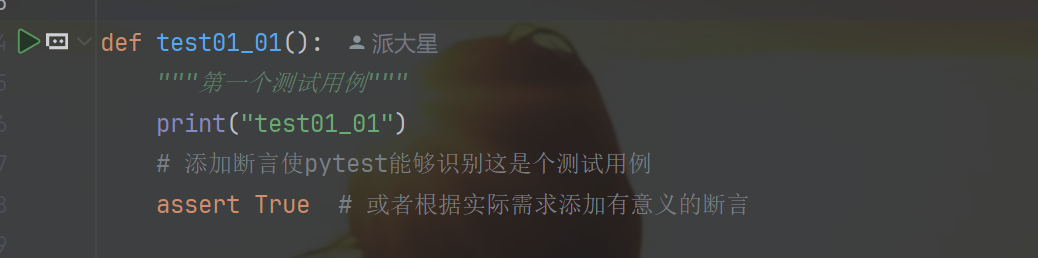
使用规则:
- 文件名必须以test_开头或者_test结尾
- 测试类必须以Test开头,并且不能有__int__方法
- 测试方法必须以test开头
以下是转换后的表格格式:
| 命令 | 描述 | 备注 |
|---|---|---|
| pytest | 在当前目录及其子目录中搜索并运行测试 | |
| pytest -v | 增加输出的详细程度 | |
| pytest -s | 显示测试中的 print 语句 |
|
| pytest test_module.py | 运行指定的测试模块 | |
| pytest test_dir/ | 运行指定目录下的所有测试 | |
| pytest -k <keyword> | 只运行测试名包含指定关键字的测试 | |
| pytest -m <marker> | 只运行标记为指定标记的测试 | |
| pytest -q | 减少输出的详细程度 | |
| pytest --html=report.html | 生成 HTML 格式的测试报告 | 需要安装 pytest-html 插件 |
| pytest --cov | 测量测试覆盖率 | 需要安装 pytest-cov 插件 |
pytest配置文件
在当前项目下创建pytest.ini文件,该文件为pytest配置文件,以下为常见的配置选项:
参数表格
| 参数 | 解释 |
|---|---|
addopts |
指定在命令行中默认包含的选项。 |
testpaths |
指定搜索测试的目录。 |
python_files |
指定发现测试模块时使用的文件匹配模式。 |
python_classes |
指定发现测试类时使用的类名前缀或模式。 |
python_functions |
指定发现测试函数和方法时使用的函数名前缀或模式。 |
norecursedirs |
指定在搜索测试时应该避免递归进入的目录模式。 |
markers |
定义测试标记,用于标记测试用例。 |
详细输出 cases 包下⽂件名以 test_ 开头且⽅法名以 Test 开头的所有⽤例
python
[pytest]
addopts = -vs
testpaths = ./cases
python_files = test_*.py
python_classes = Test*
前后置
pytest框架中不可以添加init()方法,如何进行初始化?
pytest框架提供三种前后置操作:
- setup_methond和teardown_method:这两个方法用于类中每个测试方法前置和后置操作。
- setup_class和teardown_class:这两个方法用于整个测试类的前置和后置操作。
- fixture:这是pytest推荐的方式实现测试用例前后置操作。
python
import pytest

class TestExample:
    def setup_method(self):
        print("Setup: Before each test")

    def teardown_method(self):
        print("Teardown: After each test")

    def test_example1(self):
        print("Running test_example1")

    def test_example2(self):
        print("Running test_example2")
python
class TestExample:
    def setup_class(self):
        print("Setup: Before all test")

    def teardown_class(self):
        print("Teardown: After all test")

    def test_example1(self):
        print("Running test_example1")

    def test_example2(self):
        print("Running test_example2")
参数化(fixture)
通过设计参数和规则,使得设计过程更灵活可控。
-
在用例上使用pytest.mark.parametrize
python@pytest.mark.parametrize("test_input,expected", [("3+5", 8), ("2+4", 6),("6*9", 42)]) def test_eval(test_input, expected): assert eval(test_input) == expected这个测试函数在执行的时候会把每个括号内的参数都传入函数去执行一遍。
-
在类上使用pytest.mark.parametrize
python@pytest.mark.parametrize("n,expected", [(1, 2), (3, 4)]) class TestClass: def test_simple_case(self, n, expected): assert n + 1 == expected def test_weird_simple_case(self, n, expected): assert (n * 1) + 1 == expected会将此类中的测试函数全部调用并且每个都会传入这些参数跑一遍。
-
对模块中的所有测试用例参数化,你可以将pytestmark全局变量赋值
pythonimport pytest pytestmark = pytest.mark.parametrize("n,expected", [(1, 2), (3, 4)]) class TestClass: def test_simple_case(self, n, expected): assert n + 1 == expected def test_weird_simple_case(self, n, expected): assert (n * 1) + 1 == expected -
自定义测试函数中的某个参数的数据集
python
def data_provider():
    return ["a", "b"]

# 定义⼀个测试函数,它依赖于上⾯函数的返回值
@pytest.mark.parametrize("data", data_provider())
def test_data(data):
    assert data != None
    print(f"Testing with data provider: {data}")
三、fixture是一种强大的机制,用于提供测试函数需要的资源/上下文。用于测试环境,准备数据。
-
基本用法
使用fixture方法的调用python@pytest.fixture def fixture_01(): print("第一个fixture标记的方法") def test_01(fixture_01): print("第一个测试用例")未使用fixture方法的调用:
pythondef fixture_01(): print("第一个fixture标记的方法") def test_01(): fixture_01() print("第一个测试用例")两者结果是一样的,前者可以将函数名作为参数进行调用,后者需要在方法体中调用。
测试脚本存在很多重复代码,公共数据对象时,使用fixture最为合适。
示例:
访问具体服务之前都需要执行登陆操作,可以将测试登录函数放在具体测试函数中的参数中
python
import pytest
@pytest.fixture
def login():
    print("---执⾏登陆操作-----")

def test_list(login):
    print("---访问列表⻚")

def test_detail(login):
    print("---访问详情⻚")
yield fixture
- return替代yield。
- 该fixture的任何拆卸代码放置在yield之后。
运行测试时,不希望他干扰到其他测试用例(避免留下大量测试数据来膨胀系统)pytest的fixture提供一个有用的拆卸系统。
Yield fixture使用yield替代return。有了这个,我们运行一些代码,并将对象返回给请求fixture/test。
一旦pytest确定fixture的线性顺序,他将运行每个fixture直到返回yield,然后继续执行下一个fixtrue做一样的事。
示例:
python
import pytest

@pytest.fixture
def open_close():
    print("前置操作,初始化.....")

    yield

    print("后置操作,清理数据.....")
def test_01(open_close):
    print("第⼀个测试⽤例")
示例2:
python
import pytest

@pytest.fixture
def file_read():
    print("打开⽂件句柄")
    fo = open("test.txt", "r")
    yield fo
    print("关闭打开的⽂件")
    fo.close()

def file_write():
    print("打开⽂件句柄")
    fo = open("test.txt","w",encoding="utf-8")
    return fo
    # yield fo
    print("关闭⽂件句柄")
    fo.close()

def test_file(file_write, file_read):
    # 写⼊数据
    w = file_write
    w.write("测试数据")
    w.close() # 写⼊后关闭⽂件句柄,以便读取
    # 读取数据
    r = file_read
    str = r.read(10)
    print("⽂件内容:", str)
python
【file_write前置】打开文件句柄
【file_read前置】打开文件句柄

【测试用例】文件内容: 测试数据

【file_read后置】关闭打开的文件

【file_write后置】关闭文件句柄
.
============================= 1 passed in 0.01s =============================
yield是实现测试前后置操作的关键,它可以分为两点
1.分割fixture逻辑:yiled之前的代码是测试用例执行前的前置操作(打开文件夹)
2.资源回收:yield之后的代码是测试用例执行后的后置操作,无论测试用例是否成功执行,这代码都会运行。
带参数的fixture
python
pytest.fixture(scope='',params='',autose='',ids='',name='')scope参数用于控制fixture的作用范围,决定了fixture生命周期。
- function:每个测试用例都会调用一次。
- class:同一个类中共享这个fixture。
- module:同一个测试模块中共享这个fixture。
- session:整个测试会话中共享这个fixture。
autouse:参数默认为false,设置为true,每个测试函数都会自动调用fixture。
params:参数用于参数化fixture,支持列表传入。每个参数值都会使fixture执行一次,类似for循环
ids:参数与params配合使用,为每个参数实例指定可读标识符
name:参数用于为fixture显示设置一个名称。如果使用了name,则在测试函数中需要使用这个名称来引用。