文章目录
- 一、效果
- 二、简介
- 三、环境
- 四、步骤
-
- 4.1、创建项目
- 4.2、安装PlayCanvas
- 4.3、核心逻辑(从底层到应用)
-
- [4.3.1、PlayCanvas 架构](#4.3.1、PlayCanvas 架构)
- [4.3.2、PlayCanvas 流程](#4.3.2、PlayCanvas 流程)
- 4.4、完整源码
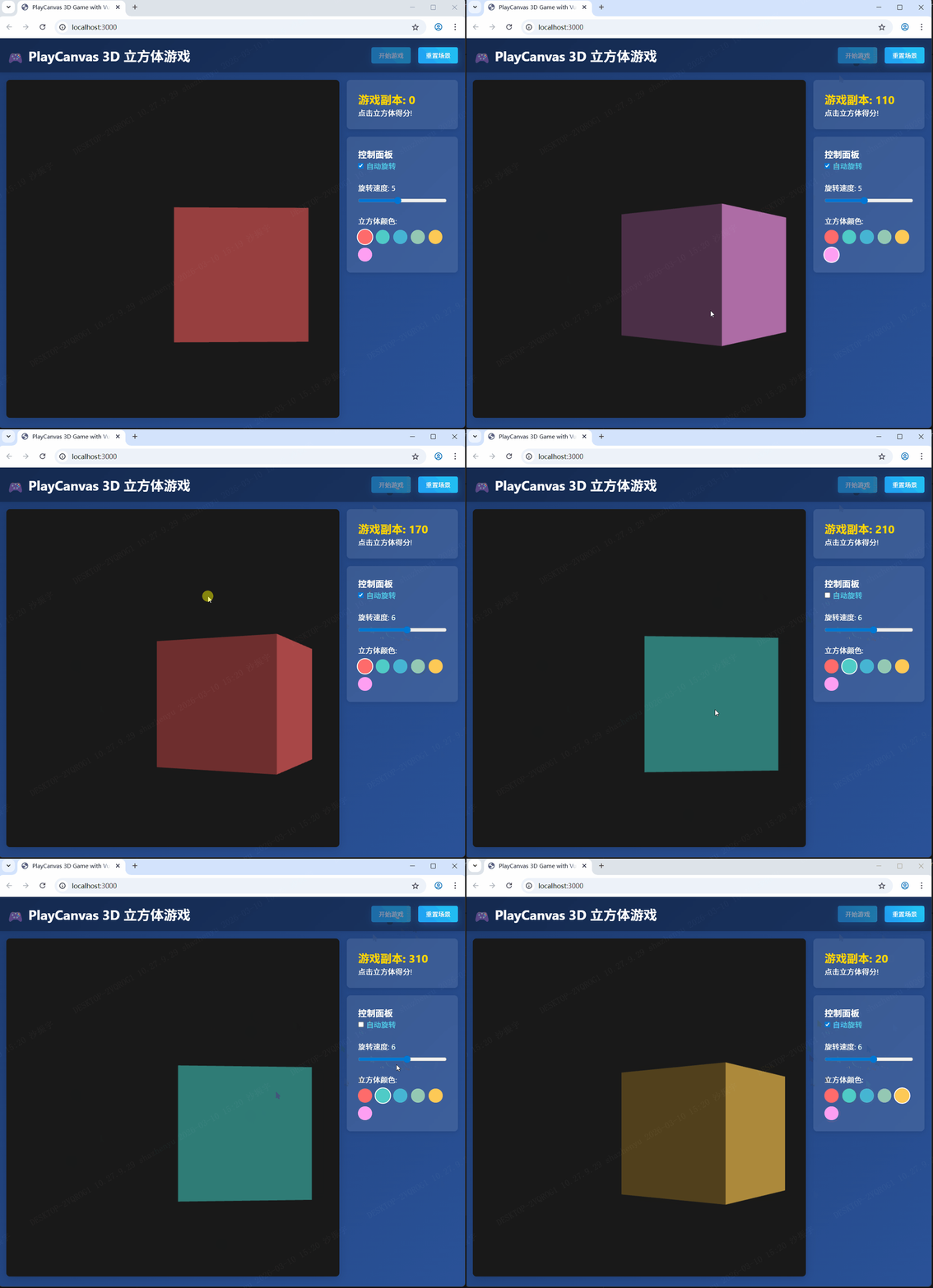
一、效果
二、简介
这款基于 Vue 3 + Vite 构建的 3D 立方体交互游戏,依托 PlayCanvas 引擎实现三维渲染,是为了学习PlayCanvas编写的。通过 Vue 响应式数据管理旋转速度、颜色、位置等交互参数,结合原生几何计算完成射线点击检测,规避引擎 API 兼容问题;利用 Vite 的高效构建能力,实现 Canvas 画布与 Vue 组件的无缝联动,支持立方体点击得分、颜色切换、自动旋转等核心交互。
三、环境
- OS:Windows11
- Browser:Google
- Node:v24.14.0
- NPM:11.9.0
- Vue:3.5.25
- Vite:7.3.1
四、步骤
4.1、创建项目
sh
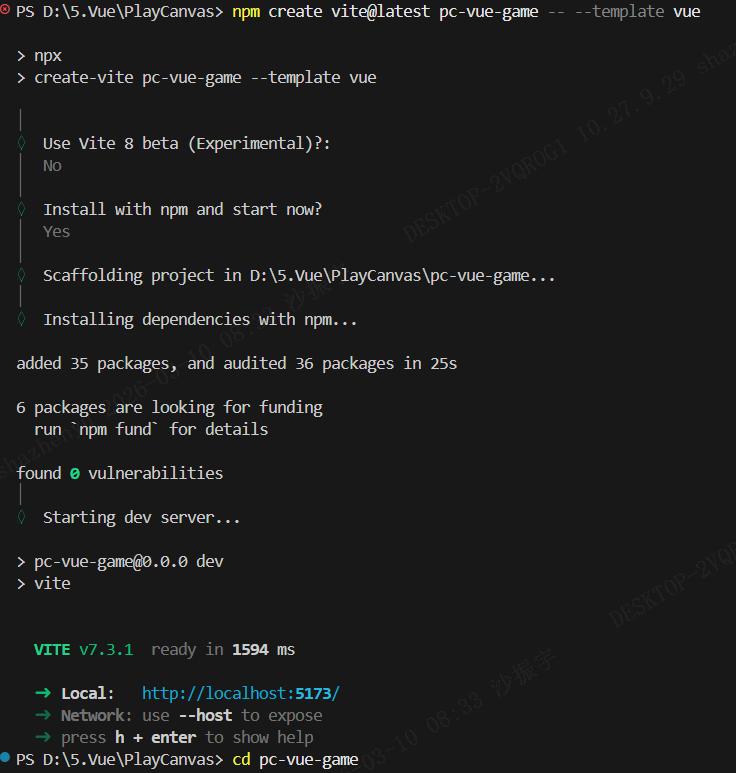
npm create vite@latest pc-vue-game -- --template vue选择默认安装
4.2、安装PlayCanvas
sh
cd pc-vue-game
npm install playcanvas
4.3、核心逻辑(从底层到应用)
PlayCanvas 是基于 WebGL 的 3D 引擎,核心逻辑围绕「场景 - 实体 - 组件」架构展开,所有 3D 功能都基于这个核心
4.3.1、PlayCanvas 架构
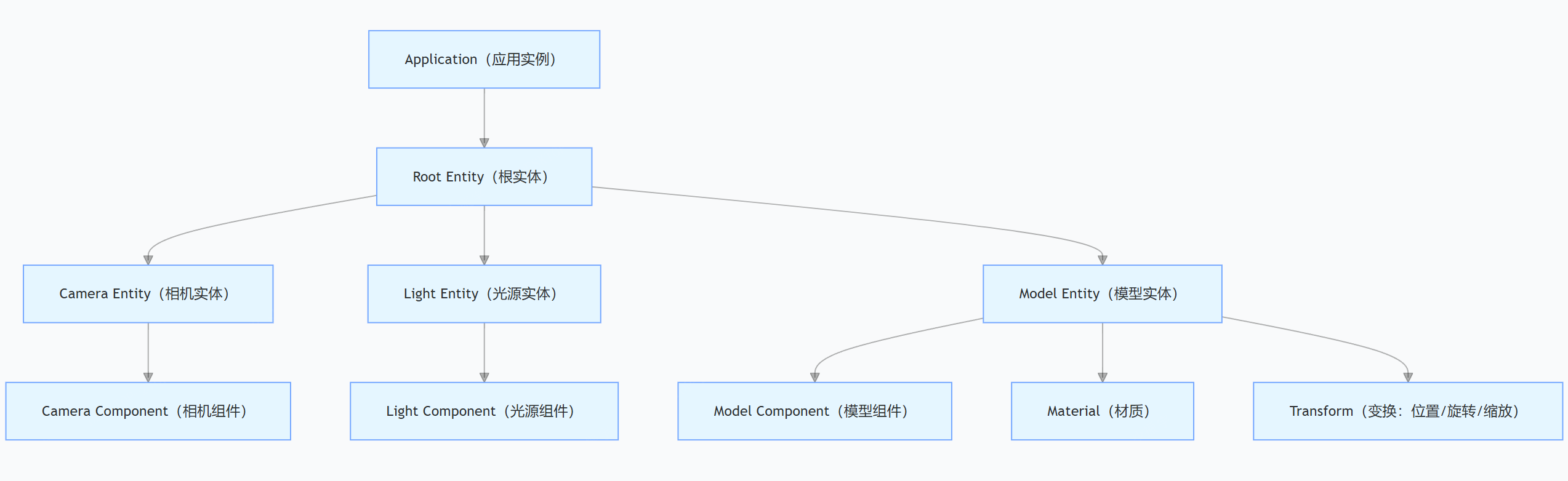
- Application:引擎入口,管理画布、渲染循环、输入设备(鼠标 / 键盘);
- Entity(实体):空容器,本身无功能,通过添加「组件」实现能力;
- Component(组件):实体的功能模块(相机、模型、光源、刚体、碰撞体等);
- Material(材质):控制模型的视觉表现(颜色、纹理、光影);
- Transform(变换):每个实体默认的属性,控制位置、旋转、缩放
4.3.2、PlayCanvas 流程
- 步骤1:创建应用实例(绑定 Canvas 元素)
- 步骤2:配置画布(填充方式、分辨率)
- 步骤3:启动应用(开启渲染循环)
- 步骤4:创建核心实体(相机/光源/模型)
- 步骤5:交互逻辑(如点击检测)
4.4、完整源码
4.4.1、App.vue
html
<template>
  <div id="app">
    <header class="header">
      <h1>🎮 PlayCanvas 3D 立方体游戏</h1>
      <nav class="nav">
        <button @click="startGame" :disabled="gameStarted">开始游戏</button>
        <button @click="resetGame">重置场景</button>
      </nav>
    </header>

    <main class="main-content">
      <div class="playcanvas-container">
        <canvas ref="pcCanvas" v-show="gameStarted"></canvas>
      </div>

      <div class="game-info">
        <div class="score-panel">
          <h3>游戏副本: {{ score }}</h3>
          <p>点击立方体得分!</p>
        </div>

        <div class="controls">
          <h3>控制面板</h3>
          <div class="control-group">
            <label>
              <input type="checkbox" v-model="autoRotate"> 自动旋转
            </label>
          </div>

          <div class="control-group speed-control">
            <span>旋转速度: {{ rotationSpeed }}</span>
            <input type="range" min="1" max="10" v-model.number="rotationSpeed">
          </div>

          <div class="control-group color-control">
            <span>立方体颜色:</span>
            <div class="color-options">
              <button
                v-for="(color, index) in colorOptions"
                :key="index"
                :style="{ backgroundColor: color.hex }"
                :class="{ active: currentColorIndex === index }"
                @click="changeCubeColor(index)"
                class="color-button"
              ></button>
            </div>
          </div>
        </div>
      </div>
    </main>
  </div>
</template>

<script setup>
import { ref, onMounted, onBeforeUnmount, watch, nextTick, reactive } from 'vue'

// 响应式数据
const pcCanvas = ref(null)
const gameStarted = ref(false)
const score = ref(0)
const autoRotate = ref(true)
const rotationSpeed = ref(5)
const currentColorIndex = ref(0)
const positionOffset = reactive({
  x: 0,
  y: 0,
  z: 0
})

// 颜色选项
const colorOptions = [
  { name: '红色', hex: '#ff6b6b' },
  { name: '蓝色', hex: '#4ecdc4' },
  { name: '绿色', hex: '#45b7d1' },
  { name: '紫色', hex: '#96ceb4' },
  { name: '橙色', hex: '#feca57' },
  { name: '粉色', hex: '#ff9ff3' }
]

// PlayCanvas 应用实例
let app = null
let cubeEntity = null
let cameraEntity = null
let material = null

// 初始化 PlayCanvas 场景
async function initPlayCanvas() {
  if (!pcCanvas.value) {
    await nextTick()
  }

  if (!pcCanvas.value) {
    console.error('Canvas element not found')
    return
  }

  try {
    // 销毁旧实例
    if (app) {
      app.destroy()
      app = null
    }

    // 创建 PlayCanvas 应用
    app = new pc.Application(pcCanvas.value, {
      mouse: new pc.Mouse(document.body),
      touch: new pc.TouchDevice(document.body)
    })

    // 设置 canvas 尺寸
    app.setCanvasFillMode(pc.FILLMODE_FILL_WINDOW)
    app.setCanvasResolution(pc.RESOLUTION_AUTO)

    // 启动应用
    app.start()

    // 创建场景元素
    createCamera()
    createLights()
    createCube()
    registerClickEvents()

    // 应用初始位置偏移
    updateCubePosition()

    console.log('PlayCanvas initialized successfully')
  } catch (error) {
    console.error('Failed to initialize PlayCanvas:', error)
  }
}

// 创建相机
function createCamera() {
  cameraEntity = new pc.Entity('camera')
  cameraEntity.addComponent('camera', {
    clearColor: new pc.Color(0.1, 0.1, 0.1)
  })
  cameraEntity.translate(0, 0, 8)
  app.root.addChild(cameraEntity)
}

// 创建光源
function createLights() {
  // 环境光
  const ambientLight = new pc.Entity('ambient-light')
  ambientLight.addComponent('light', {
    type: 'directional',
    color: new pc.Color(1, 1, 1),
    intensity: 1
  })
  app.root.addChild(ambientLight)

  // 方向光
  const directionalLight = new pc.Entity('directional-light')
  directionalLight.addComponent('light', {
    type: 'directional',
    color: new pc.Color(1, 1, 1),
    intensity: 0.8
  })
  directionalLight.setEulerAngles(45, 45, 0)
  app.root.addChild(directionalLight)
}

// 创建立方体 - 修复setValue错误
function createCube() {
  cubeEntity = new pc.Entity('cube')
  cubeEntity.addComponent('model', {
    type: 'box',
    // 显式设置模型参数,避免底层默认值缺失
    castShadows: true,
    receiveShadows: true
  })

 // ========== 新增:添加刚体组件 ==========
  cubeEntity.addComponent('rigidbody', {
    type: 'static' // 静态刚体(不移动,仅用于检测)
  });
  // ========== 新增:添加碰撞体组件 ==========
  cubeEntity.addComponent('collision', {
    type: 'box',
    halfExtents: new pc.Vec3(1, 1, 1) // 对应立方体缩放2x2x2(如果缩放是1x1x1,填0.5)
  });

  // 材质设置等原有逻辑保留
  const color = hexToRgb(colorOptions[currentColorIndex.value].hex);
  material = new pc.StandardMaterial();
  material.diffuse.set(color.r, color.g, color.b);
  material.update();
  cubeEntity.model.meshInstances[0].material = material;

  cubeEntity.setLocalScale(2, 2, 2)

  // 应用初始位置偏移
  updateCubePosition()

  app.root.addChild(cubeEntity)
}

// 注册点击事件
function registerClickEvents() {
  if (!app || !app.mouse || !cameraEntity || !cubeEntity) return;

  const handleClick = function (event) {
    // ========== 只处理左键点击 ==========
    if (event.button !== pc.MOUSEBUTTON_LEFT) return

    if (!gameStarted.value || !app || !cameraEntity || !cubeEntity) return

    try {
    const canvas = pcCanvas.value;
    const rect = canvas.getBoundingClientRect();
    const canvasWidth = rect.width;
    const canvasHeight = rect.height;

    // 1. 鼠标坐标转 NDC(标准化设备坐标,-1 到 1)
    const mouseX = ((event.event.clientX - rect.left) / canvasWidth) * 2 - 1;
    const mouseY = -(((event.event.clientY - rect.top) / canvasHeight) * 2 - 1);

    // 2. 获取相机基础参数(所有版本都支持)
    const cameraComp = cameraEntity.camera;
    const cameraPos = cameraEntity.getPosition(); // 相机世界位置
    const cameraRot = cameraEntity.getEulerAngles(); // 相机欧拉角

    // 3. 兼容所有版本的角度转弧度方法(核心修复)
    // 适配:pc.math.degToRad / pc.toRad / 手动计算
    const degToRad = function(deg) {
      return deg * (Math.PI / 180);
    };

    // 手动计算相机视角方向(纯三角函数,无 API 依赖)
    const pitch = degToRad(cameraRot.x); // 俯仰角(X轴)
    const yaw = degToRad(cameraRot.y);   // 偏航角(Y轴)

    // 计算相机正前方的单位向量
    const forward = new pc.Vec3(
      Math.cos(pitch) * Math.sin(yaw),
      -Math.sin(pitch),
      Math.cos(pitch) * Math.cos(yaw)
    ).normalize();

    // 计算相机右方/上方向量(构建相机本地坐标系)
    const right = new pc.Vec3(Math.sin(yaw - Math.PI/2), 0, Math.cos(yaw - Math.PI/2)).normalize();
    const up = new pc.Vec3().cross(forward, right).normalize();

    // 4. 计算鼠标偏移对应的射线方向(模拟透视投影)
    const fov = cameraComp.fov || 75; // 相机视场角(默认75度)
    const aspect = canvasWidth / canvasHeight; // 宽高比
    const tanFov = Math.tan(degToRad(fov) / 2);

    // 计算射线在相机本地坐标系中的方向
    const localRayDir = new pc.Vec3(
      mouseX * tanFov * aspect,
      mouseY * tanFov,
      -1 // 相机看向 -Z 方向(PlayCanvas 默认)
    ).normalize();

    // 转换为世界坐标系的射线方向
    const worldRayDir = new pc.Vec3(
      localRayDir.x * right.x + localRayDir.y * up.x + localRayDir.z * forward.x,
      localRayDir.x * right.y + localRayDir.y * up.y + localRayDir.z * forward.y,
      localRayDir.x * right.z + localRayDir.y * up.z + localRayDir.z * forward.z
    ).normalize();

    // 5. 射线与立方体包围盒相交检测(纯几何计算)
    const cubePos = cubeEntity.getPosition(); // 立方体位置
    // 立方体包围盒:中心=位置,半长=1(对应缩放2x2x2)
    const cubeMin = new pc.Vec3(cubePos.x - 1, cubePos.y - 1, cubePos.z - 1);
    const cubeMax = new pc.Vec3(cubePos.x + 1, cubePos.y + 1, cubePos.z + 1);

    // 纯数学实现射线与AABB包围盒相交检测(无任何 PlayCanvas API 依赖)
    const tMin = new pc.Vec3();
    const tMax = new pc.Vec3();
    const invDir = new pc.Vec3(1/worldRayDir.x, 1/worldRayDir.y, 1/worldRayDir.z);

    // 计算X轴相交区间
    tMin.x = (cubeMin.x - cameraPos.x ) * invDir.x;
    tMax.x = (cubeMax.x - cameraPos.x ) * invDir.x;
    if (invDir.x < 0) [tMin.x, tMax.x] = [tMax.x, tMin.x];

    // 计算Y轴相交区间
    tMin.y = (cubeMin.y - cameraPos.y ) * invDir.y;
    tMax.y = (cubeMax.y - cameraPos.y ) * invDir.y;
    if (invDir.y < 0) [tMin.y, tMax.y] = [tMax.y, tMin.y];

    // 计算Z轴相交区间
    tMin.z = (cubeMin.z - cameraPos.z ) * invDir.z;
    tMax.z = (cubeMax.z - cameraPos.z ) * invDir.z;
    if (invDir.z < 0) [tMin.z, tMax.z] = [tMax.z, tMin.z];

    // 判断是否相交
    const tNear = Math.max(Math.max(tMin.x, tMin.y), tMin.z);
    const tFar = Math.min(Math.min(tMax.x, tMax.y), tMax.z);
    console.error('tNear:', tNear, tFar);
    const isHit = tNear <= tFar && tFar > 0;

    console.error('判断是否相交:', isHit);
    // 6. 处理点击结果
    if (isHit) {
      score.value += 10;
      const randomIndex = Math.floor(Math.random() * colorOptions.length);
      changeCubeColor(randomIndex);
    }
    } catch (error) {
      console.error('点击检测异常:', error);
    }
  }
  app.mouse.off(pc.EVENT_MOUSEDOWN, handleClick);
  app.mouse.on(pc.EVENT_MOUSEDOWN, handleClick);
}

// 更新立方体颜色 - 修复setValue错误
function changeCubeColor(index) {
  if (!cubeEntity || !material) return

  currentColorIndex.value = index
  const color = hexToRgb(colorOptions[index].hex)
  material.diffuse = new pc.Color(color.r, color.g, color.b)
  material.update() // 正确调用update方法
}

// 更新立方体位置
function updateCubePosition() {
  if (!cubeEntity) return

  cubeEntity.setPosition(
    positionOffset.x,
    positionOffset.y,
    positionOffset.z
  )
}

// 十六进制颜色转RGB
function hexToRgb(hex) {
  const result = /^#?([a-f\d]{2})([a-f\d]{2})([a-f\d]{2})$/i.exec(hex)
  return result ? {
    r: parseInt(result[1], 16) / 255,
    g: parseInt(result[2], 16) / 255,
    b: parseInt(result[3], 16) / 255
  } : { r: 1, g: 1, b: 1 }
}

// 开始游戏
async function startGame() {
  if (gameStarted.value) return

  gameStarted.value = true
  score.value = 0

  await nextTick()
  initPlayCanvas()
}

// 重置游戏
function resetGame() {
  if (app) {
    app.destroy()
    app = null
  }

  gameStarted.value = false
  score.value = 0
  cubeEntity = null
  cameraEntity = null
  material = null
  currentColorIndex.value = 0
  Object.assign(positionOffset, { x: 0, y: 0, z: 0 })

  setTimeout(() => {
    gameStarted.value = true
    nextTick().then(() => {
      initPlayCanvas()
    })
  }, 100)
}

// 监听位置偏移变化
watch(positionOffset, () => {
  updateCubePosition()
}, { deep: true })

// 游戏循环
function update(dt) {
  if (!cubeEntity || !gameStarted.value) return

  // 确保 app 和相关系统已初始化
  if (!app || !app.systems) return

  // 安全访问 dt 属性
  const deltaTime = dt || (app.systems.update ? app.systems.update.dt : 0.016)

  if (autoRotate.value) {
    cubeEntity.rotate(0, rotationSpeed.value * deltaTime * 20, 0)
  }
}

// 组件挂载后初始化
onMounted(() => {
  window.addEventListener('resize', () => {
    if (app) {
      app.resizeCanvas()
    }
  })

  // 启动游戏循环
  const updateHandler = () => {
    if (app) {
      // 确保 app.update 在正确的时机调用
      try {
        app.update()
        update(app.systems.update ? app.systems.update.dt : 0.016)
      } catch (error) {
        console.warn('Update error:', error)
        // 使用默认时间步长
        update(0.016)
      }
    }
    requestAnimationFrame(updateHandler)
  }
  requestAnimationFrame(updateHandler)
})

// 组件卸载前清理
onBeforeUnmount(() => {
  if (app) {
    app.destroy()
    app = null
  }
})
</script>

<style scoped>
#app {
  font-family: 'Segoe UI', Tahoma, Geneva, Verdana, sans-serif;
  background: linear-gradient(135deg, #1e3c72, #2a5298);
  color: white;
  min-height: 100vh;
}

.header {
  background: rgba(0, 0, 0, 0.3);
  color: white;
  padding: 1rem;
  display: flex;
  justify-content: space-between;
  align-items: center;
  box-shadow: 0 2px 10px rgba(0,0,0,0.1);
  backdrop-filter: blur(10px);
}

.header h1 {
  font-size: 1.8rem;
  margin: 0;
}

.nav button {
  background: linear-gradient(45deg, #2196F3, #21CBF3);
  border: none;
  color: white;
  padding: 0.5rem 1rem;
  margin-left: 1rem;
  border-radius: 4px;
  cursor: pointer;
  transition: all 0.3s ease;
  box-shadow: 0 4px 15px rgba(33, 150, 243, 0.3);
}

.nav button:hover:not(:disabled) {
  background: linear-gradient(45deg, #21CBF3, #2196F3);
  transform: translateY(-2px);
  box-shadow: 0 6px 20px rgba(33, 150, 243, 0.4);
}

.nav button:disabled {
  opacity: 0.5;
  cursor: not-allowed;
  transform: none;
}

.main-content {
  display: grid;
  grid-template-columns: 3fr 1fr;
  gap: 1rem;
  height: calc(100vh - 80px);
  padding: 1rem;
}

.playcanvas-container {
  width: 100%;
  height: 100%;
  border-radius: 8px;
  overflow: hidden;
  box-shadow: 0 4px 20px rgba(0,0,0,0.15);
  position: relative;
  background: rgba(0, 0, 0, 0.2);
}

.playcanvas-container canvas {
  width: 100%;
  height: 100%;
  display: block;
}

.game-info {
  display: flex;
  flex-direction: column;
  gap: 1rem;
}

.score-panel, .controls {
  background: rgba(255, 255, 255, 0.1);
  backdrop-filter: blur(10px);
  padding: 1.5rem;
  border-radius: 8px;
  box-shadow: 0 2px 10px rgba(0,0,0,0.1);
}

.score-panel h3 {
  margin-top: 0;
  color: #ffd700;
  font-size: 1.5rem;
}

.control-group {
  margin-bottom: 1.5rem;
}

.control-group:last-child {
  margin-bottom: 0;
}

.control-group label {
  display: block;
  margin-bottom: 0.5rem;
  font-weight: 500;
  color: #4fc3f7;
}

.speed-control {
  display: flex;
  flex-direction: column;
  gap: 0.5rem;
}

.speed-control input[type="range"] {
  width: 100%;
}

.color-control .color-options {
  display: flex;
  gap: 0.5rem;
  flex-wrap: wrap;
  margin-top: 0.5rem;
}

.color-button {
  width: 30px;
  height: 30px;
  border: 2px solid transparent;
  border-radius: 50%;
  cursor: pointer;
  transition: all 0.2s ease;
}

.color-button:hover {
  transform: scale(1.1);
}

.color-button.active {
  border-color: white;
  transform: scale(1.15);
}

.position-control .position-sliders {
  display: flex;
  flex-direction: column;
  gap: 1rem;
  margin-top: 0.5rem;
}

.slider-group {
  display: flex;
  flex-direction: column;
  gap: 0.25rem;
}

.slider-group label {
  font-size: 0.9rem;
  color: #bbdefb;
  margin-bottom: 0;
}

.slider-group input[type="range"] {
  width: 100%;
}

@media (max-width: 768px) {
  .main-content {
    grid-template-columns: 1fr;
    grid-template-rows: 2fr 1fr;
  }

  .header h1 {
    font-size: 1.4rem;
  }

  .nav button {
    padding: 0.4rem 0.8rem;
    font-size: 0.9rem;
  }
}
</style>
4.4.2、main.js
js
import { createApp } from 'vue'
import App from './App.vue'
import './assets/style.css'

createApp(App).mount('#app')
4.4.3、style.css
css
* {
  margin: 0;
  padding: 0;
  box-sizing: border-box;
}

body {
  font-family: 'Segoe UI', Tahoma, Geneva, Verdana, sans-serif;
  background: #f5f7fa;
}

#app {
  height: 100vh;
  overflow: hidden;
}

button {
  outline: none;
  transition: all 0.2s ease-in-out;
}

button:focus {
  outline: 2px solid #667eea;
}
4.4.4、index.html
html
<!DOCTYPE html>
<html lang="zh-CN">
<head>
  <meta charset="UTF-8">
  <meta name="viewport" content="width=device-width, initial-scale=1.0">
  <title>PlayCanvas 3D Game with Vue 3</title>
  <!-- 引入 PlayCanvas -->
  <script src="https://code.playcanvas.com/playcanvas-latest.min.js"></script>
</head>
<body>
  <div id="app"></div>
  <script type="module" src="/src/main.js"></script>
</body>
</html>
4.4.5、vite.config.js
js
import { defineConfig } from 'vite'
import vue from '@vitejs/plugin-vue'

export default defineConfig({
  plugins: [vue()],
  server: {
    host: '0.0.0.0',
    port: 3000
  },
  build: {
    outDir: 'dist'
  }
})
4.4.6、package.json
json
{
  "name": "pc-vue-game",
  "private": true,
  "version": "0.0.0",
  "type": "module",
  "scripts": {
    "dev": "vite",
    "build": "vite build",
    "preview": "vite preview"
  },
  "dependencies": {
    "playcanvas": "^2.16.0",
    "vue": "^3.5.25"
  },
  "devDependencies": {
    "@vitejs/plugin-vue": "^6.0.2",
    "vite": "^7.3.1"
  }
}