前言
你好呀,我是小邹。
在信息爆炸的时代,如何让用户快速了解一篇文章的核心内容成为了博客系统的重要功能。本文将详细介绍如何在Spring Boot博客系统中集成AI智能摘要功能,实现自动分析文章内容并生成简洁的摘要,同时配合打字机动画效果,提升用户体验。
功能效果预览
体验地址:https://www.hqxiaozou.top
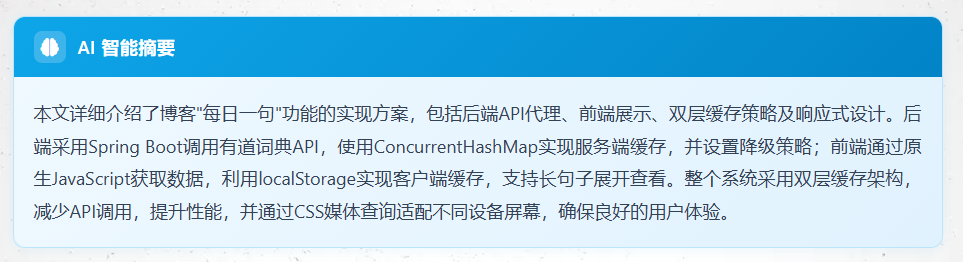
进入文章详情页后,系统会自动调用AI接口分析文章内容,以打字机效果逐字显示生成的摘要:
技术架构
本功能采用前后端分离的架构设计:
┌─────────────┐      ┌─────────────┐      ┌─────────────┐
│   前端页面   │ ───▶ │  后端API    │ ───▶ │  AI服务     │
│  (Thymeleaf)│      │(Spring Boot)│      │(智谱AI/    │
│             │ ◀─── │             │ ◀─── │ Moonshot等) │
└─────────────┘      └─────────────┘      └─────────────┘
      │                                              │
      ▼                                              ▼
┌─────────────┐                            ┌─────────────┐
│ 打字机动画   │                            │  GPT-4/     │
│ 效果展示    │                            │  GLM-4等    │
└─────────────┘                            └─────────────┘
后端实现
1. 服务接口定义
首先定义AI摘要服务的接口:
java
package com.zou.blog.service;

/**
 * AI文章摘要服务接口
 */
public interface AiSummaryService {

    /**
     * 生成文章摘要
     *
     * @param title   文章标题
     * @param content 文章内容
     * @return AI生成的摘要
     */
    String generateSummary(String title, String content);

    /**
     * 生成文章摘要(带字数限制)
     *
     * @param title      文章标题
     * @param content    文章内容
     * @param maxLength  摘要最大长度
     * @return AI生成的摘要
     */
    String generateSummary(String title, String content, int maxLength);
}
2. 服务实现类
使用OpenAI兼容格式调用AI接口:
java
@Service
public class AiSummaryServiceImpl implements AiSummaryService {

    @Resource
    private RestTemplate restTemplate;

    @Value("${ai.summary.api-key:}")
    private String apiKey;

    @Value("${ai.summary.api-url}")
    private String apiUrl;

    @Value("${ai.summary.model}")
    private String model;

    @Override
    public String generateSummary(String title, String content, int maxLength) {
        // 构建提示词
        String prompt = buildPrompt(title, content, maxLength);

        // 调用AI API
        return callAiApi(prompt);
    }

    private String buildPrompt(String title, String content, int maxLength) {
        StringBuilder prompt = new StringBuilder();
        prompt.append("请为以下文章生成一个简洁的摘要,要求:\n");
        prompt.append("1. 摘要长度控制在").append(maxLength).append("字以内\n");
        prompt.append("2. 准确概括文章的核心内容和主要观点\n");
        prompt.append("3. 语言流畅,表达清晰\n\n");

        if (title != null && !title.trim().isEmpty()) {
            prompt.append("文章标题:").append(title).append("\n\n");
        }
        prompt.append("文章内容:\n").append(content);

        return prompt.toString();
    }

    private String callAiApi(String prompt) throws Exception {
        // 构建请求体
        ObjectNode requestBody = objectMapper.createObjectNode();
        requestBody.put("model", model);
        requestBody.put("max_tokens", maxTokens);
        requestBody.put("temperature", temperature);

        ArrayNode messages = requestBody.putArray("messages");
        ObjectNode message = messages.addObject();
        message.put("role", "user");
        message.put("content", prompt);

        // 发送请求并解析响应
        // ...
    }
}
3. REST API控制器
在Controller中暴露API接口:
java
@GetMapping(value = "/api/ai-summary", produces = "application/json;charset=UTF-8")
@ResponseBody
public Map<String, Object> generateAiSummary(@RequestParam("articleId") Integer articleId) {
Map<String, Object> result = new HashMap<>();
try {
// 获取文章内容
ArticleCustom article = articleService.findByArticleId(articleId);
if (article == null) {
result.put("success", false);
result.put("message", "文章不存在");
return result;
}
// 去除HTML标签,提取纯文本
String plainText = article.getArticleContent()
.replaceAll("<[^>]+>", "")
.replaceAll(" ", " ")
.trim();
// 生成摘要
String summary = aiSummaryService.generateSummary(
article.getArticleTitle(),
plainText,
200
);
result.put("success", true);
result.put("summary", summary);
} catch (Exception e) {
result.put("success", false);
result.put("message", "生成摘要失败: " + e.getMessage());
}
return result;
}4. 配置文件
在application.yaml中添加AI配置:
yaml
ai:
  summary:
    enabled: true
    api-key: "your-api-key-here"
    api-url: "https://open.bigmodel.cn/api/paas/v4/chat/completions"
    model: "glm-4"
    max-tokens: 300
    temperature: 0.7
    timeout: 30000
前端实现
1. 页面结构
html
<div class="ai-summary-container" id="aiSummaryContainer">
    <div class="ai-summary-header">
        <div class="ai-summary-icon" id="aiSummaryIcon">
            <i class="fas fa-brain"></i>
        </div>
        <div class="ai-summary-title">AI 智能摘要</div>
    </div>
    <div class="ai-summary-body">
        <div class="ai-summary-content" id="aiSummaryContent">
            <!-- 加载状态 -->
            <div class="ai-summary-loading">
                <span class="ai-summary-loading-text">AI正在分析文章内容</span>
                <span class="ai-summary-loading-dots">
                    <span></span><span></span><span></span>
                </span>
            </div>
        </div>
    </div>
</div>
2. 打字机动画实现
核心JavaScript代码:
javascript
// 渲染摘要(带打字机动画)
function renderSummary(summary) {
    var contentDiv = document.getElementById('aiSummaryContent');
    if (!contentDiv) return;

    // 创建打字机容器
    contentDiv.innerHTML = `
        <div class="ai-summary-typewriter" id="aiTypewriter"></div>
    `;

    var typewriterDiv = document.getElementById('aiTypewriter');
    typewriterDiv.classList.add('typing');

    // 打字机效果
    var text = summary;
    var index = 0;
    var speed = 30; // 基础打字速度

    function typeWriter() {
        if (index < text.length) {
            var char = text.charAt(index);
            typewriterDiv.textContent += char;
            index++;

            // 智能调速:标点停顿更久
            var currentSpeed = speed;
            if (',。!?;:'.indexOf(char) !== -1) {
                currentSpeed = speed * 3;
            }

            setTimeout(typeWriter, currentSpeed);
        } else {
            // 打字完成,移除光标
            setTimeout(function() {
                typewriterDiv.classList.remove('typing');
            }, 800);
        }
    }

    typeWriter();
}
3. CSS样式
css
/* 打字机容器 */
.ai-summary-typewriter {
    color: #334155;
    font-size: 15px;
    line-height: 1.8;
    min-height: 1.8em;
}

/* 闪烁光标 */
.ai-summary-typewriter.typing::after {
    content: '|';
    animation: ai-cursor-blink 1s infinite;
    color: #0ea5e9;
    margin-left: 2px;
}

@keyframes ai-cursor-blink {
    0%, 50% { opacity: 1; }
    51%, 100% { opacity: 0; }
}
API调用流程
javascript
// 页面加载完成后调用
function generateAiSummary() {
    var articleId = [[${article.id}]];

    // 调用后端API
    fetch('/api/ai-summary?articleId=' + articleId)
        .then(response => response.json())
        .then(data => {
            if (data.success) {
                renderSummary(data.summary);  // 打字机效果显示
            } else {
                generateLocalSummary();       // 降级到本地摘要
            }
        })
        .catch(error => {
            generateLocalSummary();           // API失败时降级
        });
}
降级策略
当AI服务不可用时,系统自动降级到本地摘要生成:
javascript
function generateLocalSummary() {
    // 提取文章关键词
    var techKeywords = extractTechKeywords(fullText);

    // 根据关键词生成简单摘要
    if (keywords.length > 0) {
        summary = '本文介绍了如何使用' +
                  keywords.slice(0, 2).join('、') +
                  '实现相关功能。';
    } else {
        // 使用文章第一段作为摘要
        summary = paragraphs[0].substring(0, 150);
    }

    // 显示降级提示
    renderSummaryWithNote(summary, '当前为本地摘要,AI服务暂时不可用');
}
支持的AI服务商
本系统支持多种国内可访问的AI API:
| 服务商 | API地址 | 推荐模型 |
|---|---|---|
| 智谱AI | https://open.bigmodel.cn/api/paas/v4/chat/completions |
glm-4, glm-4-flash |
| Moonshot | https://api.moonshot.cn/v1/chat/completions |
moonshot-v1-8k |
| 阿里云 | https://dashscope.aliyuncs.com/compatible-mode/v1/chat/completions |
qwen-turbo |
| DeepSeek | https://api.deepseek.com/v1/chat/completions |
deepseek-chat |
总结
本文介绍了如何在Spring Boot博客系统中集成AI智能摘要功能,主要包含以下技术点:
- 后端架构 - 使用Spring Boot构建REST API,调用第三方AI服务
- 前端交互 - 实现打字机动画效果,提升用户体验
- 降级策略 - API失败时自动切换到本地摘要生成
- 多服务商支持 - 兼容OpenAI格式,支持多家国内AI服务商
通过这种方式,博客系统能够自动为每篇文章生成简洁准确的摘要,帮助读者快速了解文章内容,提升阅读效率。