关注目前处于实验性的更简单实现方式 androidx.compose.foundation.style
属于手势的最顶层API,更底层的自定义方式详见。
一、概念
针对的是那些自带交互的组件,通过将内部交互事件分享出来供外部观察,来对该组件应用不同的外观内容,或让其它组件产生联动效果。但这样要手动给每个组件应用效果,更通用的可重复应用的效果详见Indication。
二、创建交互源对象
InteractionSource 提供交互的只读流,而 MutableInteractionSource 则允许往数据流中添加新交互,它俩都是接口需要通过工厂函数返回实现类。
|----------------------------|--------------------------------------------------------------------|
| MutableInteractionSource() | fun MutableInteractionSource(): MutableInteractionSource 通过工厂函数创建。 |
Kotlin
val interactionSource = remember { MutableInteractionSource() }三、传参给组件/修饰符
传参后,即可观察该组件的交互。
3.1 自带交互的标准组件
Kotlin
val interactionSource = remember { MutableInteractionSource() }

Button(
    interactionSource = interactionSource,
    onClick = {}
) {...}
3.2 交互类型的Modifier
|--------|--------------------------|--------------------------|--------------------------|
| 高级别API | Modifier.clickable() 可以一次全处理。 |||
| 低级别API | Modifier.draggable() 拖拽。 | Modifier.hoverable() 悬停。 | Modifier.focusable() 焦点。 |
Kotlin
val interactionSource = remember { MutableInteractionSource() }

Box(Modifier
    ..draggable(interactionSource = interactionSource)
    .hoverable(interactionSource = interactionSource)
    .focusable(interactionSource = interactionSource)
    .clickable(
        interactionSource = interactionSource,
        onClick = {}
    )
) {...}
四、观察交互
4.1 交互状态(高级别API)
对于单个交互类型的收集,有简单的封装方法调用,底层将流转为了状态,返回的状态只有两个值 true/false。
|----|-------------------------------------------------------------------------------|
| 点按 | @Composable fun InteractionSource.collectIsPressedAsState(): State<Boolean> |
| 拖拽 | @Composable fun InteractionSource.collectIsDraggedAsState(): State<Boolean> |
| 悬停 | @Composable fun InteractionSource.collectIsHoveredAsState(): State<Boolean> |
| 焦点 | @Composable fun InteractionSource.collectIsFocusedAsState(): State<Boolean> |
Kotlin
val interactionSource = remember { MutableInteractionSource() }
val isPress by interactionSource.collectIsPressedAsState()
Text(
    color = if (isPress) Color.Black else Color.Blue,
    text = ""
)
4.2 交互流(低级别API)
若同时需要两种状态,Compose 会执行大量重复工作,且无法保证互动顺序正确,这种时候就需要手动收集数据流了。
交互都是成对出现,结束或取消的交互中都带有一个属性,这个属性是对应的那个起始交互。
|---------------------|-------------------------------------------------------------------------------------------------------------------------------------------------------------------------------------------------------------|
| PressInteraction 点按 | interface PressInteraction : Interaction { class Press(val pressPosition: Offset) : PressInteraction class Release(val press: Press) : PressInteraction class Cancel(val press: Press) : PressInteraction } |
| DragInteraction 拖拽 | interface DragInteraction : Interaction { class Start : DragInteraction class Stop(val start: Start) : DragInteraction class Cancel(val start: Start) : DragInteraction } |
| HoverInteraction 悬停 | interface HoverInteraction : Interaction { class Enter : HoverInteraction class Exit(val enter: Enter) : HoverInteraction } |
| FocusInteraction 焦点 | interface FocusInteraction : Interaction { class Focus : FocusInteraction class Unfocus(val focus: Focus) : FocusInteraction } |
举例:只需要按下和拖动,从Button读取,Text响应。
Kotlin
@Composable
fun InteractionDemo() {
    //创建交互对象
    val interactionSource = remember { MutableInteractionSource() }
    //存储点按和拖动交互
    val myInteractions = remember { mutableStateListOf<Interaction>() }
    //收集流
    LaunchedEffect(interactionSource) {
        interactionSource.interactions.collect { interaction ->
            when (interaction) {
                //发生新的按下互动时立即将其添加到列表中
                is PressInteraction.Press -> { myInteractions.add(interaction) }
                //在互动结束时从列表中移除互动
                is PressInteraction.Release -> { myInteractions.remove(interaction.press) }
                is PressInteraction.Cancel -> { myInteractions.remove(interaction.press) }
                //拖动同理
                is DragInteraction.Start -> { myInteractions.add(interaction) }
                is DragInteraction.Stop -> { myInteractions.remove(interaction.start) }
                is DragInteraction.Cancel -> { myInteractions.remove(interaction.start) }
            }
        }
    }
    //组件中使用自定义交互
    //判断是否处于按下或拖动状态,只需要检查列表是否为空
    val isPress = myInteractions.isNotEmpty()
    //获取最近一次互动,只需要查看最后列表的最后一项
    val lastInteraction = when (myInteractions.lastOrNull()) {
        is DragInteraction.Start -> "拖动"
        is PressInteraction.Press -> "点按"
        else -> "无"
    }
    //赋值给Button
    Button(
        interactionSource = interactionSource,
        onClick = {}
    ) {
        //Text读取
        Text(
            color = if (isPress) Color.Black else Color.Blue,
            text = ""
        )
    }
}
五、自定义组件
构建自定义的组件或修饰符,通过在参数列表暴露 InteractionSource 或 MutableInteractionSource 类型,将交互源从内部提升出去。内部往交互流中发射交互,外部收集交互流来对该组件或其它组件应用视觉反馈。
5.1 基于标准组件封装
按钮点击后显示购物车图标。
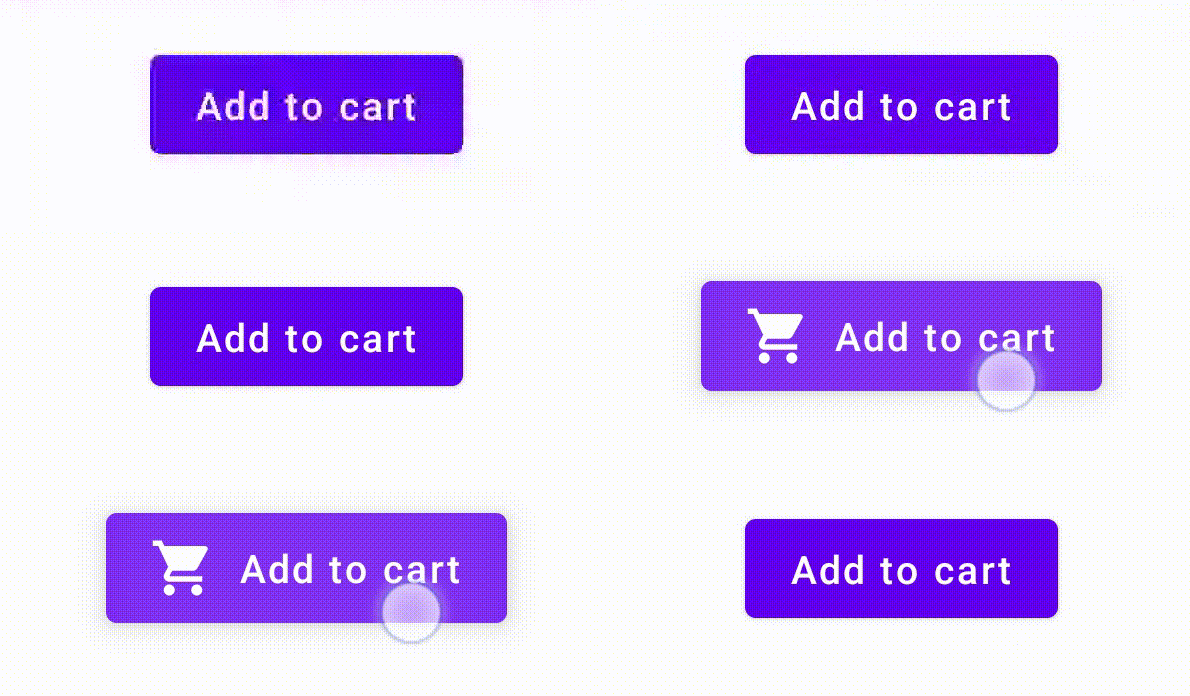
Kotlin
@Composable
fun MyButton(
    interactionSource: MutableInteractionSource? = null,
) {
    //鼠标悬停同理,只是把这里改成 collectIsHoveredAsState()
    val isPressed = interactionSource?.collectIsPressedAsState()?.value ?: false
    Button(
        interactionSource = interactionSource,
        onClick = {}
    ) {
        AnimatedVisibility(isPressed) {
            if (isPressed) {
                Icon(
                    modifier = Modifier.padding(end = 10.dp),
                    imageVector = Icons.Filled.ShoppingCart,
                    contentDescription = null
                )
            }
            Text("Add to cart")
        }
    }
}
5.2 自定义Modifier
对于在聚焦状态下绘制边框的修饰符,只需要观察 Interactions。对于处理悬停事件的修饰符,需要发出 Interactions。
Kotlin
fun Modifier.focusBorder(interactionSource: InteractionSource): Modifier {
    // ...
}

fun Modifier.hover(interactionSource: MutableInteractionSource, enabled: Boolean): Modifier {
    // ...
}
5.3 完全自定义组件
根据更底层的手势API,通过 MutableInteractionSource 的 emit() 和 tryEmit() 发送交互。