文章目录
- [4.mysql 5.x源码安装](#4.mysql 5.x源码安装)
- 5.mysql的备份与恢复
4.mysql 5.x源码安装
环境准备:
使用CentOS-7-template模板克隆mysql01
bash
#设置主机名
[root@localhost ~]# hostnamectl set-hostname mysql01
#关闭防火墙
[root@mysql01 ~]# systemctl disable firewalld.service --now
mysql5.7稳定版安装
bash
#安装依赖包,ncurses(基础运行时库) ncurses-devel(可操作终端)bison(解析语法) cmake(源码编译工具) gcc,gcc-c++(编译器)
[root@mysql01 ~]# yum -y install ncurses ncurses-devel bison cmake gcc gcc-c++

#配置程序用户(不允许终端登录)
[root@mysql01 ~]# useradd -s /sbin/nologin mysql

#解压mysql和boost包到指定目录,boost是支持mysql底层c++运行的仓库
[root@mysql01 ~]# tar zxvf mysql-5.7.17.tar.gz -C /opt/
[root@mysql01 ~]# tar zxvf boost_1_59_0.tar.gz -C /usr/local/
[root@mysql01 ~]# cd /usr/local/
[root@mysql01 ~]# mv boost_1_59_0 boost

#配置安装环境
[root@mysql01 ~]# cd /opt/mysql-5.7.17/
[root@mysql01 mysql-5.7.17]# cmake \
-DCMAKE_INSTALL_PREFIX=/usr/local/mysql \
-DMYSQL_UNIX_ADDR=/usr/local/mysql/mysql.sock \
-DSYSCONFDIR=/etc \
-DSYSTEMD_PID_DIR=/usr/local/mysql \
-DDEFAULT_CHARSET=utf8  \
-DDEFAULT_COLLATION=utf8_general_ci \
-DWITH_INNOBASE_STORAGE_ENGINE=1 \
-DWITH_ARCHIVE_STORAGE_ENGINE=1 \
-DWITH_BLACKHOLE_STORAGE_ENGINE=1 \
-DWITH_PERFSCHEMA_STORAGE_ENGINE=1 \
-DMYSQL_DATADIR=/usr/local/mysql/data \
-DWITH_BOOST=/usr/local/boost \
-DWITH_SYSTEMD=1

#注释
cmake \
-DCMAKE_INSTALL_PREFIX=/usr/local/mysql \ #安装路径
-DMYSQL_UNIX_ADDR=/usr/local/mysql/mysql.sock \ #客户端连服务的通讯文件
-DSYSCONFDIR=/etc \ #mysql的配置文件
-DSYSTEMD_PID_DIR=/usr/local/mysql \ #pid进程文件存放位置
-DDEFAULT_CHARSET=utf8  \	#字符集格式
-DDEFAULT_COLLATION=utf8_general_ci \	#字符集位置
-DWITH_INNOBASE_STORAGE_ENGINE=1 \	#开启支持的存储引擎
-DWITH_ARCHIVE_STORAGE_ENGINE=1 \
-DWITH_BLACKHOLE_STORAGE_ENGINE=1 \
-DWITH_PERFSCHEMA_STORAGE_ENGINE=1 \
-DMYSQL_DATADIR=/usr/local/mysql/data \  #数据存放位置
-DWITH_BOOST=/usr/local/boost \		#底层的c++支持库位置
-DWITH_SYSTEMD=1	#id号
------注意:如果在CMAKE的过程中有报错,当报错解决后,需要把源码目录中的CMakeCache.txt文件删除,然后再重新CMAKE,否则错误依旧------------

#编译和安装
[root@mysql01 mysql-5.7.17]# make && make install

#递归配置目录所属主和组
[root@mysql01 ~]# chown -R mysql.mysql /usr/local/mysql/

#编辑mysql的配置文件,直接全替换
[root@mysql01 ~]# vim /etc/my.cnf
[client]
port = 3306
default-character-set=utf8
socket = /usr/local/mysql/mysql.sock

[mysql]
port = 3306
default-character-set=utf8
socket = /usr/local/mysql/mysql.sock

[mysqld]
user = mysql
basedir = /usr/local/mysql
datadir = /usr/local/mysql/data
port = 3306
character_set_server=utf8
pid-file = /usr/local/mysql/mysqld.pid
socket = /usr/local/mysql/mysql.sock
server-id = 1

sql_mode=NO_ENGINE_SUBSTITUTION,STRICT_TRANS_TABLES,NO_AUTO_CREATE_USER,NO_AUTO_VALUE_ON_ZERO,NO_ZERO_IN_DATE,NO_ZERO_DATE,ERROR_FOR_DIVISION_BY_ZERO,PIPES_AS_CONCAT,ANSI_QUOTES

#配置文件所属主和组
[root@mysql01 ~]# chown mysql:mysql /etc/my.cnf

#配置环境变量
[root@mysql01 ~]# echo 'PATH=/usr/local/mysql/bin:/usr/local/mysql/lib:$PATH' >> /etc/profile
[root@mysql01 ~]# echo 'export PATH' >> /etc/profile

#加载修改过的配置
[root@mysql01 ~]# source /etc/profile

#数据库初始化
[root@mysql01 ~]# cd /usr/local/mysql/
[root@mysql01 mysql]# bin/mysqld \
--initialize-insecure \
--user=mysql \
--basedir=/usr/local/mysql \
--datadir=/usr/local/mysql/data

[root@mysql01 mysql]# cp /usr/local/mysql/usr/lib/systemd/system/mysqld.service /usr/lib/systemd/system/
[root@mysql01 mysql]# systemctl daemon-reload
[root@mysql01 mysql]# systemctl start mysqld
[root@mysql01 mysql]# netstat -anpt | grep 3306
tcp6       0      0 :::3306                 :::*                    LISTEN      70276/mysqld
[root@mysql01 mysql]# systemctl enable mysqld

#给root账号设置密码为huawei,提示输入的是原始密码(密码为空)。
[root@mysql01 mysql]# mysqladmin -uroot -p password "huawei"
Enter password:

#登录mysql
[root@mysql01 ~]# mysql -uroot -phuawei
mysql: [Warning] Using a password on the command line interface can be insecure.
Welcome to the MySQL monitor.  Commands end with ; or \g.
Your MySQL connection id is 4
Server version: 5.7.17 Source distribution

Copyright (c) 2000, 2016, Oracle and/or its affiliates. All rights reserved.

Oracle is a registered trademark of Oracle Corporation and/or its
affiliates. Other names may be trademarks of their respective
owners.

Type 'help;' or '\h' for help. Type '\c' to clear the current input statement.

mysql>

#授权远程登录
mysql> grant all privileges on *.* to 'root'@'%' identified by 'huawei' with grant option;
做完,拍摄快照
基础SQL-DDL语句
- 查询数据库
bash
[root@mysql01 ~]# mysql -u root -p
Enter password:`huawei`
Welcome to the MySQL monitor.  Commands end with ; or \g.
Your MySQL connection id is 3
Server version: 5.7.17 Source distribution

Copyright (c) 2000, 2016, Oracle and/or its affiliates. All rights reserved.

Oracle is a registered trademark of Oracle Corporation and/or its
affiliates. Other names may be trademarks of their respective
owners.

Type 'help;' or '\h' for help. Type '\c' to clear the current input statement.

mysql> show databases;                #查看数据库
+--------------------+
| Database           |
+--------------------+
| information_schema |
| mysql              |
| performance_schema |
| sys                |
+--------------------+
4 rows in set (0.00 sec)- 创建和使用数据库
bash
mysql> create database school;         #创建数据库school
Query OK, 1 row affected (0.00 sec)

mysql> show databases;                #查看数据库,看到新建的数据库school
+--------------------+
| Database           |
+--------------------+
| information_schema |
| mysql              |
| performance_schema |
| school             |
| sys                |
+--------------------+
5 rows in set (0.00 sec)

mysql> use school;              #使用数据库school
Database changed
mysql> show tables;               #查看表
Empty set (0.00 sec)

mysql>- 创建表结构
bash
mysql> CREATE TABLE info (
    id INT NOT NULL PRIMARY KEY AUTO_INCREMENT,
    name CHAR(10) NOT NULL,
    score DECIMAL(5,2),
    address CHAR(50) DEFAULT '南京',
    hobby INT NOT NULL
);
Query OK, 0 rows affected (0.02 sec)

mysql> show tables;
+------------------+
| Tables_in_school |
+------------------+
| info             |
+------------------+
1 row in set (0.00 sec)

mysql> describe info;
+---------+--------------+------+-----+---------+----------------+
| Field   | Type         | Null | Key | Default | Extra          |
+---------+--------------+------+-----+---------+----------------+
| id      | int(11)      | NO   | PRI | NULL    | auto_increment |
| name    | char(10)     | NO   |     | NULL    |                |
| score   | decimal(5,2) | YES  |     | NULL    |                |
| address | char(50)     | YES  |     | 南京      |                |
| hobby   | int(11)      | NO   |     | NULL    |                |
+---------+--------------+------+-----+---------+----------------+
5 rows in set (0.01 sec)- 添加表信息
bash
mysql> insert into info (name,score,address,hobby) values ('唐三',90,'广州',1);
Query OK, 1 row affected (0.01 sec)

mysql> select * from info;
+----+--------+-------+---------+-------+
| id | name   | score | address | hobby |
+----+--------+-------+---------+-------+
|  1 | 唐三   | 90.00 | 广州    |     1 |
+----+--------+-------+---------+-------+
1 row in set (0.00 sec)

mysql> insert into info (name,score,address,hobby) values ('叶凡',91,'伦敦',2);
Query OK, 1 row affected (0.00 sec)

mysql> insert into info (name,score,address,hobby) values ('喜羊羊',92,'',3);
Query OK, 1 row affected (0.00 sec)

mysql> select * from info;
+----+-----------+-------+---------+-------+
| id | name      | score | address | hobby |
+----+-----------+-------+---------+-------+
|  1 | 唐三      | 90.00 | 广州    |     1 |
|  2 | 叶凡      | 91.00 | 伦敦    |     2 |
|  3 | 喜羊羊    | 92.00 |         |     3 |
+----+-----------+-------+---------+-------+
3 rows in set (0.00 sec)

mysql> insert into info (name,score,address,hobby) values ('曹操',93,default,4);
Query OK, 1 row affected (0.00 sec)

mysql> select * from info;
+----+-----------+-------+---------+-------+
| id | name      | score | address | hobby |
+----+-----------+-------+---------+-------+
|  1 | 唐三      | 90.00 | 广州    |     1 |
|  2 | 叶凡      | 91.00 | 伦敦    |     2 |
|  3 | 喜羊羊    | 92.00 |         |     3 |
|  4 | 曹操      | 93.00 | 南京    |     4 |
+----+-----------+-------+---------+-------+
4 rows in set (0.00 sec)- 修改表内容
bash
mysql> update info set address='华盛顿' where name='喜羊羊';
Query OK, 1 row affected (0.01 sec)
Rows matched: 1  Changed: 1  Warnings: 0

mysql> select * from info;
+----+-----------+-------+-----------+-------+
| id | name      | score | address   | hobby |
+----+-----------+-------+-----------+-------+
|  1 | 唐三      | 90.00 | 广州      |     1 |
|  2 | 叶凡      | 91.00 | 伦敦      |     2 |
|  3 | 喜羊羊    | 92.00 | 华盛顿    |     3 |
|  4 | 曹操      | 93.00 | 南京      |     4 |
+----+-----------+-------+-----------+-------+
4 rows in set (0.00 sec)

mysql> update info set address='巴黎' where name='曹操';
Query OK, 1 row affected (0.01 sec)
Rows matched: 1  Changed: 1  Warnings: 0

mysql>  select * from info;
+----+-----------+-------+-----------+-------+
| id | name      | score | address   | hobby |
+----+-----------+-------+-----------+-------+
|  1 | 唐三      | 90.00 | 广州      |     1 |
|  2 | 叶凡      | 91.00 | 伦敦      |     2 |
|  3 | 喜羊羊    | 92.00 | 华盛顿    |     3 |
|  4 | 曹操      | 93.00 | 巴黎      |     4 |
+----+-----------+-------+-----------+-------+
4 rows in set (0.00 sec)

mysql> update info set score=66.5,address='合肥' where id=4;
Query OK, 1 row affected (0.00 sec)
Rows matched: 1  Changed: 1  Warnings: 0

mysql> select * from info;
+----+-----------+-------+-----------+-------+
| id | name      | score | address   | hobby |
+----+-----------+-------+-----------+-------+
|  1 | 唐三      | 90.00 | 广州      |     1 |
|  2 | 叶凡      | 91.00 | 伦敦      |     2 |
|  3 | 喜羊羊    | 92.00 | 华盛顿    |     3 |
|  4 | 曹操      | 66.50 | 合肥      |     4 |
+----+-----------+-------+-----------+-------+
4 rows in set (0.00 sec)

mysql> select * from info where name='喜羊羊' ;
+----+------+-------+-----------+-------+
| id | name | score | address   | hobby |
+----+------+-------+-----------+-------+
|  3 | 喜羊羊  | 92.00 | 华盛顿    |     3 |
+----+------+-------+-----------+-------+
1 row in set (0.00 sec)

mysql> select * from info;
+----+-----------+-------+-----------+-------+
| id | name      | score | address   | hobby |
+----+-----------+-------+-----------+-------+
|  1 | 唐三      | 90.00 | 广州      |     1 |
|  2 | 叶凡      | 91.00 | 伦敦      |     2 |
|  3 | 喜羊羊    | 92.00 | 华盛顿    |     3 |
|  4 | 曹操      | 66.50 | 合肥      |     4 |
+----+-----------+-------+-----------+-------+
4 rows in set (0.00 sec)- 删除表内容
bash
mysql> delete from info where id=3;
Query OK, 1 row affected (0.00 sec)

mysql> select * from info;
+----+--------+-------+---------+-------+
| id | name   | score | address | hobby |
+----+--------+-------+---------+-------+
|  1 | 唐三   | 90.00 | 广州    |     1 |
|  2 | 叶凡   | 91.00 | 伦敦    |     2 |
|  4 | 曹操   | 66.50 | 合肥    |     4 |
+----+--------+-------+---------+-------+
3 rows in set (0.00 sec)
python导出表
先配置pip源:
Windows系统:
在用户目录下(如 C:\Users\你的用户名\)创建一个名为 pip 的文件夹。
以我举例
C:\Users\69466
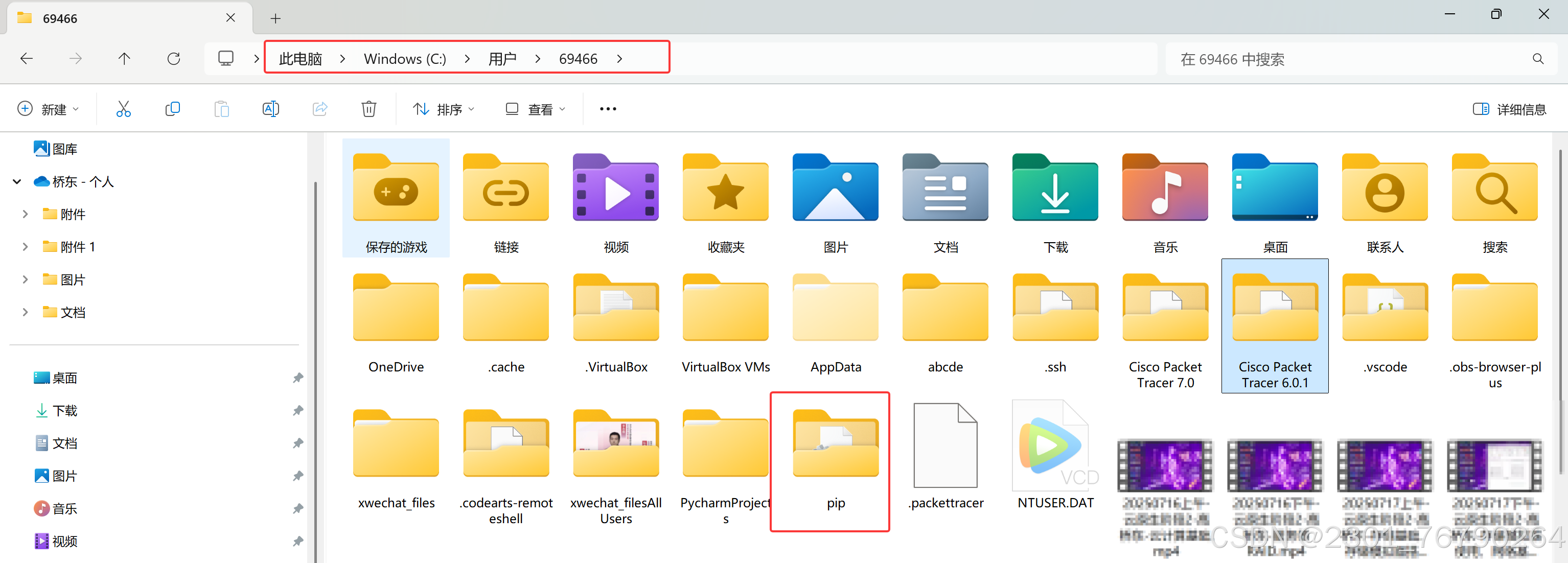
在 pip 文件夹内创建一个名为 pip.ini 的文件。

用记事本打开 pip.ini,输入以下内容并保存:
bash
[global]
index-url = https://pypi.tuna.tsinghua.edu.cn/simple
trusted-host = pypi.tuna.tsinghua.edu.cn
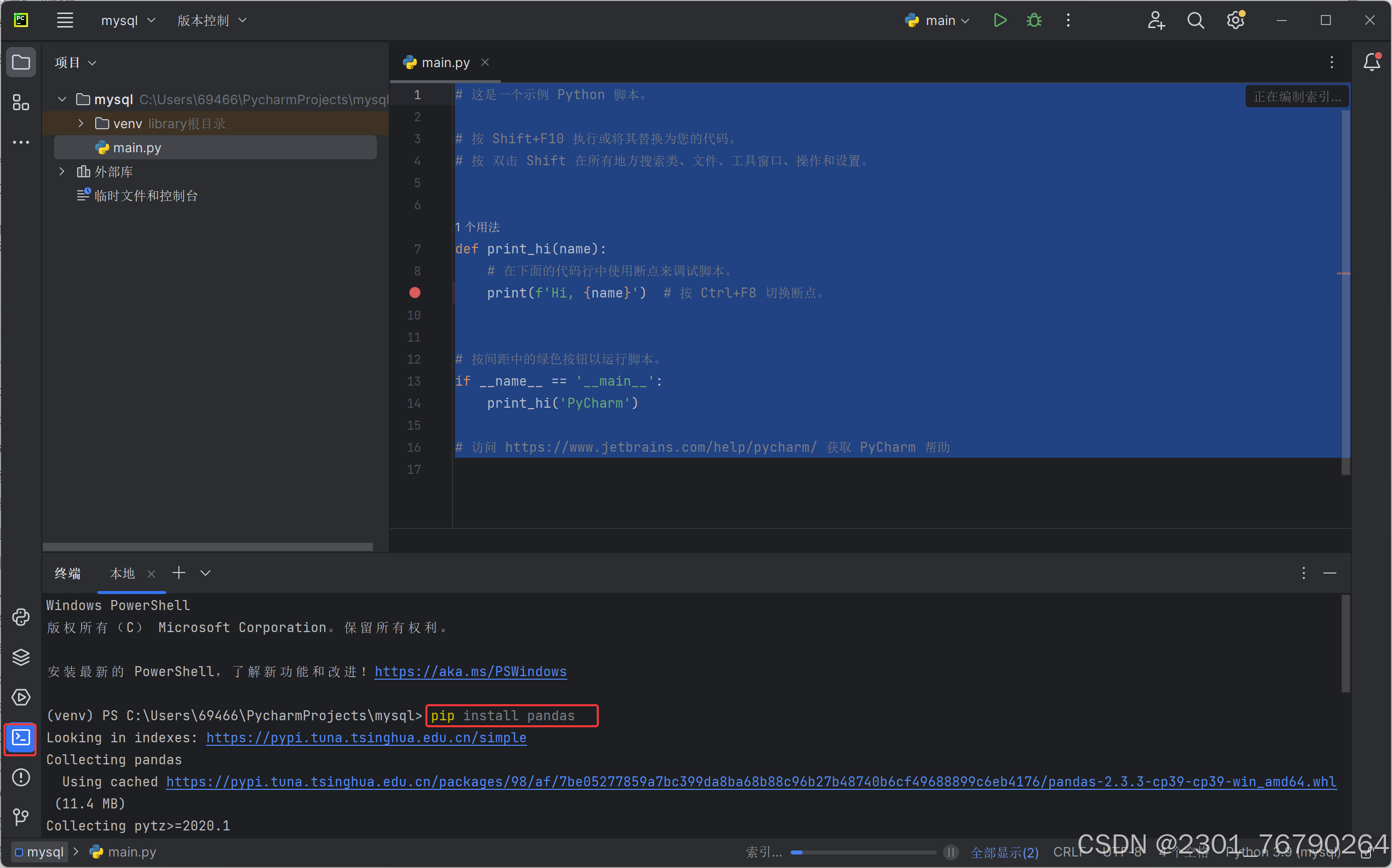
pycharm下载软件包
bash
pip install pandas
pip install sqlalchemy
pip install pymysql
pip install openpyxl
下图演示了pip install pandas,另外3个一样
代码如下
bash
import pandas as pd
from sqlalchemy import create_engine

#创建数据连接
engine = create_engine('mysql+pymysql://root:huawei@192.168.108.142:3306/school')

#执行获取数据
df = pd.read_sql('select * from info', engine)
print(df)

#导出到excel表格
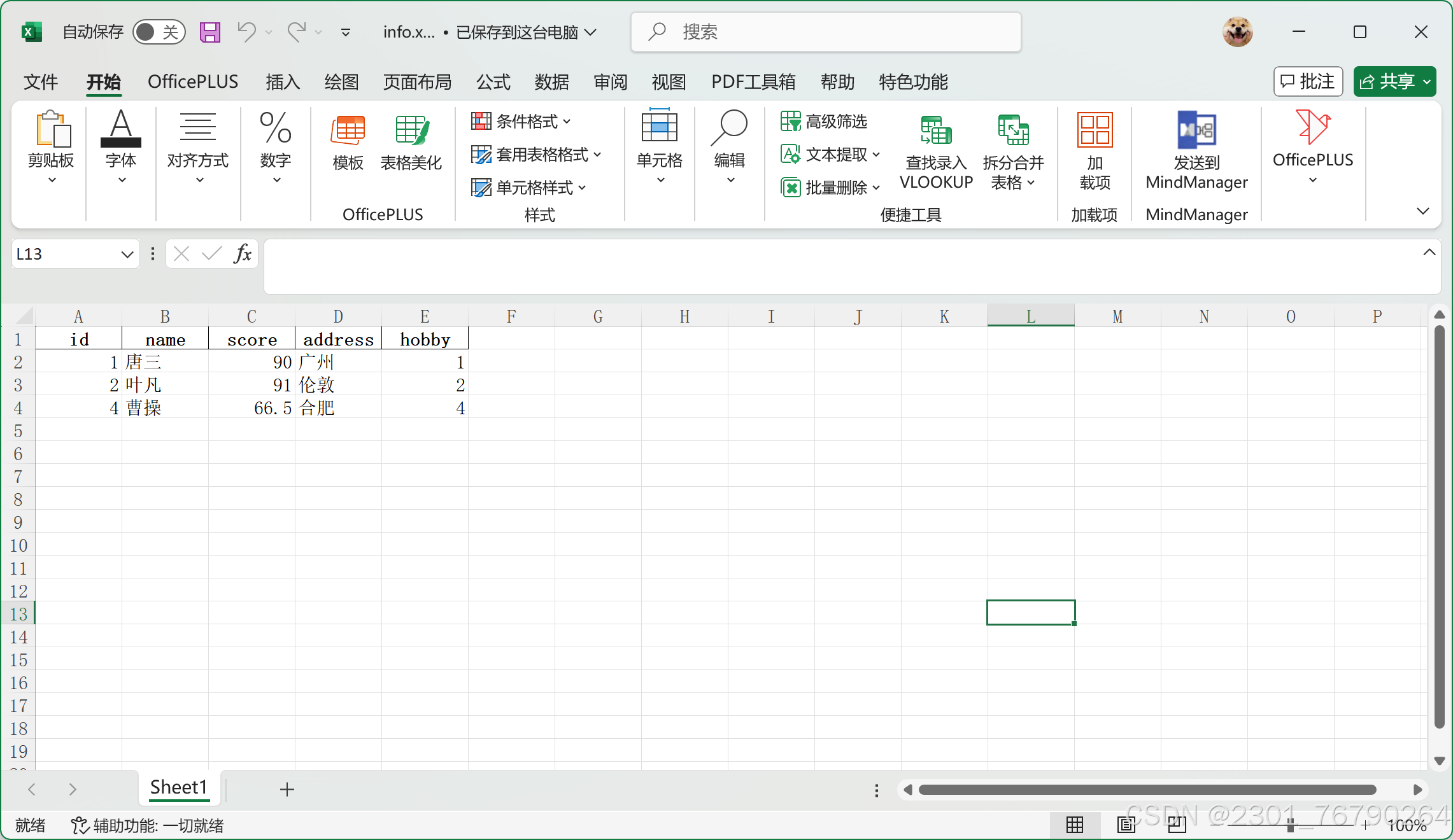
df.to_excel('info.xlsx', index=False)
print('excel 导出成功!')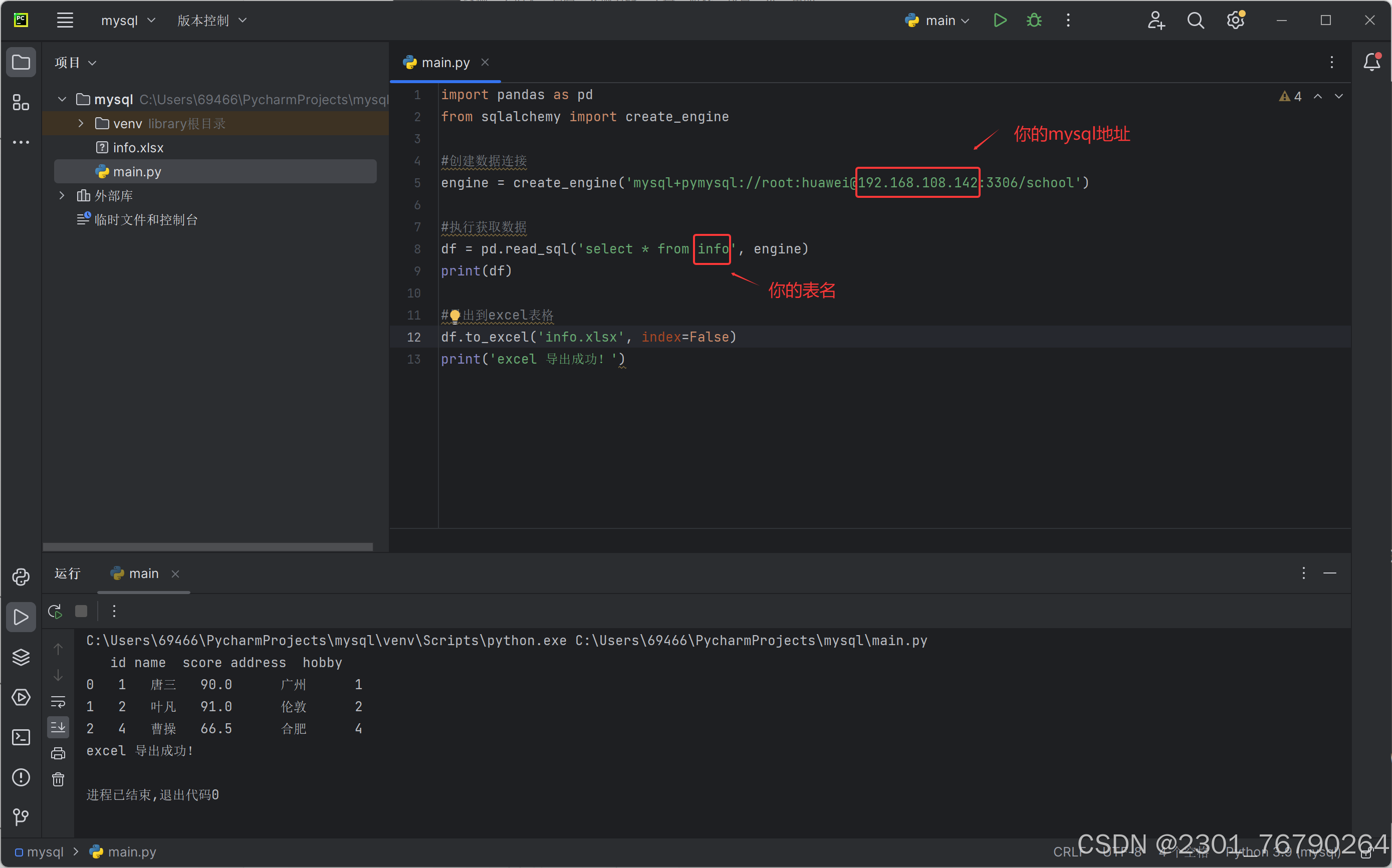
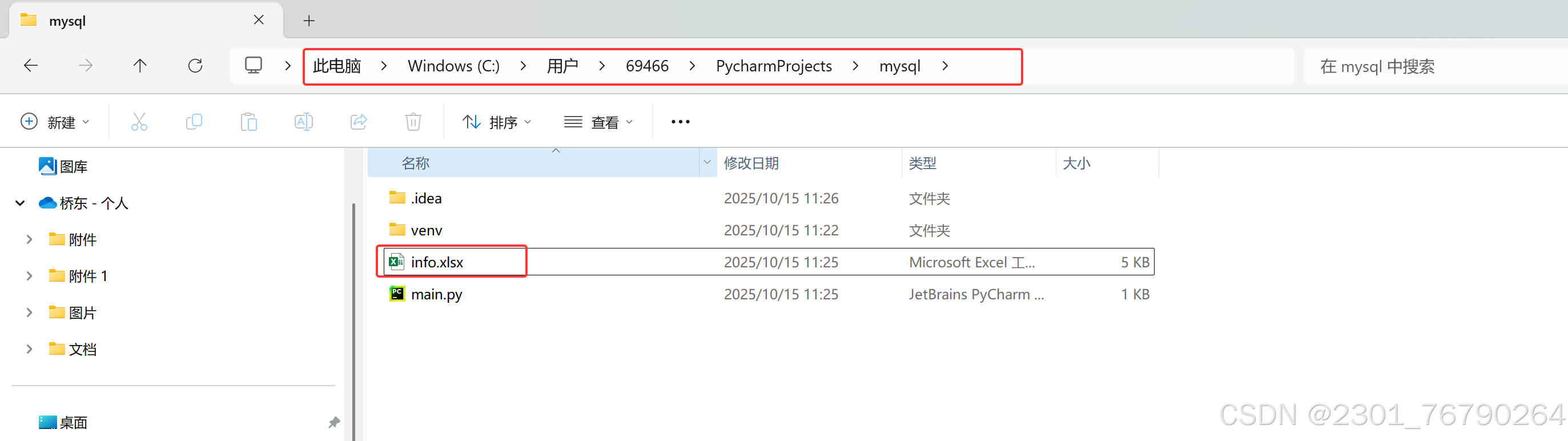
根据项目位置找到,输出的excel
5.mysql的备份与恢复
数据备份的重要性
-
在生产环境中,数据的安全性至关重要
-
任何数据的丢失都可能产生严重的后果
-
造成数据丢失的原因
-
程序错误
-
人为操作错误
-
运算错误
-
磁盘故障
-
灾难(如火灾、地震)和盗窃
-
数据库备份的分类
从物理与逻辑的角度,备份可分为
- 物理备份:对数据库操作系统的物理文件(如数据文件、日志文件等)的备份
- 物理备份方法
- 冷备份(脱机备份):是在关闭数据库的时候进行的
- 热备份(联机备份):数据库处于运行状态,依赖于数据库的日志文件
- 温备份:数据库锁定表格(不可写入但可读)的状态下进行备份操作
- 物理备份方法
- ·逻辑备份:对数据库逻辑组件(如:表等数据库对象)的备份
常见的备份方法
- 物理冷备
- 备份时数据库处于关闭状态,直接打包数据库文件
- 备份速度快,恢复时也是最简单的
- 专用备份工具mydump或mysqlhotcopy
- mysqldump常用的逻辑备份工具
- mysqlhotcopy仅拥有备份MylSAM和ARCHIVE表
- 启用二进制日志进行增量备份
- 进行增量备份,需要刷新二进制日志
- 第三方工具备份
- 免费的MvSQL热备份软件PerconaXtraBackup
冷备份
bash
# 备份(推荐写法)
systemctl stop mysqld  # 先停止服务
cd /usr/local/mysql/data
mkdir /mysql_back
tar czf /mysql_back/mysql-backup-$(date +%F).tar.gz *
systemctl start mysqld # 备份完成后启动服务
测试服务正常

# 删除数据
systemctl stop mysqld  # 先停止服务
rm -rf /usr/local/mysql/data/*            # 清空数据目录(谨慎操作!)
再次开启测试,发现数据库坏了
systemctl start mysqld

#停止数据库,恢复数据库
systemctl stop mysqld
tar xzf /mysql_back/mysql-backup-2025-10-15.tar.gz -C /usr/local/mysql/data/
chown -R mysql:mysql /usr/local/mysql/data       # 恢复权限
systemctl start mysqld          # 启动服务
逻辑备份
bash
#备份数据库
[root@web-server ~]# systemctl start mysqld
[root@web-server ~]# mysqldump -u root -p school > /mysql_bak/school.sql
Enter password:
[root@web-server ~]# ls /mysql_bak/school.sql
mysql_bak/school.sql
[root@web-server ~]# cat /mysql_bak/school.sql

#备份多个数据库
[root@web-server ~]# mysqldump -u root -p --databases school mysql > /mysql_bak/school-mysql.sql
Enter password:
[root@web-server ~]# cat /mysql_bak/school-mysql.sql
#备份所有数据库
[root@web-server ~]# mysqldump -u root -p --opt --all-databases > /mysql_bak/all.sql
Enter password:
[root@web-server ~]# cat /mysql_bak/all.sql
#备份整个表
[root@web-server ~]# mysqldump -u root -p school info  > /mysql_bak/info.sql
Enter password:
[root@web-server ~]# cat /mysql_bak/info.sql
恢复数据
bash
[root@web-server ~]# mysql -u root -p
Enter password:

mysql> use school
mysql> show tables;
+------------------+
| Tables_in_school |
+------------------+
| info             |
+------------------+
1 row in set (0.00 sec)

mysql> drop table info;
Query OK, 0 rows affected (0.01 sec)

mysql> source /mysql_bak/info.sql

mysql> show tables;
+------------------+
| Tables_in_school |
+------------------+
| info             |
+------------------+
1 row in set (0.00 sec)
增量备份
bash
[root@mysql01 ~]# vim /etc/my.cnf
------------------------
[mysqld]
log-bin=mysql-bin #这段下面最后加一行

[root@web-server ~]# systemctl restart mysqld.service

[root@mysql01 ~]# ls /usr/local/mysql/data/
auto.cnf    client-cert.pem  ibdata1      ibtmp1            mysql-bin.index     public_key.pem   server-key.pem
ca-key.pem  client-key.pem   ib_logfile0  mysql             performance_schema  school           sys
ca.pem      ib_buffer_pool   ib_logfile1  mysql-bin.000001  private_key.pem     server-cert.pem

#先进行完整性备份
[root@mysql01 ~]# mysqldump -uroot -p school > /opt/school.sql
Enter password:

#日志刷新生效
[root@mysql01 ~]# mysqladmin -uroot -p flush-logs
Enter password:
#新产生的mysql-bin.000002只记录上次刷新后的操作
[root@mysql01 ~]# ls /usr/local/mysql/data/
auto.cnf    client-cert.pem  ibdata1      ibtmp1            mysql-bin.000002    private_key.pem  server-cert.pem
ca-key.pem  client-key.pem   ib_logfile0  mysql             mysql-bin.index     public_key.pem   server-key.pem
ca.pem      ib_buffer_pool   ib_logfile1  mysql-bin.000001  performance_schema  school           sys

[root@mysql01 ~]# mysql -uroot -p
Enter password:
----------------------------------------
mysql> use school;
Reading table information for completion of table and column names
You can turn off this feature to get a quicker startup with -A

Database changed
mysql> select * from info;
+----+--------+-------+---------+-------+
| id | name   | score | address | hobby |
+----+--------+-------+---------+-------+
|  1 | 唐三   | 90.00 | 广州    |     1 |
|  2 | 叶凡   | 91.00 | 伦敦    |     2 |
|  4 | 曹操   | 66.50 | 合肥    |     4 |
+----+--------+-------+---------+-------+
3 rows in set (0.00 sec)

#再次插入数据生产增量备份
mysql> insert into info (name,score,address,hobby) values ('美猴王',75,'武汉',1);
Query OK, 1 row affected (0.00 sec)

mysql> exit
Bye

[root@mysql01 ~]# mysqladmin -uroot -p flush-log
Enter password:
#新产生mysql-bin.000003日志记录insert操作
[root@mysql01 ~]# ls /usr/local/mysql/data/
auto.cnf    client-cert.pem  ibdata1      ibtmp1            mysql-bin.000002  performance_schema  school           sys
ca-key.pem  client-key.pem   ib_logfile0  mysql             mysql-bin.000003  private_key.pem     server-cert.pem
ca.pem      ib_buffer_pool   ib_logfile1  mysql-bin.000001  mysql-bin.index   public_key.pem      server-key.pem

[root@mysql01 ~]# mysql -uroot -p
Enter password:
---------------------------------------------------------------
mysql> use school;
Reading table information for completion of table and column names
You can turn off this feature to get a quicker startup with -A

Database changed
mysql> insert into info (name,score,address,hobby) values ('超人',83,'上海',2);
Query OK, 1 row affected (0.00 sec)

mysql> select * from info;
+----+-----------+-------+---------+-------+
| id | name      | score | address | hobby |
+----+-----------+-------+---------+-------+
|  1 | 唐三      | 90.00 | 广州    |     1 |
|  2 | 叶凡      | 91.00 | 伦敦    |     2 |
|  4 | 曹操      | 66.50 | 合肥    |     4 |
|  5 | 美猴王    | 75.00 | 武汉    |     1 |
|  6 | 超人      | 83.00 | 上海    |     2 |
+----+-----------+-------+---------+-------+
5 rows in set (0.00 sec)

mysql> exit
Bye
#刷新日志生效
[root@mysql01 ~]# mysqladmin -uroot -p flush-log
Enter password:
[root@mysql01 ~]# mysql -uroot -p
Enter password:
--------------------------------------------------------------
mysql> use school;
Reading table information for completion of table and column names
You can turn off this feature to get a quicker startup with -A

Database changed

#删除内容
mysql> delete from info where id=6;
Query OK, 1 row affected (0.00 sec)

mysql> delete from info where id=5;
Query OK, 1 row affected (0.01 sec)

mysql> select * from info;
+----+--------+-------+---------+-------+
| id | name   | score | address | hobby |
+----+--------+-------+---------+-------+
|  1 | 唐三   | 90.00 | 广州    |     1 |
|  2 | 叶凡   | 91.00 | 伦敦    |     2 |
|  4 | 曹操   | 66.50 | 合肥    |     4 |
+----+--------+-------+---------+-------+
3 rows in set (0.00 sec)

mysql> exit
Bye
[root@mysql01 ~]# ls /usr/local/mysql/data/
auto.cnf    client-cert.pem  ibdata1      ibtmp1            mysql-bin.000002  mysql-bin.index     public_key.pem   server-key.pem
ca-key.pem  client-key.pem   ib_logfile0  mysql             mysql-bin.000003  performance_schema  school           sys
ca.pem      ib_buffer_pool   ib_logfile1  mysql-bin.000001  mysql-bin.000004  private_key.pem     server-cert.pem

#查看日志文件,vim看日志是乱码
[root@mysql01 ~]# mysqlbinlog --no-defaults --base64-output=decode-rows -v /usr/local/mysql/data/mysql-bin.000003
[root@mysql01 ~]# mysqlbinlog --no-defaults --base64-output=decode-rows -v /usr/local/mysql/data/mysql-bin.000004

#恢复操作,恢复时如果被拒绝,是有其他mysql进程占用了
[root@mysql01 ~]# mysqlbinlog --no-defaults /usr/local/mysql/data/mysql-bin.000003 | mysql -uroot -p
Enter password:

#验证
[root@web-server ~]# mysql -uroot -p
Enter password:
---------------------------------------------------------------
mysql> select * from info;
+----+--------+-------+---------+-------+
| id | name   | score | address | hobby |
+----+--------+-------+---------+-------+
|  1 | 唐三   | 90.00 | 广州    |     1 |
|  2 | 叶凡   | 91.00 | 伦敦    |     2 |
|  4 | 曹操   | 66.50 | 合肥    |     4 |
|  6 | 超人   | 83.00 | 上海    |     2 |
+----+--------+-------+---------+-------+
4 rows in set (0.00 sec)